PowerPoint
®: It’s not “yes” or “no” – it’s “when” and “how”
Lois A. JordanUniversity of South Florida Sarasota-Manatee Raymond Papp
The University of Tampa
ABSTRACT
A great deal of research has been done on the use of PowerPoint in the classroom. Most of it has used student acceptance of PowerPoint as the measure of its effectiveness, and these results have overwhelmingly shown that students like PowerPoint. However, most studies
measuring PowerPoint’s impact on learning have not shown any benefit from its use, and there is no shortage of articles blaming PowerPoint itself for these results. In this paper we show that the problem lies in the way in which PowerPoint is used rather than with the technology itself, and that more information is needed to fully understand how and when to use PowerPoint to enhance learning.
Keywords: PowerPoint, effectiveness, learning style, impact, misconceptions, measurement
Copyright statement: Authors retain the copyright to the manuscripts published in AABRI journals. Please see the AABRI Copyright Policy at http://www.aabri.com/copyright.html.
INTRODUCTION
PowerPoint was introduced to the business world in1987 and has since become the method of choice for business presentations. By 2012, PowerPoint was installed on over 1 billion computers and PowerPoint usage at that time was estimated to be 350 times per second (Parks, 2012). This level of use would imply that PowerPoint is a very powerful and effective tool for communication, but this is not always the case. The overuse and misuse of PowerPoint has led to such commonly-used slurs as “death by PowerPoint” and “PowerPointlessness” (McKenzie, 2000), and some businesses have actually banned its use. Steve Jobs, the late Apple founder, banned it from company meetings (Isaacson as cited in Phillips, 2012), asserting that “People who know what they’re talking about don’t need PowerPoint.” And there is even a political party opposed to PowerPoint! Switzerland's Anti-PowerPoint Party (APPP) believes that “the use of presentation software costs the Swiss economy 2.1 billion Swiss francs (US$2.5 billion) annually, while across the whole of Europe, presentation software causes an economic loss of €110 billion (US$160 billion).” (Sayer, 2011, p. 1).
PowerPoint is also used today in a high percentage of academic classrooms, due largely to three issues: (1) Increased publication and administration pressures that drive many faculty to seek ways to simplify their teaching and course preparation time; (2) Publishers who recognize this market and profit opportunity and respond by providing ready-made PowerPoint slide presentations with more and more textbooks; and (3) Students who appreciate the availability of lecture notes they don’t have to create themselves and who have responded favorably on course evaluations and surveys regarding the use of PowerPoint, putting more pressure on faculty to create, distribute and use PowerPoint in their classes. (Apperson, et al., 2006; Frey & Birnbaum, 2002; Gabriel, 2008; Harknett & Cobane, 1997; Nouri & Shahid, 2005). And although several recent studies on student response to PowerPoint use have shown lower levels of student satisfaction with its use than in earlier studies, it is still a very popular study tool and will likely continue to be requested by students. (Craig & Amernic, 2006; James, et al., 2006; Young, 2004). In fact, PowerPoint use is so prevalent in academic settings that the ability to refrain from using it is “sometimes seen as a mark of seniority and privilege” (Parker, 2001, p. 6, citing a conversation with Stanford University Professor Clifford Nass.) Gabriel (2008) states that “Another friend of mine explained that, in his highly prestigious institution, only star performers teaching executive development programmes for which participants pay several thousand dollars each earn the right to teach without PowerPoint” (p. 262).
Given the ever-expanding presence of PowerPoint in the college classroom and its benefits to instructors and publishers, it is critical that those in academics clearly understand the impact of PowerPoint use on student performance and not just base its use on student acceptance or teaching ease. Is the use of PowerPoint making us better teachers or is it instead just exposing more and more students to “death by PowerPoint”? Are we, as Parker contends, concentrating more on “formatting slides – because it’s more fun to do than concentrate on what [they’re] going to say” (2001, p. 5)? And if using PowerPoint does not produce the intended beneficial effects on learning, what can be done to improve its use and capitalize on the generally positive perception students have of it? The purpose of this paper is to address these very questions.
RESEARCH RESULTS
The vast majority of the studies to date show positive student responses to PowerPoint use in the classroom, with PowerPoint-based lectures commonly perceived by students to be more interesting, better organized, more efficient at emphasizing key points, easier to follow and understand, and easier to take notes from than traditional lectures (Atkins-Sayre, et al., 1998; Butler & Mautz, 1996; Frey & Birnbaum, 2002; Nowaczyk, et.al., 1998; Perry & Perry, 1998; Pippert & Moore, 1999). Many studies further show that students believe PowerPoint use helps them learn the materials more effectively (Atkins-Sayre, 1998; Bartsch & Coburn, 2003; Nowaczyk, et al., 1998; Sammons, 1995; Susskind, 2005). However, the majority of studies performed to date on the effect of PowerPoint use on student performance show no significant difference in student grades or material recall when using Powerpoint in the classroom, which seems to contradict student perceptions on its benefits to them (Bartsch & Cobern, 2003; Cassady, 1998; Craig & Amernic, 2006; Dietz, 2002; Frey & Birnbaum, 2002; Howard, 2005; Kunkel, 2004; Levasseur & Sawyer, 2006; Lowry, 1999; Rankin & Hoass, 2001; Savoy & Salendy, 2008; Simons, 2000; Susskind, 2005).
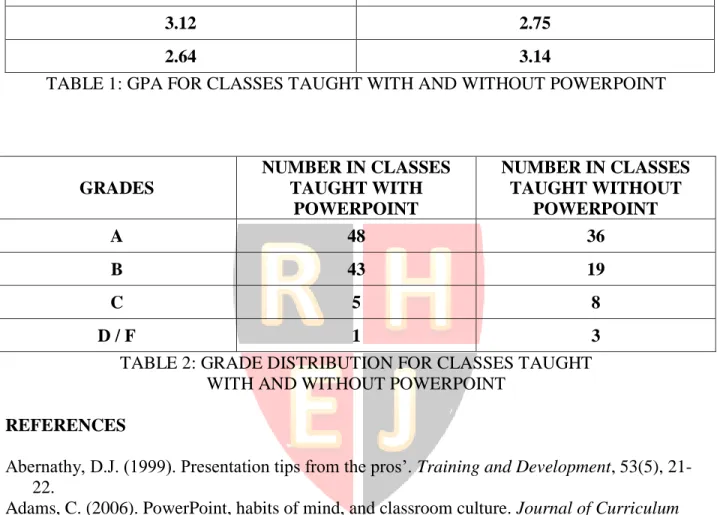
To determine whether these results may have changed in recent years, in 2012 we replicated a 2001 study performed by Rankin and Hoass, using eight sections of an introductory information systems class. The same professor taught all eight classes using the same textbook, tests, and assignments, so the only difference between the classes was that PowerPoint was used in four of them and a more traditional lecture and discussion format without PowerPoint was used in the other four. The results are shown in Table 1 (Appendix). A t-test was performed on this data with the null hypothesis that the mean GPAs are the same with or without PowerPoint. The test yielded a p-value of 0.917, which indicates that there was no significant difference in overall GPAs when PowerPoint was used.
In addition, the grade distributions of these eight classes were compared using a Chi-Square test, which also showed no significant change in the pattern of the grades between PowerPoint and non-PowerPoint classes at a 5% level of significance. The grade distribution data are shown in Table 2 (Appendix).
ANALYSIS
This study confirmed previous findings that PowerPoint use does not increase student learning over lectures without PowerPoint. (It also supported more recent studies reporting a decrease in student satisfaction with PowerPoint in the classroom, but we will leave that topic to another discussion.) It is our contention in this paper that the problem lies not with PowerPoint itself, but with the way in which it is commonly used today, by both faculty and students. We discuss here five of the major problems with classroom PowerPoint use that we believe are barriers to enhanced student learning.
The Limitations of Bullets and Lists
The first problem is the need to “bulletize” all information presented, which is at the heart of the PowerPoint template. It has been suggested that reducing information down to a list of several-word bullets neglects context, leaves critical relationships between the bullets
al., 2012; Doumont, 2005; Karreman & Strannegard, 2004; Shaw, et.al., 1998; Tufte, 2003; Vik, 2004). The lack of a hierarchical arrangement of the bullet points across slides can further
contribute to cognitive overload because it interferes with schema construction (van Merriënboer & Ayres, 2005). Further, lists can lead students to make false assumptions about them, such as the common assumptions that the list is exhaustive, or that all items in the list are co-equivalent, or that the items are mutually exclusive (Feynmann, 2001, Gabriel, 2008). As cited in Craig & Amernic (2006), Shwom & Keller (2003) conclude that Powerpoint lists cause audiences to “often lose their way in a thicket of points and sub-points” in “lists gone amuck” (p. 157).
Focus Solely on the Presentation
Another weakness of using PowerPoint in the classroom is that it takes the focus away from the lecturer and the relevant content of the lecture as well as from the student, and places it entirely on the slides themselves (Crang, 2003; DuFrene & Lehman, 2004; Tufte, 2003).
Nunberg (1999) argues that PowerPoint slides “have begun to take on a life of their own, as if they no longer needed talking heads to speak for them” (p. 330). In fact, students often comment that they can study with just the PowerPoint slides – that they don’t need to read the material or take their own notes or even hear the lecture to learn the material (Jones, 2003; Williams, 2012) – a grave misconception since research clearly shows the importance of note taking for learning and retention (Dyer, et al.,1979; Einstein, et al., 1985; Fox & Siedow, 1985). In their 2007 study on student perceptions of PowerPoint, Ahmadi, et al., theorized that students may be relying too much on the PowerPoint presentations provided by their professor and neglecting their
textbooks. A faculty source in Hill, et al., (2012), is quoted as saying “Because the info is already synthesized for them in PP slides, the students are less responsible for (and increasingly less capable of) picking out the crucial elements of a lecture, as they always have the slides to fall back on” (p. 251).
Lack of Interaction and Discussion
This lack of focus on the lecturer also results in a loss of “connection” between the student and teacher, with the format of the slideshow dictating the flow of the lecture and limiting discussion and interaction, both of which are known to be important to student learning (Carini, et al., 2006; Crandall, et al., 2010; Herzog, 2007). In their 2011 article, Burrell, et al., cite the work of Felder & Brent (2007 and 2009) and state that “student-centered teaching … has been successful for the adult learner because it focuses on the student for development and retention of their learning skills and knowledge.” (p. 48). Student-centered learning techniques include active learning (problem solving, debating, discussion, etc. during class), team work, and inductive teaching and learning (which allow students to use the course materials to solve
problems), none of which are present in the typical PowerPoint presentation.
The Assumption that “One Teaching Style Fits All”
Another problem with the use of PowerPoint in the classroom is that it tends to be used the same way across all types of students, all learning styles and all disciplines – in a “one teaching style fits all” manner. It assumes that everyone is a visual learner. However, Khurshid and Mahmood’s (2012) study on graduate student learning styles found that male students more
often prefer group and kinesthetic learning, where female students tend to prefer individual and auditory; social science students most commonly prefer visual and group learning, where tactile, auditory and kinesthetic styles are commonly preferred by natural science students. Parker, et al., (2008) also discussed the differences in PowerPoint effectiveness across disciplines, saying that “The organizing properties of PowerPoint may be particularly well suited to the linear
presentation of information required by the natural sciences” (p. 290) as compared to the social sciences. Other studies have compared PowerPoint effectiveness across business disciplines, suggesting that “If PPT’s feature strength is to cut through and help organize content, then disciplines rife with theory (e.g., management) benefit the most … However, for disciplines in which mathematical or quantitative application of central ideas is emphasized, instructors often need to repeatedly demonstrate step-by-step examples of how to apply models or churn through certain formulas” (Burke & James, 2009, p. 249).
Differences in learning styles across ages are also prevalent. For example, Papp and Matulich (2012) tell us that “Millenials are visual and kinesthetic learners who need interaction amongst themselves and hands-on learning to master concepts” (p. 2) and that they “prefer engagement from and with their peers …[and need] time to reflect” (p. 5). Other studies show that there are relationships between past student performance (GPA) and their preferred learning styles, with freshman and students with lower GPAs tending to benefit more from the linear and concrete nature of PowerPoint than older students or students with higher GPAs (Parker, et al., 2008).
The Lack of Understanding of How Cognitive Load Theory and Other Learning Principles Apply to PowerPoint Design and Use
Although a great deal of research has been done on principles of learning and memory / recall such as Cognitive Load Theory, most people using PowerPoint do not have a full
understanding of how PowerPoint use affects learning and how we need to design presentations to maximize their effectiveness. Stoner (2013) comments that “… even for the mindful author, using PowerPoint effectively is not easy or intuitive” (p. 374). In many cases, there is a fine line between presentations that enhance learning and those that inhibit it. For example, Mayer’s limited channel theory tells us that people have a finite capacity for storing, organizing and retrieving knowledge and when that capacity is exceeded, cognitive overload may occur and limit the student’s ability to process information (Mayer, 2002 as cited in Cooper, 2009).
Cognitive overload is common in multimedia presentations such as PowerPoint when the student receives the same information in two or more forms, such as verbal and written (Hede, 2003), yet presenters often commit the “sin of triple delivery, where precisely the same text is seen on the screen, spoken aloud, and printed on the handout in from of you” (Parker 2001, p. 5). In addition to boring students and being one of their most common complaints with regard to PowerPoint use, this mistake dramatically decreases retention and memory transfer (Burke and James, 2009; Mayer, 2001). However, Mayer’s personalization principle states that conversational words encourage learning, where expository words do not (Mayer, 2002 as cited in Cooper, 2009), so when presenters discuss the content of the slides rather than reading it, learning is enhanced.
Another subtle difference is found with Mayer’s modality principle, which states that animation with narration enhances learning, but animation with narration and written text overloads the visual processing channels (Mayer, 2002 as cited in Cooper, 2009).
In another example, Mayer’s coherence principle states that students learn more from interesting multimedia presentations than from less entertaining ones. Berk agrees with Meyer, stating that the combination of movement, music and videos (also known as “rich media”), has been known to “create an emotional connection, engagement, and excitement unlike any other elements in your slides” (2012, p. 144). However, it is also known that these benefits do not occur when there are excessive or irrelevant sounds, images, movement, etc., so there is clearly a limit to what should be included in a presentation (Cooper, 2009; Mayer, 2002), something many PowerPoint presentation designers fail to consider. One student’s response to the question of “What’s not so good about the use of PowerPoint in the classroom?” in Burke and James’ 2009 study confirms this: “Some teachers get carried away with animation and pictures and it takes my attention away from the main content topic” (2009, p. 251).
Finally, even if we did fully appreciate the subtleties of learning theory and understand how to apply them to PowerPoint presentations, two problems would still remain. First, many presenters are limited in their ability to use this technology to its fullest capabilities (Abernathy, 1999; Craig & Amernic, 2006; Griffin, 2003; Parker, et al., 2008). And while this problem can easily be resolved with training and practice, few institutions have the resources needed to provide this level of training, few teachers have the time needed to learn it, and even fewer have the time and resources needed to master multimedia presentation techniques. Keep in mind that the transition to PowerPoint in the classroom was due, in large part, to our desire to save time in the first place! In fact, a large percentage of faculty who use PowerPoint use the presentations provided by their textbook publishers, a major selling point for textbooks today. And while we sometimes “enhance” or “correct” these presentations, they are created by employees of the publishers or authors who typically lack the subject knowledge, teaching experience, learning theory knowledge, and PowerPoint skills needed to create presentations that enhance learning.
CONCLUSION
PowerPoint has been criticized as an ineffective tool for communication and learning. However, in this paper we demonstrated that the problem is not with PowerPoint, but with our use of it. We agree with Gabriel (2008) that PowerPoint “can become a platform for passionate, discovery learning, a medium that, far from closing discursive adventures, enables individuals and groups to discover a voice and develop their learning and communication potential” (p. 256). But not the way it’s commonly used today! This paper discussed several of the common
mistakes made with PowerPoint so that presenters might give more consideration to these issues before using PowerPoint. For example, PowerPoint can easily be used in an interactive manner that encourages note taking to exercise the connection between writing and understanding (El Khoury and Mattar, 2012; Harlin & Brown, 2007; Luse, 2010). We can pose discussion questions or introduce short quizzes or group application exercises into presentations to allow time for interaction, discussion and reflection.
We also believe that a great deal more research is needed to understand why PowerPoint use does not appear to enhance learning – a topic that should be as important to educators as student acceptance and the time-saving benefits of PowerPoint – and when PowerPoint is appropriate in the classroom, since we have seen that not all students and disciplines are equally served by it; it is clear that the “one presentation style fits all” approach is not working.
PowerPoint has the potential to enhance learning, but only if we first learn how to use it effectively.
APPENDIX
GPA FOR CLASSES TAUGHT WITH POWERPOINT
GPA FOR CLASSES TAUGHT WITHOUT POWERPOINT
3.11 3.54
3.27 2.60
3.12 2.75
2.64 3.14
TABLE 1: GPA FOR CLASSES TAUGHT WITH AND WITHOUT POWERPOINT
GRADES NUMBER IN CLASSES TAUGHT WITH POWERPOINT NUMBER IN CLASSES TAUGHT WITHOUT POWERPOINT A 48 36 B 43 19 C 5 8 D / F 1 3
TABLE 2: GRADE DISTRIBUTION FOR CLASSES TAUGHT WITH AND WITHOUT POWERPOINT
REFERENCES
Abernathy, D.J. (1999). Presentation tips from the pros’. Training and Development, 53(5), 21-22.
Adams, C. (2006). PowerPoint, habits of mind, and classroom culture. Journal of Curriculum Studies, 38(4), 389-411.
Ahmadi, M., Dileepan, P. & Raiszadeh, F. (2007). Is PowerPoint evil? Students’ perceptions.
Review of Business Research, VII(4), 15-19.
Amare, N. (2006). Slideware or not to slideware: Students’ experiences with PowerPoint vs. Lecture. Journal of Technical Writing and Communication, 36(3), 297-308.
Apperson, J.M., Laws, E.L., & Scepansky, J.A. (2006). The impact of presentation graphics on students’ experiences in the classroom. Computers and Education, 46(1), 116-126.
Atkins-Sayre, W., Hopkins, S., Mohundro, S., and Sayre, W. (1998, November). Rewards and
liabilities of presentation software as an ancillary tool: prison or paradise? Paper presented
at the 84th Annual Meeting of the National Communication Association, New York: ERIC Document Reproduction No. ED 430 260.
Bartsch, R. & Cobern, K. (2003). Effectiveness of PowerPoint presentations in lectures.
Computers & Education, 41, 77-86.
Berk, R.A. (2012, April). How to create “Thriller” PowerPoints in the classroom. Innovative
Buchko, A.A., Buchko, K.J., and Meyer, J.M. (2012). Is there power in Powerpoint? A field test of the efficacy of PowerPoint on memory and recall of religious sermons. Computers in
Human Behavior, 28, 688-695.
Burke, L.A. and James, K. (2009). Effectiveness of PowerPoint-based lectures across different business disciplines: An investigation and implications. Journal of Education for Business, March/April, 246-251.
Burrell, D.N., Finch, A., Fisher, J. Rahim, E., and Dawson, M. (2011). The use of engaging and experiential learning innovative teaching practices for graduate students. Review of Higher
Education and Self-Learning, 4(11), 45-53.
Butler, J.B. and Mautz, D. (1996). Multimedia presentations and learning: A laboratory experiment. Issues in Accounting Education, 11(2), 259-280.
Carini, R.M., Kuh, G.D., and Klein, S.P. (2006). Student engagement and student learning: Testing the linkages. Research in Higher Education, 47(1), 1-32.
Cassady, J.C. (1998). Student and instructor perceptions of the efficacy of computer-aided lectures in undergraduate university courses. Journal of Educational Computing Research, 19, 175-189.
Craig, R.J. & Amernic, J.H. (2006). PowerPoint presentation technology and the dynamics of teaching. Innovative Higher Education, 31, 147-160.
Crandall, J.M., Lim, K.A., and Ro, Y.S.E. (2010). The impact of IT: Pedagogical perspectives in university education settings. Journal of International Business Research, 9, Special Issue 1, 23-31.
Crang, M. (2003). The hair in the gate: Visuality and geographical knowledge. Antipode, 35, 238-243.
Dietz, T.L. (2002). Predictors of success in large enrollment introductory courses: An
examination of the impact of learning communities and virtual learning resources on student success in an introductory level sociology course, Teaching Sociology, 30(1), 80-88.
Doumont, J. (2005). The cognitive style of PowerPoint: Slides are not all evil. Technical
Communication, 52(1), 64-70.
DuFrene, D.D. and Lehman, C.M. (2004). Concept, content, construction and contingencies: Getting the horse before the PowerPoint cart. Business Communication Quarterly, 67, 84-88. Dyer, J.W., Riley, J. and Yekovich, F.R. (1979). An analysis of three study sills: Notetaking,
summarizing, and rereading. Journal of Educational Research, 73, 3-7.
Einstein, G.O., Morris, J., and Smith, S. (1985). Note-taking, individual differences, and memory for lecture information. Journal of Educational Psychology, 77, 522-532.
El Khoury, R.M. and Mattar, D.M. (2012). PowerPoint in Accounting Classrooms: Constructive or Destructive? International Journal of Business and Social Science, 3(10), 240-259. Felder, R.M. and Brent, R. (2009). Active learning: An introduction. ASQ Higher Education
Brief, 2(4), 105.
Felder, R.M. and Brent, R. (2007). Cooperative learning. Mabrouk, P.A. (Ed.). Active Learning:
Models from the Analytical Sciences, ACS Symposium Services 970, 4, 34-53. Washington,
DC: American Chemical Society.
Feynmann, R.P. (2001). What do you care about what other people think? New York: Norton. Fox, B.J. and Siedow, M.D. (1985). An investigation of the effects of note taking on college
students’ recall of signaled and usignalled text. Journal of Research & Development in Education, 18, 29-36.
Frey, B.A. & Birnbaum, D.J. (2002). Learners’ perceptions on the value of PowerPoint in lectures. Springfield, VA: ERIC Document Reproduction No. ED 467192.
Gabriel, Y. (2008). Against the tyranny of PowerPoint: Technology-in-use and technology abuse. Organization Studies, 29(02), 255-276.
Griffin, J.D. (2003). Technology in the teaching of neuroscience: Enhanced student learning.
Advances in Physiology Education, 27, 146-155.
Harlin, R. and Brown, V. (2007). Issues in Education: The power of PowerPoint: Is it in the user or the program? Childhood Education, 83(4), 231-233.
Harknett, R.J. & Cobane, C.T. (1997). Introducing instructional technology to international relations. Political Science and Politics, 30(3), 496-500.
Hede, A. (2002). An integrated model of multimedia effects on learning. Journal of Educational
Multimedia and Hypermedia, 11(22), 177-191.
Herzog, S. (2007). The ecology of learning: The impact of classroom features and utilization on student academic success. New Directions for Institutional Research, 2007(135), 81-106. Hill, A., Arford, T., Lubitow, A. and Smollin, L.M. (2012, April 25).” I’m ambivalent about it”:
The dilemmas of PowerPoint. Teaching Sociology, 40(3), 242-256. Retrieved on August 15, 2012 from http://tso.sagepub.com/content/40/3/242.
Howard, J.R. (2005). An examination of student learning in introductory sociology at a commuter campus. Teaching Sociology, 33(2), 195-205.
James, K.E., Burke, L.A. & Hutchins, H.M. (2006). Powerful or pointless? Faculty versus student perceptions of PowerPoint use in business education. Business Communication
Quarterly, 69(4), 374-396.
Jones, A.M. (2003). The use and abuse of PowerPoint in teaching and learning in the life sciences: A personal view. Retrieved on October 1, 2013 from
http://www.heacademy.ac.uk/resources/detail/subjects/bioscience/bioscience-education-2-3 Karreman, D. and Strannegard, L. (2004). PowerPoint knowledge – discursive closure in action.
Presented at 20th EGOS Colloquium, Ljubljana, July 2004.
Khurshid, F. and Mahmood, N. (2012, January). Learning styles of natural sciences, social sciences and humanities students at graduate level. Interdisciplinary Journal of
Contemporary Research in Business, 3(9), 672-678.
Kunkel, K.R. (2004). A research note assessing the benefit of presentation software in two different lecture courses. Teaching Sociology, 32(2), 188-196.
Levasseur, D.G. & Sawyer, J.K. (2006). Pedagogy meets PowerPoint: A research review of the effects of computer-generated slides in the classroom. The Review of Communication, 6(1/2), 102-123.
Lowry, R.B. (1999). Electronic presentation of lectures – effect upon student performance.
University Chemistry Education, 3(1), 18-21.
Luse, D.W. and Miller, R.A. (2010, December). Business faculty and students’ perceptions of the effectiveness of PowerPoint usage as a teaching and learning tool. Global Education
Journal, 4, 135-147.
Mayer, R.E. (2001). Multimedia Learning. Cambridge, England: Cambridge University Press. Mayer, R.E. (2002). Cognitive Theory and the design of multimedia instruction: An example of
the two-way street between cognition and instruction. New Directions in Teaching and
Learning, 89, 55-71.
Mayer, R.E. and Johnson, C.I. (2008). Revising the redundancy principle in multimedia learning.
McKenzie, J. (2000, September). Head of the Class. From Now On: The Educational Technology
Journal, 10 (1). Retrieved October 15, 2013 from http://fno.org/sept00/powerpoints.html.
Nouri, H. and Shahid, A. (2005). The effect of Powerpoint presentations on student learning and attitudes. Global Perspectives on Accounting Education, 2, 53-73.
Nowaczyk, R.H., Santos, L.T., and Patton, C. (1998). Student perception of multimedia in the undergraduate classroom. International Journal of Instructional Media, 25(4), 367-382. Nunberg, G.(1999, December 20). The trouble with PowerPoint. Fortune, 330-331.
Paivo, A. (1979). Imagery and Verbal Processes. Hillsdale, NJ: Lawrence Erlbaum.
Papp, R. and Matulich, E. (2011, December). Negotiating the deal: Using technology to reach the millennials. Journal of Behavioral Studies in Business, 4, 1-12. Retrieved on August 15, 2013 from http://aabri.com/manuscripts/111063.pdf
Parker, I. (2001, May 28). Absolute PowerPoint. The New Yorker, 77(13), 76-82.
Parker, R.E., Bianchi, A. and Cheah, T.Y. (2008). Perceptions of instructional technology:
Factors of influence and anticipated consequences. Educational Technology & Society, 11(2), 274-293.
Parks, B. (2012, September 3). “Death to PowerPoint!” Bloomberg Businessweek, 4294, 83-85. Perry, T. and Perry, L.A. (1998). University students’ attitudes towards multimedia
presentations, British Journal of Educational Technology, 29(4), 375-377.
Phillips, B. (2012, March 28). Should you ban PowerPoint in your office? Mr. Media Training.
Retrieved October 15, 2013 from http://www.mrmediatraining.com/2012/03/28/should-you-ban-powerpoint-in-your-office/
Pippert, T.D. and Moore, H.A. (1999). Multiples perspectives on multimedia in the large lecture.
Teaching Sociology, 27(2), 92-109.
Rankin, E.L. & Hoass, D.J. (2001). The use of Powerpoint and student performance. Atlantic
Economic Journal, 29, 113.
Sammons, M.C. (1995). Students assess computer-aided classroom presentations. T.H.E. Journal, 22(10), 66-69.
Savoy, A., Proctor, R.W., & Salendy, G. (2008). Information retention from PowerPoint and traditional lectures. Computers & Education, 52(4), 858-867.
Sayer, P. (2011, July 5). Swiss party makes dislike of PowerPoint a political issue. CIO.
Retrieved October 15, 2013 from
http://www.cio.com.au/article/392397/swiss_party_makes_dislike_powerpoint_political_issu e/
Shaw, G., Brown, R., and Bromiley, P. (1998). Strategic stories: How 3M is rewriting business planning. Harvard Business Review, 76, 42-44.
Shwom, B.L. and Keller, K.P. (2003). The great man has spoken. Now what do I do? A response to Edward Tufte’s “The cognitive style of PowerPoint.” Communication Insight, 1, 1-15. Susskind, J.E. (2005). PowerPoint’s power in the classroom: Enhancing students’ self-efficacy
and attitudes. Computers and Education, 45(2), 203-215.
van Merriënboer, J.J.G. and Ayres, P. (2005). Research on cognitive load theory and its design implications for e-learning. Educational Technology Research and Development, 53(3), 5-13. Vik, G.N. (2004). Breaking bad habits: Teaching effective PowerPoint use to working graduate
students. Business Communication Quarterly, 67, 225-228.
Williams, K.A. (2012, June 8). A technological cloud hangs over higher education. Chronicle of
Higher Education, 58(38), A31-A31, 2/3p. Retrieved on August 15, 2012 from
Young, J.R. (2004, November 12). When good technology means bad teaching. The Chronicle of
Higher Education, 51(12). Retrieved October 15, 2013 from