PROGRAM CONSTRUCTION EXAMPLES IN COMPUTER
SCIENCE EDUCATION: FROM STATIC TEXT TO ADAPTIVE
AND ENGAGING LEARNING TECHNOLOGY
by
Roya Hosseini
B.S. in IT Engineering, Shiraz Univ. of Technology, 2009
M.S. in IT Engineering (E-Commerce),
Amirkabir Univ. of Technology, 2012
M.S. in Intelligent Systems, Univ. of Pittsburgh, 2015
Submitted to the Graduate Faculty of
the School of Computing and Information
in partial fulfillment
of the requirements for the degree of
Doctor of Philosophy
University of Pittsburgh
2018
UNIVERSITY OF PITTSBURGH
SCHOOL OF COMPUTING AND INFORMATION
This dissertation was presented
by
Roya Hosseini
It was defended on
July 24th 2018
and approved by
Peter Brusilovsky, PhD, Professor
Christian D. Schunn, PhD, Professor
Diane Litman, PhD, Professor
Vincent Aleven, PhD, Associate Professor
PROGRAM CONSTRUCTION EXAMPLES IN COMPUTER
SCIENCE EDUCATION: FROM STATIC TEXT TO ADAPTIVE
AND ENGAGING LEARNING TECHNOLOGY
Roya Hosseini, PhDUniversity of Pittsburgh, 2018
My dissertation is situated in the field of computer science education research, specifi-cally, the learning and teaching of programming. This is a critical area to be studied, since, primarily, learning to program is difficult, but also, the need for programming knowledge and skills is growing, now more than ever. This research is particularly fo-cused on how to support a student’s acquisition of program construction skills through worked examples, one of the best practices for acquiring cognitive skills in STEM areas.
While learning from examples is superior to problem-solving for novices, it is not recommended for intermediate learners with sufficient knowledge, who require more attention to problem-solving. Thus, it is critical for example-based learning environ-ments to adapt the amount and type of assistance given to the student’s needs. This important matter has only recently received attention in a few select STEM areas and is still unexplored in the programming domain. The learning technologies used in pro-gramming courses mostly focus on supporting student problem-solving activities and, with few exceptions, examples are mostly absent or presented in a static, non-engaging form.
To fill existing gaps in the area of learning from programming examples, my disser-tation explores a new genre of worked examples that are both adaptive and engaging, to support students in the acquisition of program construction skills. My research
ex-amines how to personalize the generation of examples and how to determine the best sequence of examples and problems, based on the student’s evolving level of knowledge. It also includes a series of studies created to assess the effectiveness of the proposed technologies and, more broadly, to investigate the role of worked examples in the process of acquiring programming skills.
Results of our studies show the positive impact that examples have on student engagement, problem-solving, and learning. Adaptive technologies were also found to be beneficial: The adaptive generation of examples had a positive impact on learning and problem-solving performance. The adaptive sequencing of examples and problems engaged students more persistently in activities, resulting in some positive effects on learning.
TABLE OF CONTENTS
1.0 INTRODUCTION . . . 1
1.1 MOTIVATION . . . 1
1.2 OVERVIEW AND RESEARCH QUESTIONS . . . 3
1.2.1 Design and development of interactive program examples (PCEX) 4 1.2.2 Adaptive fading in the PCEX examples . . . 5
1.2.3 Adaptive recommendation of PCEX examples and problems . 5 1.3 DISSERTATION TASKS . . . 6
1.4 CONTRIBUTIONS . . . 7
1.5 THESIS ORGANIZATION . . . 8
2.0 BACKGROUND AND RELATED WORK . . . 10
2.1 WORKED EXAMPLES IN PROBLEM-SOLVING . . . 10
2.2 WORKED EXAMPLES IN PROGRAMMING . . . 12
2.3 ADAPTIVE LEARNING TECHNOLOGIES . . . 15
2.4 PERSONALIZING WORK WITH PROGRAM EXAMPLES . . . 17
2.4.1 Personalized access . . . 19
2.4.2 Problem-solving support . . . 22
2.4.3 Adaptive scaffolding . . . 22
2.5 PROGRAM CONSTRUCTION ASSESSMENT TOOLS . . . 23
2.6 INTEGRATED SYSTEMS. . . 24
3.0 TOOL DESIGN. . . 25
3.2 TARGETED ASPECTS OF ENGAGEMENT . . . 26
3.3 PCEX: CHARACTERISTICS AND DESIGN . . . 27
4.0 AN OVERVIEW OF STUDIES. . . 32
4.1 CLASSROOM AND USER STUDIES . . . 32
4.1.1 Classroom Study 1 . . . 33
4.1.2 Classroom Study 2 . . . 33
4.1.3 User Study . . . 34
4.1.4 Classroom Study 3 . . . 35
4.2 OVERVIEW OF COMMON METRICS AND INSTRUMENTS . . . 35
4.2.1 Engagement metrics . . . 35
4.2.2 Performance metrics . . . 36
4.2.3 Learning metrics . . . 36
4.2.4 Survey instruments . . . 36
4.2.4.1 Example evaluation survey . . . 36
4.2.4.2 Recommendation evaluation survey. . . 37
5.0 CLASSROOM STUDY 1: EXPLORATORY STUDY OF PCEX . 38 5.1 RESEARCH QUESTIONS . . . 38
5.2 STUDY DESIGN . . . 39
5.3 PRACTICE SYSTEM . . . 41
5.4 COLLECTED DATA . . . 41
5.5 RESULTS . . . 44
5.5.1 Relationship between usage of PCEX and student’s learning . 44 5.5.1.1 Correlation between usage of PCEX and learning gain 44 5.5.1.2 Correlation between usage of PCEX and performance in coding exercises . . . 45
5.5.1.3 Correlation between usage of PCEX and course perfor-mance . . . 45
5.5.2 Correlation between usage of PCEX and student’s learning over time . . . 46
5.5.2.1 Correlation analysis during the first and second half of
the course . . . 46
5.5.2.2 Correlation analysis of the regular and exam prepara-tion usage . . . 47
5.6 SURVEY ANALYSIS . . . 49
5.7 SUMMARY AND DISCUSSION . . . 52
6.0 CLASSROOM STUDY 2: CONTROLLED STUDY OF PCEX . . 54
6.1 RESEARCH QUESTIONS . . . 54
6.2 CONTROL GROUP INTERFACE . . . 55
6.3 THE STUDY . . . 56 6.3.1 Hypotheses . . . 57 6.3.2 Study design . . . 58 6.3.3 Study procedure . . . 58 6.3.4 Materials . . . 59 6.3.4.1 Practice Content . . . 59
6.3.4.2 Pre- and Post-Tests . . . 59
6.3.5 Metrics . . . 60
6.3.5.1 Engagement metrics . . . 61
6.3.5.2 Performance metrics . . . 61
6.3.5.3 Learning metrics . . . 63
6.4 RESULTS . . . 63
6.4.1 Students participation and collected data . . . 63
6.4.2 Engagement analysis . . . 65
6.4.3 Performance analysis . . . 68
6.4.4 Learning analysis . . . 71
6.4.5 Survey analysis . . . 74
6.5 SUMMARY AND DISCUSSION . . . 77
6.5.1 Summary . . . 77
6.5.1.2 Overall effects on problem-solving performance . . . . 77
6.5.1.3 Overall effects on learning outcomes . . . 78
6.5.1.4 Students’ feedback . . . 78
6.5.2 Discussion . . . 79
7.0 USER STUDY: CONTROLLED STUDY OF ADAPTIVE FADING 81 7.1 RESEARCH QUESTIONS . . . 81
7.2 ADAPTIVE FADING STRATEGY . . . 82
7.3 BAYESIAN NETWORK STUDENT MODEL . . . 83
7.4 THE STUDY . . . 84
7.4.1 Hypotheses . . . 84
7.4.2 Study design . . . 85
7.4.3 Participants and procedure. . . 85
7.4.4 Materials . . . 86
7.4.4.1 Practice content . . . 86
7.4.4.2 Pre- and post-tests . . . 87
7.4.5 Metrics . . . 87
7.5 RESULTS . . . 89
7.5.1 Overall practice . . . 90
7.5.2 Effects of adaptive fading on performance in practice problems 93 7.5.3 Effects of adaptive fading on performance in test problems . . 96
7.5.4 Effects of adaptive fading on learning . . . 100
7.6 SUMMARY AND DISCUSSION . . . 101
8.0 CLASSROOM STUDY 3: CONTROLLED STUDY OF ADAP-TIVE RECOMMENDATION . . . 104
8.1 RESEARCH QUESTIONS . . . 104
8.2 ADAPTIVE RECOMMENDATION STRATEGY . . . 105
8.2.1 Proactive recommendation . . . 105
8.2.2 Reactive recommendation . . . 111
8.3.1 Hypotheses . . . 113
8.3.2 Study design . . . 113
8.3.3 Participants and procedure. . . 114
8.3.4 Materials . . . 115
8.3.4.1 Practice content . . . 115
8.3.4.2 Pre- and post-tests . . . 115
8.3.5 Metrics . . . 115
8.4 RESULTS . . . 116
8.4.1 Overall engagement analysis . . . 117
8.4.2 Persistence analysis . . . 120
8.4.3 Learning analysis . . . 123
8.4.3.1 Impact of the system on midterm score . . . 123
8.4.3.2 Impact of the system on post-test score . . . 125
8.4.4 Analysis of reactive recommendations . . . 128
8.4.5 Survey analysis . . . 129
8.5 SUMMARY AND DISCUSSION . . . 134
8.5.1 SUMMARY . . . 134
8.5.1.1 Effects of adaptive proactive recommendations . . . . 135
8.5.1.2 Effects of adaptive reactive recommendations . . . 136
8.5.2 Discussion . . . 136
9.0 SUMMARY, CONTRIBUTIONS, AND FUTURE WORK . . . . 139
9.1 INTERACTIVE PROGRAM CONSTRUCTION EXAMPLES . . . . 139
9.2 PERSONALIZING WORK WITH PROGRAM EXAMPLES . . . 142
9.2.1 Adaptive fading of steps in program examples . . . 142
9.2.2 Adaptive recommendation of program examples and problems 143 9.3 CONTRIBUTIONS . . . 144
9.4 LIMITATIONS AND FUTURE WORK . . . 147
9.4.1 Example design . . . 147
9.4.3 Other directions. . . 152
9.5 Discussion . . . 152
APPENDIX A. PCEX MOCK-UPS . . . 155
APPENDIX B. PRE- AND POST-TESTS . . . 161
B.1 PRE- AND POST-TEST IN CLASSROOM STUDY 1 . . . 161
B.2 PRE- AND POST-TEST IN CLASSROOM STUDY 2 . . . 164
B.3 PRE- AND POST-TEST IN USER STUDY 1 . . . 173
B.4 PRE- AND POST-TEST IN CLASSROOM STUDY 3 . . . 177
APPENDIX C. SURVEYS . . . 182
C.1 EXAMPLE EVALUATION SURVEY . . . 182
C.2 RECOMMENDATION EVALUATION SURVEY . . . 183
APPENDIX D. VIDEOS . . . 185
LIST OF TABLES
1 Adaptive approaches for supporting work with problem-solving examples 18
2 Relationships between RQs, objectives, studies, and chapters . . . 33
3 System usage statistics in Classroom Study 1 . . . 43
4 Summary of learning results for clusters of students in Classroom Study 1 49 5 Overview of the metrics used to evaluate PCEX examples . . . 62
6 Summary of hypotheses and results of Classroom Study 2 . . . 65
7 Engagement metrics statistics in Classroom Study 2 . . . 66
8 Regression results for predicting performance metrics in Classroom Study 2 69 9 Regression results for predicting post-test score in Classroom Study 2 . 72 10 Regression results for predicting exam grade in Classroom Study 2 . . . 73
11 Survey summary in Classroom Study 2 . . . 75
12 Summary of hypotheses and results of User Study . . . 89
13 Descriptive statistics for example usage during the practice session . . . 91
14 Descriptive statistics related to faded examples in the Fading condition 92 15 Problem-solving statistics in practice session . . . 94
16 Mixed model results for predicting performance in practice problems . . 95
17 Problem-solving performance statistics in test problems . . . 97
18 Mixed model results of predicting performance in test problems . . . 99
19 Mixed model results of predicting post-test scores . . . 101
20 Summary of hypotheses and results of Classroom Study 3 . . . 117
22 Summary statistics for engagement on recommended examples . . . 120
23 Summary statistics for engagement on examples in the Experimental group121
24 Summary statistics for engagement on recommended problems . . . 122
25 Summary statistics for engagement on problems in the Experimental group122
26 Regression models for learning analysis . . . 124
27 Descriptive statistics for usage of reactive recommendations . . . 130
28 The survey items assessing the value of examples and recommendations 133
LIST OF FIGURES
1 Categories of past work on programming examples . . . 3
2 Tasks defined in this dissertation . . . 6
3 A classification of past work personalizing work with program examples 19 4 Key to example annotation in NaveEx . . . 20
5 The interface of Mastery Grids with recommendations . . . 21
6 A Java programming worked example in the PCEX activity . . . 28
7 A Java programming challenge in the PCEX activity . . . 29
8 A Python programming worked example in the PCEX activity . . . 30
9 A Python programming challenge in the PCEX activity . . . 31
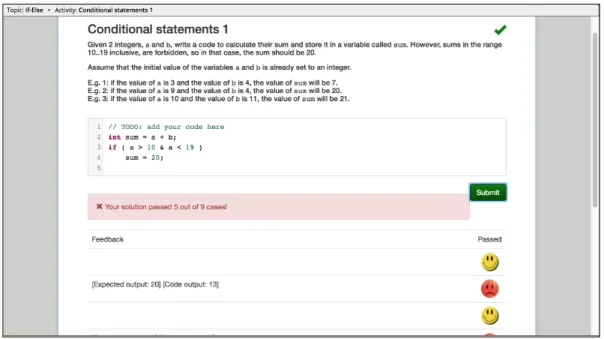
10 An example of the PCRS problem in our practice system . . . 40
11 Mastery Grids interface . . . 42
12 Correlation between PCEX activity completion and line clicks on prob-lems solved . . . 47
13 Percentage of practice for clusters of students in Classroom Study 1 . . 48
14 Distribution of answers for the survey items in Classroom Study 1 . . . 51
15 An example in the default mode of Control group . . . 56
16 An example in the code-only mode of Control group . . . 57
17 An instance of the Parson’s problems in the practice system . . . 60
18 WOE × Group interaction for predicting submission earliness . . . 70
19 WOE × Group interaction for predicting post-test score . . . 73
21 A non-faded example in the user study . . . 87
22 A faded example in the user study . . . 88
23 Plot of faded steps by individual user . . . 92
24 Plot of number of faded steps vs. faded examples . . . 93
25 Problem × Condition interaction for predicting practice performance . . 96
26 Recommendations in the practice system interface . . . 106
27 Proactive recommendation flowchart . . . 108
28 Reactive recommendations in the practice system interface . . . 112
29 Recommended attempts × Group interaction to predict midterm score . 126 30 Distribution of answers for the survey items in Classroom Study 3 . . . 131
31 Plot of group ratings in survey constructs in Classroom Study 3 . . . 132
1.0 INTRODUCTION
1.1 MOTIVATION
In recent years, the importance of computer science as a component of STEM educa-tion has been significantly increasing. In particular, the importance of learning how to program has become broadly recognized and the number of college students tak-ing programmtak-ing courses has grown rapidly. Programmtak-ing is considered an important skill for high school students aiming for a career in computer science, but has now grown broadly important to even non-computer science majors as well as to younger, middle school students. This emphasizes the need for developing instructional mate-rials and computer tools that can support students in learning programming. In this context, learning technologies play an important role in increasing the effectiveness of programming instruction and can offer crucial support to students with lower levels of prior preparation, which often includes students from underserved populations. We argue that researchers in the field of cyberlearning should embrace the established best practices in the field of computer science education to develop learning technologies to support and promote these practices.
This dissertation focuses on one of these best practices – worked programming
ex-amples. Programming code examples play a crucial role in learning how to program.
Instructors use examples extensively to demonstrate the semantics of the programming language being taught and to highlight fundamental coding patterns. Programming textbooks also place a heavy emphasis on examples, with a large proportion of
text-book space being devoted to program examples and associated comments. Moreover, the code of all presented examples is typically provided on an accompanying CD or website, in order to encourage students to explore, run, and modify the examples. Fi-nally, recent studies have also shown that, on many occasions, students prefer seeing examples to receiving hints on how to build the code and fix their programs [Rivers,
2017].
Therefore, it is surprising that learning technologies for computer science education pay little attention to code examples. In this aspect, computer science education signif-icantly lags behind other STEM areas such as mathematics and physics, where the role of problem-solving examples is comparable to the role of code examples in learning pro-gramming. In the field of math and science learning, worked problem-solving examples are extensively studied, particularly in physics [Chi et al., 1989; Conati and Vanlehn,
2000], algebra [Anthony, 2008; Kalyuga and Sweller, 2005; Sweller and Cooper, 1985], geometry [Salden et al., 2009;Schwonke et al., 2007, 2009], chemistry [McLaren et al.,
2008], and SQL [Najar et al., 2016].
Despite the importance of examples in the domain of programming, existing research on program examples is limited. Existing program examples focus on either demonstrat-ing program behavior (i.e., what is happendemonstrat-ing inside a program or an algorithm when it is executed) or program construction (i.e., they illustrate how to construct a program that achieves a specific purpose). As shown in Figure1, which categorizes existing work on programming examples, advanced types of worked programming examples have not been fully explored. The majority of work has been focused on adaptive and non-engaging examples (e.g., [Brusilovsky et al.,2009]). Even in the more explored category of behavior examples, the engagement and personalization aspects have not been ex-plored in combination. Existing engaging examples are not adaptive (e.g., [Naps et al.,
2000]) while personalized examples are not engaging (e.g., [Loboda and Brusilovsky,
2010;Yudelson and Brusilovsky, 2005]). Moreover, program construction examples are still limited to primitive static examples with text-based explanations. While
person-Program Behavior Examples Program Construction Examples
Non-Engaging Engaging Non-Engaging Engaging
Non-A daptiv e [Brusilovsky et al., 2009] [Naps et al.,2000] Non-A daptiv e [Brusilovsky et al., 2009] ? A daptiv e [Loboda and Brusilovsky,2010] ? A daptiv e [Yudelson and Brusilovsky,2005] ?
Figure 1: Past work on programming examples categorized by adaptivity and
en-gaging features in examples. Question marks indicate the areas that have not been explored to date.
alization approaches for these examples were explored, no work that aimed to improve engagement in program construction examples has been reported.
In sum, some areas in the research related to worked program examples remain that have not been studied extensively. First, although examples have been consistently proven to be valuable for the student’s learning, the field lacks program construction examples with interactive elements that could engage students. Second, research is limited on personalizing access to program examples.
1.2 OVERVIEW AND RESEARCH QUESTIONS
The goal of this dissertation is to investigate the value of the “adaptive” and “engaging” features in programming examples. I limit the scope of my dissertation to program construction examples because, despite the importance of program construction skills,
fewer tools are available for supporting students in acquiring these skills. Furthermore, I focus on the less explored areas within the program construction genre, filling gaps in the existing research (shown in Figure 1 by question marks in the program con-struction category). Within this context, I am interested in investigating three aspects related to the program construction examples. First, my goal is to design and develop a learning tool for presenting interactive program construction examples, which I re-fer to as PCEX. Next, my goal is to provide support for each student’s learning with
PCEX examples by generating and selecting examples based on each student’s current knowledge. Specifically, my goal is to adapt example generation to the student by progressively fading example steps as the student’s knowledge increases. Another goal is to personalize the presentation of learning activities during the student’s practice to her/his knowledge, in order to guide the student at each stage of learning to the learning activity that could benefit her/him the most in terms of learning programming.
1.2.1 Design and development of interactive program examples (PCEX)
To achieve the first goal of my dissertation, I developed and evaluated an interactive online tool for presenting Program Construction Examples (PCEX). I am interested in investigating the following research questions to evaluate the effectiveness ofPCEX
examples on learning how to construct programs, first through an exploratory evaluation ofPCEX examples (RQ1) and then by comparing the impact of their usage to the use of non-interactive worked examples in a controlled study (RQ2 – RQ4):
RQ1. How much would students usePCEX examples on a voluntary basis, and what is the relationship between usingPCEX examples and student’s progress in learning related to programming concepts?
RQ2. Will the PCEX examples engage students to work with them more than with non-interactive worked examples?
RQ3. Will working withPCEX examples lead to better performance in solving pro-gram construction problems than working with non-interactive worked examples?
RQ4. Will working withPCEX examples lead to better learning outcomes than work-ing with non-interactive worked examples?
RQ1 was assessed through an exploratory study and by using correlation analysis. RQ4 on the other hand, was assessed through a controlled study, by comparing learning for the control and experimental group.
1.2.2 Adaptive fading in the PCEX examples
To achieve the second goal of my dissertation, I investigated the effect of adaptive fading in the PCEX examples on each student’s problem-solving performance and learning. The research questions are stated as follows:
RQ5. Would the adaptive fading ofPCEX example steps, based on a student’s current knowledge, lead to better problem-solving performance than by not fading any example steps?
RQ6. Would the adaptive fading ofPCEX example steps based on a student’s knowl-edge lead to better learning than by not fading any example steps?
1.2.3 Adaptive recommendation of PCEX examples and problems
To achieve the third goal of my dissertation, I wanted to learn how to personalize a student’s practice by adaptively selecting PCEX examples and problems that match the student’s knowledge level at each stage of learning. Therefore, I investigated the effect that the adaptive recommendation of PCEX examples and problems had on students engagement in the recommended learning activities as well as on their learning outcomes. The research questions are stated as follows:
RQ7. Would students be more engaged in thePCEX examples and problems selected by an adaptive approach compared to a non-adaptive approach?
RQ8. Would the recommendations of PCEX examples and problems using an adap-tive approach improve a student’s learning outcomes more than a non-adapadap-tive approach?
1.3 DISSERTATION TASKS
To answer the research questions in my dissertation, I first developed and evaluated the interactive program construction examples (PCEX)1. Next, I designed, implemented,
and evaluated the personalization technologies to provide personalized access to the
(PCEX) examples. Thus, I structured my research and development work along the
following tasks:
• Task 1: Developing and assessing interactive program construction examples(PCEX). • Task 2: Developing and assessing personalization technologies for (PCEX)
exam-ples.
Figure 2 shows how these tasks address the areas where current research on program construction examples is insufficient or non-existent.
Program Construction Examples
Non-Engaging Engaging
Non-Adaptive Already explored Task 1
Adaptive Already explored Task 2
Figure 2: The tasks defined in this dissertation to fill the gaps in the program
con-struction examples.
1I received help from a graduate student in my department for developing the current version of
In Task 1, PCEX examples were developed using an innovative technology that makes examples explorable, meaning that the student can interact with the example and be challenged by tasks that are similar to the example that she/he has viewed. Task 1 was completed by conducting two studies to evaluate the impact of PCEX examples on learning programming. In Task 2, personalization technologies were developed to generate and recommend PCEX examples. In particular, an adaptive sequencing ap-proach has been implemented to personalize the selection of learning activities in the student’s practice sequence (“outer loop” adaptation). Another personalized approach that was implemented was to use adaptive fading, which adapts the amount of support provided within an example to the student’s knowledge, by adaptively fading exam-ple steps (“inner loop” adaptation). Task 2 was comexam-pleted by conducting a controlled classroom and a user study to assess the value of the developed technologies on the acquisition of program construction skill.
1.4 CONTRIBUTIONS
This dissertation is the first attempt to systematically explore worked programming examples as a new cyberlearning genre in the domain of computer science education. As part of this dissertation, we developed and evaluated an advanced online learning tool, namedPCEX, to present interactive worked program construction examples, one of the crucial components of learning how to program. The developed worked examples use an interactive, explorable nature, to improve each student’s engagement and learning outcomes. We built personalized technologies on top of this tool to adapt the selection and generation of examples to each student’s knowledge, thereby helping students with differing levels of prior preparation.
The findings from the studies in this dissertation gather new insights on how stu-dents acquire programming skills from worked examples and how to use examples ef-fectively in computer-supported learning. We hope that our results would lead to the
development of novel learning technologies that actively utilize advanced worked exam-ples in computer science education. Finally, we hope that the developed examexam-ples and personalized technologies can be deployed and evaluated in numerous programming courses; thus, directly benefiting larger populations of undergraduate and graduate students.
1.5 THESIS ORGANIZATION
The remainder of this dissertation is organized as follows: Chapter 2 presents the theoretical background related to learning from examples and provides an overview of the role worked examples have played in the field of math and science learning, as well as in learning programming. It also explains the existing research that uses personalization technologies to support each student’s work with program examples. The chapter ends with a brief overview of the existing tools for program construction problems as well as some integrated systems that offer practice with both examples and problems.
Chapter 3describes the design process of interactive Program Construction
Exam-ples(PCEX), explains the different aspects of the student’s engagement and elaborates
on the aspects of those that was focused on in the design ofPCEX. It also presents the interface, and discusses which interactivity elements were used in the PCEX examples to engage students.
Chapter 4 provides an overview of the studies conducted in this dissertation, con-necting studies with research questions and hypotheses that were formulated based on the findings of prior research as well as on learning theories. This chapter also presents an overview of the common measures and instruments that were used in our studies. This is done to avoid repeating common details in later chapters.
Chapter 5 and 6present the evaluation of PCEX through two semester-long class-room studies. Chapter 5 describes an initial exploratory evaluation of PCEX in an introductory Java programming class (with 71 undergraduate students) which was
con-ducted to understand the student’s perception of the tool. Chapter 6 presents a con-trolled study with a between-subject design that was conducted in a large introductory Python programming class (with 723 undergraduate students), in order to compare
PCEX with non-interactive worked examples that also focused on program construc-tion.
Chapters 7 and 8 introduce the personalization technologies that we used to pro-vide individualized access to thePCEX examples. Chapter7explains how the example steps are adaptively faded in the PCEX example, based on each student’s knowledge. It also reports on the results of a controlled user study with a within-subject design (with 38 participants) that was conducted to compare the adaptive fading of example steps to no fading of example steps. Chapter8explains howPCEX examples and prob-lems are recommended to each student, using an adaptive recommendation approach. It also presents the results of the controlled classroom study with a between-subject design that was conducted in a large intermediate Java programming class (with 205 undergraduate students), in order to compare the proposed recommendation approach to a non-adaptive approach.
Finally, Chapter9summarizes the main findings and conclusions of the dissertation, discusses the limitations of the work, and suggests directions for future research.
2.0 BACKGROUND AND RELATED WORK
This chapter is a literature review of the past research that supports and motivates my dissertation. The work performed by other researchers is described in this chapter with a focus on six areas: (1) worked examples in math and science problem-solving, (2) worked examples in programming, (3) adaptive learning technologies, (4) adaptive technologies for personalizing program examples, (5) program construction assessment tools, and (6) integrated systems for practicing programming. The first four areas provide the theoretical background for my dissertation and review related work on examples. The last two areas review work on systems and tools that are related to the platform that I used in conducting my studies. Specifically, the fifth area reviews the tools for assessing each student’s program construction knowledge. The sixth area reviews existing resources that parallel my dissertation, integrating the use of program examples and problems.
2.1 WORKED EXAMPLES IN PROBLEM-SOLVING
Over the last 30 years, worked examples, also referred to asworked-out examples[ Atkin-son et al., 2000], have gradually emerged as an important instructional approach that is supported by learning technology. A sizable body of research on instructional prac-tices that support the use of worked examples for acquiring cognitive skills has been accumulated in such domains such as mathematics and physics [Atkinson et al., 2000;
Chi et al., 1989; Sweller and Cooper, 1985]. Worked examples are comprised of the presentation of a problem, the solution steps, and the final solution. Students use them as models of how to solve certain types of problems. Research on studying worked examples has consistently shown that in early stages of skill acquisition, when students typically have little or no domain knowledge, instruction that relies more heavily on studying worked examples is more effective for learning than the traditional approach of being focused on only problem-solving. It has been shown that early example-based instruction leads to better learning outcomes, which are reached in less time and with less effort. This is usually referred to as the “worked example effect” [Sweller et al.,
1998].
The positive effect of examples has also been shown in Cognitive Tutor, a particular type of intelligent tutoring system (ITS). Also, Lynnette (for teaching basic equation solving) [Long and Aleven, 2013], Fractions tutor (for teaching conceptual learning of fractions) [Rau et al., 2012], Stoichiometry tutor (for teaching stoichiometry in chem-istry) [McLaren et al.,2014], AdaptErrEx (for teaching decimals) [McLaren et al.,2015], Geometry tutor [Salden et al.,2009], Algebra tutor [Anthony, 2008], and Dragoon (for teaching the construction of models of dynamic systems) [Wetzel et al., 2017] are in-stances of example-tracing tutors that have been shown to enhance learning with an ITS or to make it more efficient by decreasing the instructional time needed.
The examples appear to be most valuable when example presentation is combined with problem-solving. Specifically, past studies found that the pairing of worked ex-amples with practice problems is more effective than providing the learners with only practice problems [Sweller and Cooper, 1985] or examples only [Trafton and Reiser,
1993]. During the later stages of skill acquisition, however, the positive effect of worked examples gradually declines. In fact, example-based learning is inferior to problem-solving when learners have gained a reasonable degree of domain knowledge [Kalyuga et al., 2000, 2001, 2003]. While learning from examples is superior to problem-solving for learners with little domain knowledge, this advantage disappears over time as the learners develop more content expertise. This phenomenon is referred to as the
“exper-tise reversal effect” [Kalyuga et al.,2003]. On the one hand, this research points out the importance of examples for less prepared students, while on the other hand, it stresses the importance of carefully adapting to the current level of the student’s knowledge by decreasing the number of worked examples as the student gains expertise.
According to [Nokes-Malach et al., 2013], worked examples are hypothesized to be effective for several reasons. First, they provide constraints to the solution space, i.e., highlight the correct solution path so students do not need to waste time on incorrect or unfruitful searches. As a result, novices obtain the information needed to gain gen-eralized knowledge more quickly [Salden et al., 2010]. Secondly, they reduce irrelevant cognitive load by highlighting the important elements of the problem and solution for the learner to focus on, encode, and reason about [Paas and Van Merriënboer, 1994;
Ward and Sweller,1990]. Thirdly, they encourage constructive cognitive processes such as self-explanation in which the learner explains to herself the underlying conceptual logic and justification behind each step [Catrambone, 1998;Renkl,1997]. This may be particularly important for helping students link the features of an example to abstract domain concepts or underlying principles.
It is worth noting that while the example-based learning approach often fosters learning for students with low prior knowledge, this outcome is not guaranteed [Atkinson and Renkl, 2007]. The positive impact of examples for the student’s learning can only be observed when (a) examples are designed effectively, and (b) students study the examples thoroughly.
2.2 WORKED EXAMPLES IN PROGRAMMING
While worked examples are generally less explored in the domain of programming, there is a reasonable body of research that has guided the work completed for this dissertation. The earliest successful research showing the value of examples for learning program-ming dates back to the early 1980s, when Pirolli and Anderson [1985] reported that
examples are helpful for guiding students to solutions for novel and difficult problems. Since then, a considerable amount of research has been devoted to the development of example-based learning environments to support students in learning programming in various programming languages, such as LISP [Getao, 1990; Lieberman, 1987; We-ber, 1996; Weber and Brusilovsky, 2001; Weber and Mollenberg, 1994], Prolog [Brna,
1998], C/Java [Brusilovsky and Yudelson,2008;Esteves and Mendes,2003;Loboda and Brusilovsky,2010;Sirkiä,2013], Javascript [Davidovic et al.,2003], and mini-languages [Brusilovsky, 1994].
We classify program examples that have been used in teaching and learning to pro-gram into two groups, according to their primary instructional goal: propro-gram behavior examples and program construction examples. Program behavior examples are used to demonstrate the semantics (i.e., behavior) of various programming constructs (i.e., what is happening inside a program or an algorithm when it is executed). Program construction examples attempt to communicate important programming patterns and practices by demonstrating how a program that achieves various meaningful purposes (e.g., summing an array) is constructed. This distinction might not be clear cut for examples with no use of learning technology, since the same example code could be used for both purposes. However, attempts to augment examples with learning technologies to increase their instructional value (i.e., add code animation or explanations) usually focus on one of these goals.
Program behavior examples have been extensively studied. While textbooks and tutorials still explain program behavior by using textual comments attached to lines of program code, a more advanced method for this purpose —program visualization, which visually illustrates the runtime behavior of computer programs — is becoming increas-ingly more popular. Over the past three decades, a number of specialized educational tools for observing and exploring program execution in a visual form have been built and assessed [Sorva et al.,2013]. Despite their visual and dynamic nature, the majority of tools for presenting animated examples could be considered non-engaging in that they limit the student role to watching the animation passively (e.g., [Miyadera et al.,
2007; Sajaniemi and Kuittinen, 2003; Sirkiä, 2013]). Following several studies that have demonstrated the low effectiveness of “passively-watched” animation examples, several researchers have experimented with interactive animations that are explorable and challenging, for example, allowing the student to change input data [Lawrence,
1993], asking students to predict the result of a specific step [Byrne et al., 1999], or asking strategic questions about the visualization [Hansen et al., 2000; Myller, 2006;
Naps et al., 2000]. Several studies reported that engaging the students to be more
active in watching the visualization improved their learning [Byrne et al., 1999, 1996;
Hundhausen et al.,2002;Lawrence,1993;Naps,2005;Sears and Wolfe,1995] and had a positive influence on their problem-solving abilities in that domain [Evans and Gibbons,
2007].
Advanced technologies for presentingprogram construction examples are much less developed. In contrast to interactive and engaging worked examples in math and physics, for many years the dominant approach for presenting worked code examples was simply a text with comments [Davidovic et al., 2003; Linn and Clancey, 1992;
Morrison et al., 2016]. More recently, this technology has been enhanced by showing video fragments of code screencasts with the instructor’s narration being heard while watching slides or an editor window [Sharrock et al., 2017]. Both approaches, however, can still be considered as a passive presentation that does not allow for exploration and engagement. Research on making a screencast engaging has only recently begun to receive attention, as in [Khandwala and Guo, 2018; Park et al., 2018] which have attempted to make the screencasts more engaging by allowing inline code editing or em-bedding programming exercises into the videos. An earlier attempt to add interactivity and exploration to worked program construction examples was made in the WebEx sys-tem, which allows students to interactively explore line-by-line comments for program examples via a web-based interface [Brusilovsky et al., 2009]. However, even this ap-proach lacks the engagement power now available to modern technologies for presenting program behavior examples. In this dissertation, we attempt to use research findings
in the area of program behavior examples to produce interactive program construction examples, called PCEX, that better engage students and improve their learning.
2.3 ADAPTIVE LEARNING TECHNOLOGIES
Another gap in research on worked program examples is personalized access to exam-ples. Personalization is important to address the needs of students with different levels of preparation, as well as being important in the transition to mastery, mentioned ear-lier in Section2.1. Thus, a key goal of adaptivity in learning environments is to improve methods for assessing prior knowledge and knowledge growth and then adapting the instruction accordingly [Aleven et al.,2016]. We distinguish two levels for personalizing access to learning contents, namely the “outer loop” and “inner loop” adaptations. These personalization levels have been defined byVanlehn[2006], to discriminate categories of guidance needed in intelligent tutoring systems (ITSs). The“outer loop” adaptation
(also called task-loop adaptation [Aleven et al., 2016]) pertains to the selection of an appropriate learning activity for the student while the“inner loop” adaptation(also called adaptive scaffolding, or step-loop adaptation [Aleven et al., 2016]) is concerned with the steps taken within the learning activity and the amount of support that the system provides to the student within that activity.
There is good evidence from past studies that adaptive forms of task and step selection, based on the dynamic assessment of each student’s evolving knowledge, can substantially contribute to the effectiveness of instruction [Aleven et al., 2016]. For example, adaptively fading support has been found to be effective when the amount of support provided is faded according to a student’s needs by including gaps (i.e., faded steps) in the example that the student has to solve [Najar et al., 2016; Salden et al.,2009], when feedback is adapted to the student solution [Mitrovic et al.,2013], or when the amount of support for self-explanation of worked-example steps is adaptively determined, based on a student’s knowledge level [Conati and Vanlehn,2000].
Adapting task selection to each student’s increase in knowledge was also found to be effective. Just to name a few research studies that have attempted to do this:
• When in a fixed sequence of learning activities, the type of task (a worked example, a faded example or a problem to be solved) next presented was determined by the amount of assistance the student needed in the previous problems that he/she attempted [Najar et al., 2016]
• When the best example for each problem to be solved was adaptively selected by taking into account 1) the student’s current knowledge and 2) the similarity between the candidate example and the problem at hand, in order to promote learning by analogy [Muldner and Conati, 2007]
• When cognitive efficiency (calculated using performance and self-reported val-ues of cognitive load) was used to provide appropriate learning tasks [Kalyuga and Sweller, 2005], or
• When students were guided to program examples using adaptive navigation support techniques (described in detail in Section2.4.1).
While adapting instructional task and step selection to a student’s knowledge growth was proven to be effective across several studies, in some studies (e.g., Kalyuga and Sweller[2005]’s outer loop adaptation andConati and Vanlehn [2000]’s inner loop adap-tation), the positive effective was found only for students with low prior knowledge — that is, as students became more knowledgeable, they needed less structured, adaptive help and the more likely scaffolding would interfere with their work.
In the programming domain, there have been a few recent attempts at providing adaptation to support each student’s work with appropriate program examples, a review of which is provided in Section 2.4. Many of the recent attempts to support students in programming aimed at providing inner loop adaptations to the student’s problem-solving tasks. One example is the work byPrice et al.[2017], which provides on-demand, data-driven hints for each student’s programs in iSnap, an extension of Snap!, a block-based programming environment for novices. Other similar attempts were the work
done in [Nguyen et al.,2014;Piech et al.,2015], which presented data-driven approaches to generating hints for students’ problem-solving attempts in a programming MOOC and also the work by Rivers and Koedinger [2017], which provided real-time hints to students while they were writing programs in ITAP, a tutoring system for Python programming. Outer loop adaptation has also been explored to support problem-solving tasks. For example, [Hsiao et al.,2010] used a personalized guidance technology known as adaptive navigation support to guide students to questions with an appropriate difficulty level in a Java programming course.
2.4 PERSONALIZING WORK WITH PROGRAM EXAMPLES
There have been very few attempts to personalize student programming instruction with worked examples. Excluding the earlier research of our team (in the Personalized Adaptive Web Systems Lab) on exploring “outer loop” [Brusilovsky et al.,2006;Guerra et al., 2018; Hosseini and Brusilovsky, 2017; Hosseini et al., 2015, 2016; Yudelson and Brusilovsky,2005] and “inner loop” [Loboda and Brusilovsky,2010] adaptations for ac-cessing examples, I know of only three other studies that use “outer loop” adaptations for recommending relevant examples when a student fails to solve a problem [ Davi-dovic et al.,2003;Weber and Brusilovsky,2001;Weber and Mollenberg,1994]. Table1
summarizes the related work in terms of their adaptive characteristics by showing the technological (student model and adaptation technology) and educational dimensions (application domain, type of examples, and characteristics of students are used as the source of adaptation). I classified the approaches in Table 1 into three non-exclusive categories, according to the technique by which they provided personalization: person-alized access, problem-solving support, and adaptive scaffolding. Figure 3 shows how the related work and this dissertation fit into these classifications.
T able 1: A daptiv e approac hes for sup p orting studen t instruction with problem-solving examples. (Key : ANS: A daptiv e Na vigation Supp ort; DG: Direct Guidance; PPS: Problem-Solving Supp ort, AP: A d a p tiv e Presen tation) Approac h Domain Exam p le T yp e Studen t Mo del ELM-PE [ W eb er and Mollen b erg , 1994 ] LISP co de example episo dic ELM-AR T [ W eb er and Brusilo vsky , 2001 ] LI S P solv ed example o v erla y & episo dic SEA TS T utor [ Da vido vic et al. , 2003 ] Ja v aScript executable co d e example o v erla y Na vEx AD VISE [ Brusilo vsky et al. , 2006 ], Na vEx [ Y udelson and Brusilo vsky , 2005 ] C annotated example o v erla y W ADEIn II [ Lob o da and Brusilo vsky , 2010 ] C program visualization o v erla y Mastery Grids [ Hosseini et al. , 2015 ] Ja v a annotated example o v erla y Mastery Grids [ Hosseini et al. , 2016 ] Ja v a annotated example, animated example o v erla y jHelp [ Hoss ei ni and Brusilo vsky , 2017 ] Ja v a annotated example o v erla y Mastery Grids [ Guerra et al. , 20 18 ] Ja v a annotated example, animated example o v erla y Approac h A daptation Source A daptation T ec hnology ELM-PE [ W eb er and Mollen b erg , 1994 ] kno wledge PSS ELM-AR T [ W eb er and Brusilo vsky , 2001 ] kno wledge, p re ferences PSS SEA TS T utor [ Da vido vic et al. , 2003 ] kno wledge A NS, DG, PSS Na vEx AD VISE [ Brusilo vsky et al. , 2006 ], Na vEx [ Y udelson and Brusilo vsky , 2005 ] kno wledge ANS W ADEIn II [ Lob o da and Brusilo vsky , 2010 ] kno wledge AP Mastery Grids [ Hosseini et al. , 2015 ] kno wledge DG Mastery Grids [ Hosseini et al. , 2016 ] progress ANS jHelp [ Hossein i and Brusilo vsky , 2017 ] kno wledge, goal P SS Mastery Grids [ Guerra et al. , 20 18 ] kno wledge ANS
Figure 3: A classification of student modeling and personalization approaches for supporting a student’s work with programming examples. The shaded area indicates the contribution of my dissertation to the subareas in adaptive educational systems that support a student’s work with programming examples.
2.4.1 Personalized access
Personalized access approaches help students locate examples that match their individ-ual goals, interests, and current knowledge by using combinations of adaptive naviga-tion support technologies such as adaptive annotanaviga-tion [Brusilovsky et al.,2006;Hosseini et al., 2015, 2016; Yudelson and Brusilovsky, 2005] to augment examples, linked with dynamic and personalized visual cues and direct guidance [Hosseini et al., 2015] to provide each student with the most useful example according to her current state of knowledge. All of the systems in [Brusilovsky et al.,2006;Davidovic et al.,2003;Guerra et al., 2018; Hosseini et al., 2015; Yudelson and Brusilovsky, 2005] use concept-based adaptive link annotation to guide students to the most appropriate example in the system.
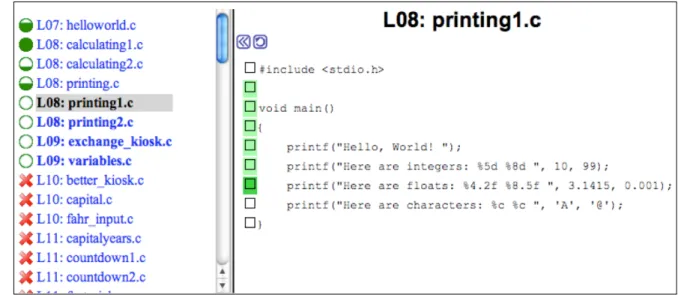
In both NavEx [Yudelson and Brusilovsky,2005] and its successor NavEX ADVISE [Brusilovsky et al., 2006], examples that are not-ready-to-be-learned are marked with red cross stop icons, while ready-to-be-learned examples are annotated with fillable
Figure 4: Key to example annotation in NaveEx.
circles. Depending upon the amount of work already completed by a student within an example, the circle would be empty, partially filled, or completely filled in (Figure
4). The SEATS Tutor [Davidovic et al., 2003] uses the same idea for link annotation but implements it in a slightly different way: links to examples that are not-ready-to-be-learned are red, while links to examples that are learned are blue, and links to ready-to-be-learned material are in green.
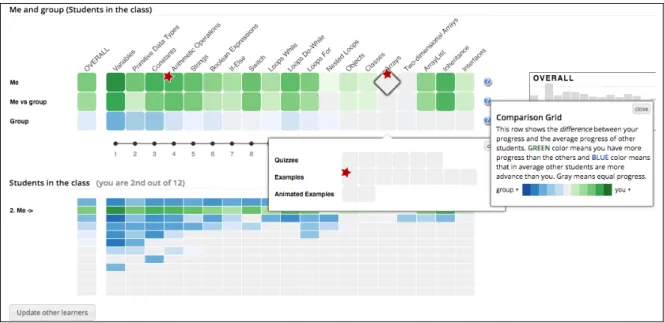
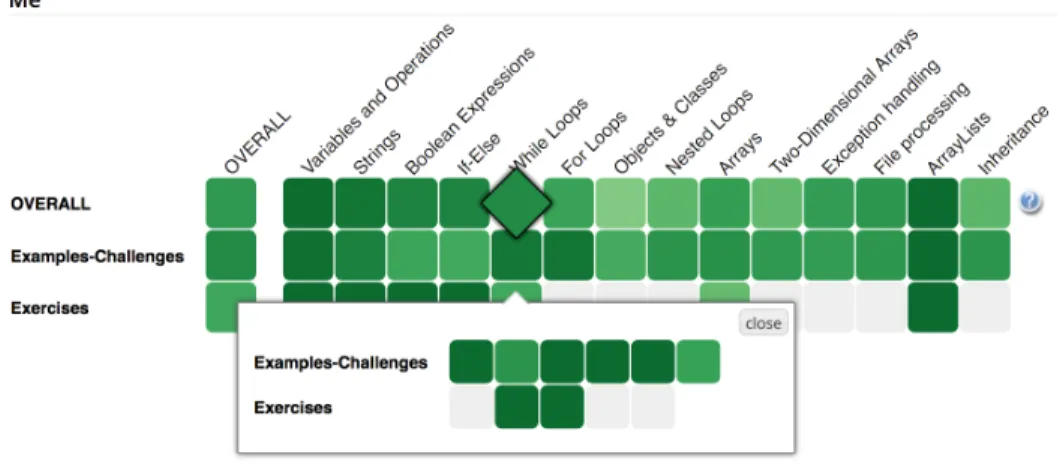
More recent attempts were presented in Mastery Grids [Loboda et al.,2014], which is a personalized interface designed to help students monitor their topic-by-topic progress and compare it with other students in the class (Figure 5). Mastery Grids provides separate views of course topics (i.e., a row of the grid) to illustrate the progress of the student and her peers in the class. In each row of the grid, each topic cell and all examples that belong to that topic are colored, based on either the student’s progress or the progress of the rest of the class, depending on which row the topic cell belongs to. As a result, each student has a personalized view of her progress in course topics and examples that belong to those topics. This information can be used to guide student navigation through the examples and problems presented by Mastery Grids
Figure 5: The interface of Mastery Grids with recommendations. The cells with a red star symbol indicate a recommended activity.
[Hosseini et al., 2015, 2016]. In [Hosseini et al., 2015], direct guidance is available in addition to the progress-based coloring of links to examples and problems. The links to examples that the system recommends to be viewed in the next step are marked with a red star (Figure 5). In this study, Mastery Grids uses an adaptive sequencing strategy to maximize the student’s gain in knowledge, which recommends the top three (3) examples or problems that the student should explore next. The recommendations are updated after each student attempts to solve a problem. In [Guerra et al., 2018], the topic-level open learned model in Mastery Grids is augmented with a more fine-grained concept-level extension and a learning gauge to guide the student to choose the learning content to maximize learning, either by alerting the student about content that does not provide new knowledge, or alerting the student of content that might be too difficult.
2.4.2 Problem-solving support
Problem-solving approaches, similar to example-based problem-solving support in the ITS domain [Brusilovsky and Peylo, 2003], help students when they are having trou-ble solving a protrou-blem, by providing relevant examples which might be helpful to solve that problem. This approach has been used, for example, in ELM-ART [Weber and Brusilovsky,2001] and ELM-PE [Weber and Mollenberg,1994] to suggest relevant suc-cessful problem-solving cases to the students from their earlier experience (i.e., examples explained to them or problems solved by them earlier). The SEATS Tutor [Davidovic et al., 2003] provides remedial support by guiding students to an example with the identical or similar structure or pages that help the student in understanding the not-yet-learned prerequisites. Finally, in a recent attempt, we [Hosseini and Brusilovsky,
2017] investigated a range of concept-level similarity approaches that assessed the sim-ilarity of problems and examples in terms of programming concepts and by considering student factors, such as expected student’s knowledge level and learning goals.
2.4.3 Adaptive scaffolding
Adaptive scaffolding aims to improve learning from worked examples by providing an individualized level of support during the example study. To our knowledge, the only attempt that provided adaptive scaffolding in the domain of programming was pre-sented in WADEIn II [Loboda and Brusilovsky,2010], which is a system for visualizing expression evaluations inC. WADEIn II adapts animation speed and level of explana-tion to the level of the student’s knowledge. As the student progresses, the speed of these animations increases while explanations are collapsed.
2.5 PROGRAM CONSTRUCTION ASSESSMENT TOOLS
Program construction assessment tools are currently the most popular e-learning tech-nology to help students to acquire program construction knowledge. Early program-ming assessment tools received uploads of entire student programs and evaluated them against a set of instructor-defined tests [Brusilovsky and Higgins, 2005]. A popular example of these assignment-focused tools is Web-CAT [Edwards and Perez-Quinones,
2008]. More recent tools have evolved into sites which pose questions to students and accept answers in online text editors. Many of these tools ask the students to write small pieces of code, rather than entire programs and insert the student responses into pre-existing starter code. Nick Parlante’s CodingBat was one of the earliest examples of these tools [Parlante,2017]. This model has been adopted by several tools, including CodeWrite [Denny et al., 2011]; CodeAssessor [Zanden et al., 2012]; PCRS [Zingaro et al., 2013]; CloudCoder [Hovemeyer et al., 2013]; and CodeWorkout [Buffardi and Edwards,2014], which was developed from the Web-CAT project.
All of the aforementioned tools expect the student to write syntactically correct code from scratch, which could take a large and unpredictable amount of time. Therefore, another line of work focused on developing tools that require less time to construct the programs and can be less challenging for students, which is especially appropriate for novices. Parsons and Haden[2006] originally created Parson’s problems as an easy way for novices to solve programming assignments without having to type any code or think about the exact syntax of the programming language. The idea is clever: there is a small number of code fragments in a random order and the novice is asked to construct the described function or a small program by placing the fragments in the correct order. Each fragment may contain one or more lines of code and all of the fragments may not be required in the solution. In [Ihantola and Karavirta, 2011], the author introduced a new family of Parson’s puzzles inspired by the Python programming language. They proposed a two-dimensional variant of Parson’s puzzles where lines of code are not only sorted but also placed on a two-dimensional surface. The vertical dimension is used for
ordering the code, as in the traditional Parson’s puzzles. The horizontal dimension is used to define code blocks, based on indentation. In another attempt, Ericson et al.
[2017] proposed a 2D Parson’s problem with paired distractors where each distractor was shown paired with the matching correct code block so that the learner only had to choose the distractor or the correct code.
2.6 INTEGRATED SYSTEMS
While animated examples and program construction assessment tools were originally designed as independent systems, platforms that incorporate more than one type of tool have become increasingly popular in “inverted courses”, MOOCs, ebooks [Campbell et al., 2014, 2016; Cooper and Sahami, 2013; Ericson et al., 2015], and online practice systems [Guerra et al.,2018;Hosseini et al.,2016]. As a result, a number of recent tools have been designed to be easily reusable in different contexts. For example, the Online Python Tutor (OPT) [Guo,2013], which provides memory visualizations for a range of languages, has been incorporated into ebooks [Ericson et al.,2015], MOOCs and online courses [Guo, 2013]. Our work follows this approach. PCEX examples were designed as reusable learning content. In the classroom studies conducted in this dissertation, access to examples was provided through an integrated practice system, which also offered coding problems served by the PCRS tool [Zingaro et al., 2013] (Figure 10) as well as Parson’s problems [Ihantola and Karavirta, 2011] served by the ACOS server [Sirkiä and Haaranen, 2017] (Figure 17).
3.0 TOOL DESIGN
This chapter introducesPCEX, an online tool developed to present program construc-tion examples in an engaging fashion. First, it describes the design process of PCEX. Then, it defines what exactly the student’s engagement is, what are its different con-structs, and which of the engagement constructs are used in thePCEX examples. After that, it presents the interface and discusses which interactivity elements are used in the
PCEX examples to engage students.
3.1 ITERATIVE DESIGN PROCESS
We followed an iterative design process in the development of PCEX. The version we describe in this chapter is the end result of two cycles of design and evaluation. We first designed the mock-ups, then evaluated the mock-ups, then iterated on the design, then developed the working prototypes, then evaluated the prototypes, and finally used the lessons learned to inform the development of a functional interface. To evaluate the mock-ups, we conducted a pilot study and interviewed four students (two males, two females) who were taking an introductory Java programming class at University of Pittsburgh during the Spring 2017 semester. The mock-ups are shown in Appendix
A. To evaluate the prototypes, we conducted a usability study with 11 students (eight males, three females) during the summer 2017 semester. Most of the participants were unfamiliar or beginner in computer programming. They were presented with two
examples in Java and two examples in Python and asked various usability questions related to each feature in the prototypes.
3.2 TARGETED ASPECTS OF ENGAGEMENT
Engagement is a construct that has many different definitions in education, ranging from activity completion to particular cognitive and affective forms of activity completion. Therefore, we need to define our conception of student’s engagement to ground our approach to creating examples that support engagement. We define engagement as the extent of a student’s active involvement in a learning activity, [Christenson et al.,2012]. It is often considered to be a multi-dimensional construct of possibly four distinct, yet intercorrelated and mutually supportive aspects: behavioral engagement, emotional engagement, cognitive engagement, and agentic engagement [Christenson et al., 2012;
Reeve,2013;Reeve and Tseng, 2011].
Behavioral engagement refers to how effortfully involved the student is in the learn-ing activity in terms of attention, effort, and persistence [Skinner et al., 2009]. Emo-tional engagement refers to the presence of positive emotions during task involvement, such as interest, and to the absence of negative emotions, such as anxiety [Skinner et al., 2009]. Cognitive engagement refers to how strategically the student attempts to learn in terms of using sophisticated rather than superficial learning strategies, such as elaboration rather than memorization [Walker et al., 2006]. Agentic engagement is a fourth and newly proposed aspect of student’s engagement that refers to the extent of the student’s constructive contribution to the flow of the instruction they receive in terms of asking questions, expressing preferences, and letting the teacher know what the student wants and needs [Reeve,2013].
Engaging examples, in this work, engage students through two of the aforementioned constructs, namely behavioral and cognitive engagement, the aspects most consistently linked with learning outcomes [Bathgate and Schunn, 2017]. That is, we sought to
de-sign examples that would make students be more actively involved in working through the full examples and encouraging them to think more deeply; these forms of engage-ment would lead to more learning from the examples.
3.3 PCEX: CHARACTERISTICS AND DESIGN
PCEX (Program Construction EXamples) is an interactive tool to support mastering program construction skills through examples. The innovative idea behindPCEX is to create “rich examples” that support free exploration and challenge the student. Figure
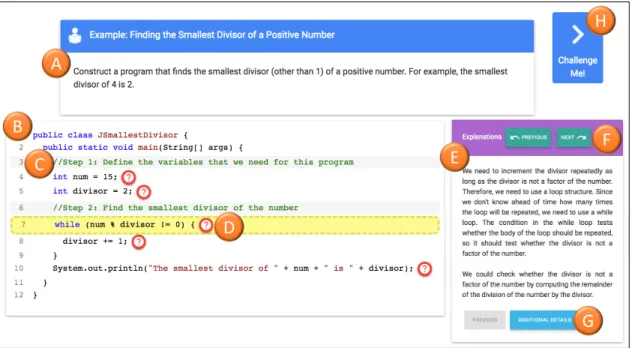
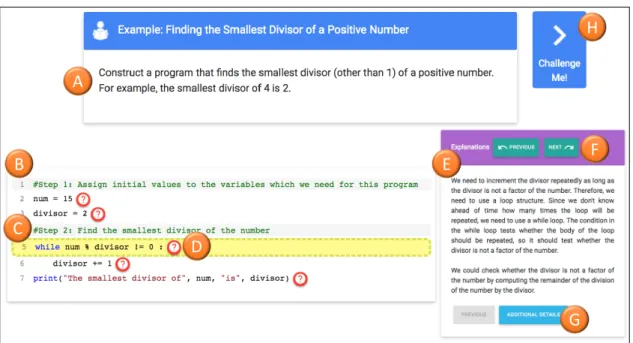
6 illustrates a PCEX example. Each PCEX example includes a “goal” (Figure 6, A) and worked program steps (Figure 6, B). The goal states what function the example program performs. The worked steps begin with a subgoal label (Figure6, C) and are represented in the form of the sequence of short fragments of code (no more than a few lines of code) that illustrate how the program is constructed. Labeling subgoals in worked examples is known to increase student’s performance by leading students to group a set of steps and encouraging them to self-explain the reason for clustering those steps [Catrambone,1998]. The example is enriched with instructional explanations that are indicated by question mark icons next to all or a subset of example lines (Figure6, D). Once a student clicks on a question mark, an explanation is shown on the right side (Figure6, E). The student can request additional details for the selected line by clicking on the “Additional Details” button (Figure6, G) or can navigate to the previous or next line to read an explanation (Figure 6, F).
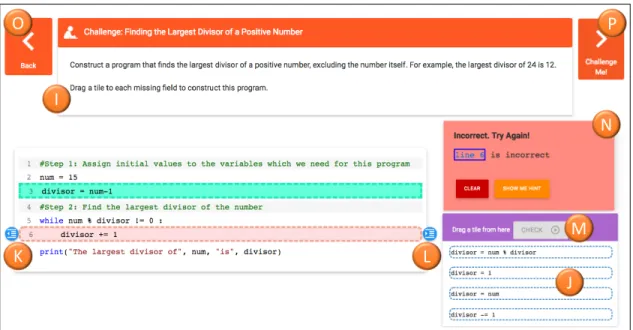
In addition to being explorable, PCEX examples challenge students by engaging them into a problem-solving activity. When a student clicks on the “Challenge me” button (Figure 6, H), an interactive challenge activity is presented to the student as shown in Figure7. The goal of a challenge is to encourage studentsto apply the program construction knowledge presented in the original example to self-assess whether their understanding is correct. In essence, a challenge is a programming problem that is very
A
B
E
G
F
H
C
D
Figure 6: A Java programming worked example in the PCEX activity. The example
includes the goal (A), interactive worked code (B), the subgoal label presented as a comment (C), the link to instructional explanations (question mark symbols) (D), explanations (E), a navigation link to the explanation for the previous/next line (F), additional details for the highlighted line (G), and a challenge navigation link (H).
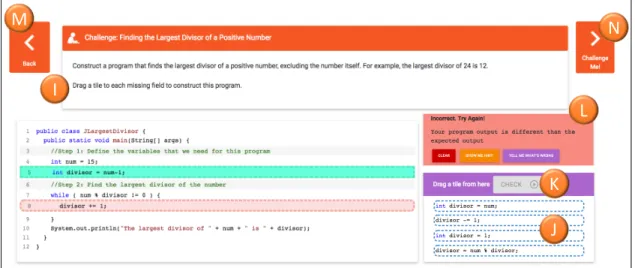
similar to the original example in both the goal to achieve and the code. A challenge has a problem statement (Figure7, I) and code. However, the code has no explanation and is not complete — one or more of the code lines are missing. The student’s goal is to complete the code by dragging and dropping lines from the set of options (Figure7, J) to each of the missing fields. This drag-and-drop interaction approach is similar to Parsons problems (puzzles) [Parsons and Haden,2006]. The student can check whether the challenge is solved correctly by clicking on the “Check" button (Figure 7, K). The feedback is presented to the student by highlighting correctly (in green) and incorrectly (in red) placed lines. The student can also request a hint or more detailed feedback (Figure 7, L). If the student cannot solve the challenge with three attempts, she can request the solution.
At any moment, the student can navigate to the core explained example by pressing the “Back” button (Figure7, M). Also, if an example has several challenges the student may navigate between them by pressing the “Challenge Me” button (Figure 7, N). The student can navigate to the next challenge only when the current challenge is solved or the solution is seen after the third incorrect attempt.
In this dissertation, we use the term PCEX activity to refer to the PCEX worked example and its associated challenges. EachPCEX activity was created by annotating the example and challenge code with a set of predefined tags. The annotated code was parsed to generate a corresponding JSON file for each of the PCEX activities. The JSON file was used by a single-page JavaScript application to support interactive work with examples and challenges as shown in Figures 6 and 7. The current version of
I
M
L
K
J
N
Figure 7: A Java programming challenge in thePCEX activity that follows the worked
example in Figure6. The challenge includes the goal (I), has one or more missing lines, and asks the student to drag and drop a line from the given options (J) to each missing line to construct the program. A student can request feedback by pressing the “Check” button (K). The feedback message is shown in part (L). The student can go back to the example by pressing the “Back” button (M). If there are more challenges available, the student can go to the next challenge by pressing the “Challenge Me” button (N). This button is shown only when the current challenge is solved or the student checks the solution after the third incorrect attempt.
A B E G F C D H
Figure 8: A Python programming worked example in the PCEX activity. The
ex-ample includes the goal (A), interactive worked code (B), the subgoal label presented as a comment (C), the link to instructional explanations (question mark symbols) (D), explanations (E), a navigation link to the explanation for the previous/next line (F), additional details for the highlighted line (G), and a challenge navigation link (H).
the PCEX supports any executable code in Java or Python. Note that the program code for a challenge requires to produce an output as PCEX employs an output-based evaluation of the student answer.
The Python interface for presenting aPCEX activity is similar to the Java interface. Figure 8 illustrates a PCEX worked example in Python. As it can be seen from this figure, the interface features are the same as the Java version of the tool. The interface features for presenting the Python challenges are also similar to the Java version of the tool, but with this difference that the Python interface has an additional feature to support indenting the code for the missing lines. The student can decrease/increase the indentation of the line by using the indentation buttons (Figure 9, K/L).
I O P N M J K L
Figure 9: A Python programming challenge in the PCEX activity that follows the
worked example in Figure8. The challenge includes the goal (I), has one or more missing lines, and asks the student to drag and drop a line from the given options (J) to each missing line to construct the program. The student can decrease/increase the indentation of the line by using the indentation buttons (K)/(L). A student can request feedback by pressing the “Check” button (M). The feedback message is shown in part (N). The student can go back to the example by pressing the “Back” button (O). If there are more challenges available, the student can go to the next challenge by pressing the “Challenge Me” button (P). This button is shown only when the cur-rent challenge is solved or the student checks the solution after the third incorrect attempt.
4.0 AN OVERVIEW OF STUDIES
This chapter presents an overview of the studies presented in the following chapters. It also explains how each study contributes to the research questions in this dissertation. Although the studies have different settings, they share some measures and instruments that we used to evaluate our hypotheses, such as pre-test, post-test, system usage variables, and surveys. This chapter provides an overview of these common measures and instruments, in order to avoid repeating the same information for each study.
4.1 CLASSROOM AND USER STUDIES
The goal of the evaluation process was to investigate the value of the “adaptive” and “engaging” features in the proposed program construction examples. We conducted four experimental studies (three classroom studies and one user study) to answer our research questions, which were stated in Section 1.2. Table 2 shows the studies that were employed to answer the research questions, the objective of the studies, and the corresponding chapters describing the studies.
The rest of this section describes the research questions that are investigated in each study. The hypotheses for the research questions were formulated based on the findings of prior studies and the theoretical foundations related to my dissertation work.
Table 2: Relationships between RQs, objectives, studies, and chapters.
Research Question Objective Study Described in
RQ1 Exploratory evaluation ofPCEX examples Classroom Study 1 Chapter 5
RQ1, RQ2, RQ3, RQ4 Evaluation ofPCEX examples relative to non-interactive examples
Classroom Study 2 Chapter 6
RQ5, RQ6 Evaluation of adaptive fading inPCEX examples User Study Chapter 7
RQ7, RQ8 Evaluation of adaptive recommendation of
PCEX examples and problems
Classroom Study 3 Chapter 8
4.1.1 Classroom Study 1
The goal of this study was to explore how PCEX would be used by students in the classroom and what the relationship would be between working withPCEX examples and student’s engagement and learning outcomes. The research question addressed in this study is as follows:
RQ1. How much would students usePCEX examples on a voluntary basis, and what is the relationship between usingPCEX examples and student’s progress in learning related to programming concepts?
I stated no hypothesis for the first research question as this study was the first deployment of the new tool and there was no past data on which to base our expectations.
4.1.2 Classroom Study 2
This study aimed to examine the impact ofPCEX examples on student’s engagement and learning compared to non-interactive examples. The research questions addressed in this study are as follows:
RQ1. How much would students usePCEX examples on a voluntary basis, and what is the relationship between usingPCEX examples and student’s progress in learning related programming concepts?
RQ2. Will the PCEX examples engage students to work with them more than with non-interactive worked examples?
RQ3. Will working withPCEX examples lead to better performance in solving pro-gram construction problems than working with non-interactive worked examples?
RQ4. Will working withPCEX examples lead to better learning outcomes than work-ing with non-interactive worked examples?
I hypothesized that the PCEX examples would increase student’s
en-gagement, problem-solving performance, and learning, compared to non-engaging examples.
4.1.3 User Study
This study investigated the effect of adaptive fading in thePCEX examples on student’s problem-solving performance and learning relative to not fading any example step. The research questions are stated as follows:
RQ5. Would the adaptive fading ofPCEX example steps, based on a student’s current knowledge, lead to better problem-solving performance than by not fading any example steps?
RQ6. Would the adaptive fading ofPCEX example steps based on a student’s knowl-edge lead to better learning than by not fading any example steps?
I hypothesized that the adaptive fading of PCEX example steps, based
on student’s knowledge, would lead to better problem-solving performance and learning outcomes than not fading any example steps.