Java Distributed File System
Tomasz Mista
MSc Advanced Computer Science
Session 2010/2011
MSc Project - COMP5200 Student #200592050
The candidate confirms that the work submitted is their own and the appropriate credit has been given where reference has been made to the work of others.
Abstract
MSc in Advanced Computer Science 2011Java Distributed File System By Tomasz Mista
Project Supervisor: Haiko Muller
There are many ready implemented distributed file systems for businesses and individuals. However, some of the problems that users faces when using those systems are still challenging for scientist. The ideal distributed system would provide shared access to the same set of files to all its users, would be scalable to provide more storage space and higher performance to a growing user community. It would require minimal human administration, and it would not become more complex as more components were added.
This dissertation describes my own Java Distributed File System (JDFS) as a new challenge in solving problems occurring in currents file distributed systems. It defines the concepts of transparency, scalability and fault tolerance and solves them in JDFS approach. It also presents alternatives for the semantics of sharing and methods for providing access to remote files. A survey along different distributed systems for file sharing demonstrates various implementations and design strategies. Based on the assessment of those systems and own research new approaches are provided in implemented system.
The paper ends with a critical examination of the product and discusses possible improvements which could be made in the future.
Acknowledgements
I would like to thank my supervisor Dr. Haiko Muller for his support and the motivation he gave me through the project.
Contents
Abstract ... 2 Acknowledgements ... 3 List of Figures ... 7 List of Tables ... 8 Chapter 1: Introduction ... 9 1.1 Structure ... 10 1.2 The problem ... 101.3 Aims and objectives ... 10
1.4 Proposed Approach ... 11 1.5 Deliverables ... 11 1.6 Required Resources ... 11 1.7 Scope of project ... 11 1.8 Time Management ... 12 1.8.1 Project Plan ... 12
Chapter 2: Literature Review ... 13
2.1 DFS Concept ... 13
2.2 Anatomy of Distributed Application ... 14
2.3 Processing Application ... 14
2.4 Naming and Transparency ... 15
2.5 File Replication ... 16
2.6 Synchronous and Asynchronous Message Passing ... 16
2.7 Protocol ... 17
Chapter 3: System Development Methodology and Technology ... 18
3.1 Boehm Spiral Model ... 18
3.2 Rapid Application Development‐RAD ... 18
3.3 Prototyping ... 19
3.4 System Development Technology ... 19
Chapter 4: Current System Analysis ... 20
4.1 Sun’s NFS ... 20 4.1.1 Sun’s NFS Architecture ... 20 4.1.2 Protocol ... 20 4.1.3 Advantages of Sun’s NFS ... 21 4.1.4 Disadvantages of Sun’s NFS ... 21 4.2 Hadoop DFS ... 21 4.2.1 Hadoop DFS Architecture ... 21
4.2.2 Advantages of Hadoop DFS ... 22
4.2.3 Disadvantages of Hadoop DFS ... 22
Chapter 5: Initiation Project ... 23
5.1 Technical Feasibility ... 23
5.2 Operational Feasibility ... 23
5.3 Economic Feasibility ... 24
Chapter 6: Java DFS ... 25
Chapter 7: Requirement Analysis ... 28
7.1 JDFS User’s requirements ... 28
7.2 JDFS System Requirements ... 28
7.2.1 Functional Requirement ... 28
7.2.2 Non‐Functional Requirement ... 29
Chapter 8: Functional Modelling ... 30
8.1 Use Case Diagram ... 30
8.1.1 Detailed Use Case Diagram ... 31
Chapter 9: Structural and Behavioural Modelling ... 33
9.1 Class diagram ... 33
9.1.1 Overall System Decomposition ... 33
9.2 Sequence diagrams ... 38
Chapter 10: Interface Design ... 38
10.1 User Interface Design Methodology ... 39
10.1.1 Prototyping and Design Process ... 39
10.1.2 Analysis and Synthesis ... 39
10.1.3 Design Steps ... 39
10.2 Interface Structure ... 39
Chapter 11: Implementation ... 40
11.1 Implementing the system ... 41
11.1.1 Server Implementation ... 41
11.1.2 Client Implementation ... 42
11.2 Software Prototype ... 44
13.2 Usability Testing ... 50
13.2.1 Usability Evaluation – results ... 50
Chapter 14: Conclusion ... 52
14.1 Project Conclusion ... 52
14.2 Recommendation for Future Work ... 52
References ... 53
Appendices ... 55
Appendix A: Critical Review and Reflection ... 55
The most interesting aspect of this project ... 55
Problem encountered ... 55
Skill Review ... 56
Reflection ... 56
Appendix B: Project Plan ... 57
Appendix C: Interface Paper prototype – Client ... 58
Appendix D: Interface Paper prototype Server ... 59
Appendix E: Connection Sequence Diagram ... 60
Appendix F: Disconnection Sequence Diagram ... 61
Appendix G: Delete/Paste/Rename/Cut Sequence Diagram ... 62
Appendix H: Copy/Paste Sequence Diagram ... 63
Appendix I: Read a file Sequence Diagram ... 64
Appendix J: Write a file Sequence Diagram ... 65
List
of
Figures
Figure 1: DFS is now everywhere and most companies use DFS to provide various services to their
users. ... 9
Figure 2: Diagram shows relationship between the Distribute System, File System and DFS ... 14
Figure 3: Communication managed by DFS ... 15
Figure 4: Abstractions in conventional file system and DFS ... 15
Figure 5: Synchronous message‐passing channel Figure 6: Asynchronous message‐passing channel ... 17
Figure 7: The Sun NFS architecture ... 20
Figure 8: HDFS architecture ... 22
Figure 9: Relationship of feasibilities ... 23
Figure 10: A software object and bicycle representation according to object – oriented concept (diagram downloaded from http://download.oracle.com/javase/tutorial/java/concepts/) ... 25
Figure 11: Simple Client/Server model ... 26
Figure 12: Use Case Diagram for JDFS ... 30
Figure 13: Overall system decomposition showing the main packages and relationships among them ... 34
Figure 14: Client Class Diagram ... 35
Figure 15: Server Class Diagram ... 36
Figure 16: System Class Diagram ... 36
Figure 17: File Class Diagram ... 37
Figure 18: Communication Class Diagram ... 37
Figure 19: Helpers Class Diagram ... 37
Figure 20: Splitter Class Diagram ... 38
Figure 21: Client interface prototype ‐ login window ... Error! Bookmark not defined. Figure 22: Client interface prototype – main system window ... Error! Bookmark not defined. Figure 23: Client interface prototype ‐ users can view their rights and change them . Error! Bookmark not defined. Figure 24: Server interface prototype ‐ window for port number ... Error! Bookmark not defined. Figure 25: Server interface prototype ‐ main server window where server logs will be displayed Error! Bookmark not defined. Figure 26: The interface structure diagram for client system ... 40
Figure 27: The code for Callback class. ... 43
Figure 28: Client interface prototype ‐ login window ... 44
Figure 29: Client interface prototype – main system window ... 45
Figure 30: Client interface prototype ‐ users can view their rights and change them ... 45
Figure 31: Server interface prototype ‐ window for port number ... 45
Figure 32: Server interface prototype ‐ main server window where server logs will be displayed ... 45
Figure 33: System interface ... 46
Figure 34: System testing table with results. ... Error! Bookmark not defined.
Figure 41: Sequence diagram for Read file ... 64
Figure 42: Sequence diagram for Write a file ... 65
List
of
Tables
Table 1: Economic feasibility analysis in order to see if the project is worth to invest or not ... 24
Table 2: Table shows detailed use case description for ‘registration’ use case ... 31
Table 3: Table shows detailed use case description for ‘login’ use case ... 31
Table 4: Table shows detailed use case description for ‘read and write’ use case. ... 32
Table 5: Table shows detailed use case description for use ‘copy/paste/rename/delete a file’ use case. ... 32
Table 6: Table show detailed use case description for ‘open a folder’ use case. ... 32
Table 7: Table show detailed use case description for ‘create a folder’ use case. ... 33
Table 8: Table show detailed use case description for ‘exit’ use case. ... 33
Chapter 1: Introduction
Nowadays, new applications require more resources than are available on an inexpensive machine. The organisations face problems with business processes that no longer fit on single cost effective machine. Also individuals have a certain amount of data stored on their home or business computers that is sensitive. Loss of this data would stop organizations to run properly or would incur a
significant cost in terms of financial cost or time and effort. Sensitive data on a personal home
computer could be a student’s university assignment. If this assignment is lost, it will incur a time cost to the student to redo the assignment. The Distributed File System (DFS) was invited to help business and individuals run their processes more effectively and without data lost during system failure or crash.
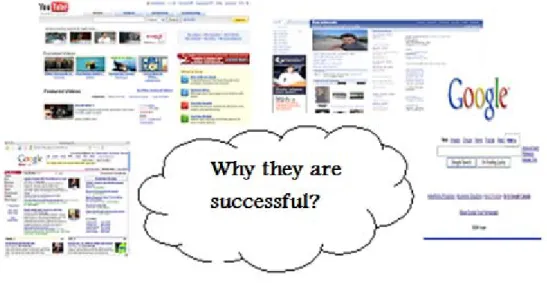
Who doesn’t know about Google, Facebook, Youtube and other services whose allows users to upload pictures, videos in their servers. Now Google is beyond the searching because it supports uploading videos, it gives email account of few gigabytes, it has Google Map, Google Earth and Google News application. All these application are heavily data intensive however Google provides their services very efficiently. The question is how Google and other companies do it? Let’s look on the figure below (Figure 1). Yes, that’s right they use DFS to provide their services on very high level.
This paper addresses the technical challenges of creating JDFS (Java Distributed File System) as an environment for sharing files between different groups of users. In this JDFS attention to details must
Figure 1: DFS is now everywhere and most companies use DFS to provide various services to their
1.1
Structure
In light of these objectives, the thesis will take the following structure:
o A literature review about Distributed File Systems, more detailed aspects of DFS will be provided and explained such as: synchronous and asynchronous message passing, protocol, file replication (Chapter 2). Chapter 3 defines the methodology chosen in order to deliver valuable project. DFS analysis and evaluation of current DFS will be given in Chapter 4: Current System Analysiswhere detailed comparison is included. Chapter 5: Initiation Project shows feasibility analysis to make sure the project will success. Chapter 6: Java DFS shows Java object-oriented and network-oriented techniques and powerful platform, which indicates why the Java is the best selection for the development of JDFS.
o The second section of document focus on the actual system analysis and design where UML diagrams are drawn. Chapter 10 Implementation, it is to detail the implementation of the system in order to make the system work flows more accurate and fluent
o The final part of this report will be the system testing and final project conclusion. System testing has to be done in Chapter 11, which makes sure that the JDFS can be accepted by the user and potential market.
1.2
The problem
A distributed file systems have grown in importance in recent years because as a reliance increase, the problem of availability becomes more acute. Today, individuals and business alike have a certain amount of data stored on their home or business computers or both. Those data are essential for the day-to-day work or activities of users. But, this work can be disrupted by several problems:
o Inability to upload any file in any size because unsupported file type or extended file size. o Inability to create file sharing permissions for example some files we want to share only with
friends and other with groups or publish to the world.
o Inability to restrict permissions on a file by a single user (read, write, delete, rename) o Lack of fault tolerance because one service is down, the user cannot access another, either
manually or automatically.
o Transporting many files over the intranet can create slow performance and network bottleneck.
o Inability to upload a file because incompatible file format
o The security of data is an important issue because we have to make sure that only authorized users have access to information.
All those problems can cause serious disruptions in a daily user’s work of individuals or businesses, and a good distributed system must deal with all those problems in proper way.
1.3
Aims and objectives
The aim of this project is to build a Java Distributed File System (JDFS) providing secure files storage, location independence, scalability and transparent migration capabilities for data. Objectives in order of priority:
1. All users are able to upload and download a file to and from the system. 2. All users are given a consistent view of the same set of files.
4. Investigate different techniques for avoiding problems such as: bottleneck, slow performance, security, bad file replications.
5. Produce a working prototype incorporating techniques specified above and show how they can be integrated with distributed file system.
6. Evaluate the project process on the whole.
Future enhancements: The project can be extended by deeper research into the concept of distributed file system and new area of use for such system such as mobile computing. Future advanced techniques and algorithms can be analyzed and used for more effective file replications.
1.4
Proposed
Approach
The main approach is to design and develop a JDFS (Java Distributed File System) that meets the user’s requirements and specification. Before deciding on the types of approach, there are number of factors that need to be considered:
o Technology – this project will involve software components. Most of the components are easily available in the market. Therefore, searching for the best components will be carried out.
o Cost – the budget of building prototype should be kept as low as possible
o Product requirements – the JDFS should be easy to use according to user’s needs.
Requirements and specifications will be obtained from external sources and as well as from the use of literature review.
Besides, I have to ensure that building this project will not have any similarities or duplications of current distributed file systems used.
The following methods will be employed in this project: o Specification definition
o Software design and development o Implementation
o Integration and testing
1.5
Deliverables
The project deliverables are as follow:
o Report with analysis of current distributed files systems: Sun NFS and Hadoop, analysis, design and implementations steps of JDFS with proofing that Java is a reasonable choose for implementations of various distributed systems
o System prototype with functionalities stated in project requirements, system testing results in order to state future system improvements.
1.6
Required
Resources
The resources I will need are accessible from School of Computing. The programming environment needed (Eclipse) is Open Source, the prototype will run on several lab machines (during the testing and presentation to assessor) those are available, so it is therefore not a formal resource requirement.
in market. The codes written must be in 100% unique, so the project success mainly will depend on my programming skills. I want to make sure that the system is using interesting features and techniques for file distribution.
Also, the project includes UML diagrams drawing and the programming includes the learning of advanced techniques from networking. Most of this skills used in this project were not touched upon in regular classes are taken here.
1.8
Time Management
As with any project, time management is of crucial importance for the purpose of generating more effective work and productivity. Time is finite. We have only so many hours to do what we need to do and what we want to do [10].
1.8.1 Project Plan
For this project I used GanttProject software to plan out activity over the course of 12 weeks allocated.
The chart attached (Appendix 1) shows an example plan. It is a screenshot of the plan as it was during the literature review. The plan changed many times over the course of the project, but its use was invaluable in managing the scope of the work.
There are some aspects missing from the plan at this stage, and also that there are things that have been planned. This is because the plan is a living document, and changes constantly.
Chapter 2: Literature Review
In order to gain better understanding of the DFS and in technical skills and tool required to implement the project requirement an extensive review of literature on the relevant subject was carried out. The literature review for the project will include the following:
o Clarify the meaning of DFS, give a brief history, identify the main functions, and main area of operations for such system.
o Clarify the meaning of: protocol, file replication and namespace in order to understand how DFS works.
Future research related to DFS will be included in later chapters by providing more advanced research.
2.1
DFS
Concept
Distributed File System (DFS) support the sharing of information in the form of files throughout an intranet. A well designed file service provides access to files stored at a server with performance and reliability similar to disk [4]. A DFS allows users to store and access remote files like in the local way, but from any computer in the intranet.
In other words a DFS system is capable of distributing files from one computer to other computers or storage devices, maybe one group to another group. This is just a personal sense from the first sight of distributed file system, which cannot make sense of it clearly. In scientific field, a DFS is a distributed implementation of the classical time-sharing model constructed on a file system, where many users can share files and storage resources.
Distributed File System supports effectively common operations on the same kind of sharing
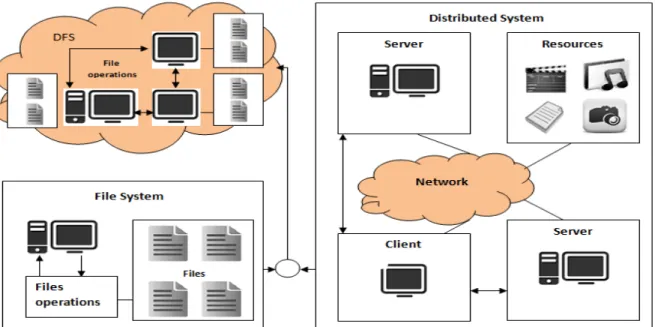
resource, especially for the files physically dispersed among the different sites of a distributed system. From the view point of inheritance, a DFS can be seen as a system inherited from Distributed System and File System. A Distributed System which centralized systems from a set of divers, autonomous, physically dispersed computer systems which are inter connected by communications networks to permit the exchange of information [9]. So a Distributed System is a resource set of processors that do not share memory or clock. It distributed each processor to each appropriate site by varied functions. Similarly with a File System, a DFS also highly provides common files operation, such as delete, read, write, rename, copy and share which formed client interface. Not only are these
operations used in certain specifically local site of DFS, but also used in other sites through proper authorization access. But the operation creating a file, making file unshared and setting the permission of file are still constrained in local site. If a Distributed system and a File system are both compared as super classes, then a DFS can be seen as a polymorphic subclass which accommodates its resource (processors) distributed mechanism derived from Distributed System and files operation inherited from File System. The figure below (Figure 2) shows the relationship among Distributed System, File System and DFS.
Figure 2: Diagram shows relationship between the Distribute System, File System and DFS
2.2
Anatomy
of
Distributed
Application
According to [4] a distributed application is built upon several layers. At the lowest, a network connects a group of host computers together so that they can talk to each other. Network protocol like TCP/IP let the computers send data to each other over the network. Higher- level services can be defined on top of the network protocol, such as directory services and security protocols. At the top of these layers distributed application runs, using the mid – level services and network protocols as well as the computer operating system to perform tasks across the network.
According to the description above the distributed application can be broken down into following parts:
o Process – a process is created by describing a sequence of steps in a programming language while the code is compiled and run on computer. A process is used to perform tasks such as file sending and receiving over the network. The process usually has access to the resources of the computer such as CPU or I/O devices though the operating system.
o Threads – every process has at least one thread of control and every thread can run independently from other threads. The purpose of thread in distributed application is to monitor for example input from a socket connection such as mouse movements etc.),and provides feedback to the user through outputs devices (monitor, speakers, etc.).
o Objects – programs written in object – oriented language are made up of cooperating objects. Also the process in applications can be made up of one r more objects, and these objects can be accessed by one or more threads within the process.
o Agents – usually refers to the functional elements of a distributed application and agent is high – level system component. For example a banking application can be broken into a customer agent, a transaction agent or information service agent.
2.3
Processing
Application
The idea behind the DFS is that the resources of a specific machine are treated locally to itself, whereas the resources of the other machines are remote. A DFS manages a collection of dispread storage device (Figure 3). The overall storage space of DFS consists of locally and remotely located storage spaces. Those storage spaces are managed by DFS correspond to several sets of files. A
component unit is the smallest set of files that can be stored on a single machine, independently from other units [18]. All files from the same component unit must reside in the same location.
Most of current DFS is constructed on client/server architecture, and it permits client to access and process files stored on the server as if they were stored locally [18]. Here it mentioned three key terms:
o Service – in DFS a service is a particular type of function that some server provides to clients o Client – client is a process that makes request of service from other programs
o Server – server is the service management software running on a specific machine used to fulfil and wait for service client in the local computer or remote computers
Figure 3: Communication managed by DFS
2.4
Naming
and
Transparency
Naming is a mapping between logical and physical objects. In DFS, users represent a logical data object with a file name that is a textural name in user-level, but the system physically stores data blocks on disk tracks which is numerical identifiers mapped to disk blocks in system – level. These two levels mapping provides users with an abstraction of a file that hides the details of how and where the file is stored on a disk. In DFS, the location of the file in the network is added to the abstraction. In conventional file system, the range of the naming mapping is represented as an address in a disk [18]. The file abstraction leads us to the notion of file replication (described in section 2.5 File Replication). When we want to access a specific file name the mapping returns a set of locations of the file replicas (Figure 4).
But, this abstraction allows hiding both their locations and existence of multiple copies (Figure 2). There are two notion related mapping in DFS:
o Location transparency – the name of a file does not reveal any hint as to its physical storage location [4].
o Location independence – the name of a file not be changed when the file’s physical storage location change [4].
Both definitions are relative to naming of files. According to [4] location independence is a stronger property than location transparency because it can map the same file name to different locations at two different instance of time.
2.5
File
Replication
File replication is a vital concept in all distributed systems. In a system that supports replication, a file may be represented by several copies of its contents at different location. Replicas of file are useful redundancy for accessing wait and delay of files because it helps to share the loads between servers. If a server copy is not available at some point, clients may simply request that file from a different server.
Almost all distributed systems uses file replication and backup. However, we have to notice that file replication is more powerful feature because there is a key difference between those two. Since backup create checkpoint in the file system to which the system can be restored that file replication is a policy of keeping redundant copies of a file. This replication policy makes sure that files are accessible even if one or more components of DFS fail.
There are number of techniques for file replication that are used to maintain data consistency. The replication service hast to maintain all the replicas having the same versions of updates. This is known as maintaining consistency or synchronization [3]. Replication techniques can be divided into three main classes: explicit replication, lazy file replication and group file replication [18].
o Explicit replication: The client explicitly writes files to multiple servers. This approach requires explicit support from the client and does not provide transparency [18].
o Lazy file replication: The server automatically copies files to other servers after the files are written. Remote files are only brought up to date when the files are sent to the server. How often this happens is up to the implementation and affects the consistency of the file state [18].
o Group file replication: write requests are simultaneously sent to a group of servers. This keeps all the replicas up to date, and allows clients to read consistent file state from any replica [4].
2.6
Synchronous
and
Asynchronous
Message
Passing
Message passing is a form of communication used in object oriented programming, and inter- process communication. In this model, processes or objects can send and receive messages or other processes. By waiting form messages, processes can also synchronize [9].
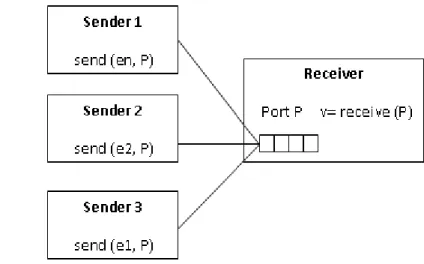
In synchronous message passing (Figure 5)sender and receiver has to wait for each other to transfer the message. That is, the sender will not continue until the receiver has received the message [15]. The synchronous communication has two advantages:
o Program can be simplified (there is a synchronization point between sender and receiver on message transfer)
In asynchronous message (Figure 6) passing the message is delivering from sender to receiver without waiting for the receiver to be ready [6]. The advantage of asynchronous communication is a follow:
o Sender and receiver can overlap computation because they do not wait for each other
Figure 5: Synchronous message‐passing channel Figure 6: Asynchronous message‐passing channel
2.7
Protocol
Protocol is a set of rules to control the data (files) communication in a DFS in order to perform the given task [8]. A protocol can be treated as a kind of agreement or procedure rules about the exchange of file message in a DFS. Additionally to this the protocol determines whether the network uses a peer-to-peer or client-server architecture. If an agreed-upon format data is transmitted between two devices then the protocol determines the following:
o How a sender indicates to finish sending a file o How a sender indicate to finish receiving a file o Error type checking mechanism
o Data compression method
Now we have some sense of how this protocol is turned into a distributed file system and its importance in client/server communication. Let us also consider a simple application which reads a file. In this application the client side tracks open files, and translates application request into set of protocol messages. The server simply responds to each protocol message in order to complete the client request. In DFS system protocol plays the same role, and provides sufficient communication between client and server.
In general the Internet and computer networks use protocols very extensively. Some of the protocols are very simple but others are complex and intellectually deep. The DFS is a very complex system itself so protocol will play crucial role in effective communication.
Chapter
3:
System
Development
Methodology
and
Technology
The purpose of this chapter is to answer: why the methodology is so important in software building process? Well according to [4] the software engineering is the practice of using selected process techniques to improve the quality of software development effort. This is based on the assumption, that a methodical approach to software development result in fewer defects and, therefore, ultimately provides shorter delivery times and better value.
The challenge in selecting and following a methodology is to do it wisely – to provide sufficient process disciplines to deliver the quality required for project success, while avoiding steps that waste time [4]. One system development methodology is not necessary suitable for use by all projects. I chose two methodology techniques which are best suited to this project, and I described them below.
3.1
Boehm
Spiral
Model
Boehm Spiral model was chosen for the development of the system. The spiral model uses incremental development, with the aim managing risk. In the spiral model, developers define and implement features in order of increasing priority. An initial version of the system is developed, and then repetitively modified based on input received from evaluations. The development of each version of the system is carefully designed using the steps involved in. With each iteration around the spiral (beginning at the centre and working outward), progressively more complete version of the system are built [4].
A key advantage of this approach is that the major difficulties are resolved at an early stage. In the event that some of the difficulties cannot be resolved using one approach may be pursued. In the event that the difficulties cannot be resolved at all, the project requirements may need to be modified so that a time effective and feasible solution can be developed.
This model was selected because as I mentioned above spiral model has some advantages which are best suitable for this project. Also, the model is versatile for the project dynamics and progressive development design. It is wise to build the various parts in a predefined order. This will give the project the versatility of a plug-in type project, meaning the ability to have core system and various add-on parts. This way it is much easier to test the various parts separately.
The project requirements remain that the end product should be able to provide system with client-server functionality in the form of packages of classes. Following the requirements gathering phase, an initial static analysis took place. The products of this analysis were the initial class diagrams of the core of the Client package with the system for clients. During this phase, some of the class diagrams turned out to be erroneous, so they were plotted again. This procedure was repeated many times for the Client package until it reached an acceptable state. The same technique was used during the implementation of the remaining packages. This is how the idea behind the spiral model was used in the project.
3.2
Rapid
Application
Development
RAD
The idea of RAD was chosen to implement the client-server model for DFS. The challenge facing software engineers and development organization can be summarized as more, better and faster [Shari]. The RAD development path attacks these challenges on providing systems faster, while reducing cost and increasing quality.
The RAD methodology was chosen for this project because it works when the work can be broken into manageable chunks like in this project. The advantage is also that the model work fine when the project is developed in small team (1 person).
3.3
Prototyping
Prototyping was chosen to build the interface for client and server. The rationale for choosing this approach is discussed below.
A prototyping methodology is a software development process which allows developers to create portion of the solution to demonstrate functionality and make needed refinements before developing the final solution [4]. It is also excellent way to confirm understanding of the requirements and ensure that the proposed solution is consistent with business expectations.
The RAD prototyping is very effective way of eliciting requirements difficult to obtain from customers or by other means [4].
I chose this approach because prototyping methodology is suitable for implementing distributed systems, and can very quickly help confirm system navigation and other user interaction
requirements. Prototyping allows the designer to obtain feedback from the users early in the project. During the project I develop several prototypes for the system after when I choose the best which matched the software specification.
3.4
System
Development
Technology
The DFS will be written in Java because Java is a powerful platform for developing distributed systems. That’s why the project title is Java Distributed File System (JDFS). Java is one of the most popular programming languages used nowadays. Java provides all the necessary features for the advance network programming. Further study about Java suitability for distributed file systems is provided in Chapter 5: Java DFS.
The client and server will be coded in Eclipse because this software provides all advanced features for programmers and is delivered as Open Source software.
Chapter 4: Current System Analysis
The peer-to-peer and client-server are two architectures used for distributed file systems. This chapter describes and perform analysis of two systems most widely used today: Sun’s NFS and Hadoop DFS. The analysis mostly is based on the type of architecture used.
4.1
Sun’s
NFS
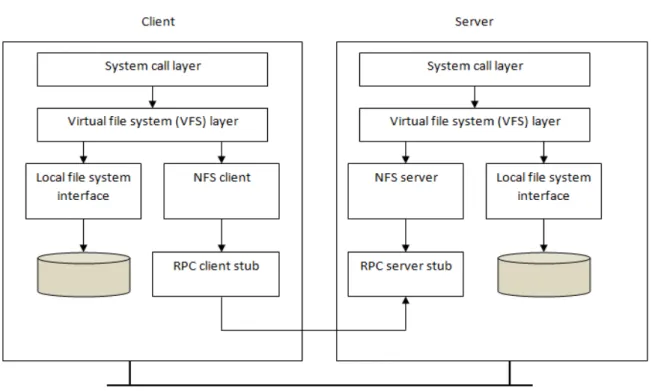
The idea of distributed file system was partially adopted by Sun Microsystems in developing their Network File System (NFS) for Unix-like operating system. This is a distributed file system for mainly local area networks-LAN) [11]. Clients in such distributed system have transparent access to remote file on a LAN under Unix. Today NFS implementation can be applied in almost all operating systems and computers including non-Unix systems, such as Microsoft Windows, Macintosh or MS-DOS.
In defining NFS, Sun took an unusual approach: instead of building a proprietary and closed system, Sun instead developed an open protocol which simply specified the exact message formats that clients and servers would use to communicate [12]. Then different groups could develop their own NFS servers and thus compete in an NFS marketplace. This approach works fine and today there are many companies that are selling NFS servers such as: IBM, EMC or NetApp.
4.1.1 Sun’s NFS Architecture
Figure 7: The Sun NFS architecture
4.1.2 Protocol
This section discusses the classic NFS protocol. Versions of different protocols are not considered here because most of the changes are shared by all versions.
NFS protocol provides a set of RPC’s (Remote Procedure Call) for remote file operations and they are as follow:
o Looking up a file within directory – views the files as a root what provides the transparent access to all directories and files.
o Manipulating links and directories
o Creating, renaming, and removing files – clients can create and remove files as specified in their access rules.
o Getting and setting file attributes - allows getting and setting different set of attributes to different files: rename, delete, write,
o Reading and writing files – allows files to be read and write by clients.
4.1.3 Advantages of Sun’s NFS
The Sun NFS was initially designed to meet the following design goals:
o Access transparency – the NFS API is identical to that used by local operating system. o Scalability – NFS can be built to handle very large real world loads in efficient manner. o File replication – read only replicas are supported
o Hardware and OS heterogeneity – NFs is implemented on nearly all known operating systems and hardware platforms.
4.1.4 Disadvantages of Sun’s NFS
Despite numerous advantages, Sun’s NFS has also some disadvantages and they are as follow:
‐ Migration transparency is not fully achieved within NFS, so it does not fully support mobile devices.
‐ Files replication with updates is not supported within NFS.
‐ Location transparency is affected because NFS does not enforce a single network so each client sees the file system their way.
4.2
Hadoop
DFS
Hadoop comes with a distributed file system called HDFS, which stands for Hadoop Distributed File System, and provides framework for the analysis and transformation of very large data sets. An important characteristic of Hadoop is the partitioning of data and computation across many (thousands) of hosts, and executing application computations in parallel close to their data [7].
4.2.1 Hadoop DFS Architecture
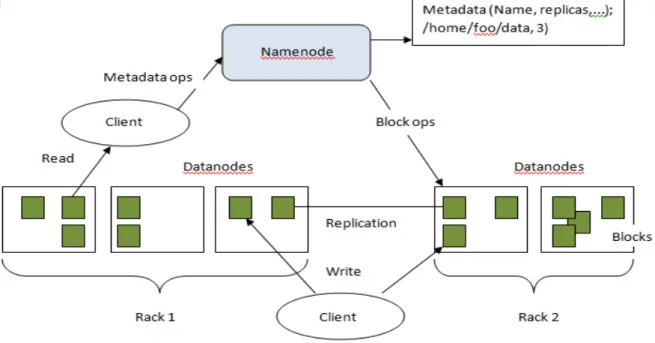
An HDFS consist of a single NameNodes, a master server that manages the file system namespace and regulates access to files by clients. In addition, an HDFS consist a number of DataNodes, which manage storage attached to the nodes that they run on. In HDFS a file system namespace allows user data to be stored in files. Internally, a file is split into one or more blocks and these blocks are stored in a set of DataNodes. The NameNode executes file system namespace operations like opening, closing, and renaming files and directories. The DataNodes are responsible for serving read and write request from the file system’s clients. The DataNodes also perform block creation, deletion, and replication upon instruction from the NameNode. The Figure 8 below shows the basic architecture of HDFS.
Figure 8: HDFS architecture
4.2.2 Advantages of Hadoop DFS
As mentioned above the HDFS is designed for storing very large files with streaming data success patterns, running on clusters of commodity hardware. The more detailed explanations for those properties are given below:
o Very large files – it means that we can operate with files that are measured in hundreds of megabytes, gigabytes or terabytes.
o Streaming data access – it means that HDFS is built around idea that most efficient data processing pattern is a write – once, read – many times pattern. A dataset is typically
generated or copied from source, and then various analysis are performed on that dataset over time [14].
o Commodity hardware – it doesn’t require expensive hardware to run properly. It’s designed to run on cluster of commodity hardware for which the chance of node failure across the cluster is high, at least for large clusters [14].
4.2.3 Disadvantages of Hadoop DFS
Despite numerous advantages, Hadoop has also some disadvantages and they are as follow:
‐ Hadoop is less than ideal for some of the mobile aspects of mobile-cloud computing. It implements much of the functionality that our platform requires, but it does not cover all of the requirements.
‐ Hadoop is not conservative in CPU and memory usage because originally was designed for I/O bound jobs, i.e. those in which reading, writing, and transferring data are the most time-consuming operations.
‐ Hadoop uses technologies that are not well suited for mobile devices.
Chapter
5:
Initiation
Project
A feasibility analysis involves a detailed assessment of the need, value and practicality of a proposed enterprise, such as systems development [12].In Software Engineering, feasibility analysis is used for definition of the system and its business requirements. It also identifies the essential risks associated with the project that must be addressed. Different project request decides different process and format for the feasibility analysis, In JDFS, it includes three techniques: technical feasibility, operational feasibility and Economic Feasibility. The relationship among them shows in Figure 9.
5.1
Technical
Feasibility
Technical feasibility is the first technique in the feasibility analysis of JDFS. It essentially
concentrates on the extent which JDFS can be successfully designed, developed and implemented
Figure 9: Relationship of feasibilities
For this purpose, it is necessary to analyze the technical features of JDFS expected to satisfy requirement in Chapter 4.
o Followed the trace of conventional client server DFS, JDFS realized the communication among clients with servers in network
o JDFS will be developed on Java platform with Java’s Object-oriented and Network-oriented application techniques.
o Based on conventional DFS, JDFS will be applied on different operating environment, such as Windows, Linux, and Mac OS, etc.
o JDFS also realizes portability which is one of most significant features of software
engineering design. From installation to implementation, it ensures that users feel easily and comfortably during file operations.
o Extensibility and saleability also should be considered in JDFS. For this goal, the Java techniques will be illustrated in the design of JDFS.
o Because of the apparent of simultaneously data passing, Java concurrency communication techniques application will be found in design process.
5.2
Operational
Feasibility
o Free toolkit is that the system is economical to be developed. Its design environment is based on Java Runtime Environment that is free to download from Sun company website, so is J2SDK.
o Performance is that the design and implementation of JDFS should avoid the network bottlenecks, so that network traffic is maintained at proper level. Therefore, the users can maintain their JDFS effectively at a user level.
o Information is stored accurately in JDFS however the computer is on-line or not. The users can manipulate the files operation in a friendly user interface.
o Security is one of the most important factors in a system development. JDFS allocates username and passwords to each computer in the network. Accordingly, if users want to access the data shared in JDFS, they must log in certain specific computer by the authorized identity.
5.3
Economic
Feasibility
A systems development project may be regarded as financially feasible or good value to the organisation if its anticipated benefits outweigh its estimated costs. The costs and benefits for economic feasibility can be break down into four categories: development costs, operational costs, tangible benefits and intangible benefits. The potential cost and benefits were identified and they are showed in Table 1 below:
Development Cost Operational Cost
Development Team Salaries £500,000 Hardware and Software £150,000 User Installation £0
Data Conservation Cost £3,000
Software Upgrades £2,000 Hardware Upgrades £10,000 Operational Team Salaries £40,000 User Training £2,000
Tangible Benefits Intangible Benefits
Increased Sales ≥ £300,00 Reduction in Staff ≥ £10,000 Reduction in IT Cost ≥ £30,000
Increased Brand Recognition ≥ £100,000 Higher Quality Products ≥ £40,000 Improved Customer Services ≥ £80,000
Table 1: Economic feasibility analysis in order to see if the project is worth to invest or not
Development Costs + Operational Costs = £707,000 Tangible Benefits + Intangible Benefits = £290,000
Because some cost will be reduced or saved in the second year, such as Hardware and Software cost, User Training cost, which makes the benefits stay or exceed the current cost next year. Obviously, the benefits will overweigh the cost of JDFS development in two or three years. Therefore, the
Chapter
6:
Java
DFS
The original Java motivations were concerned mainly with reliability, simplicity and architecture neutrality. The Sun Microsystems was developing Java seeing it as a programming language supporting networking, security and multithread operations. All these features make Java powerful development environment for distributed systems.
Java Distributed File System (JDFS) is one of the most powerful systems based on the Java platform. JDFS can be treated as a derived DFS from conventional DFS from which it inherits some features in nature such as:
o Transparency – the logical storage locations of shared files and directories are not revealed because the users only access the shared files and directories by their logical name.
o Synchronous message passing – when remote shared file or directory is modified by certain user, the machine can’t accept any more other processes to the machine where the file is stored. This is achieved by channel blocking between those two machines.
In this section, I review some of the features of Java that are particular interested in distributed applications. Due to the design of JDFS is based on Java platform and application techniques it also inherits the characteristic from Java, and they are as follow:
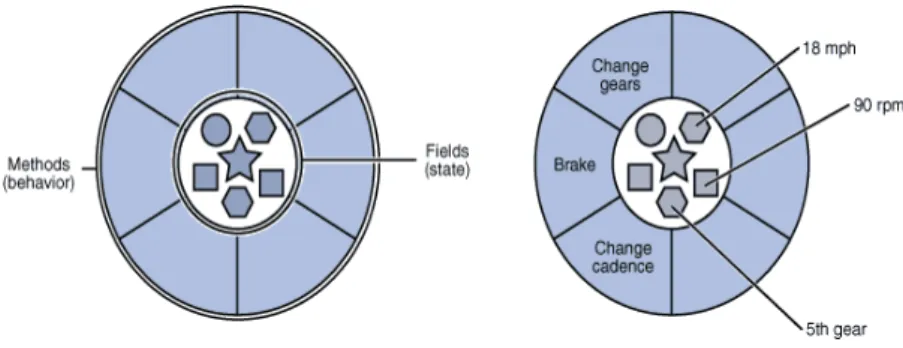
o Object – Oriented – according to [15] object technology is based on the assumption that human cognition relies on the perception of reality in the form of objects – objects that have characteristic properties and show specific behaviour, that are related to each other, and that can interact amongst themselves. From an object – oriented software development
perspective, an object is the IT-suitable representation of real – world object obtained by applying the principle of abstraction. Based on this definition each of machine, client, file and directory can appear as an independent object in JDFS.Each of those object have their own methods and variables which affects the data communication and system execution in JDFS.
Figure 10: A software object and bicycle representation according to object – oriented concept (diagram downloaded
from http://download.oracle.com/javase/tutorial/java/concepts/)
‐ The class can be moved to the local host then the local implementation of the interface can act as a surrogate or stub. And the calls are forwarded to the interface over the network to the remote class.
o Platform Independence – Java stand for programming language and as well can be called platform so it allows code to be compiled into platform – independent byte – codes using Sun’s Java compiler or any other available compilers on the market. Java is an independent software application and suitable to any operating system such as Windows, UNIX or Mac. o Fault Tolerance Through Exception Handling – Java supports throwing and catching
errors and exception, both systems – defined and applications-defined. Handling an exception is a powerful tool in distributed system because it allows wrapping any potential exception – causing code with try/catch/finally statement, where each catch clause handles a particular type of exception. It often occurs that called method generates an exception. Then, an
exception is going to be handled by a catch clause in a calling method. Whether, the try block runs the code without problem, or exception gets thrown, but the code in the finally block is always called. The purpose of finally block could be to clean up any resources created in the try block, but this is one of the examples using finally.
Also, the Java use exception handling to characterize, diagnose, and potentially recover from them. It is possible, because an exception is represented as an object in Java environment, and it can be carried with data and other methods that can be used for specific tasks.
o Network – Java has strong support towards application that requires access to network. Java application can access object across network via URL as easily as access local files. Without a doubt the Java is one of the best choices for developing DFS.
The Figure 8 below shows a simple network application involving client and server. The communication model is very simple; the client sends commands to the server then the server executes the commands and sends commands to the client. This is one of the examples how Java can be exploited for distributed applications. When we are going to write the actual code our implementation usually includes the following elements:
‐ A set of command objects to represent our command protocol between the client and
server
‐ A subclass of java.io.DataInputStream that understands out protocol
‐ A client that can send commands in the right format to the server, and a serve that can
accept client connection, read commands and send response back to the client
Figure 11: Simple Client/Server model
o Security – Java provides two kinds of security:
‐ Runtime environment – means that Java Virtual Machine places restrictions on program
operation and capabilities. It is allowed virtually no access to the local file system, very restricted network access, no access to local codes and libraries outside of the Java environment, and restricted thread manipulation capabilities.
‐ Secure remote transaction – means that Java provides capability to add user
authentication and data encryption to establish secure network links, assuming that the basic encryption and authentication algorithm already exist. An example how this can be accomplish is to extend the BufferedInputStream and BuffredOutpuStream classes in java.io to authenticate and decrypt incoming data, and to sign and encrypt outgoing data. Java itself provides secure network communications but also Java can be extended in order to provide more secure communication in applications where security plays crucial role. o Reusable – Java provides number of packages of classes which can be used directly and
frequently. Additionally, Java permits the users specify their own classes which can cooperate with Java’s classes to meet user’s request. Because the classes of Java can be reused and specified by users, so the time and effort of developers is reduced to minimum.
o Multi – thread – Multi – thread is one of the most important characteristic in Java systems, and it is always applied in real – time operating environment. Any class that we create can extend the java.lang.Thread class by providing its own implementation of run() method. When the thread is started, this run() method will be called and your class can do its work within a separate thread of control.
By calling a Thread object’s start() method a Java application tells the Java Virtual Machine (JVM) to start a separate thread of execution. Once started by the JVM, the thread exist until the run() method terminates. The thread concept is very important in every distributed system and becoming necessity in software development today. Threads are fast to set up, require less memory, and allow better encapsulation.
o Feasibility – Java programs can be easily modified and updated according to user’s requirements.
Chapter
7:
Requirement
Analysis
A requirement is simply a statement of what the system must do or what characteristic it must have. From different point of view, a requirement can be broadly divided into user requirement and system requirement. User requirements, sometimes called business requirements, focus on business user needs. In design level, user requirements evolve to become more technical. It describes how the system will be implemented.
7.1
JDFS
User’s
requirements
The JDFS system has to implement the following user’s requirement:
o Security: Each user must log in his/her system by correct username and password, which guarantees security of local and remote shared files and directories. Also, the file with user’s login details never leaves the local machine what make the security higher.
o Communication: JDFS is suitable for all of users who are familiar with different operating environment, such as Windows, Linux. So JDFS can be set up in the most of operating systems.
o Accuracy: In JDFS, the files and directories are updated in real time, wherever they are stored. So JDFS ensure users can access to the current shared data accurately during communication.
o Constancy: JDFS solve the trouble of data confliction in synchronous access, i.e. when a specific file or directory is being modified by user; others cannot make any modification on it, such as rename, edit, delete and cut.
o Error Indication: If a user makes some mistakes on file operation in JDFS, there will be a notice dialog with system message provided for leading user to correct his/her operation. o Friendly GUI: Graphic User Interface of JDFS’s design concentrates on two issues: readable
and friendly. User can easily deals with file operations through the GUI components. User also can enjoy the remote and local shared data communication by friendly platform with other computers in JDFS.
o Flexible Access: Accessing to the remote shared files and directories is as easily and flexible as those happened in local machine. So users can be hardly aware of the file or directory that they access comes from remote machine in JDFS.
7.2
JDFS
System
Requirements
From the developer’s perspective, requirements are usually called system requirement. Actually, there is no obvious distinction dividing a user requirement and a system requirement. Requirements evolve from detailed statements of the business capabilities that a system should have to detailed statement of the implementation in the technical way. System requirement can be break down into functional requirement and non-functional requirement in nature.
7.2.1 Functional Requirement
A functional requirement relates directly to information it needs to contain or a process the system has to perform. In JDFS, the most of functional requirements focus on the file/directory operations and system features.
o Share: A file/directory operation can be executed on local machine in JDFS. It is used for selecting directory to be shared folder of the shared recourse on local machine.
o Cut: A file/directory operation can be executed on local machine and remote machine, in which a user moves local or remote files/directories into buffer, awaiting the “paste” file
operation to accept them. Precondition is that the remote file needs ‘cut’ and ‘delete’ permissions, and nobody is using the file/folder now.
o Copy: A file/directory operation runs on local machine and remote machine, in which a user can copy a remote shared file or directory by the permission of “copy”, and sends the copy of the file/directory into buffer, awaiting the “paste” file operation to accept them.
o Paste: A file/directory operation runs on local machine, where it moves the file or directory from buffer to the destinations.
o Delete: A file/directory operation can be applied on local machine and remote machine. If user wants to delete a local file or directory, “delete” operation can be applied directly. Whereas, the user must send requests to the computer in which the remote shared
file/directory is stored. The host of the file/directory received the request and then delete the file/directory. The pre-condition of “delete” operation is that permission of the remote shared file/directory is “delete”, and there is nobody access the file simultaneously.
o Read: A file operation is allowed on local machine and remote machine. Users can read the local files directly, while they must have “read” permission to read the remote shared files in JDFS. This operation allowed the multiple accesses to a remote shared file.
o Write: A file operation is applied on local machine and remote machine. User is able to edit the local files directly, whereas they have to get the permission of “write” to edit the remote shared files. The precondition is that nobody edits the same remote shared file synchronously or the file is being used.
o Rename: A file/directory operation runs on local machine and remote machine. User can rename local file/directory directly. Contrary to the remote shared file/directory, they have to send the request to the remote computer where the shared file/directory is stored. The host of the remote computer receives the request, and then rename the file.
o Set Permission: A file/directory operation is applied on local machine, in which a user is allowed to change the permission of the local share file/directory.
o Path of resource: A system feature is located on local machine. It is responsible for displaying the logical path of local shared resource and remote shared resource.
o File Permission: A system feature is addressed in local machine. It is capable of showing the permission of the remote shared file or directory at present.
7.2.2 NonFunctional Requirement
Non-functional requirements reflect the behavioural characteristics that the system must have, so it can be divided into operational requirements, performance requirements, and security requirements.
7.2.2.1 Operational Requirements
o
JDFS will operate in Window, Linux, etc.
o JDFS is capable of reading and editing most of types of the file, such as Word documents, HTML, Text, Excel tables and so on.
7.2.2.2 Performance Requirements
o In JDFS, when local machine received requests from other remote machines, the responses will be sent back as immediately in order to void the bottleneck problem.
Chapter
8:
Functional
Modelling
Functional models describe the interaction between user and the Java Distributed File System (JDFS). In object – oriented system development two types of models are used to describe the functionality of JDFS: use case diagram and activity diagram.
8.1
Use
Case
Diagram
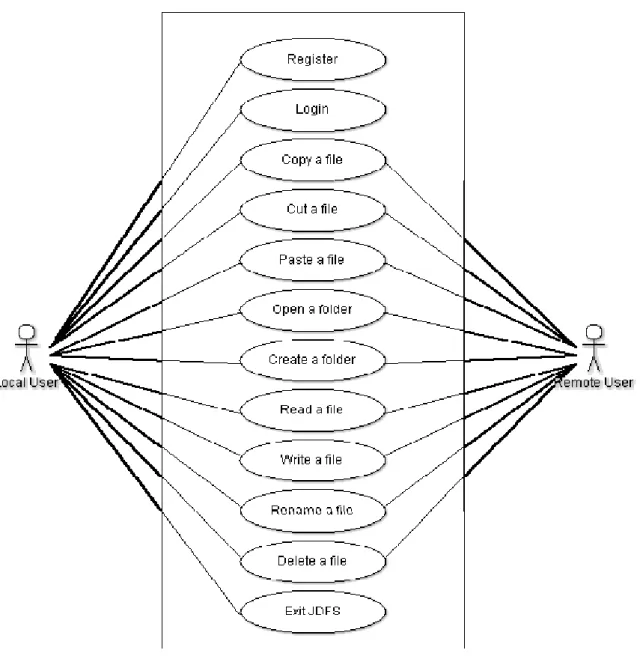
According to [5] a use case diagram is used to model the interaction between a system and its internal entities (actors) in terms of use cases. The diagram below was designed as first UML diagram for the system because it helps better understand its intended behavior.
In JDFS I distinguished two actors whose play the crucial roles in distributed file system. The actors are as follow:
o Local User – user who can perform local file operation without limitation of file access permissions on the local machine in JDFS.
o Remote User – user who operates the files located on remote machine through file access permissions on local machine in JDFS.
Figure 12: Use Case Diagram for JDFS
8.1.1 Detailed Use Case Diagram
Detailed Use Case Diagram was produced as well the best model the software specification in terms of user and systems interaction.
a) Use Case Name: Register
Actors: Local User
Description: User need to register to the server in order to obtain username and password
Precondition: None Basic flow of events: 1. The system displays a registration form
to user.
2. The user fill the form in and then press a submit button.
3. The form is validated in term of required data.
4. The system display confirmation dialog and link to login site.
Post condition: The system provide link to login window.
Table 2: Table shows detailed use case description for ‘registration’ use case b) Use case Name: Login
Actors: Local User
Description: User need to login to the system in order to be able to upload and download file.
Precondition: None: User is registered
Basic flow of events: 1. The system displays a registration form to user.
2. The user fill the form in and then press a submit button.
3. The form is validated in term of required data.
4. The system displays confirmation dialog and link to login site.
Post condition: The system provide link to login window
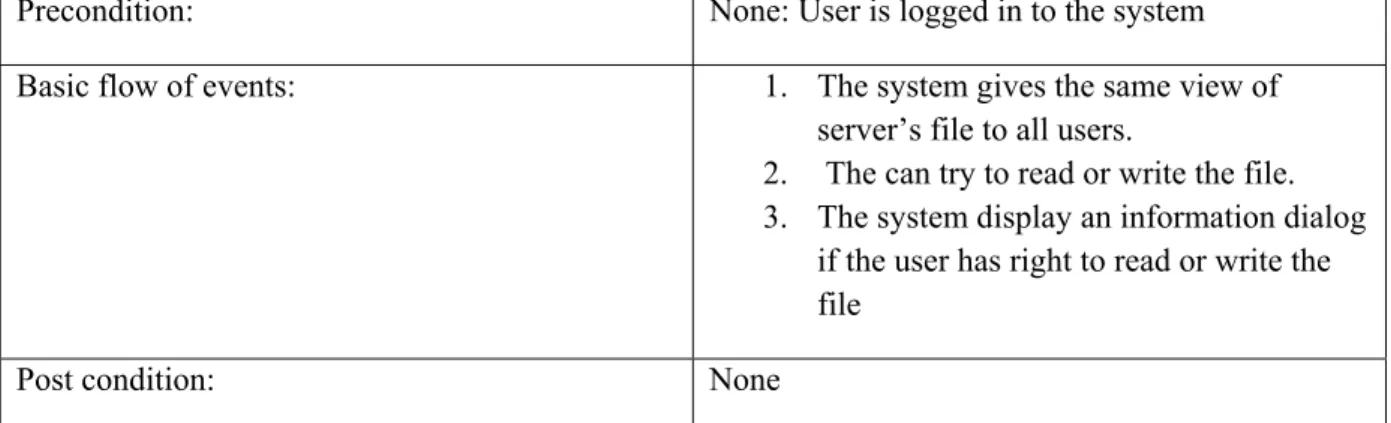
Precondition: None: User is logged in to the system Basic flow of events: 1. The system gives the same view of
server’s file to all users.
2. The can try to read or write the file. 3. The system display an information dialog
if the user has right to read or write the file
Post condition: None
Table 4: Table shows detailed use case description for ‘read and write’ use case.
d) Use case: Copy/Paste/Rename/Delete a file
Actors: Local User, Remote User
Description: User need to login to the system in order to be able to see all files.
Precondition: None: User is logged in.
Basic flow of events: 1. The system gives the same view of server’s file to all users.
2. The system displays buttons in order to copy, paste, delete or rename a file. 3. The system display an information dialog
if the user has no right to copy, paste, rename or delete a file.
Post condition: None
Table 5: Table shows detailed use case description for use ‘copy/paste/rename/delete a file’ use case. e) Use case: Open a folder
Actors: Local User/Remote User
Description: User can open any folder from disk or server
Precondition: None: User is logged in.
Basic flow of events: 1. The user double clicks on a file. 2. The system opens the file and the user
can view the file.
Post condition: None
Table 6: Table show detailed use case description for ‘open a folder’ use case. f) Use case: Crete a folder
Description: User can create a folder on local disk or on server
Precondition: None: The user is logged in.
Basic flow of events: 1. The user press the button ‘create directory’.
2. The system confirms the operation by displaying dialog with information that folder was created or not.
Post condition: None
Table 7: Table show detailed use case description for ‘create a folder’ use case. g) Use case: Exit JDFS
Actors: Local User
Description: The user is able to exit the system any time Precondition: None: The user can see the system’s interface. Basic flow of events: 1. The system gives the exit button in the
right top corner of system’s interface. 2. The user press the exit button and
system display dialog if the user is sure to exit the system.
Post condition: None
Table 8: Table show detailed use case description for ‘exit’ use case.
Chapter 9: Structural and Behavioural Modelling
9.1
Class
diagram
Class diagram model the classes or building blocks used in a system [5]. Class diagram illustrates the specification for the software classes and interfaces in an application. Typical information includes in a class diagram are (a) classes, associations and attributes, (b) interfaces, with their operation and constants , (c) methods, (d) attributes type information, (e) navigability and (f) dependencies.
The class diagram also shows the association and navigability that are necessary to the class diagram. And in the class diagram each attribute is fully typed appropriate data type.
9.1.1 Overall System Decomposition
Figure 13: Overall system decomposition showing the main packages and relationships among them
The main packages identified with their functionality description are provided below:
• dist_client – package keeps client’s classes. They are mainly responsible for displaying GUI to system’s users such as registration, login and main system window.
• dist_server – package keeps the server’s classes. It is mainly responsible to run the server program in machine background.
• dist_system – package keeps classes which are responsible for controlling access to the system by different users.
• dist_file – package keeps classes which perform operation on files such as: control the access to files by different users, perform file replications or specify the file rights.
• dist_communication – package keeps all classes responsible for sending and receiving massages between client and server.
However, to the main packages identified before I added two more, because future consideration required it. The packages and their functions are as follow:
• helpers – package keeps one class which is responsible for producing and gathering servers logs. Logs will be written in a doc file called serverLogs. The file can be viewed in order to know what is going wrong with the server operations.
• splitter – package keeps two classes responsible for file splitting from different servers. As we know files has to be spread into several pieces across different servers in order to protect the files against server failures.
a) Client Class Diagram – dist_client
The client portion of a system corresponds to the system run by individual users. Because system user interacts with the client, the client program is usually much fancier than the server in regards how information is displayed. The basic responsibility of the client is connect to the server and