© 2013 Dynaway A/S
Enterprise Asset Management
for Microsoft Dynamics® AX 2012
All rights reserved. No parts of this work may be reproduced in any form or by any means
-graphic, electronic, or mechanical, including photocopying, recording, taping, or information
storage and retrieval systems - without the written permission of the publisher.
Products that are referred to in this document may be either trademarks and/or registered
trademarks of the respective owners. The publisher and the author make no claim to these
trademarks.
While every precaution has been taken in the preparation of this document, the publisher and
the author assume no responsibility for errors or omissions, or for damages resulting from the
use of information contained in this document, or from the use of programs and source code
that may accompany it.
In no event shall the publisher and the author be liable for any loss of profit or any other
commercial damage caused or alleged to have been caused directly or indirectly by this
document.
Table of Contents
Part I Introduction
4
Part II Enterprise Asset Management
6
... 6 1 Objects and Work Orders
... 9 2 Functional Locations ... 11 3 Spare Parts ... 11 4 Checklists ... 12 5 Condition Assessment ... 13 6 Consumption
Part III Preventive and Reactive Maintenance
14
Part IV Work Order Scheduling
16
Part V Cost Control
19
Part VI KPIs
21
Part VII Security Roles
22
Part VIII Industries
23
Part IX About Dynaway
24
1
Introduction
Enterprise Asset Management is an advanced module for managing assets and maintenance jobs in Microsoft Dynamics® AX 2012. Enterprise Asset Management is developed by Dynaway A/S and integrates seamlessly with several modules in Microsoft Dynamics® AX 2012.
In Figure 1 you will see a graphic illustration of the interfaces to other modules in Microsoft Dynamics® AX 2012. Dynaway Enterprise Asset Management Project management and accounting Inventory and warehouse management Product information management Production control Master planning Fixed assets Accounts payable (Procurement) General ledger Organization administration Human resources Figure 1
Enterprise Asset Management allows you to efficiently manage and carry out all tasks related to managing and servicing many types of equipment in your company, for example, machines, production equipment, and vehicles. Enterprise Asset Management can also be set up for Asset Service Management with the main focus of servicing customer equipment.
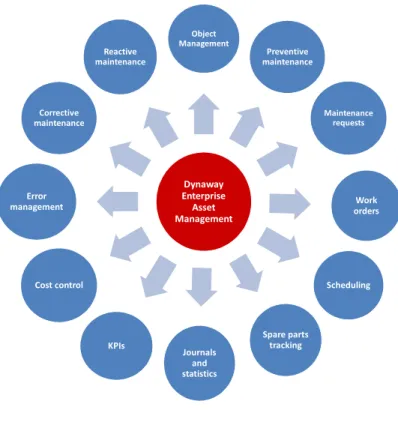
Figure 2 shows an overview of the key functionality covered by Dynaway Enterprise Asset Management. Dynaway Enterprise Asset Management Object Management Preventive maintenance Maintenance requests Work orders Scheduling Spare parts tracking Journals and statistics KPIs Cost control Error management Corrective maintenance Reactive maintenance Figure 2
2
Enterprise Asset Management
Dynaway Enterprise Asset Management (EAM) comprises many features that enable your company to keep your machinery running continuously without unnecessary interruptions or breakdowns. In the following sections, we will introduce you to some of the core functionality in our asset
management solution.
2.1
Objects and Work Orders
The central parts of Dynaway Enterprise Asset Management (EAM) are objects and work orders. An object is a machine or machine part that requires continuous maintenance and service. Objects can be created in a hierarchical structure. Maintenance jobs can be planned at all levels in the object structure. Various product information data can be set up on an object or a work order.
Here is a list of some of the data that can be created on an object or a work order:
Jobs Product/Model relations Location Spare parts Check lists Measuring points Condition assessment
Fault symptom, cause, and remedy
Maintenance sequences (based on time or counters)
Production stop
Technical specifications
Consumption (items, hours, costs) Notes
Objects and related sub objects can be created in a hierarchical structure to display relations and dependencies of objects. Maintenance jobs can be related to all levels in the hierarchical structure.
Copy and Move Objects
In the All Objects list page, objects are shown in hierarchical order in the Object column. Parent objects are displayed in the Parent column. The object hierarchy for a selected object is also shown in a tree view in the Object tree FactBox. It is possible to copy an entire object hierarchy. This is useful if your company has several object hierarchies with similar object structures, and you want to quickly create a number of similar object hierarchies.
example, your company wants to handle
moving an object permanently because it has a new location
moving an object temporarily from an object hierarchy for refurbishment and then re-inserting the refurbished object in the object hierarchy
Figure 3
In order to manage maintenance jobs carried out on objects, you create work orders. A work order consists of one or more work order lines. Each work order line contains an object that requires maintenance, and a related job type, for example, 10,000 km, 50,000 km, 1-year overhaul, or safety inspection. In the figure below you will see an overview of the work flow connected to a work order.
Work Order - Flow Diagram Check / verify work order data Schedule work order / Resource planning NOTE
Three resource types are available in Work order scheduling: Human resources Machines Tools Update work order stage Complete service job Post journals (consumption) Update work order stage NOTE
Ended = Service job completed and journals posted.
Finished = Close the work order.
NOTE
Work orders can be created in different ways:
Automatically using the Schedule preventive maintenance form, for maintenance sequences and rounds set to ”Auto create”.
Create from object calendar, based on maintenance sequences, requests, or rounds. Create a work order manually.
Create a related work order.
Create a work order from the All requests list page. Create work
order and work order lines
NOTE
Scheduled = Resource planning has been completed.
In process = Service job ready to be carried out.
NOTE Hours Items NOTE If necessary, edit or update information related to the work order or object: Forecasts Tools Notes Faults NOTE Checklist Production stop Condition assessment Faults Figure 4
2.2
Functional Locations
Functional locations are used to manage objects on locations, including track object costs on functional locations. Functional locations are structured hierarchically, and locations can have sub locations. The functional location structure is static; locations cannot change place. Objects can be installed on functional locations and, if required, the objects can later be installed on another functional location.
Functional locations are elements of a technical structure, for example, functional units within a system. Here are examples of how you can use functional locations:
Functional (user-oriented, manage objects with similar behavior)
Process-related (work flow-oriented) Spatial (geographical locations, sites)
Object costs always follow the location of the object meaning that if you install an object on a new functional location, the object automatically uses the financial dimensions related to the functional location. Therefore, object costs are always related to the functional location to which the object was related at any given time. This automatic handling of financial dimensions ensures complete
traceability of costs when your company performs project controlling and reporting on functional locations.
How you build your functional location hierarchy is based on your company's requirements for maintaining internal equipment or servicing customer equipment. The two figures below show examples of functional locations - based on geographical locations and customers.
Site A Production Line 01 Production Line 02 Work center 02-A Work center 02-B Work center 02-C Conveyor belt Electrical wiring Furnace Valves Packing Site B Production Line 10 Production Line 11
Functional location based on sites
Customer
A
Office DK1
Office DK2
HP Printer
M601-02A
HP Printer
M601-02B
HP Printer
M603-02A
Paper tray
A4
Paper tray
A3
Feeder
Controller
Power
supply
Customer
B
Office DK1
Office DK2
Functional location based on customers
Figure 6
Functional locations provide traceability of objects in relation to requests, work orders, fault registrations, condition assessments, production stop registrations, and object counter registrations.
2.3
Spare Parts
Spare parts are managed in the Product information management module in Microsoft Dynamics AX 2012. Spare part consumption is registered on work orders. Replenishment of stock, including the spare parts ordering process, is done using standard Microsoft Dynamics AX 2012 functionality.
Spare parts are set up on product models, which are related to objects. A spare part list can contain a list of approved spare parts as well as spare part alternatives to be used in case approved spare parts are not available.
Figure 8
When you have created a work order, it is possible to add approved spare parts to the work order, if required.
After you have completed a maintenance job, and item consumption has been registered on a work order, you will be able to track consumption of spare parts and other items used on the object. This functionality allows you to keep a complete item consumption record on all your objects. For
example, you can use the record to monitor if a specific spare part is often replaced, or keep track of which spare parts or other items are currently used on an object.
2.4
Checklists
Checklists and measuring points can be created to ensure that maintenance jobs are carried out correctly. For example, you want to ensure that safety precautions or special procedures relating to a particular machine type are observed.
Checklists are set up on job types. When you create a new work order line and select an object, the checklist related to the object is automatically transferred to the work order line. It is possible to define that a worker must attach his or her worker identification to each item in a checklist. This means that a job cannot be completed until the worker has signed off on all checklist items.
Figure 9
2.5
Condition Assessment
Condition assessment is performed at regular intervals. The primary objective is to create and maintain condition data on objects. Seen from a preventive maintenance perspective, it is important to monitor key information such as current condition and remaining life span. Furthermore, if you carry out condition assessment at regular intervals, you will be able to monitor and compare conditions on the machinery in your factory. You can make condition assessment registrations on objects and work orders.
Example: You measure vibrations on your machinery. After you have registered vibration measurements on various types of equipment, you can search for all registered vibration measurements within a particular range, on identical machines, or on all the machines in your factory.
Figure 10
Condition assessment templates are created and used as the basis for performing condition assessment. This is done to ensure that similar or identical objects are measured in the same way.
2.6
Consumption
When a maintenance job has been completed on a work order, the next step is to make consumption registrations and post journals. You can make registrations on the following
consumption types: Hours and items. The different consumption types are registered and posted in the Journal form. The journal setupis used for creating and posting separate journals for hours and items, which is handled in the Project management and accounting module.
3
Preventive and Reactive Maintenance
Preventive maintenance is a discipline involving planned maintenance jobs, for example, regular service, calibration, and inspections. You can create maintenance sequences and set them up on objects or functional locations. Also, you can read counter registrations (production hours or quantity produced) on your equipment and subsequently create counter registration records on the objects. The counter registrations are used in preventive and reactive maintenance scheduling.
Maintenance sequences can be set up on objects or functional locations. Instead of setting up maintenance sequences on objects, you can create rounds that include multiple objects on which you need to perform related types of maintenance jobs in the same work routine. Maintenance sequences are used for preventive and reactive maintenance on individual objects. Rounds are used for preventive maintenance on a group or a set of objects.
A maintenance sequence defines when a pre-planned preventive maintenance job is to be carried out on an object. Maintenance sequences can be related to objects, object types, functional locations, or functional location types. There are two types of maintenance sequences:
Counter Time
Examples of preventive maintenance sequences of type "Time" are "Repeated from start date", "Repeated from last work order", and "Linked from last work order" (repeated after every completed work order).
Examples of reactive maintenance sequences of type "Counter" are "Once reached
above" (validating against an upper limit) and "Once reached below" (validating against a lower limit).
The figure below provides an overview of the work flow from creating maintenance sequences to creating work orders for objects based on those sequences.
Flow Diagram: Schedule Preventive Maintenance Work Orders
Set up maintenance sequences on objects or functional locations Schedule preventive maintenance NOTE Generate calendar entries in the Object calendar. Convert calendar entries to work orders Create maintenance sequences NOTE In the Object calendar list page: Create work orders. NOTE Counter Time Create rounds Figure 11Requests and Notes
Workers can create requests and notes in the system, for example, if they discover the need for further maintenance or repair when they are performing a preventive maintenance job.
Object Calendar
The object calendar is used for scheduling all the expected preventive maintenance jobs to be carried out. The object calendar provides an overview of the following job types: Preventive maintenance jobs, rounds, and requests. When the calendar entries have been converted to work orders, you will be able to see the work order ID related to each job.
4
Work Order Scheduling
When a work order has been created and planned, the next step is to allocate the required
resources to complete the maintenance job. Resources are used in work order scheduling to make capacity reservations. Three resource types are available in Microsoft Dynamics AX 2012:
Human resources Machines
Tools
Work order scheduling can be carried out on two levels - advanced work order scheduling or
exclusive work order scheduling - depending on your requirements for resources for the maintenance job. The "Schedule exclusively" option is useful if, for example, a worker has called in sick, and you need to quickly reschedule jobs from one worker to another. The scheduling process in the
Enterprise Asset Management module is done by including different factors in the scheduling calculation:
Calculating scores for work orders and workers. The scores are set up in the Enterprise asset management parameters form.
Checking for matching competencies, meaning skills and certificates, required to perform the job. Skills and certificates are set up on workers in the Human resources module in
Microsoft Dynamics AX 2012.
Work Order Calendar
The work order calendar is used to get an overview of the work orders allocated to a resource. Work orders using resource types "Human resources", "Tools", and "Machines" are displayed in the list. The list can be used to get an overview of work orders allocated to a specific resource. You can also use it to find a work order allocated to a worker who, for example, called in sick this morning, and then quickly allocate another worker to the job.
Capacity Planning
In Enterprise Asset Management it is possible to calculate capacity load and item forecasts. You can make capacity load and item forecast calculations on
Object calendar lines
Work orders that have not yet been scheduled Scheduled work orders
This is useful if you want to get an overview of expected capacity load or expected item consumption (spare parts and other items required for completing work orders) for a specific period. Calculation of capacity load and item forecast can be done on all objects or selected objects. You can also make a calculation on a maintenance stop, or on a work order pool.
5
Cost Control
In Enterprise Asset Management, you can calculate costs to get a complete overview of actual costs compared to budget costs on
Objects
Functional locations
Work orders
Fault registrations
Actual costs are based on posted transactions. The date is the transaction date when the registration was recorded.
Figure 15
Figure 17
Figure 18
Note
The Original budget field shows budget costs from the work order forecast. The Actual cost field shows posted costs on work orders. The Committed cost field shows costs that your company is committed to in relation to work orders, but these costs have not yet been posted.
6
KPIs
In Enterprise Asset Management, you can calculate various Key Performance Indicators (KPIs) for objects and object types. KPIs are used to get an overview of performance on objects in relation to, for example
Uptime Downtime
Repair time
Mean Time Between Failure (MTBF)
Mean Time Between Stops (MTBS) Mean Repair Time (MRT)
7
Security Roles
In Microsoft Dynamics AX 2012, security roles are used to grant access rights to a user, allowing the user to access certain menu items and perform specific tasks. Security roles relate to Client Access Licenses (CAL) in Microsoft Dynamics AX 2012. You can read more about this topic in the white paper "Microsoft Dynamics AX 2012 Security Roles and Licensing" published by Microsoft®.
Below, you will see the roles and related tasks defined for Dynaway Enterprise Asset Management.
Enterprise Asset Management
Role Related tasks CAL level in Microsoft Dynamics AX 2012 Maintenance Manager Maintain base data and perform all
maintenance-related tasks
Functional
Maintenance Clerk Schedule work orders, register consumption, post journals, maintain work orders, create purchase orders
Functional
Maintenance Worker Print work order report, register consumption, change work order stage
8
Industries
Dynaway Enterprise Asset Management (EAM) is designed for maintenance management across various industries. Companies in the manufacturing, distributing, and servicing sectors will benefit from our EAM solution through powerful asset data management. Dynaway EAM helps maximize the reliability and availability of your assets.
The Dynaway EAM solution is a strong partner whether your primary focus is maintenance of buildings, machines, vehicles, facilities, or any other object that requires regular inspection or overhaul.
Here are a few examples of industries that currently profit from the Dynaway Enterprise Asset Management solution: Discrete manufacturing Process manufacturing Project manufacturing Chemical processing Metal processing Pharmaceuticals Food / Beverage Energy supply Bio diesel Mining
9
About Dynaway
Dynaway A/S is a privately held independent software vendor with an exclusive focus on providing valuable solutions for the Microsoft Dynamics AX platform.
Dynaway A/S was founded in 2001 as a spin-off from one of the largest Microsoft Dynamics AX Value Added Resellers (VAR) in Denmark. The intention of the spin-off was to create a software development powerhouse, capable of absorbing trends, ideas and partial solutions from the mother company and its end customers, and transform these into fully-fledged, high-quality software packages for the entire Microsoft Dynamics AX partner channel. Today, Dynaway A/S is owned by the EG group, a Microsoft Gold Certified Partner.
Dynaway designed and developed the Shop Floor Control module for Microsoft Dynamics AX, which has been divided into two separate modules, Manufacturing execution and Time and attendance, in Microsoft Dynamics AX 2012. Those modules are now owned by Microsoft. Production management has been a core focus area for Dynaway for more than 10 years.
Following our success with Shop Floor Control, we have developed Dynaway BLUE, which is a Manufacturing Execution System (MES) built directly into your Microsoft Dynamics AX solution, making costly integration to stand-alone MES systems and data integrity issues things of the past. The Dynaway BLUE solution is your real-time link to the factory floor; the perfect manufacturing execution companion for Microsoft Dynamics AX that will empower your shop floor for continuous improvement. Dynaway BLUE has achieved the Certified for Microsoft Dynamics (CfMD)
accreditation, the highest possible Microsoft accreditation for Microsoft Dynamics ISV solutions.
Another focus area for Dynaway is Enterprise Asset Management (EAM). Today, our solution sets the de facto standard for maintenance, service, and contract management in Microsoft Dynamics AX. The Enterprise Asset Management solution is sold through Microsoft Dynamics AX partners world-wide, and the solution is Certified for Microsoft Dynamics (CfMD).
In addition to the horizontal solutions for the shop floor and the asset management organization, Dynaway has developed VinCAD, an industry solution for door and window manufacturers, built into Microsoft Dynamics AX. VinCAD supports the very special make-to-order requirements set by the door and window industry and has proven its value among Europe’s largest manufacturers.
Dynaway has also developed mobile solutions to provide optimum flexibility for mobile workers to handle various kinds of job registrations. The mobile solutions are based on HTML5 technology and integrate seamlessly with several modules in Microsoft Dynamics AX 2012. The Mobile Time Client is an advanced client to be used for project registrations regarding time consumption and item consumption. The Mobile EAM Client is customized for maintenance workers and service
technicians to provide quick and easy access to information and registrations related to objects and work orders.
For more information on Dynaway and our products, visit our website on www.dynaway.com, or email to [email protected].
Index
C
-Capacity planning 16 Capacity reservations 16 Checklists 11 Condition assessment 12 Consumption 13 Copy objects 6 Cost control 19 Counters 14D
-Dynaway 24F
-Fault, Cost control 19 Functional location 9
Functional location, Cost control 19
H
-Hour consumption 13I
-Industries 23 Introduction 4 Item consumption 11, 13J
-Job types, Checklists 11
K
-Key Performance Indicator 21 KPI 21
M
-Maintenance sequences 14
O
-Object types, KPI 21 Object, Cost control 19 Objects 6 Objects, KPI 21 Overview 4
P
-Preventive maintenance 14R
-Reactive maintenance 14 Requests 14 Roles 22 Rounds 14S
-Scheduling 16 Security Roles 22 Spare parts 11 Sub objects 6W
-Work order scheduling 16 Work order, Cost control 19 Work orders, Work flow 6