Code Contracts User Manual
Microsoft Corporation
August 14, 2013
What’s New?
• We fixed the debug information generated by the rewriter for async and iterator methods so that locals now appear again when debugging.
• Static checker has a new option to warn about missing requires on methods visible outside your assembly. See Section 6.6.3.
• The static checker recognizes a new contract helper AssumeInvariant that allows you to assume the invariant of an object at arbitrary points in your program. It is a work-around for some static checker limitations. See Section 2.13.
What was new?
• Section 2.2.5 describes how postconditions are handled for async methods and methods returning tasks in general.
• Section 6.6.4 describes the inference options
• Section 6.6.9 describes the new slider to filter relevant warnings.
• Section 6.6.10 has been updated to describe the new InvariantInMethod modifier to suppress invariant warnings at method exits.
• You can now enable the caching of the analysis results, to avoid the re-analysis of methods that did not changed among different builds. See Section 6.6.5.
• Section 6.6.10 has been updated to describe the new EnsuresInMethod modifier to suppress precondi-tion warnings at all call sites.
• Section 7 clarifies the behavior of if−then−throw and RequireshEi with respect to the optionassert on failure.
• Section 6.6.10 has been updated to describe the new RequiresAtCall modifier to suppress precondition warnings at all call sites.
• For each assembly, you now need to specify an explicit assembly mode according to how contracts are used on that assembly. See Section 5.1.
• [ContractArgumentValidator] methods support factoring legacy if-then-throw style parameter valida-tion into helper methods, while still permitting the tools to recognize them. See Secvalida-tion 2.11.
• [ContractAbbreviator] methods support factoring commonly used combinations of Requires and Ensures into helper methods that can be used from multiple places. See Section 2.12.
• Section 4.8 describes how to turn off contract checking or inheritance at assembly, type, or method level using attributes.
• Section 5.2 describes how to migrate an existing project to take advantage of contracts.
• Section 7.8 describes how to deal with test harness setup in VS2010 when the code under test is built with .NET v3.5 and the Microsoft.Contracts. dll .
Contents
1 Code Contracts Library Overview 5
1.1 Example . . . 5
2 Contracts 5 2.1 Preconditions . . . 6
2.1.1 Legacy Requires . . . 6
2.1.2 Preconditions on automatic properties . . . 7
2.2 Postconditions . . . 7
2.2.1 Normal Postconditions . . . 7
2.2.2 Exceptional Postconditions . . . 7
2.2.3 Special Methods within Postconditions . . . 7
2.2.4 Postconditions on automatic properties . . . 9
2.2.5 Postconditions on async methods . . . 9
2.3 Object Invariants . . . 9
2.3.1 Invariants on Automatic Properties . . . 10
2.4 Assert . . . 11 2.5 Assume . . . 11 2.6 EndContractBlock . . . 11 2.7 Quantifiers . . . 11 2.7.1 ForAll . . . 11 2.7.2 Exists . . . 12 2.8 Interface Contracts . . . 12
2.9 Contracts on Abstract Methods . . . 13
2.10 Overloads on Contract Methods . . . 13
2.11 Contract Argument Validator Methods . . . 13
2.12 Contract Abbreviator Methods . . . 15
2.13 AssumeInvariant Helper . . . 16
3 Contract Inheritance 17 3.1 Custom Parameter Validation and Inheritance . . . 17
3.2 Inheriting from Multiple Methods . . . 18
3.3 Purity and Inheritance . . . 18
4 Contract Attributes 18
4.1 ContractClass and ContractClassFor . . . 18
4.2 ContractInvariantMethod . . . 18 4.3 Pure . . . 18 4.4 RuntimeContracts . . . 19 4.5 ContractPublicPropertyName . . . 19 4.6 ContractVerification . . . 19 4.7 ContractRuntimeIgnored . . . 19 4.8 ContractOption . . . 19 5 Usage Guidelines 20 5.1 Argument Validation and Contracts . . . 20
5.1.1 Assembly Mode . . . 21
5.1.2 Difference between RequireshExniand if-then-throw . . . 21
5.1.3 Forcing Projects to build with Contracts . . . 21
5.2 Migrating Projects towards Contracts . . . 22
5.2.1 Marking Existing Validation Code as Contracts . . . 22
5.2.2 Issues with Early Return . . . 22
5.2.3 Delegating Checks to Other Methods . . . 22
5.2.4 Writing Interface Contracts . . . 23
5.2.5 Going Further . . . 23
5.3 Contract Ordering . . . 24
5.4 Purity . . . 24
5.5 Visibility . . . 24
5.6 Special Method Usage . . . 24
6 Visual Studio Integration 24 6.1 Assembly Mode . . . 25
6.1.1 Custom Parameter Validation . . . 25
6.1.2 Standard Contract Requires . . . 25
6.2 Runtime Contract Checking . . . 26
6.2.1 Runtime Checking Level . . . 26
6.2.2 Public Surface Contract Checks . . . 26
6.2.3 Assert on Contract Failure . . . 26
6.2.4 Call-site Requires Checking . . . 26
6.2.5 Skip Quantifiers . . . 27 6.2.6 Build Steps . . . 27 6.2.7 Extra Options . . . 27 6.2.8 Suppressing Warnings . . . 27 6.3 C# Code Snippets . . . 27 6.4 VB Code Snippets . . . 28
6.5 Building a Contract Reference Assembly . . . 28
6.6 Static Contract Checking . . . 29
6.6.1 Current Limitations of the Checker and Bugs . . . 29
6.6.2 Setting Up a Configuration . . . 30
6.6.3 Static Checking Options . . . 30
6.6.4 Inference . . . 31
6.6.5 Caching of the Analysis Results . . . 31
6.6.6 Focus Your Attention . . . 31
6.6.7 Dealing with Warnings . . . 31
6.6.8 Baseline . . . 32
6.6.9 Relevant Warnings . . . 32
7 Runtime Contract Behavior 33
7.1 Rewriter Methods . . . 33
7.2 ReportFailure Method . . . 35
7.3 RaiseContractFailedEvent . . . 36
7.4 TriggerFailure . . . 36
7.5 Rationale for Runtime Behavior . . . 36
7.6 ContractException . . . 37
7.7 Providing a Custom Contract Runtime Class . . . 37
7.8 Test Harness Setup . . . 38
7.9 Tests that Exercise Contract Failure . . . 39
8 Contract Documentation Generation 39 8.1 Contract XML Format . . . 39
8.1.1 Contract Elements . . . 39
8.1.2 Additional Exception Elements . . . 40
8.2 Usage from Visual Studio . . . 40
8.3 Sandcastle Integration . . . 40 9 Installation 40 9.1 VS2010 Beta2 . . . 41 9.2 VS2010 Beta1 . . . 41 9.3 Upgrade-downgrade issues . . . 41 10 Troubleshooting 41 10.1 ASP .NET . . . 41 10.1.1 Asserts . . . 41
10.1.2 Ambiguous Type Warnings . . . 41
10.2 Contracts on struct constructors . . . 42
10.3 Call-site Requires . . . 42
10.4 Static Checker Doesn’t See Any Contracts . . . 42
10.5 Cannot have your own assemblies end in “Contracts” . . . 42
11 Known Issues 43 11.1 Build Slowdown . . . 43
11.2 Contracts on Delegates . . . 43
11.3 Iterators . . . 43
11.4 Closures . . . 43
11.5 Forms and Generated Code . . . 43
11.6 Old-style assembly signing . . . 44
11.7 Edit-Continue Not Working . . . 44
11.8 OldValue within Quantifiers . . . 44
12 Feedback 44 A Appendix 44 A.1 MsBuild Integration . . . 44
A.2 Contract Rewriter Command Line Options . . . 45
A.2.1 Troubleshooting Rewriting . . . 46
A.3 Static Contract Verifier Command Line Options . . . 46
1
Code Contracts Library Overview
Contracts allow you to express preconditions, postconditions and object invariants in your code for runtime checking, static analysis, and documentation. This document covers how to author them in your code, and contains guidelines for using them effectively with the provided tools.
All of the contract methods are static methods defined in the Contract class which appears in the System.Diagnostics . Contractsnamespace.
Starting with the CLR v4 (or Silverlight 4), theContractclass and related types reside in mscor-lib.dll.
If you build against a platform that does not contain the Contract namespace by default, first try to add the reference from within VisualStudio to Microsoft . Contracts from the add reference dialog under the .NET tab. If you can’t find it there, you can add it explicitly by browsing the to locations described below.
The Contract namespace for platforms that don’t contain it by default appears in a separate assembly called Microsoft . Contracts . dll that is installed under platform specific directories un-der %PROGRAMFILES%/Microsoft/Contracts/PublicAssemblies. You need to add a reference to this assembly for the appropriate platform.
For Silverlight 3,Microsoft . Contracts . dll is in%PROGRAMFILES%/Microsoft/Contracts/PublicAssemblies/Silverlight3. When you add the reference from within VisualStudio, it may show a warning that this may cause
problems for Silverlight apps. You can ignore the warning.
For Windows Phone 7, the necessary reference Microsoft . Contracts . dll can be found under the directory%PROGRAMFILES%/Microsoft/Contracts/PublicAssemblies/WindowsPhone71. Note, this as-sembly works for both WP7 and WP7.1. When you add the reference from within VisualStudio, it may show a warning that this may cause problems for Silverlight apps. You can ignore the warning.
1.1
Example
The code in Figure 1 illustrates how the main three features of contracts are used, namely preconditions, object invariants, and postconditions. The code defines a fragment of a rational class to represent rational numbers. In order to define a proper rational, the denominator must be non-zero. We express this as a precondition in the constructor using theContract. Requires method call on line 13.
In this example, the intention is that every Rational object is always valid and has a non-zero denominator. We express this precisely using an ObjectInvariant method tagged with a [ContractInvariantMethod]attribute. It uses the method callContract. Invariant on line 29 to express that the denominator is always non-zero.
Finally, given this invariant, we can use theContract.Ensuresmethod call on line 21 to express a postcon-dition that the getterDenominator always returns a non-zero value.
The next section discusses all features of the contract library in detail. To start using contracts right away with Visual Studio, we suggest jumping to section 5 and using the intervening sections as a reference.
2
Contracts
Most methods of the contract class are conditionally compiled, meaning the compiler only emits calls to these methods when a special symbol, the full-contract symbol, is defined. That symbol isCONTRACTS FULL. This allows writing contracts in your code without the use of #ifdef’s, yet produce different builds, some with contracts, and some without.
If you are using Visual Studio 2008 or later (Section 6) or msbuild (Section A.1), then you don’t need to define this symbol yourself. Instead, when you use the provided UI to enable runtime or static checking (or properties in your projects or /p defines in msbuild arguments), the build automatically defines this symbol and performs the appropriate rewrite actions. If you use your own build mechanism, then you need to define the full-contract symbol if you want the contracts to be emitted into your assemblies for further consumption by tools.
1using System;
2using System.Diagnostics . Contracts ; 3 4namespaceContractExample1{ 5 6 class Rational { 7 8 int numerator; 9 int denominator; 10
11 public Rational (int numerator, int denominator)
12 {
13 Contract. Requires( denominator != 0 ); 14
15 this. numerator = numerator; 16 this. denominator = denominator;
17 }
18
19 public int Denominator{
20 get{
21 Contract.Ensures( Contract. Result<int>() != 0 ); 22
23 return this. denominator;
24 }
25 }
26
27 [ContractInvariantMethod] 28 void ObjectInvariant () {
29 Contract. Invariant ( this. denominator != 0 );
30 }
31 }
32}
Figure 1: Example of preconditions, postconditions, and invariants
2.1
Preconditions
Preconditions are expressed usingContract. Requires (...). They are contracts on the state of the world when a method is invoked. They generally are used to specify valid parameter values. All members mentioned in preconditions must be at least as accessible as the method itself (Section 5.5). Otherwise, the precondition cannot be understood (and thus satisfied) by all callers of a method. The condition should also be side-effect free (Section 5.4).
The following precondition expresses that parameterxmust be non-null. Contract. Requires( x !=null );
If your code must throw a particular exception on failure of a particular precondition, you can use the generic overloaded form below. (Please read Section 5.1 before committing to this form in your code. You cannotuse RequireshExniwithout running the contract tools on all builds. If you do, you will get a runtime failure everytime.)
Contract. Requires<ArgumentNullException>( x!=null, ”x” );
The runtime behavior of failed preconditions is defined in Section 7. The exception type you specify must have a public constructor accepting a single string argument. Otherwise, the runtime will construct an internalContractExceptionand throw that.
2.1.1 Legacy Requires
Most code already contains some parameter validation in the form of if-then-throw code. The contract tools recognize if-then-throw statements as preconditions in the following cases:
• the statements appear first inside a method, and
• the entire set of such statements is followed by an explicit Contract method call, such as a Requires, Ensures, EnsuresOnThrow, or EndContractBlock.
When if-then-throw statements appear in this form, the tools recognize them as “legacy-requires”. The EndContractBlockform (Section 2.6) is only necessary if no other contracts follow the if-then-throw sequences.
if ( x ==null)throw new...
Contract.EndContractBlock();// All previous ’ if ’ checks are preconditions
Note that the condition in the above test is the negated precondition. The actual precondition would be x !=null. This form of precondition is highly restricted: it must be written as above, i.e., there are no else-clauses and the body of the then-clause must be a single throw statement. The if-test is subject to both the purity (Section 5.4) and visibility rules (Section 5.5), but the throw-expression is subject only to the purity rules. However, the type of the exception thrown must be as visible as the method in which the contract occurs.
2.1.2 Preconditions on automatic properties
Because automatic properties have no implementation bodies, you can’t write preconditions directly on such properties. Instead use invariants on the automatic property as described in Section 2.3.1.
2.2
Postconditions
Postconditions are contracts on the state of a method when it terminates. In other words, the condition is checked just prior to exiting a method. The runtime behavior of failed postconditions is described in Section 7.
Unlike preconditions, members with less visibility may be mentioned in a postcondition. A client may not be able to understand or make use of some of the information expressed by a postcondition using private state, but it doesn’t affect the client’s ability to use the API correctly.
2.2.1 Normal Postconditions
Normal postconditions are expressed using Contract.Ensures (...). They express a condition that must hold on normal termination of the method.
Contract.Ensures( this.F>0 );
2.2.2 Exceptional Postconditions
Postconditions that should hold when particular exceptions escape from a method, are specified using Contract.EnsuresOnThrow.
Contract.EnsuresOnThrow<T>(this.F>0 );
The argument is the condition that must hold whenever an exception is thrown that is a subtype of T. There are many exception types that would be difficult to use in an exceptional postcondition. For instance, using the type Exception forTwould require the method to guarantee the condition no matter what type of exception is thrown, even if it is a stack overflow or other impossible-to-control exception. It is recommended to use exceptional postconditions only for those exceptions that a caller should expect as part of the API, e.g., a socket-closed exception on a method in an API for sending messages across a socket.
2.2.3 Special Methods within Postconditions
Method Return Values Within postconditions the method’s return value can be referred to via the expressionContract. Result<T>(), whereTis replaced with the return type of the method. When the compiler is unable to infer the type it must be explicitly given. For instance, the C# compiler is unable to infer types for methods that do not take any arguments.
Contract.Ensures(0 <Contract.Result<int>());
Methods with a return type of void cannot refer toContract. Result<T>()within their postconditions. Prestate Values (OldValue) Within a postcondition, an old expression refers to the value of an expres-sion from the pre-state. It uses the method Contract.OldValue<T>(e), whereT is the type of e. The generic type argument may be omitted whenever the compiler is able to infer its type. For instance, the C# compiler is able to infer the type since it takes an argument. There are several restrictions on what can occur in e and also in which contexts an old expression may appear. An old expression may appear only within a postcondition. An old expression cannot contain another old expression. A very important rule is that an old expression must refer to a value that existed in the method’s pre-state, i.e., it must be an expression that can be evaluated as long as the method’s precondition holds. Here are several instances of that rule.
1. The value must exist in the method’s prestate. If the following old expression is in a method whose pre-condition implies thatxs !=null, then it is fine. But if the precondition is a disjunctionxs !=null || E for any other expressionE, then the old expression could get evaluated in a state wherexsis null because E held.
Contract.OldValue(xs.Length)// POSSIBLE ERROR
2. The method’s return value cannot be referred to in an old expression: Contract.OldValue(Contract.Result<int>() + x)// ERROR
3. Out parameters cannot be referred to within an old expression.
4. An old expression cannot depend on the bound variable of a quantifier (Section 2.7), if the range of the quantifier depends on the return value of the method:
Contract. ForAll (0, Contract. Result<int>(),
i =>Contract.OldValue(xs[i]) >3 ); // ERROR
5. An old expression cannot refer to the parameter of the anonymous delegate within aContract. ForAll or Contract. Exists unless it is used as an indexer or argument to a method call:
Contract. ForAll (0, xs . Length, i =>Contract.OldValue(xs[i]) >3); // OK
Contract. ForAll (0, xs . Length, i =>Contract.OldValue(i)>3 );// ERROR
6. An old expression cannot occur in the body of an anonymous delegate if the value of the old expression depends on any of the parameters of the anonymous delegate unless the anonymous delegate is an argument to the methods Contract. ForAll orContract. Exists:
Foo( ... (T t) =>Contract.OldValue(... t ...) ... ); // ERROR
Out Parameters Because contracts appear before the body of the method, most compilers do not allow references to out parameters in postconditions. To get around this issue, the library provides the method Contract.ValueAtReturn<T>(outT t) which will not require that the parameter is already defined.
public void OutParam(out intx){
Contract.Ensures(Contract.ValueAtReturn(outx) == 3); x = 3;
As withOldValue, the generic type argument may be omitted whenever the compiler is able to infer its type. The contract rewriter will replace the method call with the value of the out-parameter. The method may appear only within postconditions. The argument to the method must be an out parameter or a field of a struct type out parameter. The latter is also useful when referring to fields in the postcondition of a struct(ure) constructor.
Note: Currently the tools do not check to make sure that out parameters are initialized properly disre-garding their mention in the postcondition. Thus, in the above example, if the line after the contract had used the value ofx instead of assigning to it, a compiler would not issue the error that it should. However, on a build where theCONTRACTS FULL is not defined (such asRelease), the compiler will issue an error. 2.2.4 Postconditions on automatic properties
Because automatic properties have no implementation bodies, you can’t write postconditions directly on such properties. Instead use invariants on the automatic property as described in Section 2.3.1.
2.2.5 Postconditions on async methods
The .NET 4.5 version introduces async methods into the .NET languages. An async method produces a Task and allows computation to proceed while some other results are being computed or awaited. Async methods are simply methods returning aTask with support for the await construct. In terms of contracts, we treat all methods returning tasks the same, whether they are implemented using async or not.
Methods returning tasks provide two possible opportunities to check postconditions: 1. When the method returns the task (or throws an exception).
2. When the task returned by the method completes, either normally (optionaly producing a result value), or via an exception.
The first point is the standard point at which contracts are checked. But we also support contract checking at the second point as well. In order to do so, we introduce the notion ofasync ensures.
Async Ensures For any method (async or not) with a System.Threading.Tasks.Taskreturn type (generic or not), we split the written ensures clauses into two parts:
• All ensures that mentionContract. Result< >().Result, i.e., the eventual result of the task are considered async ensures and are checked when the task completes.
• All remaining ensures are normal ensures clauses and are checked when the method returns the task. Furthermore, exceptional ensures (EnsuresOnThrow) are checked both in the task producing method as well as when the task completes with an exception.
Notes: The static contract checker currently ignores async ensures.
2.3
Object Invariants
Object invariants are conditions that should hold on each instance of a class whenever that object is visible to a client. They express the conditions under which the object is in a “good” state.
All of an object’s invariants should be put into one or more private nullary instance methods that return void. These methods are identified by being marked with the attribute[ContractInvariantMethod](Section 4.2). The invariant methods must have no other code in it than a sequence of calls toContract. Invariant.
Individual invariants within invariant methods are specified usingContract. Invariant: [ContractInvariantMethod]
private void ObjectInvariant () {
Contract. Invariant ( this. y >= 0 ); Contract. Invariant ( this. x >this.y );
...
Invariants are conditionally defined on the full-contract symbol. During runtime checking, invariants are checked at the end of each public method. If an invariant mentions a public method in the same class, then the invariant check that would normally happen at the end of that public method is disabled and checked only at the end of the outermost method call to that class. This also happens if the class is re-entered because of a call to a method on another class.
Invariants are not checked for object finalizers or for any method that implementsSystem.IDisposable .Dispose. The runtime behavior for failed invariants is described in Section 7.
Don’t call methods marked with [ContractInvariantMethod] directly from your code. The contract tools will issue an error if you do.
2.3.1 Invariants on Automatic Properties
Automatic properties are getters and setters without an explicit implementation. Due to the lack of a code body, it isn’t possible to write Requires or Ensures directly on such auto-properties. Instead, we use invariants on auto-properties to indirectly write such pre- and postconditions on the setters and getters of auto-properties. For example, the code below
public int MyProperty{get; private set ; }
[ContractInvariantMethod]
private void ObjectInvariant () {
Contract. Invariant ( this. MyProperty>= 0 ); ...
}
is equivalent to the following code:
private int backingFieldForMyProperty;
public int MyProperty{
get {
Contract.Ensures(Contract. Result<int>()>= 0);
return this. backingFieldForMyProperty;
}
private set {
Contract. Requires(value >= 0);
this. backingFieldForMyProperty = value;
} }
[ContractInvariantMethod]
private void ObjectInvariant () {
Contract. Invariant ( this. backingFieldForMyProperty>= 0 ); ...
}
As the example illustrates, invariants on auto-properties turn into: 1. A precondition for the setter
2. A postcondition for the getter
3. An invariant for the underlying backing field
Additionally, the pre- and postconditions on the automatic setter and getter behave like all invariants at runtime in that they are not checked until the invariant needs to be re-established on exit from the object. Thus during construction and internal setting of auto-properties, the setter precondition may be temporarily violated without a runtime error.
2.4
Assert
Assertions are specified using Contract. Assert. They are used to state a condition that must hold at that program point.
Contract. Assert ( this. privateField >0 );
Contract. Assert ( this.x == 3, ”Why isn’t the value of x 3?” );
Assertions are conditionally defined and so exist in the build only when the full-contract symbol or the DEBUG symbol is defined. See section 7 for a description of the runtime behavior for failed assertions.
2.5
Assume
Assumptions are specified usingContract.Assume. Contract.Assume(this. privateField >0 );
Contract.Assume(this.x == 3, ”Static checker assumed this” );
At runtime,Assumeworks exactly likeAssert, i.e., the condition is checked, and if it fails, some action happens (see Section 7).
However, for static verification an assumption is something that the verification will just add to the facts that it knows about the program at that program point. You should use this for conditions that you believe to hold at a program point, but that the static verification is unable to prove due to its limitations. It is probably best to start with just assertions and then change them as needed while verifying the code.
Assumptions are conditionally defined and so exist in the build only when the full-contract symbol or the DEBUG symbol is defined.
2.6
EndContractBlock
When a method’s contracts contain only preconditions in the if-then-throw form (Section 2.1.1), this method is used to mark the end of the contract section. It has no other effect. All if-then-throw statements before EndContractBlockare assumed to be preconditions. It is also defined conditionally on the full-contract symbol.
if ( x ==null)throw newArgumentNullException(”x”);
if ( y <0 )throw newArgumentOutOfRangeException(...); Contract.EndContractBlock( );
2.7
Quantifiers
Limited support is available for quantifiers within contracts. We support only those forms which are exe-cutable at runtime. This currently means that the range of quantification must be effectively computable. Also, the “body” of each quantification must be an expression, i.e., not contain any loops or assignment statements.
2.7.1 ForAll
Universal quantifications are written usingContract. ForAll. There are two overloads, both of which are static methods. The first form takes two parameters: a collection and a predicate. A predicate is a unary method that returns a boolean. The predicate is applied to each element in the collection. If it returns false on any element, ForAll stops iterating and returns false. If the predicate returns true on all of the elements in the collection, then ForAll returns true. Here’s an example of a contract that says that all elements contained in the parameter xsmust be non-null:
public int Foo<T>(IEnumerable<T>xs){
Note that this overload of ForAll is generic; it is parameterized by the type of elements in the collection. (That is, the first argument is of typeIEnumerable<T>and the predicate must take an argument of typeT.) The other overload takes three parameters: an inclusive lower bound, an exclusive upper bound, and a predicate. It iterates over a range within a collection and is not generic: the predicate must take an integer as its argument. For example, the following method has a postcondition that all returned values in the array must be positive:
public int[] Bar(){
Contract.Ensures( Contract. ForAll (0, Contract. Result<int[]>().Length,
index =>Contract.Result<int[]>()[index] >0));
It is also possible to use the extension method System.Linq.Enumerable.All instead of Contract. ForAll. The System.Linqnamespace contains other useful extension methods usable in contracts, such as for exampleSum to sum the elements of anIEnumerable.
2.7.2 Exists
Existential quantifications are written usingContract. Exists. There are the same two overloads with the same parameters asContract. ForAll.
The predicate is applied to each element in the collection. If it returns true on any element, Exists stops iterating and returns true. If the predicate returns false on all of the elements in the collection, then Exists returns false.
It is also possible to use the extension methodSystem.Linq.Enumerable.Anyinstead ofContract. Exists.
2.8
Interface Contracts
Since most languages/compilers (including C# and VB) will not let you put method bodies within an interface, writing contracts for interface methods requires creating a separate contract class to hold them. The interface and its contract class are linked via a pair of attributes (Section 4.1).
[ ContractClass(typeof(IFooContract))]
interface IFoo{
int Count{get; }
void Put(int value );
}
[ ContractClassFor(typeof(IFoo ))]
abstract class IFooContract : IFoo {
int IFoo.Count{
get {
Contract.Ensures( 0 <= Contract.Result<int>() );
return default(int); // dummy return
} }
void IFoo.Put(int value){
Contract. Requires( 0 <= value );
} }
The tools expect that the contract class is abstract and implements the interface it is providing contracts for.
Note how the code produces a dummy return value. The easiest way is to always use default(T)for any typeT. Do not useContract. Result<T>(), as the tools will emit an error. Alternatively, you can just throw an exception. This is particularly easy when you have Visual Studio generate the method implementations for you because that is what it produces.
If you need to refer to interface methods within the same interface in the contracts, you may want to use implicit implementations of the methods you want to refer to.
[ ContractClassFor(typeof(IFoo ))]
abstract class IFooContract : IFoo {
public int Count{// implicit interface implementation
get {
Contract.Ensures( 0 <= Contract.Result<int>() );
return default(int); // dummy return
} }
void IFoo.Put(int value){
Contract. Requires( 0 <= value );
Contract. Requires( this. Count<10 );// otherwise , need to write ((IFoo) this ). Count
} }
2.9
Contracts on Abstract Methods
Similarly to interface methods, abstract methods in an abstract class cannot contain method bodies, thus contracts for these methods need to be written separately. The mechanism used for annotating abstract classes is the same as that for interfaces. The contract class must be abstract and implement the abstract class for which it defines contracts:
[ ContractClass(typeof(FooContract))]
abstract class Foo{
public abstract int Count{get; }
public abstract void Put(int value );
}
[ ContractClassFor(typeof(Foo))]
abstract class FooContract : Foo{
public override int Count{
get {
Contract.Ensures( 0 <= Contract.Result<int>() );
return default(int); // dummy return
} }
public override void Put(int value){
Contract. Requires( 0 <= value );
} }
2.10
Overloads on Contract Methods
All of the contract methods have overloads that take a string in addition to the boolean condition: Contract. Requires( x !=null, ” If x is null , then the missiles are fired !” );
The user-supplied string will be displayed whenever the contract is violated at runtime. Currently, it must be a compile-time constant.
2.11
Contract Argument Validator Methods
Important: the ContractArgumentValidatorAttribute type is not defined in the .Net Framework prior to mscorlib . dll 4.5. In order to use this feature in earlier versions, please add the file ContractExtensions . csor ContractExtensions . vb to all of your projects that contain contract valida-tor methods.
If your project uses explicit if-then-throw code to validate parameters (usage mode 3 in Section 5.1), you are likely employing helper methods that perform checks and throw particular exceptions on failure, as shown in the following example.
static class ValidationHelper {
public static void NotNull(objectargument, string parameterName){
if (argument ==null)throw newArgumentNullException(parameterName, ...);
} }
...
public void MyMethod(stringvalue){
ValidationHelper .NotNull(value , ”value” ); ...
}
In the above example,MyMethodhas an effective precondition specifying that parameter valueshould not be null. In order for the contract tools to recognize that the call to ValidationHelper .NotNullrepresents a contract, the called method can be marked with the [ContractArgumentValidator]attribute and the EndContractBlock() marker should be used in order for the tools to extract the proper specifications for document generation and static checking:
static class ValidationHelper {
[ContractArgumentValidator]
public static void NotNull(objectargument, string parameterName){
if (argument ==null)throw newArgumentNullException(parameterName, ...); Contract.EndContractBlock();
...
} }
Besides if-then-throw statements, the contract section of contract validator methods is allowed to contain calls to other contract validator methods. However, no other contracts, such as Requires, or Ensures are allowed. Code after theEndContractBlock()is ignored by all contract tools.
The following shows a range argument validator written in terms of an existingNotNullvalidator method:
static class ValidationHelper {
[ContractArgumentValidator]
public static void NotNull(objectargument, string parameterName){...}
[ContractArgumentValidator]
public static void InRange(object[] array , int index , string arrayName,string indexName){
ValidationHelper .NotNull(array , arrayName);
if (index <0)throw newArgumentOutOfRangeException(indexName, ...);
if (index >= array.Length)throw newArgumentOutOfRangeException(indexName, ...); Contract.EndContractBlock();
...
}
...
public void MyMethod(int[] data,int position ) {
ValidationHelper .InRange(data, position , ”data”, ” position ” ); ...
} }
Contract. Requires<ArgumentNullException>(data!=null);
Contract. Requires<ArgumentOutOfRangeException>(position>= 0);
Contract. Requires<ArgumentOutOfRangeException>(position<data.Length);
In ordinary methods, calls to contract validator methods can be freely mixed with other contracts, such as Contract.Ensuresor additionalContract. Requires.
2.12
Contract Abbreviator Methods
Important: the ContractArgumentValidatorAttribute type is not defined in the .Net Framework prior to mscorlib . dll 4.5. In order to use this feature in earlier versions, please add the file ContractExtensions . csor ContractExtensions . vb to all of your projects that contain contract valida-tor methods.
These files are found in%ProgramFiles%\Microsoft\Contracts\Languages\....
If you find yourself repeating similar sets of contracts in many methods, you can use contract abbreviator methods to factor these contracts and reference them in multiple places. The following example contains similar sequences of contracts inMethod1,Method2, and Method3:
public class MyClass{
public int State { get ; }
public int Data{get; }
public void Method1(...) {
Contract. Requires(this. State == 0);
Contract.Ensures(this. State == Contract.OldValue(this.State)); Contract.Ensures(this.Data == Contract.OldValue(this.Data));
...
}
public void Method2(...) {
Contract. Requires(this. State == 0);
Contract.Ensures(this. State == Contract.OldValue(this.State)); Contract.Ensures(this.Data == Contract.OldValue(this.Data));
...
}
public void Method3(...) {
Contract. Requires(this. State == 1);
Contract.Ensures(this. State == Contract.OldValue(this.State)); Contract.Ensures(this.Data == Contract.OldValue(this.Data));
...
} }
With contract abbreviator methods, the above code can be refactored as follows:
public class MyClass{
public int State { get ; }
public int Data{get; }
[ ContractAbbreviator ]
private void DataAndStateUnchanged(){
Contract.Ensures(this. State == Contract.OldValue(this.State)); Contract.Ensures(this. Data == Contract.OldValue(this.Data));
}
[ ContractAbbreviator ]
private void InStateZeroAndUnchanged(){
DataAndStateUnchanged();
}
public void Method1(...) {
InStateZeroAndUnchanged(); ...
}
public void Method2(...) {
InStateZeroAndUnchanged(); ...
}
public void Method3(...) {
Contract. Requires(this. State == 1); DataAndStateUnchanged();
...
} }
As shown in the example, abbreviator methods can abbreviate both RequiresandEnsures, as well as contain calls to other abbreviator methods. At use sites in ordinary methods, they can be combined with any other form of contracts.
The validity of such contracts (in terms of visiblity and other well-formedness criteria) is not checked in the context of the abbreviator method, but in the context of where the abbreviator method is eventually used on an ordinary method. Abbreviator methods cannot contain calls to contract argument validators (Section 2.11).
2.13
AssumeInvariant Helper
The static checker recognizes methods calledAssumeInvariantas an extra contract helper that can be used in code to force the static checker to assume the invariant on an object. This step may be necessary due to limitations of the static checker in order to avoid warnings.
Here’s an example listing of how the helper is used:
// Include this helper in your project if necessary
static class ContractHelper
{
[Pure]
static void AssumeInvariant<T>(T o){ } }
class C
{
public int field ;
[ContractInvariantMethod]
private void ObjectInvariant () {
Contract. Invariant ( field >0);
}
public C(){
field = 1;
} }
class TestAssumeInvariant
{
static voidTestMe1(C p){
Contract. Assert (p. field >0); // h warning unproven by cccheck
}
static voidTestMe2(C p){
ContractHelper.AssumeInvariant(p);
Contract. Assert (p. field >0); // h no warning by cccheck
} }
Important: theAssumeInvariantmethod is not defined in the .Net Framework. In order to use this feature, you must define this method yourself as shown in the example above.
3
Contract Inheritance
Contracts are inherited along the same subtyping relation that the type system enforces. That is, a variable of static type T might have a value at runtime of type U where U is a subtype of T. The type system guarantees that any operation you perform on the variable that is type-correct for a value of typeTwill still be type-correct when the runtime value has a type ofU. Contracts should behave in the same way: this is calledbehavioral subtyping.
Enforcing behavioral subtyping has the consequence that certain contracts are not allowed. For instance, suppose a methodT.M has a precondition. If a client makes sure that they have satisfied the precondition and has a variableowhose static type isT, then the client should not get a precondition violation when they callo.M. This needs to be true even if the runtime valueohas typeU. Therefore, the methodU.Mcannot add a precondition that is strongerthan the precondition of T.M. While we could allow aweakerprecondition, we have found that the complications of doing so outweigh the benefits. We just haven’t seen any compelling examples where weakening the precondition is useful. So we do not allow adding any preconditions at all in a subtype. Two important things to note:
• An interface implementation is a subtype of that interface, so this applies not just to classes which extend other classes, but also to interface implementations (implicit and explicit ones).
• Not having a precondition at all is equivalent to having one with the conditiontrue, so if a supertype or interface method does not list a precondition, then it is still not allowed to add one.
As a consequence, method preconditions must be declared on the root method of an inheritance/implemen-tation chain, i.e., the first virtual or abstract method declaration, or the interface method itself.
This problem doesn’t come up for postconditions: having a stronger postcondition just gives clients more guarantees than they had before. Therefore, we allow subtypes to add postconditions which are just conjoined (i.e., “and-ed”) with any existing postconditions. Object invariants also are inherited: any additional invariants are just added as additional constraints that are enforced on the type where they are declared and any subtypes.
3.1
Custom Parameter Validation and Inheritance
Custom parameter validation code in your assembly—ie., legacy requires (Section 2.1.1) or validator methods (Section 2.11)—are not inherited if your assembly mode is set toCustom Parameter Validation(Section 5.1.1). This mode is used when you do not use the contract rewriter on your release build. In that case, parameter validation on overriding methods cannot be inserted by our tools and you will likely do so by hand. Thus, it makes little sense for the tools to inherit them in builds where you run the contract rewriter.
3.2
Inheriting from Multiple Methods
If a method has multiple root methods (overrides a method and at the same time implements an interface method (or implements two different interface methods)), then the effective precondition of the implementing method would be the conjunction of the preconditions of all root methods. Since this may be a stronger precondition than the precondition of any of the root methods, this is not allowed.
The contract tools cannot easily determine whether the preconditions of all root methods are equiva-lent, thus they emit a warning in situations where there are multiple root methods and at least one has a precondition.
3.3
Purity and Inheritance
Purity (Section 5.4) is also inherited. Once a method is pure, all of its overrides/implementations must be pure as well.
3.4
Object Invariants and Inheritance
Object invariants can be added in every subclass and they are conjoined with the base class invariants. The base class invariants are enforced at runtime automatically, provided the assembly containing the base class also has contract runtime checking enabled. Thus, you should not invoke the base class invariant method from your own code.
Whether the invariant of a base class is inherited or not is controlled by a command-line option of the rewriter and also by the ContractOption attribute. The command-line option controls only the default for whether invariants are inheritedacross assembly boundaries. Within an assembly, invariants are inherited unless theContractOptionspecifies otherwise.
4
Contract Attributes
4.1
ContractClass and ContractClassFor
For interfaces and abstract types, contracts are written in a separate class (Section 2.8). The ContractClass attribute is added to the interface (or abstract type) to point to that separate class.
[ ContractClass(typeof(ContractForJ ))]
interface J { ... }
TheContractClassForattribute is used to provide the backwards link from a class that holds the contracts for an interface or abstract type to the interface or abstract type.
[ ContractClassFor(typeof(J ))]
class ContractForJ : J { ... }
4.2
ContractInvariantMethod
This attribute is used to mark methods that contain object invariant specifications. The methods marked with this attribute must be nullary methods with void return types and contain nothing other than calls to Contract. Invariant (Section 2.3). You maynotcall these methods from within your code.
4.3
Pure
The attribute [Pure]may appear on methods and declares the programmer’s intent that the method has no visible side-effects for callers. Methods are allowed in contracts only if they are declared pure. See Section 5.4 for an explanation of when you need to use this attribute.
In addition to methods [Pure] can appear on delegate type declarations to specify that all instances of this delegate type are considered side-effect free. Some existing delegates are considered pure, such as System.Predicate<T>and System.Comparison<T>.
4.4
RuntimeContracts
This assembly-level attribute is added to assemblies by the contract rewriter to flag that an assembly has already been rewritten.
4.5
ContractPublicPropertyName
This attribute is used on a field to allow it to be used in a method contract where the method is more visible than the field, e.g., a private field and a public method. This is used to be exempt from the Visibility rules (Section 5.5).
[ContractPublicPropertyName(”PublicProperty”)]
private int internal ;
public int PublicProperty {get { ... } }
The argument to the attribute is the string name of a corresponding property. The type of the field should be assignable to the type of the corresponding property, but that is currently not checked. However, an error will result if a property with the indicated name cannot be found.
4.6
ContractVerification
This attribute is used to instruct downstream tools whether to assume the correctness of the assembly, type or member it decorates without performing any verification or not. You can use [ ContractVerification (false)] to explicitly mark an assembly, type or member as one to not have verification performed on it. The most specific element found (member, type, parent type, then assembly) takes precedence. (That is a useful feature for turning off verification for an assembly but enabling it for one particular type in the assembly.) When it is applied to a type, then it applies to all members of the type, including nested types. When it is applied to an assembly, then it applies to all types and members of the assembly. When it is applied to a property, then it applies to both the getter and setter.
4.7
ContractRuntimeIgnored
This attribute can be placed on pure methods and properties. If a method or property is used inside a contract and the method is annotated with the [ContractRuntimeIgnored]attribute, then the entire contract in which it appears is ommitted from runtime checking.
Note: Uses of [ContractRuntimeIgnored]annotated methods withinContract. Assert andContract.Assumeare not currently recognized.
4.8
ContractOption
Important: the ContractArgumentValidatorAttribute type is not defined in the .Net Framework prior to mscorlib . dll 4.5. In order to use this feature in earlier versions, please add the file ContractExtensions . csor ContractExtensions . vb to all of your projects that contain contract valida-tor methods.
These files are found in%ProgramFiles%\Microsoft\Contracts\Languages\....
TheContractOptionAttribute takes a category string, a settings string, and a settings value, which is either a boolean or a string. Currently, the following settings are supported:
Category Setting Usage Value/Effect
“contract” “inheritance” assembly, types, methods true: contract inheritance (default). false: contract inheritance is suppressed Note: this option affect both runtime and static contract checking.
“runtime” “checking” assembly, types, methods true: contract checking on (default). false: contract checks omitted.
Note: all checks recognized by contracts are omitted, even legacy requires.
5
Usage Guidelines
5.1
Argument Validation and Contracts
Before you start using contracts in your own code, you need to make a few decisions that influence what contract forms to use for argument validation and where (see Figure 2). Note that you can make these decisions independently for each managed assembly you produce (each project):
Figure 2: How to Perform Argument Validation
The easiest use of the contract tools is if you decide that you don’t need to perform argument validation at runtime in release builds (Usage 1). In that case, you use the contract tools during development, but not on the shipped bits. Remember, you can ship a contract reference assembly along with your release bits so clients can get runtime checking of your parameter validations on their debug builds via call-site requires checking.
The second easiest approach if you need argument validation in your release build is to turn on contract checking in all builds (Usage 2). You therefore take advantage of the tools to produce the runtime strings of your conditions and to perform contract inheritance for you. You can choose to produce specific exceptions for your parameter validations, or have the default ContractException. The risk of using the contract tools in your release build is that you depend on tools that have not reached production quality level.
The trickiest combination is when you want argument validation in release builds, but you are using the contract tool for runtime checking only in debug builds, but not in the release build (Usage 3). In that case, you have to continue writing your argument validation the way you already do, namely using if-then-throw statements (we call them legacy-requires). If you want these to be tool discoverable, add other contracts (such as Ensures) after them, or use Contract.EndContractBlock(), if no other contracts are present. Note that since you are not using the runtime checking tools in the release build, you are not going to get any inheritance of contracts and you have to manually repeat your legacy-requires on overrides and interface implementations. For interface and abstract methods, you still get the most benefit if you write contract classes with normal requires and ensures forms so you get checking in your debug builds and they appear in contract reference assemblies and are thus visible to dependent projects and to static checkers.
5.1.1 Assembly Mode
The contract tools need to know which usage mode you choose. If you use VisualStudio, select theAssemby Modeon the contract property pane as follows:
• Usage 1 or 2: Standard Contract Requires • Usage 3: Custom Parameter Validation
This permits the tools to emit proper warnings when you violate the usage guidelines. If you use the tools from the command-line, pass the proper argument for the-assemblyModeoption.
5.1.2 Difference between RequireshExniand if-then-throw
The difference between these two forms is whether we rely on tools to perform inheritance of contracts or whether programmers manually inherit them as in existing practice. RequireshExni(...) is intended to be used with tool support, meaning that they are inherited in all builds and the message strings are generated automatically to include the failing condition. Well-formedness checks of contracts do not allow specifying RequireshExnion overrides or interface implementations.
On the other hand, legacy-requires (if-then-throw) try to capture existing practice for release builds, while providing some extra support for Debug builds using the tools. In Debug builds with contract tool support, on failure of legacy-requires the contract failure hook is called. This provides the ability to detect otherwise silent failures (due to catches) in debug builds.
5.1.3 Forcing Projects to build with Contracts
If you are using scenario 2 (RequireshExni) and you make your source code available to other developers, you might want to alert them that they need to use the tools to build your source. If so, you can insert the following snippet into your project file at the end (after the import of the CSharp or VisualBasic targets):
<PropertyGroup>
<CompileDependsOn>$(CompileDependsOn);CheckForCodeContracts</CompileDependsOn> </PropertyGroup>
<Target Name=”CheckForCodeContracts”
Condition=”’$(CodeContractsImported)’ != ’true ’ ”>
<Error Text=”Project requires Code Contracts http://msdn.microsoft.com/en−us/devlabs/dd491992.aspx”/> </Target>
5.2
Migrating Projects towards Contracts
Likely, you have an existing project and you would like to start using contracts with minimal changes. If after reading Section 5.1 you determine that your project falls into usage mode 1 or 2, you don’t really have a migration task to do. This section thus assumes that your project falls into usage 3, namely that it contains explicit parameter validation code throwing exceptions, that you want to ship such validation code in your release, and that the contract rewriting tool willnot be used in your release build.
The goal of migration is to mark your existing argument validation code so that the contract tools can recognize it. Once you have made your validations recognizable, you can start to take advantage of the tools as follows:
• You can use documentation generation to augment doc-xml files with contracts and produce documen-tation that includes explicit descriptions of your preconditions and other contracts (Section 8). • In your test/debug builds, you can enable the runtime contract checker to find inconsistencies in your
validation code (e.g., forgetting to validate parameters in overrides or interface implementations) 5.2.1 Marking Existing Validation Code as Contracts
In methods containing argument validation code in the form of if−then−throwstatements, you should place aContract.EndContractBlock() call after the last such statement as described in Section 2.1.1.
If your code uses helper methods to validate contracts, mark these methods with aContractArgumentValidator attribute as described in Section 2.11.
5.2.2 Issues with Early Return
Sometimes, you have existing code as follows:
void MyMethod(stringdata){
if (data ==null)return;
if (data.Length == 0)throw newArgumentException(...); ...
If you add anEndContractBlock() marker after the if-then-throw statement, the contract tools will complain about the return statement found in the contract section. In order to fix this, you have to move the return after the parameter validation check, while at the same time weakening the parameter validation to allow fordatato be null:
void MyMethod(stringdata){
if (data !=null && data.Length == 0)throw newArgumentException(...); Contract.EndContractBlock();
if (data ==null)return; ...
This transformation makes the effective precondition explicit, which is that eitherdatais null, ordata.Length is greater than 0: Contract. Requires<ArgumentException>(data ==null||data.Length>0).
5.2.3 Delegating Checks to Other Methods
Suppose you have a code pattern similar to the following code:
public class Base{
public virtual void Compute(stringdata){
if (data ==null)throw newArgumentNullException(...); Contract.EndContractBlock();
...
} }
public class Derived : Base{
public override void Compute(stringdata){
base.Compute(data); ...
} }
Then the tools will issue warningCC1055with a message of the form:
Method ’Derived.Compute’ should contain custom argument validation for
’RequireshArgumentNullExceptioni(data !=null)’ as it overrides ’Base.Compute’ which suggests it does.
In this situation, the warning is not helpful, as the implementation ofDerived.Computedelegates the parameter validation to another method (in this case the base method). To avoid the warning in this situation without repeating the validation, you can add aSuppressMessageattribute to the method:
public class Derived : Base{
[SuppressMessage(”Microsoft.Contracts”, ”CC1055”, Justification =”Validation performed in base method”)]
public override void Compute(stringdata){
base.Compute(data); ...
} }
5.2.4 Writing Interface Contracts
You can specify interface contracts as explained in Section 2.8. On interfaces you don’t need to use the if-then-throw form of contracts, as they are never executed directly. Instead, you can use RequireshExceptioni(...) on interfaces. In builds where you enable the tools, they make sure that each implementation of the interface has validation code (Note: the tools currently don’t check that the validation code is equivalent, only that you have any validation at all).
If you useRequires (...) on interface methods, these preconditions will be enforced at runtime only in builds where you enable runtime checking. Unlike forRequireshExceptioni(...), the inheritance ofRequires (...) onto each implementation is done by the tools and you don’t need to repeat them.
5.2.5 Going Further
When you get to the point that you have marked existing validation as contracts, and you get a clean build and test run of a debug build with runtime checking enabled, you are ready to write more contracts that are enforced in your debug/test runs.
You can add invariant methods to enforce data integrity (Section 2.3) and you can writeContract. Requires for additional preconditions (Section 2.1) andContract.Ensuresfor postconditions (Section 2.2). These checks are enforced in your testing builds with runtime checking enabled, but disappear from your shipping code.
Once you feel comfortable writing contracts and understand what they do, you may want to start using the static contract checker. Please read Section 6.6 before embarking on this adventure.
5.3
Contract Ordering
Method contracts should be written with the different elements ordered as follows: If-then-throw Backward-compatible public preconditions
Requires, RequireshEi All public preconditions
Ensures All public (normal) postconditions EnsuresOnThrow All public exceptional postconditions Ensures All private/internal (normal) postconditions EnsuresOnThrow All private/internal exceptional postconditions
EndContractBlock If using if-then-throw-style preconditions without any other con-tracts, place a call to EndContractBlock to indicate all previous if checks are preconditions.
5.4
Purity
All methods called within a contract must be pure: that is, they must not update any pre-existing state. (A pure method is allowed to modify objects that have been created after entry into the pure method.) Code Contract tools currently assume the following things are pure:
• Methods marked [Pure] (If a type is marked [Pure], then that applies to all of its methods.) The pure attribute is defined in the contract library. (Section 4.3)
• Property getters.
• Operators (static methods whose names start with op, have one or two parameters and a non-void return type).
• Any method whose fully qualified name begins withSystem.Diagnostics . Contracts .Contract,System.String, System.IO.Path, orSystem.Type.
• Any invoked delegate, provided that the delegate type itself is attributed with [Pure]. The existing delegate typesSystem.Predicate<T>and System.Comparison<T>are considered pure.
In the future, there will be a purity checker that will enforce these assumptions.
5.5
Visibility
All members mentioned in a contract must be at least as visible as the method in which they appear. For instance, a private field cannot be mentioned in a precondition for a public method: clients wouldn’t be able to validate such a contract before they call the method. However, if the field is marked with the ContractPublicPropertyName attribute (Section 4.5), then it is exempt from these rules.
5.6
Special Method Usage
Special methods such asContract. Result<T>can only appear inEnsurescontracts and typeTmust agree with the method return type.
6
Visual Studio Integration
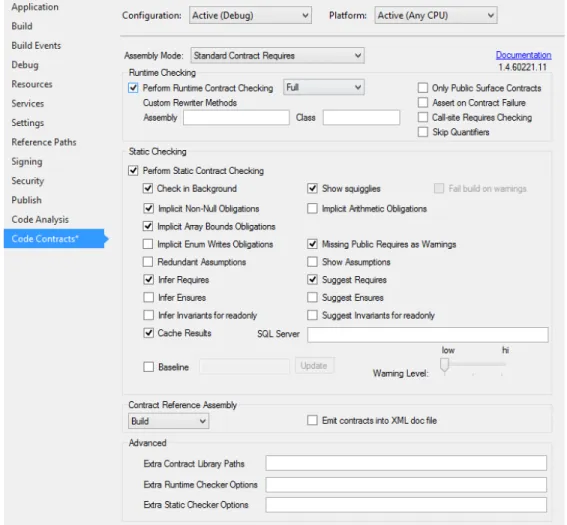
When the managed contracts plugin is installed, C# and VB projects within Visual Studio are augmented with an extra property pane entitled “Code Contracts”, as shown in Figure 3. This pane provides configu-ration specific options for enabling runtime contract checking, as well as static contract checking.
If you are using contracts with a target platform of 4.0 or later and you are referencing (implicitly) mscorlib.dll, then theContractclass appears in theSystem.Diagnostics . Contractsnamespace. If you are using a pre-4.0 target platform, you need to add a reference to theMicrosoft . Contracts . dll library. The library should appear under the .NET tab when adding project references.
Figure 3: Contract Property Pane in Visual Studio
6.1
Assembly Mode
Use the assembly mode selection on the UI to indicate to the tools what usage mode (Section 5.1) you want for the present project:
6.1.1 Custom Parameter Validation
Select this mode if your project falls into usage 3 (Section 5.1), i.e., you want to check parameter validation in your released version of the codeand you don’t run the contract rewriter on your release bits.
In this mode, you can use legacy if-then-throw statements and [ContractArgumentValidator] methods to express parameter validation code that you want the contract tools to recognize. You have to manually perform inheritance of such validation code and the tools warn you if it sees overrides/implementations where such validation appears to be missing. You can use ordinaryRequires(condition)for debug only preconditions. These will be inherited automatically, but only appear in builds where you enable the contract rewriter.
In this mode, you are not allowed to use theRequireshExniform, except on contract classes for interfaces and abstract types. If you do, the tools will issue an error.
6.1.2 Standard Contract Requires
Select this mode if your project falls into usage 1 or 2 (Section 5.1), i.e., you either don’t want parameter validation in your released code, or you run the contract rewriter on your released code.
In this mode, you are not allowed to use legacy if-then-throw blocks marked as contracts withEndContractBlock or [ContractArgumentValidator]methods. The tools will emit errors if you do.
6.2
Runtime Contract Checking
We suggest using either a standardDebug(or Checked) configuration or a custom configuration to use runtime contract checking. The benefit of a custom configuration is to allow separate testing of potentially expensive contract checks without affecting existing test runs with stricter timing constraints.
To enable runtime contract checking in a particular configuration, select the configuration and check the box for runtime contract checking. We also recommend you select Buildto build a contract reference assembly (see Section 6.5).
6.2.1 Runtime Checking Level
The drop-down menu to the right let’s you select the level of runtime contract checking. The enabled contract checks depending on the level are listed in the table below:
Enabled Runtime Checks
Checking Level Legacy RequireshEi Requires Ensures Invariants Asserts Assumes
Full X X X X X X X
Pre and Post X X X X
Preconditions X X X
ReleaseRequires X X None
By “Legacy”, we mean any if-then-throw blocks preceding any Contract.∗ methods, which are therefore recognized as declarations of preconditions.
Note that when level “None” is selected, all contracts are erased, including “Legacy requires”. This level is useful mainly for doing benchmarking without any contracts.
6.2.2 Public Surface Contract Checks
In addition to the level, the checkboxOnly Public Surface Contracts can be used to erase all contracts on methods that are not callable from outside the assembly (even via interfaces).
Warning: if you create a delegate from a method that is not visible from outside the assembly and the delegate itself will be callable from outside the assembly, then any parameter validation on this method will not trigger with this box checked.
Warning: if youdelayparameter validation on a method callable from outside by having it call a method not callable from outside the assembly that performs the validation, then you will get no validation with this box checked, as the validation on the non-visible method is erased.
6.2.3 Assert on Contract Failure
When this box is checked (default), all contract failures, includingRequireshEiand legacy requires (marked if-then-throws) trigger the default failure behavior of the contract library, which is to display an assert dialog. Clearing this box will instead generate code that throws exceptions on failure. See Section 7 for details. 6.2.4 Call-site Requires Checking
When building a projectA with call-site requires checking on, the rewriter will determine at each call-site withinAif the call “potentially” calls a method defined in another assembly. In that case, the rewriter will insert theRequireschecks for the called method at the call-site within assembly A(actually, we use wrapper methods to avoid duplicating the checks). Of course, in order for this to work, the contracts for the called method need to be known, which will require contract reference assemblies (B.Contracts, if the method is defined in assemblyB).
• Requires of constructors • Requires of protected methods
Call-site requires checking enables a library writer to produce a libraryB without runtime Requires checks (e.g., for performance reasons), while providing the Requires separately in a contract reference assembly B.Contracts. A developer of a projectAreferencingBand using call-site requires checking will have parameter validations checked for methods inB, regardless of whetherB is actually instrumented with checks or not. 6.2.5 Skip Quantifiers
Quantifier checking can be expensive at runtime as it may traverse large collections of data. Enabling skip quantifiers will skip any contracts that containContract. ForAll orContract. Exists calls.
6.2.6 Build Steps
When runtime contract checking is enabled, a build will perform the following actions in addition to the regular compile:
• It determines the availablility of contract reference assemblies for all referenced projects and warns if they are missing (Section 6.5).
• It applies the contract rewriter ccrewrite to the target assembly, performing well-formedness checks on the contracts, instrumenting contract runtime checks into the appropriate places, including contract inheritance (Section 7).
6.2.7 Extra Options
The boxes labeled custom rewriter methods can be used to customize the runtime behavior for contract failure by specifying an assembly (relative to the project output directory) and the full namespace path to the type containing the custom failure behavior (see Section 7). The specified assembly may be the project output itself.
Under the advanced options, extra library paths (semi-colon separated) can be specified for finding contract reference assemblies. Extra runtime checker and static checker command line options can be specified there as well.
6.2.8 Suppressing Warnings
You can suppress warnings you get from the tools by adding SuppressMessage attributes to methods. For example, to suppress a warningCC1055 about missing validation on a method, add the following attribute: [SuppressMessage(”Microsoft.Contracts”, ”CC1055”, Justification =”Check performed in DelegateTo”)]
public override void Compute(strings){
DelegateTo(s);
}
In general, to suppress any warning, use the above pattern with the appropriate error number you want to suppress. The error number should be visible in the output window if it is not included in the message on the Error List window.
You can place SuppressMessageattributes on types and properties in addition to methods. In that case, the suppression applies to the entire scope of the type or property.
6.3
C# Code Snippets
The installer adds a number of C# code snippets that are useful for authoring code contracts. Each snippet in the table below is invoked by typing the character shortcut and hitting TAB TAB (tab twice).
Shortcut Contract Snippet cr Contract.Requires(...); ce Contract.Ensures(...); ci Contract.Invariant(...); crr Contract.Resulth...i() co Contract.OldValue(...) cim [ContractInvariantMethod] private ObjectInvariant(){ Contract.Invariant(...); } crn Contract.Requires(... != null);
cen Contract.Ensures(Contracts.Resulth...i() != null); crsn Contract.Requires( !String.IsNullOrEmpty(...) );
cesn Contract.Ensures( !String.IsNullOrEmpty(Contracts.Resulthstringi()) ); cca Contract.Assert(...);
cam Contract.Assume(...); cre Contract.RequireshEi(...);
cren Contract.RequireshArgumentNullExceptioni(... != null);
cresn Contract.RequireshArgumentExceptioni( !String.IsNullOrEmpty(...) ); cintf expands to an interface template and associated contract class
6.4
VB Code Snippets
The installer also adds Visual Basic code snippets similar to the ones for C#. Each snippet in the table below is invoked by typing the shortcut and hitting TAB (tab once).
Shortcut Contract Snippet creq Contract.Requires(...) cens Contract.Ensures(...) cinv Contract.Invariant(...) crr Contract.Result(Of ...)() cold Contract.OldValue(...) cim hContractInvariantMethod()i
Private Sub ObjectInvariant() Contract.Invariant(...) End Sub
crn Contract.Requires(... IsNot Nothing)
cen Contract.Ensures(Contracts.Result(Of ...)() IsNot Nothing) crsn Contract.Requires( Not String.IsNullOrEmpty(...) )
cesn Contract.Ensures( Not String.IsNullOrEmpty(Contracts.Result(Of string)()) ) cca Contract.Assert(...)
cam Contract.Assume(...)
cre Contract.Requires(Of Exc)(...)
cren Contract.Requires(Of ArgumentNullException)(... NotIs Nothing)
cresn Contract.Requires(Of ArgumentException)( Not String.IsNullOrEmpty(...) ) cintf expands to an interface template and associated contract class
6.5
Building a Contract Reference Assembly
Note change from previous behavior: Contract reference assemblies are not longer built automatically for all dependee projects of a project.
If your project contains contracts and is referenced by other projects, we strongly recommend that you selectBuildunder the contract reference assemby section in the properties tab for CodeContracts.