User manual
-
Short version
-Supplier portal
Version November 2018
© picturesafe media/data/bank GmbH, 2016. All rights reserved.
This manual must not be copied, transmitted or archived in whole or in part either electronically, mechanically, by means of recording or in any other form without prior written permission.
Please note that the contents of this manual are protected by copyright laws, and that this applies even if the manual is not distributed with software that includes an end user license agreement.
The contents of the manual are intended to provide information and are subject to change without notice. Registered trademarks, trade names, common names, hardware and software names are used in this manual. The relevant protection provisions apply even if these are not marked as such.
Table of contents
FAQ
... 3
Technical requirements
... 5
Article data
... 6
Correction and subsequent deliveries (update mode)
... 6
Process and format description for article transfers
... 7
Field list
... 9
PMG ASCII format
... 12
PMG XML format
... 17
Character set
... 25
Provision of deliveries
... 31
Index
... 32
FAQ
This chapter contains a number of frequently asked questions (FAQ) with corresponding answers concerning the use of the PMG press database.
How do I inform PMG Presse-Monitor GmbH about changes to the contractual data or to the
contact person?
Changes can only be made by PMG Presse-Monitor GmbH. Please contact a system administrator of PMG Presse-Monitor GmbH in this instance.
Where can I see the version of the articles that I have supplied to PMG Presse-Monitor GmbH
and are subsequently made available in the PMG press database?
You can view your articles in the PMG supplier portal under the menu item "Edition search". Simply select the desired source and the publication date.
Where can I find out about the cause of a failed transfer to PMG Presse-Monitor GmbH?
At the time of the transfer, you will have received an e-mail containing the error description. If this error description is of no assistance, please contact PMG Presse-Monitor GmbH.What happens if a delivery contains an invalid article?
The delivery must fully comply with our format and process descriptions. All deliveries are either accepted in full or rejected. If a delivery contains an error, you will receive an e-mail notifying you of the specific issue. You are able to repeat your delivery until it is completed successfully.
Can I delete a completed delivery?
No. A successful delivery with incorrect or incomplete content can only be deleted by the system administrators of PMG Presse-Monitor GmbH. You are then able to repeat the delivery. Please contact a system administrator of PMG Presse-Monitor GmbH in this instance.
How can I prevent errors during the data transmission?
There is no general rule for preventing errors. Experience shows, however, that it is often "minor" errors that cause unnecessary problems. Errors are frequently caused, for example, by the use of incorrect naming schemes for the deliveries. A great deal of time can be saved by ensuring that the file is named correctly from the outset: SourceID-DDMMYYYY.zip/jar.
Do not use any umlauts or special characters in the file names. Only the following characters are permitted: A-Z, a-z, 0-9, - (minus), _ (underscore) and . (full stop).
Where can I find the latest process and format descriptions?
Up-to-date information regarding the delivery of sources to the PMG press database can be found on the website of PMG Presse-Monitor GmbH.
Under "Partners" > "Content partners", you can download the XSD for deliveries in XML format along with XML sample files.
Can the source logo be displayed in the articles?
Yes. A logo can be assigned to the source as an RGB file in JPG, GIF or PNG format. Do not exceed 256 colours or a size of 300x100 pixels.
Which browsers can I use to access the system?
The PMG press database is compatible with the following browsers: Microsoft Internet Explorer of version 9 or higher, Mozilla Firefox of version 23 or higher or Apple Safari of version 6.0 or higher.
We do not deliver all our data in full on a single day. Can we supply the (remaining) data on the
following day(s)?
A delivery file must contain one edition and a single delivery file cannot be transferred multiple times. This means that an edition can only be delivered on a different day in its entirety. Subsequent deliveries are only possible for sources with appropriate activation.
If we establish that a completed delivery contained incorrect data, can we re-deliver the correct
data (in full, if necessary) so that you can replace it? What do we have to be aware of in this
case?
A deliver containing errors of a technical or formal nature will be rejected in its entirety. If a delivery failed for this reason, it can be repeated as often as required. If a delivery was successfully transferred before the supplier identified errors in its content, the entire delivery must be deleted by PMG Presse-Monitor GmbH. This is considered an emergency. Subsequent deliveries for correction purposes are only possible for sources with corresponding activation.
How do we handle line breaks within element content, such as in <title> or <caption>? How do
we separate these? Do we separate the lines with <br/>? There is no provision for this in the
XSD.
No further division is to be implemented. The data must be supplied WITHOUT line breaks.
Is there a means of setting text, such as with <P ALIGN='CENTER'> in HTML?
There is NO provision for this. First and foremost, the XSD is designed to produce a structure; it does not constitute a layout instruction.
Can the author be included in the metadata and in the running text or is this an X-OR
relationship?
The author must be contained in the metadata. When the article is rendered for display, the author is then assigned to it along with the other metadata. If the author is also included in the running text, the name will appear twice.
Is it also possible (or desirable) to submit only headings or tables of contents?
Technical requirements
Access to the application is platform-independent and possible with either a PC or an Apple Mac. Minimum configuration
To ensure problem-free use of the application, we recommend the following minimum configuration for hardware and software:
• 19" monitor,
screen resolution of at least 1280 x 1024 pixels and 24-bit colour depth • Working memory: 1 GB RAM
• Browser:
Microsoft Internet Explorer version 9.0 Mozilla Firefox version 23
Apple Safari version 6.0
• Internet connection with speed of 1 Mbit/s (ADSL) • E-mail client with XHTML support
• FTP client for transferring articles Browser configuration
To ensure problem-free use of the application, the following options must be enabled in your browser:
• Use of JavaScript. • Storage of cookies.
Cookies are transferred to your computer from the application server and act as a kind of buffer for your personal settings and search results. This does not pose a security risk since other servers are unable to access these cookies.
• Transfer of forms
We also recommend that you make the following settings in your browser: • Reload temporary Internet files with each access
• Activate file downloads to ensure that the PDF documents can be downloaded
Software and plug-ins
We recommend the following software for opening the PDF files and extracting the contents of ZIP files:
• Adobe Acrobat Reader 7 or higher
• WinZip or another compatible compression program for Windows • StuffIt Expander or another compatible compression program for
Download addresses
You can download the necessary add-on software free of charge or in demo form at the following Internet addresses.
• Adobe Acrobat Reader https://get.adobe.com/uk/reader • WinZip (Windows) https://www.winzip.com
• Power Archiver http://www.powerarchiver.com
• StuffIt Expander (Mac) http://www.stuffit.com/mac-expander.html
NOTE: picturesafe media/data/bank GmbH is not responsible for the content of external websites.
Article data
All articles are supplied electronically using standardised interfaces and file formats. For each source, one edition can be supplied to PMG Presse-Monitor GmbH in one delivery. If external objects (e.g. images) are assigned to an article, these must be transferred in the same delivery as the article.
NOTE: External objects are displayed in the article in the same order as they are specified in article-list.xml.
The name of the transfer file must be structured as follows: [SUPPLIERID-]SOURCEID-PUBLICATIONDATE[-SEQUENCENUMBER].zip
• The supplier ID and the sequence number are options.
• The publication date must be specified in the format DDMMYYYY.
A delivery is only accepted into the system if the name of the transfer file matches the corresponding source data and if the delivering contact person is assigned directly to the source.
The supplier ID is no longer evaluated. It is determined on the basis of the source ID when the delivery is imported.
A sequence number can only be specified for sources that have been enabled for automatic update deliveries.
For all other sources, only deliveries without a sequence number or with the interpreted sequence number 0 (zero) are accepted.
All articles are made available in the system for a contractually agreed term. Once this term has expired, the articles are deleted automatically.
Correction and subsequent deliveries (update mode)
If a source has been enabled for automatic update deliveries and a unique sequence number is specified in the name of the transfer file, an edition can also consist of multiple deliveries. However, deliveries with identical file names will still be rejected.
NOTE: To allow deliveries of sources with EVT change rules to be assigned to an identical edition, the EVT change rules of the source must not be altered during the deliveries for an edition.
To ensure that the update mechanism functions correctly, the supplier must ensure the unique identity of an article in all deliveries for an edition.
Prerequisites
• A delivery contains only articles for one edition (one publication date). • All articles of a source and edition have a unique article ID.
• The articles for a delivery are always delivered in full, with all corrections and attachments. • The release date in all deliveries for an edition is identical.
Processing
The articles contained in multiple deliveries for one edition are combined in the PMG press database.
• In the case of identical article IDs, newly delivered articles will overwrite their predecessors. The previous version is deleted with all its attachments. If an article with an identical or higher sequence number already exists, the article is not imported again.
• Articles from a correction or subsequent delivery for which no article ID exists are added to the edition.
• Articles that have already been imported and are not contained in a correction or subsequent delivery are not deleted.
• Deleted articles are not imported again.
Release dates are only considered in the first delivery to be processed and apply to all future correction or subsequent deliveries for the same edition.
Import process
The PMG press database works with multiple independent FTP servers and import systems. As a result, the order in which deliveries as well as correction or subsequent deliveries are processed during import cannot be guaranteed. Therefore, it is possible that correction or subsequent deliveries are processed before the initial delivery or that additional correction or subsequent deliveries are processed prior to the first correction or subsequent delivery.
However, parallel processing of deliveries for one edition is prevented, thereby ensuring that the content of an edition after all corresponding deliveries have been processed is always the same.
Process and format description for article transfers
Up-to-date information regarding the delivery of sources to PMG are available from your PMG contact or via the link for downloading the documents.
File format
For each source, one delivery per edition can be sent to PMG. In the case of sources that are enabled for automatic correction and subsequent deliveries (update mode), an edition can be transferred in multiple deliveries. Activation for such deliveries is performed by PMG Presse-Monitor GmbH.
Depending on the content to be transferred, two different formats are possible.
1. If the supplier wishes to transfer graphics, images or PDF files in the form of attachments to an article, the ZIP or JAR format must be used to package the data.
Naming convention
The file name is provided to the supplier by PMG upon contract conclusion and can take different forms, depending on the file format employed.
[SupplierID-]SourceID-Date[-SequenceNumber].Extension
Supplier ID
The supplier ID is an optional specification and is not evaluated during the import.
The import authorisation is determined based on the source ID and the user name (which is automatically prefixed to the file name by the FTP server). This is also used to determine the supplier ID in the system.
Source ID
The source ID is a fixed part of the file name and must be specified. Both upper and lower case are accepted.
Publication date
The publication date is also a fixed part of the file name and must be specified in the format DDMMYYYY.
Sequence number
Specification of the sequence number is optional. If no number is specified, 0 (zero) is used instead.
The sequence number must be interpretable as a decimal number and can contain leading zeros. If the number contains letters or special characters, the delivery is rejected.
NOTE: A sequence number can only be specified for sources that have been enabled for automatic update deliveries.
Since no files can be embedded in the GZIP format, the information that is normally contained in the file name of the embedded ASCII or XML article list must be coded in the name of the delivery.
File format Naming convention
ZIP [supplierid-]sourceid-date[-sequencenumber].zip JAR [supplierid-]sourceid-date[-sequencenumber].jar GZIP-ASCII [supplierid-]sourceid-date[-sequencenumber].asc.gz GZIP-XML [supplierid-]sourceid-date[-sequencenumber].xml.gz
The naming scheme must be followed.
Example: If the supplier ID is 1002, the source ID is BIL and the publication date is 03/11/2015, this results in the following possible names for the ZIP file:
• 1002-bil-03112015.zip • bil-03112015.zip
When transferring an update delivery, a sequence number (up to 10 digits) must be added, which can also take the form of a time stamp. For example:
• bil-03112015-001.zip • bil-03112015-2.zip • bil-03112015-075318.zip Contents of the transfer file
In the case of the ZIP and JAR format, the file always contains exactly one data file (article list) with the text and metadata of all supplied articles in XML or ASCII format. It is also possible to supply any number of PDF and graphic files. The graphic files can be delivered in JPEG (or JPG, JFF), GIF or PNG format.
The article list has the same name as the ZIP/JAR file. The file name extension specifies the file type (.xml for XML format, .asc for PMG-ASCII format).
Umlauts and special characters must not be used. Only the following characters are permitted: A–Z, a–z, 0–9, - (minus), _ (underscore) and . (full stop).
The data file and all attachments are contained in the base directory of the ZIP/JAR file, giving the file the following structure:
• bil-03112015.xml • Image1.jpg • image2.jpg • article.pdf • Page.pdf
In this case, the reference to the attachments is Image1.jpg, image2.jpg, article.pdf and Page.pdf. Both upper and lower case can be used, though the search prioritises files with the specified syntax.
Dates are always specified in the format DDMMYYYY. Times are always specified in the format HHMM (hours/minutes).
Field list
The following table lists all interpreted fields. It shows the field restrictions and the mapping of ASCII-format fields to XML. The fields "Article ID", "Source ID", "Publication date" and "Text" (marked in bold in the table) are mandatory fields and must be specified; all other fields are optional.
HINT: As the original sources contain terms in German, those are given here as well.
Field ASCII name
(original)
XML name
(original)
Length restriction Article ID ARTIKEL-ID metadaten/artikel-id 1024 characters Supplier ID LIEFERANT-ID metadaten/quelle/lieferant-id as specified
Source ID QUELLE-ID metadaten/quelle/quelle-id as specified
Source QUELLNAME metadaten/quelle/name 256 characters
Volume JAHRGANG metadaten/quelle/jahrgang 256 characters
Issue number NUMMER metadaten/quelle/nummer 32 characters
Publication date QUELLDATUM metadaten/quelle/datum (uhrzeit = optional)
DDMMYYYY (HHMM = optional)
Start page SEITESTART metadaten/quelle/seite-start 64 characters
End page SEITEENDE metadaten/quelle/seite-ende 64 characters
Release date FREIGABEDATUM metadaten/quelle/freigabe-datum DDMMYYYY Release time FREIGABEUHRZEIT metadaten/quelle/freigabe-uhrzeit HHMM Supplementary
edition
NEBENAUSGABE metadaten/quelle/nebenausgabe 256 characters
Print edition metadaten/quelle /druckausgabe 256 characters
Copyright information
URHEBERINFORMATION metadaten/urheberinformation 2000 characters
Weblink WEBLINK metadaten/weblink 2000 characters
Author AUTOR metadaten/autor/autor-name
metadaten/autor/autor-kurz Max. 2000 characters combined metadaten/autor/autor-id 256 characters Attachment page PDF
SEITEN-PDF metadaten/seiten-pdf 1975 characters,
10 MB Attachment
article PDF
ARTIKEL-PDF metadaten/artikel-pdf 1975 characters,
Field ASCII name
(original)
XML name
(original)
Length restriction
Company FIRMA metadaten/firma 1024 characters
Person PERSON metadaten/person 1024 characters
Location ORT metadaten/ort 1024 characters
Page title SEITENTITEL inhalt/titel-liste/seitentitel 256 characters Series title SERIENTITEL inhalt/titel-liste/serientitel *
Short title KURZTITEL inhalt/titel-liste/kurztitel *
Column RUBRIK inhalt/titel-liste/rubrik 256 characters
Section RESSORT inhalt/titel-liste/ressort 256 characters
Kicker DACHZEILE inhalt/titel-liste/dachzeile 256 characters
Title TITEL inhalt/titel-liste/titel 256 characters
Subtitle UNTERTITEL inhalt/titel-liste/untertitel *
Lead VORSPANN inhalt/vorspann *
List inhalt/text/ol/li *
inhalt/text/ul/li *
Subhead inhalt/text/zwischentitel *
Frame text KASTENTEXT inhalt/text/kasten *
Box inhalt/text/box *
inhalt/text/box/box-titel 256 characters inhalt/text/box/box-text *
Tables TABELLE inhalt/text/table *
Images BILD inhalt/text/abbildung/bild 1975 characters,
3 MB
Infographic INFOGRAFIK inhalt/text/abbildung/infografik 1975 characters, 3 MB
Photo FOTO inhalt/text/abbildung/foto 1975 characters,
Field ASCII name
(original)
XML name
(original)
Length restriction
Caption - inhalt/text/abbildung/beschriftung 7000 characters
Photographer - inhalt/text/abbildung/fotograf 7000 characters
Photo credits - inhalt/text/abbildung/fotonachweis 7000 characters
* The field content forms part of the information stored in the database and is not subject to any length restrictions.
The SOURCE-ID comprises 2 to 5 letters and is defined by PMG in consultation with the supplier, who is then notified of the SOURCE-ID upon contract conclusion.
PMG ASCII format
All documents are written to a file and the individual documents are separated from one another by the document separator. The file always uses the ISO 8859-1 character set (refer to the section "Character set" for more information).
The first two columns in each line are reserved for the distinction between a document separator, field name or value.
Character Meaning
** (two asterisks) Document separator. The rest of the line is ignored. .. (two full stops) Field identifier. The rest of the line contains the field
name.
(two spaces) The rest of the line contains the field value.
A field value can also extend over multiple lines. In this case, each line begins with two spaces, which are ignored when the field value is read.
The line break has no special significance within a field value and is simply ignored when the field contents are read. Therefore, in running text in particular, a space must be inserted at the end of the line or as the third character in the next line if the lines are not to be joined.
Each field can only appear once per article. The fields of an article do not have to appear in a specific order.
Some fields use a paragraph separator. It can only appear in those fields for which it is explicitly permitted as per the following table. The separator consists of a separate line with two spaces followed by a backslash. The rest of the line is ignored.
HINT: As the original sources contain terms in German, those are given here as well.
Field identifier
(original)
Comments
LIEFERANT-ID This value is optional and is not evaluated. Only one value can appear per article. The ID is provided to the supplier by PMG upon contract conclusion.
QUELLE-ID This value must be repeated for each article. Only one value can appear per file. It comprises 2 to 5 letters and is defined by PMG in consultation with the supplier, who is then notified of the ID upon contract conclusion.
ARTIKEL-ID For each article, this must be a unique value for all deliveries of an edition comprising no more 1024 characters.
QUELLNAME Object key, name of the source, max. 256 characters. This value is optional and is not evaluated.
QUELLDATUM The publication date in the format DDMMYYYY must be repeated for each article. Only one value can appear per file.
NUMMER Issue number, max. 32 characters
JAHRGANG Volume, max. 256 characters
SEITESTART Number of the start page, alphanumeric, max. 64 characters. Must be specified for each article.
SEITEENDE Number of the end page, alphanumeric, max. 64 characters. SEITENTITEL Page title, max. 256 characters
SERIENTITEL Series title – the field content forms part of the information stored in the database and is not subject to any length restrictions.
KURZTITEL Short title – the field content forms part of the information stored in the database and is not subject to any length restrictions.
RUBRIK Column, max. 256 characters
RESSORT Section, max. 256 characters
DACHZEILE Kicker, max. 256 characters
TITEL Title (main title), max. 256 characters
UNTERTITEL Subtitle – the field content forms part of the information stored in the database and is not subject to any length restrictions.
VORSPANN Within the LEAD field, paragraphs can be defined by the paragraph separator. The field content forms part of the information stored in the database and is not subject to any length restrictions.
TEXT Main text of the article; must be included. Within the TEXT field, paragraphs can be defined by the paragraph separator. The field content forms part of the information stored in the database and is not subject to any length restrictions.
KASTENTEXT Frame text – the field content forms part of the information stored in the database and is not subject to any length restrictions.
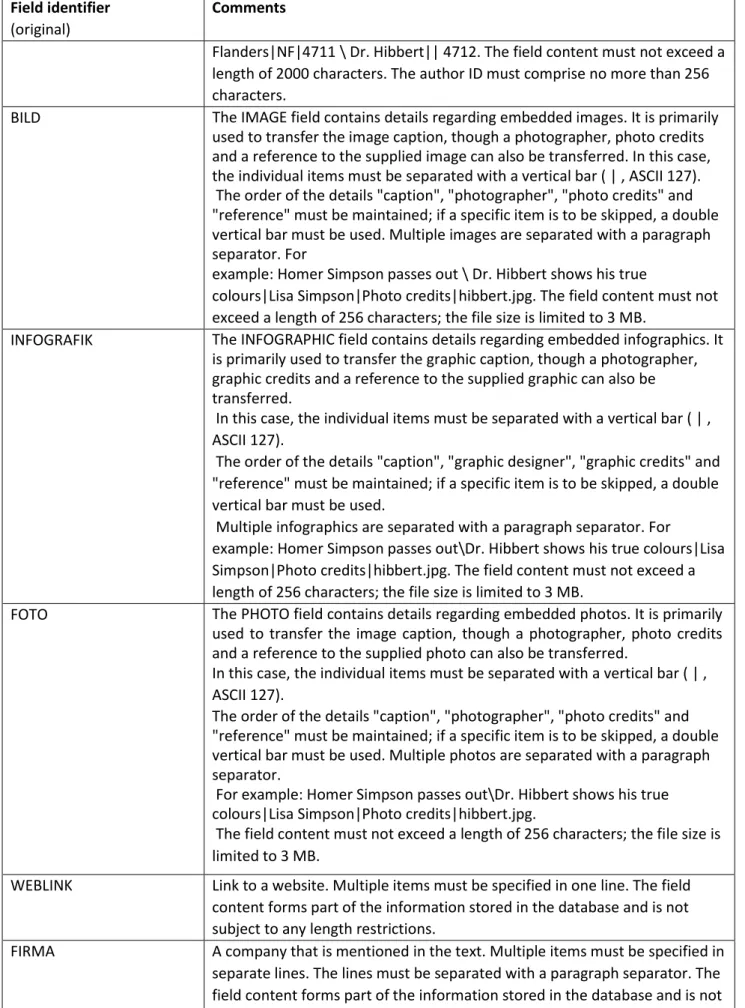
AUTOR The AUTHOR field contains details regarding the authors. It is also possible to transfer the author initials and author IDs, in which case the individual entries must be separated with a vertical bar ( | , ASCII 127). The order of the details "author name", "author initials" and "author ID" must be maintained; if a specific item is to be skipped, a double vertical bar must be used. Multiple authors are separated with a paragraph separator. For example: Homer Simpson \ Montgomery Burns|MB \ Ned
Field identifier
(original)
Comments
Flanders|NF|4711 \ Dr. Hibbert|| 4712. The field content must not exceed a length of 2000 characters. The author ID must comprise no more than 256 characters.
BILD The IMAGE field contains details regarding embedded images. It is primarily used to transfer the image caption, though a photographer, photo credits and a reference to the supplied image can also be transferred. In this case, the individual items must be separated with a vertical bar ( | , ASCII 127). The order of the details "caption", "photographer", "photo credits" and "reference" must be maintained; if a specific item is to be skipped, a double vertical bar must be used. Multiple images are separated with a paragraph separator. For
example: Homer Simpson passes out \ Dr. Hibbert shows his true
colours|Lisa Simpson|Photo credits|hibbert.jpg. The field content must not exceed a length of 256 characters; the file size is limited to 3 MB.
INFOGRAFIK The INFOGRAPHIC field contains details regarding embedded infographics. It is primarily used to transfer the graphic caption, though a photographer, graphic credits and a reference to the supplied graphic can also be transferred.
In this case, the individual items must be separated with a vertical bar ( | , ASCII 127).
The order of the details "caption", "graphic designer", "graphic credits" and "reference" must be maintained; if a specific item is to be skipped, a double vertical bar must be used.
Multiple infographics are separated with a paragraph separator. For
example: Homer Simpson passes out\Dr. Hibbert shows his true colours|Lisa Simpson|Photo credits|hibbert.jpg. The field content must not exceed a length of 256 characters; the file size is limited to 3 MB.
FOTO The PHOTO field contains details regarding embedded photos. It is primarily used to transfer the image caption, though a photographer, photo credits and a reference to the supplied photo can also be transferred.
In this case, the individual items must be separated with a vertical bar ( | , ASCII 127).
The order of the details "caption", "photographer", "photo credits" and "reference" must be maintained; if a specific item is to be skipped, a double vertical bar must be used. Multiple photos are separated with a paragraph separator.
For example: Homer Simpson passes out\Dr. Hibbert shows his true colours|Lisa Simpson|Photo credits|hibbert.jpg.
The field content must not exceed a length of 256 characters; the file size is limited to 3 MB.
WEBLINK Link to a website. Multiple items must be specified in one line. The field content forms part of the information stored in the database and is not subject to any length restrictions.
FIRMA A company that is mentioned in the text. Multiple items must be specified in separate lines. The lines must be separated with a paragraph separator. The field content forms part of the information stored in the database and is not subject to any length restrictions.
Field identifier
(original)
Comments
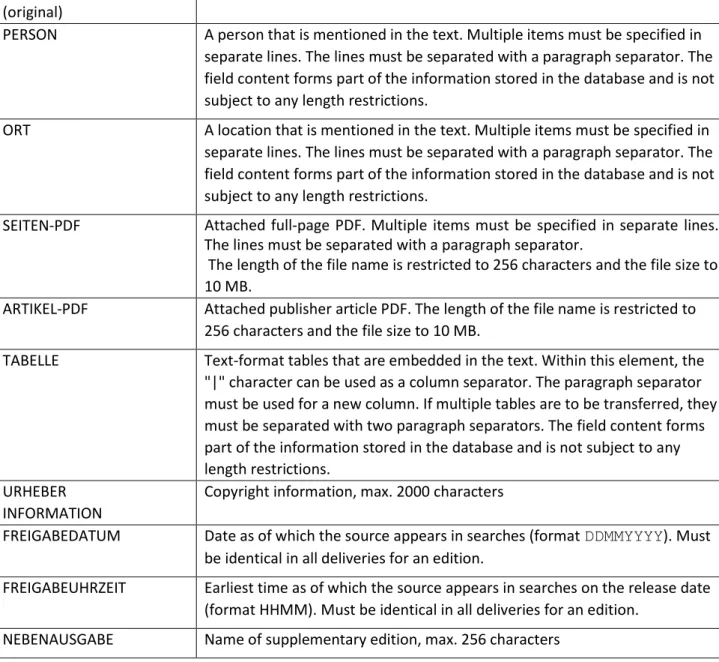
PERSON A person that is mentioned in the text. Multiple items must be specified in separate lines. The lines must be separated with a paragraph separator. The field content forms part of the information stored in the database and is not subject to any length restrictions.
ORT A location that is mentioned in the text. Multiple items must be specified in separate lines. The lines must be separated with a paragraph separator. The field content forms part of the information stored in the database and is not subject to any length restrictions.
SEITEN-PDF Attached full-page PDF. Multiple items must be specified in separate lines. The lines must be separated with a paragraph separator.
The length of the file name is restricted to 256 characters and the file size to 10 MB.
ARTIKEL-PDF Attached publisher article PDF. The length of the file name is restricted to 256 characters and the file size to 10 MB.
TABELLE Text-format tables that are embedded in the text. Within this element, the "|" character can be used as a column separator. The paragraph separator must be used for a new column. If multiple tables are to be transferred, they must be separated with two paragraph separators. The field content forms part of the information stored in the database and is not subject to any length restrictions.
URHEBER INFORMATION
Copyright information, max. 2000 characters
FREIGABEDATUM Date as of which the source appears in searches (format DDMMYYYY). Must be identical in all deliveries for an edition.
FREIGABEUHRZEIT Earliest time as of which the source appears in searches on the release date (format HHMM). Must be identical in all deliveries for an edition.
NEBENAUSGABE Name of supplementary edition, max. 256 characters
Example of article (original terms) ** ..QUELLE-ID SI ..ARTIKEL-ID A199905050773 ..QUELLDATUM 02092015 ..SEITESTART 150 ..TITEL
Emma for President ..TEXT
Example of article with table (original terms) ** ..QUELLE-ID SPI ..ARTIKEL-ID A199905050774 ..QUELLDATUM 02062016 ..SEITESTART 150 ..TITEL
Emma for President with Table ..TEXT
This is a meaningless dummy text. It can also extend across multiple lines. \
This is a meaningless dummy text. It can also extend across multiple lines. ..TABELLE
| Spalte 1 | Spalte 2 \
Zeile 1 | Z1S1 | Z1S2 \ Zeile 2 | Z2S1 | Z2S2
PMG XML format
An XSD (XML Schema Definition) defines the type and combination of the used elements and attributes of XML documents and enables their validation. The XSD used for the transfer is available from your PMG contact or via the download link.
An ELEMENT is defined by an entry in the format <xs:element name="inhalt">...</ xs:element>, where inhalt is the element name. The text is case-sensitive, with lower case used throughout for consistency.
element
Defines the permitted XML elements. simpleType
Simple element that cannot contain any subelements or attributes. restriction
Defines a restriction for the base type. extension
Defines a set of attributes for the base type. ref
Reference to a globally declared element or attribute. complexType
Complex element that can contain child elements and/or attributes.
If mixed="true" is specified, the element can also contain element content. sequence
Element structure with fixed sequence. choice
Element choice allowing only one of the specified elements to be present. minOccurs / maxOccurs
If these specifications are missing, the element can appear only once. • minOccurs="0": The element can also be omitted.
Information regarding the XSD
NOTE: External links must always be specified in full with the relevant protocol (http/https): <a
href="http://www.presse-monitor.de">PMG Presse-Monitor</a>. They are permitted in the elements
dachzeile, untertitel, vorspann, absatz, zwischentitel, kasten, li, beschriftung, fotograf and
fotonachweis.
HINT: The following examples contain the original terms always.
The delivery consists of the artikel-liste element, which in turn contains one or more artikel elements.
<xs:element name="artikel-liste"> <xs:complexType>
<xs:sequence>
<xs:element ref="artikel" minOccurs="1" maxOccurs="unbounded"/> </xs:sequence>
</xs:complexType> </xs:element>
Each article consists of the metadata and the actual content.
<xs:element name="artikel"> <xs:complexType>
<xs:sequence>
<xs:element ref="metadaten" minOccurs="1" maxOccurs="1"/> <xs:element ref="inhalt" minOccurs="1" maxOccurs="1"/> </xs:sequence>
</xs:complexType> </xs:element>
Metadata
The metadata contains the article ID and the source information.
Optional specifications include the copyright information, a weblink, 0(zero)-n authors, the references to seiten-pdf and artikel-pdf, as well as the referenced companies, persons and locations (firma,
person, ort elements).
<xs:element name="metadaten"> <xs:complexType>
<xs:sequence>
<xs:element name="artikel-id" minOccurs="1" maxOccurs="1"> <xs:simpleType> <xs:restriction base="xs:string"> <xs:maxLength value="1024"/> </xs:restriction> </xs:simpleType> </xs:element>
<xs:element ref="quelle" minOccurs="1" maxOccurs="1"/>
<xs:element name="urheberinformation" minOccurs="0" maxOccurs="1"> <xs:simpleType>
</xs:restriction> </xs:simpleType> </xs:element>
<xs:element name="weblink" minOccurs="0" maxOccurs="1"> <xs:simpleType> <xs:restriction base="xs:string"> <xs:maxLength value="2000"/> </xs:restriction> </xs:simpleType> </xs:element>
<xs:element ref="autor" minOccurs="0" maxOccurs="unbounded"/>
<xs:element name="seiten-pdf" minOccurs="0" maxOccurs="unbounded" type="xs:string"/> <xs:element name="artikel-pdf" minOccurs="0" maxOccurs="unbounded" type="xs:string"/> <xs:element name="firma" minOccurs="0" maxOccurs="unbounded" type="xs:string"/> <xs:element name="person" minOccurs="0" maxOccurs="unbounded" type="xs:string"/> <xs:element name="ort" minOccurs="0" maxOccurs="unbounded" type="xs:string"/> </xs:sequence>
</xs:complexType> </xs:element>
Source information
The source specification always includes the source ID quelle-id (2–5 digits, allocated by PMG) and the publication date. The time of publication can be transferred in the uhrzeit attribute of the date
<datum uhrzeit="1220">05082016</datum>.
Optional specifications include the supplier ID, volume, number, start and end page, as well as details regarding the release time in the form of freigabe-datum and freigabe-uhrzeit.
<xs:element name="quelle"> <xs:complexType>
<xs:sequence>
<xs:element name="lieferant-id" minOccurs="0" maxOccurs="1" type="xs:integer"/> <xs:element name="quelle-id" minOccurs="1" maxOccurs="1">
<xs:simpleType> <xs:restriction base="xs:string"> <xs:minLength value="2"/> <xs:maxLength value="5"/> </xs:restriction> </xs:simpleType> </xs:element>
<xs:element name="name" minOccurs="0" maxOccurs="1"> <xs:simpleType> <xs:restriction base="xs:string"> <xs:maxLength value="256"/> </xs:restriction> </xs:simpleType> </xs:element>
<xs:element name="jahrgang" minOccurs="0" maxOccurs="1" type="xs:string"/> <xs:element name="nummer" minOccurs="0" maxOccurs="1">
<xs:simpleType> <xs:restriction base="xs:string"> <xs:maxLength value="32"/> </xs:restriction> </xs:simpleType> </xs:element>
<xs:element name="datum" minOccurs="1" maxOccurs="1"> <xs:complexType>
<xs:simpleContent>
<xs:extension base="dateContent">
<xs:attribute name="uhrzeit" type="timeContent" use="optional"/> </xs:extension>
</xs:simpleContent> </xs:complexType> </xs:element>
<xs:element name="seite-start" minOccurs="0" maxOccurs="1"> <xs:simpleType> <xs:restriction base="xs:string"> <xs:maxLength value="64"/> </xs:restriction> </xs:simpleType> </xs:element>
<xs:element name="seite-ende" minOccurs="0" maxOccurs="1"> <xs:simpleType> <xs:restriction base="xs:string"> <xs:maxLength value="64"/> </xs:restriction> </xs:simpleType> </xs:element>
<xs:element name="freigabe-datum" minOccurs="0" maxOccurs="1" type="dateContent"/> <xs:element name="freigabe-uhrzeit" minOccurs="0" maxOccurs="1" type="timeContent"/> <xs:element name="nebenausgabe" minOccurs="0" maxOccurs="1">
<xs:simpleType> <xs:restriction base="xs:string"> <xs:maxLength value="256"/> </xs:restriction> </xs:simpleType> </xs:element>
<xs:element name="druckausgabe" minOccurs="0" maxOccurs="1"> <xs:simpleType> <xs:restriction base="xs:string"> <xs:maxLength value="256"/> </xs:restriction> </xs:simpleType> </xs:element> </xs:sequence> </xs:complexType> </xs:element> Author
The author is specified in the autor-name element, while the author ID and author initials can also be specified using autor-id and autor-kurz respectively.
<xs:element name="autor"> <xs:complexType>
<xs:sequence>
<xs:element name="autor-name" minOccurs="1" maxOccurs="1" type="xs:string"/> <xs:element name="autor-id" minOccurs="0" maxOccurs="1" type="xs:string"/> <xs:element name="autor-kurz" minOccurs="0" maxOccurs="1" type="xs:string"/> </xs:sequence>
</xs:complexType> </xs:element>
The actual article content consists of the title list (titel-liste), the lead and the actual text. External links (a href) can be used in the lead. External links must be specified with the relevant protocol (http/https).
<xs:element name="inhalt"> <xs:complexType>
<xs:sequence>
<xs:element ref="titel-liste" minOccurs="1" maxOccurs="1"/> <xs:element name="vorspann" minOccurs="0" maxOccurs="unbounded" type="plainLinkContent"/>
<xs:element ref="text" minOccurs="1" maxOccurs="1"/> </xs:sequence>
</xs:complexType> </xs:element>
Title list
The title list groups all possible title entries; only the normal title is a mandatory specification.
External links (a href) can be used in the kicker and in the subtitle. External links must be specified with the relevant protocol (http/https).
<xs:element name="titel-liste"> <xs:complexType>
<xs:sequence>
<xs:element name="seitentitel" minOccurs="0" maxOccurs="1" type="plainContent"/> <xs:element name="serientitel" minOccurs="0" maxOccurs="1" type="plainContent"/> <xs:element name="kurztitel" minOccurs="0" maxOccurs="1" type="plainContent"/> <xs:element name="rubrik" minOccurs="0" maxOccurs="1">
<xs:simpleType> <xs:restriction base="xs:string"> <xs:maxLength value="256"/> </xs:restriction> </xs:simpleType> </xs:element>
<xs:element name="ressort" minOccurs="0" maxOccurs="1" type="xs:string"/>
<xs:element name="dachzeile" minOccurs="0" maxOccurs="1" type="plainLinkContent"/> <xs:element name="titel" minOccurs="1" maxOccurs="1" type="plainContent"/>
<xs:element name="untertitel" minOccurs="0" maxOccurs="1" type="plainLinkContent"/> </xs:sequence>
</xs:complexType> </xs:element>
Text
The article text consists of an arbitrary sequence of paragraphs, lists, frames, boxes, tables and figures. External links (a href) can be used in the elements absatzzwischentitel, kasten and li, while the text markup abbr, acronym, b, big, br, cite, dfn, i, q, small, strong, sub, sup and tt can also be used. External links must be specified with the relevant protocol (http/https).
<xs:element name="text"> <xs:complexType>
<xs:element ref="absatz"/> <xs:element ref="zwischentitel"/> <xs:element ref="ol"/> <xs:element ref="ul"/> <xs:element ref="kasten"/> <xs:element ref="box"/> <xs:element ref="table"/> <xs:element ref="abbildung"/> </xs:choice> </xs:complexType> </xs:element> Figure
A figure can be an image (or a table in the form of a graphic) with an optional caption, photographer and photo credits. Since the image is an optional element, it can also be omitted. For reasons of simplicity, this XSD permits empty figures in the format <abbildung></abbildung> or <abbildung/>; these are ignored by the importer. If an image is specified, it must constitute a unique reference to an image contained in the delivery; empty elements are not permitted.
External links (a href) can be used in the elements beschriftung, fotograf and fotonachweis. External links must be specified with the relevant protocol (http/https).
In addition, the text markup abbr, acronym, b, big, br, cite, dfn, i, q, small, strong, sub, sup and tt is permitted in the beschriftung element.
<xs:element name="abbildung"> <xs:complexType>
<xs:sequence> <xs:choice>
<xs:element name="bild" minOccurs="0" maxOccurs="1" type="xs:string"/> <xs:element name="infografik" minOccurs="0" maxOccurs="1" type="xs:string"/> <xs:element name="foto" minOccurs="0" maxOccurs="1" type="xs:string"/> </xs:choice>
<xs:element name="fotograf" minOccurs="0" maxOccurs="1" type="plainLinkContent"/> <xs:element name="fotonachweis" minOccurs="0" maxOccurs="1" type="plainLinkContent"/> <xs:element name="beschriftung" minOccurs="0" maxOccurs="1" type="linkContent"/>
</xs:sequence> </xs:complexType> </xs:element>
Box
A box can contain a box title comprising no more than 256 characters, but must always contain box text which can consist of any paragraph elements.
External links (a href) and the text markup abbr, acronym, b, big, br, cite, dfn, i, q, small, strong, sub, sup and tt are permitted in the paragraph elements. External links must be specified with the relevant protocol (http/https).
<xs:element name="box"> <xs:complexType>
<xs:sequence>
<xs:element ref="box-text" minOccurs="1" maxOccurs="1"/> </xs:sequence> </xs:complexType> </xs:element><xs:element name="box-titel"> <xs:simpleType> <xs:restriction base="xs:string"> <xs:maxLength value="256"/> </xs:restriction> </xs:simpleType> </xs:element><xs:element name="box-text"> <xs:complexType>
<xs:choice minOccurs="1" maxOccurs="unbounded"> <xs:element ref="absatz"/>
</xs:choice> </xs:complexType> </xs:element>
Example article
This is the simplest article that can be created with the specified XSD.
<?xml version="1.0" encoding=""UTF-8"?> <artikel-liste xmlns:xsi="http://www.w3.org/2001/XMLSchema-instance" xsi:noNamespaceSchemaLocation="pmg-artikel-liste.xsd"> <artikel> <metadaten> <artikel-id>BSPQ190280024082016</artikel-id> <quelle> <quelle-id>BSPQ</quelle-id> <datum>24082016</datum> </quelle> </metadaten> <inhalt> <titel-liste>
<titel>Einfacher Artikel für XSD Validierung</titel> </titel-liste>
<text>
<absatz>Dies ist ein orientierungsloser Blindtext.</absatz> </text>
</inhalt> </artikel> </artikel-liste>
Example article with table
This is an example of an article with a simple table.
<?xml version="1.0" encoding=""UTF-8"?> <artikel-liste xmlns:xsi="http://www.w3.org/2001/XMLSchema-instance" xsi:noNamespaceSchemaLocation="pmg-artikel-liste.xsd"> <artikel> <metadaten> <artikel-id>BSPQ290280024082016</artikel-id> <quelle> <quelle-id>BSPQ</quelle-id> <datum>24082016</datum> </quelle> </metadaten> <inhalt> <titel-liste>
<titel>Artikel mit Tabelle für XSD Validierung</titel> </titel-liste>
<text><absatz>Dies ist ein Text vor einer Tabelle.</absatz> <table> <tr> <th rowspan="1" colspan="1"></th> <th rowspan="1" colspan="1">Spalte 1</th> <th rowspan="1" colspan="1">Spalte 2</th> </tr> <tr> <th>Zeile 1</th> <td>Zeile 1 Spalte 1</td> <td>Zeile 1 Spalte 2</td> </tr> <tr> <th>Zeile 2</th> <td>Zeile 2 Spalte 1</td> <td>Zeile 2 Spalte 2</td> </tr> </table>
<absatz>Dies ist ein Text hinter einer Tabelle.</absatz> </text> </inhalt>
</artikel> </artikel-liste>
Example article with figures
This article demonstrates the use of attached objects.
<?xml version="1.0" encoding=""UTF-8"?> <artikel-liste xmlns:xsi="http://www.w3.org/2001/XMLSchema-instance" xsi:noNamespaceSchemaLocation="pmg-artikel-liste.xsd"> <artikel> <metadaten> <artikel-id>BSPQ390280024082016</artikel-id> <quelle> <quelle-id>BSPQ</quelle-id> <datum>24082016</datum> </quelle> </metadaten> <inhalt> <titel-liste>
<titel>Artikel mit Abbildungen für XSD Validierung</titel> </titel-liste>
<text>
<absatz>Die folgende Abbildung ist maximal ausdefiniert.</absatz> <abbildung> <bild>bild.jpg</bild> <fotograf>Robert Capa</fotograf> <fotonachweis>NI-06-44-#5</fotonachweis> <beschriftung>Normandy Invasion</beschriftung> </abbildung>
<absatz>Hier noch Beispiele für Infografik und Foto.</absatz> <abbildung> <infografik>infografik.png</infografik> <beschriftung>Normandy Invasion</beschriftung> </abbildung> <abbildung> <foto>foto.jpg</foto> <fotograf>Robert Capa</fotograf> </abbildung> </text>
</inhalt> </artikel> </artikel-liste>
Character set
The character set used for the delivery must be specified: Latin-1 (ISO8859-1) or UTF-8 (recommended).
The standard ISO 8859-1 defines 8-bit character sets for a range of "Western" languages.
It thus covers most Western European languages, such as English, French, German, Italian and Spanish.
Articles containing characters that are not included in this character set can only be used by specifying the relevant Unicode or ISO/EIC 10646 UTF-8 code.
Example: The lowercase Greek letter pi is represented by the Unicode character entity π Use of the following characters is permitted:
Hexadecimal sequence number Description
0x09 Tab
0x0A Line feed
oxoD Carriage return
0x20 - 0xD7FF Unicode character
0xE000 - 0xFFFD Unicode character
Use of the following HTML entities is permitted:
HTML entity Unicode decimal
Description
Æ Æ Ligature of uppercase A and uppercase E Á Á Uppercase A with acute
  Uppercase A with circumflex À À Uppercase A with grave Å Å Uppercase A with ring à à Uppercase A with tilde
Ä Ä Uppercase A with diaeresis (umlaut) Ç Ç Uppercase C with cedilla
Ð Ð Uppercase Eth (Icelandic letter) É É Uppercase E with acute
Ê Ê Uppercase E with circumflex È È Uppercase E with grave
Ë Ë Uppercase E with diaeresis (umlaut) Í Í Uppercase I with acute
Î Î Uppercase I with circumflex Ì Ì Uppercase I with grave
Ï Ï Uppercase I with diaeresis (umlaut) Ñ Ñ Uppercase N with tilde
Ó Ó Uppercase O with acute Ô Ô Uppercase O with circumflex Ò Ò Uppercase O with grave Ø Ø Uppercase O with stroke Õ Õ Uppercase O with tilde
HTML entity Unicode decimal
Description
Þ Þ Uppercase Thorn (Icelandic letter) Ú Ú Uppercase U with acute
Û Û Uppercase U with circumflex Ù Ù Uppercase U with grave
Ü Ü Uppercase U with diaeresis (umlaut) Ý Ý Uppercase Y with acute
á á Lowercase a with acute â â Lowercase a with circumflex
æ æ Ligature of lowercase a and lowercase e à à Lowercase a with grave
å å Lowercase a with ring ã ã Lowercase a with tilde
ä ä Lowercase a with diaeresis (umlaut) ç ç Lowercase c with cedilla
é é Lowercase e with acute ê ê Lowercase e with circumflex è è Lowercase e with grave
ð ð Lowercase eth (Icelandic letter) ë ë Lowercase e with diaeresis (umlaut) í í Lowercase i with acute
î î Lowercase i with circumflex ì ì Lowercase i with grave
ï ï Lowercase i with diaeresis (umlaut) ñ ñ Lowercase n with tilde
HTML entity Unicode decimal
Description
ô ô Lowercase o with circumflex ò ò Lowercase o with grave ø ø Lowercase o with stroke õ õ Lowercase o with tilde
ö ö Lowercase o with diaeresis (umlaut)
ß ß Sharp S
þ þ Lowercase thorn (Icelandic letter) ú ú Lowercase u with acute
û û Lowercase u with circumflex ù ù Lowercase u with grave
ü ü Lowercase u with diaeresis (umlaut) ý ý Lowercase y with acute
ÿ ÿ Lowercase y with diaeresis (umlaut)
ˆ ˆ Circumflex
Α Α Uppercase Alpha (Greek letter) Β Β Uppercase Beta (Greek letter) Γ Γ Uppercase Gamma (Greek letter) Δ Δ Uppercase Delta (Greek letter) Ε Ε Uppercase Epsilon (Greek letter) Ζ Ζ Uppercase Zeta (Greek letter) Η Η Uppercase Eta (Greek letter) Θ Θ Uppercase Theta (Greek letter) Ι Ι Uppercase Iota (Greek letter) Κ Κ Uppercase Kappa (Greek letter) Λ Λ Uppercase Lambda (Greek letter)
HTML entity Unicode decimal
Description
Μ Μ Uppercase Mu (Greek letter) Ν Ν Uppercase Nu (Greek letter) Ξ Ξ Uppercase Xi (Greek letter) Ο Ο Uppercase Omicron (Greek letter) Π Π Uppercase Pi (Greek letter) Ρ Ρ Uppercase Rho (Greek letter) Σ Σ Uppercase Sigma (Greek letter) Τ Τ Uppercase Tau (Greek letter) Υ Υ Uppercase Upsilon (Greek letter) Φ Φ Uppercase Phi (Greek letter) Χ Χ Uppercase Chi (Greek letter) Ψ Ψ Uppercase Psi (Greek letter) Ω Ω Uppercase Omega (Greek letter) α α Lowercase alpha (Greek letter) β β Lowercase beta (Greek letter) γ γ Lowercase gamma (Greek letter) δ δ Lowercase delta (Greek letter) ε ε Lowercase Epsilon (Greek letter) ζ ζ Lowercase zeta (Greek letter) η η Lowercase eta (Greek letter) θ θ Lowercase theta (Greek letter) ι ι Lowercase iota (Greek letter) κ κ Lowercase kappa (Greek letter) λ λ Lowercase lambda (Greek letter) μ μ Lowercase mu (Greek letter)
HTML entity Unicode decimal
Description
ν ν Lowercase nu (Greek letter) ξ ξ Lowercase xi (Greek letter) ο ο Lowercase omicron (Greek letter) π π Lowercase pi (Greek letter) ρ ρ Lowercase rho (Greek letter)
ς ς Final sigma (Greek letter sigma, used only at end of word)
σ σ Lowercase sigma (Greek letter) τ τ Lowercase tau (Greek letter) υ υ Lowercase upsilon (Greek letter) φ φ Lowercase phi (Greek letter) χ χ Lowercase chi (Greek letter) ψ ψ Lowercase psi (Greek letter) ω ω Lowercase omega (Greek letter)
Provision of deliveries
The supplier creates a ZIP or JAR file in the defined format. The supplier merely requires a ZIP or JAR program for this process; no other software is necessary.
The supplier transfers the file to PMG Presse-Monitor GmbH. This can be done by the following means:
• FTP transfer of the file; automatic logon/logoff is possible in this case. • HTTP upload via form
The transfer of the file is acknowledged as follows: • FTP: confirmation of the FTP server
• HTTP upload via form: response page of the application
For each delivery, the supplier also receives an e-mail confirmation regarding the processing of the delivery in the PMG system.
Every delivered file is checked to ensure that it: • Complies with the required format
• Is complete • Is free of viruses
For this purpose, a transferred ASCII format is first converted into XML format. Subsequent checks are always based on XML format.
• The file must be well-formed, i.e. it must comply with the formal rules of an XML file (character set, header, no nested elements, all elements correctly closed).
Files that are not well-formed (including ASCII files that cannot be converted into XML) are not imported.
• The file must be valid, i.e. it must possess the structure of the specified XSD. This primarily applies to the mandatory fields.
• If possible, the file is converted into individual articles. The articles are only transferred
collectively. In the case of an invalid article, the entire delivery is rejected. (This means that even partially correct deliveries are refused.)
• The file must be complete, i.e. all referenced components must be contained in the file. In the case of missing components, a warning is issued.
The supplier is notified of the overall result by means of an e-mail. Subsequent deliveries are only possible for sources with corresponding activation (update mode). If the entire file is rejected, the supplier can re-deliver the file after rectifying the errors.
• Delivery punctuality
• If a submission date is defined in the source profile, the supplier and the Presse-Monitor Operating team are notified automatically when this date is exceeded.
• Automated warnings and confirmations
• PMG Presse-Monitor GmbH and the supplier are informed of all warnings and confirmations generated during the import process. PMG Presse-Monitor GmbH can access this information at any time. The supplier receives a status e-mail for every delivery.
Index
A
a href, XSD Acrobat Reader Add-on software Article content Article list Article textASCII format, specification Author ASCII
B
Box Browser ConfigurationC
Caption, figure Character set ISO 8859-1 UTF-8 Characters, hexadecimal Characters, Unicode decimal Compression program Configuration, technical Cookie, storingD
Download Software XSDE
Element, XML Embedded image ASCII Entities, permitted External linkF
Field identifier Field list Forms Frame ASCIIG
H
Hardware href, XSD HTML entitiesI
Image ASCII Infographic, ASCII Internet connectionJ
JavaScriptK
L
ListsM
MetadataMinimum configuration, recommendation
N
NotationO
P
ParagraphPermitted characters Photo, ASCII
Photo credits, figure Photographer, figure Plugins
Protocol, external link
Q
R
Recommendation, minimum configuration Requirements, technicalRelease time ASCII 14