Czech Technical University in Prague
Faculty of Electrical Engineering
Department of Cybernetics
Master Thesis
Automatic Deployment to PaaS Cloud
Bc. Petr Michaliˇ
cka
Supervisor: Ing. Jan ˇ
Sediv´
y, CSc.
Study Programme: Open Informatics
Field of Study: Artificial Intelligence
v
Aknowledgements
I would like to thank my supervisor, Ing. Jan ˇSediv´y Csc., for the patient assistance and guidance during the development of thesis application and writing of the text. Additionally, I would like to thank Ing. Tom´aˇs Vondra for valuable advices and tips about cloud computing. Without them, the thesis would not be what it is today.
Abstract
This thesis analyzes and evaluates the potential of current PaaS (Platform as a Service) cloud solutions for the migration and automatic deployment of popular open source web applications like WordPress or Drupal into cloud environment. With the use of suitable PaaS clouds the automatic deployment SaaS (Software as a Service) web application called UpCF was developed. The UpCF enables simple deployment of several popular applications into cloud environment for the user without any programming skills. The thesis summarizes the main migration problems of typical web application and suggests their solution in order to future integration with PaaS clouds and developed SaaS application.
Abstrakt
Tato pr´ace analyzuje a vyhodnocuje moˇznosti souˇcasn´ych cloudov´ych ˇreˇsen´ı typu PaaS (Platform as a Service) pro migraci a automatick´e nasazov´an´ı popul´arn´ıch open source webov´ych aplikac´ı typu WordPress nebo Drupal do prostˇred´ı cloudu. Na z´akladˇe specifik vybran´ych PaaS cloud˚u byla vyvinuta SaaS (Software as a Service) aplikace s n´azvem UpCF, kter´a umoˇzˇnuje automatick´e nasazov´an´ı nˇekolika popul´arn´ıch aplikac´ı do prostˇred´ı cloudu pro uˇzivatele bez program´atorsk´ych zkuˇsenost´ı. Pr´ace shrnuje hlavn´ı probl´emy pˇri migraci a navrhuje ˇreˇsen´ı pro moˇznou budouc´ı integraci webov´e aplikace s PaaS cloudy i jiˇz vyvinutou SaaS aplikac´ı.
Contents
1 Introduction 1
2 Problem and Goals Specification 3
3 Cloud Computing 5 3.1 Description . . . 5 3.2 Cloud Types . . . 7 3.2.1 IaaS . . . 8 3.2.2 PaaS . . . 8 3.2.3 SaaS . . . 8 3.3 Comparison . . . 9 4 PaaS Clouds 11 4.1 Classification . . . 11 4.1.1 Infrastructure . . . 11 4.1.2 Supported Technologies . . . 12 4.1.3 Deployment Options . . . 13
4.1.4 Overview of supported technologies . . . 13
4.2 Available PaaS Clouds . . . 14
4.3 Cloud Selection . . . 15
4.4 Used Clouds . . . 16
4.4.1 Cloud Foundry PaaS . . . 16
4.4.1.1 Introduction . . . 17
4.4.1.2 Description . . . 18
4.4.1.3 Architecture. . . 18
4.4.1.4 Application Deployment . . . 21
4.4.1.5 Monitoring and debugging . . . 22
4.4.1.6 Cloud limits. . . 23
4.4.1.7 API . . . 23
4.4.2 Amazon Elastic Beanstalk . . . 24
4.4.2.1 Introduction . . . 25
4.4.2.2 Architecture. . . 25
4.4.2.3 API . . . 26 xi
xii CONTENTS
5 Application Deployment Analysis 29
5.1 Applications Selection . . . 29
5.1.1 Application Types . . . 29
5.1.2 Selected Applications . . . 30
5.1.3 Applications Packages Preparation . . . 31
5.1.4 Quercus PHP engine . . . 32
5.1.5 Overview . . . 32
5.2 Deployment . . . 32
5.2.1 Migration steps . . . 34
6 UpCF System Description 37 6.1 Features . . . 37
6.2 Analysis and Design . . . 38
6.2.1 System Users . . . 38 6.2.2 Project Requirements. . . 38 6.2.3 Website Wireframes . . . 40 6.2.4 Design . . . 41 6.3 Implementation . . . 43 6.3.1 Spring . . . 44 6.3.2 MongoDB . . . 44
6.3.3 Summary of implemented functions . . . 44
6.4 Testing . . . 44
7 Conclusion 49 A List of Abbreviations 55 B User Guide 57 C Installation 59 C.1 UpCF Application Installation . . . 59
C.2 Separate Installation of Application Packages . . . 59
List of Figures
3.1 Cloud Types by Access [7] . . . 6
3.2 Cloud Concepts [27] . . . 7
3.3 Typical Provided Cloud Services [27] . . . 9
4.1 Cloud Foundry Logo . . . 17
4.2 Cloud Foundry Structure 1. . . 18
4.3 Cloud Foundry Structure 2. . . 19
4.4 Cloud Foundry Components [38]. . . 20
4.5 CF Integration Plugin for STS Eclipse . . . 21
4.6 AWS Elastic Beanstalk Architecture . . . 25
5.1 Selected Applications . . . 30
6.1 Main Screens Wireframes. . . 41
6.2 Main Work Flow Wireframes. . . 46
6.3 UpCF Packages Diagram . . . 47
6.4 Sequence Diagram - Select Application from Account . . . 47
B.1 UpCF: CloudFoundry Account Selection . . . 58
B.2 UpCF: CloudFoundry Deployment Options . . . 58
List of Tables
3.1 The summary of the cloud types with the service comparison . . . 9
4.1 The supported technologies of selected PaaS clouds . . . 13
4.2 CloudFoundry.com (beta) account limits . . . 23
5.1 Application Packs Overview . . . 32
Chapter 1
Introduction
PaaS (Platform as Service) cloud computing simplifies the development of applications by providing hosting and deployment capabilities for the customers. Developers don’t have to set up the servers or complex environments and can focus on their own software solutions. This enables easy development of new applications with their new requirements. But the PaaS clouds have more to offer. Apart from development of new solutions they offer wide range of possibilities for the fast and simple deployment of already existing web solutions. A suggested approach for this solution testing opportunity is addressed in this thesis.
The main goal of thesis is to provide a connection between available PaaS cloud platforms that are becoming popular today and the most used CMS and blogging tools on the Internet. These systems are typically written for different set of environments and services. Today’s cloud services are able to offer appropriate solutions for them so it will be useful to provide a suitable combination of user’s requirements and available cloud services, prevent the possible conflicts and automate the deployment process of selected web application into the cloud.
The developed thesis application UpCF will use well arranged graphical interfaces to guide an user through the installation of web systems into PaaS cloud. The process will contain several steps where the user will be requested to fill only the few necessary information about his accounts and the rest of the process will be executed by the system. After the deployment it will be simple to track the deployed applications and manage the changes that could be required. During the deployment the developed application will handle the main installation issues instead of user.
The gained knowledge from the development of the thesis could be used in several connected fields. The addressed aspects of system deployment can suggest what the possibilities for the migration of typical web applications are. As a part of the work the various questions of application transferability between different clouds will be discussed and some basic concepts for the automation of this process will be proposed.
Chapter 2
Problem and Goals Specification
This chapter specifies the main goals of the thesis in relation to its structure.• Define and compare cloud types.
Chapter 3 defines the basic cloud computing terms with their meaning and presents the three basic concepts of cloud. Each concept (instance, platform and software as a service) is described in its own section. In the section3.3 the comparison of concepts is presented in the relation to the services that they can offer to user.
• Describe PaaS clouds in detail.
Because the main theme of the thesis are PaaS clouds, the detailed description of them is provided in the first two sections of chapter 4. The several types of classifications are presented to divide the popular clouds into proper groups. This division simplified the selection process of most suitable clouds for deployment.
• Select the most suitable PaaS for application deployment.
In the section4.2 the several popular clouds are described briefly. These clouds were analyzed during the selection process that is presented in section 4.3. The main criteria for the deployment were determined and according to them the two target clouds were selected.
• Describe specifications of selected PaaS clouds.
The clouds that were selected for the deployment are VMware Cloud Foundry and Amazon Elastic Beanstalk. They are described in sections 4.4.1 and 4.4.2
in detail.
• Select and prepare the popular applications for deployment.
In chapter 5there is described the selection process of several web applications that were migrated and deployed into cloud later. Several criteria were used during this process to find five basic applications of various types that are suitable for the migration into PaaS cloud. These applications were configured for the target cloud and tested there before the development of automatic deployment application UpCF started.
4 CHAPTER 2. PROBLEM AND GOALS SPECIFICATION
• Discuss migration problems of typical web applications.
During the configuration and migration process of selected applications several common problems occurred. These problems are discussed in section 5.2 with suggestions to their solution.
• Describe the development and specifics of UpCF application.
As a main result of the thesis the automatic SaaS deployment application called UpCF was developed. The chapter 6 presents the development process of this application. First the analysis and design documents were prepared, than the individual requirements were implemented and tested. All the steps are described in this section.
• Summarize your findings.
At the conclusion (chapter7) the results of thesis are summarized and evaluated. The suggestions for the future extensions of SaaS application are presented along with the broader view of future PaaS cloud development.
Chapter 3
Cloud Computing
This chapter discusses the widely used cloud computing terms and describes the three main concept of clouds shortly. In last section these concepts are summarized and compared by the level of services they offer to user.
3.1
Description
The term cloud computing [33] [28] [30] refers to a paradigm for shared computing that provides computing resources as a complete automated service. The provider of the service takes the responsibility of managing the infrastructure and guarantees its availability when it is needed by customer. NIST1 [33] defines the five main characteristics that the system should contain to provide proper cloud service:
• On-demand self-service - A consumer can unilaterally provision computing capabilities, such as server time and network storage, as needed automatically without requiring human interaction with each service provider.
• Broad network access - Capabilities are available over the network and accessed through standard mechanisms that promote use by heterogeneous thin or thick client platforms (e.g., mobile phones, tablets, laptops, and workstations).
• Resource pooling - The provider’s computing resources are pooled to serve multiple consumers using a multi-tenant model, with different physical and virtual resources dynamically assigned and reassigned according to consumer demand. There is a sense of location independence in that the customer generally has no control or knowledge over the exact location of the provided resources but may be able to specify location at a higher level of abstraction (e.g., country, state, or datacenter). Examples of resources include storage, processing, memory, and network bandwidth.
• Rapid elasticity - Capabilities can be elastically provisioned and released, in some cases automatically, to scale rapidly outward and inward commensurate
1U.S. National Institute of Standards and Technology
6 CHAPTER 3. CLOUD COMPUTING
with demand. To the consumer, the capabilities available for provisioning often appear to be unlimited and can be appropriated in any quantity at any time.
• Measured service- Cloud systems automatically control and optimize resource use by leveraging a metering capability at some level of abstraction appropriate to the type of service (e.g., storage, processing, bandwidth, and active user accounts). Resource usage can be monitored, controlled, and reported, providing transparency for both the provider and consumer of the utilized service.
The advanced control over the system from the provider enables more effective resource distribution with the use of aggregated virtual computers instead of single certain system for every customer demand. From the customers point of view it is possible to adjust the amount of consumed resources flexibly and lower the possible costs of their expansion or reduction. Moreover they don’t need to search for and hire additional personnel to maintain the system and can focus on their main business product.
Cloud computing integrates with Internet and web space tightly. In the network environment it is important to differ between three main types of access to cloud (as defined in [28]):
Figure 3.1: Cloud Types by Access [7]
• Private cloudsare available to the general public or a large industry group and are owned and provisioned by an organization selling cloud services. A public cloud is what is thought of as the cloud in the usual sense; that is, resources dynamically provisioned over the Internet using web applications from an off-site third-party provider that supplies shared resources and bills on a utility computing basis.
3.2. CLOUD TYPES 7
• Public cloudsexist within company’s firewall and are managed by this organization. They are cloud services that are created and controled within customer’s enterprize. Private clouds offer many of the same benefits as the public clouds — the major distinction being that the organization is in charge of setting up and maintaining the cloud.
• Hybrid clouds are a combination of the public and the private cloud using services that are in both the public and private space. Management responsibilities are divided between the public cloud provider and the business itself. Using a hybrid cloud, organizations can determine the objectives and requirements of the services to be created and obtain them based on the most suitable alternative. In this thesis there is main focus on public clouds, but the most of recommendations and principles are valid for all types of cloud.
3.2
Cloud Types
The clouds can be divided into three main concepts by the level of services that they offer to a customer. Usually the more abstract layers of clouds use the services from the lower ones and they cooperate together to offer the customers more complex services. The most typical combination is infrastructure and platform cloud, where infrastructure provides the necessary virtual computer machines for the prepared platforms offered by platform cloud. As a cloud computing market grows there are companies that focus on the providing some higher layer of cloud independently on the certain cloud or raw servers underneath. The representant of these clouds is VMware Cloud Foundry PaaS.
8 CHAPTER 3. CLOUD COMPUTING
3.2.1
IaaS
Infrastructure as a service cloud [33] [30] consists of the management of fundamental physical resources like basic servers, network and load balancers, storage disks, etc. In most cases the virtualization is used instead of direct access to hardware. This enables the provider to manage server machines effectively and assure the isolation between users as well.
The customer manages operating systems with arbitrary applications that can be deployed to provided machines. The flexibility of the process is provided by the involvement of prepared images called instances that the load balancer can quickly start or terminate if it’s needed. The customer is responsible for the proper function of the images including patching and compatibility issues, the IaaS is responsible only for the provision of the defined underlying structure.
The amount of consumed services and number of instances is tracked and priced by the service provider.
3.2.2
PaaS
Platform as a Service cloud [28] [30] provides the higher abstraction layer that stands above the plain machine infrastructure. In PaaS the functions of the operation system are provided by cloud along with the support for the various additional services. The set of provided services can include support for one or more programming languages, web server, persistent storage and other tools. The cloud provider is responsible for the management and patching of operation system and other services.
Typically in platform cloud the customers don’t have direct access to underlying structure with operation system itself, but they can deploy their application into cloud and connect it with additional services. When an another instance is needed the PaaS cloud can quickly upload the application files to working system and assure automatic scaling. Platform cloud enables other possibility to lower the cost by sharing the operation system resources between several applications.
3.2.3
SaaS
Software as a Service cloud [33] [30] presents the top cloud layer, where the provider maintains the whole infrastructure with the operating system and applications that are placed there. The customer can access SaaS application from web interface and use the service without any knowledge about the underlying structure. All the necessary settings are available from the application itself. The customer’s data are managed by cloud as well.
Although the management of service is simplified from the customer point of view, internally the proper SaaS application must fulfill the cloud characteristics that were explained earlier. The most import is multi-tenant model that can serve multiple customers and scale as it is needed by the demand. Usually the PaaS clouds use some kind of lower cloud models like PaaS or IaaS.
3.3. COMPARISON 9
3.3
Comparison
The table 3.1summarizes the specifics of the main three cloud types and presents the typical set of components and usages [28]:
Abbreviation Service Components Typical Usage
IaaS Infrastructure as a Service Servers, load balancer, network devices Virtual machines, Storage disks PaaS Platform as a Service Platform execution runtime, web server, database
Application deployment
SaaS Software as a
Service
Web interface, cloud based application
Software access
Table 3.1: The summary of the cloud types with the service comparison The figure 4.2 presents the typical sets of services that are offered to the customer by the individual cloud types:
Chapter 4
PaaS Clouds
This chapter analyzes the PaaS cloud market in detail. Section 4.1 considers several methods of PaaS classification and lists popular commercial and open-source solutions that are available in today’s market. Writing down the analysis was important for the selection of most suitable system for automatic web deployment, i.e., the main goal of the thesis. Section 4.3 describes the process and results of this selection and section
4.4 analyzes both chosen systems thoroughly with suggestions for implementation of other systems in the future.
4.1
Classification
In today’s market there is a great variation of PaaS clouds [12]. The recent popularity of cloud computing caused many companies to come with their own more or less unique solutions to satisfy the requirements of different platforms and services. It became difficult to stay in the picture for customer unfamiliar with recent rapid development. According to regularly updated lists [13] there are about 70 different PaaS platforms today (May 2012) and the numbers are still growing.
In this situation it would be useful to sort various cloud approaches in order to compare them and better understand how they works. Two different points of view will be provided in this section. The infrastructure view presents the two concepts that form PaaS architecture and determine how the applications are managed and deployed at the target cloud. This is important for the understanding of underlying mechanisms. The second view sorts the clouds by the set of supported technologies and deployment options. The developer should expect that the cloud selection possibilities can be significantly restricted by the demand for some specific language or services. The brief overview can help with this selection.
4.1.1
Infrastructure
The basic architecture of today’s PaaS clouds can be divided into two categories according to their dependence on lower level cloud technologies [37] [30]:
12 CHAPTER 4. PAAS CLOUDS
• Instance PaaSis a type of cloud that is closely connected to the low level cloud technologies. Typically this kind of PaaS has underlying IaaS that provides the necessary set of cloud functions like scalability, multi-tenancy and security to upper system. The various platforms are realized by using virtual machines templates that are deployed on cloud dynamically when the user’s application needs more instances. Typically every application has its own virtual machine and therefore there are no problems with environment sharing. In most cases the billing is connected to the running virtual machines as well. The popular systems of this kind are Amazon Elastic Beanstalk or Microsoft Azure.
• Framework PaaS deploys user’s applications so that they are not fixed to virtual machines. With the use of this approach the providers are able to create more flexible systems that consume less hardware resources and consequently it enables various types of application resource limits settings and more flexible billing options. To assure proper load balancing and security between sharing applications the OS low level access and framework selection are more restricted typically. The popular systems of this kind are Google App Engine or VMware Cloud Foundry.
4.1.2
Supported Technologies
From the developer point of view the clouds can be naturally divided by the set of technologies that they support.
The first selection criterion is a programming language and platform. It is common for PaaS clouds to offer more than one platform for the deployment. If customers require different platforms for their application deployment, it can be preferable to select some multiple-platform solution. The deployment in the future can be significantly simplified by using this unified environment. Probably the most offered platforms that can be combined with others are Java, PHP and Ruby.
Another important advantage of deployment to platform cloud is included support for the application frameworks. Usually the various frameworks offer wide range of implemented functions and libraries, that can be integrated and reused in target applications during the development. With the use of PaaS that is compatible with selected frameworks the developer can simplify migration of his/her application with the set of different features provided by cloud environment. For some clouds the connection between platform and framework can be so tight that the use of framework is requested for the successful deployment or proper inclusion of additional services.
In addition to frameworks the typical PaaS offers several other services that are required by the most of developers today. For example almost every application needs some secure and reliable persistent storage. It is common for clouds to offer optional connection to database server, where the application data can be stored. The type of cloud determines, whether the database server is shared among user or owned by single user. Besides the storage options the other provided services can include some messaging or monitoring services.
4.1. CLASSIFICATION 13
4.1.3
Deployment Options
Usually there are two types of cloud deployment. The user can deploy package with his already compiled code or upload whole source codes that will be compiled later on the server side. Both approaches have their advantage. When some popular concurrent versioning system (CVS) is used for the source code management, it can be easily connected to the cloud environment and after that the application build and launch steps are executed by the cloud itself. This type of deployment assures compatibility between the build and runtime environment and easier analysis of problems for the cloud technical support.
On the other hand it may be needed for the customer to keep the source codes hidden from the other companies or set up and control the build process of the application. In these situations it is preferable to deploy the final application package with already build files.
4.1.4
Overview of supported technologies
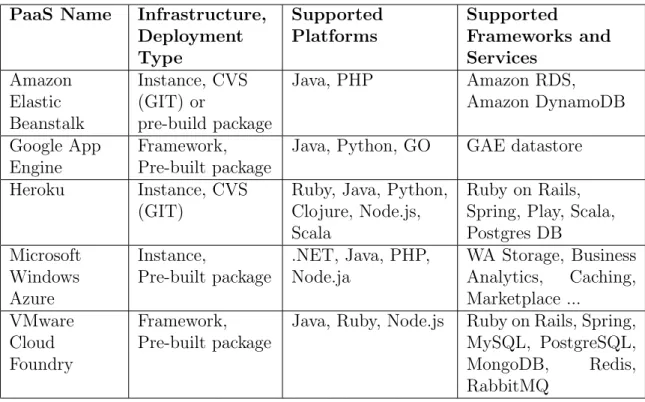
Table 4.1 presents the overview of selected PaaS clouds with the list of supported platforms, frameworks and other technologies as of May 2012. The comprehensive specifics of many other PaaS clouds can be found at [13] and [12].
PaaS Name Infrastructure, Deployment Type Supported Platforms Supported Frameworks and Services Amazon Elastic Beanstalk Instance, CVS (GIT) or pre-build package Java, PHP Amazon RDS, Amazon DynamoDB Google App Engine Framework, Pre-built package
Java, Python, GO GAE datastore Heroku Instance, CVS
(GIT)
Ruby, Java, Python, Clojure, Node.js, Scala
Ruby on Rails, Spring, Play, Scala, Postgres DB Microsoft Windows Azure Instance, Pre-built package .NET, Java, PHP, Node.ja WA Storage, Business Analytics, Caching, Marketplace ... VMware Cloud Foundry Framework, Pre-built package
Java, Ruby, Node.js Ruby on Rails, Spring, MySQL, PostgreSQL, MongoDB, Redis, RabbitMQ
14 CHAPTER 4. PAAS CLOUDS
4.2
Available PaaS Clouds
The list below provides the overview of several popular PaaS solutions that are offered on today’s market. Intentionally it contains the diverse types of cloud systems with different sets of supported platforms and services. They were selected with the focus on their popularity [31] and future potential as products supported by well-known corporations. Details and parameters of the individual clouds were described at table
4.1. From these systems the two target clouds were selected for the thesis realization as shown in 4.3.
• VMware Cloud Foundry [3] is an open source PaaS cloud system focused on open support of multiple frameworks, providers and application services. It was developed by VMware in 2011 and currently (May 2012) the project is still in beta phase of the development. CF is released under Apache License 2.0 and was written mainly in Ruby programming language. The Cloud Foundry project includes the associated public cloud service Cloud Foundry.com that is available for free as well as source codes, but the future versions will be priced.
• Amazon Elastic Beanstalk [21] is an instance PaaS cloud system offered as a part of the Amazon Web Services. AEB simplifies the deployment of applications into cloud by providing Java platform together with standard cloud functions like load balancing, auto scaling and application health monitoring. Because the Amazon PaaS is based on the underlying IaaS the customer has full control over the connected Amazon Elastic Cloud Compute, Simple Storage Service and others. Consequently the services are priced according to IaaS resources that the AEB uses.
• Google App Engine [8] is a cloud computing platform for developing and hosting web applications in data centers managed by Google. It virtualizes applications across multiple servers. App Engine offers automatic scaling for web applications - as the number of requests increases for an application, App Engine automatically allocates more resources for the web application to handle the additional demand. Currently supported languages are Python and Java (and other JVM powered languages like JRuby, Scala, Groovy,..)
• Azure Services Platform[10] is a platform built on Microsoft Windows Azure operating system. The operating system creates an abstraction over cluster hosted within datacenters. The platform is able to run service running on top of .NET Framework written in C# and VB.Net.
• Heroku [9] is a cloud PaaS run by the SalesForce.com. Heroku led the way for a multi-language PaaS, introducing the ’polyglot platform’ in 2007. Heroku initially supported the Ruby programming language, with Rack and Ruby on Rails. Heroku PaaS now supports six languages: Ruby, Java, PHP, Scala, Clojure and Python cloud PaaS. Heroku company was acquired by SalesForce.com in 2010.
4.3. CLOUD SELECTION 15
• Force.com platform is a PaaS from SalesForce.com. The platform allows external developers to create add-on applications that integrate into the main salesforce.com application and are hosted on salesforce.com’s infrastructure. These applications are built using Apex (a proprietary Java-like programming language for the Force.com platform) and Visualforce (an XML-like syntax for building user interfaces in HTML, Ajax or Flex).
• OpenShift (https://openshift.redhat.com/app/) is a Red Hat
cloud-based application platform for Java, Perl, PHP, Python, and Ruby applications.
• DotCloud(http://www.dotcloud.com/) is a Paas platform for cloud developers that offers support for multiple languages and environments like PHP, Ruby, Python, Perl, Java, Node.JS, MySQL, Redis, RabbitMQ, Solr, MongoDB and PostgreSQL.
• CloudBees(http://cloudbees.com) aims to provide Java Platform as a Service (PaaS) covering both development services and a production runtime for Java.
• Orchestra(http://orchestra.io/) andphpfog(http://phpfog.com/) focuses on the platform cloud services for the PHP applications.
4.3
Cloud Selection
The list of available clouds from the section 4.2 was used to find the most suitable PaaS for the deployment of prepared web applications. The selection process was based on the several technical and non-technical criteria that are described below. Additionally to these criteria the target PaaS had to provide the environment for the developed SaaS deployment application as well. This unified environment simplified the development process and enabled to speed up the deployment process inside the cloud itself.
According to several sources [16] the most popular programming languages and platforms in web environment today are PHP and Java. The many of popular open source web applications [34] were written in these languages and also this combination is very popular among the cloud providers as demonstrated in section 4.1.4. Because the development programming language was Java as well the languages that the selected cloud should provide were restricted to PHP and Java.
For almost every business application it is important to have some kind of persistent storage for its data. The most frequent choice of today’s web applications is some standardized SQL database. Because of most of popular applications like WordPress, Joomla or Drupal support the MySQL database [11] it was determined that the selected cloud should provide support for MySQL database service. It is most popular open source database today [11] and generally it can be said that the support for the popular open source databases like MySQL or PostgreSQL can significantly simplify the migration of applications into cloud.
16 CHAPTER 4. PAAS CLOUDS
Because the deployment of web applications needed to be automated it was necessary to have the appropriate API for the communication between SaaS application and cloud environment. With the use of prepared packs the SaaS application would use this API to deploy and manage applications in the cloud. From this point of view it was more advantageous to use the prepared pack type of deployment instead of source code deployment. For the closed source application the part of source codes may not be even available so this approach can be useful for the more specific deployments in the future.
With the regard to the previous criteria the two PaaS clouds were selected: 1. As a main development and deployment cloud platform was selectedVMware
Cloud Foundry [3]. Cloud Foundry provides the open source PaaS that is hosted on www.cloudfoundry.com. Currently the CF cloud is still in the beta phase with limited free account (see 4.4.1.6), but the resources provided by cloudfoundry.com are sufficient for the typical deployment of the applications that were used in the thesis. In the future the resources can be easily extended in other CF based clouds. From the technical point of view the Cloud Foundry PaaS provides the required Java platform with the support for Spring framework, MySQL database service and package based deployment. The communication with the cloud is realized through Java API and can be easily automated. The cloud doesn’t provide native support for PHP applications. This problem was resolved by the use of Quercus (see5.1.4) the 100% java implementation of PHP. More about VMware Cloud Foundry can be found in section4.4.1.
2. The second suitable cloud for automated application deployment is Amazon Elastic Beanstalk. Amazon EB is a instance PaaS that is tightly connected with Amazon IaaS services. The basic service is for free with the limited use of resources, larger consumption is billed according to the usage of Amazon Elastic Cloud servers. The cloud is in beta phase of development as well. EB PaaS supports Java platform, MySQL database support (realized through Amazon Relation Database Service) and the package based deployment. The extensive Java API is provided for the automation of deployment process. Until recently the Amazon EB didn’t support PHP natively, this service was added in March 2012. More about Amazon EB can be found in section 4.4.2.
4.4
Used Clouds
The clouds selected in section4.3 are thoroughly analyzed in this section.
4.4.1
Cloud Foundry PaaS
This section describes the purpose, architecture and specifications of Cloud Foundry, the open source platform as a service (PaaS) from VMware.
4.4. USED CLOUDS 17
4.4.1.1 Introduction
Cloud Foundry (CF) [3] is an open source PaaS cloud system focused on open support of multiple frameworks, providers and application services. It was developed by VMware in 2011 and currently (May 2012) the project is still in beta phase of the development. CF is released under Apache License 2.0 and was written mainly in Ruby programming language. The Cloud Foundry project includes the associated public cloud service cloudfoundry.com that is available for free as well as source codes, but the future versions will be priced.
Figure 4.1: Cloud Foundry Logo
The Cloud Foundry platform includes three main versions that should be distinguished:
• cloudfoundry.com- complete hosted public Cloud Foundry PaaS service. It’s main purpose is to test various applications that the users can upload for free and run online. In the future this service will be extended and priced.
• cloudfoundry.org- open source version of CF PaaS project placed on GitHub. The community developers can contribute to project here and develop additional services and frameworks that the CF will maintain for them.
• Micro Cloud Foundry -Ubuntu image with complete instance of the Cloud Foundry project suited for developer’s desktop. With the Micro CF the developer can more easily test his application before real deployment.
All of the versions of CF provide basic set of frameworks and services. This set will grow during forthcoming development. The current (May 2012) main offered functions are:
• Environments - Java, Ruby, Node.js, Erlang
• Frameworks - Spring, Ruby on rails, Node.js, Sinatra, Lift, Grails
• Services - MySQL, MongoDB, Redis, RabbitMQ
VMware tightly collaborates with third party companies that are called Community Leaders. The community leaders are responsible for the extension of supported programming languages and frameworks in the open source project cloudfoundry.org. The current leaders (May 2012) that use and extends Cloud Foundry PaaS are:
• ActiveState (http://www.activestate.com/cloud)- Community Lead for Python.
• Appfog (http://appfog.com) - Community Lead for PHP.
18 CHAPTER 4. PAAS CLOUDS
4.4.1.2 Description
At the figure 4.2 there are displayed three main elements of Cloud Foundry that provide basic features of PaaS open cloud [4]. On the top side there is selection of developer’s frameworks that are offered by the basic release of CF. This allows user to work easily with multiple platforms in one cloud system. On the left side there is set of application services. They should offer the additional functions to user’s applications like data persistence, messaging service and others. On the right side the developer’s organization may choose where to run CF. The deployment is not fixed to one type of a cloud, it is possible to use any private or public cloud. That cloud doesn’t have to be VMware based.
Figure 4.2: Cloud Foundry Structure 1
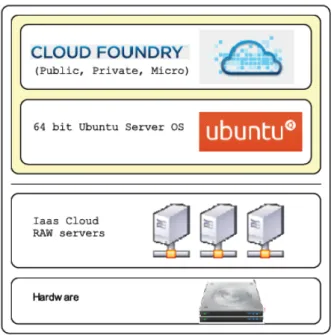
The other view of CF layer structure is at the figure 4.3. The only thing that the CF really cares about is its operation system (64-bit Ubuntu server version). Under this layer there could run different kinds of clouds or even raw servers. The choice is free.
4.4.1.3 Architecture
Cloud Foundry is composed of five main components and connecting messaging system [2] [38]. These components form the complete cloud structure of PaaS that is offered by VMware. Each one of them is self-healing and horizontally scalable. The administrator can run as many instances as is needed for the load balance of the cloud. All of the components are decoupled and can be spread over the network, it doesn’t matter which one is alive. The example of possible cloud structure is provided at figure 4.4.
4.4. USED CLOUDS 19
Figure 4.3: Cloud Foundry Structure 2
The cloud components can be installed and deployed on any customer’s computer infrastructure, the only necessary thing is installed Ubuntu 64-bit server operation system (in May 2012 it’s version 10.04.2). At the project website [3] the developers provide installation scripts that help install and configure the system.
The communication between components is provided by internally developed messaging system called NATS. It’s simple pub/sub messaging system that serves the cloud structure, but it’s not designed for application level messaging. For this type of messaging the developers offers VMware RabbitMQ as the possible service that can be associated with the application.
The five system components are:
• Cloud Controller is the main control component of the system. It’s fully asynchronous Rails3 application that executes the commands that were received from user’s service tools (VMC, STS Eclipse plugin) via REST interface. Main functions are loading and unloading of applications, controlling application environment and administer droplet execution engines (DEA) that should run each user application. During the upload of new application the Cloud Controller creates ”the droplet” (complete package with application code, its dependencies, configuration files and services setups) and prepares starting and stoping scripts that will control application lifetime. During the run of application Cloud Controller doesn’t scale application instances automatically, it relies on external input from user’s tools.
• The Droplet Execution Agent (DEA) is the execution component that manages multiple application servers, runs user’s applications and typically has
20 CHAPTER 4. PAAS CLOUDS
Figure 4.4: Cloud Foundry Components [38]
the most instances in the system. Each DEA has its own configuration of provided services and capacities, so it’s not needed to have same configuration for every DEA in the cloud. DEA treats application droplets as a black boxes, its only function is to run start and stop scripts of received droplet. When the application starts, it broadcasts all routers to inform them about running application.
• Router is the front door component of the system. It accepts HTTP requests for the user’s applications and delivers them to appropriate DEA. When the new application is online, the router registers it in its route table and starts delivering the requests to randomly selected DEA.
• Health Manager component ensures that main cloud components are alive. It has same models and database as the Cloud Controller and in intervals it checks the cloud if it’s in the intended state. If there are some problems with components and the user’s application is not running it informs cloud controller about the situation and initiates correction.
4.4. USED CLOUDS 21
Usually every service has two parts - main application that runs service itself and connecting layer that connects applications in cloud with selected service (handled by user).
4.4.1.4 Application Deployment
There are several possible ways of application deployment in Cloud Foundry [29]:
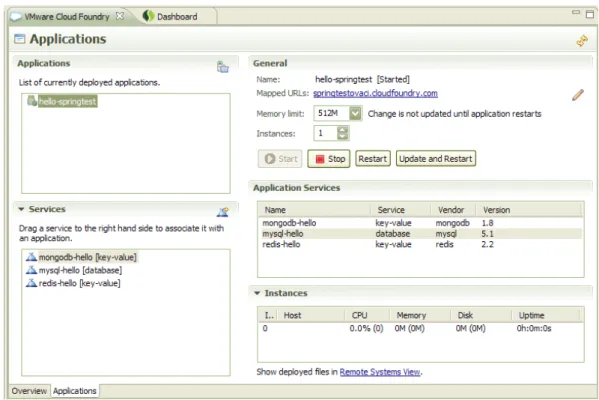
• CF Integration Plugin for STS (SpringSource Tool Suite) version of Eclipse IDE [26]. The plugin offers simplified graphical interface for the management of applications that the user developed using Eclipse environment. The interface of the plugin is shown at the figure 4.5. The plugin can be installed from the Eclipse Dashboard under Extensions tab. After the installation the user can select Cloud Foundry in Server selection and connect to any Cloud Foundry with his account information and deploy selected applications.
Figure 4.5: CF Integration Plugin for STS Eclipse
• VMC command line application. With several steps the user is able to deploy his project directory into Cloud Foundry. The detailed procedure is described below.
• Cloud Foundry Grails Plugin offers similar set of functions as VMC with the simplification of the deployment for Grails applications.
• Spring Roo Add-On provides the integration between Spring Roo tool and Cloud Foundry.
22 CHAPTER 4. PAAS CLOUDS
• Cloud Foundry Maven Pluginintegrates the Maven project’s lifecycle with Cloud Foundry deployment.
In the example the VMC client will be used for application deployment [6]. The process generally contains these steps:
1. Target Cloud Foundry instance is selected. The user can select any public, private or micro Cloud Foundry.
vmc target api.cloudfoundry.com
2. User logs into selected Cloud Foundry.
vmc login
3. User selects the source code directory of his application and VMC creates local copy of it. By default the current directory is used, but it can be changed with –path parameter.
vmc push
4. The VMC detects the application type and asks for the confirmation from user. Than the VMC client will interactively ask the user about deployment options (application URL, resources, number of instances) and the services that the application will require.
5. VMC creates the application manifest containing selected information and packs it with compressed application code. Then it starts to upload the project into Cloud Foundry.
6. When the package is uploaded, the CF starts to stage application. It means the CF will allocate required resources, frameworks and services.
7. CF starts the application automatically unless the option –no-start is selected for the push command (Application can be started later).
4.4.1.5 Monitoring and debugging
The VMC command line tool provides several commands for the monitoring of deployed application behavior [5]. The basic statistics command is:
vmc stats <appname>
4.4. USED CLOUDS 23
Instance CPU (Cores) Memory (limit) Disk (limit) Uptime
--- --- --- ---
---0 0.0% (8) 29.2M (64M) 824.0K (2G) 60d:19h:53m:58s
1 0.0% (8) 29.3M (64M) 816.0K (2G) 60d:19h:50m:3s
When an application crashes the user can find the logs about its state using command:
vmc crashlogs <appname>
Currently (May 2012) the CF will terminate the application if it exceeds allocated resources. The information about this typical situation can be easily discovered by the commands above.
4.4.1.6 Cloud limits
There are limits associated with the use of public beta version of Cloud Foundry.com [36]. In May 2012 the limits are:
Resource Limit Resource Limit
Applications 20 File Descriptors 256
Service Instances
16 URIs 4
Memory 2GB MySQL DB Size 128MB
Disk 2GB Redis Memory 16MB
CPU Fair share of 4
cores
MongoDB Memory 240MB Network Fair share
Table 4.2: CloudFoundry.com (beta) account limits
4.4.1.7 API
The suitable Java API is very important element of communication between cloud control application and cloud itself. The Cloud Foundry offers library of classes that are able to create and handle the set of cloud control objects. This library can be embedded into customer’s application and used for the communication with any public, private or even micro version of Cloud Foundry. The API is unified for all three versions of PaaS that VMware offers.
The Cloud Foundry API is still in active development and can be changed in the future, but fundamentally the classes can be divided into two groups. First group are domain classes that provide object representation of application packs, instances and relevant statistics. The example of such a class can be InstanceClass which encapsulates the instance statistics data:
24 CHAPTER 4. PAAS CLOUDS
public class InstanceStats { ...
private int cores; private long diskQuota; private int fdsQuota; private String host; private String id; ...
public int getCores() { return cores;
}
public long getDiskQuota() { return diskQuota;
} ... }
The domain objects are handled by business classes. Business classes communicates with external cloud API and assures that the Cloud Foundry executes the demanded
commands. Main business class is CloudFoundryClient, example of one of the communication method is:
public void updateApplicationInstances(String appName, int instances) { CloudApplication app = getApplication(appName);
if (app == null) {
throw new IllegalArgumentException("Application " + appName + " does not exist"); }
app.setInstances(instances); updateApplication(app); }
4.4.2
Amazon Elastic Beanstalk
Amazon Elastic Beanstalk is a second potential PaaS choice for the deployment of .war1 packs [21] [30]. This section describes some details about AEB architecture and API.
4.4. USED CLOUDS 25
4.4.2.1 Introduction
AEB is an instance PaaS cloud system offered as a part of the Amazon Web Services. AEB simplifies the deployment of applications into cloud by providing Java platform together with standard cloud functions like load balancing, auto scaling and application health monitoring. Amazon EB is a instance PaaS that is tightly connected with Amazon IaaS services. The basic service is for free with the limited use of resources, larger consumption is billed according to the usage of Amazon Elastic Cloud servers. The cloud is in beta phase of development. AEB PaaS supports Java platform, various databases (offered by Amazon Storage Services and other AWS services. It uses both types od deployment - the package or git source code upload. Until recently the Amazon EB didn’t support PHP natively, this service was added in March 2012.
4.4.2.2 Architecture
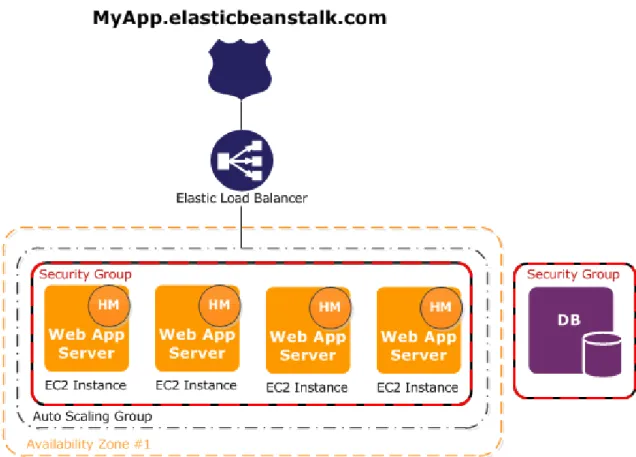
The Architecture of AWS Elastic Beanstalk is presented at the figure4.6[1]. Amazon PaaS is based on the underlying IaaS. The customer has full control over the connected Amazon Elastic Cloud Compute (EC2 instance), Simple Storage Service (DB) and optionally others. Consequently the services are priced according to IaaS resources that the AEB use.
26 CHAPTER 4. PAAS CLOUDS
Currently (May 2012) there are supported three web containers: Apache Tomcat 6, Apache Tomcat 7, PHP 5.3, and IIS 7.5. Each instance of EC2 must include one of the container. The component of container that deploys and configures applications is called host manager. Apart from application management the host manager is responsible for several other functions. The most important are:
• Monitoring applications for errors.
• Monitoring application server.
• Patching instance components.
• Aggregating events for API and other tools.
The instances are members of security groups which contain configurable firewall. By default, everyone is able to connect using HTTP port 80.
4.4.2.3 API
API of AWS Elastic Beanstalk is provided as a part of extensive Amazon SDK for Java. Under the elasticbeanstalk package the customer can find set of classes that controls the communication with Elastic Beanstalk and underlying IaaS. The main class of API is AWSElasticBeanstalkClient.java that collects the functions from other methods. Example of function that creates application:
/**
* Creates an application that has one configuration template named * default and no application versions.
*
* @param createApplicationRequest Container for the necessary * parameters to execute the CreateApplication service method on * AWSElasticBeanstalk.
*
* @return The response from the CreateApplication service method, as * returned by AWSElasticBeanstalk.
*
* @throws TooManyApplicationsException * @throws AmazonClientException
* If any internal errors are encountered inside the client while * attempting to make the request or handle the response. For example * if a network connection is not available.
* @throws AmazonServiceException
* If an error response is returned by AWSElasticBeanstalk indicating * either a problem with the data in the request, or a server side issue. */
public CreateApplicationResult createApplication( CreateApplicationRequest createApplicationRequest)
4.4. USED CLOUDS 27
throws AmazonServiceException, AmazonClientException { Request<CreateApplicationRequest> request = new
CreateApplicationRequestMarshaller().marshall( createApplicationRequest);
return invoke(request,
new CreateApplicationResultStaxUnmarshaller()); }
Chapter 5
Application Deployment Analysis
This chapter describes the selection process of several web applications that were migrated and deployed into VMware Cloud Foundry. The section5.1presents criteria that were used during the selection process of five target applications. These applications were configured for the target cloud and tested there before the development of automatic deployment application UpCF started. The section 5.1.3 contains details about this process.During the configuration and migration process of selected applications several common problems occurred. These problems are discussed in section5.2with suggestions to their solution.
5.1
Applications Selection
The selection process of suitable applications for cloud deployment is described in this section.
5.1.1
Application Types
Aim of the application selection process was to find several representatives of different applications types that are used on the Internet today. The applications should be open-source, web-based and with relevant amount of references. After the research the five main applications were selected. They represent the following types of applications:
• Content Management System (CMS)
Content Management System [32] [35] enables customer to manage web content easily. Typically it provides several interfaces and tools for maintaining user access, text publishing and media files storage inside the single system. Typically the design of such a web site is created according to some template that simplifies the modifications of graphical interfaces.
30 CHAPTER 5. APPLICATION DEPLOYMENT ANALYSIS
• Internet Forum
Internet forums [24] enable users to stay in touch within a group of people and discuss several topics on structured website. The advanced type of features that forums provides are archived discussions, tree-structured threads, user management and advanced access rights.
• Bug Tracking System
Bug tracking (BT) systems helps with reporting of bugs, defects and other issues connected with software in development. The user is able to track the selected issue systematically and view the state of the problems immediately. Additionally the BT provides some type of overview over the system, issues archives, road maps and other support functions.
• SQL Query Reporting Tool
Last type of application is query reporting. The query reporting tool enables to publish queries into database and create reports and charts over the results. As a simple business intelligence tool the results can help customer to analyze data in selected database without great effort.
5.1.2
Selected Applications
Five open source applications were selected as popular representatives of different type od applications that can be deployed into cloud environment:
Figure 5.1: Selected Applications
• WordPress – PHP powered blogging tool and CMS
Version: 3.2.1
Website: http://wordpress.org/
CMS1 are typical multi-user work flow applications that are widely used on the Internet. The first selected representative for the deployment is WordPress, the most popular open source CMS [34] with more than 60 million users [23]. The version of application that was deployed into Cloud Foundry uses Quercus (http://quercus.caucho.com/) Java implementation of PHP 5 to run WordPress
5.1. APPLICATIONS SELECTION 31
under Java application server in CF. The .war2package provided on CD includes preconfigured database settings processed from CF environment variables.
• Drupal - PHP powered CMS
Version: 6.22
Website: http://drupal.org/
The second representative of open source CMS is Drupal. Drupal is the third most used CMS [34] on the Internet with many popular references (e. g. whitehouse.gov, data.gov.uk). The CF version of Drupal uses Quercus interpreter (as well as WordPress) and also the CF database data are preconfigured in .war package on CD.
• phpBB – PHP powered forum
Version: 3.0.10
Website: http://www.phpbb.com
phpBB is the most widely used open source bulletin board system on the Internet [18] with many references [19]. The CF version of phpBB uses Quercus and MySQL database. The configuration of CF database is included in .war package.
• MantisBT – PHP powered bug tracking system
Version: 1.2.8
Website: http://www.mantisbt.org
Bug tracking (BT) systems helps with reporting of bugs, defects and other issues connected with software in development. MantisBT is one of the popular open source web-based BT. The CF version of MantisBT uses Quercus and preconfigured MySQL database.
• ART – Java powered query and reporting tool for Business intelligence
Version: 2.1
Website: http://art.sourceforge.net/
ART represents application that systematically works with SQL data source and creates reports over selected issues. It enables the user to publish SQL queries and create several types of report (tabular, charts, scheduling). The reports and settings can be stored in database and the provided war pack enables to configure this function in CF.
5.1.3
Applications Packages Preparation
For the simplified deployment of applications, the modified .war archives were created to be able to automatically install the selected application to CF. The packages are
32 CHAPTER 5. APPLICATION DEPLOYMENT ANALYSIS
provided on the enclosed CD and the method of their preparation is described below:
5.1.4
Quercus PHP engine
Because CloudFoundry doesn’t provide native support of PHP (May 2012) the alternative solution was chosen to combine PHP with Java and execute PHP applications under Java Environment. This was enabled by Caucho Quercus [22], the 100% implementation of PHP. Quercus is open source project released under GPL license.
Quercus is distributed as a simple .war web application archive that can be deployed to any Java application server like Glassfish or Apache Tomcat. It contains all necessary PHP libraries that can run PHP application within this package.
The only limitation with Quercus was unavailability of support of up-to-date version of PHP. Because of that some of the newer versions of application like Drupal or Joomla cannot be deployed. Future releases of Quercus may improve this support and enable the deployment of more applications in the future.
5.1.5
Overview
Application, Version
Website Type Deployment
WordPress 3.2.1 http://wordpress.org/ Content Management System PHP + Quercus Drupal 6.22 http://drupal.org/ Content
Management System
PHP + Quercus phpBB 3.0.10 http://www.phpbb.com Internet Forum PHP +
Quercus MantisBT
1.2.8
http://www.mantisbt.org Bug tracking system
PHP + Quercus Art 2.1 http://art.sourceforge.net/ SQL Query and
reporting tool
Java
Table 5.1: Application Packs Overview
5.2
Deployment
This section describes the main issues that were performed to migrate PHP application into cloud environment:
Generally these step were needed for the migration of application into cloud environment:
5.2. DEPLOYMENT 33
• The application was downloaded and unpacked.
• Quercus interpreter was imported into Eclipse IDE and tested.
• The application was inserted into Quercus.
• The basic functionality was tested.
• The code of application was changed to read the database data from environment variables (details are below).
• The application was tested with database access.
• Additional issues like missing libraries were solved.
When the application is deployed to Cloud Foundry typically the user assigns some database to it. This causes the cloud to create the database in cloud and exports the database connection data into environment variables. The target application needs to read this data to connect into database. In the thesis this process was performed automatically using following code:
\\reads VCAP SERVICES
$jsonVar = "{".System.getenv("VCAP_SERVICES")."}"; \\formatting of the text and creation of JSON object
$a = new JSONObject(substr($jsonVar,7,strlen($jsonVar)-2)); $b = $a->get("mysql-5.1")->toString();
$a = new JSONObject(substr($b,1, strlen($b)-1)); $c = $a->get("credentials")->toString();
$a = new JSONObject($c);
\\assigns the values to installation variables
$f_hostname = $a->get("username").’:’.$a->get("host"); $f_db_type = null; $f_database_name = $a->get("name"); $f_db_username = $a->get("username"); $f_db_password = $a->get("password"); ...
Basically the codes executes these commands:
1. Call the getevn system function that reads the systems variables and finds the demanded value.
”VCAP SERVICES” in this case.
2. The output from function is processed and credential values are found.
34 CHAPTER 5. APPLICATION DEPLOYMENT ANALYSIS
3. The JSONObject is created from credentials text value. This object enables to call the individual values easily.
4. The get methods of JSONObject are called and retrieved, values are stored in installation variables.
In this case it was username, password, database name, database ip, database port.
5. The installation script takes the environmnetal variables and uses them during installation process.
For the Java application the steps are same except from Quercus integration. The database is configured in similar way as in PHP, but the Java libraries for JSON processing are used.
After the test of the proper functionality of the package the application was uploaded into CloudFoundry and deployed there. The installation steps of application were executed and the basic application steps were tested.
The UpCF SaaS application uses this complete packages and deploys them into cloud. The installation steps are performed by user but the necessary data are preconfigured by the code presented above.
5.2.1
Migration steps
This section presents the steps of migration process that the developer solves during the deployment and suggests the most appropriate solutions for them.
• Database Connection - When the developer decides to use some database or persistence storage, the cloud will create and assign the DB connection data for application and publish them somewhere. Typically this data are accessible from system variables or from other readable place. The deployed application should be able to read this data and connect to database in order to establish connection.
• DB Schema - Ideally the application should have the ability to handle DB schema creation independently of other application, but besides that there may be possibility to separate this step using some external tool or application. First the developer deploys this application or tool, shares the database with main application and creates DB schema for it.
• File Storage- The best option for persistent file storage is to use some NoSQL database that are usually offered by PaaS clouds or other reliable and scalable central storage place. For legacy software this may not be possible, so the developer has to choose less clear solutions. Some clouds may offer some simple central persistent file storage place, that solves this problem but limits the scalability of system significantly. Other solution is to store the files non-permanently and perform the backups frequently.
5.2. DEPLOYMENT 35
• Backup - There are usually two options for application backup. It can be performed by user’s application or by cloud. Usually the cloud backup is more simple as it backups whole application data. On the other hand, the user’s backup can be more accommodated for user’s application.
Chapter 6
UpCF System Description
The development process of SaaS application UpCF is described in this chapter. First the features of developed system are presented in section 6.1. Then the analysis section describes the system users, project requirements and expected interfaces of the system using wireframes. The system was designed according to several diagrams that are presented in section6.2.4with the explanation of used source code packages. The implementation and testing summarizes the last two development steps of UpCF application.
6.1
Features
To fulfill the assignment three main features were required from the application:
• Develop application as a SaaS.
The UpCF was designed and deployed as a SaaS cloud application. The main cloud functions and characteristics were ensured with the cooperation with VMware CloudFoundry PaaS cloud. The PaaS enables the scalability, network access and measuring services for UpCF. On the application level the UpCF provides user management with proper security handling. According to
customer’s needs there is possibility for future extensions (like additional cloud support or new application packages). These features forms the automatic SaaS deployment application.
• Use Simple Interfaces.
The application was designed to use only several interface screens to successfully deploy demanded application. According to that there are only four steps to complete the deployment process. The steps are:
1. Application selection 2. Cloud account selection 3. Deployment configuration
4. Automatic deployment and launch of application.
38 CHAPTER 6. UPCF SYSTEM DESCRIPTION
• Use Cloud Compatible Permanent Storage.
To assure proper processing of application files and system data the suitable database was needed. The Cloud Foundry PaaS provides MongoDB NoSQL database that offers easy solution for these problems. It is able to store large files in the database (using GridFS access) along with regular object data. Also the database offers Java API and there is Spring framework support library available as well.
6.2
Analysis and Design
This section describes the analysis and design of developed application.
6.2.1
System Users
The two user groups that control the system are:
• Customer - The target users of the system. Typically a customers want to deploy one or more applications that are offered by the cloud. They expect simple guide that will help them with this process. After the deployment there will be possibility to track and maintain the deployed applications.
• Administrator - This users will maintain the developed system and its data. They will be able to manage existing users, offered applications and connected clouds. The administrator expects simple access to logging data and various reports.
6.2.2
Project Requirements
This section analyzes the set of requirements for the developed web application. The requirements are sorted by their function and by the type of user that will use them.
Functional Requirements:
Functional Requirements describes the functionality of the system from the user’s point of view. The requirements are numbered, titled and appended with details paragraph that summarizes the necessary steps that the user must pass to achieve the demanded result.
Customer
1. Application Selection
The customer will be able to list available applications for chosen cloud(s) and select his preference. The system will inform customer about application type with brief description and possible deployment issues.
6.2. ANALYSIS AND DESIGN 39
2. Log-in to Cloud Account
During the deployment of selected application, the customer will enter his log in details for selected cloud into the system. If he doesn’t have the necessary account, the system will refer him to register site.
3. Default/Custom Configuration
During the deployment the customer will be able to select the custom deployment option and fill in additional configuration details related to selected cloud (typically consumed resources or connection to existing database). Otherwise the default values will be used.
4. Application Management
After the automatic deployment the customer will be able to manage the deployed applications in the system. Typically the CRUD (create/remove/update/delete) commands will be available.
5. Applications Monitoring
The customer will be able to monitor the deployed application(s) state in the system and will be able to set up regular logging of application statuses. 6. Customer Activity History
The customer will have access to the logs of his activity and will be able to export them into a file.
7. Registration
The user will register in the system with his username and password. The system will keep record of the user. Every type of the user will have different set of system functions according to their needs.
Administrator
1. Application Management
The administrator will be able to add, update and remove the applications that are offered by the system. For every application, he will fill out important additional information and assign application to appropriate cloud.
2. User Management
The administrator will be able to add, update or remove user accounts in the system.
3. Logs
The administrator will have access to system logs about user’s and application’s activities. He will be able to export logs into a file.
4. Reports
The administrator will be able to read reports about the system (e.g. total number of users and application popularity among them). He will be able to export report files into a file.
40 CHAPTER 6. UPCF SYSTEM DESCRIPTION
System Requirements:
System requirements describes the inner functionality of system. During the development these requirements will be taken into consideration to achieve expected specifics and qualities of SW. The requirements are numbered, titled and appended with details paragraph that summarizes the demanded system property.
System
1. Simplicity of Use
The system will be designed for the customer without programming or application deployment knowledge. The process will focus on fast and simple deployment with “only a few clicks”.
2. Type of the System
The system will be implemented and deployed as a web application. The graphical interface will be based on modern web sites appearances.
3. Implementation Technology
The system will be implemented in Java with the use of Spring framework. 4. Security
The system will require user login for the advanced access to system functionality. Every component will be restricted only to the proper type of the user.
5. Persistence
The important system data will be stored in database with permanent storage. 6. Cloud Integration
The system will be designed for the possible extension of offered PaaS clouds. 7. Billing
The system will be able to add new applications demanded by customer (with optional restricted access to other users). This feature will be charged separately without the use of system.
6.2.3
Website Wireframes
The two website wireframes [25] were created to describe the interface and main application work flow:
• Wireframe6.1presented the main components of three screens - Home screen, Application Management Screen and Administrator Screen. The wireframes were created before the visual design of the UpCF application so the actual position of several components is different in real system.
6.2. ANALYSIS AND DESIGN 41
Figure 6.1: Main Screens Wireframes
• Wireframe6.2presents the main work flow of application during the deployment process. The wire frames for every step were provided to demonstrate the visual appearance of every step. First two wireframes describe the selection process where the users choose their application and read the provided details. In next wireframe the universal settings screen was provided. In real application there are two scrrens like this - Account Selection and Deployment Options Screen. The diagram demonstrates the main steps during the deployment process of application packages. The error scenarios were demonstrated at the choice nodes.
6.2.4
Design
During the design phase of development the application was divided into several layers with specific function. The dependencies between them can be found at package diagram 6.3. The purpose of the main packages was:
![Figure 3.1: Cloud Types by Access [7]](https://thumb-us.123doks.com/thumbv2/123dok_us/1635960.2723248/24.892.211.628.611.870/figure-cloud-types-by-access.webp)
![Figure 3.2: Cloud Concepts [27]](https://thumb-us.123doks.com/thumbv2/123dok_us/1635960.2723248/25.892.240.717.808.1047/figure-cloud-concepts.webp)
![Figure 3.3: Typical Provided Cloud Services [27]](https://thumb-us.123doks.com/thumbv2/123dok_us/1635960.2723248/27.892.186.747.608.985/figure-typical-provided-cloud-services.webp)

![Figure 4.4: Cloud Foundry Components [38]](https://thumb-us.123doks.com/thumbv2/123dok_us/1635960.2723248/38.892.166.675.143.664/figure-cloud-foundry-components.webp)