Version: Open M/SQL F.6, F.7
Revision Date: April 25, 1996
Print History
Creation Date: July, 1992
Copyright © InterSystems Corporation 1995
All rights reserved
NOTICE
PROPRIETARY — CONFIDENTIAL
This document contains trade secret and confidential information which is the property of InterSystems Corpo-ration, One Memorial Drive, Cambridge, MA 02142, or its affiliates, and is furnished for the sole purpose of the operation and maintenance of the products of InterSystems Corporation. No part of this publication is to be used for any other purpose, and this publication is not to be reproduced, copied, disclosed, transmitted, stored in a retrieval system or translated into any human or computer language, in any form, by any means, in whole or in part, without the express prior written consent of InterSystems Corporation.
The copying, use and disposition of this document and the software programs described herein is prohibited except to the limited extent set forth in the standard software license agreement(s) of InterSystems Corporation covering such programs and related documentation. InterSystems Corporation makes no representations and warranties concerning such software programs other than those set forth in such standard software license agreement(s). In addition, the liability of InterSystems Corporation for any losses or damages relating to or aris-ing out of the use of such software programs is limited in the manner set forth in such standard software license agreement(s).
THE FOREGOING IS A GENERAL SUMMARY OF THE RESTRICTIONS AND LIMITATIONS IMPOSED BY INTERSYSTEMS CORPORATION ON THE USE OF, AND LIABILITY ARISING FROM, ITS COMPUTER SOFTWARE. FOR COMPLETE INFORMATION REFERENCE SHOULD BE MADE TO THE STANDARD SOFTWARE LICENSE AGREEMENT(S) OF INTERSYSTEMS CORPORATION, COP-IES OF WHICH WILL BE MADE AVAILABLE UPON REQUEST.
InterSystems Corporation disclaims responsibility for errors which may appear in this document, and it reserves the right, in its sole discretion and without notice, to make substitutions and modifications in the products and practices described in this document.
M/SQL®, M/PACT®, and M/NET® are registered trademarks, and InterSystems™, Open M™, Open M/SQL™, ISM™, DTM™, DT-MAX™, DT Windows™, DSM™, and DASL™ are trademarks of InterSystems Corporation. MUMPS®, now called M Technology, is a registered trademark of Massachusetts General Hospital.
DSM DDP™, VAX™, VMS™, Open VMS™, and DEC™ are trademarks of Digital Equipment Corporation. Microsoft®, MS-DOS®, Microsoft Access®, and, Excel® are registered trademarks and Windows™, Visual Basic™, and Visual C++™ are trademarks of Microsoft Corporation.
ORACLE® is a registered trademark of Oracle Corporation.
For Support questions about any InterSystems products, contact the InterSystems Worldwide Support Center:
U.S.: Tel: +1 617 621-0700 Fax: +1 617 494-1631 Europe: Tel: +44 753 830-077 Fax: +44 753 861-311 Internet — [email protected]
Open M/SQL is an integrated environment for developing and running database applications. It includes an advanced relational database management system, an application and report generator, and a procedural programming language.
Open M/SQL combines two ANSI-Standard languages — M, the only proce-dural programming language designed specifically for database applications, and SQL (Structured Query Language), the most widely used relational query lan-guage.
Open M/SQL provides two program development environments:
n The M environment, in which you can execute system management
com-mands, and create, modify, and execute M routines.
n The relational environment, in which you define the database in relational
terms and use the application generator tools to create, modify, and execute advanced relational database applications.
Open M/SQL’s relational environment is a complete RDBMS (Relational Data-base Management System)—it includes a development environment for creating advanced relational database applications, a management system for maintaining them, and a run-time environment for executing them.
Open M/SQL’s relational environment has the following components:
n Relational Data Dictionary — environment where you define tables to
rep-resent the logical structure of a relational database, or map the physical struc-ture of an existing database to relational tables. These tables act as the foundation on which Open M/SQL relational database applications are built.
n Menu Generator — an application generation tool used to create pop-up
menus and menu bars which unite the various components of an application in a logical and visually sophisticated manner and structure an application by defining how it is organized and how it is presented to end users.
n M/PACT (Report Generator) — a report-writing tool used to create and run
sophisticated end-user data reporting applications that interact with the Open M/SQL Relational Data Dictionary.
n Query Generator — environment in which you can create and run database
queries on an ad-hoc basis.
n Relational Server — an optional component of Open M/SQL that allows
non-M applications to access and modify your Open M/SQL relational data-base.
The Open M/SQL Developer Guide describes all aspects of Open M/SQL pro-gram development that are independent of considerations specific to hardware platform, operating system, and host M system.
This document provides an overview of the Open M/SQL program development environment (including both the M environment and the relational environment) and presents various strategies for developing applications.
More specifically, it contains information on the following topics:
n Development of macro source routines n Use of the Full Screen Editor
n Use of routine management utilities n Use of the Open M/SQL developer utilities
n Overview of Open M/SQL’s implementation of SQL
n Various methods for using SQL to query an Open M/SQL relational database
Audience
This document is intended for use by programmers who are using InterSystems’ Open M/SQL Developer product to create Open M/SQL relational database applications.
The term “application programmer” in this document refers to the programmers who create Open M/SQL relational database applications.
The term “user” in this document refers to the end user of an Open M/SQL rela-tional database application.
This document assumes that you have programming experience. In specific, it assumes familiarity with programming in the M language and the SQL language.
Organization of this Guide
This manual is divided into four sections. Section I, Getting Started, contains the following two chapters:
n Chapter 1, Introduction to Open M/SQL, introduces InterSystems’ Open
M/SQL and discusses its uses in a 4GL application generator environment. Chapter 1 begins with a discussion of application development strategies, then goes on to discuss the components of Open M/SQL and their various applications.
n Chapter 2, The Open M/SQL Relational Database, describes relational
con-cepts and their implementation in SQL as well as the database concept and its implementation in Open M/SQL.
Section II, Program Development, contains the following five chapters:
n Chapter 3, Open M/SQL Program Development, outlines the range of
facili-ties available for program development in Open M/SQL.
n Chapter 4, Full Screen Editor, describes the Open M/SQL Full Screen Editor
used in editing macro source routines, intermediate code routines, and include files.
n Chapter 5, Developing Macro Source Routines, describes how to create
rou-tines at the macro source level, including descriptions of all the macro con-structs permitted by Open M/SQL at this level.
n Chapter 6, Routine Handling and Maintenance, presents an overview of the
Open M/SQL routine environment and describes routine handling and main-tenance.
n Chapter 7, Open M/SQL Routine Management Utilities, describes the built-in
utilities that InterSystems supplies to assist in examining and manipulating routines and include files.
Section III, SQL Language Implementation, contains the following three chap-ters:
n Chapter 8, Embedded SQL, describes the two ways of using SQL in an Open
M/SQL program: cursor-based and non-cursor-based.
n Chapter 9, Open M/SQL Implementation of SQL, describes extensions to
ANSI-Standard SQL that InterSystems has incorporated into Open M/SQL.
n Chapter 10, Query Generation and Processing, describes the Query
Genera-tor and the Query EdiGenera-tor—the two facilities provided by Open M/SQL for the generation and processing of ad hoc SQL queries.
Section IV, Application Programming, contains the following chapter:
n Chapter 11, Programmer Interface to Applications, presents an overview of
the M variables and globals that interact with forms and reports. It also dis-cusses the uses of inserted M code in an application, the conventions for call-ing forms, reports, queries, and menus and emulatcall-ing forms, and the contents of applications.
n Chapter 12, Open M/SQL Developer Utilities, describes the built-in utilities
that InterSystems supplies to assist in examining and manipulating routines and include files.
This guide contains the following appendices:
n Appendix A, SQL Error Messages, which lists and describes all message
codes (successful completion messages and error messages) that can be returned to the SQLCODE variable.
n Appendix B, Open M/SQL Reserved Words, which lists all Open M/SQL
reserved words.
n Appendix C, Open M/SQL Supported Terminal Types, which lists all terminal
types currently supported by Open M/SQL.
n Appendix D, Keyboard Actions for the Full Screen Editor, which shows the
keyboard mapping for using the Full Screen Editor on keyboards associated with the terminal types supported by Open M/SQL/
Other References
Depending on the configuration of your system, you may also wish to refer to the following guides:
n The Open M/SQL Database Administrator’s Guide, which describes how to
configure, manage, and maintain an Open M/SQL environment, including both the application development environment and the application run-time environment. For sites that use the Open M/SQL Relational Server to make Open M/SQL data available to external applications, this guide also describes how to configure, manage, and maintain the Relational Server.
n The Open M/SQL User Interface Programming Guide, which describes how
to use the application generation tools within Open M/SQL Developer to cre-ate a user interface for your relational database. These application generation tools include the Form Generator — used to create ready-to-run data screens through which end users can add, retrieve, edit, and delete database information; the Menu Generator — used to create pop-up menus and menu bars which unite the various components of an application in a logical and visually sophisticated manner and structure an application by defining how it is organized and how it is presented to users; and the Application Help Facility — used to create and deploy a context-sensitive on-line help system for your Open M/SQL relational database application.
n The Open M/SQL Data Dictionary Guide, which describes how to define
tables to represent the logical structure of a relational database, or how to map the physical structure of an existing database to relational tables. These tables act as the foundation on which Open M/SQL relational database appli-cations are built.
n The Open M/SQL Relational Client User Guide, which describes how to
access an Open M/SQL relational database (retrieve and modify data) from various third-party application development tools.
n The Open M/SQL Server Programming Guide, which describes how to
access an Open M/SQL relational database from applications created using the C or C++ programming language.
n The M/PACT Guide, which describes how to create and run sophisticated
end-user data reporting applications that interact with the Open M/SQL Rela-tional Data Dictionary.
n An tutorial entitled Open M/SQL: A Gentle Introduction, which uses a
project management demonstration application to show how to develop and use an Open M/SQL application.
n The Open M/SQL M Programming Guide, which describes ISM
n The appropriate system guide for your Open M system platform, which
describes the system-specific elements of using Open M on your particular computer and operating system.
Typographic Conventions Used in this Guide
This guide observes the following typographic conventions:Convention Description Example
Body text appears in Times
Roman type. Open M/SQL offers a variety of strategies for developing an application.
Computer generated informa-tion appears in Courier type.
Linking/Syntax Checking...DONE
Computer generated required fields appear in Courier Bold type.
Update New M Database Defaults?
User input appears in Courier Bold Italic type.
Yes
Keystrokes appear in upper-case and enclosed within angle brackets.
<RETURN>
Simultaneous keystrokes appear hyphenated, in upper-case, and enclosed within angle brackets.
<CTRL-Z>
Command syntax appears indented in Courier type with variable information in Courier Italic type and enclosed within angle brackets.
> do setaid^%msql(“<UserName>”)
Examples of user-typed com-mands appear indented in Courier Bold Italic type.
> do setaid^%msql(“Zeus”)
Procedure titles appear in bold Helvetica type and are desig-nated by an underlined side-head prefix.
Procedure To access the System Configu-ration window:
Note, Caution, Warning, and Hint statements appear in Hel-vetica type with an appropriate sidehead.
Note Turning DBMS security OFF is a useful way to guarantee access to current applications by users who will need them while you are in the process of implementing a privilege system.
Titles of other guides and other chapters within this guide appear in Times Italic type.
Preface
Audience. . . iv
Organization of this Guide . . . v
Other References . . . vii
Typographic Conventions Used in this Guide . . . ix
Part I— Getting Started
1
Introduction to Open M/SQL
What Is Open M/SQL?. . . 1-2 What Is Open M/SQL Developer? . . . 1-3 Application Development Strategies . . . 1-4 Automated Program Generation . . . 1-4 Procedural Programming in ANSI M . . . 1-6 Mixed Environments . . . 1-7 Overview of the System Environment . . . 1-8 Hardware and Operating System Environments . . . 1-8 Memory Environment . . . 1-9 Global Database . . . 1-9 ANSI-Standard M Language Processor. . . 1-9 ANSI-Standard SQL Language Processor. . . 1-9 Relational Data Dictionary . . . 1-10 Program Development Environment . . . 1-10 The Form Generator and M/PACT . . . 1-12
DT Network . . . 1-13 Open M/SQL Runs on Top of Any M Implementation . . . 1-14 Integration of Two ANSI Standards . . . 1-15 Embedded SQL . . . 1-15 Inserted Code for Data Dictionary, Forms, and Reports. . . 1-15 Accessing the Global Database . . . 1-16 SQL - Relational Database Access . . . 1-16 M Global References . . . 1-16 Open M/SQL Program Structure . . . 1-17 Macro Source Routines . . . 1-17 Intermediate Code Routines . . . 1-17 Object Code Routines . . . 1-18 Open M/SQL Routine Utilities and Editors . . . 1-18 Distributed Data Processing . . . 1-19
2
The Open M/SQL Relational Database
Open M/SQL Implements Relations as Tables . . . 2-2 Open M/SQL Tables Follow The First Normal Form . . . 2-2 Open M/SQL Supports Two Types of Tables . . . 2-3 Open M/SQL Implements Schemas as M Directories. . . 2-4 Open M/SQL Database Structure for Non-ISM Implementations of M. 2-4 The Open M/SQL Relational Data Dictionary . . . 2-5 Accessing Data in an Open M/SQL Relational Database . . . 2-6 Using SQL to Query the Database . . . 2-6 Cartesian Product . . . 2-7 Project . . . 2-9 Restrict . . . 2-10 Joins . . . 2-11 InterSystems’ Extensions to the Relational Model . . . 2-14 One-Way Outer Joins . . . 2-14 Implicit Joins. . . 2-15 Multi-Line Fields . . . 2-21
Part II— Program Development
3
Open M/SQL Program Development
Programming Methods . . . 3-2 The Full Screen Editor. . . 3-2 Intermediate Code Routines . . . 3-3 Routine Line Editor. . . 3-3
Routine Management Utilities . . . 3-3 Developer Utilities . . . 3-4 Programmer Interface to Applications . . . 3-4
4
Full Screen Editor
Overview of the Full Screen Editor . . . 4-2 Full Screen Editor Features . . . 4-2 Routine Types for Editing . . . 4-2 Invoking the Full Screen Editor . . . 4-3 Loading Existing Routines. . . 4-6 Creating New Routines . . . 4-7 Preventing Overwrites . . . 4-7 Full Screen Editor Screen Display . . . 4-8 Navigating the Full Screen Editor Menu System . . . 4-10 Primary Menu . . . 4-10 Buffers Menu . . . 4-11 Windows Menu . . . 4-11 Mark Menu . . . 4-12 Other Menu . . . 4-12 Editing Operations . . . 4-13 Moving the Cursor . . . 4-13 Inserting Text . . . 4-14 DeletingText . . . 4-14 Cutting and Pasting Text . . . 4-15 Editing Multiple Copies of a Routine . . . 4-16 Displaying Multiple Buffers . . . 4-18 Setting a Mark in Your Current Buffer . . . 4-19 Searching For Text Strings . . . 4-20 ReplacingText Strings . . . 4-20 Using Control Key Commands for Quicker Editing . . . 4-20 Getting Help . . . 4-22 Exiting the Full Screen Editor . . . 4-23 Automatic Syntax Checking . . . 4-23 Automatic Date and Time Stamps . . . 4-24
5
Developing Macro Source Routines
The Open M/SQL Macro Preprocessor . . . 5-4 Macro Preprocessor Commands . . . 5-4 Macro Preprocessor Functions . . . 5-5 Macro References . . . 5-5 Summary of Macro Preprocessor Commands . . . 5-7 #define and #undef . . . 5-7 Nested Expansion . . . 5-9 #ifdef, #ifundef, #if, #else, #elseif, and #endif . . . 5-11 #include. . . 5-13 Indicating Comment Lines . . . 5-15 Summary of Macro Preprocessor Functions . . . 5-16 &sql(...) . . . 5-16 ##vendor . . . 5-17
6
Routine Handling and Maintenance
Routine Environment. . . 6-2 Writing Routines . . . 6-2 Converting Intermediate Code to Macro Source Code. . . 6-2 Routine Names, Extensions, and Version Numbers . . . 6-3 Routine Names Must Be Unique . . . 6-3 Case Sensitivity. . . 6-3 Routine Extensions . . . 6-3 Version Numbers . . . 6-5 Using Wildcard Symbols to Specify Routines . . . 6-6 Wildcards for Routine Names. . . 6-6 Wildcards for Extensions . . . 6-7 Wildcards for Version Numbers . . . 6-7 Referencing Routines in Other Directories . . . 6-8 Restrictions on Using Remote Directory Syntax . . . 6-9 Routine Sets . . . 6-10 Creating a Routine Set . . . 6-10 Using a Routine Set. . . 6-10 Compiling Routines . . . 6-11 Backing Up Routines. . . 6-12 How Backups are Shuffled and Renumbered . . . 6-12 The Full Screen Editor Generates Backups When You Save . . . 6-13 Restoring a Backup Version to the Current Version. . . 6-13 Deleting Routines . . . 6-14 %urdel . . . 6-14 %urpurge . . . 6-14 Routine Copying and Compiling Synchronization . . . 6-15
7
Open M/SQL Routine Management Utilities
Summary of Routine Management Utilities. . . 7-2 Accessing the Routine Management Utilities . . . 7-3 Calling the Routine Utilities Directly from M. . . 7-3 Accessing the Routine Utilities from within Open M/SQL. . . 7-3 %urprint . . . 7-7 Selecting an Output Device . . . 7-7 %urload. . . 7-9 Routine Input Options . . . 7-9 Compile Macro Source Routines . . . 7-10 %urdir . . . 7-11 %urchange . . . 7-15 %urcomp. . . 7-17 %urcopy . . . 7-19 %urfind . . . 7-23 %urfand . . . 7-25 %urdel. . . 7-27 %urverma . . . 7-28 %urpurge . . . 7-29 %urset . . . 7-30 The Global ^mtemp . . . 7-30 Parameters of %urset . . . 7-31
Part III— SQL Language Implementation
8
Embedded SQL
Preprocessor Syntax Delimits Embedded SQL . . . 8-2 Open M/SQL Supports Two Kinds of Embedded SQL . . . 8-2 Non-Cursor-Based SQL. . . 8-2 Cursor-Based SQL . . . 8-4 Referencing Macros in Embedded SQL. . . 8-7 Internal and External Values . . . 8-8 Multi-Line Values . . . 8-8 Reserved Tag and Variable Names . . . 8-9
9
Open M/SQL Implementation of SQL
Summary of Extensions. . . 9-2 Added Keywords and Symbols. . . 9-3 Joins . . . 9-5 One-Way Outer Joins . . . 9-5 Implicit Joins. . . 9-6 Aggregate Extensions . . . 9-11 Aggregates as Query Columns . . . 9-11 %FOREACH. . . 9-12 %AFTERHAVING . . . 9-14 DISTINCT BY . . . 9-14 Duplicate Rows . . . 9-16 Embedded SQL . . . 9-17 Using the INTO Clause . . . 9-18 You May Use INTO in Cursor Declaration . . . 9-18 Using INTO with Arrays . . . 9-19 SELECT INTO Using Arrays . . . 9-19 INSERT and UPDATE INTO Using Arrays . . . 9-21 VALUES Extension for INSERT and UPDATE Queries . . . 9-23 Multi-Line Fields . . . 9-24 Using Multi-Line Fields in SELECT Queries. . . 9-24 Using Multi-Line Fields in INSERT and UPDATE Queries . . . 9-25 Internal and External Values . . . 9-26 %INTERNAL and %EXTERNAL Functions . . . 9-29 M Operators . . . 9-30 Pattern Match Operator Can Test Variables . . . 9-31 Extensions to SQL Operators . . . 9-32 [NOT] IN Operator . . . 9-32 Concatenation Operator . . . 9-32 %STARTSWITH. . . 9-33 LIKE Predicate . . . 9-34 Special Pattern Matching Characters . . . 9-34 Specifying a Host Variable as the Search Pattern. . . 9-35 ESCAPE Qualifier . . . 9-35 Error Handling . . . 9-36 Collation Sequence . . . 9-37 EXACT . . . 9-37 ALPHAUP . . . 9-38 UPPER . . . 9-38 Plus, Minus, and Space . . . 9-39
Field Collation Sequence . . . 9-39 Collation Sequence and ORDER BY . . . 9-40 Collation Sequence and Comparisons . . . 9-40 %ALPHAUP, %UPPER, and %EXACT . . . 9-41 Changing the Default Collation Sequence. . . 9-42 %NOCHECK . . . 9-44 SQL Transaction Processing . . . 9-45 Privilege Operators . . . 9-47 GRANT . . . 9-47 REVOKE . . . 9-49 %CHECKPRIV Keyword . . . 9-50 SQLCODE Values . . . 9-51 Using Subqueries . . . 9-52 Using a Subquery in a WHERE Clause. . . 9-52 Using a Subquery in a FROM clause. . . 9-54 Open M/SQL Subquery Extensions. . . 9-55 Query-Based Views . . . 9-57 CREATE VIEW . . . 9-57 ALTER VIEW . . . 9-57 DROP VIEW . . . 9-58 Restrictions on Defining Query-Based Views. . . 9-58 You May Name Query-Based Views in FROM Clause . . . 9-58
10
Query Generation and Processing
Facilities for Creating SQL Queries . . . 10-2 Accessing the Query Generation Facilities . . . 10-2 Using the Query Generator. . . 10-5 Example . . . 10-9 Query Definition Menu Bar. . . 10-11 Using the Interactive Query Editor. . . 10-17 Query Types. . . 10-17 Creating a Query in the Interactive Query Editor . . . 10-18 Editing Commands . . . 10-23 Query Editor Horizontal Options Menu . . . 10-23 Running Queries . . . 10-29 Privileges Required to Run Queries. . . 10-29 Running a Query From its Definition Environment . . . 10-29 Using the Run Existing Queries Utility . . . 10-30
ASCII-Delimited Output for Queries . . . 10-35 Contents of an ASCII-Delimited File . . . 10-35 Queries Support Dual Output Formats . . . 10-35 Copying Queries . . . 10-36 List Queries Report . . . 10-39 Detailed Query Listing Report. . . 10-40
Part IV—Application Programming
11
Programmer Interface to Applications
Open M/SQL Variables . . . 11-2 List of Open M/SQL Percent (%) Variables . . . 11-2 Entry Points to the %msql Routine . . . 11-8 Open M/SQL Globals . . . 11-9 Object Definition Globals . . . 11-9 Open M/SQL Percent (%) Globals . . . 11-12 Inserting Code into Open M/SQL Applications . . . 11-13 Inserted Code Can Reference Fields . . . 11-14 Inserted Code Can Reference Variables and Globals . . . 11-15 Open M/SQL Performs Syntax Checking on Inserted M Code . . . 11-15 Triggers . . . 11-16 Override Queries for Lookups . . . 11-22 Computed Fields . . . 11-22 Internal/External Conversion Code. . . 11-23 Additional Validation Code . . . 11-24 Required-Maybe Fields. . . 11-24 Map Subscripts and Pieces . . . 11-25 NEXT Subroutine . . . 11-25 Conditional Map . . . 11-26 Calling Open M/SQL Objects from M Programs . . . 11-27 Calling Forms . . . 11-27 Calling Reports . . . 11-30 Calling Queries . . . 11-31 Calling Old-Style Menus . . . 11-32 Calling Menu Objects . . . 11-32 Emulating Form Behavior from M Programs . . . 11-34 Displaying Help Text in a Help Text Box . . . 11-34 Writing Message Text. . . 11-35 Reading Fields. . . 11-36 Cleaning Up Windows . . . 11-38
Establishing Authorization ID from Programmer Mode . . . 11-39 Intermixing Open M/SQL Objects with User-Defined M Routines . . . 11-40 pushvars^%msqlutl . . . 11-40 popvars^%msqlutl . . . 11-41 $$msqlvars^%msqlutl . . . 11-42 Contents of Applications . . . 11-43 Routine Names. . . 11-43 Contents of Base Table Routines. . . 11-44 Contents of Form Routines . . . 11-46 Contents of Menu Object Routines . . . 11-46 Contents of Old-Style Menu Routines. . . 11-47 Contents of Report Routines . . . 11-47 Contents of Query Routines. . . 11-47
12
Open M/SQL Developer Utilities
Accessing the Developer Utilities Menu . . . 12-2 Using the Object Compile Driver Utility . . . 12-5 Setting Compilation Option Defaults . . . 12-8 Defining the Contents of a Compilation Configuration. . . 12-12 Compiling the Configuration . . . 12-20 Viewing the Results of the Last Compilation . . . 12-21 Compiling a Compilation Configuration from M Program Code . . . . 12-22 Checking the Integrity of Open M/SQL Objects . . . 12-23 Checks on Base Tables . . . 12-24 Checks on Views . . . 12-24 Checks on Forms . . . 12-25 Checks on Reports . . . 12-25 Checks on Menu Objects . . . 12-26 Checks on Triggers . . . 12-27 Running the Integrity Checker Utility . . . 12-29 Error Fixing Mode . . . 12-34 Searching for Strings in Open M/SQL Objects . . . 12-35 Invoking Macro Source Routine Utilities. . . 12-40 Querying Objects by Routine Prefix . . . 12-42 National Language Reports . . . 12-44
Appendices
A
SQL Error Messages
Successful Completion Messages . . . A-2 Error Messages . . . A-3
B
Open M/SQL Reserved Words
C
Open M/SQL Supported Terminal Types
Open M/SQL for DSM . . . C-3 Open M/SQL for DTM . . . C-3 Open M/SQL for MSM Environment . . . C-3
D
Full Screen Editor Keyboard Actions
Altos. . . D-1 ANSI . . . D-4 CIT-500 . . . D-7 Dasher . . . D-11 IBM 3151 ASCII Display Station . . . D-13 IBM PC . . . D-17 QUME . . . D-20 Sun . . . D-23 Televideo 905 . . . D-26 DEC VT 100 . . . D-29 DEC VT 200 . . . D-32 DEC VT 220 . . . D-35 WYSE-60 (Native Mode) . . . D-39
Glossary of Terms
Index
I
Getting Started
Chapter 1
Introduction to Open M/SQL
Chapter 2The Open M/SQL Relational
Database
1
Introduction to Open M/SQL
This chapter introduces InterSystems’ Open M/SQL and discusses its uses in a 4GL application generator environment.
Specifically, it covers the following topics:
n What Is Open M/SQL?
n What Is Open M/SQL Developer? n Application Development Strategies n Overview of the System Environment n Integration of Two ANSI Standards n Accessing the Global Database n Open M/SQL Program Structure
What Is Open M/SQL?
Open M/SQL is an integrated environment consisting of an advanced relational database management system, application generator, and procedural program-ming language that offers a variety of strategies for developing and running data-base applications.
Open M/SQL combines two ANSI Standard programming languages, SQL and M. SQL is the most widely used relational query language. M is a database-ori-ented procedural language that has been used to develop and run
perfor-mance-critical online applications at thousands of sites. The merger of these two languages provides a powerful standards-based system that offers extremely high performance.
The “Open” in Open M/SQL refers to its open systems architecture, which allows it to run in a vendor-independent host M environment. Specifically, you can develop and run Open M/SQL applications on top of the following M imple-mentations:
n ISM n DTM n DSM
n Micronetics’ MSM
All Open M/SQL applications are completely portable between these M systems. This means you can develop an application on one M system, then port it to another M system without making any modifications.
What Is Open M/SQL Developer?
Open M/SQL Developer is InterSystems’ development environment for creating Open M/SQL relational applications.
Open M/SQL Developer encompasses the relational Data Dictionary, where you define relational data structures, the Form Generator, where you build interactive data entry screens, and the Menu Generator, where you bring the various compo-nents together into a coherent application. It also supports various applications of SQL, including the interactive construction of queries and the embedding of SQL code within M routines. Open M/SQL Developer allows you to produce sophisti-cated reports, queries, and forms with speed and ease.
The Open M/SQL Data Dictionary describes the elements of an Open M/SQL relational database and as such constitutes the structural foundation of an Open M/SQL application. The Data Dictionary provides an advanced, window-based approach to defining, storing, and retrieving data.
The Open M/SQL Form Generator creates ready-to-run data entry screens to add, delete, retrieve, and edit database information. The generated forms are equipped with data validation, full-screen display handling, powerful function keys, and SQL queries used internally to retrieve and store data.
M/PACT is an Open M/SQL add-on option that allows you to generate highly formatted reports from data served by the relational Data Dictionary.
The Open M/SQL Relational Server is a related product that allows non-M, third party application development tools and C programs on client systems to access your Open M/SQL relational databases on a server system.
Application Development Strategies
Open M/SQL offers a variety of strategies for developing an application: devel-opment can take place at a purely automated level; programs can be entirely hand-coded; or, most commonly, applications can be developed in a mixed envi-ronment that includes programs created using M, the Open M/SQL procedural programming language, as well as automatically-generated forms, reports, and SQL queries, and other ancillary functions using the application generation tools of Open M/SQL. The following discussion addresses the different strategies for applications development in Open M/SQL.
Automated Program Generation
Automated program generation takes place in five phases:
1. Map the functional specifications for the application out on paper.
2. Define the data structures in the Data Dictionary, along with integrity con-straints, table relationships, and triggers.
3. Use the Form Generator to develop data entry and inquiry forms.
4. Use M/PACT to develop reports.
5. Use the Menu Generator to tie the different parts of the application together.
Mapping the Functional Specifications
The first step in developing an application is to organize the logical structure of the data on paper as a series of tables, just as you might design a paper filing sys-tem. To do this, consider the functional needs of your application and make a list of all the different pieces of data that you need. The object of the design is to describe the tables that constitute the database and how those tables will interact with one another. For example, one application might have a customer table, an invoice table, an invoice line item table, a parts table, etc. The customer table might then consist of fields for customer name, address, phone, current balance, etc.
Defining the Data Structure in the Data Dictionary
Once you have designed a data structure on paper, you next define that data struc-ture in the Open M/SQL Data Dictionary, along with any integrity constraints on the data. See the Open M/SQL Data Dictionary Guide for details about how to create and modify the underlying M global structure for your relational database.
Integrity constraints may be very simple; for example, you can specify a range of valid numbers that can be entered for a field. Other constraints may be more complex; perhaps you want to specify that an invoice cannot be entered into the invoice table without a corresponding customer entry in the customer table. Even
more complex constraints may require the addition of complete SQL queries or procedural M code.
The Data Dictionary will also contain descriptions of the relationships between tables. For example, where rows of an invoice line item table cannot exist with-out a corresponding row in an invoice table, the line item table should be defined as a characteristic table of the invoice table. One field in the invoice table should also be defined to serve as a designative reference to rows in the cus-tomer table. Open M/SQL uses this information to enforce integrity constraints and produce automatic joins in queries.
You may also define processing triggers in the Data Dictionary. Triggers are sequences of actions defined to automatically occur, or be triggered, when cer-tain other events occur. A trigger definition usually consists of an SQL query or M code segment that should be invoked when rows are created, modified, or deleted. For example, if a medical record for a given patient is deleted, you may want to establish a trigger that will automatically delete all of that patient's lab test information from various lab files.
Developing Forms and Reports
Once you have defined the data structure in the Data Dictionary, the next step is to generate forms that enable data entry and inquiry using the Form Generator. See the Open M/SQL User Interface Programming Guide for details about how to use the Form Generator.
Forms are sets of windows for entering, retrieving, modifying, and displaying data. The Form Generator creates visually sophisticated windows complete with data validation capabilities, full screen display handling, and powerful function keys. The Form Generator uses internally stored SQL queries to retrieve and store data.
You can generate windows automatically and modify them easily using
cut-and-paste editing facilities. For more complex applications, you can enhance the windows by adding SQL queries or M code to the window definition. You can add very simple lines of code, or add entire programs that perform complex calculations or generate their own displays and prompts in cooperation with the Form Generator.
M/PACT generates reports. Reports are defined through a series of questions on the screen; no complex procedural programming is required. See the Open M/SQL M/PACT Guide for information about using M/PACT.
SQL queries can be entered interactively through the SQL Query Definition win-dow.
Tying the Application Together with the Menu Generator
The Menu Generator ties the different components of the application together. You may create pop-up menus and menu bars that unite the various components of an application, apply an orderly structure to the application, and offer the user easy access. For details about creating and using the Menu Generator, see the Open M/SQL User Interface Programming Guide.
Procedural Programming in ANSI M
It is also possible to develop applications entirely in M, a powerful procedural programming language that affords rapid program development and high perfor-mance in a database application environment. M is an ANSI Standard procedural programming language. Other ANSI Standard procedural programming lan-guages include COBOL, C, FORTRAN, PL/1, BASIC, and PASCAL.
Within M programs, data can be accessed in the following ways:
n Directly through M global references that view the database as a collection of
arrays;
n Through standard SQL Data Manipulation Language (DML) constructs:
insert, update, and delete. Cursors are fully supported. For standard SQL syn-tax, refer to a commercial textbook or the ANSI X3.135-1989 standard, also known as ISO 9075:1989.
n Through embedded SQL queries that access or edit a single row (provided
you have also defined the data structures in the Data Dictionary);
n Through embedded SQL queries that access multiple rows one row at a time
using cursors;
n Through embedded SQL queries using UPDATE or DELETE statements that
operate on multiple rows.
Direct global references and SQL queries can be used to access the same data.
Programming in a procedural language allows the creation of complex programs that use sophisticated algorithms. However, procedurally generated programs take longer to develop and are more difficult to maintain than applications gener-ated automatically in Open M/SQL. The combined power of M, the Data Dictio-nary, the Form Generator, M/PACT, and SQL delivers a flexible, productive, and easily maintained environment for application development.
Mixed Environments
While many applications can be developed entirely through automatic genera-tion, and some are so specialized that they must be entirely hand coded, most applications fall somewhere in between. For this, Open M/SQL offers the advan-tages of a mixed programming strategy. It generally makes sense to use the Form Generator and M/PACT to develop as much of the application as possible, utiliz-ing customization capabilities where necessary. Then, use M to program those portions that have to be written procedurally. Thus, a laboratory application might perform most of its data entry through generated windows but use M for direct input from specialized instruments. The result is an integrated application created and run entirely within Open M/SQL.
Overview of the System Environment
Open M/SQL runs on a variety of platforms and offers a varied systems environ-ment. It also runs in a vendor-independent host M environment, equally support-ing the ISM, DTM, DSM, and Micronetics’ MSM implementations of M. The following discussion introduces the various elements of the system environment, including:
n Hardware and Software Operating System Environments n Memory Environment
n Global Database n ANSI M Processor n ANSI SQL Processor n Relational Data Dictionary
n Program Development Environment n The Form Generator and M/PACT n Menu Generator
n Query Optimizer n M/NET Networking n DT Network
n Open M/SQL Runs on Top of Any M Implementation
Hardware and Operating System Environments
Open M/SQL runs on a variety of hardware platforms and operating systems, ranging from single-user PCs to large UNIX- and VMS-based systems support-ing many hundreds of users, includsupport-ing most major supermicro and minicomputer systems from the leading hardware vendors. Operating systems include MS-DOS, Microsoft Windows 3.1, VMS, and Unix.
One of Open M/SQL’s most exceptional features is its portability. Although the host operating system may vary, the Open M/SQL environment is consistent across platforms. Applications developed on one system can be moved to another easily and usually with no modification. Frequently, these applications can be ported with no changes.
Memory Environment
Each M process runs as a separate process on the host operating system, except for MS-DOS and Microsoft Windows systems. In addition to a private memory section for each M process, there are two configurable caches, one for database transactions and one for shared re-entrant use of application programs. The glo-bal database is paged in a data pool that is shared by all of the processes, and run-time code is shared among processes. This strategy results in a highly optimized, memory-efficient system.
Global Database
The global database is the physical structure that controls the storage of data. The database can be accessed through SQL requests or M global references, as the programmer sees fit. A full set of utilities for database management are also pro-vided.
ANSI-Standard M Language Processor
The M programming language is widely used for database applications, particu-larly in interactive environments. Although it is best known for offering pro-grammers the ability to develop programs rapidly and change them easily, M is also recognized for providing high performance in interactive transaction-ori-ented database environments.
M is one of the few languages that is defined by an ANSI Standard, which indi-cates its importance to a wide audience in the data processing community. Con-formity to this standard protects software and hardware investments and facilitates a level of portability uncommon in other programming languages.
M is accepted by ANSI-Standard SQL as a host language for embedded SQL.
ANSI-Standard SQL Language Processor
ANSI-Standard SQL is the most widely used query language for relational data-base systems. Open M/SQL permits SQL queries to be entered directly through an interactive window, or to be embedded in M routines. SQL can be used not only to retrieve data, but also to insert, update, and delete data. InterSystems’ SQL implementation is compatible with ANSI-Standard SQL. InterSystems also provides numerous SQL language extensions to enhance the power of SQL que-ries.
Relational Data Dictionary
Open M/SQL includes an advanced relational Data Dictionary that allows you to define the database as a group of tables. Extensive capabilities are built into the Data Dictionary to avoid code redundancy. Data Dictionary maps define the con-nection between the logical and physical storage structure of the tables. Maps can be automatically generated to produce default structured tables. Alternatively, advanced M programmers may wish to define their own maps to conform with the global structures of existing applications or to design a new database structure compliant to application specifications.
Relationships among tables can be described in the Data Dictionary by defining characteristic or designative relationships between tables. When you define these relationships in the Data Dictionary, joins among tables are “implicit” and occur in queries automatically, freeing the programmer and end-user from the tedious and demanding task of specifying explicit joins in SQL statements.
The Data Dictionary can also be used to enforce integrity constraints that apply to database modifications made using SQL and forms designed using the Form Generator. Processing triggers can be attached to events in database update and form execution that cause related processing to occur automatically. For exam-ple, a trigger can specify that when an invoice is deleted, associated line items of the invoice are also deleted. The system thus provides a means to enforce refer-ential integrity and to define application-specific processing in the dictionary, eliminating redundant programming efforts.
A database is defined as a functionally-related group of tables that have been explicitly linked in the Data Dictionary. Tables in a single database can be used to create a view. Views are considered virtual tables because they appear to be tables to the end user, but are not stored as such in the database. A view can be used as a data source in queries and reports. Views also perform a security func-tion by restricting users' access to specified fields in database tables.
Although describing the database in the Data Dictionary is essential to the use of SQL queries, the Form Generator, and M/PACT, it is not required for M pro-grams that access the database only through direct global references.
Program Development Environment
An Open M/SQL application can consist of data structures defined entirely in the Data Dictionary, with forms for data entry and inquiry developed using the Form Generator and reports for data output developed using M/PACT. Alternatively, you can write programs in the ANSI M programming language, which is extended in Open M/SQL to allow the use of macros, include files, and embed-ded SQL (M is an ANSI-approved host language for SQL). Open M/SQL also provides a full set of utilities for routine development and management.
Hand-Coded Programming in Open M/SQL
For hand-coded programming, Open M/SQL allows you to work at two levels of processing — the macro source code level and the intermediate source code level. Typically, you create routines a the macro source level, though you may also create routines at the intermediate code level. Macro source code permits the definition of macros and embedded SQL statements using a combination of ANSI Standard M syntax, special macro preprocessor commands, and ANSI Standard SQL. The macro preprocessor phase of the Open M/SQL Compiler converts macro source code into M routines called intermediate code. You can view and edit intermediate code routines using the Full Screen Editor. From intermediate code the Open M/SQL Compiler generates executable code, called object code.
Macro source code can make use of include files, which contain definitions that are used in the preprocessor phase of compilation to expand macros and deter-mine whether optional lines of code should be included. They can also be used to include a common block of code in several routines, saving the overhead of calls to a common subroutine.
Open M/SQL Interpreted Compiler
Open M/SQL combines the best elements of interpreted and compiled systems. Interpreters are easy to use because they allow program development, testing, and modification in a simple, integrated process. Fully compiled code runs faster than interpreted code but typically involves more work for the programmer.
Open M/SQL provides program debugging facilities at the intermediate code level. These debugging facilities operate like interpreted systems. When an error or breakpoint occurs, the routine is suspended and a message appears indicating exactly where the error or breakpoint occurred. You can examine and modify variables, arrays, and database data, edit the routine, and resume debugging at any location in the program without restarting the testing process.
When you insert a new line into an Open M/SQL intermediate code routine, Open M/SQL’s incremental Compiler automatically processes the code, produc-ing efficient object code. The system always executes the object code version of the routine — never the intermediate code version. The Open M/SQL incremen-tal Compiler is toincremen-tally transparent; you need never issue separate compilation or linkage commands explicitly.
For purposes of security, you can delete the macro source or intermediate code version of any routine and still execute the object code. Furthermore, by simply erasing a line with the ZREMOVE command and inserting a new line in its place with the ZINSERT command, you can edit an object code routine as if the source
The Form Generator and M/PACT
The Form Generator allows you to automatically generate data entry/inquiry forms from Data Dictionary table definitions. You can then modify these forms to your exact specifications using a screen editor called QuickForm. The Form Gen-erator also supports the insertion of M code and SQL statements to further enhance the processing scope of your forms.
M/PACT is an add-on option that allows you to generate highly formatted reports based on data from the Data Dictionary. Designed for use by non-programmers as well as programmers, M/PACT enables you to design sophisticated reports without the use of a complex command language. Reports are generated from your answers to questions logically presented in an easy-to-use window-based interface. Though an M/PACT development license is required in order to develop M/PACT reports, an RDBMS Engine license is sufficient to run M/PACT reports.
Menu Generator
Open M/SQL includes a Menu Generator that ties a variety of programs and options together. The Menu Generator can create two types of menus: menu objects and old-style menus.
Menu objects are definitions that include the list of options for a menu, its screen positioning, and its display attributes. Menu objects can be run as either menu bars, which display horizontally across the screen, or pop-up menus, which dis-play options vertically on the screen.
Old-style menus can be either vertical menus, which display a variety of options in a vertical list, or horizontal menus, which display options in a horizontal list across the bottom of the screen. Menu options can include the following: M code, SQL code, routines, forms, windows, reports, queries, and other menus.
Query Optimizer
An unseen but extremely important part of Open M/SQL is the query optimizer. During program compilation and query processing, the query optimizer analyzes hundreds and sometimes thousands of different solutions to an information request, ultimately selecting the best solution. The result is compiled routines whose speed and efficiency guarantee optimal database throughput and response time, based on the application and database design.
M/NET Networking
The database need not reside on a single computer. M/NET is an add-on option that supports both local area and wide area networks within Open M/SQL. M/NET works transparently, i.e. it is invisible to both the programmer and end-user.
M/NET can access remote databases and split a database across multiple comput-ers. M/NET also allows mixing the hardware of different vendors. M/NET fea-tures the Distributed Cache Protocol (DCP), which is a high-speed, block-oriented networking protocol that is proprietary to InterSystems. Some of the other networking protocols currently supported by M/NET are:
n Ethernet n TCP/IP n DSM-DDP n OMI n UDP n RS-232
DT Network
DT Network is InterSystems’ PC network technology for distributing databases over Local- and Wide-Area networks (LANS and WANS). It supports ent/server architecture flexibly, in that each networked computer can act as a cli-ent, a router, a server, or all three. DT Network supports a variety of database protocols, including:
n Distributed Cache Protocol (DCP)
n ISNET for sharing globals with Open M/SQL platforms
n Open M/Interconnect (OMI), for connectivity to other M databases n DSM/DDP, InterSystems’ implementation of Digital Equipment
Corpora-tion’s Distributed Database Protocol (DDP)
n Serial Networking using serial lines for connectivity
It is possible to use multiple database protocols on the same machine. These data-base protocols also operate over a variety of network protocol stacks. For more information, see the DT-MAX Network Configuration Guide.
Open M/SQL Runs on Top of Any M Implementation
Open M/SQL runs in an environment that is independent of the underlying M implementation. You can develop and run Open M/SQL applications on any of the following host M systems:
n ISM n DSM n DTM
n Micronetics’ MSM
No matter what M implementation you are using as the host environment, Open M/SQL supports full application development and run-time capabilities. This allows existing users of these M systems to protect their current software invest-ments while taking full advantage of Open M/SQL’s extensive relational data-base and application development capabilities.
On ISM systems, Open M/SQL stores routines in a global called ^ROUTINE. On all other host M systems, Open M/SQL stores routines in a global called ^mrou-tine.
On all of the above host M environments, you may create and edit macro source routines using the Open M/SQL Full Screen Editor. You may also use the full suite of Open M/SQL routine management utilities to operate on routines.
Note To comply with all M implementations, InterSystems has renamed the routine management utilities to be indepenedent. The implementation-independent names of the utilities all begin with “u” and are lowercase. See Chap-ter 7, Open M/SQL Routine Management Utilities for more information about these utilities.
Open M/SQL applications are completely portable across M systems. This means applications can be developed on one M system and ported to other M systems (for continued development or run time purposes) without modification, as long as they are written in ANSI-Standard M code and do not include implementation-specific extensions. This portability is made possible by Open M/SQL’s
Export/Import facility, which generates programs specific to a supported M sys-tem without disturbing the programs on the development syssys-tem.
Integration of Two ANSI Standards
Open M/SQL integrates two ANSI Standard programming languages: SQL and M. SQL is a standard query language for relational databases. M is a powerful procedural programming language and ANSI-approved host language for SQL. Together they form an integrated environment for applications development.
Embedded SQL
SQL statements that access the database to select, insert, update, or delete rows (records) can be directly embedded within M routines. SQL statements inserted into M routines are called embedded SQL statements. Non-embedded queries are SQL queries entered into a special query template or entered interactively through a query editor; the results of a non-embedded query can be output to the terminal screen or to a printer. If the query is a SELECT query, the result may or may not be a single row.
Cursors
Embedded SQL statements can be based or non-based. A cursor-based statement is used to retrieve multiple rows from a table repetitively, one row at a time. A cursor-based query includes a DECLARE statement, an OPEN statement, one or more FETCH statements, and a CLOSE statement.
For example, if a programmer is writing a routine to access all invoices for a par-ticular customer that are older than a given date, his routine must: 1) DECLARE a cursor, 2) issue an OPEN of the specified cursor, 3) perform a FETCH repeti-tively on that cursor to get the next invoice that meets the query criteria, and finally 4) perform a CLOSE on the cursor when the processing is complete. An UPDATE or DELETE could also be used following a FETCH to edit or delete the row returned by the FETCH.
A non-cursor-based SQL statement embedded in a routine performs a single operation, such as retrieving a single row, inserting a new row into a table, or updating or deleting a specific row. A non-cursor-based SQL statement is appro-priate when the operation is intended to act on only one row.
Inserted Code for Data Dictionary, Forms, and Reports
Programmers can also insert M and SQL code into tables, forms, and reports in a variety of places, including triggers, lookup queries, computed field definitions, and conversion and validation codes. This allows the programmer to take full advantage of Open M/SQL’s automatic generator capabilities without costing him/her the ability to create highly customized applications.
Accessing the Global Database
The Open M/SQL global database can be accessed via the SQL language or the M language, both together, using SQL code embedded within M code, and inde-pendently. In this way existing M applications can incorporate the use of SQL over time; no large conversion is required.
SQL - Relational Database Access
SQL can be used for database queries or to insert, update, or delete rows in a table. SQL queries can be entered interactively and the results displayed on a ter-minal, or they can be embedded within M routines. Global structures that were built in a non-relational manner by M programs can be described relationally in the Data Dictionary. This is consistent with the relational model, which does not demand a specific physical storage structure or design. This special feature eases the migration to SQL and the application generator features of Open M/SQL for clients whose applications were developed with M.
M Global References
M also allows the use of global references for direct access to and modification of the database. It is possible to make direct global references to global struc-tures, regardless of whether they have been defined in the Data Dictionary. The same data can be referenced by either SQL or global references. The choice of access technique is up to the programmer and database manager. Thus, existing M applications can incorporate the use of SQL over time; no large conversion is required.
Open M/SQL Program Structure
Open M/SQL programs are organized in units called routines. A routine is an individual block of code that is compiled, and then run. In Open M/SQL, all rou-tine linking is dynamic at run time. The programmer never needs to link rourou-tines explicitly.
Open M/SQL routines can exist at three levels:
n Macro source level n Intermediate code level n Object code level
The three types of routines and their development and management in Open M/SQL are discussed below.
Macro Source Routines
Typically, you create routines at the macro source level. Macro source routines can include preprocessor syntax that permits macros, optional line inclusion, include files, and embedded SQL. Macro source routines are compiled into inter-mediate and object code routines.
All routines have macro source code, no matter what host M environment you are using.
Intermediate Code Routines
The middle level of routines is called intermediate code, which is the standard 3GL M source code available in all M implementations. The macro preprocessor phase of the Open M/SQL Compiler produces intermediate code from macro source code. At the intermediate code level, all preprocessor syntax is resolved, and the routine contains only pure M source code.
You may create, view, and edit routines at the intermediate code level using the Full Screen Editor. When you create routines at the intermediate code level, you must do so without the benefit of embedded SQL or any preprocessor syntax, such as macros.
Intermediate level source code is displayed on the terminal during debugging or error message display.
Object Code Routines
Object code is the lowest level of routine code. This is the code that is actually executed.
The Open M/SQL Compiler produces object code from intermediate code.
Routines can run in their object code form even if the macro source and interme-diate code have been deleted. Each M implementation handles object code differ-ently.
Open M/SQL Routine Utilities and Editors
Open M/SQL includes a number of routine utilities; some are designed to aid program development, while others assist system operations and maintenance:
n Routine development utilities provide editing, error analysis, date and time
conversion, compilation, and maintenance capabilities.
n Developer utilities provide editing, object integrity checking, string search,
and compilation capabilities.
n Global utilities provide analysis and control of the global database. n System operation and maintenance utilities check hardware and database
integrity, protect globals, and manage and control the database and networks.
Most Open M/SQL utilities are response driven. In other words, they use menus and prompt you for input. In addition, the utilities often include on-line docu-mentation describing their uses and functions.
Open M/SQL provides the Full Screen Editor for use in creating and editing of macro source routines, include files, and intermediate code routines. A
line-by-line editor for the editing and debugging of intermediate code routines is also available.
Routine Utilities for Non-ISM Implementations of M
Open M/SQL provides a set of utilities for editing Open M/SQL macro source routines. These routine utilities are available to all Open M/SQL users regardless of the host M environment.
In addition, for users of Open M/SQL running on non-ISM systems, the host M implementation will usually provide its own utilities for intermediate and object code management, global management, and system management.
Distributed Data Processing
Open M/SQL’s distributed data processing feature enables you to link computer systems. From any system node, a user with appropriate access privileges can read and modify the global database anywhere in the system network. To refer-ence a global on another system, you can:
n Issue the global reference with an extended syntax that specifies the directory
and a system name for the other computer, or
n Use standard global syntax to reference an implicit global (a global that
2
The Open M/SQL Relational
Database
Open M/SQL is based on an advanced relational model, which defines the data-base as a group of tables. InterSystems has extended the relational model to allow the definition of designative and characteristic relationships between tables. In Open M/SQL, any related group of tables that resides within an M data partition is considered a database. The M data partition is usually referred to as a directory or UCI, depending on your M system. An Open M/SQL database corresponds to the schema in the relational model.
Open M/SQL considers any related group of tables that resides within an M data partition to be a database. The M data partition is usually referred to as a direc-tory or UCI, depending on your M system.
This chapter discusses relational concepts and their implementation in Open M/SQL.
Specifically, it covers the following topics:
n Open M/SQL Implements Relations as Tables n Open M/SQL Implements Schemas as M Directories n The Open M/SQL Data Dictionary
n Accessing Data in an Open M/SQL Relational Database n InterSystems’ Extensions to the Relational Model
Open M/SQL Implements Relations as Tables
A relational database is characterized by:n A database structure that consists of a collection of tables (also called
“rela-tions” or “files”).
n The presence of a query language that permits the manipulation of these
tables in a mathematically complete manner.
The table, which is the basic unit of data storage in the relational model, is a col-lection of rows (also called “tuples” or “records”) and columns (also called “fields” or “attributes”). Each column contains a particular type of data, such as integer, date, or text. (Columns may also contain null values.) Each row in a table corresponds to a real world entity and contains exactly one value for each column in the table.
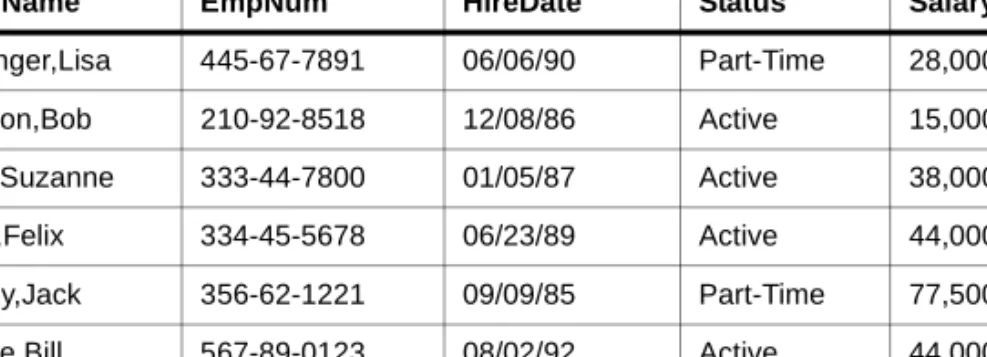
Below is a sample relational table:
Open M/SQL Tables Follow The First Normal Form
Tables follow what is called the First Normal Form; that is, each column of a single row contains exactly one value, which may be null if the field is empty.
In some non-relational database systems, a column for a single row might contain several values. For example, the “Child” field in a “People” table might contain the names of three children; a single child field might also have three grandchil-dren.
However, in a relational system, each parent/child/grandchild relationship is rep-resented by a separate row. For instance, each child of a given parent will occupy a unique row in the table despite the commonality of their parent fields. Like-wise, each grandchild of that parent will also occupy its own unique row. This means that if a parent has three children who in turn have three children apiece, the relational model uses nine separate rows to describe the entire genealogy.
Table 2-1: A Sample Relational Table
EmpName EmpNum HireDate Status Salary
Grainger,Lisa 445-67-7891 06/06/90 Part-Time 28,000.00 Corson,Bob 210-92-8518 12/08/86 Active 15,000.00 Doe,Suzanne 333-44-7800 01/05/87 Active 38,000.00 Fast,Felix 334-45-5678 06/23/89 Active 44,000.00 Finley,Jack 356-62-1221 09/09/85 Part-Time 77,500.00 Gable,Bill 567-89-0123 08/02/92 Active 44,000.00
Alternatively, separate tables called characteristic tables (see below) can be used to designate relationships between parents, children, and grandchildren. The database designer must choose how s/he wants Open M/SQL to handle par-ent/child relationships.
Open M/SQL Supports Two Types of Tables
Open M/SQL supports two types of tables:
n Base tables n Virtual tables
A base table is an autonomous, named table. Unlike virtual tables, base tables exist physically in the sense that they are mapped directly to physical storage structures. We say that base tables are “named” because the table is explicitly given a name via an appropriate definition statement, unlike, for example, the result of a query, which is not explicitly named and exists only ephemerally.
A virtual table is a named table derived from one or more base tables. Virtual tables are not directly represented in physical storage. Rather, they are abstract collections of base tables.
Examples of virtual tables include the output from a SELECT query and views. Views are windows through which data from multiple base tables can be “viewed”. Open M/SQL allows views to serve as data sources for M/PACT reports, SQL queries, and other views.
No two rows of a base table are identical. In virtual tables, two or more rows may be identical.
RowID/Primary Key
The primary key or RowID is a field or combination of fields that serve as the unique identifier to each row in a base table. At any given time, no two rows of the base table may contain the same primary key value.For example, the primary key of an “Employees” table might be the unique employee number; as each employee is identified by a unique employee number, each employee row in the table is identified by the value of the employee number field.
Since two rows of a base table cannot be identical while two rows of a virtual table can, only base tables have primary keys. Virtual tables (results of queries, for example) do not have primary keys.
In Open M/SQL, the RowID field is the primary key. The RowID is a single field of the table that uniquely identifies the row. Optionally, the database designer can
Open M/SQL Implements Schemas as M Directories
In the relational model, a schema is a conceptual repository for a group of rela-tions. No relation within the schema can have the same name as another.In Open M/SQL, the unit equivalent to the schema is an M database. In Open M/SQL, an M database can be spread over one or more directories. Each direc-tory contains one component—MUMPS.DAT file—of the entire M database. A MUMPS.DAT file is usually referred to by the name of the operating system directory in which it resides. All tables defined in the same M directory must have unique names.
The system manager's directory contains a database directory table. The database directory table contains the database name, directory, and directory set if net-worked.
Open M/SQL Database Structure for Non-ISM Implementations of M
When Open M/SQL is layered on top of a non-ISM implementation of M, the database concept is implemented differently.
For example, under DSM, Open M/SQL considers all tables within a unique UCI and volume set to be a common database.
Other M systems employ various other schemes for storing the list of databases. For more information, see the documentation provided with your M system.
The Open M/SQL Relational Data Dictionary
In Open M/SQL, tables are defined and “mapped” to M global storage structures through the Open M/SQL Relational Data Dictionary. Mapping defines the link from the logical representation of a table to the physical storage of that table. When you define a database, the Relational Data Dictionary can generate a default global storage structure, or if you prefer, you may specify a customized global storage structure. The Relational Data Dictionary also lets you map exist-ing global structures to Open M/SQL.
The Data Dictionary contains definitions for all the base tables that comprise the database. It also contains map specifications for the underlying data storage structures. The Form Generator, the SQL query facilities, and M/PACT all rely on Data Dictionary-defined structures. The window-based Data Dictionary makes the process of defining data structures very simple. It allows the program-mer to develop applications using automated map generation facilities, and enables the linking of existing Open M/SQL applications, thus providing access to stored data through SQL, forms, and reports.
The following aspects of a database are defined in the Data Dictionary:
n Its conceptual elements (base tables, fields) n RowIDs that enable data retrieval
n Global data storage (“map” specifications of global structures) n Indexes for data access efficiency
n Implicit joins - characteristic relationships and designative references n Triggers that enforce referential integrity and control application processing n Views that control users' access to tables
n Data validation parameters for data insert and update
n Code to convert field values between data entry formats (external format)
and database storage formats (internal format)
n Lookups for row selection in forms n Field access code for forms
Accessing Data in an Open M/SQL Relational Database
Once you have defined tables in the Open M/SQL Relational Data Dictionary, you can access data from those tables by any of the following means:n SQL queries — you may embed queries in M macro source code, or you may
define them via the Open M/SQL Query Definition template or the Interac-tive SQL Query Editor
n M global references (in conjunction with or independent of SQL) n Data entry, inquiry, and update forms designed using the Form Generator n Reports defined and formatted using M/PACT
This section provides a brief overview of relational operations in SQL, the ANSI-Standard Query Language. SQL enables the retrieval of data from the relational database for the generation of queries and reports.
Refer to an SQL text for a full understanding of this language. Chapter 9, Open M/SQL Implementation of SQL, describes InterSystems’ extensions to standard SQL.
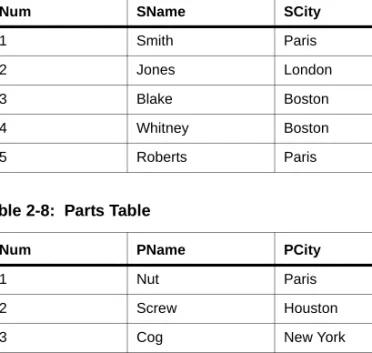
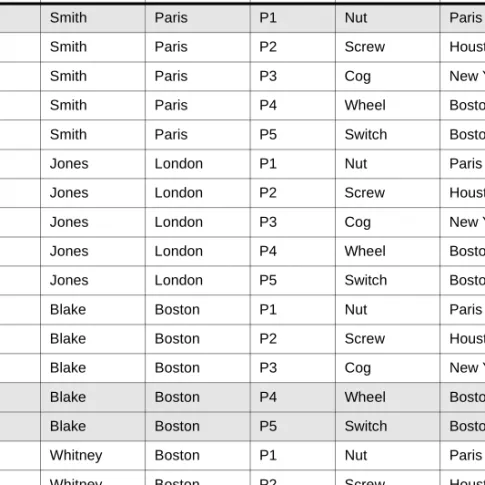
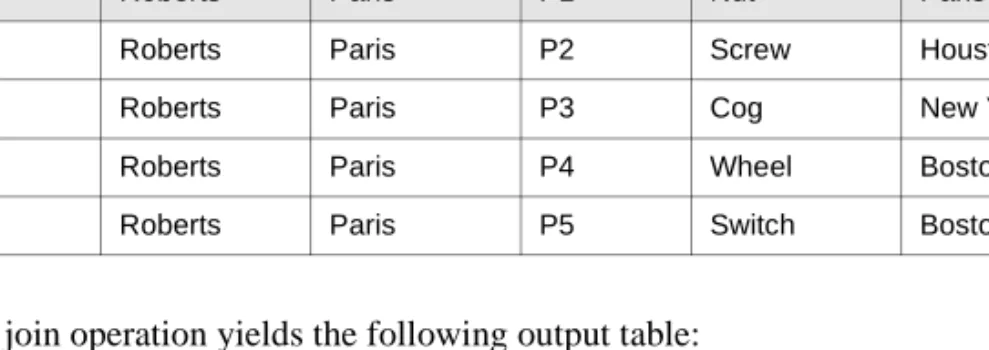
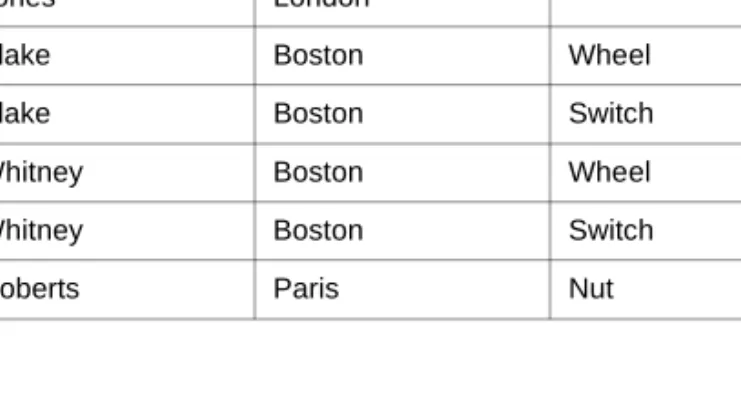
Using SQL to Query the Database
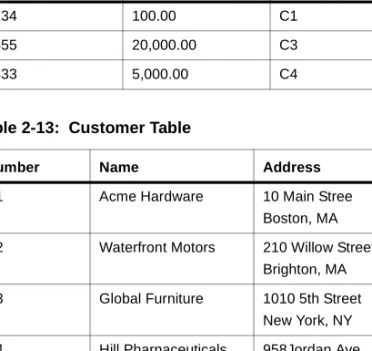
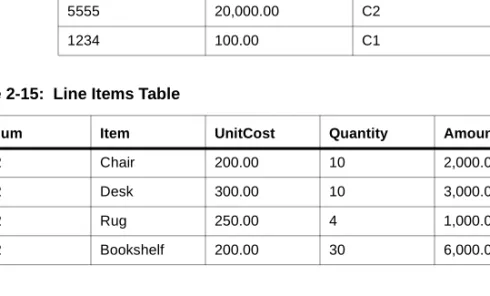
Open M/SQL lets you query the database using standard SQL SELECT state-ment queries. Queries access da