Reusing Single-user Applications to Create
Multi-user Internet Applications
Stephan Lukosch and J¨org Roth Computer Science Department
University of Hagen D-58084 Hagen
{Stephan.Lukosch, Joerg.Roth}@Fernuni-hagen.de
Abstract. Although there are many groupware platforms existing
nowadays, collaborative multi-user applications are not yet widely ac-cepted by end-users. In contrast to single-user applications, groupware applications often still have prototypical character and are lacking soft-ware quality. In this paper we introduce a three-step approach for reusing existing single-user applications for collaboration-aware multi-user applications. The three-step approach is based upon on our toolkit DreamTeam and its extension DreamObjects. By offering services for communication and coordination as well as data management and user interface development they significantly simplify the transformation of single-user applications into collaboration-aware applications. At the end of the paper we validate our approach with two examples: a diagram tool and a publicly available spreadsheet tool.
1
Introduction
Currently, the Internet offers a big set of applications, which allow groups or teams to collaboratively work on a joint task, e.g. Email, videoconferencing sys-tems, newsgroups, or chat tools. Even though these applications cover a wide range of collaborative tasks, some specific activities cannot be handled conve-niently with current Internet applications: to collaboratively edit a shared doc-ument in real-time (e.g. a text docdoc-ument or a spreadsheet) one usually has to develop a new tool, a difficult and time-consuming process: in addition to the actual application’s task (e.g. editing texts or spreadsheets) network connec-tions between collaborating users have to be supported, shared data have to be managed, and specific group functions have to be provided.
There exist two major approaches for developing collaborative applications [6]:
– Collaboration-aware applications are especially designed for collaborating teams. A collaboration-aware application usually has to be developed ’from-scratch’ but offers a huge variety of group-specific services to end-users.
– Collaboration-transparentapplications are single-user applications, which are run in a collaborative environment (e.g. a shared windows system).
T. B¨ohme and H. Unger (Eds.): IICS 2001, LNCS 2060, pp. 79–90, 2001. c
The latter approach saves development and usage costs, since single-user applications often provide high quality and users can use them without too much additional learning efforts in a multi-user environment as well. However, this approach induces two major problems: data management is hidden inside the application, thus data consistency can hardly be achieved; in addition, single-user applications, by definition, do not offer any group-specific services, and can hardly produce any group feeling (so-calledcollaboration awareness).
Our new approach combines the advantages of both approaches: we keep the quality, the functionality, and the user interface of an existing single-user application, but at the same time transform it into a truly collaboration-aware application. To minimise transformation costs, we offer a powerful runtime sys-tem, a set of programming abstractions for distributed data management, and a set of group-specific user interface elements.
Before describing the necessary transformation steps in detail, we discuss related work.
2
Related Work
DistEdit[4] andDistView [11] reuse existing single-user application as multi-user applications. DistEdit allows a transformation of editor programs. Although the transformation does not require much effort, it uses a floor control mechanism, which only allows one user at a time to edit a document and thus prevents real concurrent work.
DistView supports synchronous collaboration by distributing application windows. Each user can export one of his DistView windows to a central win-dow server, from which another user may import the winwin-dow. Interface and data objects are replicated to the importing site. Since all interface objects, e.g., a scrollbar or the window itself, are replicated, all users have the same view on the document. Concurrent work in large documents may lead to so calledscroll-wars. Besides DistEdit and DistView several collaborative toolkits have been de-veloped during the last years.
GroupKit [12] is a package for implementing shared applications under Tcl/Tk. A library offers services for session management, communication, and shared dialogue management. A program library contains basic services for stan-dard problems, covering session management, communication, and distributed user interfaces.
Dolphin [17] is a co-operative hypermedia system for co-operatively editing hypermedia documents. It is written in Smalltalk and provides a single hard-coded application, a shared hypermedia editor. The underlying platformCOAST
[16] offers general services for synchronous, document-based groupware.
Suite[2] extends a framework for developing single-user applications by mech-anisms supporting groupware aspects. A Suite application consists of a module, which runs on a central server, and replicated dialogue managers. Because of their replication, dialogue managers are able to offer individual user interfaces for each user of a collaborative session.
Habanero[10] has fully been implemented in Java. It focuses on making Java applets available in a distributed environment. The applets must be available as source code and in most cases can be converted into a distributed applet (called Hablet). Interface events are distributed via Habanero’s specific event distribution mechanism. If a specific applet does not fit with this distribution mechanism, it is quite difficult to transform it into a collaborative applet.
Each of these platforms significantly restricts the distribution architecture, the data model and the user interface of the application to be developed, and thus is not adequate for transforming existing single-user applications into pre-tentious collaboration-aware multi-user applications. In the following, we present our approach.
3
The Three-Step Approach
When transforming an existing single-user application into a collaboration-aware multi-user application, the transformation platform has to meet certain require-ments: while preserving the functional core of the single-user application it must allow the developer (”transformer”) to seamlessly integrate group-specific ser-vices. Though our concept does not depend on a specific object-oriented lan-guage, the DreamTeam/DreamObjects platform has been implemented in Java and thus can only be used for Java applications. While DreamTeam [13] pro-vides a set of collaborative services, DreamObjects [8] focuses on shared data management.
The transformation consists of three steps:
1. Integrate the application into the platform’s runtime system. 2. Organise shared data.
3. Add awareness services.
In the following, we describe these three steps in more detail.
3.1 Platform integration
In order to collaborate, users must be able to plan and schedule sessions and to inform all group members about their plans in time. The DreamTeam runtime system offers a palette of services for setting up, coordinating, and scheduling sessions as well as for informing group members about planned and active ses-sions [14]. To provide these services, the runtime system must be able to control the application, i.e. the developer has to specify
– the application’s name and icon,
– methods for starting and closing the application,
– the application’s version, and
– optional methods for configuring the application.
The name and the icon of an application are used to identify the application in various overview and configuration windows. A user can, e.g., open a window,
which shows all active applications. While a single-user application usually pro-vides a main method for starting the application and a menu entry for closing the application, the multi-user application is started and closed by the DreamTeam runtime environment via methods to be provided by the application. In a dis-tributed system, different versions of the same application may run at different locations. To cope with potential inconsistencies, each application has to pro-vide its actual version number as well as version numbers of compatible older versions. When the session manager detects conflicting versions, it prevents the application from starting and informs the corresponding users.
Before being started, an application may be configured; a teacher, e.g., may identify a set of slides before he starts a session based upon these slides.
3.2 Shared Data
Usually, a single-user application does not need to manage shared data, whereas data sharing and data consistency mean a major and difficult task for multi-user collaborative applications. To transform the data objects of a single-multi-user application into shared ones, the following steps have to be performed:
1. Identify all data objects that have to be shared and define an adequate distribution mode for each such object.
2. Configure shared objects for consistency.
3. Couple the user interface with shared data objects.
4. Replace a shared object’s constructor-based creation by its registration with the runtime environment.
In the following we describe these steps in more detail. If the architecture of a single-user application follows a style likeArch[18],MVC[5], orPAC [1] – which all postulate the a clear separation of data, functional core and user interface – its data objects can easily be identified.
The DreamObjects approach is based uponsubstitutes [8], a concept similar to the substitution principle in object-oriented languages. Substitutes offer the same interface as the substituted data object, and thus can easily be used as placeholders. The developer does not have to provide any additional classes, he uses the substitute like a local object, all distribution mechanisms are hidden in the substitute’s methods.
Since discussions about the best distribution mode are still going on [15]. Our platform supports replicated as well as central data objects. While replicated objects may be used for highly responsive tasks, e.g. in group editors, central objects may be used for objects with extensive data but minor data exchange.
To define the distribution mode of a data object, it has to provide an addi-tional interface. Just in case of a replicated object, the developer has to imple-ment one additional method. Fig. 1 shows a class diagram for a replicated object classSampleRObj and a central object classSampleCObj in UML Syntax. The class SampleRObj, e.g., implements the interface ReplicatedObject and thus is replicated. The corresponding substitute classSampleROSubstitutecan either be
Substitute <<Interface>> SampleCObject SampleRObject PessimisticCC FloorControl Serializable (from io) <<Interface>> SharedObject <<Interface>> ReplicatedObject <<Interface>> CentralObject <<Interface>> SharedObjectReference SampleCOSubstitute 1 1 1 1 contains SampleROSubstitute 1 1 1 1 contains ConsistencyScheme 1 1 1 1 contains 1 1 1 1 contains Toolkit-generated class Developer-defined class Toolkit-provided class
Fig. 1.Shared object class diagram
generated from the command line or the developer can leave it to the runtime environment to generate the corresponding substitute. Upon registration, the runtime environment uses these classes to replace the developer-defined classes. The substitute classes provide the Substitute interface, which offers necessary methods for the runtime environment. The aggregatedSharedObjectReferenceis used to identify a shared object at runtime.
The aggregatedConsistencyScheme defines an object’s consistency proper-ties. In a multi-user scenario several users may manipulate an object simultane-ously. To allow a maximum of concurrency, our platform provides a very flexible concurrency control service [7].
Usually, not all methods of a shared object modify all components of the object and thus some methods can be executed simultaneously. For each shared object, the developer can define sets of mutuallyexclusive methods (EM), which form theobject’s exclusive method set (OEM). To allow simultaneous method ex-ecution, whenever possible, our concurrency control scheme uses multiple locks, one for each mutually exclusive method set.
Imagine, e.g., a collaborative sketch editor, where a replicated object keeps the history of the sketch. Among other methods the history object offers the methodschangeLine andremoveLine. The following source code shows how the execution of these methods can be mutually excluded by adding a set of exclusive methods to the object’s exclusive method set.
EM em=new EM("Draw.HistoryVector"); em.addMethod("changeLine");
em.addMethod("removeLine"); oem.addExclusiveMethodSet(em);
In contrast to single-user applications the data objects of a multi-user appli-cation may be manipulated unnoticed from the local appliappli-cation. Thus, there is a need for an application to react on remote changes. Our toolkit offers a flexible
object coupling service[8], which allows the developer to trace changes in a shared data object and to propagate these changes to the user interface. This service is realised via a kind of extended callback mechanism, which avoids the confusing program code [9] of the normal callback mechanism. It allows to restrict the passed information to the needs of a developer-defined listener method. For this the developer has to define amethod mapping between a shared object’s method and a corresponding listener’s method; the listener’s method is called whenever the shared object’s method is executed; its parameters can be composed from the shared object’s method parameters, the method call result, and may contain information about the site, which called the method. Thus a method mapping consists of a shared object’s method name, a listener’s method name, and the listener’s method parameters.
The following source code shows the method prototype of a method used to add a line to the sketch history:
public void addLine(int x1,int y1,int x2,int y2,int c);
The next source code example shows how these arguments are mapped to two different user interface methods:
CallListenerConfig config=
new CallListenerConfig(CallListenerConfig.METHOD_MAPPING); config.addMethodMapping(new MethodMapping("addLine","drawLine",
new int[]{0,1,2,3})); // i.e. x1, y1, x2, and y2
config.addMethodMapping(new MethodMapping("addLine","setColour", new int[]{4})); // i.e. c
Finally, to use a shared object in the DreamObjects environment, the ob-ject’s constructor-based creation has to be exchanged by a registration with the runtime environment, which enables the runtime environment to initialise the shared data object: the runtime environment creates an instance of the shared object’s substitute class, adds this instance to its object registry, informs all other sites about the newly registered object, and returns the substitute. De-pending on the shared object’s distribution mode either a replica or a reference is distributed. To register a shared object, the developer has to call a special registration method and provide the shared object’s class name, a unique reg-istration name and the used consistency scheme as arguments. The following source code shows how the history object of the sketch editor is registered:
history=(HistoryVector)om.registerObject("Draw.HistoryVector", "history",new PessimisticCC(oem));
3.3 Awareness
Awareness is an important requirement for multi-user applications. As other group members are not physically present, a collaborative application has to
provide some group feeling: so-calledawareness widgetsoffer group specific ser-vices, e.g. an overview about other users’ current activities. In contrast to the issues discussed in steps 1 and 2, awareness explicitly addresses end-users. Only if a multi-user application has appropriate support for group functions and aware-ness included into the user interface, an application will be accepted by end-users.
Our platform supports three kinds of awareness widgets: 1. Widgets, which are offered by the runtime system.
2. Widgets, which can be used as building blocks from the DreamTeam class library.
3. New widgets, which are created by an application developer.
Using the first kind of widgets does not cause any integration costs. DreamTeam, e.g., offers a list of all users of a collaborative group, who are currently online, which is called theonline list, where each user is represented by a small picture. Users in this list are not necessarily working in a collabo-rative session, but they are ready for collaboration. Using this widget has an effect of ”hang out in the hallway” [3]. A user can perceive other users, which are willing to collaborate, and thus may be challenged to spontaneously initiate a collaborative session.
Widgets of the second kind aredistributed mouse pointers, which may, e.g., be used for discussing shared documents. DreamTeam allows to easily integrate distributed mouse pointers into an existing application. Usually, a user interface in Java is created by subclassing predefined Java classes such as Frame, Panel or Canvas. For distributed mouse pointers, a similar set of DreamTeam classes has to be subclassed. Each class offers services identical to the original class, but mouse distribution is automatically provided in the background. The application can control the behaviour of the mouse pointers via the DreamTeam API. It can switch on and off the mouse distribution to other users. Because too many pointers may confuse a user, remote pointers may be enabled and disabled. In addition, the application can define a string to be displayed below the mouse shape (normally the user name), as well as a pointer colour.
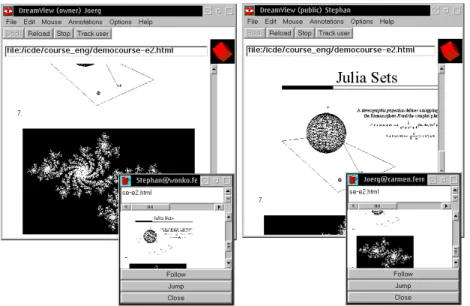
Another awareness widget is the so-calledtracking window (see fig. 2). Track-ing windows can be used to follow another one’s work, if, e.g., a shared document may be scrolled independently by different users. The tracking window shows the current contents of the other user’s window in a 1:3 scale, thus one user can follow the scrolling of another user.
Usually, an application developer integrates awareness widgets of the first two kinds into an application, by adding just a few lines of code. If a developer is not satisfied with the above awareness widgets, he can develop his own widgets. For this purpose, a widget can use information provided by the platform (e.g. the user list) and can register for group-related events (e.g. someone joins or leaves a session). These mechanisms help a developer to efficiently develop new awareness widgets, which can be collected in a class library and be reused in other applications.
Fig. 2.Shared document browsing with tracking windows
4
Examples
We validated our approach by transforming some single-user applications. In the following we describe two example transformations.
4.1 A Diagram Editor
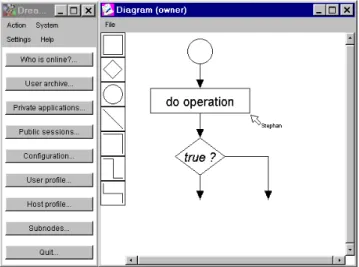
Our first example is a collaborative diagram editor (see fig. 3), which we derived from a single-user version.
This diagram editor allows the construction of diagrams such as flow charts or entity relationship diagrams. In contrast to a painting tool, diagram elements are not stored as bitmaps, and thus can easily be modified. According to our three-step approach the following transformation actions were performed:
Step 1:Embedding the application into the platform was simple: only one class, derived from the DreamTeam class library had to be coded. Since the superclass already contains some default methods, we only had to code some application-specific methods. The resulting Java class file contains less then fifty lines of code.
Step 2:The data class hierarchy of the single-user diagram editor consists of a container object class and a basic diagram element class, from which the different diagram elements, e.g. a rectangle or a circle, are derived. First, we transformed the container object class and the basic diagram element class into replicated objects. By defining different exclusive method sets, e.g. one for text operations and one for style changes, a maximum of concurrency was achieved.
Fig. 3.A collaborative diagram editor
Next, the user interface was coupled to the container and the basic diagram element: whenever a diagram element is changed, added to, or removed from the container the user’s view is updated.
Step 3:All built-in-widgets (e.g. participant windows) are available for the diagram editor. In addition, we integrated the distributed mouse pointer and the tracking window. The effort for integrating both elements was very small. The class, which does the painting inside the diagram had to be derived from a DreamTeam canvas class instead of the standard Java canvas. In addition, some lines of code were necessary to control these widgets, e.g. to enable or disable the pointers.
4.2 A Spreadsheet Tool
The next example is the single-user spreadsheet application, which is part of Sun’s Java Development Kit JDK. The code for the tool is publicly available, but only supplied with small documentation, thus the transformation was a real challenge for our toolkit.
The steps to be performed were similar to the steps for the first application. In summary, the transformation could be done without considerable problems. In the following, we discuss our experiences.
4.3 Discussion
It is quite difficult to empirically assess the effort for transformations. Many factors influence the transformation process: on one hand, it is important how complex the application is and how well it was designed. On the other hand, the
Fig. 4.A collaborative spreadsheet tool
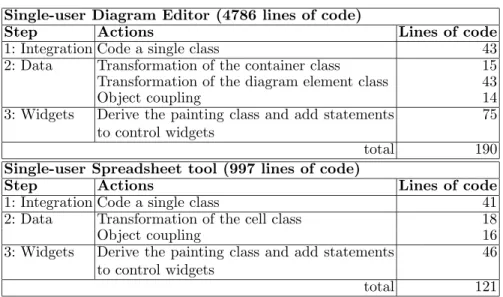
Table 1.Actions to transform the applications
Single-user Diagram Editor (4786 lines of code)
Step Actions Lines of code
1: Integration Code a single class 43
2: Data Transformation of the container class 15
Transformation of the diagram element class 43
Object coupling 14
3: Widgets Derive the painting class and add statements to control widgets
75
total 190
Single-user Spreadsheet tool (997 lines of code)
Step Actions Lines of code
1: Integration Code a single class 41
2: Data Transformation of the cell class 18
Object coupling 16
3: Widgets Derive the painting class and add statements to control widgets
46
total 121
transformation effort heavily depends on the skills of the transforming individual. Table 1 summarises the transformation efforts for both examples, measured in lines of code per transformation step.
The effort for reverse engineering the original application has not been in-cluded into the table. In total, one day of work was needed for each application.
5
Conclusion
Reusing existing single-user applications for collaborative scenarios is an impor-tant step for reducing development costs and increasing end-user acceptance. On the other hand, collaborative applications have to provide for collaboration awareness. Our approach minimises the effort for changing the single-user appli-cation, but at the same time adds collaboration awareness and group functions
to the collaborative application. Because of the simple transformation steps, in many cases even poorly designed single-user applications can easily be trans-formed into collaborative applications. In contrast to other platforms, our plat-form supports a variety of architectures, distribution mechanisms, concurrency schemes, and can thus be used for transforming a variety of single-user appli-cations in an adequate way. We validated our approach with various single-user applications; two of them were discussed in this paper.
References
[1] Ga¨elle Calvary, Jo¨elle Coutaz, and Laurence Nigay. From Single-User Architec-tural Design to PAC∗: a Generic Software Architecture Model for CSCW. In
Human Factors in Computing Systems: CHI’97 Conference Proceedings, pages 242–249. ACM, 1997.
[2] Prasun Dewan and Rajiv Choudhary. A High-Level and Flexible Framework for Implementing Multiuser Interfaces. ACM Transactions on Information Systems, 10(4):345–380, October 1992.
[3] H. Gajewska, M. Manasse, and D. Redell. Argohalls: Adding Support for Group Awareness to the Argo Telecollaboration System. InProceedings of the 8th annual ACM symposium on User interface software and technology, pages 157–158, 1995. [4] Michael J. Knister and Atul Prakash. DistEdit: A Distributed Toolkit for Sup-porting Multiple Group Editors. InProceedings of the ACM 1990 Conference on Computer Supported Cooperative Work, pages 343–355, Los Angeles, California, USA, October 1990.
[5] Glenn E. Krasner and Stephen T. Pope. A Cookbook for Using the Model-View-Controller User Interface Paradigm in Smalltalk-80. Journal of Object-Oriented Programming, 1(3):26–49, August 1988.
[6] J. C. Lauwers and K. A. Lantz. Collaboration awareness in support of collabora-tion transparency: requirements for the next generacollabora-tion of shared window systems. InCHI ’90 Conference on Human factors in computing systems, special issue of the SIGCHI Bulletin, pages 303–311, Seattle, Washington, USA, April 1990. [7] Stephan Lukosch and Claus Unger. Flexible Synchronization of Shared Groupware
Objects. ACM SIGGROUP Bulletin, 20(3):14–17, December 1999.
[8] Stephan Lukosch and Claus Unger. Flexible Management of Shared Groupware Objects. In Proceedings of the Second International Network Conference (INC 2000), pages 209–219, University of Plymouth, Great Britain, July 2000. [9] Brad A. Myers. Separating Application Code from Toolkits: Eliminating the
Spaghetti of Call-Backs. In Proceedings of the 4th annual ACM symposium on User interface software and technology, pages 211–220, Hilton Head, South Car-olina, USA, November 1991. ACM SIGGRAPH.
[10] NCSA Habanero Homepage. http://havefun.ncsa.uiuc.edu/habanero.
[11] Atul Prakash and Hyong Sop Shim. DistView: Support for Building Efficient Col-laborative Applications using Replicated Objects. InProceedings of the ACM 1994 Conference on Computer Supported Cooperative Work, pages 153–164, Chapel Hill, NC, USA, 1994.
[12] Mark Roseman and Saul Greenberg. Building Real-Time Groupware with GroupKit, A Groupware Toolkit. ACM Transactions on Computer-Human In-teraction, 3(1):66–106, March 1996.
[13] J¨org Roth. ’DreamTeam’: A Platform for Synchronous Collaborative Applica-tions. AI & Society, 14(1):98–119, March 2000.
[14] J¨org Roth and Claus Unger. Group Rendezvous in a Synchronous, Collabora-tive Environment. In11. ITG/VDE Fachtagung, Kommunikation in Verteilten Systemen (KiVS’99), March 1999.
[15] J¨org Roth and Claus Unger. An extensible classification model for distribution ar-chitectures of synchronous groupware. InProceedings of the Fourth International Conference on the Design of Cooperative Systems (COOP2000), Sophia Antipolis, France, May 2000. IOS Press.
[16] Christian Schuckmann, Lutz Kirchner, Jan Sch¨ummer, and J¨org M. Haake. De-signing object-oriented synchronous groupware with COAST. In Proceedings of the ACM 1996 Conference on Computer Supported Cooperative Work, pages 30– 38, Cambridge, MA, USA, July 1996.
[17] N. A. Streitz, J. Geißler, J.M. Haake, and J. Hol. DOLPHIN: Integrated Meeting Support across LiveBoards, Local and Remote Desktop Environments. In Pro-ceedings of the ACM 1994 Conference on Computer Supported Cooperative Work, pages 345–358, Chapel Hill, NC, USA, 1994.
[18] The UIMS Tool Developers Workshop. A Metamodel for the Runtime Archi-tecture of an Interactive System. ACM SIGCHI Bulletin, 24(1):32–37, January 1992.