Empirical Analysis of User’s Log Activities for
Misuse Detection: A SNORT Based Study
1
Sunil Jadhav, 2 Dr. G.D.Kurundkar, 3 Dr. Santosh Khamitkar, 4 Pawan Wasnik
1 System Expert, S.R.T.M.University ,Nanded, MS, 431606
2 Department of Computer Sceicne, S.G.B.S College, Purna, Dist. Parbhani, MS,India
3
School of Computational Sciecnes, S.R.T.M.University, Nanded, MS, 431606, India
4
School of Computational Sciecnes, S.R.T.M.University, Nanded, MS, 431606, India
Abstract - In Information Security, an Intrusion Detection Systems (IDS) works like a thief alarm and detects destruction activates. Intrusion Detection and Prevention System (IDPS) is a new technology for IDS. Our present study is based on IDPS approach using SNORT tool. Here we have collected access logs and historical activities of user on the system and then by using data analysis methods, the Intruders are found out.
Keywords - Abnormal Behavior, SNORT, Signature Identification, NIDS, HIDS
1. Introduction
Intrusion Detection Systems (IDS) facilitate computer systems organize for and deal with attacks. They collect information from a multiplicity of computer systems and networks, and analyze this information for security problems[1]. They are basically a set of techniques or methods used to detect mistrustful activity both at the network and host levels. The working core is detection of signatures as the Intruders have signatures, like computer viruses. Thus one has to try to find data packets that contain any known intrusion-related signatures or anomalies related to Internet protocols. Based upon a set of signatures and rules, the detection system is able to find and log the mistrustful activity to generate alerts.
Anomaly-based intrusion detection usually depends on packet anomalies present in protocol header parts. In some cases these methods produce better results compared to signature-based IDS. We stick to SNORT as tool for IDS. For intrusion detection SNORT is appropriate, SNORT is a freeware, which collects all system logs & helps to find out Intruder in the current system or Network. It performs protocol analysis, content searching, and content matching [1]. SNORT uses rules (user can define its own rules) stored in text files that can be modified by a text editor. Rules are grouped in categories. Rules belonging to each category
are stored in separate files. These files are then included in a main configuration file called SNORT .conf. Then the SNORT reads these rules at the start-up time and builds internal data structures or chains to apply these rules to captured data. It is important to implement as many signatures as you can use as few rules as possible. SNORT comes with a rich set of pre-defined rules to detect intrusion activity and you are free to add your own rules at will.
One can also remove some of the built-in rules to avoid false alarms. This manuscript explains how intrusion detection and susceptibility assessment products fit into the in general structure of security products. It includes container histories used by customer organizations. Finally, the concepts and definitions section provides information about product features, explaining why they represent effective countermeasures to hacking and misuse. In this text, we provide the information one needs in order to be a ability client in the areas of intrusion detection and vulnerability assessment. Some significant features of SNORT include,
1. SNORT is an open source, freeware IDS/IPS tool. 2. Source code of SNORT can be modified.
3. IPV6 is integrated into latest SNORT versions. List of ports for port scan is available in the SNORT reports.
4. SNORT can detect threats like stealth port scans, SMB probes, and CGI attacks.
5. Alert file indicates any suspicious or malicious attacks Log file is created with TCP dump formats of incoming and outgoing data packets.
6. SNORT's Unified output defines the nature of output file SNORT can be used to inspect HTTP traffic.
2. Intrusion Detection Systems
During the course of research, we grouped Intruders into two categories:
1. Outsiders: Intruders from outside your network, and who may attack you external presence (forward spam through e-mail servers, etc.). Outside intruders may come from the Internet.
2. Insiders: Intruders that legally use your internal network. These include users who misuse privileges.
The following section covers technical terms used in the study.
1. Intrusion Detection System or IDS is software, hardware or combination of both used to detect intruder activity. SNORT is an open source IDS available to the general public. IDS software’s are available with different facilities. There are two general methodologies of detection: misuse and anomaly detection.
2. Network IDS or NIDS: NIDS are intrusion detection systems that capture data packets traveling on the network media e.g. data transmission cables & wireless, an alert is generated or the packet is logged to a file or database. One major use of SNORT is as a NIDS. A fundamental problem for network intrusion detection systems (NIDSs) that passively monitor a network link is the ability of a skilled attacker to evade detection by exploiting ambiguities in the traffic stream as seen by the NIDS. NIDS can eliminate much of the ambiguity if it has access to a sufficiently rich database cataloging the particulars of all of the end-system protocol implementations and the network topology. In intrusion detection mode, the program will monitor network traffic and analyze it against a rule set defined by the user. The program will then perform a specific action based on what has been identified. The SNORT sensor is set to monitor network traffic at the interface of the node [3,4]. 3. Host IDS or HIDS: Host-based intrusion detection
systems or HIDS are installed as agents on a host. These intrusion detection systems can look into system and application log files to detect any intruder activity. Some of these systems are reactive, meaning that they inform you only when something has happened. Some HIDS are proactive; they can sniff the network traffic coming to a particular host on which the HIDS is installed and alert you in real time. HIDS (host intrusion detection systems) take a different approach to detecting attacks; they look at each host separately. HIDS must be deployed on each system that is to be protected. HIDS have similar methods for detecting and identifying attacks.
4. Signatures: A signature is used to detect one or multiple types of attacks. e.g. packet going to your web server may indicate an intruder activity.
Signatures may be present in different parts of a data packet depending upon the nature of the attack. e.g. you can find signatures in the IP header, transport layer header (TCP or UDP header) and/or application layer header or payload. In signature based IDS are that every signature requires an entry in the database, and so a complete database might contain hundreds or even thousands of entries. Each packet is to be compared with all the entries in the database [2].
5. Alerts: Alerts are any sort of user notification of an intruder activity. When an IDS detects an intruder, it has to inform security administrator about this using alerts. Alerts may be in the form of pop-up windows, logging to a console, sending e-mail and so on. Alerts are also stored in log files or databases where they can be viewed later on by security experts. SNORT can also send the same alert to multiple destinations.
6. Logs: The log messages are usually saved in file. By default SNORT saves these messages under SNORT\log directory. However, the location of log messages can be changed using the command line switch when starting SNORT. Log messages can be saved either in text or binary format. The binary files can be viewed later on using SNORT or tcpdump program. A new tool called Barnyard is also available now to analyze binary log files generated by SNORT. Logging in binary format is faster because it saves some formatting overhead. In high-speed SNORT implementations, logging in binary mode is necessary.
3.
Design of Experimentation
3.1. System Configuration
For Experimentation, we setup a separate Network with equipments like special Switch with local IP address (make DIGISOL DG-GS4528S ) is a managed stackable Gigabit Ethernet. We select six different computer systems to form network. The network settings allow us to set SNORT to monitor any range of network IP addresses, from a single IP address to several IP addresses in groups or individually, up to entire IP subnets. You can configure the IP address range and the subnet. We have made changes in SNORT .conf as per our requirements for Network setup
Step #1: Set the network variables.
# Setup the network addresses you are protecting var HOME_NET 172.16.21.148/24
#var HOME_NET any
# set up the external network addresses. Leave as "any" in most situations
var EXTERNAL_NET any
var SMTP_SERVERS $HOME_NET # List of web servers on your network var HTTP_SERVERS $HOME_NET # List of sql servers on your network var SQL_SERVERS $HOME_NET # List of telnet servers on your network var TELNET_SERVERS $HOME_NET # List of ssh servers on your network var SSH_SERVERS $HOME_NET # List of ftp servers on your network var FTP_SERVERS $HOME_NET Path setting for SNORT:
# Path to your rules files (this can be a relative path) # Note for Windows users: You are advised to make this an absolute path,
# such as: c:\SNORT\rules var RULE_PATH c:\SNORT\rules var SO_RULE_PATH ../so_rules
var PREPROC_RULE_PATH ../preproc_rules
# If you are using reputation preprocessor set these # Currently there is a bug with relative paths, they are relative to where SNORT is
# not relative to SNORT .conf like the above variables # This is completely inconsistent with how other vears work, BUG 89986
# Set the absolute path appropriately #var WHITE_LIST_PATH /etc/SNORT/rules #var BLACK_LIST_PATH /etc/SNORT/rules # path to dynamic preprocessor libraries
Dynamicpreprocessor directory
C:\SNORT\lib\SNORT_dynamicpreprocessor # path to base preprocessor engine dynamicengine
C:\SNORT\lib\SNORT_dynamicengine\sf_engine.dll # path to dynamic rules libraries
#dynamicdetection directory
/usr/local/lib/SNORT_dynamicrules
SNORT use variables in configuring the rules. Delete all existing VAR setting lines and add the following variable setting to the SNORT .conf file: As you see we have specified that our internal (home_net) network is on network address with a range of 255 hosts. And the external network is (any) to include any destination, DNS server.
The SNORT rule is created as below. Our SNORT is working well and is able to generate alerts. Syntax for creating SNORT rule,
Alert ip any any -> any any (msg: "<any message>";)
We can use this rule at the end of the SNORT .conf file the first time you install SNORT. The rule will generate an alert message for every captured IP packet. We must first test to make sure that SNORT is installed properly. In the next section, you will find information about the different parts of a SNORT rule. However for the sake of completeness, the following is a brief explanation of
different words used in this rule. The word “alert” shows that this rule will generate an alert message when the criteria are met for a captured packet. The criteria are defined by the words that follow.
1. The “IP” part shows that this rule will be applied on all IP packets.
2. The first “any” is used for source IP address and shows that the rule will be applied to all packets. 3. The second “any” is used for the port number. Since
port numbers are irrelevant at the IP layer, the rule will be applied to all packets.
4. The next rule isn’t quite as bad. It generates alerts for all captured ICMP packets. Again, this rule is useful to find out if SNORT is working.
Alert icmp any any -> any any (msg: "ICMP Packet found";)
If we want to test the SNORT machine, send a ping packet (which is basically ICMP ECHO REQUEST packet on machines). Again, you can use this rule when you install SNORT to make sure that it is working well. As an example, send an ICMP packet to your gateway address or some other host on the network using the following command:
Ping <IP_Address>
SNORT Command Options: 1. -d: Dump the Application Layer
2. -D: Run SNORT in background (daemon) mode 3. -e : Display the second layer header info 4. -v : Be verbose
5. -l : Log to Directory 6. -i : Listen on Interface
7. -L: Add Interface name to alert output 8. -h : Home network
9. -c: Use rules files<rules>
-dev: The output of this command will show data in exactly the same way if we are looking at it on the console in real time.
The Log parser is a dominant, versatile tool that provides universal query access to text-based data such as log files, XML files and CSV files, as well as key data; Log Parser includes functionality to export data to charts by using chart as a parameter. Log Parser offers
a unique set of features that enhance its flexibility in the most common log processing scenarios. These features include: Parsing Input Incrementally: some input formats allow Log Parser to parse incrementally logs that grow over time.
3.2.User Behavior Identification Procedure
is observed using winpcap and SNORT on the basis of following merits for one month.
1. How much time they spend on the system. 2. Which web sites are they frequently visited. 3. Which search engine is frequently used by the
users?
4. What are their specific requirements while searching on net?
4.1.1 Entertainment 4.1.2 Education 4.1.3 Adult 4.1.4 Official 4.1.5 Business 4.1.6 Research Related 4.1.7 Social
Depending on the observed data the rules for SNORT are manually designed for the implementation of the proposed practical work. We have used one dedicated system for installation of SNORT and which is working on same network. The system where SNORT is installed monitors all the incoming and outgoing data of the systems which are connected on the same network. The log was recorded on SNORT installed system. The packets are captured for the web sites which are in the rule file of SNORT. We have created our own rules for some websites and these are used with SNORT for recording logs. The log is collected in text format. We have used different ports on each machine for packet capturing, e.g. UDP, SSH etc. The system wise analysis of the result of log which is recorded using SNORT is compared with the observed reading which is observed before implementation of the SNORT statistically. The observation and analysis of the result is totally depending on the behavior of the user on the visited web sites after and before implementation of SNORT.
3.3.Log Collection
Log is collected from all network based machines. The following figure 3 depicts the log monitoring of SNORT on Console machine. The process for collecting log into file is also given below.
3.3.1 Collection of log in txt file:
04/30-09:13:16.515569 00:A1:B0:C0:51:51 -> FF:FF:FF:FF:FF:FF type:0x800 len:0x5C
192.168.52.114:137 -> 192.168.52.255:137 UDP TTL:128 TOS:0x0 ID:37936 IpLen:20 DgmLen:78 Len: 50
8A BA 01 10 00 01 00 00 00 00 00 00 20 45 49 45 ... EIE
50 45 4E 45 46 46 50 45 4F 45 46 46 45 43 41 43 PENEFFPEOEFFECAC
41 43 41 43 41 43 41 43 41 43 41 41 41 00 00 20
ACACACACACAAA.. 00 01 ..
=+=+=+=+=+=+=+=+=+=+=+=+=+=+=+=+=+=+=+ =+=+=+=+=+=+=+=+=+=+=
04/30-09:13:17.264665 00:A1:B0:C0:51:51 -> FF:FF:FF:FF:FF:FF type:0x800 len:0x5C
192.168.52.114:137 -> 192.168.52.255:137 UDP TTL:128 TOS:0x0 ID:37939 IpLen:20 DgmLen:78 Len: 50
8A BA 01 10 00 01 00 00 00 00 00 00 20 45 49 45 ... EIE
50 45 4E 45 46 46 50 45 4F 45 46 46 45 43 41 43 PENEFFPEOEFFECAC
41 43 41 43 41 43 41 43 41 43 41 41 41 00 00 20
ACACACACACAAA.. 00 01 ..
=+=+=+=+=+=+=+=+=+=+=+=+=+=+=+=+=+=+=+ =+=+=+=+=+=+=+=+=+=+=
05/01-16:23:41.101502 [**] [1:1000275:1] Facebook User! [**] [Priority: 1] {TCP} 192.168.62.114:7199 -> 69.171.224.37:80
05/01-16:23:41.378232 [**] [1:1000275:1] Facebook User! [**] [Priority: 1] {TCP} 192.168.62.114:7203 -> 69.171.224.37:80
05/01-16:23:41.378232 [**] [139:1:1] SDF_COMBO_ALERT [**] [Classification: Senstive Data] [Priority: 2] {PROTO:254} 192.168.62.114 -> 69.171.224.37
05/01-16:23:41.789746 [**] [1:1000275:1] Facebook User! [**] [Priority: 1] {TCP} 192.168.62.114:7211 -> 69.171.229.72:80
3.3.2 Rules (SNORT)
1. alert tcp any any -> any any (content:"www.unipune.ernet.in";
msg:"GK_IDS_pune university site User !"; sid : 1050002; priority:1; rev:1;)
2. alert tcp any any -> any any (content:"www.srtmun.ac.in";
msg:"GK_IDS_srtmun site User !"; sid : 1050001; priority:1; rev:1;)
3. alert tcp any any -> any any (content:"www.ugc.ac.in"; msg:"GK_IDS_ugc site User !"; sid : 1050101; priority:1; rev:1;)
4. alert tcp any any -> any any (content:"www.google.co.in";
msg:"GK_IDS_google_User !"; sid : 1000001; priority:1; rev:1;)
5. alert tcp any any -> any any (content:"www.google.com";
msg:"GK_IDS_google_User !"; sid : 1000002; priority:1; rev:1;)
msg:"GK_IDS_facebook_User !"; sid : 1000003; priority:1; rev:1;)
3.3.3 SNORT Commands
Following are SNORT commands which we used for collect system user log and activity of user, we have created Network for Experiment.
1. SNORT dev l c:\SNORT\log h 172.16.12.55/24 -c c:\SNORT\etc\SNORT.conf -i 1 -L alertGateway.csv
2. SNORT dev l c:\SNORT\log h 172.16.12.56/24 -c -c:\SNORT\et-c\SNORT.-conf -i 1 -L alertLo-cal.-csv
3. SNORT -dev -l c:\SNORT\log -h
218.248.255.212/24 -c c:\SNORT\etc\SNORT.conf -i 1 -L alertOverall.csv
3.3.4 Results of log Processing
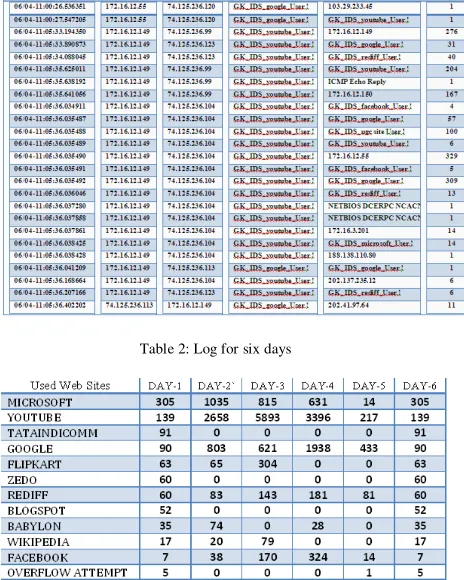
Table 1 shows Log file data with attributes Date, time, Source IP, Dst_IP, Websites, Web access, Count of ID.
Table 1 .Log Alerts IP based user message for total five days log
Table 2: Log for six days
3.3.5 Procedure for Data Analysis
Data analysis is an integral part of the experimental studies to understand, explore and make inferences from given data set. Such data sets are assumed normally distributed because most of the measurable things, variables in the nature are sprayed in normal distribution. The normal distribution consist two kinds of tendencies amongst which one is central tendency and another is variation. Mean, median and mode are the measures of central tendency and for a standard normal probability curve the values of mean, mode and median are one and same. A deviation from the mean is the difference between a score and the mean. So, when we say the sum of the deviations about the mean must always equal zero is just a way of saying that there are just as many differences between values above the mean and the center as there are differences between values below the mean and the center. Especially, mean and standard deviations are claimed to be most reliable measures because they are the product of mathematical operations and the impact of each value given in the data set. Therefore, these are the best descriptive measures but they are not competent to avoid the effect of extreme values and thus may fail to represent the group. For such as situation median and quartile deviation are most useful to describe the nature of data set. Quartiles are points in a distribution which divide that distribution into quarters.
In these lines, the data set with duration of the Days gives the more discriminating results for identification of normal users and intruders. This, phenomenon can be explained in the frame of normal distribution and behavioral sciences. We need a reference set of data to claim either normal or intruder. In a data set of one or two day every behavior is normal because they have no any reference set to categorize. Thus, the intruders cannot be identified. When a data set becomes large (of few weeks) then many behaviors are gathered for reference but simultaneously size of category of normal also increases which expands the upper limit and reduces the lower limit. Thus, the critical regions for identification of intruders become smaller and it makes difficult to identify intruders. The results obtained for each day were compiled after completion of experimentation period and they were put together for further analysis which is presented as above. The logical operations were carried to identify “Normal” and “Intruder” by applying different association rules.
4.
Conclusion
Intruder and vice versa can be asserted by using data set of last Day as reference set rather than the data set of more than one week.
References
1] A brief study and comparison of Snort and Bro Open Source Network Intrusion Detection Systems in International Journal of Advanced Research in Computer and Communication Engineering Vol. 1, Issue 6,August 2012, ISSN : 2278 –1021 by Pritika Mehra.
2] Dynamic Multi Layer Signature Based Intrusion Detection System Using Mobile Agents by Mueen Uddin1, Kamran Khowaja2 and Azizah Abdul Rehman in International Journal of Network Security & Its Applications (IJNSA), Vol.2, No.4, October 2010 PP.129-141.
3] Liabotis, O. Prnjat, T. Olukemi, A. Ching, A. Lazarevic, L. Sacks, M. Fisher, and P. MacKee, “Self - organizing management of grid environments,” in Proc. Int. S. Telecommunications, Isfahan, Iran, 2003.