Low-Cost Computing Using Raspberry Pi 2 Model B
Ar Kar Kyaw
1, 2*, Hong Phat
Truong3, Justin Joseph
21 Digital Forensic Research Labs, Auckland University of Technology, Auckland, New Zealand.
2 Whitireia Community Polytechnic, 450 Queen Street, Auckland, New Zealand. 3 Super Shuttle, Auckland, New Zealand.
* Corresponding author. Email: [email protected] Manuscript submitted March 1, 2017; accepted June 21, 2017. doi: 10.17706/jcp.13.3.287-299
Abstract: A low-cost computing environment using Raspberry Pi based systems is very efficient to use as a proposed computing system in libraries and classrooms of schools in the developing countries such as Argentina, Bangladesh, Cambodia, China, Kiribati, Myanmar, Tuvalu, Vietnam and Zimbabwe where money is always a constraint. This paper presents the results of an experimental set up of the low-cost computing environment using Raspberry Pi 2 (Model B), a cost-benefit analysis and a discussion of findings in addition to a literature review about Raspberry Pi and a methodology that is applied.
Key words: Low-cost computing, LCC, raspberry Pi 2 model B, cost-benefit analysis.
1.
Introduction
To improve the educational levels of learners in developing countries, it is important to implement a computing environment that is affordable and durable. Raspberry Pi is a multi-purpose low-cost Advanced Reduced-Instruction-Set-Computer (ARM) processor-based miniature device that has been utilised as a standalone machine in schools to improve the education provision in rural areas [1]-[3]. A network-based low-cost computing (LCC) environment is designed and implemented by using Raspberry Pi 2 Model B devices in this research project. Usability testing of the implemented system is conducted by participants before collecting data using an online questionnaire. Subsequently, the collected data is analysed and a cost-benefit analysis is discussed. With this implemented prototype system, students from schools where the computing budget is a constraint (especially in developing countries) can have the opportunity to access to educational resources.
This paper outlines the results of research into the test-bed setup of low-cost computing environment using Raspberry Pi 2. Section 2 contains a review of literature, including related previous work. Section 3 outlines the methodology including the research questions. Section 4 contains the findings – analysis of collected data from a pilot test and a Cost-Benefit Analysis (CBA) of the provisioning of LCC environments. Section 5 presents a discussion that is followed by conclusion and future work (Section 6).
2.
Literature Review
A review of the literature provided in this section includes a brief overview of Raspberry Pi, a review of previously published articles and contributions of our research.
2.1.
Raspberry Pi
a provided operating system (OS), but there are various other ARM-Linux OS variants that can run on it. This miniature device can be used for robotics, arcade machines, and temperature probing devices. It can also be used for MATLAB applications, among others, and comes in a variety of models with different interfaces for different requirements. Raspberry Pi 2 Model B (the latest version of the hardware as of November 2015) has 1 gigabyte (GB) of random access memory (RAM), a 900MHz quad-core ARM processor, four universal serial bus (USB) interfaces, an Ethernet port, a mini USB for power supply and high-definition multimedia interface (HDMI) for display. The OS is flashed onto a micro Secure Digital (SD) card [4]. The running device can either be accessed directly using a USB keyboard, mouse and display or via a LAN port by creating a secure shell (SSH) session remotely.
2.2.
Previous Related Work
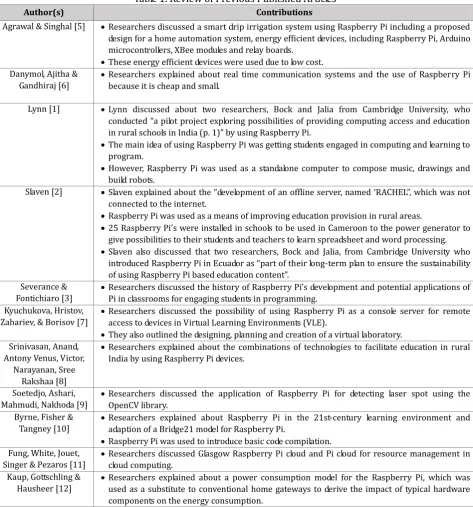
Table 1. Review of Previous Published Articles
Author(s) Contributions
Agrawal & Singhal [5] Researchers discussed a smart drip irrigation system using Raspberry Pi including a proposed design for a home automation system, energy efficient devices, including Raspberry Pi, Arduino microcontrollers, XBee modules and relay boards.
These energy efficient devices were used due to low cost. Danymol, Ajitha &
Gandhiraj [6]
Researchers explained about real time communication systems and the use of Raspberry Pi because it is cheap and small.
Lynn [1] Lynn discussed about two researchers, Bock and Jalia from Cambridge University, who conducted “a pilot project exploring possibilities of providing computing access and education in rural schools in India (p. 1)” by using Raspberry Pi.
The main idea of using Raspberry Pi was getting students engaged in computing and learning to program.
However, Raspberry Pi was used as a standalone computer to compose music, drawings and build robots.
Slaven [2] Slaven explained about the “development of an offline server, named ‘RACHEL”, which was not connected to the internet.
Raspberry Pi was used as a means of improving education provision in rural areas.
25 Raspberry Pi’s were installed in schools to be used in Cameroon to the power generator to give possibilities to their students and teachers to learn spreadsheet and word processing.
Slaven also discussed that two researchers, Bock and Jalia, from Cambridge University who introduced Raspberry Pi in Ecuador as “part of their long-term plan to ensure the sustainability of using Raspberry Pi based education content”.
Severance & Fontichiaro [3]
Researchers discussed the history of Raspberry Pi’s development and potential applications of Pi in classrooms for engaging students in programming.
Kyuchukova, Hristov, Zahariev, & Borisov [7]
Researchers discussed the possibility of using Raspberry Pi as a console server for remote access to devices in Virtual Learning Environments (VLE).
They also outlined the designing, planning and creation of a virtual laboratory. Srinivasan, Anand,
Antony Venus, Victor, Narayanan, Sree
Rakshaa [8]
Researchers explained about the combinations of technologies to facilitate education in rural India by using Raspberry Pi devices.
Soetedjo, Ashari, Mahmudi, Nakhoda [9]
Researchers discussed the application of Raspberry Pi for detecting laser spot using the OpenCV library.
Byrne, Fisher & Tangney [10]
Researchers explained about Raspberry Pi in the 21st-century learning environment and adaption of a Bridge21 model for Raspberry Pi.
Raspberry Pi was used to introduce basic code compilation. Fung, White, Jouet,
Singer & Pezaros [11]
Researchers discussed Glasgow Raspberry Pi cloud and Pi cloud for resource management in cloud computing.
Kaup, Gottschling & Hausheer [12]
Author(s) Contributions Raspberry Pi was used because of low power consumption.
According to previous literature, researchers utilized Raspberry Pi in different ways and their contributions are summarised in the following table.
2.3.
Our Contributions
Our main contribution in this research was to utilize and demonstrate the usage of Raspberry Pi 2 Model B devices as client computers in a proposed internet-connected LCC environment. It is envisaged that this LCC environment can be deployed in libraries or classroom environments in developing countries.
3.
Methodology
A literature review was conducted to identify previous work in the general and experimental usage of Raspberry Pi and similar low-cost devices. After conducting a literature review, a suitable mixed-method of experimental and survey methodology was crafted to fit the aims of this project – to create and test a test-bed LCC environment. The experimental method was used to design and implement the low-cost computing [13], [14] and then the survey methodology was used for conducting a pilot test with participants, who had hands-on experience using the LCC environment prior to completing an online questionnaire survey [15]. A total of 87 participants were invited to take part in the pilot testing, 22 students and 65 staff, but only 38 out of 87 invitees participated in the pilot testing of the low-cost computing.
3.1.
Research Question
The LCC research project was attempting to find answers to three key questions. The questions were: Q1. What software and hardware are required to set up low-cost computing (LCC) for libraries and classrooms?
Q2. Is a Raspberry Pi based client a suitable replacement for the computer in the libraries and classrooms in developing countries?
Q3. What are the benefits of the proposed LCC system?
3.2.
Final Research Phases
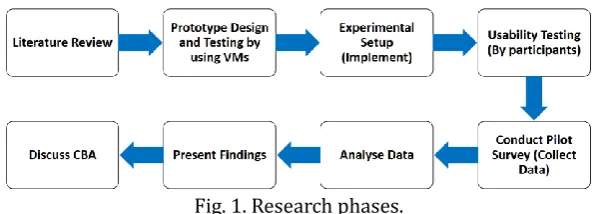
Fig. 1. Research phases.
To answer these research questions (Section 3.1) it was necessary to follow a pre-defined methodology, with distinct phases (Fig. 1), in order to setup and evaluate the test-bed environment (as the LCC prototype) consisting of computer servers and multiple Raspberry Pi devices as client (end-user) computers.
3.3.
Experimental Setup
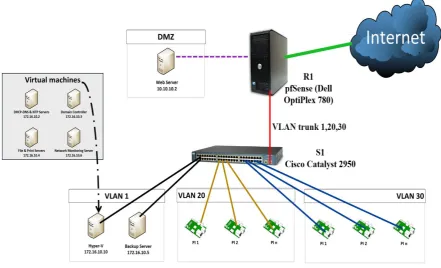
The test-bed prototype implementation design has three VLANs - VLAN1 for servers, VLAN20 for production network (classrooms & office) and VLAN 30 for the library. VLANs are used to create network segments using managed switches to isolate network users and devices – as an added security measure. Using VLANs in a network does require managed switches, but cost more than unmanaged switches and add network management overhead. VLANs can be omitted from the design resulting in a non-complex, non-hierarchical design if the expertise does not exist to manage the network.
Fig. 2. System architecture for the experiment.
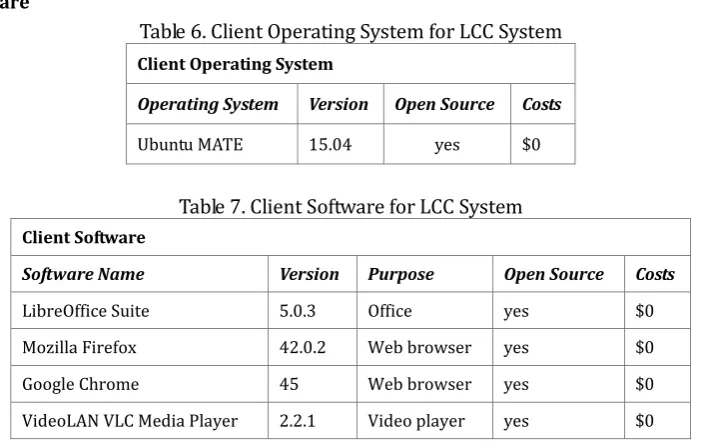
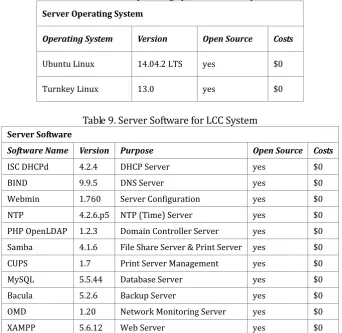
The three physical computer servers are Backup server (utilizing Bacula network backup software), Virtualization server (utilizing Microsoft Hyper-V) and Web server (utilizing XAMPP web application hosting software). The four virtualized servers provision core network services: directory (authentication), DNS, DHCP, file sharing, printing and network monitoring. The client and server OSes, application and network services software are presented in Tables 6, 7, 8 and 9 (see Appendix).
3.4.
Data Collection
The pilot testing and survey method were used for data collection [4]. The following questions were used in an online survey as part of the data collection process.
How often do you use computers in the library?
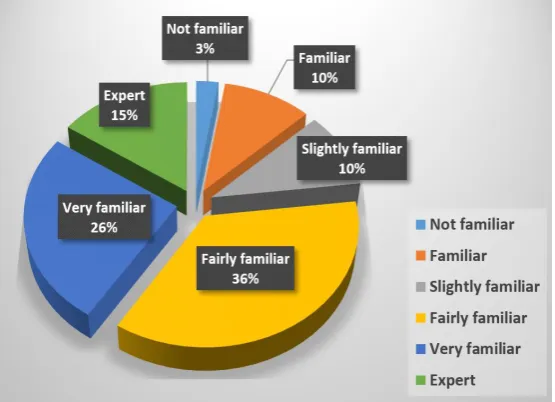
What is the main purpose of using computers in the library? How familiar are you with computers?
How was your web browsing experience on Raspberry Pi-based system?
How was your experience using LibreOffice application on Raspberry Pi-based system?
How was your experience using file sharing and printing services on Raspberry Pi-based system? Is the Raspberry Pi-based computer a suitable replacement for computers in the libraries?
Can you suggest ways to improve Raspberry Pi-based LCC system?
an end-user, a trial test was conducted with three student participants. The survey questions were refined from the provided feedback. Thereafter, final pilot testing and online survey were conducted. The collected data was processed, analysed and presented in tables and charts (refer to Section 4).
To electronically collect data, a questionnaire was uploaded to a free online survey engine – Google Forms. The staff were invited by email, while students were randomly approached on campus to take part in this research.
4.
Findings and CBA
This section presents the collated findings of the survey completed by the participants who tested the proposed LCC environment and then presents a Cost Benefit Analysis (CBA) of implementing it.
4.1.
Data Collection
A total of 38 participants (22 students and 65 staff were invited) took part in the pilot testing and afterwards completed the online survey. The major findings are depicted in the following figures (Fig. 3, 4, 5, 6, 7 and 8).
Fig. 3. Frequency of using computers in library.
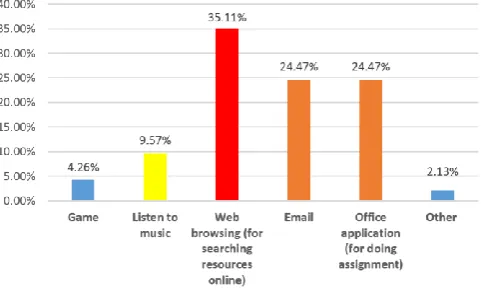
Fig. 4. Purpose of using computers in library.
Over 34% of participants had not used the computers in the library at all, but 26% used it on a daily basis (Fig. 3). Approximately 35% of participants use library computer for web browsing whereas 49% use it for emails and using Office productivity software for doing assignments, etc., (Fig. 4).
Fig. 5. Participants’ experience in using web browsing.
Likewise, 44% of participants were expert to very familiar while 36% were fairly familiar to familiar in using LibreOffice Suite on the LCC Raspberry Pi 2 client computer (Fig. 6).
Fig. 6. Participants’ experience in using the open source LibreOffice Suite on Raspberry Pi 2.
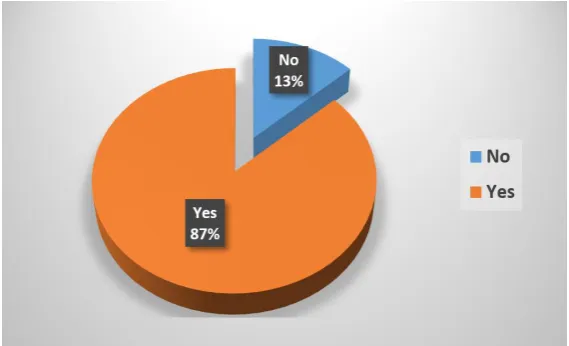
In using file sharing and printing services available on the LCC Raspberry Pi 2 client computer, 41% of participants were expert to very familiar while 46% were fairly familiar to familiar (Fig. 7). That Raspberry Pi 2 based LCC system was a suitable replacement for PCs in libraries, 87% of participants agreed while 13% disagreed (Fig. 8).
Fig. 8. Participants’ answers to whether or not Raspberry Pi 2 based clients are suitable replacements for PCs in libraries.
Based on the results of this pilot testing and survey, the participants also suggested that user training could be a way of improving the user’s knowledge of using this system. The results of this research also highlighted that the majority of participants had their own computers for their own personal needs.
4.2.
Cost-Benefit Analysis
The purpose of the cost-benefit analysis (CBA) is to determine whether the proposed LCC environment is a viable option for libraries and classrooms in developing countries.
CBA has two purposes, which are:
Determining if the proposed LCC environment is a feasible investment or decision (i.e., a justification of feasibility or advantage), and
Comparing the total expected cost of each alternative against the total benefits.
Calculating a cost-benefit analysis does provide the cost and benefits that will be helpful in analysing and evaluating the three alternative system approaches.
There are three alternative approaches in the CBA calculations:
Existing system refers to the existing computing environment in the library of Whitireia (Auckland Campus).
Proposed refers to the proposed low-cost computing environment for libraries and classrooms for developing countries.
Assumed system refers to a computing environment that can be set up by using second-hand personal computers (PCs) where an organisation or a school cannot afford to buy new PCs.
Table 2 presents the total cost of the setup of each system (server and client). The cost of each factor includes hardware, software, human resources and power consumption for all three alternatives of the existing, proposed and assumed systems including server and client [16]-[18].
Table 3 presents the individual cost of hardware and software required for setting up a client and server environment. It also displays the total costs of hardware and software for the client as well as hardware and software for server systems.
Table 2. Hardware and Software Costs for Server and Client [17]-[19]
Table 3. Hardware and Software Costs for 2 Servers and 20 Clients [17]-[19]
Table 4 displays the total of the calculated operating cost for all systems. This is how much the schools would spend in order to have system administrators maintain the LCC environment. The total of these costs are the total operating costs for that period [21], [22].
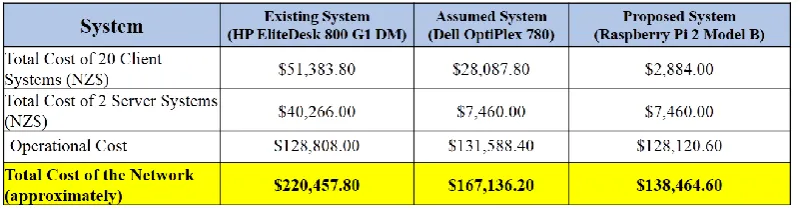
Table 5 outlines the total cost for 20 client systems and 2 servers of existing systems, assumed systems and proposed systems. This total amount represents approximate costs associated with human resources, power consumption, hardware and software. For a one-off implementation cost of the Raspberry Pi 2-based LCC system, there is a cost savings of 88.7% (against Existing System) and 71% approximately (against the Assumed System); however, the difference in operational cost is not significant across the three system implementations.
Table 5. Total Cost
5.
Discussion
The purpose of this section is to discuss the results of analysed data from the pilot test of the implemented LCC environment for libraries and classrooms in developing countries.
5.1.
Discussion of Findings from Survey
Gender and age: Gender and age data were collected while conducting the pilot survey. According to the results, there were 51.4% females and 48.6% males participants. Most of the female participants were impressed with the way the system worked and were keen to perform more activities on the Raspberry Pi 2 client computer.
Regarding the analysis of the findings the purpose of using computers in libraries such as web browsing, office applications (for assignments), emails, 35.11% of the respondents used computers for web browsing whereas 24.47% used it for checking their emails and 24.47% of participant used computers for doing assignments (office applications). Only a small percentage of the participants stated that they used computers to listen to music and play games and other personal activities. It is doubtful that the majority of the respondents did not give the correct information in this part of the questionnaire survey.
While conducting the pilot testing and online survey, some participants were very impressed with how the system (LCC systems) worked. Most of the participants taking part in the survey were females. The majority of student participants used computers in the library for several reasons such as checking personal emails, work on academic assessments, researching and surfing the Internet. Only a few stated they do not use the computers in the library.
different operating system (Linux). The majority of the participants suggested that the responsiveness of the Raspberry Pi 2 client system needed to improve. This is attributed to lack of processing power for intensive computing tasks and limited system memory on Raspberry Pi 2 devices. [Note: This pilot testing and survey was conducted in 2015, before the release of Raspberry Pi 3].
5.2.
Limitations
The survey was limited to selected staff and randomly invited students who had agreed to participate in the survey. The results of the survey do not distinguish between data collected from staff and students, i.e. data not grouped. Since there could be a difference in computing skill levels and computer usage patterns between staff and students, some of the results from survey could be skewed.
6.
Conclusion and Future Work
In this research, a LCC test-bed environment for school libraries in developing countries was designed and implemented. To answer the research questions, data was collected using an online survey questionnaire after usability testing was performed by each participant. The collected data was analyzed and a CBA was conducted using the existing library computing environment (as a reference), assumed computing environment and proposed LCC environment. After data analysis and CBA were completed, research questions were answered and the benefits of the proposed LCC system were compared with the existing and assumed systems. To sum up, implementing the proposed LCC system could have potential benefits in saving power, human resources, hardware and software costs.
In the future, an Intrusion Detection or Intrusion Prevention system (IDS/IPS such as Security Onion, BroIDS, Snort IDS etc.) and a Virtual Private Network (VPN) solution will be integrated into the LCC system for added security. An additional domain controller will be implemented for redundancy purposes. Similarly, additional network services such Zimbra for enterprise email and cloud storage services such as PiCloud or OwnCloud will be integrated into the LCC environment.
Microsoft Hyper-V service was used on Microsoft Windows Server 2012 R2 for operating system virtualization in the LCC system. This is to be replaced with an open source (no cost) virtualization bundled solution (such as Proxmox VE, Xen, Citrix XenServer or oVirt). Raspberry Pi 2 to be replaced with Raspberry Pi 3, Odroid-C2 or similar alternatives.
Appendix
Client Software
Table 6. Client Operating System for LCC System Client Operating System
Operating System Version Open Source Costs
Ubuntu MATE 15.04 yes $0
Table 7. Client Software for LCC System Client Software
Software Name Version Purpose Open Source Costs
LibreOffice Suite 5.0.3 Office yes $0
Mozilla Firefox 42.0.2 Web browser yes $0
Google Chrome 45 Web browser yes $0
Client Hardware: Mouse, Keyboard, Monitor, Raspberry Pi 2 Model B (with a 16GB microSDHC for storage).
Server Software:
Table 8. Server Operating System for LCC System Server Operating System
Operating System Version Open Source Costs
Ubuntu Linux 14.04.2 LTS yes $0
Turnkey Linux 13.0 yes $0
Table 9. Server Software for LCC System Server Software
Software Name Version Purpose Open Source Costs
ISC DHCPd 4.2.4 DHCP Server yes $0
BIND 9.9.5 DNS Server yes $0
Webmin 1.760 Server Configuration yes $0 NTP 4.2.6.p5 NTP (Time) Server yes $0 PHP OpenLDAP 1.2.3 Domain Controller Server yes $0 Samba 4.1.6 File Share Server & Print Server yes $0 CUPS 1.7 Print Server Management yes $0 MySQL 5.5.44 Database Server yes $0 Bacula 5.2.6 Backup Server yes $0 OMD 1.20 Network Monitoring Server yes $0
XAMPP 5.6.12 Web Server yes $0
Hardware: Mouse, Keyboard, Monitor, Dell PowerEdge R730xd Server.
References
[1] Lynn, H. (2014). Exploring computing education in rural schools in India. Retrieved from https://www.raspberrypi.org/blog/exploring-computing-education-in-rural-schools-in-india/
[2] Slaven, C. (2015). The raspberry Pi phenomenon: Global education uses. Retrieved from http://students.ecohouseinitiative.org/%EF%BF%BCthe-raspberry-pi-phenomenon-global-education-uses [3] Severance, C., & Fontichiaro, K. (2013). Raspberry Pi. North Mankato: Cherry Lake Publishing.
[4] Kothari, C. R. (2013). Research Methodology: Methods and Techniques (3th ed.). India: New Age International Pvt Ltd Publishers.
[5] Agrawal, N., & Singhal, S. (2015). Smart drip irrigation system using raspberry Pi and arduino. Proceedings
of International Conference on Computing, Communication & Automation (ICCCA) (pp. 928-932).
[6] Danymol, R., Ajitha, T., & Gandhiraj, R. (2013). Real-time communication system design using RTL-SDR and Raspberry Pi. Proceedings of International Conference onAdvanced Computing and Communication Systems
(ICACCS) (pp. 1-5). Coimbatore, India: IEEE.
[7] Kyuchukova, D., Hristov, G., Zahariev, P., & Borisov, S. (2015). A study on the possibility to use Raspberry Pi as a console server for remote access to devices in virtual learning environments. Proceedings of
International Conference on Information Technology Based Higher Education and Training (ITHET) (pp. 1-4).
sustainable development through education. Proceedings of IEEE Global Humanitarian Technology
Conference (GHTC) (pp. 102-107).
[9] Soetedjo, A., Mahmudi, A., Ashari, M., & Nakhoda, Y. (2014). Raspberry Pi based laser spot detection.
Proceedings ofInternational Conference on Electrical Engineering and Computer Science (ICEECS) (pp. 7-11).
[10]Byrne, J., Fisher, L., & Tangney, B. (2015). Computer science teacher reactions towards raspberry Pi continuing professional development (CPD) workshops using the Bridge21 model. Proceedings of the 10th
International Conference on Computer Science & Education (ICCSE) (pp. 267-272). Cambridge: IEEE.
[11]Fung, P., White, D., Jouet, S., Singer, J., & Pezaros, D. (2013). The glasgow raspberry Pi cloud: A scale model for cloud computing infrastructures. Proceedings of IEEE 33rd International Conference on Distribute
Computing Systems Workshops (ICDCSW) (pp. 108-112). Philadelphia, PA: IEEE.
[12]Kaup, F., Gottschling, P., & Hausheer, D. (2014). PowerPi: Measuring and modeling the power consumption of the raspberry Pi. Proceedings ofIEEE 39th Conference on Local Computer Networks (LCN) (pp. 236-243). Edmonton, AB: IEEE.
[13]McLeod, S. (2012). Experimental Method. Retrieved August 30, 2016, from the website: http://www.simplypsychology.org/experimental-method.html
[14]Tsukada, M., Santa, J., Matsuura, S., Ernst, T., & Fujikawa, K. (2014). On the experimental evaluation of vehicular networks: Issues, requirements and methodology applied to a real use case. EAI Endorsed
Transactions on Industrial Networks and Intelligent Systems.
[15]Wen, K., & Chang, S. (2014). A study of visualization analysis method in crowd flow spatial survey.
Proceedings of the 22nd International Conference on Geoinformatics (pp. 1-7).
[16]Meg, S., & Mary, M. (2015.). Using Cost Analysis in Evaluation. Retrieved August 30, 2016, from the website: http://ag.arizona.edu/sfcs/cyfernet/cyfar/Costben2.htm
[17]Layard, R., & Glaister, S. (1994). Cost-Benefit Analysis (2nd ed.). Cambridge, United Kingdom: Cambridge University Press.
[18]Borysowich, C. (2009). CBA sample. Retrieved September 30, 2015, from the website: http://www.scribd.com/doc/20757582/CBA-Sample#scribd
[19]Mishan, E. J., & Quah, E. (2007). Cost-Benefit Analysis. Abingdon, Oxford, United Kingdom: Taylor & Francis. [20]Markgraf, B., & Media, D. How to calculate the total operating costs & breakeven volume. Retrieved from
http://smallbusiness.chron.com/calculate-total-operating-costs-breakeven-volume-63129.html
[21]How much does it cost. (2015). Retrieved September 30, 2015, from the website : http://www.powershop.co.nz/how-much-does-it-cost/
[22]Allen, D. (2007). Cost/benefit analysis for implementing ECM, BPM Systems. Information Management
Journal, 41(3), 34. Retrieved from http://www.arma.org/bookstore/files/Allen.pdf
Ar Kar Kyaw is an ICT lecturer at Whitireia Polytechnic's Auckland campus. His research interests include computer security, information security, wireless networks, medical informatics, digital forensics, internet of things (IoT) and cloud computing.
![Table 3. Hardware and Software Costs for 2 Servers and 20 Clients [17]-[19]](https://thumb-us.123doks.com/thumbv2/123dok_us/7808821.1662237/8.595.71.535.166.819/table-hardware-software-costs-servers-clients.webp)