Joyce C. Chapman. What Would Users Do? An Empirical Analysis of User Interaction With Online Finding Aids. A Master’s Paper for the M.S. in I.S. degree. July, 2009. 77 pages. Advisor: Katherine M. Wisser.
This paper presents the findings from a usability study on the redesign of the finding aid Web display at the Southern Historical Collection at UNC-Chapel Hill. The study focused on how users interact with help and navigational features, stumbling blocks presented by finding aid structure and archival terminology, how users seek information, and what users want for the future of finding aids. Findings show that Internet proficiency is slightly more important than archival expertise when navigating online finding aids; novice users are able to attain a fairly high level of archival intelligence without the help of mediators; archival terminology proves a significant barrier only when presented without context; and users rely heavily on the browser function ctrl + F and series titles when searching. Interest in Web 2.0 was low for features involving modification of the finding aid or requiring trust in other users, but relatively high for features helping users to organize information.
Headings:
Archival description Finding aids
WHAT WOULD USERS DO? AN EMPIRICAL ANALYSIS OF USER INTERACTION WITH ONLINE FINDING AIDS
by
Joyce C. Chapman
A Master’s paper submitted to the faculty of the School of Information and Library Science of the University of North Carolina at Chapel Hill
in partial fulfillment of the requirements for the degree of Master of Science in
Information Science.
Chapel Hill, North Carolina
July 2009
Approved by
______________________________________
Table of Contents
TABLE OF FIGURES...2
1. INTRODUCTION...3
2. LITERATURE REVIEW ...5
3. METHODOLOGY... 13
3.1. FINDING AID REDESIGN... 13
3.2. PARTICIPANT GROUPS... 14
3.3. CONDUCTING THE STUDY... 17
4. RESULTS ... 18
4.1 HELP FEATURES AND NAVIGATION... 18
4.2. STRUCTURE... 29
4.3. ARCHIVAL TERMINOLOGY AND LABELING... 33
4.4. HOW USERS SEARCH... 44
4.5. WHAT USERS WANT: WEB 2.0... 52
5. SUMMARY AND DISCUSSION ... 57
6. CONCLUSION... 61
BIBLIOGRAPHY ... 64
APPENDICES... 67
APPENDIX A: DEMOGRAPHICS QUESTIONNAIRE... 67
APPENDIX B: TASKS... 69
APPENDIX C: POST-TEST QUESTIONNAIRE... 71
APPENDIX D: POST-TEST QUESTIONNAIRE DATA RESULTS... 74
Table of Figures
Figure 1. Help features: Top statement and help pages...19
Figure 2. Help features: Left navigation menu hover captions...24
Figure 3. Help features: Contents List hover captions. ...25
Figure 4. Task two: collapsible sections...27
Figure 5. Task six: understanding restrictions. Mark Arduini Collection...37
1. Introduction
Although finding aids have been displayed on the Web for over fifteen years, for much of that time little direct usability testing was done to evaluate how users interact with online finding aids. Though major research into usability was occurring in the world of Web design, the archival profession was slow to implement even basic user-design principles in online displays (Howard 8). However, it is essential that an archival Web presence adhere to the general rules of Web design. As Rosalie Lack points out in her 2006 usability study, “Even archives…can benefit from the same methods used by other types of sites” (84). If one of the main goals of archivists is to serve users, a priority must be to quantify how well the tools created are serving that goal. This can only be achieved through controlled testing and direct interaction with users.
that it is time to turn attention to understanding how users will interact with the standard in display form. In the past two years alone, a number of archival institutions and consortia have conducted testing on user interaction with online finding aids, including the Archives of American Art (AAA), the North West Digital Archives (NWDA), and the Online Archives of California (OAC). As archivists work to refine finding aid Web displays, it is important to remember that the goals of descriptive standards should not and do not include display. User needs and the principles of Web design, rather than the structure of the EAD XML standard, should dictate how finding aids are displayed.
According to Web usability expert Jakob Nielson, the ideal number of users to test in one round of usability with multiple groups of participants is three to four. Nielson’s studies show that a test of five users will uncover 85% of usability issues, with a full third of issues being uncovered by the first user alone. What Nielson stresses, however, is that second and third rounds of testing must be conducted. While a first round of testing can easily identify weaknesses, cannot evaluate the improvement of a design (2000). The results of the current study report only on a first round of usability testing. While one round alone cannot evaluate improvement for the Southern Historical Collection (SHC) finding aid redesign, the findings are significant in that they add to the small body of data currently available surrounding user interaction with online finding aids, and provide a further stepping stone for future research.
how these distinct user populations interact with online finding aids and what aspects of online display help or hinder them in that process; how quickly novice users learn without the help of mediators; and what capabilities users want finding aids to have in the future. In order to realize these goals, the study observed user interaction with help and navigational features, finding aid structure, terminology, and search. User habits were examined at the finding aid level only.
2. Literature Review
While the body of literature is increasing, there are still very few published studies examining data from usability studies conducted on finding aid Web displays. Though usability studies have most often been institution-specific, findings can often be extrapolated to apply to the entire field (Yakel 2004, 68). Usability studies to date have provided the field with some broad and basic conclusions from which to work in modeling concepts of redesigned display: users have trouble determining where they are in the hierarchy of the finding aid and need dynamic Web navigation options, archival terminology is a barrier to information discovery, and search capabilities are important to users.
finding aids, and recommended that online finding aid displays help users to know where they are at all times (2001, 126). The hierarchy employed in archival description may be both unintuitive and unappealing to users when reproduced in the visual display. Yakel also found that users became lost in the hierarchy of the finding aid (2004, 68). The need for navigational assistance in the container list when there are multiple levels of hierarchy involved is especially important. The OAC’s 2009 round of usability testing reported users feeling lost and unsure of where they were in the collection after jumping to detailed parts of the container list from the table of contents (15). The AAA's participants also had issues navigating the collection via the finding aid (1), and Wendy Scheir's findings showed that one of the major issues identified by novice users was frustration as they became lost in the container list, with endless scrolling required to find the container, series, or sub-series in which they were currently situated (74). Most usability studies have shown that users are desperately in need of dynamic Web navigation options when dealing with online finding aids.
Certain sections of the finding aid are less useful to users than others. In their third round of usability testing, the NWDA’s participants found subject headings “confusing and distracting,” after which the NWDA chose to move subject headings to the bottom of the finding aid Web display (3). In the fourth round of testing, NWDA’s participants commented that they would like subject headings to be linked to catalog searches (7). The Minnesota Historical Society (MHS) reference staff and SHC reference staff have similarly reported that users are confused by subject headings, often requesting a subject heading as if it represented a discrete set of material. The MHS has considered suppressing subject headings all together in the Web display, though it has not been done to date (Ralston).
attention to the navigational area (Van Schalk and Ling 2001, 513-525).
Another of Krug's four questions that must be answerable for every Web page is: "what is this page?" One possible way to answer this question for online archives users was suggested by the NWDA. In the findings of their second round of usability testing, they recommended adding a simple statement to each finding aid explaining the nature of a finding aid (2). One of the most potentially confusing aspects of a finding aid is that it discusses material that may or may not be accessible from the Web page. In the succinct words of one of the OAC’s usability participants, “my first question is, where is it?” (2009, 16). In Wendy Duff and Penka Stoyanova’s usability focus groups, users stressed a need for online finding aid pages to tell them how to actually access materials (61). Similarly, in 2006 the California Digital Library found that in the current digital age, users expect resources to be available online. If resources are not available on the Web, users want that plainly indicated (77). The AAA's 2008 study also found that users had difficulty determining whether or not materials were available online in digital form, and the OAC’s users also emphasized the need for information about the availability of materials (2008, 16).
“repository,” “EAD,” “description summary,” and “folder list” — could not be interpreted easily by most users (81, 84). Many have noted that users do not even understand the concept of “finding aid" (AAA 2008; Lack 2006; NWDA 2009; Prom 2004), leading to potential confusion when the word was used in menu options elsewhere on the site.
Scheir found that unclear section labels and series titles are especially problematic and that participants wanted archival terminology to be hyperlinked to definitions (72). In 2001, Andrea Rosenbusch also found that section labels were confusing (50), and over a decade ago, Duff and Stoyanova determined that users wanted more widely understood and consistent terminology to be used to label finding aid sections (52). In the fourth round of testing at the NWDA, users considered sectional labels such as, “Administrative Information” opaque, commenting that it gave the impression that the information was not for users, but rather for administrators (7). In 2008, Cory Nimer's findings corroborated that users would prefer more intelligible labels for finding aid sections. However, while Nimer, like others, found that archival terminology was unintelligible to users, he also found that when put in context, most jargon became understandable for his participants (229).
studies to date, testing 84 users with both advanced and novice archival research and Internet proficiency levels. He found that if a search option was available, most users opted to use it immediately (257). Upon entering a finding aid, users behaved in one of two ways: conducting a search with the built-in browser function ctrl + F, or scrolling through the finding aid (258). Of particular note, Prom found that many advanced users opted to use ctrl + F to find information rather than navigate the archivist-imposed hierarchy (259). However, Prom also found that the most advanced researchers still tended to read the Scope and Content Note and make use of other detailed contextual information (260). In Scheir's 2005 study of novice finding aid users, she also discovered a preference among users for immediate answers: her users relied on search tools or went immediately to the container list to seek information (60). Nimer's 2008 study once again showed a strong preference on the part of participants to use the search functionality of the delivery system almost exclusively to locate materials (228). Indeed, Nielson has stressed searchability as a fundamental aspect of what users want from Web sites. Studies conducted by Nielson show that over half the people on the Web are “search-dominant users,” meaning the first thing that they do upon entering any given site is look for a search box (1997). The majority of the OAC’s 2008 usability participants admitted that they wanted to begin an information-finding task with a search (9).
page to find information rather than take the time to read them (1).
already incorporating the ability for users to comment. In their article discussing the collections’ interactive features, Yakel and Krause report low user-commenting statistics for the commenting feature. While logs showed that thousands had viewed the collection, only seventeen user-produced comments were left after six full months (298).
of archival principles, “participants went through a rapid self-education process” (49, 78). Though the majority of those who have not previously interacted with finding aids may at first encounter great difficulty, can they develop archival intelligence on their own by interacting with finding aids and online help resources, or do they ultimately require mediation on the part of archivists?
3. Methodology
3.1. Finding aid redesign
(see Figure 2), and a statement at the top of each Web page explaining the nature of a finding aid (see Figure 1).
3.2. Participant groups
The study tested two participant groups of six people each. The first group consisted of novice archival researchers who had never interacted with finding aids or archives and the second group was composed of advanced archival researchers. As finding aids are increasingly made available on the Web, a large percentage of the people accessing finding aids are doing so virtually and without any prior knowledge of archival theory (Scheir 49). Yakel and Torres have identified the concept of “archival intelligence” and posited the degree to which users need such knowledge in order to expertly use finding aids (51-78). The decision was made to test a group of novice participants in order to evaluate problems encountered specifically by this rapidly expanding user group and to assess the rate at which novice users can self-educate as they interact with online finding aids. Novice participants were not informed that the Web pages they would be testing were related to archival materials. Two-thirds of novice participants were graduate students from various schools at UNC-Chapel Hill, with no school represented more than once. One-third of the novice group was composed of members of the general public without advanced degrees. Novice participants ranged in age from 24 to 62, with 50% over 40 years old and 50% under 40 (see Table 1).
information seeking behavior, to evaluate the greatest obstacles for these users in online finding aids, and to evaluate their interest in future finding aid Web 2.0 capabilities. The advanced participant group was composed of veteran researchers at the SHC, familiar with both archival material and with the SHC’s finding aids, though none had previously seen the redesigned Web display. The advanced participants comprised a less varied demographic background due to the smaller pool available. These participants ranged in age from 24 to 35. Five of six participants were affiliated with UNC-Chapel Hill. The last participant was a visiting graduate researcher from out of state. The number of times these participants had used SHC finding aids prior to the redesign ranged from fifteen to hundreds (see Table 1).
collapse and expand sections of a Web page. Participants were classified as “intermediate” Internet users if they displayed knowledge of only one of the two above-mentioned functions, and participants were classified as “beginner” Internet users if they did not display knowledge of either function. Under this classification system, 42% of participants were “expert” Internet users, 42% were “intermediate” Internet users, and 16% were “beginner” Internet users.
58% of participants spent more than ten hours per week on the Internet, 25% spent six to ten hours a week on the Internet, and 17% spent between three to five hours per week on the Internet. High number of hours spent on the Internet was distributed evenly across advanced and novice participant groups and number of hours spent on the Internet did not correlate with level of Internet proficiency. Both participants with “beginner” Internet skills spent over eleven hours a week on the Internet.
Table 1. Participant demographics
_____________________________________________________________________
ID Age Sex Field Archival experience Internet level Hr/wk
1 43 M GS, Library Science None Intermediate 11+
2 53 M GP, Banking None Expert 6-10
3 31 F GS, History Advanced Intermediate 11+
4 24 F GS, History Intermediate Expert 6-10
5 28 M GS, History Advanced Intermediate 11+
6 26 F GS, Social Work None Beginner 11+
7 24 F GS, Political Science None Intermediate 3-5
8 58 F GP, Administration None Beginner 11+
9 38 F FS, Linguistics None Expert 11+
10 35 M FS, History Advanced Expert 11+
11 25 M GS, History Advanced Intermediate 3-5
12 27 F GS, English Beginner Expert 6-10
GS = graduate student FS = faculty and staff GP = general public
3.3. Conducting the study
Testing took place in the Usability Lab at the Davis Library at UNC-Chapel Hill, from April to May 2009. The study consisted of three parts: a demographics questionnaire (see Appendix A), a series of tasks to be completed by each participant by interaction with online finding aids (see Appendix B), and a post-test questionnaire (see Appendix C) and exit interview. Each test took approximately one hour, with roughly half the time spent on a post-test questionnaire and exit interview. The demographics questionnaire was identical for both participant groups. The tasks to be performed were identical for both groups, with the exception of an extra four-part question for novice participants. The post-test questionnaire asked all the same questions of advanced participants that it did of novices, but included a set of extra questions for advanced participants related to their research habits. The post-test questionnaire asked all participants to rate various aspects of their experiences completing the tasks using a Likert scale of one to six, with one being the most positive and six the least positive. The post-test questionnaire also included a seven-part question investigating participants’ interest in a number of Web 2.0 features for finding aids.
participant as well as one novice participant’s interviews were lost. Many statistics for the later tasks and post-test questionnaire results are therefore calculated for 10 or 11 participants instead of 12.
4. Results
Findings show that novice participants were able to attain a fairly high level of archival intelligence without the help of mediators. Finding aid navigation and structure did not result in participants feeling lost in the finding aid, as has been reported in many other studies. Archival terminology proved the greatest barrier when presented without context, in hyperlinked menus or series titles, but did not hinder participants in information discovery in other contexts. Both novice and advanced participants preferred to find information within a page by keyword searching or by working within the Container List alone, and participants mostly used the Series Quick Links as their home base for known-item searching. Overall, participants were not enthusiastic about the addition of Web 2.0 capabilities to finding aids, though they showed more interest in some features than others.
4.1 Help features and navigation
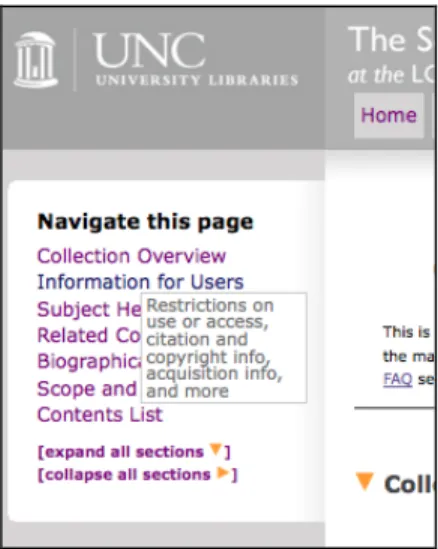
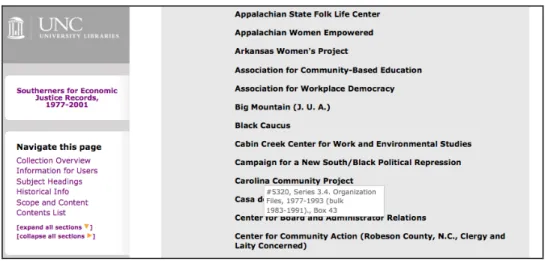
collapsible sections. One set of hover captions occurred in the left navigation bar, providing users with more in-depth explanations of section contents (see Figure 2). The other appeared in the Contents List, showing users their current position in the finding aid hierarchy (see Figure 3).
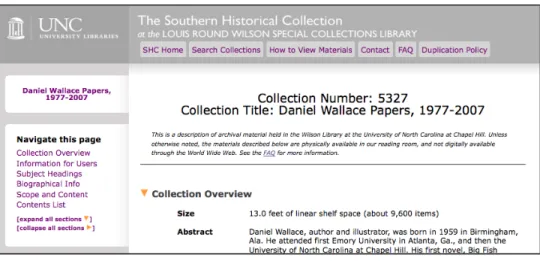
The effectiveness of a the statement at the top of finding aids and the two new help pages in aiding users who have no prior experience with archival material were evaluated by task one. The task was performed by novice participants only, using the finding aid for the Daniel Wallace Papers. Results show that, if given the proper information, novice users can quickly and correctly identify what finding aids represent, as well as the non-digital nature of materials.
Figure 1. Help features: Top statement and help pages
were able to understand and correctly answer the question. All participants answered in one minute or less, with time for correct completion of the task ranged from 15 to 60 seconds. Answers included, “description of archives at the Wilson Library,” “archival material,” “a collection of documents,” and “papers accumulated and authored by Daniel Wallace.” A full third of participants took their answers solely from the statement at the top of the finding aid (see Figure 1). Two participants who answered correctly also read the finding aid’s abstract, and three participants commented that it was obvious to them that this was archival material based on words that appeared on the opening screen such as, “collection” and “papers.” These findings suggest that novice users who are not knowingly seeking archival materials can be greatly aided by an informational statement providing contextual information on the opening screen of a finding aid. Results also show that novice users are capable of understanding some degree of information about the nature of archival material from context.
the current study found the correct answer to the third part of task one, which asked them where the archival materials were physically located. Participants averaged 33 seconds to determine the correct answer. Two-thirds of novice participants answered using the new statement at the top of the finding aid. One participant followed the new How to View Materials link in the top navigation bar, and one participant did not see either the link or the top statement, but guessed that materials would be “in the Library” once she had read the abstract and determined that the materials in question were archival. Those who found their answer by reading the statement at the top of the finding aid answered over six times faster than the others, averaging 10 seconds for completion.
When asked what they would have to do to view materials in part four of task one, participants had to either read the top statement, follow the How to View Materials link in the top navigation bar, or follow the FAQ link to the statement at the top of the finding aid or top navigation bar. All six participants answered correctly, averaging 28 seconds for completion. Half of the participants answered by using only the top statement; one participant followed the How to View Materials link and two participants followed the FAQ link in the top statement to read the more detailed instructions on the external page. When asked in the post-test questionnaire whether they use FAQs in general, 80% of respondents answered in the affirmative. While completing task one alone, 50% of novices were willing to navigate away from the current page in order to use one of the two help pages available. This diverges from previous findings that users will not use help pages or leave the current page to seek more information.
(2005; 2004). When asked whether the finding aids had been easy to navigate in the post-test questionnaire, all participants responded positively, with only two participants (both novice) rating the experience as slightly negative. The average rating for ease of navigation was 2.4 on a Likert scale of 1-6, with six representing the most difficulty. Many participants simply used the browser function ctrl + F to navigate the finding aid. When not using ctrl + F, most participants moved through the finding aid using a combination of links in the left navigation bar, hyperlinked series titles in the Container List Series Quick Links (see Appendix E), and scrolling. Oddly, no participants reported feeling lost in the Container List or complained about the need for endless scrolling, as subjects in so many other usability studies have. When asked to discuss the most frustrating aspects of navigating the finding aids in the post-test questionnaire, novice participants for the most part wanted to discuss terminological difficulties. When the researcher redirected them to discuss navigation specifically, participants rated the finding aids as fairly easy to navigate. Some commented that the pages were daunting because they were so large, but that with some practice, they believed one could quickly become more comfortable navigating.
fixed left navigation at all. This participant was most comfortable scrolling through the entirety of finding aids. The other participant of “beginner” Internet proficiency also navigated purely via scroll until approximately one-third of the way through the study, when she began using the left navigation menu of her own accord. The first participant complained that she literally had not seen the side bar. She thought that there should be a statement at the top and center of the finding aid telling users to look to the left for a navigation bar. In contrast, most other participants in the study automatically saw and understood how to use the sidebar. This participant’s experience implies that users with low Internet proficiency may have difficulty taking advantage of some navigational features in online finding aids. A video tutorial demonstrating the use of different navigational features of online finding aids could possibly help such users.
Figure 2. Help features: Left navigation menu hover captions
Over the course of the study, three participants (all novices) made use of the left navigation hover captions. All three found the captions useful. Two used hover captions to answer task seven, which asked participants to explain the finding aid section Contents List. A third novice used the Information for Users hover caption during task four to determine which section contained restrictions. While he found it useful, he complained that the caption obscured the other choices on the navigation menu. Two advanced participants noticed the left navigation hover captions but did so very late in the study. Both thought the captions would be a useful feature for novices. Though the remaining 58% of participants triggered the left navigation hover captions at some point during the course of the study, they did not appear to notice the captions.
particularly useful in long box lists where the container information is lost from view on the page.
Figure 3. Help features: Contents List hover captions.
information, she hesitated and then said that she had scrolled up to the beginning of the series, when in reality she had not scrolled at all.
In the exit interview, advanced participants were asked whether they thought the new Container List hover captions would be useful, regardless of whether or not they had triggered the captions during the study. All responded that they would find it useful, though one identified a potential point of confusion, explaining that her own expectation upon seeing the hover caption appear was that it contained more detailed information on the contents of the folder in question. More research should be done on the proper presentation of the information found in these hover captions, and to determine whether the majority of users are helped or annoyed by the feature after interacting with it for a significant period of time.
Though hover captions are a useful method of imparting information for navigating online finding aids, their presence could be an obstacle if captions block other critical information from view, and hover captions used as a navigational device in the Contents List may initially confuse some users. The usefulness of hover captions may be limited, as it seems a large percentage of users have a learned habit of disregarding pop-up text. This is demonstrated by the fact that 58% of participants did not notice the hover captions in the left hand navigation menu when activated, and one participant who used hover captions in the Container List did so entirely subconsciously.
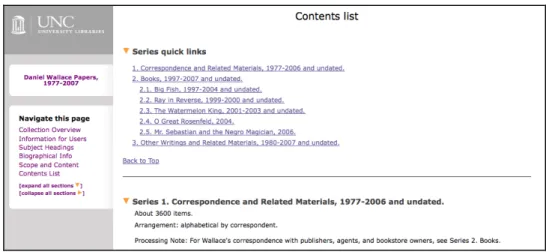
of the finding aid (including each series and sub-series) was collapsible and expandable via an arrow image next to the section’s title that changed direction when collapsed or expanded. The new fixed left side bar also featured expand all and collapse all buttons with the same miniature arrow images demonstrating the meaning of the arrows’ directions. The task asked participants to navigate to the Contents List and collapse the first series.
Figure 4. Task two: collapsible sections
When asked about the utility of the collapsing feature, 78% of participants who used the feature successfully responded favorably. Some of the ways in which they imagined the feature being useful included the ability to navigate a long, unwieldy page, the ability to better view all the section headers at once, and the ability to eliminate certain sections once it was determined that they were not necessary for the research at hand. Only 50% of the advanced respondents who understood the collapse feature deemed it useful, whereas 100% of novices who succeeded in collapsing the section said that it would be a useful feature. In their fourth round of usability testing, the NWDA found that collapsible and expandable feature in their sidebar produced only a “lukewarm response” from participants (2). Advanced participants in the current study reacted in a similar way. Those who did not think the feature would be useful indicated that they could not envision themselves having the need to use it. However, whereas some participants in the NWDA’s study found the feature distracting when used in the sidebar (5), none of the current study’s participants were bothered by the feature, which occurred only in the body of the finding aid. Participants did not interact with the feature during the study other than to determine how it functioned. It is likely that users in a non-controlled research setting would attain a more concrete view of the feature’s utility or lack thereof. Data should be gathered from users regarding their real-life interaction with the feature after the redesigned finding aids have been live on the Web for a period of time.
preferred linking to a search limited to archival resources. Though advanced participants all claimed that they did not use subject headings in finding aids, each of the four asserted that that they would find subject headings useful if they were hyperlinked to a search.
The utility of several navigational features was tested in the study. Participants found the finding aids fairly easy to navigate, and did not complain about feeling lost in the Container List. Participants liked and made good use of the fixed left navigation bar, though participants with low Internet proficiency had difficulty taking advantage of the feature and were forced to scroll through long pages. Collapsing finding aid sections, while intuitive to most and well received by many, may not be a much-used feature of online finding aids. Further observation of user interaction with this feature in a real-life setting is necessary. Advanced researchers feel that navigational capacities would be increased if subject headings were linked to a search of all archival materials or of the entire library catalog.
4.2. Structure
The post-test questionnaire asked several questions aimed at understanding user perception of the structure of online finding aids, including a survey of which sections of the finding aid advanced participants use while conducting research, whether or not they find the order of sections within the finding aid to be logical, and how easily novice participants can infer the nature of a given section.
advanced participants reported that they used the Contents List and Series Quick Links as the home base for the majority of their work within a finding aid. Their actions during task completion confirm this. Two claimed that they almost never refer to the collection-level Scope and Content unless forced by a lack of clarity on the part of series' titles in the Series Quick Links. No advanced participants claimed to use Subject Headings in finding aids, though three had used subject headings while completing the tasks. Three participants explained that they use subject headings in the main library catalog when they are first beginning a project, but have no further need to use them once they arrive at a finding aid. All but one participant explicitly mentioned using the Collection Overview, where the abstract is found. Two advanced participants discussed the abstract as an integral part of the decision-making process for whether or not to use a collection for research.
Biographical Note before moving into the Contents List.
Advanced participants also discussed the sections of the finding aid that they use for corroborating evidence after they have found information in what they consider to be the most important places. Two said that while they first look for information in the Contents List, they then may then return to the collection-level Scope and Content to substantiate the information. Another did the same with Biographical Information, returning to corroborate findings or obtain dates. A fourth said he always scans the Biographical Note at some point during his research.
Task seven tested whether the structural breakdown of information in finding aids makes sense to users, as well as how quickly novice users can grasp meaning behind the structure of archival description. It asked participants to look at the various Contents List section of the four finding aids they had used for the study, and to explain what archivists were trying to convey by grouping the information as they did in the Container List. Interestingly, novice participants’ answers to this question were just as accurate as advanced participants’ answers, demonstrating evidence that some aspects of archival intelligence may be acquired fairly quickly, without the help for formal training. Novice answers included, “Generally speaking, it looks like an inventory of the materials,” and "This tells me what the contents are, and breaks them down.” The most common misconception among novice and advanced participants alike was that the Contents List grouped collection materials by format instead of by intellectual grouping. Only one advanced participant reported that materials in the Contents List were grouped by “subject/theme” instead of by format. Though problems stemming from this false impression did not arise in the current study, one can easily imagine how search patterns could be affected by such a misconception. Further research should be conducted to determine the extent of this misconception and its causes.
hyperlinks to sections of the finding aid enhance usability by overcoming possible confusion that may be caused by the structure of the finding aid itself. Novice participants showed a reasonably high level of understanding of the purpose and structure of the Contents List after very brief interaction with finding aids, suggesting again that some archival intelligence may be acquired fairly quickly without the help of archivists.
4.3. Archival terminology and labeling
As discussed in the literature review, the majority of finding aid usability studies have identified archival terminology as a stumbling block for users. The current study attempted not only to identify what terminology presents difficulty for users, but also to identify qualities specific to the terminology that impedes users in information discovery. The study did so by comparing the location of unknown terminology that did not hinder participants versus that which did. Findings indicate that users’ success with finding aids is hindered most by unfamiliar terminology appearing without context: for example, in menus such as the Series Quick Links and left hand navigation bar. In particular, participant searches were greatly impeded by unclear labeling practices and unknown terminology found in series’ titles. Participants were better able to either circumnavigate terminology or intuit its general meaning when terms were placed in context. The wording of collection restrictions also confused participants.
language that was not too difficult to understand; with novice participants averaging 2.8 in their response and advanced participants averaging 1.8. In contrast, complaints about terminology were one of the largest issues that arose during the exit interview. In particular, participants cited labeling practices in series titles used in tasks eight and nine as well as the wording of restriction statements as problematic. Other terminology that many participants complained about but which did not impede research included “series” and “container,” both of which they were required to interact with when identifying the location of materials in tasks five, eight, and nine.
Over the course of the study, participants relied heavily on series titles in search and expressed intense frustration with those series titles that were not descriptive of the subject matter of material. The most problematic terms were “volumes” and “additions.” Three-fourths of participants actively complained about the series title, Volumes, 1860-1965 and Additions received after 1989, and five of six advanced participants complained specifically about how addition series are named in the exit interview.
series title] that led me to a diary. The heading ‘volumes’ didn’t provide much information for me.”
Similarly, task nine also used the Thomas E. Watson finding aid, and asked participants to locate an oral history. The oral history was located in the series 8. Additions received after 1989. The task forced participants to navigate via the finding aid’s hierarchy, as the phrase “oral history” did not occur in the finding aid (it was labeled “tape recorded interview”). Once again navigating from the Series Quick Links, 75% of participants chose Additions received after 1989 as the first logical series in which the oral history would be located. However, all of these participants (which included 67% of all advanced participants) did so because they falsely assumed that the term “additions” implied material created at a later date than the bulk of the original deposit, instead of material added to a collection at a date later than the original accession. Only one of six advanced participants clearly expressed an understanding of archival additions.
that’s in there, not what the objects are,” to the more restrained, “the additions don’t provide any useful information from the titles,” and, “it doesn’t seem like ‘additions’ as a category was useful.” Some advanced participants commented that if additions were going to be named this way, they needed the contents of each addition to be expressly stated in the abstract.
Participant comments on both tasks eight and nine underscore user interest in the subject matter of collections. Schaffner analyzes the split between archivist and user interest in describing collections in her article, "The Metadata Is the Interface," in which she discusses data from various studies proving that users are interested in the "aboutness" of collections, whereas archivists often focus on the "ofness" (6). The participants in the current study showed a strong desire to obtain subject information, or “aboutness,” in series titles.
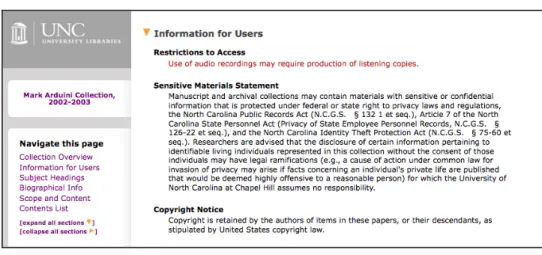
Figure 5. Task six: understanding restrictions. Mark Arduini Collection.
included an explanation of the term "listening copy," the information was not available when and where participants needed it.
Regarding the new Sensitive Materials Statement, 50% of participants did not see it at all, many of them novices. Half of the advanced participants were confused by the statement. Specifically, they were unsure of whether it was a generic statement or particular to the collection at hand. Two complained about the “legalese” of the statement. By the end of the study, one advanced participant still incorrectly believed that she was not able to access materials at all due to the statement. Another advanced participant said that if she had not gone back to compare the multiple finding aids and realized the same statement occurred on each, she would have been thoroughly confused about whether the statement was restricting that particular collection. This participant strongly recommended that the statement be moved to fine print, or at least not grouped together with collection-specific restrictions at the top of Information for Users.
The failures of tasks four and six highlight the fact that archivists must remain vigilant to the language used in finding aids. What seems obvious to professionals in the field may be obscure not only to novice users, but to experienced users as well. In the words of one novice participant in regards to restriction statements, "I think I understand, but, I shouldn’t need to think. You should have it there in black and white."
nowhere in the finding aid (the SHC does not use column headers in the Container List). While the term “container” was not clear to any novice participant and also not clear to a few advanced participants, they were all able to use process of elimination to identify the element that must be the “container” in question. In the words of one novice participant as she stared at container “V-755/1” on task nine, “well I don’t know what a container is but I’m assuming it’s this. I feel like that’s an important number to go take to someone.” In the post-test questionnaire, only two participants specifically complained about the term, one saying that he did not like the word because it “doesn’t mean anything,” neither saying that it actually stopped them from using the finding aid.
“Series” and “sub-series” are terms that are relevant in archival description, but which may be unclear to users. Participants were also asked whether the phrase “series” made sense. Almost all participants agreed that it did not, including advanced participants; however, terminology did not impede participants in information discovery, as it had in series titles. One advanced participant commented, “‘Series’? I just look at the title after ‘series,’ I don’t know what you mean by ‘series’ there actually, to be honest.” When the unknown vocabulary term was placed in an understandable context, participants did not need to understand it.
aids prefix the term “series” or “subseries” to the series title in the Contents List (see Figure 6) and also reinforce the conceptual connection by including the term in the section label Series Quick Links. It would be interesting to study whether users make the intellectual leap involved in cross-referencing materials in narrative descriptions (i.e., “see Series 10.1. for other videotapes”) when the term “series” does not appear anywhere else in the finding aid.
Figure 6. Series title in the Container List
they were “related to cataloging.” More testing should be conducted to examine the correlation between user understanding of sections labels appearing in navigation menus and frequency of users’ use of sections. From the results of the current study, it seemed plausible that a number of participants chose to ignore the sections of the finding aid whose labels included unfamiliar terminology.
Problems arising from confusion regarding subject headings had a significant impact on some participants’ information seeking behavior. One advanced participant and one novice participant thought that the subject headings could be tracked as discrete units throughout the finding aid Container List, despite the presence of a statement at the top of each finding aid’s Subject Headings section, explaining that subject headings do not represent discrete portions of a collection.
sophisticated manner, using them in combination with the Series Quick Links and collection abstract to complete task nine. This once again points to the ability of novice users to rapidly self-educate with the help of only an explanatory statement at the top of Subject Headings, and without the need for live mediators.
The issue of overlapping jargon arose again, as it had with the term “series,” this time in respect to Subject Headings. One novice participant commented that, “the distinction between Subject Headings and Contents List [is unclear]…as a naïve user, the ‘table of contents’ of a book and the ‘subject headings’ of a book are more or less synonymous.” Another novice participant mentioned having no idea what was meant by the word "creator" used in the Collection Overview, and did not understand it to imply origination, saying, “They are… the creator of what? Is there a creator and therefore the originator is… who is the originator of this [collection]?”
abstracts harshly, saying, "would be nice if the abstract weren’t more than 150 words…I’m losing the will to live, reading [this], I’m afraid! An abstract needs to be brief."
Lastly, an interesting point can be made about the labeling of help links. The SHC labeled the help page “FAQ” instead of “Help” with the idea that “FAQ” sounded easier to navigate. One advanced participant confirmed this idea during the exit interview, commented that she might not use a page labeled, “Help” but she would use a page labeled, “FAQ” because, “you never know what’s going to happen if you click on ‘Help,’ but ‘FAQ’ is manageable.” In fact, 80% of participants said that they use FAQ pages. Though Lack’s subjects admitted that they would not use help pages (80), it is possible that there is a difference in user response to pages labeled “help” versus pages labeled, “FAQ.”
the Series Quick Links. This study found that series titles that lacked information as to the “aboutness” of the materials seriously hindered participants in information discovery. Restriction statements should be worded clearly and precisely, or links should be provided to definitions of terminology (though participants generally felt comfortable with the idea of contacting the repository if they required an explanation of the restrictions). If a generic warning statement putting the onus of illegal use of information found in collections is added to a finding aid should be clearly identifiable as a generic statement. Some novice participants once again proved to be able to quickly deepen their knowledge of archival practices by interacting with the finding aid alone.
4.4. How users search
to search used the Series Quick Links (see Appendix E) as a home base for information seeking.
Only 58% of participants (33% of novice participants and 83% of advanced participants) knew how to search a Web page using the ctrl + F function. Results challenge the commonly held assumption that most users will be able to fall back on the built-in browser search if the rest of the finding aid fails to guide them to their goal. Four of five participants who did not know how to search the browser page were novice archival researchers. Four spent more than 10 hours a week on the Internet, signaling that Internet proficiency does not necessarily correlate to heavy use. Since the SHC does not provide a search box on the finding aid page, this left 42% of participants with no means of keyword searching.
Advanced participants and novice participants both wanted answers immediately. Like Scheir and the NWDA’s users (2005; 2009), the current study’s participants were turned off by large blocks of text. Rather than read blocks of text to acquire contextual information, all participants preferred to be taken straight to the materials desired via a keyword search of the page, or, if they were forced to determine the information on their own, for the most part worked on information finding tasks from the Series Quick Links and ignoring the rest of the finding aid.
In the post-test questionnaire, most novice participants thought it was difficult to find information in the finding aids, averaging 4.1 in their responses, whereas advanced participants thought it had been easier, averaging 2.8 in theirs. Most participants cited tasks five and nine as the most problematic information finding experiences. Of the four information-seeking tasks, three asked participants to identify the usefulness of a collection based on known-item searches (tasks five, eight, and nine) and a fourth was a subjective search that asked participants to determine the research value of a collection related to a particular research subject (task three).
how to search using the ctrl + F function, 71% began this task by immediately doing so. This represented 42% of all participants. All but one advanced participant who knew how to use the function did so immediately. The other participants, most of whom were novices, began the task by navigating to a variety of places in the finding aid. Such behavior is not surprising, given that this was the first search task of this nature and they had not yet learned what most of the sections of the finding aid contained. One novice began at the Contents List, and two began at the Subject Headings. One novice and one advanced participant each began by scrolling through the finding aid, and another novice and advanced participant each began by reading the abstract in the Collection Overview.
By the end of the task, every participant who knew how to use the built-in browser search function had done so. Novice participants completed or gave up on the task in an average of 3:00 minutes and advanced participants did the same in an average of 1:16 minutes. However, if participants are grouped by those who used the ctrl + F function versus those who did not, those who used the search function completed the task in an average of 1:00 minute, with the others completing it in an average of 3:52 minutes. If grouped by level of Internet proficiency, experts completed the task in an average of 0:56 seconds, intermediates in 2:15 minutes, and beginners in 4:27 minutes. The four participants who used the search function at the very beginning completed the task in an average of 0:41 seconds.
task in order to display what they believed to be good study behavior.
least three times faster than those who did not.
Interestingly, by the time they reached tasks eight and nine, all participants who did not begin the task with a ctrl + F search (67% of total participants) began the tasks by going to the Series Quick Links. From there, they chose the most logical-sounding series title and navigated to that series via the hyperlink. If participants did not find what they were looking for, they returned to the Series Quick Links with the left navigation bar or by scrolling, and repeated the process. This stands in contrast with participant actions in the first of the three tasks (task five), in which only one participant who did not search with the ctrl + F function began her search from the Series Quick Links. Without being shown any example, multiple participants came to the conclusion that this was the most productive search method. One point of note is the clear tendency of participants, both novice and advanced, to rely not just on the series' titles but also the series' dates in the Series Quick Links to eliminate possible locations for the material in question. Previously, the SHC had not displayed series date spans in the Arrangement section of the finding aid. These dates were clearly of great use to participants in the current study.
However, the study and teaching of Japanese is not mentioned anywhere else in the finding aid. If a participant were to attempt to search solely within the Container List, he or she would find nothing.
Two-thirds of participants (83% of novices and 50% of advanced participants) began their search by reading the finding aid abstract, which appears on the opening screen of the Web display. Only one advanced participant began his search with a ctrl + F keyword search of the Web page, though by the end of the task 25% of participants had done so. 58% of participants (including all but one of the novice participants) answered after having found corroborative evidence in the first place they looked. Four advanced participants and one novice participant continued their search in a second place in order to verify the initial information. Seventy-five percent of the advanced participants who had continued to a second place continued to a third.
aid before answering the question. In regards to novice participants, it is interesting to note that without any example to follow, many of them came to the rapid conclusion that basing searches from the Series Quick Links was the most productive search method.
4.5. What users want: Web 2.0
Ability to comment on finding aids
Advanced participants typically rated themselves as strongly unlikely to use commentable features if they existed on finding aids: four of six gave a score at the lowest possible value and the remaining two the highest possible, though even these two seemed hesitant when discussing the feature. In the words of one participant in favor of the feature, “It would be useful, but it would be hard to regulate. In the sense that you have people interpret things differently… I’d be skeptical.” The advanced participants who were not in favor of the feature did not think it would be useful, mostly because they would not trust the comments of other users. If finding aids were to become commentable, two advanced participants specifically requested that the comments appear on a separate page and did not “clutter” the main finding aid page. Another advanced participant would require users to leave their real names on comments so that he could read only those of trusted scholars. Others would want archivists to monitor all comments before they were accepted. Novice participants were not very interested in attempting to envision how this feature might be useful if they were conducting research.
Ability to tag finding aids
‘cool.’ The issue is people are writing garbage tags…if you just have any old Joe writing, you’d have tags that would confuse people.” Novice participants’ answers again ranged broadly. Whereas advanced participants worried about the quality and source of tags, the main issue novices had with taggable content was lack of experience with tags in any Internet context.
Ability to rate finding aids (1-5 stars)
Ability to share finding aids with others
All but three participants (including 5 of 6 advanced participants) were in favor of the ability to share finding aids with others (for example, an “email this page” link). Two advanced participants said it would be was just as easy for them to copy and paste the URL in an email, but still rated it favorably. One advanced participant who gave the feature the lowest possible score explained that she uses finding aids to teach classes and she cannot access her class listservs except from her own email. In their first round of usability testing, the OAC also found support among participants for the ability to email a finding aid to themselves (8).
Ability to save finding aids to an online “bookbag”
Seventy-five percent of participants (67% of advanced participants and 83% of novice participants) were strongly in favor of an “online bookbag” feature, whereby participants could save and retrieve their preferred finding aids. Of the two advanced participants who did not rate this feature favorably, one explained that he dislikes having to keep track of multiple logins, preferring instead to bookmark pages in his Web browser.
Ability to view a list of the most used finding aids
feature favorably also commented that, “just because they’re the most used doesn’t mean that they are going to be useful to you.” While another novice participant who rated the feature got straight to the crux of the matter for researchers, noting that the feature wouldn’t be helpful because, “I want my research to be different from everybody else’s.”
Ability to export collection citations to a citation manager
When asked about exportation of citations to a citation manager, participants were polarized. Two-thirds of both participant groups strongly favored the feature, and 1/3 strongly opposed. Those who were not in favor cited previous problems with citation managers (losing their citations via lost login information or access privileges), or had never used a citation manager before. Everyone that used a citation manager and had not had a bad experience was in favor of the feature. Participant interest in the feature, therefore, related almost entirely to citation managers and not to finding aids.
with others, rather than those features that would result in user interaction in direct relation to the finding aid.
5. Summary and Discussion
Regarding the structure of finding aids, novice participants showed a reasonably high level of understanding of the purpose and structure of finding aid sections, though a majority remained confused as to how to use Library of Congress Subject Headings. Problems arising from confusion regarding subject headings had an impact on some participants’ information seeking behavior. Advanced participants perceive the Contents List, Series Quick Links, and the collection-level abstract as the most essential components of the finding aid. Though advanced participants did not all agree that the structure of finding aids makes sense, they claimed that navigational features made the illogical structure irrelevant. This suggests that increased navigational capabilities enhance usability. However, iterative testing would be needed to prove this assumption.
When attempting to distinguish factors specific to terminology that impedes users in information discovery versus terminology that does not, it was found that participants were impeded to the greatest extent by terminology appearing without context. When jargon appeared in context, participants were better able to circumnavigate or intuit meaning. Participants focused on their interest in the “aboutness” of collections when discussing labels that hindered their search. Participants also found unfamiliar terminology in restriction statements to be a pitfall.
subjective searches, participants began by reading contextual information at the top of the finding aid, rather than at the Container List. With subjective searches, some participants looked for corroborative evidence in a secondary or even tertiary location within the finding aid before answering the question. Neither of these behaviors was observed in known-item searching. The obvious explanation for this behavior is that participants were not asked to evaluate the research value of the material in question, nor did the researcher assure them that the material in question for known-item searches existed; for the subjective search, they were required to verify the existence of materials and evaluate the possible research value of the collection for a certain topic. Because users in uncontrolled environments do not usually approach a finding aid with the assurance that it contains what they need, participant behavior for the subjective search could be viewed as a more realistic replication of independent research behavior.
Participant overall enthusiasm for Web 2.0 features was low. Advanced participants in particular were concerned with the ability of the average Internet user to leave unmoderated content on finding aids. Participants had relatively high interest in features that would help them personally organize or track information related to finding aids, and less interest in those features that involved user modification of the finding aid or that would require them to trust other users.
What can this study tell us about ways in which online finding aids inhibit or facilitate use by different groups? Though measurements of speed are not always an accurate indicator
expertise, and second by Internet proficiency. When the total time to complete all nine tasks was analyzed, it was found that participants who were both advanced archival researchers and expert Internet users were among the fastest to complete all tasks, and participants who were novice finding aid users and who also had lower levels of Internet proficiency (beginning or intermediate) were among the slowest to complete all tasks. Participants who ranked high in one of these two categories but low in the other completed the tasks at identical speeds (an average of 12:30 minutes for each group). This substantiates Prom’s 2004 findings that both Internet proficiency and archival expertise “play significant and roughly comparable roles in efficient navigation through electronic finding aids” (248).
In regards to novice users in particular, the results of the current study imply that by interacting with the finding aid alone, these users can acquire a degree of archival intelligence high enough to complete a variety of tasks with online finding aids successfully. In a short period of time, most novice participants developed the same search patterns as advanced users for known-item searches; novices were willing to read explanations and follow links to help information in order to identify the nature of finding aid Web pages and to better understand how to access materials; in task seven they were able to rudimentarily identify processes of archival description behind the structure of the finding aid; they were able to either circumnavigate or intuit the meaning of unknown terminology involved in identifying requesting archival materials; and some novices showed evidence of learning how to differentiate the functions of different components of the finding aid – such as Subject Headings and Series Quick Links -- through a process of trial and error. While novice participants were greatly assisted by help features such as FAQs and explanatory statements, they were able to acquire a significant portion of this intelligence simply through iterative interaction with the finding aid. This does not mean that novice users can become archival experts without the help of structured training or mediators, but they may be able to acquire enough knowledge to meet their research needs, especially when using finding aids that include features aimed at helping novice users.
6. Conclusion
Bibliography
Altman, Burt, and John R. Nemmers. "The Usability of On-line Archival Resources: The Polaris Project Finding Aid." American Archivist 64.1 (2001): 121-131. Metapress. Web. 15 May 2009.
Archives of American Art (AAA). “Web Usability Study Report: Round 1, Subject Experts.” (2008). Email to Joyce Chapman. 12 June 2009.
Brown, Laura Clark. "Beyond Fast Pictures." Southern Sources: Focusing the Conversation. April 10-12, 2008. Transcript.
Coates, Lisa R. "Users of Online Finding Aids: Who Are They and Are They Satisfied?" Journal of Archival Organization 2.3 (2004): 25-39. Informaworld. Web. 10 April 2008.
Cox, Richard J. “Revisiting the Archival Finding Aid.” Journal of Archival Organization 5.4 (2007): 5-32. Informaworld, Web. 23 June 2009.
Duff, Wendy and Penka Stoyanova. “Transforming the Crazy Quilt: Archival Displays from a Users’ Point of View.” Archivaria 45 (1998): 44-79. Print.
Howard, Dawne E. “The Finding Aid Container List Optimization Survey:
Recommendations for Web Usability. ” MA thesis, University of North Carolina at Chapel Hill, 2006. UNC Electronic Theses and Dissertations. The University of North Carolina at Chapel Hill Libraries, Chapel Hill, N.C. 11 Dec. 2009.
Huffman, Noah. “Re: Duke usability testing.” E-mail to the author. 22 June 2009. Krug, Steve. Don't Make Me Think! A Common Sense Approach to Web Usability.
Berkeley, Calif: New Riders, 2005. Print.
Lack, Rosalie. “The importance of User-Centered Design: Exploring Findings and Methods.” Journal of Archival Organization 4.1/2 (2006): 69-85. Informaworld. Web. 15 Dec. 2008.
Meissner, Dennis. “First Things First: Reengineering Finding Aids for Implementation of EAD.” American Archivist 60.4 (1997): 372-387. Print.