Amy L. Kapral. Five Aspects of Design in a School Media Center. A Master’s Paper for the M.S. in L.S degree. April, 2009. 37 pages. Advisor: Sandra Hughes-Hassell.
This paper gives a brief overview of five aspects of school media centers’ facility design--lighting, acoustics or sound, furniture style and arrangement, temperature control, and color schemes. These five aspects, each of which can impact student learning, are then used to evaluate the design of five school library media centers in North Carolina. Personal interviews with the Media Specialists of the selected media centers provide insight into which of these aspects they believe are critical to creating a media center that is effectively utilized by its school population.
Headings:
Space/ Architecture
School Buildings/ Designs and Plans
FIVE ASPECTS OF DESIGN IN A SCHOOL MEDIA CENTER
by Amy L. Kapral
A Master’s paper submitted to the faculty of the School of Information and Library Science of the University of North Carolina at Chapel Hill
in partial fulfillment of the requirements for the degree of Master of Science in
Library Science.
Chapel Hill, North Carolina
April 2009
Approved by
Contents
Introduction ... 4
Literature Review... 6
Lighting ... 6
Acoustics and Sound ... 10
Furniture ... 12
Temperature and Climate ... 17
Color ... 19
An Evaluation of Five School Library Media Center Facilities ... 22
Sample Selection and Data Collection ... 22
Data Analysis and Discussion ... 26
Conclusion ... 34
Introduction
Lately, I have noticed an abundance of literature on new young adult spaces in
public libraries. Librarians have clearly recognized that young adults and teens use
library space differently than children or adults do, and have begun to make
accommodations for this difference. Yet there has been little attention focused on how
to redesign school library media centers to maximize their usage. With a background in
K-12 education, I am also aware of the large quantity of research literature that addresses
how students learn and discusses the factors that affect student learning. Taken together,
these resource pools can provide school media specialists with a better understanding of
the properties of a good school library media space.
I began my search for literature in databases that are subject specific for education
(ERIC, Education Full-Text via Wilson Web) and library science (LLIS, LISA). I found
many articles in each of these databases, and selected articles by their title/abstract for
further reading. Many of these articles were only superficially related to my topic or
discussed a particular library renovation, but I was able to find several articles that
discussed one or more of the aspects I wanted to investigate in depth. These I marked as
helpful and continued searching for more resources. I was able to find several books on
library facilities that had chapters that were relevant, and a few books on teaching and
education which discussed the physical classroom and student learning styles.
In reviewing the literature on library facilities, it became clear that the physical
of which has a significant impact on a media program. These categories include lighting,
acoustics or sound, furniture, climate, and color.
Another interesting theme I noticed was the type of “spaces” that should be
included in a school media center. Of course, a media center should have space
dedicated to its print resources (general shelving). Other spaces that were mentioned
included meeting spaces for students to work in small groups or for faculty committee
meetings, study spaces for individual or group study, reading spaces for recreational
reading of books and journals/ newspapers, and research spaces such as computer labs
and reference areas (Crawford, 1999). Additional spaces include teacher workrooms,
media specialist offices, and circulation and AV spaces (Klafehn, 2006). Most sources
agreed that each type of space has unique requirements for lighting, acoustics, furniture,
color, and climate.
Finally, the literature on learning styles showed that no two students learn the
same way. The most commonly applied learning styles are visual, auditory, and
kinesthetic. Most learners will exhibit a preference for one of these styles, although they
may be able to learn through more than one style. Visual learners are sight-stimulated,
either through written words or images and viewings. Auditory learners are at their best
when they can hear what is being taught. Kinesthetic learners do best in active situations,
where they are either physically doing an activity or touching items they are learning
about. One can enhance all learners’ education by ensuring the media center has spaces
and facilities for all learning styles to flourish.
Clearly, in designing school library media centers, there are a number of factors
physical space identified in the literature—lighting, acoustics, furniture, climate, and
color—with an emphasis on the intersection of these elements and learning styles. It will
also provide suggestions or recommendations for each element. It will then present an
evaluation of five school library media centers which was undertaken to determine how
well they incorporated each aspect into their design and layout. Deficiencies and gaps
will be analyzed, and finally changes to improve the spaces will be recommended.
Literature Review
The five elements discussed above, lighting, acoustics, furniture, climate, and
color, will be explored in the literature review. Lighting will be discussed with
consideration of lighting requirements and type of lighting. The acoustics of a library are
inherently different than acoustics in a classroom, with varying levels of sound required
in the various parts of the media center. I will provide examples and suggestions for
improving acoustics in the school library media center. Appropriate and mobile furniture
will be described with respect to the different spaces of the media center. The
temperature or climate of a room can affect student learning, as well preservation
capabilities of libraries, both of which should be considered for a school library media
center. Colors can influence how a room is perceived by visitors, and will be discussed
with reference to promoting and hindering learning.
Lighting
School media centers should be the hub of a school’s learning community. As a
focal point in the school, the media center should be well lit. Lighting has been shown to
of a space that will be used by students for learning. There has been an ongoing
discussion of what the ‘best’ light source for a library is for many years. Between
considering light sources and their affect on student learning, there are many factors that
must be considered when determining the type of light to be used in a school media
center. The intensity of light (brightness), the quality of light (diffused or direct), the
lighting needs of specific areas, aesthetic effect, and cost are considerations listed in
Library Buildings: Planning and Design (Kaula, 1970).
Have you ever had the power knocked out at your house during a storm? You
find the flashlight, realize the batteries are dead, and decide to light a couple of candles
instead of hunting for new batteries. Then you pick up your overdue library book,
deciding you might as well read, since you can’t watch The Office. After squinting at the small print on the page in the candlelight for about 5 minutes, you give up, and decide to
go to bed early. While I doubt any person would encourage the use of candlelight in a
book-filled library, the lack of sufficient lighting is the key here. At the other end of the
spectrum, imagine trying to read a piece of “bright white” paper while you are outside on
one of those exceptionally bright, sunny, cloudless days. Your eyes begin to water as you
squint towards the paper, trying to shade your eyes from the bright sunlight that is
reflected from the paper in your hand. For students who are studying, researching, or
reading in a media center, light must be sufficient but not overly without glare. Glare is
the reflection of light from a surface. Glare is most common on brightly colored or shiny
surfaces, and can cause discomfort or difficulty in reading.
There has been debate over the type of lighting to be used in media centers and
preservation of library resources. Direct sunlight may damage books and other resources
over time, as well as create glare on computer screens, or simply heat a room beyond
comfort. This type of natural lighting can be variable: on an overcast day, it may provide
insufficient light for using a media center on its own. These are all compelling reasons to
use electric lights. However, electric lights burn out and require replacements; this and
the expense of electricity can add up in cost. Electric lights may also cause glare on
computer screens, depending on how and where they have been installed in the media
center. It is easier to reduce glare from sunlight by adding shades or drapes to the
windows than it is to try to block glare from electric lights that have been permanently
installed in a way that interferes with computer usage.
In a study by Rayneri, Gerber and Wiley (2006) on gifted students learning
environment preferences, dim lighting was preferred by 71.6% of participants, with
strong preferences for dim lighting by 35% of participants This type of data should be
taken into consideration when determining lighting schemes for the media center. While
a survey may be ideal in determining the preferences of the students at a given school,
surveys are time and effort intensive, and will likely result in split opinions, with some
students opting for bright lighting and other students opting for dim lighting. Media
centers can facilitate both learning styles by providing for dim lighting by installing
permanent electric lights and supplementing that light with windows or lamps. Using
windows to light the room is called “daylighting.” This is a very cheap, easy way to add
some extra light to a media center (Kennedy, 2002b). Since glare can cause problems,
daylighting is best accomplished (for school media centers in the northern hemisphere)
setting of the sun in the east and west, as well as minimizing solar heat gain from
windows that face south (Jacobs & Sargo, 2005).
Providing blinds or curtains for windows will allow the media center to be
“darkened” when film or computer presentations require low-light environments.
Curtains can also provide a touch of color to the media center. If a school media center is
located in an area that has more cloudy or rainy weather than sunshine, desk or floor
lamps may be the way to provide the extra lighting. Lamps can be simple or decorative,
but must be purposefully placed to facilitate the uses intended for each space in the media
center. A floor lamp by the circulation desk may not be helpful, but could be beneficial
to leisure readers in a lounge area. Desk lamps are better utilized in single-study areas
than at computer desks.
Regardless of the type of light used in a media center, there are some points that
were agreed upon by lighting experts as long ago as 1970. All areas of a school media
center should be provided with an acceptable level of lighting, leaving no dark corners or
aisles in the stacks. Whatever kind of lighting is provided in a school media center
should be diffused lighting and not direct in order to reduce the chance for glare. As
pointed out earlier, daylighting cannot be relied upon as an exclusive source of light due
to the uncontrollability of the weather (Kaula, 1970). School media centers should also
avoid highly polished surfaces (tile floors and polished tables) due to their high
reflectivity and increased glare potential (Morris, 2004). Controls for light should allow
for dimming of lights within specified sections. There should be light switches or panels
should be conveniently located by doors and/ or near the section they control (Hart,
2006).
Acoustics and Sound
“Shhhh! You are in the library!” In the past, libraries were expected to provide
silence for studying patrons. This need was accommodated for by many libraries
incorporating lounges within which silence was not required (Kaula, 1970). While the
idea of libraries as quiet places used to be the norm, and may still be in some settings,
school media centers should not be silent. Students and teachers must communicate to
facilitate learning. While the walls, floor, and ceiling may already be permanently in
place, acoustics can still be improved for maximum usage of the media center space.
Media centers host a variety of functions. It is necessary for the space to accommodate
differing sound levels, and buffer sounds when necessary.
To begin to think about acoustics in the media center, first think about the levels
of sound the media center currently attains. Is it ever completely silent? Are there
ventilation systems or computers running that are overly loud? Can students hear cars/
trains/ planes during their study times? Can guest speakers be heard from the back row
of a large group? Do the speakers from the viewing area overpower students on the
computer with headphones? Can small groups collaborating in one area hear each other
over the other activities in the media center? Depending on the answers to these
questions, the media center may need to rethink its acoustics.
In 2002, Mike Kennedy (2002a) wrote a brief article discussing the possibility of
new acoustical standards for educational facilities. These standards were adopted, and
provides guidelines in terms of decibels and other acoustical measurements, and offers
some suggestions for building an educational facility that meets the new standards.
While the standards have been officially adopted by the Acoustical Society of America,
there is currently no testing of educational facilities to enforce the standards. For the full
set of standards, you can visit the Acoustical Society of America’s online store and
download a free copy (Acoustics.com” 2003). While the standards were created with
classrooms in mind, they should be considered when designing a school media center, as
well, since it is a key learning environment in most schools.
Some things to keep in mind when looking at media center acoustics are the
surfaces (walls, ceiling, and floor), as well as the arrangement of the furniture, and the
location of the media center in relation to the parking/ bus/ road areas on the school
campus (Wetherill, 2002). If all the walls, the ceiling, and the floor are composed of
hard, noise reflecting surfaces, echoing is likely to increase and become a significant
problem. This can be combated by adding acoustic ceiling tiles in place of traditional
tiles, or incorporating fabric-covered fiberglass panels in the ceiling, or on the walls.
Another way to keep sounds from travelling as freely in a school media center is to place
furniture and shelving in strategic locations that will block sound waves and help prevent
noise (Morris, 2004). Placing study desks or tables away from the high-traffic or louder
areas of the media center (front door, computer area, or circulation area) will help
decrease the noise overflow in the study area. If the media center has one or more walls
facing the bus lot or a well-traveled roadway, consider adding extra noise barriers such as
fabric wall hangings or curtains on windows to those walls to diminish the transference of
There will be times when instruction will be taking place in the media center, and
at these times, sound must be able to travel freely in the instructional area. Many times,
instruction is taking place in the largest open area in the media center, and this will help
with the transmission of instructional sounds. The recommendations above will help
eliminate extraneous noises and echoes. As Crawford said in Library Space, The Next Frontier, “Librarians should not be in the shushing business” (Crawford, 1999). If your media center has a quiet study area as well as an instructional area, the spaces should be
distinctly separated to facilitate the best acoustic situation possible.
In order to support all learning styles in a media center, media specialists should
attempt to differentiate the space to allow students to choose between quiet study areas
and group study areas that allow for slightly higher volumes. If there is no way to
differentiate the space, consider purchasing a few sets of noise cancelling headphones for
students who prefer silence when they study. The study of gifted students learning
preferences shows that almost as many students prefer sound in their learning
environment as those that prefer quiet in their learning environment (Rayneri et al.,
2006). The media center should be prepared to provide either learning environment for
students, as there will likely be varied preferences in any given school.
Furniture
Another important aspect of the space in school media centers is the furniture.
Depending on the age (and corresponding size) of the students in the school, furniture
should be arranged and scaled differently. Students’ learning styles may also affect the
type and size of furniture placed in the media center. Another factor to consider when
a lecture/ large group working area? Will this area be subdivided for small group work,
or is there a separate space for that? Is there an open area where students can move
around, perform, or play? Can the computer space be used for anything else, or is it
single purpose?
Learning styles should be accounted for when arranging a school media center.
There should be comfortable, relaxed areas where students can sit or sprawl on the floor
with beanbags or cushions to read, as well as areas with tables and chairs for students to
sit at ‘desks’ and study. There should be a place or a way for auditory learners to listen to
audio clips without disturbing the other students or to be able to study in quiet areas.
Kinesthetic learners should have a place to move around while they work in groups, or
‘put on’ a show from a book they are reading. Visual learners should be provided with
plenty of maps, diagrams, and artifacts within the media center.
Many media centers are not arranged in their most productive and appealing
layout. If the first visible thing when walking in the door of the media center is
floor-to-ceiling shelves, as was the case with Lynette Mitchell, it might be wise to reconsider the
floor plan of the media center (Books and bricks, 2002). The media specialists/ assistants
should be able to have a clear line to sight to most, if not all of the media center from
their desk or office. Appropriate sightlines promote student safety, and encourage proper
use of materials through supervision. Student misuse of materials and resources may be
higher in areas that are not easily supervised (Harper, 2007). To create beneficial lines of
sight, reading areas, study areas, and computer areas should be “in front” of the majority
of the shelves. Depending on the location of the desk or office from which the line of
reading or studying areas. The circulation desk often plays an important role in
supervision of the media center, as it is nearly always staffed by a media assistant. By
locating the circulation desk near the main entrance and exit, it is easier to monitor the
materials entering and leaving the media center; sightlines should allow monitoring of the
majority of the media center. The visibility needed throughout the media center is, of
course, dependent upon the student population and its needs (Klafehn, 2006)
If multiple classes will be in the media center at the same time, multiple “spaces”
should be available within the media center. If there are 30 computers in the media
center, consider setting 25 up in a “classroom” area that is distinct from the other five
computers. These extra computers can be used by individuals for searching the catalogue
or general research or word processing while a class is using the computer “classroom.”
Also consider having a distinct reading area with comfortable seating to encourage
students to read for pleasure. Students can read at a table or desk, but it is much more
enjoyable to read on a couch or cushioned chair. Tables and chairs should be arranged in
such a way that a classroom teacher or teacher-librarian could lead a class, or small
groups of students could study on their own.
Computers are a very important part of the school media center in today’s world.
Not only do computers replace the old Card Catalogues in providing ready access to the
collection, they are also used as reference tools, production centers for staff and students,
and as administrative tools (Baule, 2007). This variety of uses requires that computers be
strategically placed throughout the media center. A computer or two with the reference
collection is always helpful. It is also wise to keep a computer or two in the office or
scattered among the stacks or in the entry-way of the media center to facilitate catalogue
searching. The largest single group of computers will be used primarily as a student or
staff production area or instruction center.
Furniture specifically designed for computers is also importantn. Two very
important considerations when choosing computer furniture are power supply and cord/
wire management. A typical desk from 30 years ago has no place for a keyboard, no
cutout hole for cords, and no convenient way to reach the outlet on the wall behind the
desk. Today, there are huge selections of desks and tables designed for use with
computers. Be sure to consider the school’s average class size and the number of
computers that will be available for “class” use in the media center. If more than one
person will be working from the same computer, provide extra table-top space for
multiple students (Baule, 2007).
Chairs and tables in the group study and single study areas should have smooth,
easy to clean surfaces. This allows for easy maintenance, and may prolong the overall
life of the furniture. When choosing chairs and tables, avoid choosing furniture that has
stretchers (the bars between the legs). Stretchers are often just used as footrests, and are
difficult to clean around. If the media center is often used for community or school-wide
functions that require moving the furniture, consider lightweight, stackable chairs (Baule,
2007).
Another consideration when discussing furniture in the school media center is the
size of the furniture. While low shelving is useful in high school media centers for
allowing better visibility, it is necessary in elementary and middle schools to allow the
be tall enough to reach books on the top shelf of many typical shelving units. Shelves can
be ordered in a variety of shapes and sizes making it is easy to ensure the students will be
able to access the resources comfortably and safely. Size should also be considered for
all other furniture in the media center, including the tables, chairs, couches, and the
circulation desk (Books and bricks,2002).
Shelf space is a hot topic for discussion in many media centers. While I
personally do not believe any media center will ever become a book-free zone, I do
concede that more and more non-print resources are becoming available and desirable for
use in school media centers. In order to maximize flexible space in the media center,
shelves should line a good portion, if not all, of the available wall space. By
incorporating shelves on the walls, more floor space is opened up and can be used for
tables, desks, computers, or lounge areas. Single-facing wall shelves also help in
maximizing the space that could be dedicated to books. Since floor to ceiling shelves are
not the ideal, consider locating windows higher in the wall and incorporating shelves
below the windows (Klafehn, 2006).
Furniture for an instructional area should be sturdy, and large enough to
comfortably instruct at least one class of students at a time. Round tables can limit
flexibility, but square or rectangular tables can be put together for large-group work.
Selecting adult-sized furniture allows the space to be utilized by faculty and parents
comfortably, but should be considered only in middle or high school media centers where
students would also be able to comfortably use the adult-sized furniture. Small children
in elementary school should be provided with furniture that is appropriate for their size
In general, furniture should be comfortable, durable, eye-pleasing and safe
(Morris, 2004). Comfortable reading furniture was repeatedly noted as being important
to an inviting classroom, and should be a priority in library furniture (Foster-Harrison &
Bullock, 1998). In areas of the school media center dedicated to leisure reading (such as
the magazine and newspaper area) there should be plenty of comfortable and informal
seating. In schools with older students, consider the student population and their desire to
study “biology” outside the lab. It may be wise to purchase comfortable chairs that are
for individual use instead of loveseats or couches (Baule, 2007). In schools with younger
students, consider purchasing large pillows or cushions for the students who prefer to sit
on the floor and read (Morris, 2004).
Temperature and Climate
Have you ever seen a cat curled up in a spot of sunlight, taking a catnap? Perhaps
even you have curled up in the sun to take a nap before. Have you ever fallen asleep in
class because it was too warm? Or shivered so much you couldn’t hear what the teacher
was saying over your chattering teeth? Then you realize how important climate control is
in a learning environment. Jacobs and Sargo (2005) point out that while good air quality
and temperature control often goes unnoticed, bad air quality and poor temperature
control will not only be noticed, but it may negatively impact student performance. If
you have ever noticed a damp, musty smell in a library, then you also realize how
important humidity control is in a library. These are two major issues that must be
Since the invention of air conditioning, libraries have evaluated the benefits and
drawbacks of incorporating this amenity. Today, most people assume “air conditioning”
means cooling the air to a comfortable temperature, but there are many more benefits to
creating an air flow system within a building that houses print resources. Eight air
quality factors are discussed in Library Buildings: Planning and Design, including temperature, humidity, air motion, air distribution, dust, bacteria, odors, and toxic gasses
(Kaula, 1970). Most of these factors are addressed in every modern building’s air
circulation/ filtration/ heating/ cooling system.
The Rayneri, Gerber and Wiley (2006) study surveyed gifted students preferences
for temperature in their learning environment. The results were nearly evenly split
between preferring warm and cool environments, with a slight preference towards warm
environments (58.7%). For student learning styles to be supported, the best idea is to
keep the temperature of the room slightly cooler than warmer. Students can always bring
a sweater or jacket with them to the media center if they are too cool without it. It is
more difficult for students who are too warm in the media center to cool off. The cooler
temperature in the media center may also facilitate easier cooling of the computers being
utilized. Tables near windows can also provide “warm spots” to study, for students who
prefer warmer areas. If temperatures become excessively warm in the media center
during late spring or early fall, consider bringing in mobile fans.
A study completed in 1998 asked students, parents, and teachers what the most
important characteristics of an “inviting” classroom environment was (Foster-Harrison &
Bullock, 1998). Manual temperature control was identified by teachers as the number
important characteristic of an inviting classroom, and temperature control was noted as
being one of many important factors of comfort (Foster-Harrison & Bullock, 1998).
To determine what to set the thermostat to, you should not only consider student
learning preferences, but also the materials housed in the media center. Paper
disintegrates over time and is susceptible to mold in humid environments. Most modern
heating and cooling systems can be programmed to maintain a constant temperature, and
some can even control for humidity. The ideal environment for preserving paper has a
temperature between 70 and 75 degrees Fahrenheit and a relative humidity of 50%
(Kaula, 1970). This is a comfortable temperature for most people, and should be
manageable for a school media center. If a school media center is in an older facility that
has been struggling with humidity problems, consider purchasing and using humidifiers
or dehumidifiers. There are many products available that function as both humidifiers
and dehumidifiers. When evaluating the school media center’s heating and cooling
system, also consider the placement of the in- and out-flow vents. They should be
located in areas that allow for maximum flexibility of design, as well as places that do not
limit shelf space (Morris, 2004). Windows in a school media center should be able to be
opened to allow for air flow when the heating/ cooling system is not able to be used
(Hart, 2006).
Color
Hospitals are notorious for being sparkling white. Other institutional places also
tend towards bright white interiors. School media centers should not be so bland. Colors
this should not be a limiting factor. Walls that are not covered with bookshelves or
windows should incorporate color, even if it is only a painted border or a bulletin board.
According to the 1998 study on creating inviting classroom environments, “The physical
environment of a school and its classrooms plays an important part in the support and
ownership that a community will feel toward the school.” (Foster-Harrison & Bullock,
1998) As the media center often plays host to community events, it is important to
consider its physical environment!
A number of studies have investigated the effect of color on attitude and emotion.
A1998 study brought together several key findings. Posters, pictures, and plants provide
color to learning environments, and these elements have been associated with higher
student achievement (Rutter, Maughan, Mortimore,, 1998; Ouston 1979). Cool colors
such as blues and greens help students relax, while warm colors such as reds and oranges
tend to support anxiety in students (Weinstein 1981). Most teachers and students noted
that the use of color on the walls was an important characteristic of an inviting classroom
(Foster-Harrison & Bullock, 1998).
As students and teachers are primary users in the school media center, it seems
appropriate that media centers should strive to accommodate their preferences for color.
To “warm” the media center, use yellows and rich browns in carpets or furniture. To
“cool” the media center, use blues, greens, pale neutrals, or white on the walls and
furniture (Hathaway 1983;(Foster-Harrison & Bullock, 1998). If there is a large, open
wall area, media specialists may consider asking local artists or a group of students to
displays, drapes/ curtains for windows, rugs, or wall trimmings and borders
(Foster-Harrison & Bullock, 1998).
Some things to avoid when incorporating color are overuse of a color, “popular”
colors, and large amounts of exceptionally bright colors. If you paint all open wall space
blue, even if it is a muted shade, you may eventually begin to feel like you are under
water. Add colors in areas—perhaps use blue on one wall and a complimentary green on
another wall. Whatever color is decided upon, do not choose popular decorating colors
(remember avocado refrigerators?). Instead, stick with a general color palette or school
colors. Popular colors will eventually go out of style, and the next generation of students
(and teachers/ librarians) will “date” the library. Using bright colors, or even a single
bright color, can stimulate the mind, and promote creativity. An entire wall of bright
yellow or orange may be too much stimulation. Bright colors are better used for accents
and borders in an area such as the school media center.
For elementary students, it is appropriate to incorporate the primary colors of red,
blue, and yellow into the media center in measured amounts. Middle or high school
students are better focused in green, blue, grey, or beige surroundings (Morris, 2004).
Variety is important in choosing and applying colors, but be sure that the colors in your
media center do not clash or imply something you do not intend (green and red may look
like Christmas decorations or watermelon, oranges and reds may look like fire, pinks and
An Evaluation of Five School Library Media Center Facilities
In this section of the paper, I present the results of an evaluation of five school
library media centers I undertook to determine how well they incorporated lighting,
acoustics or sound, furniture, climate, and color into their design and layout.
Sample Selection and Data Collection
The five schools were selected based on ease of access, and included 2
elementary, 1 middle, and 1 high schools, as well as one grade 6-12 school. The media
specialists and assistants at each school were contacted via email to determine if they
would be interested in participating in the study. Participation in the study involved
allowing me to examine their facility and taking part in a short interview. Once the
participants had indicated via email that they would be interested in joining the study, I
scheduled a time to meet with them face to face.
Upon arrival at each media center, I first examined the media center to determine
how well it reflected each of the key aspects. A rubric, shown in figure 1, was used to
guide the analysis. A score for each element was calculated by adding the number of
criteria met within each category. Each school’s category scores were combined to give
an “observation score” for the school.
Lighting scores were calculated by observing whether or not the facility’s lighting
could be adjusted for partial lighting, either by multiple banks of lights and/ or by pulling
shades on windows; whether or not the facility’s lighting could be adjusted properly for
presentations or films; whether or not the facility had natural light; whether or not
computers were situated in an area with high glare; and whether or not the facility had
FIGURE 1. Rubric for Evaluating Media Facilities
Lighting (out of 5)
Can be adjusted for partial lighting
Can be adjusted for films/ projector viewing Has Natural Lighting
Installed to avoid glare in computer areas No dark corners/ aisles
Acoustics (out of 5)
Can not hear excessive outside noise Personal conversations do not carry Teachers can be heard during instruction A quiet study area exists
Sound-dampening items are used (carpet, wall coverings, acoustical ceiling tiles)
Color (out of 5)
*Color includes shades of red, orange, yellow, green, blue, and purple. Black, white or beige do not count towards “color.”
Walls incorporate color via paint or art Floor incorporates color via tiles or carpet
Furniture matches the color scheme in the media center More than one color is used to decorate the media center Colors are soothing to the eye (shades of blue, green, or purple) -1 if colors are all bright, harsh (shades of red, orange, or yellow)
Furniture (out of 5) Appropriate size Sturdy
Can be re-arranged when needed Suited to the uses of the media center
Chairs, tables, desks, and shelves are in the same style
Climate (out of 5)
Temperature can be adjusted on site Climate system controls for humidity Windows can be opened
Windows have shades, blinds, or curtains Climate system is working properly
Acoustic scores were calculated by observing whether or not noises from outside
the media center were audible; whether or not personal conversations carried across the
facility; whether teachers could be heard during instructional periods; whether or not
there was an area dedicated to quiet or silent study; and whether or not sound-dampening
items, such as carpet, wall coverings, and acoustical ceiling tiles were included in the
facilities design.
Color scores were calculated by observing the use of color on the walls (paint or
art/ posters); the use of color in the flooring (such as carpeting or colored tiles); whether
or not the furniture matched the color scheme of the facility; whether or not more than
one color was utilized in the color scheme; and whether or not the color(s) utilized were
soothing to the eye (greens, blues, or purples). If all colors utilized in the facility were
bright or harsh (reds, yellows, and oranges), 1 point was deducted from the color score.
“Colors” are defined as shades of red, orange, yellow, green, blue, and purple for the
purpose of this study. Black, white, and beige are not being included in the definition of
“color.”
Furniture scores were calculated by observing whether or not the facility had
appropriately sized furniture; whether or not the furniture was sturdy; whether or not the
furniture could be re-arranged as needed; whether or not it was suited to the uses of the
media center; and whether or not the chairs, tables, desks, and shelves were in the same
style.
The climate score was calculated by observing whether or not the temperature
the windows could be opened; whether or not the windows has shades, blinds, or
curtains; and whether or not the system was working properly.
The interviews were conducted in each media center, thus allowing the media
specialist to indicate objects/ areas/ characteristics as they were being described.
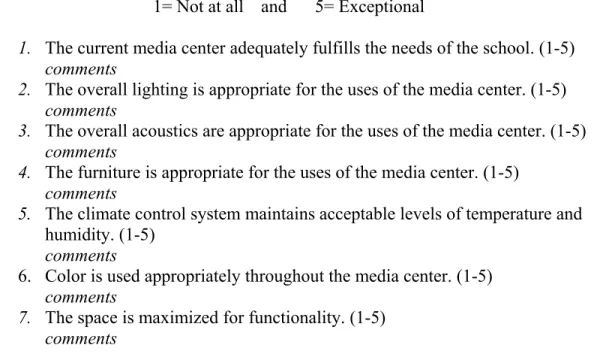
Interviewees scored their facility on the five indicators using a Likert scale, with 1 being
“not at all” and 5 being “exceptional.” (See Figure 2) Specialist’s comments about each
score they assigned to the media center were also recorded during the interview. Each
school’s category scores were combined to give an “interview score” for the school.
FIGURE 2. Interview Questions and Likert Scale
1= Not at all and 5= Exceptional
1. The current media center adequately fulfills the needs of the school. (1-5) comments
2. The overall lighting is appropriate for the uses of the media center. (1-5) comments
3. The overall acoustics are appropriate for the uses of the media center. (1-5) comments
4. The furniture is appropriate for the uses of the media center. (1-5) comments
5. The climate control system maintains acceptable levels of temperature and humidity. (1-5)
comments
6. Color is used appropriately throughout the media center. (1-5) comments
7. The space is maximized for functionality. (1-5) comments
During the interview phase, each specialist was also asked to score their facility
on how well they believed the facility met the needs of the users, and how well they
value between 1 and 5 using the same Likert scale shown in Figure 2. I used these two
scores to assign a value (as a %) to the specialist’s opinion of how “good” they believe
their facility is, in general.
Once all data had been collected via the rubric and the interview, I averaged the
interview score and the observation score to find an overall facility score.
Data Analysis and Discussion
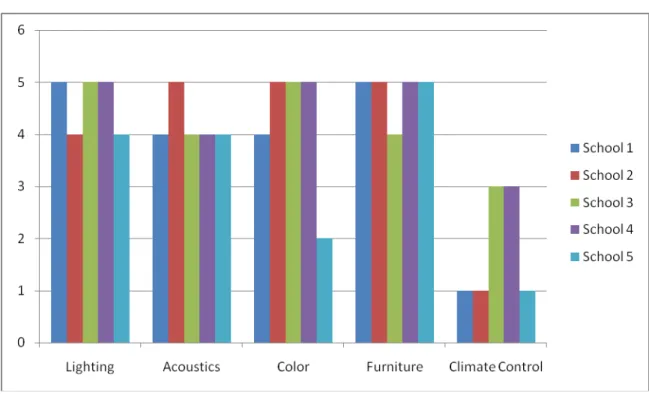
Figure 3 shows each media center’s observed score based on the rubric. Most
schools scored relatively high in lighting, acoustics, and color. Climate control was the
lowest scoring category, with three schools having met only one of the five criteria. The
furniture category scored the best out of all the categories, overall.
In the lighting category, it was clear that most schools had prioritized this need.
Only one school media center had no windows, and thus, no daylighting. The other
schools had plenty of windows, and of the four with windows, only one lacked blinds or
curtains to manage light control.
Acoustics were another area that was clearly taken into consideration when the
media centers were built. All five schools had carpeting in the media center, though one
school had an area that was not carpeted due to high foot traffic, which could cause
unnecessary noise problems during high-traffic periods. Only one school had clearly
separated areas where independent quiet study could take place while other students were
studying in groups, and not necessarily quietly.
Three of the five schools met all the criteria for color. One of the schools
use more than one color to decorate, but there was a lack of color in the carpet, and on the
walls. The walls were dark brick, and the colors incorporated in the media center were
bright colors—oranges, yellows, and avocado green—not soothing colors.
FIGURE 3. Observation Scores—From Rubric
Furniture was the highest scored category in the rubric. Each school had furniture
appropriate to the size and function of its user population. None of the media centers had
completely mismatched furniture, although some did have a piece or two that did not
match the general collection of furniture. Only one of the media centers had furniture
that was lacking stability and sturdiness. Most of the furniture (excluding shelving) could
be re-arranged for special uses.
Climate control was the lowest scored category in the rubric. None of the climate
systems appeared to control for humidity. Of the four schools with windows, two had
solar heating, when necessary. Two schools of the five had control over the temperature
on-site. One school had fans that could be turned on or off on site, and the second school
that had control of its own climate system had a thermostat that they could monitor and
adjust as needed. The other three schools had climate control systems maintained by the
county or district, and were unable to directly affect the temperature beyond opening
windows.
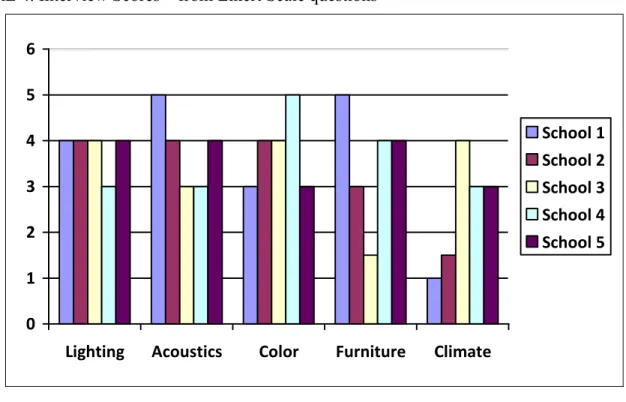
Figure 4 shows the interview scores. The media specialists seemed quite hesitant
to assign a five to many categories, and none of the specialists assigned more than one
five during the interview. Most specialists scored their media centers at average or above
average, with two exceptions in the climate category and one exception in the furniture
category. When given a chance to comment on the score they assigned, most media
specialists described why the category did not receive a five.
Several problems were mentioned during the discussion on lighting. These include and
inability to block natural light well enough for PowerPoint, film, or other projection
needs; lack of natural light altogether; technology concerns with automatic light
adjustments; and stacks that were too tall and blocked light sources to some shelf areas,
making it difficult to read book spines. The projection lighting problem is a difficult one.
The windows letting the daylight in were often high on the wall, above shelving. It
would not be feasible to install normal shades or blinds in these windows, and electrically
controlled shades are cost prohibitive at this point. Without actual windows in the media
center, specialists can not use daylighting to help brighten the place. The lighting issue in
the stacks is easier to fix than some other problems, though it would still require a
area where the stacks are located, or ordering and installing lower shelving, letting more
light scatter and cause fewer (smaller) shadows. The extra lights would probably be the
simplest and most cost effective fix for this problem.
During the acoustics discussion, the main concern was echoes from adjoining
hallways, stairways, or arches/ high ceilings within the media center. One of the schools
had recently installed a new drop ceiling, and the specialist reflected this had helped with
overall sound level. Another specialist noted that though their media center was designed
with a beautiful arched ceiling, the acoustics were not a problem. The arched ceiling did
produce some echoes, but since the instruction areas were not under the arch, and the
media center included technology to help facilitate projection of intentional sound
(microphones, speakers), the media specialist had no significant complaints about that
(otherwise beautiful) feature. A third specialist commented that the main echo problem
was from a nearby stairwell that projected all noises into the media center when the door
to the stairs was open. As this stairwell is used for class changes throughout the day, the
echo problem is persistent, and largely unavoidable. While only one of the five schools
had a separate area that could be used for truly silent study, none of the other schools
indicated that this seemed to be a problem. Specialists commented that while the media
center was never silent, they had received no complaints about the noise level that
FIGURE 4. Interview Scores—from Likert Scale questions
0 1 2 3 4 5 6
Lighting Acoustics Color Furniture Climate
School 1 School 2 School 3 School 4 School 5
The discussion about color was an interesting one. Four of the five media centers
incorporated blue into their color scheme, and had one or more neutrals to accompany the
blue. Other color was added via artwork or posters in most cases. The only school
without a blue theme in the media center was had been built and decorated in a past era
with red-orange, avocado green, and banana yellow. However, the media specialist at
this school has used the “funky” colors to an advantage: any displays or decorations set
up in the media center match something, and the displays change often. The bright colors
in the media center are toned down by the exposed brick and dark wood paneling,
preventing it from being overwhelming. None of the media specialists had a choice in
the color scheme of the library. Most of the specialists commented that the
administration had chosen the colors for the media center, without specialist input.
The schools that chose to participate have a wide range of “ages.” One of the
Understandably, older schools may have older furniture. This has distinct advantages and
disadvantages. Much of the “old” furniture is actually sturdier than today’s, as it tended
to be made of heavy wood, instead of aluminum or plastics that are more easily damaged.
One media specialist commented that when new furniture was to be purchased, the
salesman looked at the current furniture and told the specialist that no furniture in his
sales book would be as sturdy and durable as what was already in place. Needless to say,
that media specialist kept the “old” furniture. One school specialist commented that they
had been repairing the furniture on a regular basis, as legs kept coming loose and funding
was not currently available to replace all the furniture in the media center. This specialist
did comment that the furniture met the users’ needs; it just needed some physical
improvements. Another specialist commented that the “rocking” chairs in the media
center helped the students stay focused while at the tables in groups. The “rocking”
chairs have two angled sled runner sections along with a larger flat runner section instead
of one single flat runner. This allows the students to “rock” in their seats.
Several of the specialists commented that they had not been included in the
selection of the furniture in the media center. Some of these were cases where the media
center had been opened many years before the current media specialists was hired, and
other situations seemed to be that the administration picked the furniture without
consulting the specialists, but allowed the specialist to arrange the furniture in the space.
One media specialist commented that money could have been saved if the administration
had asked the specialist what furniture was needed for the facility. At two schools, after
the furniture was delivered, several pieces of furniture bought specifically for the media
Each media specialist interviewed commented that the mobility of the tables and other
small furniture was beneficial.
Climate control was the lowest scored area during the interviews. Only one
school claimed “above average” climate control. The other schools had a variety of
difficulties with climate control. The most common concern was that the thermostat was
actually controlled by the district of the county, and that media facilities had no direct
control over the temperature. None of the systems controlled for humidity. One school
had a serious humidity problem when the school was opened. Since the climate system
was not functioning properly, the humidity in the media center was extremely high, and
book pages were becoming wavy, or curvy, with the moisture. Even with dehumidifiers,
emptied daily, the humidity was a problem on weekends, when the dehumidifiers would
overflow. Fortunately, this was fixed with all due haste, and there have not been further
humidity problems in that media center. One school rescued some old ceiling fans from a
school that was being renovated, and installed them in their media center in order to have
some local control over the temperature. In one of the older schools, the climate system
has been a long-standing problem, causing health concerns with bad air quality and
circulation. One of the newer school’s climate systems is unbalanced. Of the two main
air ducts in the media center, one disperses cool air and the other disperses warm air,
effectively creating a cold side and a hot side to the facility. In the schools with
windows, specialists commented they use the windows to help air flow and control
temperature.
When asked to score their facility on how well it met the needs of the users, and
to score their facility at an “excellent” level, however, but most of the specialists declared
their space to be above average in meeting user needs and maximizing space. Overall
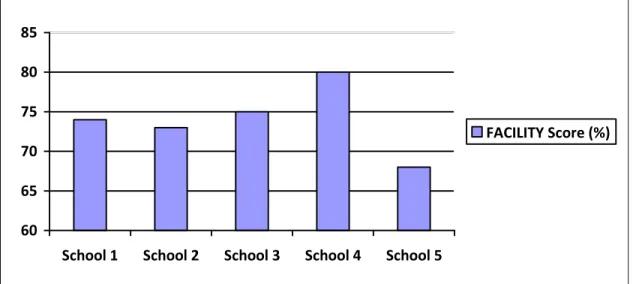
quality scores ranged from 67.5% to 90%. The Quality Score (Figure 5), based on
specialists’ opinions of their facility, can be compared to the Facility Score (Figure 6),
which is a percentage that represents how well the facility lines up with criteria for
“good” facilities as found in literature.
FIGURE 5. Quality Facility Score (%)—from Likert Scale Questions
0 20 40 60 80 100
School 1 School 2 School 3 School 4 School 5
Maximized Space Meets User Needs
The data in Figure 6 shows the averaged scores from the rubric and the interview,
using the 5 category scores from the rubric and 5 interview question Likert values (from
FIGURE 6. Facility Score (%)— Averaged from Rubric and Interview
60 65 70 75 80 85
School 1 School 2 School 3 School 4 School 5
FACILITY Score (%)
Conclusion
Using the criteria identified by the literature review—lighting, acoustics or sound,
furniture style, climate control, and color scheme—the five media centers that chose to
participate in this study rate as moderately “good” facilities. The media specialists too
ranked the facilities overall as above average. Four of the five schools had Quality
Scores within 10% of the Facility Score.
The criteria used in this study can be applied to any facility to determine how
“good” the facility is, but if the facility is older, it is likely that the facility will score low.
The newer the facility is, the more likely that current (or much more recent) research was
considered in the design. While only two of the schools in the study are less than 10
years old, the others had been renovated since their construction, thus explaining why
their scores on each criteria were higher. The largest discrepancy in the scores was
renovations since its construction. Yet the very criteria that lowered the Facility Score
for School 5 (the furniture score) was seen as a benefit by the media specialist. This
suggests that a media center facility does not have to be perfect and meet all suggestions
and recommendations made in literature to be utilized successfully.
In order for a media center facility to be utilized successfully, media specialists
must take into consideration the learning styles of the facility users. During the interview
phase, each media specialists acknowledged the fact that students have different learning
styles. While there was no specific question about accommodating learning styles, it
was evident that the media specialists were aware that the each media center patron is
unique and has their own style of learning. However, the media specialists appeared to
support the varied learning styles more through technology and programming than
through facility design.
While there is no one right or wrong answer for all school media centers, each
media specialists should ask themselves the question, “Does my facility meet the needs of
my students?” By carefully evaluating their current facility with consideration for
lighting, acoustics, furniture, temperature and color, a media specialist can determine
which areas need improvement. If funding is limited, media specialists can begin by
choosing one area to improve each year until all areas have been redone. Even small
Works Cited
(2003). Online Source for Architectural Acoustics Information. Retrieved Oct. 15, 2008, from Acoustics.com. Web site: http://www.acoustics.com/ansi_education.asp.
Baule, S. M. (2007). Facilities planning for school library to technology centers (2nd ed.). Worthington, Ohio: Linworth Pub.
Books and bricks.(2002). Knowledge Quest, 31(1), 7-31.
Crawford, W. (1999). Library space: The next frontier? Online (Weston, Conn.), 23(2), 61-2+.
Foster-Harrison, E. S., & Bullock, A. A. (1998). Creating an inviting classroom
environment. Phi Delta Kappa Fastbacks, (433), 7-38.
Harper, M. (2007). How physical design can influence copyright compliance. Knowledge Quest, 35(3), 30-32.
Hart, T. L. (2006). The school library media facilities planner. New York: Neal-Schuman Publishers.
Jacobs, D. H., & Sargo, S. (2005). Designing the ideal children's house: How architecture
can help children learn. Montessori Life, 17(1), 34-37.
Kaula, P. N. (1970). Library buildings; planning and design. New Delhi: Vikas Publications.
Kennedy, M. (2002b). Creating ideal facilities. American School & University, 74(5), 30 33.
Klafehn, C. (2006). Sight, sound and supervision space planning for K-12 library media
centers. Colorado Libraries, 32(1), 25-27.
Morris, B. J. (2004). Administering the school library media center (4th , rev. and expand ed.). Westport, Conn.: Libraries Unlimited.
Rayneri, L. J., Gerber, B. L., & Wiley, L. P. (2006). The relationship between
classroom environment and the learning style preferences of gifted middle school
student and the impact on levels of performance. Gifted Child Quarterly, 50(2), 104-118.
Wetherill, E. A. (2002). Quiet Classrooms- Classroom Design for Good Hearin Retrieved Oct. 15, 2008, from Noise Pollution Clearinghouse, Montpelier, VT.