Ryan M. Greenway. Faceted Interface for Human Resource Management in the College of Arts and Sciences. A Master’s Paper for the M.S. in I.S. degree. April, 2011. 43 pages. Advisor: Brad Hemminger
This paper describes a project to modify an existing Human Resource Information System for the Dean’s Office in the College of Arts and Sciences at the University of North Carolina at Chapel Hill. The current system was evaluated through observations, informal surveying, and employee input. The main problems with the system were scalability, ease of use, ability to analyze information, and duplicated data entry.
After reviewing the current systems available, a decision was made to develop a new system so that a customized, staggered solution could be implemented. Several design decisions were made, including creating a one-page system with sorting and parameters to increase the ease of use; facets to organize the data; and the ability to export to
Microsoft Excel to facilitate analysis. The new system received positive reviews and the experience proved that the entire environment should be scanned when designing an information system of any size.
Headings:
Faceted browser
User interface design
Enterprise Resource Planning
by
Ryan M. Greenway
A Master’s paper submitted to the faculty of the School of Information and Library Science of the University of North Carolina at Chapel Hill
in partial fulfillment of the requirements for the degree of Master of Science in
InformationScience.
Chapel Hill, North Carolina
April 2011
Approved by
_______________________________________
Table of Contents
INTRODUCTION ... 4
1.1 Background information ... 4
Figure 1: Information system landscape for the Dean’s Office ... 5
1.2 Problem ... 6
Figure 2: IT Works Evaluation Survey Results... 7
REVIEW OF LITERATURE ... 8
1.3 HRIS ... 9
Figure 3: HRIS applications for IT Works ... 10
1.4 Enterprise Resource Planning Systems ... 10
1.5 Faceted Browser ... 12
COMPETING ALTERNATIVE PRODUCTS ... 14
Figure 4: Comparable products ... 14
1.6 IT Worksiii ... 15
1.7 Drupaliv ... 15
1.8 HarrisDatav ... 16
1.9 InfoPortevi ... 16
1.10 OnBase - Information Access Systems Inc. (IAS)vii ... 17
1.11 PeopleSoft Campus Solutionsviii ... 18
1.12 SAP Human Capital Managementix ... 19
IMPLEMENTATION – COLLEGE DATAMART ... 19
1.13 Platform – MS Access ... 20
DESIGN DECISIONS ... 20
Figure 5: Scalable Code UML Diagram ... 22
1.14 Final Design ... 24
Figure 6: Screenshot of Dean’s Office Datamart ... 24
ASSESSMENT ... 25
1.15 Methodology ... 25
1.16 Results ... 26
Figure 7: Dean’s Office Datamart survey responses vs IT Works survey responses... 26
IMPLICATIONS FOR FUTURE RESEARCH ... 28
CONCLUSION ... 29
APPENDICES ... 33
1.17 Appendix A: System Descriptions ... 33
1.18 Appendix B: Screenshot of IT Works – previous HRIS ... 36
1.19 Appendix C: InfoPorte Screenshot ... 37
1.20 Appendix D: OnBase Screenshot ... 38
1.21 Appendix E: Screenshot of PeopleSoft Campus Solutions ... 39
1.22 Appendix F: SAP screenshot ... 40
Acknowledgements
This work would not be possible without the guidance and support from Dr. Brad
Hemminger, who pushed me not just to complete the paper but also to develop a
meaningful piece that exemplifies my two years of hard work at SILS.
I also owe many thanks to both my wife, Vanessa, and my daughter, Luna, who
have patiently stood beside me over the past two years. Their support helped me make it
through many late nights and weekend projects and team meetings while I juggled my
balance of work-school-life.
Lastly, I would not have many of the opportunities to work with the design and
planning of information systems without my experiences working in the Dean’s Office in
the College of Arts and Sciences. I want to specifically thank Tammy McHale, who
trusted me with the vision to development the College Datamart system which was the
Introduction
The focus of this study is on the development of a system to capture human
resource information in the College of Arts and Sciences’ Dean’s Office at the University
of North Carolina at Chapel Hill. This system was targeted in another studyi as the
primary point of duplicate data entry and a starting point for redesigning the entire
information architecture supporting the Dean’s Office. The goal of the project was to
first evaluate the existing human resource information system, research the potential
options, determine a solution that would best fit into the information architecture of the
office, and assess the implemented solution. The results shed light on some important
considerations for information architects when designing systems.
1.1
Background information
The College of Arts and Sciences is the largest school at the University of North
Carolina at Chapel Hill. The College teaches over eighty-six percent of undergraduate
credit hours at the University, and operates with over 260 million dollars in annual
expensesii. Due to its size and diversity, administrators have adopted unique methods to
manage the finances and related human resources of the seventy departments in the
College. Also, small holes in University systems have been magnified in the complex
environment, and this forced the development of shadow systems for either reporting or
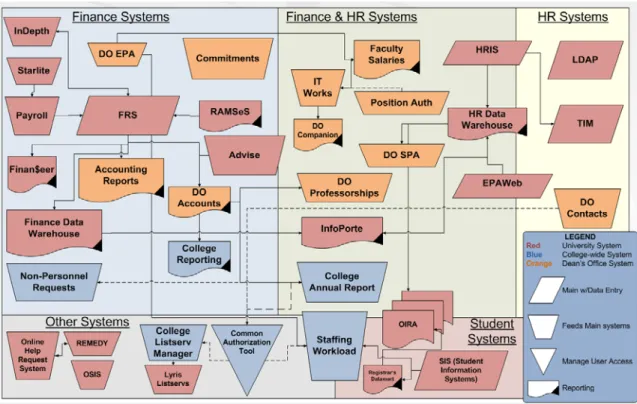
Figure 1: Information system landscape for the Dean’s Office (See Appendix A for system descriptions)
During the past decade, the Dean’s Office has purchased and developed shadow
systems as independent applications that support a specific need or process. This
approach has molded the current information landscape into an impassable sea of systems
(see figure 1), and the result is a duplication of effort to maintain each application. The
current method of developing new systems for individual processes has proven to be an
inefficient strategy for growth. Unfortunately, the University has a culture that motivates
departments to remain autonomous and not collaborate with other units. This means that
the Dean’s Office cannot attach new modules or entire systems to existing University
For a small office of only eleven permanent staff members, the information
processed through the Dean’s Office is monumental. Even though the College is
decentralized and departments initiate their own human resource and financial actions,
most of these actions must be approved in the Dean’s Office. There are 1,527 permanent
employees – 765 tenured and tenure-track faculty, 201 fixed-term faculty, and 561 staff –
and another 3,369 temporary employees. In addition, the College of Arts and Sciences
holds an endowment of over $380 million including hundreds of endowed chairs and
private funds for awards, scholarship, or departmental support. The Dean’s Office is
supports the allocation and budgeting of these funds along with approximately $120
million in state funds. Finally, the eleven staff members serve as a resource for questions
on the operations of departments in the Collegeii.
1.2
Problem
This project targets the replacement of a system which requires heavy data entry
and is not very user friendly, the IT Works system. This system embodies the definition
of a shadow system and requires much of the University kept human resource data to be
re-keyed into its many forms. This system has been identified by staff members through
unstructured interviews, surveys, and observations conducted as part of work processes
as one of the most difficult systems to use and the main source of duplicate data entry.
IT Works allows users to view personnel information one employee at a time but
searching is limited to the employee ID or name and you can only search an exact match
or contains. The user interface organizes information by tabs for the various types of
information – demographics, leaves, ranks, and salary. The system does not allow users
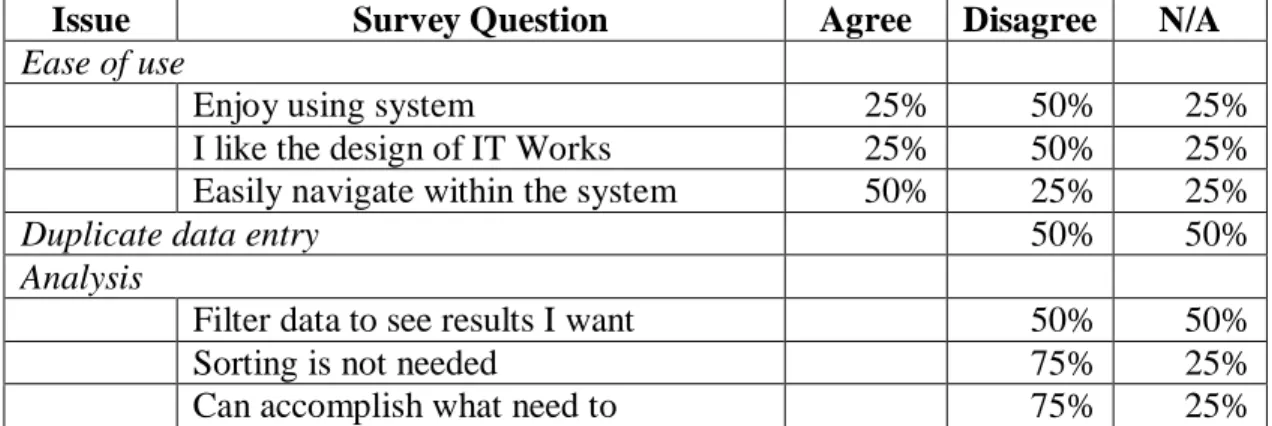
Issue Survey Question Agree Disagree N/A Ease of use
Enjoy using system 25% 50% 25%
I like the design of IT Works 25% 50% 25%
Easily navigate within the system 50% 25% 25%
Duplicate data entry 50% 50%
Analysis
Filter data to see results I want 50% 50%
Sorting is not needed 75% 25%
Can accomplish what need to 75% 25%
Figure 2: IT Works Evaluation Survey Results
Sample size = 4 employees; one never entered data into IT Works
The research found four main areas for improvements with the current human
resource information system, IT Works:
1. Scalability – Major modifications and additions to IT Works are only available if other customers have similar needs. Furthermore, each need in the Dean’s Office
prompts a new system and there is not a system that can integrate new processes
well. It requires an information professional just to navigate through the complex
web of systems, but staff members need to have more information at their
fingertips.
2. Ease of use – IT Works does not have many advanced features, and nearly half of the users are not happy with the system (figure 2). You can only search on the ID
and name fields, and searching using an unintuitive key combination [Ctrl+Z].
Furthermore, the windows are not expandable and users often need to scroll after
five rows of data. This issue is also closely tied to analysis because users are not
able to perform the analysis that they want due to poor reporting and a lack of
3. Analysis - Users need a system that will not only provide quick access to personnel information, but also they must be able to export data and have new
views created quickly – IT Works does not allow either. There are no filtering or
sorting options and the reporting options in the system are too slow and clunky.
4. Duplication of data entry –The Dean’s Office purchased the personnel piece of the software in order to maintain information on employee leaves, ranks, salaries,
and reviews. Since they are only using a small piece of the system, the staff
members are not receiving a lot of the benefits of the system and instead are
forced to view unused parts of the system which impacts their cognitive load
(Miller, 1956). Furthermore, only the data on faculty leaves, reviews, and travel
grants is not available in the University systems but the staff members must
re-key demographic, rank, and salary information to use the system.
Review of Literature
Before deciding what solution to implement, it is important to determine what
research suggests for the problems with this system. The IT Works system functions as a
human resource information system (HRIS) which may have specific concerns or
limitations. On the other hand, the strategy for the information architecture focuses on
the integration of systems and an Enterprise Resource Planning (ERP) system may need
to be implemented. Lastly, the size and scope of the Dean’s Office makes reporting a
serious concern with respect to each information system, and some form of faceted
browsing might help alleviate the need for standardized reports by facilitating the
1.3
HRIS
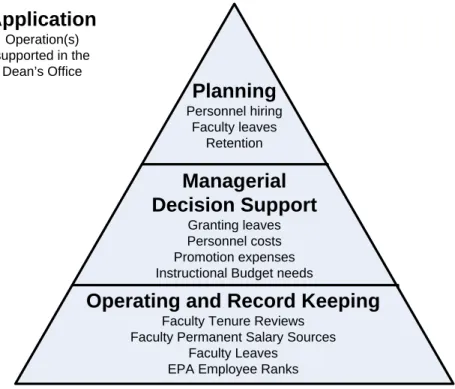
Human resource information systems (HRIS) play a very important role in the
management of human resources in organizations. According to DeSanctis (1986), these
systems should support three distinct applications – operations and record keeping,
managerial support, and planning (p. 19). While human resource employees will need to
enter and update information, an HRIS needs to be flexible enough so that employees can
query and retrieve information that they need to support decisions for management.
Furthermore, the valuable information in these systems can assist in the planning and
analysis of employees in an organization. Haines (1998) states that “…the extent to
which the HRIS is flexible to interact with or that the HRIS helps increase productivity”
determines its successful application in the organization (p. 271).
Furthermore, a human resource information system can function as the primary
analysis tool for an organization with many employees. In his research survey of
organizations in the United Kingdom, Ball (2000) found a positive correlation with the
number of employees and the amount of information analysis that occurs with the
organizations HRIS (p. 691). These findings confirm that as an organization grows, it
will be more important for their human resource information system to move from
operation and record keeping toward planning. Larger organizations will employ their
HRIS to support a “hierarchy of managerial activities, ranging from routine reporting to
unstructured decision making” (DeSanctis, 1986, p. 18). The complexity of the needs of
management drives the implementation of a flexible system that supports querying and
the exporting of data. These features help managers to use existing skills to look up and
Planning
Personnel hiring Faculty leaves
Retention
Operating and Record Keeping
Faculty Tenure Reviews Faculty Permanent Salary Sources
Faculty Leaves EPA Employee Ranks
Managerial Decision Support
Granting leaves Personnel costs Promotion expenses Instructional Budget needs
Application
Operation(s) supported in the
Dean’s Office
Figure 3: HRIS applications for IT Works
Even the most sophisticated human resource information system can still lack
important information needed to support decision making and planning. These systems
should ultimately reduce costs and provide analytical support (Ball, 2000, p. 679).
However, if the HRIS is not adequately integrated into the overall information
architecture of the organization, then managers may not have the full picture when they
are making decisions. For example, the department may have transferred personnel
money to pay for equipment and they are unable to fund a temporary employee. An ERP
system is the only solution that can illuminate the entire picture all at once for
management and prevent duplicated data entry for staff.
1.4
Enterprise Resource Planning Systems
An Enterprise Resource Planning system is a comprehensive software suite that
order to present a holistic view of a business from a single information and IT
architecture” (Klaus et al., 2000, p. 141). Companies provide a standard ERP package
which can then be customized for the specific needs of the purchasing organization. In
order to support the entire business, the system provides controlled redundancy to create
a highly functional, efficient experience. Furthermore, users can easily move to a new
module because a characteristic of ERP software is a consistent graphical user interface
(Klaus et al., 2000, p. 144). Another characteristic of these systems is that they are
developed around business processes. Therefore, even though the modules may have
similar user interfaces, they do have major differences due to the coding of the business
rules.
Businesses of all sizes are implementing Enterprise Resource Planning systems
due to the wide range of benefits that can be experienced (Klaus, 2000, p. 141).
According to Robey (2002), the main reason for implementing an ERP is “…greater data
visibility and analysis capability, and more process-centered thinking” (page 18).
Managerial decision-making and planning can be heightened more with an ERP system
than through an HRIS alone. Furthermore, Shang and Seddon (2000) mention five
benefits that will lead to integrated processes and system coordination which support an
employee ‘common vision’ and more empowered users (p. 2). These benefits are
operational, managerial, strategic, IT infrastructure, and organizational. These benefits
explain how upper management can assess ERP software.
The assessment of an ERP system must take into consideration the current state of
the information architecture within the organization. Part of the investment in an ERP
The first step in an implementation will be a thorough needs analysis using techniques
typical to “…user-centered design (interviews, contextual inquiry, observation)
but….focus[es] on obtaining a more complete and holistic picture of the environment”
(Robertson, 2007, p. 3). Gable (2002) suggests evaluating an ERP system based on four
components, including individual impact, organization impact, system quality, and
information quality (p. 586). Since ERP implementations are a costly and
time-consuming venture, perhaps better information analysis can be provided through a
faceted browsing interface.
1.5
Faceted Browser
A faceted browser can be implemented as a user interface to facilitate the analysis
of the information contained in the database. Hearst (2003) describes the goal of a
faceted interface as offering the flexible organization of search results. She provides a
description of the faceted system that they implemented for image browsing:
The design can be thought of as having three stages, by rough analogy to a game of chess: the opening, middle game, and endgame. The most natural progression is to proceed through the stages in order, but users are not forced to do so… The items in the result set can be sorted on various fields, or they can be grouped into categories by any facet. Selecting a category both narrows the result set and organizes the result set in terms of the newly selected facet (p. 412).
The organization of the collection through faceted meta-data allows the users to move
through their queries in a more flexible manner. Serendipitous information retrieval is
more likely through a flexible, faceted system, thereby increasing the analysis potential.
Additionally, Shneiderman and Byrd (1998) states that faceted browsing improves the
refinement of user searches through successive querying since their previous searches
earlier searches” (p. 98). More modern faceted browsing allows the user real-time
control of the data, including the ability to move backward through their search and
easily explore the data set.
Employees need a system that allows more than just searching in order to perform
analysis and planning. Research by Hemminger and Niu (2011) indicated that users are
more inclined to use faceted browsing systems “…where facets support as well browsing
the collection as refining a text search” instead of facets purely for refining a search (p.
7). These findings also link to the fact that often the information retrieved based on the
user’s statement of need does not always represent exactly what they might be looking
for, and this can be especially true for complex management. A “…facet analysis is a
general yet powerful strategy for decomposing complex information needs…. systems
should provide some type of support for this method of analysis” (Lin et al., 2008, p. 30).
These type of system could be a middle ground to provide analysis without the cost of a
full ERP implementation.
Implementing a faceted interface has been found to have many benefits for the
users of the system. First, Antelman et al. (2006) found that task success was improved
and task duration was reduced when using a faceted navigation system for North Carolina
State University’s library catalog. Furthermore, a faceted browsing interface allows the
user to examine relationships among data attributes and understand the data set
(Marchionini & Brunk, 2003). According to Marchionini and Brunk (2003),
“…understanding the data set leads to more effective searching and usage” of the system
and the information in the database (p. 1). Lastly, the dynamic query building afforded
their experience with the system and the information (Plaisant et al., 1999). Users can
refine query to get a different view of data, which can help both novice and expert users
find trends and spot exceptions.
Competing Alternative Products
In order to solve the issues related to the current human resource information
system, IT Works, the Dean’s Office considered several comparable systems. The
desired solution needs to be scalable and allow related data to be integrated into the
system. It also needs to be easy to use with more advanced features that will allow
managers more ad-hoc querying and data analysis. Linking in with University systems
and data would be preferable in order to reduce duplicate data entry, although the ability
to load in data would suffice. The system needs to be able to sustain a small number of
users, around five, in the short-term but hopefully be scalable to be used outside of the
Dean’s Office with up-to 200 users. Lastly, financial considerations limit the choices to
products costing at most several thousand dollars (including the option of modifications
to the existing system).
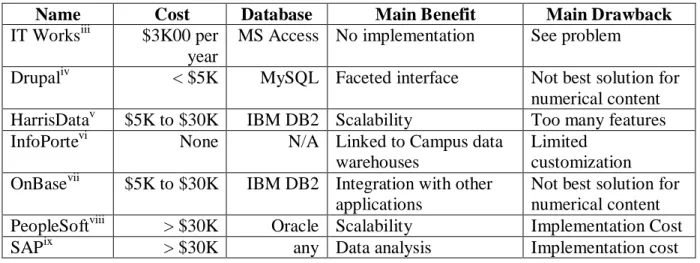
Name Cost Database Main Benefit Main Drawback
IT Worksiii $3K00 per
year
MS Access No implementation See problem
Drupaliv < $5K MySQL Faceted interface Not best solution for
numerical content
HarrisDatav $5K to $30K IBM DB2 Scalability Too many features
InfoPortevi None N/A Linked to Campus data
warehouses
Limited customization
OnBasevii $5K to $30K IBM DB2 Integration with other
applications
Not best solution for numerical content
PeopleSoftviii > $30K Oracle Scalability Implementation Cost
SAPix > $30K any Data analysis Implementation cost
1.6
IT Works
iiiDescription – IT Works distinguishes itself as grant management software specifically
designed for educational institutions. In addition to the personnel module that the Dean’s
Office purchased, there are other modules that could be purchased in order to make it a
complete enterprise system, including the grant, accounting, facility management, and
space/inventory modules. Furthermore, the license agreement for IT Works is available
for a smaller set of users than most HRIS and ERP systems (screenshots – appendix B).
Benefits – This is the “as is” solution and there would be no implementation cost for the
system. A loading feature could be arranged in order to import data from the University
systems, but that would be an additional cost.
Drawbacks – see the problem statement.
1.7
Drupal
ivFeatures – Drupal serves as a content management system that can be implemented for
free on an organization’s servers. Since it is an open source software package, there is
limited support for the implementation and users must be adept in the deploying
applications in order for the pages to work. Furthermore, there is a faceted search
module that will allow users to “never feel lost in the data”. The metadata is created
using the taxonomy features of Drupal and other tagged metadata as well, allowing users
to refine or expand queries at any point during their search.
Benefits – This would serve as a fully integrated faceted browsing interface for the
data. Additionally, new content or data can be added quickly and easily with Drupal and
the facets would be created when the content is entered into the system as metadata.
Drawbacks – The main drawback of Drupal is that it functions best for text-based content
and not for the numerical data that the Dean’s Office needs to access. There would also
be a larger learning curve to implement the Drupal Core and the faceted search module
which creates a cost for this solution.
1.8
HarrisData
vFeatures – HarrisData runs off an IBM servers and their ERP solution includes
management modules for accounting, payroll/human resources, ordering, purchasing,
inventory, and manufacturing.
Benefits – Targeted toward mid-sized businesses, this solution would be more affordable
than a larger scale ERP. Also, the software includes entry and exit points for any part of
the system allowing customization and integration with outside applications.
Drawbacks – The HRIS piece has more features than are needed by the Dean’s Office,
and this software may not allow for their customized needs. Furthermore, this would
require IBM servers to be purchased, installed, and scanned for the database storing the
human resource information.
1.9
InfoPorte
viFeatures – InfoPorte provides a consolidated view of financial and human resource
information from the University data warehouses. The software was custom built by the
School of Pharmacy and is being modified to work within the College of Arts and
interface with standardized features and appearance. The system was created in order to
allow front-line employees to have access to information they need without requiring the
training necessary to use the complex and full-featured systems at the University
(screenshot – appendix C).
Benefits – Since the College is already implementing InfoPorte, this would be an
opportunity to select InfoPorte as the system for Dean’s Office data. As an added
benefit, departments would have live access to any of the Dean’s Office data on faculty
leaves, reviews, etc.
Drawbacks – At the current time, modifications to InfoPorte must go through a
University stakeholder committee and they would probably not consider these additions
as a high priority. Also, the system functions more as a view of the University data
warehouse information than a true RDMS application that would allow data to be created,
read, updated, and deleted.
1.10
OnBase - Information Access Systems Inc. (IAS)
viiFeatures – OnBase is a fully integrated enterprise content management software
package, this includes workflow and document imaging. This system also allows full
integration with other applications, which allows other systems to display the related
documents and data in OnBase. This functionality comes out of the box and is provided
along with the ‘single interface’ software (screenshot – appendix D).
Benefits – Users can manage and analyze content from a variety of sources including
Microsoft SharePoint, SAP, or other business applications. The University of North
Carolina at Chapel Hill has SharePoint licenses allowing the Dean’s Office to affordably
solution that will allow this level of integration, it will provide a ‘plug-in’ enterprise level
atmosphere for the current systems.
Drawbacks – As with other content management solutions, OnBase does not handle
numerical data and analysis as well as pure database driven applications. While the
addition of workflow and imaging could be beneficial in the long-term, it was not
identified as a primary issue with the current framework.
1.11
PeopleSoft Campus Solutions
viiiFeatures – A complete and fully featured ERP software package, PeopleSoft includes
modules for most of the standard processes within an organization. In addition,
businesses can create custom modules for specific business needs. The University has
already implemented the Campus Solution piece of the software and is in the process of
implementing Finance, HR, and payroll (screenshot – appendix E).
Benefits – The system contains many features that would help with the analysis of data
and contains a scalable framework to support growth of data storage, users, and modules.
Adding Dean’s Office data into PeopleSoft would be the best way to eliminate duplicated
data entry.
Drawbacks – A stand-alone implementation would be too expensive and the College
cannot append data into the University’s PeopleSoft implementation. In addition, it can
be difficult to navigate through the system given the amount of information available.
Additions and modifications could take too long or not be implemented because work
1.12
SAP Human Capital Management
ixFeatures – The SAP system for human resource management is based on one set of
employee master data, which completely reduces redundant data entry. The software
caters to organizations of all sizes, but is capable enough for the largest businesses
(screenshot – appendix F).
Benefits – Similar to other ERP systems, the SAP module for Human Capital
Management has many features and is scalable for customized needs as well. Deeper
insight into the data can be attained through their flexible reporting features and the
ability to explore the data due to the links between the modules and tables.
Drawbacks – Implementation and customization is expensive. Similar drawbacks apply
to SAP as with PeopleSoft, and the users often complain that the system is complex and it
is difficult to navigate through such an extensive amount of information. This would lead
to increased training for the staff in the Dean’s Office and potentially less satisfaction
with the system.
Implementation – College Datamart
Despite the comparable solutions available to replace the IT Works system, the
decision was made to build a custom, in-house system. According to Haines (1998),
human resource information systems that are developed in-house are often more
successful because the users enjoy the increased customization of these systems (p. 265).
The Dean’s Office did not have the budget or the time to implement a full-scale ERP
solution, and there are currently only a handful of users for the IT Works system. The
system will be developed so that further data and modules can be added one at a time to
1.13
Platform – MS Access
The chosen platform for this project was Microsoft Access because the College
has two staff members dedicated to maintaining ten other MS Access systems. In
addition, these applications can be developed quickly and the only cost will be staffing
for maintenance and the modules that will be added. Also, the system can be integrated
well with MS Excel, which many employees are already familiar using for data analysis.
Forms can be quickly built using Visual Basic and MS Access contains most of the
functionality of a large scale application despite not being scalable for more than ten to
twenty users. The College Datamart will be developed without any extra budget and
using current staff time and resources.
Design Decisions
Based on the existing research and comparable systems, specifications were
developed for the College Datamart system. The evaluation of the IT Works system also
filled in most of the user requirements, but additional consultations were performed in
order to make sure that the best decisions were made for the design given that the system
was going to be developed in MS Access. Additional design features and screenshots can
be viewed in appendix G.
1.13.1Facets
The main design of the system will be tabbed structure with sub-tabs that are
related to the main tab. This approach chunks the information, or “combin(es) many
units of information into a limited number of units or chunks, so that the information is
specific processes – looking up employee information, managing travel allocations,
position authorizations, etc. This will help users analyze the data by grouping it into
similar categories and allowing them to filter all of the sub-tabs by parameters on the
main tab. It is also a scalable solution because tabs can be added in the appropriate
group.
1.13.2One page, one look
The user interface will only have one page for the current information and one
look if any additional pages are added in the future (see figure 6). This concept provides
an easy to use interface and a scalable system. Moreover, it follows the Entry Point
Principle and helps to initially orient the user so that they are able to quickly determine
how to navigate the system (Lidwell et al., 80). Design and coding time will be reduced
because the developers will not need to make any new design decisions when building
new modules or tabs.
1.13.3Scalability
The real benefit of creating a system with one look is that the system can be
programmed using objects so that the system is truly scalable. This mimics the relational
browser in Marchionini and Brunk’s study (2003), in which they found that for adding
data to the system that the data collection itself takes longer than the programming. The
“information architects can focus on data collection and organization rather than interface
programming (p. 11).
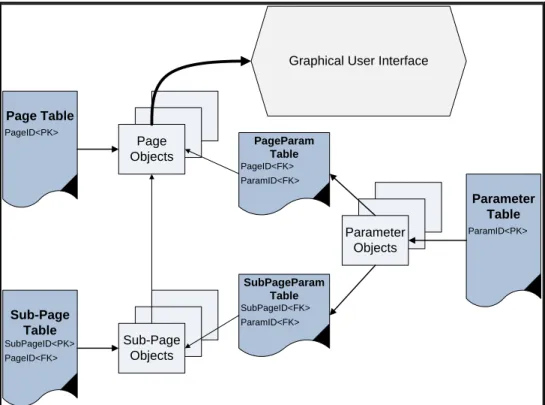
In order to do this, the application must save attributes of the interface into a table
Parameter Table ParamID<PK> Parameter Objects Sub-Page Table SubPageID<PK> PageID<FK> Page Table PageID<PK> Page Objects
Graphical User Interface
Sub-Page Objects PageParam Table PageID<FK> ParamID<FK> SubPageParam Table SubPageID<FK> ParamID<FK>
Figure 5: Scalable Code UML Diagram
application, the form loads the appropriate tabs (pages) for the users. These page objects
are initiated and loop through tables that load parameters and other attributes, including
sub-pages (sub-tabs). Those sub-pages also load parameters and attributes and store the
“Select” and “From” statements of the queries for the data that they will load (figure 5).
When a user makes choices in one or more of the parameters, the systems will
dynamically generated the “Where” clause to append to the existing query. These
choices are saved and the user can then refine and expand their selections at any time.
They also have the option of simply resetting the system and starting over again.
1.13.4Excel Export
Users should be able to access a quick export for any data in the system from any
current conventions to prevent confusion and create a better experience for users.
Managerial analysis can be best performed using MS Excel as everyone is already
familiar with this tool. It can also serve to prevent the manual keying of data for users to
create and maintain their own spreadsheets. Instead, they will be able to quickly and
easily drill to the data that they need, and then export it into MS Excel in order to
manipulate it and create a report.
1.13.5Use existing data
The system will use an extract from the HR Data Warehouse in order to prevent
users from needing to re-key information that is currently available from the University.
Although the extract must be loaded on a bi-weekly basis, the loading procedure will be
automated so that the user only needs to use a familiar file browser to select the
downloaded file from the HR Data Warehouse and then the system will load and validate
the data. User created data will never be deleted, but all data pulled from the Data
Warehouse will be overwritten and validated with the automated procedure.
Furthermore, the loading procedure will flag employees that may be new and need some
manually entry to fill in information that is not available from the HR Data Warehouse.
1.13.6Sorting and parameters
Users were not satisfied with the sorting options in IT Works related to the salary
tabs and any other lists of information and the inability to filter the set of employees by
division, department, or employee type. Therefore, the College Datamart will have
extensive sorting capabilities and parameters in the system to ensure that it is capable of
be able to filter employee information by employee type, division, department, employee
name, and effective dates. Also, each sub-tab with long lists of data will have a
consistent sorting on each column. Sorting will be enabled by having clickable column
labels that sort the records based on the contents of that column. The label for each
column will allow the user to click once to sort ascending and then again to sort
descending. This will save clicks, reduce mental load, and help organize the information
on the fly by any of the Five Hat Racks (Lidwell et al., 100).
1.14
Design Implemented for Version 1
After several mock-ups, the system was creating with a consistent icon set and a
blue tone color scheme. The pages were tested for data entry by one employee and the
validation and user experience were modified as problems occurred. The final design can
be viewed in figure 6.
Assessment
An assessment of the College Datamart system was initiated eight months after it
replaced IT Works. Many changes were made to the system during the implementation
phase, but the system has remained nearly unchanged over the past five months. This is
due in part to one of the programmers moving to different position in the Dean’s Office
and no one has had time to create other modules and further develop the system as an
enterprise level system for the Dean’s Office. Nonetheless, the College Datamart
continues to be used by employees on a daily basis and has not required much support as
initially planned.
1.15
Methodology
As part of a work process to evaluate the system and plan for modifications, a
survey was sent to eight employees in the Dean’s Office. Five of those employees filled
out the short survey and gave their recommendations as well. The survey was conducted
anonymously online in an attempt to remove some of the observer biases that may have
been present if the survey was conducted in person.
Of the respondents, one hundred percent had used the system to query employee
demographic information. However, only fifty percent had used the system to review
faculty leaves, salaries, and reviews. An even more striking fact was that only one
employee had ever used the system to enter information before. This was partly due to
the loading from the HR Data Warehouse but also because the data entry was given to
1.16
Results
The responses from the survey were all positive, and there were not many
complaints about the design and capabilities of the new system. Most of the current staff
had not used the IT Works system due to employee turnover, but all of the employees
who had preferred the College Datamart. They defined the Datamart as requiring less
duplicate data entry, easier to use, less frustrating, more capable, and they are having a
more enjoyable experience as well. One user commented that they like the “ease of
moving from tab to tab.”
Some of the positive sentiment about the IT Works system could have been
related to the benefits from storing valuable information that was not available elsewhere.
Davis (1989) states that how useful the system is can often be much more important than
how easy it is to use (p. 333). In line with the cost-benefit theory, even if the system does
not perform well, users may continue to perceive it as adequate if they benefit from
critical information or functionality. This hypothesis would help to explain why many
more users made positive claims toward the new College Datamart system (figure 7).
Many employees have also generated their own reports using the excel export
feature. This has been a huge help to provide managerial analysis for the underlying
data. Users are adept at pulling excel exports and creating a quick pivot table of the data,
which was not possible in the previous system. These ad-hoc reports have also helped
the users to reduce their need for maintaining separate spreadsheets where portions of
data or all of the data is available in the Datamart system. Additionally, the system has
more flexibility and users can request for additional columns or even tables to be added
to the system and eliminate their shadow spreadsheets.
Staff members in the Dean’s Office have been especially pleased with the level of
customization for the College Datamart system. This begins with the flexibility to add
more data and view it in the organization that makes sense to the user and flows
throughout the system. Since an in-depth user requirements analysis and testing occurred
within the Dean’s Office, this system meets their needs better than the IT Works system.
Nonetheless, the organization marks the true customization to the needs of the Dean’s
Office. All of the other features of the system could be implemented in any business
environment with success due to the ease of use and the flexibility for it to be
implemented based on the needs of any organization.
Finally, little maintenance is required with the new implementation and the
Dean’s Office has reduced their costs to meet their needs for human resource information
storage and reporting. The previous contract with IT Works included an annual fee,
whereas this system will be maintained in-house and supported by existing employees.
Eight months after implementation, the system has only had a handful of problems
will continue to grow and include more information with the majority of the effort falling
into the hands of the information architect to organize the data and provide a meaningful
structure for the users.
Implications for future research
More time is needed to thoroughly evaluate the effectiveness of this system as a
scalable solution for providing a quick, intuitive, and organized view of data within an
organization. One possibility would be request views from the various data warehouses
at the University that the system could use in its queries. In general, more steps need to
be taken in order to reduce the complexity of the information architecture and the amount
of duplicate data entry that is needed for these systems.
One last possibility would be to code this into a web-based framework so that
more users could have access to the system. This would allow even more feedback and
further disbursement of information throughout the College to improve the decision
quality of departmental managers and chairs.
Perhaps larger systems and implementation could focus more on the structure of
the data than the pages that are developed for the users. The design of this system has
proven flexible enough for any user to explore information in their organization and
develop reports based on their needs. Business software developers have spent a lot of
effort analyzing what businesses do and how they do it instead of focusing also on why
they do it. Data entry and processing may be streamlined by these systems, but they do
not have good methods for the discovery of issues and opportunities.
Finally, even though all organizations perform their work differently, the real
allow any organization to define how their information needs to be stored, viewed, and
explored. This flexibility can lead to competitive advantages and a true understanding of
what has happened and will happen in the future.
Conclusion
The biggest lesson that can be learned from this study is that you cannot build any
system in isolation. Careful thought needs to be given before undertaking any application
development project, but not just input from the customer on their needs. You also need
to conduct a thorough analysis of the environment to try and determine what already
exists and how to best add to the current infrastructure. This might not always be an
internal search either, and a truly skilled information architect will also scan the exterior
environment. Schools and departments at the University have begun to collaborate more
on the development of information systems, and this will pay dividends in the future.
Finally, this project demonstrates the importance of thinking about what the users
need to get out of a system rather than just how they will put information into a system.
This thinking goes beyond just considering the normal reporting needs of users to
providing information analytics tools which will allow users to serendipitously find
problems and opportunities. Users will accept a system for various reasons, but we are
leaving behind the era of just improving workflows to a time in which users demand the
ability to understand the information that is kept in the system. Great systems will be
build knowledge with information extraction, and not just focus on data entry.
NOTES
i
The previous study was performed as part of a course on systems analysis at the School of Library and
evaluating and improving the new hire process in the Dean’s Office for employee exempt for the State Personnel Act (EPA). This process required the use of the IT Works system along with Commitments, Contacts, Position Authorizations, and Professorships. Upon evaluating the process and these systems, the research team found that IT Works required the most work hours for entering data that is available in other systems.
ii
All statistics on the College of Arts and Sciences is as of April 2011. iii
IT Works current contract pricing for the Dean’s Office. http://www.itworks-inc.com/ iv
Drupal faceted search module - http://drupal.org/project/faceted_search. v
http://www.harrisdata.com/ vi
http://infoporte.unc.edu vii
http://www.iasinc.net/solutions/ecm/onbase viii
PeopleSoft http://www.oracle.com/us/products/applications/peoplesoft-enterprise/campus-solutions/index.html
Corporate price list - http://www.oracle.com/us/corporate/pricing/peoplesoft-price-list-070612.pdf - pricing for Employee modules for the College.
ix
Bibliography
Antelman, K., et al. (2006). Toward a twenty-first century library catalog. Information Technology and Libraries, 25(3), 128-139.
Ball, K. (2000). The use of human resource information systems: A survey. Personnel
Review, 30(5), 677-693.
Davis, F. (1989). Perceived usefulness, perceived ease of use, and user acceptance of
information technology. MIS Quarterly, 13, 319-339.
DeSanctis, G. (1986). Human resource information systems: A current assessment. MIS
Quarterly, March, 15-26.
Gable, G. et al. (2003). Enterprise systems success: A measurement model.
Twenty-Fourth International Conference on Information Systems, 576-591.
Haines, V. & Petit, A. (1998). Conditions for successful human resource information
systems. Human Resource Management, 36(2), 261-275.
Hearst, M. et al. (2003). Faceted Metadata for image search and browsing. CHI ’03
Proceedings of the SIGCHI conference on Human factors in computing systems, 410-418.
Hemminger, B., & Niu, X. (2011). Beyond text querying and ranking list: How people
are searching through faceted catalogs in two library environments. Proceedings
of the American Society for Information Science and Technology, 47(1), 1-9.
Klaus, H., Rosemann, M., & Gable, G. (2000). What is ERP? Information Systems
Frontiers, 2(2), 141-162.
Lidwell, W. et al. (2003). Universal Principles of Design. Beverly, MA: Rockport
Publishers, Inc.
Lin, J., Wu, P. and Abels, E. (2008). Towards automatic facet analysis and need
negotiation: Lessons from mediated search. ACM Transactions on Information
Systems, 27(1), Article 6.
Miller, G. (1956). The magical number seven, plus or minus two: Some limits on our
capacity for processing information. Psychological Review, 63, 81-97.
Plaisant, C. et al. (1999). Interface and data architecture for query preview in networked
information systems. ACM Transactions on Information Systems, 17(3), 320-341.
Robertson, J. (2007). Enterprise IA methodologies: Starting two steps earlier. Boxes and Arrows. Accessed online March 28, 2011 at
http://www.boxesandarrows.com/view/enterprise-ia.
Roby, D. et al. (2002). Learning to implement enterprise systems: An exploratory study
of the dialectics of change. Journal of Management Information Systems, 19(1),
17-46.
Shang, S. & Seddon, P. (2000). A comprehensive framework for classifying benefits of
ERP systems. Proceedings of the Sixth Americas Conference on Information
Systems, 10(13), 1005-1014.
Shneiderman, D. & Byrd, D. (1998). Sorting out searching: a user-interface framework
Appendices
1.17
Appendix A: System Descriptions
System Name Description
Accounting Reports Subsidiary ledger reporting on expenditures by fund
type.
Advise Donor data, including pledges, gifts, payments, and
outstanding pledges. It also has all of the demographic information and even documentation for most
designations.
College Annual Report Faculty members enter annual accomplishments -
including publications, committees, teaching, awards, etc. The chairs also fill out a questionnaire on the department’s activities and use the information to help determine raises.
Stewardship-
Students, faculty, and departments enter details of how gift funding was spent during the reporting period and their responses are given to the donors.
College Listserv Manager Automates the maintenance of departmental listservs
from University directory data.
College Reporting Parameterized report distribution to any employees in
the College. The critical reports are released to help with department administration.
Commitments Tracks funding commitments for the Dean’s Office and
used for budgeting.
Common Authorization Tool
Assigns security access to all College-wide applications.
DO Accounts General ledger reporting and stewardship.
DO Companion HR reports using data from IT Works.
DO Contacts Create a list of chairs and managers for the College of
Arts & Sciences and update listserv membership.
DO EPA Manage positions in the Dean’s Office and permanent
funding sources.
DO Professorships Track awarded professorships and allocations from the
gift accounts.
DO SPA Track SPA pool of money for upgrades, new positions,
salary increases, etc.
EPAWeb University HR system for EPA employees.
Faculty Salaries Provide aggregated reports on faculty members,
including reports on peer data for decision-making.
into the main accounting system, FRS.
Finance Data Warehouse Static storage of accounting data from University
systems.
FRS (Financial Records System)
Main accounting system of the University for SL and GL accounting.
HR Data Warehouse The only place to get reports on EPA employees, but it
also has SPA employees.
HRIS University HR system for SPA employees.
InDepth Cost-code accounting system.
InfoPorte Provides a consolidated view of financial information
from various University systems. The purpose of InfoPorte is to allow a variety of users a simplified way to access the information they need to perform their job functions on a day-to-day basis.
IT Works Dean’s Office shadow system for DO supported
positions, includes over 750 faculty members.
LDAP University directory information.
Lyris Listservs University supported listserv management tool.
Non-Personnel Requests Departments enter requests for non-personnel funding
to the Dean’s Office.
OIRA (Office of Institutional Research and Assessment)
This is the canonical source of information, especially for student information used by the Dean’s Office.
Online Help Request System
This is the actual portal that staff in the University use to submit requests.
OSIS (Online Spatial Information System)
Building plans and occupancy data.
Payroll Track benefits, payroll, check register, and tax
information for each employee.
Position Authorization Track the new positions paid for by the Dean’s Office
until hired, including salary, FTE, start-up and faculty CCI requests (computers).
RAMSeS (Research Awards and Management system)
It has grant, contract, and cooperative agreement application and reporting.
Registrar's Datamart Degrees conferred, enrollment, and credit hour reports.
Remedy Help requests that are sent online from departments.
This system is used by HR and Finance staff in the Dean’s Office to help collaboration on issues.
SIS (Student Information System)
Recently replaced with PeopleSoft as the main system
for student information and management.
College departments.
Starlite Student Awards and Reporting system.
TIM Track employee time, wage, and leave information
1.18
Appendix B: Screenshot of IT Works – previous HRIS
Main form – tabbed structure
1.19
Appendix C: InfoPorte Screenshot
1.23
Appendix G: Dean’s Office Datamart - other features
Searching: Click on any header
Processes drop-down