Enterprise Application
Development Using UML,
Java
™Technology and XML
Will Howery
CTO
Introduction
• Effective management and modeling of enterprise applications
• Web and business-to-business applications
• Messaging environments
– Loosely coupled
– Asynchronous
– Fault tolerant
• Java technology provides the descriptive language
• XML provides the data representation
• UML provides the notational language
• Manage complexity for deploying n-tier enterprise applications
Overview
•
A process and examples for building UML
applications with XML messages through
multiple distributed server containers
•
Illustrate a complete UML design for n-tier
application web development
•
Implement a web based logon and user
profile application
•
Utilizing
– UML
– Java technology
Tools
•
Examples presented in UML using Rational
Rose with UML Factory
•
The examples will be implemented with
JAR components that can be deployed
into multiple configurations
•
UML Factory will generate, deploy, and
animate the examples through the UML
diagrams
Technologies
•
UML:
– Unified Modeling Language will describe the static and dynamic behavior for applications
•
XML:
– Extensible Markup Language describes
document information for building pages and carrying messages through the application tiers
•
JSP™ components:
– JavaServer Pages™ technology-based components are used to define dynamic HTML interface pages
Technologies
•
XSL:
– Extensible Style Sheet language is used to transform the XML documents into dynamic HTML interface pages
•
EJB™ specification
– Enterprise JavaBeans™ specification is used for data access and manipulation
•
JMS:
– Java™ Message Service API provides an asynchronous fault tolerant messaging capability between application tiers
Sample JSP™ Client to
J2EE™ Application Container
XML to JSP conversions
Web Server JSP
Client
ejb Container HTTP
XML over RMI or IIOP
Session Bean State Machine
Data Base JDBC
UML Model Overview
•
Use Case Diagram
•
Collaboration Diagram
•
Class Diagrams
•
State Diagrams
•
Activity Diagrams
Modeling the Application
•
Use Case
– Use Case Diagrams define the high-level
interactions between external actors and system processes. The Use Case diagram must have an actor, an interaction, and a process
LogonProcess GPublic SetProfile
Register
Alternate Implementations
•
Realize
– The “realize” stereotype on a Use Case interaction defines alternate mechanisms for implementing the same process
GPublic SetProfile
JSP Logon
(from JSP Implementation)
XSL Logon LogonProcess
Logon
<<realize>> <<realize>>
User Artifacts
•
Each interaction on a Use Case process
contains artifacts, these artifacts are tangible
attributes provided to the Actor or input
artifacts from the Actor to the process.
For a Logon:
– UserName
– UserPassword
LogonProcess
Logon
Collaboration Diagram
•
Collaboration Diagrams define the
implementation for each Use Case
interaction
LogonPage : (Logical
UserValidation : (Logical
TryAgain Page : (Logical
FailPage : (Logical
MainMenuPage : (Logical 1: Submit
4: Retry
5: Submit 3: Fail
Storyboard Interface Objects
•
Storyboard interface objects identify user
input and output artifacts. These objects will
identify the types of artifacts used within the
system for the Use Case interaction
LogonPage : LogonPageS B
UserValidation : (Logical 1: Submit
5: Submit 3: Fail
2: Good
TryAgain Page : TryAgainSB FailPage : FailLogonSB MainMenuPage : MainMenuSB 4: Retry LogonPageSB
UserNameLabel : Label = User Name: UserName : Edit = UserName
PasswordLabel : Label = Password: Password : Password = UserPassword Hidden1 : Hidden = SomeField
rule : rule = LogonValidation event=logo Submit : link = Submit
Decision Control Process
Flow Objects
•
Through the Collaboration diagram choices
or decisions are made directing the diagram
flow. Control process flow objects define the
domain logic class specifications that will
govern these decisions
LogonPage :LogonPageS B
UserValidation : (Logical 1: Submit
5: Submit 3: Fail
2: Good
TryAgain Page : TryAgainSB
FailPage : FailLogonSB
MainMenuPage : MainMenuSB
4: Retry
LogonPageSB
UserNameLabel : Label = User Name: UserName : Edit = UserName
PasswordLabel : Label = Password: Password : Password = UserPassword Hidden1 : Hidden = SomeField
rule : rule = LogonValidation event=logo Submit : link = Submit
<<StoryBoard>>
Events
•
Collaboration Diagram events show the
linking between various collaboration
diagram objects
LogonPage : LogonPageS B UserValidation : (Logical 1: Submit5: Submit 3: Fail
2: Good
TryAgain Page : TryAgainSB FailPage : FailLogonSB MainMenuPage : MainMenuSB 4: Retry
LogonPageSB
UserNameLabel : Label = User Name: UserName : Edit = UserName
PasswordLabel : Label = Password: Password : Password = UserPassword Hidden1 : Hidden = SomeField
rule : rule = LogonValidation event=logo Submit : link = Submit
<<StoryBoard>>
Storyboard Class
Specifications
•
The storyboard class specification identifies
the ordered set of artifacts and events that
this storyboard object element will contain
HTML Pages
•
Each storyboard class specification is linked
to an HTML page that will be processed to
create the XSL or JSP interface definition
HTML Pages
•
The HTML pages will contain tokens
identifying the XML abstract semantic
names representing the use case
artifacts coming and going from the
control process flow
XML DTD/Schema Modeling
• Modeling the XML
schema information within UML provides a visual representation of the XML documents structure. The modeled XML document also provides runtime
information and model time checking for
collating the use case artifacts with the XML elements
– Sample Company Person XML relating to the LogonPage
logonFormToPersonCt l UserName = PersonCtlUserName Password = PersonCtlPassword
<<XMLTransform>> LogonPageDTD
<<AttributeAcc ess>> getXML_PersonCt lPersonId() <<AttributeAcc ess>> getXML_PersonCt lFirstName() <<AttributeAcc ess>> getXML_PersonCt lMiddleName() <<AttributeAcc ess>> getXML_PersonCt lLastName() <<AttributeAcc ess>> getXML_PersonCt lUs erName() <<AttributeAcc ess>> getXML_PersonCt lPassword() <<AttributeAcc ess>> getXML_UserName() <<AttributeAcc ess>> getXML_Password() <<AttributeAcc ess>> getXMLMapPersonCtl() <<AttributeAcc ess>> getXMLMapLogonPageSB()
<<ControlPF>>
PersonCtl
PersonId : Integer FirstName : String MiddleName : String LastName : String UserName : String Password : String (from DataAccess) <<Cont rolDA>>
<<XMLMap> >
LogonPageSB
UserNameLabel : Label = User Name: UserName : Edit = UserName PasswordLabel : Label = Password: Password : Password = UserPassword Hidden1 : Hidden = SomeField rule : rule = LogonValidation event=logo Submit : link = Submit
(from StoryBoardObjects) <<StoryBoard>> <<XMLMap>>
XML Mappings
• UML Factory provides an abstract mapping
between XML elements and semantic names. These Mappings allow isolation between the
arbitrary physical representation of a data element, and a logical name or handle to access and
manipulate that element
– Semantic Names
• Semantic Names identify abstract textual identifiers for elements, or attributes, within the XML document
– XML Element Mappings
• XML element mappings identify the arbitrary physical XML element definition. The XML mappings identify XML text, cardinality, attributes, and schema information
XML Mapping Example
•
Generated semantic mappings to sample
Company Person XML
mXMLMaptestDTD = new XMLMap();
mXMLMaptestDTD.addMapping("TestXML", "xml");
mXMLMaptestDTD.addMapping("XmlName", "xml/name");
mXMLMaptestDTD.addMapping("Company", "xml /company");
mXMLMaptestDTD.addMapping("CompanyName", "xml/company#name"); mXMLMaptestDTD.addMapping("CompanyCity", "xml/company#city"); mXMLMaptestDTD.addMapping("Person", "xml/company* /person");
mXMLMaptestDTD.addMapping("FirstName", "xml/company/person#fname"); mXMLMaptestDTD.addMapping("LastName", "xml/company/person#lname");
XML Mappings to
“JSP
™
tags”
•
The token semantic names within the HTML
page associate with storyboard class
specifications are substituted with methods
to extract semantic data from the XML
document representing the Storyboard
interface object
XML Mappings to XSL tags
•
In like manner, the token semantic names
within the HTML page associated with
storyboard class specifications are replaced
with XSL syntax to transform the XML
document representing the Storyboard
interface object
Storyboard Events
•
The storyboard class specification objects
contain events that will fire into the
application, transitioning through the
designed collaboration diagrams
– If the target object of a collaboration diagram event is another interface element then that storyboard interface element will be displayed
– If the target object is a decision point then the class specification defined for that decision logic would be sent the event through the UML state machine implementation
LogonPageSB
UserNameLabel : Label = User Name: UserName : Edit = UserName
PasswordLabel : Label = Password: Password : Password = UserPassword Hidden1 : Hidden = SomeField
rule : rule = LogonValidation event=logo Submit : link = Submit
<<StoryBoard>>
Storyboard Events
•
The Logon Page Submit link event
LogonPage : LogonPageS B
UserValidation : (Logical 1: Submit
5: Submit 3: Fail
2: Good
TryAgain Page : TryAgainSB FailPage : FailLogonSB MainMenuPage : MainMenuSB 4: Retry
Collaboration Decisions
• Decisions are implemented by UML logical classes
LogonValidation MaxTries : int = 3
CurrentTries : int Validated : boolean
<<StateMachineMethod>> SubmitValidate(theWidl : Widl) : v oid <<AttributeAccess>> LogonValidation() : v oid
<<AttributeAccess>> setMaxTries(aMaxTries : int) : v oid <<AttributeAccess>> getMaxTries() : int
<<AttributeAccess>> setCurrentTries(aCurrentTries : int) : v oid <<AttributeAccess>> getCurrentTries() : int
<<AttributeAccess>> setValidated(aValidated : boolean) : v oid <<AttributeAccess>> getValidated() : boolean
<<AttributeAccess>> inWidl(theWidl : Widl) : boolean isValid() : boolean
isMaxAttempts() : boolean
<<StateMachineMethod>> GoodGood(theWidl : Widl) : v oid <<StateMachineMethod>> FailFail(theWidl : Widl) : v oid <<StateMachineMethod>> Retry Retry (theWidl : Widl) : v oid <<StateMachineMethod>> DoneEnd(theWidl : Widl) : v oid <<AttributeAccess>> setPersonCtl(aPersonCtl : PersonCtl) : v oid <<AttributeAccess>> getPersonCtl() : PersonCtl
<<Control PF>> LogonPage : LogonPageS B UserValidation : (Logical 1: Submit
5: Submit 3: Fail
2: Good
TryAgain Page : TryAgainSB FailPage : FailLogonSB MainMenuPage : MainMenuSB 4: Retry
Control Process
Flow Class Specification
• The control process flow class specification provides the logical implementation making decisions through the use case collaboration
process. The UML control process flow stereotyped class specification is generated into Java™ source
code with all the static and dynamic behavior required for:
– Receiving input events
– Managing persistent data
– Manipulating Interface XML documents
– Returning information to the process
Receiving Events
•
When a user activates an event from an
interface object, that event is sent into the
state machine. All information coming into
the state machine is contained within an XML
document
Control Process
Class State Machines
Start End Validate Retry Fail Goo d
Done[ Continue ]
Done[ Continue ]
Done[ Continue ] Se ts Widl Return
results="Retry"
Sets Widl Return results="Good"
Sets Widl Retu rn resul ts=" Fai l"
Goo d[ isVa lid() ]
Fail [ isMaxAttempts() & & !i sV alid() ] Retry[ !isMaxAttempts() && !isValid() ]
Submit
LogonValidation MaxTries : int = 3
CurrentTries : int Validated : boolean
<<StateMachineMethod>> SubmitValidate(theWidl : Widl) : v oid <<AttributeAccess>> LogonValidation() : v oid
<<AttributeAccess>> setMaxTries(aMaxTries : int) : v oid <<AttributeAccess>> getMaxTries() : int
<<AttributeAccess>> setCurrentTries(aCurrentTries : int) : v oid <<AttributeAccess>> getCurrentTries() : int
<<AttributeAccess>> setValidated(aValidated : boolean) : v oid <<AttributeAccess>> getValidated() : boolean
<<AttributeAccess>> inWidl(theWidl : Widl) : boolean isValid() : boolean
isMaxAttempts() : boolean
<<StateMachineMethod>> GoodGood(theWidl : Widl) : v oid <<StateMachineMethod>> FailFail(theWidl : Widl) : v oid <<StateMachineMethod>> Retry Retry (theWidl : Widl) : v oid <<StateMachineMethod>> DoneEnd(theWidl : Widl) : v oid <<AttributeAccess>> setPersonCtl(aPersonCtl : PersonCtl) : v oid <<AttributeAccess>> getPersonCtl() : PersonCtl
WIDL
• WIDL is a Web Interface Definition Language specification
– The WIDL contains an event, process, and structured records defining behavior and data together within a single XML
document package
– Event or Method
• The method described within the WIDL is the event name coming
into the state machine
– Process
• The WIDL process attribute identifies the executable Java class
that will receive the WIDL and respond to the method event. The process name can be a fully qualified Java class or an abstract object name. Containers receiving the WIDL input from either
session beans, JMS messaging Queue implementations etc., must have a mechanism to late bind the WIDL event to the correct
WIDL Records
The WIDL contains three records for input information, output
information and return information. These records can be populated with attributes or complete XML documents
• Input Record
– Our example for the Web application will use the input record to contain
information coming from the Web interface into the process logic
• Output Record
– The example WIDL use the output record of the WIDL to contain
Return Page or XML document information back to the Web interface
• Return Record
– The WIDL return record contains results information for evaluating
decisions to the collaboration process flow. The result Attribute within the WIDL Return record contains the return events from the control process flow class specification
State Machines
• State machines define the possible events coming into a dynamic class and the state transitions for those events. The state machine diagram provides a readable definition of the dynamic behavior for a given class specification
LogonPage : LogonPageS B
UserValidation : (Logical 1: Submit
5: Submit 3: Fail
2: Good
TryAgain Page : TryAgainSB FailPage : FailLogonSB MainMenuPage : MainMenuSB 4: Retry Start Validate Retry Fail Goo d
Done[ Continue ] Done[ Cont
Done[ Continue ] Se ts Widl Return
results="Retry"
Sets Widl Return results="Good"
Goo d[ isVa lid() ]
Fail [ isMaxAttempts() & & !i sV alid() ] Retry[ !isMaxAttempts() && !isValid() ]
States and Transitions
•
States
– States define the process stops through the state machine
•
Event Transitions
– Transitions define the event causing a transition from one state to another state
•
Event State Methods
– Event state methods are the implied action behaviors when an event transition occurs. These event state methods are implemented through UML activity diagrams
State Diagram Elements
Start
Validate
Retry
Fail
Goo d
Done[ Continue ] Sets Widl Return
results="Good"
Goo d[ isVa lid() ]
Fail [ isMaxAttempts() & & !i sV alid() ] Retry[ !isMaxAttempts() && !isValid() ]
Submit
Event Transition
Event State Method State
State Timing
• Guard Conditions
– Guard conditions imply a synchronous transition exiting a given state. The guard conditions contain boolean logic to determine which exit transition will be traversed
• Asynchronous
– Asynchronous events have no guard conditions and are triggered from some external source. That source is
typically a user interface link artifacts
• Synchronous
– Synchronous events transition automatically and internal to the state machine. Synchronous events
are identified as exit events from a state containing guard conditions
Transition Timing Example
Start
Validate
Retry
Fail
Goo d
Done[ Continue ] Sets Widl Return
results="Good"
Goo d[ isVa lid() ]
Fail [ isMaxAttempts() & & !i sV alid() ] Retry[ !isMaxAttempts() && !isValid() ]
Submit
Asynchronous Transition
Setting Animation Points
• Within the state machine any transition can be
identified within the UML diagram as an animation point. When the application is executed the UML document will be displayed selecting the animation location
Start
Validate
Goo d Sets Widl Return
results="Good"
Goo d[ isVa lid() ]
Fail [ isMaxAttempts() & & !i sV alid() ] Retry[ !isMaxAttempts() && !isValid() ]
Submit
Activity Diagrams
•
Activity Diagrams implement the behavior of
algorithms for UML class specification
methods
S t a rt
V a l i d a t e
R e t ry
F a il
G o o d
D o n e [ C o n t i n u e ]
D o n e [ C o n t i n u e ]
D o n e [ C o n t i n u e ] S e ts W i d l R e t u rn
re s ul t s =" R e t ry "
S e t s W i d l R e t u rn re su l t s= " G o o d "
G o o d [ is Va l i d () ]
F a i l [ i sM a x A t t e m p t s () & & !i sV al i d ( ) ] R e t ry [ !i sM a x A tt e m p ts() & & ! i sV a l i d () ]
S u b m i t
UML Object
Navigation Notation
• Activity Diagrams are represented in UML Object Navigation Notation. This notation manipulates the objects with their public attributes and methods.
Using the object notation and Activity Editor within UML Factory you can define the complete behavior for a method implementation
sUserName = theWidl.getInputParameter( "UserName" ) sPassWord = theWidl.getInputParameter( "Password" ) this.setValidated( false )
Accessing a Data Base
•
Through the activity diagram
implementations we can manipulate our
database objects, defining the operations for
all our database elements as required
aPerson.PersonCtl( )
aPerson.setFirstName( sUserName ) aPerson.setPassword( sPassWord )
Manipulating XML
•
Within the activity diagrams we also define
the XML manipulation for retrieving and
building the XML documents going between
the process flow logic and user interface
elements
sValue= new String( "PassageSoftware" );
aXMLMap.insert( this.getXML_CompanyName( ), sValue ); sValue= new String( "Richmond, VA" );
aXMLMap.insert( this.getXML_CompanyCity( ), sValue ); aXMLMap.insert( this.getXML_Person_NODE( ), null );
sName= new String( "Dick" );
sLName= new String( "Douglas" );
aXMLMap.insert( this.getXML_FirstName( ), sName ); aXMLMap.insert( this.getXML_LastName( ), sLName );
Intelligent Advisor Code view
•
The UML Factory Intelligent Adviser allows
us to view the code generation results while
designing the UML activity diagrams
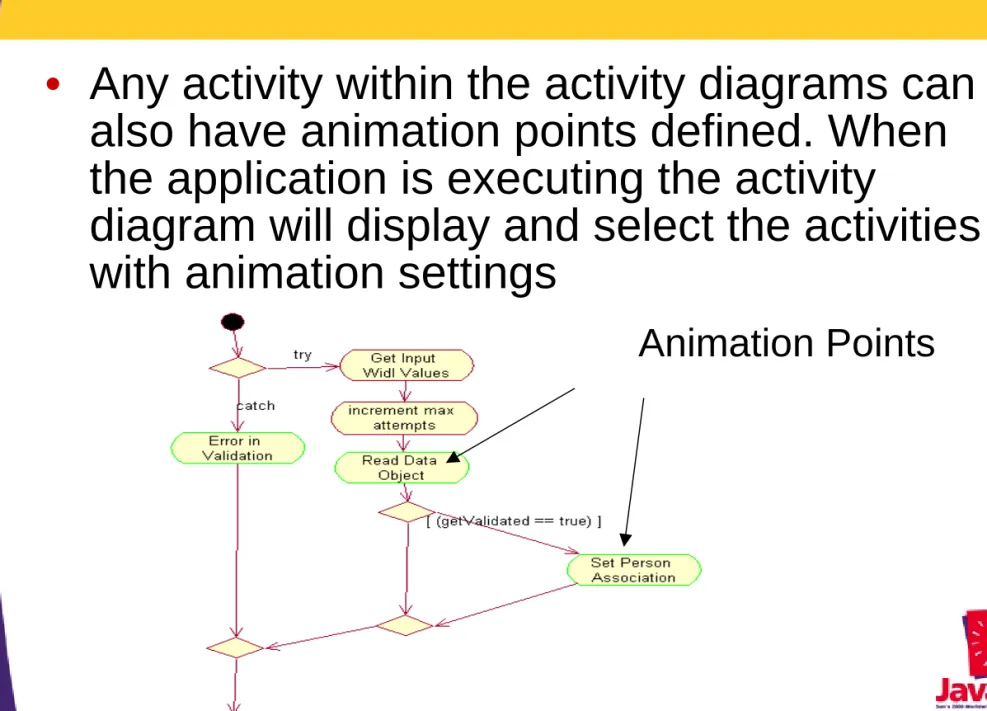
Setting Animation Points
•
Any activity within the activity diagrams can
also have animation points defined. When
the application is executing the activity
diagram will display and select the activities
with animation settings
Generating the Application
•
After the static and dynamic elements of our
application are defined we can organize
these elements into UML Component
Diagrams to define deployment definitions.
From the components definitions we can
then generate the complete Java class code,
compile the code and package it into the
Collaboration Diagram
XML Generation
•
The collaboration diagram information for
our use case definitions is also generated
into an XML description document identifying
the interface elements, XML mappings, and
control process flow information. This XML
document then becomes the basis for
execution through the application
– The XML document defines the process flow through the application
– The engine that iterates the collaboration diagram XML document was also designed and generated from a UML model
Control Process
Flow Generation
•
Dynamic behavior represented within an
application is designed within a control
process flow class specification. The
following sections will briefly illustrate the
generation processing capabilities for
dynamic behavior within a UML environment.
The following code examples were
Generating the UML
Class Specification
• Looking at the State Machine implementation
– Current State
– Incoming Event
– Synchronous Transitions
– Asynchronous Transitions
– Start and End States
• Packages, imports, declarations
– Java package specifications can be explicitly or implicitly defined by the class locations within the UML model
• Association and Attribute implementations
– Association implementations generate both the container and access methods for the stereotyped association.
The type of container and resulting access methods are defined by the stereotype applied to the
Method Implementation
• Activity Diagram Method Implementations
– Activity diagrams are generated following the UML Object Notation. The activity generation can be viewed with either as a fully generated class or using the Intelligent Advisor code window
• Round Trip engineering
– Roundtrip engineering allows developers to hand edit code generated from the UML Diagram. By Identifying elements which have been hand edited, the UML Factory generator will leave the method implementation as edited without forward generating from the model. The developer controls the
granularly of roundtrip engineering
• UML Model Animation code
– Animation points placed within the code can be turned off for individual points, the entire model being generated,
Executing the Architectures
•
The following demonstrations will walk
through executing the various architectures
from the complete components on different
types of application servers
Sample JSP™ Client to
J2EE™ Application Container
XML to JSP convers ions
W eb Server JSP
Client
ejb Container HTTP
XML over RM I or IIOP
Ses sion B ean St ate M achine
Data Base JDBC
Using the Java™ Message Service
API (JMS) for Communications
HTML Client
Web Server
XML/XSL to HTML Conversion
JMS Message Que
EJB Container
Session Bean St ate Mac hine
Data Base HTTP
Publish/Subscribe XML Object Publis h/Subscribe XML Object
Summary
• This concludes the presentations and
demonstrations for building n-tier enterprise applications with UML and XML data
representations
• The demonstrations have illustrated the ability to completely model both static and dynamic application behavior within a UML model
• The UML model also defined components and deployment into multiple configurations
• The modeled demonstration illustrated the ability to use the same components within different J2EE™ platform-enabled implementations on multiple
Enterprise Development
Benefits
• Enterprise computing can improve the software development process by combining the
descriptive power of the UML notation, and
the flexible data representation and distribution capabilities of XML with the object oriented,
network, and portable capabilities of Java technology
• Combining these technologies enables
organizations to manage components increasing reuse, visibility, and implementation
understanding; effectively reducing the complexity and total cost of ownership for deploying n-tier enterprise applications