Research Article
a
June
2019
Computer Science and Software Engineering
ISSN: 2277-128X (Volume-9, Issue-6)
Evaluation of Web Usability Requirement Model and Web
Application Interface Components
Nirjhor Anjum, Mithun Sarker, Syed Ishteaque Ahmed Computer Science, AIUB, Bangladesh
[email protected], [email protected], [email protected]
Abstract — in web application, being a non-quality requirement, usability has been quite a concern for a product to be more successful and efficient for users in the competitive market. User centric design methodology is also based on usability design. Even usability is just a non-functional requirement but usability analysis and design can impact the behavioural requirement of a web application in a great extent. The review and feedback sessions are done during prototype design and sometimes like in agile XP process during the user interface designing step. A web application is built on collection of defined HTML controls and components. Our ultimate goal would be to model a guideline of usability requirements for different web application components based on different characteristics of usability like learnability, efficiency, memorability, error recovery, flexibility. In this paper we have evaluated a composite usability requirements model based on the usability requirement attributes & principals and categorization the web application components based on web application design and interaction context.
Keywords — Usability, User Experience, User Interface, Web Design, Design Elements
I. INTRODUCTION
In this research we are mainly going to study usability characteristics and web application components to analyze if we can establish any semantic relationship between these two. This reasoning can help us to identify the guideline which can help UI designer to consider usability requirement which are sometimes even dis-satisfier in context of requirement engineering and considered as eminent expected behavior by client. Even a usability requirement could be delighter for client which can add value not to the product only, but also add value for the product team in competitive market. Nowadays agile is hugely followed, where the iteration take place between clients/users and development team to sort out various issues by feedback. But not every case it is easy to communicate with user or even in case of product developing in context of business to business it is very hard to reach to end users. So here an efficient technique of usability requirement elicitation can be more powerful to reduce feedback sessions and therefore make loom for this major quality requirement during the design phase of requirement. Here a guideline can help the designer to consider the usability for different contexts. To work on the guideline we evaluate here various papers and study on usability and web application to establish the justification of doing further research to develop a guide line based on the finding of this paper.
This guideline would help a requirement engineer to take the usability in account while documenting requirement specification. This might help them to define the behavioral requirement more precisely and adjust the functional requirement due to the constraints evolved by the usability requirement. The aim of this paper we have analyzed usability characteristics for web application to depict the reasoning between web application components and usability requirement.
II. BACKGROUND STUDY
User interface design is the core task to consider usability, how easy the end user interacts with an application. Mostly Developer or UI Designer design the web UI. Sometimes it shows that user don`t want to take this because of don`t like it. The main reason to deny, they don`t like the design part. And this happened when the designer didn`t understand the requirement or had lack of knowledge. That`s why, company came up with the approach of usability training for the UI designers. From [1] we are trying to find some pattern of usability of web component that designer can easily adopt the knowledge so that it helps to determine how the web component should look like. How easily a user can use the system. This can be reduce the cost of training. The key factors we have learned are:
ISSN(E): 2277-128X, ISSN(P): 2277-6451, pp. 1-8
Usability engineering does not only benefit the end users as improving usability can also reduce the costs of development, support, training, documentation and maintenance.
Study shows that no company in the experiment had usability specialist who can take all decisions regarding usability design.
User interface design is not just full fill the usability, usability is more than that.
More difficult to identify the usability problems for the Requirement reviews.
In the software requirement engineering process usability is more challenging to accommodate.
[2] Day by day internet is the most commonly use in our daily life. Websites are using for many prepares. But for every end user, they love to access user friendly websites. Even sometimes user don`t want to visit websites if they face some difficulties. In every software companies, their target is to make the websites more flexible for the end user. Creating a website is not enough. The major concerns we achieve from this paper for usability are Importance of Usability for the Web: learnability, efficiency, memorability, error ratio, satisfaction which needs to be scoped while making a web site UI design guideline. In this paper we also found that several research was done to prepare a website usability guidelines but there is not yet any guideline set that has been established as a standard framework. We would study further these papers and analyze the limitations and achievement in our analysis section.
Identifying the usability for a system from the scratch of application/website developments is now a days become an important task. From [3], by using a framework if we can recognize the actual need of a system then those system become more user friendly and more usable. By using a usable catalog where researcher divided the functional and no-functional requirement from the beginning of an automation system from doctor and patients become a successful project. In this paper writer are present a reusable catalogue with strategies to satisfice usability requirements. This catalogue collects a large amount of knowledge on achieving usability goals from the literature and enriches it with personal experiences also. This catalogue help requirement engineer to address usability requirements from the early stages of software development.
Some system has lots of functionality but there is not enough usability. In that scenario if we follow a guideline the system become more usable. Here [4] the writer discussed about six style which we can use to develop a user-friendly system. But there is some problem for using those recommended style which raise whenever we develop a system with untested prototypes as part of the requirements. Other common problem is prototypes which are developed from participative development effort where users are not any more in the concern in their own creations. On the other hand the prototype is only taken as a guideline in later development, so that the final user interface is designed by the programmers without further usability testing.
Jacob Nilsen in his paper [5] has depicted some generic analysis from different perspective for web application and come up with several guidelines for considering different aspect of usability. In [6] there has been guideline introduced thru checklist for content, visual appearance, navigation, testing. But again here we have experienced lack of correlation with usability factors. A heuristic evaluation [7] has also prescribed a generic guideline for home page and normal web page to illustrate what kind guile line for usability can be followed for different kind of web application component, but yet this is evaluated from a very high level view.
To understand the usability attributes we studied [8] [9] to know the definition of usability attributes and suggestion on different usability design techniques in software engineering. The very important finding of [9] has been that usability design and concerns are not yet easy to consider for all software development arena.
The usability attributes has been well deformed in [10] which shows how each of the usability attributes (learnability, memorability, efficiency, satisfaction, error rate) can be decomposed. The decomposed attributes would be out key target to co-relate with the web application components attributes. Shneiderman’s Eight Golden Rules for interface design and Norman’s 7 principals [10] to transform difficult usability research task to simple one which can help us to materialize the co-relation.
To gather the list of simple and advanced web components we have taken w3schools has the knowledge bank for all detail of web components and Telerik UI components where we have got scope to analyze some advanced web components, build based on the modern user centric design.
III. METHODOLOGY AND OBJECTIVE
ISSN(E): 2277-128X, ISSN(P): 2277-6451, pp. 1-8
practice. This would probably give us idea if we can map the usability in web components and how they differ for different scenarios. We would like to study scenarios as well that could make the same usability properties to vary for different or same web components. Third step we are aiming for eliciting a guideline based on the matrix from second step in future.
In this research we are mainly focusing on to build a usability requirement model.
IV. ANALYSIS
A web application has definite set of components and defined set of attributes for all of the components which are considered as constraints while designing user interface. Whenever a designer is using a web application he has to use this defined set. During study [10] we have found principals usability in more decomposed format which helps us to model the usability attributes in detail level.
A. Usability Principal
Learnability: There are few principals in learnability. Predictability is a principal is about user can easily predict the outcome of the task he is doing or the event he is initiating. Synthesizability concerns the fact of communicating to users about the changes taken placed as a result of user’s action or an event. Familiarity is about how system is first perceived and if user can determine how to initiate any interaction. Generalizability is somewhat also noted by consistency, but this mainly depicts the principal that common task or elements across different system or platform should be designed in a general manner to which people are mostly used to. Consistency on the other hand is little controversial attribute as this can be considered from different perspective of users. Sometimes familiarity and generalization can be considered in scope of consistency as well [10]. Overall consistency is more of following same concept, response technique and communication pattern for the homogenous scope of design.
Flexibility: This refers to the multiplicity of ways for doing a task [10]. As sub principal Dialog initiative refers to the design theory where user is prompted with dialog to makes sure he is not deviated from the task or to make sure he cannot initiate any other action which can be harmful for current ongoing task. Multithreading is allowing user to do different tasks in parallel. Task migratability is concern of transferring the control of task from user to system or system to user at right time. Substitutivity can minimize the error rate and optimize cognitive effort of users in form of allowing user with substitutive options to do a task. Customizability is such principal which consider adaptability and adaptivity as former one is user’s choice to customize the system up to some extend and later one for system getting customized automatically depending on user’s nature or any other attribute [10].
Robustness: Robustness covers the interactions that supports the successful achievement of the goal. In robustness we have studied the factor observability which focuses in 4 abilities in form of availability of defaults, browsability, reachability and persistence [10]. Availability to defaults can help user with passive recall and predictable options with more corrective way to do the task. Browsability can help user to browse thru different observable and logical state of system. Reachability refers to the navigation thru the observable states in the defined view port of user system. Persistent is related to sustainability of the any action or effect through visual communication. Recoverability is about recovering from any error as initiated by system or by user himself [10]. Responsiveness can be counted as measurement of frequency compare to time that system takes to respond to user’s action or request. System has to indicate the request is received and it has responded. Task conformance is about ensuring the coverage of the desired tasks in system context referred as task completeness and another in form of task adequacy which refers to facts for users understanding about the task. If user is doing anything beyond the system to achieve the goal defined by system with in the domain of task, then that should be considered as a lack of task conformance
B. Usability Aspect as Efficiency & Effectiveness
ISSN(E): 2277-128X, ISSN(P): 2277-6451, pp. 1-8 C. Composite Model of Usability Requirement Attributes
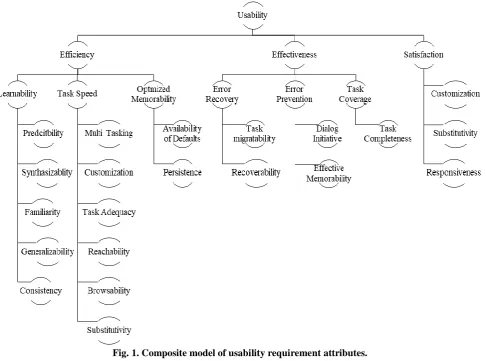
Now we are decomposing efficiency and effectiveness from the aspect of the usability principals [10] that we have described in previous section. We have here modeled those decomposed attributes in hierarchy that we are going to consider for web application usability guideline.
While researching on usability for end user, author [12] has also stated that other research considered security/confidentially has also become an attribute of usability. But eventually this ends up with the concern of satisfaction factor for end user. Authors [13] Stated here security is one of key attribute that conflicts with usability most but security is also subjected to system type and technology in backend that is used. In our research we are not going to consider satisfaction as part of our usability model. Because satisfaction can be impersonally subjective matter, and have weaker co-relation to efficiency and other usability attributes [12] and also this attribute is the most elusive one as this depends on subjective opinion of user [13]. Also we are not considering the security context here for our research as that could possibly require a different analysis to set some layer of exception on our findings from this work. So we are here first modeling a decomposed usability context from technical perspective for web application. We are naming it as composite model of usability design for web application. This section will describe the justification of the model. Substitutivity [25] has been found as high rated usability feature to support user doing the same task in different ways or specify data & configurations in different ways. So this this attribute can help user to achieve the goal in more efficient manner. As this also directly involves user’s personal preferences [25] in consideration it has the aspect of satisfaction as well.
Efficiency is directly related to task speed by generic phenomenon. On the other hand effectiveness will be another key factor for usability requirement model as described in section B. So we will further justify other related attributes whether we can fit them in either as efficient or effective characteristic or in any other third category. So our usability requirement model would be the compact one with decomposed attributes further down for each of the major attributes that we have studied. In the following study we will justify each of the attribute and characteristics of usability to find the similar impact and categorized them.
As learnability can refers to the factor that how quickly user evolves to an expert user from novice one [13] and high learning rate [12] can help user to do task faster, we would like to put this attribute under branch of efficiency. We have kept the same factors from [10] as learnability attributes in the third layer of our model.
Multithreading is subjected to efficiency by any means for parallel processing mechanism. In case of multithreading in web application we really do not want to consider the programming multithreading concept as that is just backend process and has no impact on usability from the user perspective. So here we are considering multithreading in ways where the user can do parallel tasks from web application. Example, a task could be too time consuming that user might need to wait for a longer period of time to get it finished. In such cases an offline processing would let user to continue doing his tasks during the processing. When the former task is finished then user has to be notified or communicated in suitable way. So therefore we can put multithreading in the form of multitasking for a user in web application interaction. In this context author has noted about effects of asynchronous technology like AJAX in web on usability [20]. This clearly shows that this kind of technology task increases speed which is related to efficiency. In context of web application interaction we would then note this attribute as multitasking.
Customization options for user in application [21] can reduce the repetitive functionalities and omit redundant actions. Therefore it can increase efficiency of users. In addition customization also increase user satisfaction as well. . Task adequacy has also impact on efficiency as it minimizes the effort required of user’s observation and articulation effort [22]. Task completeness can be attributed as a property for effective design as it takes care of the fact that the design has covered all the desired tasks of users [10]. In [23] the author has mentioned that reachability is high where navigating to tasks designed in an efficient manner, so efficiency would increase due to reachability in design. We see that defaulting of data or settings in application, can help user by passive recall and that also reduces number of actions by user for input which increase efficiency [10]. As defaulting can also consider as an error prevention mechanism, so we get two essence of memorability in form of one is making the system efficient and another is making the system more corrective. Defaulting is directly related to memorability as system remembers the default values either in static cont ext or sometimes in dynamic context, depending on user’s need.
ISSN(E): 2277-128X, ISSN(P): 2277-6451, pp. 1-8
Fig. 1. Composite model of usability requirement attributes.
Considering effectivity as the benchmark for completeness of a task and correctness in doing it, error recovery mechanism directly falls into the segment. In case of any error user should be properly notified and allow to recover the error [10]. Task migratability refers the factor of negotiating control of the task between user and system Task migratability can eventually make the system more effective by allowing user a way out from a potential scenario not desired by user. If system would consider to take decision automatically, that might lead into an error for which user ultimately would need a recovery plan. Dialog initiatives in an ideal solution should confirm the flexibility of user to suspend or resume any action instantly which is known as user pre-emptive [24]. There is also another kind of dialog initiative in form of system pre-emptive when the system restricts the user to do anything harmful to task under go or to the core of system itself. For an example a user should able to close context at any stage of the task, but may be in some stages doing so would eventually cost the user where system becomes responsive to notify user about the possible loss. So we can say that dialog initiatives is one of the measures to prevent errors. Responsiveness serves the satisfaction level for user as it is calculated based on the response time between initiations of task by user and system processing the task, or also when systems responses to user proactively. In research [26] the responsiveness has been well stablished to count as a property for satisfaction level.
ISSN(E): 2277-128X, ISSN(P): 2277-6451, pp. 1-8 D. Web Application Interface Components
As of now we will now focus on the web application components and environmental properties with which we will co-relate the usability factors and attributes from the model we defined in previous section. When we take HTML elements in considerations [11] we have found along with the elements there are events as well which are used for interaction. These elements and events are basic tool that we use to design the application, hence usability is provided through designing with these elements and their various attributes. These elements are like various input fields, image element, buttons, links and others. We have also considered some advance elements used nowadays as basic control like advance search control, where user can search for items by typing inside the control, custom tooltip and controls line multi selector and tree selector where with the former on user can select multiple items with in a single selector and with later one data or items can be shown in hierarchy structure.
After getting a list of HTML elements we also found such elements which are more contextual rather than elementary. For an example a page is known as document, a page is designed using several components but a page itself has some events that may be triggered by another basic element within but eventually context of page is more of a consideration while page is changing state. For example onbeforeunload, onload, onpageshow, onpagehide, onresize, onscroll, onunload are such events [17] when page is changing the internal state. These type of states become more crucial when we consider the context of usability. While designing, the orientation of elements are subjected to page and display size sometimes. Page preference is also an attribute of page but containing contextual data or settings of user which plays a great role in usability as we assume. Components like Navigation Menu uses hierarchy and categorization to illustrate the content to user which directly subjected to usability characteristic. Hierarchy of any co-related data has been always challenging to be presented in usable way and author in [18] on a different context of file system has also worked on same scope. Navigation menu categorization has been also a considerable concern for designing navigation as stated in [19]. Then the data grid is a complex presentation of data which normally comes with view of categorized data with sorting, filtering and paging options. Another context is notification which normally refers to the context of communicating users with some response of an event, action, processing request initiated over a time period.
Fig 2: Categorized web application interface components
We have categorized the web application components in 2 different categories based on their elementary structure, whether they are basic components and also based on type of behavior where either they behave as a candidate of contextual behavior of the task. Those categories are contextual component and elementary components. Elementary components are like basic controls like text field, dropdown, checkbox etc. On the other hand the contextual components made of several structural components or events which can be justified contextually only for the task, for an example HTML page, data list, any specific generic state in context of HTML page life cycle etc. fig 2 shows the categorization of components.
V. LIMITATIONS AND FUTURE WORK
In this paper we have only tried to depict an approach of usability requirement model based one a composite model of usability attributes and principals. Consistency is another domain which has been not in focus as it is harder to define consistency according to context and more research could be have done on this.
ISSN(E): 2277-128X, ISSN(P): 2277-6451, pp. 1-8
thru behavior and look & feel. In a broader view what we see as usability, in the ground level actually the elementary and contextual components that we described in previous section, are manipulating the visual and behavioral communication with users. Those attributes can be considered as constraints as well which help us to plot the usability requirements to the component attributes. The next approach would be to make the relationship between the HTML components’ attributes.
For the elementary components then we have defined attributes as found in web.
Once we can draw the tables to co-relate the usability requirement attributes to the each of HTML component’s available attributes to establish the fact that the attributes supplement each other in the any context, then we can draw the outline for the usability guideline for specific HTML control.
At second stage we can focus on the contextual components. For this kind of components we build another matrix. The contextual components can be decomposed to certain level of features or attributes which can help to relate them with usability requirement in more confined manner. Then we have the relationship of usability requirement and contextual components for further derivation of guideline.
In future the second phase would be to derive the matric to show the relationship between usability and web application components and based on that we can articulate a guideline. Further, that has to be go through usability testing methods as well to validate the applicability of guideline.
VI. CONCLUSIONS
In this paper a model for requirement engineering is introduced that can help a requirement engineer to take the usability in account while collecting and documenting the requirement specification from customer or end-users. In doing so, the usability characteristics for web application is analyzed to illustrate the reasoning between web application components and the usability requirement. The proposed guideline will help to define the behavioral requirement more accurately and prepare the functional requirements more appropriately. The research outcome will be effective and helpful for the requirement engineers and project managers.
REFERENCES
[1] Juho Heiskari, Marjo Kauppinen, Tomi Männistö, Mikael Runonen, “Bridging the Gap Between Usability and
Requirements Engineering” Available: https://goo.gl/R5BQeL
[2] Alexiei Dingli and Sarah Cassar, “An Intelligent Framework for Website Usability” Volume 2014 (2014), Article ID 479286 Available: http://www.hindawi.com/journals/ahci/2014/479286/
[3] Luiz Marcio Cysneiros, Vera Werneck and Andre Kushniruk, “Reusable Knowledge for Satisficing Usability Requirements” IEEE reference: RE, 2005, 2013 21st IEEE International Requirements Engineering Conference (RE), 2013 21st IEEE International Requirements Engineering Conference (RE) 2005, pp. 463-464,
doi:10.1109/RE.2005.60 Aug. 29, 2005 to Sept. 2, 2005 Available:
http://www.computer.org/csdl/proceedings/re/2005/2425/00/24250463-abs.html
[4] Soren Lauesen & Houman Younessi 1988 , “Six Styles for Usability Requirements” Available:
http://www.itc.dk/people/slauesen/Papers/SixStyles.pdf
[5] Jakob Nielsen, Bellcore, September 1994, “The Usability Engineering Life Cycle” Available:
http://goo.gl/aScD4e
[6] Tim Comber, T 1995 “Building usable web pages: an HCI perspective” Available:
http://epubs.scu.edu.au/comm_pubs/7/
[7] Jose A. Borges, Israel Morales, Nkstor J. Rodriguez, “Guidelines for Designing Usable World Wide Web Pages” Available: http://www.cc.gatech.edu/projects/PageSleuth/references/p277-borges.pdf
[8] https://econsultancy.com/blog/64359-the-attributes-of-usability-and-how-to-exploit-them/
[9] Xavier Ferré and Natalia Juristo, Helmut Windl, Larry Constantine, “Usability Basics for Software Developers”
Available: http://is.ls.fi.upm.es/xavier/papers/usability_b.pdf
[10] Alan Dix, Janet Finlay, Gregory D. Abowd, Russell Beale, Human Computer Interaction 3rd Edition Chapter 7.2 Page 260 -273 Available: http://fit.mta.edu.vn/files/DanhSach/__Human_computer_interaction.pdf
[11] http://www.w3schools.com/
[12] Philip Liew, LiZhang, Shouxin Wang “Model and Measurement for web application usability from and end user
perspective” Available: http://ceur-ws.org/Vol-561/paper2.pdf
ISSN(E): 2277-128X, ISSN(P): 2277-6451, pp. 1-8
wiLovfXm9vJAhXHQI4KHUVdAxgQFggdMAA&url=http%3A%2F%2Fwww.doc.ic.ac.uk%2F~rbc%2Fstatu s%2FSTATUS_T2_1_v1.0.doc&usg=AFQjCNG2vGoswLFh7ogbUhaWgFUrAFUU3Q&sig2=Tvb7mnWTRS Wa2ySgDlSksw
[14] http://www.nngroup.com/articles/usability-101-introduction-to-usability/
[15] Nigel Bevan and Miles Macleod, “Usability measurement in context” Available:
http://www.usabilitynet.org/papers/music94.pdf
[16] Scientific Communication Program Miami University of Ohio “Usability Testing: Developing Useful and Usable Products” Available: http://www.units.miamioh.edu/mtsc/usabilitytestingrevisedFINAL.pdf
[17] http://www.w3schools.com/tags/ref_eventattributes.asp
[18] Gary Marsden, David E. Cairns 2003 Improving the Usability of the Hierarchical File System,
http://pubs.cs.uct.ac.za/archive/00000225/01/sacj-dave.pdf
[19] Research-Based Web Design & Usability Guidelines, Michael O. Leavitt, Ben Shneiderman, Chapter 7.1 - 7.2
[20] Jonas Kluge 2007, The Effects Of The Ajax Technology On Web Application Usability, Available:
https://www.uni-ulm.de/fileadmin/website_uni_ulm/iui.inst.100/institut/Papers/Prof_Weber/webist2007.pdf
[21] Lydia B. Chilton, Robert C. Miller, Greg Little, Chen-Hsiang Yu MIT CSAIL, Why We Customize the Web,
Available: https://groups.csail.mit.edu/uid/other-pubs/why-we-customize.pdf
[22] Alan Dix, Janet Finlay, Gregory D. Abowd, Russell Beale, Human Computer Interaction 3rd Edition Chapter 3
[23] Richard Atterer, Usability Tool Support for Model-Based Web Development Available:
http://www.medien.ifi.lmu.de/pubdb/publications/pub/atterer2008thesis/atterer2008thesis.pdf page 57
[24] Mauricio Lopez,Using Principles to Support Usability in Interactive Systems, Available:
http://www.malchevic.com/papers/usability.pdf
[25] V. Hinze-Hoare, 2007, Review and Analysis of Human Computer Interaction (HCI) Principles, Available: http://arxiv.org/ftp/arxiv/papers/0707/0707.3638.pdf