Desktop Studio: Importing Crystal Reports
Intellicus Web-based Reporting Suite Version 4.5
©Intellicus Technologies [email protected] Enterprise Professional Smart Developer Smart Viewer
Copyright © 2009 Intellicus Technologies
This document and its content is copyrighted material of Intellicus Technologies. The content may not be copied or derived from, through any means, in parts or in whole, without a prior written permission from Intellicus Technologies. All other product names are believed to be registered trademarks of the respective companies.
Dated: - May 2009.
A
A
c
c
k
k
no
n
o
wl
w
le
ed
d
g
g
em
e
me
en
nt
t
s
s
Intellicus acknowledges using of third-party libraries to extend support to the functionalities that they provide.
Contents
Importing crystal report in Intellicus ...4
Prerequisites... 4
Import Steps ... 4
The Imported report ... 5
Scripting ... 6
Page Settings ... 6
Sections ... 7
Data for the report ... 8
Label ... 9 Field ...10 Line ...14 Box ...14 Sub Report ...15 Charts...15
Importing crystal report in Intellicus
Intellicus Desktop Studio can import reports designed in Crystal Reports. This feature eliminates the need to re-design the entire report (which was already designed in Crystal) in Intellicus Studio.
Crystal Report import feature takes care of major time spender activities of report designing like writing queries, placing individual controls and setting properties for them, inserting formulas, inserting groups and page setup information.
Prerequisites
Report Import feature of Intellicus will be enabled on a workstation having Crystal Reports 8 or higher installed on it.
Import Steps
To import a crystal report layout in Intellicus Desktop studio,
1. From File menu, point to Import and click option Crystal Report. Open dialog box appears.
2. Select a crystal report file to import. Save As dialog box appears.
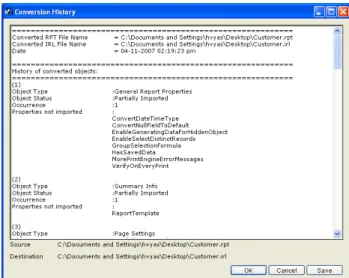
3. Specify information required to save the report. Report is imported and report conversion history dialog box appears.
On Conversion History dialog box, click OK to proceed. Click Save to save the conversion history in a file.
The report is imported in Intellicus and is ready to be modified.
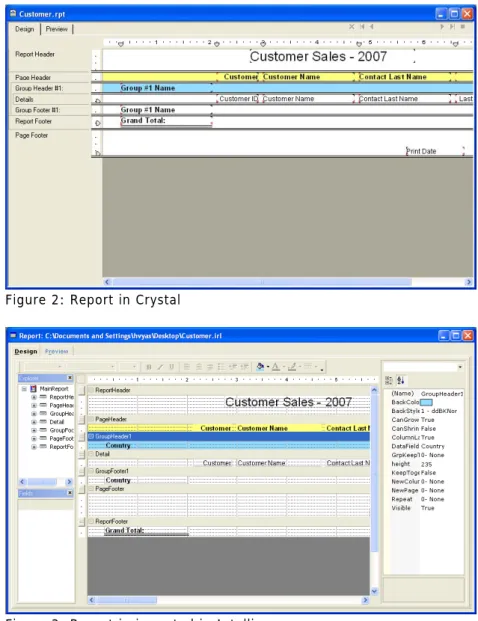
Figure 2: Report in Crystal
Figure 3: Report in imported in Intellicus
The Imported report
The imported report looks just like any other report designed in Intellicus Studio. You will observe that many of the report components on crystal report layout are imported in the IRL as it is along with their property values.
Following information will not be imported from a crystal report template to Intellicus report:
• Connection information
• OLAP Grid Object
• Blob Field Object
• Cross-tab Object
• Conditions
• Conditional formatting
• Picture
• OLE
• Notification
Formula fields with formula script are imported as-it-is and needs to be re-written in JavaScript syntax.
For controls that are imported,
• Properties that are available in Crystal but not in Intellicus are not imported.
• Properties that are available in Intellicus but not in Crystal, are imported with default value.
Scripting
Scripts are imported as it is (in the form of comments) and can be viewed and edited using Script editor in Intellicus. Scripts are imported in respective sections on OnFormat event.
Imported script will have following structure: <control name> <property name> <script code>. Page Settings
Supported page sizes are: A4, B5, Letter and Legal. If the paper size specified in crystal report is other than any of these four, Default paper size will be set in the imported report.
Following page settings are imported from a crystal report layout to IRL: Property Name (Crystal) Property Name (Studio)
Paper Size Paper Size
Orientation Orientation
Top Margin Top Margin
Left Margin Left Margin
Bottom Margin Bottom Margin
Right Margin Right Margin
Following properties existing in Crystal are not imported in Intellicus:
• PaperSource
• PrinterDuplex
Note: If default printer is selected, then default page setting specified in the default printer is selected, no the one specified in report. Presently supported paper sizes are: PaperA4, PaperB5, PageLetter and PaperLegal. Any other paper size will be treated as default paper size.
Sections
All the sections available in crystal report layout are imported in Intellicus. Dimension of sections and controls within sections are imported and placed as they were in crystal report layout.
Note: If the report being imported had multiple section headers and footers, Intellicus will merge all the section headers into one and all the section footers into one.
A section has section properties. At the time of import, properties of the first section (including formatting related properties) are imported. From other sections, only controls along with their respective properties are imported.
Following properties and their values are imported when a section is imported in Intellicus.
Property Name (Crystal) Property Name (Studio)
Suppress Visible Print At Bottom of page
New Page Before NewPage
New Page After NewPage
Keep Together KeepTogether
Background Color Backcolor
SectionHeight Height
BackStyle Following properties existing in Crystal are not imported in Intellicus:
• Suppress • ResetPageNumberAfter • SupressIfBlank • UnderlaySection • GroupCondition • HideForDrillDown • HorizontalGap • NumberOfTopOrBottomNGroups • RepeatPageNumberAfter • SortDirection • TopOrBottomNSortField
Data for the report
A crystal report may have fields that are coming from one or multiple databases. An Intellicus report can get data only from one data connection.
If the report being imported has fields coming from multiple databases, the report will get imported and the fields that have lost connection with their database in Intellicus, will behave as labels.
If the crystal report has one or more tables and no stored procedures, report layout as well as SQL part will be imported. If crystal report has stored procedure, import process has following limitations:
• If the crystal report has one or more tables and no stored procedures, report layout as well as SQL part will be imported.
• If the crystal report has both – table and stored procedure, then only report layout will be imported SQL will not be imported.
• If the crystal report has a stored procedure (that does not have
parameter(s)), only report layout will be imported SQL will not be imported.
• If the crystal report has only stored procedure with one or more parameters, report layout as well as SQL part will be imported.
• If the crystal report has multiple stored procedures, only report layout will be imported, SQL will not come.
• For MS Access data source, query does not convert properly.
• If Record Selection Formula is specified in crystal report, then during conversion, record selection formula is appended in SQL query as it is. You need to convert it in proper SQL syntax at later stage.
• If crystal report is designed using linking manager and record selection formula is specified in crystal report then imported SQL in IRL should be checked for validity. This is because record selection formula can have any SQL script syntax that can be different then what we have in IRL.
Label
When a label object is imported, following properties are imported along with their values:
Property Name (Crystal) Property Name (Studio)
Text Caption Common
Suppess Visible
Horizontal Alignment Alignment
Maximum No. Of Lines Multiline
Border
Line Style Line Style
Drop Shadow Border Shadow
Border Color BorderTopColor
Background Color BackColor
ForeColor Forecolor BackStyle BackStyle RightLineStyle Size Height Height Width Width Top Top Left Left Font Font Font Following properties existing in Crystal are not imported in Intellicus
• TextRotationAngle • Hyperlink • CanGrow • CharacterSpacing • CloseAtPageBreak • FirstLineIndent • Keeptogether • LeftIndent • Linespacing • LineSpacingType • SupressIfDuplicated
Field
When a field object is imported, following properties are imported along with their values. This is applicable to data fields, parameter fields, formula fields, running total and SQL expression field.
Property Name (Crystal) Property Name (Studio) Text Text
Common
Suppress Visible
Horizontal Alignment Alignment
Can Grow CanGrow
Border
Line Style Line Style
Drop Shadow Border Shadow
Border Color BorderTopColor
Background Color BackColor
ForeColor Forecolor BackStyle BackStyle RightLineStyle Size Height Height Width Width Top Top Left Left Font Font Font Data DataField DataField (received from object model) DataSize
Output Format OutputFormat
Running Total Properties
FieldToSummarize DataField
Type of Summary Summary Func
Reset Never SummaryRunning
Reset on Change of Group Summary Running + Summary Group
Formula Properties, SQL Expression
Formula Expression Expression
Return Type Return Type
Parameter Properties
Prompting Text Prompt
Value Type Param Input Type
Allow Multiple Values Multi select default value
Default value Default Value
Special Field Properties
Data date, Print Date Data Field + Tag (Import as system fields)
Date Time, Print Time Data Field + Tag (Import as system fields)
Page Number Summary Type + Summary Running + Tag
Following properties existing in Crystal are not imported in Intellicus: • AmPmType • CharecterSpacing • CloseAtPageBreak • CurrencyPositionType • CurrencySymbol • DateCalendarType • DateEraType • DateFirstSeperator • DatePrefixSeperator • DateSecondSeperator • DateSuffixSeperator • DateWindowsDefaultType • DecimalSymbol • DisplayReverseSign • HourMinuteSeperator • HourType • Hyperlink • LeadingDayPosition • LeadingDaySeperator • LeadingDayType • RoundingType • ThousandsSeperator • ThousandSymbol • Timebase • UseLeadingZero • FirstLineIndent • EnableTightHorizontal • KeepTogether • LeftIndent • LineSpacing • LineSpacingType
• RightIndent • RightLineStyle • SuppressIfDuplicated • TextRotationAngle • UseOneSymbolPerPage • UseSystemDefaults • MaxNumberOfLines (Multiline) • ZeroValueString
The summary fields in Crystal Reports and Imported in Intellicus:
• STAverage • STCount • STDistinctCount • STDMedian • STDMode • STMaximum • STMinimum • STPopStandardDeviation • STPopVariance • STSampleStandardDeviation • STSampleVariance • STSum
The summary fields available in Crystal Reports and not supported in Intellicus are:
• STDCorrelation • STDCovariance • STDNthLargest • STDNthMostFrequent • STDNthSmallest • STDPercentage • STDPercentile • STDWeightedAvg
Crystal report has a set of special fields. These fields are not supported in Intellicus:
• File Author
• File Creating Date
• File path and name
• Group Number
• Group Selection Formula
• Modification Date
• Modification Time
• Record Number
• Record Selection Formula
• Report Comments
• Report Title
• Total Page Count
For a formula field, following properties are not exported:
• DiscreteOrRangeKind • EditMask • EnableNullValue • EnableRangeLimit • EnableShowDescriptionOnly • EnableSortBasedOnDesc • MaximumValue • MinimumValue • NumberOfCurrentRanges • PickListSortMethod • PlaceInGroup
Line
When a line object is imported, following properties are imported along with their values:
Property Name (Crystal) Property Name (Studio)
Style LineStyle Width LineWeight Color LineColor Suppress Visible Left Left Right Right Top Top Bottom Bottom Following properties existing in Crystal are not imported in Intellicus:
• ExtendToBottomOfSection
Box
Following properties and their values are imported when a line object is imported.
Property Name (Crystal) Property Name (Studio)
Style Shape Width Width Height Height
Fill Color BackColor
Line Color Line Color
Suppress Visible Left Left Right Right Top Top Bottom Bottom Following properties existing in Crystal are not imported in Intellicus:
• HasDropShadow
• ExtendToBottomOfSection
Sub Report
Sub report is imported as embedded. Its position and dimension information is imported. Crystal does not have concept of referenced report.
Following properties are not imported in the report:
• Backclor • BorderColor • BottomLIneStyle • CloseAtPageBreak • EnableOnDemand • HasDropShadow • KeepTogether • LeftLineStyle • RightLineStyle • TopLineStyle Charts
Charts are imported as bound charts. Fields placed on Group axis, as well as on Value axis are imported as it is.
Chart type
Charts of following chart type are imported:
• Side by side Bar Chart (Normal)
• Stacked Bar Chart (Normal)
• Side by Side Bar Chart (3D)
• Stacked Bar Chart (3D)
• Line Chart (Normal)*
• Stacked Line Chart (Normal)
• Line Chart (Marker)*
• Stacked Line Chart (Marker)*
• Stacked Area Chart (Normal)*
• Stacked Area Chart (3D)*
• Pie Chart (3D)
• Radar Chart
*Imported properly when only 1 series is plotted.
Charts of following chart type are converted to their generic chart type after import:
Source chart type Converted chart type
Percent Bar Chart (Normal) Bar Chart
Percent Bar Chart (3D) Bar Chart
Percent Line Chart (Normal) Line Chart
Percent Line Chart (Marker) Line Chart
Percent Area Chart (Normal) Area Chart
Percent Area Chart (3D) Area Chart
Multiple Pie Chart Pie Chart
Proportional Pie Chart Pie Chart
Doughnut Chart Bar Chart
3D Riser Chart Bar Chart
3D Surface Chart Bar Chart
Stacked Radar Chart Radar Chart
Notes
• 3D charts of Crystal are not imported. In Intellicus 3D is a visual effect only.