Process
Model-ing
Use Case
Analysis
Data
Modeling
Requirements
Determination
Process
Model
Use Cases
Data
Model
CHAPTER
5
CHAPTER
6
CHAPTER
7
CHAPTER
4
The Analysis Phase answers the questions of who will use the system,
what the system will do, and
where and when it will be used. All of the deliverables are combined
into a System Proposal, which is presented to management who decide whether the project should
continue to move forward.
ANALYSIS
PHASE
ANALYSIS
A N A L Y S I S
T A S K
C H E C K L I S T
Apply Requirements Analysis Technique (Business Process Automation, Business Process
Improvement, or Business Process Reengineering) Use Requirements-Gathering Techniques (Interview,
JAD Session, Questionnaire, Document Analysis, or Observation)
Develop Use Cases
Develop Data Flow Diagrams Develop Entity Relationship Model Normalize Entity Relationship Model
P L A N N I N G A N A L Y S I S D E S I G N
uring the analysis phase, the analyst determines the business requirements for the new system. This chapter begins by presenting the requirements definition, a doc-ument that lists the new system’s capabilities. It then describes how to analyze require-ments using business process automation, business process improvement, and business process reengineering techniques, and how to gather requirements using interviews, JAD sessions, questionnaires, document analysis, and observation.
OBJECTIVES
■ Become familiar with the analysis phase of the SDLC. ■ Understand how to create a requirements definition. ■ Become familiar with requirements analysis techniques. ■ Understand when to use each requirements analysis technique.
■ Understand how to gather requirements using interviews, JAD sessions, ques-tionnaires, document analysis, and observation.
■ Understand when to use each requirements-gathering technique.
CHAPTER OUTLINE
Requirements
Determination
D
I M P L E M E N T A T I O N
Introduction
Requirements Determination
What is a Requirement Requirements Definition Determining Requirements
Creating the Requirements Definition
Requirements Analysis Techniques
Business Process Automation Business Process Improvement Business Process Reengineering Selecting the Appropriate Technique
Requirement-Gathering Techniques
Interviews
Joint Application Development Questionnaíres
Document Analysis Observation
Selecting the Appropriate Techniques
Applying the Concepts at CD Selections
Requirements Analysis Techniques Requirements-Gathering Techniques Requirements Definition
System Proposal
INTRODUCTION
The Systems Development Life Cycle (SDLC) is the process by which the organi-zation moves from the current system (often called the as-is system) to the new sys-tem (often called the to-be system). The output of the Planning Phase that we dis-cussed in Chapters 2 and 3 is the System Request, which provides general ideas for the to-be system, defines the project’s scope, and provides the initial workplan. The analysis phase takes the general ideas in the system request and refines them into a detailed requirements definition (this chapter), use cases (Chapter 5), process mod-els (Chapter 6) and a data model (Chapter 7) that together form the System Pro-posal. The system proposal also includes revised project management deliverables, such as the feasibility analysis (Chapter 2) and the workplan (Chapter 3).
The system proposal is presented to the approval committee who decides if the project is to continue. This usually happens at a system walk-through, a meet-ing at which the concept for the new system is presented to the users, managers, and key decision makers. The goal of the walk-through is to explain the system in mod-erate detail so that the users, managers, and key decision makers clearly understand it, can identify needed improvements, and are able to make a decision about whether the project should continue. If approved, the system proposal moves into the design phase, and its elements (requirements definition, use case, process mod-els, and data model) are used as inputs to the steps in the design phase, which fur-ther refine them and define in much more detail how the system will be built.
The line between the analysis and design phases is very blurry, because the deliverables created in the analysis phase are really the first step in the design of the new system. Many of the major design decisions for the new system are found in the analysis deliverables: In fact, a better name for the analysis phase would really be “Analysis and Initial Design,” but because this is rather long name, and because most organizations simply call this phase “Analysis,” we will too. Nonetheless, it is important to remember that the deliverables from the analysis phase are really the first step in the design of the new system.
In many ways, the requirements determination step is the single most critical step of the entire SDLC, because it is here that the major elements of the system first begin to emerge. During requirements determination, the system is easy to change because little work has been done yet. As the system moves through the other phases in the SDLC, it becomes harder and harder to return to requirements determination and make major changes because of all of the rework that is involved. Several studies have shown that more than half of all system failures are due to problems with the requirements.1This is why the iterative approaches of many RAD and Agile methodologies are so effective—small batches of require-ments can be identified and implemented in incremental stages, allowing the over-all system to change and evolve over time.
In this chapter, we will focus on the requirements determination step of the analysis phase. We begin by explaining what a requirement is and the overall process of requirements gathering and requirements analysis. We then present a set of techniques that can be used to analyze and gather requirements.
1For example, see: The Scope of Software Development Project Failures,Dennis, MA: The Standish Group,
REQUIREMENTS DETERMINATION
The purpose of the requirements determination step is to turn the very high-level explanation of the business requirements stated in the System Request into a more precise list of requirements than can be used as input to the rest of the analysis phase (creating use cases, building process models, and building a data model), which further require and expand on the requirements and ultimately lead to design.
What is a Requirement?
A requirementis simply a statement of what the system must do or what charac-teristic it needs to have. During the analysis phase, requirements are written from the perspective of the businessperson, and they focus on “what” the system does. They focus on business user needs, so they usually are called business requirements
(and sometimes user requirements). Later in the design phase, business require-ments evolve to become more technical, and they describe “how” the system will be implemented. Requirements in the design phase are written from the developer’s perspective, and they usually are called system requirements.
Before we continue, we want to stress that there is no black-and-white line dividing a business requirement and a system requirement—and some companies use the terms interchangeably. The important thing to remember is that a require-ment is a staterequire-ment of what the system must do, and requirerequire-ments will change over time as the project moves from analysis to design to implementation. Requirements evolve from detailed statements of the business capabilities that a system should have to detailed statements of the technical way in which the capabilities will be implemented in the new system.
Requirements can be either functional or nonfunctional in nature. A func-tional requirementrelates directly to a process the system has to perform or infor-mation it needs to contain. For example, requirements that state that the system must have the ability to search for available inventory or the ability to report actual and budgeted expenses are functional requirements. Functional requirements flow directly into the next steps of the analysis process (use cases, process models, data model) because they define the functions that the system needs to have.
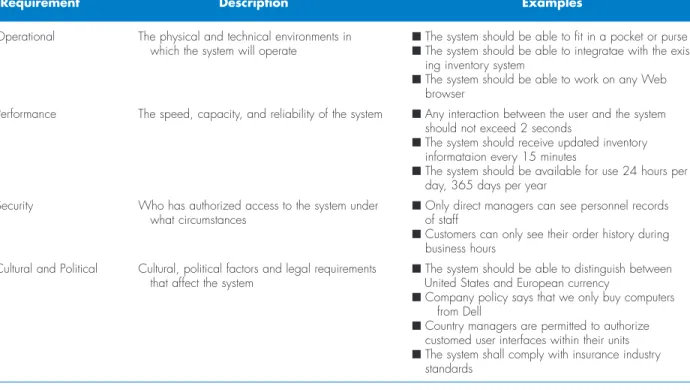
Nonfunctional requirements refer to behavioral properties that the system must have, such as performance and usability. The ability to access the system using a Web browser would be considered a nonfunctional requirement. Nonfunctional requirements may influence the rest of the analysis process (use cases, process models, and data model) but often do so only indirectly; nonfunctional require-ments are primarily used in the design phase when decisions are made about the user interface, the hardware and software, and the system’s underlying architecture. Figure 4-1 lists different kinds of nonfunctional requirements and examples of each kind. Notice that the nonfunctional requirements describe a variety of char-acteristics regarding the system: operational, performance, security, and cultural and political. These characteristics do not describe business processes or informa-tion, but they are very important in understanding what the final system should be like. For example, the project team needs to know if a system needs to be highly secure, requires subsecond response time, or has to reach a multilingual customer base. These requirements will affect design decisions that will be made in the design phase, particularly architecture design, so we will revisit them in detail in Chapter 9. The goal at this point is to identify any major issues.
Operational The physical and technical environments in ■The system should be able to fit in a pocket or purse which the system will operate ■The system should be able to integratae with the
exist-ing inventory system
■The system should be able to work on any Web browser
Performance The speed, capacity, and reliability of the system ■Any interaction between the user and the system should not exceed 2 seconds
■The system should receive updated inventory informataion every 15 minutes
■The system should be available for use 24 hours per day, 365 days per year
Security Who has authorized access to the system under ■Only direct managers can see personnel records
what circumstances of staff
■Customers can only see their order history during business hours
Cultural and Political Cultural, political factors and legal requirements ■The system should be able to distinguish between that affect the system United States and European currency
■Company policy says that we only buy computers from Dell
■Country managers are permitted to authorize customed user interfaces within their units ■The system shall comply with insurance industry
standards Source:The Atlantic Systems Guild, http;//www.systemsguild.com
Nonfunctional
Requirement Description Examples
FIGURE 4-1
Nonfunctional Requirements
One of the most common mistakes by new analysts is to confuse functional and nonfunctional requirements. Pretend that you received the following list of require-ments for a sales system.
Requirements for Proposed System: The system should…
1. be accessible to Web users
2. include the company standard logo and color scheme 3. restrict access to profitability information
4. include actual and budgeted cost information 5. provide management reports
6. include sales information that is updated at least daily
7. have 2-second maximum response time for prede-fined queries, and 10-minute maximum response time for ad hoc queries
8. include information from all company subsidiaries 9. print subsidiary reports in the primary language of
the subsidiary
10. provide monthly rankings of salesperson performance
QUESTIONS:
1. Which requirements are functional business require-ments? Provide two additional examples.
2. Which requirements are nonfunctional business requirements? What kind of nonfunctional require-ments are they? Provide two additional examples.
4-1 I
DENTIFYINGR
EQUIREMENTSY O U R
Requirements Definition
The requirements definition report—usually just called the requirements defini-tion—is a straightforward text report that simply lists the functional and nonfunc-tional requirements in an outline format. Figure 4-2 shows a sample requirements definition for a word processing program designed to compete against software, such as Microsoft Word.
The requirements are numbered in a legal or outline format so that each requirement is clearly identified. The requirements are first grouped into functional and nonfunctional requirements and then within each of those headings they are further grouped by the type of nonfunctional requirement or by function.
Sometimes, business requirements are prioritized on the requirements defini-tion. They can be ranked as having “high,” “medium,” or “low” importance in the new system, or they can be labeled with the version of the system that will address the requirement (e.g., release 1, release 2, release 3). This practice is particularly important when using RAD methodologies that deliver requirements in batches by developing incremental versions of the system.
The most obvious purpose of the requirements definition is to provide the information needed by the other deliverables in the analysis phase, which include use cases, process models, and data models, and to support activities in the design phase. The most importantpurpose of the requirements definition, however, is to define the scope of the system. The document describes to the analysts exactly what the system needs to end up doing, and when discrepancies arise, the document serves as the place to go for clarification.
Determining Requirements
Determining requirements for the requirements definition is both a business task and an IT task. In the early days of computing, there was a presumption that the systems analysts, as experts with computer systems, were in the best position to define how Ionce worked on a consulting project in which my
manager created a requirements definition without listing nonfunctional requirements. The project was then esti-mated based on the requirements definition and sold to the client for $5,000. In my manager’s mind, the system that we would build for the client would be a very simple stand-alone system running on current technology. It shouldn’t take more than a week analyze, design, and build.
Unfortunately, the client had other ideas. They wanted the system to be used by many people in three different departments, and they wanted the ability for any number of people to work on the system concurrently. The
technology they had in place was antiquated, but nonetheless they wanted the system to run effectively on the existing equipment. Because we didn’t set the project scope properly by including our assumptions about non-functional requirements in the requirements definition, we basically had to do whatever they wanted.
The capabilities they wanted took weeks to design and program. The project ended up taking four months, and the final project cost was $250,000. Our company had to pick up the tab for everything except the agreed upon $5,000. This was by far the most frustrating project situation I ever experienced.
Barbara Wixom
4-A W
HATC
ANH
APPENI
FY
OUI
GNOREN
ONFUNCTIONALR
EQUIREMENTSIN ACTION
a computer system should operate. Many systems failed because they did not ade-quately address the true business needs of the users. Gradually, the presumption changed so that the users, as the business experts, were seen as being the best posi-tion to define how a computer system should operate. However, many systems failed to deliver performance benefits because users simply automated an existing ineffi-cient system, and they failed to incorporate new opportunities offered by technology. A good analogy is building a house or an apartment. We have all lived in a house or apartment, and most of us have some understanding of what we would like to see in one. However, if we were asked to design one from scratch, it would be a challenge because we lack appropriate design skills and technical engineering skills. Likewise, an architect acting alone would probably miss some of our unique requirements.
Therefore, the most effective approach is to have both businesspeople and analysts working together to determine business requirements. Sometimes, how-ever, users don’t know exactly what they want, and analysts need to help them dis-cover their needs. Three kinds of techniques have become popular to help analysts do this: business process automation (BPA), business process improvement (BPI),
D. Nonfunctional Requirements 1. Operational Requirements
1.1. The system will operate in Windows and Macintosh environments
1.2. The system will be able to read and write Word documents, RTF, and HTML 1.3. The system will be able to import Gif, Jpeg, and BMP graphics files
2. Performance Requirements
2.1. Response times must be less than 7 seconds
2.2. The Inventory database must be updated in real time
3. Security Requirements
3.1. No special security requirements are anticipated
4. Cultural and Political Requirements
4.1. No special cultural and political requirements are anticipated
C. Functional Requirements 1. Printing
1.1. The user can select which pages to print
1.2. The user can view a preview of the pages before printing
1.3. The user can change the margins, paper size(e.g., letter, A4) and orientation on the page
2. Spell Checking
2.1. The user can check for spelling mistakes. The system can operate in one of two modes as selected by the users.
2.1.1. Mode 1 (Manual): The user will activate the spell checker and it will move the user to the next misspelled word.
2.1.2. Mode 2 (Automatic): As the user types, the spell checker will flag misspelled words so the user immediately see the misspelling.
2.2. The user can add words to the dictionary
2.3. The user can mark words as not misspelled but not add them to the dictionary
FIGURE 4-2
and business process reengineering (BPR). They are tools that analysts can use when they need to guide the users in explaining what is wanted from a system.
The three kinds of techniques work similarly. They help users critically exam-ine the current state of systems and processes (the as-is system), identify exactly what needs to change, and develop a concept for a new system (the to-be system). A different amount of change is associated with each technique; BPA creates a small amount of change, BPI creates a moderate amount of change, and BPR cre-ates significant change that affects much of the organization. All three will be described in greater detail later in the chapter.
Although BPA, BPI, and BPR enable the analyst to help users create a vision for the new system, they are not sufficient for extracting information about the detailed business requirements that are needed to build it. Therefore, analysts use a portfolio of requirement-gathering techniques to acquire information from users. The analyst has many gathering techniques from which to choose: interviews, ques-tionnaires, observation, joint application development (JAD), and document analy-sis. The information gathered using these techniques is critically analyzed and used to craft the requirements definition report. The final section of this chapter describes each of the requirements-gathering techniques in greater depth.
Creating the Requirements Definition
Creating the requirements definition is an iterative and ongoing process whereby the analyst collects information with requirements-gathering techniques (e.g., interviews, document analysis), critically analyzes the information to identify appropriate busi-ness requirements for the system, and adds the requirements to the requirements def-inition report. The requirements defdef-inition is kept up to date so that the project team and business users can refer to it and get a clear understanding of the new system.
To create the requirements definition, the project team first determines the kinds of functional and nonfunctional requirements that they will collect about the system (of course, these may change over time). These become the main sections of the document. Next, the analysts use a variety of requirement-gathering techniques (e.g., interviews, observation) to collect information, and they list the business requirements that were identified from that information. Finally, the analysts work with the entire project team and the business users to verify, change, and complete the list and to help prioritize the importance of the requirements that were identified. This process continues throughout the analysis phase, and the requirements definition evolves over time as new requirements are identified and as the project moves into later phases of the SDLC. Beware: the evolution of the requirements def-inition must be carefully managed. The project team cannot keep adding to the requirements definition, or the system will keep growing and growing and never get finished. Instead, the project team carefully identifies requirements and evaluates which ones fit within the scope of the system. When a requirement reflects a real business need but is not within the scope of the current system or current release, it is added on a list of future requirements, or given a low priority. The management of requirements (and system scope) is one of the hardest parts of managing a project!
REQUIREMENTS ANALYSIS TECHNIQUES
Before the project team can determine what requirements are appropriate for a given system, they need to have a clear vision of the kind of system that will be
cre-ated, and the level of change that it will bring to the organization. The basic process of analysisis divided into three steps: understanding the as-is system, identifying improvements, and developing requirements for the to-be system.
Sometimes the first step (i.e., understanding the as-is system) is skipped or done in a cursory manner. This happens when no current system exists, if the exist-ing system and processes are irrelevant to the future system, or if the project team is using a RAD or Agile development methodology in which the as-is system is not emphasized. Structured design methods such as waterfall and parallel development (see Chapter 1) typically spend significant time understanding the as-is system and identifying improvements before moving to capture requirements for the to-be sys-tem. However, newer RAD and Agile methodologies, such as phased development, prototyping, throwaway prototyping, and extreme programming (see Chapter 1) focus almost exclusively on improvements and the to-be system requirements, and they spend little time investigating the current as-is system.
Three requirements analysis techniques—business process automation, busi-ness process improvement, or busibusi-ness process reengineering—help the analyst lead users through the three (or two) analysis steps so that the vision of the system can be developed. We should note that requirements analysis techniques and requirements-gathering techniques go hand in hand. Analysts need to use requirements-requirements-gathering techniques to collect information; requirements analysis techniques drive the kind of information that is gathered and how it is ultimately analyzed. Although we focus now on the analysis techniques and then discuss requirements gathering at the end of the chapter, they happen concurrently and are complementary activities.
The choice of analysis technique used is based on the amount of change the system is meant to create in the organization. BPA is based on small change that improves process efficiency, BPI creates process improvements that lead to better effectiveness, and BPR revamps the way things work so that the organization is transformed on some level.
To move the users “from here to there,” an analyst needs strong critical think-ing skills. Critical thinking is the ability to recognize strengths and weaknesses and recast an idea in an improved form, and they are needed to really understand issues and develop new business processes. These skills are needed to throughly examine the results of requirements gathering, to identify business requirements, and to translate those requirements into a concept for the new system.
Business Process Automation
Business process automation (BPA)means leaving the basic way in which the orga-nization operates unchanged, and using computer technology to do some of the work. BPA can make the organization more efficient but has the least impact on the business. BPA projects spend a significant time understanding the current as-is sys-tem before moving on to improvements and to-be syssys-tem requirements. Problem analysis and root cause analysis are two popular BPA techniques.
Problem Analysis The most straightforward (and probably the most commonly used) requirements analysis technique is problem analysis. Problem analysis means asking the users and managers to identify problems with the as-is system and to describe how to solve them in the to-be system. Most users have a very good idea of the changes they would like to see, and most will be quite vocal about suggesting them. Most changes tend to solve problems rather than capital-ize on opportunities, but this is possible, too. Improvements from problem
analy-sis tend to be small and incremental (e.g., provide more space in which to type the customer’s address; provide a new report that currently does not exist).
This type of improvement often is very effective at improving a system’s effi-ciency or ease of use. However, it often provides only minor improvements in busi-ness value—the new system is better than the old, but it may be hard to identify sig-nificant monetary benefits from the new system.
Root Cause Analysis The ideas produced by problem analysis tend to be solu-tionsto problems. All solutions make assumptions about the nature of the prob-lem, assumptions that may or may not be valid. In our experience, users (and most people in general) tend to jump quickly to solutions without fully considering the nature of the problem. Sometimes the solutions are appropriate, but many times they address a symptomof the problem, not the true problem or root causeitself.2 For example, suppose you notice that a lightbulb is burned out above your front door. You buy a new bulb, get out a ladder, and replace the bulb. A month later, you see that the same bulb is burnt out, so you buy a new bulb, haul out the ladder, and replace it again. This repeats itself several times. At this point, you have two choices. You can buy a large package of lightbulbs and a fancy lightbulb changer on a long pole so you don’t need the haul the ladder out each time (thus saving a lot of trips to the store for new bulbs and a lot of effort in working with the ladder). Or you can fix the light fixture that is causing the light to burn out in the first place. Buying the bulb changer is treating the symptom (the burnt-out bulb), while fixing the fixture is treating the root cause.
In the business world, the challenge lies in identifying the root cause—few problems are as simple as the lightbulb problem. The solutions that users propose (or systems that analysts think of) may either address symptoms or root causes, but without a careful analysis, it is difficult to tell which one. And finding out that you’ve just spent a million dollars on a new lightbulb changer is a horrible feeling!
Root cause analysistherefore focuses on problems, not solutions. The analyst starts by having the users generate a list of problems with the current system, and then prioritize the problems in order of importance. Then starting with the most important, the users and/or the analysts generate all the possible root causes for the problems. Each possible root cause is investigated (starting with the most likely or easiest to check) until the true root cause(s) are identified. If any possible root causes are identified for several problems, those should be investigated first, because there is a good chance they are the real root causes influencing the symptom problems.
In our lightbulb example, there are several possible root causes. A decision tree (Chapter 6) sometimes helps with the analysis. As Figure 4-3 shows, there are many possible root causes, so buying a new fixture may or may not address the true root cause. In fact, buying a lightbulb changer may actually address the root cause. The key point in root cause analysis is to always challenge the obvious.
Business Process Improvement
Business process improvement (BPI)means making moderate changes to the way in which the organization operates to take advantage of new opportunities offered by technology or to copy what competitors are doing. BPI can improve efficiency 2Two good books that discuss the problems in finding the root causes to problems are: E.M. Goldratt, and J.
Cox, The Goal,Croton-on-Hudson, NY: North River Press, 1986, and E.M. Goldratt, The Haystack Syn-drome,Croton-on-Hudson, NY: North River Press, 1990.
(i.e., doing things right) and improve effectiveness (i.e., doing the right things). BPI projects also spend time understanding the as-is system, but much less time than BPA projects; their primary focus is on improving business processes, so time is spent on the as-is only to help with the improvement analyses and the to-be system requirements. Duration analysis, activity-based costing, and information bench-marking are three popular BPI activities.
Duration Analysis Duration analysis requires a detailed examination of the amount of time it takes to perform each process in the current as-is system. The analysts begin by determining the total amount of time it takes, on average, to perform a set of business processes for a typical input. They then time each of the individual steps (or subprocesses) in the business process. The time to complete the basic steps are then totaled and compared to the total for the overall process. When there is a significant difference between the two—and in our experiences the total time often can be 10 or even 100 times longer than the sum of the parts— this indicates that this part of the process is badly in need of a major overhaul.
For example, suppose that the analysts are working on a home mortgage sys-tem and discover that on average, it takes 30 days for the bank to approve a mort-gage. They then look at each of the basic steps in the process (e.g., data entry, credit check, title search, appraisal, etc.) and find that the total amount of time actually FIGURE 4-3
Root Cause Analysis for the Example of the Burned-Out Lightbulb
Lightbulb burns out frequently
Buy better bulbs
Fix bad fixture
Fix bad wiring
Control power surges
Left on when not needed Left on when needed Bulb burns out at
end of rated life Bulb burns out
prematurely
Change procedure to have bulb turned off Develop ways to automatically turn off bulb
Find way to simplify changing
Buy a bulb with a longer- rated life
Find other means to deliver light Find other ways to achieve what light does
spent on each mortgage is about 8 hours. This is a strong indication that the over-all process is badly broken, because it takes 30 days to perform 1 day’s work.
These problems likely occur because the process is badly fragmented. Many different people must perform different activities before the process finishes. In the mortgage example, the application probably sits on many peoples’ desks for long periods of time before it is processed. Processes in which many different people work on small parts of the inputs are prime candidates for process integration or paral-lelization. Process integration means changing the fundamental process so that fewer people work on the input, which often requires changing the processes and retraining staff to perform a wider range of duties. Process parallelization means changing the process so that all the individual steps are performed at the same time. For example in the mortgage application example, there is probably no reason that the credit check cannot be performed at the same time as the appraisal and title check.
Activity-Based Costing Activity-based costingis a similar analysis that examines the cost of each major process or step in a business process rather than the time taken.3The analysts identify the costs associated with each of the basic functional In 1984, I developed an information
system to help schedule production orders in paper mills. Paper is made in huge rolls that are six to ten feet wide. Customer orders (e.g., newspaper, computer paper) are cut from these large rolls. The goal of production sched-uling is to decide which orders to combine on one roll to reduce the amount of paper wasted because no matter how you place the orders on the rolls, you almost always end up throwing away the last few inches—customer orders seldom add up to exactly the same width as the roll itself (imagine trying to cut several rolls of toilet paper from a paper towel roll).
The scheduling system was designed to run on an IBM PC, which in those days was not powerful enough to use advanced mathematical techniques like linear programming to calculate which orders to combine on which roll. Instead, we designed the system to use the rules of thumb that the production schedulers them-selves had developed over many years. After several months of fine-tuning, the system worked very well. The schedulers were happy and the amount of waste decreased.
By 1986, PCs had increased in power, so we revised the system to use the advanced linear program-ming techniques to provide better schedules and reduce the waste even more. In our tests, the new system reduced waste by a few percentage points over the orig-inal system, so it was installed. However, after several months, there were big problems; the schedulers were unhappy and the amount of waste actually grew.
It turned out that although the new system really did produce better schedules with less waste, the real prob-lem was notfiguring how to place the orders on the rolls to reduce waste. Instead, the real problem was finding orders for the next week that could be produced with the current batch. The old system combined orders in a way in which the schedulers found it easy to find “matching” future orders. The new system made odd combinations with which the schedulers had a hard time working. The old system was eventually re-installed.
Alan Dennis
QUESTION
How could the problem with the new system have been foreseen?
4-B W
HENO
PTIMALI
SN’
TIN ACTION
CONCEPTS
3Many books have been written on activity based costing. Useful ones include K.B. Burk and D. W.
Web-ster, Activity Based Costing,Fairfax, VA: American Management Systems, 1994; and D. T. Hicks, Activity-Based Costing: Making It Work for Small and Mid-Sized Companies,New York: John Wiley, 1998. The two books by Eli Goldratt mentioned previously (The Goal and The Haystack Syndrome) also offer unique insights into costing.
steps or processes, identify the most costly processes, and focus their improve-ment efforts on them.
Assigning costs is conceptually simple. You just examine the direct cost of labor and materials for each input. Materials costs are easily assigned in a manu-facturing process, while labor costs are usually calculated based on the amount of time spent on the input and the hourly cost of the staff. However, as you may recall from a managerial accounting course, there are indirect costs such as rent, depreci-ation, and so on that also can be included in activity costs.
Informal Benchmarking Benchmarkingrefers to studying how other organizations perform a business process in order to learn how your organization can do some-thing better. Benchmarking helps the organization by introducing ideas that employees may never have considered, but have the potential to add value.
Informal benchmarking is fairly common for “customer-facing” business processes (i.e., those processes that interact with the customer). With informal bench-marking, the managers and analysts think about other organizations, or visit them as customers to watch how the business process is performed. In many cases, the busi-ness studied may be a known leader in the industry or simply a related firm. For exam-ple, suppose the team is developing a Web site for a car dealer. The project sponsor, key managers, and key team members would likely visit the Web sites of competitors, as well as those of others in the car industry (e.g., manufacturers, accessories suppli-ers) and those in other industries that have won awards for their Web sites.
Business Process Reengineering
Business process reengineering (BPR) means changing the fundamental way in which the organization operates—”obliterating” the current way of doing business and making major changes to take advantage of new ideas and new technology. BPR projects spend little time understanding the as-is, because their goal is to focus on new ideas and new ways of doing business. Outcome analysis, technology analy-sis, and activity elimination are three popular BPR activities.
Outcome Analysis Outcome analysisfocuses on understanding the fundamental outcomes that provide value to customers. While these outcomes sound as though Agroup of executives from a Fortune
500 company used Duration Analysis to discuss their pro-curement process. Using a huge wall of Velcro and a handful of placards, a facilitator proceeded to map out the company’s process for procuring a $50 software upgrade. Having quantified the time it took to complete each step, she then assigned costs based on the salaries of the employees involved. The 15-minute exercise left the
group stunned. Their procurement process had gotten so convoluted that it took 18 days, countless hours of paper-work and nearly $22,000 in people time to get the prod-uct ordered, received, and up and running on the requester’s desktop.
Source:“For Good Measure,” CIO Magazine, March 1 1999, by Debby Young.
4-C D
URATIONA
NALYSISIN ACTION
they should be obvious, they often aren’t. For example, suppose you are an insur-ance company, and one of your customers has just had a car accident. What is the fundamental outcome from the customer’s perspective? Traditionally, insurance companies have answered this question by assuming the customer wants to receive the insurance payment quickly. To the customer, however, the payment is only a meansto the real outcome: a repaired car. The insurance company might benefit by extending their view of the business process past its traditional bound-aries to include not paying for repairs, but performing the repairs or contracting with an authorized body shop to do them.
With this approach, the system analysts encourage the managers and project sponsor to pretend they are customers and to think carefully about what the orga-nization’s products and services enable the customers to do—and what they could
enable the customer to do.
Technology Analysis Many major changes in business over the past decade have been enabled by new technologies. Technology analysistherefore starts by having the analysts and managers develop a list of important and interesting technologies. Then the group systematically identifies how each and every technology could be applied to the business process and identifies how the business would benefit.
For example, one useful technology might be the Internet. Saturn, the car man-ufacturer, took this idea and developed an Extranet application for its suppliers. Rather than ordering parts for its cars, Saturn makes its production schedule avail-able electronically to its suppliers, who ship the parts Saturn needs so that they arrive at the plant just in time. This saves Saturn significant costs because it eliminates the need for people to monitor the production schedule and issue purchase orders.
Activity Elimination Activity eliminationis exactly what it sounds like. The ana-lysts and managers work together to identify how the organization could eliminate each and every activity in the business process, how the function could operate without it, and what effects are likely to occur. Initially, managers are reluctant to conclude that processes can be eliminated, but this is a “force-fit” exercise in that they must eliminate each activity. In some cases the results are silly, but nonethe-less, participants must address each and every activity in the business process.
For example, in the home mortgage approval process discussed earlier, the managers and analysts would start by eliminating the first activity, entering the data into the mortgage company’s computer. This leads to two obvious possibilities (1) eliminate the use of a computer system; or (2) make someone else do the data entry (e.g., the customer over the Web). They would then eliminate the next activity, the credit check. Silly right? After all, making sure the applicant has good credit is crit-ical in issuing a loan. Not really. The real answer depends upon how many times the credit check identifies bad applications. If all or almost all applicants have good credit and are seldom turned down by a credit check, then the cost of the credit check may not be worth the cost of the few bad loans it prevents. Eliminating it may actually result in lower costs even with the cost of bad loans.
Selecting the Appropriate Technique
Each of the techniques discussed in this chapter has its own strengths and weak-nesses (see Figure 4-4). No one technique is inherently better than the others, and in practice most projects use a combination of techniques.
Potential Business Value The potential business valuevaries with analysis strat-egy. While BPA has the potential to improve the business, most of the benefits from BPA are tactical and small in nature. Since BPA does not seek to change the IBM Credit was a wholly owned
sub-sidiary of IBM responsible for financing mainframe com-puters sold by IBM. While some customers bought main-frames outright, or obtained financing from other sources, financing computers provided significant addi-tional profit.
When and IBM sales representative made a sale, he or she would immediately call IBM Credit to obtain a financing quote. The call was received by a credit officer who would record the information on a request form. The form would then be sent to the credit department to check the customer’s credit status. This information would be recorded on the form, which was then sent to the busi-ness practices department who would write a contract (sometimes reflecting changes requested by the cus-tomer). The form and the contract would then go to the pricing department, which used the credit information to establish an interest rate and recorded it on the Form. The Form and contract was then sent to the clerical group, where an administrator would prepare a cover letter quoting the interest rate and send the letter and contract via Federal Express to the customer.
The problem at IBM Credit was a major one. Get-ting a financing quote took anywhere for four to eight days (six days on average), giving the customer time to rethink the order or find financing elsewhere. While the quote was being prepared, sales representatives would often call to find out where the quote was in the process, so they could tell the customer when to expect it. How-ever, no one at IBM Credit could answer the question because the paper forms could be in any department and
it was impossible to locate one without physically walk-ing through the departments and gowalk-ing through the piles of forms on everyone’s desk.
IBM Credit examined the process and changed it so that each credit request was logged into a computer system so that each department could record an applica-tion’s status as they completed it and sent it to the next department. In this way, sales representatives could call the credit office and quickly learn the status of each appli-cation. IBM used some sophisticated management sci-ence queuing theory analysis to balance workloads and staff across the different departments so none would be overloaded. They also introduced performance standards for each department (e.g., the pricing decision had to be completed within one day after that department received an application).
However, process times got worse, even though each department was achieving almost 100 percent com-pliance on its performance goals. After some investiga-tion, managers found that when people got busy, they conveniently found errors that forced them to return credit requests to the previous department for correction, thereby removing it from their time measurements.
QUESTIONS:
What techniques can you use to identify improvements? Choose one technique and apply it to this situation— what improvements did you identify?
Source: Reengineering the Corporation, New York: Harper Business, 1993, by M. Hammer and J. Champy.
4-2 IBM C
REDITY O U R
T U R N
FIGURE 4-4
Characteristics of Analysis Strategies
Potential business value Low–moderate Moderate High
Project cost Low Low–moderate High
Breadth of analysis Narrow Narrow–moderate Very broad
Risk Low–moderate Low–moderate Very high
Business Process Business Process Business Process
business processes, it can only improve their efficiency. BPI usually offers mod-erate potential benefits, depending upon the scope of the project, because it seeks to change the business in some way. It can increase both efficiency and effec-tiveness. BPR creates large potential benefits because it seeks to radically improve the nature of the business.
Project Cost Project costis always important. In general, BPA requires the low-est cost because it has the narrowlow-est focus and seeks to make the fewlow-est number of changes. BPI can be moderately expensive, depending upon the scope of the project. BPR is usually expensive, both because of the amount of time required of senior managers and the amount of redesign to business processes.
Breadth of Analysis Breadth of analysis refers to the scope of analysis, or whether analysis includes business processes within a single business function, processes that cross the organization, or processes that interact with those in cus-tomer or supplier organizations. BPR takes a broad perspective, often spanning several major business processes, even across multiple organizations. BPI has a much narrower scope that usually includes one or several business functions. BPA typically examines a single process.
Risk One final issue is riskof failure, which is the likelihood of failure due to poor design, unmet needs, or too much change for the organization to handle. BPA and BPI have low to moderate risk because the to-be system is fairly well defined and understood, and its potential impact on the business can be assessed before it is implemented. BPR projects, on the other hand, are less predictable. BPR is extremely risky and not something to be undertaken unless the organiza-tion and its senior leadership are committed to making significant changes. Mike Hammer, the father of BPR, estimates that 70% of BPR projects fail.
REQUIREMENTS-GATHERING TECHNIQUES
An analyst is very much like a detective (and business users sometimes are like elu-sive suspects). He or she knows that there is a problem to be solved and therefore must look for clues that uncover the solution. Unfortunately, the clues are not always obvious (and often missed), so the analyst needs to notice details, talk with witnesses, and follow leads just as Sherlock Holmes would have done. The best analysts will thoroughly gather requirements using a variety of techniques and make sure that the current business processes and the needs for the new system are well understood before moving into design. You don’t want to discover later that you have key require-ments wrong—surprises like this late in the SDLC can cause all kinds of problems. Suppose you are the analyst charged with developing a new Web site for a local car dealer who wants to be very innovative and try new things. What analysis techniques would you recommend? Why?
4-3 A
NALYSISS
TRATEGYY O U R
This section of the chapter will describe five techniques that can be used to gather the business requirements for the proposed system: interviews, joint appli-cation development, questionnaires, document analysis, and observation.
Interviews
The interviewis the most commonly used requirements-gathering technique. After all, it is natural—usually if you need to know something, you ask someone. In gen-eral, interviews are conducted one-on-one (one interviewer and one interviewee), but sometimes, due to time constraints, several people are interviewed at the same time. There are five basic steps to the interview process: selecting interviewees, designing interview questions, preparing for the interview, conducting the inter-view, and postinterview follow-up4.
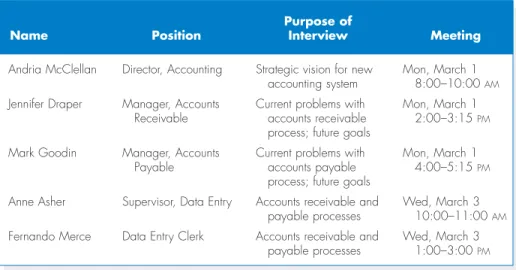
Selecting Interviewees The first step to interviewing is to create an interview schedulethat lists all of the people who will be interviewed, when, and for what purpose (see Figure 4-5). The schedule can be an informal list that is used to help set up meeting times, or a formal list that is incorporated into the workplan. The people who appear on the interview schedule are selected based on the analyst’s information needs. The project sponsor, key business users, and other members of the project team can help the analyst determine who in the organization can best provide important information about requirements. These people are listed on the interview schedule in the order in which they should be interviewed.
People at different levels of the organization will have different perspectives on the system, so it is important to include both managers who manage the processes and staff who actually perform the processes to gain both high-level and low-level perspectives on an issue. Also, the kinds of interview subjects that you need may change over time. For example, at the start of the project, the analyst has a limited understanding of the as-is business process. It is common to begin by
4A good book on interviewing is that by Brian James, The Systems Analysis Interview,Manchester: NCC
Blackwell, 1989.
Andria McClellan Director, Accounting Strategic vision for new Mon, March 1 accounting system 8:00–10:00 AM
Jennifer Draper Manager, Accounts Current problems with Mon, March 1 Receivable accounts receivable 2:00–3:15 PM
process; future goals
Mark Goodin Manager, Accounts Current problems with Mon, March 1 Payable accounts payable 4:00–5:15 PM
process; future goals
Anne Asher Supervisor, Data Entry Accounts receivable and Wed, March 3 payable processes 10:00–11:00 AM
Fernando Merce Data Entry Clerk Accounts receivable and Wed, March 3 payable processes 1:00–3:00 PM
Purpose of
Name Position Interview Meeting
FIGURE 4-5
interviewing one or two senior managers to get a strategic view, and then move to mid-level managers who can provide broad, overarching information about the business process and the expected role of the system being developed. Once the analyst has a good understanding of the “big picture,” lower-level managers and staff members can fill in the exact details of how the process works. Like most other things about systems analysis, this is an iterative process—starting with senior managers, moving to mid-level managers, then staff members, back to mid-level managers, and so on, depending upon what information is needed along the way.
It is quite common for the list of interviewees to grow, often by 50% to 75%. As you interview people, you likely will identify more information that is needed and additional people who can provide the information.
Designing Interview Questions There are three types of interview questions: closed-ended questions, open-closed-ended questions, and probing questions. Closed-ended questionsare those that require a specific answer. You can think of them as being similar to multiple choice or arithmetic questions on an exam (see Figure 4-6). Closed-ended questions are used when the analyst is looking for specific, precise
Closed-Ended Questions • How many telephone orders are received per day? • How do customers place orders?
• What informations is missing from the monthly sales report? Open-Ended Questions • What do you think about the current system?
• What are some of the problems you face on a daily basis? • What are some of the improvements you would like to see in a
new system? Probing Questions • Why?
• Can you give me an example?
•Can you explain that in a bit more detail?
Types of Questions Examples
In 1990, 1 led a consulting team for a major development project for the U.S. Army. The goal was to replace eight existing systems used on virtually every Army base across the United States. The as-is process and data models for these systems had been built, and our job was to identify improvement opportu-nities and develop to-be process models for each of the eight systems.
For the first system, we selected a group of mid-level managers (captains and majors) recommended by their commanders as being the experts in the system
under construction. These individuals were the first and second line managers of the business function. The indi-viduals were expert at managing the process, but did not know the exact details of how the process worked. The resulting to-be process model was very general and non-specific.
Alan Dennis
QUESTION
Suppose you were in charge of the project. Create an interview schedule the remaining seven projects.
4-D S
ELECTING THEW
RONGP
EOPLEIN ACTION
CONCEPTS
FIGURE 4-6
information (e.g., how many credit card requests are received per day). In general, precise questions are best. For example, rather than asking “Do you handle a lot of requests?” it is better to ask “How many requests do you process per day?”
Closed-ended questions enable analysts to control the interview and obtain the information they need. However, these types of questions don’t uncover whythe answer is the way it is, nor do they uncover information that the interviewer does not think to ask ahead of time.
Open-ended questionsare those that leave room for elaboration on the part of the interviewee. They are similar in many ways to essay questions that you might find on an exam (see Figure 4-6 for examples). Open-ended questions are designed to gather rich information and give the interviewee more control over the information that is revealed during the interview. Sometimes the information that the interviewee chooses to discuss uncovers information that is just as important as the answer (e.g., if the interviewee talks only about other departments when asked for problems, it may suggest that he or she is reluctant to admit his or her own problems).
The third type of question is the probing question. Probing questions follow-up on what has just been discussed in order to learn more, and they often are used when the interviewer is unclear about an interviewee’s answer. They encourage the interviewee to expand on or to confirm information from a previous response, and they are a signal that the interviewer is listening and interested in the topic under dis-cussion. Many beginning analysts are reluctant to use probing questions because they are afraid that the interviewee might be offended at being challenged or because they believe it shows that they didn’t understand what the interviewee said. When done politely, probing questions can be a powerful tool in requirements gathering.
In general, you should not ask questions about information that is readily available from other sources. For example, rather than asking what information is used to perform to a task, it is simpler to show the interviewee a form or report (see document analysis later) and ask what information on it is used. This helps focus the interviewee on the task, and saves time, because he or she does not need to describe the information detail—he or she just needs to point it out on the form or report.
No question type is better than another, and usually a combination of ques-tions is used during an interview. At the initial stage of an IS development project, the as-is process can be unclear, so the interview process begins with unstructured interviews, interviews that seek a broad and roughly defined set of information. In this case, the interviewer has a general sense of the information needed, but few close-ended questions to ask. These are the most challenging interviews to conduct because they require the interviewer to ask open-ended questions and probe for important information “on the fly.”
As the project progresses, the analyst comes to understand the business process much better, and he or she needs very specific information about how busi-ness processes are performed (e.g., exactly how a customer credit card is approved). At this time, the analyst conducts structured interviews, in which specific sets of questions are developed prior to the interviews. There usually are more close-ended questions in a structured interview than in the unstructured approach.
No matter what kind of interview is being conducted, interview questions must be organized into a logical sequence, so that the interview flows well. For example, when trying to gather information about the current business process, it can be useful to move in logical order through the process or from the most impor-tant issues to the least imporimpor-tant.
There are two fundamental approaches to organizing the interview questions: top-down or bottom-up; see Figure 4-7. With the top-down interview, the inter-viewer starts with broad, general issues and gradually works towards more specific ones. With the bottom-up interview, the interviewer starts with very specific ques-tions and moves to broad quesques-tions. In practice, analysts mix the two approaches, starting with broad general issues, moving to specific questions, and then back to general issues.
The top-down approach is an appropriate strategy for most interviews (it is certainly the most common approach). The top-down approach enables the intervie-wee to become accustomed to the topic before he or she needs to provide specifics. It also enables the interviewer to understand the issues before moving to the details because the interviewer may not have sufficient information at the start of the inter-view to ask very specific questions. Perhaps most importantly, the top-down approach enables the interviewee to raise a set of “big picture” issues before becom-ing enmeshed in details, so the interviewer is less likely to miss important issues.
One case in which the bottom-up strategy may be preferred is when the ana-lyst already has gathered a lot of information about issues and just needs to fill in some holes with details. Or, bottom-up may be appropriate if lower-level staff mem-bers are threatened or unable to answer high-level questions. For example, “How can we improve customer service?” may be too broad a question for a customer ser-vice clerk, whereas a specific question is readily answerable (e.g., “How can we speed up customer returns?”). In any event, all interviews should begin with non-controversial questions first, and then gradually move into more contentious issues after the interviewer has developed some rapport with the interviewee.
Preparing for the Interview It is important to prepare for the interview in the same way that you would prepare to give a presentation. You should have a gen-eral interview plan that lists the questions that you will ask in the appropriate order; anticipates possible answers and provides how you will follow up with them; and identifies segues between related topics. Confirm the areas in which the interviewee has knowledge so you do not ask questions that he or she cannot
High-level:very general How
can order processing be improved?
Medium-level:moderately How can we
specific reduce the number
of times that customers return items they’ve ordered?
Low-level:very specific How can we reduce the number
of errors in order processing (e.g., shipping the wrong products)?
FIGURE 4-7
Top-Down and Bottom-Up Questioning Strategies
Bottom-Up Top-Down
answer. Review the topic areas, the questions, and the interview plan, and clearly decide which have the greatest priority in case you run out of time.
In general, structured interviews with closed-ended questions take more time to prepare than unstructured interviews. So, some beginning analysts prefer unstructured interviews, thinking that they can “wing it.” This is very dangerous and often counterproductive, because any information not gathered in the first inter-view would require follow-up efforts, and most users do not like to be interinter-viewed repeatedly about the same issues.
Be sure to prepare the interviewee as well. When you schedule the interview, inform the interviewee of the reason for the interview and the areas you will be dis-cussing far enough in advance so that he or she has time to think about the issues and organize his or her thoughts. This is particularly important when you are an out-sider to the organization, and for lower-level employees who often are not asked for their opinions and who may be uncertain about why you are interviewing them.
Conducting the Interview When you start the interview, the first goal is to build rapport with the interviewee, so that he or she trusts you and is willing to tell you the whole truth, not just give the answers that he or she thinks you want. You should appear to be professional and an unbiased, independent seeker of infor-mation. The interview should start with an explanation of why you are there and why you have chosen to interview the person, and then move into your planned interview questions.
Interpersonal skills are those skills than enable you to develop rapport with others, and they are very important for interviewing. They help you to communicate with others effectively. Some people develop good interpersonal skills at an early age; they simply seem to know how to communicate and interact with others. Other people are less “lucky” and need to work hard to develop their skills.
Interpersonal skills, like most skills, can be learned. Here are some tips:
• Don’t worry, be happy.Happy people radiate
con-fidence and project their feelings on others. Try inter-viewing someone while smiling and then interinter-viewing someone else while frowning and see what happens!
• Pay attention. Pay attention to what the other
per-son is saying (which is harder than you might think). See how many times you catch yourself with your mind on something other than the conversation at hand.
• Summarize key points.At the end of each major
theme or idea that someone explains, you should
repeat the key points back to the speaker (e.g., “Let me make sure I understand. The key issues are…”). This demonstrates that you consider the information impor-tant—and also forces you to pay attention (you can’t repeat what you didn’t hear).
• Be succinct.When you speak, be succinct. The goal
in interviewing (and in much of life) is to learn, not to impress. The more you speak, the less time you give to others.
• Be honest.Answer all questions truthfully, and if you don’t know the answer, say so.
• Watch body language (yours and theirs).The
way a person sits or stands conveys much information. In general, a person who is interested in what you are saying sits or leans forward, makes eye contact, and often touches his or her face. A person leaning away from you or with an arm over the back of a chair is dis-interested. Crossed arms indicate defensiveness or uncertainty, while “steepling” (sitting with hands raised in front of the body with fingertips touching) indicates a feeling of superiority.
4-1 D
EVELOPINGI
NTERPERSONALS
KILLST I P PRACTICAL
It is critical to carefully record all the information that the interviewee pro-vides. In our experience, the best approach is to take careful notes—write down
everything the interviewee says, even if it does not appear immediately relevant. Don’t be afraid to ask the person to slow down or to pause while you write, because this is a clear indication that the interviewee’s information is important to you. One potentially controversial issue is whether or not to tape-record the interview. Recording ensures that you do not miss important points, but it can be intimidating for the interviewee. Most organizations have policies or generally accepted prac-tices about the recording of interviews, so find out what they are before you start an interview. If you are worried about missing information and cannot tape the inter-view, then bring along a second person to take detailed notes.
As the interview progresses, it is important that you understand the issues that are discussed. If you do not understand something, be sure to ask. Don’t be afraid to ask “dumb questions” because the only thing worse than appearing “dumb” is to be “dumb” by not understanding something. If you don’t understand something during the interview, you certainly won’t understand it afterward. Try to recognize and define jargon, and be sure to clarify jargon you do not understand. One good strategy to increase your understanding during an interview is to periodically sum-marize the key points that the interviewee is communicating. This avoids misun-derstandings and also demonstrates that you are listening.
Finally, be sure to separate facts from opinion. The interviewee may say, for example, “we process too many credit card requests.” This is an opinion, and it is useful to follow this up with a probing question requesting support for the statement (e.g., “Oh, how many do you process in a day?”). It is helpful to check the facts because any differences between the facts and the interviewee’s opinions can point out key areas for improvement. Suppose the interviewee complains about a high or increasing number of errors, but the logs show that errors have been decreasing. This suggests that errors are viewed as a very important problem that should be addressed by the new system, even if they are declining.
As the interview draws to a close, be sure to give the interviewee time to ask questions or provide information that he or she thinks is important but was not part of your interview plan. In most cases, the interviewee will have no additional con-cerns or information, but in some cases this will lead to unanticipated, but impor-tant information. Likewise, it can be useful to ask the interviewee if there are other people who should be interviewed. Make sure that the interview ends on time (if necessary, omit some topics or plan to schedule another interview).
As a last step in the interview, briefly explain what will happen next (see the next section). You don’t want to prematurely promise certain features in the new system or a specific delivery date, but you do want to reassure the interviewee that his or her time was well spent and very helpful to the project.
Post interview Follow-up After the interview is over, the analyst needs to prepare an interview report that describes the information from the interview (Figure 4-8). The report contains interview notes, information that was collected over the course of the interview and is summarized in a useful format. In general, the interview report should be written within 48 hours of the interview, because the longer you wait, the more likely you are to forget information.
Often, the interview report is sent to the interviewee with a request to read it and inform the analyst of clarifications or updates. Make sure the interviewee is convinced that you genuinely want his or her corrections to the report. Usually there are few changes, but the need for any significant changes suggests that a second
interview will be required. Never distribute someone’s information without prior approval.
Joint Application Development(JAD)
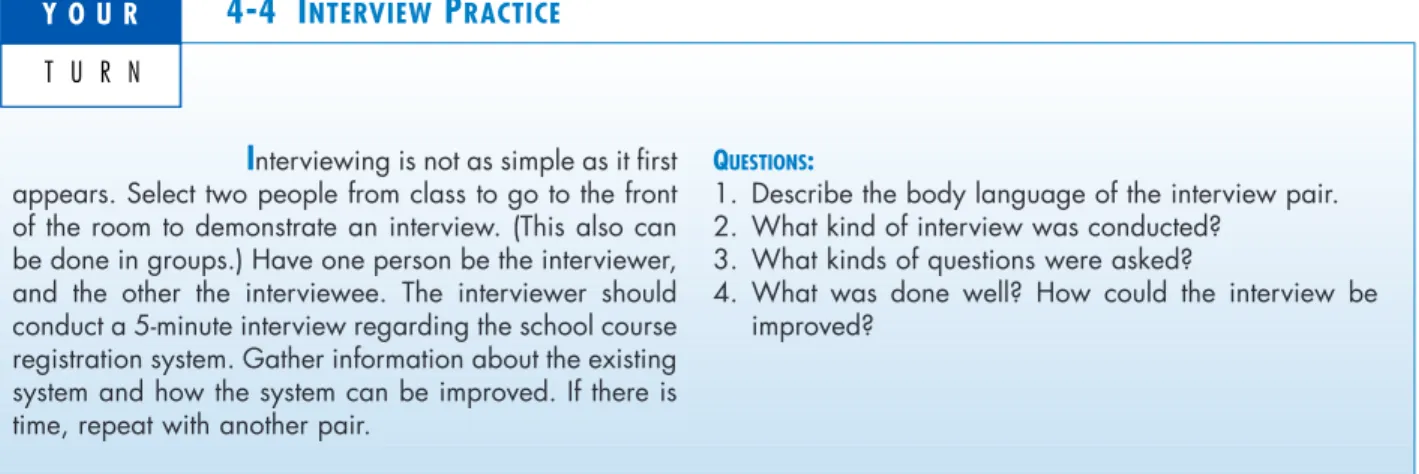
Joint application development(or JADas it is more commonly known) is an infor-mation gathering technique that allows the project team, users, and management to work together to identify requirements for the system. IBM developed the JAD tech-Interviewing is not as simple as it first
appears. Select two people from class to go to the front of the room to demonstrate an interview. (This also can be done in groups.) Have one person be the interviewer, and the other the interviewee. The interviewer should conduct a 5-minute interview regarding the school course registration system. Gather information about the existing system and how the system can be improved. If there is time, repeat with another pair.
QUESTIONS:
1. Describe the body language of the interview pair. 2. What kind of interview was conducted?
3. What kinds of questions were asked?
4. What was done well? How could the interview be improved?
4-4 I
NTERVIEWP
RACTICEY O U R
T U R N
Interview Notes Approved By: Linda Estey
Person Interviewed: Linda Estey, Director, Human Resources Interviewer: Barbara Wixom Purpose of Interview:
■Understand reports produced for Human Resources by the current system ■Determine information requirements for future system
Summary of Interview:
■Sample reports of all current HR reports are attached to this report. The information that is not used and missing information are noted on the reports.
■Two biggest problems with the current system are:
1. the data is too old (the HR Department needs information within 2 days of month end; currently information is provided to them after a 3-week delay)
2. the data is of poor quality (often reports must be reconciled with departmental HR database) ■The most common data errors found in the current system include incorrect job level information
and missing salary information.
Open Items:
■Get current employee roster report from Mary Skudrna (extension 4355) ■Verify calculations used to determine vacation time with Mary Skudrna.
■Schedule interview with Jim Wack (extension 2337) regarding the reasons for data quality problems.
Detailed Notes:See attached transcript. FIGURE 4-8