Implementing
a
Collaborative
Web
Platform
based
on
Transparent
Layers
Akihiro Sugiyama
∗, Yusuke Niwa
∗,
Shun Shiramatsu
∗, Tadachika Ozono
∗, Toramatsu Shintani
∗Abstract
We have developed a novel collaborative web platform that shares a part of one’s desktop. In the case of using a general desktop sharing software such as VNC and TeamViewer, all users interfere with each other on a shared desktop, resulting in disturbing user’s work. Prior work has proposed a common collaborative workspace, but there are problems with collaborative workspaces using desktop applications. The platform uses a part of user’s desktop as a collaborative workspace in consideration of interference to a user. To create the platform, we introduce a transparent layer with two aspects: visible- and event-transparency. The background of the transparent layer can be opaque. The transparent layer can forward received events to other layers as well as to other applications. The layer can interact with a user’s desktop, thus taking a screenshot of a user’s desktop and sharing the screen shot among other users. Furthermore, we have been developing a new web browser, Silhouette Web Browser, that consists of five transparent layers including existing desktop layers. The platform shares one’s desktop by using transparent layers, thus using one’s desktop as a collaborative workspace in consideration of interference to users. This paper describes the architecture and implementation of the proposed platform and its application.
Keywords: computer-supported collaborative work, transparent layer, desktop sharing
1
Introduction
We address issues of collaborative workspaces using multiple desktop applications. In the case of document editing, the author and corrector need to exchange PDF documents, TeX documents, Word documents, and so on. Despite the fact that users would prefer to share the contents more easily, they must currently use multiple communication tools. Solutions to this problem are now being widely discussed. One remedy is to implement a system that can be integrated into existing applications [1][3].
In this paper, we aim to implement a novel collaborative web platform that does not depend on a particular desktop application. To this end, we need to create an integrated framework of file, content, event, and screenshot sharing on one’s desktop. We introduce
∗ Nagoya Institute of Technology, Aichi, Japan
transparentlayersthathaveafundamentalfunctionforcollaborativeworkspaces. Further-more,wehavebeendevelopinganewwebbrowser,SilhouetteWebBrowser,thatenables seamlesscontent,screenshot,andfilesharingwithtransparentlayers.
Toimplementtheproposedsystem,weneedtoconsidertheinterferencetousers. The systemdisplayssuperimposedlayersonexistingdesktopapplication’swindows,thus hin-deringvisibilityandoperability.Therefore,wedesignatransparentlayerwithtwoaspects: visible- andevent-transparency. Inotherwords, the background ofthe transparentlayer canbeopaque.Thetransparentlayerscanforwardreceivedeventstootherlayersandother applications. Furthermore, weassume thatwe usethe system with variousdevicessuch asPCandtablet. Thereisissueabout layoutofweb contents. The layoutofcontentsis dependentonthedevice. Thesystemsharesthecontentsbasedonimage,thusholdingthe layoutofthecontents.
Wedescribeacollaborativeeditingsystemasanapplicationofoursystem.Inthis sys-tem, a teacher anda student share the student’s desktop aswell as documents andtheir annotations.Oneoftheadvantagesofthissystemisthatthestudentcanrestricta synchro-nizationareaofhisorherdesktopusingthetransparentlayers.Thestudentselectsaportion ofthedesktoptosharewiththeteacher. Theteachercanbrowsethestudent’sdesktopand addannotationstothedocument. Theannotationsareinstantlydisplayedonthestudent’s desktop.
Inthisstudy,wefirstdescribethetransparentlayerwiththetwoabove-mentioned as-pectsandthelayer’sfunctions. ThenwedescribetheSilhouetteWebBrowser.Finally,we describeanapplicationusingtheproposedbrowser.
2
Transparent
Layer
Inthissection, wedescribethetransparentlayerandits functions. Thetransparentlayer issimilar towindowsofexistingbrowsers. Unlike theexistingwindows,thetransparent layers cannot only display contentsbutalso interactbetween layersand cooperatewith thedesktop. Combininglayerfunctionsallowsuserstousea layerwitha newcombined function. One advantage of the layer is thatit canhave various shapes, e.g., rectangle, star,andcloud. Userscancreatelayerswithvariousshapestodisplaynoticeablecontents. Another advantageis its display level, e.g.,it can be displayedbetween fileicons anda desktop image. Layer dynamics(e.g., gravity) canbe represented using animation. For example,somegroupedlayersmovetogether.
Interestingly,layershavetwoaspects: visible-andevent-transparency. Layerscanbe configured for passing through transparency of background andmouse events, and win-dowleveltocontrolinterferencetothem. Asanexampleofcontrollingwhethertheypass throughevents,layersarecontrollableinregardtowhetheralayercanbecontrolledwitha mouse. Forinstance,theproposedbrowserenablesdesktopfusion: amixtureofadesktop andevent-transparentlayers.Thetransparentlayerofadesktopfusionappearstofadeinto thedesktop. Thelayerisdisplayedbetweenthefileiconsanddesktopimages. By control-lingthetransparencyofthebackground,thebrowsercandisplayalayersuperimposedon otherlayersandapplications. Forexample,additional informationcandisplayedon other layersandapplications. Moreover, layerscandynamicallychangewindowlevel. Insome situations,itispossibletodisplaythelayersatthetoporbackofthedesktop.
Layersare sharable amongusers. Moreover, a supported cooperative work environ-mentisfeasibleusinglayers. Therearethreetypesoflayer: pair-sharing,public-sharing,
and private-sharing. In addition, there is a web desktop shot (WDS) function. The WDS function takes a screenshot of the area that the layer overlaps. Users can restrict the screen-shot area by changing the layer area.
2.1 Sharing of Layers
We classify attributes of a layer in accordance with the range of users who share the layer: one for one, more than three, and an unspecified number, called the pair-sharing, private-sharing, and public-sharing layers, respectively. Users can configure the layer attributes and create the layer on all window levels. A pair-sharing layer is a private-sharing layer with only two users. To create a pair-sharing layer, a user sends an invitation to another user, with whom the pair-sharing layer is to be shared. Users can create a private-sharing layer on all window levels, assigning a token and name to one transparent layer to be used for authentication. For example, in the case of sharing a schedule in a group, group members can share the schedule among themselves by displaying the schedule on the desktop by using a private-sharing layer.
Users can create the public-sharing layer on their desktop. All users who run the Silhou-ette Web Browser can see the contents displayed on the layer by using the public-sharing layer. They can set whether the public-sharing layer is displayed or not. If they decide not to share the contents among all users, they can stop doing so.
Figure1:OverviewofinteractionwiththeSilhouetteWebBrowser.
2.2 InteractionbetweenLayers
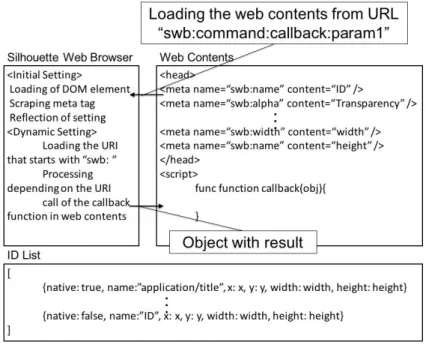
Fig.1showsanoverviewofinteractionwiththeSilhouetteWebBrowser.Inthebrowser, thelayerscaninteractwithwebcontentsusingURLScheme.Thelayerreadswebcontent specifiedby theuserwithaURLandscrapesmetatags intheHTML oftheweb content. Then,thelayerreflectssettingswritteninthemetatags.Theelementsofthemetatags
include name, transparency, desktop coordinates, width, and height. The ID list contains a set of desktop applications and transparent layers. All windows and transparent layers have anative property. If thenativeproperty of a window or layer is true, then it belongs to a desktop application.
Moreover, the settings of a layer can be changed dynamically by loading the URL that specifies swb:command:callback:param 1:param 2:···:param nchanging the settings of the layer. There arename, alpha, x, y, width, height,andwindowscommands for identifier, transparency, x-coordinate of the upper left, y-coordinate of the upper left, layer width, layer height, and the set of window identifiers.
In addition, one layer can interact with another. By loading the URL that specifies
swb:send:callback:a identifier of destination:data, the layer can send the data to the layer with the identifier. The layer that receives the data executes the callback function with the data.
2.3 Web Desktop Shot (WDS)
The WDS allows the user who runs the Silhouette Web Browser to share the desktop with another user using a layer. Users create layers with the same token and name. The WDS takes a screenshot of the desktop running the browser and sends the screenshot to a server. The another user browses the screenshot on the server to share the desktop. Users take a screenshot in three roles: sender, receiver, and free. The sender takes a screenshot and shares it with receivers. The receiver displays the sender’s screenshot on a layer and takes a screenshot of the sender’s desktop. The free user does not receive any screenshots.
The WDS takes a screenshot of a specified area in the desktop. The user can configure the size and coordinates of the layer to share the specified area. The WDS also takes a screenshot of the area that the layer overlaps. In other words, the user can share the part of the desktop that the user wants to share with other users.
Figure2:RangeselectionofdesktopsharingwiththeWebDesktopShot.
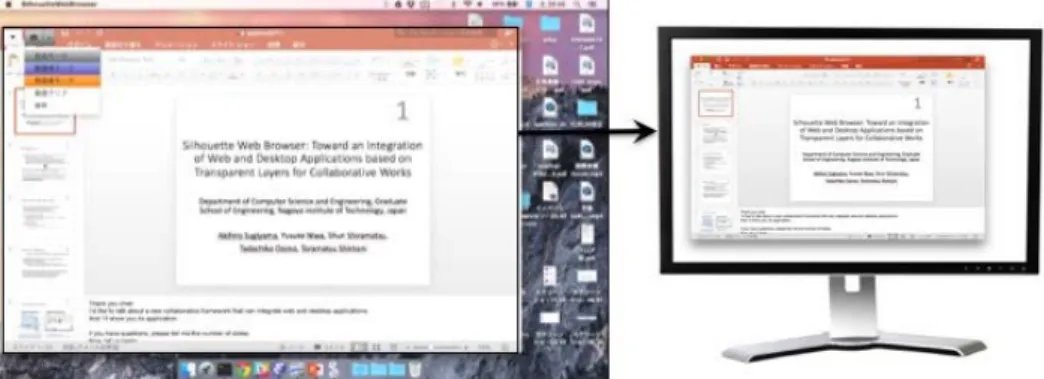
Fig.2 shows an example executionofa range selection ofdesktop sharing using the WDS.First,userscreatealayeroneachdesktopandinputthesametokenandnameofthe layer.Next,theydecidetheirroles.Then,thesenderdefinesarangeofthedesktopthathe orshewantstoshare.Tosharethedesktop,theuser superimposestheWDSonit(Fig. 2, left).Theysharethesender’sdesktopbyclickingthecameraicon.Thereceiverbrowsesthe screenshot with the layer (Fig. 2, right). In this case, the sender takes a screenshot of creatingdocumentandthescreenshotisdisplayedonthereceiver’sdesktop.
Using the WDS, the sender shares the desired area in the desktop. In contrast to existing remote desktop software, the sender can share a part of the desktop. Users share the desktop and can change the shared area easily, because the WDS shares the area on which the sender superimposes the WDS.
3
Silhouette Web Browser
The Silhouette Web Browser can display superimposed transparent windows. We call a window in the browser a transparent layer. The browser manages the layers, enabling in-teraction between layers. Moreover, combining layer functions allows the user to use more complex functions. As noted, we describe a novel collaborative web platform using the proposed browser. In this section, we explain a novel desktop structure of the browser and new layer model.
Figure3:ExecutionexampleoftheSilhouetteWebBrowser.
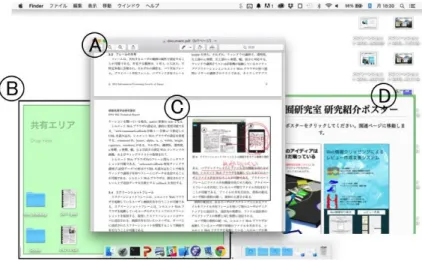
Fig. 3showsa browser execution. Thereis an existingPDFviewer (Fig. 3 A), and threelayers(Fig. 3B,C,D).Thelayeratthebackoftheiconsallowsuserstosharefiles (Fig. 3B).ThelayerhoversonthePDFvieweranddisplaysfeedbackfromanotheruserin thelayer(Fig. 3C)aswellaswebcontent(Fig. 3D).Userscanselectwhetherthelayers aredisplayedatthefrontorbackofthedesktop. Furthermore,userscanworktogetheron theuser’sdesktopbyusingthelayerthatcansharecontents.
WedescribethestructureofmultipletransparentlayersintheSilhouetteWebBrowser. Inotherwords,wedescribethenovellayermodelthataddsnewlayersusingthebrowserto anexistingdesktoplayerstructure.Themostsignificantaspectofdisplayingcontentswith the proposed browser is its focus on control of interference to users. For example, the contents can be displayed without obstructing the user’s work through minimal interference.However,contentcanalsobedisplayedbyinterferingwithitaggressively.We create this capability by introducing a five-layered structure. The browser changes the levelsofthelayersbyadjustingthedegreeofinterferenceintheuser’sactivity.Theoptimal levelofalayerdependsonitscontext.Forexample,contentisdisplayedintheforefrontof the desktop, when it needs to be noticed as soon as possible. However, content can be integratedwithadesktopwhenthecontentistobeshareddiscretely.
Figure4:Left:Overviewoflayermodel. Right:Layersonadesktop.
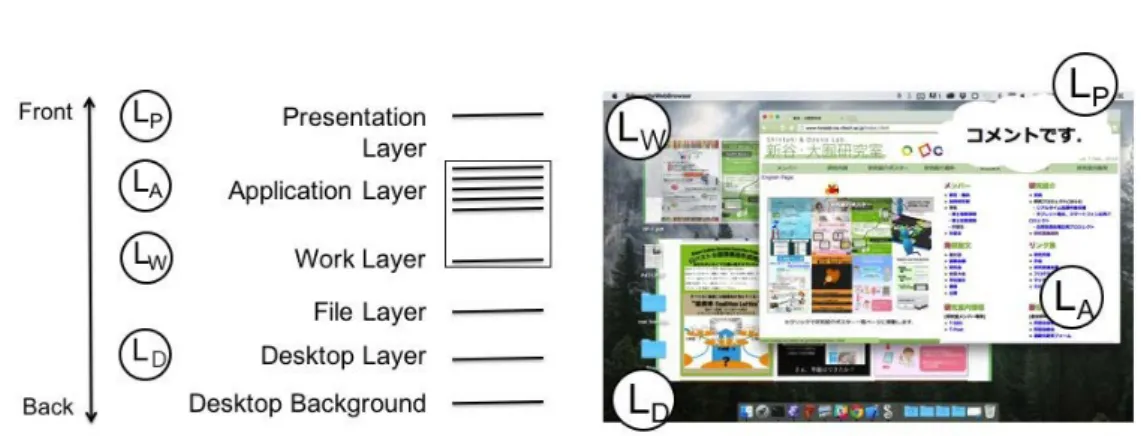
TheSilhouette WebBrowser containspresentation(Lp),application(LA),work (LW), file(LF),anddesktoplayers(LD)orderedfromthefronttothebackofthedesktop. Fig. 4
showsanoverviewofthelayermodel. Thethreelayers(LP,LW,andLD)areextralayers.
Userscanselectthewindowlevelcorrespondingtothecontentdisplayedonthelayersby addingnewlayerstotheexistinglayerstructure.
Alayerclosertothefrontismuchmorevisibleonthedesktop,whereasthatcloserto thebackislessvisibleonthedesktop(Fig. 4,left). InthecaseinFig.4,LP isdisplayedin
theforeground,andthedesktoppictureisdisplayedbehindit. Usersseethelayersontop ofoneanotherontheirdesktop(Fig. 4,right).
LP is thelayer displayedinthe foreground amongthe windowson thedesktop (Fig.
4, LP). Users canavoidoverlookingcontentsdisplayedon LP sinceLP canpassthrough mouseevents. UserscancontrolapplicationsonLAwhilebrowsingcontentsdisplayedon LP bypassingthroughthemouseeventsonLP. Ontheotherhand,anincreaseintheuse
ofLP will lead toadecline intheregionofthelayersbehindLP. Usersfrequently work onLA. AnincreaseinthecontentonLP willleadtoadeclineinsuchauser’sworkspace,
interferingwiththe user’swork. However, userscandecrease interferencebycontrolling transparencyofthebackgroundoflayers. Userscandisplaycontentsintheforegroundon thedesktopinanoptimalwaybycontrollingvisible-andevent-transparency.
LW is thelayer displayedbehindin LA, i.e., behindthe windowsthatthe user opens (Fig. 4,LW). Hence,LW candisplaycontentswithoutdisturbingtheuser’swork. LW can
passthroughmouseevents.Thelayerscancooperatewithexistingapplications. Therefore, bycreatingLW andusingthefunctionofsharingone’sdesktop,asdescribedabove,users cansharethedesktopforaspecificapplicationtocollaboratewithotherusers.
LDisthelayerdisplayedbehindalltheotherlayers,i.e.,LDdisplayscontentsasifthere isan integrationofLD andthedesktop picture (Fig. 4, LD). LDis displayedattheback
ofthedesktop. Therefore,LD candisplay contentswithout disturbinga user’swork. LD
isconfiguredatthewindow levelclosetothedesktoppicture. Userscanseethecontents easilydisplayedonLD byusing theshortcutkey toshowthedesktop. LD passesthrough mouseevents. Userswork on LA frequently. Therefore,LD candisplaycontentswithout
disturbingauser’swork. However,anincreaseinwindowsonLA willleadtoadeclinein
thespaceofLD.ItispreferablethatLDdisplayslessurgentcontents,similartoacalendar. Weintroduceafive-layeredstructuretochange alayer’swindowlevel corresponding tothecontentdisplayedonthelayers. Usingmultiplelayersenablesthebrowsertodisplay
contents in consideration of interference with users.
4
Evaluation
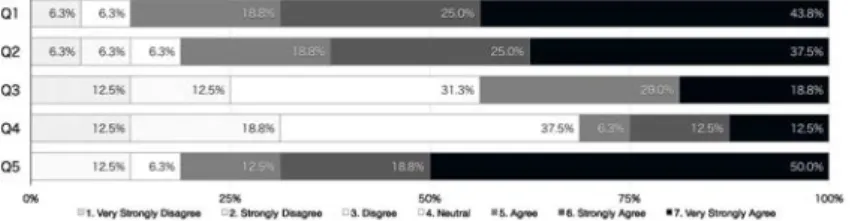
We conducted a programming contest as an evaluation of the Silhouette Web Browser in June 2015. On the programming contest, 19 participants had to develop each collaborative work support system with the Silhouette Web Browser for four weeks. The participants were consisting of 8 undergraduate students and 11 graduate students of our laboratory. 10 of 19 students were able to develop collaborative work support systems as Web applications without the Silhouette Web Browser. We conducted a questionnaire to the participants shown in Table 1, and we received 16 answers.
Table 1: Description of questionnaire. Description
Q1 Was“visible-transparency”function effective for your development? Q2 Was“event-transparency”function effective for your development? Q3 Was“Web Desktop Shot” function effective for your development? Q4 Was“sharing of layers”function effective for your development? Q5
Do you think that you cannot develop the same system for the same period without the Silhouette Web Browser?
The result of the questionnaire is shown in Fig. 5. More than 80% answers on Q1 and Q2 are agree, strongly agree, or very strongly agree. It means that visible-transparency and event-transparency function are effective for developments of collaborative work support systems. More than 80% answers on Q5 are agree, strongly agree, or very strongly agree. It means that the Silhouette Web Browser effectively supports the development of collab-orative work support systems. However, more than 40% and 20% answers of Q3 and Q4 respectively are agree, strongly agree, or very strongly agree. Therefore, we need further improvement of the sharing function.
Figure5:Resultofquestionnaire.
5
Application
For applicationof the Silhouette Web Browser, we describean editing system as an ex-ample of the proposed browser. The production of research documents such as papers or presentation documentsis fundamental toacademic practice. Multiple rolesoccur in
document editing, such as a teacher and a student. The student writes a document and has his or her document corrected by the teacher. In face-to-face document editing, they always share the same document and can verbally explain the details, gesture over documents, and write manually in real-time. In editing documents by using computers, they need to share the document when the student or teacher modifies it. For example, the teacher corrects a document and sends it to the student. Then the student modifies the document on the basic of the received document and sends the modified document to the teacher. This system shares a part of the student’s desktop, thus viewing the same document seamlessly on the desktop in real-time. Furthermore, the teacher can write manually by using the tablet.
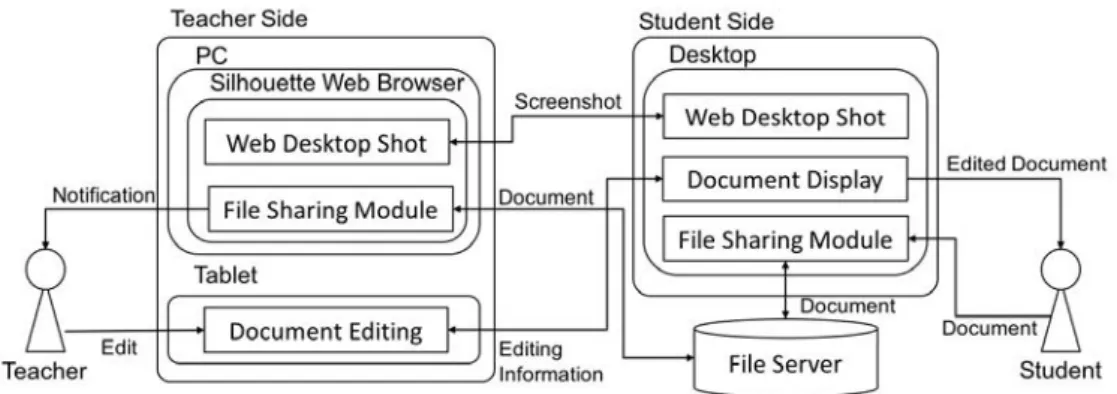
Figure 6: System architecture of editing system.
Fig. 6 shows an overview of the system architecture of the editing system. A student creates a document and shares it using the proposed browser on a PC. A teacher edits the document using a PC and tablet. The system on the PC uses the Web Desktop Shot functions in the proposed browser, whereas that on the tablet computer uses the editing module. The student and teacher can share the document with the File Sharing Module. When they share the document, the system announces the file has been uploaded by the student. The teacher browses the document and creates annotations in the shared document using the tablet computer. On the student’s desktop, the layer displays the annotations created by the teacher. The student takes a screenshot of the edited document with the WDS and shares the screenshot with the teacher.
Figure 7: Example of collaborative editor based on the Silhouette WebBrowser. Left: desktopofstudent’sPC.Right:theteachereditsadocumentusingatablet.
Fig. 7showsanexampleofeditingexecutionontheresearchdocument. The student writesaTeXdocumentandsharesitwiththeteacherusingGoogleDocs(Fig. 7,left).The
systemdisplaysthesharedfilesonthebackofthedesktop.Theteachereditsthedocument usingthetablet(Fig.7,right).First,thestudentsharesthedocumentfile.Next,theteacher opensthedocumentandcreatesannotationsusingthesystem. Theteachercanselectfour toolsforeditingthedocument:freehandmemo,textannotation,color,andfigure,including circle, rectangle,andstraight. Whentheteacheropensthedocument,thesystem displays theeditingdocumentonthestudent’sdesktop.
The teacher can freely create complex annotations such as a curve using freehand memo, butitisdifficult fortheteacher todraw astraight line. However, theteachercan createexact circle,rectangle, andstraight annotationsusing figureannotationsandcreate smaller characters than freehand memo annotations using text annotations. The annota-tionscreatedbytheteacheraredisplayedonthelayer. Inotherwords,theSilhouetteWeb Browseroverlaystheannotationsonthestudent’sdesktop. Thissystemhelpsedita docu-mentdirectlyonthedesktopwhentheteachereditsthedocument,anditenablesthestudent tousefamiliarapplications.
6
Related
Works
Collaborativeworkspacesaresharedtofacilitateawarenessfortheremoteuser[8][9].Tracs isasystemthatusesdual-sidedsee-throughdisplaysthroughwhichausercancontrolthe transparencyofindividualareas.Tracsallowsuserstocollaboratetoresolveissues regard-ingpersonalprivacy,screencontentprivacy,andvisualinterference. A3D-Board addsto thevirtual3Dembodimentofaremoteuseronremotecollaborativeworkspaces.By blend-ingthefront-facing3Dembodimentofaremotecollaboratorwiththesharedworkspace,an illusioniscreatedasiftheobserverwerelookingthroughthetransparentwhiteboardinto the remote user’sroom. Inthe caseofusing transparentcontents, itis importanttotake rivalryintoaccount[10].
Anotherstudyonfacilitatingmoreimmersiveinteractionwiththeremoteenvironment ingeneraldevelopeda fullyfunctional systemformobileremote collaboration. Ashared visualinformationhelpscollaboratorsunderstandthecurrentstateoftheirtaskandenables themtocommunicateandgroundtheirconversations[5].Theremoteusercancommunicate viaspatialannotationsthatareimmediatelyvisibletothelocaluser[12]. RichReview[2]is asystemforcreatingannotations onthefrontofdigitaldocumentsusingfreeforminking, voicefornarration,anddeicticgesturesinsupportofvoice.
Priorworkhascreatedtoolsbyintegratingintoanexistingapplication. InterTwine[1] is a system forlinking information regarding search history inweb browsers with infor-mation regardingapplicationusage,helpinga usertore-findinformation inboth applica-tions. Brandtetal. [3]hasproposedaWebsearchinterfaceintegratedintotheAdobeFlex Builderdevelopmentenvironment. Pongnumkuletal.’sPauseandPlaysystem[4] demon-strateshowa3Dmodelingapplicationcanworktogetherwithavideoplayer.Thissystem automatically pausesand playsthevideo by detectingimportantevents in it andlinking themwithcorrespondingevents inthe targetapplication. Incontrasttotherelatedwork, theSilhouetteWebBrowsercreatesacollaborativeworkspaceonauser’sdesktop. Users can work in theirfavorite environments. In otherwords, users canuse familiardesktop applicationsforcollaborationwork.Userscancontrolthetransparencyandwindowlevels ofthelayerstoavoidinterferenceandrivalryonthedesktop.
Theproposedbrowserisalsoinspiredinpartbypairprogramming[11],inwhichtwo programmersworkinthesameworkspace,onewritingcode,whiletheotherwatchesand
reviews the typed code. The two programmers typically work on the same project. Pair Research [7] is a kind of interaction within a research group in which group members are assigned as pairs each week to work together on each other’s projects. Pair Research motivates participants, helps them learn about their colleagues, and makes opportunities for further collaboration. The browser differs in that it is applicable to not only programming but also other research tasks such as creating presentation materials and writing papers without any need for partners to work in the same workspace.
7
Conclusion
We have developed a web platform for collaborative work that shares a part of a user’s desktop in the consideration of interference to a user. The core innovation is transparent layers to share a part of one’s desktop and control interference to users. The transparent layers have two features: First, the background of the transparent layer can be opaque. Second, the transparent layer can forward received events to other layers as well as to other applications. Users can share the layers in three modalities: one for one, more than three, and an unspecified number. A layer can interact with web contents or another layer using a URL Scheme. Transparent layers allows users to use their desktop as a collaborative workspace. We believe that these features can help users to collaborate with other users.
Furthermore, we have been developing the Silhouette Web Browser, a WebKit-based web browser that consists of five transparent layers: presentation, application, work, file, and desktop layers. The user can change the depth level of the layers in accordance with the contents to be displayed. The browser enables seamless content, screenshot, and file sharing among users by using transparent layers.
For an application of the Silhouette Web Browser, we described an editing system. This system shares a part of a student’s desktop, sharing the document and annotations on the student’s desktop in real-time. The Silhouette Web Browser overlays the layers displaying the annotations and the document on the student’s desktop. This system helps edit a document directly on the student’s desktop when the teacher edits the document.
The student selects a region that he or she wants to edit using the WDS. The teacher browses and edits the region using a tablet computer. The annotations that the teacher writes are displayed on the student’s desktop. Therefore, the student can edit documents on his or her desktop by using familiar desktop applications.
Acknowledgments
This work was supported in part by JSPS KAKENHI Grant Number 15K00422, 25870321.
References
[1] Fourney, A. et al., “InterTwine: creating interapplication information scent to support coordinated use of software,” Proc. of the 27th annual ACM symposium on User inter-face software and technology, 2014, pp. 429-438.
[2] Yoon, D. et al.,“RichReview: blending ink, speech, and gesture to support collabora-tive document review,” Proc. of the 27th annual ACM symposium on User interface software and technology, 2014, pp. 481-490.
[3] Brandt, J. et al., “Example-centric programming: integrating web search into the devel-opment environment,” Proc. of the SIGCHI Conference on Human Factors in Comput-ing Systems, 2010, pp. 513-522.
[4] Pongnumkul, Suporn, et al., “Pause-and-play: automatically linking screencast video tutorials with applications,” Proc. of the 24th annual ACM symposium on User interface software and technology, 2011, pp. 135-144.
[5] Gergle, Darren, et al., “Action as language in a shared visual space.” Proc. of the 2004 ACM conference on Computer supported cooperative work, 2004, pp. 487-496. [6] Amores, J. et al., “ShowMe: A Remote Collaboration System that Supports
Immer-sive Gestural Communication,” Proc. of the 33rd Annual ACM Conference Extended Abstracts on Human Factors in Computing Systems, 2015, pp. 1343-1348.
[7] Miller, R. C., et al., “Pair research: matching people for collaboration, learning, and productivity”, In Proc. of the 17th ACM conference on Computer supported cooperative work & social computing, 2014, pp. 1043-1048.
[8] Lindlbauer, D., et al., “Tracs: transparency-control for see-through displays”, In Proc. of the 27th annual ACM symposium on User interface software and technology, 2014, pp. 657-661.
[9] Zillner, J., et al., “3D-board: a whole-body remote collaborative whiteboard”, In Proc. of the 27th annual ACM symposium on User interface software and technology, 2014, pp. 471-479.
[10] Laramee, R. S., et al., “Rivalry and interference with a head-mounted display”, ACM Transactions on Computer-Human Interaction, 9(3), 2002, pp. 238-251.
[11] Beck, Kent. “Extreme programming explained: embrace change”, Addison-Wesley Professional, 2000.
[12] Gauglitz, S., et al., “World-stabilized annotations and virtual scene navigation for remote collaboration”, In Proc. of the 27th annual ACM symposium on User interface software and technology, 2014, pp. 449-459.