© School of Engineering, Taylor’s University
INTEGRATION OF SCREENCAST VIDEO THROUGH QR CODE:
AN EFFECTIVE LEARNING MATERIAL FOR m-LEARNING
FARIDAH HANIM YAHYA1,*, HAFIZA ABAS2, RAHMAH LOB YUSSOF31
Department of Educational Technology, Faculty of Human Development, Universiti Pendidikan Sultan Idris, 35900 Tanjung Malim, Malaysia
2
Advanced Informatics School, Universiti Teknologi Malaysia, 54100 Kuala Lumpur, Malaysia 3
Faculty of Computer & Mathematical Sciences, Universiti Teknologi Mara Cawangan Pahang, Kampus Raub, 27600 Raub, Pahang, Malaysia
*Corresponding Author: [email protected]
Abstract
This study aimed to evaluate the effectiveness of online screencast video integration through the Quick Response code (QR code) as mobile learning (m-learning). In the flipped classroom, the QR code is distributed to the students to access the screencast video as a means of disseminating lecture notes through their mobile devices. A total of 19 in-service teachers from Technical Colleges, Teacher Training Institute participated in the study. Through this QR code, students can access the learning materials before they come to class. Next, in the classroom, the lecturer will engage students in collaborative learning activities. Thus, in this paper, the researchers discuss about usability testing using a five-point Likert scale, through a questionnaire consisting of the following four constructs: learnability, efficiency, attitude and flexibility. Results from this study showed that the highest mean is efficiency. Thus, we can conclude that through the integration of video screencast by scanning the QR code, can be a potential tool to support the use of m-learning, and also support the blended learning.
Keywords: Online screencast video, QR code, Flipped classroom, m-Learning, Usability study.
1.
Introduction
Blended learning is highlighted by Ministry of Education (MOE) in Blueprint 2013-2025 [1] as a teaching approach that integrates ICT in teaching and learning process. Besides that, flipped classroom model is also being emphasized as a
Abbreviations
CAD Computer Aided Design
ISO International Standards Organization m-learning Mobile learning
MOE Ministry of Education QR code Quick Response code
QUIS Questionnaire for User Interface Satisfaction SVOR Screencast Video Online Repository
TCTEI Technical Campus; Teacher Education Institute TVET Technical and Vocational Education and Training
teaching model that engages students in their learning [1]. Thus, teaching materials that in line with these are needed for teachers, including those who are teaching Technical and Vocational Education and Training (TVET). According to Kotsik [2], the integration of ICTs into TVET could be achieved, when the following factors are not neglected: strategic readiness, pedagogical readiness, organizational readiness and technical readiness. They described pedagogical readiness as the fit between ICTs and current teaching and learning practice. However, Saud et al. [3] reported that some of the drawbacks for the effectiveness of integration of ICTs in TVET. They claimed that teachers do not have time in the preparation of teaching materials and they do not have enough knowledge and skills for the presentation of advanced ICT teaching materials. Thus, teaching materials using the application of ICT which incorporates with teaching and learning practices in TVET are needed. Besides that, Saud et al. [4] suggested adequate planning, and management of ICT resources are recommended to ensure the effectiveness ICTs integration into TVET.
Therefore, planning is a crucial factor to be considered when implementing ICT in teaching and learning process. In a flipped classroom setting, students review lectures online prior to the class session and in class they spend time working on problems or exercise [5]. In order to do that, teachers should select the best teaching material that supports this teaching model. Screencast video is a step-by-step video tutorial which is created by a special software to record the
movement of a pointer on the computer screen [6]. In contrast, it is also known as lecture captures, which are defined as technology involves audio only, or audio combines with video or other media such as PowerPoint
slides and document camera images [7-9]. McDermott and Clark [10] discovered that screencast video is an effective instruction that determine the successful of implementing flipped classroom in teaching. These findings are supported by the findings of Talbert [11] and Love et al. [12] which showed that the screencast video is a vital factor to ensure the success of conducting flipped classroom in classroom. Meanwhile, Billings et al. [6] claimed that the use of screencast video is becoming a pertinent teaching strategy. Thus, screencast video is a potential teaching material that enhances teaching and learning process.
Mobile learning (m-learning) is a popular teaching approach nowadays for teachers and students. m-learning emerges due to the capabilities of handheld devices to support students’ engagement with outdoor activities [13]. Gikas and Grant [14] and Kearney et al. [15] also claimed that the emerging of technologies has influenced students and educators in choosing an appropriate mode of teaching
and learning. Meanwhile, in TVET, a study has been done by Hassan et al. [16] which showed that the effect of the integration of mobile technology and Computer Aided Design (CAD) technology help the students to produce quality product of architectural works. However, students are having problems when using smartphones such as difficulty to type a long web address when using mobile phones due to the size of the screen and fail to memorize web addresses for the given websites [17]. Therefore, quick response (QR) code is a medium to embed m-learning inside and outside classroom [18]. Similar results were also reported by Bressler and Bodzin [19] and Hwang et al. [17].
Hence, screencast videos should be integrated with QR code in order to assist teachers in flipped classroom. Students can watch the screencast videos anywhere at any time using their mobile devices. The QR code is considered as a mean of sending the “lecture” home and permits teacher/lecturer to guide students in class as they work on special skills [20]. However, not much research has been done on integration of screencast video online through QR code, including for TVET. Hence, this paper aims to evaluate the effectiveness of the integration of screencast video online through QR code as a teaching material for m-learning. The initial idea was to use QR Codes to link to these resources for viewing on mobile devices at the point of use.
2.
Background of the Studies
2.1.
Screencast video online
Screencast videos can be produced by software such as Jing, Camtasia Studio and Screencast-O-Matic. Special visual effects or cues (such as Callouts, Zoom-n-pan and Screen Draw) can be embedded in the screencast video to scaffold students in learning new concepts on their own [8, 9]. The importance of screencast video is supported by the findings of Özdemir [21] and Tisdell and Loch [22] that claimed that the screencast video helped to reduce cognitive load. In addition, West and Turner [23] also reported that the screencast video can help teachers enhance their assessment of students. Furthermore, Green et al. [24] found out that the screencast video promotes self-efficacy among students. Hence, the screencast video had benefited to both students and lecturers [7].
On the other hand, Mestre [25] discovered that a web-based tutorial using static web page with screen shots were better than screencast videos. Mestre conducted a study to determine whether students performed better after working through a screencast library video tutorial or a web-based tutorial with screenshots. This study involved students from diverse backgrounds and learning styles. The results of this study indicated that across all learning preferences, students performed much better in recreating tasks when they used a static web page with screen shots than they did after viewing a screen casting tutorial.
However, many studies had shown that screencast video had succeeded to scaffold students in their learning. These videos can assist users in learning new software such as object-oriented program [26], computing software [27] and Flash animation software [28]. Screencast video also capable to assist users in learning systems or websites such as online library instructions [29]. Moreover, the screencast videos also scaffold university students to comprehend lecture materials in various fields. The findings of Trisdell and Loch [22] supported
these findings in mathematics courses. Similar results were reported by Love et al. [12] and Carney et al. [30]. Furthermore, Dunn et al. [31] also indicated that the videos assisted students in learning statistics while Pickering [32] in anatomy drawing for medical students. Besides that, McDermott and Clark [10] also discovered that the videos helped engineering students in learning electrical machinery. Moreover, Brame [33] claimed that the videos had assisted students in learning biology. Similarly, a study showed that these screencast online videos were also effective students in elementary schools for them to learn mathematics [34]. Thus, screencast videos are used effectively at university level and also in schools.
Various learning tools can be embedded in the screencast video to enrich the process of learning. The findings of West and Turner [23] supported these findings on video feedback. They conducted a study about student perceptions of both written and video feedback. In this study, students were provided with online video feedback in the form of individualized video screencasts with accompanying narration. The findings showed that 61% of 299 students preferred video feedback while 21% prefer written feedback. Meanwhile, Tisdell and Loch [22] discussed the effectiveness of using closed captions in the screencast video online. The findings showed that 98% of 421 students broadly agree that captions are useful. It is clear that students believe closed captions form an effective tool in the learning process. Furthermore, Mohamad Ali et al. [28] also discovered that screencast video online with narration can enhance learning performance. They conducted a pre-test post-test experimental design involving two different groups of 45 students. Results suggested that students in the instructional screencast with narration strategy obtained better mean scores than students in the instructional screencast without narration strategy.
2.2.
QR Code
QR code has been around for about 20 years. Denso Wave, Inc, created technology in 1994 as a method for managing the inventory of Toyota vehicle parts in Japan. Denso chose not to exercise the trademark of the technology, which led to QR code technology being used throughout the world. Data can be stored in this code both horizontally and vertically. Hence, the amount of information that can be stored in the QR code is greater than the conventional bar code. The data can contain an URL, telephone numbers and text. The code is free to be produced and simple to use. It can be scanned with camera found on most mobile phone.
Studies had shown the usefulness of QR code in teaching and learning process. Ali et al. [18] investigated the integration of QR code in classroom activities among pre-services teachers in United Arab Emirates. Results suggested that the preservice teachers perceived QR codes as an easy and useful application to support learning activities. They also demonstrated an overall positive attitude and intention to use this application in the future. Their attitude toward the integration of QR codes was affected by only one factor, which was usefulness. Leone and Leo [35] also claimed that QR code improved students’ language skills in listening and reading comprehension. The findings of Leone and Leo [35] are in line with the findings of Chen and Choi [36]. Chen and Choi [36] did a study of the combination of online digital materials and textbook with embedded 2D
barcodes. They found out that this teaching method had assisted students in learning history and practicing history inquiry skills. Furthermore, studies have also shown that QR code supported ubiquitous learning [13, 37].
3.
Methodology
The research design is a survey research. There were 19 in-service teachers from Technical Campus; Teacher Education Institute (TCTEI) participated in the study, from Center of GIATMARA. The organization is a non-profit educational institution in Malaysia that provides technical and vocational skills training to youths in rural areas and in towns. The objective of the organization is to enable them in acquiring skills as preparation to become skilled workforce and technical entrepreneurs in meeting the needs of the industry and needs of economic development as well as entrepreneurship within local areas and in the country. The teachers represented the population of the total participants in the course.
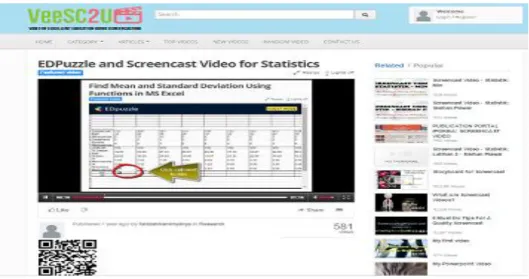
According to Nielsen [38], the minimum sample for usability test is five. The teachers were compelled to take Islamic Studies curriculum in order to fulfil the requirement to get their Diploma in Education. The screencast videos are recorded which presentations of a lecturer’s note. We proposed Screencast Video Online Repository (SVOR), which enables students to access screencast videos by utilizing 2D barcode as shown in Fig. 1. The 2D barcode for all videos in SVOR automatically created by the website. Therefore, users can download the videos easily which can be accessed at www.camtasia2u.com. Related to the matter, the authors chose Camtasia Studio software to produce the videos due to the available editing tools such visual effects.
Fig. 1. Interface for SVOR.
In this study, the QR codes (as shown in Fig. 2) are printed with notes that are given by the lecturer as handouts. Printed QR codes were distributed to students before coming to class.
Fig. 2. Sample of QR codes for screencast video online.
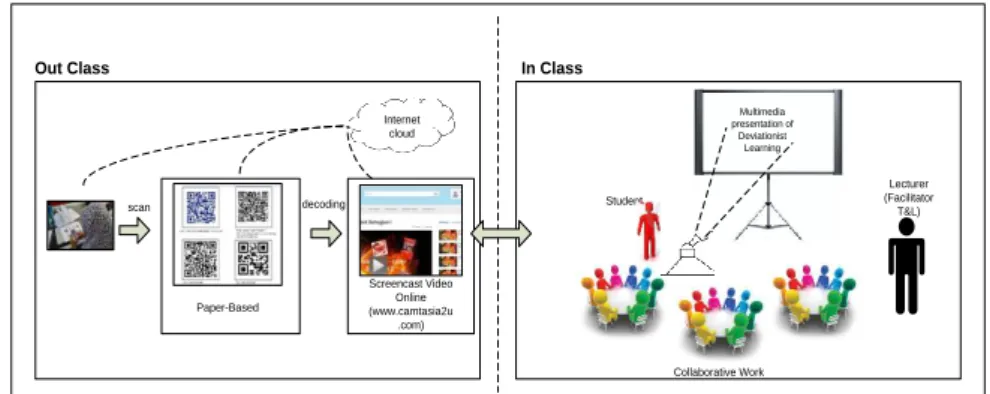
A pedagogical model which is called Flipped Classroom Quick Response Code (FC-QR Code) is designed as shown in Fig. 3. The lecturer will post questions about the videos and the students will discuss in their groups and present their ideas in class. Usability questionnaire is distribution right after they had finished their presentation. A general definition of usability can be found in the International Standards Organization's "Ergonomics of Human System Interaction Part 11: Guidance on Usability" [39], which defines usability as the "extent to which a product can be used by specified users to achieve specified goals with effectiveness, efficiency and satisfaction in a specified context of use". There are many studies conducted for usability such as evaluating online network [9] and online publishing software which is related to consumers’ acceptance or intention of product purchase [40]. In this study, the usability is defined as users’ acceptance of screencast video online with QR code. In order to do that, four attributes of usability that had been chosen: learnability, efficiency, flexibility and attitude. Learnability is to determine whether the screencast video is easy to learn and use for beginners, whereas efficiency is focusing on high productivity such as a time factor. Meanwhile flexibility is to study if the screencast video is suitable for all types of students and attitude is to test users’ attitudes towards screencast video. The questionnaire for this study is referred to QUIS (Questionnaire for User Interface Satisfaction), developed by Chin et al. [41].
Out Class In Class
Collaborative Work decoding scan Screencast Video Online (www.camtasia2u .com) Multimedia presentation of Deviationist Learning Student Lecturer (Facilitator T&L) Internet cloud Paper-Based
Fig. 3. FC-QR code model.
4.
Results and Discussion
The findings focused on the in-service teachers’ perception on the use of printed QR code and screencast video online as a learning tool in learning Islamic Studies. The usable data are processed in SPSS 22.0. Hence, descriptive statistics is used throughout the process of the data collection that involved the mode
(frequency), percentage, mean and standard deviation in order to identify the students’ perception level on the use of printed QR code and screencast video online as a learning tool in the classroom. 13 (68.4 percent) of the participants were male, while 6 (31.6 percent) were female. 62.2 percent of them are diploma holders, while 37.8 percent of them are degree holders.
4.1.
The learnability of screencast video and QR code
The result of the descriptive analysis is shown in Table 1.Table 1. The level of learnability towards using screencast video and QR code.
Item SD D M A SA Mean SDiv Interp.
Screencast video online that I access using the QR code, help me to learn new concepts/ skills. - - 1 (5.3%) 12 (63.2%) 6 (31.5%) 4.26 0.56 High Screencast video online that I access using the QR code, can provide information in a format that makes it easy to learn. - - 1 (5.2%) 13 (68.5%) 5 (26.3%) 4.16 0.69 High I am responsible for my own learning when I am using the QR code to access the website for video tutorial online - - 3 (15.75%) 13 (68.5%) 3 (15.75%) 4.00 0.58 High I can control the screencast video online that I access using QR code - (10.5%) 2 (10.5%) 2 (68.5%) 13 (10.5%) 2 3.79 0.56 High
Table 1 shows that the highest mean of the item was most teachers believed that screencast video online that they had accessed using the QR Code, helped them to learn new concepts/ skills (m = 4.26). In terms of its frequency and percentage, it was clearly demonstrated that 1 student (5.3%) stated for uncertain, 12 students (63.2%) were agree and 6 students (31.5%) were strongly agree of using screencast video online and QR code application. Meanwhile, the lowest mean of the item was most teachers believed that they can control the video tutorial online that they had accessed using QR code. It showed that 2 students (10.5%) stated disagree, 2 students (10.5%) stated uncertain, 13 students (68.5%) were agree and 2 students (10.5%) stated to strongly agree. Overall, it can be
concluded that the students’ learnability towards screencast video and QR code were rated at the highest level (mean = 4.05).
4.2.
The efficiency of screencast video and QR code
The result of the descriptive analysis is shown in Table 2.Table 2. The level of efficiency towards using screencast video and QR code.
Item SD D M A SA Mean SDiv Interp.
Screencast video that I access using the QR code, meet my goal when I use it. - - 6 (31.5%) 11 (58.0%) 2 (10.5%) 3.79 0.63 High Screencast video that I
access using the QR code clearly shows why it is useful for me to learn this material. - - 1 (5.3%) 13 (68.4%) 5 (26.3%) 4.21 0.54 High
I know how many concepts / skills that I've learned after using screencast video that I access using a QR code.
- - 1 (5.3%) 12 (63.2%) 6 (31.5%) 4.26 0.56 High Screencast video that I
access using the QR codes can be used to solve assignment for group work - - 5 (26.3%) 9 (47.4%) 5 (26.3%) 4.00 0.75 High
Table 2 shows that the highest mean of the item was most teachers believed that they knew how many concepts/skills that they had learned after using video tutorials that they had accessed using a QR code (m = 4.26). In terms of its frequency and percentage, it was clearly demonstrated that 1 student (5.3%) stated for uncertain, 12 students (63.2%) were agreed and 6 students (31.5%) were strongly agreed about using screencast video online and QR code application. Meanwhile, the lowest mean of the item was most teachers believed that the screencast video that they had accessed using QR code had met their goal when they used it. It showed that 6 students (31.5%) stated uncertain, 11 students (58.0%) were agreed and 2 students (10.5%) stated to strongly agree. Overall, it can be concluded that the students’ efficiency towards screencast video and QR code were rated at the highest level (mean = 4.07).
4.3.
The students’ attitude of using screencast video and QR code
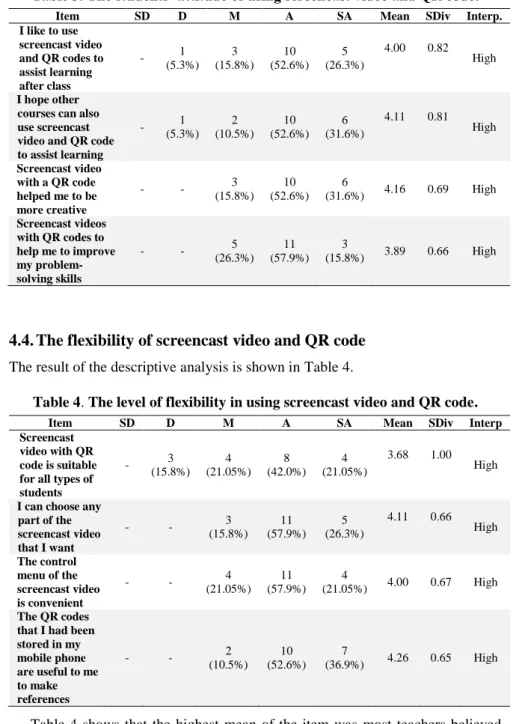
The result of the descriptive analysis is shown in Table 3. Table 3 shows that the highest mean of the item was most teachers believed that screencast video with QR code helped them to be more creative (m = 4.16). In terms of its frequency and percentage, it was clearly demonstrated that 3 students (15.8%) stated for uncertain, 10 students (52.6%) were agree and 6 students (31.6%) were strongly agreed about using screencast video online and QR code application. Meanwhile, the lowest mean of the item was most teachers believed that the screencast video that they had accessed using QR code had helped them to improve theirproblem-solving skills. It showed that 5 students (26.5%) stated uncertain, 11 students (57.9%) were agree and 3 students (15.8%) stated for strongly agree. Overall, it can be concluded that the students’ flexibility towards screencast video and QR code were rated at the highest level (mean = 4.04).
Table 3. The students’ attitude of using screencast video and QR code.
Item SD D M A SA Mean SDiv Interp.
I like to use screencast video and QR codes to assist learning after class - 1 (5.3%) 3 (15.8%) 10 (52.6%) 5 (26.3%) 4.00 0.82 High I hope other courses can also use screencast video and QR code to assist learning - 1 (5.3%) 2 (10.5%) 10 (52.6%) 6 (31.6%) 4.11 0.81 High Screencast video with a QR code helped me to be more creative - - 3 (15.8%) 10 (52.6%) 6 (31.6%) 4.16 0.69 High Screencast videos with QR codes to help me to improve my problem-solving skills - - (26.3%) 5 (57.9%) 11 (15.8%) 3 3.89 0.66 High
4.4.
The flexibility of screencast video and QR code
The result of the descriptive analysis is shown in Table 4.Table 4. The level of flexibility in using screencast video and QR code.
Item SD D M A SA Mean SDiv Interp
Screencast video with QR code is suitable for all types of students - 3 (15.8%) 4 (21.05%) 8 (42.0%) 4 (21.05%) 3.68 1.00 High
I can choose any part of the screencast video that I want - - 3 (15.8%) 11 (57.9%) 5 (26.3%) 4.11 0.66 High The control menu of the screencast video is convenient - - 4 (21.05%) 11 (57.9%) 4 (21.05%) 4.00 0.67 High The QR codes
that I had been stored in my mobile phone are useful to me to make references - - 2 (10.5%) 10 (52.6%) 7 (36.9%) 4.26 0.65 High
Table 4 shows that the highest mean of the item was most teachers believed that the QR codes that they had been stored in their mobile phone were useful to them to make references (m = 4.26). In terms of its frequency and percentage, it
was clearly demonstrated that 2 students (10.5%) stated for uncertain, 10 students (52.6%) were agree and 7 students (36.9%) were strongly agree of using screencast video online and QR code application. Meanwhile, the lowest mean of the item was most teachers believed that the screencast video with QR code is suitable for all types of students. It showed that three students (15.8%) stated disagree, 4 students (21.05%) stated uncertain, 8 students (42.0%) stated agree and 4 students (21.05%) stated for strongly agree. Overall, it can be concluded that the students’ attitude towards screencast video and QR code were rated at the highest level (mean = 4.01).
Overall, the final findings demonstrated that the level of learnability, efficiency, flexibility and attitute towards screencast video and QR code were all at the highest level. The highest mean of all the constructs is 4.07 that represents ‘Efficiency’. It is confirmed that the use of screencast video and QR code in Islamic Studies among the GIATMARA teachers has been highly used and significant for future use as it does help the teachers to enhance their learning.
5.
Conclusions
The purpose of the current study was to examine the effectiveness of the integration of printed quick response (QR) code and online screencast video as a learning tool for m-learning. This study has shown that the combination of traditional paper-based learning material with a digital one in mobile learning environment has a good potential to be an effective mode of teaching. Therefore, it can be recommended as a teaching material for TVET. Thus, the Ministry of Education (MOE) should take initiative to conduct training to teachers on how to produce ‘lecture capture’ using screencast technique. Besides that, the concept of QR code should be included in the training to engage teachers with m-learning. Another important factor that should be added in the training is to expose teachers to Screencast Video Online Repository (SVOR). Furthermore, the Flipped Classroom Quick Response Code (FC-QR Code) Model should be taken as a guideline for teachers to implement flipped classroom in their teaching. In future, the development team and researchers of SOVR would like to expand the scope of learning modules in Islamic Studies and other disciplines. For example, students can take mobile devices with 2D code recognition application to study Science, Physical Education and English. The team would also like to conduct a formal evaluation in other institutions in Malaysia such as Polytechnique and local universities. We believe that the integration of paper-based and screencast video online through QR code can support students to develop the knowledge and skills required for Malaysian society.
References
1. Ministry of Education (2013). Malaysia education blueprint 2013-2025,Putrajaya. 2. Kotsik, B. (2009). ICT application in TVET. In R. Maclean and D. Wilson
(Eds.), International handbook of education for the changing world of work: Springer Science + Business Media BV.
3. Saud, M.S.; Rajuddin, M.R.; Ismail, S.; Nordin, M.S.; Minghat, A.D.; Subari, K.; Arsat, M. (2010). ICT application in vocational and technical education
and training (VTET) institutions in Malaysia. Retrieved 14 April 2017, 2017, from http://s3.amazonaws.com/academia.edu.documents/25676036/64-35-1-SM.pdf?AWSAccessKeyId=AKIAIWOWYYGZ2Y53UL3A&Expires=1492 144235&Signature=2fhWP%2FGIkVilWwx%2F06%2Fh2nge5mc%3D&res ponse-content-disposition=inline%3B%20filename%3DICT_Application_in_ Vocational_and_Techni.pdf.
4. Saud, M.S.; Shu'aibu, B.; Yahaya, N.; Yasin, M.A. (2011). Effective integration of information and communication technologies (ICTs) in technical and vocational education and training (TVET) toward knowledge management in the changing world of work. African Journal of Business
Management, 5(16), 6668-6673.
5. Sams, A.; and Bergmann, J. (2013). Flip your students’ learning. Educational Leadership, 70(6), 16-20.
6. Billings, D.M.; Kowalski, K.; and Smith, C.M. (2013). The flipped classroom for professional development: Part II. Making podcasts and videos. The Journal of Continuing Education in Nursing, 44(11), 486-487.
7. O’Callaghan, F.V.; Neumann, D.L.; Jones, L., and Creed, P.A. (2017). The use of lecture recordings in higher education: A review of institutional, student, and lecturer issues. Education and Information
Technologies,22, 399-415.
8. Oud, J. (2009). Guidelines for effective online instruction using multimedia screencasts. Reference Services Review, 37(2), 164-177.
9. Sadik, A. (2014). The development and evaluation of a network for producing and sharing video presentations. Journal of Educational Technology, 11(2), 28-40.
10. McDermott, T.E.; and Clark, R.M. (2016). Improving a flipped electromechanical energy conversion course. The 123rd ASEE Annual Conference and Exposition. New Orleans; United States.
11. Talbert, R. (2014). Inverting the Linear Algebra Classroom. PRIMUS, 24(5), 361-374.
12. Love, B.; Hodge, A.; Grandgenett, N.; and Swift, A.W. (2014). Student learning and perceptions in a flipped linear algebra course. International Journal of Mathematical Education in Science and Technology, 45(3), 317-324. 13. Chin, K.Y.; and Chen, Y.L. (2013). A mobile learning support system for
ubiquitous learning environments. Procedia – Social and Behavioral Sciences, 73, 14-21.
14. Gikas, J.; and Grant, M.M. (2013). Mobile computing devices in higher education: Student perspectives on learning with cell phones, smartphones and social media. Internet and Higher Education, 19, 18-26.
15. Kearney, M.; Schuck, S.; Burden, K.; and Aubusson, P. (2012). Viewing mobile learning from a pedagogical perspective. Research in Learning Technology, 20, 1-17.
16. Hassan, I.S.; Ismail, M.A.; and Mustapha, R. (2010). The effects of integrating mobile and CAD technology in teaching design process for Malaysian polytechnic architecture student in producing creative product. TOJET. The Turkish Online Journal of Educational Technology, 9(4), 163-172.
17. Hwang, G.J.; Wu, P.H.; and Ke, H.R. (2011). An interactive concept map approach to supporting mobile learning activities for natural science courses.
Computers and Education, 57, 2272-2280.
18. Ali, N.; Santos, I.M.; and Areepattamannil, S. (2017). Pre-service teachers' perception of Quick Response (QR) code integration in classroom activities.
Turkish Online Journal of Educational Technology, 16(1), 93-100.
19. Bressler, D.M.; and Bodzin, A.M. (2013). A mixed methods assessment of students' flow experiences during a mobile augmented reality science game.
Journal of Computer Assisted Learning, 29(6), 500-517.
20. Dappolone, M. (2013). Make best practices better. Educational Leadership,
70(6), 69-72.
21. Özdemir, S. (2010). Supporting printed books with multimedia: A new way to use mobile technology for learning British Journal of Educational Technology, 41(6), 135-138.
22. Tisdell, C.; and Loch, B. (2017). How useful are closed captions for learning mathematics via online video? International Journal of Mathematical Education in Science and Technology, 48(2), 229-243.
23. West, J.; and Turner, W. (2016). Enhancing the assessment experience: improving student perceptions, engagement and understanding using online video feedback. Innovations in Education and Teaching International, 53(4), 400-410.
24. Green, K.R. and Pinder-Grover, T.; and Millunchick, J.M. (2012). Impact of screencast technology: Connecting the perception of usefulness and the reality of performance. Journal of Engineering Education, 101(4), 717-737. 25. Mestre, L.S. (2012). Student preference for tutorial design: a usability study.
Reference Services Review, 40(2), 258-276.
26. Lee, M.J.W.; Pradhan, S., and Dalgarno, B. (2008). The effectiveness of screencasts and cognitive tools as scaffolding for novice object-oriented programmers. Journal of Information Technology Education, 7, 61-80. 27. Sugar, W.; Brown, A.; and Luterbach, K. (2010). Examining the anatomy of
a screencast: uncovering common elements and instructional strategies.
International Review of Research in Open and Distance Learning, 11(3), 1-19. 28. Mohamad Ali, A.Z.; Samsudin, K.; Hassan, M.; and Sidek, S.F. (2011). Does screencast teaching software application need narration for effective learning? TOJET: The Turkish Online Journal of Educational Technology,
10(3), 76-82.
29. Craig, C.L., and Friehs, C.G. (2013). Video and HTML: Testing Online Tutorial Formats with Biology Students. Journal of Web Librarianship, 7(3), 292-304.
30. Carney, D.; Ormes, N.; and Swanson, R. (2015). Partially flipped linear algebra: A team–based approach. PRIMUS, 25(8), 641-654.
31. Dunn, P.K.; McDonald, C.; and Loch, B. (2015). StatsCasts: screencasts for complementing lectures in statistics classes. International Journal of
Mathematical Education in Science and Technology, 46(4), 521-532.
32. Pickering, J.D. (2015). Anatomy drawing screencasts: Enabling flexible learning for medical students. Anatomical Sciences Education, 8(3), 249-257.
33. Brame, C.J. (2016). Effective educational videos: Principles and guidelines for maximizing student learning from video content. CBE—Life Sciences Education, 15(6), 1-6.
34. Soto, M. (2015). Elementary students' Mathematical explanations and attention to audience with screencasts. Journal of Research on Technology in Education, 47(4), 242-258.
35. Leone, S.; and Leo, T. (2011). The synergy of paper-based and digital material for ubiquitous foreign language learners. Knowledge Management and E-learning: An International Journal., 3(3), 319-341.
36. Chen, X.; and Choi, J. (2010). Designing online collaboration location-aware platform for history learning. Journal of Educational Technology Development and Exchange, 3(1), 13-26.
37. Martin, F.; and Ertzberger, J. (2013). Here and now mobile learning: An experimental study on the use of mobile technology. Computer and Education., 68, 76-85.
38. Nielsen, J. (1994). Usability inspection methods. Conference Companion on Human Factors in Computing Systems. ACM, 413-414.
39. ISO9241-1I. (1998). Ergonomic requirements for office work with visual display terminals (VDTs) Part II: Guidance on usability. Retrieved 20 March 2017, 2017, from https://www.iso.org/standard/16883.html.
40. Lee, Y.J.; Lin, C.J. (2014). Evaluation and satisfaction survey on the interface usability of online publishing software. Mathematical Problems in Engineering, 2014, 1-10.
41. Chin, J.P.; Diehl, V.A.; Norman, K.L. (1988). Development of an instrument measuring user satisfaction of the human-computer interface. The SIGCHI