University of Munich
Department of Computer Science
Media Informatics Group
Enrico Rukzio , Gregor Broll , Sergej Wetzstein
The Physical Mobile
Interaction Framework
(PMIF)
1
Computing Department, Lancaster University, UK
2
Media Informatics Group, University of Munich, Germany
Technical Report
Enrico Rukzio, Gregor Broll, Sergej Wetzstein
The Physical Mobile Interaction Framework (PMIF)
Enrico Rukzio1
, Gregor Broll2
, Sergej Wetzstein2
1Computing Department, Lancaster University (UK)
2Media Informatics Group, University of Munich (Germany)
Abstract. Mobile interactions with the real world, meaning a person using her mobile device as a mediator for the interaction with smart objects, is becoming more and more popular in industry and academia. Typical technologies supporting this kind of interactions are Radio Frequency Identification (RFID), Near Field Communication (NFC), visual marker recognition, or Bluetooth. Currently, there is only very little tool support for developing systems based on this kind of mobile interactions. In this paper we motivate such tool support, discuss its requirements and present the architecture and implementation of the Physical Mobile Interaction Framework (PMIF). This framework comprises several components that support different implementations of the interaction techniques touching, pointing, scanning and user-mediated object selection. In addition to that PMIF also abstracts from specific techniques and technologies and provides a generic framework for the uniform integration and simple use of the supported interaction techniques Furthermore we discuss seven prototypes that were implemented using PMIF which show the maturity of the framework.
Keywords: Physical mobile interaction framework, physical mobile interaction, mobile human computer interaction, interaction techniques.
1 Introduction and Motivation
In the last years we noticed a rapid development and usage of mobile devices, networks and services. But so far there was mostly an interaction between the user, her mobile device and the services she uses. The context of use, the environment in which the interaction happens is mostly not considered. Typical examples for this are making phone calls, writing short messages and using organizer functionalities.
Currently we see the establishment of built-in cameras, GPS, WLAN, Bluetooth or infrared in mobile devices which is a first step to interactions with objects in the real world. In addition to that novel technologies like Radio Frequency Identification (RFID), Near Field Communication (NFC) or visual marker recognition are integrated in mobile devices and will leverage the dissemination of physical mobile interactions in academia, research and industry. This paper uses the term physical mobile interactions to describe interaction styles in which the user interacts with a mobile device and the mobile device interacts with objects in the real world.
In our previous research [1] we learned that finding and interacting with services in a given context is one of the central issues that has to be addressed for creating useful and innovative mobile services.
One scenario illustrating this kind of interaction technique is a person who uses her RFID/NFC-reader equipped mobile phone to physically click on an advertisement poster which includes a RFID/NFC tag with a link to open a related web page. Another scenario could be the usage of the built-in camera of a mobile device to take a picture of a barcode of a product built-in a supermarket to get further information about it. Bluetooth-based interaction between a mobile device and a public display is also an example for physical mobile interactions.
Physical mobile interaction incorporates the research fields mobile interaction with augmented
physical objects [2, 3], sensing the environment to become aware of the user’s context [4], mobile
interaction with public and semi-public displays [5, 6], mobile interactions in smart environments [7,
8] or using the mobile device as a universal remote control [9]. So far this research has mostly focused on specific interaction techniques, their implementation, sensing techniques and specific applications.
2
For this reason we developed the Physical Mobile Interaction Framework (PMIF) which supports the easy, quick and straightforward development and implementation of applications that use physical mobile interactions [10, 11]. Its power and effectiveness is based on two aspects: On the one hand PMIF comprises several components that support different physical interaction techniques and encapsulate the technologies behind them (e.g. Bluetooth, NFC or GPS). On the other hand, PMIF also steps back from specific techniques and technologies and provides a generic framework for uniform integration and easy use of its specialized components. Therefore the framework provides a simple uniform stream metaphor for the communication with augmented objects. PMIF supports the interaction techniques touching, pointing, scanning, and user mediated object selection. Furthermore it is possible to easily integrate new interaction techniques through a plug-and-play mechanism.
The paper is structured as follows. The next section relates our work to existing approaches. Section 3 and 4 describe the architecture and implementation of our framework. Afterwards we present seven prototypes which were realized based on PMIF. The paper is completed by a discussion of our work.
2 Related Work
When looking at the related work in this area, most publications and projects focus on the development and evaluation of novel interaction techniques or applications. The CoolTown project for example provides an architecture and implementation for an infrastructure for mobile interaction with people, places and things [2]. The WebWall system is an example for a platform that realizes mobile interaction with public displays [5].
There are several APIs available that support one single sensor type or one single interaction type. For example there is a huge set of APIs for the interpretation of visual markers sensed by a mobile phone camera - such as Visual Codes [12], Semacode [13] or QR-Code [14]. The core functionality of these APIs is the extraction of the information encrypted in visual markers.
The Contactless Communication API (JSR 257) is a Java Specification Request which got the status of a final release by 17 October 17, 2006 [15]. This API is implemented by the Semacode SDK for Java Phones [13] providing visual marker recognition and by several phones providing access to the NFC interface. The PMIF framework is similar to the JSR 257 but has the following advantages:
• It provides an implementation of the interaction technique pointing using a laser pointer based approach, of scanning using Bluetooth or GPS, and of user-mediated object selection in general.
• It provides a uniform abstraction layer for the development of applications that take physical mobile interactions into account. Without PMIF, different APIs such as JSR 257 (Contactless Communication API), JSR 179 (Location API for J2ME), JSR 135 (Mobile Media API) or JSR 82 (Java APIs for Bluetooth) have to be used in conjunction to develop an application that supports different physical mobile interaction techniques.
• It provides support for the development of the user interface that is needed during a physical mobile interaction.
• It also provides components for the management of physical objects, the communication with object related services and the provision of mobile services.
The Nokia Field Force Solution consists of phones with built-in RFID/NFC functionality, the NFC & RFID SDK, the local interaction client and the local interaction server [16]. This product supports, for example, field workers who just need to touch an electricity meter to get relevant information about it via their mobile phone. The NFC & RFID SDK is an API which can be used to develop Java ME applications that take the NFC/RFID capabilities of mobile phones into account. The local interaction server supports the management of users, tags and the actions that should be triggered when users interact with tags. In contrast to PMIF, the NFC & RFID SDK is a proprietary API that is only supported by Nokia NFC/RFID phones.
4 Architecture of the Framework
In this section the architecture of the Physical Mobile Interaction Framework (PMIF) will be presented. First the requirements for the framework are discussed and based on this the architecture of the framework, divided into overall architecture, smart objects, mobile device and server, will be presented.
4.1 Requirements
After analysing existing frameworks, APIs and toolkits and before designing the architecture, the following requirements and goals for the PMIF framework were identified and defined. These requirements are also based on experiences gathered during the development of physical mobile interactions and applications that were implemented before the work on this framework had started.
• Support the development and implementation of systems that use physical mobile interactions.
• Support for many different physical mobile interaction techniques based on the different communication technologies between mobile devices and smart objects.
• Provision of abstractions for the programmer that hide the details of the communication technologies used for the communication between mobile devices and smart objects.
• Orientation on existing and evolving standards in this field like Java ME and the Contactless Communication API (JSR 257).
• Provision of interfaces for the integration of additional implementations for existing or novel physical mobile interaction techniques.
• Provision of lightweight components running on the mobile device which allows the easy development of applications that take the memory and processing constraints of mobile devices into account.
4.2 Overall Architecture
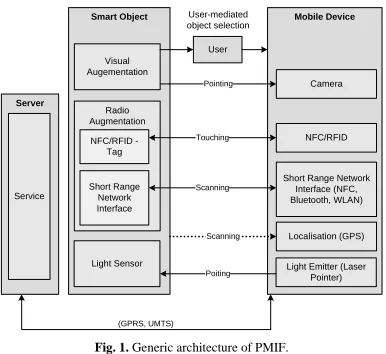
The following Figure 1 illustrates the overall architecture of PMIF. In this overview, all elements involved in the interaction are depicted: the mobile device, the smart object and related services running on a server. This figure also shows which interaction technique is implemented using which technologies.
Within a physical mobile interaction, the mobile device acts as a mediator between the physical and the digital world. The server represents the digital world which offers information and services related to the smart object. The latter represents the physical world and provides entry points into the digital world. Generally, it could be said that the smart object provides a link to corresponding services that are made available by a corresponding server.
The communication between the mobile device and the smart object can be based on different modalities: information provided by the smart object can be sensed by the mobile device (unidirectional arrow from smart object to mobile device in Figure 1), the mobile device can submit information to the smart object which senses it (unidirectional arrow from the mobile device to the smart object in Figure 1) or there can be a bidirectional communication between the mobile device and the smart object (bidirectional arrow between mobile device and smart object in Figure 1).
4 Smart Object Visual Augementation Radio Augmentation Mobile Device Camera
Short Range Network Interface (NFC, Bluetooth, WLAN) Pointing Scanning Server NFC/RFID Touching User Service Localisation (GPS) Scanning (GPRS, UMTS) Short Range Network Interface NFC/RFID - Tag
Light Emitter (Laser Pointer) Light Sensor
[image:8.430.119.312.78.255.2]Poiting User-mediated object selection
Fig. 1. Generic architecture of PMIF.
Besides the marker based approach, PMIF also supports a second implementation of the interaction technique pointing. A laser pointer is attached to the mobile device and the smart object is equipped with a light sensor.
PMIF also supports the augmentation of smart object with technologies like NFC, RFID, Bluetooth and WLAN. The communication realized by these technologies can be distinguished as either unidirectional (e.g. read-only RFID tag attached to the physical object) or bidirectional communication (e.g. peer-to-peer communication based on Bluetooth). The interaction technique touching is supported by implementations based on NFC and RFID technology.
Another interaction technique supported by PMIF is scanning which uses location information to reason about the proximity of smart objects and mobile devices. The corresponding arrow between smart object and mobile device is dotted because only the information about the location of the object is required for the interaction but not the object itself. The implementations of PMIF for scanning are based on Bluetooth and GPS.
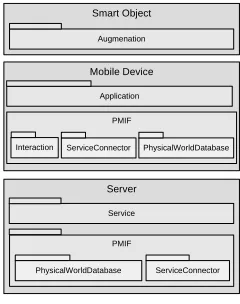
Based on this generic architecture and the used communication technologies, components of PMIF were defined which run on mobile devices and on the server which provides the services. Figure 2 illustrates the software components of the framework discussed in the following subsections in more detail.
4.3 Smart Object
As depicted by Figure 2 smart objects have to be augmented so that they can be sensed by mobile devices. Typical examples for smart objects supported by PMIF are:
• advertisement posters augmented by visual markers,
• machines augmented by RFID/NFC tags to support up-to-date service information (e.g. when the item was last serviced and by whom) and
• public displays which are augmented by Bluetooth-based services through which the user can interact with it via a mobile device.
These examples also show the different kinds of smart objects that are addressed by the PMIF framework. A smart object can just be a location, a physical object augmented with a number, URL, NFC / RIFD tag or visual marker, another mobile device or a computer providing its services via Bluetooth to the mobile device.
In most cases the smart object provides an identifier which links to a service provided by a server. The complexity of such services can range from simple XHTML web pages to sophisticated Web Services.
Server
PMIF
ServiceConnector PhysicalWorldDatabase
Service
Smart Object
Augmenation
Mobile Device
PMIF Application
ServiceConnector
[image:9.430.154.274.105.257.2]Interaction PhysicalWorldDatabase
Fig. 2. Architecture and main components of PMIF.
4.4 Mobile Device
As mentioned before, the mobile device acts as a mediator between the physical and digital world. For this purpose, PMIF provides components for the communication with smart objects (Interaction
component) as well as for the communication with a server (ServiceConnector component). These components and the PhysicalWorldDatabase are depicted by the box titled mobile device in Figure 2. They can be directly used by the application developer to implement applications that use physical mobile interactions. The components are independent from each other and can also be used individually.
The Interaction component provides an abstraction of the concrete technology (e.g. NFC or marker
based) used for the communication between mobile phones and smart objects. This component handles every interaction with a smart object as a stream. The advantage of this solution is that the application developer who uses this component does not have to handle the details of each technology; she only needs to handle streams to and from a smart object. In practice there are two different kinds of streams: read-only streams in cases where the smart object provides static information (e.g. visual marker) and read/write streams in cases in which the smart object can also receive information (e.g. Bluetooth).
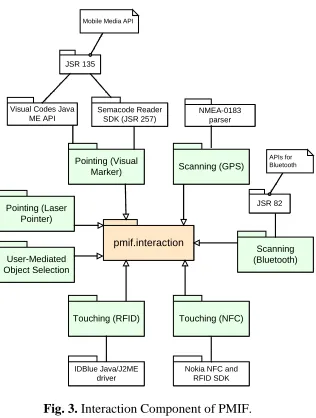
The following Figure 3 illustrates the different interaction techniques (green) currently provided by
the Interaction component of PMIF (orange). Furthermore, the Java Specification Requests (JSR) and
APIs are depicted which are used to implement an interaction technique or to show on which concepts the implementation is based on.
The main element of every interaction component is the InteractionController which is responsible for the communication with the smart object. The InteractionController is defined within
pmif.interaction (orange) and then implemented according to the corresponding interaction technique
(green).
Another component on the mobile device, the ServiceConnector component, provides a communication interface which abstracts from the concrete communication and transport protocol. That way, applications can be developed without the need to decide whether the communication should be based on HTTP, Web Services or SMS.
A service can be implemented using technologies like XHTML, i-mode, WAP, Web Services, OWL-S or UPnP. The ServiceConnector handles the communication between the Interaction
6
pmif.interaction
User-Mediated Object Selection
Pointing (Visual
Marker) Scanning (GPS)
Touching (NFC) Touching (RFID)
Pointing (Laser Pointer)
JSR 135
NMEA-0183 parser
Scanning (Bluetooth) JSR 82 Mobile Media API
APIs for Bluetooth Visual Codes Java
ME API
Nokia NFC and RFID SDK IDBlue Java/J2ME
driver Semacode Reader
[image:10.430.141.299.85.294.2]SDK (JSR 257)
Fig. 3. Interaction Component of PMIF.
Physical objects are managed by the PhyiscialWorldDatabase which can be located either on the mobile devices or on the server. This component can be used for the management of smart objects and the information regarding its identifiers, location, properties, related content (e.g. text, audio, images, video) and related services (e.g. a URL referring to a mobile service running on a server). Examples for identifiers are, e.g., a number represented by a visual marker, an identifier of an NFC or RFID tag, an identifier of a light sensor or a Bluetooth address.
In the case that one smart object supports different interaction techniques, all corresponding identifiers can be mapped to one smart object by using the physical world database. A feature of the
PhyiscialWorldDatabase is the separation of data access through Java objects and the storage of the
data. Thus, the data can be stored independently from the application in a database, in the file system, as an XML file or within a Java ME record store.
4.5 Server
Figure 2 also shows the components of PMIF on the server. It provides the PhysicalWorldDatabase
and the ServiceConnector for the communication between the services on the server and the
ServiceConnector on the mobile device. The server could be located in a remote destination or could
even be an element of the smart object. An example for the latter case is a public display with a built-in computer.
The PhysicalWorldDatabase component is used by the ServiceConnector on the server to provide
this information to the mobile device or by the services running on the server.
The ServiceConnector is on the one hand responsible for the communication between the mobile
device and the server and on the other hand manages the relationships between the
PhysicalWorldDatabase and the service.
5 Implementation
widespread availability of these technologies were the most important reasons for that decision. The most critical part is the implementation of the components on the mobile phone since it is mostly not feasible to install another run-time environment or player. Therefore Java ME was chosen which is currently supported by circa 1 billion mobile devices [18]. Java ME is platform independent, and nearly all operating systems on mobile devices such as Symbian, Palm OS, Windows Mobile as well as most mobile phone vendor specific operation systems support it. The Java ME configurations CLDC 1.0/1.1, the MIDP 2.0 profile, some optional APIs (e.g. JSR 82, JSR 135 or JSR 257) and the generic connection framework are used for the implementation of the components running on mobile devices.
The Java Standard Edition (Java SE), the Servlet API, JDBC and MySQL are used for the implementation of the server side components. The service connector is realized as a Java Servlet running on a Tomcat server. The communication between the server and mobile devices can be based on HTTP or SOAP messages.
In the following, the implementations of the different interaction techniques are discussed. PMIF also provides simple example applications for each interaction technique that show how it can be used within an application. These example applications rarely do more than just pick up an identifier and show it to the user.
5.1 Touching
PMIF provides two implementations of the physical mobile interaction technique touching. One is based on Near Field Communication (NFC) and the other is based on Radio Frequency Identification (RFID). The smart objects are in this case augmented with NFC / RFID tags that can be sensed by mobile devices. Through this the application on a mobile device can read the information stored on the tag and can identify the touched object and the related services. For NFC as well as RFID, the mobile device generates an RF field that powers the tag by inductive coupling and enables to send or receive data.
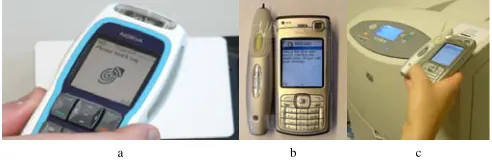
The first implementation is based on a Nokia 3220 with an attached Nokia NFC shell. The reading range of this shell is about 3 centimetres whereby just one tag can be read at the same time. Mifare NFC tags with a storage capacity from 512 Bytes to 4 Kilobyte are supported. PMIF uses the Nokia NFC and RFID SDK 1.0 to access the NFC shell [19]. The second implementation is based on the IDBlue RFID pen which can be connected via Bluetooth with a mobile phone [20]. This device supports the following RFID tag standards: ISO 15693-2/3, Tag-it HF/HFI and Philips I-Code SLI. The reading range is about 2-4 centimetres. PMIF uses the IDBlue Java/J2ME driver to access the RFID pen [21].
The following Figure 4 shows how the two devices are used to perform the interaction technique touching: a Nokia 3220 with NFC Shell (Figure 4a), an IDBlue RFID pen attached to a Nokia N70 (Figure 4b) and a user reading an RFID tag attached to a printer (Figure 4c).
[image:11.430.92.338.401.483.2]a b c
Fig. 4. Interaction technique touching
5.2 Pointing
PMIF provides two implementations of the interaction technique pointing; one is based on visual markers and the other on a laser pointer.
8
API and the Semacode Reader SDK for Java Phones 1.6 that implements the public draft of JSR 257 were used. Both APIs provide support for the generation and interpretation of visual markers. The Mobile Media API (JSR 135), already depicted by Figure 3, is used for accessing the camera and taking a picture.
[image:12.430.184.245.137.212.2]The following Figure 5 shows the usage of the visual code based implementation of the interaction technique pointing.
Fig. 5. Interaction technique pointing based on visual marker.
The second implementation is using a light beam from a laser pointer attached to a mobile phone that is recognised by light sensors attached to a smart object. The light sensors are attached to a micro-controller on which a recognition algorithm is implemented. The Particle Computer platform was chosen as the micro-controller [22]. Particle Computers are small wireless sensor nodes. The node’s hardware comprises a microcontroller, a radio transceiver (125 kbit/s, with a range of up to 50 meters), a real-time clock, a speaker for basic notification functionality, additional Flash memory and LEDs. For this prototype, off-the-shelf light sensors (FW 300) with an active area of about 0.77 square centimetres were added.
Each sensor for the pointing action consists of three such light sensors to achieve a larger active area (about 2.3 square centimetres). A small LED is added to provide basic feedback when the pointing action was successful. This setting is sufficient to detect whether or not a light source like a laser pointer is aimed at such a sensor.
However, a change in the ambient light can give exactly the same result, especially if the surroundings are rather dim and the main light is switched on. There is no way to distinguish these two cases by merely looking at the magnitude of the signal change. Therefore a chip was added to the laser pointer that makes the pointer pulse in a specific frequency. By hardware or – like in this prototype – software analysis directly on the Particle computer, it can be determined whether changes in the sensor values are caused by a pointer or by changes in ambient light.
After the Particle computer has detected that the laser pointer points to one of its sensors, a message is sent to a receiver connected to a USB port of a pointing recognizer server. This communication is performed using its radio frequency communication facility. The pointing recognizer on the server side retrieves the identifier of the smart object. Upon reception of such a message, this identifier is passed to a Java Servlet on the web server where it is stored in a database together with time information.
The moment the user starts the pointing technique mode on the mobile phone, it periodically sends requests to the web server. Whenever there is an identifier available in the database that is not older than a certain amount of time, this identifier is returned to the phone. Through this, the application on the mobile phone can identify the object which the person has pointed at and can start related services.
a b c d
Fig. 6. Used hardware for the implementation of pointing [8].
5.3 Scanning
For the implementation of the interaction technique scanning, the built-in Bluetooth capabilities of mobile phones or external GPS devices are used.
PMIF uses the Java ME APIs for Bluetooth (JSR 82) to scan for and to connect to other devices. For that purpose, the Bluetooth Serial Port Profile (SPP) of JSR 82 which is based on the Bluetooth protocol RFCOMM is used. This implementation of scanning was tested with external GPS devices (Royaltek BT GPS x-mini and the Blue GPS RBT-3000), external mobile printers (Brother MW-140BT) and remote PCs/Laptops. The latter were mostly using an Acer Bluetooth USB Dongle, e.g. the Acer BT-600.
The GPS-based implementation of scanning was tested with two external GPS devices - the BT GPS x-mini and the Blue GPS RBT-3000 from Royaltek - that can be connected to the mobile phone via Bluetooth. The Bluetooth serial port profile is used to communicate with the GPS device. PMIF provides the GPS data as NMEA-0183 data packets that can be used within the mobile application. Within a mobile application this location information can be used to analyze which smart objects are next to a person. If the distance is for instance below a specific threshold, the smart object is selected and the application can react on that.
5.4 User Mediated Object Selection
The implementation of this interaction technique is very simple and already available in nearly every mobile phone. A URL printed on an advertisement poster which is typed in the browser of a mobile phone is already an implementation of this interaction technique. To support all relevant interaction techniques, PMIF also explicitly provides support for user-mediated object selection.
5.5 Used Hardware
The following
[image:13.430.66.365.480.576.2]Table 1 gives a compact overview of the implemented interaction techniques, the mobile devices and markers that were tested and used within prototypes developed with PMIF.
Table 1. Overview of which hardware was used and tested within which interaction technique.
Interaction technique Tested devices Tested marker/technology
Touching (NFC) Nokia 3220 + Nokia NFC shell Mifare NFC tags (1 and 4 Kbyte)
Touching (RFID) Nokia 6630 + IDBlue RFID pen ISO 15693-3 tags (1 Kbyte)
Pointing (light beam) Nokia N70/6630 light sensors (FW 300)
Pointing (visual marker) Nokia 6600/6630/N70 Visual Codes [12], Semacode [13]
Scanning (Bluetooth) Nokia 6600/6630/6230i/N70 Brother MW-140BT mobile Bluetooth
printer, GPS - devices
Scanning (GPS) Nokia 6600/6630 + Royaltek BT GPS
x-mini or Blue GPS (RBT-3000) N/A
10
selection
6 Examples of Use
As already mentioned, PMIF provides a simple application for every interaction technique that shows how it can be used. This application mainly reads an identifier and presents it to the user. But for the development of a framework it is in general very important that it is used by several developers who build different systems. A framework can not be considered as usable, helpful and mature without the realization of prototypes or products based on it. PMIF was used for the implementation of several prototypes using physical mobile interactions and is still used in the development of further prototypes [3, 11]. Seven of them will be presented in the following subsections. Three of these prototypes, their architecture and functionality will be explained in more detail than the others because it is not possible to discuss all of them in an extensive way. The usage of the framework for the development of these prototypes showed that it takes less time to develop such applications and that the integration of these interaction techniques can be done in a simple and structured way.
6.1 Mobile Tourist Guide
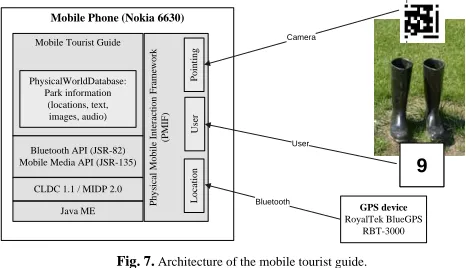
This prototype is a mobile guide application in which the user can get information about smart objects, in this case about art exhibits in a park. The mobile tourist guide was developed mainly by four computer science students, who had no previous experiences in developing mobile applications, within a practical course in the summer term 2005.
This prototype uses the physical mobile interaction technique pointing based on visual codes, scanning based on GPS and user-mediated object selection provided by the PMIF framework. The real world objects were augmented with information signs showing a number and a visual marker. With this mobile tourist guide, users are able to use all these interaction techniques, walk through the park and get information about the exhibits. The prototype shows a screen presenting the name of the exhibit, a picture of it, some text about the artist and further information about the object. In addition to that, an audio file is played reading out the written information on display.
The mobile tourist guide was implemented using a Nokia 6630 and an external GPS device with a Bluetooth interface (RoyalTek BlueGPS RBT-3000) for the implementation of the physical mobile interaction technique scanning. Pointing was implemented using the visual code system that provides a tool for the generation of such codes and a Java ME implementation of the code recognition algorithm [12].
Mobile Phone (Nokia 6630)
Mobile Tourist Guide
CLDC 1.1 / MIDP 2.0 Bluetooth API (JSR-82) Mobile Media API (JSR-135)
[image:14.430.98.331.379.513.2]Java ME
9
9
GPS device RoyalTek BlueGPS RBT-3000 PhysicalWorldDatabase: Park information (locations, text, images, audio) P h y sica l Mobile I n te ra ction F ra m ew or k (P MIF ) Poi n ti ng Us er Loca ti on Bluetooth Camera UserFig. 7.Architecture of the mobile tourist guide.
after she has typed in the number shown on the object or after a picture of the attached visual marker has been taken. The prototype was used and evaluated in a two-day user study in which 17 persons took part.
6.2 Mobile Museum Guide
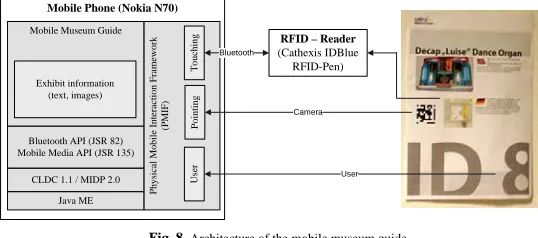
This mobile museum guide was developed by three computer science students within a practical course in the winter term 2005/06. This prototype is an enhancement of the mobile tourist guide discussed in the previous subsection but focuses on an indoor environment. Here the user is able to get information about objects within an exhibition. This prototype supports the interaction techniques pointing (visual codes), touching (RFID) and user-mediated object selection provided by the PMIF framework. The prototype consists of several posters showing the name of the exhibit, a picture of it and some textual information. These posters are augmented with ISO 15693-3 RFID tags, visual codes and numbers. The mobile museum guide was implemented and evaluated using a Nokia N70 and an external RFID reader device with a Bluetooth interface (Cathexis IDBlue RFID-Pen) for the implementation of the interaction technique touching. Figure 8 shows the architecture of mobile museum guide consisting of the mobile phone, the external RFID reader and the augmented exhibit.
Mobile Phone (Nokia N70)
Mobile Museum Guide
CLDC 1.1 / MIDP 2.0 Bluetooth API (JSR 82) Mobile Media API (JSR 135)
Java ME
RFID – Reader (Cathexis IDBlue
RFID-Pen)
Exhibit information (text, images)
Physica
l Mobile I
[image:15.430.80.349.236.355.2]n te ra ction F ra m e w ork (P M IF ) T o uchin g Pointing Us er Camera User Bluetooth
Fig. 8.Architecture of the mobile museum guide
The application on the mobile phone is based on CLDC 1.1 / MIDP 2.0, uses the Bluetooth API (JSR 82) to communicate with the external RFID reader and uses the Mobile Media API (JSR 135) to access the built-in camera of the mobile phone. Information about the exhibits like title or text is provided by an XML file that also references corresponding images. This information is shown after the user touches the RFID tag, after a picture of the attached visual marker is taken or after the user types in the number shown on the object. The prototype was evaluated in user study in which 8 persons took part.
6.3 Mobile Interaction with Advertisement Posters
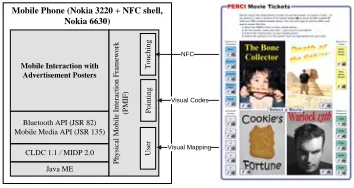
This prototype for mobile interaction with advertisement posters supports the interaction techniques touching, pointing and user-mediated object selection provided by the PMIF framework [23].
The idea behind this prototype is similar to the previously discussed prototypes. The big difference is that a smart object is not just augmented with one link to one service. In this prototype, two posters, one for buying movie tickets and one for buying public transportation tickets, are augmented with multiple tags.
Figure 9 shows picture of the posters for buying movie tickets and the architecture of the prototype. There is a visual code beside every NFC sign and on the position of every NFC sign there is a Mifare NFC tag attached to the back of the poster. The user can physically click on each of these markers by pointing to or touching them. To buy a movie ticket, for instance, the user has to select the movie, the cinema, the number of persons as well as the desired time slot.
12
Mobile Phone (Nokia 3220 + NFC shell, Nokia 6630)
Mobile Interaction with Advertisement Posters
CLDC 1.1 / MIDP 2.0 Bluetooth API (JSR 82) Mobile Media API (JSR 135)
Java ME P
[image:16.430.130.307.81.175.2]hysi c al M obile I n te ra c tion F ra m ew or k (P M IF) Touc hing P o in ting User NFC Visual Codes Visual Mapping
Fig. 9.Architecture of the mobile interaction with advertisement posters.
6.4 Additional Examples of Use
The following prototypes were also developed using the PMIF framework, but can not explained in detailed because of space restrictions.
A prototype for situated mobile commerce has been realized. It can be employed by a user to get information about products in a store or supermarket. Furthermore, it is possible to compare products or to request related product tests. The advantage of such a service is that the process of getting information about a product and buying the product in a shop can happen at the same time and place. This prototype supports the interaction techniques pointing based on visual codes and user-mediated object selection. A Nokia 6600 is used as the mobile device. The products are augmented with a sign containing a visual code tag and a number for user-mediated object selection.
Furthermore a mobile learning application for children was developed based on PMIF. Here, information signs in a zoo are augmented to provide links to information on the corresponding animals. Through this, children can select an animal and then they have to answer some questions about it before proceeding to the next one. This prototype employed user-mediated object selection on a Nokia 6630.
Within a prototype focusing on mobile peer-to-peer file sharing, the interaction technique scanning implemented using Bluetooth is used to find other mobile devices which offer media data. The concept underlying the prototype is that users can download media files (image, audio, video, etc.) from other mobile devices and that these files are then offered to other mobile users. The interesting aspect of this prototype is that it implements a novel business model. The user pays for a media file when downloading it form a server and then she can subsequently earn money from other users when these download it from her. Two Nokia 6230i phones were used to implement and test the prototype.
A further prototype was developed and used to analyze typical privacy and security problems of mobile interactions with smart objects. The user is able to interact with notes and a printer that are augmented with RFID tags. The prototype particularly analyzes the information that is exchanged between the mobile device and the smart object. The interaction technique touching is used within the prototype. A Nokia N70 connects an IDBlue RFID reader via Bluetooth to read the RFID tags attached to smart objects.
7 Summary and Conclusion
So far there was no framework, toolkit or API available which can be used to integrate different physical mobile interactions in an application in a structured and homogeneous way. Most of the available software just focuses on one implementation of one interaction technique and their usage within different applications.
that using this framework makes it possible to integrate physical mobile interactions into an application in a time efficient, structured and simple way.
Another advantage of the framework is the possibility to integrate new implementations of physical mobile interaction techniques into the framework in an easy and structured way. For that purpose, the interfaces defined by the pmif.interaction component have to be used and implemented. The usage of a new implementation in an application is then similar to the usage of other implementations because of the abstractions provided by the PMIF framework.
This paper has mainly focussed on the functionalities of PMIF that are directly involved in the interaction because this is the focus of this dissertation. The components ServiceConnector,
PhyiscalWorldDatabase and Service were just discussed in a compact way but were especially used
and showed their usefulness in the prototypes described in section 6.
Although the framework has not been evaluated in a formal way, the seven discussed prototypes show that the framework was already used within several projects and through this feedback it became a matured framework and many of the issues it had in the beginning could be removed.
14
References
1. E. Rukzio, A. Schmidt, and H. Hussmann. Physical Posters as Gateways to Context-aware Services for
Mobile Devices. Sixth IEEE Workshop on Mobile Computing Systems and Applications (WMCSA 2004). English Lake District, UK. 2004.
2. T. Kindberg, J. Barton, J. Morgan, G. Becker, D. Caswell, P. Debaty, G. Gopal, M. Frid, V. Krishnan, H.
Morris, J. Schettino, B. Serra, and M. Spasojevic, People, places, things: web presence for the real world.
Mobile Networks and Applications. 7(5): p. 365--376. 2002.
3. E. Rukzio, G. Broll, K. Leichtenstern, and A. Schmidt. Mobile Interaction with the Real World: An
Evaluation and Comparison of Physical Mobile Interaction Techniques. European Conference on Ambient Intelligence (AmI-07). Darmstadt, Germany. Springer. 2007.
4. K. Hinckley, J. Pierce, M. Sinclair, and E. Horvitz. Sensing techniques for mobile interaction. UIST '00:
Proceedings of the 13th annual ACM symposium on User interface software and technology. ACM Press. 2000.
5. A. Ferscha, G. Kathan, and S. Vogl. WebWall - An Architecture for Public Display WWW Services.
Eleventh International World Wide Web Conference. Honolulu, Hawaii, USA. 2002.
6. R. Hardy and E. Rukzio. Touch & Interact: Touch-based Interaction of Mobile Phones with Displays. 10th
International Conference on Human-Computer Interaction with Mobile Devices and Services (Mobile HCI 2008). Amsterdam, Netherlands. Springer. 2008.
7. A. Shahi, V. Callaghan, and M. Gardner. Introducing Personal Operating Spaces for Ubiquitous
Computing Environments. Workshop PERMID 2005 in conjunction with Pervasive 2005. Munich, Germany. 2005.
8. E. Rukzio, K. Leichtenstern, V. Callaghan, P. Holleis, A. Schmidt, and J. Chin. An Experimental
Comparison of Physical Mobile Interaction Techniques: Touching, Pointing and Scanning. Eighth International Conference on Ubiquitous Computing (Ubicomp 2006). Orange County, California, California. Springer. 2006.
9. B.A. Myers, Using Handhelds for Wireless Remote Control of PCs and Appliances. Interacting with
Computers. 17(3): p. 251-264. 2005.
10. E. Rukzio, S. Wetzstein, and A. Schmidt. A Framework for Mobile Interactions with the Physical World.
In Proceedings of Wireless Personal Multimedia Communication (WPMC'05) Aalborg, Denmark. 2005.
11. Physical Mobile Interactions: Mobile Devices as Pervasive Mediators for Interactions with the Real
World.,
12. M. Rohs and B. Gfeller, Using Camera-Equipped Mobile Phones for Interacting with Real-World Objects.
Advances in Pervasive Computing, Austrian Computer Society (OCG) p. 265-271. 2004.
13. Semacode, http://www.semacode.org/.
14. QRCode, http://www.qrcode.com/.
15. JSR 257: Contactless Communication API, http://jcp.org/en/jsr/detail?id=257.
16. NokiaFieldForce. Nokia Field Force Solution. Available from:
http://europe.nokia.com/NOKIA_BUSINESS_26/Europe/Products/Mobile_Software/Field_Force_Solution
s/NokiaFieldForceSolution_DataSheet.pdf.
17. R. Ballagas, F. Memon, R. Reiners, and J. Borchers. iStuff Mobile: prototyping interactions for mobile
phones in interactive spaces. Workshop PERMID 2006 in conjunction with Pervasive 2006. Dublin, Ireland. 2006.
18. W. Hardy, Journal 6: JavaOne and Trends in the Java Framework. Sun Developer Network - The Learning
Curve Journals. 2006.
19. Nokia NFC RFID SDK 1.0, http://www.nokia.com/A4136001?newsid=1000788.
20. Cathexis IDBlue (Bluetooth RFID pen),
http://www.cathexis.com/products-and-services/idblue%E2%84%A2-hf.aspx.
21. IDBlue Java/J2ME driver, http://auriga.wearlab.de/projects/jidblue/.
22. C. Decker, A. Krohn, M. Beigl, and T. Zimmer. The Particle Computer System. 4th International
Symposium on Information Processing in Sensor Networks (IPSN). Los Angeles, California, USA. 2005.
23. G. Broll, S. Siorpaes, E. Rukzio, M. Paolucci, J. Hamard, M. Wagner, and A. Schmidt. Supporting Mobile

![Fig. 6. Used hardware for the implementation of pointing [8].](https://thumb-us.123doks.com/thumbv2/123dok_us/7977437.755763/13.430.107.325.81.164/fig-used-hardware-implementation-pointing.webp)