item and our policy information available from the repository home page for further information.
Author(s):Ali, Liaqat; Jahankhani, Hamid; Jahankhani, Hossein Title: Accessibility evolution tools comparison
Year of publication:2007
Citation:Ali, L.; Jahankhani, H.; Jahankhani, H. (2007) ‘Accessibility evolution tools comparison’Proceedings of Advances in Computing and Technology, (AC&T) The School of Computing and Technology 2nd Annual Conference, University of East London, pp.28-36
Link to published version:
ACCESSIBILITY EVOLUTION TOOLS COMPARISON
Liaqat Ali, Hamid Jahankhani, Hossein Jahankhani
Innovative Informatics Research Group, School of Computing and Technology {Alil, hamid.jahankhani, h.jahankhani}@uel.ac.uk
Abstract: The Web is widely used as a delivery channel and the importance of eAccessibility to digital resources is now widely acknowledged. By developing a series of guidelines and designing standards the W3C WAI has played an important role to achieve the goal of eAccessibility and to ensure that Web resources can be accessed by people with special need. Accessibility tools play a critical and important role in ensuring the accessibility of the Web and perform a static analysis of home pages or sites regarding their accessibility. This paper claims that because of no standardization these tools often provide different results of the same tested Website according to their own interpretation and due to the lack of standard testing methods eAccessibility is a difficult goal to achieve.
1. Introduction
The growth of the World Wide Web means that people with serious sight problems now have the opportunity to enjoy a wealth of information and services that was previously unavailable to them, from up-to-the-minute news and travel timetables to online shopping and banking. With the help of synthesised speech and Braille display technology, even completely blind people can use the Web. Braille is a system of raised dots which blind people can read with their fingers. Many blind and partially sighted people prefer particular types of information in Braille.
Louis Braille was born in 1809, at Coupvray, near Paris. In 1826, he was elected Professor at the Institution. Both as pupil and teacher he spent most of his leisure trying to find a system by which the blind could write in relief. One, which had been invented by M. Barbier, appeared the most promising. In 1825, he suggested embossing by means of a point method, the character containing 12 dots, 6 high and 2 wide, arranged in a rectangle The character thus obtained was large and unwieldy, though capable of an almost
unlimited number of combinations. Louis Braille cut Barbier's character to two and thus produced his well-known 3 by 2. On this basis Braille was the first who devised a practical scheme for printing and writing in tangible form, suitable to the tactile capacity of all. This was in 1829. The below figure is also an image of 1829.
Figure 1, Braille of 1829
Usability is paramount for the success of web sites. The World Wide Web and its use are growing at a very fast rate with 100 million Web sites expected by 2002 (Jahankhani, 2002). Design for usability therefore is of principal importance.
In today's age of pervasive computing, users have the ability to access information stored on powerful networks anywhere, anytime. Such things as personal digital assistants (PDAs), smart phones, wearable computers and other mobile devices give the user instant access to global information systems (Jahankhani 2002).
The challenge is to ensure that the information from these devices takes into account both the user's capabilities and his/her device. Therefore by adapting video, images, audio and text to both individual devices and individual user requirements will help to ensure that people with disabilities can take advantage of the benefits of pervasive computing.
Visually impaired people, ‘read’ web pages using software tools known as screen readers, which generate speech and/or refreshable Braille output. Even the simplest web pages generally feature images and use tables to format their navigation menus and content, while many others use JavaScript, animation and other technologies to - supposedly - make their navigation systems more user-friendly. This creates a number of problems for people with visual impairments, as they cannot see the images and their screen readers can have serious problems interpreting tables, animation and JavaScript. In many cases this renders entire sites unusable.
The W3C WAI plays an important role to achieve the goal of eAccessibility. eAccessibility describes a person’s ability
to use a Website over the internet. It’s a term which is traditionally refers to the development of Web sites that are accessible to all users regardless any disability. WAI have dev eloped a series of guidelines and standards to ensure that Web resources can be accessed by people with special need.
Now it is time to have a look to find out how far these standards have been implemented during the design of the Web sites. If these standards and guidelines are followed then Websites can be made more accessible to a wider range of users with disabilities and more objectives can be achieved in public sectors. The assessment and validation of Websites is an art. Different tools are available for the assessment and validation of websites which is itself a positive step towards eAccessibility. These tools play a critical and important role in ensuring the accessibility of the Web and perform a static analysis of home pages or sites regarding their accessibility. Unfortunately due to the lack of standard and regulations these tools often provide different results of the same website.
This paper aims to review different eAccessibility evolution tools and why the results of these tools are different. By comparing the results obtained by three different tools the research also report that despite standards set by the international agencies like W3C, many websites still fall short of accessibility standard.
2. eAccessibility Testing and
Validation Tools
keyboards and mouse systems. The enormous challenge facing to web is to make sure that all developers and designers follow accessibility guidelines in providing description that optimize access to end users with disabilities. There has been a lot of discussion on different forums regarding eAccessibility on the part of web developers and designers. This causes the development of a plethora of new software utilities and the interesting part of these utilities is that all are claiming to automate the process of evaluating and/or repairing web pages.
The aim of all these utilities and tools is to assist the developer and authors of HTML is to pin point the changes needed in the HTML coding to make sure and achieve the high level of eAccessibility.
The two available set of standards to achieve the goal of eAccessibility used by developers of evaluation and repair products are Web Content Accessibility Guidelines 1.0 from the Web Accessibility Initiative (WAI) of the World Wide Web Consortium (W3C) finalized in 1999 that provides a priority based (Priority 1, 2 and 3) checklist of guidelines. This document is now using as a reference for evaluation and assessment of the eAccessibility and web-based resources.
In addition, the rehabilitation act amendments of 1988, section 508, covers access to United State Federal Agencies in making their electronic and information technology more accessible to people with special needs. An independent US Federal Agency, The Access Board, whose goal is to achieve the highest level of eAccessibility has established a “Guide to the Section 508 Standards for Electronic and Information Technology.”
As two of these standards provide the context for evaluation, assessment and repair, a very little attention has been given
to the role of authoring tools like HTML editors, in designing and development of accessible Web resources. Authoring tool is a mechanism that helps developers and authors of HTML with a limited knowledge of inclusive design practices. This absence of integrated authoring tools causes to the development of other products that have been designed to examine the accessibility of websites after it has been designed and developed (Jahankhani, 2002). A wide variety of these products available in market, responsible for determining how well their site accommodates the feature of eAccessibility guidelines choosing one product is really a difficult task. The reason behind this difficulty is the non availability of any comprehensive reviews available for these types of software’s. Although all of these tools play a critical and important role in ensuring the accessibility of the Web and perform a static analysis of home pages or sites regarding their accessibility, testing and validation of a website is still very important. The two common types of HTML testers are validators and linters. People new to eAccessibility should know the difference between validators and linters.
The main difference between a validator and a linter is that a validator checks a page against a published HTML specification for technical errors, whereas a linter checks a page for commonly made mistakes. It is often a good idea to use both as they can sometimes find different types of problems (Any Browser, 2006).
accessible website is the most important task. A tool that can help to identify the inaccessible elements rather than interfering with the websites should be selected. A key point to understand in regard of accessibility tools is that these tools can only partially check the accessibility of websites through automation and still required human judgement and checking or manual check of the website.
No automated accessibility evaluation tool can find all of your content's accessibility errors. Automated programs can only evaluate a few of the many possible accessibility issues that can arise in a particular Web site (WebAim 2006).
Skiome tools include prompting for alternative text while other supports some HTML elements for increasing and ensuring the accessibility of the Web. The three basic concepts for the effectiveness of a tool are completeness, correctness and effectiveness (Brajnik 2004). A complete list of these tools is available at http://www.w3.org/WAI/ER/existingtools. html. W3C divided these tools in three sub categories i.e.
• Evaluation Tools • Repair Tools
• Filter and Transform Tools (WAI, 2006).
The Evaluation tools are further divided into three sub-categories:
• General, Tools that perform test for a variety of accessibility issue • Focused, Tools that test for one or
limited aspect of accessibility.
• Service, Tools that run on an ongoing basis such as proxies, Web services and Monitors(WAI, 2006) Tools can check the accessibility of the website according to the standard of Section 508 or checkpoints in WCAG 1.0
Priority 1, 2 and 3. It is important to understand that up to what standard the website is accessible. The developed standard by W3C for accessible Web sites is prioritized according to their impact on accessibility as
Priority [1] or ‘A’ checkpoints are those that the developer of the Web must satisfy to insure that the page itself is accessible. Priority [2] or ‘AA’ checkpoints are those that the Web developer should satisfy to ensure that certain groups will be able to access information the web page.
Priority [3] or ‘AAA’ checkpoints are
those the web developer may do to ensure that all content on the page is completely accessible (W3C, 2000)
Tools designed to evaluate web pages against WCAG1.0 Priority 1, 2 and 3 are displaying errors automatically but these tools generate a variety of reports based on results and analysis of the web page or web site.
Till now there are several different tools for testing, assessment and validation of Websites which are different from one another in several dimensions. Some of them do only testing while some other tools perform fixing of a page as well. They are different from each other in terms of effectiveness, cost and reliability. The important thing is to evaluate the quality of these tools. For a common Web developer to develop and design a better and accessible Website, the key role of these tools is very critical. By evaluation and comparing the accessibility tools, Web developers and designers can act upon the appropriate selection and choice. This evaluation will also provide a competition between the tools manufacturers and will improve the tool’s quality itself.
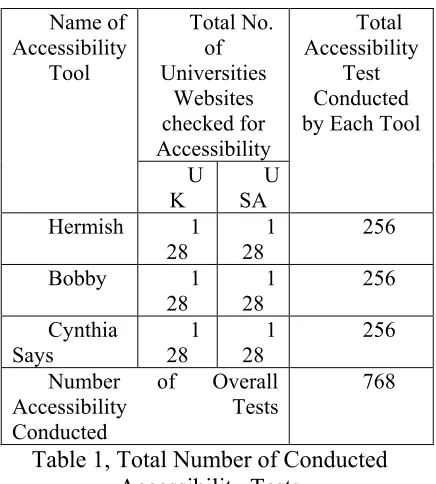
accessibility to disable people. For example if an image element in a Website does not contain the Alt attribute then the Website will become an accessibility failure because the page can not be accessed through the speaking browser. The US federal agencies and corporations are spending millions of dollars on such tools that claim to test web sites for accessibility (Thatcher, 2006). There are over 30 automated tools (Ivory et al, 2003). These includes Accessibility check, Accessibility Wizard, A-Prompt ATRC Web Accessibility Checker, Bobby WebXACT WatchFire, EvalAccess, Hera, Hermish, HiSoftware AccVerify Cynthia Says, Silvinha Accessibility Validator and Repair Tool, Site, Page and Accessibility Valet Demonstrator, TAW Online Accessibility Tool, UsableNet LIFT and W3C HTML Validator (World Wide Web Consortium) etc. Some of these tools are commercial while some of them provide free online assessment of the Website. Unfortunately there is no standardization of these tools and even these tools provide different results of the single selected Websites according to their own interpretation. This might cause another problem for a Web developer where a Web developer can not decide to select which tool for developing Website according to the standard provided by the W3C WCAG 1.0. To prove that we selected three tools Bobby, HiSoftware AccVerify Cynthia Says and Hermish among existing tools and checked the home pages of 256 UK and US Universities Websites i.e. 128 from UK and 128 from USA. All 256 Websites has been checked on these three tools. The following table 1 shows the total number of tests conducted to find out the eAccessibility level of universities websites and to proof the diverse result of these accessibility tools.
Total No. of Universities Websites checked for Accessibility Name of Accessibility Tool U K U SA Total Accessibility Test Conducted by Each Tool
Hermish 1 28 1 28 256 Bobby 1 28 1 28 256 Cynthia Says 1 28 1 28 256
Number of Overall
Accessibility Tests Conducted
[image:6.595.307.525.104.346.2]768
Table 1, Total Number of Conducted Accessibility Tests
The analysis found that the accessibility result of these tools is different from one another. Before further analysis I would like to introduce these tools first. Here is a short introduction to these tools.
3. Bobby WebXACT WatchFire
Bobby is one of the famous tools for assessment and validation of websites and brings the Website up to the required standard of Web Content Accessibility Guidelines (WCAG 1.0) and Section 508 of the US Rehabilitation Act. It is especially designed for small Websites to help and expose barriers of eAccessibility page by page through Bobby Spider of the whole Website including readability by screen readers, animated elements, audio and video displays and the provision of text equivalent for all images. It checks HTML against select accessibility guidelines and then reports on the accessibility of each page.
accessibility testing and perform over 90 accessibility checks during the assessment and validation of required Website. It was first released in 1996 and in July 2002 WatchFire Acquired from Centre for Applied Special Technology (CAST) and held the responsibility for its marketing and distribution. Originally Bobby was based on the Trace Research and Development Centre guidelines (Trace, 2006) but when WAI introduced the WCAG 1.0 guidelines, Bobby conformed to them. Now Bobby is to be considering one of the best and famous tools to test the accessibility standard defined by the WAI W3C.
A window based version, Bobby 5.0, incorporates the scanning and reporting functionality of WatchFire WebQA and includes the following enhancements:
• Spidering: Flash links, JavaScript parsing and execution, http(s), Session ID(s)
• Scalability: able to scan larger sites • Reporting
• HTML Editor Integration
• Extensive Online Help: Explains why certain errors are reported as issue (WatchFire, 2005)
Bobby is therefore has been selected as one of the tools to generate this report. The
tool is available at http://webxact.watchfire.com/
4. HiSoftware AccVerify Cynthia
Says
HiSoftware AccVerify Cynthia Says provides for the verification of accessibility policy and standards required for Web sites. It allows user to define and conduct custom tests. Complete HTML Validation custom and standard based testing and test management and also
provides solution and repair for section 508 and WCAG Priority 1, 2 and 3. It’s a very robust program with many features and options. It also allows for customized scripts to be created. It has extensive report generation capability, including statistics and graphics. The actual report is based on the possible errors for the compliance standards are cited, along with a pass and fail notation for each of the checklist. The new version 3.0 also contains new features like project management tool in which the user can identify the areas of Website to be validated and repaired. Cynthia Says is special edition of the AccVerify tool by Hisoftware which is designed to identify errors related to US Rehabilitation Act Section 508 standards and the W3C Web Content Accessibility Guidelines (WCAG 1.0). Its aim is to educate Website developers and designers about eAccessibility and validate one page at a time. The tool can be found at http://www.hisoftware.com/accmonitorsite test/ and see for how to use the tool http://www.cew.wisc.edu/accessibility/hiso ftware/AccVerify/accverifyquick.htm . The edition of Cynthia Says is available at http://www.cynthiasays.com/Default.asp
5. Hermish
screen test report for visual elements. The Hermsih test can identify any incorrectly placed attributes in HTML and XHTML. The CSS browser compatibility test checks the style against a table of known compatibility issues featuring several well known browsers and platforms. The tool can be found at http://www.hermish.com
6. Example of different results of
the tools
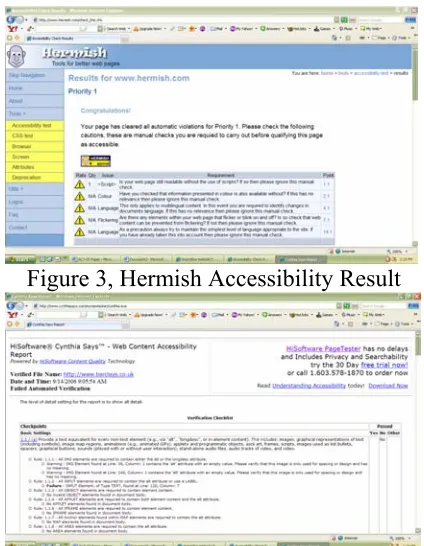
[image:8.595.305.517.105.378.2] [image:8.595.79.289.280.598.2]The following figures 2, 3 and 4 shows the different result of accessibility test for Priority 1 of the same tested website www.barclays.co.uk. As can be seen in figure 2 and 3, the Website achieved the Level A conformance according to Bobby WatchFire and Hermish but in figure 4 according to HiSoftware AccVerify Cynthia Says the Website did not achieved the same Level A conformance for the same Website. The criterion for testing a Website for all these tools is the same standard as defined by WAI WCAG 1.0.
Figure 2, Bobby Accessibility Result
Figure 3, Hermish Accessibility Result
Figure 4, HiSoftware Accessibility Result
7. Priority One Result
The result of each tool that has been obtained for Level A conformance is completely different from one another. According to Cynthia Says 48% of Websites achieved the Level A conformance. The Bobby says that the Level A conformance for tested Websites is 60% while Hermish says that 69% of Websites achieved the Level A conformance. This is illustrated in the following figure 5.
[image:8.595.311.517.592.696.2]8. Priority 2 Result
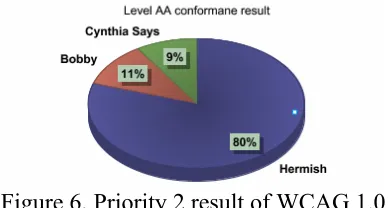
For the high Level of AA conformance the result obtained from Cynthia Says for tested Websites is only 9%. Bobby says that 11% of Websites achieved the AA conformance but with a huge difference Hermish say that 80% of Websites achieved the high Level of AA conformance. See the following figure 6.
Figure 6, Priority 2 result of WCAG 1.0
9. Priority 3 Result
[image:9.595.87.282.266.370.2]For the Level of AAA conformance according to Bobby only 3% of tested Websites achieved the AAA conformance while Cynthia Says and Hermish both shows that 36% of tested Websites achieved the high Level of AAA conformance. The following figure illustrates this.
Figure 7, Priority 3 result of WCAG 1.0
10. Conclusion
The growth of the World Wide Web means that people with serious sight
these tools. A further thorough review of other existing tools is required to bring these tools in a standard format.
Acknowledgements
This research is supported by a grant from Dr. Wali Muhammad Trust and High Commission for Pakistan in London UK.
References
Any Browser (2006) Accessible Design Tools Viewable with Any Browser http://www.anybrowser.org/campaign/abto ols.html
Brajnik G., 2004, Comparing accessibility evaluation tools, a method for tool effectiveness, Universal Access in the Information Society, 3(3-4), Springer Verlag, pp252-263, October.
Ivory, M. Mankoff, J. Audrey, L. (2003) Using Automated tools to improve Websites usage by users with diverse abilities, In proceeding of the IT&Society volume 1, issue 3, pp 195-236 http://www.stanford.edu/group/siqss/itands ociety/v01i03/v01i03a11.pdf
The achievement of total accessibility is really difficult because of so many problems like different disabilities, language barriers, and hardware and software inconsistencies
Jahankhani, H., Lynch, J. A., Stephenson, J., (2002), “Review of the current legislation covering e-learning provisions for the visually impaired”, Lecture Notes in Computer Science, Volume 2510/2002, ISSN: 0302-9743, Pages: 552 – 559, Springer-Verlag Heidelberg, 2002.
Jahankhani, H., Safieddine, F., (2002) “A review of web tools categories”, International Association for Development of Information Society, IADIS WWW/Internet 2002, 13-15 November 2002, Lisbon, Portugal.
Thatcher (2006), Web Accessibility testing http://www.jimthatcher.com/testing.htm
Trace (2006) Designing more usable Websites, http://trace.wisc.edu/world/web/
W3C (2000) Techniques for Web Content Accessibility Guidelines 1.0, Note 6 November 2000, 1.1 Priorities, http://www.w3.org/TR/WCAG10-TECHS/
WAI (2006) Web Accessibility Evaluation
Tools: Overview http://www.w3.org/WAI/ER/existingtools.
html
WatchFire (2005) Web Accessibility testing
http://www.watchfire.com/resources/bobb y-overview.pdf