A Novel Soft Computing Authentication
Scheme for Textual and Graphical Passwords
P.S.V. Vachaspati
C S E Department Bapatla Engineering College
Baptla, A.P., India
A. S. N. Chakravarthy
C S E Department JNTUK UCEV Vizianagaram, A.P., India
Prof. P. S. Avadhani
CS&SE Department AU College of Engineering Visakhapatnam, A.P, IndiaABSTRACT
Authentication is the process of identifying an individual, usually based on username and password. Authentication merely ensures that the individual is who he or she claims to be. This forestalls the activities against confidentiality and integrity. Shoulder surfing is the main problem of graphical passwords. To overcome the problem of shoulder surfing we introduced a novel scheme called S3PA (Scalable Shoulder Surfing Resistant Textual-Graphical Password Authentication Scheme) . This S3PA scheme provides the login screen to the user at every time the user logs in, this login image consists of set of characters. User with his password clicks some pass characters which are different for different sessions and explained in proposed scheme. To provide better results Neural Network is used for the authentication.
Keywords
Authentication, Shoulder Surfing, Back Propagation Learning Algorithm, Feed Forward Neural Network.
1.
INTRODUCTION
Authentication can be quoted as form of computer security verifying the identity of the user logging into a network. Passwords, digital certificates, biometrics [1] can be used to prove the identity of the user to the network. There are human response authentication, challenge-response authentication, password, digital signature and biometrics. There are different types of attacks on the password authentication like Brute-force attacks, Dictionary attacks, spyware attacks [2], hidden camera attacks and shoulder surfing attack. Different password mechanisms are introduced to over these attacks. In traditional authentication [3] approach the server maintains a password table [4] which stores the usernames and passwords. This procedure gives some compromising issues over the security of the users. If an intruder or hacker performs some attacks like SQL injection he/she can access the password table which he can disclose the user information. Even storing the information in encrypted for like hashing [5, 6, 7] may not provide enough security if the intruder can break the cipher with reverse hashing [7] etc.
The traditional and common approach for authentication method is to use alphanumerical passwords. It is known to have some Drawbacks. Mainly users tend to pick passwords that can be easily remembered [8]. On the other hand, if a password is hard to guess, then it is often hard to remember. To address this problem, some researchers have developed authentication methods that use Graphical passwords [8]. These graphical passwords [1, 3, 9, 10, 11] are also suffered due to shoulder-surfing and screen-dump attacks [8]. For different scenarios we use different authentication techniques. The main limitation in using the traditional password authentication method is that, a server must maintain a password table that stores each user‟s ID and password [9]. If
an intruder attacks the server system through attacks like SQL injection then he can access the entire information from the table. Even if the information is stored in the hashed format [9] or encrypted format the intruder can affect the system like appending the wrong password for an identified user etc. hence to overcome this setback we use soft computing approach, a neural network with Back Propagation Learning [12].
In this work we explained different password mechanisms and different stages of password enhancements, drawbacks of each mechanism. Then we introduced the concept of shoulder surfing and explained how our scheme is used to overcome pitfalls of shoulder surfing.
In our scheme users are allowed to give a username and password at the registration phase without any password policies, we developed a Feed Forward Neural Network which takes the user name as an input and produces user password which was given at the registration as output [12]. We employed Back propagation [13] a supervised learning algorithm s. The weights of the neural network are stored at the sever side DB [4,12]. Hence every time the user logs in he provides his/her username, this username is sent to server, and then server gives the username as input to the FFNN with the stored weights as weights of the neural network therefore providing the password of the user. This obtained password is synchronized with our S3PA scheme [14]. An image is sent to the user which contains complete set randomly scattered characters. Then user finds his pass characters through our schemes and enters the every pass character formed by pass triangles, the coordinates of these are sent to server then server checks the authenticity of the user.
We provided a detailed explanation of S3PA scheme followed by concepts of neural network, like defining and developing a neural network, training the neural network and how we provide liaison between this and S3PA scheme.
2.
RELATED WORK
Authentication determines whether a particular individual or a device is allowed to access a system or an application which assures the basic security goals, viz. confidentiality and integrity. Also, adequate authentication is the first line of defense for protecting any resource. The same authentication technique may not be used in every scenario. The acceptability and wide acceptance of any authentication scheme greatly depends on its robustness against attacks and resources needed for it.
To overcome the issues with traditional password-based scheme [3], the biometric system [1] was introduced. This relies on unique features unchanged during the life time of a human, such as finger prints, iris etc. The problem with biometric system is cost of additional equipment needed for devices. And false-positive and false-negative rate may also be high if the devices are not robust. Biometric systems are vulnerable to replay attack (by the use of sticky residue left by finger on the devices), which reduces the security and usability levels.
Developments have attempted to overcome biometric shortcomings by introducing token-based authentication schemes [10]. Token-based systems use a physical device such as smartcards or electronic key for authentication purpose. This may also be used in conjunction with the traditional password-based system. Token-based systems are vulnerable to man-in-the middle attacks where an intruder intercepts the user‟s session and records the credentials by acting as a proxy between the user and the authentication device without the knowledge of the user. Thus as an alternative, graphical based passwords [9,15] are introduced to resolve security and usability limitations mentioned in the above schemes.
Graphical-based password techniques have been proposed as a potential alternative to text-based [16] techniques, it was widely accepted that humans can remember images better than text. Therefore, graphical-based authentication schemes have higher usability than other authentication techniques. Graphical passwords [11, 17] are difficult to break using normal attacks such as dictionary attack, brute force and spyware [2], which have been affecting text-based and token-based authentication. Thus, the security level of graphical-based authentication schemes is high over other authentication techniques. In general, the graphical password techniques can be classified into two categories:
2.1 Recognition-Based Systems
In recognition-based systems, a group of images are given to the user on login screen and a valid authentication requires a correct image being clicked or selected in a particular order. Some examples of recognition based system are
(a) Awase-E system [18]. (b) Pass faces system [5].
(a) Awase-E System
An image password called Awase-E [18] is a new system which enables users to use their favorite image instead of a text password for authentication purpose. Even though Awase-E system has a higher usability, it is difficult to implement due to the storage space needed for images [19]
and also the system cannot tolerate replay attack. Adding to this, a user may always tend to choose a well-known (or associated with the user through some relation, like son, wife or a place visited etc.) image which may be prone to guessing attacks.
(b) Pass Faces Scheme
Weinshall and Kirkpatrick [20] studied a recognition-based scheme and concluded that users can still remember their graphical password with 90% accuracy even after one or two months. Their study supports the theory that human remember images better than text. In addition for example, the commercial system Pass faces uses images of human faces. Davis, et al. worked on such a scheme and concluded that user‟s password selection is affected by race and gender. This makes the Pass faces password somewhat predictable. Although a recognition-based graphical password seems to be easy to remember, which increases the usability, it is not completely secure. It needs several rounds of image recognition for authentication to provide a reasonably large password space, which is tedious. Also, it is obvious that recognition-based systems are vulnerable to replay attack and
mouse tracking because of the use of a fixed image as a password.
Fig.1 Pass faces System
2.2
Recall-Based Systems
In recall-based [11,21] systems, the user is asked to reproduce something that he/she created or selected earlier during the registration phase. Recall-based [21] schemes can be broadly classified into two groups.
2.2.1
Pure Recall-Based Technique
Pure recall-based techniques can be classified into(a) Draw-A-Secret Technique (b) Grid Selection Technique (c) Passdoodle Scheme
(a) Draw-A-Secret Technique: In this, users need to reproduce their passwords without any help or reminder by the system. Draw-A-Secret technique [22], Grid selection [3], and Pass doodle [14] are common examples of pure recall-based techniques. In 1999, Jermyn et al. [22] proposed DAS (Draw-A-Secret) scheme, in which the password is a shape drawn on a two dimensional grid of size G * G as in Fig. 1. Each cell in this grid is represented by distinct rectangular
Authenticati
on Schemes
What you
know type
What you
have type
What you
are type
Graphical password
techniques
Recognition-based
Recall-based
graphical
techniques
Types of
recall-based systems
Pure recall-based
technique
coordinates (x, y). The values of touch grids are stored in temporal order of the drawing. If exact coordinates are crossed with the same registered sequence, then the user is authenticated. As with other pure recall-based techniques, DAS has many drawbacks. In 2002, Goldberg conducted a survey which concluded that most users forget their stroke order and they can remember text passwords easier than DAS. Also, the password chosen by users are vulnerable to graphical dictionary attacks and replay attack.
Fig.2 Draw-A-Secret Technique
(b) Grid Selection Technique: In 2004, the Grid selection technique was proposed by Thorpe and Van Oorschot [3] to enhance the password space of DAS. Their study showed the impact of stroke-count on DAS password space which decreases significantly with less strokes for a fixed password length. To improve the DAS security level, they suggested the „„Grid Selection‟‟ technique, where the selection grid is large at the beginning, A fine grained grid from which the person selects a drawing grid, a rectangular area to zoom in on, in which they may enter their password as shown in Fig. 2. This technique would increase the password space of DAS, which improves the security level at the same time. Actually, this technique only improves the password space of DAS but still carries over DAS weaknesses and drawbacks as mentioned above.
Fig.3 Grid selection Technique
(c) Passdoodle Scheme: Passdoodle is a graphical password of handwritten drawing or text, normally sketched with a stylus over a touch sensitive screen. Goldberg et al. have shown that users were able to recognize a complete doodle password as accurately as text-based passwords. Unfortunately, the Passdoodle scheme has many drawbacks the authors concluded that the Passdoodle scheme is vulnerable to several attacks, such as guessing, spyware, key-logger, and shoulder-surfing.
Fig.4 Passdoodle Scheme
2.2.2
Cued Recall-Based Technique
In this technique, the system gives some hints which help users to reproduce their passwords with high accuracy. These hints will be presented as hot spots (regions) within an image. The user has to choose some of these regions to register as their password and they have to choose the same region following the same order to log into the system. The user must remember the „„chosen click spots‟‟ and keep them secret. There are many implementations, such as
(a) Blonder algorithm. (b) PassPoint scheme.
(a) Blonder Algorithm: In 1996, Blonder designed a method where a pre-determined image is shown to the user on a visual display and the user should „„click‟‟ on some predefined positions on the image in a particular order to be authenticated. This method was later modified and presented as PassPoint
Fig.5 Blonder Scheme
close to the selected points, within some measured tolerance distance from the pass point. Wiedenbeck et al. [23] proposed the best tolerance around the click point in such an image. To log in, the user should click with the tolerance of such a click point.
Fig. 6 Image is used for Pass-Point Scheme
2.3
Problems with the Existing Schemes
Traditional alphanumeric passwords are always vulnerable to guessing and dictionary attack. There may even be a rogue program that may record the key strokes and publish it on a remote website. In order to overcome the key logger-based attacks, newer systems may show a graphical keyboard and the user has to press the correct password using „„mouse clicks‟‟. This may also be defeated if the attacker uses a screen capture mechanism, rather than using a key logger. Since new video codecs are providing higher compression ratio, an attacker may use a screen capture program and record a short video clip and send it to a remote server for publishing.
So, as an alternative, a token-based authentication method may be used either as a stand-alone authentication or used in addition to the traditional alphanumeric password. But this technology is not pervasive. The user may have to carry a trusted token card reader. With unknown token readers, a user may not be aware whether they are using a trusted legitimate reader or using an untrusted one that may clone the token. Although image-based authentication systems reviewed in our paper address most of the threats, still they suffer from the following attacks: replay, shoulder-surfing, and recording the screen. One may argue that replay attack can be prevented using encryption and tamper-proof time stamps, and physical shoulder-surfing may be known to the user as this process is invasive. However, due to the availability of high-bandwidth Biometric systems even though have some success in these issues have drawbacks where the false negative and false positive rates are considerably high. Moreover the cost of additional devices required for these biometric systems is another setback. There is a chance of replay attack for the biometric systems.
2.4 Shoulder Surfing
In computer security, shoulder surfing refers to using direct observation techniques, such as looking over someone's shoulder, to get information. It is commonly used to obtain passwords, Pins, security codes, and similar data. Like text based passwords, most of the graphical passwords are vulnerable to Shoulder surfing. At this point, only a few recognition-based techniques are designed to resist shoulder-surfing. None of the recall-based based techniques are considered should-surfing resistant
Fig.7 Shoulder Surfing
Sobrado and Birget developed a graphical password technique that deals with shoulder-surfing problem. In the first scheme, the system will display a number of pass objects (Pre-selected by user) among many other objects. To be authenticated, a user needs to recognize pass-objects and click inside the convex hull formed by all the pass objects.. In order to make the password hard to guess, Sobrado and Birget suggested using 1000 objects, which making the display very crowded and the objects almost indistinguishable. On the other hand, using fewer objects may lead to a smaller password space, since the resulting convex hull can be large. In their second algorithm, a user moves a frame (and the objects within it) until the pass object on the frame lines up with the other two pass-objects. The authors also suggest repeating the process for a few more times to minimize the likelihood of logging in by randomly clicking or rotating.
Fig.8 Shoulder-Surfing Resistant Graphical Password Scheme (sobrado & birget)
Fig. 9 Shoulder Surfing Resistant Scheme Developed by Hong, et al
password. Hence the user enters a session key for every log in
session.
Fig. 10 Scheme to Overcome Shoulder Surfing [24]
The drawback of this scheme it is vulnerable to brute force attack using hidden cameras. The space for valid characters for the intersection points is also less. Hence this method is prone to be insufficient.
2.5 Use of Back Propagation Neural Net
The major drawback of traditional password mechanism is that passwords are stored in the password table along with the user names, hence if an attacker tries to attack the server system with attacks like SQL-injection he gain access to the tables and disclose the entire user information publicly. Hence to overcome the drawback of this problem we introduced the concepts of soft computing approach [2,5]. We used a neural network. Our main intention is to make sure that even though user accesses the tables at server side, he could not use the information which was gained by him.
3.
PROPOSED SCHEME
In our scheme we proposed a novel approach for user authentication with a new GUI (Graphical User Interface) login screen. We also proposed S3PA Scheme and new methodology involving neural network with back propagation learning algorithm.
3.1
S
3P
A
Scheme
To overcome the problem with shoulder surfing we introduced our scheme S3PA which can be used for both textual and graphical passwords [14]. S3PAS is designed to be used in client/server environments as most password authentication systems. Note that, the S3PAS system generates the login image in server side and transmits the image to clients so that client will not have overhead to generate the image and image information will be stored in server side like coordinates and characters information in the image.
User initially gives his username and password at registration phase. Every time the user logs in he is provided with a login image which was generated randomly for every session. Server will produce the image randomly and stores the image specifications, image will contain alphabet a-z,A-Z numerical 0-9 and two special characters „#‟,‟@‟ total 64 and image formed as 8X8 grid image. .User enters his username and click on some pass characters which were inside the pass triangles. User identifies the pass triangles with the help of his password. He identifies the first three characters in the login image which forms a triangle; he then clicks any character which was inside the pass triangle. He/she never allowed entering the password. User either has to give Pass-clicks or asked to enter the pass characters using S3PAS scheme as below.
The login image which is created for every session is as shown in the figure below
Fig. 11 Randomly Generated Login Image for S3PA
3.2
Login Procedure
Let us assume, the user‟s original password is “A1BC”.So the length of password is 4.
The four combinations of password in order are “A1B”, “1BC”, “BCA” and “CA1”.
The login procedure consists of the following four steps as for the assumed password and is also shown below User finds his/her pass-characters “A”, “1” and “B”, in
the picture displayed in the page, then clicks inside the pass-triangle or input a session pass character in A1B
(e.g., “Z”).
Fig. 12 Clicking First Pass Character in Login Screen
Here Z is the first pass click of the procedure
Next user clicks inside the pass-triangle or input a session pass character in 1BC (e.g. “D”).
Fig. 13 Clicking Second Pass Character
Fig. 14 Clicking of Third Pass Character
[image:6.595.333.527.224.364.2]Next user clicks inside the pass-triangle or input a session pass character inside the CA1 (e.g., “n”).
Fig. 15 Clicking of Fourth Pass Character
Hence the User enters a session password which was given by him with help of his password.
Therefore for every login session user enters different session keys for different sessions.
Hence password is directly used only at the registration phase, for every log in we will make use of our password and enter a session key.
This makes our scheme resistant to many attacks like key logger attack, screen capture attack and shoulder surfing attack.
The only possible attack that was possible is random click attack. The probability of success of the random click attack for a 92 character set is 0.076. Hence it was less, which concludes less chance of random click attack. Probable cases while forming pass triangles are explained below in detail.
Case -i when the characters of the pass triangle are different: In This case the identifying and clicking appropriate pass character is as shown in above example
Case -ii when two of three characters forming the pass
triangles are same:
Fig. 16 Clicking Pass Triangle with Two Characters
Let us consider the password of the user is “j9j9”. Then the same user finds the pass triangle with two common characters is as below. It becomes a rectangle and user can click inside any point inside the rectangle formed by it.
In the figure above user can click at any point in the area of the rectangle that was formed
Case-iii: When three of three characters forming the pass triangles are same
Let us consider the password of the user is “j999”. Then the user finds the pass triangle with three common characters is as below. It becomes a circle and user can click inside any point inside the circle formed by it.
Fig. 17 Clicking Pass Triangle with Three Characters Same
3.3
Generating a Random Image
A random function is used to generate 64 random numbers from 1-64 which are unique and they are stored in integer array called „image‟ and initially we store 64 images of named 1-64 and images are of A-Z, a-z, 0-9 and two special characters @ and % all are of 64 images.
3.3.1
Generating Random Numbers
Basically two integer arrays are used „len‟ and „image‟, both are of size 64
The below code is used to assign a default value initially to avoid the repetition of random numbers.
for (int i = 0; i < 64; i++) {
len[i] = -1; }
The following code is used to produce a unique random number from 1-64 and every time “rand( )” function is called and which return an integer and output of the function is stored in the image array.
for (int i = 0; i < 64; i++) { image[i] = rand();
out.print(" " + image[i] + " "); }
[image:6.595.52.269.233.363.2] [image:6.595.66.271.608.726.2]then it represents that that value has been generated in earlier so that another random value is to be generated by calling the same function „random()‟ Random ra=new Random(); public int rand() throws Exception {
int sim;
sim = ra.nextInt(64); if (len[sim] == -1) { len[sim] = sim; return sim; }
else {
return rand(); }
}
Now after having 64 loops finally the array „image[]‟ will have all of unique random values and this array is used as follows .
3.3.2
Using Random Valued Array
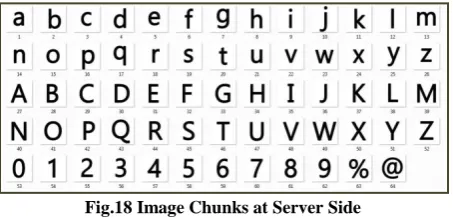
[image:7.595.55.282.334.443.2]We have used BufferdImage function to generate a random image and at server side we initially store 64 image chunks of alphabet, numerical and special symbols as shown in the figure below.
Fig.18 Image Chunks at Server Side
Now following java code is used to generate an image which takes input as array of integers which contains the names of 64 images and finally this code will merge all 64 images in to a single JPEG image named „hi.jpg‟
Here we use the „image[]‟ array for the random image creation and it is used as input to the function and all the chunks of images are stored in the given path of server side ,as chunks names are of numerical so with reference to random numbered array „image[]‟ final image will be different.
public boolean merge(int[] hi) throws IOException {
int rows = 8;
//we assume the no. of rows and cols are known and each chunk has equal width and
height int cols = 8;
int chunks = rows * cols;
int chunkWidth, chunkHeight,type; //fetching image files
File[] imgFiles = new File[chunks]; for (int i = 0; i < chunks; i++) {
imgFiles[i] = new File("web/images/"+(hi[i]+1)+ ".jpg");
}
//creating a bufferd image array from image files
BufferedImage[] buffImages = new BufferedImage[chunks];
for (int i = 0; i < chunks; i++) {
buffImages[i] = ImageIO.read(imgFiles[i]); }
type = buffImages[0].getType(); chunkWidth = buffImages[0].getWidth(); chunkHeight = buffImages[0].getHeight();
//Initializing the final image
BufferedImage finalImg = new BufferedImage(chunkWidth*cols, chunkHeight*rows, type); int num = 0;
for (int i = 0; i < rows; i++) { for (int j = 0; j < cols; j++) {
finalImg.createGraphics().drawImage(buffImages[num], chunkWidth * j, chunkHeight * i, null);
num++; } }
System.out.println("Image concatenated...");
ImageIO.write(finalImg, "jpeg", new File("/web/hi.jpg"));
System.gc(); return true; }
Finally the random image named „hi.jpg‟ is stored in the „web‟ folder and returns a Boolean value „true‟ if the image is generated and after returning the true value called function will redirect the page to Login.jsp which uses the above image as reference to the user and if user login again there is no chance of displaying the same image, for every login it is going to generate a random image.
3.4
Location of Click Point inside the
Triangle
This is the simple code for finding whether the click point is inside the triangle which is formed by the user pass 3 characters or not .As user click point is taken as the „a‟,‟b‟ as X and Y coordinates and these coordinates are passed as arguments along with and Y coordinates 3 pass characters of users passwords and checked with above snippet and if click coordinate is inside the pass triangle it returns a Boolean „true‟ else it returns „false‟.
boolean testTriangle(int x1, int y1, int x2, int y2, int x3, int y3, int a, int b)
{
if (findarea(x1, y1, x2, y2, x3, y3) == ((findarea(x1, y1, x2, y2, a, b) +
findarea(x1, y1, a, b, x3, y3) + findarea (a, b, x2, y2, x3, y3))))
{
return true; }
else {
return false; }
}
float findarea(int x1, int y1, int x2, int y2, int x3, int y3) { int a, b, c, d;
d = (y2 - y3);
[image:8.595.56.240.115.297.2]Return (float) (0.5 * Math.abs ((a * d) - (b * c))); }
Fig. 19 Location of Click Point Inside the Triangle
If user password is of length „K‟ then user must hit the K pass clicks and for every pass click server will call above snippet and if it results all trues then user is authenticated else an error message will be displayed.
For finding area of the rectangle, we divide the rectangle into two halves with its diagonal and which divides it into two triangles. Then we can check whether the click point is inside any of the two triangles.
Fig
.20 Area of Triangle in RectangleTo find the area of circle we use the following pseudo code
Fig.21 Distance from the Center of Circle to Passcpoint
boolean testCircle(int x, int y, int radius, int p, int q) {
int d=(int) Math.sqrt ((p-x)*(p-x)+(p-y)*(p-y)); if (d<=radius)
return true;
else
return false; }
3.5 Storing Weights in Database
After having the BPLA for username as input and output as password, the weights are important to the login procedures. According to the paper [2] the weights are to be stored in database which are used to authenticate the user instead of storing password directly [2,4] .
Here we used one hidden layer which requires two arrays named v[ ][ ] and w[ ][ ] of two dimensional and type „float‟. The sizes of these arrays vary from one username to other and one password to other. The problem here is for storing the weights of user we need two separate tables for each V [ ][ ] and W[ ][ ] matrices. The sizes will differ from user to user, but we used a global single table to store all users‟ weights using the following snippet.
boolean storeInDatabase(float v[][],float w[][],int ip,int op,String uname) throws ClassNotFoundException, SQLException
{
Class.forName("oracle.jdbc.driver.OracleDriver"); //Class.forName("sun.jdbc.odbc.JdbcOdbcDriver");
System.out.println("registerd");
Connection con =
DriverManager.getConnection("jdbc:oracle:thin:@localhost:1 521:XE", "system", "system");
System.out.println("connection established"); Statement st = (Statement) con.createStatement(); System.out.println("Statement Created"); String wstr="",vstr="";
for(int i=0;i<ip;i++) {
for(int j=0;j<ip;j++) { vstr=vstr+v[i][j]+"$"; }
vstr=vstr+"#"; }
for(int i=0;i<ip;i++) {
for(int j=0;j<op;j++) {
wstr=wstr+w[i][j]+"$"; }
wstr=wstr+"#";
}
//System.out.print(vstr+wstr);
boolean b=st.execute("insert into weights values ('"+uname+"' ,'"+vstr+"', '"+wstr+"')");
if(!b) return true; else
return false; }
[image:8.595.54.278.428.517.2] [image:8.595.55.215.549.678.2]different in sizes, so „ip‟ is the input length of username which is taken as the first and second indexes of V[ ][ ] matrix. The same value acts as the first index and „op‟ is used for the second index value for W[ ][ ] matrix ,here user name is used to access the database and it acts as a foreign key in „table 2‟ and which refers primary key in „table 1‟ username so that no user will have weights in „table 2‟ without user information in „ table 1‟.
We are using „$‟ as a delimiter between the weights, and cast the float values in to string format and delimiter between the lines as „#‟.
In this way both array values are converted into two strings and finally they are stored in database with index as username.
After inserting the values the result is checked. If it returns false for the function we return a Boolean value true because st.execute() function will return true if ResultSet is output, else it will return false. Hence here we will not get any ResultSet but returns a Boolean value for storing the data.
3.6 Retrieving Weights from Database
As weights in database are stored in string format so while giving weights for FFNN in login phase string format is not compatible, so we need to convert the string format to the matrix format. We have used delimiters for the weights to make it easy to regain the values from database and convert „string‟ to „float‟. The following snippet is used to get weights in string format.
String getFromDatabase(String name) throws ClassNotFoundException, SQLException {
Class.forName("oracle.jdbc.driver.OracleDriver"); //Class.forName("sun.jdbc.odbc.JdbcOdbcDriver"); //System.out.println("registerd");
Connection con = DriverManager.getConnection ("jdbc:oracle:thin:@localhost:1521:XE", "system", "system"); //System.out.println("connection established");
Statement st = (Statement) con.createStatement(); //System.out.println("Statement Created"); ResultSet rs;
rs=st.executeQuery("select count(*) from weights where uname='"+name+"'");
if(rs.next()) {
if(rs.getInt(1)==0) return "not a user"; else{
rs=st.executeQuery("select fname,lname from myproject where
uname='"+name+"'"); rs.next();
fname=rs.getString(1); lname=rs.getString(2);
rs=st.executeQuery("select * from weights where uname='"+name+"'");
String wstr="",vstr=""; if(rs.next())
{
vstr=rs.getString(2); wstr=rs.getString(3); }
return (vstr+"&&"+wstr); }
}
//System.out.print(vstr+wstr); return "false";
}
After creating the connection to the database „rs‟ is the object created for the ResulSet. This retrieves the data from database and weights will be selected using username as index and if username doesn‟t exists then server will throw an error message. vstr and wstr are the string formats of weights in database and they are returned with delimiter „&&‟ because we can‟t return the two values for function call.
Following snippet is used to evaluate the weights from the string.
a11= getFromDatabase(String name); String a22[]=a11.split("&&");
String vstr[]=a22[0].split("#"); String wstr[]=a22[1].split("#");
float v[][]=new float[vstr.length][vstr.length]; for(int p=0;p<vstr.length;p++)
{
StringTokenizer temp=new StringTokenizer(vstr[p],"$") int count=temp.countTokens();
for(int q=0;q<count;q++) {
v[p][q]=Float.parseFloat(temp.nextToken()); }
out.print("<br/>"); }
float w[][]=new float[wstr.length][(new StringTokenizer(wstr[0],"$")).countTokens()]; int pwdlength=(new
StringTokenizer(wstr[0],"$")).countTokens();
for(int p=0;p<wstr.length;p++) {
StringTokenizer temp=new StringTokenizer(wstr[p],"$"); int count=temp.countTokens(); for(int q=0;q<count;q++) {
w[p][q]=Float.parseFloat(temp.nextToken()); }
out.print("<br/>"); }
Here is the code for the matrices V[ ][ ] and W[ ][ ] using StringTokanizer with input as string and delimiter‟s “$” and “#”, the string is divided into tokens and followed by casting function Float.parseFloat() used in order to convert the „string‟ to „float‟. Finally V[ ][ ] and W[ ][ ] are the two matrices which stores the weights of the user at registration phase and now along with username these weights are given input for the FFNN which produces the password as output. This password is used for the S3PA scheme pass characters verification and if all the pass characters entered by the user are true then a successful login message will be displayed else an error message will be displayed.
3.7 Formal Statement of the Algorithm
Stochastic Back propagation (training examples, ŋ, ni, nh, no)
Each training example is of the form (x̄ ,t̄) where x̄ the input vector is and t̄ is the target vector ŋ is the learning rate (e.g., .05) . ni, nh and no are the number of input, hidden and output
nodes respectively. Input from unit i to unit j is denoted xji and
its weight is denoted by wji.
Create a feed-forward network
with ni inputs, nh hidden units, and no output units.
Until termination condition is met, Do
o For each training example (x̄ ,t̄) , Do 1. Input the instance x̄ and compute the
output ou of every unit.
2. For each output unit k, calculate δk=ok(1-ok)(tk-ok) 3. For each hidden unit h, calculate δh=oh(1-oh) ∑ k Ɛ Downstream(j) wkh δk
4. Update each network weight wji as follows:
wji wji + Δ wji
Where Δ wji = ŋ δjxji
3.8 Liaison between S3PAS and Back
Propagation
In our scheme user initially registers himself to the server. He enters his personal information along with his username and password. This User name and password are given as input to the neural network. The Username has to be mapped to the password. Initially random weights are taken for the neural network. We employed Back Propagation Algorithm for this mapping as a learning algorithm and obtain the weights after performing the training. These weights are the best weights that are obtained with which we can perform mapping. These weights are stored in the Server side as user information. Every time the user logs in, he was provided with a login image which was randomly generated containing 66 characters randomly scattered. User with the help of his known password identifies his pass triangles according to our S3PA scheme. He identifies the pass triangles clicks all the pass characters successfully. After successfully giving appropriate pass clicks he enters his user name and click on submit. Then the Image coordinates are sent to the server along with the click point coordinates. Then we check at the server side whether the user enters all the pass clicks correctly. If he does then he is an authenticated user. The following series of figures clearly explains the different stages of our scheme. Initially username and password are given to the network this is explained in the figure below.
Fig. 22 Giving Username and Password to the NN
v- Weight matrix at Layer 1 w- Weight Matrix at Layer 2
In the above figure we can see that username and password are given by the user at registration phase. This username and password are normalized into values with range 0 to 1. This
normalization function is the key step in our scheme playing a major rule. We can take any character set for normalization like alphanumeric, gray code etc. As the input to the neural network is between 0 and 1, we design our normalization function to generate a normalized value taking any character for character set as input and producing output a normalized value. The normalization function can be given by the following equation.
x‟i= (xi – min(x))/(max(x) – min(x)) Where xi‟ is the normalized value.
For the first time we forward propagate the NN and calculate the error of output layer with respect to the normalized output. Then we back propagate the Error as shown in the figure below.
Fig. 23 Back Propagating the Error
After back propagating the error we forward propagate the network with the new updated weight matrices v1 and w1 which are obtained after the back propagation. If we get a considerable error then we repeat the process of back propagation and forward propagation until the error is minimized. Weights for which the error is low are stored in the database.
Every time the user logs in the procedure is explained as shown in the figure below.
Fig. 24 Forward Propagating the Network at Login Phase
of the generated password. So the server can authenticate whether he is an authenticated user or not.
4.
RESULTS
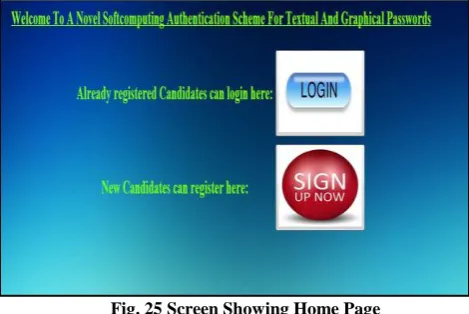
In our scheme initially user is given with the following page as shown in the figure below. It contains two buttons login and sign up. A new user clicks on sign up, a registered user clicks on login.
Fig. 25 Screen Showing Home Page
A new user should register with his/her credentials as input and by clicking signup button a following page will be displayed.
Fig. 26 Screen Showing Signup Page
Now user will enter details like first name, last name, and date of birth, email id along with his desired username and password and after submitting the data, username is initially checked in database whether it already exists or not using following SQL query
If res1 results 1 as output then server will display an error message that “username already exists and try another username” Else username and password are given as input to neural network and at server side the back propagation is applied to adjust weights in order to get output of network the password and for every iteration server will calculate the error and it displayed like below
[image:11.595.55.290.161.318.2]
Fig. 27 Screen Showing the Training of Neural Network
After completion of training the data will be stored in database and a successful message with comparing the actual values and outcome values as follows
Fig. 28 Screen Showing Actual Weights and Outcome Weights of Neural Network
In above image underlined values are expected values and highlighted values are values which are output to the network with very small error.
Then for user server will display the successful registration message and asked to login link for optional
Fig. 29 Screen Showing Successful Registration Message
At server side only weights are stored instead of password which is higher secure comparing with textual or encrypted or hashed passwords and the following image shows how weights are stored in database.
After clicking the login page the following page will be displayed with unique image for every login phase.
ResultSet res1 = st.executeQuery ("select count (*) from myproject where uname=‟ "
Fig. 30 Screen Showing Login Page for the User
Then user will be asked to enter username but password should enter using S3PAS scheme and not allowed to enter characters but only clicks on the image and image coordinates are sent to server for validation along with username. Now the username is given as input to Feed Forward Network and weights for network are retrieved from database with index as username and used for network so that the output of network will be the user password used for server side checking of S3PAS password and if all the pass characters entered by the user are results true then user is authenticated else an error page will be displayed following page even password lengths are not matched same following page is projected.
Fig. 31 Screen Showing Error Message in Login Phase
If user is authenticated then following page will be displayed by the server. Here underlined words are first name and last name.
Fig. 32 Screen Showing Login Successful Page
We can perform training to the back propagation neural network with different variants of learning rate and momentum term. Learning rate tells how fast the network is going to learn the given pattern. Higher the learning rate time taken for learning is less, where as if the learning rate is low the network is going to learn the pattern slowly. The following graph below clearly describes different variants of learning rate (ŋ). In most of the cases learning rate is taken in the range 0.9-2.0.
CONCLUSION
By using S3PA Scheme we successfully overcome the drawback of attacks relating to shoulder surfing. As this Scheme generates the image randomly it was resistant to screen capture and key logger attacks, we are making a user to enter his session password with the help of his known password.
We could provide security at the server side, during the registration phase. The neural network was trained and stored weights of the network used for our mapping. Even though an intruder attacks the system and accesses this information he cannot interpret the data as he cannot find the normalized data values. We provided connectivity between our two schemes and successfully provided security at the server side and the client side. For back propagation we performed training with variants of learning rate (ŋ) and momentum term (α).
FUTURE SCOPE
We can further enhance our scheme by having some variants of learning functions. For performing training to the neural network we can use different learning algorithms apart from Back Propagation algorithm thereby increasing security over internet.
We can use Hopfield Neural Networks for our scheme which is used for associative memory. And similarly we can use different concepts of neural network soft computing for our functionalities.
ACKNOWLEDGMENTS
The authors would like to thank everyone, whoever remained a great source of help and inspirations in this humble presentation. The authors wish to thank many anonymous referees for their suggestions to improve this paper.
REFERENCES
[1]. Haichang Gao, Xiyang Liu, Sidong Wang, Honggang Liu, Ruyi Dai, “Design and analysis of a graphical password scheme,” 2009 Fourth International Conference on Innovative Computing, Information and Control, ICICIC, 7–9 Dec. 2009, pp. 675–678.
[2]. D. Hong, S. Man, B. Hawes, and M. Mathews, "A password scheme strongly resistant to spyware," Proceedings of International conference on security and management. Las Vergas, NV, 2004.
[3]. A.P. Sabzevar, A. Stavrou, “Universal Multi-factor authentication using graphical passwords,” in: IEEE International Conference on Signal Image Technology and Internet Based Systems, 2008, SITIS ‟08, Nov. 30 2008–Dec. 3 2008, pp. 625–632.
[4]. G. Horng, “Password authentication without using password table,” Inform. Processing Lett., vol. 55, pp. 247–250, 1995.
[5]. S. Wiedenbeck, J. Waters, J.C. Birget, A. Brodskiy, N. Memon,” PassPoints: design and longitudinal evaluation of a graphical password system,” International Journal of Human-Computer Studies 63 (2005) 102–127, Special issue on HCI research in privacy and security.
[6]. Sadiq Almuairfi, Prakash Veeraraghavan, Naveen Chilamkurti, “A novel image-based implicit password authentication system (IPAS) for mobile and non-mobile devices,” Department of Computer Science and Computer Engineering, La Trobe University, 3086, Melbourne, Australia.
[7]. A. Gilbert, "Phishing attacks take a new twist," CNET News.com, May 04,2005.
[8]. A. Adams and M. A. Sasse, “Users are not the enemy: why users compromise computer security mechanisms and how to take remedial measures,” Communications of the ACM,42:41–46, 1999.
[9]. L. Sobrado and J.-C. Birget, "Graphical passwords," The Rutgers Scholar, An Electronic Bulletin for Undergraduate Research, vol. 4, 2002.
Management Conference, 24 Sept. Perth, Western Australia, November 2003, paper 16.
[11]. S. Xiaoyuan, Z. Ying, et al. “Graphical passwords: a survey,” 21st Annual Computer Security Applications Conference, 2005, pp. 463–472.
[12]. ASN Chakravarthy and Prof.P S Avadhani,” A Probabilistic Approach for Authenticating Text or Graphical Passwords Using Back Propagation,” IJCSNS International Journal of Computer Science and Network Security, VOL.11 No.5, May 2011.
[13]. Khalil Shihab,” A Back propagation Neural Network for Computer Network Security,” Journal of Computer Science 2 (9): 710-715, 2006 ISSN 1549-99 © 2006 Science Publications.
[14]. Huanyu Zhao and Xiaolin Li ,” S3PAS:A Scalable Shoulder-Surfing Resistant Textual-Graphical Password Authentication Scheme,” 21st International Conference on Advanced Information Networking and Applications Workshops, 2007, IEEE.
[15]. R. Dhamija and A. Perrig, "Deja Vu: A User Study Using Images for Authentication," Proceedings of 9th USENIX Security Symposium, 2000.
[16]. G. Agarwal and R.S. Shukla,” Security Analysis of Graphical Passwords over the Alphanumeric Passwords “, Int. J. Pure Appl. Sci. Technol., 2010.
[17]. J.C. Birget, H. Dawei, et al., “Graphical passwords based on robust discretization,” IEEE Transactions on information Forensics and Security 1 (3) (2006) 395– 399.
[18]. T. Takada, H. Koike, “Awase-E: image-based authentication for mobile phones using user‟s favorite images,” Human–Computer Interaction with Mobile Devices and Services, vol. 2795, Springer, Berlin / Heidelberg, 2003, pp. 347–351.
[19]. K. Renaud,” On user involvement in production of images used in visual authentication,” Journal of Visual Languages and Computing 20 (I) (2009) 1–15.
[20]. D. Weinshall and S. Kirkpatrick, "Passwords You‟ll Never Forget, but Can‟t Recall," Proceedings of Conference on Human Factors in Computing Systems (CHI). Vienna, Austria: ACM, 2004, pp. 1399-1402. [21]. A.H. Lashkari, F. Towhidi,” A complete comparison on
pure and cued recall-based graphical user authentication algorithms,” in: Second International Conference on Computer and Electrical Engineering, 2009, ICCEE ‟09, pp. 527–532.
[22]. M. S. Obaidat and D. T. Macchiarolo, “An on-line neural-network system for computer access security,” IEEE Trans. Ind. Electron., vol. 40, pp. 235–242, 1993. [23]. K. Wei-Chi, T. Maw-Jinn, “A remote user authentication
scheme using strong graphical passwords”, 30th Anniversary IEEE conference on Local Computer Networks, 2005, pp. 351–357.
[24]. M Sreelatha,M Shashi,M Anirudh,MD Sultan Ahamer,V Manoj Kumar, “Authentication Schemes for Session Passwords using Color and Images,” International Journal of Network Security & Its Applications (IJNSA), Vol.3, No.3, May 2011.
Authors
P.S.V Vachaspati is currently working as Assistant Professor in Dept. of C S E in Bapatla Engineering. He has 3 papers published in various International journals and conferences. His research areas include Security & Cryptography, Neural Networks.
Dr. A. S. N. Chakravarthy did his Master‟s Degree from JNTU Hyderabad and PhD from Acharya Nagarjuna University, Guntur. He is currently working as Associate Professor in Dept. of C S E in JNTUK University College of Engineering Vizianagaram. He has 37 papers published in various International journals and conferences. He is Reviewer and Editorial board member for various international journals. His research areas include Cryptography, Biometrics, and Digital Forensics.