Design and Implementation of a Home Automatedn
System based on Arduino, Zigbee and Android
Application
Abdulrahman Yusuf
Faculty of Science, Department of Computer Science,
Yobe State University, Damaturu, Nigeria
Murtala Aminu Baba
School of Engineering and EngineeringTechnology,
Abubakar Tabawa Balewa University, P.M.B.0248, Bauchi, Nigeria
ABSTRACT
Due to the proliferation of modern technology, these days, the world is increasingly experienced the use of wireless devices. The devices such as remote control and GSM phone could provide means for monitoring and controlling home appliances in a more convenient way. This project has explored the concept of home automation and ZigBee technology. A home automated system based on Arduino and ZigBee are developed which is tried to be integrated with Android application through Home Gateway for network interoperability. To show the effectiveness and feasibility of this proposed system, a remote control, indoor control and outdoor control systems have been developed and evaluated. However, integrating the system with android application remains unsuccessful.
General Terms
Mobile and distributed computing.
Keywords
Zigbee; Arduino; Home appliances; gateway and remote control.
1.
INTRODUCTION
The concept of home automation is being in place since 1980’s with the term dometics “Domotics is the application of computer and robot technologies to domestic appliances. It is a portmanteau word formed from domus (Latin, meaning house) and robotics” [4]. Today a lot of activities at homes and offices can be automated and controlled (example light, TV, door/gate and other home appliances) over a handy device (remote control or remote access) either inside or outside home or office. According to [11] a remote control is a device that is mostly small wireless handheld object for managing several settings by means of buttons arrays. In engineering remote control is the control of system or activity by a person at different place usually by means of radio or ultrasonic signal or by electric signal transmitted by Wire[4]. Due to the widespread of personal computing of consumer electronic devices such as media players, mobile phone and a like; peoples are increasingly accepting technology in everyday life which gives them more sophisticated avenue of home management for the aspects like security, comfort, energy efficiency, home media and other related issues [8]. ZigBees appear to be one of the technologies that allows
ZigBee performs two ways communication and do away with line-of-sight restrictions (pointing at the device).
For this project work, using Arduino and ZigBee an automation device system of a particular house will be developed to control inner and outer home electrical appliances as well as integrating android phone application. For the inner home system four rooms lights will be controlled within the home. Servo gate will be automatically open upon shadow detection and also light will be automatically switch “ON” and “OFF” when sun sets and rises respectively by the outdoor system.
1.1
Statement of Problem
Today telecommunication is massively used in customer electronic sector. And it is very useful to have very handy device for controlling as well as facilitating activities around home. Therefore wireless remote control can be achieved using Arduino and ZigBee as well as GSM phone to control the interior and exterior home appliances. This is exactly what the proposed system should do.
1.2 Assumptions
The proposed system to develop is expected to perform the following:
Remote control (device 1) should instruct device 3 (interior controller) to light on/off of either room one, room two, room three or room four of a particular house. But room 4 switch would be a dimmer light.
The interior controller is expected to respond by informing the device 1 which light of the room is on or off
The light of room four can be regulated by dimmer switch from the remote control
The exterior controller should inform the remote control once the outside light is automatically on or off during night or day respectively.
The exterior controller should also inform the remote control when the servo gate is automatically open upon shadow detection and close if no shadow detected.
2.
SYSTEM DESIGN
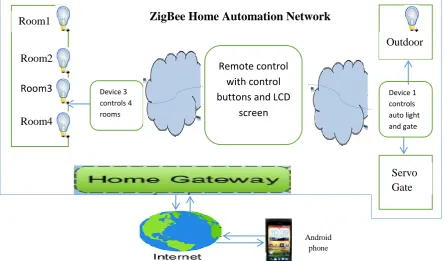
The design procedures and working principles of the whole system is organized into different units which include: control units (remote control, outer door control, and inner door control); home gateways (interfacing unit) and GSM android application. It also requires compiler to build programs which is used in Arduino microchip and ZigBee. Fig. 1 shows the conceptual architecture of the proposed system and some part of the image is from [6]
2.1
Hardware Design
2.1.1 Remote Control Unit
This central module is built using Arduino and ZigBee plus bread board with switches, a potentiometer and LCD screen. Arduino Uno is an integrated circuit consists of microcontroller, an ATMega328 RISK devices 30kb available flash memory and 32-8 bit registers and assorted programmable I/O lines [3]. The ZigBee is interfaced with Arduino for wireless personal area network (WPAN) operating at 868MHz, 902-928MHz and 2.4GHz and it can
communicate at the rate of 250Kbps within the physical distance of about 50 miles [9]. The three switches are plugged on the board then to the Arduino to control the three inner rooms by switching on/off through pin 13, 12, and 11, a potentiometer as dimmer switch for dimming the 4th room light through pin A1. The LCD screen which is 16x2 alphanumeric displays with 16 pins connected to the Arduino through board on pin 9, 8, 7, 6, 5 and 4 as well as 5V and GND to display messages from other units. Fig 2 gives the remote control circuit.
2.1.2 Inner Control Unit
The general function of this unit is to receive command from the remote control to light on/off of either room one, room two or room three or dimming room four as well as informing the remote control unit which room is on or altered. It consists of Arduino and ZigBee as explained under remote control unit. It has a bread board connecting the four positive legs of the LEDs to pins 13, 12, 8 and 11 respectively for digital read and each of the negative legs are connected to the ground through 560Ω resistor. The circuit diagram is depicted in the Fig. 3.
Device 3 controls 4 rooms
Remote control
with control
buttons and LCD
screen
Device 1 controls auto light and gate
Room3
Room1
Room2
Room4
Servo
Gate
Outdoor
ZigBee Home Automation Network
[image:2.595.70.515.306.567.2]Android phone
2.1.3 Outdoor Control Unit
The general function of the unit is to send to the remote control whenever the gate is open and whenever the outside light is on/off upon sun sets or rises respectively. This unit is built using Arduino, ZigBee and a bread board contains a LED, Servo and two photo-resistors. What Arduino and ZigBee do are explained under remote control (section 2.1.1) above. The two photo-resistors on the board, one is connected to the LED and the other is connected for the servo. The light is automatically switched on when sun sets and off when sun rises. The gate is opened upon detection of shadow and closed when no shadow. The circuit is shown in the Fig. 4. The LED connected to pin 13 and to the GND through 1.8KΩ which switches on upon reading luminous intensity of less than 12 Lux (i.e when sun sets) which allow the current to pass
reading luminous intensity of less than 21 Lux (i.e when shadow detected) that allowed the current to pass through 100Ω and pin A1 active to the ground.
Photo-resistors are used for this light sensitivity devices (i.e servo gate and outdoor light). This is because, in Photo-resistor, resistance goes lower at the higher light levels but goes higher at the low light levels [2]. This sensor technology has limited frequency, bandwidth and linearity and its spectral response is within 350 and 1100nm but has ease of use, low cost and TTL signal level [7].
2.2
Home Gateway (Interfacing Unit)
Remote control access and interoperability to the home automation system through internet requires home gateways. Pin 9
Pin A1 5V
Pin 13
Pin A0
GND
1.8KΩ 100Ω 100Ω
Fig 4: Outer Control Unit
LED
Servo Pin 11
560Ω A1 Pin 12
Pin 13
LED1
GND
560Ω A1 560Ω
A1 560Ω
A1
Pin 8
Fig 3: Inner Control Unit
LED2 LED3
LED4
Pin 12
5V Pin A1
Pin 11 Ground
10KΩ
10KΩ 10KΩ 10KΩ
Pin 13
Fig 2: Remote Control Circuit
1 2 3 4 5 6 7 8 9 10 11 12 13 14 15 16
pin 9 pin 8 pin 7 pin6 pin 5 pin 4
LCD
Potentiometer LCD
The home web server based home gateway to interconnect home automation system with internet need to be developed [7]. This can be based on key technologies HyperText Markup Language (HTML), Web-based User Interface Web Server, HyperText Transfer Protocol, Common Gateway Interface (CGI) and Web Application Scripting or Programming Language [10]. The home gateway can play two primary functions. Firstly data translation services between the internet and ZigBee. Secondly provision of standardized user interface for the devices connecting to the ZigBee remote control [7].
3.
FLOW CHARTS
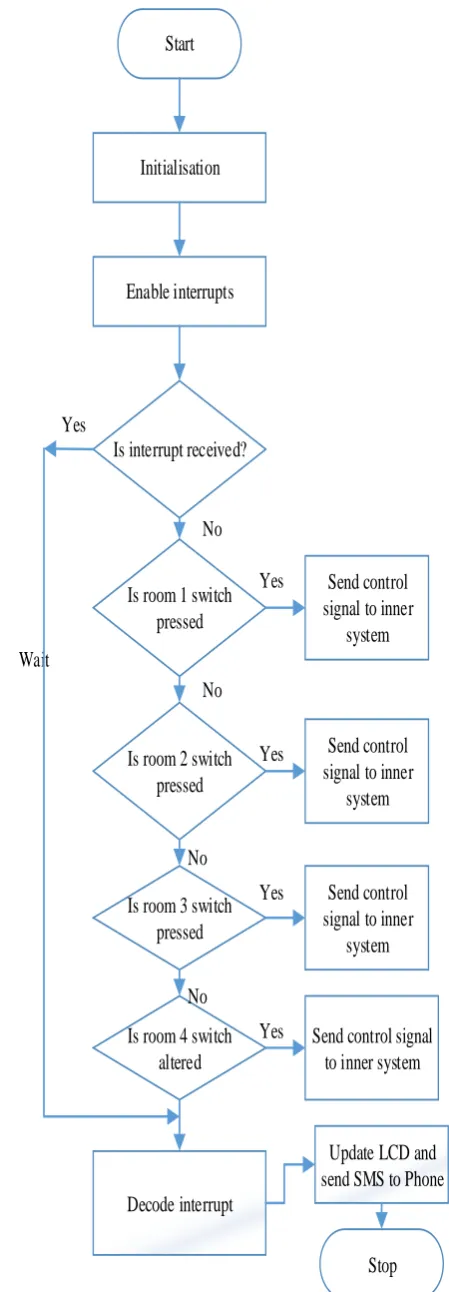
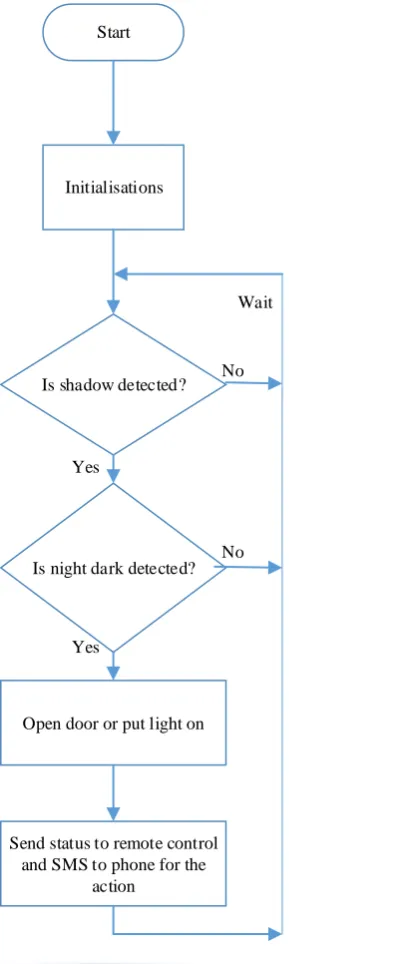
Fig 5a shows flow-chart of remote control. Fig 5b shows flow chart of inner control unit of four rooms and Fig 5c shows flow chart of the outer control unit. It is clearly depicting from Fig 5a if a switch of a particular room is pressed a control signal is transferred to the Fig 5b which decodes and switches on/off the appropriate room light and sends back the action performed to the remote control which also decodes and updates LCD as well as sending SMS to the android phone. Fig 5c indicating the gate open upon shadow detection and outside light automatically ‘ON’ upon dark sensing and ‘OFF’ if not. The unit sends to the Fig. 5a upon any action happens which decodes and update the LCD and sends SMS to the android phone
4.
SOFTWARE DESIGN AND
IMPLEMENTATION
4.1 Arduino with ZigBee
The software is designed with the use of Arduino Integrated Development Kid Environment that allows writing, compiling and uploading code to the board. The program or sketch is written using C programming language or C compiler. Three programs are written for three different systems: First the program for the remote control which allows the remote control to instruct inner control system to switch “ON” or “OFF” of either of the three rooms by switch press as well as dimming the light of room four through turning the potentiometer. The remote control program also allows for receiving signal from inner or outer control system of any action performs which is decoded and updated on the LCD screen. The complete program of the remote control unit is available with the developer. Second is the inner control program which performs switch “ON” or “OFF” actions as result of the instruction receives from remote control program unit and send back signal for any particular action done to the remote control. The actual work contains the code for inner control system. In the third outer system the program is written to allow automatic light switch on or off whenever sun is set or raise. It also inform remote control when the light is on or the servo gate is open. The code for outer control system is available in the actual work.
Wait
Start
Initialisation
Enable interrupts
Is interrupt received?
Is room 1 switch
pressed
Is room 2 switch
pressed
Is room 3 switch
pressed
Is room 4 switch
altered
Send control
signal to inner
system
Send control
signal to inner
system
Yes
No
Send control
signal to inner
system
Send control signal
to inner system
Decode interrupt
Update LCD and
send SMS to Phone
Stop
No
No
No
Yes
Yes
Yes
[image:4.595.314.539.70.717.2]Yes
Start
initializations
Enable interrupt
Is any key pressed and
interrupt received?
Decodes
On/Off appropriate room
Reply to remote control
and send SMS to phone
Wait
No
Wait
[image:5.595.331.538.72.555.2]Yes
Fig. 5b: Inner Control Unit Flow-Chart
No
No Wait Start
Initialisations
Is shadow detected?
Is night dark detected?
Open door or put light on
Send status to remote control and SMS to phone for the
action Yes
Yes
Fig.
5c: Outer Control Unit Flow-Chart4.2 Android Application
[image:5.595.63.242.73.595.2]
5.
EVALUATION
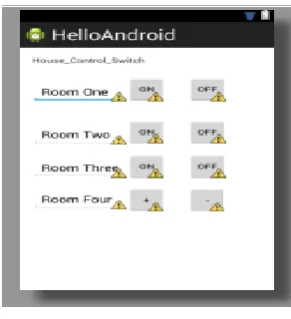
The implemented system has been evaluated. To show the feasibility and effectiveness of the proposed system; four devices were developed but the forth one is partially developed: first is a remote control with four switches and LCD; second is an inner control system connected to the lights of four rooms; third is an outside control system connected to servo gate and outside light and the fourth is an android application integrated to act as GSM remote control for the home automation system. The system was subjected to the thorough testing in which some amount of delays have been observed especially between switch off press and its response. However, the system does as expected.
Due to the time limitations as well as unavailability of appropriate materials for developing and integrating android phone to control the developed Zigbee home automation system. All the efforts for achieving that remained unsuccessful.
6.
CONCLUSION
These days, there were increasing used of wireless devices. The devices such as remote control and GSM phone provide means for monitoring and controlling home appliances (for example doors, lights and the rest). Integrating mobile phone to control and monitor home devices provide a more convenient way to alert users of the possible intrusion as well as avoiding user to be moving with additional equipment as almost every person use mobile phone. The home automation developed for this project remote control device, inner control device and outer control device communicated with some delay issues. But integrating it with android application has turned unsuccessful. Therefore, this remains the great limitation for further work.
7.
REFERENCES
[1] Balasubramanian, K. and Cellatoglu, A. 2009. Analysis of remote control techniques employed in home automation and security systems [online]. New York: Institute of Electrical and Electronics Engineers, Inc, pp.1401-1407. . [Accessed 18th March, 2013]. Available at: <http://wlv.summon.serialssolutions.com/link/0/>.
[2] Department. of Mechanical and Aerospace Engineering, 2011. Photoresistor Laboratory: Photoresistor, Transistor, and LED’s, USA: San José State University. [Accessed 18th April, 2013]. Available at: < www.engr.sjsu.edu/bjfurman/.../photoresistor-Arduino.d >
[3] Dennett, C. 2013. 7CC003DAMC Arduino Duemilanove WorkBookWeb [Online]. [Accessed 20th March, 2013]. Available at: <http://wolf.wlv.ac.uk/>
[4] Delgado A. R., Picking R. and Grout V. 2005 “Remote-Controlled Home Automation Systems with Different Network Technologies” Centre for Applied Internet Research (CAIR), University of Wales, NEWI, Wrexham, UK [Online]. [Accessed 15 March, 2013].
Available at:
<www.glyndwr.ac.uk/groutv/papers/p5.pdf>
[5] FALEX, 2013. The Free Dictionary [online]. [Accessed
15th March, 2013]. Available at:
<http://www.thefreedictionary.com/engineering> [6] Gill,K., Yang S., Yao F and Lu X. (2009) A
zigbee-based home automation system [online]. New York: Institute of Electrical and Electronics Engineers, Inc, pp.422-430 [online]. [Accessed 15 March, 2013].
Available at:
<http://wlv.summon.serialssolutions.com/link/>.
[7] Godfrey L. 2012. Choosing the Detector
for your Unique Light Sensing Application [online].
[Accessed 15 April, 2013].
http://www.johnloomis.org/ece445/topics/egginc/tp4.htm l
[8] Khan, S. R. , Al-Mansur, A., Kabir, A., Jaman, S. and Chowdhury, N. 2012. Design and Implementation of Low Cost Home Security System using GSM Network. International Journal of Scientific & Engineering Research 3(3), ISSN 2229-5518 [online].[Accessed 15th
March, 2013]. Available At:
<http://www.ijser.org/researchpaper%5CDesign-and- Implementation-of-Low-Cost-Home-Security-System-using-GSM-Network.pdf>
[9] Rouse, M. 2012. ZigBee Definition [Online]. [Accessed
18th March, 2013]. Available at:
<http://searchmobilecomputing.techtarget.com/definition /ZigBee>
[10]Ting, J.(2013) 7CC003 DAMC Web Interfacing to Embedded Devices [Online]. [Accessed 20th March, 2013]. Available at: <http://wolf.wlv.ac.uk/>
[11]Wikipedia 2013. ZigBee [Online]. [Accessed 20th April,
2013]. Available at:
<http://en.wikipedia.org/wiki/ZigBee>
[image:6.595.67.213.87.247.2][12]ZigBee Alliance, 2013. ZigBee Remote Control Overview [Online]. [Accessed 11the March, 2013]. Available At: <http://www.zigbee.org/Standards/ZigBeeRemoteContro l/Overview.aspx>