First Release Edition Published 1999
Copyright © 1999 by New Riders Publishing
This material may be distributed only subject to the terms and conditions set forth in the Open Publication License, v1.0 or later (the latest version is presently available at http://www.opencontent.org/openpub/ (
What is Gnome?...24
The Gnome Development Framework...24
Non-Gnome Libraries...25
glib ...25
GTK+ ...25
ORBit ...25
Imlib ...26
Gnome Libraries...26
libgnome...26
libgnomeui...26
libgnorba...27
libzvt...27
libart_lgpl...27
Other Libraries ...27
gnome-print...27
gnome-xml...27
Guile ...28
Bonobo ...28
A Word About Header Files ...28
Structure of the Book...28
2. glib: Portability and Utility ...30
Basics ...30
Type Definitions ...30
Frequently Used Macros ...30
Debugging Macros...31
Memory ...33
String Handling...34
Data Structures...37
Lists ...37
Trees ...41
GTree ...41
GNode ...43
Hash Tables ...46
Other Features...48
3. GTK+ Basics ...50
Whirlwind Tour of GTK+ ...50
A Complete Hello, World ...50
Compiling Hello, World ...51
How It Works...52
Initialization ...52
Widgets ...52
Signals ...53
Entering the Main Loop...53
More on Signals and Callbacks ...54
Containers And Widget Layout ...55
Size Allocation ...56
Requisition...56
Allocation...56
GtkBox...57
GtkBoxLayout Details ...58
Non-Homogeneous Box Packing Patterns ...59
Usinggtk_table_attach_defaults()...65
Other Layout Widgets ...65
Manually Affecting Layout ...66
Widget Concepts...67
Widget Life Cycle...67
Realizing, Mapping, and Showing ...68
Other Widget Concepts ...70
Sensitivity ...70
Focus...70
Grabs ...71
Default...71
Widget States...71
The Main Loop ...72
Main Loop Basics ...72
Quit Functions ...73
Timeout Functions ...73
Idle Functions ...74
Input Functions ...74
II. Building a Gnome Application...76
4. Creating Your Source Tree...76
Overview of a Gnome Source Tree...76
Source Tree Checklist ...77
configure.in...78
Makefile.am...80
Relevant GNU Documentation...82
Installing Support Files...83
Installing Datafiles: Documentation and Pixmaps...83
Pixmaps...83
Documentation ...84
.desktopEntries...85
EXTRA_DIST...86
5. Gnome Application Basics ...87
Initializing the Libraries ...87
Internationalization ...87
Argument Parsing withpopt...89
Argument Parsing in GnomeHello ...92
Saving Configuration Information...95
Reading Stored Config Data ...96
Storing Data In Configuration Files ...97
Config File Iterators ...98
Iteration Example fromgnome-apt...98
Section Iterators ...100
Other Config File Operations ...100
Session Management...101
Using the GnomeClient Object ...102
6. The Main Window:GnomeApp...104
TheGnomeAppWidget ...104
Menus and Toolbars with GnomeUIInfo ...105
Converting GnomeUIInfo to a Widget ...107
GnomeHello: An Example...108
Adding a Status Bar...109
GnomeAppBar...109
Adapting to Screen Size ...114
Setting Window Class Hints...114
7. User Communication: Dialogs ...116
TheGnomeDialogWidget...116
Creating a Dialog ...116
Filling in the Dialog ...117
HandlingGnomeDialogSignals ...118
Finishing Touches ...119
Modal Dialogs ...121
A Dialog Example...122
Special Dialog Types ...123
GnomeAbout...124
GnomePropertyBox...125
GnomeMessageBox...126
Convenience Routines ...127
8. Gnome Application Checklist ...128
III. Advanced GTK+/Gnome Techniques ...130
9. The GTK+ Object and Type System...130
Object and Class Structures...130
Type Checking and New Types ...131
Initializing a New Class...133
GtkArg and the Type System ...135
Object Arguments...139
Setting Object Arguments...140
Reading Object Arguments ...141
Using Object Arguments in Your Own GtkObject Subclass ...142
Discovering the Available Object Arguments...144
Signals ...146
Adding a New Signal ...146
Using Existing Signals ...150
Emitting A Signal ...153
What Happens When A Signal Is Emitted ...155
Object Finalization...156
Chaining Up...159
Attaching Data to Objects...160
10. GDK Basics...162
GDK and Xlib ...162
GdkWindow ...162
GdkWindow and GtkWidget ...163
GdkWindow Attributes...163
Visuals and Colormaps ...167
GdkVisual...167
Types of Visual ...168
Color and GdkColormap ...169
Obtaining a Colormap ...171
Drawables and Pixmaps ...171
Events ...172
Types of Event ...173
The Event Mask...175
Receiving GDK Events in GTK+...176
Focus Change Events...186
Expose Events...186
Window Change Events...188
Little-used Events ...189
Visibility Events ...189
Property Events ...189
Selection Events ...190
Client Events ...190
Drag and Drop Events ...191
Proximity Events ...191
The Mouse Pointer...191
Pointer Location ...192
Grabbing the Pointer ...192
Changing the Cursor ...193
Fonts ...194
Font Metrics ...196
Graphics Contexts ...198
Drawing ...203
Points ...204
Lines ...204
Rectangles...205
Arcs ...205
Polygons ...206
Text ...206
Pixmaps ...207
RGB Buffers...207
GDK Resource Management...209
GtkStyle and Themes ...209
11. Writing aGtkWidget...212
Overview...212
Kinds of Widget...212
What a Widget Does ...213
TheGtkWidgetBase Class...213
TheGtkWidgetInstance Struct ...213
TheGtkWidgetClass Struct...214
Overridable Signals...217
An Example: TheGtkEvWidget...217
Overview ...217
GtkObject Features...219
Creation...219
Destruction ...220
Realization and Mapping...221
Size Negotiation ...224
Drawing...226
Handling Focus ...230
GtkEv’s Functionality ...231
GtkWidgetIn Detail ...232
Destruction...232
Showing, Hiding, and Mapping ...233
Realization...234
Drawing...235
Size Negotiation ...235
Child Type ...241
OtherGtkBinFunctionality ...242
GtkVBox: A Windowless Container...244
Coding a GTK_NO_WINDOW Widget...244
Size Negotiation ...245
Child Arguments...249
GnomeAppBar: A Trivial Composite Widget...250
Other Examples...253
12.GnomeCanvas...254
Introduction to the Canvas...254
Basic Canvas Architecture...254
GnomeCanvasGroup...254
Coordinates ...255
Affine Transformations ...256
Using the Canvas ...258
Preparing theGnomeCanvasWidget...258
Scroll Region...259
Zooming...259
Canvas Items...260
Canvas Items and Events...262
A Canvas Example...263
Standard Canvas Item Reference ...267
Rectangle and Ellipse Items...268
Line Item...269
Polygon Item...271
Image Item ...272
Text Item ...273
Widget Item...275
13. Writing a GnomeCanvasItem ...276
Overview...276
GnomeCanvasRect...277
Drawing Methods...278
The Update Method...279
Requesting Updates ...284
The Render Method (Antialiased Mode)...284
Speed and RGB Rendering...287
The Draw Method (GDK Mode)...287
Other Methods ...288
Events...288
Point ...289
Bounds ...291
Realizing and Mapping...291
GtkObject Methods ...292
IV. Appendices...293
14. GTK+/Gnome Object Hierarchy ...293
Hierarchy Summary...293
GtkObject ...298
GtkObject...298
Library...298
Header File ...298
Header File ...299
Description ...299
GtkContainer...299
Library...299
Header File ...299
Description ...300
GtkBin...300
Library...300
Header File ...300
Description ...300
GtkWindow...300
Library...300
Header File ...300
Description ...300
GnomeDialog...301
Library...301
Header File ...301
Description ...301
GnomeAbout...301
Library...301
Header File ...301
Description ...301
GnomeMessageBox...301
Library...302
Header File ...301
Description ...302
GnomePropertyBox...302
Library...302
Header File ...302
Description ...302
GnomeScores...302
Library...302
Header File ...302
Description ...302
GnomeApp...303
Library...303
Header File ...303
Description ...303
GtkDialog...303
Library...303
Header File ...303
Description ...303
GnomeFontSelector...303
Library...303
Header File ...304
Description ...304
GtkInputDialog...304
Library...304
Header File ...304
Description ...304
GtkColorSelectionDialog...304
Library...304
GtkFontSelectionDialog...306
Library...306
Header File ...306
Description ...306
GtkPlug...306
Library...307
Header File ...306
Description ...307
GtkButton...307
Library...307
Header File ...307
Description ...307
GnomeColorPicker...307
Library...308
Header File ...308
Description ...308
GnomeFontPicker...308
Library...308
Header File ...308
Description ...308
GnomeHRef...308
Library...308
Header File ...308
Description ...308
GtkToggleButton...309
Library...309
Header File ...309
Description ...309
GtkCheckButton...309
Library...309
Header File ...309
Description ...309
GtkRadioButton...310
Library...310
Header File ...310
Description ...310
GtkOptionMenu...311
Library...311
Header File ...311
Description ...311
GnomeDockItem...311
Library...311
Header File ...312
Description ...312
GtkAlignment...312
Library...312
Header File ...312
Description ...312
GtkFrame...312
Library...312
Header File ...313
Description ...313
GtkItem...314
Library...314
Header File ...314
Description ...314
GtkMenuItem...314
Library...314
Header File ...314
Description ...314
GtkCheckMenuItem...314
Library...314
Header File ...314
Description ...314
GtkRadioMenuItem...315
Library...315
Header File ...315
Description ...315
GtkPixmapMenuItem...315
Library...315
Header File ...315
Description ...315
GtkTearoffMenuItem...316
Library...316
Header File ...316
Description ...316
GtkListItem...316
Library...316
Header File ...316
Description ...316
GtkTreeItem...316
Library...317
Header File ...317
Description ...317
GtkEventBox...317
Library...317
Header File ...317
Description ...317
GtkHandleBox...317
Library...317
Header File ...317
Description ...317
GtkScrolledWindow...318
Library...318
Header File ...318
Description ...318
GtkViewport...318
Library...319
Header File ...318
Description ...319
GtkBox...319
Library...319
GnomeAppBar...320
Library...320
Header File ...320
Description ...320
GnomeDateEdit...320
Library...320
Header File ...320
Description ...320
GtkCombo...321
Library...321
Header File ...321
Description ...321
GnomeEntry...321
Library...321
Header File ...321
Description ...321
GnomeFileEntry...322
Library...322
Header File ...322
Description ...322
GnomeNumberEntry...322
Library...322
Header File ...322
Description ...322
GnomeProcBar...322
Library...322
Header File ...323
Description ...323
GtkStatusbar...323
Library...323
Header File ...323
Description ...323
GtkVBox...323
Library...323
Header File ...323
Description ...323
GnomeCalculator...323
Library...324
Header File ...323
Description ...324
GnomeGuru...324
Library...324
Header File ...324
Description ...324
GnomeIconEntry...324
Library...324
Header File ...324
Description ...324
GnomeIconSelection...325
Library...325
Header File ...326
Description ...326
GnomePaperSelector...326
Library...326
Header File ...326
Description ...326
GnomePixmapEntry...327
Library...327
Header File ...327
Description ...327
GnomeSpell...327
Library...327
Header File ...327
Description ...327
GtkColorSelection...327
Library...328
Header File ...327
Description ...328
GtkGammaCurve...328
Library...328
Header File ...328
Description ...328
GtkButtonBox...328
Library...329
Header File ...328
Description ...329
GtkHButtonBox...329
Library...329
Header File ...329
Description ...329
GtkVButtonBox...329
Library...329
Header File ...329
Description ...329
GtkLayout...329
Library...330
Header File ...330
Description ...330
GnomeCanvas...330
Library...330
Header File ...330
Description ...330
GnomeIconList...331
Library...331
Header File ...331
Description ...331
GnomeDockBand...332
Library...332
Header File ...332
Description ...332
GnomeDock...332
Library...333
GtkCTree...334
Library...334
Header File ...334
Description ...334
GtkFixed...335
Library...335
Header File ...335
Description ...335
GtkNotebook...335
Library...336
Header File ...335
Description ...336
GtkFontSelection...336
Library...336
Header File ...336
Description ...336
GtkPaned...337
Library...337
Header File ...337
Description ...337
GtkHPaned...337
Library...337
Header File ...337
Description ...337
GtkVPaned...337
Library...338
Header File ...338
Description ...338
GtkList...338
Library...338
Header File ...338
Description ...338
GtkMenuShell...338
Library...338
Header File ...338
Description ...338
GtkMenuBar...339
Library...339
Header File ...339
Description ...339
GtkMenu...339
Library...339
Header File ...339
Description ...339
GtkPacker...339
Library...339
Header File ...340
Description ...340
GtkSocket...340
Library...340
Header File ...340
Description ...340
GtkTed...340
Library...341
Header File ...340
Description ...341
GtkToolbar...341
Library...341
Header File ...341
Description ...341
GtkTree...341
Library...341
Header File ...341
Description ...341
GnomeAnimator...342
Library...342
Header File ...342
Description ...342
GnomePixmap...342
Library...343
Header File ...342
Description ...343
GnomeStock...343
Library...343
Header File ...343
Description ...343
GtkMisc...343
Library...343
Header File ...343
Description ...343
GtkLabel...344
Library...344
Header File ...344
Description ...344
GtkAccelLabel...344
Library...344
Header File ...344
Description ...344
GtkClock...345
Library...345
Header File ...345
Description ...345
GtkTipsQuery...345
Library...345
Header File ...345
Description ...345
GtkArrow...346
Library...346
Header File ...346
Description ...346
GtkImage...346
Library...346
GtkCalendar...347
Library...347
Header File ...347
Description ...347
GtkDrawingArea...347
Library...347
Header File ...347
Description ...347
GtkCurve...348
Library...348
Header File ...348
Description ...348
GtkDial...348
Library...348
Header File ...348
Description ...348
GtkEditable...349
Library...349
Header File ...349
Description ...349
GtkEntry...349
Library...349
Header File ...349
Description ...349
GtkSpinButton...350
Library...350
Header File ...350
Description ...350
GtkText...350
Library...350
Header File ...350
Description ...350
GtkRuler...351
Library...351
Header File ...351
Description ...351
GtkHRuler...352
Library...352
Header File ...352
Description ...352
GtkVRuler...352
Library...352
Header File ...352
Description ...352
GtkRange...353
Library...353
Header File ...353
Description ...353
GtkScale...353
Library...353
Header File ...354
Description ...354
GtkVScale...354
Library...354
Header File ...354
Description ...354
GtkScrollbar...354
Library...354
Header File ...354
Description ...354
GtkHScrollbar...355
Library...355
Header File ...355
Description ...355
GtkVScrollbar...355
Library...355
Header File ...355
Description ...355
GtkSeparator...355
Library...355
Header File ...355
Description ...355
GtkHSeparator...355
Library...356
Header File ...356
Description ...356
GtkVSeparator...356
Library...356
Header File ...356
Description ...356
GtkPreview...356
Library...356
Header File ...356
Description ...356
GtkProgress...357
Library...357
Header File ...357
Description ...357
GtkProgressBar...357
Library...357
Header File ...357
Description ...357
ZvtTerm...357
Library...358
Header File ...357
Description ...358
Canvas Items ...358
GnomeCanvasItem ...359
Library...359
Header File ...358
Description ...359
GnomeCanvasRE ...359
Description ...360
GnomeCanvasRect...360
Library...360
Header File ...360
Description ...360
GnomeCanvasGroup...360
Library...360
Header File ...360
Description ...360
GnomeCanvasImage ...360
Library...360
Header File ...360
Description ...360
GnomeCanvasLine...361
Library...361
Header File ...361
Description ...361
GnomeCanvasPolygon...361
Library...361
Header File ...361
Description ...361
GnomeCanvasText ...361
Library...362
Header File ...361
Description ...362
GnomeCanvasWidget...362
Library...362
Header File ...362
Description ...362
GnomeCanvasTextItem...362
Library...362
Header File ...362
Description ...362
Miscellaneous Objects ...363
GnomeClient...363
Library...363
Header File ...363
Description ...363
GnomeDEntryEdit ...363
Library...363
Header File ...363
Description ...363
GnomeDockLayout...364
Library...364
Header File ...364
Description ...364
GnomeMDIChild ...364
Library...364
Header File ...364
Description ...364
GnomeMDI ...365
Library...365
Header File ...365
Description ...365
GtkData...365
Library...366
Header File ...365
Description ...366
GtkAdjustment ...366
Library...366
Header File ...366
Description ...366
GtkTooltips...366
Library...366
Header File ...366
Description ...366
GtkItemFactory...367
Library...367
Header File ...367
Description ...367
15. Table of Header Files ...368
16. Frequently Asked Questions ...375
Questions, with Answers ...375
How do I make my application beep? ...375
When do I need to destroy my widgets? ...375
When I turn on memory profiling in glib, my application becomes unstable. What gives? ...375
To create a custom display, I want to place widgets in arbitrary locations, or move them around rapidly, or draw to them directly. How? ...375
Why does my memory debugging tool show memory leaks in glib? 375 I get a bunch of "assertion failed" warnings from GTK+. What causes these? ...376
Why are some things in Gnome rather than GTK+? ...376
How can I center a window on the screen?...376
Is there a widget that does printing?...377
When Ifork(), I get a bunch of warnings and my program crashes. What’s going on? ...377
When do I need to callgtk_widget_realize()vs. gtk_widget_show()? ...377
When creating a pixmap, I get the warning:Creating pixmap from xpm with NULL window and colormap. What’s wrong?...378
How can I separate the GUI from the rest of my application?...378
I don’t like the default appearance of [some widget]. How do I change its appearance? ...379
Thanks for the lecture, but I have a really good reason to change the appearance of a widget. How do I override the theme? ...380
Why are signals specified as strings rather than integers or some sort of macro?...380
Why is GTK+ written in C? ...380
I’m trying to set the background of aGtkLabel, and it doesn’t work. 381
In the GTK+ and Gnome source code, many functions have two variants: one calledgtk_whatever_foo(), and another called
gtk_whatever_real_foo(). What’s the difference?...382
How do I "gray out" a widget, so the user can’t select it?...382
I’m connecting to "button_press_event" or some other event signal, but the callback is never invoked...382
I want to use the arrow keys as a control in my application, but GTK+ keeps stealing the key press events to move the focus around. ...382
Does GTK+ have multiple inheritance?...383
I’m getting error messages from GDK. How can I determine the cause of these?...383
How do I update the GUI without returning control to the main loop? ...383
How should I format code to be included in GTK+ or Gnome?....383
Is there a GUI builder for GTK+ and Gnome?...384
How well do GTK+ and Gnome support internationalization? ....384
17. Online Resources...385
Obtaining and Compiling the Libraries ...385
Web sites...385
Mailing Lists ...385
Internet Relay Chat...386
This Book ...386
18. Code Listings ...387
The GnomeHello Application...387
hello.c...387
app.h...389
app.c...390
menus.h...392
menus.c...393
TheGtkEvWidget...395
gtkev.h...395
6-1. GnomeUIInfoType Values ...107
9-1. The GTK+ Fundamental Types ...136
10-1. GdkWindowAttr Fields ...166
10-2. GdkEventType Values...174
10-3. Event Masks ...175
10-4.GtkWidgetEvents...177
10-5. Modifier Masks for Key and Button Events ...180
10-6. GC Attributes ...202
12-1. GnomeCanvasRE Arguments...268
12-2. GnomeCanvasLine Arguments ...270
12-3. GnomeCanvasPolygon Arguments ...271
12-4. GnomeCanvasImage Arguments...272
12-5. GnomeCanvasText Arguments ...273
12-6. GnomeCanvasWidget Arguments ...275
15-1. glib, GTK+, and Gnome Header Files ...368
List of Figures
2-1. Familiar C Macros ...312-2. Macros for storing integers in pointers ...31
2-3. Precondition Checks ...32
2-4. Assertions ...32
2-5. glib memory allocation ...34
2-6. Allocation macros...34
2-7. Portability Wrappers ...35
2-8. In-place string modifications ...35
2-9. String Conversions ...36
2-10. Allocating Strings ...36
2-11. Concatenating strings...37
2-12. Manipulating NULL-terminated string vectors...37
2-13. Changing linked list contents ...39
2-14. Accessing data in a linked list ...40
2-15. Manipulating a linked list ...40
2-16. Sorted lists ...41
2-17. Creating and destroying balanced binary trees ...42
2-18. Manipulating GTree contents ...42
2-19. Determining the size of a GTree ...42
2-20. Traversing GTree...43
2-21. Accessing GNode members ...43
2-22. Creating a GNode...43
2-23. Building a GNode tree ...44
2-24. Building a GNode...44
2-25. Destroying a GNode ...44
2-26. Predicates for GNode...45
2-27. GNode Properties ...45
2-28. Accessing a GNode ...46
2-29. GHashTable ...47
2-30. Pre-written hashes/comparisons ...47
2-31. Manipulating GHashTable ...47
2-32. Freezing and thawing GHashTable ...48
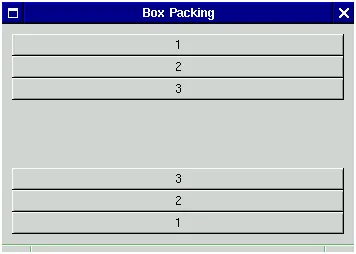
3-7. Non-homogeneous, with expand = TRUE and fill = FALSE...60
3-8. Non-homogeneous, with expand = TRUE and fill = TRUE...60
3-9. Homogeneous, with fill = FALSE...60
3-10. Homogeneous, with fill = TRUE ...61
3-11. All Five Ways to Pack a Box ...61
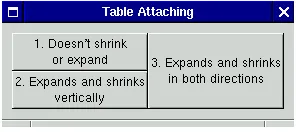
3-12.GtkTable...62
3-13. GtkTable before resizing ...64
3-14. GtkTable after expanding the window vertically ...64
3-15. GtkTable after expanding the window horizontally ...64
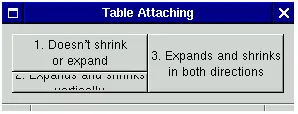
3-16. GtkTable after shrinking the window vertically ...64
3-17. GtkTable after shrinking the window horizontally...65
3-18. Attaching with Defaults ...65
3-19. Forcing Allocations ...66
3-20. Default Window Size ...66
3-21. Widget Destruction ...67
3-22. Reference Counting ...67
3-23. Showing/Realizing Widgets...69
3-24. Widget Predicates ...70
3-25. Changing Sensitivity ...70
3-26. Sensitivity ...70
3-27. State Accessor...72
3-28. Main Loop ...73
3-29. Quit Functions...73
3-30. Timeout Functions...74
3-31. Idle Functions...74
3-32. Input Functions...75
5-1. Initializing Gnome...87
5-2. Translation Macros ...88
5-3. Init with Argument Parsing ...90
5-4. Retrieving data from configuration files ...97
5-5. Saving data to configuration files...98
5-6. Configuration file iterators...100
5-7. Miscellaneous configuration file functions...101
6-1. The Gnumeric spreadsheet, which uses theGnomeAppwidget...104
6-2.GnomeAppConstructor...105
6-3. Adding Widgets toGnomeApp...105
6-4. Creating Widgets from GnomeUIInfo ...108
6-5. Installing a Statusbar...109
6-6.GnomeAppBarConstructor ...109
6-7. Extracting GtkProgress ...110
6-8. SettingGnomeAppBarText...110
6-9.GtkStatusbar... 111
6-10. Help Files ...113
6-11. Installing Menu Hints ...113
6-12. Querying Screen Size ...114
6-13. Setting Class Hints ...115
7-1.GnomeDialogConstructor ...117
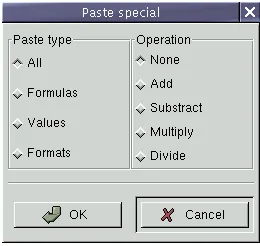
7-2. AGnomeDialogfrom the Gnumeric spreadsheet ...118
7-3. ClosingGnomeDialog...118
7-4.GnomeDialogPolish ...119
7-9. Property Box State ...125 7-10. Message Box Constructor...126 7-11. Convenience Dialogs...127 9-1.GtkButtonAncestry...134
9-2. Macros for Accessing GtkArg Values ...139 9-3. Manipulating Object Arguments ...145 9-4. Using Signals...152 9-5. Signal Emission...154 9-6. Attaching key-value pairs to a GtkObject...161 10-1. GdkWindow ...164 10-2. Default Visual...168 10-3. Color Allocation...171 10-4. GdkPixmap Constructor...172 10-5. GdkWindow Event Mask ...175 10-6. Widget Event Mask ...175 10-7. Querying Pointer Location...192 10-8. Grabbing the Pointer...193 10-9. GdkCursor ...194 10-10. GdkFont ...196 10-11. Font Metrics ...197 10-12. Font Metrics...197 10-13. Five dashed lines, with GDK_LINE_DOUBLE_DASH ...200 10-14. Default dash pattern, with varied offsets...200 10-15. A complex dash pattern...201 10-16. GdkGC ...202 10-17. Drawing Points ...204 10-18. Drawing Lines...204 10-19. Drawing Rectangles ...205 10-20. Drawing Arcs ...206 10-21. Drawing Polygons...206 10-22. Drawing Text...206 10-23. Drawing Pixmaps ...207 10-24. GdkRGB ...208 11-1. TheGtkEvwidget. Events are reported for the white subwindow. ...217
12-1. Root Group Accessor ...255 12-2. Coordinate Conversions ...256 12-3. Affine Manipulation...257 12-4. Canvas Affines ...258 12-5. Canvas Constructors ...259 12-6. Canvas Scrolling ...259 12-7. Canvas Zooming...260 12-8. Using GnomeCanvasItem ...261 12-9. SimpleGnomeCanvasprogram ...263
14-1.GtkColorSelectionDialog...304 14-2.GtkFileSelection...305 14-3.GtkFontSelectionDialog...306 14-4. A dialog filled withGtkButtons ...307 14-5. ThreeGtkToggleButtonwidgets; the center one is "active." ...309 14-6. ThreeGtkCheckButtonwidgets; the center one is "active." ...310 14-7. A group of threeGtkRadioButtons...310
14-8.GtkOptionMenu...311 14-9.GnomeDock, with severalGnomeDockItems. ...312
14-14.GnomeDateEdit...320 14-15.GtkCombo...321
14-16.GnomeCalculator...324 14-17.GnomeIconSelection...325 14-18.GtkGammaCurve...328 14-19.GnomeCanvas...330 14-20. Gnome file manager, demonstratingGnomeIconList...331
14-21. The Gnome file manager’s list view usesGtkCList...333 14-22.GtkCTree...334
14-23.GtkNotebook...336 14-24. Horizontal and verticalGtkPanedwidgets ...337 14-25.GtkTree...342 14-26.GtkCalendaris Y2K compliant!...347 14-27. TheGtkDialwidget...348 14-28.GtkEntryallows the user to enter a line of text...349 14-29.>GtkSpinButton...350
14-30.GtkText...351 14-31.GtkHRulerandGtkVRuler, as used in the GIMP...351
This chapter gives you an overview of the technologies described in this book.
What is Gnome?
Gnome is a free (or "open source") software development project started in 1997 by Miguel de Icaza of the Mexican Autonomous National University and a small team of programmers from around the world. Inspired by the success of the similar K Desktop Environment (KDE) project, the burgeoning popularity of the GNU/Linux operating system, and and the power of the GTK+ graphical toolkit, Gnome grew quickly — within a year, hundreds of programmers were involved and many thou-sands of lines of code had been written. Gnome has become a powerful framework for GUI application development which runs on any modern variety of UNIX. "Gnome" is actually an acronym: GNU Network Object Model Environment. Origi-nally, the project was intended to create a framework for application objects, similar to Microsoft’s OLE and COM technologies. However, the scope of the project rapidly expanded; it became clear that substantial groundwork was required before the "net-work object" part of the name could become reality. The latest development versions of Gnome include an object embedding architecture called Bonobo, and Gnome 1.0 included a fast, light CORBA 2.2 ORB called ORBit.
Gnome is a part of the GNU Project, whose overall goal is developing a free oper-ating system (named GNU) plus applications to go with it. GNU stands for "GNU’s Not UNIX", a humorous way of saying that the GNU operating system is UNIX-compatible. You can learn more about GNU at http://www.gnu.org.
Gnome has two important faces. From the user’s perspective, it is an integrated desk-top environment and application suite. From the programmer’s perspective, it is an application development framework (made up of numerous useful libraries). Appli-cations written with the Gnome libraries run fine even if the user isn’t running the desktop environment, but they integrate nicely with the Gnome desktop if it’s avail-able.
The desktop environment includes a file manager, a "panel" for task switching, launch-ing programs, and docklaunch-ing applets, a "control center" for configuration, and several smaller bells and whistles. These programs hide the traditional UNIX shell behind an easy-to-use graphical interface.
Gnome’s development framework makes it possible to write consistent, easy-to-use, interoperable applications. The X Window System designers made a deliberate de-cision not to impose any user interface policy on developers; Gnome adds a "policy layer," creating a consistent look-and-feel. Finished Gnome applications work well with the Gnome desktop, but can also be used "standalone" — users only need to in-stall Gnome’s shared libraries. It’s even possible to write Gnome applications which do not rely on the X Window System; you might want to provide a non-graphical CORBA service, for example.
This book is about Gnome from a developer’s point of view; it describes how to write a Gnome application using the Gnome libraries and tools.
The Gnome Development Framework
written in portable ANSI C and intended to be used on UNIX-like systems. Libraries which involve graphics realy on the X Window System. Wrappers are available which export the Gnome API to nearly any language you can think of, including Ada, Scheme, Python, Perl, Tom, Eiffel, Dylan, and Objective C. There are at least three different C++ wrappers as well.
This book will cover the C interface to the libraries; however, it should be useful for users of any language binding, since the mapping from C to your preferred language is typically straightforward. The book covers version 1.0 of the Gnome libraries (in-cluding the compatible bug fix releases, such as 1.0.9—all 1.0.x versions are compati-ble).
Non-Gnome Libraries
Taking full advantage of the free software tradition, Gnome didn’t start from scratch. It uses several libraries which are maintained separately from the Gnome project. These are a part of the Gnome application development framework, and you can count on their presence in a Gnome environment.
glib
glib is the base of the Gnome infrastructure. It’s a C utility library, providing routines to create and manipulate common data structures. It also addresses portability issues; for example, many systems lack thesnprintf()function, but glib contains an im-plementation calledg_snprintf()which is both guaranteed to exist on all platforms and slightly safer thansnprintf()(it always NULL-terminates the target buffer). Gnome 1.0 uses glib version 1.2 and works with any glib in the 1.2 series (1.2.1, 1.2.2, etc.). All glib versions beginning with 1.2 are compatible bug-fix releases.
GTK+
GTK+, or the Gimp Tool Kit, is the GUI toolkit used in Gnome applications. GTK+
was originally written for the Gimp (GNU Image Manipulation Program — http://www.gimp.org), but has become a general-purpose library. GTK+ depends on glib.
The GTK+ package includes GDK, the Gimp Drawing Kit, which is a simplification and abstraction of the low-level X Window System libraries. Since GTK+ uses GDK rather than calling X directly, a port of GDK permits GTK+ to run on windowing systems other than X with relatively few modifications. GTK+ and the Gimp have already been ported to the Win32 platform in this way.
GTK+ provides several features for Gnome applications:
• A dynamic type system.
• An object system written in C, complete with inheritance, type checking, and a signal/callback infrastructure. The type and object systems are not GUI-specific.
• AGtkWidgetobject written using the object system, which defines the interface GTK+’s graphical components implement.
• A large collection of usefulGtkWidgetsubclasses (widgets); this collection forms
the bulk of GTK+’s code.
Gnome 1.0 is based on GTK+ version 1.2. All GTK+ versions beginning with 1.2 are compatible bug-fix releases; 1.2.1, for example.
ORBit
ORBit is a CORBA 2.2 ORB written in C. It was designed to be small and fast com-pared to other ORBs, and supports the C language mapping. ORBit is implemented as a suite of libraries.
CORBA, or Common Object Request Broker Architecture, is a specification for Object Request Brokers, orORBs. An ORB is much like a dynamic linker, but it works with objects, rather than subroutines. At runtime, a program can request the services of a particular object; the ORB locates the object and creates a connection between it and the program. For example, an email program might request an “addressbook” object, and use it to look up a person’s name. Unlike dynamic linking, CORBA works fine across a network, and even allows different programming languages and operating systems to interact with one another. If you’re familiar with DCOM on the Windows operating system, CORBA is analagous.
Imlib
Imlib ("Image Library") provides routines for loading, saving, displaying, and scal-ing images in a variety of popular formats (includscal-ing GIF, JPEG, PNG, and TIFF). It comes in two versions; an Xlib-only version, and a GDK-based version. Gnome uses the GDK version.
Gnome Libraries
The libraries in this section are a part of thegnome-libspackage and were developed specifically for the Gnome Project.
libgnome
libgnomeis a collection of non-GUI-related routines for use by Gnome applications. It includes code to parse configuration files, for example. It also includes interfaces to some external facilities, such as internationalization (via the GNUgettextpackage), argument parsing (via thepoptpackage), and sound (via the Enlightenment Sound
Daemon,esound). Thegnome-libspackage takes care of interacting with these ex-ternal libraries, so the programmer does not need to concern herself with their im-plementation or availability.
libgnomeui
• TheGnomeAppwidget, which makes it easy to create a nice main window for your application. It uses another widget calledGnomeDockwhich enables users to rear-range and "undock" toolbars.
• TheGnomeCanvaswidget which makes it easy to write intricate, flicker-free
cus-tom displays.
• The Gnome stock pixmaps (icons for open, close, save, and other operations).
• Convenient routines for creating and using dialogs.
• TheGnomePixmapwidget which is more versatile thanGtkPixmap.
libgnorba
libgnorbaprovides CORBA-related facilities, including a security mechanism and object activation. (Object activation is the process of obtaining a reference to an object that implements a given interface; it can involve executing a server program, loading a shared library module, or asking an existing program for a new object instance.)
libzvt
This small library contains a terminal widget (ZvtTerm) you can use in your Gnome programs.
libart_lgpl
This library contains graphics rendering routines by Raph Levien. The routines in-cluded here are released under the GNU Library General Public License and used in the GnomeCanvas widget; Raph Levien also sells an enhanced proprietary ver-sion.libart_lgplprovides antialiasing, microtile refresh regions, and other magic. In essence it is a vector graphics rasterization library, functionally analogous to the PostScript language.
Other Libraries
These libraries are commonly used in Gnome applications, but are not a part of
gnome-libsproper.
gnome-print
gnome-printis still somewhat experimental, but very promising. It useslibart_lgpl
and works nicely withGnomeCanvas. It provides virtual output devices (called "print contexts"), so a single codebase can output to a print preview widget, to PostScript, and eventually to other printer formats.gnome-printalso includes printing-related GUI elements, like a print setup dialog, and a virtual font interface (to deal with the problem that X fonts are not printable).
gnome-xml
struc-ture as XML. It’s useful for any application that needs to load and save strucstruc-tured data; many Gnome applications use it as a file format. This library does not depend on any of the others, not even glib — so it is tied to Gnome in name only. However, you can expect most Gnome users to have it installed, so it should not inconvenience your users if your application uses this library.
Guile
Guile is an implementation of the Scheme programming language in a library, so that any application can have an embedded Scheme interpreter. It is the official extension language of the GNU Project, and is used by several Gnome applications. Adding an extension language to your application might sound complex, but Guile makes it almost trivial. (Several Gnome applications support Perl and Python as well; it is usually easy to support several languages once you implement the first. But Guile has a special place in the Gnome developer’s hearts.)
Bonobo
At press time, the Gnome hackers were putting the finishing touches on Bonobo. Bonobo is a compound document architecture in the tradition of Microsoft’s OLE; it allows you to embed charts in spreadsheets, for example. It will be used pervasively throughout Gnome; any application will be able to display MIME-typed data such as plain text, HTML, or images by asking the Gnome libraries for an appropriate Bonobo component. Look for Bonobo technology in the next major Gnome release.
A Word About Header Files
Throughout the book, the exact header file which declares each function is given alongside the function prototype. This is to facilitate your exploration of the source code. However, you probably don’t want to manually include the hundreds of head-ers found in GTK+ and Gnome. You can include all GTK+ headhead-ersen masseby in-cluding thegtk/gtk.hheader file.gtk/gtk.halso includesgdk/gdk.hfor you. You
can include all Gnome headers by includinggnome.h;gnome.hincludesgtk/gtk.h
for you. Most Gnome application files simply includegnome.h.
Structure of the Book
This book is divided into several parts:
• Right now you’re reading Part 1. This chapter gives you an overview of the Gnome application development framework. The following two chapters quickly intro-duce glib and GTK+ – if you’re already familiar with GTK+ programming, you may want to move directly to Part 2.
• Part 3 describes some advanced topics, including the internals of the GTK+ object and type system, writing a customGtkWidgetsubclass, and using the GnomeCan-vaswidget. It also covers GDK.
• The appendices include a map of the GTK+ and Gnome object hierarchy, with a
short description of each object; a map of the GTK+ and Gnome header files; and some pointers to online programming resources.
This book assumes some knowledge of GTK+ programming; chapters 2 and 3 will give you a quick overview if your knowledge is minimal, but they move very quickly. Most of the specific widgets in GTK+ are not covered. The book is intended to intro-duce Gnome programming, and some advanced GTK+ topics; it is a supplement to an introductory GTK+ book.
glib is a C portability and utility library for UNIX-like systems and Windows. This chapter covers some of the most commonly-used library features in GTK+ and Gnome applications. glib is simple, and the concepts are familiar; so we’ll move quickly. For more complete coverage of glib, see glib.h or the free glib reference manual that comes with the library. (By the way: don’t be afraid of using the glib, GTK+, or Gnome header files; they are very clean and easy to read, and are handy as a quick reference. For that matter, don’t be afraid to look at the source code, if you have very specific questions about the implementation.)
glib’s various facilities are intended to have a consistent interface; the coding style is semi-object-oriented, and identifiers are prefixed with "g" to create a kind of names-pace.
glib has a single header file,glib.h.
Basics
glib provides substitutes for many standard and commonly-used C language con-structs. This section describes glib’s fundamental type definitions, macros, memory allocation routines, and string utility functions.
Type Definitions
Rather than using C’s standard types (int, long, etc.) glib defines its own. These serve a variety of purposes. For example, gint32 is guaranteed to be 32 bits wide, something no standard C type can ensure. guint is simply easier to type than unsigned. A few of the typedefs exist only for consistency; for example, gchar is always equivalent to the standard char.
The following primitive types are defined by glib:
• gint8, guint8, gint16, guint16, gint32, guint32, gint64, guint64—these give you
in-tegers of a guaranteed size. Not all platforms provide 64-bit inin-tegers; if a platform has them, glib will defineG_HAVE_GINT64. (If it isn’t obvious, the guint types are unsigned, the gint types are signed.)
• gboolean is useful to make your code more readable, since C has no bool type.
• gchar, gshort, glong, gint, gfloat, gdouble are purely cosmetic.
• gpointer may be more convenient to type than void *. gconstpointer gives you
const void*. (const gpointer willnotdo what you typically mean it to; spend some time with a good book on C if you don’t see why.)
Frequently Used Macros
#include <glib.h>
MAX( a , b );
MIN( a , b );
ABS( x );
CLAMP( x , low , high );
Figure 2-1. Familiar C Macros
There are also many macros unique to glib, such as the portable gpointer-to-gint and gpointer-to-guint conversions shown in Figure 2-2.
Most of glib’s data structures are designed to store a gpointer. If you want to store pointers to dynamically allocated objects, this is the right thing. However, sometimes you want to store a simple list of integers without having to dynamically allocate them. Though the C standard does not strictly guarantee it, it is possible to store a gint or guint in a gpointer variable on the wide range of platforms glib has been ported to; in some cases, an intermediate cast is required. The macros in Figure 2-2 abstract the presence of the cast.
Here’s an example:
gint my_int;
gpointer my_pointer; my_int = 5;
my_pointer = GINT_TO_POINTER(my_int);
printf("We are storing %d\n", GPOINTER_TO_INT(my_pointer));
Be careful, though; these macros allow you to store an integer in a pointer, but storing a pointer in an integer willnotwork. To do that portably, you must store the pointer in a long. (It’s undoubtedly a bad idea to do so, however.)
#include <glib.h>
GINT_TO_POINTER(p);
GPOINTER_TO_INT(p);
GUINT_TO_POINTER(p);
GPOINTER_TO_UINT(p);
Figure 2-2. Macros for storing integers in pointers
Debugging Macros
Of course you should be very careful to ensure your code isn’t subtly dependent on debug-only statements to function correctly. Statements that will disappear in pro-duction code shouldneverhave side effects.
#include <glib.h>
g_return_if_fail(condition);
g_return_val_if_fail(condition, retval);
Figure 2-3. Precondition Checks
Figure 2-3 shows glib’s precondition checks.g_return_if_fail()prints a warning
and immediately returns from the current function if condition is FALSE.g_return_val_if_fail()
is similar but allows you to return some retval. These macros are incredibly useful—if you use them liberally, especially in combination with GTK+’s runtime type check-ing, you’ll halve the time you spend looking for bad pointers and type errors. Using these functions is simple; here’s an example from the glib hash table imple-mentation:
void
g_hash_table_foreach (GHashTable *hash_table, GHFunc func, gpointer user_data) {
GHashNode *node; gint i;
g_return_if_fail (hash_table != NULL); g_return_if_fail (func != NULL);
for (i = 0; i < hash_table->size; i++)
for (node = hash_table->nodes[i]; node; node = node->next) (* func) (node->key, node->value, user_data);
}
Without the checks, passing NULL as a parameter to this function would result in a mysterious segmentation fault. The person using the library would have to figure out where the error occurred with a debugger, and maybe even dig in to the glib code to see what was wrong. With the checks, they’ll get a nice error message telling them that NULL arguments are not allowed.
#include <glib.h>
g_assert(condition);
g_assert_not_reached(void);
Figure 2-4. Assertions
an assertion which always fails. Assertions callabort()to exit the program and (if your environment supports it) dump a core file for debugging purposes.
Fatal assertions should be used to checkinternal consistencyof a function or library, whileg_return_if_fail()is intended to ensure sane values are passed to the
pub-lic interfaces of a program module. That is, if an assertion fails, you typically look for a bug in the module containing the assertion; if ag_return_if_fail()check fails,
you typically look for the bug in the code which invokes the module. This code from glib’s calendrical calculations module shows the difference:
GDate*
g_date_new_dmy (GDateDay day, GDateMonth m, GDateYear y) {
GDate *d;
g_return_val_if_fail (g_date_valid_dmy (day, m, y), NULL); d = g_new (GDate, 1);
d->julian = FALSE; d->dmy = TRUE; d->month = m; d->day = day; d->year = y;
g_assert (g_date_valid (d)); return d;
}
The precondition check at the beginning ensures the user passes in reasonable values for the day, month and year; the assertion at the end ensures that glib constructed a sane object, given sane values.
g_assert_not_reached()should be used to mark "impossible" situations; a
com-mon use is to detect switch statements that don’t handle all possible values of an enumeration:
switch (val) {
case FOO_ONE: break; case FOO_TWO:
break; default:
/* Invalid enumeration value */ g_assert_not_reached();
break; }
Memory
glib wraps the standardmalloc()andfree()with its own g_ variants,g_malloc()
andg_free(), shown in Figure 2-5. These are nice in several small ways:
• g_malloc()always returns a gpointer, never a char*, so there’s no need to cast the
return value.
• g_malloc()aborts the program if the underlyingmalloc()fails, so you don’t have to check for a NULL return value.
• g_malloc()gracefully handles a size of 0, by returning NULL.
• g_free()will ignore any NULL pointers you pass to it.
In addition to these minor conveniences,g_malloc()andg_free()can support var-ious kinds of memory debugging and profiling. If you pass the-enable-mem-check
option to glib’s configure script, the compiledg_free()will warn you whenever you free the same pointer twice. The-enable-mem-profileoption enables code which keeps memory use statistics; when you call g_mem_profile() they are printed to the console. Finally, you can define USE_DMALLOC and the glib memory wrappers will use the MALLOC(), etc. debugging macros available indmalloc.hon some plat-forms.
#include <glib.h>
gpointer g_malloc(gulong size); void g_free(gpointer mem);
gpointer g_realloc(gpointer mem, gulong size);
gpointer g_memdup(gconstpointer mem, guint bytesize);
Figure 2-5. glib memory allocation
It’s important to match g_malloc()with g_free(), plainmalloc()with free(),
and (if you’re using C++) new with delete. Otherwise bad things can happen, since these allocators may use different memory pools (and new/delete call constructors and destructors).
Of course there’s ag_realloc()equivalent torealloc(). There’s also a convenient
g_malloc0()which fills allocated memory with 0s, andg_memdup()which returns a copy of bytesize bytes starting at mem.g_realloc()andg_malloc0()will both
accept a size of 0, for consistency with g_malloc(). However,g_memdup()will not. If it isn’t obvious:g_malloc0()fills raw memory with unset bits, not the value 0 for whatever type you intend to put there. Occasionally someone expects to get an array of floating point numbers initialized to 0.0; this willnotwork.
Finally, there are type-aware allocation macros, shown in Figure 2-6. The type argu-ment to each of these is the name of a type, and the count arguargu-ment is the number of type-size blocks to allocate. These macros save you some typing and multiplication, and are thus less error-prone. They automatically cast to the target pointer type, so at-tempting to assign the allocated memory to the wrong kind of pointer should trigger a compiler warning. (If you have warnings turned on, as a responsible programmer should!)
g_new(type, count);
g_new0(type, count);
g_renew(type, mem, count);
Figure 2-6. Allocation macros
String Handling
glib provides a number of functions for string handling; some are unique to glib, and some solve portability concerns. They all interoperate nicely with the glib memory allocation routines.
For those interested in a better string than gchar*, there’s also a GString type. It isn’t covered in this book, but documentation is available at http://www.gtk.org/.
#include <glib.h>
gint g_snprintf(gchar* buf, gulong n, const gchar* format, ...);
gint g_strcasecmp(const gchar* s1, const gchar* s2);
gint g_strncasecmp(const gchar* s1, const gchar* s2, guint n);
Figure 2-7. Portability Wrappers
Figure 2-7 shows some substitutes glib provides for commonly-implemented but un-portable extensions to ANSI C.
One of the annoying things about C is that it provides the crash-causing, security-hole-creating, generally evil sprintf(), but the relatively safe and widely
imple-mentedsnprintf()is a vendor extension.g_snprintf()wraps nativesnprintf()
on platforms that have it, and provides an implementation on those that don’t. So you can say goodbye tosprintf()forever. Even better: classically,snprintf()does not guarantee that it will NULL-terminate the buffer it fills.g_snprintf()does.
g_strcasecmp() and g_strncasecmp() perform a case-insensitive comparison of two strings, optionally with a maximum length. strcasecmp() is available on many platforms but not universally, so using glib instead is advisable.
The functions in Figure 2-8 modify a string in-place: the first two convert the string to lowercase or uppercase, respectively, whileg_strreverse()reverses its charac-ters.g_strchug()andg_strchomp()"chug" the string (remove leading spaces), or "chomp" it (remove trailing spaces). These last two return the string, in addition to modifying it in-place; in some cases it may be convenient to use the return value. There is a macro, g_strstrip(), which combines both functions to remove both leading and trailing spaces; it is used just as the individual functions are.
void g_strdown(gchar* string); void g_strup(gchar* string); void g_strreverse(gchar* string); gchar* g_strchug(gchar* string); gchar* g_strchomp(gchar* string);
Figure 2-8. In-place string modifications
Figure 2-9 shows a few more semi-standard functions glib wraps.g_strtodis like
strtod()—it converts string nptr to a double—with the exception that it will also
at-tempt to convert the double in the"C"locale if it fails to convert it in the user’s default locale. *endptr is set to the first unconverted character, i.e. any text after the number representation. If conversion fails, *endptr is set to nptr. endptr may be NULL, caus-ing it to be ignored.
g_strerror()and g_strsignal()are like their non-g_ equivalents, but portable. (They return a string representation for an errno or a signal number.)
#include <glib.h>
gdouble g_strtod(const gchar* nptr, gchar** endptr); gchar* g_strerror(gint errnum);
gchar* g_strsignal(gint signum);
Figure 2-9. String Conversions
Figure 2-10 shows glib’s rich array of functions for allocating strings. Unsurprisingly,
g_strdup()andg_strndup()produce an allocated copy of str or the first n
char-acters of str. For consistency with the glib memory allocation functions, they return NULL if passed a NULL pointer. Theprintf()variants return a formatted string.
g_strescapeescapes any \ characters in its argument by inserting another \ before them, returning the escaped string.g_strnfill()returns a string of size length filled with fill_char.
g_strdup_printf()deserves a special mention; it is a simpler way to handle this
common piece of code:
gchar* str = g_malloc(256);
g_snprintf(str, 256, "%d printf-style %s", 1, "format");
Instead you could say this, and avoid having to figure out the proper length of the buffer to boot:
gchar* str = g_strdup_printf("%d printf-style %s", 1, "format");
gchar* g_strdup(const gchar* str);
gchar* g_strndup(const gchar* format, guint n); gchar* g_strdup_printf(const gchar* format, ...);
gchar* g_strdup_vprintf(const gchar* format, va_list args); gchar* g_strescape(gchar* string);
gchar* g_strnfill(guint length, gchar fill_char);
Figure 2-10. Allocating Strings
glib provides some convenient functions for concatenating strings, shown in Figure 2-11.g_strconcat()returns a newly-allocated string created by concatenating each of the strings in the argument list. The last argument must be NULL, sog_strconcat()
knows when to stop.g_strjoin()is similar, but separator is inserted between each string. If separator is NULL, no separator is used.
#include <glib.h>
gchar* g_strconcat(const gchar* string1, ...);
gchar* g_strjoin(const gchar* separator, ...);
Figure 2-11. Concatenating strings
Finally, Figure 2-12 summarizes a few routines which manipulate NULL-terminated arrays of strings.g_strsplit()breaks string at each delimiter, returning a newly-allocated array.g_strjoinv()concatenates each string in the array with an optional separator, returning an allocated string.g_strfreev()frees each string in the array
and then the array itself.
#include <glib.h>
gchar** g_strsplit(const gchar* string, const gchar* delimiter, gint max_tokens); gchar* g_strjoinv(const gchar* separator, gchar** str_array );
void g_strfreev(gchar** str_array );
Figure 2-12. Manipulating NULL-terminated string vectors
Data Structures
glib implements many common data structures, so you don’t have to reinvent the wheel every time you want a linked list. This section covers glib’s implementation of linked lists, sorted binary trees, N-ary trees, and hash tables.
Lists
glib provides generic single and doubly linked lists, GSList and GList, respectively. These are implemented as lists of gpointer; you can use them to hold integers with the
API’s, except that there is ag_list_previous()function and nog_slist_previous(). This section will discuss GSList but everything also applies to the doubly linked list. In the glib implementation, the empty list is simply a NULL pointer. It’s always safe to pass NULL to list functions since it’s a valid list of length 0. Code to create a list and add one element might look like this:
GSList* list = NULL;
gchar* element = g_strdup("a string"); list = g_slist_append(list, element);
glib lists have a noticeable Lisp influence; the empty list is a special "nil" value for that reason.g_slist_prepend() works much likecons—it’s a constant-time operation that adds a new cell to the front of the list.
Notice that you must replace the list passed to list-modifying functions with their return value, in case the head of the list changes. glib will handle memory issues, deallocating and allocating list links as needed.
For example, the following code would remove the above-added element and empty the list:
list = g_slist_remove(list, element);
list is now NULL. You still have to free element yourself, of course. To clear an entire list, useg_slist_free(), which removes all the links in one fell swoop.g_slist_free()
has no return value because it would always be NULL, and you can simply assign that value to your list if you like. Obviously,g_slist_free()frees only the list cells; it has no way of knowing what to do with the list contents.
To access a list element, you refer to the GSList struct directly:
gchar* my_data = list->data;
To iterate over the list, you might write code like this:
GSList* tmp = list; while (tmp != NULL)
{
printf("List data: %p\n", tmp->data); tmp = g_slist_next(tmp);
}
Figure 2-13 shows the basic functions for changing GSList contents. For all of these, you must assign the return value to your list pointer in case the head of the list changes. Note that glib does notstore a pointer to the tail of the list, so prepend-ing is a constant-time operation, while append, insert, and remove are proportional to the list’s size.
In particular, this means that constructing a list usingg_slist_append()is aterrible
void
efficient_append(GSList** list, GSList** list_end, gpointer data) {
g_return_if_fail(list != NULL); g_return_if_fail(list_end != NULL); if (*list == NULL)
{
g_assert(*list_end == NULL);
*list = g_slist_append(*list, data); *list_end = *list;
} else
{
*list_end = g_slist_append(*list_end, data)->next; }
}
To use this function, you would store the list and its end somewhere, and pass their address toefficient_append():
GSList* list = NULL; GSList* list_end = NULL;
efficient_append(&list, &list_end, g_strdup("Foo")); efficient_append(&list, &list_end, g_strdup("Bar")); efficient_append(&list, &list_end, g_strdup("Baz"));
Of course you have to be careful not to use any list functions that might change the end of the list without updating list_end.
#include <glib.h>
GSList* g_slist_append(GSList* list, gpointer data); GSList* g_slist_prepend(GSList* list, gpointer data);
GSList* g_slist_insert(GSList* list, gpointer data, gint position); GSList* g_slist_remove(GSList* list, gpointer data);
Figure 2-13. Changing linked list contents
For accessing list elements, the functions in Figure 2-14 are provided. None of these change the list’s structure.g_slist_foreach()applies a GFunc to each element of
the list. A GFunc is defined as follows:
typedef void (*GFunc)(gpointer data, gpointer user_data);
For example, you might have a list of strings, and you might want to be able to create a parallel list with some transformation applied to the strings. Here is some code, using theefficient_append()function from an earlier example:
typedef struct _AppendContext AppendContext; struct _AppendContext {
GSList* list; GSList* list_end; const gchar* append; };
static void
append_foreach(gpointer data, gpointer user_data) {
AppendContext* ac = (AppendContext*) user_data; gchar* oldstring = (gchar*) data;
efficient_append(&ac->list, &ac->list_end,
g_strconcat(oldstring, ac->append, NULL)); }
GSList*
copy_with_append(GSList* list_of_strings, const gchar* append) {
AppendContext ac; ac.list = NULL; ac.list_end = NULL; ac.append = append;
g_slist_foreach(list_of_strings, append_foreach, &ac); return ac.list;
}
glib and GTK+ use the "function pointer and user data" idiom heavily. If you have functional programming experience, this is much like using lambda expressions to create aclosure. (A closure combines a function with anenvironment—a set of
name-value bindings. In this case the "environment" is the user data you pass toappend_foreach(), and the "closure" is the combination of the function pointer and the user data.)
#include <glib.h>
GSList* g_slist_find(GSList* list, gpointer data); GSList* g_slist_nth(GSList* list, guint n);
gpointer g_slist_nth_data(GSList* list, guint n); GSList* g_slist_last(GSList* list);
gint g_slist_index(GSList* list, gpointer data);
void g_slist_foreach(GSList* list, GFunc func, gpointer user_data);
Figure 2-14. Accessing data in a linked list
There are some handy list-manipulation routines, listed in Figure 2-15. With the ex-ception of g_slist_copy(), all of these affect the lists in-place. Which means you
when adding or removing list elements.g_slist_copy()returns a newly-allocated list, so you can continue to use both lists and must free both lists eventually.
#include <glib.h>
guint g_slist_length(GSList* list);
GSList* g_slist_concat(GSList* list1, GSList* list2); GSList* g_slist_reverse(GSList* list);
GSList* g_slist_copy(GSList* list);
Figure 2-15. Manipulating a linked list
Finally, there are some provisions for sorted lists, shown in Figure 2-16. To use these, you must write a GCompareFunc, which is just like the comparison function in the standard Cqsort(). Using glib types, this becomes:
typedef gint (*GCompareFunc) (gconstpointer a, gconstpointer b);
If a<b, the function should return a negative value; if a>b a positive value; if a == b it should return 0.
Once you have a comparison function, you can insert an element into an already-sorted list, or sort an entire list. Lists are already-sorted in ascending order. You can even recycle your GCompareFunc to find list elements, usingg_slist_find_custom(). (A word of caution: GCompareFunc is used inconsistently in glib; sometimes it glib expects an equality predicate instead of aqsort()-style function. However, the usage is consistent within the list API.)
Be careful with sorted lists; misusing them can rapidly become very inefficient. For example,g_slist_insert_sorted()is an O(n) operation, but if you use it in a loop to insert multiple elements the loop runs in exponential time. It’s better to simply prepend all your elements, then callg_slist_sort().
#include <glib.h>
GSList* g_slist_insert_sorted(GSList* list, gpointer data, GCompareFunc
func);
GSList* g_slist_sort(GSList* list, GCompareFunc func);
GSList* g_slist_find_custom(GSList* list, gpointer data, GCompareFunc func);
Figure 2-16. Sorted lists
Trees
GTree
To create and destroy a GTree, use the constructor-destructor pair displayed in Figure 2-17. GCompareFunc is the sameqsort()-style comparison function described for
GSList; in this case it’s used to compare keys in the tree.
#include <glib.h>
GTree* g_tree_new(GCompareFunc key_compare_func); void g_tree_destroy(GTree* tree);
Figure 2-17. Creating and destroying balanced binary trees
Functions for manipulating the contents of the tree are shown in Figure 2-18. All very straightforward; g_tree_insert()overwrites any existing value, so be care-ful if the existing value is your only pointer to a chunk of allocated memory. If
g_tree_lookup()fails to find the key, it returns NULL, otherwise it returns the asso-ciated value. Both keys and values have type gpointer, but theGPOINTER_TO_INT()
andGPOINTER_TO_UINT()macros allow you to use integers instead.
#include <glib.h>
void g_tree_insert(GTree* tree, gpointer key , gpointer value); void g_tree_remove(GTree* tree, gpointer key );
gpointer g_tree_lookup(GTree* tree, gpointer key );
Figure 2-18. Manipulating GTree contents
There are two functions which give you an idea how large the tree is, shown in Figure 2-19.
#include <glib.h>
gint g_tree_nnodes(GTree* tree); gint g_tree_height(GTree* tree);
Figure 2-19. Determining the size of a GTree
Usingg_tree_traverse()(Figure 2-20) you can walk the entire tree. To use it, you provide a GTraverseFunc, which is passed each key-value pair and a data argument you give tog_tree_traverse(). Traversal continues as long as the GTraverseFunc
returns FALSE; if it ever returns TRUE then traversal stops. You can use this to search the tree by value. Here is the definition of GTraverseFunc:
typedef gint (*GTraverseFunc)(gpointer key, gpointer value, gpointer data);
• G_IN_ORDER first recurses the left child of the node (the "lower" key according to your GCompareFunc), then calls the traversal function on the key-value pair of the current node, then recurses the right child. This traversal is in order from lowest to highest, according to your GCompareFunc.
• G_PRE_ORDER calls the traversal function on the key-value pair of the current node, then recurses the left child, then recurses the right child.
• G_POST_ORDER recurses the left child, then recurses the right child, and finally calls the traversal function on the current node’s key-value pair.
• G_LEVEL_ORDER is only meaningful for GNode, it is not allowed with GTree.
#include <glib.h>
void g_tree_traverse(GTree* tree, GTraverseFunc traverse_func, GTraver-seType traverse_type, gpointer data);
Figure 2-20. Traversing GTree
GNode
A GNode is an N-way tree, implemented as a doubly linked list with parent and child lists. Thus, most list operations have analogues in the GNode API. You can also walk the tree in various ways. Here’s the declaration for a node:
typedef struct _GNode GNode; struct _GNode
{
gpointer data; GNode *next; GNode *prev; GNode *parent; GNode *children; };
There are macros to access GNode members, shown in Figure 2-21. As with GList, the data member is intended to be used directly. These macros return the next, prev, and children members respectively; they also check whether their argument is NULL before dereferencing it, and return NULL if it is.
#include <glib.h>
g_node_prev_sibling(node);
g_node_next_sibling(node);
g_node_first_child(node);
Figure 2-21. Accessing GNode members
To create a node, the usual_new()function is provided (Figure 2-22).g_node_new()
used only to create the root node; convenience macros are provided which automat-ically create new nodes as needed.
#include <glib.h>
GNode* g_node_new(gpointer data);
Figure 2-22. Creating a GNode
To build a tree the fundamental operations shown in Figure 2-23 are used. Each oper-ation returns the just-added node, for convenience when writing loops or recursing the tree. Unlike GList, it is safe to ignore the return value.
#include <glib.h>
GNode* g_node_insert(GNode* parent, gint position, GNode* node);
GNode* g_node_insert_before(GNode* parent, GNode* sibling, GNode* node); GNode* g_node_prepend(GNode* parent, GNode* node);
Figure 2-23. Building a GNode tree
The convenience macros shown in Figure 2-24 are implemented in terms of the fun-damental operations.g_node_append()is analagous tog_node_prepend(); the rest take a data argument, automatically allocate a node for it, and call the corresponding basic operation.
#include <glib.h>
g_node_append(parent, node);
g_node_insert_data(parent, position, data);
g_node_insert_data_before(parent, sibling