SECRETS
SEO
© Copyright 2002 - 2008 Divine Write Copywriting Pty Ltd
The right of Divine Write Copywriting Pty Ltd to be identified as author and copyright owner of this work is asserted by Divine Write Copywriting Pty Ltd in accordance with Australian copyright laws as determined by the Australian Copyright Council.
Copyright extends to any and all countries in which this publication is purchased and/or viewed and/or read.
All rights reserved. No part of this publication may be reproduced or transmitted, in any form by any means without the prior written permission of the author, nor be otherwise circulated in any form of binding or cover other than that in which it is published and without a similar condition being imposed on the subsequent purchaser.
The purchaser of this publication indemnifies Glenn Murray and Divine Write Copywriting Pty Ltd and its directors, officers, employees and agents from and against all losses, claims, damages and liabilities which arise out of any use of this publication and/or any application of its content.
To buy a copy of the e-book, please visit
Table of contents
Introduction ... 9
About the author ... 10
Thanks ... 11
Earn money promoting this book ... 11
What’s new in V2.0 ... 12
Understand what SEO means ... 14
Why are search engines so important? ... 14
What’s the difference between organic search results and paid listings? ... 15
Which is more effective? ... 16
How do search engines work? ... 17
So what is SEO? ... 18
What is keyword analysis? ... 21
Keyword analysis tools ... 22
Keyword analysis complexities ... 24
Chapter summary ... 28
Develop your website right ... 29
Development checklist ... 29
Choose the right web host ... 31
Use HTML text copy, links & breadcrumb trails… and anything else important ... 32
Position your content toward the top of your HTML code ... 34
Create lots of content and regularly update your site ... 35
Optimize Your HTML Meta-Tags ... 36
Use image captions ... 41
Structure your site around keywords ... 41
Optimize your internal link architecture ... 42
Add Titles to internal links ... 44
Link to related sites... 45
Check for broken links ... 45
Add a sitemap page... 46
Create an open format / Google sitemap ... 47
Use permanent 301 redirects for changed URLs ... 48
Create a custom 404 error handling page ... 48
Consider making dynamic URLs static ... 51
Avoid duplicate content ... 53
Avoid Flash ... 58
Be careful with AJAX ... 59
Avoid JavaScript ... 60
DON’T use text within images ... 60
DON’T rely too heavily on footer links for navigation ... 61
DON’T use empty hyperlinks with deferred hyperlink behavior ... 61
DON’T use Silverlight ... 62
DON’T use Frames or iFrames ... 62
DON’T use spamming techniques ... 63
Chapter summary ... 65
Host and optimize your own WordPress blog ... 67
Host your own... 68
Install & activate all of these WordPress plugins ... 69
Link to related content ... 69
Optimize your categories for your main keywords ... 70
Optimize your blog Tags for minor keywords ... 71
Automate a meaningful, compelling & search friendly Description meta tag ... 72
Optimize your URLs ... 74
Control comment spam ... 89
Put commenters’ photos next to their comments ... 90
Add a social bookmarking widget plugin ... 90
Ensure your Title meta tag is search friendly and bookmark friendly ... 91
Optimize your post titles (the main heading) ... 92
Make your posts easy to Tweet ... 92
Use the Blogroll to link to related blogs ... 93
Link to related posts ... 94
Support pingbacks & trackbacks ... 95
Add your blog to Google Webmaster Tools ... 97
Chapter summary ... 97
Make sure the search engines know about your site
... 99
Submit your site to Google & the other search engines ... 99
Submit your site to the search engines’ local business centers ... 101
Submit your products to Google Product Search (if you sell products) ... 102
Submit news, images or video ... 102
Chapter summary ... 103
Create great web content ... 104
Link baiting ... 105
Writing SEO copy ... 114
Chapter summary ... 122
Generate ‘buzz’ about your content with Social
Media ... 124
What is social media? ... 125
Uses of social media ... 125
List of social media services ... 126
Social media networks and communities ... 127
How to leverage social media for SEO ... 128
20 Tips for successful community building ... 134
How long will it take to generate a lot of links? ... 141
How many links will I need to get a top ranking? ... 141
Chapter summary ... 141
Use other link building methods too ... 142
Chapter summary ... 155
Monitor your progress ... 156
Monitor whether your pages have been crawled & indexed ... 156
Monitor how many links you’re generating & who’s linking ... 157
Monitor your blog’s popularity ... 158
Engaging an SEO company ... 161
Lies told by unscrupulous SEO companies ... 161
Chapter summary ... 163
The future of SEO ... 164
Visitor behavior ... 164
Other developments ... 170
What does it all mean? ... 173
Conclusion ... 175
Earn money promoting this book ... 175
Glossary ... 176
Bibliography ... 187
Introduction
If you’re like most people, the term “search engine optimization” will mean very little. Either that or it just means expense! But it doesn’t have to be that way…
If you feel like you’re standing in a dark room handing money to strangers to get you in the search engines, then this e-book is written just for you.
This e-book is written by a business owner for other business owners, CEOs, marketing practitioners, and webmasters. It explains Search Engine Optimization (or SEO) in layperson’s terms. It won’t make you an expert, but it will give you some insight into what you should be spending your money on, and just as importantly, what you shouldn’t.
The book is structured like a procedure – a series of steps to get you from where you are now to where you want to be: ranking high. Although you don’t always have to perform the steps in the order that I’ve written them in, doing so worked for me, so I reckon it’ll work for you too.
As you work your way through this e-Book, refer to the Glossary (on p.176) if you’re unsure of a particular term, or the Bibliography (on p.187) if you’re reading offline and you want to investigate things a little further on your own.
About the author
I’m a specialist SEO copywriter. I specialize in writing web copy that will help increase a website’s search engine ranking (while also remaining engaging and compelling to readers).
I rank no.1 in the world for “SEO copywriter” and I’m on page 1 for most of my important keywords.
Keyword Google worldwide rank
SEO copywriter Page 1
website copywriter Page 1
advertising copywriting Page 1
website copywriting Page 1
copywriting forum Page 1
copywriter Page 2
internet copywriter Page 2
copywriting Page 2
Based in Sydney, Australia, I’ve been a copywriter for 7 years
and was a technical writer for 9 years before that. Numbered among my clients are some of the world’s leading companies including Toyota, IBM, Virgin, Telstra, Honeywell, Kimberley-Clark, Safe-n-Sound, Doubleday, the Australian Government, Raine & Horne, PMP Limited, Volante, Reckon and MYOB.
I have a Bachelor of Arts in Linguistics and English Literature,
and a Master of Arts in International Communication.
I’m also a lucky husband and a very proud father of two (soon three!).
Thanks
Thanks to
media.
justice translating it into Microsoft Word). And al
valuable advice. You know who you are.
Earn money promoting this book
What’s new in V2.0
I’ve spent the last six months researching this version. I’ve attended seminars, talked with other SEO professionals, had discussions (and debates!) on various forums, chatted with thought leaders on Twitter, watched videos, and read many articles and blog posts.
The upshot? The book has transformed. It’s now more than twice as long and infinitely more helpful than the previous (V1.7).
Here’s a summary of some of the more noteworthy additions and changes.
Using Blogs, Twitter, StumbleUpon &
other Social Media for SEO
Web development spam
Optimizing your blog Tools for monitoring your progress
Avoiding duplicate content issues ‘Legal’ link buying
Optimizing your internal link
architecture
Lies often told by SEO firms
Visitor behavior as a ranking signal Custom 404 error pages
Using Flash, AJAX, JavaScript,
Silverlight & Frames
Leveraging 404 links
Theming, clustering & hub pages Important updates on article submission
Personalization, local search, Universal
Search & mobile search
Content prominence
Step 1
Understand what SEO means
Before launching into an explanation of SEO, let’s talk a bit about search engines. I’ll assume you know what search engines are, and what they’re used for, and start, instead, with some facts that illustrate why they’re so important.Why are search engines so important?
• The Internet is the world’s second most commonly used medium after television (Internet Statistics Compendium, 2006)
• Approximately 1.5 billion people use the Internet, worldwide (Internet World Stats, 2008)
• That’s a massive 305% increase since 2000! And still it’s only 21.9% of the world’s population (Internet World Stats)
• 93% of users worldwide use search engines to find websites (Forrester Research) • 66% of online Americans have purchased a product online (Pew Internet)
• Search engines are the way most people (85%) find new sites, and the way most businesses find new
sources for products and services (Direct Marketing Association)
What’s the difference between organic
search results and paid listings?
Most search engines, these days, return two types of results whenever you click Search:
• Natural/Organic – The ‘real’ search results (often called ‘SERPs’ for Search Engine Results Pages). The results that most users are looking for. When we talk about search engine ranking, these are the results we’re talking about. The order of these results is determined by how relevant each is to the searcher’s query. Important: You can’t pay a search engine to give you a high ranking in the natural results. You can only get a high ranking if your content is seen as relevant and important by the search engines.
• Paid – Pure advertising. This is how the search engines make their money. Advertisers pay the search engines to display their ad whenever someone searches for a word that is related to their product or service. These ads look similar to the natural search results, but are normally labeled “Sponsored Links”, and normally take up a smaller portion of the window. The order of these results is determined mostly by how much each advertiser is prepared to pay. (This e-book does not cover “Sponsored Links” in any detail.)
Figure 1 – Natural / organic search results v paid ads
Which is more effective?
For most industries, the natural results are significantly more effective:
• 89% of people click on the no.1 result, 33% on no.2, 17% on no.4, 17% on no.5, 6% on no.7 and 0% on no.8 (Microsoft Eye-Tracking Study of informational searches)
• 94% of people see the no.1 result, 94% see no.2 (Microsoft Eye-Tracking Study of informational
searches)
• Only 50% see the no.1 paid listing (PPC/paid ads) and only 40% see the no.2 paid listing (Eye-tracking Study, Enquiro, Did-it and Eyetools, 2005)
• Organic results get clicked 8½ times as often as paid listings – excluding search results that have no
paid ads (Enquisite 2008) Natural / Organic
How do search engines work?
Search engine companies like Google and Yahoo are all about finding content that will bring them more traffic (and thus more ad revenue). In other words, their results must be relevant and high quality. In the words of Nathan Buggia of Microsoft Live Search: “Our whole role in life is to find the best content on the web and bring it together with people who are looking for that content. And to do that, we’ve invented a couple of algorithms to figure out what people think is good content.” (SMX East Search Marketing Conference, New York City, October 2008)
Here’s a simplistic explanation of how search engines work:
1. Crawl - They send out ‘bots’ (aka ‘spiders’ or ‘robots’) that crawl your pages and send back details for processing.
2. Index – They then use really complex mathematical algorithms to deduce the subject matter of your site from frequently used words and the text on links to, from, and within your site. This tells them which searches your pages are relevant to.
3. Rank – They consider some 200 factors when ranking, but the most important – of those that you can actually manipulate – is the number of external links pointing to your site, where those links come from, and what anchor text is used in those links. If there are lots of links pointing to your site, all from quality sites, and all with relevant words in their anchor text, you’re likely to rank well. The logic is that if all those webmasters are willing to link to you and they’ve used a variety of relevant words in their links (i.e. they’re not automated links), your site must be relevant and important.
So what is SEO?
SEO stands for Search Engine Optimization. It’s the art of increasing your site’s natural search engine ranking, so that you rank high in the right searches. And remember, being ranked number 1 when you search for your company name or web address doesn’t count. You need to rank for the words your target customers use at search engines. So you need to:
1. Tell the search engines what your site is about, so they know what searches it’s relevant to. This is called ‘on-page optimization’. You make your site search-friendly so the bots can crawl it, and you use the right keywords in your content and code (e.g. HTML). By itself, this usually won’t increase your ranking much, but it’s a necessary first step.
2. Prove to the search engines that your site is important in its field (i.e. will likely be helpful to searchers). Embark on an ongoing campaign to increase the number of links pointing to your site (aka “backlinks” or “inbound links”). Of course, not all links are equal; see ‘Create great web content’ on p.104 for more information on the best kinds of links.
For more information…
• on choosing keywords, see ‘Choose your keywords’ on p.21.
• on optimizing your web development, see ‘Develop your website right’ on p.29.
• on optimizing your web content, see ‘Optimize your web content’ on p.113.
How long will it take for SEO to
increase my ranking?
There are no guarantees in SEO. It all takes time. If your site is new, it’ll probably take some time for the search bots to even get there to crawl it. (You can speed this process up by getting a link from a high ranked site.) In fact, because they don’t crawl it all at once, it can actually take some time for them to get through the whole thing. And even once they’ve crawled a page, it can take a while before it’s indexed. And then it has to be ranked, which takes yet more time.
To avoid disappointment, expect everything to take months. Not days and not weeks. It typically takes months for a new site to make it into the Search Engine Results Pages (SERPs), and months for any site to see any increase in rankings. It can happen faster, but it usually doesn’t.
SEO is an ongoing (often tedious) task. You need to be dedicated and systematic. In other words, you need a strategy. Take a look at the advice offered in this book, to see what suits you best. Then put your thinking cap on and get creative. It’s a new and very exciting field; there are undoubtedly many undiscovered ways to build links.
Chapter summary
• People pay more attention to the natural results than the paid listings in search engines. • You can’t pay for a high search ranking.
• Search engines try to make their results as useful as possible. This is how they keep users coming back (and how they make their revenue).
• To a search engine, a site is considered useful if a lot of other sites link to it. This implies it is well regarded in its field.
• If you have a search engine-friendly site with a lot of the right keywords, used in real sentences,
distributed realistically throughout, and a lot of the right sort of backlinks, you stand a good chance of being ranked highly.
Step 2
Choose your keywords
Stop! Before you do anything, you need to know what words you want to rank for. And that means finding out what words your target customers are Googling when they’re looking for products or services like yours.
These are your ‘keywords’. Only when you know them, can you target them. (That’s a fancy word that means use them frequently, and in the right places, on your website, and hopefully get them in some links to your site.)
What is keyword analysis?
The process of uncovering the words your target customers are Googling is called ‘keyword analysis’ or ‘keyword research’.
There are quite a few reliable keyword analysis tools out there. You enter a term that you think your target visitors are Googling, and they tell you how many people are actually Googling that term. They use real search data – usually from the previous one or two months.
Keyword analysis tools
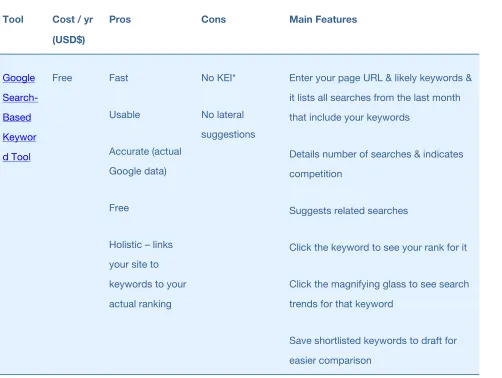
Everyone has their favorites, and you’ll quickly identify yours. I like three: WordTracker, Google Search-Based Keyword Tool, and Google Insights. WordTracker makes great keyword suggestions, but the Google tools are free and easier to use. Also, I have my doubts about WordTracker’s accuracy. So I use WordTracker to make sure I’m not missing important words, and I rely on the Google tools for the actual analysis.
[image:22.612.54.556.317.695.2]Have a play and see what you think.
Table 1 - Comparison of three of the main keyword analysis tools
Tool Cost / yr
(USD$)
Pros Cons Main Features
Free Fast
Usable
Accurate (actual
Google data)
Free
Holistic – links
your site to
keywords to your
actual ranking
No KEI*
No lateral
suggestions
Enter your page URL & likely keywords &
it lists all searches from the last month
that include your keywords
Details number of searches & indicates
competition
Suggests related searches
Click the keyword to see your rank for it
Click the magnifying glass to see search
trends for that keyword
Save shortlisted keywords to draft for
Tool Cost / yr
(USD$)
Pros Cons Main Features
Free Fast
Very simple to
use Accurate (actual Google data) Graphs search trends Doesn’t list actual search
numbers – uses
a normalized
scale of 0-100
Type your keyword and it displays a long
term trend of search popularity
Visually compare multiple keywords
See up-and-coming searches and maps
search hotspots
Geotargeting – analyze by country and
state
Reports on a simplified list of related
searches
$329.00 Lateral
suggestions
KEI
Free trial
Accuracy^
Cost
Enter a possible keyword & it returns the
number of searches for that term in the
last two months
See how many other websites are
targeting that keyword
See KEI = difficulty to rank for each term
See related searches (including lateral
* KEI = Keyword Effectiveness Index. It’s a ratio of the number of searches to the number of competing sites. It tells you how difficult a keyword will be to dominate.
^ WordTracker gets its data from a secondary (or ‘meta’) search engine, Dogpile, that pulls results from Google, Yahoo, etc.
Keyword analysis complexities
You’ll find these tools very helpful and very powerful. They’ll give you a great insight into what people are searching for. But they won’t tell you everything. Ultimately, they just provide the raw data. Once you’ve uncovered that raw data, you need to analyze it to make some decisions.
And this is trickier than it sounds. You’ll need to apply all of your knowledge of your business, the benefits you offer your customers, and how prospective customers think and talk about your products and services (which may be entirely different from how actual customers think and talk, and is almost guaranteed to be different from how people in the industry think and talk). You also need to have a good understanding of what your competitors are doing, and why.
And finally, always remember that search engines don’t read as humans do. They’re nowhere near that smart. So sometimes you have to make allowances for them.
Following is a rundown of some issues that quite often have people tearing their hair out.
Searcher intent
I’ll use my own copywriting website as an example. “Copywriting” is more popular than “copywriter”, but I didn’t choose it because I know people Google it when they’re looking for copywriting jobs, copywriting advice, copywriting tips, copywriting articles, etc. When people want to engage the services of a copywriter, they usually Google “copywriter.”
Can’t I just use Google Analytics?
No. Google Analytics will tell you what searches brought your current visitors to your site. It won’t tell you anything about your target visitors. E.g. Let’s say you run a cinema website and the majority of your visitors arrived after Googling “movies”. That doesn’t means you should necessarily target “movies”. What if 10 times that many customers are finding a competing cinema after Googling “cinema”?
Single keyword or keyword phrase?
If you’re a niche business, target niche keyword phrases, not single keywords. Include extra detail, points of difference or your location. For example:
• “cheap second hand computers” instead of “computers”
• “small business income tax accountant Sydney” instead of “accountant Sydney”
• “thai restaurant delivery Highland Park” instead of “restaurant”
• “small blue widgets” instead of “widgets”
Why? Because:
2. The search results for the more generic keywords tend to be dominated by the big multinationals. Search for “computers” and you’ll see there are around 955 million results and the top rankings are dominated by the big authority sites, like Wikipedia, Computer.org, Apple, etc.
3. Searchers know they’ll find what they want faster, if they’re specific. According to OneStat.com, 58.93% of people search for either a 2-word phrase or a 3 word phrase.
4. Most people Google generic keywords when they’re researching a purchase and specific keywords when they’re ready to buy. So by targeting a more specific keyword, you’ll attract more qualified traffic.
Of course, if you need to target hotly contested generic keywords, go ahead. But I’d still recommend starting out with a niche phrase that includes your generic term. E.g. It won’t take you long to rank for “small business income tax accountant Sydney”, and this will generate income while you’re waiting for your link profile and site authority to grow enough to rank for “accountant Sydney”.
Plural or singular?
The simplest answer is to look at what the majority of your target visitors are Googling, and go for that.
But if searches are equally split, think about intent. Maybe people Google “tennis shoe” when they’re deciding whether to buy a tennis shoe or a running shoe. And maybe they Google “tennis shoes” when they’re ready to buy a pair online. As an online shoe shop, you’d choose “tennis shoes”. As a shoe manufacturer, you’d choose “tennis shoe”.
Still no closer to a decision? Consider the number of competing sites. If you sell televisions, you’d be better off targeting “TVs” than “TV”, because then you’re not competing against all the TV stations and TV guides.
Split, merged and hyphenated words
“Copywriter”, “copy writer” or “copy-writer”? Google knows they’re different words so, as always, go with whatever version your target visitors are Googling most.
If there’s no clear distinction, again, consider intent and competition. Failing that, just choose whatever’s easy to optimize for. Google’s smart enough to know that they all refer to the same animal. Search for “copy-writer” and you’ll find plenty of results that contain only “copywriter”. (In fact, Google bolds “copywriter” even when you search for “copy-writer” or “copy writer”.)
Related words
All the important search engines use a thesaurus when analyzing your site’s content. Once they identify what your target keywords are, they then check to see if the rest of your content is related to those keywords. (Actually, they use a fancy name for it: “latent semantic indexing (LSI)”, and it’s a lot more complicated than I’ve indicated here. But if you think of it as a thesaurus, you’ll be just fine.)
For example, a naturally evolved site about tennis shoes wouldn’t just contain “tennis” and “shoes”. It would also contain words like “footwear”, “sole”, “foot”, “feet”, “upper”, “inner” and “surface”. And probably “grass”, “clay” and “court”. Possibly even “racquet”, “basketball” or “running”.
If it does, the search engines will deduce that it’s very relevant to people who’re searching for “tennis shoes” (and that it’s less likely to be a cheap spam site that’s just stuffed full of the single term “tennis shoes”).
Of course, the corollary of this logic is that if your site has evolved naturally and is actually useful, you won’t need to worry about these issues too much.
searches.” So, don’t try and be all things to all people. Pick the words that you think will deliver the most traffic, and – at least in the beginning – focus on them exclusively.
Target your suburb or city name for local traffic
If local search traffic is important to your business, you should also target your suburb or city.
A note on WordTracker’s KEI
WordTracker’s KEI is helpful, but don’t base your decision on it alone. A keyword with a good KEI might be completely irrelevant or offer such low traffic that its ROI would be terrible. And one with a bad KEI might be highly relevant with great potential ROI. Indeed, it might be your only sensible choice. Glean whatever value you can from the numbers, then use your discretion.
Chapter summary
• Find out what words your customers are searching.
• Don’t base your decision purely on statistics. • Consider searcher intent.
• Use keyword phrases in competitive fields (not single keywords).
• Develop a long term keyword strategy that will increase your ranking for hotly contested single keywords even as you target your keyword phrase.
• Make your decision about singular v plural & hyphenated words based on searchers not search engines.
• Related words enhance your optimization and generally make their way into your copy naturally. • Focus exclusively on bang for buck in the beginning.
Step 3
Develop your website right
Search engine bots don’t use websites the way you and I do. They need your site to be designed and built in a particular way. If you don’t do it right, you can severely hamper your search engine presence.
Development checklist
There are quite a few web development dos and don’ts to remember. Here’s a checklist that’ll make it all a little easier to grapple with. You’ll find further detail on each of these items below.
Do
• Choose the right web host (p.31)
• Use HTML text copy, links & breadcrumb trails (p.32)
• Position your content toward the top of your HTML code (p.34)
• Create lots of content and regularly update your site (p.35) • Optimize Your HTML Meta-Tags (p.36)
• Use image captions (p.41)
• Link to related sites (p.45)
• Check for broken links (p.45) • Add a sitemap page (p.44)
• Create a Google sitemap (p.47)
• Use permanent 301 redirects for changed URLs (p.48)
• Create a custom 404 error handling page (p.48) • Create a robots.txt file (p.50)
• Use subfolders or subdomains – they’re both OK (p.51)
• Consider making dynamic URLs to static (p.51)
Do Sparingly or Avoid
• Duplicate content (p.53) • Flash (p.58)
• AJAX (p.59) • JavaScript (p.60)
Don’t
• Use text within images (p.60)
• Rely too heavily on footer links for navigation (p.61)
• Use empty hyperlinks with deferred hyperlink behavior (p.61)
• Use Silverlight (p.62)
• Use Frames or iFrames (p.62)
TIP: As you work your way through the above do’s and don’ts, you may find it useful to occasionally check how the search engine bots see your site. Google recommends you use Lynx. In their words: “If fancy features such as JavaScript, cookies, session IDs, frames, DHTML, or Flash keep you from seeing all of your site in a text browser, then search engine spiders may have trouble crawling your site.” (Google Webmaster Guidelines)
Choose the right web host
Google shows different search results to different people, depending on where they’re searching from. This is particularly true of shopping-type searches for goods that are likely to be purchased in person (as opposed to online). For example, if you Google “bank” in the US, you’ll probably see Bank of America at number 1, whereas if you Google “bank” in Australia, you’ll probably see The Commonwealth Bank.
When deciding what sites to display, Google considers where each is hosted. It assumes that Americans will want to see American banks, and that American banks probably host their websites with American web hosts.
Put simply, if you’re after visitors from a particular country, choose a web host with servers in that country. And if you’re after visitors from a particular city, choose a web host with servers in that city.
For more information…
• on local search, see ‘Submit your site to the search engines’ local business centers’ on p.101 and
Use HTML text copy, links &
breadcrumb trails… and anything else
important
Obviously, your copy, links and breadcrumb trails are critical to your visitor. They explain your offering, and help the visitor navigate and stay oriented. So the search engines will want to crawl these elements in order to figure out what your site’s about.
As a rule of thumb, search engines have trouble reading anything that’s not straight HTML. They can
sometimes make some sense of non-HTML, but they can always read HTML. So play it safe. Unless you have a
really good reason to do otherwise, make sure that all important copy, all important links – including your main navigation – and all breadcrumb trails are straight HTML.
When you view the source code (right-click a web page and select View Source), HTML text should look something like this:
<h1>Cheap second hand computers</h1>
<p>Did you know that most second hand computers are retired because of their software, not because of their hardware?</p>
That’s a level one heading followed by a paragraph. Simple stuff – just how the search engines like it.
Here’s how a typical HTML link looks in the source code:
<p>Most computers slow down because they’re overloaded with <a
href=”http://www.cheapsecondhandcomputers.com/unhealthysoftware.htm”>poorly
And here’s how a typical HTML breadcrumb trail looks in the source code:
<p>You are here: <span>Company</span> <span>/</span> <a href="contact.htm" class="active">About Us</a></p>
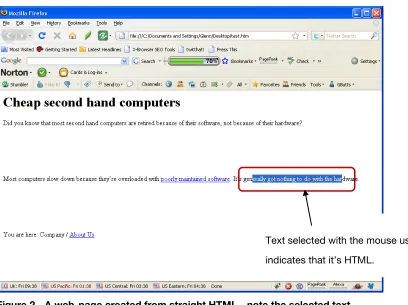
[image:33.612.60.468.246.551.2]If you saw the resultant copy on a web page, you’d be able to select it with your mouse – letter by letter. As a rule of thumb, if you can’t do that, the search engines can’t read it.
Figure 2 - A web-page created from straight HTML - note the selected text
Of course, that’s a broad generalization, but it’s a good starting point. In practice, it’s a little more complicated than that. In practice, the search engines can read some stuff you can’t select, and they can’t read some stuff you can select. But there’s no point complicating matters like that unless you have a specific reason to do so.
TIP: You can also view the content without a stylesheet to see more-or-less what the search engines can read – assuming you’re using FireFox as your browser. Select View > Page Style > No Style.
For more information…
• on search friendly drop-down/rollover navigation menus, see ‘Avoid JavaScript’ on p.60.
• on using Flash, see ‘Avoid Flash’ on p.58.
• on using AJAX, see ‘Be careful with AJAX’ on p.59.
• on using JavaScript, see ‘Avoid JavaScript’ on p.60.
Position your content toward the top
of your HTML code
When the search engines look at your page, they don’t actually see the display version that you and I read. They read only the HTML behind the page. But they’re like us one key respect; they pay more attention to words at the top. They figure that’s is where the most important words will be.
What’s more, if there are two links on a page to the same target page, Google appears to only take the anchor text of the first into consideration when indexing. (For more information on this, see Rand Fishkin’s blog post,
So by placing your content toward the top of the page of code, you ensure that the keywords and links within are properly taken into account when your pages are indexed.
correctly to visitors – just not to the search engines.) This can bury your content 1000 words or more down the page of code.
There’s absolutely no reason for this to happen. All of these elements can be coded after your content, especially if your developers are using Cascading Style Sheets (CSS), as they should.
Note that by placing your JavaScript toward the bottom of the page of code (e.g. before the </body> tag), you’ll make your page load faster for visitors. (They won’t have to sit and wait for the code to run before the page displays.) But there’s a trade-off. With your Google Analytics code loading late, it may not register all visits because people may leave quickly, closing the page before the Analytics code has finished running.
Create lots of content and regularly
update your site
In Google’s eyes, it’s unlikely that a rarely updated site with minimal content is going to be helpful to visitors. It and the other search engines like to see lots of content, and they like to see it updated regularly.
Fortunately, that approach goes hand-in-hand with the most effective link building method, ‘link baiting’. Content is one of link baiting’s two core components (the other being social media).
Of course, I’m not talking any old rubbish, here. I’m talking useful, unique, high quality content. That’s the only sort that works.
For more information…
• on link baiting, see ‘Link baiting’ on p.105.
Optimize Your HTML Meta-Tags
Within the HTML code behind your page, there are things called ‘meta tags’. These are short notes within the header of the code that describe some aspects of your page to the search engines.
Although there is some debate over how important meta tags are to SEO, it’s generally agreed that they shouldn’t be ignored.
[image:36.612.59.305.276.513.2]Title tag
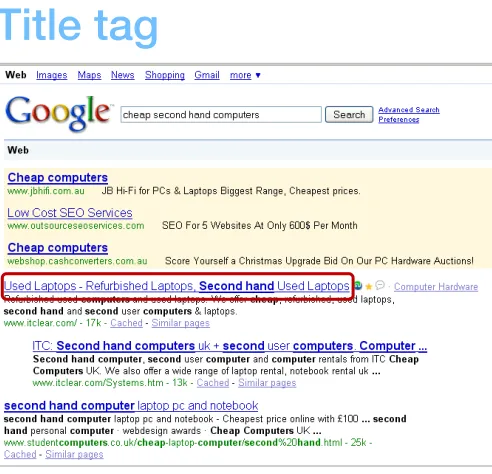
Figure 3 - How the Title tag displays in Google
Because it functions as the headline of your SERPs listing, the search engines figure it’s likely you’ll make it something fairly relevant to the content of the target page, in order to get people to click through. As a result, they pay more attention to it than the other tags when indexing your site.
You have 66 characters (including spaces) in which to write a compelling, keyword rich headline for your listing. The better your title, the more people will click on it. Be descriptive and accurate. In fact, why not consider the four criteria for an effective headline?
• Self Interest – Does it promise a benefit to the searcher? • Quick, Easy Way – Does it offer one?
• News – Does it contain any?
• Curiosity – Does it sound interesting?
Also it can be a good idea to include your company name in the Title. Above all else, this helps develop brand recognition (especially when you rank on page 1), and lends credibility to your listing. E.g:
World’s cheapest second-hand PCs GUARANTEED – CheapCom.com
And finally, it’s best not to use the same Title tag on every page. It’s supposed to be a headline, compelling searchers to click through to your page. If it’s generic enough to be suitable for every page, it’s not going to be particularly compelling.
What’s more, if Google sees duplicate Title tags, it may choose to display DMOZ data instead of your actual tag data.
How the Title tag should look in the code
TIP: If Google’s link looks different from your Title tag, Google may be using data from DMOZ instead. This can happen if your Title and/or Description tags are identical on all pages. To fix, update your DMOZ directory listing (if outdated), then give each page of your site a unique Title and Description. This will usually resolve the problem. If not, double-check that the offending title doesn’t appear somewhere on your site.
[image:38.612.58.310.272.505.2]Description tag
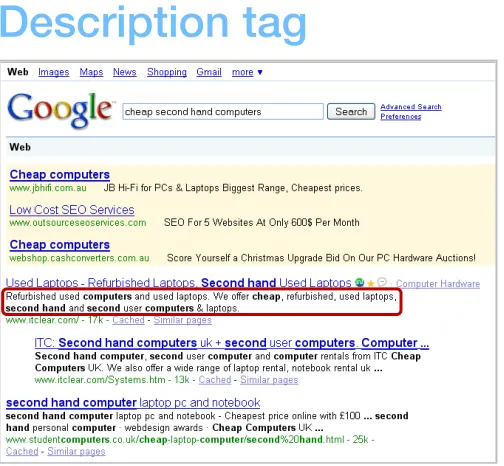
Figure 4 - How the Title tag displays in Google
Think of your description tag as the copy for an ad. You have 155 characters (including spaces) in which to craft an informative, compelling description. Try to use your keyword at least once in the Description, as close to the start as possible. For a product website, you might consider including the vital statistics about each product in the Description tag. E.g. Brand names, model numbers, colors, etc.
I’m not convinced. If you leave the search engines to their own devices, there’s no guarantee they’ll choose a section that’s well written or even intended to be the “copy for an ad” as I’ve suggested the Description should be. I recommend defining the Description on all pages.
It’s not a good idea to use the same Description on every page. It’s supposed to be helpful and persuade searchers to click through to your page. If it’s generic enough to be suitable for every page, it’s not going to be particularly engaging, compelling or helpful.
What’s more, if Google sees duplicate Description tags, it may choose to display DMOZ data instead of your actual tag data.
TIP: If Google’s description looks different from yours, Google may be using data from DMOZ instead. This can happen if your Title and/or Description tags are identical on all pages. To fix, update your DMOZ directory listing and give each page a unique Title and Description, then direct all search engines to NOT use DMOZ data, by adding one of the following meta tags to your page’s code:
<meta name="robots" content="NOODP">
How the Description tag should look in the code
<meta name="DESCRIPTION" CONTENT="Cheap second hand computers for sale – Find a cheap second hand Dell computer for the kids. All computers come with
Windows & Office installed & a 2 year warranty." />
Alt tag
Because the search engines assume your pictures have something to do with your subject matter, they pay some attention to the Alt tag when indexing your page. Try to include your keyword at least once in your Alt text. But don’t overdo it, or you may be penalized.
How the Alt tag should look in the code
<img src="filename.gif" alt="Cheap second hand computer in use" title="Cheap second hand computer in use">
Keywords tag
A comma-separated list of keywords that are most relevant to the subject matter of the page.
Stick to about 300 characters and don’t repeat your keywords over and over. You can, however, include variations of your keyword, such as “copy”, “copywriter”, “copywriters” and “copywriting.” You can also re-use a keyword so long as it’s part of a different phrase.
The Keywords tag isn’t visible to visitors of your website (unless they view the source). It’s really just a legacy from a time when the search engines used it as their sole means of identifying a site’s subject matter.
These days, most search engines pay it little or no mind. The key exception is Yahoo. Yahoo likes your Keywords tag to be ‘aligned’ with your web copy. So don’t include keywords in your tag that don’t appear in your copy if you want to rank in Yahoo.
How the Keywords tag should look in the code
Use image captions
No magic here. And nothing technical. Just another way to get your target keywords on the page. In addition to your image Alt tags, add a caption to your images, explaining their content. Because they’re outside the flow of the copy, they’re easy to optimize without impeding readability. You can even include links. In fact, you can even add images just for SEO, so long as they still add some value to your reader too.
Structure your site around keywords
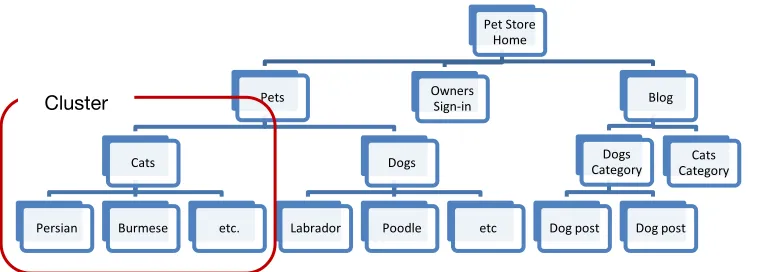
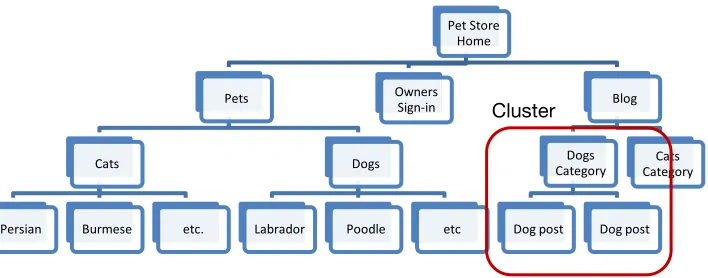
[image:41.612.50.433.396.532.2]Visitors and search engines, alike, prefer a structured site. As discussed on p.117, it’s good practice to structure your site around the keywords you want to target. This is generally called ‘clustering’, ‘theming’ or ‘siloing’. The easiest way to explain clustering is to illustrate it:
Figure 5 – Structure your site around your keywords – ‘Theming’
This approach:
• Makes your site more usable;
• Allows you to target many different keywords, site-wide, but still focus on a small handful per page;
Pet Store Home
Pets
Cats
Persian Burmese etc.
Dogs
Labrador Poodle etc
Blog
Dogs Category
Dog post Dog post Cats Category Owners
Sign-in
IMPORTANT: You must also consider your message, not just your keywords, when you structure your website. If you structure your website without thought to the content, you’ll end up trying to squeeze the copy into an inappropriate structure.
For more information…
• on structuring pages around keywords, see ‘What if I want to target more than one keyword
phrase?’ on p.117.
Optimize your internal link architecture
For search engine bots, text links are like doorways from page to page and site to site. This means websites are generally better indexed by search engines if their bots can traverse the entire site using text links.
But there’s more to it than that. Links from top level pages (like the ‘Home’ and ‘Products’ pages) carry more weight than links from lower level pages (e.g. the ‘10 reasons why the ball bearings in our widget last longer’ page). The logic here is that if you link to a page from a top level page, you obviously want a lot of your visitors to see that link, so it must be key to your subject matter and business model.
Figure 6 - The HTML of a typical text link
Internal links also tell the search engines what pages are important. In other words, if you link to a page again and again and again, and you use meaningful anchor text, Google will assume that page is a core part of your subject matter, and index you accordingly.
What’s more, every time you link to a page, it’s passed a bit of PageRank. Link to it enough, and it will become one of your higher ranking pages, as it develops ‘link equity’.
So when you’re planning the structure of your site, if it doesn’t adversely impact the user experience:
Add a sitemap page (e.g
least one text link. And consider adding an open format sitemap specifically for the search engines. (See ‘Create an open format / Google sitemap’ on p.47.)
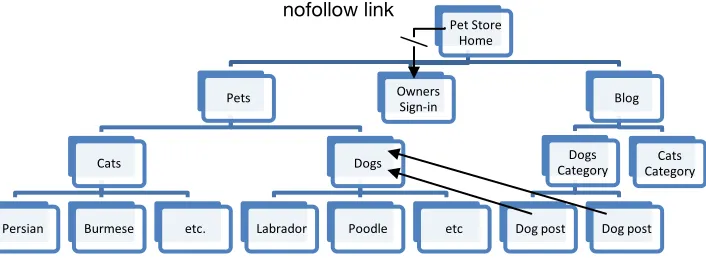
Keep your page hierarchy as flat as possible. Some pages in your site will attract many backlinks, and some will attract very few. By keeping your page hierarchy flat, you ensure that all pages are within just a few internal links of each other, and that as much internal link-equity as possible flows through to the pages that attract few backlinks. Most SEOs recommend a maximum of four levels. (See Figure 7 below.)
Link to your most important pages often (with simple text links). This builds the ‘link equity’ of those pages.
Limit links to fewer than 100 per page. Remember the visitor; use leading usability expert,
…include links to other resources that are directly relevant to the current location. Don't bury the user in links to all site areas or to pages that are unrelated to their current location.”
Place your links prominently on each page. The search engines pay more attention to links toward the top of
the page, and visitors are OK with prominent links too.
users performed 26% faster when the anchors were part of the main text.
<a href="page1.htm" rel="nofollow">go to page 1</a>
Figure 7 – Visualizing internal link architecture
TIP: If you sign up to
(the Google crawler) can find your internal links. (‘Links > Pages with internal links’).
Add Titles to internal links
HTML links can include a Title, which becomes a tooltip when a visitor hovers their mouse over the link. They’re also read out by screen readers for the vision-impaired people. Because this aids accessibility and
crawl it and it plays a part in how they index the page (albeit a small part).
Link titles look like this:
<a href="http://www.divinewrite.com/portfolio.htm" title="Copywriting
Pet Store Home
Pets
Cats
Persian Burmese etc.
Dogs
Labrador Poodle etc
Blog
Dogs Category
Dog post Dog post Cats Category Owners
Sign-in
Link to related sites
Linking to external sites may seem ill-advised, because you’re sending away visitors. But it’s actually a very good idea. Assuming you link to relevant, helpful sites, your visitors will thank you for it, and will be more likely to bookmark your site and come back repeatedly.
This is particularly true of outbound links to ‘hub sites’ – the really, REALLY big ones in your field. If you link out to them, the search engines figure you’re adding value to your visitors, and this is argued to count in your favor.
Here’s
…if the user is happy, they are more likely to come back or bookmark your site or tell their friends about it. And so, if you try to hoard those users, they often somehow subconsciously sense it, and they are less likely to come back or tell their friends about it.”
Translation? Outbound links can impact your ranking favorably. (When discussing ranking factors, Matt usually talks in terms of visitor experience.)
Check for broken links
Broken links are bad for visitors because they convey the impression that your site is not well maintained, and they‘re bad for SEO because they can stop the search engine bots from crawling all your pages.
Note tha
views broken links as a sign that your site is in poor repair, just as human visitors do, and that the existence of broken links may impact your ranking simply because Google wants well maintained sites at the top of its SERPs.
What’s more, broken links can impede your chances of getting listed in the DMOZ directory (see ‘DMOZ & Yahoo Directories’ on p.145 for more information on DMOZ), and will likely discourage other webmasters from linking to you. Both of these outcomes would be detrimental to your rank.
You can use a tool called
Add a sitemap page
Create a sitemap page containing a list of text links to every page in your site. Link to your sitemap from the footer of every other page. (Your sitemap page is not the same thing as an open format / Google sitemap. Open format / Google sitemaps are discussed on p.47 below.)
If your site has a lot of pages, it may take you some time to create your sitemap page. Although I’ve never tried any, there are a few tools out there that claim to automate the process. Like Smart IT Consulting’s
TIP: Because site maps are used by both search engine bots and human visitors, you need to make it user-friendly. Try using bolding and indenting to represent your site hierarchy. See
Create an open format / Google
sitemap
A Google sitemap is an optional XML file that lists all of the public pages on your site, and a whole bunch of data for each, including when it was last updated, how often you update it, and how important you consider it.
A Google sitemap won’t affect your ranking, but it may affect how quickly you appear in the SERPs, because Google may index your pages faster and more often. None of it’s guaranteed though.
To create a Google sitemap, download and run
do is type your site’s URL and a couple of other simple details, and it does the rest. It’ll even upload the resultant XML file to your FTP site automatically! (It has to go in your site’s root directory.)
GSiteCrawler also handles self-hosted WordPress blogs and phpBB forums.
Once you’ve uploaded your Google sitemap, sign in to you
re-submit) it. Google will ask you to verify your ownership of the site by placing an HTML file with a particular name in the root directory, or by adding a line of code to one of your files.
TIP: To get best use out of a Google sitemap, you should really re-crawl your site and re-upload the XML file each time you add a new page to your site. But GSiteCrawler has you covered there, too, as it
allows you t
Use permanent 301 redirects for
changed URLs
If ever you change a page’s URL, you need to redirect the old URL to the new one. If you don’t, all old links will point to a page that no longer exists, including any search results. Visitors won’t be able to get through, and you won’t get any PageRank from backlinks.
Your web developer will know what you’re talking about when you instruct them to use 301 redirects. But just
in case,
IMPORTANT: Be aware, however, that when you move a page to a new location, its PageRank can take a while to catch up with it. Google recommends maintaining the 301 redirect for as long as you have control of the original URL. (Just one more reason to avoid moving your pages!)
Create a custom 404 error handling
page
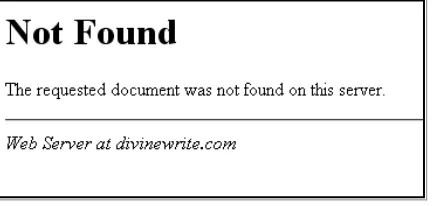
Unfortunately, the standard 404 page – provided by your ISP – truly lives up to its geeky name! It usually looks something like this:
Figure 8 – A standard ugly & very geeky 404 error handling page.
Not very friendly, is it? When confronted with this, the only thing a would-be visitor can do is click Back. And if the link that brought them here is on another site, that’s likely the last you’ll see of them. So creating a visitor-friendly, helpful 404 error handling page is a must.
Most of the issues surrounding 404 error handling pages pertain to conversion, not SEO. However, there are two that are search-related:
You have to find out from your web host how to report the 404 status to the search engines. In other words, how to tell the search engines that your 404 page is an error page, and shouldn’t be indexed or displayed in the SERPs.
For more information…
• on setting up a custom 404 error handling page, see Google’s
• on identifying and fixing 404 links, see ‘Leveraging 404 links’ on p.153.
Create a robots.txt file
Use this file to tell the search engine bots what they can and cannot crawl and/or index. (You might, for instance, not want search bots to crawl and index your admin page, or your e-book.)
Visit
You can check that your robots.txt file is working properly using the Analyze robots.txt tool in
Oh, and make sure you keep it up to date so you don’t accidentally block any bots.
If, for some reason, you don’t have access to your site’s root directory, you can add a Robots meta tag to the header section of every page in your site that you don’t want crawled and/or indexed. Note, however, that not all bots will honor the meta tag, so it’s not as reliable as the robots.txt file. The Robots meta tags are as follows:
• <meta name="ROBOTS" CONTENT="ALL" /> tells the bots to crawl and index your entire site
• <meta name="ROBOTS" CONTENT="NOINDEX,FOLLOW" /> says don’t index this particular page,
but follow its links to other pages (e.g. for use on secure or private pages).
• <meta name="ROBOTS" CONTENT="INDEX,NOFOLLOW" /> says to index the page but not follow
its links.
Here’s an examples of what the robots tag looks like in practice.
<html> <head>
<title>Cheap second hand computers admin page</title> <META NAME="ROBOTS" CONTENT="NOINDEX, NOFOLLOW"> </head>
Use subfolders or subdomains –
they’re both OK
Over the years, there’s been a lot of talk about whether low-level content should be stored in subfolders or sub-domains. The truth is, it really doesn’t make any difference to your SEO. Just choose the option that suits your technical capabilities (and any other requirements).
Consider making dynamic URLs static
Static URLs, on the other hand, are tied to their content, and are generally a combination of the page’s filename and directory location. E.g.:
The three main problems with dynamic URLs are:
1. They can lead to duplicate content issues – See ‘’ on p.77 and ‘Avoid duplicate content’ on p.53 for more information on duplicate content.
2. Search engines can have trouble reading them properly – Google can now read and index them very effectively. (There are, after all, millions of sites with dynamic URLs in Google’s SERPs.) But that’s not to say that they can read and index them as effectively as they can static URLs. In fact,
…the decision to use database-driven websites does not imply a significant disadvantage in terms of indexing and ranking.”
The important words here are, “significant disadvantage.” What’s more, not all search engines crawl dynamic URLs as effectively as Google.
3. They reduce click-thrus from search engine results, they’re harder to remember, share and write down, they’re easily clipped, they’re often not keyword rich, and they often don’t give readers any clue about what to expect at the destination site.
These issues can be overcome by rewriting your dynamic URLs in such a way that they become static. For example, the following dynamic URL:
Could be rewritten to become the following static URL:
Unfortunately, static URL rewriting is not without risks of its own. If done incorrectly, it can cause Google problems crawling and indexing your pages. Google now outrightly advocates dynamic URLs:
Providing search engines with dynamic URLs should be favored over hiding parameters to make them look static.”
Of course, it’s important to remember that Google’s a public company, answerable to shareholders. It’s ability to crawl and index dynamic URLs better than its competitors is a significant competitive advantage, if
leveraged. Who’s to say that the above advice isn’t merely an attempt to leverage that ability?
My advice? If you’re using a CMS that doesn’t offer trustworthy dynamic URL rewriting, stick with dynamic URLs. If, however, your CMS rewrites dynamic URLs very well (e.g. WordPress or any CMS using mod_rewrite), then consider rewriting to static URLs – if it will help your customers and aid your promotions significantly. Rewriting dynamic URLs isn’t likely to have a huge impact on your rankings, so I would avoid it unless I was sure it wasn’t going to cause problems.
Avoid duplicate content
You have duplicate content when:
• you have more than one version of any page • you reference any page with more than one URL • someone plagiarizes your content
• you syndicate content
And it’s a problem for two reasons:
1. Duplicate content filter – Let’s say there are two pages of identical content out there on the Web. Google doesn’t want to list both in the SERPs, because it’s after variety for searchers. The duplicate content filter identifies the pages, then Google applies intelligence to decide which is the original. It then lists only that one in the SERPs. The other one misses out. Problem is, Google may choose the wrong version to display in the SERPs. (There’s no such thing as a duplicate content penalty.)
2. PageRank dilution – Some webmasters will link to one page/URL and some will link to another, so your PageRank is spread across multiple pages, instead of being focused on one. Note, however, that Google claims that they handle this pretty well, by consolidating the PageRank of all the links.
Below are some examples of duplicate content and how to resolve them.
Multiple versions of the same page
Multiple versions of the same page is clearly duplicate content. (e.g. A print-friendly version and the regular display version.) The risk is that Google may choose the wrong one to display in the SERPs.
Solutions:
Use a no_follow link to the print-friendly version. This will ensure that Google’s bots don’t crawl it, and that it won’t be indexed. The HTML of a nofollow link looks like this:
<a href="page1.htm" rel="nofollow">go to page 1</a>
Multiple URLs for a single page
Even though there’s really only one page, the search engines interpret each discrete URL as a different page. There are two common reasons for this problem:
1. No canonical URL specified 2. Referral tracking & visitor tracking
No canonical URL specified
A canonical URL is the master URL of your home page. The one that displays whenever your home page
displays. For most sites, it would be
Test if your site has a canonical URL specified. Open your browser and visit each of the following URLs (substituting your domain name, of course).
•
•
•
•
If your home page displays, but the URL stays exactly as you typed it, you have not specified a canonical URL, and you have duplicate content.
Solutions:
1. Choose one of the above as your canonical URL. It doesn’t really matter which one. Then redirect the others to it with 301 redirects. (Your web developer should know how to set up a 301 redirect, but just
3. Specify your preferred domain in Google Webmaster Tools (you have to register first). To do this, at the Dashboard, click your site, the the equivalent of a 301 redirect for Google. But it has no impact on the other search engines, so you should still set up proper 301 redirects.
4. Create and submit an open format (Google) sitemap and ensure that it uses only the appropriate (‘canonical’) URLs. (See ‘Create an open format / Google sitemap’ on p.47’ for more info.)
Referral tracking & visitor tracking
If you’re storing referrer and/or user data in your URLs, your URLs will vary depending on who the visitor is and/or what link they clicked to arrive at your page. This may be the case if you manage a forum (e.g. a phpBB 2.x forum) or you participate in an affiliate program.
In addition to the duplicate content filter and PageRank dilution problems, this sort of duplicate content makes your site a ‘bot-trap’, significantly increasing the time it takes search engine bots to crawl your site. In Google’s words:
Duplicated content can lead to inefficient crawling: when Googlebot discovers ten URLs on your site, it has to crawl each of those URLs before it knows whether they contain the same content (and thus before we can group them as described above). The more time and resources that Googlebot spends crawling duplicate content across multiple URLs, the less time it has to get to the rest of your content.” (From the
Solutions:
1. If you host a forum on your site, find out if upgrading to the most recent version will resolve the
problem. (e.g
2. Devise an appropriate strategy for referrer/visitor tracking. This is well beyond the scope of this book
WordPress
WordPress causes a lot of duplicate content issues by naturally pointing to the same content with multiple different URLs. (e.g. A single post can be accessed through the blog’s home page, search results, date archives, author archives, category archives, etc. And each of these access points has a different URL.)
Solution: For advice on overcoming duplicate content issues on WordPress blogs, see ‘’ on p.77.
Someone has plagiarized your content
If someone has plagiarized your content, Google may mistakenly identify their plagiarized version as the original. This is unlikely, however, because most webmasters who plagiarize content are unlikely to have a very credible, authoritative site.
Solution: You can contact the offender and ask that they remove the content, and you can also report the
plagiarism to Google
your content using
You syndicate content
If you publish content on your site and also syndicate it, your site’s version may not appear in the SERPs. If one of the sites that has reprinted your article has more domain authority than yours, their syndicated version may appear in the SERPs instead of yours. Also, other webmasters may link to the syndicated version instead of yours.
Avoid Flash
Google CAN read Flash (SWF files). A bit. But you should still be very wary of Flash if you want a high ranking. Below is a quick explanation of why.
• Google can’t read all types of JavaScript – So if your Flash file is invoked with JavaScript, it may not be read.
• Links in Flash may not be ‘follow-able’ –
information the search engines saw from a Flash file. His results suggest that links in Flash are stripped of anchor text and appear not to be followed.
• Other search engines can’t read Flash at all – Google isn’t the only search engine out there. It may be the biggest, but the others are still important. Yahoo has the ability to read Flash, but at the time of writing, it appears they still don’t. None of the others do.
• Many mobile phones don’t handle Flash well – Over the last year – thanks mostly to the release of the iPhone – mobile search has become very popular. But it’s still very much in its infancy, and many mobile phones don’t yet handle Flash properly.
• More technical reasons to avoid Flash – If you’re still not convinced, read Rand Fishkin’s SEOmoz
blog post,
Vanessa Fox’s (ex-Google Webmaster blogger) blog post
But if you insist on using Flash…
For some more technical advice on optimizing Flash for search, read Jonathan Hochman’s article, How to SEO Flash, first.
Be careful with AJAX
AJAX enhanced sites can deliver a rich visitor experience, but they can also be very difficult for search engine bots to crawl. Following is a checklist to help you develop AJAX pages that are visitor AND search engine friendly.
• Develop your AJAX pages using ‘Progressive Enhancement’. In other words, create your structure and navigation in HTML, then add all the pretty stuff on top with AJAX (including JavaScript versions of your static HTML links – aka HIJAX). That way, the search engines will be able to see all the things that are important to them.
• Ensure your static links don’t contain a #, as search engines typically won’t read past it.
For more information…
• on the technical ins and outs of using AJAX, s
Avoid JavaScript
Google can now read JavaScript to discover links within. But there’s no consensus about how much PageRank those links pass on to the pages they point to. The most credible comment I’ve read on this was by
…although Javascript links are sometimes followed, they appear to provide only a fraction of the link weight that normal links grant.”
My advice is to steer clear of JavaScript for content and links, at least until there is general consensus in the SEO community that those links are treated exactly as standard HTML links are treated.
If you want navigation menus that drop down on mouse rollover, use standard rollovers and/or CSS formatting instead of JavaScript. Your developer will know what this means.
DON’T use text within images
Search engines can’t read words that are presented in image files. So if you embed your copy in images, you’ll find it a lot harder (if not impossible) to get indexed for the right searches.
So don’t have your graphic designer lay out a beautiful page of copy and save it as a .gif or .jpg file, then upload it to your site. For all its beauty, it’ll be completely wasted on the search engines.
Your best bet is to present all important text as straight HTML text. You can get fancy with sIFR text
replacement if you want, but that starts getting fairly complicated, so you’d want to have a pretty good reason.
DON’T rely too heavily on footer links
for navigation
Most visitors don’t pay too much attention to footer links. Not surprisingly, the search engines are following
suit.
The irrelevant links at the bottom of a page, which will not be as valuable for a user, don’t add to the quality of the user experience, so we don’t account for those in our ranking.” (Priyank Garg, director of product management for Yahoo! Search Technology (YST)).
What’s more,
Although it may not actually use that technology to discount the impact of footer links, it’s certainly not out of the question. Remember Google tends to ignore the things visitors ignore, and to place great emphasis on the things they value.
I’m not saying don’t put nav links down there; I’m saying don’t use them as your main form of navigation.
DON’T use empty hyperlinks with
deferred hyperlink behavior
Make sure the targets of all your hyperlinks are real. Don’t use empty hyperlinks that have some sort of deferred behavior.
DON’T use Silverlight
Just don’t do it. Perhaps things will change, but for now, if you want your pages to rank, steer clear of Silverlight. Straight from the horse’s (Google’s) mouth:
…we still have problems accessing the content of other rich media formats such as Silverlight… In other words, even if we can crawl your content and it is in our index, it might be missing some text, content, or links.”
Simple.
DON’T use Frames or iFrames
Pages that use frames aren’t really single pages at all. Each frame on the page actually displays the content from an entirely different page. The frames and their content are all blended and arranged on the page you see according to the instructions found on another page entirely, called the ‘frameset’ page.
The problem with this is that search engine bots only see the ‘frameset’ page. They don’t see the page you see at all, nor the individual pages that make up the page you see. And this is where the problem lies. Those individual pages may have lots of really helpful, keyword rich content and links, and the search engines don’t see it.
Although you can use the "NoFrames" tag to provide alternate content that the search engines can read, you’ll still be undermining your SEO because the links and content within a frame aren’t considered part of the page they disp