
EN Google Adsense Secrets pdf
132
0
0
Full text
(2) INDEX Chapter. Topic. Page. 0 1. How to Use this Book How To Make (More) Money With Google AdSense. 4 7. 2. Getting Started With Google AdSense: As Easy As 1 - 2 - 3 !. 11. 3. How To Tweak Your Ads To Make Them Click. 16. 4. Using Colors To Increase Your Clicks. 22. 5. How To Maximize Visibility And Response. 31. 6. Controlling Your Ads. 41. 7. Catch Fickle Visitors With The Google Search Box. 47. 8. Building Content. 52. 9. Response Tracking: Your Hidden Pot Of AdSense Gold!. 64. 10. How To Make AdSense work With Internet Communities. 81. 2.
(3) 11. How To Read Your Visitors Like A Book. 85. 12. What To Do Before You Apply To Google AdSense. 90. 13. Recommended Resources: Try These Tools And AdSense Utilities (Some Are FREE!). 96. 14. Keeping Track Of What Works — And What Doesn't Work — For You!. 101. 15. Other Pay-Per-Click Programs. 107. 16. Getting Traffic To Your Website. 110. 17. Search Engine Optimization. 115. 18. Case Studies. 122. Conclusion. 128. Legalese. 3.
(4) Dear Reader… Thank you for buying this second, expanded edition of "What Google never told you about making money with AdSense: 3 Steps to Higher AdSense Income"! This is an advanced book about Google AdSense. In writing this book I have assumed that you, the reader, have a basic knowledge of AdSense. Don't let that scare you, because this book is fairly simple to understand. However, if you are new to AdSense, you might want to check out Google's AdSense Support Pages or occasionally refer to their online Glossary. I have tried to keep this book concise and very focused on the objective of increasing your AdSense income. In this book you will find hands-on solutions to many of the concerns and challenges faced by content publishers in their quest to attract targeted traffic, improve content relevance and increase responsiveness to AdSense ads — using easy and legitimate techniques that have worked for me and many others. No matter what type of website you have or the nature of your content, you will find hands-on ways to increase your AdSense income. Through the pages of this book, I will teach you the exact-same techniques that I used to create a TEN-FOLD increase in my AdSense earnings — almost overnight! Techniques that you can apply yourself and see real results. To those of you expecting a fat Dummies-style book with entire chapters devoted to "What the heck is AdSense?" or "A brief history of contextual advertising" this slim manual might come as a bit of a surprise. But there's a reason for that. And the reason is that I don't want to lose you before you get to the real meaty parts. I will disclose, for the first time, my proven stepby-step techniques to increase your AdSense click-throughs. Isn't that the real reason you bought this book? If so, you won't be disappointed. 4.
(5) I don't want to hide these golden nuggets of wisdom under piles of fluff that you can read for free on the Internet. In fact, if you want to brush up on the basics, there's nothing like Google's own quick guide to AdSense, available here. You might want to print it out into and have it handy. Refer to it often, or whenever in doubt. Why pay for free content! Get the basics direct from Google! That doesn’t mean that there’s nothing in this book to help beginners though. In this revised edition, I have added a short section at the beginning for people who are just getting started. If you don’t have a website, I’ll tell you how to build one, get it online and start earning with AdSense fast. If you’re already online and using AdSense — but want to know how to use it to earn much, much more — you can just skip straight past those pages and dive right into the gold! That’s because getting set up with Google AdSense is the easy part. The harder part is making real money with it. And that's where this book comes in! Readers of my first edition frequently send me email, asking questions such as “Where can I find free content?”, “How can I optimize my pages for the search engines?” and “How can I get traffic to my site?” As a result, the expanded edition contains chapters on search engine optimization, traffic acquisition, content writing, ad formats and a whole host of other useful techniques that you can implement and feel the results in your pocket right away. I guarantee you will find insights here that you wouldn't find anywhere else. My AdSense story — right from the sluggish $3/day times to the explosive $600/day — when AdSense pays off my mortgage, car payment, cable (and a whole lot more actually)… has taught me a great deal about how to make my web pages more profitable. Every page is bursting with hard-to-find AdSense tips, tricks and proven strategies - gleaned from successful publishers who have very generously shared their money-making ideas with me.. Read. Apply. And don't forget to report your results! Drop me an email anytime at [email protected] these ideas 'at work'!. I like to see 5.
(6) In the rapidly evolving world of contextual advertising, your unique problems and real-life results will help subsequent editions stay current and useful. I appreciate your inputs! Yours for more AdSense Profits,. Joel Comm. 6.
(7) Chapter One How To Make More Money With Google AdSense Google wants a slice of your traffic. And they're willing to pay big bucks! For those who have been complaining of high traffic and low sales, there's simply no better way to cash in on those hard-earned visitors to your web pages.. AdSense makes it so easy! There's no complicated software to install, no need to scout for affiliates, nothing to buy and no need to even have a merchant account. So… Why isn't everybody doing this? More importantly, why isn't everybody making the most of it?. It's "Hidden Money" "Seeing is believing", they say. Most webmasters love to obsessively track their visitors, earnings and CTR's several times a day. They love to see what's there, but they often miss what can be. AdSense doesn't give you ultimate control over which ads are served, how the ads are rotated or what each click is worth. That's a good thing, because it's hands-free income. (It does give you some control though, and I’ll tell you how to use those controls in this book.) But many webmasters still think that once you've stuck the AdSense code on your page, there's little you can do except wait and watch. Nothing could be further from the truth! Google gives you a great deal of control over your ads, and especially their visual or graphic elements. By tweaking these elements to your advantage, you could easily — in as little as a few minutes — multiply your click-throughs many, many times over!. 7.
(8) My Experiments with AdSense I signed up with AdSense in June 2003, starting small by serving AdSense off just a few of my pages. By the end of the day, I'd delivered several thousand AdSense impressions — which netted me the princely sum… $3.00. I didn’t exactly burn down the house. While I didn’t see a great deal of potential based on this initial figure, I figured it couldn’t hurt to place AdSense code on more pages. Over the period of a couple months, I increased my impressions 25-fold, but the clicks just weren’t happening. That was when I hit my lowest point as an Internet publisher. My click-through ratios were so bad, I needed thousands of visitors to net about $30 per day. At that point, I knew something had to change — and I was going to change it! It was as late as April 2004 — ten months after I signed up with AdSense — that I had my eyes opened to what I had been missing all along. It was one of the “Ah-Ha!” moments where I felt as though I were being hit by the proverbial two-by-four. Immediately, I began experimenting with my Google ads, testing various placement and colors to see if my assumptions would hold water. The results were fast — and fantastic! By applying the same easy tweaks discussed in this book, I nearly tripled my click-through rate, and my income shot up to $600 PER DAY! I still remember that golden day in April 2004 — and for me there's been no looking back. From my early days of being an "AdSense nobody" to becoming a leading AdSense guru, when a five-figure monthly income no longer surprises me… it's been an eventful journey full of learning experiences. Little cogs run the AdSense machinery! It's easy to get carried away when you're making so much money. But I never lose sight of the little things that make me big money with AdSense.. 8.
(9) Every AdSense partner — however big or small — knows that at the end of the day, it all boils down to one thing: stats! Your AdSense stats might not be amazing to start with, but make it a habit to go through it with a finetoothed comb. As you start making sense of those 'little numbers'… the big checks with follow!. Fig. 1.1 Stats are the holy grail of Internet Marketing. This is a real, recent screenshot of my AdSense stats page. You can see what I'm making daily, but specific details such as CPM and CTR have been blacked out in keeping with Google's terms of service. 9.
(10) Hitting the AdSense Jackpot! As you can see, today AdSense takes care of my car payment, mortgage, cable bills and a whole lot more besides. Aren't you dying to know… WHAT was it I did to AdSense — and my website — that turned it overnight into a cash-cow on steroids?! More importantly, what can YOU do to shoot your AdSense income through the roof- right NOW!. My advice to you is quite simple... Don't be passive about your AdSense income; work hard to increase it. But before you try out that hot new idea you read about at an Internet Forum, be sure to check out Google's AdSense TOS. Some web publishers have forever relinquished their fat AdSense paychecks, just because they were too busy to pay attention to something so fundamental to their AdSense survival. I like to play by the rules and have taken adequate care to ensure that my AdSense tips and tweaks are legit. Making what I do from AdSense, I have little incentive to go on a rule-breaking spree and get my AdSense account suspended. For many Internet site owners, AdSense is like the goose that lays the golden egg. Take good care of your goose — don't slaughter it in the mad rush to increase your AdSense income!. 10.
(11) 2. Getting Started With Google AdSense 2.1 The Basics: Building Your Site After the last edition of this book came out lots of people started asking me how they can make money with AdSense. I’m always happy to help people make the most of Google, but many of these people didn’t even have a website! Here’s the facts: to make money with AdSense, you’ve got to have a website. There’s no getting around that. The good news is that it’s never been easier to create a website from scratch and use it to generate real revenue. I’m going to give a brief introduction here to creating a website from the ground up. You can find plenty more information online and I’ll tell you where to look. If you already have a site up and running, you can just skip this bit, head down to 2.10 and begin reading about how to improve your AdSense revenues.. 2.2 Naming Your Site The first thing your site will need is a name. That’s easier said than done these days. All the best words in the dictionary have either already been bought and built by developers or they’ve been bought and offered by speculators. But that doesn’t mean you can’t create a good name and buy it for a song. Putting two words together with a hyphen can work (like http://www.AdSense-tools.com) and there are plenty of good names available if you’re prepared to move outside the world of .coms into .net and .biz etc. Your first stop should be to register a domain name and order a hosting plan. One of my favorite sites to do this is Globat. They frequently offer excellent specials, such as free or reduced hosting for a year. Click here to see their latest offer. 11.
(12) Another stop is Network Solutions. This is a nuts and bolts service that lets you hunt and buy names, order hosting plans and even submit your site to the search engines. When you’re looking for a name, you can just toss in ten options and the site will tell you which (if any) are available. All in, buying a name from one of these service won’t cost you more than about $20 a year. If you can’t find a name you like and that hasn’t already been grabbed though, you can take a look at sites like moderndomains.com and bestnames.net. These are companies that buy domain names and sell them for a profit. There’s a good chance you’ll find some good names here but they can cost you anything from $50 to $50,000. Before you part with a penny, think about the advantage that a good name can bring and ask yourself if you can’t get the extra traffic a cheaper way. Often, you can. And remember, twelve years ago no one knew what a Yahoo, ebay or Google was!. 2.1. Choosing A Hosting Service. Your site is going to be stored on a hosting company’s server. (You didn’t want thousands of people dialing into your computer every hour, did you?) Again, there are lots of different options available depending on how much you want to pay and what you need. In general, you’ll want to make sure that you have about 50 megabytes of space (that’s enough for 100 pages!), full statistics reporting and most importantly, 24 hour service. If your site goes down, you’ll be losing money every hour it’s offline. If there’s a problem with the server, you want to make sure it’s fixed right away. You often get what you pay for with Web hosting from “free” services that will cost you more than you save to $200 a month for dedicated servers. Twenty bucks a month is a reasonable price to pay and Globat and Network Solutions both offer good programs.. 2.2. Designing The Site. It used to be said that absolutely anyone could create a website. That was true: absolutely anyone who knew HTML. Today, you don’t even need to know that. Programs like Microsoft’s FrontPage or NVU (which is free; you. 12.
(13) can download it at http://www.nvu.com) let you create sites without you needing to know your tags from your tables. If you can use Word, you can create a website. You can either have fun playing with the programs and designing the site yourself or you can hire a professional designer to do it for you. Freelance site like http://www.elance.com can http://www.guru.com are good places to advertise. You can invite designers to give you quotes and pick the best based on price and talent. Be sure to check feedback and portfolios though; a low bid is often low for a good reason.. 2.3. Creating Content. In chapter 8, I talk in detail about building content and optimizing what you write to attract traffic and maximize your AdSense revenues. There are all sorts of ways to do that but for the moment just bear in mind that the ads that appear on your site will depend on the content on your pages. That’s how AdSense works: users click on the ads because they’re relevant. And that’s why it’s not worth putting up a site just to cash in on particular keywords. Google doesn’t like it and neither do users. If your site doesn’t genuinely interest your visitors, you’ll find it hard to get traffic, links and clicks on your ads. But there are still a lot of different ways to create content very easily that improves your income. I’ll tell you all about them in chapter 8. It’s also worth remembering that Google doesn’t place ads on particular types of sites, so if you’re thinking of building a casino site stuffed with AdSense ads, you can forget about it; it’s not going to happen. Before you build a site that contains any content that’s remotely controversial, check out the Terms of Service (TOS) to make sure that it’s allowed. It will tell everything you need to know.. 13.
(14) 2.4. Search Engine Optimization. Of course, once you’re up, people have to know you’re there. One of the most important ways to do that is get yourself a high-ranking in a search engine. There are lots of different search engines, but only three are really important: Google, Yahoo! and MSN. In chapter 17, I’ll talk in more detail about improving your search engine rankings. If you want to take a shortcut, there are plenty of companies which will make the submissions for you and they’ll even optimize your site to get you as high on the rankings as possible. Submit Express has a free service that you might find useful.. 2.5. Links. Your search engine ranking will depend on a number of factors. One of those factors is the number of sites that link to yours. As far as Google is concerned if lots of sites about model railways link to your model railway site, that must be a pretty good sign that people who like model railways think your site is good. So they’ll want to offer it to people who search for model railways, bringing you lots of free traffic. Once you’ve got your site up and running you’ll want to persuade other sites to give you links. You could offer to exchange links and you can even set up a page that contains recommended links so that you’ll have somewhere to put them. There’s a range of other strategies and services that you can use. You can find out about those in chapter 17 too.. 2.6. AdSense — Making The Money!. Once you’ve done all this, you’ll be ready to start using — and profiting from — AdSense. The application process is very simple and straightforward. First, you’ll have to tell Google whether you’re a company or a one-man show. That’s important because it tells them where to send the money. (In general, it’s better to get your money by direct deposit; Google 14.
(15) charges for express mail checks.) You’ll also have to choose whether you want content-based ads, search ads or both. (Content-based ads are better but I’ll tell you how to benefit from each.) Once you’re approved, you’ll just have to copy and paste a small piece of code into your website and you’re done!. 2.7. Google Policies. AdSense works. I know it works because I’ve got the stats, the checks and the bank balance to prove it. And all of the methods that I used to increase my AdSense revenues are completely legitimate and in line with Google’s policies. That’s important. It is possible to cheat AdSense. But you’d have to be crazy to do it. You can make so much money working within Google’s rules that to risk getting thrown out by putting ads on pages without content or by persuading users to click on the ads is just plain crazy. You can find an excellent run-down of Google’s do’s and don’ts (mostly don’ts) at https://www.google.com/AdSense/policies. The things to look out for in particular are: Code Modification You have to paste the AdSense code onto your site as is. And you don’t need to do anything else! Your AdSense account will let you play with colors and placements (and getting those right is what will really rocket your income) so why bother playing with Google’s HTML? It’s not necessary and it could get you a lifetime ban. Incentives When the ads appear on your page, you have to leave them completely alone. You might be tempted to tell your users to “click here” or support your sponsors but if Google catch you, they could well cut you off. They want people to click because they’re genuinely interested in the ad. Get your strategy right and they’ll do just that. Content Google is pretty picky about where the ads are displayed. They don’t want advertisers complaining to them that their services were being promoted on a site that supports gambling or is filled with profanity or contains more. 15.
(16) ads than content. If your content doesn’t come up to scratch, you’ll need a site that does. Prohibited Clicks And nastiest of all are the people who either click on their own ads or create programs to do it for them. The bottom line is that you don’t need any of this stuff. Maximizing your revenue within the rules is easy!. 2.10 As Easy as 1-2-3! The bottom line is that there are three ways to increase your AdSense revenue. 1. By Tweaking the Ads to make them more appealing to your visitors; 2. By Optimizing your Website for better AdSense targeting (or what the Google folks call 'content relevance'); And the only sure-fire way to get 1 and 2 right is by 3. Tracking Visitor Response. If you don't know what works (and what doesn't work) in trying to increase your AdSense revenue… you're shooting arrows in the dark! The right tracking tools can reveal a great deal about your visitors and answer fundamental questions such as what they're looking for and what makes them 'click'. Once you've figured that out, bingo! You're on your way to big AdSense bucks! But it isn't as straight-forward as it seems. If it were, there wouldn't be so many grumpy people on AdSense forums, complaining about their low AdSense earnings. It's not that they aren't doing anything about it. They simply aren't doing the right things. 16.
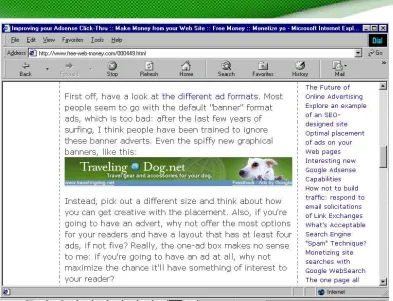
(17) Let me assure you that in the time that I have been using AdSense, my earnings have only gone up — and so will yours, if you apply all my techniques seriously.. 17.
(18) 3. How To "Tweak" Your Ads To Make Them "Click"! 3.1 Ad Formats: "Dress" your ads for success! How would you like your ads served? Banners? Skyscrapers? Rectangles? Squares? What about borders and background colors? The choices can be overwhelming. Many people let Google decide for thempreferring to stick with the default settings. Big mistake! From my own experience I can tell you that it's like swapping a hundred-dollar bill for a ten-dollar one. For almost one year I settled for just a tenth of what I could have been making — just because I didn't bother to control the looks and placement of my AdSense ads. The various ad formats, colors and their placement on the web page can be done in thousands of combinations. You can literally spend hours every day experimenting with every possible combination. But you don't want to, do you? Let me give you a few 'ground rules' that have sky-rocketed the CTR's on my top-grossing pages:. 3.2. Don't "look" like an ad. People don't visit your website for ads. They want good content. If you make the ads stick out with eye-popping colors, images or borders, that makes them easy to recognize as ads — and people work extra hard to avoid them. The same goes for ads that are tucked away in the top, bottom or some other far corner of the page. So easy to ignore! If you want people to click, make the ads look like an integral part of your content. 18.
(19) Today's visitors are blind to banners, mad at pop-ups, weary of ads and skeptical of contests and giveaways. So how do you win their confidence? Simple. Don't make your ads look like ads!. Here are a few simple choices that zoomed my CTRs to incredible heights:. 3.3. Go for text ads instead of image ads. A text ad offers many advantages over image ads: A. With the right formatting, a text ad 'blends in' with your site content. An image ad will not give you the same freedom with its appearance, as the only thing you can play with is the size and positioning. B. You can squeeze more text ads into the space that a conventional banner takes. People love to have more choices! C. Properly formatted text ads don't look like clutter. Banners do! D. People hate banners and avoid them at sight. Many tests confirm that people are much more receptive to text ads related with your content.. 19.
(20) Fig 3.1 This banner ad stands out, but will it get clicked? Dave Taylor, best-selling technology writer and AdSense partner, stands up for text ads in this article at: http://www.free-web-money.com/000449.html You can read more of his AdSense articles on this page.. To compare the look and feel of the different ad formats, there's nothing like Google's official AdSense guide at: https://www.Google.com/AdSense/adformats. 3.4 The Best Performing Ad Size So you’ll want to use text ads and you’ll want them to look like anything but an ad. But you’ll also want them to be a particular size. Which size is that? 336 x 280 – the Large Rectangle. Why should you choose the 336 x 280 ad block? Simple. It gets the most clicks! My studies have shown that this format looks most like real content added to a page. I’ve dabbled with every size Google offers and this is the size that consistently has the best results. Other people have told me the exact same thing. That’s all I need to know! Second best is the 300 x 250 – The Medium Rectangle. 20.
(21) This ad block size is really useful when you went to have two sets of ads side by side. They fit on most web pages just perfectly! I would also recommend using the 'wide skyscraper', text-only ads on the right hand edge of the screen — in conjunction with the 3-way matching I talk about in chapter 4. If you think about it, nearly all PC users are right handed (even left-handed people like me control their mouse with their right hand because it's how we were 'brought up' to use a mouse.) By placing the ads on the right hand edge it's psychologically 'less distance' between your right hand and the screen. This 'closeness' in my opinion makes the user feel more comfortable and therefore more likely to click through to a link. They feel more in control of their visit experience. Stay away from the 468 x 60 ad block! One of the first things people do when they sign up for AdSense is to grab a 468 x 60 ad block. Big mistake. I have a theory about why they do this. It’s the same theory that explains why the 468 x 60 block does not entice clicks. Most site owners have the mindset that when they put Google ads on their site, they must place the code that conforms most to traditional web advertising. And that would be...? Yup, the 468 x 60, the ubiquitous banner format that we have all come to know and love and... IGNORE. Everyone is familiar with the 468 x 60. And that’s exactly why the clickthrough rate on this size is very low, even among advertisers who use images on their banners. The 468 x 60 blocks screams, "Hey! I am an advertisement! Whatever you do, DON'T click me. In fact, you should run from me as fast as you can!" In all but a few special cases, I have found the 468 x 60 ad block to be completely ineffective, and recommend ignoring it the same way your visitors do.. 21.
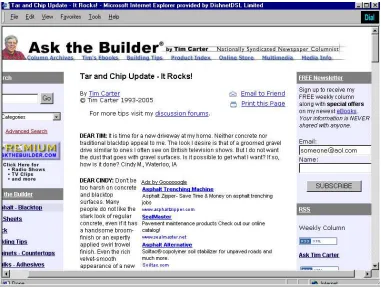
(22) 4. Using Colors To Increase Your Clicks 4.1. Design your website to Highlight AdSense. I once went to a fashion show where each model wore the exact same black outfit for the entire duration of the show. Boring? Hardly! The show was intended to showcase platinum jewelry, and the outfits were designed to enhance the jewelry — instead of distracting the audience. You don’t have to make all the pages on your website identical (or black). But you do want to make sure that the look of your page draws attention to the ads — and makes them appear as attractive and as valuable as platinum jewelry. Many websites have strong graphic elements that catch the eye — usually at the expense of the AdSense units. If you're using AdSense, be judicious in the selection of fonts, font size, colors, images, tables and other visual aspects of your website. Draw subtle attention to your AdSense units. Make them the stars of your show!. 22.
(23) Fig. 4.1 On this website, Tim Carter employs subtle design and placement to make AdSense the center of attraction. Check it out at: http://www.askthebuilder.com/457_Tar_and_Chip_Driveway_Update.shtml. 4.2. Make the border go!. You can more than DOUBLE your click-through's with this one simple tweak! Even before the Internet, ads in newspapers and magazines were marked off with a thick, heavy border. No wonder borders and boxes have come to symbolize advertising messages. Ads with prominent borders make your pages look cluttered. They distract the eye from the ad text, while marking off the ad blocks from the rest of the content. 23.
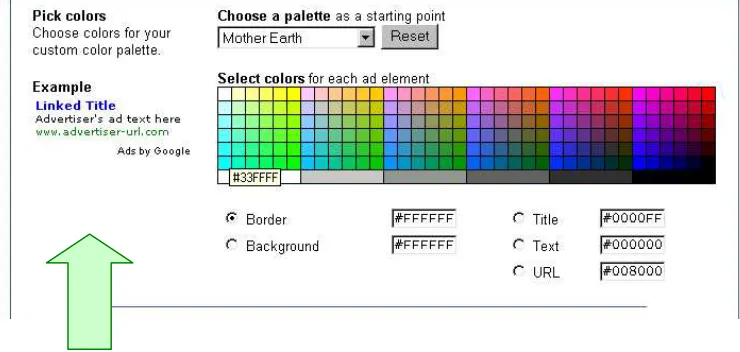
(24) Google provides an extensive color palette in your administrative area (see above). Use it to tweak the look of your ads to suit your web page.. With just one simple click, you can match the color of your ad's border with the background color of your web page. When the border blends with the background, it frees up loads of space. The page looks instantly neater and the ads look more inviting. Make sure you also pick a matching background color for the ad. The ad's background must match the page background on which the ad will appear. If the ad appears in a table, match the table background with the ad background. The key is to blend the background and border color with the page, so that the text looks like an integral part of your web content.. 24.
(25) Fig 4.2 It's always easier to work with a white background. If your page background is white, you can instantly see the results with the Example ad next to the color palette.. 25.
(26) Fig. 4.3 Don't forget to match the background color for your ad with the background color of your web page. Even with a matching border, the ad in the Example above sticks out against the white background.. 4.3. Text is Design too!. That's right: the text size, font, color and the color of your ads must match the other text elements. If the text color of the ads is the same as the text in the body of your page, it’ll help the ads blend into the site and make the reader feel that you’ve endorsed them. And if the size of the font in the ads is the as the size of the main body of the content, it will have the same effect: they’ll look like part of your site and not something brought in by Google. That’s the sort of blending that translates into clicks.. 26.
(27) Fig 4.5 Format your text ads to maximize clicks! On my Blog, I have chosen to use a 728 x 90 leaderboard at the top of my page. See more at http://www.joelcomm.com. You can see this on my blog. I’m running a test where I’ve changed the title color of the ads to match the color of the titles on the text. I’ve also matched the text color of the ads to the color of the site text and the background of the ads to the background of the page. (I could also change the size of the font and see what that does to my CTR.) This 3-way matching (titles, text and background) can generate excellent click-through rates. Too many text styles add clutter and can confuse your visitors. Instead, try every legitimate way to make the ads look like a part of your web content. In other words use the colors to make sure that your ads don't look like ads!. 27.
(28) 4.4. Blue Is Best. So you want to get rid of the border. You want to get your ads the same color as the text on the rest of your page and the background matching the background color of your Web page. But what about the link itself, the line the user is actually going to click? What color should that be? That’s an easy one: blue. I used to say that all the text in the ad should match the text on your page, including the link. After seeing an article about the benefits of keeping the links blue — and testing extensively — I don’t say that any more. The logic is that users have come to expect links on websites to be blue. Just as they expect stop signs to be red and warning signs to be yellow, so they expect their links to blue. That means people are more likely to click on a blue link than a link in any other color. The line in your AdSense code that sets the color of your link is the one that says: Google_color_link = “#color”; “#color” is the hexadecimal number for the color you want to use. You should make sure that number is #0000FF. Keep your link blue and you can experience an increase in click-throughs as high as 25 percent!. 4.5. Where did my URL go?. You can change the color of your text and you can make sure that your links scream, “I’m a FREE road to where you want to go!” But you still have to display the URL. It’s one of Google’s rules. But you don’t have to display it in a way that people can see it.. 28.
(29) One legitimate trick to make the click-through link less obtrusive is to change the URL display color to match the text description color. Now the link will blend in with the text description and the eye will be drawn to the hyperlink instead of the URL. Google provides these tools for you. Why not use them? Note that the 728 x 90 leaderboard and the 468 x 60 banner do not display the url line by Google’s design. It is not a mistake and you will not get in trouble for the url not appearing with these ad blocks. It’s just the way it is.. 4.6. Deliberate Mismatching. When it comes to choosing colors, I recommend 3-way matching and using blue for the links. But there is another strategy that you can use. You can deliberately mismatch your ad colors and styles, provided you keep it to the top of your page. This distinction generates two powerful 'zones' and therefore two types of experience for the visitor. The first zone is always at the top of the first page, above the main site banner. The titles and text colors match colors found in the banner graphic heading. (Important — the URL links are hidden, so only certain text ads will allow you to do this.) The end result is that these ads, placed above the banner graphic look like key control points for your site and are just more likely to be clicked. The visitor feels that they are visiting the another major area of that site.. 29.
(30) Fig. 4.6 www.dressesforthewedding.com has two zones: an ad zone at the top and a free article beneath. Implementing this design increased their revenues FIVE-FOLD!. 30.
(31) 5. How To Maximize Visibility And Response 5.1 Ad Placement: Where to put your Ads? Location is everything. The world's best ad won't deliver if it isn't visible in the first place. But after much experimentation with Google AdSense, I know that the most visible ads aren't always the most effective. In fact, they're likely to get ignored as 'blatant advertising'. What does work is wise placement. Put them where your content is most likely to interest and engage your visitors. You can create several 'points of interest' with the wise use of graphics, tables and other layout techniques. Once you have your visitor's attention with engaging and meaningful content, they are most likely to read and click on relevant ads. And that is precisely what Google wants — "educated" clicks from real prospects, not random visits from bored people. Here are a few simple tips to make your ads 'click'!. 5.2. Go with the 'flow'. Identify the reading patterns of your visitors. What draws their attention first? What makes them 'click'? Like I said, you want to put your ads in areas that draw your visitors in with interesting content. There’s no point in putting your ads in some out of the way place where no one ever looks. Your users will follow your content, so you need to make sure that your ads follow that content too. Look at the design and layout of your webpage, identify the places that you think most of your users look — and mark that as a likely spot to put your ads. 31.
(32) Google actually offers a pretty neat tool to help you identify where your users are most likely to look. Their heat map at https://www.google.com/support/AdSense/bin/static.py?page=tips.html sums up the options pretty well:. Fig. 5.1 Google’s Heat Map shows an “average” site’s hot spots. The darker areas are the regions where people look most frequently. But remember, no site is average. Where do your visitors look most?. Google says that certain areas are more effective than others. Researchers have also found that when people look at a website, their eyes start in the top left hand corner and then travel down the page from left to right. All of this is true but the hottest areas can vary from site to site. You will need to experiment to find the very best places for you.. 5.3. Above The Fold One general rule on the Internet is that people spend most of their time on a site “above the fold.” The first thing people do when they reach a website is to absorb as much information as possible before they start scrolling. The part of the page that they can see without scrolling is called “above the fold.” 32.
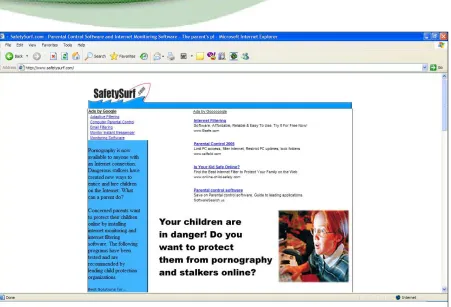
(33) That’s where you want your ads. The number of links that appear above the fold affect how likely people are to click on your AdSense ads. That’s why more ads doesn't always mean more money! Google always puts the top-paying ads on the top and the lowest-paying ones at the bottom. If you have a stack with three or more ads, the cheaper ads might steal attention away from high-paying ads and clutter up your website. You don’t want ads and links competing against each other. If you want to increase your earnings per click, remember: Less is More! And that’s particularly true above the fold. Let's take a look at two sample pages:. Fig 5.2 MegaBookshop.com has a search form, a featured product, category links and AdSense ads, all above the fold.. 33.
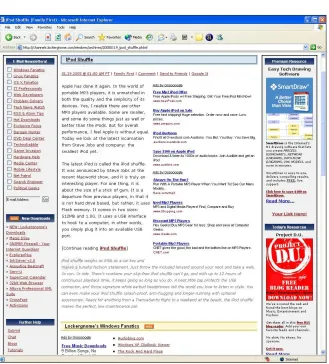
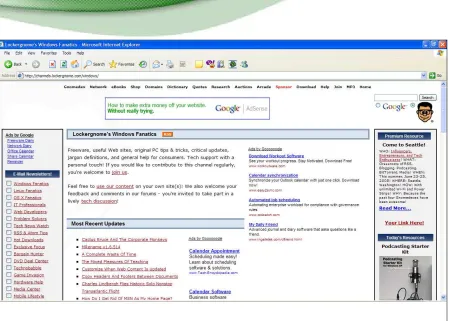
(34) Fig 5.3 SafetySurf.com is not the most attractive site, but notice how the only links above the fold are AdSense ads.. Now, which of these sites’ ads do you think bring a higher click-through rate? You guessed it. The second site has triple the click-through rate of the first site. The moral of the story? If you want to maximize your AdSense clicks, give your visitors fewer choices above the fold!. 5.4 Using Tables I’ve already mentioned that one of the principles of a high click-through rate (CTR) is to make your sites blend into the page. The more you position your sites to blend into the page, the better your click-through rate will be. One very neat way to help your ads blend into the site is to place them in tables. In the example below, technology guru Chris Pirillo skillfully drops his AdSense into a <table> for a clean and attractive look that turns AdSense into a new focal point. See out how he does it at http://www.lockergnome.com 34.
(35) Fig 5.4 Note how clean the tables make the ads look.. Want to get the same results with your web page? Dave Taylor (http://www.intuitive.com) shares this simple code to create a left-aligned table containing AdSense. Just paste this code where you want AdSense to appear. Easy! Left-aligned table with AdSense: <table border="0" align="left"><tr><td> Google AdSense code goes here </td></tr></table> 35.
(36) Right-aligned table with AdSense: <table border="0" align="right"><tr><td> Google AdSense code goes here </td></tr></table>. 5.5 Ad Link Units So far, I’ve been talking about where to put your ads and I’ve recommended above the fold, with little competition and suggested that you might want to put them in a table. But you should also think about which kinds of ads you want to place where. Ad Link units let you place a box on your site that contains four or five links. They come in sizes ranging from 20 x 90 to 200 x 90, and are really meant to be placed on a sidebar. Because you can place one Ad Link unit as well as three other units on the page, you might find that the choice helps: if a user doesn’t spot something interesting in one type of ad block, he might spot it on another. Where Ad Links differ from other types of ads is that they only display a list of topics that Google believes are relevant to the content of your pages. They don’t display the ads themselves. When a visitor clicks on a topic, Google pops up a new window with targeted ads. It can be argued that the Ad Links are ineffective because people have to go through two clicks in order for you to get paid. That’s right, you only get paid for the second click (but that does mean you can check to see which ads your users are being served.) But it can also be argued that if someone is taking the time to click on a topic, then they are probably very interested and are likely to click an actual advertisement on the resulting page. Some people have found that just about everyone who clicks on an Ad Link will click on the ads that appear on the next page. I have tested Ad Links on multiple sites and have seen vast differences in results. That makes it more difficult to say whether or not they are for you. 36.
(37) In the first case, I placed the Ad Links on an information-based site with a very general audience. The results were nothing to write home about. Let's just say that you could just about buy a large candy bar with the CPM I saw. In the second case, I placed the Ad Links on a product specific site with a narrow audience. The results were fantastic! We're talking about a CPM that is greater than what someone might make flipping burgers in one day. The conclusions should be obvious. If you’re going to use Ad Links units campaign. You need to put them: 1. On a site with a specific field of interest. A general site will give you general ads — and few clicks. 2. Above the fold with few other links. For Ad Links, this is crucial: If your users are going to click a link, it should be a link that gives you money. It’s also a good idea to keep your Ad Link units for sites with high-paying keywords. If someone comes to your site seeking out information or a product on a top-notch keyword, they tend to be more likely to click as a result. Let’s take a look at an example:. 37.
(38) Fig 5.5 LockerGnome.com puts AdLinks above a list of links so that they blend into the site.. I’ve already mentioned Chris Pirillo’s site at Lockergnome.com as an excellent template for how to do AdSense properly. While I don't have access to his AdSense statistics, I have watched his sites long enough to speculate as to his success. The center column of his page is classic AdSense placement. He is using a medium or large rectangle with blue links, black text and subtle URL. The ads are placed inline and right justified. People start on the left and drift to the right. My testing has also shown that ads on the right perform best. He is using a 120 x 600 skyscraper ad, which I usually don't recommend. However, many people use the skyscraper ads in sidebars. Pirillo has thought outside the box and used the white space next to his bullet points for this page. Right justifying the skyscraper block and placing it inline is a slick move. 38.
(39) But look where his Ad Links are: in the top left column of the page, above the fold. That means you can see Ads by Google as the first item. As long as those AdLinks are very targeted to the content on the page, they could generate 1%-2% in clicks. If you have the space and they fit in your sidebar, I would test them on your site as well.. 5.6 Horizontal Ad Link Units Recently, Google introduced a new format for Ad Link Units: horizontal. This is a huge difference. Users are reporting increases in CTR as high as 200% using this units! Instead of piling the links one on top of the other—which is great for putting above lists of links but stand out too clearly when placed in text—the horizontal ads blend in perfectly when placed on pages with articles.. Fig. 5.6 New horizontal Ad Link units are great for inserting into articles and show very clearly which keywords your site is generating.. You can still only use one Ad Link unit per page and users still have to click twice before you get paid but they’re definitely worth slipping into a long article. I’d recommend that you put them either above the article or in the middle. They’ll be too easy to miss at the bottom.. 39.
(40) 5.7. Using Multiple Ad Blocks. So Google allows you to put up to three AdSense blocks (ad units) on the same page, as well as an Ad Link unit and a search box. What does this mean for web publishers? A real bonanza: you now have many more chances to hook readers with new ads as Google will show unique ads in each ad unit! To leverage this opportunity, look at adding new content to your high-traffic pages. Use attractive, quick-loading graphics that encourage people to scroll down. For example, relevant, catchy graphics could be a great way to draw your visitors to an ad. A B2B website could run a daily cartoon strip with a humorous take on trade news and issues. Your AdSense ads can be positioned right underneath the cartoon, which will lend instant visibility to the ads. That’s a strategy that will maximize exposure to the AdSense units, leading to more clicks and more money! With multiple ad blocks, you can decide which ads are served in the best place for your site.. 40.
(41) 6. Controlling Your Ads 6.1 Attracting Relevant Ads Getting the color and placement right will help improve your click-through rate. But neither of those will affect which ads your site serves. In theory, Google controls the ads that appear on your site. You don’t get to choose them at all. In practice, there are a few things that you can do stop irrelevant ads from appearing and ensure that you get the ads that give you cash. The more relevant the ads, the greater the chance that a user will click and you’ll earn money. The most important factor is obviously going to be your content. Google’s robot will check your site and serve up ads based on the keywords and the content on your page. Bear in mind that Google’s robot can’t read graphics or Flash or pretty much anything that isn’t text. I’ll talk about content in detail in chapter 8 but for now, remember that if you want to keep your ads relevant, you’ve got to have the sort of page that Google can understand and use to give you the ads you want.. 6.2 Keep The Title, Directory And Headlines Relevant How exactly Google’s robot reads pages is a secret guarded about as closely as Coca Cola’s special syrup formula. One thing that does seem to have an effect though is the title of your URLs and files. When you create your pages and view them on your computer before uploading them to the server, you should find that AdSense serves up ads related to the name of the directory that holds the page. That gives a pretty big clue as to at least one of the things that Google is looking at: the name of the directory. Actually, it’s not just the name of the directory that’s important. The name of 41.
(42) the file plays a big part too. If you have a website about wedding trains and the title of one of your pages is trains.php for example, there’s a good chance that you’ll get ads about Amtrak and Caltrain. That wouldn’t give you many clicks. Change the name of the file to weddingtrains.php and there’s a much better chance that you’ll see ads related to weddings. If you find that the ads that are appearing on your site have nothing to do with your content, the first places to look are your directory and your title. Make them more relevant to your content and you should find that you get better ads. Another place to look is your headlines. Instead of using a <font> tag for your heading, try using the <h1> tag with headings that contain your keywords. That should help them to stand out to the robots. And if you don’t have any headlines at all, try adding some.. 6.3. Finding Keywords. We know that Google’s robot searches websites for keywords, then reports back and tells the company what kind of ads to send to the site. If your site is about pension plans for example, then your keywords would be things like “retirement”, “401k” and “pension”. Getting the right keywords on your site won’t just make your ads relevant; it will also help you to make sure that the ads you get are the ones that pay the most. There are all sorts of tools available on the Web that tell you how much people are prepared to pay for keywords. www.overture.com and www.googlest.com let you see how much people are prepared to pay, and keywords.clickhereforit.com also has a list of keywords with their prices. Again, you don’t want to build a site just to cash in on a high paying keyword but if you know that “401k” pays more than “retirement” for example, then it makes sense to use the higher paying keywords more than the lower paying ones. 42.
(43) See chapter 12.4 for more on finding the most up-to-date high paying keywords.. 6.4 Keyword Density You’ll need the right keywords to get the right ads. But you’ll also need the right amount of keywords. There’s no golden rule for the putting right number of keywords on a page to get the ads you want. You’ll just have to experiment. It also seems to be the case that keyword density is counted across pages, especially for high-paying keywords. If you have a site that's generally about cars and you write a page for car rental, a higher-paying keyword, you might find that you need to produce several pages about car rental before you get the ads. In general though, if you find that your ads are missing the point of your page and that your titles are all correct, then the next step would be to try mentioning your keywords more often and make sure that they’re all finely focused. For example, talking about “fire extinguishers” is likely to get you better results than talking generally about “safety equipment.”. 6.5 Keyword Placement It shouldn’t really matter where you put your keywords, should it? As long as the right words are on the right page in the right amount of numbers, that should be enough to get you relevant ads, right? Wrong. One of the strangest results that people have had using AdSense is that putting keywords in particular places on the page can have an effect on the ads the site gets. In my experience, the most important place on your webpage is directly beneath the AdSense box. The keywords you place there could influence your ads. For example, mentioning clowns in the space directly beneath the AdSense box could give you ads about circuses and red noses! 43.
(44) Keeping that in mind, you could play with your ads in all sorts of ways. If you had a site about camping for example, you might find that you’re getting lots of ads about tents and sleeping bags, which would be fine. But if you also wanted to make sure that one or two of your ads were about Yosemite or mobile homes, then mentioning those keywords once or twice on the page directly below the AdSense box could give you ads for sites with that sort of content too. Bear in mind though that you’ll often find that you get ads that try to combine the main thrust of your site with the words in that keyword space below the ad box. So if you had a site about gardening and you mentioned “cabbages” beneath the ad box, you’re more likely to get ads about growing cabbages than ads about cabbage recipes. Experimenting with the placement of the keywords could allow you to control at least one or two of the ads you receive and help keep them varied. That’s definitely something to try.. 6.6 Keyword Frames One of the reasons that websites don’t always receive relevant ads may be that all the navigation and other non-content words affect the way Google reads the page. If your links and other words take up lots of space, it could well skew your results. One way to avoid your navigation affecting your ads is simply to create frames. You put all of your content in your main frame and the navigation material in a separate frame. Only the “content frame” has the Google code (google_page_url = document.location), so your keywords won’t be diluted by non-relevant words.. 6.7. No 'Baiting'!. Often I've clicked through a 'promising' website, only to find reams of keyword spam, interspersed with AdSense. Websites like these make AdSense look bad. Keyword spam may trick search spiders, but your human visitors will leave disappointed. 44.
(45) People hate being 'baited' by a web marketer. Offer content that makes their visit worthwhile. Address the needs and concerns of your visitors with original content. Quality content builds trust and loyalty — and that, in turn, makes people want to click. Search rankings may change, but loyal visitors keep coming back for more!. 6.8 Changing Metatags Metatags certainly aren’t what they used to be and in AdSense, they’re barely anything at all. There’s a good chance that when it comes to deciding ad relevance, your metatags have no effect whatsoever. I’ve already mentioned that the title of your page will have an effect. It’s also very likely that the description does too. But that doesn’t mean that your metatags are completely irrelevant when it comes to AdSense. They aren’t. They’re only irrelevant when it comes to serving ads; they still play a role in search engine optimization and getting your site indexed faster.. 6.9 Inviting The Robot So far in this chapter, I’ve explained some of the ways that you can tweak your page to keep your ads relevant. But the changes you make won’t have any effect until Google’s robot stops by and re-indexes your page. What will generally happen is that once you upload your new page, you’ll still get the old ads and you might have to wait some time before the robot visits it again and you can find out whether your changes have the right result. To get the robot to stop by earlier, reload the page in your browser, and then again a few minutes later. Do not click on any of the ads just reload and wait a few minutes before attempts. You should find that you receive new ads within a few minutes.. 45.
(46) 6.10 Public Service Ads The penalty for not getting your keyword placement and density right isn’t just irrelevant ads. It could also be no ads at all. If Google can’t find any relevant ads to give you, it could use your space to present public service ads, which are very nice but they don’t pay you a penny. You might prefer to earn money and give it to a charity of your choice rather than give space on your site to a cause that Google chooses. The most obvious way to beat this problem is to specify an alternate URL in the event that Google has no ads for you. You can do this from your AdSense account. Instead of linking to the Red Cross or whoever it may be, you’ll receive a link to a site that you’ve pre-chosen. For example, I have set up default ads for my 336x280 ad block. http://www.worldvillage.com/336x280-1.html They look remarkably like AdSense ads, don’t you think? You can also use this space to deliver image-based ads that come from your server. For offers that pay per action (clicks or signups), I like to use WebSponsors.com. You can signup for a free account and find new ways to monetize your unused ad space. You can also use Google Backfill, a very neat service that allows you to select keywords relevant to your site and display targeted ads instead of the public service ads or your alternative URL. They’ll match your colors and styles and split the revenue 50/50. It’s all in line with Google’s TOS and makes good alternative to no revenue at all while you get your keywords fixed. The service is available at www.allfeeds.com. 6.11 Blocking Ads Finally, the last way to control the ads you see on your site is to block ads you don’t want. Google gives you a limit of 200 URL’s to block, which isn’t much. You might well find yourself burning through them pretty fast, especially if you try to block lower paying ads in favor of the higher-paying ones. Playing with keywords, content and placement will give you much better results. 46.
(47) 7. Catch Fickle Visitors With The Google Search Box 7.1 Finding Money With Search What happens when your visitors can't find what they want on your website? They might be bored, probably they're hungry for more or they might want to refine their search. If you have a Google Search Box, you can now retain these 'quitters' — and make money from ads they click from their search results! The Google Search Box isn't just an added convenience for your visitors — it can actually make you money! If your AdSense ads are being ignored, add a link at the bottom of the AdSense ads, inviting visitors to try Google search. A simple note should do the trick. Try something like: "Can't find what you're looking for? Try Google Search!" A Google Search box allows your visitors to specify their exact search terms, thereby "pulling" more relevant ads to your page. Using the Search feature, you can pull up on-demand AdSense ads at the top of the search results.. At the bottom of the Google text ads, place a link to the Google Search bar, inviting readers to Search for better-targeted content and offers. When visitors click an ad, YOU get paid! You can invite users to search within the website or the entire web. As far as possible, use a staid gray button for the Google search feature. It looks more believable — and legitimate! Note that Google has not played around with its own search buttons, although the logo itself has undergone many theme-based transformations.. 47.
(48) Fig 7.1 The "Search" feature is an important part of content-rich websites. On my website above, users are invited to search different threads within the website 'by keyword' and 'by username'. Check it out at: http://forums.dealofday.com/search.php?. Google Search Boxes are getting increasingly popular with Internet Forums, enabling users to pull up relevant text ads "on demand"!. 7.2 Learn How To Add Google Search To Your Web Page! Adding Google Search to your Web page is very easy. This Step-by-Step Tutorial shows you how:. 48.
(49) How to… Add Google "AdSense for Search" to your Web Page!. 1. Log in to your. AdSense Account and click the "Account Information" tab.. 2. From the. Account Information Page, click on "Products" and then the "Edit Information" button to Subscribe to AdSense for Search.. 3. Click the "Search Settings" tab 49 to specify your search preferences and results. Paste the html code on your web page and start turning those clicks into AdSense cash!.
(50) 7.3 To Search Or Not To Search Putting a Google search box on your site brings advantages and disadvantages. The big plus is that all the ads the user sees are going to be relevant. The user chooses the keyword so the results are going to be right in line with what the user wants. On the other hand, that means you’ve got no control over the keywords they choose so you can’t try to promote high-paying keywords. You have to take what you’re given. You could have a high click-through rate but low revenues (although there’s still no guarantee that the user will click on an ad rather than an unpaid listing on the search results page.) But your users will leave your site at some point anyway. Why shouldn’t you try to make money when they do click away? Even if Search doesn’t bring you huge amounts of money, you should still use it as an added revenue source and to bring extra functionality to your users. I look at it this way. If a visitor doesn’t find what they want on my site, I’d prefer that they leave some change in the “tip jar” on the way out the door!. 7.4 Home Page Searching One way to increase your revenues from searching is to encourage your users to use your site as their home page. Many users have Google as their home page. If you’re offering the same service as Google, using their search box and delivering their results, there’s no reason why they shouldn’t be searching from your page — and giving you revenue from the ads. Just encourage your users, especially users with Google as their home page, to switch to you, and you’ll be able to make the most of your search function and your ads.. 7.5 Customizing Your Search Google lets you customize the search box to match your site in the same way that you can customize your ad units. But a different principle applies here: 50.
(51) you want to prevent your ads from looking like ads; you want your search box to look like a search box. You can certainly make the box look like part of your site so that it looks attractive but as I said, keep the button grey. People trust Google to deliver results that they want. If the search box reminds them of Google, they’re more likely to use it than go to Google.com and search from there.. 7.6 An Innovative Search Script Bob Rankin of www.tourbus.com shares a custom-made javascript that allows you to suggest additional search terms for your users. Note that is a violation of Google’s Terms of Service to modify the search code. However, this script is independent of the search code, though it does dabble with the input. Simply replace ABC, DEF and GHI in the script below with whatever search terms you wish to provide as suggestions for your visitors. // change forms[0] to forms[n] as needed. <SCRIPT language="JavaScript"> function setvar(val) { document.forms[0].q.value=val; } </SCRIPT> <P>Suggested Searches <BR>Click a highlighted word below, then press the Search button. <P> <A href="javascript:setvar('ABC');">ABC</A> <A href="javascript:setvar('DEF');">DEF</A> <A href="javascript:setvar('GHI');">GHI</A> . 51.
(52) 8. Building Content 8.1 Writing Content AdSense works better than just about every other type of online advertising for one simple reason: the ads are relevant to the content on your page. Users click on the ads because they find them interesting. And they come back and click on them again because they find your content interesting. If your site doesn’t have good content, you’re going to struggle to attract users and links, and you won’t be able to persuade anyone to come back to your site. Having the right content then is crucial to having good revenues with AdSense. It’s also crucial to the relationship you have with Google’s indexing mechanism. Remember, Google is a search engine first and foremost. Their purpose is to provide the web user with the best search results for the terms they are seeking. If you are providing quality content, you have a greater likelihood of having your search results come up higher on the page. Fortunately, it’s also easier than ever to fill your site with page after page of sticky content, each of which contains ad units and opportunities to earn revenue. The most obvious way to create content is of course to write it yourself. Pick a subject you like and pour your heart out. If you know everything there is to know about video games, you could set up a site stuffed with reviews, news and walkthroughs, and write all the articles yourself. Your AdSense units will give you ads related to gaming and as long as they’re positioned properly and look right they should give you more than enough revenue to fund your video gaming habit and then some. You can do the same thing for any topic you wanted. But remember, if you’ve created your site to make money, then writing the content yourself means that you’re working for that money. When you count your revenues, you have to factor in the time and effort it took you to make those revenues. 52.
(53) That’s one of the reasons that many people look for other, easier ways to get content around their ads. (The fact that they just don’t like writing is another good reason.) Fortunately, there’s plenty of ways of creating effortless content and some of them are even free.. 8.2. Making Bucks With Blogs. Writing blogs isn’t exactly effortless, but it is something a lot of people do for fun and because they’re updated regularly, Google loves them. If you’re going to write a blog anyway, then you should certainly be making money out of it. The biggest challenge when writing a blog is getting ads that give you good revenues. Because your entries are going to be talking about all sorts of different things, there’s a chance that you’re going to get ads on all sorts of random topics. That’s fine, unless your ads are barely giving you enough revenue to pay for the blog. If you find that you’re getting lots of ads related to “blogs” for example, instead of what you’re blogging about, you can try changing the meta name in your template. Delete the <$Metainfodata$> tag and replace it with your own keywords and description: <meta name="robots" content="index,follow"> <meta name="keywords" Content="Your keywords"> <meta name="description" Content="Keyword-rich description">. Make sure that your blog has plenty of keywords and use lots of headlines containing key phrases, repeating them throughout the blog. Above all though, make sure that your blog has plenty of text. It might be fun to stuff your pages with pictures of friends, family and pets but Google can’t read them and you’ll end up with public service ads instead of revenue.. 8.3 Adding AdSense To Your Blog Not all blog sites use the same template so how you add AdSense to your blog will depend on the company you’re using.. 53.
(54) For users of Blogspot.com, which is owned by Google, you can put the ads in the template section of the site: <!-- Begin .post --> <div class="post"><a name="<$BlogItemNumber$>"></a> <BlogItemTitle> <h3 class="post-title"> <BlogItemUrl><a href="<$BlogItemUrl$>" title="external link"></BlogItemUrl> <$BlogItemTitle$> <BlogItemUrl></a></BlogItemUrl> </h3> </BlogItemTitle> <!--Your AdSense code -->. You can see on my own blog at http://www.joelcomm.com how I put ads directly above my text. http://crayfish-info.blogspot.com does the same. The ads here are centered above the <div> tag and he’s added a <br> break tag to add a gap between the head and Google and help his ads to stand out. To do the same thing to your blogspot blog, click “Change Settings” on the Dashboard and then click “Template Tab.” Somewhere on the page, below the CSS material, you should find a section of code that begins” <p id="description"><$BlogDescription$></p> </div></div><br>. The code should then look like this: <div align="center"> <script type="text/javascript"><!-google_ad_client = "pub-xxxxx09818xxxxx"; google_ad_width = 728; google_ad_height = 90; google_ad_format = "728x90_as"; google_ad_channel ="117893460x"; google_ad_type = "text_image"; google_color_border = "336666"; google_color_bg = "669966"; google_color_link = "CCFF99"; google_color_url = "003333"; google_color_text = "FFFFFF"; //--></script> <script type="text/javascript". 54.
(55) src="http://pagead2.googlesyndication.com/pagead/show_ads.js"> </script></center></div> <!-- Begin #main — Contains main-column blog content -->. Before uploading, check the preview to make sure that the ads are where and how you want them, then “Save Template Changes” and “Republish” to refresh the blog. Of course, you don’t have to place AdSense directly above the text. Another option is to embed the ads within the text so that they appear after particular entries. That would limit you to three entries per page (if you wanted an ad unit after each entry) but it could increase your click-throughs.. 8.2 Old Content Blogs have to be written all the time, but if you’ve ever written anything in the past, don’t just let it gather dust on your shelf. Give your old work a new lease of life by throwing it onto the Web! For example, “Low Fat Linux” by Bob Rankin was written years ago. You may be able to find it on Amazon.com, but it’s not likely that many people are buying it because you can read the entire book for free at www.lowfatlinux.com. Bob’s content has done its job of selling copies. Now it’s doing a second job, selling clicks to ads. What have you got lying around that could be earning you money?. 55.
(56) Fig. 8.1 Bob Rankin makes money from old content. Note the position of his ads. They’re prominent but could he get more clicks by putting them on the right? He could also have added an AdLink unit above the list of links on the left.. You might have an ebook of your own that isn’t selling very well. Instead of attempting to sell your ebook for $19.95, why not turn it into web pages and make it available for free for all to enjoy? Paste your AdSense code on the pages and you may make more from the ads than from sales of your ebook. Repurposing old content is a fantastic way to draw water from your own well.. 8.3 Volunteer Writers To use old content, you have to have content in the first place. If you don’t happen to have any out-of-print books that you’ve written lying around — and you don’t feel like writing something new — another option is to ask people to write for your site for free. Lots of people like writing. Just look at Amazon. They didn’t pay a penny for all those book reviews. Their users write them for free and Amazon benefits. When I started www.WorldVillage.com, I didn’t have money to pay the people who reviewed software for me. Instead, I contacted the game companies and received complimentary copies of their computer games, which I then forwarded to a staff of volunteer writers. The agreement was that they would provide me with a written review of the game and they would keep the game as payment. I’ve got dozens of game reviews that. 56.
(57) bring users to my site and get them clicking on my ads. I didn’t pay a penny for them but years later they continue to generate revenue for me. You don’t have to use reviews though. Whatever the subject of your website, you can add a line asking people to send in their thoughts and comments. You can just say something like: “We want YOU! We want your thoughts, articles and comments. Send your submissions to [email protected] and we’ll post them here.” You can then create a whole new set of pages for your users’ submissions and put AdSense on each one of them.. Fig. 8.2 Game reviews at http://www.worldvillage.com/softwarereviews/index.html Mmm... free content.. 8.4 Build Thousands of Pages with Other People’s Content What is the focus of your web site? Is it all about parenting? Do you help people with their finances? Does your newsletter introduce people to new web sites? Or is your focus on the legal field? Regardless of your niche, you can benefit from taking advantage of one of the little-known secrets of AdSense experts… FREE syndicated articles. 57.
(58) Many writers want nothing more than to have their work published and read. Syndicated content is a dream-come-true for writers AND publishers. For the writer, it exposes their work to a larger audience. And for the publisher (that’s you!), it means more quality content for your site. You might not be aware that there are literally THOUSANDS of articles available online which you can easily add to your web site! Of course, the trick is knowing where to find these articles. Below is a list that can get you started by showing you where you can find over 30,000 articles that are ready to be placed on your own web site. Please note that each site has its own restrictions and rules for using its content. In all cases, you must leave the author’s name and web site link intact. Some sites require that you also link back to the site where you found the article. This is critical! Remember that while you are allowed to use the articles on your pages, the content is still property of the author. Please give credit where credit is due! You may wish to publish articles only relevant to your topic, or you may wish to become a publishing powerhouse, adding thousands of new pages to your site. Regardless of how you wish to approach it, here are a few sites that provide you with thousands of FREE articles that you can republish on your web sites. EzineArticles.com http://www.ezinearticles.com A fantastic resources featuring over 21,000 articles covering a huge range of topics. However, they do have a limit of 25 articles/year for each site. Look through the categories and you can select some gems. DotComWomen.com http://www.dotcomwomen.com/free-content.shtml Nice selection of articles targeting women. John Watson http://members.tripod.com/buckcreek John offers his stories for site owners to enjoy and place on their sites. ValuableContent.com http://www.valuablecontent.com/ The site name delivers as promises. Dozens of categories with hundreds of 58.
(59) articles for you to publish. Marketing, business, humor, internet, legal, computing, sports, travel and many more. Patricia Fripp http://www.fripp.com/articleslist.html Patricia Fripp is a businesswoman, marketer and motivational speaker. Her site offers over one hundred articles perfect for any business-oriented site. ArticleCity.com http://www.articlecity.com This one is a source of articles that will keep you busy for weeks on end. ArticleCity offers over 12,000 articles that you can place on your site. If the topic exists, you can bet that this site will have an article on that topic. I recommend spending a great deal of time selecting articles for your site here. Want to find more? Simply do a Google search for "free articles" and see what turns up. Fine tune your search for your topic to find articles relevant to your site, such as “free parenting articles” or “free financial articles”. Now that you know where to find free content, you can build hundreds or thousands of keyword relevant pages and place your AdSense code on them to generate more revenue.. 8.5. Add Public Domain Works To Your Site. One of the best kept secrets of free content comes in the form of Public Domain works. Basically, these are books, articles, recordings and pictures whose copyrights have expired. Since they have not been re-registered with a copyright, they enter the public domain. What does that mean? It means ANYONE (including you) can publish, re-publish and/or sell the works without paying a commission to anyone! Think about this. You can build a site with HUNDREDS of pages just by publishing one public domain book on your site! Think of all the AdSense impressions you can deliver. The possibilities are endless. I have two sources that you will want to investigate to find Public Domain works that you can begin using immediately 59.
Figure

+7


Outline
Writing Content
AdSense In RSS Feeds
How to Read your Server Logs
The Most Important Stat Of All
Websites that rank higher in a Google search (SERPS) will get a better per-click payout than websites which rank lower for the
Learn From A Pro
Gifts-911.com Gets Emergency Treatment With Multiple Ad Units
Related documents
The work for a degree must be completed within six years. This policy remains in effect even if a student is absent or not enrolled during several semesters. A student who allows
You may either create an installation media (disk, CD or USB flash drive) from the Installation CD or create an installation media (disk, CD or USB flash drive) from a file from
Small and medium enterprises, support of SME, development of SMEs, funds of the European Union, Small Business Act, operational programs, South Moravian Innovation Centre,
• The comfort of freedom to design • High quality architectural designs • Innovative functionality and materials • Outstanding energy performances • Complete building
Packet delay variation is not a good indicator of expected packet clock properties because the time interval error of a packet clock is a small and unknown fraction of the
352 KRISHNA GIRLS ENGINEERING COLLEGE KANPUR NAGAR.. 164 PRANVEER SINGH INSTITUTE OF TECHNOLOGY
The aim of our study was to evaluate factors associated with exacerbations requiring hospital admission, with regard to host characteristics, usual treatments, severity scores
Provision of milk from animals free of the infection or pasteurisation of milk for feeding young animals is essential to prevent new cases of Johne's disease.. There is evidence that
