Augmenting the Science Centre and Museum Experience
Eric Woods
HIT Lab NZ, University of
Canterbury, New Zealand
[email protected]
Mark Billinghurst
mark.billinghurst@
hitlabnz.org
Julian Looser
[email protected]
Graham Aldridge
[email protected]
Deidre Brown
[email protected]
Barbara Garrie
[email protected]
Claudia Nelles
[email protected]
Abstract
Recent advances in computer graphics and interactive techniques have increased the visual quality and flexibility of Augmented Reality (AR) applications. This, in turn has increased the viability of applying AR to educational exhibits for use in Science Centres, Museums, Libraries and other education centres. This article outlines a selection of five projects developed at the Human Interface Technology Laboratory in New Zealand (HIT Lab NZ) that have explored different techniques for applying AR to educational exhibits.
These exhibits have received very positive feedback and appear to have educational benefits involving spatial, temporal and contextual conceptualisation and provide kinaesthetic, explorative and knowledge-challenging stimulus. The controls available to a user of turning a page, moving an AR marker, moving their head and moving a slider provide sufficient freedom to create many interaction scenarios that can serve educative outcomes. While the use of virtual media provides many advantages, creating new content is still quite difficult, requiring specialist software and skills. Useability observations are shared.
CR Categories: B.4.2 Input/Output Devices - Image display H.1.2 User/Machine Principles H.5.1 Multimedia Information Systems – Animations, Artificial Realities I.3.6 CG Methodology and Techniques - Interaction techniques I.3.7 3D Graphics and Realism K.3.1 Computer Uses in Education - CAI K.7.m (The Computing Profession): Miscellaneous – Ethics
Keywords: augmented reality, educational exhibits, software, science centres, museums, real-time 3D graphics, digital archiving, storytelling.
1 Introduction
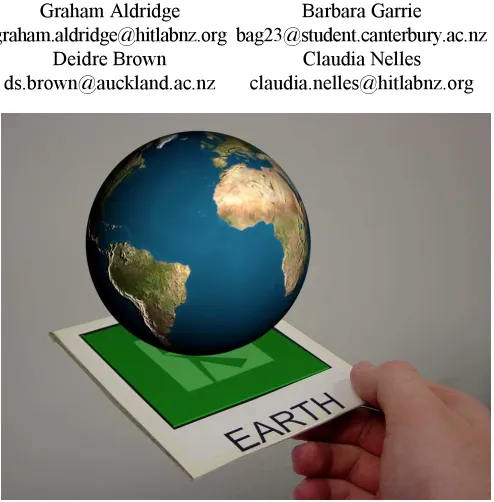
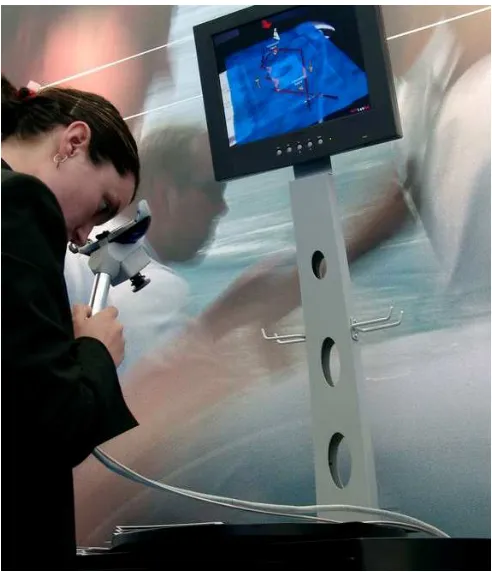
Augmented Reality (AR) describes the concept of augmenting a view of the real world with 2D images or 3D objects (Figure 1). Typically AR is viewed through a head-mounted or hand-held visor (Figure 2) and the augmented components are ‘anchored’ to an object or position in the real world.
An AR visor typically consists of a display screen and a small camera. The camera continuously captures pictures of what the person is looking at and sends them to the computer. The computer utilises 3D tracking data of the position and rotation of the camera and elements within the real world to calculate where and how it should render its artificial components on the camera image. The result is sent back to the display screen which is
aligned directly behind the camera to give the user the illusion that they are looking ‘through’ the visor into the real world.
In these projects, 3D tracking has been implemented using the ARToolKit [ARTOOLKIT 2002]. This toolkit utilises black squares (called markers) as anchors for augmented components. The image from the camera is processed to identify all black squares in the scene, analyse their position and shape to determine their 3D position and rotation, and analyse the unique pattern inside them to determine which AR component they relate to.
AR has a wide variety of uses, as it can clearly demonstrate spatial concepts, temporal concepts and contextual relationships between both real and virtual objects. The main advantages of using virtual objects is that they can be animated, respond to the users actions and are not constrained by the costs and practical or physical limitations of real objects. These factors make AR a powerful educational tool.
While education in Virtual Reality (VR) is well established, research in this area of AR is still maturing, with few papers available on AR in education [BILLINGHURST 2002; SHELTON 2002; SHELTON AND HEDLEY 2002; KAUFMANN AND SCHMALSTIEG 2002] or storytelling [MACINTYRE ET AL. 2001; MACINTYRE ET AL. 2003a].
[image:1.612.314.561.88.339.2]AR is beginning to be used in museum exhibits. The Virtual Showcase [VOSKAMP AND MADER 2002] allows individual users to see virtual objects placed on real artefacts, such as skin and bone placed on the skull of a Raptor dinosaur [ENCARNAÇÃO 2003]. Another proposed version of the Virtual Showcase allows a person to play a game of chess with a virtual recreation of the original ‘Chess Turk’ opponent by reaching into a cabinet and moving virtual chess pieces [VIRTUAL CHESS TURK 2002]. Archeoguide is a prototype demonstrating outdoor AR being used to augment the historical site of Olympia with re-created buildings and athletes participating in Olympic events [DÄHNE AND KARIGIANNIS 2002].
Figure 1: Example of Augmented Reality – a virtual planet ‘anchored’ on a real square (marker) as seen in the S.O.L.A.R
2 Examples of AR in Educational Exhibits
This article outlines a variety of projects developed at the Human Interface Technology Laboratory in New Zealand (HIT Lab NZ) that have explored different techniques of applying AR to museum and science centre exhibits. Further information and video clips are available from the website [HIT LAB NZ].
2.1 The BlackMagic Kiosk
The BlackMagic Kiosk was developed for the Telecom Technology Pavilion at the America's cup in New Zealand in 2003 [BLACKMAGIC BOOK 2002], which was visited by over 400,000 people over six months.
[image:2.612.53.299.51.337.2]The BlackMagic Kiosk uses AR presented as a MagicBook [BILLINGHURST 2001] to tell the history of the America's Cup. When people look through a handheld visor at the pages of a normal book, animated virtual models leap out of the pages (Figure 2). The book is attached to a turntable to prevent removal or damage while maximising freedom of movement.
No matter where the user positions themselves around the book, or how they turn it, three-dimensional images will still appear attached to each right-hand page. On each left-hand page, normal text provides background information. As the computer knows which page is being viewed, it can also trigger other events relevant to the current page such as narration and sound effects.
New virtual content can be seen by simply turning the pages of the book. The BlackMagic book contains an array of 2D and 3D content ranging from a 3D model of the original 1852 winning boat, to a 2D video depicting Team New Zealand's 1995 victory, and a 3D animation of the 2003 America's Cup course.
The website also provides a condensed version of the BlackMagic Kiosk that can be downloaded and run at home. Once the software is installed, the user simply prints out the black markers and views them through a standard web camera.
2.2 The S.O.L.A.R System (Solar-System and
Orbit Learning in Augmented Reality)
The S.O.L.A.R System was created for the TeManawa Science Centre (Palmerston North, New Zealand). It is an educational exhibit that teaches people the position of each planet in the Solar System (Figure 2). Using a set of nine AR planet cards, participants place each planet orbit around the Sun. When all of the planets are in their correct locations, they begin to orbit the Sun at accurate relative size and speed.
When someone looks through the handheld visor they see three-dimensional (3D) planets standing out from the black square on each of the planet cards (Figure 1). Cards can be rotated and examined up close to see details such as the spot on Jupiter or Saturn’s rings. The surface of each planet is highly detailed and based on accurate satellite imagery. This level of detail allows users to visually compare the surface properties of different planets in the Solar System.
An overhead camera monitors the placement of all cards on the table. When a card is put in the correct place, it turns green and a voice states the planet’s name. Once all nine planets have been placed correctly, they begin to orbit around the Sun.
This exhibit allows two handheld visors to be run from a single computer, which greatly enhances collaboration and doubles the number of people who can experience the exhibit in a busy museum setting. Two large LCD panels show what is being seen in each handheld visor to increase the interest and participation from people not using a visor. The three camera inputs are USB, so can all be captured from simultaneously. A dual-head video card is used to support two visors, with two SVGA multiplexers used to support the LCD panels.
The handheld visors were designed to be as robust as possible and fabricated from polycarbonate perspex. Design considerations included the need for a well protected lens, strong joins between visor components and high-tensile stainless-steel cable taking the stress off the cables that run from the visors to the computer under the table.
[image:2.612.317.562.51.245.2]A logging feature reports not only how many times the activity has been completed, but also records every action all users make. The analysis of this data will be published in a subsequent paper, but should provide statistics on average time per activity, average time spent per planet and the typical order of planet placement, which infers which planets users are most/least
Figure 2: The BlackMagic Kiosk depicting the history of the America’s cup in Augmented Reality.
confident about. Science Centre staff appreciate having this data available and TeManawa plan to compare the number of times the activity has been completed to the number of people who visited the museum on a given day to estimate the percentage of people who use the kiosk. This level of automated auditing is not easy to implement in many traditional educational exhibits.
2.3 The Augmented Reality Volcano Kiosk
The AR Volcano Kiosk was developed for Science Alive! (Christchurch, New Zealand) and is also on display at Science Works (Melbourne, Australia). It is an exhibit that teaches people about volcanoes, including details on subduction, rifts, the Ring of Fire, volcano formation, eruptions and tectonic plates (Figure 3). It is similar in concept to the Black Magic Book in that it is a six page AR book, attached to a turntable and viewed through a handheld visor. In addition, two visors are supported by one computer, an interactive slider is included and it is based on an advanced 3D graphics engine.
The interactive slider allows the user to control some aspect of the content on each page. As you move the slider up, the animation advances, and as you move it down, it rewinds. Interactions include volcano formation, movement of tectonic plates, the sequence of events in the eruption of Mount St Helens, flows of magma in convection currents and the resultant forces
applied to the Earth’s crust. The position of the slider is mapped to both the animation of the model and to various other dynamic effects such as particle system density, pixel shader brightness and ambient sound. This is highly beneficial in allowing the animated content to be presented to the viewer at their desired speed, and also allows for simple and intuitive pausing and rewinding.
Three-dimensional modelling and animation was outsourced to the professional studio One Glass Eye, who provided high quality models, animation and photorealistic textures for the various scenes. It was necessary to develop strategies to simplify the export of 3D content from 3D Studio Max into the application. The SDL model format was used for this, with bone systems supporting the animation. While this was not ideal for all animations, it was the best format available that worked in both the design and development environments.
The addition of an advanced 3D graphics engine [ALDRIDGE 2002] offered easier access to the advanced features and speed of the latest generation of graphics cards. It also made it easier to bring the high quality models and animation into a real-time AR environment and add the required interactivity via the slider. The graphics engine was a 3D game engine modified to work with the ARToolKit. This provided a host of new features including dynamically lit particle systems for the smoke and ash, vertex and pixel shaders and very fast real-time rendering speeds (Figure 5, bottom). The result was that complex textures such as lava and water could be created and made to move and change realistically over time.
2.4 Digital Archiving of Historical Artefacts
This project is currently incomplete, but has produced results that are immediately applicable to a variety of educational exhibits. The Canterbury Museum (Christchurch, New Zealand) is working with the HIT Lab NZ to investigate how AR techniques can be applied to displays in a museum setting [GARRIE ET AL. 2003]. In addition to work on exhibits, the viability of creating digital replicas of historical artefacts is being investigated.
[image:3.612.54.298.306.668.2]A prototype has been developed which currently consists of a virtual Maori whalebone patu (club) (Figure 6) and a human face being presented in a Magic Book. Both objects are replicas of real world objects - a technique made possible by the FastScan system, developed by a Christchurch company [ARANZ 2004]. FastScan is a handheld laser scanner that can be swept over the surface of a real object to digitize it into its virtual replica. This
Figure 5:Top: The AR Volcano Kiosk in use. Note how the slider is being used to highlight the convection currents. Bottom: A page
showing the use of dynamically-lit particle systems and pixel
[image:3.612.317.561.496.690.2]process is very fast and produces a high quality product, so it is suitable for use in a museum on an ongoing basis. Unfortunately, in addition to the laser not registering very well on glass and black materials, the main limitation currently faced is that FastScan only records the shape of the object. The surface colour, or ‘texture’ of the object must be recreated separately in a very labour-intensive process. This is currently achieved by taking digital photographs of the object and applying them to the surface of the virtual object as texture maps. This process is not of such high quality and it is unlikely that museum staff would be able to achieve this without significant training. Automated solutions and colour laser scanners exist, but they are generally very expensive and less flexible.
While there are currently technical obstacles to be overcome, there are significant benefits to being able to conduct digital archiving easily and effectively. For example, fragile artefacts could be archived and displayed with no further risk of deterioration. Artefacts could be shared among researchers and the public with no limitations on distance, transport or exclusivity. Also, artefacts could be displayed in ways that enhance their contextual relationships with the environment in which they were originally created and used, with no risk to the original. Understandably, this creates both opportunities and risks that then need to be assessed. For example, it could increase dissemination of cultural heritage, but issues of ownership rights must be respected. Further research in this area is also being conducted.
2.5 The eyeMagic Virtual Story Book
eyeMagic has been designed as a new form of children’s book. The first title was based the story ‘Giant Jimmy Jones’, written and illustrated by the New Zealand author and illustrator Gavin Bishop. It is currently on show at the South Public Library (Christchurch, New Zealand).
The book can be read like any ‘normal’ picture book, however when you look at the pages through a handheld visor, they are replaced with fully animated characters acting out the story in a virtual environment. Using a similar concept to traditional 3D pop-up books, flat planes of scenery are layered near the back of the scene to enhance the environment. When each page comes to life a soundtrack and narration of the story is triggered.
The eyeMagic book is currently viewed in an AR Kiosk, similar to the BlackMagic Kiosk, but versions that can be run on any computer are being planned.
As the book is still be able to be read as a traditional story
book, the visual impact of the black square was minimized as much as possible. This was done by employing a new extension to the ARToolKit called Natural Feature Tracking, which only uses a small (3cm) marker for initial calibration, and then tracks from features it has been trained to recognize on the surface of the page. This technique is still not as stable as traditional marker tracking, but should become more stable as higher quality USB 2.0 and fire-wire cameras become available.
The process used to make eyeMagic was very similar to that of creating real-time 3D games. Three-dimensional modelling was once again completed by the studio One Glass Eye, but in this instance, character rigging, animation and export to the application was done by the software developer. This work was done in 3D Studio Max with Character Studio. Models with bone systems were exported in the SDL model format, which were subsequently converted into the MDL model format. While this format had severe limitations to the length of animation and the number of polygons that could be used per model (presumably to ensure real-time gaming speeds were maintained), the use of multiple, linked models overcame this.
The second stage to this project involved creating a workshop for 10 to 14 year old children in which they could create their own virtual story book (Figure 8). Ten children were given a week in which to learn a combination of basic 3D modelling techniques and an awareness of narration and storytelling. During the week the ten children were grouped into pairs, and each pair worked on creating their own page of the ‘Giant Jimmy Jones’ story. It was found that children of this age were able to learn rapidly and produce results that were entertaining and highly creative. Research into the educational benefits of this workshop has just been completed [MCKENZIE AND DARNELL 2003].
3 Conclusions
Five examples of educational applications of AR have been presented which have applications in educational centres such as libraries, science centres and museums. While each is based on AR, they have all explored different techniques relevant to the educational objectives required.
3.1 Educational Benefits of AR Exhibits
[image:4.612.318.563.370.516.2]Observations of users of these applications has shown that they are very popular and create considerable excitement and entertainment. But gauging the educational benefits will require more than cursory observation and is a vital topic for future research. We have made a start on this with the logging of users’ actions and the comprehensive research into the educational benefits of the workshop, but much more work is required. We are
Figure 7: The ‘Giant Jimmy Jones’ eyeMagic storybook.
[image:4.612.54.298.498.702.2]currently proposing to identify all the characteristics of the technology that impact education and evaluate the benefits of each one. Having this range of completed projects available for study will be very beneficial.
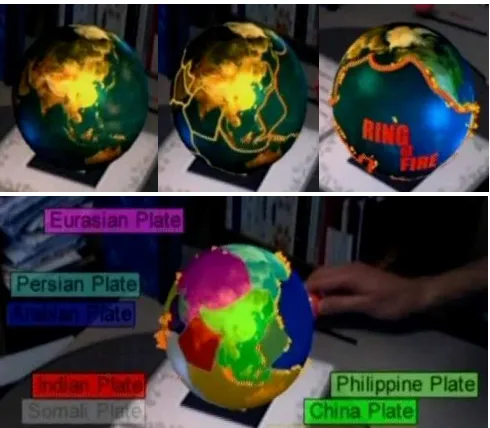
As mentioned, we have already identified a number of beneficial characteristics of Augmented Reality - it can clearly demonstrate spatial concepts, temporal concepts and contextual relationships between both real and virtual objects. The temporal concepts of volcano formation and eruption, for example, are much harder to convey in other mediums, such as a book. The spatial concepts of planetary orbits are difficult to convey in both books and videos. Illustrating contextual relationships is possibly the strongest benefit of AR. For example, seeing a virtual Patu in context to the real world and your real hands conveys a much richer sense of scale than seeing it in a book. Being able to hold virtual planets beside each other to compare them, and being able to see the earth in context to the locations of its volcanoes and then in context to the locations of its tectonic plates (Figure 9) is very beneficial for enabling exploration and developing critical analysis.
Constructivism as an educational theory states that students should construct their own knowledge framework on the foundation of their existing knowledge, and then challenge this framework to ensure it is valid [OLIVER 2000; WILLIS 2000]. AR can assist in letting a student explore the information at their own pace (helping construct a knowledge framework) and can also enable critical analysis to assist in challenging this framework, which indicates that AR has considerable educational potential.
AR can also appeal to students who learn best through kinaesthetic means. Not only can they manipulate tangible markers and sliders, they can also create their own AR scenes.
3.2 Interaction with AR Exhibits
AR enables exploration of information in a number of ways. By using the book metaphor, each page, or unit of information can be observed independently. By moving their head or the AR marker, the user can view the information from different angles. In the AR Volcano Kiosk, the slider is used on each page to reveal either temporal or spatial information. For example, in the case of volcano formation, the slider reveals an animation over time. In other cases, the slider reveals multiple ‘spaces’ of information. For example, one page starts by showing the Earth and as the slider is moved more information is revealed such as the boundaries of tectonic plates, their names, the locations of known volcanoes, and the location of the Ring of Fire (Figure 9). This scenario allows users to understand the (contextual) relationships between these different elements, all overlaid on the same space of the Earth.
One interesting challenge encountered was that when the slider is used to change animation over time, it is not always as simple as advancing and rewinding a preset 3D animation. In the formation of volcanoes, it was a very linear process, but in the eruption of Mount St. Helens, the violent explosion involved real-time particle systems and sound effects – neither of which were amenable to a simple, linear rewind. In fact, the St. Helens page was comprised of five states: a passive volcano, steam hissing from vents around the volcano, the bulging of the volcano cap, the ultimate explosion of the cap and the subsequent eruption of lava. Therefore, the length of the slider was divided into five zones. Some of the effects were a simple linear mapping of the position of the slider within the zone, for example, the increasing brightness of the lava and the bulging cap of the volcano. However, other effects were triggered as soon as the slider entered the zone, such as hissing of steam vents and the explosion. The decay of these effects varied: the steam vents stopped hissing as
soon as the slider left the zone, but the explosion played out its entire animation regardless of the position of the slider.
In summary, the input controls a user can have in AR currently include turning a page, moving an AR marker, moving their head and moving a slider. However the resulting interactions that can stem from these simple controls are many and varied. There are many more interactions that can be created from these controls or derivations of them that are yet to be explored.
3.3 Advantages and Disadvantages of Virtual
Objects
Some of the spatial, temporal and contextual benefits of AR could also be gained by using real physical objects or models, but often physical objects are limiting. Virtual objects have the advantage of being safer and cheaper to reproduce; they can be animated, respond to the users actions, be modified and transformed, be combined seamlessly with other media (audio etc) and they are not constrained by the laws of physics (unless that is desirable). Virtual media that have been used in these projects include 2D images, 3D objects, animated 2D images (i.e. videos), animated 3D objects and sound (both background sound and narration). It is interesting to note that with the BlackMagic Book we observed that many users made no attempt to read the text on the left of each page. Therefore, in the AR Volcano Kiosk, we used the narration on each page to ask the viewer questions relevant to that page, encouraging them to seek answers in the associated text.
[image:5.612.318.563.141.355.2]But just like any other objects, virtual objects still have to be created, and some of the advantages of their use become challenges in producing them, especially given the lack of established techniques in this area. In general, virtual objects can be created in one of three ways: manually in a 3D modelling package, by digitising a real object, or by creating a visualisation of pre-existing data or mathematical algorithms. The use of a professional studio for 3D modelling produced excellent results and gave us complete artistic freedom. However, this can become quite time consuming and the transition of all of the details
Figure 9: Demonstration of the slider in the AR Volcano Kiosk revealing spatial information to hi-light contextual relationships. Clockwise from top: The Earth, the boundaries of tectonic plates,
(lighting, texture, specularity, opacity, bones, animation, particle systems etc) from a 3D design environment into a real-time 3D development environment proved challenging. Some details like lights and particle emitters were simply exported as proxy bones and further embellished once in the game engine. Many textures were similarly converted into pixel shaders, so renders of the 3D design were given to the real-time developer to ensure reasonable fidelity. The digitisation of real objects can be a lot faster and produce a very high quality model, but requires access to expensive equipment and is restricted to recreating objects that already exist (or can be fabricated). The main disadvantage is that only static geometry is captured, so both texturing and animation must be done later.
Another limitation encountered was the need for a file format that could store all of the information created by the 3D designers in a way that could be used by the real-time developers. Traditional animations in formats like VRML and 3DS were sufficient for the BlackMagic Book, but ineffective for surface-deforming animation as they created a new instance of all geometry for every frame. This made playback very inefficient and slow. The best solution for this was to use bone animation, which stores the surface geometry only once, and changes the skeleton every frame, which in turn modifies the geometry. It was also necessary to have access to the code libraries for model loading and rendering of the given model format, so that it could be customised in the real-time graphics engines. Therefore, the SDL format was used, which could be converted to MDL or imported directly into the game engine. While surface deformation was not used much in the AR Volcano, SDL was still used because it was easier to create non-deforming animations with bones than it was to choose and incorporate another model format into the game engine. As mentioned, conversion to MDL introduced severe limitations, which could be overcome to a certain extent. Importing the SDL directly was a better solution, but required even more specialised code and skills.
In short, there is currently no complete workflow or environment that allows AR scenes to be easily created with complex animation, texturing and interaction. This will severely limit how much high quality content can be created for this medium, so more work in this area is necessary. The students in the eyeMagic workshop were able to create static models with photographic textures for an AR book, but this level of complexity does not fully utilise all of the potential educational benefits of the medium. Some promising progress is being made in creating design environments that can be used with minimal technical skill. Alice, for example, allows 3D models to be imported, animated, and interacted with [PAUSCH ET AL. 1995] and similar work is being done specifically for AR environments that can be designed in Macromedia Director [MACINTYRE ET AL. 2003b].
3.4 Useability of AR Exhibits
Predominantly, users of these AR applications have had no previous experience with AR or anything similar, so they have only the book (if a book is used) as a familiar paradigm with which to relate to the exhibit. Therefore, some help has to be offered.
Firstly, the design of the handheld visor had to indicate its intended use, with clear affordances for the handle “to be gripped”, the display “to be looked at” and preferably the camera “to be pointed at the scene”. Techniques used included bicycle handles, machined handles, two eye-holes, a tapering shape and a small camera cone at the front. As mentioned, the handheld visor had to be robust to stand up to use by children, but probably the most fragile item became the cables. While a high-tensile
stainless-steel cable took the longitudinal stress off the cables, some cable faults still occurred in some of the older units, presumably due to bending or twisting stresses. A flexible metal tube, as seen in arcade parlours has been proposed to minimise this stress in future. As the HMD contains buttons for power and adjustments, these must be covered to avoid tampering (but still accessible to curators so the HMD can be turned on!). Similarly, the camera lens is designed to be turned to adjust focus, so this was disabled.
The main instructions that needed to be communicated to users were “to look through the handheld visor at the black squares”, “ensure the entire square is visible” and other tips relevant to the exhibit (move the slider, place the planets in orbits etc.). These instructions are most needed by new users who approach the exhibit while no one is using it, as they have no one to learn from. Observations showed that many older users would avoid the exhibit if it was not clear how to use it. While instructions were initially offered on posters beside the exhibit, and later as pre-recorded voice-overs, the best solution was found to be an instructional screensaver that triggers if the video feed from the handheld has not changed significantly for 30 seconds. Therefore, if the exhibit is unused for 30 seconds, the screensaver shows a video of the exhibit being used, which is visible from the large LCD panels directed towards bystanders. As soon as activity is detected in the video feed, the screensaver stops, AR resumes and a welcome voice-over is triggered with more detailed instructions.
Encouraging the visitor to leave the handheld visor in a position that was conducive to use by subsequent visitors was also desired. Some kiosks provided a hook on which the visor could hang (Figure 2), but only a fraction of people used it when they left. The AR Volcano kiosk contained a padded, inset bay with the words “place handheld here” on it, which was reasonably successful. The MagiPlanet system simply let the users place the visor on the table. With the advent of the instructional screensaver, the necessity to leave the visor in an indicative position decreased. However, if the visor is left with the camera pointing towards the user space, there is a risk that movement in the distance will prevent the screensaver from being triggered.
A significant design challenge of the kiosks was to make the height of the AR activities comfortable for both adults and children – what was right for children tended to be uncomfortably low for adults. For exhibits that expected a mixed-aged audience, a higher kiosk was preferred, with a foot stool available for children.
As these AR applications relied on image processing, lighting proved to be an important factor. In some locations fluorescent and incandescent lighting was mixed, which creates difficulties in calibrating the camera for colour temperature and flicker removal. In other locations, natural lighting from windows changed according to clear, cloudy or night skies, creating drastic changes in illumination of the AR markers. While automatic gain control (AGC) could often be enabled in the camera drivers, this would generally not maximise the contrast of pure black and white on the markers, reducing tracking stability. In addition, visors left camera-down would AGC to very dark conditions and have to re-adjust to bright conditions as soon as they were used. The AR Volcano Kiosk successfully trialed a system using a halogen spotlight embedded in the kiosk behind the LCD panels, shining down on the book. Care has to be taken to avoid shadows being cast on the markers, and to ensure the markers are evenly lit, regardless of their position in the system.
make the users aware of this, plus it quickly becomes obvious to most users that covering the object makes it disappear. Handles were provided on the MagiPlanet markers to encourage them to be used in a way that would not cover the square.
3.5 Summary
The AR exhibits described in this paper have received very positive feedback and appear to have educational benefits involving spatial, temporal and contextual conceptualisation and provide kinaesthetic, explorative and knowledge-challenging stimulus. The controls available to a user of turning a page, moving an AR marker, moving their head and moving a slider provide sufficient freedom to create many interaction scenarios that can serve educative outcomes. Therefore, there is a lot of room for further study in this area in both the disciplines of technology and pedagogy.
While the use of virtual media provides many advantages, the current state of technology is such that creating new content is still quite difficult, requiring specialist software and skills. Considerable knowledge has been gained in the useability of these AR exhibits that will assist greatly in refining future designs.
References
ARTOOLKIT, 2002. http://www.washington.edu/artoolkit/
BILLINGHURST, M., 2002. Augmented Reality in Education, New Horizons for Learning,
www.newhorizons.org/strategies/technology/billinghurst.htm
SHELTON, B.E., 2002. Augmented Reality and Education: Current Projects and the Potential for Classroom Learning, New Horizons for Learning, www.newhorizons.org/strategies/technology/shelton.htm
SHELTON, B.E., HEDLEY, N., 2002. Using Augmented Reality for Teaching Earth-Sun Relationships to Undergraduate Geography Students, Program for Educational Transformation Through Technology, http://depts.washington.edu/pettt/papers/shelton-hedley-art02.pdf
KAUFMANN, H., SCHMALSTIEG, D., 2002. Mathematics and Geometry Education With Collaborative Augmented Reality, Computers & Graphics 27, 3, 339-345
MACINTYRE, B., BOLTER, J. D., MORENO, E., AND HANNIGAN, B. (2001). Augmented Reality as a New Media Experience. In Proceedings of the International Symposium on Augmented Reality, pg 197–206.
MACINTYRE, B., BOLTER, J., VAUGHN, J., HANNIGAN, B., GANDY, M., MORENO, E., HAAS, M., KANG, S., KRUM, D., AND VOIDA, S., 2003. "Three Angry Men: An Augmented-Reality Experiment in Point-of-View Drama." In Proceedings of 1st International Conference on Technologies for Interactive Digital Storytelling and Entertainment (TIDSE 2003), Darmstadt, Germany, March 24-26.
VOSKAMP, J., MADER, S., 2002. Virtual Showcases - Presenting European Cultural Heritage. In Proceedings of ACM SIGGRAPH 2001, ACM Press / ACM SIGGRAPH. Computer Graphik topics, INI-GraphicsNet, www.inigraphics.net/publications/topics/2002/issue3/3_02a04.pdf
ENCARNAÇÃO, L.M.,2003, The Virtual Showcase, Fraunhofer Centre for
Research in Computer Graphics,
www.crcg.edu/research/projects/vs.php3
VIRTUAL CHESS TURK, 2002. Interactive Media Systems Group, Vienna
University of Technology,
www.ims.tuwien.ac.at/~flo/vs/chessplayer.html
DÄHNE, P., KARIGIANNIS, J.N., 2002. Archeoguide: System Architecture of a Mobile Outdoor Augmented Reality System. In Proceedings of the International Symposium on Mixed and Augmented Reality (ISMAR’02), IEEE Computer Society, http://csdl.computer.org/comp/proceedings/ ismar/2002/1781/00/17810263.pdf
HIT LAB NZ, 2004. Project information at http://www.hitlabnz.org/index.php?page=projects
Video Clips at http://www.hitlabnz.org/index.php?page=mm-movies
BLACKMAGIC BOOK, 2002. www.hitlabnz.org/blackmagic
BILLINGHURST, M., KATO, H., POUPYREV, I. 2001 The MagicBook: A Transitional AR Interface. Computers and Graphics, November 2001, pp. 745-753.
ALDRIDGE, 2002. ProjectX, http://legion.gibbering.net/projectx/
GARRIE, B., WOODS, E., BROWN, D., 2003. Pilot Study to Determine the Feasibility of Introducing Augmented/Virtual Reality Applications to the Canterbury Museum, Summer Scholarship Thesis, Canterbury Museum, Christchurch, New Zealand.
ARANZ, 2004. Applied Research Associates New Zealand, www.aranz.com
MCKENZIE, J., DARNELL, D., 2003. The Magic Book: A Report Into Augmented Reality StoryTelling in the Context of a Children’s Workshop. Research report funded by the Ministry of Education. OLIVER, K., 2000. Methods for Developing constructivist learning on the
Web, Educational Technology, 40(6), 5-18
WILLIS, J., 2000. The Maturing of Constructivist Instructional Design: Some Basic Principles that can Guide Practice, Educational Technology, 40(1), 5-16
PAUSCH, R., BURNETTE, T., CAPEHART, A., CONWAY, M., COSGROVE, D., DELINE, R., DURBIN, J., GOSSWEILER, R., KOGA, S., AND WHITE, J., 1995. Alice: A rapid prototyping system for 3D graphics. IEEE Computer Graphics and Applications, 15(3):8–11.