Gestures in the Wild: Studying Multi-Touch Gesture
Sequences on Interactive Tabletop Exhibits
Uta Hinrichs
InnoVis Group, Dept. of Computer Science
University of Calgary, AB, Canada
[email protected]
Sheelagh Carpendale
InnoVis Group, Dept. of Computer Science
University of Calgary, AB, Canada
[email protected]
ABSTRACT
In this paper we describe our findings from a field study that was conducted at the Vancouver Aquarium to investigate how visitors interact with a large interactive table exhibit us-ing multi-touch gestures. Our findus-ings show that the choice and use of multi-touch gestures are influenced not only by general preferences for certain gestures but also by the inter-action context and social context they occur in. We found that gestures are not executed in isolation but linked into se-quences where previous gestures influence the formation of subsequent gestures. Furthermore, gestures were used be-yond the manipulation of media items to support social en-counters around the tabletop exhibit. Our findings indicate the importance of versatile many-to-one mappings between gestures and their actions that, other than one-to-one map-pings, can support fluid transitions between gestures as part of sequences and facilitate social information exploration.
Author Keywords
direct-touch interaction, multi-touch gestures, tabletop dis-plays, public disdis-plays, field study.
ACM Classification Keywords
H.5.2 Information interfaces and presentation: User Inter-faces—Input devices and strategies, Interaction styles.
General Terms
Design, Experimentation, Human Factors.
INTRODUCTION
The recent interest in multi-touch interaction has led to a plethora of gesture-based interaction techniques, e.g. [8, 24, 26, 32, 34, 36], and multi-touch studies, e.g. [13, 22, 23, 31, 35, 37]. At the same time, there is a growing use of in-teractive surfaces in public exhibition spaces such as muse-ums [10, 11, 13], galleries [28], and urban spaces [23]. Pre-vious findings have indicated that public walk-up-and-use displays benefit from multi-touch interaction by providing pleasurable and playful experiences [11, 13, 18, 23]. How-ever, the design of multi-touch gestures for such scenarios is still a significant challenge due to short interaction times and diverse audiences with varying expectations toward technol-ogy. This is fueling the demand for a better understanding
Permission to make digital or hard copies of all or part of this work for personal or classroom use is granted without fee provided that copies are not made or distributed for profit or commercial advantage and that copies bear this notice and the full citation on the first page. To copy otherwise, or republish, to post on servers or to redistribute to lists, requires prior specific permission and/or a fee.
CHI 2011, May 7–12, 2011, Vancouver, BC, Canada. Copyright 2011 ACM 978-1-4503-0267-8/11/05...$10.00.
of multi-touch gestures to inform the design of systems that do not require elaborate instructions or prior practice.
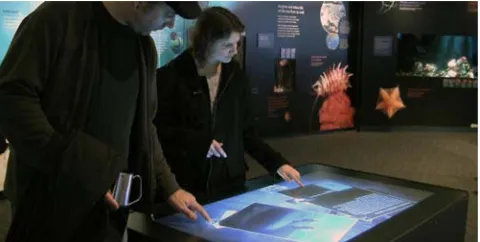
Previous lab-based studies have indicated interesting trends in people’s preferences for certain gestures to accomplish particular actions [35]. However, to observe how gestures emerge as part of people’s individual and social interactions around the digital display, we found it important to study the use of multi-touch gestures in a real-world walk-up-and-use context. We focused on the following questions: (1) What characterizes multi-touch gestures that people apply in walk-up-and-use scenarios?, (2) How do gesture types differ be-tween different visitor groups such as adults and children?, and (3) What factors influence the choice of multi-touch ges-tures in walk-up-and-use scenarios? To investigate these questions, we conducted a field study at the Vancouver Aquar-ium where we observed a general public of all ages as they interacted freely and spontaneously with a third-party multi-touch tabletop exhibit (see Fig. 1).
[image:1.612.317.557.581.702.2]This study of multi-touch gesturesin the wildprovides a de-tailed picture of real-world gestures to inform the design of multi-touch gesture sets. Our observations have led to new insights into the composition of gesture sequences. While previous work generally establishes one-to-one mappings be-tween actions and gestures that trigger them [5, 35, 37], our findings indicate that multi-touch gestures are part of inte-grated interaction sequences. The flow and physical ease of transitions between gestures affect the formation of the subsequent gesture. Also, we found that contextual social factors (e.g., age; proximity to other people) and social en-counters that emerge during exhibit exploration influence the choice of multi-touch gestures. We therefore argue for en-abling a variety of gestures for each action (e.g., different hand postures, number of touch points and hands) to support fluid gesture sequences and social interactions.
RELATED WORK
Since the seminal work of Kruger in the 1970s advocated for the design of responsive interactive systems [15] there has been a large number of research and commercial systems that rely on touch and gesture to provide interactivity (e.g., [8, 24, 26, 25, 30, 32, 34, 36]). In the following sections we summarize previous work on the design of multi-touch gesture sets, empirical and theoretical studies on the use of touch interaction as well as observations of people’s touch interactions in public settings.
The Design of Gesture Sets
The multiple investigations into the design of multi-touch and multi-point gesture sets include Ringel et al.’s proposed set of gestures for collaborative settings [25], Wu et al.’s set of multi-touch and pose-based hand gestures within the con-text of room planning, and a list of principles for the design of gesture sets [36, 37]. Previous systems generally pursue the design of parsimonious gesture sets where a single ac-tion is performed through a unique gesture. This approach was expanded by Wobbrock et al. and Morris et al. [27, 35] to create user-generated gesture sets that reflect people’s ex-pectations of the actions that will be triggered by specific gestures. This approach has been further applied to other contexts [4, 6, 22]. Although in this work we do not address the design of a gesture set (we study a system that incorpo-rates gestures designed and implemented by a third party), our findings are relevant for the design of future gesture sets and depart in several ways from predominant paradigms.
Theoretical and Empirical Foundations
Guiard’s work on bimanual manipulation [7] forms the foun-dation for much of the current empirical work on multi-touch gestures (e.g., [16, 19]). The work of Nielsen et al. on how people spontaneously apply gestures to trigger given effects has greatly advanced the understanding of gesture use [21]. Because we focus on walk-up-and-use scenarios, we are not as concerned with performance and efficiency; however, our observations echo some of these findings and propositions, as well as the results from other work comparing the manip-ulation of physical and digital artifacts [22, 31]. We build upon this work and bring to the front the influence of ges-ture sequences and the social context of interactions for the choice and use of multi-touch gestures.
Field Studies on Multi-touch Systems
Several field studies have investigated people’s approach and interaction with large direct-touch surfaces in public settings [10, 11, 13, 23]. At a basic level, our work corroborates many of the valuable findings from these studies; e.g., like Peltonen et al. [23] and Jaccuci et al. [13], we look at how interpersonal interaction is mediated by the system and, like Hornecker [11], we examine the variety of gestures explored by people. However, previous research in this area has not focused on the choice and use of multi-touch gestures, and only reports high-level findings. We expand on this by inves-tigating the sequential nature of gestures, an approach that has not yet been addressed previously. We also provide a de-tailed analysis of the range of gestures that were performed and discuss the effects that the presence and interactions by other people introduce on the use of gestures.
STUDYING MULTI-TOUCH GESTURES IN THE WILD To investigate the spontaneous use of multi-touch gestures in public walk-up-and-use settings, we accepted an invitation from the Vancouver Aquarium to study their newly acquired interactive tabletop exhibits. This was an ideal opportunity to observe how people freely interact with multi-touch dis-plays as part of their visit through the aquarium.
Study Setting
The Vancouver Aquarium features a vast amount of infor-mation about the Canadian Arctic, which is a fragile habi-tat that is rich in biodiversity. As part of the renovations of the Arctic exhibit in 2009, more interactive technology was introduced alongside fish tanks and traditional informa-tion murals, including two rear-projected tables with diffuse IR input (50” diagonal,1280×720pixels) built by Ideum1. With a height of 86cm, the digital tables invite interaction of both children and adults. Each table features one application: (1) theCollection Viewerenables browsing through a large collection of media items that show information about the Arctic environment (see Fig. 1 & 2), and (2)Arctic Choices demonstrates environmental, economic, and political charac-teristics of the Arctic. In our study, we focused on visitor interactions with the Collection Viewer because it features an unstructured and dynamic interface that allows for more free-form gestures than the Arctic Choices application which is mostly based on sliders and dials.
The Collection Viewer
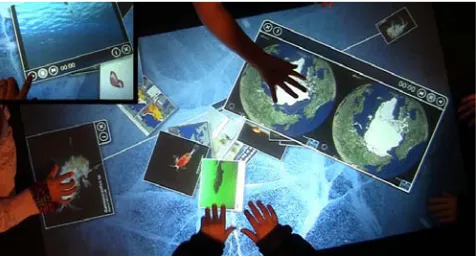
The Collection Viewer consists of a selection of media items such as images, videos, and graphic animations that are dis-tributed across the table surface in different orientations (see Fig. 2). This collection of media items covers topics about the Arctic environment, including living creatures and envi-ronmental issues. The content is constantly in flux: items are removed and replaced depending on how much visitors interact with them. For every media item that disappears, an-other one appears in a different location close to the center of the table. A movie reel icon is used to distinguish videos from static media items. Contextual relations between media items are visualized through labeled connection lines.
The Collection Viewer supports a set of multi-touch gestures commonly used on interactive surfaces [13, 23, 30]: trans-lation (one or more touch points moving in one direction), rotation (two or more touch points moving around a point
1
[image:2.612.318.556.583.711.2]http://www.ideum.com/products/multitouch/
centered between them), scaling (two or more touch points moving in opposite directions), and flicking (one or more points touch the surface briefly, moving rapidly in one direc-tion). In addition, each media item is equipped with buttons to bring up additional textual information or to delete it from the table surface. Video items also have play, pause, and re-verse buttons (see Fig. 2, upper left corner). The Collection Viewer does not feature any help system or guiding instruc-tions to explain functionalities or interaction techniques, but lets visitors discover interactions through exploration.
Study Method & Data Collection
Our study is based on an ethnographic approach [1]. This enabled us to observe visitors’ interactions while minimizing intrusion that might have biased their activities. We are not affiliated with the Vancouver Aquarium or the digital table manufacturer. Therefore, there were no conflicts of interest between our observations and the success of the exhibit.
The study was conducted approximately two months after the first deployment of the interactive tables at the Arctic exhibit. We installed two small high definition video cam-eras in unobtrusive locations above and beside the Collection Viewer table. The collected video recordings of visitors’ ges-tures on the interactive surface from different perspectives form the basis for our interaction analysis [14]. The study took place during eight days: one weekend before, and six consecutive days during the Christmas school holidays. Dur-ing this time we collected field notes and video data on-site for three to four successive hours each day. Study sessions took place between 11am and 5pm during both high and low visitor traffic. A static sign in the proximity of the ta-ble informed visitors that observations were taking place and that video was being recorded. An observer from our team was present during each study session, taking notes of the interactions and activities that took place around the table. The observer wore casual clothes to blend in with the visitor crowd and kept sufficient distance from the table to avoid affecting visitor activities. In total, approximately 20 hours of video data was collected with each camera. We also re-cruited groups of visitors and accompanied them on their aquarium visit. This shadowing technique [11] allowed us to learn about visitors’ experiences of aquarium exhibits first-hand. In this paper, however, we focus on the findings that resulted from our analysis of the collected video data in con-junction with our field observations.
Data Analysis
We followed a two-pass video analysis strategy [13, 23]. To gain an overview we fast-forwarded through all video data, broadly transcribing interaction times and activities. These broad transcriptions were then used to select an hour-long subset of video data for an in-depth coding for different types of multi-touch gestures and activities. This data subset was selected from two different days to provide data from a broad range of visitors of different age and gender and a range of interaction times and activity levels around the table.
For our multi-touch gesture analysis we analyzed 943 ges-ture instances in-depth, regardless of whether they led to successful responses of media items or not. Unsupported gesture attempts were included in the analysis if their intent
was interpretable, either by verbal comments or repeated at-tempts leading to success. Gestures included in our analysis were performed by 20 children (11 male, 9 female) and 20 adults (10 male, 10 female). The age of these visitors ranged from toddlers interacting with their parents’ help to elderly visitors. Each gesture was coded according to intended ac-tion (determined by context, previous and subsequent ges-tures, and visitor comments), number of hands used, hand posture (including the fingers involved and number of touch points), hand and finger movement, and the targeted inter-face element (media item, button, or tabletop surinter-face). We occasionally transcribed activities and verbal comments co-occurring with gestures. From our initial set of 943 ges-ture instances, 17 could not be clearly identified and were therefore excluded from our data analysis, leaving us with 926 coded and classified gesture instances (391 performed by adults and 535 by children). We quantified some of this qualitative data by counting particular activities and gesture occurrences to help characterize interactions further.
FINDINGS
Visitors engaged in a large variety of activities while explor-ing information on the Collection Viewer, both individually and collaboratively. Activities included browsing through media items, taking a closer look at images, playing videos, or playfully tossing items back and forth between each other. From our observations, it became apparent that these activi-ties can be decomposed into sequences of low-level actions. The intent of these low-level actions was generally appar-ent from the context; for example, the ongoing conversa-tion, repeated attempts, or the expression of satisfaction or frustration often clearly exposed visitors’ intentions. In our terminology, the higher-level intent is executed through a sequence of low-level actions, or sub-tasks. For instance, curiosity could spark intent to examine a media item (high-level intent). To achieve this, visitors might drag the item toward themselves, rotate it into the desired orientation, and enlarge it (sequence of low-level actions: move, rotate, and enlarge). We classified these low-level actions in which vis-itors commonly engaged into seven categories: drag/move, enlarge/ shrink, rotate, tap, sweep, flick, and hold. Typi-cally, transitions between such low-level actions would hap-pen smoothly and rapidly, often blurring the boundaries be-tween actions and appearing as a unified activity.
To execute each of these possible low-level actions, visitors applied a large variety of gestures. The drag/move action, for example, was performed at different times and by dif-ferent people through single-handed, bimanual, single-finger and multi-touch gestures. We noticed general trends in the choice of gestures for low-level actions but, most interest-ingly, we observed that the visitors’ choice of gestures was strongly influenced by the sequence of actions they had just performed. We call this theinteraction context. Usually, vis-itors chose gestures that are physically easy to perform as a continuation of the ongoing gesture sequence. Further, we also found that the choice of gesture is influenced by social factors such as number of visitors and social relationships between visitors that we call the gesture’ssocial context.
composi-0 50 100 150 200 250
single handed bimanual
# of g
es
tur
e ins
[image:4.612.357.516.52.159.2]tances
Figure 3. Total of single-handed and bimanual gestures observed for each action.
0 2 4 6 8 10 12 14 16 18 20
ad
ul
ts
ad
ul
ts
ad
ul
ts
ad
ul
ts
ad
ul
ts
ad
ul
ts
ad
ul
ts
drag/move rotate resize tap sweep flick hold
single-handed bimanual
# of ob
ser
ved visit
or
s
childr
en
childr
en
childr
en
childr
en
childr
en
childr
en
childr
[image:4.612.58.287.55.183.2]en
Figure 4. Number of participants who engaged in each action using single-handed and bimanual gestures.
tion based on touch points, hand postures, and movements. We then discuss the interplay between interaction context and social context as part of the choice of gestures in detail.
Actions & Their Gesture Variations
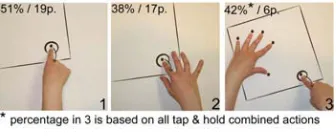
We categorized all coded 926 gesture instances based on the observed low-level actions (drag/move, enlarge/shrink, ro-tate, tap, sweep, flick, and hold). Fig. 3 shows an overview of the amount of single-handed (single-finger and multi-touch) and bimanual gesture instances that were applied for each action. Fig. 4 shows the number of observed visitors that engaged in each action using single-handed and bimanual gestures. The following descriptions of each observed low-level action are accompanied by figures showing example hand postures used for each action. The arrows in these fig-ures indicate movement; the circles touch points. For each hand posture we indicate how often it was observed for a particular action (percentage on top of the figure, e.g., 48%, see Fig. 5.1). Note that some of these percentages include posture variations (e.g., open and closed hand) unless stated otherwise. We also indicate how many participants applied each posture (e.g., 31p., see Fig. 5.1). Due to space con-straints we do not provide figures for all gesture variations that were applied.
Drag/Move.Dragging and moving media items was one of most common actions that visitors engaged in. As with all actions, visitors tried to accomplish this action with a great variety of gestures (see Fig. 5).
Figure 5. Some gestures applied to the drag/move action.
The most common drag/move gesture involved touching a media item continuously with a single finger (most commonly the index finger) with the rest of the hand loosely open or closed to a fist (see Fig. 5.1). Other observed gestures in-volved four or five fingertips touching the media item (see Fig. 5.2 & 5.3). As Fig. 3 and 4 show, visitors mostly ap-plied single-handed gestures to drag/move media items. In a few instances, bimanual gestures involving four or five fin-gertips were applied (see Fig. 5.4 & 5.5).
Enlarge/Shrink. The enlarging or shrinking of media items was the second most common action. Visitors applied ges-tures similar to those observed by Wobbrock et al. [35]. The five-finger-pinch gesture was one of the frequently observed resize gestures (see Fig. 6.1). Another common single-handed gesture was the two-finger-pinch using the index finger and thumb (Fig. 6.2). However, 70% of all observed resize ac-tions were achieved through bimanual gestures (see Fig. 6.3– 6.6), and these were particularly common among children.
Figure 6. Some gestures applied to the enlarge/shrink action.
[image:4.612.60.281.218.371.2]Rotate.The rotation of a media item was less common, and more often applied by adults than children (see Fig. 3 and 4). The most common rotation gesture involved touching the item with all five fingertips of one hand and rotating the wrist
[image:4.612.348.519.400.512.2] [image:4.612.322.551.596.710.2]or arm in the desired direction (Fig. 7.1). Other strategies included the rotation of media items using both hands (see Fig. 7.5– 7.7). Some participants also tried to rotate media items using single finger gestures which was not supported by the system (see Fig. 7.4).
[image:5.612.351.521.51.169.2]Tap.Tap actions (rapid touch-and-release motion) were al-most exclusively applied to the buttons on media items. Due to the small size of these buttons, it is not surprising that in 99% of all observed tap actions, visitors used single-handed, single-finger gestures (see Fig. 8.1 & 8.2).
Figure 8. Some gestures applied to the tap action.
[image:5.612.89.257.182.252.2]Sweep.Sweep actions were used to move media items across the digital table in a less controlled way than the drag/move action. They usually affected several media items at once. Mostly children engaged in sweep actions, often in phases of playful information exploration. Fig. 3 and 4 show that adults applied single-handed sweeping gestures only, while children also frequently used bimanual gestures. For sweep-ing, visitors generally preferred gestures that take up a lot of space. Gestures typically involved four or more fingers, often including the palm of the hand (see Fig. 9.1– 9.5). We also observed visitors using their sleeves and arms to sweep media items around (see Fig. 20, left). When applying bi-manual sweeping gestures visitors sometimes did not move both hands simultaneously across the table surface but, in-stead, alternated rapidly between both hands.
Figure 9. Some gestures applied to the sweep action.
Flick.The majority of flicking gestures (a brief forceful touch of a media item to make it move rapidly in a certain direc-tion) we observed were single-handed (see Fig. 3) with chil-dren occasionally applying bimanual flicking gestures. The most frequently applied gestures for the flick action involved the index finger, four fingers (all except the thumb), or the flat hand touching the media item (see Fig. 10.1– 10.3).
Hold.Most visitors applied hold actions (a steady touch of a media item) to make a media item stay in place, e.g., when someone else tried to grab it or when it slid away uninten-tionally. Similarly to sweeping gestures, visitors preferred broad gestures for the hold action that take up space on the
[image:5.612.350.522.191.253.2]Figure 10. Some gestures applied to the flick action.
Figure 11. Some gestures applied to the hold action.
tabletop surface: most hold gestures involved one or both full hands (see Fig. 11.1– 11.3).
Asymmetric Use of Hands.Bimanual gestures were mostly used in a symmetric way (67% of all bimanual gesture in-stances), with a) both hands holding the same posture, b) the same fingers touching the table surface, and c) both hands are engaged in the same action targeting the same object (see, e.g., Fig. 6.3 & 6.5). However, visitors also used their hands in asymmetric ways (60% children, 25% adults).
Visitors often touched a media item using different fingers (e.g., left hand index finger, right hand middle finger), a dif-ferent combination of touch points (e.g., left hand index fin-ger, right hand four fingers, see Fig. 7.7), or using different hand postures (e.g. left hand partly closed, right hand open, see Fig 6.4). In these cases, the motion of hands remained symmetrical and both hands engaged in the same action tar-geting the same item. We also observed cases of rotate and resize actions where the motion of hands was asymmetrical while both hands engaged in the same action targeting the same item (see Fig. 6.6 & 7.7).
[image:5.612.89.258.440.556.2]In other cases, each hand was engaged in a different low-level action at the same time, targeting different media items. For instance, visitors would hold a media item in place using their left hand and, at the same time, flick through other me-dia items using the right hand (see Fig. 12, left). As in an earlier study [31], it seems that visitors adopt this asymmet-rical use of both hands from their previous experiences with manipulating objects on physical tables.
[image:5.612.319.557.612.693.2]Figure 14. Participant drags an item toward herself single handedly, holds the posture while bringing in her second hand to enlarge the item and (without changing her hand posture) rotates the media item.
We also observed instances where visitors used each hand for different low-level actions targeting the same object. For instance, media items often slipped away due to some un-intended interactions by other visitors. To prevent this and to facilitate targeting the small info button, visitors (mostly children) often used both hands in a combined hold and tap action: one hand would hold the media item in place while the other hand tapped its information button (see Fig. 12, right). Although our data does not allow the identification of visitors’ dominant and non-dominant hands, this asymmetri-cal use of hands suggests the adoption of interactions styles from the physical world: the non-dominant hand (holding the media item in place) creates a frame of reference for the dominant hand (touching the information button) [7, 31].
Fluid Transitions between Actions & Gestures
Visitors combined the aforementioned seven low-level ac-tions to achieve higher-level goals such as browsing through a group of media items, finding and playing video items, or taking a closer look at a media item. For example, to achieve the latter visitors would drag the media item toward them-selves and, while dragging, rotate and enlarge the item simul-taneously into the desired position. In other cases, visitors would rapidly switch between enlarge, hold, and drag/move actions to enlarge the media item in several passes while pre-venting it from sliding away to a different position of the table. Transitions between such low-level actions happened fluidly and near instantaneously: in 9% of all observed ges-ture instances the exact point of transition between actions could not be identified.
[image:6.612.53.291.610.697.2]We found that visitors’ choice of gestures was strongly in-fluenced by the context in which the current action occurred and not only based on preferences for a given gesture for a particular action. This interaction context is determined by the type of gesture that a visitor has just performed for the previous action, because the characteristics of this previ-ous gesture (number of hands and touch points, hand posture, and movement) influence how comfortably and smoothly the transition into the next action can be achieved.
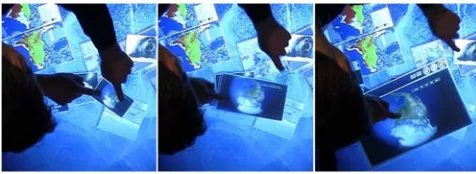
Figure 13. Participant smoothly transitioning between a scale and ro-tate action by just changing his hand motion.
We observed that visitors often tried to keep their hand pos-tures, only changing their hand or arm movement to tran-sition fluidly from one action to the next. Such trantran-sitions were observed, e.g., between enlarge/shrink and rotate ac-tions. Fig. 13 shows a visitor enlarging an item and rapidly transitioning to rotation. The initial hand postures and touch points stay the same during both actions: two index fingers (Fig. 13, left) initiate contact with the item. The enlarging occurs as the two touches separate (Fig. 13, center; note that both touches maintain control of the item as they sepa-rate). In the the transition to rotation (Fig. 13, right) only the wrist and arm movement change. Also, visitors fluidly tran-sitioned between single-handed and bimanual gestures, but again, without changing the hand posture of the first hand. For instance, they would singlehandedly dragg an item to-ward themselves, then bring in their second hand in a similar posture, to then move both hands away from and around each other, fluidly enlarging and rotating the item (see Fig. 14).
In some cases, even unpopular gestures were chosen specif-ically to facilitate fluid transitions between actions. For ex-ample, visitors used comparatively unpopular two-finger ges-tures for drag/move when this followed a two-finger pinch gesture to enlarge an item (see Fig. 15). We observed equiva-lent strategies with bimanual move gestures in the context of bimanual rotation. Similarly, visitors would use a full hand flick gesture right after full hand move and resize actions.
Our observations of how visitors fluidly transitioned between actions through the choice of gestures can be discussed in light ofcompound tasks: activities composed of a sequence of low-level actions or subtasks [3]. For instance, trying to bring a media item closer to oneself to take a closer look can be described as a compound task including a drag/move, enlarge, and rotate action. Commonly, people do not con-sciously think about these subtasks, but consider the com-pound task as a single entity [3, 20]. Similarly, our observa-tions indicate that visitors did not plan their activities on the Collection Viewer in advance, but followed their high-level intention while spontaneously reacting to the response of me-dia items, and fluidly adjusting their subsequent gestures ac-cordingly. It is therefore important to design multi-touch gestures not only as a one-to-one mapping between actions and gestures, but to also consider how they can be embed-ded into, and support smooth transitions between sequences of low-level actions.
Actions & Gestures of Children and Adults
in-Figure 15. Item is enlarged by spreading thumb and middle finger and, using these same two touch points, the item is dragged towards the participant.
vites people from all age groups to interact with the exhibits, individually as well as in groups. Our analysis of gesture in-stances showed fundamental differences the way adults and children interacted with the digital table.
Differences in Low-level Actions
We found that children usually engaged in playful interac-tion, such as tossing media items back and forth between each other, gathering as many media items as possible, or try-ing to delete all media items by frantically flicktry-ing them to-ward the surface boundaries. Similarly to Jacucci et al. [13] we also found that children engaged slightly longer with the exhibit than adults (2.39 vs. 1.94 min. in average).
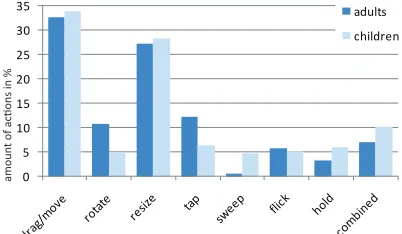
Our quantitative analysis comparing the occurrence of low-level actions of adults and children shows that the frequen-cies of drag/move and enlarge/shrink actions are relatively similar among both adults and children. However, adults en-gaged in rotate and tap actions much more frequently than children, while children made more use of sweep actions (see Fig. 16). This is an indication for adults’ stronger in-terest in the content of media items, since rotate and tap are more content-oriented actions.
Differences in Gestures
We also noticed differences regarding gesture types. Chil-dren applied bimanual gestures much more frequently than adults (see Fig. 17). Furthermore, they engaged in coarse-grained gestures involving the flat hand or even arms and sleeves more frequently than adults. In contrast, adults more often applied single-handed gestures involving one or two fingers, enabling more fine-grained interaction. Asymmetric gestures where each hand engages in a different action upon the same object (see hold & tap action in Fig. 8.3) were more often applied by children, although, being not supported by the system, they often led to undesired reactions.
These findings are in keeping with the notion that children explore the physical world in a more hands-on way. As part
0 5 10 15 20 25 30
35 adults
children
amoun
[image:7.612.52.558.53.129.2]t of actions in %
Figure 16. Proportion of action types for children and adults.
of their everyday learning, they try to understand, or grasp the physical world through the use of their hands, and seem to adopt this strategy to their interaction with these digital direct-touch exhibits.
Gestures and Territoriality
Previous studies showed that children quite assertively en-force their intentions and try to retain control through ges-tures on and above the table in small-group collaborative scenarios [17] as well as in the context of physical museum exhibits [12]. Expanding on these findings, we observed that children frequently made use of gestures to express or claim a dominant role around the Collection Viewer table when in-teracting within a group of other visitors (peers or strangers). Such large-scale bimanual gestures often included the use of all five fingers and the palm of each hand (see Fig. 9.5), and sometimes even the sleeves or arms, and reaching far across the table surface to enlarge their interaction radius in order to maximize their impact on media items. In contrast, adults would restrain themselves to single-handed gestures, especially when the table was crowded, probably to not inter-fere with other visitors’ interactions. We also observed par-ents physically restraining the large-scale hand movempar-ents of their children to try and prevent them from dominating the interaction around the table.
The number of visitors interacting with the Collection Viewer influenced children’s and adults’ use of gestures in different ways: while children made use of gestures to keep their inter-action radius relatively large, adults’ use of gestures shows a (learned) respect of other visitors’ personal territories that has been observed in previous research [29].
Influence of the Social Context on Multi-touch Gestures As discussed in the previous sections, our study findings in-dicate that the choice and use of multi-touch gestures are influenced by the sequence of actions applied and vastly
dif-single-handed gestures by # of fingers 0
5 10 15 20 25 30 35
40 adults children
# of obser
ved visit
[image:7.612.330.544.581.712.2]ors
[image:7.612.72.273.597.714.2]fers between adults and children. Through our study obser-vations we noticed that public multi-touch interaction is also deeply embedded in a social context. People usually visit ex-hibition spaces, such as aquariums and museums, in groups and, during their exploration of exhibits, encounter interac-tions of other people [2, 9, 33]. This social context defined by the presence of other visitors influences if and how people approach public exhibits [2] and how they experience and re-act to them [9, 33]. Expanding on these findings, we found that this social context also has an influence on the choice and use of multi-touch gestures. As we describe in the fol-lowing sections, multi-touch gestures evolved to express a personal opinion about information or to collaboratively ex-plore information in a group. Furthermore, the way that peo-ple interacted with the Collection Viewer was influenced by the observation of other visitors interacting at the same time, and by direct guidance from peers.
Multi-touch Gestures for Personal Expression
[image:8.612.316.559.53.134.2]Peltonen et al. observed that people touched photos on a digi-tal wall in distinct ways to communicate their intentions [23]. Similarly, we found that the choice of gestures and the way they were conducted often went beyond object manipula-tion but served as a means for expressing opinions and emo-tions. The girl in Fig. 18, for instance, pushes away an image that her brother had brought up showing a bug-like creature. Vividly demonstrating her repulsion against the image, she used a bimanual flat hand gesture to forcefully push the item away, and even extended the gesture by lifting both her hands up into the air with the palms pointing away from the item. She emphasized her gesture by yelling: “No! No bugs!!!” Flicking gestures such as this were commonly applied singlehandedly (see Fig. 3 & 4). In this instance, however, the bimanual flicking gesture is used to not only flick the media item away but to emphasize an emotion.
Figure 18. Child flipping away a media item she dislikes.
Heath et al. have discussed how a visitor’s response to an art exhibit in the form of pointing gestures, facial expressions, or exclamations can facilitate co-participation by making her experience visible to other visitors [9]. Visitors’ experience of an exhibit is greatly shaped by how they observe other visitors experiencing it. The way people apply multi-touch gestures on a tabletop exhibit can tell a story of how they experience this interaction or even the content they interact with. The ability to apply multi-touch gestures in a versatile way to communicate opinions and emotions can therefore be highly important for the success of multi-touch exhibits.
Gestures to Support Group Actions
[image:8.612.53.291.441.526.2]Visitors frequently explored media items in groups, alter-nating between individual and closely coupled collaborative exploration. During collaborative exploration phases, we
Figure 19. Left: Child (right) helps a stranger (left) to get a video media item start playing. Right: One visitor holds media item in place while another touches the play button.
found that multi-touch gestures were occasionally applied collaboratively to manipulate a single media item. For in-stance, one person would hold a video item in place while an-other person would press the play button (see Fig. 19, right). In such collaborative contexts, gestures were chosen partic-ularly to serve the group: for example, holding gestures in-cluded the finger tips only rather than the flat hand and were applied on the edge of the media item to not obscure the group’s view of the item.
Mentoring & Imitation
Although the Collection Viewer does not provide any instruc-tions on how to interact with media items, hands-on explo-ration was not the only way in which visitors became fa-miliar with the various multi-touch gestures. Some visitors demonstrated gestures to other people, even to strangers. For instance, we observed a girl tapping on a video item in front of a stranger to show how to play it (see Fig. 19, left). Simi-larly to Hornecker [12] who observed parental scaffolding in the context of tangible exhibits, we frequently observed par-ents manually guiding their children’s hands to form a partic-ular hand posture and performing the hand motion with them (see Fig. 20, right). Also, as mentioned earlier, we observed parents restraining their children from applying gestures that could interfere with other visitors’ interactions.
Furthermore, we observed some instances of imitation. In one case, an adult visitor used both arms to herd as many media items as possible into his own corner. A little girl, interacting with the Collection Viewer at the same time ob-served this and started to imitate his gesture immediately (see Fig. 20, left). In another case, a boy watched a girl sweeping items across the table surface using her sleeves. Shortly after, he tucked away his hand inside his sleeve and tried to interact in a similar way. While we only observed few cases of gesture imitation that were that obvious, we be-lieve that this sort of learning-through-imitation occurs fre-quently on more subtle levels.
[image:8.612.316.558.606.697.2]All of these examples show how visitors’ choice of gestures was strongly influenced by other visitors and the current so-cial interaction. Although it is likely that the soso-cial context plays a similar role in environments other than public exhibi-tion spaces, it is especially important to consider the social context in walk-up-and-use scenarios where people only in-teract for brief periods of time and without any instructions or practice. In these situations they are more likely to turn to other people’s interactions as a frame of reference. In ex-hibition spaces such as aquariums and museums the social aspect of information exploration plays an important role as it greatly shapes visitors’ overall experience of the exhibi-tion [9]. It is therefore crucial to design for versatile multi-touch gestures that can be chosen and adjusted flexibly to facilitate group interaction and mentoring, and to communi-cate emotions and personal opinions.
DESIGN IMPLICATIONS FOR MULTI-TOUCH GESTURES We have discussed how multi-touch interaction is deeply em-bedded in an interaction and social context that can influence both the choice and use of multi-touch gestures on walk-up-and-use interactive exhibits. Our findings point toward three design considerations that are directly applicable to multi-touch tabletop exhibits and are likely to have an im-pact on the design and evaluation of multi-touch interaction with large displays in general.
Sequences of Actions & Multi-touch Gestures
While previous work on multi-touch gestures has led to a number of design implications and principles [37], examples of multi-touch gesture sets have mostly focused on finding a sensible one-to-one mapping between an action (e.g., rotate) and a gesture. These gestures are often differentiated from each other by the number of touch points, hand movement, and posture. However, our study findings indicate that multi-touch gestures are deeply embedded in an interaction con-text, i.e., sequences of actions that are characterized by fluid transitions in-between and lead up to a compound task [3]. The choice of a gesture for a specific action is therefore not only dependent on personal preference or the quality of the gesture-action mapping, but also on the gestures applied for prior low-level actions. Since our findings indicate that peo-ple try to transition between gestures in smooth, physically easy ways, gestures sets must be designed to facilitate these transitions and enable fluid action sequences that support high-level tasks. This involves taking into account the re-quired changes in posture, movement, and number of hands and fingers used. As in dance, for a gesture to be `comfort-able’, it is important to be able to adjust gestures to fluidly transition from one gesture to the next.
Social Context of Multi-touch Gestures
We document examples of how, in an exhibition space, social factors influence people’s choice and use of multi-touch ges-tures. Visitors interacting with the table in close proximity directly or indirectly influenced each others’ choice of multi-touch gestures. Furthermore, we found that visitors chose particular multi-touch gestures to communicate their opin-ion about certain content or to socially explore media items within a group. Previous studies have found that exhibits are not only experienced based on their content or interaction
design. Instead, the way how other visitors reveal their per-sonal experience of a piece (through body language or verbal expression) influences people’s own reactions [9]. This vis-ibility of other visitors’ reactions can be quite important for the success of an exhibit [9]. We therefore recommend sup-porting a range of versatile multi-touch gestures that, while enabling the manipulation of interface items, can facilitate a variety of social encounters that evolve around the exhibit. Considering social encounters in the design of multi-touch gestures might also have an important impact on other use-case scenarios that include large direct-touch displays (e.g. work environments).
Multi-touch Gesture Variety
Exhibition spaces such as the Vancouver Aquarium target a large and diverse audience. Our study shows vast differ-ences in the choice and use of gestures, especially between children and adults. At the same time, walk-up-and-use in-teractive exhibits only have a few moments to attract visitors’ attention and provoke an interaction with the presented in-formation. It is therefore important to support a variety of single-handed and bimanual multi-touch gestures for each single action to make sure that the different gesture choices of visitors lead to a rewarding experience. In that way, the design of multi-touch gestures on the Collection Viewer is a successful example because gestures are defined in a flexi-ble way that allows for different hand postures and different numbers of touch points to get the same result. Designing for flexible multi-touch gesture sets that incorporate a vari-ety of hand postures, number of touch points, and number of hands is also important to consider for scenarios other than exhibition spaces. As we have shown, interaction and social contexts, even within a single environment, can be diverse and fluidly changing. To account for this, each low-level ac-tion that people might engage in would benefit from being mapped to a variety of gestures instead of just one.
CONCLUSION
We have described and discussed the findings of a field study that investigated factors that influence the choice and use of multi-touch gestures on large horizontal displays in a walk-up-and-use exhibition space. The main contribution of our work is the finding, supported by our observations, that a whole variety of gestures may benaturalfor any given in-tended action and that the choice of these gestures is influ-enced by their interaction context and their social context. In other words, gestures should not be considered in isolation from previous and subsequent gestures, and different people will use different alternative gestures for the same action de-pending on the social context, their age, and their overall intention. We also present complementary data showing dif-ferences between children and adults, single- and bimanual interaction, and symmetric and asymmetric actions.
will suffice, even when certain gestures have been shown to be generally preferable.
ACKNOWLEDGMENTS
We thank the Vancouver Aquarium, in particular Jeff Heywood, for supporting our study at the Canada’s Arctic exhibit. We also thank our study participants. Special thanks go to Miguel Nacenta for his invaluable advice and help with this this paper. We thank Lindsay MacDonald and Jagoda Walny for their help with editing. We thank our iLab colleagues and our funding agencies (AITF, CFI, NSERC, SurfNet, and SMART Technologies) for their support.
REFERENCES
1. J. Blomberg, J. Giacomi, A. Mosher, and P. Swenton-Wall. Participatory Design, chapter Ethnographic Field Methods and their Relation to Design, pages 123–155. Lawrence Erlbaum, 1993.
2. H. Brignull and Y. Rogers. Enticing people to interact with large public displays in public spaces. InProc. of HCI Int., pages 17–24, 2003.
3. W. Buxton. Chunking and phrasing and the design of human-computer dialogues. InProc. of IFIP World Computer Congress, pages 475–480, 1986.
4. T. Dwyer, B. Lee, D. Fisher, K. I. Quinn, P. Isenberg, G. Robertson, and C. North. A comparison of user-generated and automatic graph layouts.IEEE TVCG, 15(6):961–968, 2009.
5. D. Freeman, H. Benko, M. R. Morris, and D. Wigdor. Shadowguides: Visualizations for in-situ learning of multi-touch and whole-hand gestures. InProc. of ITS, 2009.
6. M. Frisch, J. Heyekorn, and R. Dachselt. Diagram editing on interactive displays using multi-touch and pen gestures.LNCS, 6170:182–196, 2010.
7. Y. Guiard. Asymmetric division of labor in human skilled bimanual action: The kinematic chain as a model.Motor Behavior, 19(4):486–517, 1987.
8. M. Hancock, S. Carpendale, and A. Cockburn. Shallow-depth 3d interaction: Design and evaluation of one-, two- and three-touch techniques. InProc. of CHI, pages 1147–1156, 2007.
9. C. Heath, P. Luff, D. vom Lehn, and J. Hindmarsh. Crafting participation: Designing ecologies, configuring experience. Visual Communication, 1(1):9–33, 2002.
10. U. Hinrichs, H. Schmidt, and S. Carpendale. EMDialog: Bringing information visualization into the museum.IEEE TVCG, 14(6):1181–1188, 2008.
11. E. Hornecker. “I don’t understand it but it is cool”: Visitor interactions with a multi-touch table in a museum. InProc. of Tabletop, pages 121–128. IEEE, 2008.
12. E. Hornecker. Interactions around a contextually embedded system. InProc. of TEI, pages 169–176, 2010.
13. G. Jacucci, A. Morrison, G. Richard, J. Kleimola, P. Peltonen, L. Parisi, and T. Laitinen. Worlds of information: Designing for engagement at a public multi-touch display. InProc. CHI'10, 2010.
14. B. Jordan and A. Henderson. Interaction analysis: Foundations and practice.The Journal of the Learning Sciences, 4(1):39–103, 1995.
15. M. W. Krueger. Responsive environments. InProc. of AFIPS National Computer Conference, pages 423–433. AFIPS Press, 1977.
16. C. Latulipe, C. Kaplan, and C. Clarke. Bimanual and unimanual image alignment: an evaluation of mouse-based techniques. InProc. of UIST, pages 123–131, 2005.
17. P. Marshall, R. Fleck, A. Harris, J. Rick, E. Hornecker, Y. Rogers, N. Yuill, and N. S. Dalton. Fighting for control: Cildren’s embodied interactions when using physical and digital representations. InIn Proc. of CHI, pages 2149–2152, 2009.
18. A. Morrison, G. Jaccuci, and P. Peltonen. Citywall: Limitations of a multi-touch environment. InProc. of PPD, 2008.
19. T. Moscovich and J. Huges. Multi-finger cursor techniques. In Proc. of GI, pages 1–7, 2006.
20. M. Nacenta, P. Baudisch, H. Benko, and A. Wilson.
Separability of spatial manipulations in multi-touch interfaces. InProc. of GI, pages 175–182, 2009.
21. M. Nielsen, M. Storring, T. Moeslund, and E. Granum. A procedure for developing intuitive and ergonomic gesture interfaces for hci.LNCS, 2915:409–420, 2004.
22. C. North, T. Dwyer, B. Lee, D. Fisher, P. Isenberg, G. Robertson, and K. I. Quinn. Understanding multi-touch manipulation for surface computing. InProc. of HCI Int., pages 236–249, 2009.
23. P. Peltonen, E. Kurvinen, A. Salovaara, G. Jacucci, T. Ilmonen, J. Evans, A. Oulasvirta, and P. Saarikko. “It’s mine, don’t touch!”: Interactions at a large multi-touch display in a city centre. InProc of CHI, 2008. 24. J. Rekimoto. Smartskin: An infrastructure for freehand
manipulation on interactive surfaces. InProc. CHI'02, pages 113–120, 2002.
25. M. Ringel, K. Ryall, C. Shen, C. Forelines, and F. Vernier. Release, relocate, reorient, resize: Fluid techniques for document sharing on multi-user interactive tables. InProc. of CHI, 2004.
26. M. Ringel Morris, A. Paepcke, and T. Winograd. Cooperative gestures: Multi-user gestural interactions for co-located groupware. InProc. of CHI, 2006.
27. M. Ringel Morris, J. O. Wobbrock, and A. D. Wilson. Understanding users preferences for surface gestures. InProc. of GI, pages 261–268, 2010.
28. H. Schmidt, U. Hinrichs, A. Dunning, and S. Carpendale. memory [en]code—Building a collective memory within a tabletop installation. InProc. of CAe, pages 135–142, 2007. 29. S. Scott, M. Carpendale, and K. Inkpen. Territoriality in
collaborative tabletop workspaces. InProc. of CSCW, pages 294–303, 2004.
30. M. Surface. http://www.microsoft.com/surface/.
31. L. Terrenghi, D. Kirk, A. Sellen, and S. Izadi. Affordances for manipulation of physical versus digital media on interactive surfaces. InProc. of CHI, pages 1157–1166, 2007. 32. E. Tse, C. Shen, S. Greenberg, and C. Forlines. Enabling
interaction with single user applications through speech and gestures on a multi-user tabletop. InProc. of AVI, pages 336–343, 2006.
33. D. vom Lehn, C. Heath, and J. Hindmarsh. Exhibiting interaction: Conduct and collaboration in museums and galleries.Symbolic Interaction, 24(2):189–216, 2001. 34. A. Wilson, S. Izadi, O. Hilliges, A. Garcia-Mendoza, and
D. Kirk. Bringing physics to the surface. InProc. of UIST, pages 67–76, 2008.
35. J. O. Wobbrock, M. R. Morris, and A. D. Wilson. User defined gestures for surface computing. InProc. CHI'08, pages 1083–1092. ACM Press, 2009.
36. M. Wu and R. Balakrishnan. Multi-finger and whole hand gestural interaction techniques for multi-user tabletop displays. InProc. UIST'03, 2003.