
Distributed Slide Show Tool
Elizabeth Daly
A dissertation submitted to the University of Dublin in partial fulfilment of the requirements for the degree of Master of Science in Computer
Science
Declaration
I declare that the work described in this dissertation is, except where otherwise stated, entirely my own work and has not been submitted as an exercise for a degree at this or any other university.
Signed: ___________________
Elizabeth Daly
Permission to lend and/or copy
I agree that Trinity College Library may lend or copy this dissertation upon request.
Signed: ___________________
Elizabeth Daly
Abstract
The growing use of the Internet has increased connectivity and allowed users to communicate in a more interactive manner. This had lead to a growing use of E-Learning and Collaborative tools. But one of the biggest challenges that applications need to overcome is the increased use of Firewalls. A number of current web technologies allow communication through a firewall, however this communication is still restricted to basic request/reply functionality. This reduces the interaction a node behind a firewall can have with distributed applications.
This thesis aims to evaluate the current Internet technologies, and devise a design of a distributed slide show presentation tool, that will overcome the hurdle of firewalls and allow all nodes to interact in an equal manner.
Acknowledgements
Contents
Chapter 1 1
Introduction 1
1.1 Motivations 1
1.2 Client/Server Architecture and its drawbacks 3 1.2.1 Request/Reply 3
1.2.2 Applets 4 1.3 Objectives 5
1.4 Document Structure 5
Chapter 2 7
State of the Art 7
2.1 Introduction to Internet Technologies 7
2.2 Server Push 7
2.2.1 Server Push Introduction 7
2.2.2 Mime Multipart Server Push 8 2.2.3 Server-Side Callbacks 11
2.2.4 Server Push Evaluation 12
2.3 SOAP 13
2.3.1 Introduction to SOAP 13
2.3.2 SOAP Message Structure 14
2.3.3 SOAP Request 15
2.3.4 SOAP Response 16
2.3.5 SOAP in a Peer2Peer Application 17 2.3.5 Evaluation of SOAP 18
2.4 XML-RPC 19
2.4.4 Evaluation of XML-RPC 21
2.5 JXTA 21
2.5.1 Overview Of JXTA 22
2.5.2 How JXTA Works 27
2.5.2.1 Communication 27
2.5.2.2 Group Management 29
2.5.2.3. Message Format 30
2.5.2.4 Security 30
2.5.3 Evaluation of JXTA 31
2.6 Conclusion 32
Chapter 3 Requirements and Design 33
3.1 Introduction 33
3.2 Requirements 33
3.2.1 Connectivity 33 3.2.2 Interoperability 33
3.2.3 Group Management 34
3.2.4 Slide Show Mechanism34
3.2.5 Chat mechanism 34
3.2.6 Visual Display of Slides 35
3.2.7 GUI 35
3.2.8 Security 35 3.3 Design 36
3.3.1 Underlying Transport Mechanism 36
3.3.2 Network Overview 36
3.3.3 Interoperability 36
3.3.4 Group Management 36
3.3.5 Slide Show Mechanism 38
3.3.5.1 Slide Format 38
3.3.5.2 Slide Show Format 38
3.3.5.5 Slide Transmission Protocol Optimisations 42
3.3.6 Chat Mechanism 43
3.3.7 Security 43
3.3.7.1 Username and Password 43
3.3.7.2 Encryption of messages 44
3.3.7.3 Data Integrity Check 44
3.3.8 Visual Display of Slides 45
3.3.9 GUI Design 45
3.4 Conclusion 46
Chapter 4 47
Implementation 47
4.1 Overall Architecture 47 4.2 Flow of Events 48
4.2.1 StartUp 49
4.2.2 Joining Group 50
4.2.3 Sending a Slide 51
4.2.4 Receiving a Slide 52
4.2.5 Group Messaging 52
4.2.6 Change of Control 53
4.3 Comments on Implementation 55
Chapter 5 56
Evaluation 56
5.1 JXTA 56
5.1.1 Overview of JXTA 56
5.1.2 Problems 57
5.2 XML 57
5.2.1 Overview of XML 57
5.5.1 Research 59 5.5.2 Implementation 60
Chapter 6 61
Conclusion 61 6.1 Overview 61
6.2 Review Of Dissertation 61
6.3 Conclusion 62
References: 63 XML 65
DTDs 65
Elements 65
Attributes 66
Three Phase Commit Protocol 67
Bully Algorithm 68
Table of Figures
Chapter 1
Introduction
1.1 Motivations
The World Wide Web opened new possibilities for people to collaborate, as the Internet can be used as the basic means of connectivity between users. This communication need not end with email or browsing static web pages, but should grow to a fully interactive experience with shared control of information, applications and resources. This trend has been recognised by the Computer Science community leading to collaborative and E-Learning tools becoming a popular medium for helping users work together in a group environment. There is a demand for such technologies, which allow interaction regardless of the users location, or the type of device they are using, all that should be required is an Internet connection. However with the current selection of such tools, this is not the case. Many applications such as JETS[1] use solutions that cannot function once a firewall exists between the server and the user. This limits the interaction of users inside firewalls, and there is also a single point of control, which affects scalability and performance.
you may be able to get around this problem as long as the ports used by the distributed object protocol are included.
To make matters worse, clients of your distributed application that lie behind other corporate firewalls suffer the same problems. If they don't configure their firewall to open the same port, they won't be able to use your application. Making clients reconfigure their firewalls to accommodate an application is not practical.
Despite the increased connectivity of users to the Internet, necessary roadblocks have been put up preventing interaction to reach its full potential. Security risks have made it vital for a company and sometimes even personal users to run a firewall thus protecting their devices from malicious connections. Network Address Translation (NAT) is a technique used to map a set of private IP addresses within an internal network to another set of external IP addresses in a public network. It is used in many networks to eliminate the need for global unique IP addresses for every workstation within a corporation; it also protects the network by providing a single point of entry into the internal network. This prohibits connection initiated by networks outside the internal network.
1.2 Client/Server Architecture and its drawbacks
The client/server architecture works in two fashions 1. The basic request/reply
2. The request/reply results in the downloading of an applet or some other mechanism that then opens a TCP connection to allow bi-directional communication.
1.2.1 Request/Reply
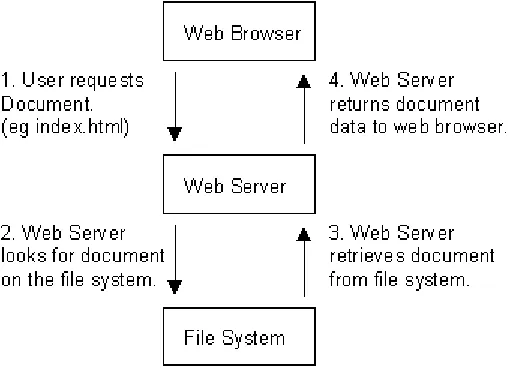
[image:14.612.178.433.334.518.2]The diagram below illustrates how a normal web server is used to distribute information.
Figure 1. Request/Reply Architecture
As can be seen, the information only flows from the server to the client when requested. This means that the server cannot instigate updates to the client. The only other alternative is to have the client making regular requests to the server to obtain updates, this is undesirable solution for three main reasons:
However this solution over comes the firewall problem.
1.2.2 Applets
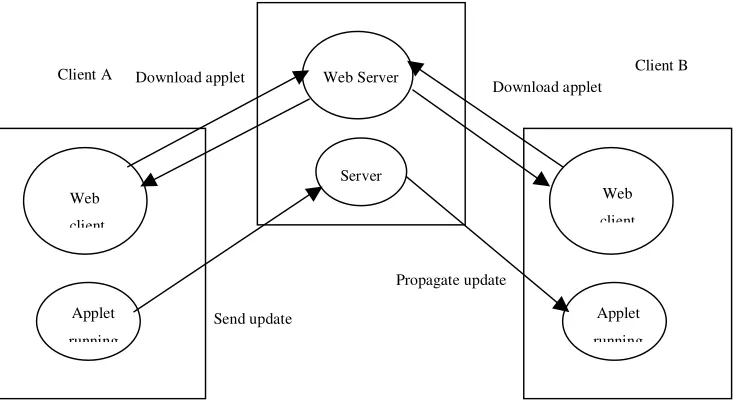
Applets work by the user sending a request to the server for the applet, which is then downloaded and executed on the client’s machine. This applet then opens a tcp socket to communicate with the server. Using this tcp connection the client can relay updates to the server to be propagated to the other users.
This solution allows for the server to instigate updates on the clients, hence improving the propagation time for changes. However this solution has a number of disadvantages:
Most firewalls will not permit the new tcp connection to the server.
Connections can only be made to the server that the applet is download from, hence is a central point of failure
Will not scale for two reasons:
o A permanent connection is needed for each user
o All updates must be propagated to each user in a unicast fashion
Web Server
Server Web
client
Applet running
Download applet
Send update
Propagate update
Web client
Applet running Download applet
[image:15.612.119.486.275.478.2]Client A Client B
1.3 Objectives
This section describes the objectives and the scope of the project.
1. The design and implementation of a distributed slide show presentation tool. This tool should be run on both the presenter and the clients’ machine. Using this tool the presenter will change the slides and this change will then be propagated to all connected clients.
2. A simple messaging facility should be implemented to enable users to communicate both during and after the presentation.
3. The control of the presentation should not rest purely with the presenter. It should be possible for a client to be able to take control of the slides after the presenter has relinquished control, but the presenter must be able to regain control if necessary.
4. The application must over come the firewall issue to allow users behind firewalls to interact with the application in order to be of maximum value.
1.4 Document Structure
This section outlines the chapters of the thesis, the contents of which are listed below.
Chapter 3: Requirements and Design discusses in depth the requirements of the application. It then follows on to describe the design of the various element of the system in order to meet the requirements
Chapter 4: Implementation describes the key algorithms used in the application.
Chapter 5: Evaluates a number of decisions made during the implementation and their effects on the application. It also outlines future work that could be carried out in this area.
Chapter 2
State of the Art
2.1 Introduction to Internet Technologies
The Internet community has been attempting to enhance the services provided by the web, the original design supported the request of static text and then the response of this text, whereas now the move is toward a more dynamic and interactive service. The aim of these enhanced services is to take advantage of the increased connectivity and change the experience of viewing static data to a more interactive experience. Here will be presented a number of current facilities that are being used to do this.
Server Push
SOAP
XML-RPC
Peer2Peer JXTA technology
2.2 Server Push
2.2.1 Server Push Introduction
Server push - the server sends down a chunk of data; the browser display the data but leaves the connection open; whenever the server wants it sends more data and the browser displays it, leaving the connection open; at some later time the server sends down yet more data and the browser displays it.
Client pull - the server sends down a chunk of data, including a directive (in the HTTP response or the document header) that says "reload this data in 5 seconds", or "go load this other URL in 10 seconds". After the specified amount of time has elapsed, the client does what it was told -- either reloading the current data or getting new data.
Client pull as seen in the introduction is not a viable solution, as it does not scale well, it consumes a large amount of bandwidth and has a slow response time to update.
2.2.2 Mime Multipart Server Push
In server push, a HTTP connection is held open for an indefinite period of time (until the server knows it is done sending data to the client and sends a terminator, or until the client interrupts the connection). Server push is accomplished by using a variant of the MIME message format "multipart/mixed", which lets a single message (or HTTP response) contain many data items.
The MIME message format is used by HTTP to encapsulate data returned from a server in response to a request. Typically, an HTTP response consists of only a single piece of data. However, MIME has a standard facility for representing many pieces of data in a single message (or HTTP response). This facility uses a standard MIME type called "multipart/mixed"; a multipart/mixed message looks something like:
The above message contains two data blocks, both of type "text/plain". The final two dashes after the last occurrence of "ThisRandomString" indicate that the message is over and there is no more data.
For server push we use a variant of "multipart/mixed" called "multipart/x-mixed-replace". The "x-" indicates this type is experimental. The "replace" indicates that each new data block will cause the previous data block to be replaced -- that is, new data will be displayed instead of (not in addition to) old data.
Content-type: multipart/mixed;boundary=ThisRandomString
--ThisRandomString
Content-type: text/plain
Data for the first object.
--ThisRandomString
Content-type: text/plain
Data for the second and last object.
--ThisRandomString--
Here is an example of "multipart/x-mixed-replace":
Figure 4. Mime Multipart Server Push multipart/x-mixed-replace
The key to the use of this technique is that the server does not push the whole "multipart/x-mixed-replace" message down at once but rather sends each successive data block whenever it sees fit. The HTTP connection stays open all the time, and the server pushes down new data blocks as rapidly or as infrequently as it wants, in between data blocks the browser simply sits and waits for more data in the current window. The user can even go off and do other things in other windows; when the server has more data to send, it just pushes another data block down the pipe, and the appropriate window updates itself.
The flow of what happens is:
Following in the tradition of the standard "multipart/mixed", "multipart/x-mixed-replace" messages are composed using a unique boundary line that separates each data object. Each data object has its own headers, allowing for an object-specific content type and other information to be specified.
The specific behaviour of "multipart/x-mixed-replace" is that each new data object replaces the previous data object. The browser replaces the existing data object with the new data object and then displaying.
Content-type: multipart/x-mixed-replace;boundary=ThisRandomString
--ThisRandomString
Content-type: text/plain
Data for the first object.
--ThisRandomString
Content-type: text/plain
Data for the second and last object.
A "multipart/x-mixed-replace" message doesn't have to end. That is, the server can just keep the connection open forever and send down as many new data objects as it wants. The process will then terminate if the user is no longer displaying that data stream in a browser window or if the browser severs the connection (e.g. the user presses the "Stop" button). We expect this will be the typical way people will use server push.
The previous document will be cleared and the browser will begin displaying the next document when the "Content-type" header is found, or at the end of the headers otherwise, for a new data block.
The current data block (document) is considered finished when the next message boundary is found.
Together, the above two items mean that the server should push down the pipe: a set of headers (most likely including "Content-type"), the data itself and a separator (message boundary). When the browser sees the separator, it knows to sit still and wait indefinitely for the next data block to arrive.
2.2.3 Server-Side Callbacks
On the server side, a JSP executes when the page is requested. This JSP pushes JavaScript over to the client when notified by the server to do so. When the server receives the JavaScript command such as :
<script language=JavaScript >parent.push('Page 4')</script>
the browser JavaScript engine executes the command and displays the page.
2.2.4 Server Push Evaluation
1. Efficiency: A connection is held open over time, even when no data is being transferred, the server must be willing to accept dedicated allocation of a TCP/IP port, which may be an issue for servers with a limited number of TCP/IP ports. There is one distinct connection for each instance of server push in use.
2. Network Compatibility: Though message will traverse firewalls and make dynamic changes at the client side, a new problem emerges; that solution will not work if a proxy server lies between the web client and server. Another consideration is that some web servers such as Apache buffer responses and hence waits for the buffer to fill up before returning the partial response.
2.3 SOAP
2.3.1 Introduction to SOAP
SOAP is a lightweight protocol for the exchange of information in a decentralized, distributed environment [6]. It is a method for performing RPC (Remote Procedure Call). The XML based protocol consists of three parts:
1. An envelope that defines a framework for describing what is in a message and how to process it.
2. A set of encoding rules for expressing instances of application-defined data types
3. A convention for representing remoteprocedure calls and responses.
SOAP can potentially be used in combination with a variety of other protocols; however, the only bindings defined in the specifications describe how to use SOAP in combination with HTTP and HTTP Extension Framework. SOAP sits on top of existing HTTP connections and, as most companies have Web servers configured for HTTP connections on standard port 80, so SOAP fits right in without the complex changesto the network or firewalls that many other protocols require.
2.3.2 SOAP Message Structure
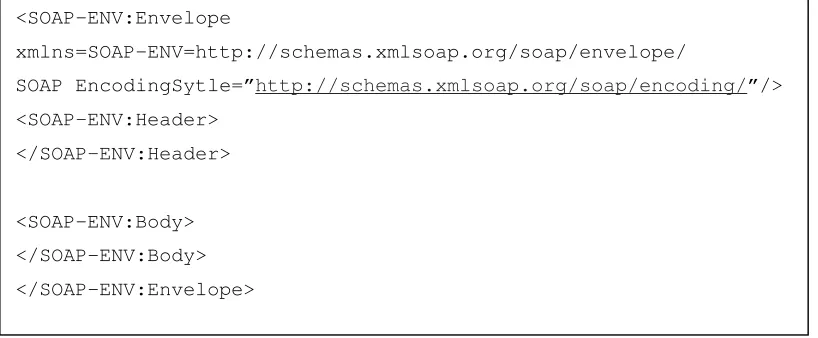
[image:25.612.104.513.171.340.2]SOAP messages are encoded as XML documents that consist of a mandatory SOAP envelope, and optional SOAP header, and a mandatory SOAP body. For example:
Figure 5. SOAP Message Structure
The SOAP envelope element is required as the first element in the SOAP message. The SOAP envelope is analogous to the envelope of an actual letter. It supplies information about the message that is being encoded in a SOAP payload, including data relating to the recipient and sender, as well as details about the message itself. For example, the header of the SOAP envelope can specify exactly how a message must be processed. This means that before an application goes forward with processing a message, the application can determine information about a message, including whether it can process the message. Distinct from the situation with standard XML-RPC calls, where each message would have to be fully processed in order to determine whether the message should be processed by us, or simply forwarded, with SOAP the header can indicate whether to process the message by looking at the header, avoiding parsing the payload before acting.
<SOAP-ENV:Envelope
xmlns=SOAP-ENV=http://schemas.xmlsoap.org/soap/envelope/
SOAP EncodingSytle=”http://schemas.xmlsoap.org/soap/encoding/”/> <SOAP-ENV:Header>
</SOAP-ENV:Header>
2.3.3 SOAP Request
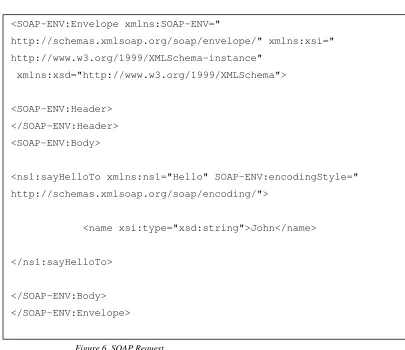
Figure 6. SOAP Request
First, note how the SOAP document is neatly organized into an Envelope (the root node), a header section, and a body. The body section contains the method-specific information. Second, note the heavy use of XML namespaces. SOAP-ENV maps to the namespace
http://schemas.xmlsoap.org/soap/envelope/, xsi maps to http://www.w3.org/1999/- XMLSchema-instance, and xsd maps to http://www.w3.org/1999/XMLSchema. Those are standard namespaces that all SOAP documents have.
Finally, the interface name (i.e., Hello) refers to a namespace, ns1. Also, along with the parameter value, the type information is also sent to the server. Note the value of the
envelope's attribute. It is set to http://schemas.xmlsoap.org/soap/encoding/.
<SOAP-ENV:Envelope xmlns:SOAP-ENV="
http://schemas.xmlsoap.org/soap/envelope/" xmlns:xsi=" http://www.w3.org/1999/XMLSchema-instance"
xmlns:xsd="http://www.w3.org/1999/XMLSchema">
<SOAP-ENV:Header> </SOAP-ENV:Header> <SOAP-ENV:Body>
<ns1:sayHelloTo xmlns:ns1="Hello" SOAP-ENV:encodingStyle=" http://schemas.xmlsoap.org/soap/encoding/">
<name xsi:type="xsd:string">John</name>
</ns1:sayHelloTo>
method; the server requires that information to successfully de-serialize the method. As far as the server is concerned, the SOAP document is completely self-describing.
2.3.4 SOAP Response
[image:27.612.101.510.177.502.2]The response to the preceding SOAP request would be as follows:
Figure 7. SOAP Response
Above is similar to the request message. In the code above, the body contains the return value; which in this example is the personalized "Hello" message.
The document's format has flexibility built in. For example, the encoding style is not fixed but instead, specified by the client. As long as the client and server agree on this encoding style, it can be any valid XML.
<SOAP-ENV:Envelope
xmlns:SOAP-ENV="http://schemas.xmlsoap.org/soap/envelope/" xmlns:xsi="http://www.w3.org/1999/XMLSchema-instance"
xmlns:xsd="http://www.w3.org/1999/XMLSchema">
<SOAP-ENV:Body>
<ns1:sayHelloToResponse xmlns:ns1="Hello" SOAP-ENV:encodingStyle ="http://schemas.xmlsoap.org/soap/encoding/">
<return xsi:type="xsd:string">Hello John, How are you doing?</return>
</ns1:sayHelloToResponse>
2.3.5 SOAP in a Peer2Peer Application
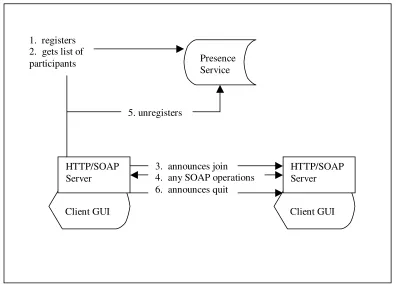
In a peer2peer application the SOAP client and SOAP server must be one. Running a full off-the-shelf web server such as apache is an impractical solution, therefore when using SOAP in a peer2peer environment, it is more sensible to write a custom made, light-weight web server that simply processes SOAP requests.
[image:28.612.104.500.268.553.2]Another problem arises in regards to group management, there needs to be some form of presence server to register the SOAP node into the network.
Figure 8. SOAP in a peer2peer application
The node is responsible for registering itself with a presence service, and each node can pole the presence service to get an up-to-date list of connected nodes. The main problem
HTTP/SOAP Server
Client GUI
HTTP/SOAP Server
Client GUI Presence
Service 1. registers
2. gets list of participants
service when they notice that a node has failed. Though this architecture has improved on the client/server model, where now each node can interact with each other, we still have the notion of a server, a single point of failure, a bottleneck and synchronisation of information difficulties.
2.3.5 Evaluation of SOAP
1. Efficiency: SOAP still relies on a request/reply architecture, meaning that if there are a large amount of users trying to communicate with the same node at once, a large amount of connections will have to be opened. To allow group communication, if a message needs to be sent to every member of the group, a connection will have to be opened on the sending node, for every member of the group. This means that this solution will not scale well for large groups.
2. Network Compatibility: Since SOAP relies on HTTP as the transport mechanism, and most firewalls allow HTTP to pass through, it is possible for our application to plug into most network set-ups. As discussed above it is possible for SOAP to be used in a peer2peer manner, however this is only possible if the firewall allows each of the users to run a small web/SOAP server, which will not necessarily be the case in may networks.
2.4 XML-RPC
2.4.1 XML-RPC Introduction
It is remote procedure calling using HTTP as the transport and XML as the encoding. XML-RPC is designed to be as simple as possible, while allowing complex data structures to be transmitted, processed and returned.
XML-RPC has defined simple goals in order to avoid a complex, heavyweight solution. It doesn't set out to be the solution to every problem. Instead it seeks to be a simple and effective means to request and receive information. This has an advantage over SOAP in regards to its simplicity, and reduced overhead. XML-RPC defines the format of method calls and responses as well as some tags for common data types, such as integers and strings. It also defines tags for more complex data structures. The implementation details of how the data types are defined are outside the scope of this dissertation, for the moment it is sufficient to assume that XML-RPC can be used to define most data types that are needed to carry out remote procedure calls.
2.4.2 XML-RPC Method calls
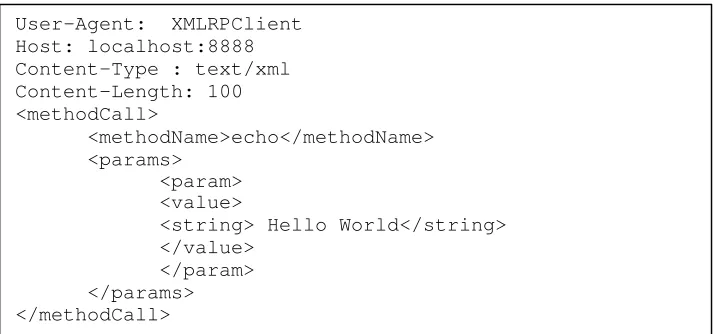
Method calls are represented by the <methodCall> tag, inside the <methodCall> tag the name of the method to be called is specified in the <methodName> child element. Because XML-RPC works over HTTP, the usual HTTP header information needs to be included in the call. Below is an example of a request:
User-Agent: XMLRPClient Host: localhost:8888 Content-Type : text/xml Content-Length: 100 <methodCall>
<methodName>echo</methodName> <params>
[image:30.612.124.481.576.743.2]<param>
As can be seen in figure 9, requesting to execute a method named echo, with a single parameter ‘Hello World’.
2.4.3 XML-RPC Method Responses
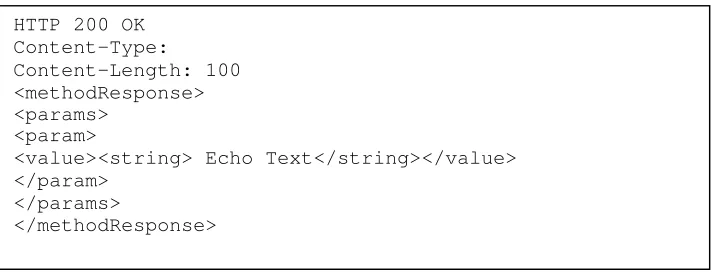
Method responses are represented by the <methodResponse> tag. A method response can return the value of the call or return a <fault> indicating that an exception has occurred somewhere during the execution of the method.
[image:31.612.129.485.350.490.2]If no errors occurred, the return format of the response must be a single <methodResponse> tag followed by a <params> tag, and the values of the response must be represented by the <value> and data-type tag. Again the standard HTTP header information must be included.
Figure 10. XML-RPC Method Response
XML-RPC can either be used with a custom server, or incorporated into an existing web server such as Apache using Java Servlets or JSPs.
HTTP 200 OK Content-Type:
Content-Length: 100 <methodResponse> <params>
<param>
<value><string> Echo Text</string></value> </param>
</params>
2.4.4 Evaluation of XML-RPC
This is a more lightweight solution than SOAP and hence has less overhead associated with it. It is a stable protocol, which is fairly user friendly with simple interfaces. It is operating system independent and also programming language independent. However it still has the same problems that seen using SOAP:
1. Efficiency: Relies on request/reply architecture. Meaning this solution will not scale well for large groups.
2. Network Compatibility: Each node must be allowed to run a server of some sort to allow bi-directional communication and not restrict the node to a request/reply scenario. This means that firewall traversal will still be a problem in most networks.
3. Control of Information Exchange: This allows interaction between the nodes. So this system will allow the role of presenter to be carried out by any node. But a similar problem as in SOAP in regards to presence information replicated across different nodes still exists.
2.5 JXTA
2.5.1 Overview Of JXTA
Figure 11. JXTA Platform [8]
“ JXTA technology is a set of open, generalized peer-to-peer (P2P) protocols, defined as XML messages, that allow any connected device on the network ranging from cell phones and wireless PDAs to PCs and servers to communicate and collaborate in a P2P manner ”
Project JXTA is an open-source project (www.jxta.org) originally conceived by Sun Microsystems, Inc. and designed with the participation of a small but growing number of experts from academic institutions and industry [8]. Project JXTA was initiated to standardize a common set of protocols for building peer2peer applications.
JXTA has the technology needed to write interoperable peer2peer distributed applications that can easily provide:
Platform Independence – use of JXTA is not only limited to desktop personal computers or laptops but can be portable to other devices like PDA’s etc. Though JXTA implementation is in Java, it provides API’s so that a user can build on top of JXTA in C, C++ or Java.
presence, and offered services.
Uniform peer addressing – The peer Ids used in JXTA are 128-bits.
The basic concepts used to communicate in JXTA are:
Advertisements
Peers advertise their services in an XML document called an "advertisement". Advertisements enable other peers on the network to learn how to connect and interact with the peer's services. They can be used to pipes, peer groups etc.
Messages
Peers exchange information using JXTA messages. These are simple XML documents that includes routing, digest and credential information.
Peer Groups
Set of co-operating peers providing a common set of services or sharing a common set of interests.
Pipes
They are virtual communication channels, which can be used to connect to one or more peer endpoints
There are two modes of communication in JXTA: 1. Point-to-point pipes
Unidirectional channel in which one input pipe is connected to one output pipe
Pipe end-points are dynamically bound to a peer end-point at run time via Pipe Binding Protocol. An example of pipes is JXTA Unicast secure pipes which we are using in our communication.
JXTA Core Protocols
Peer Resolver Protocol
The Peer Resolver Protocol (PRP) permits the dissemination of generic queries to one or multiple handlers within the group and match them with responses. Each query is addressed to a specific handler name. This handler name defines the particular semantics of the query and its responses, but is not associated with any specific peer. It provides the essential generic query/response infrastructure for building high-level peer resolver services.
Endpoint Routing Protocol
The Endpoint Routing Protocol provides a set of request/query messages, which are processed by a routing service to help a peer route, a message to its destination. The Endpoint Router is responsible for exchanging messages between peers that do not have a direct connection between each other. The Endpoint Router provides a virtual direct connection to the Endpoint Service. The protocol provides a set of request/query messages, which are processed by a routing service to help a peer route, a message to its destination.
Core Transport Bindings
Endpoint Service
that need to have an understanding of the network topology, such as the Resolver Service or the Propagation Service.
Endpoint Router Transport Protocol
[image:36.612.168.444.220.355.2]The Endpoint Router Transport Protocol is responsible for exchanging messages between peers that do not have a direct connection between each other.
Figure 12. JXTA Core Transport Bindings [8]
JXTA Standard Protocols:
Figure 13. JXTA Standard Protocols [8]
Peer Endpoint
Protocol Rendezvous Protocol
Peer Resolver Protocol
Peer Discovery
Protocol Pipe Protocol Binding Peer Information Protocol Endpoint
Router JXTA TCP Binding JXTA HTTP Binding Endpoint Service
[image:36.612.131.489.446.634.2]
Rendezvous Protocol
Rendezvous Protocol is responsible for propagating messages within a JXTA PeerGroup. A Simple protocol that allows:
o Peers to connect to services. o Control propagation of messages.
Peer Discovery protocol
The Peer Discovery Protocol consists of only 2 messages that define all the elements required to perform a discovery transaction between peers:
Discovery Query Message - a request format that discovers advertisements. It specifies a number of parameters like type, number, attribute and value pair of advertisements to be searched for.
Discovery Response Message - a response format for responding to a discovery request.
Peer Information Protocol
This protocol is used to monitor the status of a remote peer in order to obtain information that will help to leverage the resources of the peer-to-peer network. Depending upon the network traffic and the remote peer’ s load it may decide whether to use it as a source of services. This protocol also defines a Peer Information Query Message and a Peer Information Response Message to handle the details of sending a query and generating responses.
Pipe Binding Protocol
2.5.2 How JXTA Works
The following section explains how JXTA works in practise by utilising the JXTA protocols.
2.5.2.1 Communication
In JXTA there are three types of peers:
Simple peer
Rendezvous peer
Router peer
Simple peers serves a single end user, this usually would define a peer located behind a firewall, which is essentially separated from the outside network by the firewall.
Figure 14. JXTA Peer Discovery
A is a simple peer behind a firewall that wants to communicate with D. A knows about B which is a rendezvous peer and C, another rendezvous peer, knows about D. A opens a HTTP connection to B and requests information for D. B does not know about D so it propagates the request onto C. C sends back the information to B and then in turn B returns the information to A.
A router peer provides a mechanism for peers to communicate with other peers separated from the network by firewall or Network Address Translation (NAT) equipment. A router peer provides a go-between that peers outside the firewall can use to communicate with a peer behind the firewall, and vice versa. To send a message to a peer via a router, the peer sending the message must first determine which router peer to use to communicate with the destination peer. This routing information provides a mechanism in peer2peer to replace traditional DNS, enabling an intermittently connected device with a dynamic IP address to be found on the network. Similar to DNS, routing information provides a mapping between a unique identifier specifying a remote peer on the network and a representation that can be used to contact the remote peer via a router peer. In a simple system the routing information may be simply a matter of resolving an IP address and a TCP port for the unique identifier, more complex systems may contain an ordered list of routers for peers to use to route a message to a peer.
Internet
Firewall
Simple Peer
Simple Peer Router Peer Rendezvous Peer
Simple Peer Router Peer Rendezvous Peer
Simple Peer
Simple Peer
A
The Diagram below illustrates how communication can be establishes between two peers behind firewalls on separate networks.
Figure 15. JXTA Communication
A needs to send a message to D. A has previously used a discovery to find D and knows how to route information to it, but A and D are both behind a firewall. A opens a HTTP connection to B, B opens a TCP connection to C. D polls C and is told there is a message waiting for it and opens a HTTP connection to C. A virtual connection is then created between A and D using B and C as routers.
2.5.2.2 Group Management
Most Peer2Peer solutions use their own specialised protocol, Gnutella for file sharing uses one protocol, ICQ for chatting uses another. Because JXTA is attempting to enable all peer2peer application to run over the JXTA network and interact, the partition needs to be introduced to enable different applications to interact with each other, and not interfere with other applications. This is were the notion of peer groups is used. Peer groups can be divided based on the following:
o The application the peers are using. Internet
Firewall
Simple Peer
Simple Peer Router Peer Rendezvous Peer
Simple Peer Router Peer Rendezvous Peer
Simple Peer
A
B C
D
o Possibly only that group of peers are of interest to you, for example the node is only interested in communicating with peers from a certain company, so a peer group is created for all of the nodes to communicate in.
Essentially when a peer joins the JXTA network, it is a member of what is called the NetPeerGroup. This is the basis for all communication, and any group message sent while connected to this group is propagated to every member of the NetPeerGroup. When a peer joins a new group, the peer becomes a member of new newly joined group, and creates a pipe in order to receive messages for that peer group.
2.5.2.3. Message Format
All aspects of in JXTA builds on XML to structure data such as advertisements, messages, and protocols. Below shows an example of a JXTA peer advertisement:
Figure 16. JXTA Advertisement
JXTA does not specify a format for payload of JXTA messages. It is left up to the developer whether to use binary or XML data.
2.5.2.4 Security
The need to support different levels of authentication and resource access in the ad hoc Project JXTA network leads to a role-based trust model in which a peer will typically act under the authority granted to it by another trusted peer. Peer relationships may change quickly and the policies governing access control need to be flexible in allowing or denying access. The Project JXTA message format allows the addition of a variety of
<Peer>MyPeer</Peer>
<keywords> NetPeerGrooup by default</keywords>
<PeerId>urn:jxta:uuid-59617899A7800987790D80958D</PeerId> <TransportAddress>tcp://asterix:9701/</TransportAddress>
metadata information to a message, such as credentials, digests, certificates, public keys, etc. Every message contains a credential. A credential is a token that, when presented in a message body, is used to identify a sender, and can be used to verify the sender's rights to send the message. The credential is an opaque token that is validated by the receiving end. The sending address placed in the message envelope is cross-checked with the sender's identity in the credential. Each credential's implementation is specified as a plug-in configuration, allowplug-ing multiple authentication configurations to co-exist on the same network. Message digests guarantee the data integrity of messages. Messages may also be encrypted and signed for confidentiality, integrity, and irrefutability. It is the intent of the JXTA network to be compatible with widely accepted transport-layer security mechanisms for message- based architectures such as Secure Sockets Layer (SSL), Transport Layer Security (TLS), and Internet Protocol Security (IPSec) [9].
2.5.3 Evaluation of JXTA
JXTA provides an abstract language for peer communication enabling a wide variety of services, devices and network transports to be used in peer2peer networks. The employment of XML provides a standards-based format for structured data that is well supported and easily adapted to a variety of transport protocols. XML also has the advantage that it is a human readable format, making it easy for developers to comprehend and debug.
1. Efficiency: JXTA has been designed for peer2peer communication; hence to communicate with an entire peer group, the sending node only needs to transmit one copy of the message. It only needs to have one connection opened in order to receive messages from the whole group. This means that it scales well compared to the previous solutions outlined.
joining and interacting with peer groups. And hence solves the group management and data replication problems discussed previously.
3. Control of Information: JXTA is short for Juxtapose, as in it was design for each peer to be equal. The result is that any node as necessary can hold the control of information.
One aspect of concern is that JXTA is a relatively new technology and is still undergoing analysis. Another question that arises is bandwidth usage, because though we now have a means for traversing firewalls, this is done by polling rendezvous peers outside the firewall. A possible solution to this is to have a rendezvous peer inside the firewall network, but capable of accepting outside connections, this means instead of waiting for the peer to pole it, the peer can be notified by the rendezvous peer. This also means that only one node on the network needs access to the outside network, and the rest of the nodes can be safely behind a firewall.
2.6 Conclusion
Chapter 3 Requirements and
Design
3.1 Introduction
The following chapter analyses the requirements of the system. It then goes into the design considerations for each requirement.
3.2 Requirements
The functionality can be broken into several subsections:
Connectivity
Interoperability
Group Management
Slide Show Mechanism
Chat Mechanism
Visual Display of Slide
GUI
Security
3.2.1 Connectivity
The user needs to be able to connect to remote users regardless of network configuration.
3.2.2 Interoperability
3.2.3 Group Management
The group management must allow: the ability to create new groups and join new groups in a distributed fashion. Any end user to should be able to assume to role of presenter. The changing of presenter should not require the creation of a new group. For example, a company may have a scheduled daily meeting at a given time, where a number of people may want to present different topics and issues, meaning any user can be a presenter therefore, group management should have some mechanism for determining who is the presenter at a given time.
Another aspect to the group management is that a user should be able to join and leave the presentation as needed. The application should be able to deal with a changeable group structure, and not be hindered if a non-presenter node fails. It should be also possible to have a reasonably up-to-date view of the participants, which means that some form of user presence needs to be established.
3.2.4 Slide Show Mechanism
The application needs to be able to transmit slides to all members of the group. The initial control of the slides is performed by the presenter, however the presenter should have the ability to unlock the slide show, and other members of the audience can take control of changing the slides, possibly to illustrate a point, or ask a question regarding a certain slide. The control should never be fully taken away from the presenter however, and at any time they should be able to lock the show again.
3.2.5 Chat mechanism
3.2.6 Visual Display of Slides
A format needs to be defined for the storage of slides and their transmission format. A means of visually displaying the slides is also required. It was decided that the application should support more than just simple text, but images and rich text format.
3.2.7 GUI
The GUI should consist of three main components: the current slide of the presentation, the general char forum for discussion, and a list of on-line users.
3.2.8 Security
It is desirable to not restrict the security mechanisms for the presentation. The solution should provide varying degrees of security:
High Username and password required to join the group
Payload of message encrypted during transmission Integrity check of messages
Medium Username and password required to join the group Payload of message encrypted during transmission No integrity check of messages
Low Username and password required to join the group
Payload of message transmitted in the clear No integrity check of messages
3.3 Design
3.3.1 Underlying Transport Mechanism
JXTA was selected as the underlying transport mechanism; the reason for this is because it already handles connectivity, peer discovery, group management, and a certain amount of security.
3.3.2 Network Overview
It was assumed that this application could take advantage of the existing JXTA infrastructure. Using the JXTA libraries the peer connects to the JXTA network, this means that each peer on this network has to able to act as a simple peer, rendezvous peer or a router peer, depending on the way the peer is configured on start up.
3.3.3 Interoperability
JXTA was designed to work with any device with a digital heartbeat, which means that it meets our requirement for device independence. Java was also selected so as to meet the requirement of operating system independence, this means that the application will operate on any internet capable device with a Java Virtual Machine.
3.3.4 Group Management
The requirements brought out three key aspects of the group management.
1. The creation and joining of peer groups.
is sent out through the JXTA network. Once the group advertisement has been found, the user can join the group by binding to the peer group pipe.
2. A distributed means of determining the current presenter.
When the user joins the group and wishes to become a presenter, it sends a request to see if anyone else is a presenter yet. After a timeout period, it sends a notification that it is about to become a presenter. After another timeout period, if there is no response to inform the user that there is already a presentation running, it sends a message saying ‘I am the presenter’, again if no one response with a problem, it sets itself to presenter. From then on if anyone asks is there a presenter, the presenter responds with the current slide of the slide show.
Once the current presenter has finished, it sends a group message informing all peers that it is finished. At this point if a new peer wishes to become the presenter, the same algorithm as described above is executed to determine the new presenter.
If a conflict arises and while peers are in the process of requesting presenter status they compare their peer id number with the peer id number of the other peer requesting presentation status, if their number is smaller, they back off. This means that the peer with the highest id number will gain control. If the node that should get control gets disconnected from the group during the discussion process, and no final ‘presenter’ notice arrives, the peers who previously wanted to become presenters restart the election process after a given timeout.
3. Coping with a changeable group.
When a peer leaves a group the JXTA network propagates this information to other nodes in the group. A member can also join a group at any time during the presentation. If a node is disconnected without notification, this causes no problems to the group due to the fact that none of the design requires complete information pertaining to the state of the group.
3.3.5 Slide Show Mechanism
The issues that need to be addressed in the slide show mechanism are the format of the slide itself, the format of the slide show, and how the slides can be transmitted from the presenter to the receiving nodes.
3.3.5.1 Slide Format
The slide format must have to support rich text and images. HTML was selected as the format due to the fact it is a widely used and is an accepted format that could support these requirements. So essentially, a single html file represents each slide.
3.3.5.2 Slide Show Format
The slide show is represented in an XML file. The slideshow is the root node and each slide is a child node. Each slide node must contain a list of all files that are required to render the html slide, including Cascading Style Sheets and images. The figure below illustrates and example of this.
Figure 17. SlideShow Format
The order of the slides is declared using the <number> tag, and because some slides may contain more that one html file if the user is using frames, we need to declare that actual file to be rendered which is declared using the <titleFile> which contains the relative path to the file (relative to where the xml file is stored on the users machine), the same goes for all files references in the slideshow xml document. Any additional files needed are defined by the <contentFile> tag and all image files and declared using the <imageFile> tag.
Figure 18. shows the DTD that the slideshow XML document must conform to in order to be considered valid.
<slideshow> <slide>
<number>1</number>
<titleFile>slide1.html</titleFile>
<contentFile>frame.htm</contentFile>
<contentFile>hii.htm</contentFile>
<contentFile>hii.css</contentFile>
<contentFile>frame.css</contentFile>
<imageFile>blue+white.gif</imageFile>
</slide> <slide>
<number>2</number>
<titleFile>slide2.html</titleFile>
<contentFile>frame.htm</contentFile>
<contentFile>board.htm</contentFile>
<contentFile>hii.css</contentFile>
Figure 18. SlideShow DTD
3.3.5.3 Slide Transmission Format
Each slide transmitted across the network contains the full information needed to display the slide. This means that not just the data from the main htlm file needs to be sent, but also any additional content files or image files that will be needed. A few problems arose when encapsulating the data through XML, as html uses < > symbols to define tags XML tries to parse these as elements. XML does allow character data to be defined:
<![CDATA[ data that the parser should not try and parse ]]>
This has the problem that the body cannot contain the termination string “]]>” otherwise the parser will consider it the end of the character data and not be able to parse the document correctly. To solve this problem all file data, such as the html file, and the image files are Base64 encoded before sending, which guarantees that it will not contain the termination string. The format of the slide transmitted to the recipients is shown in figure 19.
<?xml version=”1.0” encoding=”UTF-8”?> <!DOCTYPE slideshow[
<!ELEMENT slideshow (slide*)>
<!ELEMENT slide (number+, titleFile+, contentFile*, imageFile*)>
Figure 19. Slide Transmission Format
3.3.5.4 Slide Transmission Protocol
When the presenter changes the slide, all the files specified for the new slide in the XML slide document are formatted into an XML document as shown in the previous section. This slide is then sent to all members of the group using JXTA as the transportation mechanism.
On the receivers slide, the slide is added to a local copy of the slideshow. This means that when the slide show is completed all participants should have a complete representation of the slide show presentation. So when the presenter releases control of the presentation, the same protocol is used to distribute the slides through out the group.
All the information needed to display the slide is transmitted every time a slide is changed. In order to deal with a constantly changing network, where some users will not
<application:newSlide xmlns:application="http://jxta.org">
<slide>
<number>1</number>
<titleFileName>slide1.html</titleFileName>
<titleFile>DQo8aHRtbD4NCg0KPGhlYWQ+DQoNCjx0aXRsZT5Vbml2ZbG1lIHNy Yz0iaGlpLmh0bSIgbmFtZT0iZnJtYWluIiB0YXJnZXQ9Im1haW4iPg0KPC9mcmFt ZXNldD4NCjwvaHRtbD4NCg==</titleFile>
<contentFiles>
<contentFileName>frame.htm</contentFileName> <contentFile>PGh0bWw+DQoNCg0KDQo8aGVhZD4NCg0KDQoNCjx0aXRs ZTJhbWUuY3NzIi8 +DQoNCg==</contentFile>
</contentFiles> <images>
<imageFileName>blue+white.gif</imageFileName>
<imageFile>R0lGODlhUwBrAPf/AP///xgYGDk5OZycnFJKSntKShAICH M5OZRCQs5SUkIYGMZCQrUxMdY5OcYxMc4pKcYhI5COb0xKaUpIdYhGIwI AGspIVopIbVjSsaEa+djMb1KIa17UI0k0ZnZTTTgEICAA7</imageFile >
</images> </slide>
receive the full slide data, and they need not have been present earlier in the presentation. However this causes redundancy of data transmitted and received.
3.3.5.5 Slide Transmission Protocol Optimisations
As can be seen from the above protocol, there is a large amount of overhead associated in regards to redundant data with assuming a user may not have been present from the beginning of the presentation. Every time a new slide is shown, the background image which is present in all slides, for example, will be retransmitted. Also even though by the end of the slide show, most participants have all the data needed to show the slide, the complete slide is sent again over the network.
To improve on this performance, one possible optimisation is to transmit all the files one by one before the presentation begins. This means that all members present before the presentation begins will have all the data needed to display the slides, and will simply have to notified when to change the slide, and what files are required to display it, so the message would now look like this:
Figure 20. Optimised Slide Transmission Format
However, the question still remains on how to cope with latecomers, or users who did not receive all the required files. When the user receives the slide, with the list of required files needed to view the slide, it checks to see if all the required files have been received. If not, it sends a query to the group requesting the required file. It is not appropriate for all users in the group to reply with the file, as this would quickly flood the network. The solution is to implement a random back off time that the node waits before replying.
<application:newSlide xmlns:application="http://jxta.org">
<slide>
<number>1</number>
<titleFileName>slide1.html</titleFileName>
<contentFileName>frame.htm</contentFileName> <imageFileName>blue+white.gif</imageFileName> </slide>
The node sees that a request for a file has been received, it checks to see if it has the file. If it does not have the file, it does nothing. If it has the file, it waits a random amount of time and if it sees that no one has responded during that timeout period, it them sends the slide. Though this does not guarantee that only one node replies to the request, it will vastly reduce the amount of replies generated. And since more than one reply is not a serious problem in this case, it is not necessary to implement a more serious solution like the Three Phase Commit illustrated earlier, as this would required a lot of overhead and provided minimal benefits.
3.3.6 Chat Mechanism
The chat mechanism is handled by binding to the group pipe using the JXTA protocol. It is kept relatively simple, with every message sent being propagated to every user in the group. The messages are then displayed using a simple message board type GUI. There is no assurance that the chat messages will be received in the same order by all users. Due to the dynamic, and casual nature of chat it was felt that it did not warrant the overhead that would be required to guarantee consistency
3.3.7 Security
There are three key security aspects that needed to be designed:
Password and username needed to join group
Encryption of messages
Data integrity check
3.3.7.1 Username and Password
As seen in section 2.5.2.4. JXTA has the functionality to run over TSL to provide secure communication, however this is only available in one to one communication in JXTA, and our application uses group messaging, therefore in order to provide an encryption feature it is necessary for us to implement encryption at the application layer.
3.3.7.2 Encryption of messages
Because in a secure group a user needs a password to join the group, and there are no individual passwords, we will use symmetric (single key) encryption with the password as the key. Therefore, before sending a message on the group pipe, AES encryption will be performed on the message payload and then decrypted on the other side using the password as the key. AES was selected, as it has become a recognised standard for encryption. This means that a malicious user sniffing the network, who is not entitled to join the group, will not be able interpret the messages.
3.3.7.3 Data Integrity Check
3.3.8 Visual Display of Slides
Once the slides are available, some form of HTML rendering engine needs to be incorporated into the application in order to display the slides properly. This engine should be able to deal with some of the main features of HTML but not all. The key features to be supported are: relative links, Cascading Style Sheets (CSS), frames, and images.
3.3.9 GUI Design
Any functionality that the tool offers to the user is only available through the GUI. The processing layer that sits under the GUI processes all the requests made by the user channeling them to the underlying communication layer. The GUI also needs to display communication events that occur at the underlying layer.
Event Management GUI
Underlying Transport Mechanism
User generated Group generated
[image:56.612.124.464.362.542.2]events
From the required features there were three key events that needed to be displayed through the user interface :
Slide Display Needs to be the main focus of attention
Uncluttered by additional info Chat Message Board Simple
Unobtrusive
Easily accessible from main presentation page
Group View Unobtrusive
Should not affect view of presentation
3.4 Conclusion
Chapter 4
Implementation
The following chapter outlines the application that was implemented. The application was written using Java and the Eclipse 2.0 Java compiler, on the Windows 2000 professional platform. One piece of software that was integrated into the application was the Jazilla web browser. The Jazilla project is an open-source attempt to implement a Mozilla type browser using Java. The Jazilla HTML rendering engine proved to be suitable for applications requirements.
4.1 Overall Architecture
The architecture is essentially a 3-tier architecture :
Transport Layer Application Layer
Group
Management SlideShow GroupChat
GUI
Group
Management Discovery Group Chat Group Presentation
[image:58.612.102.516.412.659.2]4.2 Flow of Events
The following section shows a number of the key events to help illustrate the implementation.
The events are:
StartUp – when the application is first run. This includes to initialisation of the connection to the JXTA network.
Joining a Group – when the user selects a group to join from the list of JXTA groups.
Sending a Slide – when the presenter sends a slide to the peer group. This includes how the message is formatted for transmission.
Receiving a Slide – when a user in the group receives a slide. It describes how the slide is decoded and also how the users begin to build a copy of the slide show locally.
Group Messaging – how the messages are taken from the user and distributed throughout the group. It also explains how the messages are processes once received.
4.2.1 StartUp
PeerGroupMan ager
Main Discover JXTA
g etNet PeerGroup() ret urn JXTAP eerGroup
wait ForRendezvous(JXTAP eerGroup p) Rendezvous Found() ret urn JXTARendezvous
PeerGroupManager(JXTAPeerGroup p)
Discover(JXTAPeerGroup p, PeerGroupManager mg)
getDiscoveryService() return JXTADiscoveryService
discoverPeers() peerFound() return peerAdvertisement
[image:60.612.92.527.126.409.2]addToPeers(JXTAAdvert isement a)
Figure 23. Start Up
On start up we get an instance of the JXTANetPeerGroup. Once it has this, it waits
for a connection from a JXTARendezvous peer for this group. A
PeerGroupManager is instantiate using the JXTANetPeerGroup and invokes the
Discover class. The Discover class then uses JXTA to get a reference to the JXTADiscoveryService for this group, and sends a request for peers. The
Discover class receives advertisements through the JXTADiscoveryService and
adds them to a list of known peers. The PeerGroupManager is notified when new advertisements arrive.
4.2.2 Joining Group
PeerGroupMan
ager Discover GroupMessaging GroupPresDisplay GroupChat JXTA JXTAPeerGroup(Advertisement a)
return JXTAPeerGroup groupChanged(JXTAPeerGroup p)
discoverPeers() groupChanged(JXTAPeerGroup p)
groupChanged(JXTAPeerGroup p)
JXTAPipe(JXTAPeerGroup p)
return JXTAPipe
JXTADiscoveryService(JXTAPeerGroup p)
[image:61.612.93.531.127.437.2]return JXTADiscoveryService
Figure 24.Joining Group
User selects from the groups displayed in GUI. The GUI notifies the PeerGroupManager and passes the Advertisement of the group selected. The
Advertisement is used to instantiate a new JXTAPeerGroup, the Discover class
is notified and a new search for peers and groups is performed as before. The Group-
Messaging and the GroupPresDisplay implements a listener for group changes,
and they call the setGroup() method in the GroupChat class. At this point the
GroupChat class binds itself to the JXTAPipe, and to the
4.2.3 Sending a Slide
GroupPresDispl
ay SlideShow Slide EncodedSlide GroupChat JXTA
getCurrentSlide()
return Slide Object
getEncodedSlide()
EncodedSlide() return EncodedSlide Object
send EncodedSlide
[image:62.612.90.523.105.322.2]send EncodedSlide using JXTAPipe
Figure 25. Sending a Slide
The GUI notifies the GroupPresDisplay class, the GroupPresDisplay requests
the currentSlide from the SlideShow class. The SlideShow class returns a Slide object representing the currentSlide, this slide is the requested to return the EncodedSlide class that represents that slide. This EncodedSlide is then sent to the GroupChat along with a String that represents a tag. This tag represents whether the message is from the GroupPresDisplay or the GroupMessaging as both classes receive their messages through the JXTAPipe the GroupChat class listens to. The GroupChat then sends the EncodedSlide along with the tag using the
JXTAPipe.
4.2.4 Receiving a Slide
GroupPresDispl
ay MessageParser SlideShow Slide EncodedSlide GroupChat JXTA message received on JXTAPipe Send String representing Message
getType() type = Slide
EncodedSlide(String msg) return EncodedSlide encodedSlide.getSlide()
Slide(EncodedSlide e) return Slide return Slide
[image:63.612.91.524.107.379.2]addSlide(Slide s) setCurrentSlide(s)
Figure 26. Receiving a Slide
The GroupChat class receives the message on the JXTAPipe. It extracts a tag from the message to determine whether the message is of type ‘Chat’ or type ‘Pres’ (ie whether the message is intended for the GroupMessaging or GroupPresDisplay). Once it extracts the tag and finds that it is of type ‘Pres’ , the message is sent to the GroupPresDisplay class. This message is sent to the MessageParser class in order to determine what type of instruction the message contains. If the message type is determined to be of type Slide, an EncodedSlide object is instantiated using the String that represents the message as the constructor. This EncodedSlide is then requested to return the Slide object representation of itself.
The user maintains a local version of the SlideShow object, this Slide is added to the local version of the SlideShow, and set to the currentSlide. The Slide is then passed to the BrowserFrame class for rendering.
GroupM ess agin g
GroupChat JXTA
sendM essage(String msg, S tring "Chat")
sendM essage(S tring m sg)
recei vedM essage( ) t ype = 'C hat'
[image:64.612.92.527.91.345.2]prepend senderName displayMsg(S tring m sg)
Figure 27. Group Messaging
The GUI notifies the GroupMessaging class with the String contained in the messageBox, which is of type TextFeild. The GroupMessaging class sends the GroupChat class the message along with the tag ‘Chat’ to notify it that the message is coming from GroupMessaging. The GroupChat sends the message using the
JXTAPipe.

![Figure 11. JXTA Platform [8]](https://thumb-us.123doks.com/thumbv2/123dok_us/1003136.614908/33.612.96.519.114.287/figure-jxta-platform.webp)
![Figure 12. JXTA Core Transport Bindings [8]](https://thumb-us.123doks.com/thumbv2/123dok_us/1003136.614908/36.612.131.489.446.634/figure-jxta-core-transport-bindings.webp)
