© 2010 Marty Hall
jQuery Part II:
j
y
Selectors and DOM Manipulation
(jQuery 1.4 Version)
(j
y
)
Originals of Slides and Source Code for Examples:
http://courses.coreservlets.com/Course-Materials/jquery.html
Customized Java EE Training: http://courses.coreservlets.com/
Servlets, JSP, JSF 2.0, Struts, Ajax, GWT 2.0, Spring, Hibernate, SOAP & RESTful Web Services, Java 6. Developed and taught by well-known author and developer. At public venues or onsite at yourlocation.
p
jq
y
© 2010 Marty Hall
For live Ajax & GWT training, see training
t htt //
l t
/
courses at http://courses.coreservlets.com/.
Taught by the author of
Core Servlets and JSP
,
More Servlets and JSP
and this tutorial Available at
More Servlets and JSP
, and this tutorial. Available at
public venues, or customized versions can be held
on-site at your organization.
C d l d d t ht b M t H ll
Customized Java EE Training: http://courses.coreservlets.com/
Servlets, JSP, JSF 2.0, Struts, Ajax, GWT 2.0, Spring, Hibernate, SOAP & RESTful Web Services, Java 6. Developed and taught by well-known author and developer. At public venues or onsite at yourlocation.
•Courses developed and taught by Marty Hall
–Java 6, servlets/JSP (intermediate and advanced), Struts, JSF 1.x, JSF 2.0, Ajax, GWT 2.0 (with GXT), custom mix of topics –Ajax courses can concentrate on 1 library (jQuery, Prototype/Scriptaculous, Ext-JS, Dojo, Google Closure) or survey several
•Courses developed and taught by coreservlets.com experts (edited by Marty)
–Spring, Hibernate/JPA, EJB3, Web Services, Ruby/Rails
Topics in This Section
•
Basics
–
Basic selectors
–
Hierarchical selectors
–
Manipulating the matched elements
Manipulating the matched elements
–
Chaining
–
Registering event handlers
•
Advanced topics
–
Attribute selectors
Form element selectors
–
Form element selectors
–
Positional selectors
–
Content-filtering selectors
g
–
Advanced operators
–
Cross-browser mouse and keyboard event handling
5
© 2010 Marty Hall
Basic Selectors and
Basic Selectors and
Operators
p
Customized Java EE Training: http://courses.coreservlets.com/
Selecting DOM Elements
•
Idea
U $("
l
")
f DOM l
–
Use $("css selector") to get a set of DOM elements
•
Then, perform operations on each
–
$("div.warning").html("Missing values!").show()
E
l
•
Examples
–
$("#some-id")
•
Return 1-element set (or empty set) of element with id
Return 1 element set (or empty set) of element with id
•
Simplest use, and most common for Ajax (note the “#”!)
–
$("p")
•
Return all p elements
Return all p elements
–
$(".blah")
•
Return all elements that have class="blah"
$("li b span blah")
–
$( li b span.blah )
•
Return all <span class="blah"> elements that are inside b
elements, that in turn are inside li elements
7
Manipulating DOM Elements
•
Common functions on matched elements
$("#
id")
l
()
–
$("#some-id").
val
()
•
Returns value of input element. Used on 1-element sets.
–
$("selector").
each
(function)
•
Calls function on each element “this” set to element
•
Calls function on each element. this set to element.
–
$("selector").
addClass
("name")
•
Adds CSS class name to each. Also
removeClass
,
toggleClass
$("selector")
hide
()
–
$( selector ).
hide
()
•
Makes invisible (display: none). Also
show
,
fadeIn
,
fadeOut
, etc.
–
$("selector").
click
(function)
•
Adds onclick handler Also
change focus mouseover
etc
•
Adds onclick handler. Also
change
,
focus
,
mouseover
, etc.
–
$("selector").
html
("<tag>some html</tag>")
•
Sets the innerHTML of each element. Also
append
,
prepend
•
Chaining
•
Chaining
–
$("a").click(funct1).addClass("name").each(funct2)
Short Examples
•
$("#some-div").html("Blah <i>blah</i>");
–
Find the element with id “some-div” and set its
innerHTML to “Blah <i>blah</i>”
•
$("#some button") click(someFunction);
•
$( #some-button ).click(someFunction);
–
Add someFunction as the onclick handler for button
whose id is “some-button”
•
$("div.msg").addClass("important").show();
–
Find all <div class="msg"> elements (which are
bl hidd ) dd h CSS
l “i
” h
presumably hidden), add the CSS style “important”, then
make them visible
•
$("form#some-id input[type=text]") val("");
$( form#some id input[type text] ).val( );
–
Clear the values of all textfields that are inside
<form id="some-id">
9
Basic Selectors
Selector
Meaning
Examples
element
Matches all elements with given tag
$("li")
Returns all li elements
element
Matches all elements with given tag
name. Returns array of matches.
$( li )
$("p")
Returns all li elements
Returns all p elements
#id
Matches the element with given id.
Returns array of 0 or 1 elements.
$("#blah")
Returns element with
<…id="blah">
.class
Matches all elements with given
CSS style. Note that $(".foo") is a
shorthand for $("*.foo").
$(".important")
Returns all elements
with
<… class="important">
element class
Matches all elements with given tag
$("div important")
Returns all elements like
element.class
Matches all elements with given tag
name that have given class.
$( div.important )
Returns all elements like
<div class="important">
element#id
Matches the element that has given
tag name and given id. Since ids
$("form#blah")
Returns element with
<form id="blah">
must be unique, you can omit the
element name and get same result.
Doing $("#blah") would
match same element.
*
Matches all elements in entire page.
More useful with the “not” operator
$("*")
Returns all elements.
10
p
covered later. E.g.,
Hierarchical Selectors
Selector
Meaning
Examples
1 2
El
h
h l
M
h
ll
l
"b "
s1 s2
Elements that match selector
s2 and are
directly or
indirectly
inside an element
that matches selector s1.
$("div.foo span.bar")
Matches all <span class="bar">
elements that are
somewhere
inside <div class="foo">.
s1 > s2
Elements that match selector
s2 and are
directly
inside an
element that matches s1.
$("div.foo > span.bar")
Matches all <span class="bar">
elements that are
directly
inside
<div class="foo">.
s1, s2
Elements that match either
selector.
$("ul,ol,dl.foo")
Matches all ul, ol, and
<dl class="foo"> elements.
s1 + s2
Elements that match s2 and
are immediately after a
$("label + input")
Matches all input elements that
are immediately after a label
are immediately after a
sibling element matching s1.
are immediately after a label
element.
s1 ~ s2
Elements that match selector
s2 and are somewhere after a
$("label ~ input")
Matches all input elements that
have a label element
11
sibling element matching s1.
somewhere before them at the
same nesting level.
Manipulating the Results
Function
Meaning
Examples
ht l
Sets the innerHTML $("#some id") html("Test") Sets innerHTML of element withhtml
Sets the innerHTML property of each element. With no args, returns the innerHTML property.$( #some-id ).html( Test ) Sets innerHTML of element with <…id="some-id"> to "Test"
append
Appends (or prepends) to $("ol li") append("!") Adds an exclamation point to theappend,
prepend
Appends (or prepends) to innerHTML property.
$( ol li ).append( ! ) Adds an exclamation point to the end of all li elements that are part of ol lists.
addClass,
remo eClass
Adds (or removes, or toggles) the specified
$("ol#foo li").addClass("bar") Finds all li elements inside <ol id="foo"> and makes them
removeClass,
toggleClass
toggles) the specified CSS class name to each element.
ol id foo and makes them <li class="bar">
css
Adds specified style property and value$("ol#foo li").css("color", "blue")
Finds all li inside <ol id="foo"> and makes them blue
p p y )
val
Sets the value property. With no args, returns the property. Applies to form elements only.$("#form-id input").val("")
$("#field-1").val()
Clears all input elements inside <form id="form-id">.
Returns value of textfield with <… id="field1">
12
hide
show
Hides or shows all matching elements. Can call with no args or with "fast", "normal", "slow".
Registering Event Handlers
•
Approach: Unobtrusive JavaScript
–
Assign event handlers from code when DOM loads.
–
Use $(function() {…})
•
This is shorthand for $(document) ready(function() { })
•
This is shorthand for $(document).ready(function() {…})
–
Advantages over using window.onload
•
Runs after DOM loaded, but before images loaded
•
Can be called more than once; won’t clobber any existing
ready handlers
•
Example
Example
$(function() { $("#button1").click(button1Handler);
$("#button2").click(button2Handler);
$(" l bl h li") h
( H dl
ffH dl )
$("ol.blah li").hover(onHandler, offHandler);
$("input.foo").keyup(keyHandler); });
13
Event Handler Functions
•
Idea
–
Use $(…).click(function) to assign a click handler
–
Use $(…).click() to invoke an existing click handler
Similar helper functions for other event types
–
Similar helper functions for other event types
•
Event handler helper functions
–
blur change click dblclick error focus keydown
blur, change, click, dblclick, error, focus, keydown,
keypress, keyup, load, mousedown, mouseenter,
mouseleave, mousemove, mouseout, mouseup, resize,
scroll select submit unload
scroll, select, submit, unload
•
Event objects
–
Event handlers are passed an event object containing info
Event handlers are passed an event object containing info
about the event in cross-browser format
Higher-Level Event Handlers
•
hover(onHandler, offHandler)
–
Shorthand way to assign both mouseover and mouseout
handlers. Also catches common mouseout errors.
$(" l li") h
(
•
$("ol li").hover(
function() { $(this).css("background-color", "yellow"); },
function() { $(this).css("background-color", "transparent"); } );
•
toggle(function1, function2, … , functionN)
–
Shorthand way to assign click handler that cycles among
a set of two or more functions for each click.
•
$("h1#special").toggle(
function() { $(this).addClass("wow"); },
function() { $(this).addClass( wow ); },
function() { $(this).removeClass("wow"); } );
15
© 2010 Marty Hall
Basics: Example
Customized Java EE Training: http://courses.coreservlets.com/
Using Basic Selectors and
Operators
Operators
•
Goals
–
Make button that turns certain elements green
•
$("#poem li.blue").removeClass("blue").addClass("green");
–
Make button that reverts green element to original form
–
Make button that reverts green element to original form
•
$("#poem li.green").removeClass("green").addClass("blue");
–
Make button that hides certain elements
•
$("#poem li.red").hide("slow");
–
Make button the shows the hidden elements
•
$("#poem li.red").show("slow");
$( #poem li.red ).show( slow );
–
Change the background color of certain elements when
the mouse moves over
$(thi ) ddCl
(" ll
b ")
•
$(this).addClass("yellow-bg");
•
$(this).removeClass("yellow-bg");
17
Buttons that Turn Elements
Green (and Back) – JavaScript
Green (and Back) – JavaScript
function turnBlueToGreen() {
$("#poem li blue") removeClass("blue")
$( #poem li.blue ).removeClass( blue )
.addClass("green");
}
The functions on selectedelements return the selected elements, so you can chain function calls. If it is too long to fit li it i t Matches <li class="blue"> inside
<… id="poem">
function turnGreenToBlue() {
$("#poem li.green").removeClass("green")
.addClass("blue");
fit on one line, it is common to put them underneath each other like this.
.addClass( blue );
}
…
Like window.onload handler, but runs earlier (before images loaded) and it is OK to call it more than once.
$(function() {
$("#turn-green-button").click(turnBlueToGreen);
$("#revert-green-button").click(turnGreenToBlue);
$( #
g
)
(
);
Buttons that Turn Elements
Green (and Back) – HTML
Green (and Back) – HTML
<ul
id="poem"
>
<li class="red">To gild refined gold, to paint the lily,</li>
g
g
,
p
y, /
<li class="blue">
To throw a perfume on the violet,</li>
<li>To smooth the ice, or add another hue</li>
<li class="red">Unto the rainbow, or with taper-light</li>
<li class="blue">
To seek the beauteous eye of heaven to
<li class="blue">
To seek the beauteous eye of heaven to
garnish,</li>
<li>Is wasteful and ridiculous excess.</li>
</ul>
<form action="#">
<input type="button"
id="turn-green-button"
value="Turn Blue Lines Green"/>
<input type="button"
id="revert-green-button"
<input type= button
id= revert green button
value="Revert Green Lines"/>
<input type="button" id="hide-red-button"
value="Hide Red Lines"/>
<input type="button" id="revert-red-button"
value="Revert Red Lines"/>
</form>
19
Buttons that Turn Elements
Green (and Back) – Results
Green (and Back) – Results
Before pressing any buttons or after pressing “Revert Green Lines”.
After pressing “Turn Blue Lines Green”.
Buttons that Hide (and Show)
Red Lines – JavaScript
Red Lines – JavaScript
function hideRed() {
$("#poem li red") hide("slow");
$( #poem li.red ).hide( slow );
}
Matches <li class=“red"> inside
<… id="poem"> Besides hide and show, there are toggle, fadeIn, fadeOut, fadeTo, slideDown, slideUp, slideToggle, and animate (for custom animations). Not nearly as extensive as Scriptaculous, but good enough for most purposes.
function showRed() {
$("#poem li.red").show("slow");
}
}
…
$(function() {
I put these registration calls in the same ready handler as the last example. But I could have used a new ready handler.
$( u ct o () {
…
$("#hide-red-button").click(hideRed);
$("#revert-red-button").click(showRed);
$( #
)
(
);
…
});
21
Buttons that Hide (and Show)
Red Lines – HTML
Red Lines – HTML
<ul
id="poem"
>
<li class="red">
To gild refined gold, to paint the lily,</li>
g
g
,
p
y, /
<li class="blue">To throw a perfume on the violet,</li>
<li>To smooth the ice, or add another hue</li>
<li class="red">
Unto the rainbow, or with taper-light</li>
<li class="blue">To seek the beauteous eye of heaven to
<li class="blue">To seek the beauteous eye of heaven to
garnish,</li>
<li>Is wasteful and ridiculous excess.</li>
</ul>
<form action="#">
<input type="button" id="turn-green-button"
value="Turn Blue Lines Green"/>
<input type="button" id="revert-green-button"
<input type= button id= revert green button
value="Revert Green Lines"/>
<input type="button"
id="hide-red-button"
value="Hide Red Lines"/>
<input type="button"
id="revert-red-button"
value="Revert Red Lines"/>
Buttons that Hide (and Show)
Red Lines – Results
Red Lines – Results
Before pressing any buttons or after pressing “Revert Red Lines”.
After pressing “Hide Red Lines”.
23
Highlighting Elements on
Mouseover – JavaScript
Mouseover – JavaScript
function addYellow() {
$(this) addClass("yellow-bg");
$(this).addClass( yellow bg );
}
function removeYellow() {
The element to which the mouseover or mouseout handler is attached
function removeYellow() {
$(this).removeClass("yellow-bg");
}
…
$(function() {
$( u ct o () {
…
$("#poem li").hover(addYellow, removeYellow);
…
});
24
Highlighting Elements on
Mouseover – HTML
Mouseover – HTML
<ul
id="poem"
>
<
li
class="red">To gild refined gold, to paint the lily,</li>
g
g
,
p
y, /
<
li
class="blue">To throw a perfume on the violet,</li>
<
li
>To smooth the ice, or add another hue</li>
<
li
class="red">Unto the rainbow, or with taper-light</li>
<
li
class="blue">To seek the beauteous eye of heaven to
<
li
class="blue">To seek the beauteous eye of heaven to
garnish,</li>
<
li
>Is wasteful and ridiculous excess.</li>
</ul>
<form action="#">
<input type="button" id="turn-green-button"
value="Turn Blue Lines Green"/>
<input type="button" id="revert-green-button"
<input type= button id= revert green button
value="Revert Green Lines"/>
<input type="button" id="hide-red-button"
value="Hide Red Lines"/>
<input type="button" id="revert-red-button"
value="Revert Red Lines"/>
</form>
25
Highlighting Elements on
Mouseover – Results
© 2010 Marty Hall
Advanced Selectors
Advanced Selectors
and Operators
p
Customized Java EE Training: http://courses.coreservlets.com/
Servlets, JSP, JSF 2.0, Struts, Ajax, GWT 2.0, Spring, Hibernate, SOAP & RESTful Web Services, Java 6. Developed and taught by well-known author and developer. At public venues or onsite at yourlocation.
Attribute Selectors
Selector
Meaning
Examples
[ tt]
Elements that match selector s and $("div blah a[name]") Matches all <a name " ">s[att]
Elements that match selector s and also contain attribute named att.$( div.blah a[name] ) Matches all <a name="…"> elements that are inside <div class="blah">
s[att=val]
Elements that match selector s and also contain attribute named att$("a[href=#sect2]") Returns all
<a href="#sect2"> elements also contain attribute named att
whose value is (exactly) val.
<a href= #sect2 > elements
s[att^=val]
Elements that match selector s and also contain attribute named att whose value starts with val.$("a[href^=#]") Returns all internal hyperlinks whose value starts with val.
s[att$=val]
Elements that match selector s and also contain attribute named att whose value ends with val.$("a[href$=jquery.com]") Returns all hyperlinks pointing to blah.jquery.com home page (not subpages)
s[att* val]
Elements that match selector s and $("a[href*=jquery com]") Returns all hyperlinkss[att*=val]
Elements that match selector s and also contain attribute named att whose value contains val.$( a[href*=jquery.com] ) Returns all hyperlinks pointing to any page at blah.jquery.com
s[att!=val]
Elements that match selector s and either do not have the specified$("a[href!=#sect2]") Returns all hyperlinks except <a href="#sect2">
28
either do not have the specified attribute, or have a different value.
except <a href #sect2 > elements
s:not([…])
Elements that match s but do not match attribute specification.Form Element Selectors
Selector
Meaning
:input
M t h
f
l
t (i
t
l t t t
b tt )
:input
Matches any form element (input, select, textarea, button)
:text
Shorthand for input[type=text]. For example, $("form#blah :text[value=]")
matches empty textfields inside <form id="blah">.
:button
Matches input[type=submit] input[type=button] input[type=reset] and
:button
Matches input[type=submit], input[type=button], input[type=reset], and
button
:enabled, :disabled
Matches enabled/disabled elements.
:selected
Matches elements that are selected
:selected
Matches elements that are selected
:checkbox, :radio
Matches checkboxes and radio buttons, respectively
:checked
Matches checkboxes or radio buttons that are currently checked
:file, :image,
:password, :reset,
:submit
Shorthand entries for input[type=file], input[type=image],
input[type=password], input[type=reset], and input[type=submit]
:hidden :visible
Matches hidden or visible elements
29
:hidden, :visible
Matches hidden or visible elements.
Advanced Operators
Function
Meaning
Examples
each(fn)
Calls function on each entry. First $(".foo li").each(funct) Calls funct on each lieach(fn)
yarg passed to function is index (0-based), 2ndis element. The “this” variable also set to element.
$( oo ) eac ( u ct)
element inside <… class="foo">
map(fn)
p( )
Calls function on each entry, then y $(":text").map(upVal) Assume that upVal returnsreturns array of outputs. Same args and meaning of this as “each”. Function returns value rather than only performing side effect.
( ) ( )
$(this).val().toUpperCase() Then, the example returns an array of all textfield values, in uppercase
find(expr)
Finds elements that matchexpression in current context.
$("p").find("span") Same as $(“p span”), but using find is useful from each and map
next
Returns the next sibling element. Wi h$(":text[value=]").next() Returns elements right f fi ld ( With an argument, returns next
sibling that matches the argument.
after empty textfields (e.g., a span for a message)
parent
Returns the enclosing element $("input#foo").parent() Surrounding element (e.g.,the form input is inside)
not(expr)
Removes elements that match theexpression. Opposite of “filter”
$(".foo").not("li") Returns all non-li elements that have <…class="foo">
filter(expr)
Keeps only elements that match theexpression. Opposite of “not”
© 2010 Marty Hall
Advanced Selectors
and Operators:
Example
Example
Customized Java EE Training: http://courses.coreservlets.com/
Servlets, JSP, JSF 2.0, Struts, Ajax, GWT 2.0, Spring, Hibernate, SOAP & RESTful Web Services, Java 6. Developed and taught by well-known author and developer. At public venues or onsite at yourlocation.
Goals
•
Recognize empty textfields
–
Have a way of marking which fields need values
•
Use <input type="text" class="required">
•
No actual style sheet entry for “required”
No actual style sheet entry for required
–
Identify those fields when empty
•
$("… input.required[value=]")
Hi hli h fi ld
i h
i i
l
•
Highlight fields with missing values
–
Use parent() to find table cell holding textfield
Use addClass to add CSS style that has red border
–
Use addClass to add CSS style that has red border
•
Turn on error message if any field missing
–
Call “each” on the fields with missing values Set a
Call each on the fields with missing values. Set a
“warning” style in div. Insert warning message via
$("#warning-msg.warning").html("…");
Highlighting Empty Textfields –
JavaScript
JavaScript
function highlightMissingValues() {
removeHighlighting();
The td in which the textfield sitsTextfield with class="required" but no value (i.e., empty)
removeHighlighting();
$("#form-1 td input.required[value=]").parent()
.addClass("missing")
each(addWarningStyle);
Red border around the td
Set a flag that says warning message needs to be turned on.
.each(addWarningStyle);
$("#warning-msg.warning").html("Please enter required values");
}
g
This div originally had no class="warning". It was added only
function addWarningStyle() {
$("#warning-msg").addClass("warning");
}
g y g y
if an empty textfield was found above.
}
function removeHighlighting() {
$("#warning-msg.warning").removeClass("warning").html("");
$( #
g
g
g )
C
(
g )
( );
$("#form-1 td input.required").parent().removeClass("missing");
}
33
Highlighting Empty Textfields –
JavaScript (Continued)
JavaScript (Continued)
$(function() {
$("#turn green button") click(turnBlueToGreen);
$("#turn-green-button").click(turnBlueToGreen);
$("#revert-green-button").click(turnGreenToBlue);
$("#hide-red-button").click(hideRed);
$("#revert red button") click(showRed);
$("#revert-red-button").click(showRed);
$("#poem li").hover(addYellow, removeYellow);
$("#highlight-button").click(highlightMissingValues);
$("#
hi hli ht b tt
")
li k(
Hi hli hti
)
$("#unhighlight-button").click(removeHighlighting);
$("#zebra-button").click(zebrafyTables);
$("#cool-styles-button").click(doCoolStyles);
$("#
fi ld") k
(
k U
C
)
$("#uppercase-field").keyup(makeUpperCase);
$("#echo-button").click(echoText);
Highlighting Empty Textfields –
HTML
HTML
<form
id="form-1"
>
<div
id="warning-msg"
></div>
No class="warning" unless inserted programmatically
g
g
/
<table>
<tr><td align="right">
First name: <input type="text"
class="required"
/></td></tr>
First name, last name, and password marked as required.
<tr><td align="right">
Middle name: <input type="text"/></td></tr>
<tr><td align="right">
Last name: <input type="text"
ast
a e:
put type
te t
class="required"
c ass
equ
ed
/></td></tr>
/
/td
/t
<tr><td align="right">
Password: <input type="password"
class="required"
/></td></tr>
<tr><td align="center">
<input type="button"
id="highlight-button"
value="Highlight Missing"/>
<input type="button"
id="unhighlight-button"
value="Remove Highlighting"/>
value
Remove Highlighting />
</td></tr>
</table>
</form>
35
Highlighting Empty Textfields –
Results
Results
After loading page and entering a last name.
After pressing “Highlight Missing”. Note that last name field was not marked as required.
© 2010 Marty Hall
Positional and Content
Positional and Content
Filtering Selectors
g
Customized Java EE Training: http://courses.coreservlets.com/
Servlets, JSP, JSF 2.0, Struts, Ajax, GWT 2.0, Spring, Hibernate, SOAP & RESTful Web Services, Java 6. Developed and taught by well-known author and developer. At public venues or onsite at yourlocation.
Positional Selectors
Selector
Meaning
Examples
s:first
First or last match in page. $("ul.foo li:first") Matches first li element that iss:last
inside <ul class="foo">s:eq(
n
)
The nth match in the page. Count starts at 0.$("p:eq(3)") Fourth p element in page.
s:gt(
n
) s:lt(
n
)
Elements after/before the nth $("p:gt(3)") 5thand following p elementss:gt(
n
), s:lt(
n
)
Elements after/before the nth. $( p:gt(3) ) 5 and following p elements.s:even
s:odd
Elements that are even or odd numbered elements in the page. 0-based, so first match is even.
$("tr:even") Finds all table rows, then returns the even numbered ones from that overall list.
s:first-child
s:last-child
s:only-child
Elements that are the first or last child of their parents, or that have no siblings.
$("tr:first-child") Returns the first row of every table.
s:nth-child(
n
)
Elements that are the nth child. $("tr:nth-child(3)") The third row of each tables:nth child(
n
)
Elements that are the nth child.First child is nth-child(1), not (0)
$( tr:nth child(3) ) The third row of each table
s:nth-child(even)
s:nth-child(odd)
Elements that are even or odd children of their parent. Count starts at 1, so first match is odd.
$("tr:nth-child(even)") Rows that are even numbered rows of their own table. ,
s:nth-child(
x
n+
y
)
Elements matching formula. You list “n” literally. So, 3n means every third. 3n+1 means entry after every third.Content Filtering Selectors
Selector
Meaning
Examples
(
)
l
h
h
d
$(" f li
t i (
)")
h li l
h
s:contains(text)
Elements that match s and
whose body content
contains given text.
$(".foo li:contains(wow)")
Matches li elements that
are inside
<… class="foo"> and
have “wow” in body text
s:empty
Elements that have no
child elements. Body
content counts as a child
element (text node)
$("div:empty")
Empty divs.
element (text node).
s:parent
Elements that have child
elements.
$("div:parent")
Non-empty divs.
s1:has(s2)
Elements that match s1
and have directly or
indirectly contain
elements that match s2.
$("table:has(th)")
All tables that have at
least one th element
inside.
39
© 2010 Marty Hall
Positional and Content
Filtering Selectors:
Examples
Examples
Customized Java EE Training: http://courses.coreservlets.com/
Goal 1: Adding Simple “Zebra
Striping” to Tables
Striping to Tables
•
Add gray background to even rows
–
$("tr:nth-child(even)").addClass("gray-bg");
•
Undoing striping
Ch
“ ddCl
”
“
l Cl
” b
h
h
ll
–
Change “addClass” to “toggleClass” above, then each call
reverses the operation
•
Complete JavaScript Code
Complete JavaScript Code
function zebrafyTables() {
$("tr:nth-child(even)").toggleClass("gray-bg");
}}
$(function() { …
$("#zebra-button").click(zebrafyTables);
});
41
Zebra Striping: Results
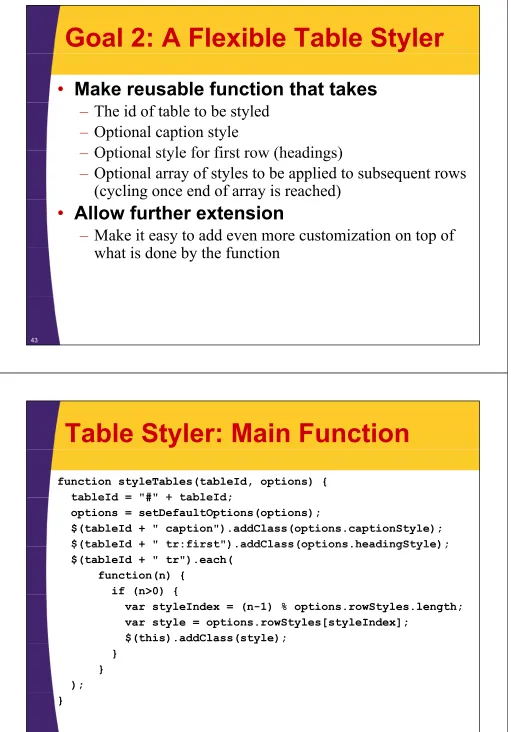
Goal 2: A Flexible Table Styler
•
Make reusable function that takes
–
The id of table to be styled
–
Optional caption style
Optional style for first row (headings)
–
Optional style for first row (headings)
–
Optional array of styles to be applied to subsequent rows
(cycling once end of array is reached)
( y
g
y
)
•
Allow further extension
–
Make it easy to add even more customization on top of
h i d
b h f
i
what is done by the function
[image:21.612.53.564.23.755.2]43
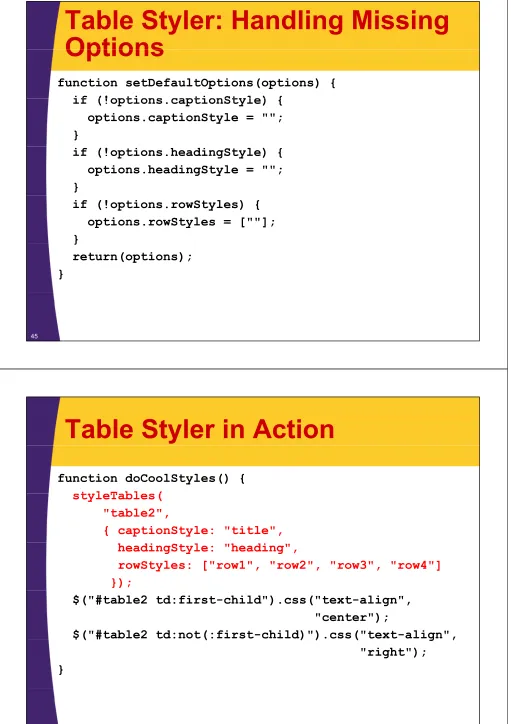
Table Styler: Main Function
function styleTables(tableId, options) {
tableId = "#" + tableId;
tableId = # + tableId;
options = setDefaultOptions(options);
$(tableId + " caption").addClass(options.captionStyle);
$(tableId + " tr:first").addClass(options.headingStyle);
$(tableId + tr:first ).addClass(options.headingStyle);
$(tableId + " tr").each(
function(n) {
if (n>0) {
(
) {
var styleIndex = (n-1) % options.rowStyles.length;
var style = options.rowStyles[styleIndex];
$(this).addClass(style);
y
}
}
);
}
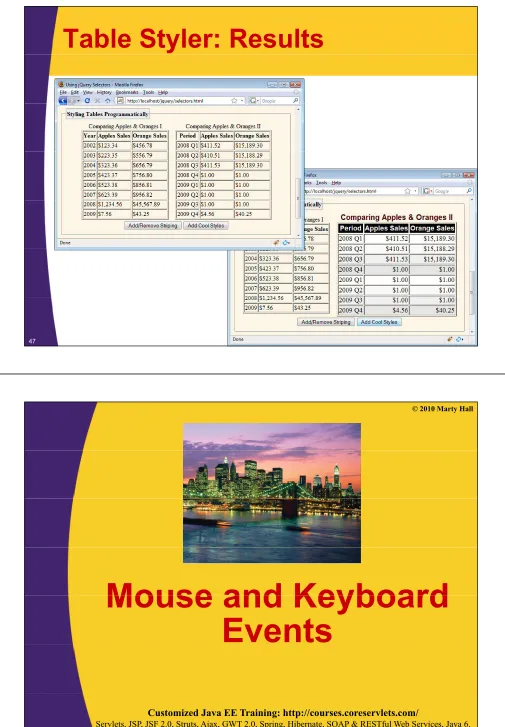
Table Styler: Handling Missing
Options
Options
function setDefaultOptions(options) {
if (!options captionStyle) {
if (!options.captionStyle) {
options.captionStyle = "";
}
if (!options.headingStyle) {
options.headingStyle = "";
}
if (!options.rowStyles) {
options.rowStyles = [""];
}
}
return(options);
}
45
Table Styler in Action
function doCoolStyles() {
styleTables(
styleTables(
"table2",
{ captionStyle: "title",
headingStyle: "heading",
rowStyles: ["row1", "row2", "row3", "row4"]
});
$("#table2 td:first-child").css("text-align",
"center");
$("#table2 td:not(:first-child)").css("text-align",
$( #
(
) )
(
g
,
Table Styler: Results
47
© 2010 Marty Hall
Mouse and Keyboard
Mouse and Keyboard
Events
Customized Java EE Training: http://courses.coreservlets.com/
Event Properties: Overview
•
Idea
–
When you assign an event handler as with
$("#button-id").click(someHandler), you can use “this”
inside handler to access element to which it was attached
inside handler to access element to which it was attached
–
But, handler is also passed an event object. This is
particularly useful for mouse and keyboard events
W k
i t tl
b
!
•
Works consistently across browsers!
•
Most important event properties
–
event keyCode: numeric key code
–
event.keyCode: numeric key code
–
event.which: mouse button number
–
event.pageX, event.pageY: location of click
p g
p g
–
event.shiftKey (etc): is shift, alt, meta, control down?
49Event Properties: Details
Property
Description
event keyCode
Numeric key code For alphabetic characters returns code of uppercase version Checkevent.keyCode
Numeric key code. For alphabetic characters, returns code of uppercase version. CheckshiftKey to distinguish. Consistent across browsers for keydown and keyup. For keypress, use “which” property for browser consistency.
event.which
For mouse events, the mouse button that was pressed. Left=1, middle=2, right=3. Right button is 3 even on 2-button mouse Can also be used for key events and is consistent button is 3 even on 2-button mouse. Can also be used for key events, and is consistent across browsers for keypress.event.target
Element where event started. Usually the same as event.currentTarget and “this”.event.currentTarget
g
Element that currently has event. With event bubbling, could be different fromevent.target. Always the same as “this”.
event.relatedTarget
For mouse events, element mouse was over before moving on/off current target.event.pageX
t
Y
The x and y coordinates relative to the page. For mouse events only.
event.pageY
event.screenX
event.screenY
The x and y coordinates relative to the whole monitor. For mouse events only.
event altKey
Boolean flags to determine if modifier keys were downevent.altKey
event.ctrlKey
event.metaKey
event.shiftKey
Events: Example
•
Goal 1: make textfield value uppercase
–
$(this).val($(this).val().toUpperCase());
–
Register: $("#uppercase-field").keyup(makeUpperCase);
•
Not dramatically easier than version in regular JavaScript
•
Not dramatically easier than version in regular JavaScript
(see section on JavaScript: Browser Capabilities)
•
Goal 2: down arrow should do same thing
as the button that is below the field
if (event.keyCode == 40) {
$("#echo button") click();
$("#echo-button").click();
}
•
Dramatically easier than similar version in regular
y
g
JavaScript section. jQuery unifies cross-browser behavior.
51
Example: JavaScript
function makeUpperCase(event) {
$(this).val($(this).val().toUpperCase());
$(this).val($(this).val().toUpperCase());
if (event.keyCode == 40) {
$("#echo-button").click();
}
}
function echoText() {
var msg =
var msg =
"Textfield value is '" +
$("#uppercase-field").val() +
"'.";
$("#echo-text").html(msg);
}
$(f
ti
() {
$(function() { …
$("#uppercase-field").keyup(makeUpperCase);
$("#echo-button").click(echoText);
});
Example: HTML
<form action="#">
Hit down arrow or press button to echo
Hit down-arrow or press button to echo
textfield data below the field<br/>
<input type="text" id="uppercase-field"/>
<input type="button" id="echo-button"
value="Echo Textfield Value"/><br/>
<div class="title" id="echo-text"></div>
</form>
53
Example: Results
© 2010 Marty Hall
jQuery Plugins
Customized Java EE Training: http://courses.coreservlets.com/
Servlets, JSP, JSF 2.0, Struts, Ajax, GWT 2.0, Spring, Hibernate, SOAP & RESTful Web Services, Java 6. Developed and taught by well-known author and developer. At public venues or onsite at yourlocation.
Idea
•
Extensible architecture
–
jQuery is designed to be extensible
–
Large set of third-party jQuery extensions
•
Varying degrees of stability and robustness
y g
g
y
•
Examples
–
Color choosers
–
Sortable tabs
–
Filtering keys on regular expressions
–
Ajax form plugin (sends all form data automatically)
Ajax form plugin (sends all form data automatically)
–
Templates for filling in HTML from JSON data
–
Functional programming extensions
•
Download site
–
http://plugins.jquery.com/
Form Plugin
•
Without form plugin
<form id="form1">…</form>
function showParams3() {
$("#result2") load("show params jsp"
$("#result2").load("show-params.jsp",
$("#form1").serialize());
}}
•
With form plugin
<form id="form2" action="show-params.jsp">…</form>
function showParams4() {
$("#form2").ajaxSubmit({ target: "#result3" });
}}
57
© 2010 Marty Hall
Wrap-up
Customized Java EE Training: http://courses.coreservlets.com/
Summary
•
Find some elements
–
$("element")
–
$("#id")
–
$(" class")
$( .class )
–
$("element.class")
–
$("parent child")
•
Operate on those elements
–
$(…).html(…)
$( ) addClass( )
–
$(…).addClass(…)
–
$(…).hide()
–
$(…).css(name, value)
( )
(
,
)
–
$(…).click(clickHandler)
–
$(…).each(function)
59
© 2010 Marty Hall