Designing Scalable JavaScript Applications
Selections by Emmit A. Scott, Jr.
Manning Author Picks
Copyright 2016 Manning Publications
For online information and ordering of these and other Manning books, please visit www.manning.com. The publisher offers discounts on these books when ordered in quantity.
For more information, please contact
Special Sales Department Manning Publications Co. 20 Baldwin Road
PO Box 761
Shelter Island, NY 11964 Email: [email protected]
©2016 by Manning Publications Co. All rights reserved.
No part of this publication may be reproduced, stored in a retrieval system, or transmitted, in any form or by means electronic, mechanical, photocopying, or otherwise, without prior written permission of the publisher.
Many of the designations used by manufacturers and sellers to distinguish their products are claimed as trademarks. Where those designations appear in the book, and Manning
Publications was aware of a trademark claim, the designations have been printed in initial caps or all caps.
Recognizing the importance of preserving what has been written, it is Manning’s policy to have the books we publish printed on acid-free paper, and we exert our best efforts to that end. Recognizing also our responsibility to conserve the resources of our planet, Manning books are printed on paper that is at least 15 percent recycled and processed without the use of elemental chlorine.
Manning Publications Co. 20 Baldwin Road Technical PO Box 761
Shelter Island, NY 11964
Cover designer: Leslie Haimes
ISBN 9781617294174
iii
contents
introduction iv
T
HE
ROLE
OF
MV*
FRAMEWORKS
1
The role of MV* frameworks
Chapter 2 from
SPA Design and Architecture
2
E
MBRACING
MODULARITY
AND
DEPENDENCY
MANAGEMENT
33
Embracing modularity and dependency management
Chapter 5 from
JavaScript Application Design
34
D
EALING
WITH
COLLECTIONS
67
Dealing with collections
Chapter 9 from
Secrets of the JavaScript Ninja, Second Edition
68
G
ETTING
STARTED
WITH
G
ULP
104
Getting started with Gulp
Chapter 2 from
Front-End Tooling with Gulp, Bower, and Yeoman
105
iv
introduction
If you’ve ever written a non-trivial JavaScript application, you know that creating a code base that’s easy to maintain and scales well over time is no small feat. The com-plexity only grows as the project becomes larger. While it’s impossible to plan for every change that could possibly happen over the life of a project, you can help future-proof your front-end architecture by designing software that’s pliable and easily extended. This approach inherently leads to more sustainable code even in a constantly chang-ing environment. Well-designed, extensible architecture can also help reduce devel-opment and maintenance costs, as bug fixes, enhancements, and new technologies can be incorporated more easily.So how do you begin? Spending more time up front on the design of your applica-tion is a great start. This includes thinking about which tools and frameworks you’ll use and which design patterns you’ll implement.
A
lthough you can build nearly anything from scratch with JavaScript, most of the time, starting with existing tools and frameworks is more efficient. Under-standing how to take advantage of JavaScript frameworks is pivotal to building better applications. Frameworks hide the complexity normally associated with large projects and help to achieve a separation of concerns in an application’s code base. They can be used with applications of any size, but are crucial for large-scale application development. The following chapter introduces the role of Model-View-Controller (MVC) and Model-View-ViewModel (MVVM) works and includes a complete working project built with three different frame-works for comparison.2
Chapter 2 from
SPA Design and Architecture
by Emmit A. Scott, Jr.
The role of
MV* frameworks
Probably one of the most difficult tasks a web developer faces is creating a code base that can grow gracefully as the project grows. The larger and more compli-cated a project becomes, the more difficult the task. Shaping a project’s code base in a way that makes troubleshooting, maintenance, and enhancements easier, not harder, is no small feat, though. This is true for even traditional web projects.
In an SPA, keeping your code segregated based on its functionality is more than just a good practice. It’s critical to being able to successfully implement an applica-tion as a single page. The key to this is creating a separaapplica-tion of concerns within your application. Having a separation of concerns within your code base means that you’re making a concerted effort to separate the various aspects of the applica-tion’s code based on the responsibility it has.
This chapter covers
■ An overview of UI design patterns
■ An introduction to MV* in the browser
■ Exposure to core MV* concepts
■ Benefits of MV* libraries/frameworks
3
We can break the overall SPA into many application layers, on the server side as well as in the client. Within the browser space, we can begin our quest for creating a separa-tion of concerns in a fundamental way by first remembering the roles of our three pri-mary languages: HTML, CSS, and JavaScript:
■ HTML—This is the scaffolding of your application. This code is primarily
con-cerned with the elements that provide placeholders for content, give the UI its structure, and offer controls the user can interact with.
■ CSS—Style sheets describe the design of the UI, giving it its look and formatting. ■ JavaScript—In a general sense, the code in this layer represents the application’s
presentation logic. This layer is used to give a web application its dynamic nature, providing behavior and programmatic control over the other two layers.
We’ve all worked with these three languages and understand the role of each. Even so, because these three languages can easily be mixed together, your code can quickly turn into spaghetti (see figure 2.1). This can make your project extremely challenging to manage.
It’s possible, however, to produce code written in a decoupled manner but still achieve the same level of interactivity between each layer. Each part of your code can be compartmentalized based on the purpose it serves.
Additionally, this compartmentalization can be extended to encompass the applica-tion’s data versus its presentation to the user. Data and events can be assigned to your
UI via mapping, instead of direct assignment in your business logic. The UI and the data can both be observed for changes, allowing them to stay in sync and giving your logic a means to react appropriately. So not only can the code itself be segregated based on its responsibility, but your UI’s presentation and the data it represents can be disjoined. This achieves yet another level of separation in your application (see figure 2.2). Figure 2.1 Indiscriminately interweaving JavaScript, HTML, and CSS makes your project more difficult to manage as it grows.
Inline style Embedded script
<button style="background-color: #ccc;" onClick="if(formValid && !formChanged){showConfirmation();}"> Confirm
</button>
Data Presentation
How the user sees and interacts with the data What the
data is
CSS
HTML
JavaScript
4 CHAPTER 2 The role of MV* frameworks
Although it’s entirely possible for you to create a homemade solution to manage all these layers of separation, it’s probably not where you want to spend your develop-ment time. Thankfully, though, a myriad of libraries and frameworks are ideal for just such a task. If used in your application, they can play a key role in creating a successful separation of concerns by externally managing the relationship between your logic, data, and the UI. In varying degrees, they also provide many other features to assist you in building your SPA.
This chapter defines JavaScript MV*, briefly discusses its evolution from traditional
UI design patterns, and discusses what these frameworks do for us. The chapter also breaks down some common MV* concepts, using three MV* frameworks to illustrate different approaches to the same objective. As mentioned in chapter 1, not everything is MV*. My focus in this book, however, is on the MV* style of frameworks.
To further demonstrate how the same concepts are prevalent in MV*, even though the approach may differ, you’ll create a small but reasonably realistic online directory project with each framework. I’ll abbreviate the code samples in the text so the con-cepts don’t get lost in the code. (The code for all three versions is available in appen-dix A, with a complete code walk-through. And the code for each is available for download online.)
The end of the chapter includes a list of things to consider when selecting a frame-work that’s right for you. Because all MV* implementations are different approaches to the same problem, you’ll ultimately have to decide which one is the right fit for you. There’s no clear right or wrong answer that fits all situations. Once you understand the role of MV* and its underlying patterns, though, you’ll be able to select one that best fits your environment. After all, no one knows your situation better than you do. You know the factors that affect your project, your end users, your budget, your time-lines, and your development resources.
2.1
What is MV*?
The term MV* represents a family of browser-based frameworks that provide support for achieving a separation of concerns in your application’s code base, as discussed in the introduction. These frameworks have their roots in traditional UI design patterns, but the degree to which they follow a pattern varies from implementation to imple-mentation.
In MV*, the M stands for model and the V stands for view. Section 2.2 covers them in depth, but for this discussion let’s briefly summarize each term:
■ Model—The model typically contains data, business logic, and validation logic.
Conceptually, it might represent something like a customer or a payment. The model is never concerned with how data is presented.
■ View—The view is what the user sees and interacts with. It’s a visual
5
What is MV*?
As you’ll see in section 2.1.1, traditional UI design patterns include a third compo-nent, which helps manage the relationship between the model and the view, as well their relationship with the application’s user. Although most modern browser-based
UI design frameworks based on MVC/MVVM have some notion of a model and a view, it’s the third component that varies, in both name and the duty it performs. There-fore, people have generally settled on the wildcard (*) to represent whatever the third component might be.
Section 2.1.2 presents a lot more about MV* in the browser. First, though, let’s find out a little about traditional UI design patterns, which form the roots of MV*. Knowing how we got here will help you get a better idea of why things work the way they do.
2.1.1 Traditional UI design patterns
Using architectural patterns to separate data, logic, and the resulting representation of the output is a notion that has been around for a long, long time. Central to these design patterns is the idea that an application’s code is easier to design, develop, and maintain if it’s segmented based on the type of responsibility each layer has.
This section details the three pat-terns that have had the most influence on client-side approaches: Model-View-Controller (MVC), Model-View-Presenter (MVP), and Model-View-ViewModel (MVVM). After a proper introduction to these design patterns, you’ll see in section 2.1.2 how they relate to the MV* frameworks we see in the browser today.
MODEL-VIEW-CONTROLLER
Model-View-Controller (MVC) is one of the oldest patterns to try to separate data, logic, and presentation. MVC
was proposed by Trygve Reenskaug and later implemented in the Small-talk programming language in the 1970s.
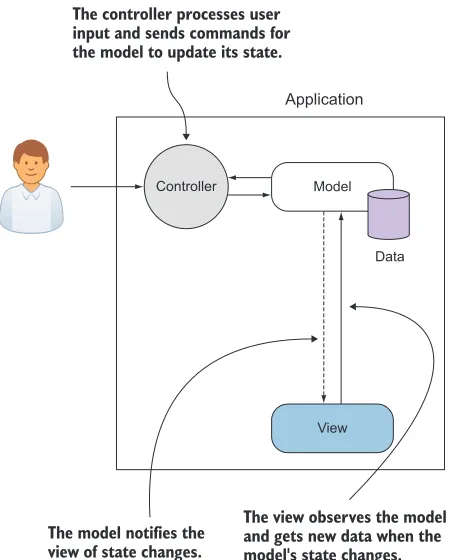
MVC was instrumental in the design of graphical user interfaces then and still is today. Since its inception, it and its variants have become common design patterns for all types of soft-ware development. The MVC pattern includes the model, the view, and a controller (see figure 2.3):
Application
View Model Controller
Data
The controller processes user input and sends commands for the model to update its state.
The model notifies the view of state changes.
The view observes the model and gets new data when the model's state changes.
6 CHAPTER 2 The role of MV* frameworks
■ Controller—The controller is the entry point for the application, receiving
sig-nals from controls in the UI. It also contains the logic that processes the user input and sends commands to the model to update its state based on the input received.
The interactions with the controller set off a chain of events that eventually lead to an update of the view. The view is aware of the model in this pattern and is updated when changes are observed.
MODEL-VIEW-PRESENTER
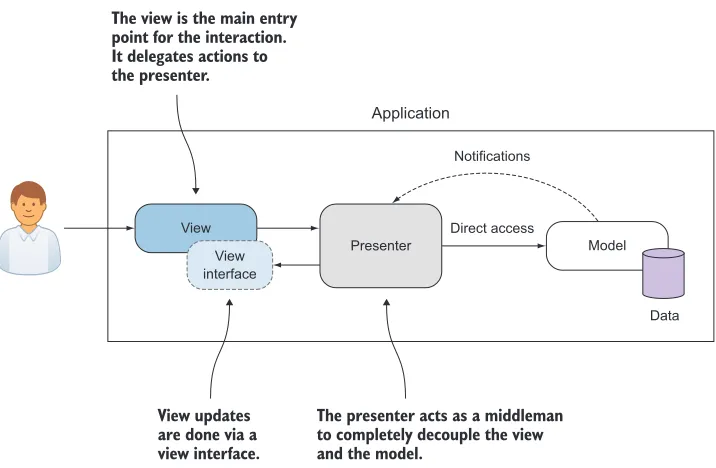
In 1996, a subsidiary of IBM called Taligent came up with a variation of MVC called Model-View-Presenter, or MVP. The idea behind this pattern was to further decouple the model from the other two components of MVC. Under MVP, a controller-like object and the view would jointly represent the user interface, or presentation. The model would continue to represent data management. As noted in figure 2.4, in MVP, there’s no controller acting as a gatekeeper. Each view is backed by a component called a presenter:
■ Presenter—The presenter contains the view’s presentation logic. The view
merely responds to user interactions by delegating responsibility to the pre-senter. The presenter has direct access to the model for any necessary changes and propagates data changes back to the view. In this way, it acts as a “middle-man” between the model and the view.
Application
View
Presenter
Direct access Notifications
View interface
Model
Data
The view is the main entry point for the interaction. It delegates actions to the presenter.
View updates are done via a view interface.
The presenter acts as a middleman to completely decouple the view and the model.
7
What is MV*?
The presenter takes on the task of keeping the view and model updated. Having an object in the middle allows the view and model to have more-focused responsibilities.
MODEL-VIEW-VIEWMODEL
Model-View-ViewModel(MVVM) was proposed by John Gossman in 2005 as a way to sim-plify and standardize the process of creating user interfaces for use with Microsoft’s Windows Presentation Foundation (WPF). It’s another design pattern that emerged to try to organize the code associated with the UI into something sensible and manage-able, while still keeping the various components of the process separate.
As in MVP, the view itself is the point of entry. Also like MVP, this model has an object that sits between the model and the view (see figure 2.5). The third component in this pattern is called the ViewModel:
■ ViewModel—The ViewModel is a model or representation of the view in code, in
addition to being the middleman between the model and the view. Anything needed to define and manage the view is contained within the ViewModel. This includes data properties as well as presentation logic. Each data point in the model that needs to be reflected in the view is mapped to a matching property in the ViewModel. Like a presenter in MVP, each view is backed by a ViewModel. It’s aware of changes in both the view and the model and keeps the two in sync.
Now that you know a little about traditional UI design patterns, you can better under-stand browser-side MV* approaches. Let’s fast-forward, then, and talk about the MV*
we see in the browser.
2.1.2 MV* and the browser environment
Just like application code running on the server or natively as a desktop application, code running in the browser can benefit from using good architectural design pat-terns. In recent years, many frameworks have cropped up, aiming to fulfill this need.
Application
View ViewModel
Model changes
Model
Data
The ViewModel provides properties and logic that model the view. It also keeps the model and view in sync.
UI changes
8 CHAPTER 2 The role of MV* frameworks
Most are based on MVC, MVP, or MVVM to some degree. The browser is a different sort of environment, though, and we’re dealing with three languages at once (JavaScript,
HTML, and CSS). Therefore, it’s difficult to perfectly match a browser-side MV* frame-work with a design pattern. Trying to pigeonhole them into one category or another is, in most cases, a fruitless undertaking. Design patterns should be malleable strate-gies, not inflexible directives.
One of the reasons why the term MV* sprang up in the first place is that it’s often hard to nail down what the third concept in the framework is. The term represents sort of a compromise, to cease the endless disputes about whether particular frame-works are more this pattern or more that pattern.
The remnants of the traditional patterns are there but are loosely interpreted. Each one has some form of the data model, whether it’s in the form of a POJO (plain old JavaScript object) or some model structure dictated by the implementation. Each also has some notion of a view. The third cog in the machine might be a little more elusive, though. The framework might employ an explicit controller, presenter, or ViewModel. But it might have some sort of hybrid or not have the third part at all!
Derick Bailey, creator of Marionette.js for Backbone.js, put things rather elo-quently in one of his online posts, titled “Backbone.js Is Not an MVC Framework”:
Ultimately, trying to cram Backbone into a pattern language that doesn’t fit is a bad idea. We end up in useless arguments and overblown, wordy blog posts like this one, because no one can seem to agree on which cookie-cutter pattern name something fits into. Backbone, in my opinion, is not MVC. It’s also not MVP, nor is it MVVM (like Knockout.js) or any other specific, well-known name. It takes bits and pieces from differ-ent flavors of the MV* family and it creates a very flexible library of tools that we can use to create amazing websites. So, I say we toss MVC/MVP/MVVM out the window and just call it part of the MV* family.
Source: http://lostechies.com/derickbailey/2011/12/23/ backbone-js-is-not-an-mvc-framework/
Many other people share this same viewpoint about the fruitlessness of trying to one-for-one match today’s MV* with a traditional design pattern. The idea of the useful-ness of the framework taking priority over its categorization gained even more steam when the AngularJS team weighed in with a similar conclusion about their framework. Igor Minar (from the AngularJS team) famously blogged that developers will argue endlessly about how to categorize a particular MV* framework. He went on to state that AngularJS started out more like MVC, but over time it has become a little more like MVVM. In truth, it’s a little like both. In this same blog entry, he proposes the term MVW, which has since stuck:
I’d rather see developers build kick-ass apps that are well-designed and follow separation of concerns than see them waste time arguing about MV* nonsense. And for this reason, I hereby declare AngularJS to be MVW framework—Model-View-Whatever. Where What-ever stands for whatWhat-ever works for you.
9
Common MV* concepts
Knowing that most MV* implementations only loosely base their design on the origi-nal pattern helps us remember that it’s not so important to try to brand the frame-work as one pattern or another.
2.2
Common MV* concepts
Now that you know what MV* is, let’s go over a few common concepts that are fre-quently found, no matter the implementation. In the examples for each concept, you’ll quickly begin to see that even though the syntax and approach may vary between frameworks, the ideas are the same. Before we begin, let’s take a moment to review at a high level the concepts covered in this section:
■ Models—Models represent the data of our application. They contain properties
and possibly logic to access and manage the data, including validation. The model often contains business logic as well.
■ Views—Views are what the user sees and interacts with and are where models
are visually represented. In some MV* implementations, views may also contain presentation logic.
■ Templates—Templates are the reusable building blocks for views when dynamic
content is needed. They contain placeholders for data, as well as other instruc-tions for how content in the template should be rendered. One or more tem-plates will be used to create a view in an SPA.
■ Binding—This term describes the process of associating the data from a model
with an element in a template. Some MV* implementations also provide other types of binding, such as bindings for events and CSS styles.
Figure 2.6 gives a big-picture view of how these concepts relate to each other in an SPA. These concepts are probably the least common denominator in building SPAs. Other features, such as routing (covered in chapter 4), are also common (and necessary) but may not be provided universally. Not to worry, though. I cover many of the other concepts later in the book. We just need a sound foundation to begin with.
Model
(Binding)
+ =
[
{"firstName":"Mary"}, {"firstName":"Ted"}, {"firstName":"Alice"} ]
Template View
Hello <%= firstName %>, how are you?
Hello Mary, how are you?
Hello Ted, how are you?
Hello Alice, how are you?
10 CHAPTER 2 The role of MV* frameworks
2.2.1 Meet the frameworks
Because we’re using three frameworks for illustration in this section, some introduc-tions are in order. Each represents a slightly different approach to these basic MV*
concepts. Seeing the different approaches, though, should give you a broader per-spective ultimately. The three frameworks are as follows:
Description: As mentioned before, Back-bone.js doesn’t perfectly fit a traditional design pattern but could be described as being some-where between MVC and MVP. Backbone.js is code driven. Models and views are created pro-grammatically, using JavaScript code in this
framework, by extending Backbone.js objects. By extending core objects, you auto-matically inherit a lot of built-in functionality. The framework also provides other out-of-the-box features to make routine tasks easier. Backbone.js doesn’t provide everything you’ll need in your SPA, though, so you must fill certain gaps using other libraries or frameworks.
Description: Knockout may not perfectly fit with the original MVVM definition, but it’s fairly close. In this framework, the model is any source of data, not an explicit object structure prescribed by the framework. Views and tem-plates are created with plain HTML. The View-Models that map model data to UI elements
and provide views with behavior are created programmatically using JavaScript code, but most everything else is done declaratively by adding custom attributes to the HTML. Knockout is mainly concerned with making the binding process clean and easy. Though this makes the framework small and superbly focused, it leaves you to look to other frameworks and libraries for all other SPA requirements.
Description: AngularJS humbly describes itself as the “Superheroic JavaScript MVW
Framework.” The creators of AngularJS
designed it to be a one-stop-shopping kind of framework. Most, if not all, of your SPA needs are covered by this framework. AngularJS mixes and matches concepts that its creators liked
from traditional patterns, as well as from other popular frameworks, to come up with a nicely balanced palette of out-of-the-box features. Part of your work in this framework will be done programmatically via JavaScript code, and part will be done declaratively using custom HTML attributes.
2.2.2 Meet our MV* project
To help illustrate our list of common concepts, you’ll create a simple online employee directory. You’ll create it three ways, using each of the frameworks previously
URL: http://backbonejs.org
URL: http://knockoutjs.com
11
Common MV* concepts
described. Later in the book, you’ll learn about more-advanced topics, such as routing and server transactions. For now, you’ll stick to the basics for this project. Our exam-ple, though somewhat contrived, still covers basic CRUD operations over a list. That should be sufficiently challenging for an introduction.
Let’s go over our objectives for this example:
■ Create a simple SPA to enter employee information.
■ Build an easy-to-use UI for entering each employee’s first name, last name, title,
email, and phone.
■ Keep track of each entry as part of a list, with the screen split between the entry
form on the left and the directory’s entry list on the right.
■ Have two buttons on the entry side of the SPA: one to add a new entry and one
to clear the form.
■ Have one button next to each entry to remove the entry from the list.
■ Have indicators next to each entry field to denote whether the field’s entry
requirement has been met. (Each indicator should update as the user types.)
Now that you’ve reviewed the objectives, take a look at the screenshot of the final product (see figure 2.7). The application will look and behave the same for each MV*
framework used.
Indicators change from “Required” to “Invalid” if the user enters invalid data.
Clicking the X button deletes the entry.
12 CHAPTER 2 The role of MV* frameworks
Throughout our discussion of MV* concepts, I’ll refer to this example. I’ll also talk about how different philosophies by the framework creators affect the type of code you’ll create. Although only certain parts of the code will be used for illustration, all of the code for each MV* version is in appendix A and available for download.
2.2.3 Models
You know from our discussion of patterns that models often contain business logic and validation. They also represent the data in your application. The data they con-tain shouldn’t be a motley crew of unrelated information, though. They’re called mod-els because they model a real-life entity that’s important to the application’s logic.
For example, if you were building an online reservation system for a hotel, your models might include the hotel, a room, an agent, a customer, the reservation, ameni-ties, notes, invoices, receipts, and payments. What about a web-based application for teachers? You’d need to have data representing the school, its teachers, the students, courses, and grades, at a minimum. Each model in the application would represent a real-world object. Consequently, the larger and more complex the system, the more types of models you’ll have.
Let’s see what a model’s data would look like for our online employee directory. Remember that models mirror things in the real world. They contain not only data but behavior as well. In this case, you’re going to model a directory listing. I’ll keep it extremely simple to make sure the concept doesn’t get buried in too much code. Here’s the information we’re going to keep track of in each model:
■ First name ■ Last name ■ Title
■ Email address ■ Phone number
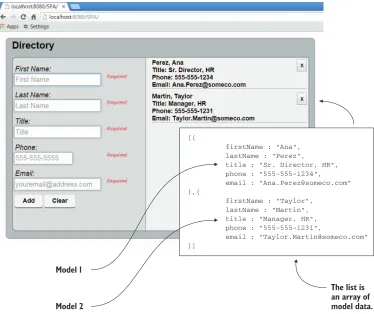
The employee list inside the directory would be a collection (array) of these models. Figure 2.8 illustrates what this would look like from a conceptual standpoint.
Employee record (model)
validate() First name Last name Title Phone Email
Employee record (model)
validate() First name Last name Title Phone Email
Employee record (model)
validate() First name Last name Title Phone Email
Data
Directory
Validation logic Employee list
13
Common MV* concepts
To help you visualize what the models will look like when they’re added to the collec-tion and rendered in the view, you can look at the screenshot of the employee directory application again (see figure 2.9). Remember, each model in the list is an object in an array. In this version of the screenshot, I’ve superimposed a snapshot of the data inside each model that has been added to our list. This will help you see the models in action. Now that you have a mental picture of how the employee models will be used, let’s talk about how a model is defined in each type of framework. How you create a model in an MV* application varies, depending on the framework you’re using. As I men-tioned, the framework might not be an exact match for one of the traditional design patterns, but the implementation will certainly be influenced by the pattern.
IMPLIED MODELS
In some MV* implementations, the model is just the data itself, not an explicit struc-ture prescribed by the framework. This data can be from any source, including POJOs and HTML form controls in the UI itself. There are no restrictions on what you can use
[{
firstName : "Ana", lastName : "Perez",
title : "Sr. Director, HR", phone : "555-555-1234", email : "[email protected]" },{
firstName : "Taylor", lastName : "Martin", title : "Manager, HR", phone : "555-555-1231",
email : "[email protected]" }]
The list is an array of model data. Model 1
Model 2
14 CHAPTER 2 The role of MV* frameworks
for the source data when the model is implicit. This is the case for both Knockout and
AngularJS.
For example, in our fictitious employee directory, we need the data for the employee model to come from the entry form the user fills out. So instead of creating a JavaScript object or getting JSON from the server, we need to capture data directly from the INPUT fields of our HTML form when creating each entry in the directory’s list. AngularJS provides an easy shortcut for this. If you need your model data to come from an INPUT field, you can adda custom attribute called ng-model to each field (see listing 2.1). The attribute declares that model data is sourced from the HTML form element where the attribute is placed. The attribute magically establishes the form-Entry model if it doesn’t already exist and gives it a property called firstName. Then it ties formEntry.firstName to this INPUT field.
<input id="firstName" name="firstName" type="text" ng-model="formEntry.firstName"
required
placeholder="First Name"/>
Once established, the model is readily available in your JavaScript code. One of the many benefits of using an MV* framework is keeping the complex, boilerplate code that marries the data and UI external to our application’s logic. This one attribute is a great example.
In Knockout, the model is again implied, not explicitly declared (see listing 2.2). In this framework, you add custom attributes to each INPUT field just as we did in the
AngularJS version. This time, the attribute is called data-bind.
With Knockout (in true MVVM fashion), the attribute ties the INPUT field with a matching property in the ViewModel. In turn, our JavaScript code gains access to the field through the ViewModel.
<input id="firstName" name="firstName" type="text" data-bind="hasFocus: isFocused,
value: entry.firstName, valueUpdate: 'afterkeydown'"
placeholder="First Name" />
With both AngularJS and Knockout, your model could have been any data source. Because you’re working from an entry form, that’s where you needed your model’s data to come from. In both cases, no model object was explicitly defined. Instead, each framework provided a custom attribute you could add to the HTML to establish the entry form as the source of the model’s data. Now let’s see how to create a model in Backbone.js, where models are explicitly defined in code.
Listing 2.1 AngularJS model
Listing 2.2 Knockout model
ng-model is AngularJS’s custom attribute
data-bind is Knockout’s custom attribute
A matching property from
15
Common MV* concepts
EXPLICIT MODELS
In MV* implementations where an explicitly declared model is required by the frame-work, the model is created as a JavaScript object. Backbone.js is a prime example of this. Backbone.js models can have logic in addition to data, such as validation, default data, and custom functions. You also inherit a lot of functionality. Just by extending the framework’s model to create your own, you automatically receive a wide variety of base functionality without even writing code.
The ability to immediately inherit a lot of functionality makes creating a model in these types of frameworks powerful and flexible. For example, in Backbone.js you can create a bare-bones model in a single line of code:
var EmployeeRecord = Backbone.Model.extend({});
To use the object, you create a new instance of it and call any functions it has available out of the box. With this single declaration, your model right away has a variety of built-in behaviors such as validation, functions to execute RESTful services, and much more. See the online documentation for the full list (http://backbonejs.org).
It’s equally as easy to assign properties to a Backbone.js model. To create a new property called firstName and set its value to Emmit, you can either pass in {first -Name : "Emmit"} to the object’s constructor or use the model’s built-in set method:
var employee = new EmployeeRecord({}); employee.set({firstName : "Emmit"});
The following listing illustrates the Backbone.js version of the employee model for our online directory. The validation needed for the directory example makes the source for the model quite verbose.
var validators = { "*": [ {
expr: /\S/,
message: "Required" } ],
"phone": [ {
expr: /^[0-9]{3}-[0-9]{3}-[0-9]{4}$/, message: "Invalid"
} ],
"email": [ {
expr: /^[a-z0-9!#$%&'*+\/=?^_`{|}~-]+(?:\. [a-z0-9!#$%&'*+\/=?^_`{|}~-]+)*@
(?:[a-z0-9](?:[a-z0-9-]*[a-z0-9])?\.)+[a-z0-9] (?:[a-z0-9-]*[a-z0-9])?$/i,
message: "Invalid" } ]
};
function validateField(value, key) {
var rules = validators["*"].concat(validators[key] || []);
Listing 2.3 Backbone.js model
Define validation for data being set on the model’s properties
16 CHAPTER 2 The role of MV* frameworks
var broken =
_.find(rules,function(rule) {return !rule.expr.test(value);});
return broken ? {"attr":key,"error":broken.message} : null; }
var EmployeeRecord = Backbone.Model.extend({ validate: function(attrs) {
var validated = _.mapObject(attrs, validateField); var attrsInError = _.compact(_.values(validated)); return attrsInError.length ? attrsInError : null; },
sync: function(method, model, options) { options.success();
} });
There seems to be a lot more going on than there is. We inherit the power of the Backbone.js model just by extending its base object. But the framework leaves it up to you as to how you want to validate the data. It gives you a couple of hooks with validate(attrs,options), and you can fill in the rest however you want.
2.2.4 Bindings
The term binding is another concept you should understand if you plan on using an
MV* framework. This term is used frequently when talking about UI development. In plain English, it means to tie or connect two things together. In UI development, whether we’re talking about desktop programming with a language like .NET or web development with MV*, we mean linking a UI element in the view (such as a user input control) to something in our code (for example, a model’s data).
It doesn’t have to be just data, though. Different libraries and frameworks offer dif-ferent types of bindings. Styles, attributes, and events such as click are just a sampling of what can be bound to the UI. The binding types that are available vary, depending on the framework. You’ll look at the code for a few approaches in this section, just to illustrate.
How exactly do we declare a binding in our application? MV* frameworks make binding something in our code to an element in the UI simple. Understanding how to declare a binding starts with getting to know the syntax.
BINDING SYNTAX
Binding syntax comes in two flavors:
■ Expressions, which are special characters that wrap/delimit the bound item ■ HTMLattributes (called directives in AngularJS or bindings in Knockout)
17
Common MV* concepts
Keep in mind, also, that the table is using simple text bindings to illustrate syntax styles. As noted previously, things other than data, such as events and CSS styles, may also be supported. See the documentation for each library/framework to see the com-plete list of bindings supported and additional usage instructions.
After you look at the documentation of the framework or library to get a feel for the syntax, the next thing to understand about binding is the directional flow of data in the binding.
BINDING DIRECTION
Binding something in our code to a visual element in the view can be bidirectional, single-directional, or a one-time binding. The type of binding relationship is also established via the MV* framework.
TWO-WAY BINDING
In bidirectional, or two-way, binding, after the binding link is established, changes on either end cause updates on the opposite side. This keeps the two sides in sync. In a web application, two-way binding is associated with UI controls, like those in a form, that support user input.
Knockout is a great library to illustrate the concept of two-way binding. Binding is, after all, this library’s main purpose. As you saw previously, creating a binding is as easy as typing a custom attribute called data-bind right in the HTML. The data-bind attri-bute tells Knockout that something in the UI is going to be bound to a property in a ViewModel. In the following example, we’re binding the value of an INPUT control to a ViewModel property called firstName:
<input data-bind="value: firstName" />
Table 2.1 Binding is in the form of either an attribute or an expression. AngularJS supports both styles to some extent.
Framework/library Type Example
Knockout
http://knockout.com
Attribute data-bind="text: firstName"
AngularJS (type 1) https://angularjs.org
Attribute ng-bind="firstName"
AngularJS (type 2) Expression {{ firstName }}
Mustache
http://mustache.github.io
Expression {{ firstName }}
Handlebars
http://handlebarsjs.com
Expression {{ firstName }}
Underscore.js (default) http://underscorejs.org
18 CHAPTER 2 The role of MV* frameworks
For the other half of the two-way binding relationship, you tell Knockout you want the property to be observed for any changes by wrapping its data in a Knockout observ-able object. (Remember observobserv-ables from the Observer pattern?)
var myViewModelObject = {
firstName : ko.observable("Emmit") };
Because of the two-way binding established by this small amount of code, these two items will stay in sync automatically.
Binding is just as easy, or more so, with AngularJS. You already saw AngularJS’s two-way binding in action during our discussion of models. You add the attribute ng-model to the HTML of the INPUT tag:
<input ng-model="firstName" />
On the JavaScript code side, you have a $scope object instead of a ViewModel. Scopes are similar in that they sit between the view and our JavaScript code and give us access to the model.
One nice thing about this framework is that AngularJS’s magic automates a lot of the two-way setup. First, the $scope object automatically monitors models for changes. Second, you don’t even have to create the $scope object; AngularJS will hand it to you, if you ask for it. Then, in your code, you can refer to the property via the $scope object like this:
$scope.firstName
That’s it. Now both the INPUT field and the property are bidirectionally bound. Changes on either side affect the other. Pretty easy, huh?
You’ve seen the approaches to two-way binding from two different frameworks. Even so, the concept remains the same in both. Now let’s take a quick look at binding in a single direction.
ONE-WAY BINDING
When binding is single-directional, or one-way, changes in the state of the source affect the target but not the other way around. This type of binding is normally associ-ated with HTML elements that don’t require any input from the user, such as a DIV or SPAN tag. With these types of elements, you’re interested in its text, not its value. You still access the data on the JavaScript side in the same manner, but in the template you choose the attribute specifically for one-way text binding.
With Knockout, you change the word value to text:
<span data-bind="text: firstName"></span>
In AngularJS, the attribute itself changes from ng-model to ng-bind:
<span ng-bind="firstName"></span>
19
Common MV* concepts
TIP Knockout provides an additional way to make even bindings for user input one-way, in case you need that behavior. You just remove the observable “wrapper” from the ViewModel property like this: firstName : "Emmit".
You might be wondering at this point, why bother with the one-way types? Why not use two-way binding always? Well, usually something as magical as automatic, two-way bind-ing comes at a cost. Two-way bindbind-ing has slightly more overhead. No need to panic and avoid it, though. For most views, this overhead is negligible. But if you have a ton of bindings throughout your application, you should use any means to save on overhead. If your view receives input from the user, and you need the data and view to stay constantly in sync, use two-way binding. When you have read-only UI elements, use one-way binding. One-way will keep the view updated when the model changes but doesn’t bother with trying to monitor the view side, because the element is read-only.
ONE-TIME BINDING
One-time binding is a type of one-way binding that happens only once. Nothing is automatically observed for changes. No subsequent updates occur if the source changes or the target changes.
With one-time binding, after the template and the data are combined and ren-dered as the view, the process is done. If new changes need to be applied to the view, the entire process starts over. The previous view is destroyed, and the new data is com-bined with the same template to generate the view anew.
I’ve saved Backbone.js for this section. The typical approach for rendering tem-plates when using Backbone.js is through one-time binding (though some Backbone-compatible libraries and plugins offer the other two types). With AngularJS and Knockout, after the bindings are established, they’re reused. In Backbone.js, the gen-eral idea is that when new data is needed, the view is destroyed (with the bindings) and re-created. I’ll talk more specifically about templates in the next section.
NOTE Backbone.js doesn’t have templating/binding capabilities built in but instead lets you pick the outside library of your choice for the task. Its default is the utility library Underscore.js.
To recap the types of bindings we discussed, consider table 2.2.
In the next section, you’ll see binding in action with template examples from our online employee directory.
Table 2.2 Bindings can be two-way, one-way, or one-time.
Binding type Behavior
Two-way Bidirectional—keeps data and view constantly in sync.
One-way Single-directional, or one-way—changes in the state of the source affect the target, but not the other way around.
20 CHAPTER 2 The role of MV* frameworks
2.2.5 Templates
A template is a section of HTML that acts as a pattern for how our view is rendered. This pattern can additionally contain various types of bindings and other instructions that dictate how the template and its model data get processed. A template is also reusable, like a stencil.
One or more templates are used to create a view, with complex views often having multiple rendered templates on the screen at the same time. The part of the MV*
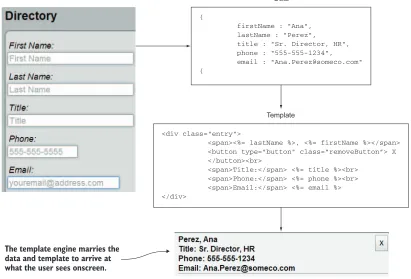
framework, whether built in or via an outside library, that marries the template and the model’s data is generally referred to as a template engine. Figure 2.10 illustrates the marriage of data from the employee directory form (our model) and a template to arrive at what the user sees onscreen.
You should now be able to recognize bindings when you see them, so let’s take a look at some real examples of templates and their bindings taken from our MV* proj-ect. I’ve highlighted the bindings so you can easily see which part of the template is the binding and which part is just the HTML.
WHAT TEMPLATES LOOK LIKE
One thing all templates have in common is that they represent some part of our view. What this means for you as a developer is that, apart from the binding syntax, views
{
firstName : "Ana", lastName : "Perez", title : "Sr. Director, HR", phone : "555-555-1234", email : "[email protected]" {
The template engine marries the data and template to arrive at what the user sees onscreen.
Data
<div class="entry">
<span><%= lastName %>, <%= firstName %></span> <button type="button" class=”removeButton”> X </button><br>
<span>Title:</span> <%= title %><br> <span>Phone:</span> <%= phone %><br> <span>Email:</span> <%= email %> </div>
Template
21
Common MV* concepts
are just HTML. This also means that if you have a web designer on the team, views can be constructed by the designer as well.
The following listing shows our Knockout template. Notice that it has custom attri-butes, but apart from that it’s normal HTML.
<li class="entry">
<button type="button" class="remove-entry"
data-bind="click: removeEntry">╳</button>
<span data-bind="text: $data.lastName"></span>, <span data-bind="text: $data.firstName"></span> <br />
<span>Title:</span>
<span data-bind="text: $data.title"></span> <br />
<span>Phone:</span>
<span data-bind="text: $data.phone"></span> <br />
<span>Email:</span>
<span data-bind="text: $data.email"></span> </li>
Do you remember from our discussion of binding syntax that with AngularJS we could use either expressions or attributes? For the online directory project, we’re using expressions just to demonstrate those (see the following listing). You can use ng-bind if you prefer the attribute style.
<li class="entry" ng-repeat="entry in entries">
<button type="button" class="remove-entry"
ng-click="removeEntry(entry)">╳</button>
{{entry.lastName}}, {{entry.firstName}}<br />
Title: {{entry.title}}<br /> Phone: {{entry.phone}}<br /> Email: {{entry.email}}
</li>
What’s neat about templates in Backbone.js is that you aren’t confined to a particular template syntax, because there’s no built-in template library. Backbone.js allows you to use the template engine of your choice. In our directory project, we’re using the default, which is Underscore.js (see the following listing). Underscore.js has a default
Listing 2.4 Knockout template
Listing 2.5 AngularJS template
This click binding
removes
the entry Data bindings link our form
fields to the ViewModel’s data
Stamps out this template for every entry object in the list of entries Calls a function,
22 CHAPTER 2 The role of MV* frameworks
delimiter of <%= %> for its expressions, but the delimiters can be anything you want (including {{ }}).
<button type="button" class="remove-entry">╳</button> <%= lastName %>, <%= firstName %><br />
Title: <%= title %><br /> Phone: <%= phone %><br /> Email: <%= email %>
These examples provide a good introduction to templates and the various binding styles that are used. One thing we haven’t talked about yet, though, is how the process gets triggered.
TEMPLATE RENDERING
In AngularJS, the rendering of a template happens automatically, as soon as the appli-cation starts. AngularJS searches through the DOM for its custom attributes, including those for binding templates.
In other frameworks, this step isn’t difficult but may be a little more explicit. Knockout, for example, requires a one-liner in your JavaScript code for each View-Model to activate the bindings:
knockout.applyBindings(myViewModel, $("#someElement")[0])
Knockout has a special function you call, applyBindings, which renders the template with the model data supplied by the ViewModel. The first parameter is the ViewModel itself. The second is the place in the DOM you want Knockout to start looking for bind-ings for the given ViewModel. The second parameter is optional, but for efficiency you should use it in order to confine the binding process to a particular parent element.
TIP $("#someElement")[0] is the way in jQuery to access the underlying
DOM object referenced in its selector, because jQuery doesn’t know how many elements will be a match for a given selector. You can also use the Java-Script document.getElementById("someElement") method as the second parameter.
In Backbone.js, rendering the template is a bit more of a manual process. The frame-work provides template and render as hooks for the external template engine of your choice. To render the template to the screen, you have to run it through the compile-and-render process. You’ll see the view in its entirety in the next section, but for now let’s focus on the rendering of the template, as shown in the following listing.
template : _.template(templateHTML), render : function() {
var modelAsJSON = this.model.toJSON();
Listing 2.6 Backbone.js template using the Underscore.js template library
Listing 2.7 Backbone.js template compile and render
We’re sticking with the default Underscore.js as the template engine, but we could substitute a different one
Compiles the template into a reusable function
Translates the
23
Common MV* concepts
var renderedHTML = this.template(modelDataAsJSON); this.$el.html(renderedHTML);
return this; }
The preceding code seems quite verbose when compared to the other two frameworks. The ability to choose whichever template engine you want is a great trade-off, though. You now know what templates are and how to create them. The lingering question you might have is where do you keep their source code?
WHERE TO KEEP TEMPLATES
Templates can either be included in the initial download of your SPA (inline) or down-loaded on demand as external partials (or fragments).
INLINE TEMPLATES
If your template uses the expression style of binding syntax and isn’t downloaded on demand, you’ll need to place it inside SCRIPT tags. You use SCRIPT tags to avoid acci-dentally showing the user the binding code before the render process happens. The browser won’t try to display code within the SCRIPT tags.
To prevent the browser from trying to execute the script as JavaScript code, you’ll need to give the SCRIPT tag’s Multipurpose Internet Mail Extensions (MIME) type something other than text/javascript or application/javascript, as shown in the following listing.
<script type="text/template" id="myTemplate"> Hello, <%= firstName %>, how are you? </script>
If your inline template uses attributes for its binding syntax, there’s nothing else spe-cial you need to do. SCRIPT tags aren’t needed. Also, because attributes aren’t dis-played anyway, there’s no chance the user will accidently see the bindings before the view is rendered.
TEMPLATE PARTIALS
If you download the template on demand, there’s no need for SCRIPT tags, even if you’re using expressions. The dynamically fetched template can be used directly by the template engine, which avoids the issue altogether.
As noted previously, these on-demand templates are sometimes referred to as par-tials or fragments. They’re not part of the initial HTML document that’s loaded with your application. Instead, they’re fetched as snippets of source code directly from the server at runtime.
Now that you have a good idea about models, binding, and templates, you need to finally see how they culminate into the view the user sees and interacts with. In the next section, you’ll look at how MV* frameworks approach views.
Listing 2.8 Inline template
Marries the
data and HTML Replaces the element’s content
with the rendered HTML
24 CHAPTER 2 The role of MV* frameworks
2.2.6 Views
As you saw during our discussion of templates, frameworks such as Knockout and
AngularJS use declarative bindings in their templates, usually in the form of special attributes added to HTML elements. In these frameworks, the templates and views are pretty much the same thing. Thus, when composing views in these frameworks, you need to decide only whether the templates will be kept inline or downloaded on demand. This is more of a design issue.
In a code-driven framework like Backbone.js, the approach is to programmatically create the view. The following listing is an example from our directory application of a Backbone.js view. Don’t worry if you don’t understand everything in the example right now. When you’re ready, appendix A contains a complete walk-through of the code.
var Employee = Backbone.View.extend({ tagName: "li", template: _.template(templateHTML), render: function() {
this.$el.html(this.template(this.model.toJSON())); return this;
},
events: {
"click .remove-entry": "removeEntry" },
removeEntry: function() { this.model.destroy();
this.remove(); }
});
Backbone.js allows you to define traits for your view, such as its CSS class name and the type of element it will be. Additionally, you’re given the freedom to define key mile-stones in the life of the view, such as its rendering and removal, in any manner you wish. The discussion on views rounds out our conversation of basic MV* concepts. It’s great to understand the concepts, but what does an MV* framework do for us? In the next section, I’ll discuss how using an MV* framework can make our lives as SPA devel-opers much easier and our code much cleaner.
2.3
Why use an MV* framework?
Deciding to use any external software in your project shouldn’t be taken lightly. You are, after all, introducing a dependency. That being said, however, when its benefits exceed the costs, a new dependency is worth considering. This section presents some of the key benefits of using MV* frameworks.
Listing 2.9 Backbone.js view example
Extend the built-in
Backbone.js view object Define the
element type
Compile the
template Render the view and
attach it to the DOM
Define the behavior
for the click event Perform some cleanup
25
Why use an MV* framework?
2.3.1 Separation of concerns
As mentioned previously, MV* frameworks provide a means to segregate JavaScript objects into their basic roles based on their underlying design pattern or patterns. Each part of the code can be focused on a particular responsibility to the application. This overarching concept of separation of concerns helps us design objects with a particular purpose. Models can be dedicated to data, views can be dedicated to the presentation of data, and components such as controllers, presenters, and ViewMod-els can keep these two parts communicating with one another without being joined at the hip. The more dedicated an object is to a singular purpose, the easier it is to code, test, and update after it’s in production.
MV* frameworks also reduce the tendency to write spaghetti code by providing framework elements that require us to write code in a particular way to facilitate loose coupling. This keeps our HTML as clean as possible by removing embedded JavaScript and CSS code. It also keeps our JavaScript free from deep coupling with
DOM elements.
Here’s a classic AngularJS example demonstrating how MV* can make our code cleaner. Figure 2.11 shows a SPAN tag (right) mirroring what’s being typed into an INPUT field (left).
Let’s create the example from figure 2.11, first written as spaghetti code and then with AngularJS. Listing 2.10 is the source code, written as tightly coupled
HTML and JavaScript. Tightly coupling means making direct references or calls from one function or component to another. This joins them at the hip, so to speak.
Writing code this way works, but it can prove to be difficult to read and a pain to update later. If an entire single-page application were written like this, you can imag-ine how monumentally difficult it would be to maintain.
<html> <body>
<input id="name" onKeyUp="document.getElementById('output').innerHTML = document.getElementById('name').value"> <span id="output"></span>
</body> </html>
WARNING The code in listing 2.10 dynamically updates the SPAN as you type but is hard to read and difficult to maintain.
Listing 2.10 Tightly coupled HTML and JavaScript
Figure 2.11 In this example, a SPAN tag’s contents are being updated dynamically as the user types into an INPUT field.
26 CHAPTER 2 The role of MV* frameworks
Now, in the following listing, we use the AngularJS framework’s ability to abstract away much of the boilerplate code needed to achieve the same results.
<html> <body ng-app>
<input ng-model="name"> <span>{{name}}</span>
<script src="js/thirdParty/angular.min.js"></script> </body>
</html>
Believe it or not, that small bit of code is all that’s needed. Of course, this is a con-trived example. Even using a framework as powerful as AngularJS, complicated appli-cations will have complicated logic. For all the reasons I just mentioned, though, you’ll spend more of your time writing business logic, not the low-level, routine plumbing.
2.3.2 Routine tasks simplified
MV* frameworks also simplify some of the tasks we as developers deal with on a regular basis. Take, for instance, repetitively printing out the data from a list, complete with
HTML markup, to the screen. That’s a run-of-the-mill task, but the mechanics involved take a good deal of code to pull it off. Moreover, we find ourselves repeating the same code over and over every time we need to do this.
Let’s consider the employee directory from the beginning of the chapter. One of the requirements is to be able to add an employee’s data as an entry to a list. If you had to code all the mechanics by hand, you’d find yourself manually creating DOM
elements for each entry in a JavaScript loop. The code wouldn’t be pretty, and chances are it wouldn’t be reusable for other tasks.
MV* frameworks take the drudge work out of tasks like this. Take the code in list-ings 2.12 and 2.13. This is how we’re adding entries to our list using Knockout. Listing 2.12 is from the HTML side of things. For brevity, this isn’t the entire source code, only the portion to add to the directory’s employee listing. The complete source code can be found in appendix A.
<ul class="entry-list" id="entryList" data-bind="foreach: entries"> </ul>
Notice that we don’t have any JavaScript code in our HTML. The following listing shows the ViewModel backing this section of the template.
Listing 2.11 AngularJS example
Listing 2.12 Employee list HTML
The AngularJS framework marries the INPUT field with the SPAN tag, removing the need to put JavaScript code in your HTML
27
Why use an MV* framework?
self.entries = ko.observableArray(); self.addEntry = function(e) {
var newEntry = {
firstName : self.entry.firstName(), lastName : self.entry.lastName(), title : self.entry.title(), phone : self.entry.phone(), email : self.entry.email() };
self.entries.push(newEntry); };
With a few subtle attributes and a minimal amount of code, we were able to accom-plish our list of management needs. Taking the grunt work out of routine tasks like this greatly simplifies life as a programmer.
2.3.3 Productivity gains
From a development standpoint, being able to devote your time and energy to your business logic is a definite boost to productivity. When we do decide to use an external library or framework, we’re removing the burdens of having to maintain that part of the code base ourselves. We also use the expertise of their authors in the areas that the particular framework covers. Sure, you could create your own routines to do the same thing, but it would take an enormous effort to get it to the level of the MV* implemen-tations out there.
You also have an incredible amount of community-based knowledge on the web for most libraries/frameworks, should you run into problems. Most authors of MV*
have mechanisms for reporting bugs too. This means that periodically code fixes are tested and released, without you having to spend your time on the issue.
If you’re doing everything yourself, you’re maintaining your own business logic, plus the extra bug fixes and testing for all of the structural code provided from exter-nal libraries/frameworks.
2.3.4 Standardization
As you’ll hear me repeat throughout this book, writing a robust web application with a clean, scalable code base is already difficult. This difficulty can be compounded in a single-page app. So the last thing you need is to have everyone on the development team writing code in completely different styles.
You want to be able to read your teammate’s code as if it were your own. Other-wise, you’ll continuously waste time deciphering some “foreign” style of coding before you can get around to updating it. Even if you’re alone, not working with a team, hav-ing uniform code standards will help you when it’s time to revisit somethhav-ing you wrote to make changes.
Listing 2.13 Employee list JavaScript
Special Knockout array that keeps the array data in sync with the HTML
Create a new entry whenever the Add button is clicked
28 CHAPTER 2 The role of MV* frameworks
MV* libraries and frameworks have certain conventions that must be followed in order to use the software. This will compel you to write your application’s code in a more formal, standardized way.
2.3.5 Scalability
As discussed previously, MV* frameworks inherently promote the separation-of-concerns concept. This, in turn, also makes a project more scalable, because loosely coupled objects can be reworked with minimal effect on other objects.
Objects can also be swapped out entirely to make room for new functionality with-out causing a huge ripple effect throughwith-out the project. This allows the project to grow more gracefully, because code changes tend to have much less negative impact.
Now that you’ve seen some of the core MV* features, which style seems easier? Which is more difficult to use? You’ll have to be the judge. Some people don’t like having the declarative style of bindings freely mixed with the HTML page itself as you see with MVVM. Others prefer it over having to use so much boilerplate code to create the view.
Although you’ll ultimately have to decide which framework is right for you and your project, section 2.4 will give you a few things to think about as you’re making your decision.
2.4
Choosing a framework
After you’ve decided you do want to use an MV* library or framework, you have a lot to choose from. Even if you decide on a particular style you like better, you’ll still have a lot of candidates to weed through. Just to give you an idea, here are some popular cli-ent-side MV* options available at the time of this writing:
■ AngularJS (https://angularjs.org) ■ Agility.js (http://agilityjs.com) ■ Backbone.js (http://backbonejs.org) ■ CanJS (http://canjs.com)
■ Choco (https://github.com/ahe/choco) ■ Dojo Toolkit (http://dojotoolkit.org) ■ Ember.js (http://emberjs.com)
■ Ext JS (www.sencha.com/products/extjs) ■ Jamal (https://github.com/adcloud/jamal) ■ JavaScriptMVC (http://javascriptmvc.com) ■ Kendo UI (www.telerik.com/kendo-ui) ■ Knockout (http://knockoutjs.com) ■ Spine (http://spinejs.com)