A Survey: A Tool for Database Query
Translation into Spreadsheets
MAYURI SADAPHULE1
Department of Computer Engineering, MESCOE, Pune, Maharashtra, India. [email protected]
NUZHAT F. SHAIKH2
Department of Computer Engineering, MESCOE, Pune, Maharashtra, India. [email protected]
Abstract:
One of the most successful analytical tools for business data is a spreadsheet. A user can enter business data, define formulas over it using two-dimensional array abstractions, construct simultaneous equations with recursive models, pivot data and compute aggregates for selected cells, apply a rich set of business functions, etc. They also provide flexible user interfaces like graphs and reports.
However, the spreadsheet paradigm of computation still lacks sufficient analysis. Non-technical users find it challenging to specify queries against structured databases. The main topic of this article is to offer a fully automated tool to construct spreadsheet implementations for relational database class. This paper proposes an automated tool to store the data and translate it into spreadsheet system easily. It overcomes certain risks while building the queries.
Keywords: Query Translation; Relational Databases; Spreadsheets.
1. Introduction
Spreadsheets are the most commonly used application or tool. Spreadsheet is a computational tool for data management and analysis in business modelling applications. It is very easy to understand and to work on by any individual user or any organization. The most commonly used spreadsheet is the Microsoft Excel, used by any user. There are many other spreadsheets available offered by various operating systems, viz, Gnumeric, LibreOfficeCalc, NeoOfficeCalc, OpenOffice.org Calc etc.
Spreadsheets offer many functions in the field of engineering, mathematics, financial, statistics so on. They are highly portable and act as a virtual machine where spreadsheet applications offered by vendors can run.
Still spreadsheets may have certain disadvantages. It lacks the analysis required enough to be work on. It may have scalability and share ability problems. Spreadsheet is an analytical tool having data and formula bounded together at one place giving rapid prototype. Though have a disadvantage as no separation of data and formula leads to unstructured and ill-defined models.
This paper studies various methods and techniques useful for translating the relational databases into spreadsheet systems. Main goal is to build a tool which is compatible to Microsoft Excel and other spreadsheet systems working on various operating systems. The paper also discusses the techniques used for dealing with certain drawbacks of Databases and Spreadsheet system. In this paper the study of various spreadsheet systems required for further work is also done.
2. Literature Survey
Spreadsheets act as a computational tool for data storage and on querying the relational data. JacekSroka et al. [1] introduces that spreadsheet is capable of implementing all data transformations defined in SQL, based on building querying formulas. The main contribution is a building an automated method which implements all the operators of relational algebra into spreadsheet, Microsoft Excel. Next is introducing a tool or compiler called as “QueryCompiler” from high level language into formula based spreadsheet language. The tool implements the complex formulas given by the user in SQL or relational algebra query, reducing human generating errors. Also efficient implementation of the two algorithms: a recursive implementation of BFS (Breadth First Search) for directed acyclic graph and an iterative implementation of DFS (Depth First Search) for arbitrary graphs are stated.
The author in [1] has proposed the Database Architecture implemented in a Spreadsheet.The architecture of relational database has following procedure:
1. The tool QueryCompiler implements the SQL or relational query in the form of an .xlsx file.
3. There are two rows of formulas to be implemented in which the second row contains all the detail information of the formula that the user enters.
When the user enters data into tables, the tool automatically computes the query and output it in the form of columns. The list of operators for implementation is: Sorting, Duplicate removal, selection, projection, union, difference, Cartesian product, grouping with aggregation, and two additional operators are semi-join and join. QueryCompiler an automated tool has been proposed in [1] which is explained in detail further. The tool converts the SQL query into the spreadsheets. The steps are as follows:
1. The SQL expression is translated into relational algebra expression as per the algorithm below. 2. Then relational algebra expression translated into spreadsheet as per operator implementations. The proposed Algorithm states as:The translation proceeds in four steps:
1. Translate the subquery-free part 2. De-correlate the EXISTS subqueries 3. De-correlate the NOT EXISTS subqueries. 4. Apply the projection.
JeryTyszkiewicz [2] stated that spreadsheets can act as a relational database engine, just by using spreadsheet formulas and no any programming language to be built in. The implementation is based on Microsoft Excel thus contributing on other spreadsheet models too. When the user enters, alters or deletes data in the spreadsheet worksheet, the formulas in query worksheet automatically computes the actual results of the queries. Some of the relational algebra operators like sorting, duplicate removal, selection, projection, union, difference, Cartesian product, standard spreadsheet operations like error trapping and standardization are implemented in spreadsheet. The Technicalities used in [2] by the authors are:
R1C1 Notation:
The row column R1C1 style for addressing cells and ranges in Excel is used. In this notation both rows and columns of worksheets are numbered by integers from 1 onwards to the requirement. Following are the expressions of cell references in the notation for arbitrary nonzero integer i, j and nonzero natural numbers m, n. RmCn, R[i]Cm, RmC[j], R[i]C[j], RCm, RC[i], RmC, R[i]C
The number after R is the row number and the number after C is the column number. The number written in square brackets is a relative reference. By adding that number to row or column number of present cell, the cell to which the expression points, is determined. Number written out of brackets is absolute reference to cell whose row or column number is same to that number.
IF Function:
It is conditional function in spreadsheets. So only one of the branch TRUE or FALSE is evaluated. It is used to protect functions applied for wrong types, trap-errors and to speed up execution of queries. The syntax is: IF (condition, true_branch, false_branch)
SUMPRODUCT, MATCH and INDEX functions:
These are the other special functions used. The special two operators implemented are error trapping and standardization specific to spreadsheet environments.
Bin Liu et al. [3] presented direct data manipulation query interface. Main objective is to create a spreadsheet like interface that directly query and access relational databases through direct manipulation. Certain challenges like Query Division challenge, Grouping challenge, Aggregation challenge, Query Modification challenge, Operator Ordering challenge has overcome. Nontechnical users find it challenging defining queries against structured databases. So a direct manipulation interface provides some datasets to the user on hand to be analyzed or manipulated. Spreadsheets like Microsoft Excel and OpenOfficeCalc are popular for analyzing data through direct manipulation.
Spreadsheet algebra has been developed which is a precise semantics of spreadsheet model. The manipulation unit is recursively grouped to overcome the grouping challenge
The Spreadsheet Data Model has been introduced in [3]. The data model contains notations and set of operators for data manipulation. The basic unit is ‘Spreadsheet’ itself, which is an unordered set of tuples. It must support grouping and ordering and if not specified then grouped it by NULL. A single spreadsheet is used to represent a single relation. Each column in relation corresponds to column in spreadsheet.
Definitions of Spreadsheet model are: Definition 1 (Spreadsheet):
2. C is a superset of columns in R, 3. G is a list for grouping specification.
4. O is a list for order specification, where oi is for group level i. Definition 2 (Base Spreadsheet):
For relation R, its base spreadsheet is S0(R; C0; G0; O0), where C0 is the set of columns in R, and G0 and O0 are both empty lists.
In [3] the Spreadsheet Algebra is discussed as follows:
The spreadsheet algebra is for building expressive direct manipulation interface. The motive is to develop complex expressions into spreadsheets. The easy to use spreadsheet interface named as ‘SheetMusiq’ (Model driven Usable System for Information Querying) is built which follows 3 principles of direct manipulation.
1. Users specify queries by mouse click with minimal keyboard input.
2. It provides immediate and intuitive result presentation for users to easily specify difficult queries. 3. All user actions are reversible
Error rate is much high in the spreadsheets. So a method or tool is needed to detect and remove errors from spreadsheets. Robin Abraham [4] introduced a type system and type inference algorithm for spreadsheets and demonstrated how these algorithms will identify the programming errors in spreadsheets. The type system is based on idea to associate cells with units, which are given by labels that user used in the spreadsheet. This increased the reliability of spreadsheets.
Andrew Witkowskiet at. [5] Proposed automatically translation of Excel computation into SQL. Though spreadsheets and Excel offer an attractive user interface and easy computable model, they lack parallelization and do not offer scalable computation. Thus the system called “QueryByExcel” (QBX) is been introduced which combines the presentational and interactive power of Excel with computational power of Relational Engine with analytical extensions allowing scalability .Main goal was to translate Excel computation to SQL and user extensions to Excel formulas and menus to perform relational operations on RDBMS.
The tool QueryBy Excel (QBX) has been introduced in [5] which states as: Some of the features of QBX are:
1. Users build and edit model using Excel formulas. The model will automatically be translated into SQL and relational views.
2. Users can perform relational operations with Excel without writing a SQL.
3. The operators are translated to SQL applying scalability of RDBMS to Excel models.
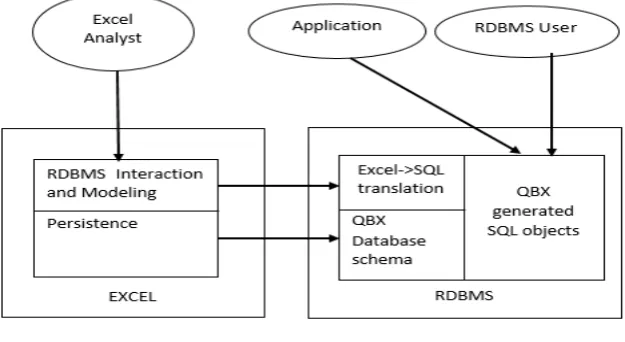
The Architecture of QBX is explained further by the authors.The main aim is to make excel spreadsheet front end to relative databases. The figure 1 shows system’s components and their interactions.
Figure 1 Architecture of QBX
Also the Excel to SQL Translation includes some key points discussed.Some advanced excel capabilities like pivot functions, advanced filters and operations on named ranges, operators like aggregation, selection and set functions are used. The 3 types of Excel to SQL translation are:
1. Fixed Frame Translation: handles self- contained Excel computation.
2. The Table Translation: uses Excel operation on imported relational tables to simulate parts of relational algebra.
3. Excel computation on RTables allowed by Unified translation.
Computerized spreadsheet system works successfully for automatic calculation of values using formulas. But it limits usefulness by having restrictions on formulas which are used for calculations must be a function. Michael Kassoff et al. [6] presented a PrediCalc, a spreadsheet system which allows general logical constraints, preserving benefits of automatic calculation of values. The primary feature of PrediCalc is its approach to update. It bridges the gap between traditional databases and spreadsheets. The proposed PrediCalc: A tool for updating database discussed in [6] states as:
PrediCalc is a tool that fills gap between traditional databases and spreadsheets mostly used today’s application. Its main feature is updating approach. There are basically two cells included in updates viz., the base cell and the computed cell. When any user wants to alter data, delete data or even add new value to the database, PrediCalc tool supports for calculation. The tool first divides the cells into ‘base cells’ and ‘computed cells’. The computed cells are consequences of base cells. If user wants to add a new value then the cell is the base cell and its status changes to computed cell after assignment of the value. Similarly the value to be deleted from the cell is a computed cell which then becomes base cell after deletion.
Andrew Witkowski et al. [7], [8] proposed spreadsheet like computation in RDBMS through extensions to SQL, allowing OLAP tools to handle the user interface. Spreadsheet is a successful analytical tool for business data but it has scalability problem. SQL doesn’t support for n-dimensional array based computations which are frequent in OLAP scale computation while spreadsheets and specialized MOLAP engines are good for constructing formulas for mathematical modelling. In [7] the author presented SQL extensions involving array based calculations for complex modelling using spreadsheet and MOLAP engines. [8] Proposed the SQL extensions, optimizations and execution model called SQL spreadsheet, which makes RDBMS suitable for business modelling applications.
In [7], [8] the proposed SQL extensions of the spreadsheets states as: Some of the features of SQL spreadsheets are as follows:
1. Relations viewed as n-dimensional arrays.
2. Formulas can be defined over arrays and can be ordered automatically.
3. Formulas are encapsulated in new SQL query class supporting data partitioning.
4. Formulas support UPSERT and UPDATE semantics and correlation between their left and right side. The proposed Spreadsheet Clause is given as:
ROLAP and Business Modeling Applications has introduced new SQL query clause named as Spreadsheet clause which identifies, within the query result, partition, dimension, and measure columns. The structure is as follows:
<existing parts of a query block>
SPREADSHEET PBY (cols) DBY (cols) MEA (cols) <processing options>
(
<formula>, <formula>, . . , <formula> )
Here PBY, the partition column divide the relation into disjoint subsets. DBY, the dimension column uniquely identifies a row within each partition and the MEA, the measure column identifies the expressions computed by spreadsheets.
The SQL spreadsheet optimization includes:
1. Parallelization of Formulas: The PBY clause provides partitioning of data and enables parallel formula computation.
2. Pruning of Formulas: The formulas whose results are not referenced in outer blocks is removed from spreadsheets. The algorithm is stated as:
PruneFormulas (G) {
{Pick a formula Fi from FS,
FS = FS - {Fi} /* remove Fi from FS */
If (all the cells referenced on the left side of Fi are filtered out in the outer query block OR
the measure updated by the left side of Fi is not referenced in the outer query block) {
F = F - {Fi} /* delete Fi from list F */ E = E - {all incoming edges into Fi},
If deletion of F generates new ’sink’ nodes, insert them into the set FS }}}
3. Predicate Pushing: The predicates from other query blocks can be moved inside query blocks with spreadsheets, thus reducing the amount of data to be processed.
A fundamental challenge in spreadsheet is lack of ill-defined schema. So Laks V. S. Lakshmanan [9] Proposed a framework where user specify the layout of data in a spreadsheet. Introduced the concept abstract database machine (ADM) which user layout specification viewed as a ‘physical schema’ of spreadsheet which provides relational view of data in spreadsheet applications. This ADM is being implemented for Microsoft Excel applications. Results shows that the approach used is capable of handling broad class of naturally occurring spreadsheet application.
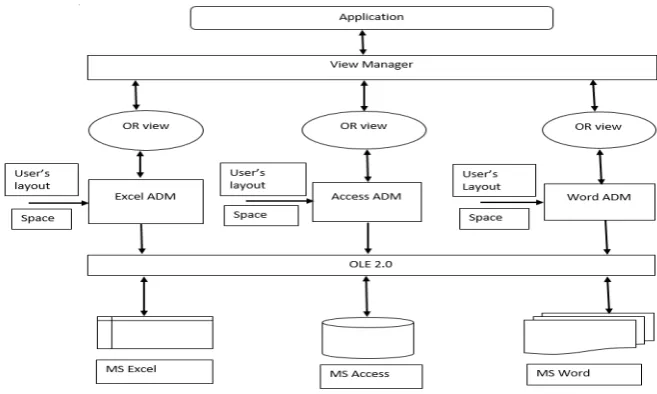
An ADM (Abstract Database Machine) uses the layout specification to provide a relational view of data in spreadsheet applications and supports efficient querying of the spreadsheet data.
Figure 2 Abstract Database Machine Architecture
Figure 2 shows the architecture for achieving interoperability among semi structured information sources, based on building semantic abstractions. ADM has following responsibilities:
1. Mapping physical source data to logical form of semantic data. 2. Reflection
3. Refraction
Simon Peyton Jones et al. [10] contributed for a possible extension to Excel that supports user defined functions. Main objective was to bring the benefits of additional programming language features to a system, maintain the compatibility and the usability advantage by end users. Thus the focus is on end users rather than professional programmers. The author proposed the functions in terms of formulae to be implemented in spreadsheet. Various methods to support high level designs of spreadsheets are discussed in [11], [12], [13], and [14]. Most of them are based on functional programming perspective. In [15] the author proposed a complete extended relational algebra with multi-set semantics, having clear formal background and close connection to standard relation algebra.
3. Motivation for Future Work
Modeling applications. Typical Business Modeling computations with SQL spreadsheet and compared with the ones using standard SQL shows performance advantages and ease of programming for the former. The type of requests comes from users, who describe the operation they need in plain words. The ability to compile a query into Excel formulas will significantly reduce the amount of necessary user work. The advantage of automatic recalculation upon data change.
The future work is: to develop optimization for SQL queries translated into spreadsheet. Also to construct a translator capable of producing the spreadsheet files for other spreadsheet systems like Gnumeric, OpenOfficeCalc, LibreOffice and so on offered by Linux, Windows and Mac Operating Systems. And to implement some AI based algorithms in spreadsheets. Some of the other spreadsheets are stated as
Gnumeric: for Linux operating system:
Gnumeric is a spreadsheet program that is part of the GNOME Free Software Desktop Project. Gnumeric has the ability to import and export data in several file formats, including CSV, Microsoft Excel (xlsx format), Microsoft Works spreadsheets (*.wks), HTML, LaTeX. Gnumeric has a different interface for the creation and editing of graphs from other spreadsheet software.
LibreOffice Calc: for Windows, Linux, BSD and Mac operating system:
LibreOffice Calc is the spreadsheet component of the LibreOffice software package. Calc is capable of opening and saving most spreadsheets in Microsoft Excel file format. It is also capable of saving spreadsheets as PDF files. Main feature is the pivot table.
NeoOfficeCalc: for Mac Operating system:
NeoOfficeCalc is a complete office suite for Mac OS X. With NeoOffice, users can easily view, edit and save OpenOffice documents, LibreOffice docummets, and simple Microsoft Word, Excel, and Powerpoint documents. It is extremely stable and many use it daily easily.
OpenOffice.org Calc: for Linux, Microsoft Windows and Solaris operating system:
OpenOffice.org was known as OpenOffice, was an open source office suite. Its default file format was the OpenDocument Format (ODF). It could also read a wide variety of other file formats, with those from Microsoft Office. OpenOffice.org contains a word processor (Writer), a spreadsheet (Calc), a presentation application (Impress), a drawing application (Draw), a formula editor (Math) and a database management application (Base).
4. Conclusion
This paper presents various methods and tools to translate the relational queries into spreadsheet application. It presents some techniques to deal with certain disadvantages of spreadsheets with SQL extensions. The techniques discussed gives benefit for end users and professional user to implement the complex queries into spreadsheets reducing the error rate generated in the spreadsheet.
References
[1] JacekSroka et al., “Translating Relational Queries into Spreadsheets”, IEEE Trans. On Knowledge and Data Engineering, Vol. 27, No.
8, August (2015).
[2] J. Tyszkiewicz, “Spreadsheet as a relational database engine,” in Proc. ACM SIGMOD Int. Conf. Manag. Data, (2010), pp. 195–206.
[3] B. Liu and H. V. Jagadish, “A spreadsheet algebra for a direct data manipulation query interface,” in Proc. IEEE Int. Conf. Data Eng.,
(2009), pp. 417–428.
[4] R. Abraham and M. Erwig, “Type inference for spreadsheets,”in Proc. 8th ACM SIGPLAN Symp. Principles Prac. Declarative
Program.(2006), pp. 73–84.
[5] A. Witkowski, et al., “Query by excel,” in Proc. 31stInt. Conf. Very Large Data Bases,(2005), pp. 1204–1215.
[6] M. Kassoff, L.-M. Zen, A. Garg, and M. Genesereth, “PrediCalc: A logical spreadsheet management system,” in Proc. 31st Int.
Conf.Very Large Data Bases, (2005), pp. 1247–1250.
[7] A. Witkowski, et al., “Spreadsheets in RDBMS for OLAP,” in Proc. ACM SIGMOD Int. Conf.Manag. Data, (2003), pp. 52–63.
[8] A. Witkowski, S. Bellamkonda, T.Bozkaya, N. Folkert, A. Gupta, L. Sheng, and S. Subramanian, “Business modeling using SQL
spreadsheets,” in Proc. 29th Int. Conf. Very Large Data Bases, (2003), pp. 1117–1120.
[9] L. V. S. Lakshmanan, S. N. Subramanian, N. Goyal, and R. Krishnamurthy, “On query spreadsheets,” in Proc. Int. Conf.Data Eng.,
(1998), pp. 134–141.
[10] S. P. Jones, A. Blackwell, and M. Burnett, “A user-centred approach to functions in Excel,” in Proc. 8th ACM SIGPLAN Int.Conf.
Functional Program, (2003), pp. 165–176.
[11] R. Mittermeir and M. Clermont, “Finding high-level structures in spreadsheet programs,” in Proc. 9th Working Conf. Reverse Eng.,
(2002), p. 221.
[12] B. Ronen, M. A. Palley, and H. C. Lucas Jr., “Spreadsheet analysis and design,” Commun. ACM, vol. 32, no. 1, pp. 84–93, (1989).
[13] D. Wakeling, “Spreadsheet functional programming,” J. Functional Program., vol. 17, no. 1, pp. 131–143, (2007).
[14] A. G. Yoder and D. L. Cohn, “Real spreadsheets for real programmers,”in Proc. Int. Conf. Comput. Language, (1994), pp. 20–30.
[15] P. W. P. J. Grefen and R. A. de By, “A multi-set extended relational algebra-A formal approach to a practical issu e,” in Proc. Int.