Available Online at www.ijpret.com 937
INTERNATIONAL JOURNAL OF PURE AND
APPLIED RESEARCH IN ENGINEERING AND
TECHNOLOGY
A PATH FOR HORIZING YOUR INNOVATIVE WORK
LIVE DATA STREAMING WITH SECURE PROVENANCE TRANSMISSION
ASHISH V. RANDHAI1, DR. P. N. CHATUR2
1.Electronics Engineering Department, M. Tech. in Electronics System and Communication, Government College of Engineering Amravati. 2.Electronics Engineering Department, Head of Department, Government College of Engineering Amravati.
Accepted Date: 05/03/2015; Published Date: 01/05/2015
\
Abstract: Large number of application fields, like real-time financial analysis, e-healthcare systems, sensor networks, are working by continuous data streaming from multiple sources and through intermediate processing by multiple aggregators. Keeping track of data provenance secure for such highly dynamic context is an important requirement, since data provenance is a key factor in assessing data trustworthiness which is useful for many applications. Provenance management for streaming data having several chalenging problems, including the assurance of high processing throughput, low bandwidth consumption, storage efficiency and secure transmission. In this paper, we propose a novel approach to securely transmit provenance for streaming data by embedding provenance into the interpacket timing domain while addressing the above mentioned problems. As provenance is hidden in another host-medium, our solution can be conceptualized as watermarking technique. However, unlike traditional watermarking approaches, we embed provenance over the interpacket delays (IPDs) rather than in the sensor data themselves, hence avoiding the problem of data degradation due to watermarking. Provenance is extracted by the data receiver utilizing an optimal threshold-based mechanism which minimizes the probability of provenance decoding errors. The ability to recover quickly of the scheme against outside and inside attackers is established through an extensive security analysis. Experiments show that our technique can recover provenance up to a positive level against perturbations to inter-packet timing characteristics.
Keywords:USB Camera, Ethernet, Rasberry Pi board
Corresponding Author: MR. ASHISH V. RANDHAI
Access Online On:
www.ijpret.com
How to Cite This Article:
Ashish V. Randhai, IJPRET, 2015; Volume 3 (9): 937-946
Available Online at www.ijpret.com 938
INTRODUCTION
Available Online at www.ijpret.com 939
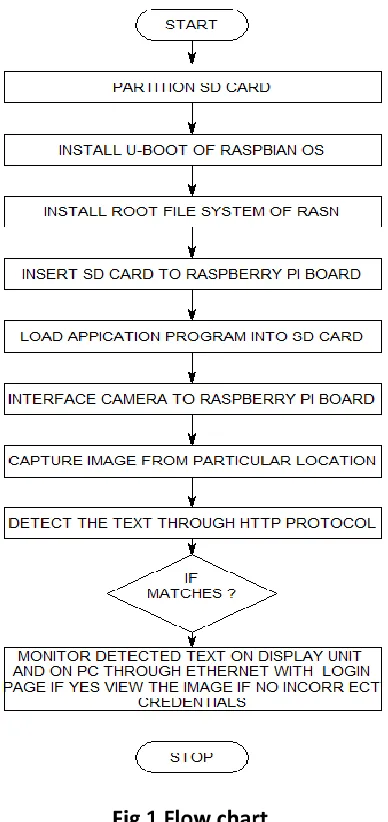
I. HTTP SECURE STREAMING FLOW CHART REPRESENTATION:
Fig 1 Flow chart
III. PROPOSED SYSTEM
Available Online at www.ijpret.com 940
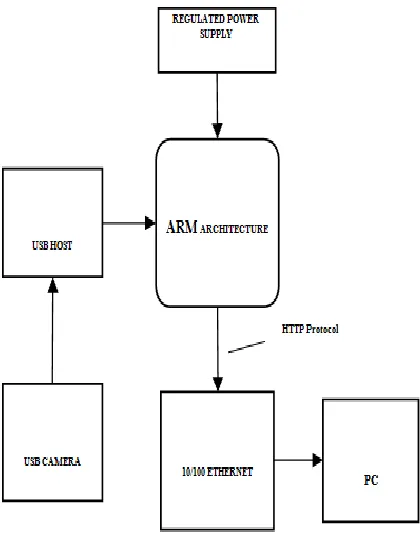
Fig. 2 Block diagram of proposed system
The proposed method is used to overcome the drawback present in existing method. The design for the video encoding system involves various aspects such as the selection of the hardware platform and the embedded operating system.
Before transferring the data through internet first of all we are transferring some password to particular file. Based on this the file will not be hacked and we can provide security for each and every file.
The development board is the hardware platform. Start-up codes, OS kernel and user’s application programs are together stored in a NAND FLASH. Application programs run in 64MB SDRAM, which can also be used as the room of various data and the stack. A CMOS camera capturing videos is connected to a USB interface in the board.
This system is used to design a capturing continuous streaming of videos like live cricket matches etc. capturing these live data and videos are stored inside internet.
Available Online at www.ijpret.com 941 II. HARDWARE IMPLEMENTATION
The Raspberry Pi is a credit-card-sized single-board computer developed in the UK by the Raspberry Pi Foundation with the intention of promoting the teaching of basic computer science in schools.
Fig.3: Raspberry pi board
The Raspberry Pi is manufactured in two board configurations through licensed manufacturing deals with Newark element14 (Premier Farnell), RS Components and Egoman. These companies sell the Raspberry Pi online. Egoman produces a version for distribution solely in China and Taiwan, which can be distinguished from other Pis by their red coloring and lack of FCC/CE marks. The hardware is the same across all manufacturers. The Raspberry Pi has a Broadcom BCM2835 system on a chip (SoC), which includes an ARM1176JZF-S 700 MHz processor, Video Core IV GPU, and was originally shipped with 256 megabytes of RAM, later upgraded to 512 MB. It does not include a built-in hard disk or solid-state drive, but uses an SD card for booting and persistent storage.
Research Article Impact Factor: 4.226 ISSN: 2319-507X Ashish V. Randhai, IJPRET, 2015; Volume 3 (9): 937-946 IJPRET
Available Online at www.ijpret.com 942 The Foundation provides Debian and Arch Linux ARM distributions for download. Tools are available for Python as the main programming language, with support for BBC BASIC (via the RISC OS image or the Brandy Basic clone for Linux), C, Java and Perl.
UVC DRIVER CAMERA
Fig.5: UVC Driver Camera
A UVC (or Universal Video Class) driver is a USB-category driver. A driver enables a device, such as your webcam, to communicate with your computer’s operating system. And USB (or Universal Serial Bus) is a common type of connection that allows for high-speed data transfer. Most current operating systems support UVC. Although UVC is a relatively new format, it is quickly becoming common.
There are two kinds of webcam drivers:
1. The one included with the installation disc that came with your product. For your webcam
to work properly, this driver requires some time to install. It is specifically tuned for your webcam, designed by your webcam manufacturer and optimized for webcam performance.
2. A UVC driver:-You can only use one driver at a time, but either one will allow you to use your webcam with various applications.
V. SOFTWARE IMPLEMENTATION
A. Linux Operating System:
Available Online at www.ijpret.com 943 Linux-based system is a modular Unix-like operating system. It derives much of its basic design from principles established in UNIX during the 1970s and 1980s. Such a system uses a monolithic kernel, the Linux kernel, which handles process control, networking, and peripheral and file system access. Device drivers are either integrated directly with the kernel or added as modules loaded while the system is running.
Fig.6: Architecture of Linux Operating System
B. Qt for Embedded linux:
Qt is a cross-platform application framework that is widely used for developing application software with a graphical user interface (GUI) (in which cases Qt is classified as a widget toolkit), and also used for developing non-GUI programs such as command-line tools and consoles for servers. Qt uses standard C++ but makes extensive use of a special code generator (called the Meta Object Compiler, or moc) together with several macros to enrich the language. Qt can also be used in several other programming languages via language bindings. It runs on the major desktop platforms and some of the mobile platforms. Non-GUI features include SQL database access, XML parsing, thread management, network support, and a unified
cross-platform application programing interface for file handling. It has
extensive internationalization support.
C. OPEN CV:
Available Online at www.ijpret.com 944 efficiency and with a strong focus on real- time applications. OpenCV is written in optimized C and can take advantage of multi core processors. If you desire further automatic optimization on Intel architectures *Intel+, you can buy Intel’s Integrated Performance Primitives (IPP) libraries [IPP], which consist of low-level optimized routines in many different algorithmic areas. OpenCV automatically uses the appropriate IPP library at runtime if that library is installed.
VI. WORKING PRINICIPLE
In this section, we are giving the complete description on the proposed system architecture. Here we are using Raspberry Pi board as our platform. It has an ARM-11 SOC with integrated peripherals like USB, Ethernet and serial etc. On this board we are installing Linux operating system with necessary drivers for all peripheral devices and user level software stack which includes a light weight GUI based on XServer, V4L2 API for interacting with video devices like cameras, TCP/IP stack to communicate with network devices and some standard system libraries for system level general IO operations. The Raspberry Pi board equipped with the above software stack is connected to the outside network and a camera is connected to the Raspberry Pi through USB bus. On the other side we have to host a web server with cloud facility.
After connecting all the devices then power up the device. When the device starts booting from flash, it first loads the Linux to the device and initializes all the drivers and the core kernel. After initialization of the kernel it first checks weather all the devices are working properly or not. After that it loads the file system and starts the startup scripts for running necessary processes and daemons. Finally it starts the main application.
When our application starts running it first check all the devices and resources which it needs are available or not. After that it checks the connection with the devices and gives control to the user. The GUI for the user has the following options.
I.An optional label for displaying the image taken from the camera.
Available Online at www.ijpret.com 945 technique. Here we are using Open CV library to detect a frontal hand as an image using its Haar Cascade hand Detector, this will increase the human computer interaction. If any gesture is recognized by the camera, a rectangular box will appear on touch screen display unit. The identified gestures are sends to ARM board and we can perform TV related functions. In this way we are implementing single camera dedicated television control system using gesture drawing.
CONCLUSION
The project “Television volume and channel control by hand gesture using raspberry pi” has
been successfully designed and tested. It has been developed by integrating features of all the hardware components and software used. Presence of every module has been reasoned out and placed carefully thus contributing to the best working of the unit. Secondly, using highly advanced ARM9 board and with the help of growing technology the project has been successfully implemented.
ACKNOWLEDGMENT
I express my sincere gratitude to Dr. C. N. Chatur, Professor, Electronics Engineering Department, Government College of Engineering, Amravati, for extending his valuable insight for completion this work.
REFERENCES
1. W. T. Freeman, and C. D. Weissman, “Television control by hand gestures,” IEEE
International Workshop on Automatic Face and Gesture Recognition, Zurich, Switzerland, pp. 179-183, June 1995.
2. I. S. Mackenzie, and W. Buxton, “Extending fitts’ law to two dimensional tasks,” CHI 92, pp.
219-226, May 1992.
3. M. Moyle, and A. Cockburn, “The design and evaluation of a flick gesture for ‘back’ and ‘forward’ in web browsers,” Proceedings of the 4th Australasian User Interface Conference on User Interfaces, vol. 18, pp. 39-46, 2003.
Available Online at www.ijpret.com 946 5. D. Lee, and Y. Park, “Vision-based remote control system by motion detection and open finger counting,” IEEE Trans. Consumer Electronics, vol. 55, no. 4, pp. 2308-2313, Nov. 2009.
6. S. Lenman, L. Bretzner, and B. Thuresson, “Using marking menus to develop command sets
for computer vision based hand gesture interfaces,” NordiCHI 02, pp. 239-242, Oct. 2002.
7. P. Premaratne, and Q. Nguyen, “Consumer electronics control system based on hand gesture
moment invariants,” IET Computer Vision, vol. 1, no. 1, pp. 35-41, March 2007.
8. N. Henze, A. Locken, S. Boll, T. Hesselmann, and M. Pielot, “Free-hand gestures for music playback: deriving gestures with a user-centered process,” Proceedings of the 9th International Conference on Mobile and Ubiquitous Multimedia, no. 16, Dec. 2010.
9. A. Wilson, and N. Oliver, “GWindows: robust stereo vision for gesture based control of windows,” ICMI 03, pp. 211-218, Nov. 2003.
10.M. V. Bergh, and L. V. Gool, “Combining RGB and ToF cameras for real-time 3D hand gesture
interaction,” IEEE Workshop on Applications of Computer Vision (WACV), pp. 66-72, Jan. 2011.
11.M. Takahashi, M. Fujii, M. Naemura, and S. Satoh, “Human gesture recognition using 3.5-dimensional trajectory features for hands-free user interface,” ARTEMIS 10, pp. 3-8, Oct. 2010.
12.X. Liu, and K. Fujimura, “Hand gesture recognition using depth data,” Proceedings of 6th IEEE International Conference on Automatic Face and Gesture Recognition, pp. 529-534, May 2004.
13.M. Chen, L. Mummert, P. Pillai, A. Hauptmann, and R. Sukthankar, “Controlling your TV with