
ISSN 2286-4822 www.euacademic.org
Impact Factor: 3.4546 (UIF)
DRJI Value: 5.9 (B+)
E-Document Tracking System
MARYLENE SALDON- EDER Mindanao University of Science and Technology Lapasan Cagayan de Oro City The Philippines
Abstract:
Document Tracking System, (DTS for brevity) for Procurement Process is a utility that establishes better transparency, management and tracking of documents of the procurement process. DTS is a system that deals with the process of storing, locating, updating, and sharing data for the purpose of workflow progression and business outcomes. DTS is a tool used to monitor documents at any given time and generate reports informatively. The system is locally interconnected inside the office using local area network. The system provides convenience of easy tracking of documents within the parameters of the office, and supplies information on the progress of the request on process, the archived request, and determines which requests are completed. The DTS is designed primarily for the Department of Science and Technology – X to expedite processing and recording on matters of procurement of the agency and enhance monitoring of documents and generating reports.
Key words: Document Tracking System, Local Area Network
1.0 Introduction
help organizations access information efficiently and effectively, along with securing protected data. Servers designated to manage documents can also contain built-in workflow applications to maximize task management and assist in overall organizational workflow. DTS helps offices to manage or monitor their documents.
Nowadays, Document Tracking Services (DTS) is used as a web-based application that allows school districts to streamline how they complete and update a wide array of school and district-level reports. Our web-based application completely eliminates faxing documents; provides more flexibility to staff work schedules (clients can access from anywhere) and provides 100% accountability in tracking their documents/reports. DTS is a cost effective web-based application that will guarantee you savings on an on-going basis (Boyd, 2010).
Recently, Electronic Document Tracking System (EDTS) has been developed as a solution system to improve the efficiency of retrieving the document online at any time and tracking the movement of documents in and out of the offices. The role of the EDTS is to logically register, preserve, retrieve and renew documents at high speed while tracing the required documents or files. It is designed to help structure the field by approaching it from three perspectives: (1) technologies that are making EDTS possible, (2) the application areas in which business value is being realized, and (3) the roles and responsibilities of several personnel that will be involved in maintaining EDTS (Demong et al, 2009).
Recently, A Hospital Wireless Local Area Network-Based (WLAN) Tracking System was developed with a personal digital assistant (PDA) having a simple text messaging function and a prototype stand-alone tracking device. Evaluation of the effectiveness of the tracking system was performed in two ways. Twenty-five messages were sent to nurses by direct communication and forty-six messages were sent by the
http://europepmc.org/articles/PMC3092989/reload=0;jsessiond= d6NyMsRK6B5VFTiqT0SU.1).
Statement of the Problem
The DOST Region –X is having hard time in documenting and tracking each request or transaction. One of the problems that they often encounter is losing significant documents without a back-up document. It is time-consuming in finding records or tracking specific requests.
2.0 Methodology
As shown in Figure 2.1, a user or an employee will request an item with all the information to the administration using the document tracking system. The administration will be notified by the system that there was a request pending. Then the administration will forward the transaction to the signatory for evaluation and approval of the request.
2.1 Designing of the Document Tracking System
2.1.1 Analysis
In designing the system, the researchers gathered information and conducted a series of interviews to identify the problems. The researchers interviewed office personnel who were capable of giving information that we needed and who possessed substantial working knowledge and expertise in the flow of their current procurement process. From the various interviews and consultations, the researchers used the data collected as reference in constructing the different diagrams of the proposed system.
The researchers utilized the tools context diagram and use-case diagram to help explain the procedure of our system. The context diagram shows the transaction of the entire system. The use-case diagram enumerates the privileges of every user namely; the administrator, signatory and employee.
2.1.2 Tools
2.1.2.1 Context Diagram The researchers designed and created a context diagram to visualize and understand the flow of the system. Figure 2.2 context diagram level 0 represents the flow of the document
tracking system for
procurement process. It shows how the system sends and receives data and generates reports.
request records, generates reports and requests notification message. The employee inputs personal information and requests to the system. The system shows the request status of the employee/requisitioner. The signatory notifies the system when they approve a request and the system notifies the signatory when there‟s a request that needs to be approved.
2.1.2.2 Use Case Diagram The researchers designed and created a Use Case Diagram to visualize or show different types of users of a system and the various ways on how they interact with the system.
It is a graphical
representation of what the system can do.
Figure 2.3 Use Case diagram shows the representation of the administrator‟s interaction with the system. The administrator has the authority to register an employee. The administrator can edit employee information, add positions for employees, and edit the signatories of each form. The administrator has the authority to forward the request to the signatories. The administrator can hold a request if there are complications affecting the transaction. The administrator can delete requests.
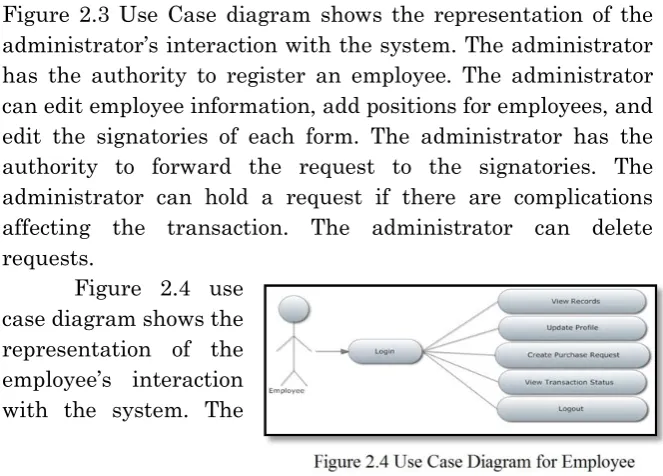
Figure 2.4 use case diagram shows the representation of the employee‟s interaction with the system. The
The employee can edit his/her profile. The employee can create and print his/her own purchase request.
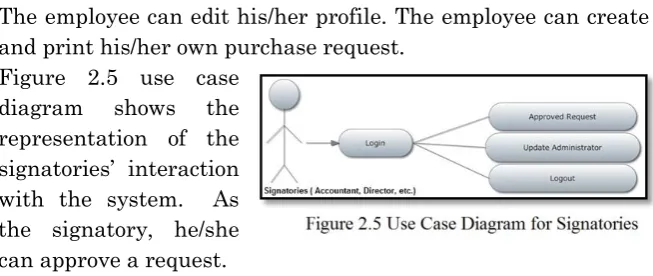
Figure 2.5 use case diagram shows the representation of the signatories‟ interaction with the system. As the signatory, he/she can approve a request.
2.1.2.3 Creation of the Database
A database is a collection of tables containing a list of fields which is used to store data. The researchers designed and created a database of the entire system to show the entities and attributes of each table, connected with the respective relationships. Each table has its unique role, where information is stored such that by connecting them, the task of data retrieval would be easier and faster.
2.2 Developing the Document Tracking System
2.2.1 Softwares used in Developing the System
The softwares used to develop this system are WAMP and Sublime Text. The researchers also used frameworks like Codeigniter and Bootstrap.
CodeIgniter is an Application Development Framework - a toolkit - for people who build web sites using PHP. Its goal is to enable you to develop projects much faster than you could if you were writing code from scratch, by providing a rich set of libraries for commonly needed tasks, as well as a simple interface and logical structure to access these libraries. CodeIgniter lets you creatively focus on your project by minimizing the amount of code needed for a given task.
researchers chose Bootstrap because it is easy to learn and can be easily be manipulated. Since web-based programs and software are easy to access, HTML and PHP are good for developing this kind of programs. HTML and PHP also allows the researcher to do more designs with the help of Bootstrap. MySQL is a free and open source database program. It can be used to create, modify and manipulate information contained in the database. It is used to add, delete and update information in the database.
Sublime Text is a sophisticated text editor code, markup and prose. It‟s like Notepad++ but more modern. Sublime contains many features which allow working with multiple open files. Sublime Text is customizable with simple JSON files. This system gives you flexibility as settings can be specified on a per-file type and per-project basis.
In order to achieve the proposed system, the researchers developed functional software that satisfied the system design. The researchers also used some logical procedures in creating and developing the software in order for the system to work efficiently. The researchers chose Hypertext Processor (PHP) and Hypertext Mark-up Language (HTML) for the front-end, PHP/HTML as a front-end for our proposed system because it has the features which suites the needs of our client and we can assure that it is user-friendly.
2.2.2 Creation of database
it will be easy to retrieve data. As shown in Figure 2.6, the database used in this study starts with a tale called “tbl_purchase_request”. The “tbl_purchase_ request” table is composed of columns for the text of purchase_request_id, emp_id, purchase_request_no, purchase_request_date, purchase_request_section, purchase_request_department, purchase_request_ purpose, viewed, complete and archive. Information stored in the table is referred to as „row‟ in the table.
2.2.2.2 Data Dictionary
After creating the database, next is developing a data dictionary. The data dictionary is important and useful. A data dictionary is a data structure that stores metadata, i.e., (structured) data about data. It contains a list of all files in the database, the number of records in each file, and the names and types of each field. Each data object or item is given a descriptive name and is connected with their respective relationships
2.2.3 Testing and Debugging
After the proposed system was completed, the researchers conducted a trial and error testing for several days to evaluate the system‟s functionalities and usability. The researchers used a parallel testing to check whether the proposed system performs better than the existing ways. The researchers took down note every operation the system transacts in every departments of the office.
2.3 Evaluation of the system
demonstration of the system, the researchers also discussed about the features of the system as well as the important terms of the system‟s process. The researchers let the employees to try and test the system. For the regular user of the system, they requested an item to the administrator while the administrator received the request and completed the process of procurement. This transaction was completed in order to assess that the system was good or not. Finally, the researchers distributed a survey questionnaire (see Appendix G) and asked the employee to evaluate the system‟s functionality as well as the system‟s interface. At the end, the researchers used descriptive statistics to analyze the data acquired from the result of the survey.
3.0 Results and Discussions
3.1 Analysis
To identify the problem, the researchers conducted a series of interviews of our client and analyzed all the data collected to have the most feasible solution of the problem. The information collected from Mr. Ruel Vincent Banal, Administrative Officer V of Department of Science and Technology, Region X (DOST-X) helped a lot in diagnosing the problem besetting the current system. He provided sample forms like Purchase Request (PR) and Purchase Order (PO) forms produced by the current system using the Excel application. He supplied the researchers with a sample monthly report for procurement monitoring. The researchers used the Gantt chart as our guide in our thesis proposal. Finally, the researchers referred to the objectives as the bases for coming up with the enhanced document tracking system for procurement process.
3.2 Design of the Document Tracking System
as well as the printing of every form of the whole process of procurement which is the focus of the study.
3.2.1 Transaction Progress Form (Admin)
Figure 3.1 shows the transaction progress interface of the system; where the administrator can see the progress of every transaction as well as the viewing of request and approval status of every form. The administrator can also see the completed transaction of the request in the archive form. All in all, the administrator has the authority to operate the system.
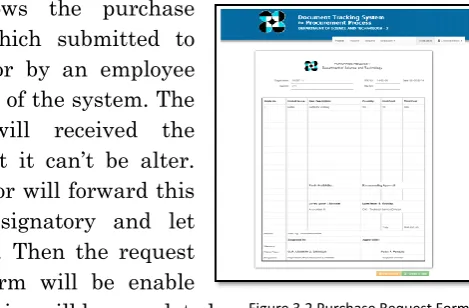
3.2.2 Purchase Request Form (Admin/Signatory)
Figure 3.2 shows the purchase request form which submitted to the administrator by an employee or a regular user of the system. The administrator will received the request form but it can‟t be alter. The administrator will forward this form to every signatory and let them approve it. Then the request for quotation form will be enable
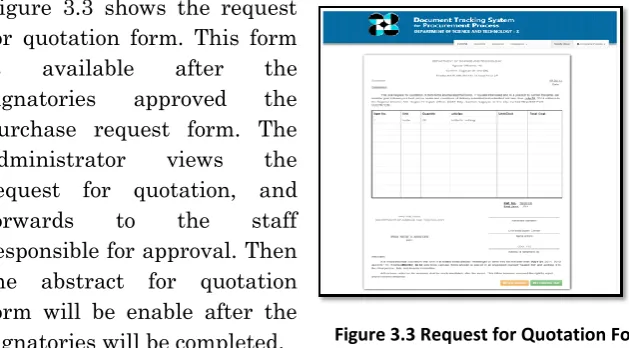
3.2.3 Request for Quotation Form
Figure 3.3 shows the request for quotation form. This form is available after the signatories approved the purchase request form. The administrator views the request for quotation, and
forwards to the staff
responsible for approval. Then the abstract for quotation form will be enable after the signatories will be completed.
3.2.4 Abstract of Quotation Form
Figure 3.4 shows the abstract of quotation form, after the request for quotation is approved by all signatories, the system will then enable the abstract of quotation form. The administrator views abstract of quotation, inputs the supplier and the cost of the products
according to the item
description, then inputs the
choice of supplier, and forwards to the staff responsible for approval.
Figure 3.3 Request for Quotation Form
3.2.5 Purchase Order Form
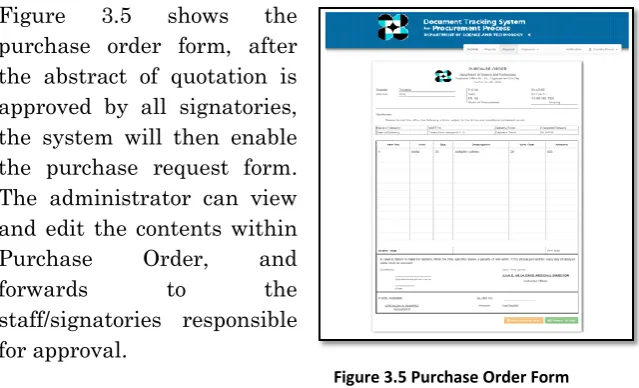
Figure 3.5 shows the
purchase order form, after the abstract of quotation is approved by all signatories, the system will then enable the purchase request form. The administrator can view and edit the contents within
Purchase Order, and
forwards to the
staff/signatories responsible for approval.
3.2.6 Inspection and Acceptance Report
Figure 3.6 shows the
inspection and acceptance report, after the purchase order is approved by all signatories, the system will then enable the inspection and acceptance report form. The administrator can view and input the condition of Inspection and Acceptance with date of request.
Figure 3.5 Purchase Order Form
3.2.7 Acknowledgement Receipt Form
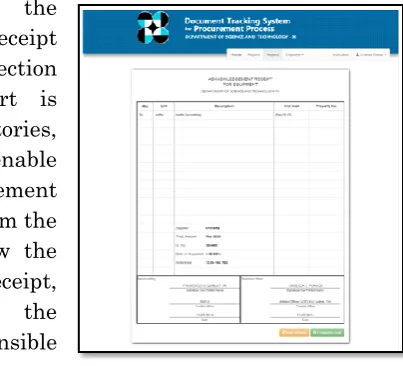
Figure 3.7 shows the acknowledgement receipt form, after the inspection and acceptance report is approved by all signatories, the system will then enable
the acknowledgement
receipt form. In this form the administrator can view the Acknowledgement Receipt,
and forwards to the
staff/signatory responsible for approval.
3.2.8 System Reports
Reports are important to the Department of Science and Technology Region-X (DOST-X) for the evaluation of the Commission on Audit (COA). The system has the menu for the reports. The system reports are categorized by supplier, month and year. These reports are based on the format of the old reports of the office and also it was in PDF format. So the administrator can print easily the reports using the document tracking system. The employee or the regular user can also print the purchase request form in the system. This form was also in PDF format. In addition, the administrator can print every form of the system namely; purchase request, request for quotation, abstract for quotation, purchase order, inspection and acceptance report, and acknowledgement receipt form and this was in PDF format also. To sum up, these reports are the product or the output of the system which helps the administrator to make their work easier and faster.
3.3 Evaluation
The researcher‟s demonstration of the system was successfully conducted at Department of Science and Technology Region-X (DOST-X). The proposed study was all about the tracking of documents of procurement process. This study presented a solution on the unsystematic monitoring of documents which the system can also produce a purchase request form as well as a monthly report.
Survey questionnaires were given to the selected employee of DOST-X after conducting the demonstration of system‟s functionality. The purpose for this survey was to determine the result of the study either the researcher achieves the objective or not. And also to determine what are the other feature needed of the system and add it to the recommendation for the next researchers to continue this study.
Table 3.1 shows the responses of the DOST-X employee about the aspect of system‟s functionality and output. This aspect was important to know how the system‟s functionality works as well as the output produce by the system. In survey‟s results, most of the employee rated the system as “good” in terms of accuracy of tracking of request and printing output while in completeness of information of request, ease of use the system and timeliness of tracking of request the employee rated the system‟s functionality as “fair”. This percentage of results in system‟s functionality and output considered an average result.
Table 3.1 Employees’ response on the aspect of system’s functionality and output
Survey Questions Results Poor Fair Good
Accuracy of tracking of request
Nine out of ten respondents said that the system is accurate in tracking of request and one out of ten said that the system is less accurate in tracking of request.
1(10%) 9(90%)
Completeness of Information of request
Five out of ten respondents said that the system provides complete information on every request while the other five said that the system lacks information on every request.
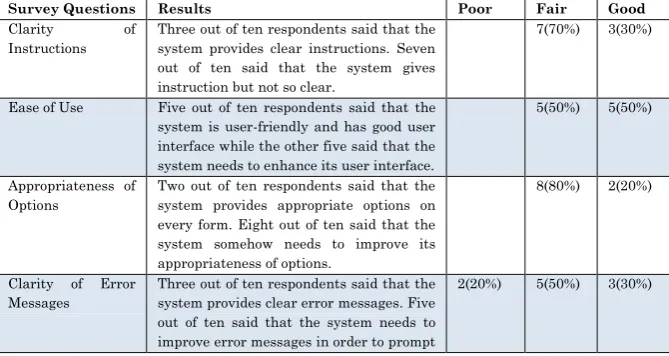
Table 3.2 shows the responses of the DOST-X employee about the aspect of system‟s user interface (UI). This aspect was important also in a sense that the user may able to use the system as easy as possible and it has an environment-friendly program. In survey‟s results, most of the employee rated the system as “fair” in terms of clarity of instructions, appropriateness of options and prevention of input errors while in ease of use the employee rated the system‟s UI as “good” and the clarity of error messages rated by the employee as “poor”. This percentage of results in system‟s functionality and output considered relatively low.
Table 3.2 Employees’ response on the aspect of system’s user interface
Survey Questions Results Poor Fair Good
Clarity of
Instructions
Three out of ten respondents said that the system provides clear instructions. Seven out of ten said that the system gives instruction but not so clear.
7(70%) 3(30%)
Ease of Use Five out of ten respondents said that the system is user-friendly and has good user interface while the other five said that the system needs to enhance its user interface.
5(50%) 5(50%)
Appropriateness of Options
Two out of ten respondents said that the system provides appropriate options on every form. Eight out of ten said that the system somehow needs to improve its appropriateness of options.
8(80%) 2(20%)
Clarity of Error Messages
Three out of ten respondents said that the system provides clear error messages. Five out of ten said that the system needs to improve error messages in order to prompt
2(20%) 5(50%) 3(30%) Ease of Use the
System
Six out of ten respondents said that the system is guaranteed to generate reports and forms (ex. PR, PO, etc.). Four out of ten said that the system can generate reports or forms.
4(40%) 6(60%)
Timeliness of tracking of request
Four out of ten respondents said that the system can track every request on time while the other six said that the system can track every request.
6(60%) 4(40%)
Printing Output Nine out of ten respondents said that the system provides a good printing output while one out of ten said that the system gives fair printing output.
the user about errors and etc. Two out of ten said that the system is poor when it comes to clarity of error messages. Prevention of Input
Errors
Three out of ten respondents said that the system provides an error trapping in input errors to prompt the user about invalid inputs. Seven out of ten said that system needs to improve its error trapping to prevent invalid inputs.
7(70%) 3(30%)
Based on the overall assessment of the results, it can be seen that the employee as the respondents of the survey find the proposed system to be useful but needs an improvement in terms of system‟s user interface. Generally the system was operational and it helped them in tracking their request.
4.0 Conclusion and Recommendations
The Document Tracking System is developed to assist the monitoring of documents specifically in the procurement process. Based on the findings of the study, the proponents concluded that adopting the document tracking system enables other offices to track the documents chronologically in a step-by-step manner in the procurement process in a shorter time. The system has the capability to monitor updated documents and generate reports immediately while archiving the completed transactions that can be retrieved anytime. As a security feature, only authorized persons and registered users can access the system.
The following concerns are recommended to enhance the proposed study:
1. Develop the system into a web-based document tracking system to be accessed online.
2. Provide more security features when the system is uploaded online to be accessed only by authorized users.
performed during the period, a vital factor to protect the integrity and confidentiality of the records.
REFERENCES
Carcirieri, Pamela J. (2008). Document Management and Records Tracking System. Retrieved November 9, 2013 from http://dhs.gov
Demong Rochin, Lailatul Faizah Abu Hassan, Tuan Badrol HIsham Tuan BIsar, and
Hyunsik Woo, Hak Jong Lee, Hyun Chul Kim, Kyung Ja Kang, and Sang Soon Seo. (2007). Hospital Wireless Local Area Network-Based Tracking System. Retrieved March 7,
2014 from
http://europepmc.org/articles/PMC3092989/reload=0;jses sionid=d6NyMsRK6B5VFTiqT0SU.10
Perocho, Lawrence M., Mark Anthony S. Abao, Christian Ryan G. Lopez. (2012). Document Tracking System of Northern Mindanao Medical Center. Retrieved July 3,
2013 from
http://asianscientificjournals.com/publication/index.php/ aitr/article/view/331
Sueno, Bernadette. (2009). Up Docutrak: An Assessment of an In-House Developed Document Tracking System.
Retrieved December 12, 2013 from
http://journals.upd.edu.ph/index.php/index/search/result s
Sujeet Kumar, Abhishek Verma, and Siddharth Dixit. (2012). Electronic File Tracker. Retrieved July 1, 2013, from http://www.ijress.org

![TERM SHEET FOR SERIES A PREFERRED STOCK FINANCING OF [INSERT COMPANY NAME], INC. [, 20 ]](data:image/gif;base64,R0lGODlhAQABAIAAAP///wAAACH5BAEAAAAALAAAAAABAAEAAAICRAEAOw==)