ISSN 2348 – 7968
A Survey on Securing the Virtual Machines in Cloud
Computing
K.Sunitha
Asst.Prof.,CSE,MGIT,Affilialted to JNTU, HYD.
Abstract
Cloud computing is one of today’s most exciting technologies, because it can reduce the cost and complexity of applications, and it is flexible and scalable. These benefits changed cloud computing from a dreamy idea into one of the fastest growing technologies today. Virtualization is a rapidly evolving technology that can be used to provide a range of benefits to computing systems, including improved resource utilization, software portability, and reliability. In addition, the virtualization technology has limit security capabilities in order to secure wide area environment such as the cloud. Therefore, the development of a robust security system requires changes in traditional virtualization architecture. This paper discusses virtualization components, approaches , VMs Encryption options and new security architecture in a hypervisor-based virtualization technology in order to secure the cloud environment.
Keywords—Virtualization, cloud computing, security, hypervisor.
I. INTRODUCTION
Cloud computing, an emerging IT delivery model, is the next generation of networking computing which can deliver both software and hardware as on-demand resources and services over the internet with lower IT costs and complexities[1]. Actually, in cloud there are lot users and their application that are running but security is important for all of them. The cloud must work properly and creates an immune environment against attacks, no matter what application is running on the cloud. In the computer world, anything makeable is breakable, however. In addition, cloud is an Internet-based technology, and but building root-of-trust cloud systems seemed impossible. Therefore, it seems main area of concern in cloud is security and cloud providers will face innumerable vicissitudes when their cloud become bigger than now.
However, this way to decentralize applications and allow universal access to data creates its own set of challenges and security problems that must considered before transferring data to a cloud. Moving toward cloud computing requires the consideration of several essential factors, and the most important of them is security.
II. VIRTUALIZATION COMPONENTS
Virtualization - A technology that has an enormous effect in today’s IT world. It is a technique that divides a physical computer into several partly or completely isolated machines commonly known as virtual machines (VM) or guest machines.
Multiple of these virtual machines can run on a host computer, each possessing its own operating system and applications. This gives an illusion to the processes on these virtual machines as if they are running on a physical computer, but in reality they are sharing the physical hardware of the host machine. The software that allows multiple operating systems to use the hardware of the physical machine is called a hypervisor or a control program. Hypervisors sit between the operating system of the host machine and the virtual environment.
Virtualization is a technique, which allows to share single physical instance of an application or resource among multiple organizations or tenants (customers). It does so by assigning a logical name to a physical resource and providing a pointer to that physical resource when demanded.
ISSN 2348 – 7968
challenge as virtualization adds more points of entry and more interconnection complexity [6]. Unlike physical servers, VMs have two boundaries: physical and virtual [7].
Creating a virtual machine over existing operating system and hardware is referred as Hardware Virtualization. Virtual Machines provide an environment that is logically separated from the underlying hardware. The machine on which the virtual machine is created is known as host machine and virtual machine is referred as a guest machine. This virtual machine is managed by a software or firmware, which is known as hypervisor.
A. Hypervisor
Hypervisor is a firmware or low-level program that acts as a Virtual Machine Monitor.
The Virtual Machine Monitor (VMM) or hypervisor is responsible for virtual machines isolation; therefore, if the VMM is compromised, its virtual machines may potentially be compromised as well. The VMM is a low-level software that controls and monitors its virtual machines, so as any traditional software it entails security flaws [7]. Keeping the VMM as simple and small as possible reduces the risk of security vulnerabilities, since it will be easier to find and fix any vulnerability.
Virtualization introduces the ability to migrate virtual machines between physical servers for fault tolerance, load balancing or maintenance [8]. This useful feature can also raise security problems [2][3]. An attacker can compromise the migration module in the VMM and transfer a victim virtual machine to a malicious server. Also, it is clear that VM migration exposes the content of the VM to the network, which can compromise its data integrity and confidentiality. A malicious virtual machine can be migrated to another host (with another VMM) compromising it.
There are two types of hypervisor:
Type 1 hypervisor runs on bare system.
LynxSecure, RTS Hypervisor, Oracle VM, SunxVM Server, VirtualLogic VLX are examples of Type 1 hypervisor.
"The type1 hypervisor does not have any host operating system because they are installed on a bare system."
Type 2 hypervisor is a software interface that emulates the devices with which a system normally interacts. Containers, KVM, Microsoft Hyper V, VMWare Fusion, Virtual Server 2005 R2, Windows Virtual PC and VMware workstation 6.0 are examples of Type 2 hypervisor.
In Type I virtualization architectures, the virtual machine monitor (VMM) is just above the hardware and intercepts all the communications between the VMs and the hardware. There is a management VM on top of the VMM, which manages other guest VMs, and is responsible for most communications with the hardware. A popular instance of this type of virtualization architecture is the Xen system [9].
In Type II virtualization architectures, such as VMware Player [3], the VMM runs as an application within the host operating system (OS). The host OS is responsible for providing I/O drivers and managing the guest VMs.
From a security point of view, both architectures raise the question “How can the VM trust its execution environment, which may be either malicious, or susceptible to vulnerability exploits?” We elucidate this concern by describing two concrete application scenarios where it arises.
ISSN 2348 – 7968
associated configuration settings is built as a VM and executed on the service provider’s data centers. The problem is how can they trust the VM execution environment and be sure that the private data stored there are safe enough.
• The ubiquitous computing community has proposed the concept of storing the “working environment” of a user on a portable storage device so that any computer available to the user can be “personalized” to provide the exact same look and feel as the user’s personal computer (e.g., the SoulPad system developed at IBM [11]). Virtualization can enable this concept by storing an OS image together with applications and data as a VM on a portable storage device. The user does not have to bring a computer everywhere, instead, his VM can be imported to the virtualization environment provided by his collaborators or a third-party computing company. In such a scenario, how can the user be assured of the privacy of data in his VM if he wants to execute it on an untrusted computer?
Generally, in order to ensure the trustworthiness of a software system, we first determine the trusted computing base (TCB) of that system. Then, we check the integrity of its TCB and decide whether to trust it. In virtualization-based architecture, while the hardware is inevitably in the TCB and the VMM has a relatively small code base and is thus easy to verify, a full-fledged OS – the OS in the management VM or the host OS – cannot be trusted because (1) the sizes of the source code base of a VMM and an OS are very different, (2) the known and unknown vulnerabilities and numerous potentially malicious applications running within the management OS and the administrative interface of the management OS are exposed more often to careless or even malicious administrators.
III. VIRTUALIZATION APPROACHES
A. Types of Hardware Virtualization
Here are the three types of hardware virtualization: 1. Full Virtualization
2. Emulation Virtualization 3. Paravirtualization
1) Full Virtualization
In Full Virtualization, the underlying hardware is completely simulated. Guest software does not require any modification to run.
2) Emulation Virtualization
In Emulation, the virtual machine simulates the hardware and hence become independent of the it. In this, the guest operating system does not require
modification. 3) Paravirtualization
In Paravirtualization, the hardware is not simulated. The guest software run their own isolated domains. VMware vSphere is highly developed infrastructure that offers a management infrastructure framework for virtualization. It virtualizes the system, storage and networking hardware.
B .Shared resource
VMs located on the same server can share CPU, memory, I/O, and others. Sharing resources between VMs may decrease the security of each VM. For example, a malicious VM can infer some information about other VMs through shared memory or other shared resources without need of compromising the hypervisor [12]. Using covert channels, two VMs can communicate bypassing all the rules defined by the security module of the VMM [13]. Thus, a malicious Virtual Machine can monitor shared resources without being noticed by its VMM, so the attacker can infer some information about other virtual machines.
C . Public VM image repository
ISSN 2348 – 7968
D . Virtual machine rollback
Furthermore, virtual machines are able to be rolled back to their previous states if an error happens. But rolling back virtual machines can re-expose them to security vulnerabilities that were patched or re-enable previously disabled accounts or passwords. In order to provide rollbacks, we need to make a “copy” (snapshot) of the virtual machine, which can result in the propagation of configuration errors and other vulnerabilities.
E. Virtual machine life cycle
Additionally, it is important to understand the lifecycle of the VMs and their changes in states as they move through the environment. VMs can be on, off, or suspended which makes it harder to detect malware. Also, even when virtual machines are offline, they can be vulnerable [14]; that is, a virtual machine can be instantiated using an image that may contain malicious code. These malicious images can be the starting point of the proliferation of malware by injecting malicious code within other virtual machines in the creation process.
IV. VIRTUAL MACHINES SECURITY
A. Protecting the VMM
A hypervisor can be used to monitor the virtualized systems it is hosting. However, the hypervisor can in turn be targeted and modified by an attack. As the hypervisor possesses every privilege on its guest systems, it is crucial to preserve its integrity. However, while it is possible to ensure the integrity of a system during boot (we can for example cite the Trusted Computing Group13 which works on this topic), it is much harder to ensure runtime integrity. So, to ensure runtime integrity, one could think of installing a second hypervisor under the initial hypervisor dedicated to monitoring it, similarly to one would have to guarantee that the most privileged hypervisor cannot in turn be corrupted. Several studies have therefore focused on using other means to ensure the integrity of the most privileged element.
B. Protecting the VMs against their VMM. The purpose of CloudVisor is to ensure data
confidentiality and integrity for the VM, even if some elements of the virtualization system (hypervisor, management VM, another guest VM) are compromised. The idea is that data belonging to a VM but accessed by something else than this VM appears encrypted. To reach its goal, CloudVisor
virtualizes the monitored hypervisor (realizing nested virtualization), therefore removing the latter from the most privileged zone while still giving it the illusion of the opposite. This means that the monitored VMM is now running in guest mode while CloudVisor is the only one in root mode. Any access, requested by the VMM, to some memory belonging to a VM is then trapped by Cloud-Visor. If the access is not requested by the owner of the requested page, CloudVisor encrypts its content.
C. Virtual Machine Encryption
Because a virtual machine consists of a set of files, machine theft has now become much easier. People will notice you walking out of the building with a server but not with a USB stick containing a set of VM files. Furthermore, stealing a virtual machine can be achieved with relative ease by simply snapshotting the VM and copying the snapshotted files. All of this can be done without taking the virtual machine offline.
Fortunately, there are options available for encrypting all or parts of a virtual machine, whether the VM runs in a datacenter/private cloud or within an instrumented or un-instrumented public cloud. There are several layers in the virtualization stack where you can deploy encryption. Each option has pros and cons, especially when you consider management of encryption keys.
The following are potential places that virtual machines and data can be encrypted in a virtualized environment:
• Within the virtual machine itself. In this case, files other than those stored in VMDKs cannot be protected.
• Within the hypervisor. At the time of writing, none of the hypervisor vendors provide encryption solutions for server virtualization environments.
• On a network-attached storage (NAS) filer. In this case, it is most likely that all portions of the VM are encrypted, and if NFS is the protocol between the filer and the hypervisor, selected parts of the VM could be encrypted.
ISSN 2348 – 7968
and it is not possible to distinguish between one VM and another.
• Within the storage devices themselves. This is usually accomplished by means of full disk encryption (FDE).
• In backups / Disaster Recovery (DR). Note that backups can be taken at any layer in the stack.
Figure 4.1 shows the encryption options.
All of these choices offer some level of protection for VMs, but some options are rather static in nature and don't reflect the increasing use of virtual machines as mobile containers for workflow. For example, if a virtual machine migrates from a private cloud to a public cloud, switch-level encryption or full disk encryption becomes useless because you don't migrate your switches or disks to a public cloud along with the VM!
To solve these issues, we need a flexible storage model that encompasses strong encryption and policy-driven key management capabilities (to mitigate the complexities found around key management). we need strong separation of duties to allow different workloads with different privilege levels, or virtual machines from different customers, to share the same infrastructure.
Figure 4.1: VM encryption options
D. ENCRYPTION UNDER THE HYPERVISOR
Figure 4.2 shows how VMs can be encrypted underneath the hypervisor. By using standard protocols such as NFS or iSCSI, the encryption is independent of the hypervisor platform. That means hypervisor features such as vMotion and Live Migration continue to work unchanged. As VMs are copied into an encrypted datastore, they will be
encrypted according to the encryption policy that is put in place.
Figure 4.2: Encryption "underneath" the hypervisor
A great benefit with this approach is that no modifications are needed to the virtual machines themselves. Regardless of operating system or applications, the data is encrypted at rest. For large organizations that may have many thousands of applications modifying each and every VM, attempting to secure the VM directly is certainly problematic and therefore this approach works well.
The key server could reside anywhere:
• In the customer's datacenter
• At the provider site where the VMs reside • At a third-party site that only hosts key
services
The one drawback with this encryption approach is that the VM administrator sees a clear text view of the VMs as they are read from storage and through the hypervisor. This is not a problem in all environments, however. If backups are taken at the hypervisor layer, encryption may already take place within the backup app, and therefore, cleartext data at this layer may be beneficial for use with other operational applications or processes. Even so, there are many organizations that are concerned about exposing data to VM administrators.
Another disadvantage with this approach is that service providers will need to deploy the technology in their infrastructure. Some providers will work with you to customize your environment, while others, such as Amazon AWS, allow you to encrypt only within the VM itself.
ISSN 2348 – 7968
VMs are moved to backups/archives, between datacenters for replication purposes, or to wherever else they are copied, they remain secure at all times.
E. ENCRYPTION WITHIN THE VM
Figure 4.3 presents another model. In this model, for all devices encrypted, there is an encrypted path from the VM's operating system through the hypervisor and down to the storage layer. This prevents VM administrators from being able to view sensitive data that resides within the VM. In this environment, as with the previous one described, the key server could reside anywhere.
Figure 4.3: Encryption within the VM
F. ENCRYPTION OF VM IMAGES AND
APPLICATION DATA
Another model combines encryption at the VM and storage layers. This combined option is superior because there's an encrypted path for sensitive data all the way from the VM through the hypervisor. This prevents the VM administrator from seeing cleartext data. In addition, the snapshot, suspend, log, and other important VM files can be encrypted too, because the encryption "container" encompasses all VM files. If a snapshot is taken, the contents are also encrypted. Most virtualization platforms give you the flexibility to split VM files and place them on different datastores, allowing for more flexibility in encryption deployment and implementation. This option is shown in Figure 4.4.
Figure 4.4: Encryption of both VM images and application data
G. KEY MANAGEMENT CHALLENGES
In the preface to the second edition of his book Applied Cryptography (Wiley, 1996), Bruce Schneier is quoted as saying "Key management is the hardest part of cryptography and often the Achilles' heel of an otherwise secure system." Encryption systems are typically hard to crack and certainly beyond the capabilities of most individuals. However, unless a good key management solution is put in place, keys can be easily exposed or lost. As we move toward hybrid cloud models where organizations have VMs and data in multiple locations, the need for encryption as a means to protect sensitive data beyond the traditional security boundary is becoming more mainstream. The focus from security teams then typically becomes, Who owns the keys and where should they be held?
Figure 4.5 shows three possible options for key management that we will see being deployed over the next several years. The three key management options are as follows:
• The cloud service provider owns the keys as well as the VMs. Providers can certainly provide this capability, and for many, the fact that their data is encrypted and they do not have to manage keys themselves is seen as a big plus. However, if authorities were to seize systems containing your VMs/data, they would likely have access to the keys as well.
ISSN 2348 – 7968
distrustful of service provider staff that they have no control over and will not relinquish control of key services.
• Third-party key services host the keys. Some of the cloud service providers don't want to host keys, and there are many places where organizations require encryption but do not wish to host the keys themselves. This model certainly will be interesting for smaller organizations that want to use the public cloud but do not wish to have the responsibility for managing keys on site.
The discussion around where to host keys is becoming increasingly popular, particularly as we see the balance of production servers in the public cloud moving passed the 50 percent mark and as more and more sensitive data migrates into public cloud environments.
Figure 4.5: VM encryption key management options
H. Hypervisor Security
In a virtualization environment, there are several Virtual Machines that may have independent security zones which are not accessible from other virtual machines that have their own zones. A hypervisor has its own security zone, and it is
the controlling agent for everything within the virtualization host. Hypervisor can touch and affect all acts of the virtual machines running within the virtualization host [15].There are multiple security zones, but these security zones exist within
the same physical infrastructure that, in a more traditional sense, only exists within a single security zone. This can cause a security issue when an attacker takes control over the hypervisor. Then the attacker has full control over all data
within the hypervisor’s territory. Another major virtualization security concern is “escaping the Virtual Machine” or the ability to reach the hypervisor from within
the Virtual Machine level. This will be even more of a concern as more APIs are created for virtualization platforms [4]. As more APIs are created, so are controls to disable the functionality within a Virtual Machine that can reduce
performance and availability.
1) Benefits and weakness of hypervisor-based systems
The hypervisor, apart from its ability to manage resources, has the potential to secure the infrastructure of cloud. Hypervisor-based virtualization technology is the best choice of implementing methods to achieve a secure cloud environment.
The reasons for choosing this technology:
1. Hypervisor controls the hardware, and it is only way to access it. This capability allows hypervisor-based virtualization to have a secure infrastructure. Hypervisor
can act as a firewall and will be able to prevent malicious users to from compromising the hardware infrastructure.
2. Hypervisor is implemented below the guest OS in the cloud computing hierarchy, which means that if an attack passes the security systems in the guest OS, the hypervisor can detect it.
3. The hypervisor is used as a layer of abstraction to isolate the virtual environment from the hardware underneath.
4. The hypervisor-level of virtualization controls all the access between the guests’ OSs and the shared hardware underside. Therefore, hypervisor is able to simplify the transaction-monitoring process in the cloud environment. Aside part of the benefits of hypervisor, there are some weaknesses that are able to affect performance of implemented security methods:
1. In a hypervisor-based virtualization, there is just one hypervisor, and the system becomes a single point-of-failure. If hypervisor crashes due to an overload
or successful attack, all the systems and VMs will be affected.
ISSN 2348 – 7968
2) Security management in hypervisor-based virtualization
As mentioned before, hypervisor is management tools and the main goal of creating this zone is building a trust zone around hardware and the VMs. Other available Virtual Machines are under the probation of the hypervisor, and they
can rely on it, as users are trusting that administrators will do what they can to do provide security. There are three major levels in security management of hypervisor as mentioned below:
• Authentication: users must authenticate their account properly, using the appropriate, standard, and available mechanisms.
• Authorization: users must secure authorization and must have permission to do everything they try to do. • Networking: the network must be designed using mechanisms that ensure secure connections with the management application, which is most likely located in
a different security zone than the typical user.
Authentication and Authorization are some of the most interesting auditing aspects of management because there are so many methods available to manage a virtual host auditing purpose [16]. The general belief is that networking is the most important issue in the transaction between users and the hypervisor, but there is much more to virtualization security than just networking. But it is just as important to understand the APIs and basic concepts of available hypervisor and virtual machines and how those management tools work. If security manager can address Authentication, Authorization, and Virtual Hardware and hypervisor security as well as networking security, cloud clients well on the way to a comprehensive security policy [17]. If a cloud provider at the virtualization level depends only on network security to perform these tasks, then the implemented virtual environment will be at risk. It is a waste of money if a cloud provider spends too much on creating a robust, secure network and neglects communication among virtual machines and the hypervisor.
V . A PROPOSED ARCHITECTURE BY F. SABAHI
“When the workload of the VM increases
abnormally, the VM may be a victim or an attacker”
A. Description of Proposed Architecture
Generally, encryption is used by most of users and it is not possible to ask users not to encrypt their data.
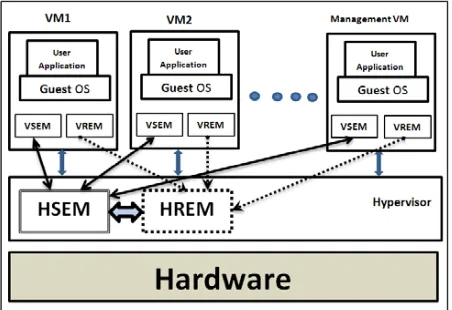
in architecture, there are not any requirements to reveal user data or encryption key to cloud providers. it's also added some new features to increase security performance in virtualization technology such as security and reliability monitoring units (VSEM and VREM).HSEM and HREM are the main components of the security system, and all the other parts of the security system communicate with them, but HSEM decides if the VM is an attacker or a victim. Actually, HSEM receives behavioral information from VSEM and HREM and never collects any
information itself. In addition, HSEM notifies the hypervisor about which VM is under Level-2 monitoring in order to set service limits until the status is determined.
Figure 4.6 illustrates the new secure architecture and the new units in VMs level, VSEM and VREM, which is available for all VMs (and also in Management VM) In addition, There are
two other new units, HSEM and HREM, which is available in the hypervisor level. VSEM and VREM consume low resources of the VM, but they help to secure VMs against attacks.
Fig. 4.6. Architecture of secured virtualization
B. VM Security Monitor (VSEM)
ISSN 2348 – 7968
hypervisor activity, some tasks were done by VSEMs in VMs such as collecting information that is asked by HSEM. In addition, because users don’t want to consume their resources, which they paid for it, VSEMs have two levels of monitoring that consume more resource only when it is necessary. Actually, each level of VSEM is monitored almost the same events but at different detail levels.
1) Level 1
In this level, the VSEMs monitor their own VMs. In this level VSEM collects of the source and destination addresses which are in head of data, number of unsuccessful and successful tries in sending data, and number of requests that were sent to the hypervisor. At this level, VSEM, according to the brief history of the VM which provided by HSEM, looks for anomaly behavior (HSEM has had history of VMs in more details). For instance, the system identifies the VM as a potential attacker or victim if the number of service requests from the hypervisor is higher than average based on the history of requests of the VM. If abnormal behavior is detected, or the type of sending data and unsuccessful tries increase above that threshold (according to history of the VM), then VSEM switches to Level 2 and also notify HSEM about this switching in order to HSEM investigates the VM for finding malicious activities.
2) Level 2
In this level, the VSEM monitors and captures the activity of the VM in more detail, such as VM’s special request from the hypervisor, details of requested resources (e.g. the number of requests), and the destination transmitted packets (to recognize if it is in the same provider’s environment or outside). In this mode VSEM notifies HSEM about the level of monitoring in the VM. According to this notification, the hypervisor set activity limits in types of activities until HSEM learns that the VM is not an attacker or victim. At this level, HSEM makes a request from VREM about the reliability status of the VM, including the workload status and how many times the VM workload was close to the maximum capacity of the VM.
C. VM Reliability Monitor (VREM)
VREM monitors reliability-related parameters, such as workload, and notifies the load-balancer (within the hypervisor) about the parameter results. VREM is also used for security purposes. The VREM will send useful information such as workload status to HREM and requests the status of the VM from HSEM, and then it decides whether to give the VM more resources. Actually, if the VM requests as many
resources as it can (that is different behavior according to its usage history), it may signify an overflow attack victim. Therefore, proposed HREM can detect overflow attacks and notify the HSEM about it.
VI. CONCLUSION
A survey shows that security is the most significant user’s concerns in cloud computing [9]. In this paper, I focused on the security of virtual machines which is a key technology of cloud platforms.
Majority of the security issues presented here concerns the security of the host and the hypervisor. If the host or the hypervisor is compromised then the whole security model is broken. Attacks against the hypervisor becoming more popular among the attackers realm. Therefore after setting up the environment, care should be taken to ensure that the hypervisor is secure enough to the newly emerging threats, if not patches should be installed.
Virtualization is a powerful solution to reduce the operational costs in today’s computing but if done wrong it become as a threat to the environment. While implementing, exaggerate the security model to withstand the attacks.
And I also focused on Virtual Machine encryption options like i) Encryption "underneath" the hypervisor, ii)Encryption within the VM and iii) Encryption of both VM images and application data . which are very useful for protecting the VMs from attackers.
REFERENCES
[1] M. Armbrust, A. Fox, R. Griffith, Anthony D. Joseph,et al. “ Above the Clouds: A Berkeley View of Cloud Computing” . 2009, EECS Department, University of California, Berkeley.
[2] Jasti A, Shah P, Nagaraj R, Pendse R (2010) Security in multi-tenancy cloud. In: IEEE International Carnahan Conference on Security Technology (ICCST), KS, USA. Washington, DC, USA: IEEE Computer Society. pp 35-41
ISSN 2348 – 7968
Proceedings of the 10th conference on Hot Topics in Operating Systems, Santa Fe, NM. volume 10. CA, USA: USENIX Association Berkeley. pp 227-229
[4] Owens D (2010) Securing elasticity in the Cloud. Commun ACM 53(6):46-51.
[5] Ertaul L, Singhal S, Gökay S (2010) Security challenges in Cloud Computing. In: Proceedings of the 2010 International conference on Security and Management SAM’10. Las Vegas, US: CSREA Press. pp 36-42 .
[6] Reuben JS (2007) A survey on virtual machine Security. Seminar on Network Security.
http://www.tml.tkk.fi/Publications/C/25/papers/Reub en_final.pdf webcite. Technical report, Helsinki University of Technology, October 2007.
[7] Morsy MA, Grundy J, Müller I (2010) An analysis of the Cloud Computing Security problem. In: Proceedings of APSEC 2010 Cloud Workshop. Sydney, Australia: APSEC.
[8] Cloud Security Alliance (2010) Top Threats to Cloud Computing
V1.0.Available: https://cloudsecurityalliance.org/rese arch/top-threats webcite
[9] P. Barham, B. Dragovic, K. Fraser, S. Hand, T. Harris, A. Ho,R. Neugebauer, I. Pratt, and A. Warfield, “Xen and the art of virtualization,” in Proc. ACM Symp. Operating Systems Principles, no. 5, Oct. 2003, pp. 164–177.
[10] G. Gruman and E. Knorr. What cloud computing really means. InfoWorld, April 2008. Electronic Magazine, available at
http://www.infoworld.com/article/08/04/07/15FE-cloud-computingreality 1.html.
[11CloudComputing,
http://www.ibm.com/ibm/cloud/.
[12] Hashizume K, Yoshioka N, Fernandez EB (2013) Three misuse patterns for Cloud Computing. In: Rosado DG, Mellado D, Fernandez-Medina E, Piattini M (eds) Security engineering for Cloud Computing: approaches and Tools, Pennsylvania, United States: IGI Global. pp 36-53 .
[13] Ranjith P, Chandran P, Kaleeswaran S (2012) On covert channels between virtual machines. Journal in Computer Virology Springer 8:85-97 [14] Morsy MA, Grundy J, Müller I (2010) An analysis of the Cloud Computing Security problem. In: Proceedings of APSEC 2010 Cloud Workshop. Sydney, Australia: APSEC.
[15]G. Texiwill, Is Network Security the Major Component of Virtualization Security?, 2009.
[16] T. Ristenpart and e. al, "Hey, you, get off of my cloud: exploring information leakage in third-party compute clouds," presented at the 16th ACM
conference on Computer and communications security, Chicago, IL, November 9-13, 2009.