ABSTRACT
HU, ZHEWEI. Helping Students Make Better Contributions to Open-Source Software Projects. (Under the direction of Dr. Edward Gehringer).
Instructors who teach software engineering courses may struggle to come up with course project ideas. This situation may occur more frequently for instructors who teach advanced undergraduate or graduate courses. One approach is to use existing open-source software (OSS) projects as the code base on which to build course projects. Contributing to OSS projects holds many benefits for students, for instance, allowing them to learn good coding practices from real-world projects, and giving them a glimpse of a real project. However, it is difficult for instructors to find specific open-source projects that are suitable for software engineering courses. It is also challenging for the OSS core team to specify enough course projects with a reasonable amount of work and offer consistent support during the semester.
We, as both the teaching staff and the core team of one OSS project named Expertiza, have long-term experience in maintaining student-authored open-source software and making it as the code base of software engineering courses. Our course projects require students to use GitHub pull requests as deliverables to make contributions to OSS projects. One of the big challenge we face is to improve the code quality of student contributions. After manually checking 313 OSS-based course projects in the past five years, we summarized 13 common mistakes that frequently occur in student contributions, such as not following the existing design or messy pull requests. We propose four suggestions, including (1) elaborated project requirements, (2) better communication between core team members and students, (3) test-driven development, and (4) usage of third-party tools, to help students reduce the frequency of common mistakes and improve the quality of their contributions.
We have already adopted the first two suggestions over the years. To test the performance of the test-driven approach on OSS-based course projects, we conducted a quasi-experimental controlled study, which lasted for more than one month. Thirty-five masters students participated in our study. They worked on course projects in teams, half of which were assigned to the TDD group (using the test-driven approach), and the rest of which were assigned to the non-TDD group (using the traditional test-last approach). We found that students in the TDD group were able to apply test-driven techniques pragmatically—spending more than 20% of their time on average complying with the test-driven process—throughout the whole project. There were no major differences in the quality of source-code modifications and newly added tests between the TDD group and the non-TDD group; however, the TDD group wrote more tests and achieved significantly higher (12% more) statement coverage.
© Copyright 2019 by Zhewei Hu
Helping Students Make Better Contributions to Open-Source Software Projects
by Zhewei Hu
A dissertation submitted to the Graduate Faculty of North Carolina State University
in partial fulfillment of the requirements for the Degree of
Doctor of Philosophy
Computer Science
Raleigh, North Carolina
2019
APPROVED BY:
Dr. Christopher Parnin Dr. Sarah Heckman
Dr. Ranga Vatsavai Dr. Edward Gehringer
DEDICATION
BIOGRAPHY
Zhewei Hu was born on March 3, 1992, in Cixi, Zhejiang, China. He attended the Zhejiang Normal University from 2010 to 2014, graduating with a bachelor’s degree in Educational Technology in 2014. He joined the graduate program in Department of Computer Science at North Carolina State University in Fall 2014. He has been working with Dr. Gehringer since November 2014. He obtained the degree of Master of Science in 2016. After that, he kept working with Dr. Gehringer to pursue a Ph.D. degree.
He is the chief contributor and maintainer of the open-source peer review system—Expertiza. He contributed more than 1000 commits, refactored and merged more than 100 pull requests. In 2016 summer, he interned as a Software Developer at Offers.com at Austin, Texas. In 2017 summer, he interned as a DevOps Engineer at IBM Aspera at Emeryville, California. In 2018 summer, he interned as a Site Reliability Engineer at Carpinteria, California. He will work as a Site Reliability Engineer at Pinterest at San Francisco, California in August 2019.
ACKNOWLEDGEMENTS
I would like to extend my thanks to the following people without whom it would not have been possible for me to achieve this work.
I sincerely thank all my family members, especially my parents and Tiange Hai, for their dedica-tion towards my future and their tireless efforts to expose me to the best of opportunities. I thank them for all the sacrifices they have made to provide me with everything I have ever needed. Without your help, I cannot complete this work.
I owe my sincere thanks to Dr. Edward Gehringer, my advisor, for his all-time support and guidance. I am very grateful to him for his valuable time, continuous advice and patient feedback. I learned a lot from our weekly meetings and his insights that helped me to generate creative ideas in my mind.
I would like to thank my other committee members, Dr. Christopher Parnin, Dr. Sarah Heckman, sand Dr. Ranga Vatsavai, for being my committee and providing valuable feedback about the work. I thank Yang Song, my good teacher, and helpful friend, for recommending me to join Dr. Gehringer’s research team, guiding and cooperating with me to finish many papers, and going fishing with me.
TABLE OF CONTENTS
LIST OF TABLES . . . .viii
LIST OF FIGURES. . . ix
Chapter 1 Research Background. . . 1
1.1 Open-Source Software . . . 1
1.2 Open-Source Software in Education . . . 2
1.3 Project-Based Programming Assignments . . . 2
1.4 Problems . . . 3
1.4.1 How to Get and Incorporate OSS Projects into Software-Engineering Courses? 3 1.4.2 How to Improve Student Contributions to OSS Projects? . . . 3
1.5 Expertiza . . . 4
1.6 Course Settings . . . 8
1.7 Overview of the Approach . . . 9
Chapter 2 Long-Term Maintenance of Student-Authored Open-Source Software. . . 10
2.1 Introduction . . . 10
2.2 Maintaining Student-Authored OSS Projects . . . 10
2.2.1 Code Quality . . . 12
2.2.2 Code Review and Deployment Process . . . 13
2.2.3 Infrastructure . . . 15
2.2.4 Human Resources . . . 15
2.3 Conclusion . . . 16
Chapter 3 Common Mistakes in Student Contributions to Open-Source Software Projects 17 3.1 Introduction . . . 17
3.2 Related Work . . . 18
3.3 Expertiza and Other OSS Projects . . . 19
3.4 Common Mistakes We Observed . . . 19
3.4.1 Common Textual Mistakes . . . 20
3.4.2 Common Coding Mistakes . . . 21
3.4.3 Common Design Mistakes . . . 22
3.4.4 Common Testing Mistakes . . . 24
3.4.5 Common Mergeability Mistakes . . . 24
3.4.6 Common Specification Mistakes . . . 25
3.5 Analysis of Common Mistakes . . . 25
3.5.1 Overview of Common Mistakes . . . 27
3.5.2 Common Mistakes in Rejected vs. Partially Merged Projects . . . 29
3.5.3 Common Mistakes in Initial vs. Final Projects . . . 29
3.6 Quality Control Suggestions for OSS Pull Requests . . . 31
3.6.1 Well-designed Project Tasks . . . 32
3.6.2 Better Communication between Core Team Members and Students . . . 32
3.6.4 Usage of Third-Party Tools . . . 33
3.7 Discussion . . . 33
3.8 Threats to Validity . . . 34
3.8.1 Internal Validity . . . 34
3.8.2 External Validity . . . 34
3.8.3 Construct Validity . . . 35
3.9 Conclusions . . . 35
Chapter 4 A Test-Driven Approach to Improving Student Contributions to Open-Source Software Projects . . . 36
4.1 Introduction . . . 36
4.2 Related Work . . . 37
4.2.1 Introducing the Test-Driven Approach to Computer Science Education . . . . 37
4.2.2 Measurement of Compliance with the TDD Process . . . 38
4.2.3 Challenges of Adherence to the TDD Process . . . 39
4.3 Methodology . . . 40
4.3.1 Tactics for Helping Students Complete Course Projects . . . 40
4.3.2 Experiment Design . . . 43
4.3.3 Examination of Compliance with the TDD Process . . . 44
4.4 Data Collection . . . 45
4.5 Data Analysis . . . 46
4.5.1 Survey Results . . . 46
4.5.2 Compliance with the TDD Process . . . 48
4.5.3 Quality Analysis of Source-Code Changes . . . 48
4.5.4 Test Quality Analysis . . . 51
4.6 Discussion . . . 53
4.7 Threats to Validity . . . 55
4.7.1 Internal Validity . . . 55
4.7.2 External Validity . . . 55
4.7.3 Construct Validity . . . 55
4.8 Conclusions . . . 56
Chapter 5 An Internet Bots Approach to Improving Feedback on GitHub Pull Requests. . 57
5.1 Introduction . . . 57
5.2 Related Work . . . 58
5.3 Methodology . . . 60
5.3.1 Internet Bots . . . 60
5.3.2 Bot Behavior Adjustment . . . 63
5.4 Data Collection . . . 67
5.5 Data Analysis . . . 68
5.5.1 Survey Results . . . 68
5.5.2 Overview of Pull Request Comments . . . 69
5.5.3 Response Time by Internet Bots vs. Teaching Staff . . . 69
5.5.4 System-Specific Guideline Violations . . . 72
5.5.6 Code Smells . . . 73
5.6 Discussion . . . 73
5.7 Threats to Validity . . . 76
5.7.1 Internal Validity . . . 76
5.7.2 External Validity . . . 77
5.7.3 Construct Validity . . . 77
5.8 Conclusions . . . 77
Chapter 6 Summary and Future Work. . . 78
6.1 Summary . . . 78
6.2 Future Work . . . 79
LIST OF TABLES
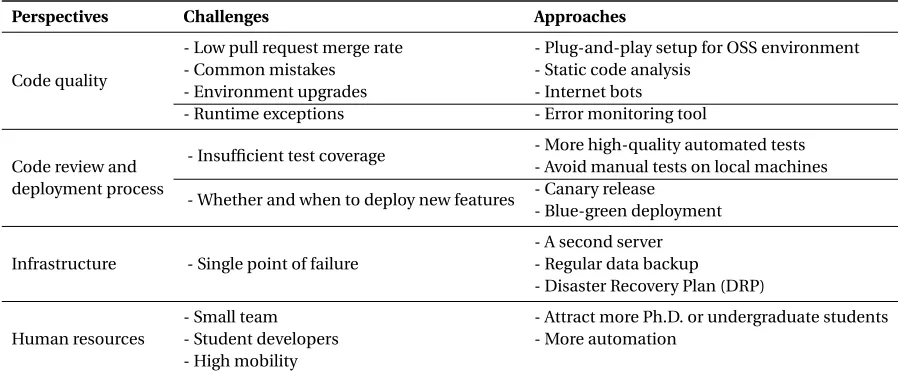
Table 2.1 Challenges and approaches in each perspective . . . 11
Table 3.1 Criteria for common mistakes . . . 26
Table 3.2 Number of students enrolled in each spring (S) and fall (F) semester . . . 29
Table 3.3 Chi-square tests for common mistakes in rejected vs. partially merged projects 30 Table 3.4 Chi-square tests for common mistakes in initial vs. final projects . . . 31
Table 4.1 Twelve course projects . . . 43
Table 4.2 Patterns followed in developing code and tests . . . 45
Table 4.3 Post-survey questions . . . 46
Table 4.4 Merge status and common mistakes of 12 course projects . . . 48
Table 4.5 Overview of pre-existing (p), staff-authored (t) and student-authored tests (s) . 52 Table 4.6 Average percentage of commits per team per week . . . 54
Table 5.1 System-specific guidelines . . . 61
Table 5.2 Survey questions . . . 65
LIST OF FIGURES
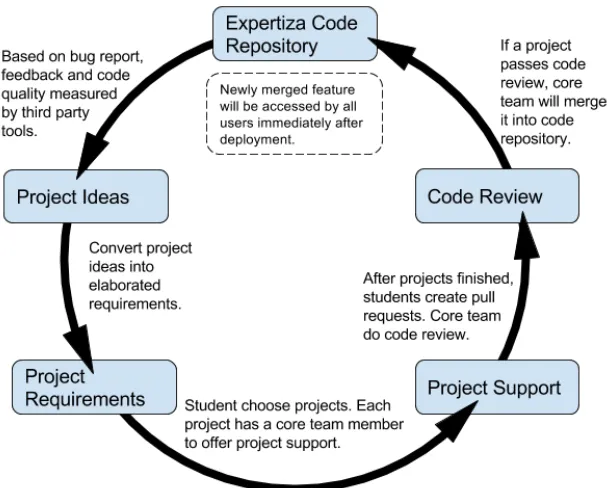
Figure 1.1 Expertiza development cycle . . . 4
Figure 1.2 Screenshots of content management pages . . . 6
Figure 1.3 Screenshots of review and score reports . . . 7
Figure 2.1 Relationship among different perspectives . . . 11
Figure 2.2 Code review and deployment pipeline . . . 14
Figure 3.1 Merge status of OSS-based course projects from the 2012 fall semester to the 2017 spring semester . . . 20
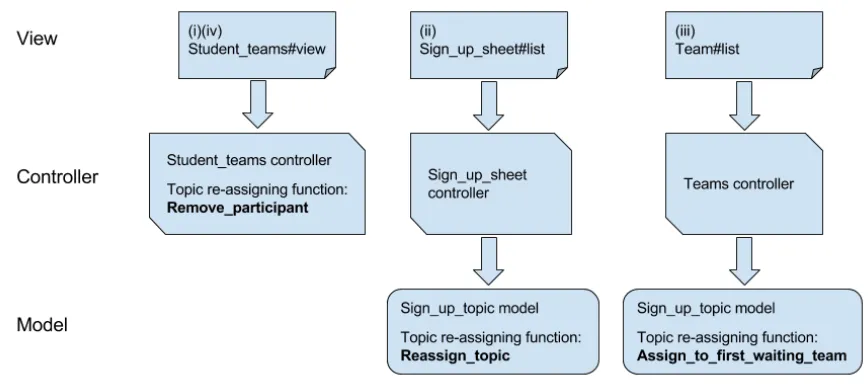
Figure 3.2 Functionality for reassigning topics in Expertiza. The left flow chart shows the functionality for scenario (i) and (iv). The middle chart displays the func-tionality for scenario (ii). The right one presents the funcfunc-tionality for scenario (iii). . . 22
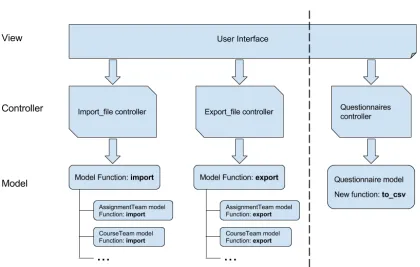
Figure 3.3 Functionality for importing/exporting questionnaires in Expertiza . . . 23
Figure 3.4 An example of shallow test . . . 24
Figure 3.5 Number of course projects that has each common mistake . . . 27
Figure 3.6 Number of course projects that have each common mistake, by semester. Due to space limitations, we abbreviate each common mistake: CMT (comment-ing), SMT (shallow or missing tests), BN (bad nam(comment-ing), DC (duplicated code), FF (failing functionality), MPR (messy pull request), HC (hardcoding), NFD (not following the existing design), NoPR (missing pull request/not forked), LMe (long methods), Spec (bad specification), SS (switch statements), and LMo (limited modifications). . . 28
Figure 3.7 Frequency of occurrence of most-common mistakes, by semester . . . 28
Figure 3.8 An example of well-designed project tasks . . . 32
Figure 4.1 An example of the method that needs to be tested (a), corresponding test skeleton (b) and completed tests (c) . . . 42
Figure 4.2 Data-processing pipeline . . . 44
Figure 4.3 An overview of student development steps . . . 47
Figure 4.4 A piece of source code (a) and code after modified by students (b), the cor-responding test written by students (c) and code refactored by course staff (d) . . . 50
Figure 5.1 A pull-request comment created by the Danger Bot . . . 62
Figure 5.2 A pull-request comment created by the Travis CI Bot . . . 62
Figure 5.3 Comments created by the Code Climate Bot . . . 64
Figure 5.4 Comment created by the new Travis CI Bot . . . 66
Figure 5.7 A pull-request comment created by the Travis CI Bot shows that test execution cannot be completed due to an error. . . 74 Figure 5.8 Relationship between code smells (left column), common mistakes (middle),
CHAPTER
1
RESEARCH BACKGROUND
1.1
Open-Source Software
Open Source Software (OSS) is computer software whose source code can be inspected, modified, and distributed by anyone under open-source licenses [Lau04].
1.2
Open-Source Software in Education
As mentioned above, one significant advantage of making contributions to OSS projects is improving programming skill. Therefore, many researchers and educators have introduced OSS projects into software-engineering courses. This effort brings many benefits to engineering students. First, reading project documents and exploring source code can help students learn a lot from real-world projects [CK03], such as coding style, feature design, and other good development practices. Second, working on OSS projects can provide students with a bird’s eye view of a large project, since students are making contributions to an existing project instead of starting a project from scratch. They have to think about how to make the newly-added code compatible with the current design. Last but not least, students need to communicate frequently with the OSS core team. This interaction can enhance students’ communication abilities, which are crucial to their future career.
1.3
Project-Based Programming Assignments
Project-based programming assignments are common in software-engineering courses. More and more instructors are experimenting with long-lasting student-authored projects, industrial projects, and OSS projects, to help students gain experience in the real-world software development process. Heckman et al.[Hec18]shared their experience in incorporating a student-authored software application named iTrust into a junior-level software-engineering course. They discussed some benefits and challenges in making a 10+–year software as the code base of the course. Then they talked about some approaches to overcome these obstacles. Ellis et al.[Ell15]discussed their experi-ence in involving students in real-world projects—Humanitarian Free and Open Source Software (HFOSS) projects. Based on a six-year study, the authors found that working on HFOSS projects can not only help students gain experience in developing software in a distributed environment but also increase their interest in computer science. Fox & Patterson[FP12]talked about the benefits of taking their project-based online courses—Agile Development Using Ruby on Rails, onto edX.1 Their project-based courses combine techniques like Agile development, the Ruby on Rails web framework, software as a service, and cloud computing. Many students, faculty, and practitioners in the industry highly recommend the courses. Bruegge et al.[Bru15]described their experience in supporting hundreds of students working with industrial clients. The authors concluded that integrating software engineering courses with real-world projects can improve students’ technical and non-technical skills and prepare them for challenges they will face in their future careers.
1.4
Problems
1.4.1 How to Get and Incorporate OSS Projects into Software-Engineering Courses?
Instructors who teach software engineering courses may have difficulty proposing ideas for course projects. This situation may happen more frequently for instructors who teach advanced under-graduate or under-graduate courses. This is because such courses need to have larger course projects, focusing more on object-oriented design, and design patterns compared with CS1 or CS2 courses. One approach is to use existing OSS projects as the code base on which to build course projects.
Instructors who attempt to incorporate OSS projects into courses have to deal with three prob-lems: (1) how to get ideas for OSS-based course projects with a reasonable amount of work, (2) how to provide consistent support during the semester, and (3) how to review students’ deliverables. OSS core team members are best qualified to design course projects, offer technical support and review students’ work. For instance, Ellis et al.[Ell07]integrated the Sahana project into their curriculum. The Sahana core team would review project requirements and all code written by students. However, due to the voluntary nature of the open-source community, it may be difficult for other instructors to get OSS core teams to work with their course. Therefore, some instructors have specified “toy features”—features commissioned/specified by teaching staff instead of the open-source commu-nity, in OSS projects as course projects. Toy features render course projects “unreal,” and causes students’ work to be put aside once the project is finished, without any further benefit to the OSS community or users of the software.
1.4.2 How to Improve Student Contributions to OSS Projects?
Figure 1.1: Expertiza development cycle
1.5
Expertiza
We maintain and run a student-authored open-source software application named Expertiza[Geh07]. It is an online peer-assessment tool initially funded by NSF. It collects data for researchers to do educational data mining and data analysis, such as a reputation system to help determine the reliability of reviews [Son15b], peer-assessment rubric improvement[Son15a], calibrated peer assessment [Son16], and collusion detection in peer assessment [Son17]. The current Expertiza application was conceived in 2007. Since then, Expertiza has become the main source of course projects in our masters-level Object-Oriented Design and Development (OODD) course, CSC/ECE 517. The Ruby on Rails code base is available on GitHub.2
Figure 1.1 is a circle graph showing how Expertiza is integrated into CSC/ECE 517. Our project ideas come from reported bugs, feedback of users, rejected projects from previous semesters, and new features requested by instructors using Expertiza (which has also been used by other North Carolina State University courses and at 21 other institutions). Each core team member is responsible for elaborating detailed requirements for several project ideas in each offering of CSC/ECE 517. After that, students choose course projects and start to work on them.
Each project has a core team member to offer project support. Since all core team members are
on campus, it is convenient for students to meet directly with them. We encourage students to create pull requests as early as possible. Then each time students commit code, several widely-used tools will be triggered automatically to run all test cases and check the code quality according to Ruby Style Guide.3The core team will accept qualified projects by merging them into the Expertiza code repository. After we deploy the latest code, new features will be available to all users. In this manner, a cycle is generated, which continually improves Expertiza and allows problems to be addressed in a timely manner.
Over the years, more than 370 students have contributed code as deliverables through GitHub pull requests and helped Expertiza undergo several major updates. Below are two exemplars of student contributions that have extensively improved the performance and user interface (UI) of Expertiza.
Figure 1.2a shows the previous UI of the Expertiza content management page. We used Rails’s built-in feature Embedded RuBy (ERB), to build the page. There is a search panel on the page, which allows instructors to filter and sort different kinds of content, such as courses, assignments, and questionnaires (rubrics and surveys). One big performance impact in the previous design is that each time an instructor executed a search query, the client had to fetch all data from the server again instead of requesting only the missing data. The page was redesigned with ReactJS by a team of students in 2014. The new UI in Figure 1.2b is much faster. Currently, if an instructor tries to filter or sort on different kinds of content, no more requests are sent to the server. All filtering and sorting happens at the client end. Students used flat UI elements to make this page more streamlined and efficient and make it responsive to changes in browser size across different devices.
Figure 1.3a illustrates the previous review and score report. At first glance, instructors can only figure out how many reviewers have reviewed this team’s deliverables and the corresponding timestamps. Instructors have to click “show review” link to toggle the details of each review. This design is inefficient and instructors cannot compare different reviews directly. One team of students redesigned this report in 2015 by using a two-dimensional table shown in Figure 1.3b. The table shows the scores given for each question (“Criterion”) in different rows and the scores given by each reviewer in different columns. What’s more, instructors can hover over each cell to see the comments given by a particular reviewer. They can also compare scores and comments given by all reviewers on a question by clicking on each cell. Compared with the previous UI, the new one combines more information into a similar space on the page. This team of students also optimized the back-end data processing logic to reduce the page loading time.
(a) Previous UI
(b) Current UI
(a) Previous UI
(b) Current UI. The first row lists reviewer names. The student view uses “Review X” in place of reviewer names. The first column displays the number of questions (“Criteria”) with their corresponding types: (1) a check mark represents a checkbox question; (2) a number in a circle represents a Likert scale question (here represents a 1–5 Likert scale question); (3) a pencil mark represents a paragraph (free text) question. The background colors of cells are scaled from poor to excellent in the following order: red, orange, yellow, light green, and dark green. And gray indicates that the reviewer did not give a score for a particular question. A score in an underlined bold font means that there are corresponding comments on this question.
1.6
Course Settings
The OODD course has been opened in North Carolina State University for more than 25 years. Students come from different countries, but with a predominance from India, usually more than 70%. The other prominent countries of origin are China and the United States. Most of the students are majoring in Computer Science. The remaining students are mostly from Computer Engineering, Electrical Engineering, and Computer Networking. More than 90% of the students are graduate students. Most of them have bachelors degrees in Computer Science, and some of them have several years programming-related work experience.
Each semester, there are two kinds of OSS-based course projects, most of them Expertiza-based projects (other projects have been based on Mozilla, Sahana, Apache, and OpenMRS, among others). During the first half of the semester, the instructor will cover important points related to code refactoring. Correspondingly, the primary purpose of the initial course project is understanding the logic of existing code and refactoring it. The expected workload of these projects is to refactor around 250 lines of code (LoC) and write 100–200 lines of testing code. During the second half of the semester, many design patterns will be introduced in the class. And the evaluation of final course projects focuses on students’ abilities to add a new feature in the system and follow the design patterns if applicable. The desired deliverable of the final course project is usually around 500 LoC changed with 100–200 lines of testing code.
All course projects are done in teams. The desired team size for the initial course project is 2–3, and for the final course project is 3–4. To give each student a diversity of development experiences, we required them to work with a certain number of other students during the semester. We also adopted a clustering algorithm for intelligent team formation[Akb18]. Students are asked to choose which project topics they are interested in, and are allowed (but not required) to form teams before indicating their preference. They register their preferences in Expertiza, and the algorithm matches students and teams with project topics. Students are allowed to switch teams and project topics if they don’t like the team or topic they have been assigned.
1.7
Overview of the Approach
In this dissertation, we address the problem ofhelping students make better contributions to open-source software projects. The following is the structure of this dissertation.
Chapter 2 shares our long-term experience on how to maintain Expertiza with limited resources. We discuss what challenges instructors would meet when they attempt to maintain and run a software application implemented by students and what approaches they could adopt to overcome these issues.
Chapter 3 shares our experience in supporting nearly 1000 students on 461 OSS-based course projects from 2012 to 2018. We manually checked 313 course projects from the 2012 fall semester to the 2017 spring semester, and we summarize 13 mistakes that frequently occur in student contribu-tions. Based on the criteria for each common mistake, we further tallied common mistakes in 148 course projects from the 2017 fall semester to the 2018 fall semester. We then give four suggestions to help students reduce the frequency of common mistakes and improve the quality of their OSS pull requests.
Chapter 4 presents our effort to conduct a quasi-experimental controlled study to test the efficiency of the test-driven approach on OSS-based course projects. Thirty-five masters students participated in our study. Students worked on course projects in teams, half of which were assigned to the TDD group (using the test-driven approach), and the rest of which were assigned to the non-TDD group (using the traditional test-last approach). We found that the test-driven approach can help students in the TDD group write more tests and achieve significantly higher statement coverage than students in the non-TDD group.
Chapter 5 discusses how we bypass the limitations of existing third-party tools by implementing three Internet bots, namely the Danger Bot, the Travis CI Bot, and the Code Climate Bot. One-hundred one masters students participated in our study. We found that bots can provide more timely feedback than teaching staff, and significantly reduce system-specific guideline violations and code smells in student contributions.
CHAPTER
2
LONG-TERM MAINTENANCE OF
STUDENT-AUTHORED OPEN-SOURCE
SOFTWARE
2.1
Introduction
In this chapter, we share our long-term experience on how to maintain a student-authored open-source software with limited reopen-sources. During these years, we have maintained a user base for Expertiza. Meanwhile, students have kept making contributions to this OSS project semester after semester. We discuss challenges that instructors may encounter when they attempt to maintain and run a software application implemented by students, from four perspectives: (1) code quality, (2) code review and deployment process, (3) infrastructure and (4) human resources. We also talk about what approaches instructors could use to handle these challenges.
2.2
Maintaining Student-Authored OSS Projects
Figure 2.1: Relationship among different perspectives
Table 2.1: Challenges and approaches in each perspective
Perspectives Challenges Approaches
Code quality
- Low pull request merge rate - Plug-and-play setup for OSS environment - Common mistakes - Static code analysis
- Environment upgrades - Internet bots - Runtime exceptions - Error monitoring tool
Code review and deployment process
- Insufficient test coverage - More high-quality automated tests - Avoid manual tests on local machines - Whether and when to deploy new features - Canary release
- Blue-green deployment
Infrastructure - Single point of failure
- A second server - Regular data backup - Disaster Recovery Plan (DRP)
Human resources
- Small team - Attract more Ph.D. or undergraduate students - Student developers - More automation
- High mobility
2.2.1 Code Quality
The first challenge instructors face is how to maintain a high-quality code base. If the software application is based primarily on student code developed over many years, it is inevitable that there are some code quality issues (code smells) in the code base. We discuss the concrete manifestation of code smells and the problems they cause. We also mention several methods we have adopted to overcome these challenges.
According to one report, on average 92% of pull requests of industrial projects are merged into the master code base.1However, pull requests submitted by students have alow merge rate. We were only merging around 30% of course projects into the Expertiza code base[Hu18]. The report mentions several possible reasons for pull requests not being merged, including unclear development directions and late-changing requirements. These causes are not applicable in most educational settings, because all course projects are designed by teaching staff who should have a clear idea of what needs to be developed. Most of the time, we will not change project requirements in mid-stream.
The main reason for the low merge rate is that students do not make high-quality contributions. In our research (shown in Chapter 3), we manually checked 313 course projects from 2012 to 2017 and summarized 13common mistakesthat frequently occur in students’ deliverables[Hu18]. The proportion of the five most frequent mistakes—which include commenting, shallow or missing tests, bad naming, duplicated code, and failing functionality—exceeds 50% in most semesters. Hence, we need some tactics to help students eliminate these common mistakes and make better contributions. Also, a domino effect may occur if we merge too few contributions: the release of new features may be delayed, causing the software application to lose users.
We have used Git to manage the Expertiza code base for more than 10 years. During this decade, the Ruby on Rails community has repeatedly upgraded the web application framework. Due to
environment upgrades, Expertiza has also undergone several major updates: from Rails 1.0 to 3.0, and from 3.0 to 4.0. There is a certain amount of source code still using the old syntax. Code with old syntax either works well but with some deprecation warnings, or breaks some features. These are challenges in maintaining the old code base.
To support students’ participation in OSS-based course projects, we have prepared a plug-and-play setup for the OSS environment, using virtual machines (VirtualBox) and Docker images. The idea is that these can provide a self-contained development environment for the projects. These environments help students to start projects smoothly.
We also make use ofstatic code analysis. With its help, we are able to enforce many coding guidelines to the code repository. Since 2013, we have used a tool called Code Climate,2which is free
for OSS projects. The tool can perform static analysis and detect problems such as code complexity, code duplication, bad code style, and security issues. Although we have set up a static code analyzer to help check students’ contributions, it cannot enforce system-specific guidelines. Therefore, we implemented threeInternet botsduring the 2018 fall semester to bypass the limitations of existing tools (shown in Chapter 5). Our pilot study[HG19]results show that (1) more than 70% of students think the feedback given by the bots is useful; (2) bots can provide six times more feedback on average than teaching staff; (3) bots can help student contributions avoid more than 33% of system-specific guideline violations.
In the production environment, manyruntime exceptionsmay occur every day. We have used anerror monitoring toolnamed Airbrake3 since 2011. Its free plan includes a quota of 5000 monthly errors and two-day error retention. Airbrake sends instant alerts (emails) with stack traces and other information to the OSS core team whenever a runtime exception occurs. We take advantage of the information provided by Airbrake to eliminate these runtime exceptions. However, Airbrake’s free plan lacks many advanced features, such as a detailed summary report, deployment tracking, and third-party tool integration. And it will no longer send alerts once the number of errors exceeds the monthly quota. Alternatively, we could extend the capabilities of existing open-source error monitoring tools to add advanced features and handle unlimited runtime exceptions.
2.2.2 Code Review and Deployment Process
Our typical code review and deployment pipeline consists of six steps as shown in Figure 2.2: (1) creating/modifying a pull request; (2) automatically executing static code analysis and automated tests after each code commit; (3) performing manual testing; (4) optionally discussing the code in the weekly meeting of the OSS core team; (5) deploying the code. If we find problems during steps 2–4, we will ask the author to modify the code and go through these steps again (shown by the dotted line). Then we deploy the code to the production environment. If some runtime exceptions occur because of our newly-deployed code, we can (6) roll back to the previous release.
Our current code review and deployment pipeline relies heavily on continuous integration,4 manual testing, and continuous deployment. The biggest problem with continuous integration is insufficient test coverage. The biggest problem with manual testing is that most of the time we test new features on local machines. And the biggest problem with continuous deployment is that we need a mechanism to decide whether and when to deploy new features.
Expertiza hasinsufficient test coverage, only around 50%, which means the automated tests in Expertiza lacks thoroughness. Moreover, many existing tests are shallow tests—tests focusing on irrelevant, unlikely-to-fail conditions[Hu18], which weakens their fault-finding capability. Before
3https://airbrake.io/
Figure 2.2: Code review and deployment pipeline
merging each project, we make sure that all existing tests pass and perform additional manual tests. But these may not cover all edge cases, even fatal errors.
More high-quality automated testsare crucial to the quality control of the code base. We have used a tool called Coveralls5since 2014. It can visualize statement coverage statistics in different granularities, from repository overview coverage, individual file coverage to line-by-line coverage. Each time developers modify the code base, Coveralls calculates the new test coverage and sends a notification to those developers.
Furthermore, we shouldavoid manual tests on local machinesto eliminate the “it works on my machine” problem. Every machine has different environment settings. If a new feature works on one developer’s local machine, there is no guarantee that the new feature also works in the production environment. The solution is to use on-demand test servers. Before manual testing, we use Ansible6, a configuration-management tool, to spin up a test server with the same settings as the production environment and pull a specific version of the code base from the version-control system. Then multiple developers can log into the system and conduct manual testing together. During manual testing, we always conduct smoke testing first to make sure new contributions do not break the most important and most basic features of the system.
As the core team of Expertiza, we need to decidewhether to deploy new features, which is a recurring dilemma. Suppose we have a new feature which is urgently required but not thoroughly tested. If we deploy the new feature, some runtime exceptions may occur. On the other hand, if we do not deploy the new feature, users will not benefit from it. Another example is whether we need to deploy a usable feature with dirty code. If we deploy the feature, users will benefit in the short term. Later we can ask another team to refactor the code. On the other hand, not deploying the new feature allows us to avoid code smells and the technical debt caused by the dirty code. More importantly, we also need to decidewhen to deploy new features. If we deploy new features immediately after we confirm the modifications, the change may come while the system is heavily used. If we have overlooked some edge cases, users may encounter bugs. Alternatively, we can
deploy new features only when the system is not heavily used, such as late nights or early mornings. However, this requires developers to work late at night or get up early in the morning.
Since 2011, we have used a tool named Capistrano7to handle continuous deployment. However,
the tool cannot help us to decide whether and when to deploy new features. One technique called
canary releasecan help us to decide whether to deploy a new feature. Canary release can reduce the risk of introducing new features into the production environment by first rolling out the feature to the core team, then to a small set of users, and finally to the entire user group. If developers need to address any issues during this process, the new feature will be unavailable to the next subset of users. We can deploy new features frequently by introducing theblue-green deployment. It uses two environments (blue and green). At any time, only one environment is live (e.g., blue). Then we can deploy new features to the other environment (green). After the green environment is stable, we can switch all incoming traffic to the green environment and the blue one becomes idle.8If
developers encounter some runtime errors in the green environment, they can easily switch back to the blue environment.
2.2.3 Infrastructure
Currently, we have deployed Expertiza on a server that physically located in our university. The single server becomes asingle point of failure. Users cannot access Expertiza whenever the server is down or scheduled for maintenance. To eliminate the single point of failure, we have already configureda second serverto achieve higher site reliability. And we created a load balancer to control traffic between two servers. Furthermore, we have set upregular data backupto avoid the data loss and plan to document aDisaster Recovery Plan (DRP)to protect the entire infrastructure in the disaster.
2.2.4 Human Resources
Expertiza core team is asmall team. Last year, the core team of Expertiza had four members. Two core team members left recently because of graduation and lack of continuing funding. One student joined the team. Currently, there are three members in Expertiza core team. In the event of an emergency, at least one of us has to take the action to resolve the problem. Most core team members arestudent developers. Although most of us have taken related courses and had several internship experiences, our experience is still limited compared with practitioners in industry. Furthermore, as students, we have to take other courses. Hence, we are unable to maintain Expertiza full time. Besides the core team of Expertiza, we have several masters students who help us refactor code and fix bugs, which is quite helpful. However, masters students havehigh mobility—most masters
7https://capistranorb.com/
students stay on the team only a semester or two. It might be more effective toattract more Ph.D. or undergraduate studentsto the team since they are able to stay longer than masters students. We can always introducemore automationto make up for the lack of human resources. We have already implemented automatic static code analysis, automated testing framework, and automated test coverage calculation to ensure the quality of student contributions.
2.3
Conclusion
CHAPTER
3
COMMON MISTAKES IN STUDENT
CONTRIBUTIONS TO OPEN-SOURCE
SOFTWARE PROJECTS
3.1
Introduction
3.2
Related Work
Many papers talk about incorporating OSS projects into computer science education. Bishop et al. [Bis16]proposed four integration options, including using open source as examples in classes, OSS-based capstone projects, extending the software for research purposes, and incorporating it into hackathons. Our literature search showed that the majority of such studies used OSS projects in regular courses[Geh07; RK06; Ell12; McC12; Liu05].
Some studies discuss the benefits of integrating OSS projects into software-engineering courses. Ellis et al.[Ell12]presented a multi-year study on involving students in an OSS project. They found that students who participated in OSS projects are able to gain significant software-engineering knowledge. Raj & Kazemian[RK06]used OSS projects in database-implementation courses to help students gain insights into software design and development. The authors believe the cooperation between the OSS community and academia can revitalize computer-science education. Pinto et al.[Pin17]interviewed seven software-engineering professors who adopted OSS projects in their software-engineering courses. They figured out that inspiring students to work on OSS projects can not only improve their social and technical skills but also enhance their resume.
Other researchers focus on the challenges of adopting OSS projects in software-engineering courses. Toth[Tot06]postulated that the first challenge of using OSS projects in software-engineering courses is to identify and select appropriate OSS projects. Smith et al.[Smi14]reported their experi-ence in selecting OSS projects for software engineering. They stated that it is important to select OSS projects with proper size and complexity. And the burden of selecting suitable OSS projects could impede instructors from incorporating OSS projects into software-engineering courses. Similarly, Gehringer[Geh11]concluded that instructors need to spend weeks or months to search for proper OSS projects. And it is better for instructors to be involved in OSS development themselves. The au-thor also offered an overview of several OSS projects which have already worked with academia. Ellis et al.[Ell08]summarized five challenges they faced in involving students in OSS projects: student inexperience, limited course duration, informal development practices, sustaining a development effort, and product complexity.
Moreover, it is important to assess student contributions to OSS projects. In their literature review paper, Nascimento et al.[Nas15]summarized 10 types of assessment in both student and teacher perspectives, such as exams, reports, software artifacts, surveys, and presentations. Among them, surveys are the main instrument for getting student feedback. And software artifacts, reports, and presentations are the main artifacts assessed when grading students’ submissions.
includes evaluation criteria and coding-style guidelines.
To the best of our knowledge, there are no previous studies talking about common mistakes that frequently occur in student contributions to OSS projects. In this chapter, we summarize 13 common mistakes organized into six categories, which could become a checklist to help evaluate students’ code.
3.3
Expertiza and Other OSS Projects
Compared with other open-source software applications we have worked with (e.g., Mozilla Servo, Sahana Eden, Apache Ambari, and OpenMRS) and the Sahana project collaborated with Dr. Ellis [Ell07], Expertiza projects have two big advantages. First, all core team members are involved in course projects and are on-campus most of the time. This allows CSC/ECE 517 students to talk to core team members face to face. Research shows that face-to-face meeting is more effective, less time-consuming and more satisfactory compared to computer-mediated communication [Bal02]. The core team of Expertiza has three members right now, which is composed of one professor, one Ph.D. student, and one undergraduate student. Moreover, there are several prerequisites to joining the Expertiza core team; for instance, a new core team member should have taken the course and ranked very high in the class, or have mentored course projects in CSC/ECE 517, or have more than one year of Ruby on Rails development experience. Second, Expertiza is used in the course as a peer-assessment tool. Each student enrolled in the course submits their homework with it and uses it to review others’ work. Frequent use of Expertiza familiarizes students with the system, which is a big help when they start working on OSS-based course projects. Student contributions can be merged into the code repository, sometimes even during the course, if they have done a great job, which is an extra encouragement for them to do their best.
3.4
Common Mistakes We Observed
There were a total of 313 OSS-based course projects related to Expertiza from the 2012 fall semester to the 2017 spring semester. Among them, 92 projects were merged into the Expertiza code base (shown in green in Figure 3.1). Twenty-one projects were partially merged (shown in orange), which means we merged particular parts of their code directly into Expertiza repository, and refactored or removed the remaining part. Moreover, 200 projects were rejected (shown in dark red) including 62 projects that did not submit pull requests (shown in gray). We will discuss projects without pull requests later this section. We (I and my colleague Yang Song) performedopen coding1—we went through the project grades and feedback, GitHub pull request code, and comments on 221 rejected
Figure 3.1: Merge status of OSS-based course projects from the 2012 fall semester to the 2017 spring semester
or partially merged projects (dark red and orange),2created a new label whenever we detected a new common mistake, and tagged projects using existing labels. During the coding process, we implemented the technique ofnegotiated agreementto code reliably[Cam13].
We identified a total of 13 common mistakes. And we definecommonas single mistake that occurred in close to or more than 10% of rejected or partially merged projects. Our work parallels that of Gousios et al.[Gou15], who surveyed 749 OSS core team members and summarized 23 factors that core team members check when assessing the quality of pull requests. After comparing our common mistakes and those 23 factors, we found that these two sets match well. Some differences are due to the usage of separate terminologies and different degrees of generalization. Others are the result of the difference between our education-oriented OSS project and other OSS projects. For instance, other OSS projects may consider whether contributions add value to a project when evaluating pull requests. However, all Expertiza projects are designed by core team members; they would add value to Expertiza if merged. Therefore,value addedwill not be included among the factors we consider. Later in this section, we will go through each common mistake and demonstrate corresponding code smells and their causes.
3.4.1 Common Textual Mistakes
When checking pull requests, we found that students tend to miss details because they always pay more attention to the functionality.Bad namingandhardcodingare two mistakes that occur frequently. In many cases, students made these mistakes for the sake of convenience. For throwaway
projects, these mistakes may not cause many problems, however, for long-term OSS projects, these mistakes would increase maintenance costs if merged into the main code base.Commenting
frequently became an issue. Some students added several new methods without writing meaningful method comments. Other students wrote inline comments for each line of code or left commented debug code in pull requests. This breaks the continuity of the code and makes it difficult to read. Many inline comments can be avoided by adopting self-explanatory method names or variable names. We also found another situation: when students need to delete one method or file, they comment out all the code instead of removing it. It seems that students hesitate to remove code snippets from the code repository. In fact, they shouldn’t need to worry about deleting code since the version-control system can retrieve it easily.
3.4.2 Common Coding Mistakes
An important rule of software design is the DRY principle: “Don’t repeat yourself”[HT00]. If one feature or one piece of code is presented multiple times in one system, anyone who refractors that functionality needs to remember to make the change everywhere the functionality is implemented. Unlike throwaway projects, OSS projects can acquireduplicated codeaccidentally, when students re-implement functionality without bothering to do a thorough search to see if is already coded elsewhere in the project.
One good example in Expertiza is the functionality for reassigning topics. On some assignments, students or teams are allowed to “sign up” for a topic on which they want to work. If someone else or some other team has already chosen the topic, later choosers will be placed on a waitlist. When the topic-holder drops the topic for any reason, the first candidate on the waitlist should get this topic. The challenging part is that there are multiple scenarios in which the topic-holder may lose this topic either actively or passively: (i) when the last team member leaves the team that reserved the topic, (ii) when the student or the team switches to another topic, (iii) when the student holding the topic joins a team that holds another topic, or (iv) when the instructor drops a team from a topic, e.g., because the team does not have enough members, and larger teams are waiting for the topic. Ideally, all these scenarios should call the same method to re-assign topics. However, this functionality was once implemented in three places in the Model-View-Controller (MVC) architecture shown in Figure 3.2 (once in the controller and twice in the models), which caused the topic re-assignment functionality to be difficult to maintain.
Figure 3.2: Functionality for reassigning topics in Expertiza. The left flow chart shows the function-ality for scenario (i) and (iv). The middle chart displays the functionfunction-ality for scenario (ii). The right one presents the functionality for scenario (iii).
existing code than to understand an inheritance hierarchy structure across files. This violates a rule of object-oriented design—when you see aswitch statement,3you should think of polymorphism.
In many cases, we observed inconsistencies between students’ demos and our manual testing results. Although the demos seemed to be fully functional, we found that some features did not work well under one or more circumstances during manual testing. Many factors will causefailing functionality, such as unfamiliarity with the system, failing to implement some requirements of the project, and then bypassing them during the demo.
3.4.3 Common Design Mistakes
An elegantly designed system should make it reasonably easy for developers to “guess” where to find the code related to specific functionalities. When students need to invoke some functionality (e.g., to sort emails based on the last name of each user), they may not realize that this functionality or similar ones might already be implemented (e.g., in theusermodel file). In most cases, students donot follow the existing designand tend to rewrite the needed methods. Another reason is that even if they are able to find the method they need, it may require refactoring before using (e.g., the existing method sorts emails based on the first name of each user). Moreover, they need to make sure all other call sites for the original method work as usual. Under this circumstance, it might be easier for students to write a new method rather than refactor the existing one.
1 it " f i l l s out a t e x t b o x and s a v e s d a t a " do 2 l o a d _ q u e s t i o n n a i r e
3 f i l l _ i n " r e s p o n s e [ c o m m e n t ] " , : wi t h = > " H e l l o W o r l d ! " 4 s e l e c t 5 , : f r o m = > " r e s p o n s e [ s c o r e ] "
5 c l i c k _ b u t t o n " S u b m i t "
6 e x p e c t ( p a g e ) . to h a v e _ c o n t e n t " R e s p o n s e was s u c c e s s f u l l y s a v e d . " 7 end
Figure 3.4: An example of shallow test
One good example is the OSS-based course project to fix the functionality of importing and exporting questionnaires. Figure 3.3 shows this functionality in the MVC architecture. The left side of the dotted line is the existing design in our system. In the current design,import-fileand
export-filecontrollers call corresponding methods written in different models. However, the student team did not follow the existing design and implemented the functionality in a different way (shown on the right side of the dotted line). If we merged students’ pull request, this functionality would be difficult to maintain in the future. Ideally, the code for importing and exporting ques-tionnaire should be placed inquestionnairemodel with correct method names and called by
import-fileandexport-filecontrollers.
3.4.4 Common Testing Mistakes
Pull requests with tests have a higher chance to be merged [Tsa14]. Most of our projects ask students to write tests for their code or for previously untested code. Sometimes, even when students wrote test cases, many of them wereshallow tests. If too many shallow test cases exist in the system, even if all the test cases pass, we cannot be sure that features in the system work as intended.
The OSS-based course project, “functional tests for peer assessment,” is a good example. This project is supposed to test that an assessor is able to fill out the form and submit the response. And the data can be saved into the database successfully. Figure 3.4 shows one RSpec4test case students wrote. It only tested that the correct message was displayed at the top of the page after clicking “Submit” button. The test will not fail even if the data is not saved in the database, as long as the expected message appears. A more robust test of this scenario is to test not only message appearance on the view but also the corresponding database records.
3.4.5 Common Mergeability Mistakes
Some pull requests include unnecessary output files, additional libraries and even code modifica-tions of other projects, which makes it difficult for core team members to figure out which code
changes are directly related to the course project.Messy pull requestscan be created when stu-dents did not realize that some files only need to be stored locally instead of being committed to the remote repository, or when they are unfamiliar with the steps of syncing their fork with the main code base. An opposite situation is when students submit pull requests withlimited modifications. These pull requests do not improve the current code much, but only make minor changes, such as whitespace changes, or identifier name changes.
Back in 2012, we found that many students didnot create pull requests. This made it difficult for core team members to review the students’ work. A more serious situation is when students had
not even forkedthe Expertiza repository. Instead, they downloaded the source code from GitHub, created a new repository and committed their modifications to the newly-created repository. Since the downloaded source code did not contain any historical information and the newly-created repository cannot be associated with the Expertiza repository, students were not able to create pull requests. Without thediffinformation in pull requests, the core team could not check how students’ modifications affect the system, so they could not merge them. This situation occurred mostly in 2012. In later semesters, prior to assigning the projects, the instructor assigned in-class exercises on the relevant Git operations, and had the students finish them for homework. After that, this problem rarely occurred.
3.4.6 Common Specification Mistakes
Although each project has its requirement elaborated by core team members, some submissions deviated far from our expectation. The primary reason forbad specificationis insufficient commu-nication between core team members and students. In recent semesters, we added a design check section before students starting coding to make sure they thoroughly understand our requirements.
3.5
Analysis of Common Mistakes
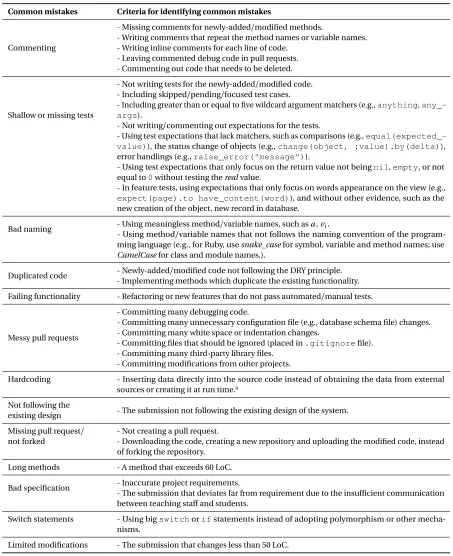
Table 3.1 summarizes the criteria for each common mistake. Based on those, we tallied common mistakes in course projects from recent three semesters, namely the 2017 fall semester, the 2018 spring semester, and the 2018 fall semester. There were a total of 461 OSS-based course projects related to Expertiza from the 2012 fall semester to the 2018 fall semester: 126 projects (27%) were merged into the Expertiza code base; 41 projects were partially merged; 294 projects were rejected, including 63 projects that did not submit pull requests.
Table 3.1: Criteria for common mistakes
Common mistakes Criteria for identifying common mistakes
Commenting
- Missing comments for newly-added/modified methods.
- Writing comments that repeat the method names or variable names. - Writing inline comments for each line of code.
- Leaving commented debug code in pull requests. - Commenting out code that needs to be deleted.
Shallow or missing tests
- Not writing tests for the newly-added/modified code. - Including skipped/pending/focused test cases.
- Including greater than or equal to five wildcard argument matchers (e.g.,anything, any_-args).
- Not writing/commenting out expectations for the tests.
- Using test expectations that lack matchers, such as comparisons (e.g., equal(expected_-value)), the status change of objects (e.g.,change(object, :value).by(delta)), error handlings (e.g.,raise_error("message")).
- Using test expectations that only focus on the return value not beingnil,empty, or not equal to0without testing therealvalue.
- In feature tests, using expectations that only focus on words appearance on the view (e.g.,
expect(page).to have_content(word)), and without other evidence, such as the new creation of the object, new record in database.
Bad naming - Using meaningless method/variable names, such asa,v1.
- Using method/variable names that not follows the naming convention of the program-ming language (e.g., for Ruby, usesnake_casefor symbol, variable and method names; use
CamelCasefor class and module names.).
Duplicated code - Newly-added/modified code not following the DRY principle. - Implementing methods which duplicate the existing functionality.
Failing functionality - Refactoring or new features that do not pass automated/manual tests.
Messy pull requests
- Committing many debugging code.
- Committing many unnecessary configuration file (e.g., database schema file) changes. - Committing many white space or indentation changes.
- Committing files that should be ignored (placed in.gitignorefile). - Committing many third-party library files.
- Committing modifications from other projects.
Hardcoding - Inserting data directly into the source code instead of obtaining the data from external sources or creating it at run time.a
Not following the
existing design - The submission not following the existing design of the system.
Missing pull request/ not forked
- Not creating a pull request.
- Downloading the code, creating a new repository and uploading the modified code, instead of forking the repository.
Long methods - A method that exceeds 60 LoC.
Bad specification - Inaccurate project requirements.
- The submission that deviates far from requirement due to the insufficient communication between teaching staff and students.
Switch statements - Using bigswitchorifstatements instead of adopting polymorphism or other mecha-nisms.
Limited modifications - The submission that changes less than 50 LoC.
Figure 3.5: Number of course projects that has each common mistake
frequent in rejected vs. partially merged projects, or in initial vs. final projects. Instead of counting the frequency, of each common mistake in course projects, we merely tally the existence or absence of each mistake. This is because it is essentially impossible to determine how many times, e.g., the existing design is not followed.
3.5.1 Overview of Common Mistakes
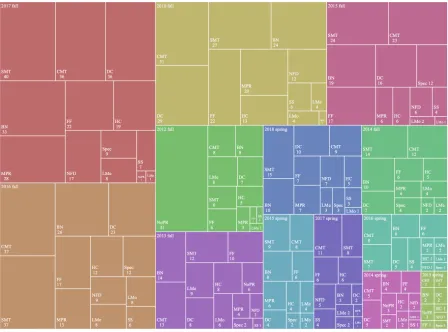
We tallied the occurrence of each common mistake in 335 rejected or partially merged projects shown in Figure 3.5. Among all rejected or partially merged projects, more than 60% have commenting and testing problems, and almost half of them have naming problems. Other common mistakes like duplicated code and failing functionality also occurred with a high frequency. We also used the treemap method (shown in Figure 3.6) to visualize the number of course projects for each common mistake per semester. Each color represents one semester. Each rectangle shows the name of a common mistake and the number of projects with this common mistake. Note that the area of rectangles is proportional to thenumberof mistakes. Table 3.2 shows the number of students enrolled in our course per semester. The number of students (and projects) is greater in fall semesters than spring semesters. As popularity grows, a larger number of common mistakes occurs.
Figure 3.6: Number of course projects that have each common mistake, by semester. Due to space limitations, we abbreviate each common mistake: CMT (commenting), SMT (shallow or missing tests), BN (bad naming), DC (duplicated code), FF (failing functionality), MPR (messy pull request), HC (hardcoding), NFD (not following the existing design), NoPR (missing pull request/not forked), LMe (long methods), Spec (bad specification), SS (switch statements), and LMo (limited modifications).
Table 3.2: Number of students enrolled in each spring (S) and fall (F) semester
Semester 12F 13S 13F 14S 14F 15S 15F 16S 16F 17S 17F 18S 18F
# of students 138 18 71 19 78 36 95 53 132 62 120 49 106
3.5.2 Common Mistakes in Rejected vs. Partially Merged Projects
We first applied a one-sided Wilcoxon rank-sum test to check whether the occurrence of all common mistakes in 41 partially merged projects was significantly less than in the 294 rejected projects (p=0.027<0.05). We then conducted Chi-square tests on rejected and partially merged projects to determine whether these two sets of projects differed on each common mistake. Table 3.3 displays contingency tables for Chi-square tests. Results indicated that there were significant differences in failing functionality and missing pull request/not forked issues for rejected and partially merged projects.
We further studied these two common mistakes. About 41% of rejected projects and 22% of partially merged projects have a failing functionality problem. Moreover, more than 21% of rejected projects but no partially merged projects had missing pull request/not forked issues. Because of the Chi-square results, we concluded that rejected projects tended to have more failing functionality and missing pull request/not forked problems than partially merged projects. We thought that the occurrence of these two common mistakes could help us decide whether to reject a particular project and speed up our grading process: when grading a project, we could first check whether they exhibit missing pull request/not forked or failing functionality issues in student contributions; then we could decide whether to continue to look at other common mistakes.
3.5.3 Common Mistakes in Initial vs. Final Projects
We are also interested in whether common mistakes occurred more in initial or final projects. Similar to before, we performed a one-sided Wilcoxon rank-sum test. The result (p=7.2e−8<0.05) revealed
Table 3.3: Chi-square tests for common mistakes in rejected vs. partially merged projects
Common mistakes Has this mistake? # of rejected
projects
# of partially merged projects
P value of
Chi-square test
Commenting Yes 176 27 0.57
No 118 14
Shallow or missing tests Yes 179 24 0.91
No 115 17
Bad naming Yes 147 20 0.98
No 147 21
Duplicated code Yes 133 21 0.58
No 161 20
Failing functionality Yes 120 9 0.031*
No 174 32
Messy pull requests Yes 83 12 0.96
No 211 29
Hardcoding Yes 82 5 0.050
No 212 36
Not following the existing design
Yes 58 8
0.86
No 236 33
Missing pull request/ not forked
Yes 63 0
0.0021*
No 231 41
Long methods Yes 50 3 0.17
No 244 38
Bad specification Yes 43 4 0.55
No 251 37
Switch statements Yes 35 2 0.28
No 259 39
Limited modifications Yes 26 5 0.68
No 268 36
communication with OSS core team members.
Table 3.4: Chi-square tests for common mistakes in initial vs. final projects
Common mistakes Has this mistake? # of initial
projects
# of final projects P value of
Chi-square test
Commenting Yes 106 97 0.012*
No 88 44
Shallow or missing tests Yes 108 95 0.040*
No 86 46
Bad naming Yes 85 82 0.013*
No 109 59
Duplicated code Yes 77 77 0.0095*
No 117 64
Failing functionality Yes 67 62 0.10
No 127 79
Messy pull requests Yes 46 49 0.037*
No 148 92
Hardcoding Yes 33 54 2.0e−5*
No 161 87
Not following the existing design
Yes 26 40
0.0011*
No 168 101
Missing pull request/ not forked
Yes 43 20
0.088
No 151 121
Long methods Yes 21 32 0.0053*
No 173 109
Bad specification Yes 18 29 0.0055*
No 176 112
Switch statements Yes 15 22 0.036*
No 179 119
Limited modifications Yes 24 7 0.034*
No 170 134
* The significance level is 5%.
3.6
Quality Control Suggestions for OSS Pull Requests
Figure 3.8: An example of well-designed project tasks
3.6.1 Well-designed Project Tasks
Figure 3.8 is an example of well-designed project tasks. Based on our experience, a good project requirement statement should consist of four parts: (1) Background information (“What they do” in Figure 3.8), for instance, why do we need this new feature, what is the problem with the current design? etc. (2) Overall requirements (“What’s wrong with it”), explicitly telling students at a high level what they need to achieve. (3) A list of the main files involved in this project (“Files involved”), to show students where to start the project. (4) Detailed requirements (“What needs to be done”), which will directly guide students through the project requirements.
3.6.2 Better Communication between Core Team Members and Students
3.6.3 Test-Driven Development
Test-driven development is one way to develop software by turning requirements into specific test cases.5Students are asked to convert each task into failed test cases, make failed test cases pass and
refactor the code. In the end, all tasks are completed, and all tests are passed. In the meanwhile, students accomplish the high-level requirements.
3.6.4 Usage of Third-Party Tools
It is time-consuming to check the code style in each line of code and manually run all test cases after each code modification. Therefore, we can adopt third-party tools, such as Travis CI, Code Climate, Coveralls, Internet bots, to automatically check the quality of student contributions and provide instant feedback.
3.7
Discussion
In order to incorporate OSS projects into courses, instructors need not be core team members of an OSS project, but they should collaborate closely with one or more OSS core team members. This is because OSS core team members are best qualified to propose course project ideas, well-designed project tasks, and review student contributions. Due to the voluntary nature of the open-source community, it is not easy for instructors to find stable contacts on OSS projects. But then again, if instructors are OSS core team members (like us), the process will be much easier.
Also, students do not need to be users of the OSS software. It is true that frequent use of the system can help students when they start working on course projects. However, knowing high-level features is not equivalent to familiarity with the low-level code base. Even if students are familiar with high-level features, they still need to understand the code before making contributions to OSS projects.
When reviewing OSS-based course projects, we discussed how to code mistakes and came to agreement with each other, so that the validity of the coding would be improved. However, it is difficult to record all kinds of mistakes exhaustively. There are several kinds of mistakes we did not cover since we are not experts in those areas, such as security. Although the Ruby on Rails framework helps protect us from many security issues, each time new code is added, new vulnerabilities may be introduced. And we will cover more kinds of mistakes in our future research.
Based on our code-review experience, some code snippets can exhibit more than one common mistake. For instance, the example we gave to implicitly demonstrate duplicated code in OSS projects (the functionality for reassigning topics) also manifests the “not following the existing design” mistake. The related code for this functionality has already been implemented in the OSS