*
Alexander Maier was on internship at Victoria University, Australia. Manuscript received September 5, 2006.
Manuscript revised September 25, 2006.
Speech-enabled windows application using Microsoft SAPI
Hao Shi and Alexander Maier
*Victoria University, Melbourne, Australia
Summary
PCs are no longer a playground for a few computer freaks. They have changed from “big pocket calculators” to be used as everyday tools with seemingly unlimited options. In modern countries using a computer has become a basic requirement like reading and writing. The importance of digital information has already reached such an enormous level that many start-up companies and even corporations provide information largely digital. Also politicians around the world try to find their ways to a paperless e-Government. Obviously this is a positive progress because it means up to date information at any time and for everybody. But is this really accessible to everybody? People with disability such as visual impaired are often forgotten though the number of the elderly for who it's very hard to identify the screen text is already high and increasing continuously during the next decades. So it would be a real relief to have the option to use ears to listen to the contents and use voices to navigate and control the computer systems. Even if sometime it is for normal people, it would be more comfortable to work with speech enabled applications. Microsoft has designed an interface called SAPI (Speech Application Programming Interface) which supports dynamic speech input and output, and integrated it in its current operating system. With the API it is possible to develop speech enabled applications without caring about the details of synthesis and recognition. In this paper, a windows application is presented to demonstrate the speech-enabled application using Microsoft SAPI.
Key words:
Speech-enabled, Windows applications, Microsoft SAPI.
1.
Introduction
Using VoiceXML to help visual impaired people understanding digital contents is one of the recent approaches [1]. But it works with websites only [2] [3]. If offline data need to be accessible and even controllable, SAPI will probably be a better option for Windows operating systems.
Most of the software coded today is only accessible through mouse and keyboard. But the expected improvements to the SAPI version included in Windows Vista may lead to a wave of new speech enabled applications [4][5]. Full integration for speech synthesis and recognition as well as support for native and managed code could be part of the Windows operating system in the
nearer future [6]. But it is already possible to use these speech functions right now [7].
In this paper, a Microsoft sample e-Commerce storefront called “GrocerToGo” is converted to a speech-enabled C# .NET Windows application. It is detailed the entire process from the requirements, system set up and final demonstration. The developed example demonstrated that Microsoft SAPI (Speech Application Programming Interface) can be used for speech synthesis and recognition.
2.
SAPI and its Applications
SAPI (Speech Application Programming Interface) was first introduced to Windows 95. This API provides a unified interface for dynamic speech synthesis and recognition. Over the years new versions were developed and now it is version 4.0 with WinXP. Unfortunately the API wasn't really maturated and supported only C++ (later Visual Basic and COM), so it was quite widely used. Microsoft redesigned the version 5.0 from scratch and changed critical parts of the interface. However the latest stable version 5.1 is still a native code DLL, but with the next one, which is considered to be part of Windows Vista (a complete redesign again), A full support for managed .NET code will be expected [7]. Right now it is only possible to take advantage of the current SAPI interface via C# by using COM Interop, which is .NET technique to use native COM objects.
3.
Windows Application Design
and not designed to demonstrate any speech related features.
The developed application is written in the .NET language C# and uses Microsoft SQL Server. Although the GrocerToGo website comes with a database server as data source, the whole application has to rewritten from scratch due to the differences between the ASP.NET programming and the way C#.
Fig. 1 Original ASP.NET website
The interactions for the newly developed application are illustrated in Fig. 2 where User, Client and Database Server interact with each other. The User speaks with a microphone to the Client. The Client recognizes the User's command and creates a request to the Database Server. When the result arrives the Client updates its visual objects, generates a response text and sends it to the User via speakers.
Fig. 2 Interaction between User, Client and Database Server
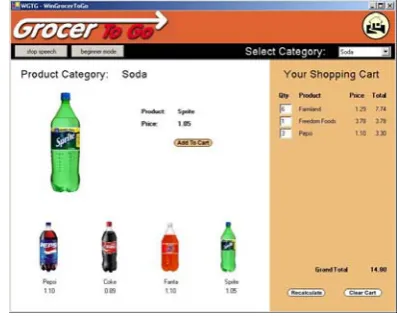
The windows application also provide the User a choice between a beginner mode with step by step progress or an advanced mode for quick results as sown in Fig. 3. In addition, it is still possible to control the application by mouse and keyboard.
Fig. 3 New speech-enabled window application
4.
Windows Application Implementation
4.1
Speech Synthesis
Speech Synthesis is a part of the speech functionality. First a SpVoice object and a speechVoiceSpeakFlags object has to be created once. Then SpVoice's Speak method can be used for the desired output text and theSpeechVoiceSpeakFlags object as parameters to generate the speech output as listed below:
SpVoice spv = new SpVoice();
SpeechVoiceSpeakFlags svsf = new SpeechVoiceSpeakFlags(); spv.Speak("Hello!", svsf);
4.2
Speech Recognition
For Speech Recognition some initial work has to be done, i.e. getting a recognition context, adding the event handler and creating a grammar. It is necessary to use an event handler as a callback function so that every time SAPI recognizes a word from the grammar, it calls the event handler. Of course, these words have to be added to the grammar before SAPI can identify them. The following are some example codes:
object PropValue = "";
SpSharedRecoContext objRecoContext = new SpeechLib.SpSharedRecoContext(); objRecoContext.Recognition +=
new _ISpeechRecoContextEvents_RecognitionEventHandler(Reco_Event); ISpeechRecoGrammar grammar = objRecoContext.CreateGrammar(0);
ISpeechGrammarRule milk = grammar.Rules.Add("milk",
SpeechRuleAttributes.SRATopLevel|SpeechRuleAttributes.SRADynamic, 2); milk.InitialState.AddWordTransition(null, "skinny", ",
SpeechGrammarWordType.SGLexical, "skinny", 1, ref PropValue, 1.0F); milk.InitialState.AddWordTransition(null, "pauls", " ",
SpeechGrammarWordType.SGLexical, "pauls", 2, ref PropValue, 1.0F); milk.InitialState.AddWordTransition(null, "farmland", " ",
SpeechGrammarWordType.SGLexical, "farmland", 3, ref PropValue, 1.0F); milk.InitialState.AddWordTransition(null, "pura", " ",
SpeechGrammarWordType.SGLexical, "pura", 4, ref PropValue, 1.0F); grammar.Rules.Commit();
grammar.CmdSetRuleState("milk", SpeechRuleState.SGDSActive);
The code segment below shows how to implement the event handler when SAPI recognizes an expression.
private static void Reco_Event(int StreamNumber, object StreamPosition, SpeechRecognitionType RecognitionType, ISpeechRecoResult Result)
{
String input = Result.PhraseInfo.GetText(0, -1, true); switch(input)
{
case "skinny":
...
break; }
}
5.
Function
The handling of this windows application should be intuitive. As such, only sample functions are presented
here though an advanced mode has also been implemented to offer a quick solution for people who want to use this program frequently.
5.1
Start and Stop Control
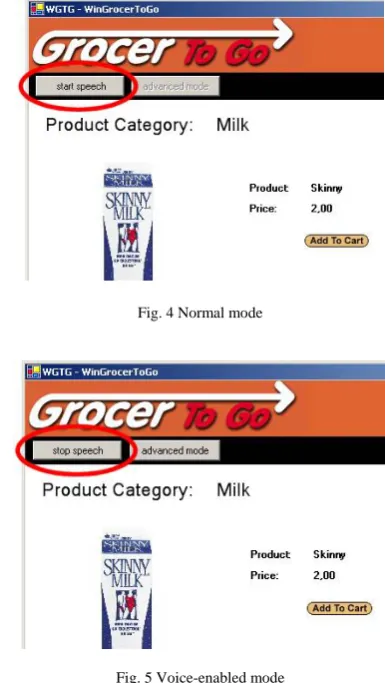
If the demonstration application is used as a normal mode, i.e. with mouse and keyboard but not with the voice option as shown in Fig, 4, no speech output will be generated. But it can be activated by clicking on “start speech” or just saying “start” as shown in Fig. 5. Then the application can be controlled by either mouse/keyboard or voice. Pressing the “stop speech” button or saying “stop” disables voice mode. This is implemented to avoid unintentionally voice commands.
Fig. 4 Normal mode
Fig. 5 Voice-enabled mode
5.2
Beginner and Advanced Modes
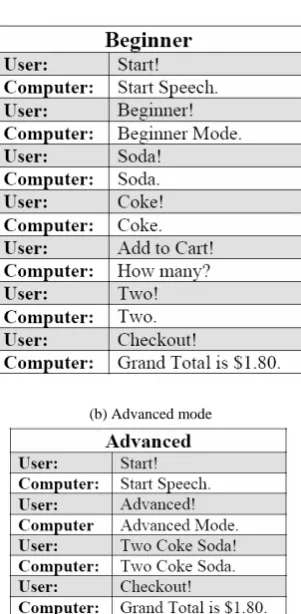
But in the advanced mode, the user can provide all the information in one single sentence as illustrated in Table 1(b).
Table 1 Beginner and advanced user interaction
(a) Beginner mode
(b) Advanced mode
5.3
Shopping and Checkout
During the shopping period the category and the desired product are selected. Clicking or saying (beginner mode only) “add to cart” results a prompt for the quantity. Adding an already existing product just increases its amount by one. It's also possible to alter the amount by changing the number in the textbox and update the price by clicking “Recalculate”. To delete one item simply set the amount to “0” and update the list. The “Check Out” command brings the grant total for the shopping as shown in Table 1.
6.
Conclusions and Future Work
This developed windows application demonstrates that it is possible to build a speech-enabled appclaiton using the existing Microsoft SAPI. Although it lacks sophisticated
speech error handling, for example, to cancel a started buying process and create a dynamic grammar file. Perhaps future versions of SAPI will solve this problem.
The development of a standard speech interface like SAPI provides a very positive outcome for those who want to use speech functionality with minimus technical details. Speech output is absolutely simple to generate and even input is manageable for software programmers who aren't linguistic specialists. The step from version 4.0 (Windows XP) to 5.0 (not delivered with any operating system yet) is the most important improved made by Microsoft, but the version 5.3 (perhaps later called 6.0) which is supposed to be shipped with Windows Vista ought to improve further more especially for providing basic support for managed code. Microsoft has promised to integrate speech in its new operating system. If it really becomes reality, it's likely that there will be more and more speech-enabled applications.
References
[1] Raynal, M, Serrurier, M (2002) ‘CYNTHIA: An HTML Browser for Visually Handicapped People’, ICCHP, Vol. 2398, pp. 353.
[2] Vankayala, RR and Shi H (2006) ‘Dynamic Voice User Interface Using VoiceXML and Active Server Pages’, Lecture Notes in Computer Science, No. 3841, Frontiers of WWW Research and Development, pp. 1181-1184.
[3] Mecanovic, D, and Shi, H. (2005) ‘Voice User Interface Design for a Telephone Application Using VoiceXML’, Lecture Notes in Computer Science, No. 3399, Web Technologies Research and Development, pp. 1058-1061. [4] Microsoft Speech SDK 5.1 (2001),
http://www.microsoft.com/downloads/details.aspx?FamilyI
D=5e86ec97-40a7-453f-b0ee-6583171b4530&DisplayLang=en.
[5] C# Corner 2004, ‘Speech Recognition using C#’,
http://www.c-sharpcorner.com/UploadFile/ssrinivas/SpeeechRecognitionu singCSharp11222005054918AM/SpeeechRecognitionusing CSharp.aspx?ArticleID=c984b731-4369-4dd2-b44a-c22b5cd5f9e3
[6] EmAnt, ‘Voice Activation & Annunciation using Visual C# 2003’, http://www.emant.com/676008.page.
[7] Harrington, M, (2006) ‘Giving Computers a Voice’,
Dr. Hao Shi obtained her BE in Electronics Engineering from Shanghai Jiaotong University, China in 1986. She joined the then Department of Electrical and Electronic Engineering, Victoria University as a Lecturer after completion of her PhD in the area of Computer Engineering at University of Wollongong in 1992 and was promoted to a Senior Lecturer in 2001. She joined School of Computer Science and Mathematics in March 2003.She has been actively engaged in R&D and external consultancy activities. Her research interests include p2p Network, Location-Based Services, Web Services, Computer/Robotics Vision, Visual Communications, Internet and Multimedia Technologies.