BYOD:Usability
Abha Tewari
1, Pooja Nagdev
2,Kiran Israni
31,2
Assistant Professor, Vesit, Mumbai, India
3Student, Vesit, Mumbai, India
Abstract-Bring Your Own Device (BYOD) has become one of the most influential trends that has or will touch each and every IT organization. The term has come to define a megatrend occurring in IT that requires sweeping changes to the way devices are used in the workplace.This white paper discusses the security challenges posed by bring-your-own device(BYOD) on end users as well as on IT organisations and how they can be addressed through the management of mobile devices, apps and data.Different architectures used for this upcoming technology are also being highlighted to a certain extent.
Keywords- BYOD(Bring Your Own Device),Challenges for IT organization,Challenges for End users,BYOD security Models.MDM Architectures,MIS architectures,MMM architecture
INTRODUCTION
What is BYOD?is it just a new IT buzz or something more than that?Yes,its an emerging Trend in IT world.It allows employees and executives to use personal devices for accessing companies resources.This leads companies to reduce costs,(ii) provide flexibility to employees to choose their own device.As every coin has two sides, BYOD though providing such clear advantages, posses serious challenges with respect to securing organisational data.As the data that originates or belongs to the organisation is stored or displayed on personal device of the employee.This may lead to data leakage,unauthorised sharing of data and more.Also the privacy of the employee may be hampered as the organisation might monitor the personal data saved on the device.
In the future a single device may be used for computing, communications, and applications,really?
Actually,today most believe there will continue to be different devices best suited to particular uses. For example, a laptop is not as portable as a smartphone, so people are likely to carry their smartphone for mobile communications. Tablets are powerful devices as well, but it is likely laptops and PCs will still be used for document creation and publishing. This means people will more likely carry and use multiple devices and less likely that a single, all-purpose device will emerge. Figure 1 shows how various devices are suited to different tasks.
Figure 1 Variety of Devices(CISCO courtesy)
The impact of this trend is that many more devices will be connected to the network by the same employee or person, often simultaneously, and likely lead to a large increase in overall connected devices.
Also employee overlaps the organisation’s data with personal data due to the convenience of using only a single device anytime, anywhere i.e. beyong the working hours of the organization.The effect of this time and device overlap is that corporate and personal data will be increasingly co-mingled on devices, leading to security and privacy challenges.
It is estimated that mobile devices and the traffic they create on networks will increase by 18X between 2011 and 2016, driven by more powerful smartphones and tablets, with users demanding Internet access and access to applications wherever and whenever they want. The more employees can easily access work using WiFi and mobile networks, the more widespread these networks will become, thereby further enabling access. The end result is pervasive connectivity anywhere and anytime, which means corporate networks will have more devices connected more frequently, leading to an even broader need for the 24/7 availability of applications.
Mobile applications are categorized into three parts as shown in Fig.2[9].White List, Grey List and Black List applications.Applications in White-list are considered Safe where as applications in Black List are considered unsafe.Those in Grey List are not identified as safe or unsafe.Therefore reducing the range of Grey List is very important for enhancing safety as well the convenience of users.
Figure.2 Application category according to safety
The total applications of Fig. can be presented asEq.(1)
TAPp=NWL+NGL+NBL TAPP:Total number of mobile applications. NWL:Number of White List applications NGL: Number of Grey List applications NBL: Number of Black List applications
When a mobile user downloads applications from app markets, the probability of infection by malicious codes is suggested as Eq.(2).If all applications in White List are safe, then the probability of infection is Zero.If application in Black List are unsafe the the probability of infection is 100%.If applications in Grey List are not sure, then probability of infection can be changed according to the app markets.
PMAL_DOWN=(NGL*PMAL+NBL*100%)/TAPP. (2)
PMAL_DOWN:Probability of downloading malicious code Total Applications
White List
Safe Applications
Grey List
Safe or unsafe
applications
Black List
PMAL:Probability of infection in Grey List apps
Most applications in Black-List can be blocked by mobile vaccine programs, therefore NBL can be omitted in Eq.(3).
PMAL_DOWN=(NGL*PMAL)/TAPP. (3)
If we refer to the analysis done by Kim and Lee[9] we come to know that companies or organizations which use BYOD based mobile office services can prevent possible infection from malicious codes. As the domain of Grey List increases, the possibility of infection and inconvenience of users also become higher.thus all applications should be categorized into White List or Black List, but its very difficult because of the quantity and complexity of whole mobile application codes.
CHALLENGES FOR IT ORGANIZATIONS [Cisco Courtesy]
Adopting BYOD comes with a set of challenges for the IT organization. Many of the benefits of BYOD, such as having the choice of any device and anywhere, anytime access, are somewhat antithetical to traditional IT requirements for security and support.
Data Breaches:BYOD has resulted in data breaches. For Example, if an employee uses a smartphone to access the company network and then loses that phone,untrusted parties could retrieve any unsecure data on the phone Another type of security breach occur when an employee leaves the company, they do not have to give back the device , so company applications and other data may still be present on their device. Scalability and capability of corporate network:Due to lack of proper network infrastructure,organizations fail to handle the large traffic which will be generated when employees will start using different devices at the same time.hus employees demand performance.T
Providing Device Choice and Support
Traditionally, IT pre-determined a list of approved workplace devices, typically a standardized desktop, laptop, and perhaps even a small, standardized set of mobile phones and smartphones. Employees could choose among these devices, but generally were not permitted to stray from the approved devices list.With BYOD, IT must approach the problem differently. Devices are evolving so rapidly that it is impractical to pre-approve each and every device brand and form-factor. It is also somewhat impractical to expect IT organizations to have the same level of support for each and every device that employees may bring to the workplace.Hence most IT organizations have to establish, at a macro level, what types of devices they will permit to access the network, perhaps excluding a category or brand due to unacceptable security readiness or other factors. Support must also be considered, such as adopting more IT-assisted and self-support models.
Maintaining Secure Access to the Corporate Network
Device choice does not mean sacrificing security. IT must establish the minimum security baseline that any device must meet to be used on the corporate network, including WiFi security, VPN access, and perhaps add-on software to protect against malware.In addition, due to the wide range of devices, it is critical to be able to identify each device connecting to the network and authenticate both the device and the person using it. On-Boarding of New Devices
On-boarding of new devices—bringing a new device onto the network for the first time—should be simple and, ideally, self-service with minimal IT intervention, especially for employee bought devices. IT also needs the ability to push updates to on-boarded devices as required.
Ideally on-boarding should be clientless, meaning no pre-installed software is required. This has an added benefit: if a self-service on-boarding model is successfully implemented, it can be
easily extended to provide access to guests as well. Enforcing Company Usage Policies
Businesses have a wide range of policies they need to implement, depending upon their industry and its regulations and the company’s own explicit policies. Adoption of BYOD must provide a way to enforce policies, which can be more challenging on consumer devices like tablets and smartphones.Another complication results from the mixing of personal and work tasks on the same device. Smartphones are likely used for business and personal calls and tablets likely have both personal and business applications installed. Access to the Internet, peer-to-peer file sharing, and application use may be subject to different policies when a user is on their personal time and network and when they are accessing the corporate network during work hours.
Visibility of Devices on the Network
Traditionally an employee had a single desktop PC or laptop on the network and probably an IP desk phone. If the employee called IT for support, it was likely straightforward to locate that user’s device on the network and troubleshoot the issue.
With BYOD adoption, each employee is likely to have three, four, or more devices connected to the network simultaneously. Many of the devices will have multiple modes, able to transition from wired Ethernet to WiFi to 3G/4G mobile networks, moving in and out of these different connectivity modes during a session. It is critical for IT to have tools that provide visibility of all the devices on the corporate network and beyond.
Protecting Data and Loss Prevention
One of the largest challenges with any BYOD implementation is ensuring protection of corporate data. If a corporate asset, such as a laptop, is used to access business applications and data, typically that asset is tightly controlled by IT and likely subject to more restrictive usage policies.IT must have a strategy for protecting business data on all devices whether corporate managed or employee self-supported and managed. This may include a secure business partition on the device which acts as a container of corporate data that can be tightly controlled and may also include the need for a Virtual Desktop Infrastructure (VDI) application to allow access to sensitive or confidential data without storing the data on the device.
Revoking Access
At some point in the lifecycle of a device or employee, it may become necessary to terminate access to the device. This could be due to a lost or stolen device, an employee termination, or even an employee changing roles within the company.IT needs the ability to quickly revoke access granted to any device and possibly remotely wipe some or all of the data (and applications) on the device.
Ensuring Wireless LAN Performance and Reliability
As wireless access becomes pervasive, performance and reliability expectations are the same as what is expected from the wired network, including reliable connectivity, throughput, application response times, and increasingly voice, video, and other real-time collaboration applications.
This fundamental shift demands that IT change the service level of the corporate wireless LAN (WLAN) network from one of convenience to a mission critical business network, analogous to the wired network. Design and operation of the WLAN must include high availability, performance monitoring and mitigation, as well as seamless roaming.
Managing the Increase in Connected Devices
CHALLENGES FOR END USERS
The demand for BYOD is largely driven by users who want to choose the devices they use in the workplace. From a user perspective, there are challenges to address.
Keeping it Simple
BYOD solutions and technologies are quickly evolving, however one of the largest challenges is how to make it simple for people to get connected to and use corporate resources. The number of device possibilities, the range of connection types and locations, and the lack of widely adopted approaches can translate to difficulties for users.
Each device brand and form factor may require slightly different steps to be on-boarded and connected. Security precautions and steps may also vary depending upon how and where the user is trying to connect.Ultimately any BYOD solution needs to be as simple as possible for users, provide a common experience no matter where and when they are connecting, and be as similar as possible across devices.
Mixing Personal Devices With Work
BYOD brings a mix of personal and work tasks on the same device. Contact lists, E-mail, data files, applications, and Internet access can pose challenges. Ideally, users want to separate their personal data and activities from work. Personal photos, text messages, phone calls, and Internet browsing performed on their own time needs to be subject to personal privacy, while documents, files, applications using corporate data, and Internet browsing performed on company time needs to be in compliance with corporate policies.
Some employers make connecting with an employee-owned device contingent on signing an agreement so the company can monitor compliance, acceptable use policies, and otherwise act to protect corporate data. In some cases this may include remote wiping of all data on the device—potentially including personal data—which obviously can be a source of contention between IT and users if not properly managed.
Considerations for BYOD Adoption
For any widespread adoption of BYOD, there are a number of factors that need to be considered.
Understand User Segments and Needs
It is important to understand that there are different segments of users within any BYOD implementation. One recommendation is to conduct a user segmentation analysis within the company to help understand needs and likely level of required support. An example is shown in Figure 3.
Figure 3: User Segments and Needs(CISCO courttesy)
Every company is different. Figure 4 evaluates employee roles against the need for mobility and mobile applications and against the likely level of required support. BYOD deployments are easy with users who only need low levels of IT support, possibly using self-support communities to share best practices.
Deployments may be more difficult with users who have high mobility needs but also require high support levels, such as executives.
Conducting such an analysis will help you understand entitlement policies and support models and may prevent frustration and cost overruns in the IT budget.
Deciding on a BYOD Adoption Strategy
Different businesses will approach BYOD with different expectations across a spectrum of adoption scenarios. Every business needs a BYOD strategy, even if the intention is to deny all devices except IT approved and managed devices. Figure 4 shows a number of possible adoption scenarios into which most businesses fit.
Figure 4 BYOD Adoption Scenarios(CISCO courttesy)
Businesses within industries with high degrees of regulation, such as finance or secure government agencies, may need to take a restrictive approach with BYOD adoption to protect sensitive data. Devices may need to be tightly controlled and managed as in the traditional IT approach, which may still be valid in these instances.
For many companies, adoption will range from allowing a broader set of devices with restrictive access to applications to embracing BYOD in full, encouraging broad adoption of many or all device types and deploying security measures to enable access to a broad set of enterprise applications and data. In the broadest sense, some companies will adopt a “mobile first” strategy, whereby their own internal applications development will be prioritized on tablets and smartphones, seeking competitive advantage by leveraging the broadest set of productivity tools and devices.
Considering Application Strategies
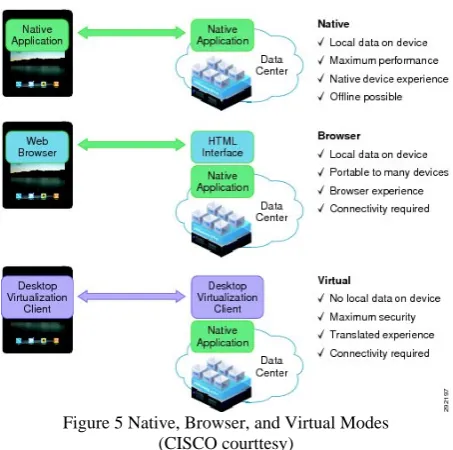
Securing and preventing the loss of corporate data is a top concern when implementing BYOD. It is important to understand three possible application architectures and the trade-offs involved: native, browser, and virtual.shown in Figure 5. In native mode, applications running on the device communicate directly with the application server in the host data center (or cloud). Data may be exchanged and stored directly on the BYOD device. Typically the application performance and user experience are closest to the specific device; in other words, a business application functions much like any other application on the device. All the productivity benefits and device behavior are preserved and applications can be tailored to provide enhanced experiences.
Figure 5 Native, Browser, and Virtual Modes (CISCO courttesy)
To contrast, in virtual mode applications exist on the application server in the data center (or cloud) and are represented through a VDI client on the device. Data is not stored locally on the BYOD device. Only display information is exchanged and rendered on the BYOD device. While this method provides maximum data security, user experience may be a compromise due to the translation from an application server to the form-factor and OS native to the BYOD device. Early adopters of this approach have provided somewhat negative feedback.
It is important to make decisions about which mode, native or virtual, will be relied on for the application architecture. Many companies may use a hybrid approach, using native mode for many standard business applications and virtual mode for a subset of applications with stricter confidentiality or sensitive data requirements.
Extending Collaboration to BYOD Devices
Ultimately, employees want to connect to the network not only for access to data applications, but also to collaborate with one another. Just as in traditional workspaces, users with BYOD devices want access to their company’s voice, video, and conferencing services.
Standalone approaches, such as relying on the smartphone’s cellular communications, can be somewhat effective. To be truly effective, it is essential to have an integrated approach that makes employees easily reachable within their company’s communications directory and systems. Another consideration is how then do we extend these services to devices without cellular voice capabilities, such as an Apple iPad?
A complete BYOD solution must consider how to extend the full suite of collaboration applications to BYOD devices, including integrated voice, video, IM, conferencing, application sharing, and presence. Any solution needs to consider not only the employees using BYOD devices, but also others trying to collaborate with them.
Have an Encompassing End User Agreement
Although not part of the network architecture, one area that must be well thought out prior to any BYOD implementation is the end user agreement (EUA). Because of the mixing of personal and corporate data, and the potential of having employee-owned devices being used for work, it is critical to outline policies up front and be sure to communicate these to employees in advance. IT organizations need to familiarize themselves with laws, including the Computer Fraud and Abuse Act, the Wiretap Act, and Communications Assistance for Law Enforcement Act
(CALEA).
What will company policies be? Will communications be subject to monitoring? Will policies apply to both corporate and personal? Areas to be addressed include (but are not limited to):
Text messaging
Voice calling via cellular and via VoIP services such as Skype or Google Voice
Internet browsing Instant messaging E-mail
GPS and geo-location information Applications purchased/installed Stored photographs, videos, and e-books Device “wiping”
As a simple example, many businesses regularly filter and monitor Internet access to ensure compliance with policies against accessing inappropriate Web sites at work. Most BYOD devices have direct internet access through public WiFi and/or 3G/4G mobile Internet access. It would be common to have a policy against browsing X-rated Web sites on a device connected through the corporate network. Will the same policy apply if the employee decides to browse sites on their employee-owned device, on personal time, through public Internet access? As another example, it would be common to have policies against transmitting inappropriate E-mails containing very personal photos through E-mail or text messaging while using a corporate-owned device or corporate network. Will the same policies apply to personal E-mails or personal text messaging on an employee-owned device? Which communications will be monitored? Which will not?There have been several legal challenges recently for cases involving an employer who remotely “wiped” an employee-owned device, including both the corporate and personal data it contained. Imagine the surprise as an employee when by using your new tablet to access the corporate network, you unknowingly agreed to let IT delete your favorite family photos. Other challenges exist around potentially illegal wiretap situations where employees are challenging that their text message conversations were being illegally monitored by their company who failed to notify them.
The key to avoiding legal liabilities is to notify, notify, and notify again. Make it clear to employees in a written policy that they must accept how the company will treat corporate and personal data and communications on the BYOD device. By agreeing to the EUA, make it clear what rights the employee is forfeiting to gain access to the network with an employee-owned device. Have a Lost or Stolen Device Policy
Similar to the previous discussion about having a complete EUA in place, businesses should have a plan in place for how lost or stolen devices will be handled. What will be the process for notification by employees? What are the necessary steps to remove access to the corporate network? What steps can and will be taken to remotely remove local data stored on the device? Different solutions offered in the market provide varying degrees of capabilities to reach out to a device remotely and destroy data or applications to insure they remain confidential. Consider the types of data that are likely to be stored on BYOD devices and integrate mitigation plans into the overall BYOD strategy before deployment.
BYOD security Models[3]Currently, there are three main security models for BYOD:Mobile Device Management (MDM), Mobile Application Management (MAM), and Mobile Information Management(MIM).
A. Mobile Device Management (MDM)
agent is an application which is installed on mobiledevices and sends its status and data to the MDM server.The MDM server manages the received data and accordingly triggers commands on the registered mobile device to lockdown, control, encrypt, and enforce policies for them.The MDM systems consist of several components such as MDM Server and a gateway server (aka a relay server), the MDM Console and the Mobile Device Management Agent which is a light software agent that can be installed on mobile device.
B. Mobile Application Management (MAM)
An MAM system is a solution used by IT administrators to remotely install, update, remove, audit, and monitor enterprise related applications on mobile devices, therefore, the MAM functionalities can be summarized as follows:
Remote application provisions
Remote application removal and configuration Remote application updates and backups Application white lists and black lists
Unlike the MDMs which control the mobile devices in the hardware layer, the Mobile Application Management systems monitor and control certain applications with reference to an organization’s policies and requirements. For instance, the organizations may use the MAM to restrict corporate-relatedapplications and leave other information and applications unmonitored and open to use by users .
C. Mobile Information Management (MIM)
Recently, the enterprises have been able to use a newtechnique called MIM in which critical corporate informationis secured instead of mobile devices. The main aim of MIM isto preserve enterprise information in a centric location (e.g.private cloud) and securely share them between differentendpoints and platforms. The MIM only allows a limitednumber of trusted applications tocontrol and manage theencrypted corporate data.Regardless of the advantages and disadvantages ofsecurity models, they provide limited solutionsand protection and only focus on managing devices (i.e.MDM), applications (e.g. MAM) and information (e.g. MIM)based on certain policies.
CONCLUSION
The industry has to learn the importance of BYOD for its organization.Inspite of all the challenges of BYOD,it’s a useful technology to implement. Our main focus is to tell the organization the different solutions in order to overcome the security issues.
ACKNOWLEDGMENTS
Our thanks to the experts who have contributed towards development of the template.
REFERENCES
[1] Alessandro Armando,Gabriele Costa and Luca verderame,Alessio Merlo. ” Securing the Bring Your Own Device Paradigm” IEEE computer society of India,2014.
[2]. Morris Chang, Pao-chung HO and Teng-Chang Chang. “Securing BYOD” 2014. IEEE Computer society
[3] Faculty of Electrical engineering university Teknologi MARA,Malaysia,Faculty of Computer Engineering & Technology,Asia pacific University of Technology & innovation,Malaysia “BYOD:Current State And Security Challenges”IEEE,2014
[4] Khoula Alharthy,Wael shawkat “Implement Network Security Control Solutions in BYOD environment”IEEE2014
[5] T.Andrew Yang,Radu Vlaas,Alan Yang,Cristina Vlas ”Risk Management in the Era of BYOD”,IEEE 2013
[6] Antonio Scarfo “New Security Perspective around BYOD” IEEE 2012
[7] David Jaramillo,Micheal Ackerbauer,Stephen Woodburn”A user study on mobile Virtualisation to measure personal freedom Vs.enterprise security”,IEEE 2014
[8] Santiago Gimenez Ocano,Byrav Ramamurthy,Yong wang”Remote Mobile Screen(RMS):An pproach for secure BYOD environment”IEEE 2015
[9] Seungcheon Kim,Kyu-Tae Lee ”A Security Architecture for BYOD office”IEEE 2014
[10] Thomas Shumate,Mohammed Ketel”Bring Your Own
Device:Benefits, Risks and Control Techniques” IEEE 2014 [11] Denis Gessner, Joao Giaro,ghassan Karame Wenting Li”Towards A
User-Friendly Security-Enhancing BYOD Solution”NECTechnicalJournal vol.no.3 2013
[12] SecuringBYOD, J. Morris Chang, Iowa State University Pao-Chung Ho and Teng-Chang Chang, Institute for Information Industry, Taiwan