A Hybrid Checkout System
Final report of the bachelor assignment for Industrial Design by Tycho Hartman
Date: June 24th, 2008
Number of pages: 56 Attachments: A to M
Number of printed copies: 4
Author: Tycho Hartman Study: Industrial Design Student number: s0095184
Address: Amundsenstraat 6c, 3814WV Amersfoort, The Netherlands
...
Institute: University of Twente
Faculty: Construerende Technische Wetenschappen Study: Industrial Design
Address: postbus 217, 7500 AE Enschede, The Netherlands, tel. (053)4 89 91 11
This report is intended for the tutors and the graduation professor.
Tutors:
H. Boiten Msc., Scanpoint B.V. Ir. M. Brouwer, University of Twente
Professor:
2
Abstract
3
Table of contents
Introduction ... 5
1 What is the current market situation for Scanpoint? ... 7
1.1 What are checkout systems? ... 7
1.1.1 Conventional checkout and self checkout ... 7
1.1.2 The purpose of the checkout ... 7
1.2 How is the market for checkout systems organized? ... 8
1.2.1 Supply of checkout components ... 8
1.2.2 Requirements ... 8
1.2.3 Checkout market diagram ... 9
1.3 What is the position of Scanpoint in the market? ... 9
1.3.1 Original Equipment Manufacturer ... 9
1.3.2 Customer support ... 9
1.3.3 Scanpoint’s offerings ... 10
1.4 Which products from other companies are competing with Scanpoint’ products? ... 12
1.4.1 Two types of self checkout ... 12
1.4.2 Self checkout ... 13
1.4.3 Hybrid self checkout ... 13
1.5 Where will the subject of this project, a hybrid checkout system, fit in the market? ... 14
1.6 What are the current developments in the market? ... 14
1.6.1 RFID chips versus barcodes ... 14
1.6.2 In-store merchandising... 15
2 How are checkout systems being used? ... 15
2.1 What is the opinion of the primary users on the checkout systems? ... 15
2.1.1 User interviews ... 15
2.2 Who are the primary users of checkout systems during daily operation? ... 18
2.2.1 About personas ... 18
2.2.2 Personas ... 18
2.3 Which tasks are performed during the various checkout processes? ... 19
2.3.1 Conventional checkout ... 19
2.3.2 Self Checkout (Scanpoint Lite) ... 21
2.3.3 Hybrid checkout ... 22
3 What are the requirements that need to be met by a hybrid checkout system? ... 23
3.1 Who are the stakeholders for checkout systems? ... 23
3.1.1 User stakeholders ... 23
3.1.2 Non-user stakeholders ... 24
3.2 Which functions must be served by the hybrid checkout system? ... 25
3.2.1 General functions ... 25
3.2.2 Usage functions ... 25
3.2.3 Support functions ... 27
3.3 Which requirements for Hybrid Checkout systems are set by Dutch Arbo law? ... 27
3.4 What are the requirements for a hybrid checkout system? ... 28
3.4.1 Usage phase ... 28
3.5 What are the guidelines for a hybrid checkout system? ... 29
4
3.5.2 Production phase ... 29
3.5.3 Distribution phase ... 29
3.5.4 Usage phase ... 29
3.5.5 Removal phase ... 29
4 How should a hybrid checkout system look? ... 30
4.1 What components are mandatory for a hybrid checkout system to perform as required? ... 30
4.2 What are the optimal physical arrangements of these components? ... 30
4.2.1 Results of the physical arrangement study ... 31
4.2.2 Zone model: three functional zones ... 31
4.3 How can these physical arrangement best be realized? ... 32
4.3.1 Generated concepts ... 32
4.3.2 Styling ... 37
4.3.3 Final hybrid checkout design proposals ... 39
4.4 What are the global costs for the designed hybrid checkout systems? ... 47
4.4.1 Estimated list prices for the three concepts ... 48
4.4.2 Cost evaluation ... 48
5 Design evaluation ... 49
5.1 Evaluation of the functions and requirements ... 49
5.1.1 Functions ... 49
5.1.2 Requirements ... 49
5.2 Feedback from Scanpoint ... 50
5.2.1 Feedback on the three systems... 50
5.3 Further evaluation ... 51
6 Conclusions and recommendations ... 51
6.1 Conclusions ... 51
6.1.1 Project objective ... 51
6.1.2 General conclusions ... 52
6.2 Recommendations ... 52
6.3 Personal evaluation ... 54
6.3.1 Takeover ... 54
6.3.2 Project planning and execution ... 54
6.3.3 Learning points ... 55
6.4 Evaluation of the persona study ... 55
Final words ... 56
5
Introduction
This report marks the completion of the bachelor assignment of Tycho Hartman, an Industrial Design student at the University of Twente in The Netherlands. The assignment has been issued by
Scanpoint in Amersfoort, The Netherlands, and involved the preliminary research phase and the conceptual design phase for a checkout system for supermarkets.
Scanpoint is a company that sells and services essential hardware and software for a proprietary checkout system that allows supermarket customers to scan their groceries and pay for them with very little assistance of a store attendant. This so called self checkout system provides the
shopkeeper with a reliable and secure way for checking out groceries. The self checkout solution allows one attendant to supervise up to eight self checkout systems, which is a great advantage over regular attended checkouts that require one attendant at each checkout. The self checkout systems also take up less floor space in the store compared to regular attended checkouts. The benefits of this self checkout system for the customers are that there are more checkout lanes open at any given moment, thus allowing more customers to checkout simultaneously without having to wait in line. The self checkout process also provides the customer with more privacy because there is no longer an attendant that processes every single product they wish to purchase.
The self checkout process, however, has a weakness on a very basic level that has caused
shopkeepers to delay implementing the system or refraining from the implementation altogether. This weakness is that customers, however experienced they may be with the self checkout system, cannot scan the products as fast as a trained attendant. At peak hours, this causes lines to form at the self checkout systems that do not dissolve as fast as they would at an attended checkout. Because the self checkout systems often take up floor space in the store that would otherwise have been occupied by regular attended checkouts, the number of regular attended checkouts that a store has, alongside the self checkout systems, is not sufficient to eliminate the lines at these busy
moments. Therefore, shopkeepers have asked for a variation of the self checkout systems that allows an attendant to take over the scanning from the customers to speed up the checkout process. Such a system is dubbed a hybrid checkout system, as it bundles features from both regular attended checkouts and self checkouts.
Scanpoint provides essential hardware components and software for self checkout systems. The checkout system itself, which also consists of the housing for these components and the some mechanical parts, is built by various checkout furniture manufacturers that each offer a model that is slightly different from the others. A hybrid checkout system, as requested by the shopkeepers, could be built by checkout manufacturers using the existing Scanpoint offerings with some minor
modifications. However, thus far none of the checkout manufacturers has made an effort to design and build such a hybrid checkout system.
The purpose of this study is to research the options for such a hybrid checkout system and to do some design proposals that can inspire the checkout manufacturers to design and build such
6
proposals for a hybrid checkout system. Finally, an approximation of the sales costs for the hybrid checkout system was made.
7
1 What is the current market situation for Scanpoint?
1.1 What are checkout systems?
Most modern day supermarkets are based on the self service principle. This means that the customer can walk freely through the store, searching for the desired products in the various sections of the supermarket. The desired products are usually carried in a shopping cart or shopping basket. When all groceries are picked from the shelves, the customer has to pay for them. This is done in the checkout area, usually the area closest to the exit of the store. It is quite common that the customer can only leave the store by traversing the checkout area, to ensure that all products chosen in the store are being paid for. The checkout area of an average sized supermarket consists of a number of checkout desks and often also has a customer service desk. In this project, the focus is on the checkout desks, but to explain the working of the supermarket, a wider view of the store is
sometimes applied. The checkout process is the process of paying for the groceries and all underlying processes, such as registering the products, making the monetary transaction, etcetera. From this point on, the term checkout is used for both the checkout desk as the checkout process, depending on the context.
1.1.1 Conventional checkout and self checkout
A relatively new development of the checkout process is the move towards self service checkout, also known as self checkout or self scanning. The conventional checkout procedure is facilitated by a store employee (a cashier) who helps the customer register the products, calculates the due fee and accepts the payment. Generally, for each customer that checks out, one store employee is required. To minimize labour costs, a new checkout process is developed and introduced to the market. This new checkout method is called ‘self checkout’ and allows the customer to execute most (and sometimes all) checkout tasks, without much help from an attendant. This functional concept requires different checkout systems that replace the attended checkout desks of the conventional checkout process. It allows one store attendant to service multiple checkout systems and thus can help save labour costs. The upside of this new checkout process is more privacy for the customer and the perception of a more speedy checkout. The store can process more customers simultaneously and thus reduce the waiting lines, without having to increase the number of cashiers.
1.1.2 The purpose of the checkout
Now that the checkout process is clarified, a more in-depth look at the purpose of the checkout is offered.
1.1.2.1 Allow for payment
The primary reason for the checkout to exist is to allow the products from the store to be paid for. A checkout usually has a cash register to securely store the received money as well as the change money. Another feature of the cash register is to aid the cashier in calculating the due fee and the change money.
1.1.2.2 Register products
8
the turnover and lost products, the sold items are also registered in a separate database after the transaction. Modern day information technology is applied in many stores to automate the ordering of new product stock, a system which is heavily depending on the correct registering of all sold products at the checkouts. The described ‘cash register system’ is often called the Point-of-Sale system or POS system in technical terms. The term POS (without system) is also used in more informal situations.
1.1.2.3 Extra services
At the checkout, a host of extra services to the customer are provided. Depending on the store, the offerings at the checkout vary from plastic bags, discount products and packs of gums to prepaid telephone cards and cigarettes. It is also quite common for a chain of stores to have customer loyalty cards which give the customer a way to save credits and get extra discounts, among other things. Often, these loyalty cards are also used by a store or chain to get purchase statistics from their customers for marketing purposes.
1.2 How is the market for checkout systems organized?
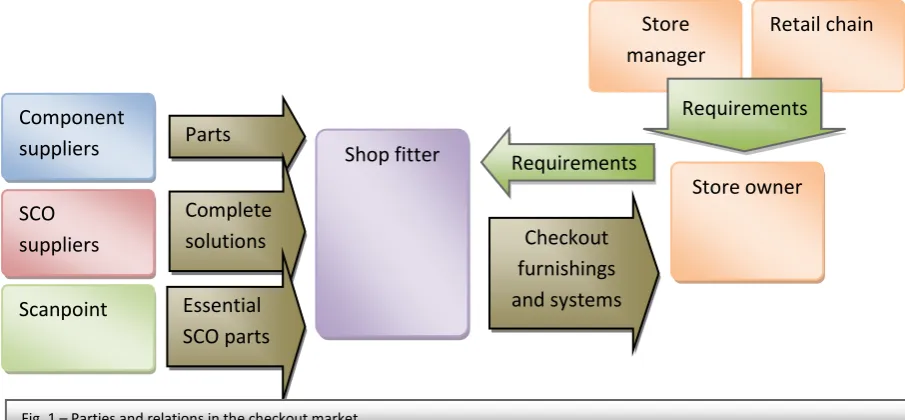
Based on conversations with Scanpoint employees, an overview of the market has been drafted. A supermarket nowadays is a very complex and versatile environment in which products and services of many kinds, shapes and forms are traded. The supermarket is furnished with various different objects and systems, varying from store shelves to checkout furnishing and cooling installations. The checkout system and checkout furnishing are the focus of this project. Usually, a shop fitter selects the furnishing and systems to be installed, keeping in mind the requirements of the store owner. The shop fitter is the party that ties supply and demand of supermarket systems together.
1.2.1 Supply of checkout components
On the supply side of checkout systems, there are various parties. Most of these parties offer hardware and software solutions that can be built into the checkout furnishing that is designed and produced by the shop fitter. Shop fitters usually are the designers and manufacturers of the checkout furnishing. The mentioned hardware and software solutions can be cash drawers, barcode scanners, keyboards, displays, cash register electronics etcetera. Aside from these hardware parts, software is of growing importance in the checkout systems and as such is an important product for the
manufacturers of checkout components.
The suppliers of self checkout systems usually deliver their products as a whole, complete with enclosure, rather than as individual parts. This means that the shop fitters have little freedom in fitting these systems into other furnishings, and their options for combining parts to create a custom, built to order system for the store owner are limited. Scanpoint is a notable exception, since their solution consists of only the essential components. These components can be fitted into any piece of furniture the shop fitter wishes, ensuring great freedom in design for the shop fitter. More on this subject will be explained in section 1.3.
1.2.2 Requirements
9
treated. Another influential stakeholder can be the store manager, which in some cases is the same person as the store owner. In other cases, the retail chain is the owner of the store and as such can determine the requirements. These parties decide what they want and then approach a shop fitter to execute the project.
1.2.3 Checkout market diagram
The following graphical representation (Fig. 1) explains the relations between the various parties that are active in the market for checkout solutions.
1.3 What is the position of Scanpoint in the market?
1.3.1 Original Equipment Manufacturer
As described in section 1.2 and shown in Fig 1, Scanpoint has a unique market position for self checkout solutions. Scanpoint is a so-called Original Equipment Manufacturer, or OEM, which means that they provide the components necessary for their solutions to other parties. These parties in turn use the parts in the end product. In this case, the necessary components that Scanpoint delivers are electronics and software for self checkout systems. These components can be built into checkout furnishings by the shop fitter. This business model allows Scanpoint’s solutions to be used in varying situations and under varying circumstances. This means the shop fitters can build furnishing for the self checkout that suits their customers’ needs and that seamlessly integrates in the existing product lines. The position Scanpoint is in is unique, because no other supplier uses the OEM business model for self checkout solutions. The competitors deliver complete systems that allow for customisation to a small degree. The styling of these products and the arrangement of the components cannot be changed.
1.3.2 Customer support
Scanpoint also provides product support and services to the stores directly. Normally, the service and maintenance of checkout products is carried out by the shop fitter, but due to the complex nature of the self checkout solution not all issues can be resolved by the shop fitter and an expert helpdesk is needed. Scanpoint handles the issues and when necessary directs a technician to the store. Also, feature requests and solutions to unforeseen problems are handled by Scanpoint directly.
Shop fitter
10
1.3.3 Scanpoint’s offerings
Scanpoint offers a complete self checkout solution that consists of multiple separate systems that work together. The Scanpoint self checkout solution currently consists of two self checkout systems and three peripheral systems. These peripheral systems are needed to complete the self checkout solution. In this section follows a brief description of the various systems. A more in-depth
description can be found in attachment A.
1.3.3.1 The Scanpoint self checkout solution
The self checkout solution provided by Scanpoint consists of two self checkout systems (Scanpoint Lite and Scanpoint XS) and three peripheral systems. At the self checkout systems, the customer can scan the groceries. After all groceries are registered by the computer, the receipt is finalised. The customer can pay at the self checkout with a bank card, or choose to pay the receipt in cash at a cash payment machine (Cashpoint) or at an attended service desk (Servicepoint). When the payment is done, the customer receives an exit receipt. This receipt can be scanned at the Exitpoint so that the gate opens and the customer can leave the store.
In attachment J, the Scangineers self checkout solution is illustrated by checkout manufacturer Itab.
1.3.3.2 Scanpoint Lite
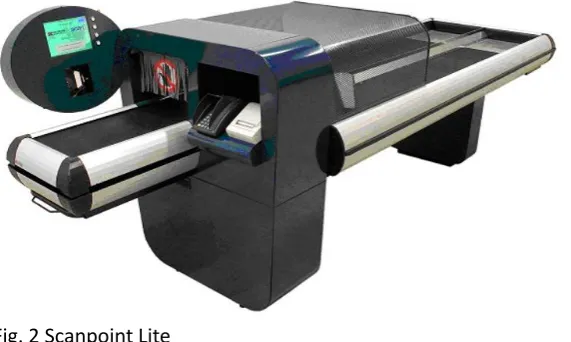
Scanpoint Lite (Fig. 2) is a self checkout system with conveyor belts. This system can be used with smaller or larger quantities of groceries, because the conveyor belt transports the groceries to a packing area. The customer can elect to pay directly at the Scanpoint Lite with a bank card. The system is very well equipped for
customers that use shopping carts. There are two parallel rear belts, which allow a customer to start scanning even if the previous customer is not yet done packing. This is the most popular self checkout system of the two systems currently in service; over 300 Scanpoint Lite systems are currently operational in stores. The hybrid checkout solution that is the goal of this project will be based on the Scanpoint Lite.
11
1.3.3.3 Scanpoint XS
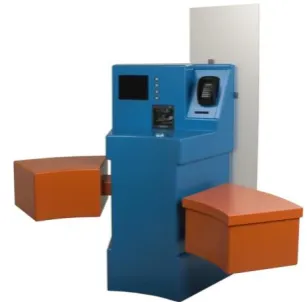
Scanpoint XS (Fig. 3) is a scan-to-bag self checkout system which means that it allows the user to pack each scanned product directly in a bag or box. This is a difference with the Scanpoint Lite, where the users will scan all their products before they start packing them. The system is best suited for small quantities of groceries, most likely carried to the checkout in a
shopping basket. The basket is put on a platform and the groceries can be scanned. The scanned products can be put directly in a plastic bag or cardboard box on the other side of the scanner. The customer can elect to pay directly at the Scanpoint XS with a bank card.
1.3.3.4 Cashpoint
The Cashpoint is a payment terminal that allows the customer to pay the groceries with coins or bank notes.
1.3.3.5 Servicepoint
The Servicepoint is a service desk for attendants. At this desk a supermarket employee can handle cash payments, but also bank card payments. The attendant can also monitor the self checkout systems, handle problems and answer questions.
1.3.3.6 Exitpoint and self checkout area
After passing the self checkout systems, the customer is guided into the self checkout area. This is a controlled area (usually surrounded by a fence) in which the Servicepoint and Cashpoint systems are situated. After the groceries are paid, the customer receives an exit receipt. The Exitpoint is located at the electronic gate of the self checkout area. At the Exitpoint, the customer can scan the exit receipt. The Exitpoint opens the gate if the receipt is indeed paid for.
1.3.3.7 Security
To prevent fraud at the checkout, the Scanpoint checkout systems have a few security measures in place. Both models have a weight scale that checks if the item on the belt or in the basket is the same as the item that was scanned by the customer. The system checks in a centrally stored database how much the scanned article weighs, and checks if this weight corresponds to the weight that was detected by the scale. On top of this, the Scanpoint Lite has a light curtain, internally referred to as the objectsensor, which registers if only scanned items are passing through the checkout to the packing area. This objectsensor is placed in a tunnel, which prevents that customers place or throw items past the objectsensor. The objectsensor and tunnel are a security feature that set the
Scanpoint Lite apart from its direct competitors.
1.3.3.8 Age restricted products
In the supermarket, some products may only be sold to people above a certain age. As an example, in the Netherlands, alcoholic beverages and cigarettes may only be sold to people above 16 years old. The Scanpoint models have a built in warning system that alerts the attendant when an age
12
system works by sending an alert to the attendant’s display at the Servicepoint, as well as by activating an orange light on the self checkout system.
1.4 Which products from other companies are competing with Scanpoint’ products?
1.4.1 Two types of self checkout
Currently, two quite distinctive types of self checkout are available to shop fitters and store owners. The first type is most important for this research, as this is the type of self checkout Scanpoint offers in their self checkout solution. An explanation of this type of self checkout is already given in the previous paragraphs that explain Scanpoint position in the market. In summary, in this type of self checkout the customer can shop just like in a store with conventional checkout. At the checkout, however, the customer identifies the products to the cash register and pays for them without the aid of a supermarket attendant.
The second type of self checkout is performed during the shopping in the store. The customer picks up a scanning terminal (Fig. 4) at the entrance of the store and uses this to scan the products when they are put in the shopping cart or basket. At the checkout, the customer only has to return the scanning terminal, pay for the scanned items and leave. This type of self checkout will be called ‘scan terminal self checkout’ (or STSCO) in this report, to distinguish it from the first type which will be simply referred to as ‘self checkout’ (or SCO). The reason for this decision, apart from convenience, is that the shopping process for the first type is more akin to the conventional shopping process, and as such is more ‘standard’ and needs no additional describing words.
The following table provides a basic comparison between the two types of self checkout:
Type 1: Self checkout (SCO) Type 2: Scan terminal self checkout
Before shopping Nothing Pick up scan terminal, register
(with Customer loyalty card)
During shopping Nothing Scan products before putting
them into cart
After shopping Scan products, pay and leave Return scanner, pay and leave
Difference from conventional shopping procedure
13
Because Scanpoint is only active on the type 1 self checkout market, and it is not an option to select type 2 as a solution to the design problem of this project, the type 2 self checkout solutions will not be further investigated.
As part of the investigation into the checkout market, the Euroshop Retail Trade Fair in Düsseldorf, Germany was attended. A report of this visit can be found in attachment H.
1.4.2 Self checkout
Scanpoint’ checkout solution is completely aimed at the self checkout market, and thus Scanpoint does not have to compete directly with suppliers of conventional checkouts. However, many of these suppliers have started developing self checkout systems, probably because they believe self checkout is the future of the checkout market and they want to remain active in that market. These companies are the direct competition of Scanpoint. Among these checkout suppliers are some of the biggest names in the industry, such as IBM, Wincor-Nixdorf, NCR and Fujitsu. In attachment B, an overview of the self checkout solutions offered by these companies is given. The websites of these companies that were used as a source of information to put this overview together are also given in this attachment. As a summary of the overview, two important facts can be concluded.
The first is that most SCO manufacturers are focussed on scan-to-bag systems. There are various configurations with support for one up to six bags at a single checkout station. Some manufacturers also offer systems with conveyor belts, like the Scanpoint Lite, but these are nothing more than scan-to-bag systems with a belt fitted before or after the scanning plate. In contrast, the Scanpoint Lite system by Scanpoint is completely designed around the belts.
The second important fact is that all other manufacturers provide all-in-one solutions. Their systems come complete with enclosures and there are very few options for shop fitters to customise the system or its appearance for a specific store. On the other hand, the solution offered by Scanpoint and its partners can be fitted in any checkout furnishing, as long as certain key components (such as the security weight scale and the light curtain) are installed correctly.
1.4.3 Hybrid self checkout
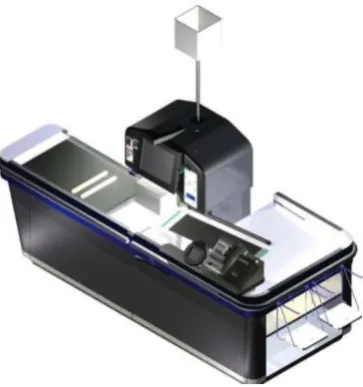
14 For this project, one solution offered by a competitor is especially interesting. DigiPos, a German manufacturer of checkout products and systems, offers a hybrid checkout solution that could be very similar to the result of this project (Fig. 5). Their line of self checkout products is named The Utopia Solution, and the hybrid is only one of multiple self checkout solutions. Their hybrid solution is a self checkout system that can transform into an attended checkout in a few steps. Judging from footage shot at a trade fair [DigiPos, 2007], the actions necessary for this transformation are quite cumbersome. However, this system may be useful as inspiration for the design of a hybrid self checkout solution for Scanpoint.
1.5 Where will the subject of this project, a hybrid checkout system, fit in the
market?
A hybrid solution is an often-heard request from shop fitters and store owners. The main reason they give is that a cashier can work faster than a customer using a self checkout system. Therefore, at busy times it could be beneficial for the store’s efficiency to use a self checkout as an extra attended checkout to quickly help as many customers as possible.
A market survey has revealed that two different directions are possible to honour this request. The aforementioned DigiPos Utopia system shows one of these directions: a self checkout system that can physically transform into a checkout that is similar in appearance to a conventional attended checkout. The other direction is taken by some other suppliers of self checkout systems. This direction is a relatively simple addition to the systems user interface software that allows a store employee to help at a self checkout system. This direction does not provide the physical similarity to a conventional checkout, which might prove crucial to a hybrid solutions success.
The subject of this project, a hybrid checkout solution based on Scanpoint’ self checkout system, will try to honour the request from shop fitters and store owners for such a system. As mentioned above, two solution directions are investigated by various competing parties on the market, but neither has proven the most successful or effective. Therefore, both directions are open for investigation. The requirements of the various stakeholders and their relative importance will have to determine in which direction the preferred solution may be found.
1.6 What are the current developments in the market?
1.6.1 RFID chips versus barcodes
Possibly the most obvious development in the market is the shift towards smart product tags. Small, cheap chips based on Radio Frequency Identification (RFID) technology are in development at numerous companies. These tags are aimed at replacing the currently widely applied barcodes on products, which are used for identification purposes. For instance, these barcodes are used in supermarkets to identify the products at the checkout, allowing for a quick processing of large
15
quantities of products. The downside to barcodes is that they have to be held before a barcode scanner and that they are easily damaged (for instance by wrinkling the material they are printed on), rendering the code unreadable.
RFID chips are small, cheap electronic chips that transmit a radio signal on a specific frequency. The chips, and the products they are attached to, can be identified by this frequency. The RFID chips can be read from a distance through other materials. This is a great advantage over barcodes. The downside of RFID is that the radio signals are continuously transmitted, which could be a breach of the customer’s privacy. A more pressing issue is the costs of the chips, which is a very high compared to the costs of printing a barcode on a product or package. Generally it is expected that RFID chips will become less expensive in the future. However, the novelty of the technology and the relatively high costs have prevented the technology to break through as a mainstream product. In the current generation of supermarkets, the barcode is still the preferred type of product identification despite its shortcomings compared to RFID chips. Scanpoint’s self checkout solutions are currently optimized for barcodes. Support for RFID may be incorporated in the future, but is currently not yet requested by the clients and thus not yet implemented in the hardware and software.
1.6.2 In-store merchandising
In-store merchandising is not a new
phenomenon, but the means by which a store owner can raise customer awareness for specific products or services have increased in the past years. As flat panel display technologies have become more affordable, they are used more and more for in-store communication purposes (Fig. 6). This means that a store owner has more options to promote certain products, for instance with a slideshow, a television commercial or a spoken message that is presented on these television monitors. This trend could be used in the design of the checkout system, for instance by reserving an appropriate part of the furnishing to allow a flat panel display to be mounted for promotional purposes.
2 How are checkout systems being used?
2.1 What is the opinion of the primary users on the checkout systems?
2.1.1 User interviews
To determine what the various users think of the checkout systems, a series of interviews has been done. In these short interviews customers and personnel were asked to tell their opinion on regular attended checkouts, self checkouts and the idea of a hybrid checkout as proposed for this project. The questions were aimed at getting qualitative information about the appreciation for the various checkout systems and the different users of these systems. Due to the qualitative nature, 16
16
customers, seven staff members and one manager were interviewed. The results were used both to create the personas (see the next section) and to answer the questions in this chapter. A more thorough analysis of the interviews can be found in attachment L (in Dutch).
2.1.1.1 Interview locations
Two supermarkets that have Scanpoint self checkouts in operation allowed interviews with
customers and staff members. One is a C1000 store in Bodegraven (The Netherlands), the other is a Hoogvliet store in Hilversum (The Netherlands). Important differences between the two stores concern the payment options and service attendants. The differences are given in the following descriptions of these stores.
2.1.1.1.1 C1000 Langerak Raadhuisplein, Bodegraven
The C1000 store Langerak Raadhuisplein in Bodegraven is the store that participated in the first pilot of Scanpoint self checkout systems, and has been operating these systems ever since. The self checkouts had various problems due to the new technology when they were first deployed, but are currently working well and both customers and staff members are very positive about them. At this store there were a Cashpoint cash payment terminal and a Servicepoint. Both of these allow the customers to pay with cash, rather than with a bank card at the checkout. At any time there was one attendant present to service just the self checkout customers. There were six self checkout systems of the Scanpoint Lite type, positioned three by three with one path in between.
2.1.1.1.2 Hoogvliet Seinstraat, Hilversum
The other store that allowed the interviews was Hoogvliet Seinstraat in Hilversum, a store that only recently started using self checkouts. This was very obvious, because both staff members and customers were less satisfied with the system. In this store, customers could only pay with bank cards when they chose to use self checkout and there was not a special service desk at which an attendant was present to help customers. When a customer or system required attention, an employee had to come from another position, for instance the general service desk of the store. There were four Scanpoint Lite systems with two paths (in the following order: one SPL, path, two SPLs, path, one SPL).
2.1.1.2 Satisfaction with the various systems
As mentioned above, the two stores were rather different in the way the self checkout systems were implemented. Also, the customers and personnel of the Hoogvliet supermarket were clearly not yet accustomed to the system, contrary to the C1000 where the systems were widely accepted and appreciated. This is also the most important conclusion of the interviews: it takes time for the systems to be accepted and appreciated. Customers often make beginners mistakes with the systems, and it takes time and effort from the store employees to help the customers get accustomed to this new way to check out their groceries.
2.1.1.3 Perceived bottlenecks and annoyances
17
Bottleneck/annoyance Staff Customer
Conventional, attended checkouts
Bad seats that cannot be adjusted to personal preferences
Long queues, long waiting time
Self checkouts
Too little room for groceries on the pick-up belt (after checkout) Indication for alcoholic products is not clear enough
Only payment with bank cards (depending on store) When paying with cash: having to go to two separate stations, wait
twice in line
2.1.1.4 Suggestions for checkout systems
Suggestions Staff Customer Manager
Conventional, attended checkouts
High quality, adjustable chairs
Adjustable foot rest
Room for movement in cashiers cabin (roll chair, pick up dropped items, leg space, etc)
Touch screen rather than keyboard system
Quick checkout, no unnecessary waiting, short queues Personal contact with the cashier is an important aspect Plenty of space for groceries on the pick-up belt
Self checkouts
Plenty of space for groceries on the pick-up belt Allow barcode numbers to be entered manually (useful
when barcode is damaged or otherwise unreadable)
Less height difference between belts (prevent products from falling and bumping)
Clear indicator when alcoholic products are purchased Privacy for both cashiers and customers (especially when dealing with money, bank transactions, etc)
Clear view on the checkout systems and area from service desk (both via Servicepoint monitor and visually in the store)
Clear explanation of the intended use (presented on signs or explained by a service attendant)
Cash payment should always be an option Easy to understand, easy to use (usability should be a high
priority, both in the design of the overall system as in the design of the user interface)
Hybrid checkout (most suggestions for other checkouts apply as well)
When in attended mode: allow cashier to perform the same tasks as at a regular checkout; when in SCO mode: work like a regular self checkout system.
18
Attended mode: cashier wants to sit Meet the same requirements as the separate checkouts
that are combined in the hybrid checkout
Mode (attended or self checkout) must be very obvious to the customer (presence of cashier must be visible, mode changes must be clearly communicated)
The footprint of the system must be kept to a minimum (floor space is valuable)
Prevent damage to groceries (for instance by product separator arm)
2.2 Who are the primary users of checkout systems during daily operation?
An overview of the primary users of checkout systems is relatively easy to compose. A simple observation and interview in a supermarket reveals that there are two parties that use the checkouts: the supermarket staff, and the customers. Both parties can be further divided into different categories. Customers for instance can be further divided into different usage
characteristics that may be dependent on factors like age, experience, lifestyle, interests and other personal preferences. The staff that uses the checkouts can be divided into categories as well. This can be done by looking at the various functions a staff member can perform within a supermarket, such as cashier or principal cashier. However, for some functions there may be different types of users within that group, so a further division into types of users may be required. Just as with customers, staff members may be categorized based on age, experience, personal preferences, etcetera. In the following section, an attempt is made to catch all these different categories of users in so-called personas.
2.2.1 About personas
Personas are fictional persons whose experience, preferences and other usage characteristics are representative for a broad group of real-world users. Important aspect when creating personas is to give them a name, a fictional biography that makes them appear as a real person and specific
demands towards the product. When the personas are created carefully, they can be a powerful tool when specific design decisions must be made. For instance, the decision to design for one persona but not for the other might make it easier to decide which functions to implement and which functions to discard. For instance, John is one persona and Jane another. The decision was made to design for Jane, and not for John. If a certain function is very important to John, but Jane doesn’t need it, it should not have a priority. Rather, the designer should focus on the functions that are important to Jane. [Cooper, 1999]
Several personas have been created for the hybrid checkout system that is the subject of this research project. In the following paragraph, the global characteristics of these personas are
explained. These personas could then be used in the design phase, which is described in chapter 4 of this report, to make design decisions.
2.2.2 Personas
19
to their checkout habits and preferences, the personas that were similar were merged into a new, single persona. Eventually, seven different personas were created. Four of these personas are
customers; Gerrit (76), Jacques (29), Marianne (39) and Tim (7). Two of the personas are supermarket employees; Debby (48) and Lisa (32). Finally, the last persona is a technician named Freddy (28). Biographies for these personas may be found in attachment I. It is recommended that these biographies are read so that the reader is familiar with the personas and better understands the following discussion.
To effectively design a complex product, the critical persona must be determined. This critical persona is the one that needs to be able to successfully use the product, but is the most demanding in terms of requirements. In the case of the hybrid checkout system, the critical persona is Marianne, because she needs to be able to use the system, and wants to, but has the least experience and interest in technical products. While Gerrit is even less experienced and interested, he was not chosen as the critical persona. Because of his behaviour and preferences, it is very hard to design a system that would persuade Gerrit to use it. For this project, it was deemed too difficult and would provide too little benefits. It is chosen to not design the system for Gerrit, but rather for a persona that is less hard to cater and more likely to eventually use the system. In this case, this was Marianne. Jacques is more interested in technology and has more experience with technical products, and therefore will be able to use the system if Marianne is able to. It is not necessary to focus on Jacques during the design of the system. Tim, the persona that is still a child, is not an autonomous user of the system but is always assisted while using it. Therefore, it is not needed to design for Tim
specifically but rather for the person that accompanies him, who will either be able to use the system if Marianne is able to, or will choose not to use the system like Gerrit.
The other three personas, Debby, the cashier, Lisa, the principal cashier, and Freddy, the technician, all will be users of the system and it is not an option to choose to not design for them. Their
requirements towards the system, however, are mostly separable from those of the customer personas. Therefore, it is possible to design for both the critical persona, Marianne, and for these three personas.
2.3 Which tasks are performed during the various checkout processes?
2.3.1 Conventional checkout
Conventional checkout means that the checkout is performed by a supermarket attendant. This process is slightly different at various supermarkets. To get a general understanding of the process, various supermarkets were studied. The results are used to make a general task analysis for this type of checkout which is given in the tables in the following sections. The columns separate the cashier’s actions from the customer’s actions, and the rows indicate that some actions happen more or less at the same time. Not all actions are mandatory; these are marked as optional (opt.).
2.3.1.1 Super de Boer
Cashier Customer
Place groceries on front belt (Greet customer) (Greet cashier)
Ask for customer loyalty card Give customer loyalty card (opt.)
20
Allow payment (Cash or PIN) Pay with cash or using PIN terminal
Hand out stamps (opt.) Receive stamps (opt.)
Return customer loyalty card Receive customer loyalty card Hand over receipt Receive receipt
(Greet customer) (Greet cashier)
Pack groceries (from rear belt)
Most important observations:
1. Customer loyalty card is read before all other actions performed by cashier
2. Customer loyalty card is returned after all other actions performed by cashier, except returning of the receipt (which is the final step for the cashier)
3. Customer loyalty card is not mandatory to receive price reduction for action products, it does facilitate an extra point saving system called ROCKS.
2.3.1.2 Albert Heijn, Hoogvliet
Return customer loyalty card Receive v Calculate total
Allow payment (Cash or PIN) Pay with cash or using PIN terminal
Hand over receipt Receive receipt (Greet customer) (Greet cashier)
(Greet next customer) Pack groceries (from rear belt) Most important observations:
21
2. Customer loyalty card is mandatory to receive the price reduction for action products (action is called ‘Bonus’; customer loyalty card is called ‘Bonuskaart’ (‘Bonus Card’).
3. Air Miles is a separate saving plan available at AH; customer loyalty card may be linked to an Air Miles card.
2.3.1.3 General
For the general task analysis the situation at Albert Heijn and Hoogvliet is copied. This is because this is the system for the customer loyalty card that is used in most supermarkets. Also, this is the
customer loyalty card system that is supported by the current self checkout solutions from Scanpoint.
Cashier Customer
Place groceries on front belt (Greet customer) (Greet cashier)
Scanning of products, vouchers, money refund receipts,
customer loyalty card, etc.
Hand over additional vouchers, money refund receipts,
customer loyalty card, etc. (opt.)
Check age if customer wishes age restricted products (opt.)
Tell age or show identification (opt.)
Ask for customer loyalty card (opt.)
Give customer loyalty card (opt.)
Scan customer loyalty card (opt.)
Return customer loyalty card Receive customer loyalty card Calculate total
Allow payment (Cash or PIN) Pay with cash or using PIN terminal
Hand over receipt Receive receipt (Greet customer) (Greet cashier)
(Greet next customer) Pack groceries (from rear belt) Important properties:
1. The customer loyalty card may be scanned at any point during the checkout procedure before the receipt is finalized.
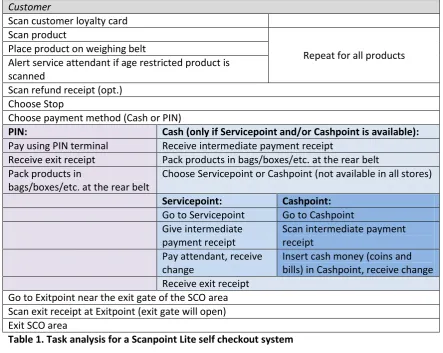
2.3.2 Self Checkout (Scanpoint Lite)
22
Alert service attendant if age restricted product is scanned
Scan refund receipt (opt.) Choose Stop
Choose payment method (Cash or PIN)
PIN: Cash (only if Servicepoint and/or Cashpoint is available):
Pay using PIN terminal Receive intermediate payment receipt
Receive exit receipt Pack products in bags/boxes/etc. at the rear belt Pack products in
bags/boxes/etc. at the rear belt
Choose Servicepoint or Cashpoint (not available in all stores)
Servicepoint: Cashpoint:
Go to Servicepoint Go to Cashpoint Give intermediate
Go to Exitpoint near the exit gate of the SCO area Scan exit receipt at Exitpoint (exit gate will open) Exit SCO area
Table 1. Task analysis for a Scanpoint Lite self checkout system
2.3.3 Hybrid checkout
For hybrid checkout, the tasks depend on what functionality is required by the stakeholders. A very important outcome of the user interviews is that both supermarket staff and customers expect the functionality of a hybrid checkout to be the same as the functionality of a regular checkout (when in attended checkout mode) and the same as a self checkout (when in self checkout mode). This requirement will be used in the requirement analysis later in this report. Assuming this requirement will be met, the task analysis for a hybrid checkout system will be very similar to the task analysis for conventional or self checkout systems, depending on the mode of operation. These task analyses may be found in the previous sections of this paragraph.
23
3 What are the requirements that need to be met by a hybrid checkout system?
3.1 Who are the stakeholders for checkout systems?
The stakeholders for checkout systems are all parties that, in one way or another, have an interest in the functioning of the system. The most obvious stakeholders for any product are its users. In the case of a checkout system, the users may be divided into customers, attendants, technical
maintenance workers and cleaners. Besides the users, there are quite a few other parties that have an interest in how the system works. For instance, the store owner may have specific wishes for the system, despite the fact that he or she will not be a direct user. Also important are the requirements for the checkouts that are issued by the retail chain in which a store operates. Last but not least, the parties that cooperate to design and build the checkout system also have specific demands for the design of the system. All these stakeholders and their requirements will be discussed in the rest of this section.
3.1.1 User stakeholders 3.1.1.1 Customer
The customers of the supermarket are a very varied group of people because it contains people from all layers and backgrounds of society. Due to the varied nature of these users, in section 2.2 this group was divided into different user personas. These personas have in turn been used to determine some of the requirements that the customers have regarding checkout systems presented later on in this chapter. The requirements of this group are versatile, since this is the only group of users that has to work with the checkout functions of the system in both modes. Other requirements from this group of users were found during the user interviews.
The requirements of this group of users are mostly related to the ease of use of the checkout system and the level of service provided by it.
3.1.1.2 Attendant
The attendants are supermarket staff members that assist the customers during the checkout of the groceries. In the attended checkout mode they function as a cashier, checking out all desired products and facilitating the payment. In the self checkout mode, an attendant is still required to help customers when they encounter problems when using the self checkout systems. Also, depending on the implementation of self checkout in a particular store, the attendants at a service desk facilitate cash payment for customers who have used a self checkout system to register the products, but do not wish to pay with a bank card. It is also the attendant’s job to ensure that age restricted products, such as alcoholic beverages and cigarettes, are not sold to people below the restricted age. This is a difficult job, especially for younger attendants that may be quickly intimidated or are very sensitive to social pressure.
24
3.1.1.3 Technical maintenance worker
The technical maintenance workers are primarily the people that service and maintain the checkout systems, especially when the system does not function properly. However, during the building and installing of the system the technical staff may also have some specific demands to the system. All technical workers during the various product life phases are grouped in this stakeholder category.
The requirements they have regarding the checkout system are all related to easy and safe access to the various parts of the system, either to install them for the first time or to repair or replace them during usage.
3.1.1.4 Cleaner
In most supermarkets, cleaning is done by the attendants when there are more attendants than are needed to help all customers. The requirements regarding the cleaning of the system are different from those regarding the use of the system, and therefore the cleaners are chosen as a separate user group.
The requirements of cleaners are all related to the cleaning of the system and the surrounding store parts, such as the floor.
3.1.2 Non-user stakeholders 3.1.2.1 Supervising cashier
In most situations, there is one supermarket attendant who is in charge of the checkout area. This attendant usually works at the service counter of the store and is the primary person for customers and other checkout attendants to turn to when there is a problem. Also, small but expensive items (such as cigarettes and razor blades) are sold the service counter. The supervising attendant usually takes care of these sales. The supervising attendant is also in charge of money transactions between the store’s vault (usually located in a nearby office) and the various cash drawers that are in use by the other attendants at the checkouts. Another important role for the supervising cashier is to manage the other cashiers to make sure they work efficiently and perform as they are supposed to. Generally, the person who acts as supervising cashier does not work at a regular checkout, and therefore is not a direct user of a hybrid checkout system.
The requirements of the supervising attendant are more related to the effective employment of other attendants at the various checkout systems. For the supervising attendant it is also important to minimize errors during the checkout, as the supervising attendant is the one who has to solve these errors. Generally, the supervising attendant is more aware of the need to provide good customer service than the regular cashiers.
3.1.2.2 Store manager
25
The requirements of the store manager are mostly aimed at allowing the employees to perform effectively and efficiently, while providing the customer with the expected service.
3.1.2.3 Retail chain management
A retail chain is a chain of stores that operates under the same name and with the same identity. One of the goals of the management of such a chain is to maintain a uniform identity for all stores in the chain. The customer experience should be the same in all stores, and should be in accordance with the intended experience for the retail chain.
The requirements set by the retail chain management are aimed at maintaining a uniform customer experience and store identity throughout all the affiliated stores.
3.1.2.4 Shop fitter / furniture manufacturer
The shop fitter is often also the designer and manufacturer of the store furniture. The goal for the shop fitter is to furnish as many stores as possible. The clients are the store owners, and an obvious strategy to sell more store furniture is to meet the client’s demands as good as possible. To create and maintain a good reputation, it is important to be recognized. This can be achieved by
differentiating the furniture designs from those of the competitors.
The requirements from shop fitters are aimed at meeting their clients’ demands, while maintaining a recognizable company identity.
3.1.2.5 Scanpoint
Scanpoint has, very much like the shop fitters, an interest in selling as much self checkout systems as possible. This can be achieved in the same way, too, so the requirements for Scanpoint are not very different from those of the shop fitters. Scanpoint is a small company with limited resources, and as such has to use existing technology as effectively as possible.
The company has an interest in the effective re-using of existing technology to keep the development costs of a new self checkout system low.
3.2 Which functions must be served by the hybrid checkout system?
The following functions must be performed by the hybrid checkout system. The functions are only related to the actual checkout product. Functions that are required for this checkout to function, but that are performed by other systems in the operating environment, such as the checkout server, service desk, cash payment machines or the exit gate, are not specified in this document. The functions are primarily grouped by function type as introduced in Productontwerpen [Eger et al., 2004, p74].
3.2.1 General functions
1. Feature an attended mode and a self checkout mode 2. Communicate current mode
3. Communicate mode changes
3.2.2 Usage functions 3.2.2.1 Checkout functions
4. Feature a front belt with weighing unit 5. Feature an objectsensor (light curtain)
26 a. Scan barcodes of checked out products
i. By attendant in attended mode ii. By customer in self checkout mode
b. Allow extra actions, manual barcode entry, cancelling of products, etcetera c. Provide link with POS system
d. Calculate total due amount
7. Accept refund tickets/coupons/etcetera (barcode mandatory) 8. Allow services connected to customer loyalty card
9. Allow payment for checked out supermarket products a. Allow cash payment in attended mode1 b. Allow bank card payment in both modes 10. Print receipts
a. Accessible for attendant in attended mode (unless a digital copy of the receipt is displayed on a feedback device that is visible for the attendant, and allows the attendant to look at the entire receipt from top to bottom, in which case the receipt printer may be placed so that it is only accessible for the customer)
b. Accessible for customer in self checkout mode
11. Feature cash drawer similar to those found in conventional checkouts 12. Plus: provide room for bank note deposit box
3.2.2.2 Physical functions
13. Provide room for products
a. In attended mode: before scanning (product queue) b. In both modes: after scanning (packing area)
c. For two customers, with average amounts of groceries, at a time
14. Provide means to physically separate products of subsequent customers in attended mode 15. Plus: provide means to automatically separate products of subsequent customers in self
checkout mode
3.2.2.3 Interface functions
16. Communicate checkout mode
17. Communicate checkout mode changes
18. Plus: support user by highlighting important locations on the checkout 19. Provide user interface
a. Provide checkout information to customer in both modes
b. Provide checkout and system information to attendant in attended mode c. Allow information input by attendant in attended mode
d. Allow information input by customer in self checkout mode
e. Allow administration access by service attendant in self checkout mode
f. Plus: allow attendant to manually enter a barcode number in self checkout mode g. Plus: allow customer to manually enter a barcode number in self checkout mode 20. Display the occurrence of an error on the system
21. Warn attendants when an age restricted product is purchased in self checkout mode.
3.2.2.4 User interaction functions
22. Provide customer privacy when using bank cards as a payment method 23. Plus: keep cash drawer contents private from customers
3.2.2.5 Emotional functions
24. Communicate desired company image
1
27
3.2.3 Support functions
25. Allow maintenance worker to access and replace internal parts
26. Allow cleaner access to places that become dirty during normal operation 27. Minimize potential places for dirt and dust to accumulate
3.3 Which requirements for Hybrid Checkout systems are set by Dutch Arbo law?
The Arbo law (Arbo is short for ‘Arbeidsomstandigheden’ or Work Circumstances) is a Dutch law aimed at protecting good working circumstances for employees. The ‘Arbeidsomstandighedenbesluit’ [SZW, 2008] (Working Circumstances Plan) is derived from the Arbo law and sets more concrete guidelines to the working conditions. However, these guidelines are still very general and are not aimed at specific branches. For this project, the Arbo law and the Arbeidsomstandighedenbesluit were checked for requirements that apply to checkout systems.2 Because these documents are not written with just the retail environment in mind, the rules and guidelines cannot be translated in concrete requirements. The general rule, however, is that the working circumstances should be so that the employee can do the job without risks to the health and safety.
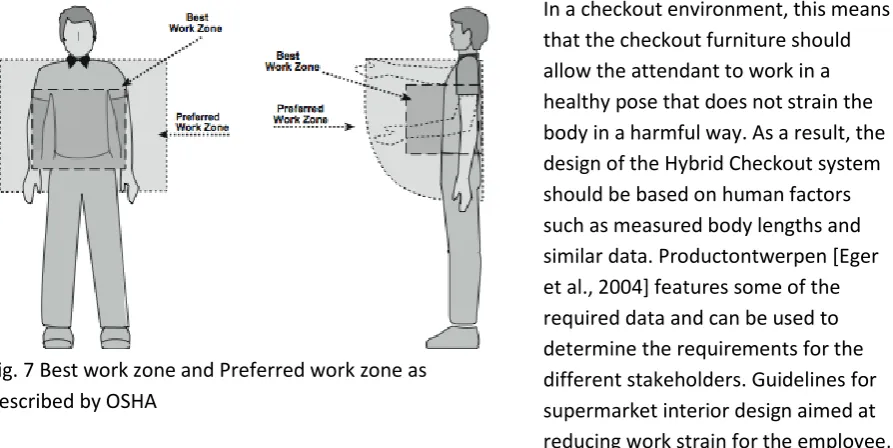
In a checkout environment, this means that the checkout furniture should allow the attendant to work in a healthy pose that does not strain the body in a harmful way. As a result, the design of the Hybrid Checkout system should be based on human factors such as measured body lengths and similar data. Productontwerpen [Eger et al., 2004] features some of the required data and can be used to determine the requirements for the different stakeholders. Guidelines for supermarket interior design aimed at reducing work strain for the employee, issued by the American Occupational Safety & Health Administration [OSHA, 2004], provided
additional information about which human factors are most relevant for this project. The concept of a Best Work Zone and a Preferred Work Zone (Fig. 7) may be applied when designing the checkout system for this project. This results in some health and safety related requirements, which are used in section 3.4.
2 It is assumed that other countries in which Scanpoint technology is applied have similar rules and laws. It is up
to local shopfitters to apply local laws in the custom design.
28
3.4 What are the requirements for a hybrid checkout system?
All requirements are mandatory, with the exception of those marked Plus. The requirements marked Plus are not mandatory, but when met they provide added value to the system in terms of cost-effectiveness, usability or functionality.
The requirements are primarily grouped by the phase of the product life cycle they are related to, as described in Productontwerpen [Eger et al., 2004, p49].
3.4.1 Usage phase
3.4.1.1 User interaction requirements
1. The system must allow the customer and attendant to have a direct line of sight to each other.
2. The system must allow the customer and attendant to talk to each other directly, without altering the tone or the volume of the speech in any way.
3. The system must place the attendants and the customers in such a way that 95% of the attendants can give small items to or receive small items from 95% of the customers.
3.4.1.2 Security requirements
4. The cash drawer must be securely attached to the system, regardless of the current operating mode, to provide the same level of security as cash drawers in regular checkouts provide.
5. The optional bank note deposit box must be securely attached to the system, regardless of the current operating mode, to provide the same level of security as bank note deposit box in regular checkouts provide.
3.4.1.3 Mode switching requirements
6. Switch between attended mode and self checkout mode (and vice versa) in 30 seconds or less.
7. 95% of all supermarket staff members have to be mentally and physically able to perform a mode switch after they have had a proper explanation of the system.
3.4.1.4 Dimensional requirements
8. The maximum footprint of a hybrid checkout system is 100% of the footprint of a regular attended checkout. The largest attended checkouts have a footprint of 430 by 125 centimetres.
9. The checkout must be placed in the store with a wide enough aisle for a customer pushing a shopping cart to walk through.
10. Allow 95% of the customers to access the goods that are located on the front and rear belts.
3.4.1.5 Health and safety requirements
11. Do not harm users during operation, after operation or when passing by
12. Compliant to local health and safety laws (for this project: Dutch ARBO law, see section 3.3) a. Prevent strains and other injuries that are caused by performing repetitive actions
with the system.
b. Allow all primary actions3 of the attendant to be performed in Preferred Work Zone4
3
Primary actions are the actions that are performed repeatedly during the checkout process, such as scanning products, inputting data in the cash register, etc.
4
29
c. Plus: Allow all primary actions of the attendant to be performed in the Best Work Zone
3.4.1.6 Mode switching requirements
13. A mode switch has to be possible without requiring the customer and/or his/her shopping cart to move (the area that is accessible to them should not change).
14. A mode switch has to be possible without the removal of the products that are already on the front and rear belts.
15. The cash drawer must remain securely attached to the system during a mode switch. 16. The optional bank note deposit box must remain securely attached to the system during a
mode switch.
3.5 What are the guidelines for a hybrid checkout system?
In this section, specific guidelines for the design of the hybrid checkout system are gathered. These guidelines do not fit in the section that covers the system functions because they are not specific functions the system has to perform. They do not fit in the requirements section either, because it cannot be specified to what extent these guidelines have to be met to achieve the project goals and end up with an acceptable end result. These guidelines are meant to direct the design in a specific direction by stating goals that should be pursued, but that cannot be set in a way that allows an objective evaluation of the achievement. The guidelines are primarily grouped by the phase of the product life cycle they are related to. The product life phases are taken from Productontwerpen [Eger et al., 2004, p49].
3.5.1 Design phase
1. Use existing components and software from current Scanpoint solutions 2. Use standard checkout components whenever possible
3.5.2 Production phase
3. Produced with techniques suitable for small production series
3.5.3 Distribution phase
4. Plus: transport in separate parts 5. Plus: easy assembly
3.5.4 Usage phase
3.5.4.1 Checkout guidelines
6. Provide a user experience similar to a conventional, attended checkout when in attended mode.
7. Provide a user experience similar to a self checkout when in self checkout mode.
3.5.4.2 Security guidelines
8. In self checkout mode, the system must prevent the customer from circumventing the scanning and registration process.
3.5.4.3 Emotional guidelines
9. The three concepts must be styled after three chosen photo collages, with an emphasis on chosen materials, material finish, colours and atmosphere.
3.5.4.4 Durability guidelines
10. Lifetime comparable to regular checkout and self checkout systems; because of the nature of this requirement, this study cannot be used to determine whether or not this requirement has been met.
3.5.4.5 Health and safety guidelines
11. Design two mirrored varieties to evenly balance body strain
3.5.5 Removal phase
30
4 How should a hybrid checkout system look?
In this chapter is systematically determined how a hybrid checkout system that has the previously determined functions and meets the previously determined requirements and guidelines can be designed.
4.1 What components are mandatory for a hybrid checkout system to perform as
required?
There are certain hardware components that any hybrid checkout system that meets the
requirements and performs the required functions must include. A full list of these items is given in attachment C. This list is determined by investigating the parts list for a regular attended checkout and the parts list for a self checkout system. These part lists were then compared to determine the parts list for a hybrid checkout system.
An important decision for making the parts list is that the hybrid checkout system that will be designed, will be of the same type as the DigiPos system as described in section 1.5 and 1.6. Due to the requirements found in chapter 3, it is not an option to just add an elaborate attendant interface to the existing self checkout systems. The health and safety requirements imply that the attendant must have a comfortable and well designed checkout to work at. Also an important factor in this decision is the guideline that the system should behave similar to an existing self checkout in self checkout mode, and similar to an attended checkout in attended mode. This is not possible with just the addition of a software interface to the existing model, and therefore the hybrid checkout that will be designed will have a fully functional attendant workplace, as well as the necessary components to be a fully functional self checkout system.
On the parts list are, among other things, computer screens and interface elements for the cash register and conveyor belts to transport the goods. Also on this list are items that are specifically needed to make the self checkout system work, such as a weighing unit fitted in the front belt and an objectsensor, which is the light curtain that detects if a scanned and weighed item is transported from the front belt onto the next.
The number of needed parts that is displayed in the list after each part is the bare minimum, and it is not unthinkable that more than the given number of items of a part are used. As an example, the system needs a barcode scanner and a display screen with touch input in both modes. However, in attended mode these two items must face the attendant, whereas they must face the customer in self checkout mode. It is possible to design the system so that these parts are relocated during a mode switch. This probably makes the switching between modes more complex, adding design costs and probably higher costs for the mechanical system. Also, the extra action during a mode switch might cause the switch to take up more time than the maximum time as specified in the
requirements. Considerations like these can lead to the decision to put each of the mentioned parts twice in the system, making the mode switching less complex but adding costs for the double components.
4.2 What are the optimal physical arrangements of these components?
31
blocks that are shaped like the mentioned parts and are built to the same scale. These parts were then fitted together with small rods to create very rough scale models with different arrangements. Every model was created with the functions, requirements and guidelines, mentioned in the previous chapter, in mind. For examples of these models, see Fig. 8.
Fig. 8 Examples of two of the models
4.2.1 Results of the physical arrangement study
The result of this little experiment is a better understanding of the various parts and the way they have to be combined to make a system that works as intended. A very important observation is the importance of three specific requirements and guidelines. The first of these is the guideline that the user experience of the system in a certain mode should always be very much like the user experience of the existing checkout that performs that modes function. This guideline has proven to be a
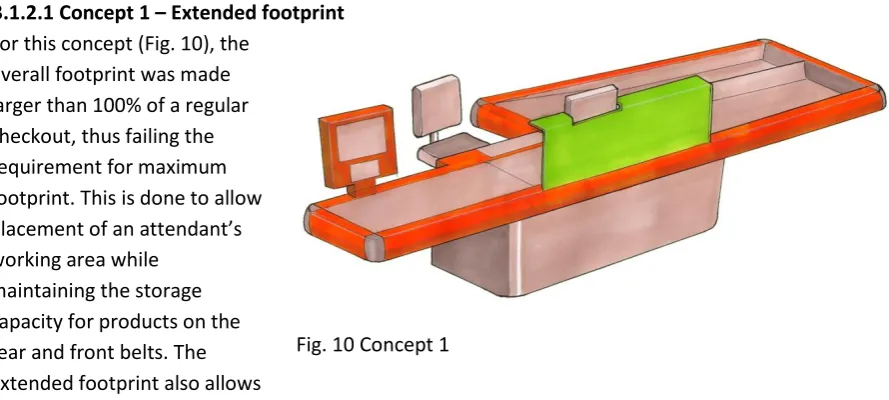
deciding factor in the forming of the various concepts. The second requirement that is very important is the requirement that limits the hybrid system’s footprint to 100% of the footprint of a regular attended checkout. This requirement makes it necessary to exchange parts and choose important functions, rather than just add extra functionality at the cost of a larger footprint. As an example, when a specific area is added to a self checkout system for the attendant to work at, the space required for this area must be taken from other functions, for instance by shortening the length of the rear conveyor belts and thus limiting the storage capacity for products on these belts. The third requirement that is very determining for the possible concepts is the requirement that protects the well-being of the attendant. This requirement determines the direction of the attendant’s workflow, the placement of key parts the attendant needs to operate and the position of the customer
compared to the attendant.
The importance of these three guidelines and requirements and the consequences they impose on the concepts were understood through the experiment with the foam blocks.
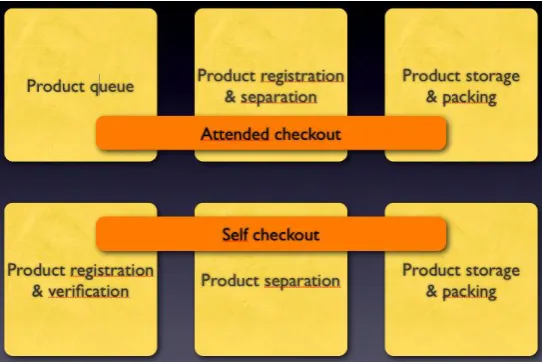
4.2.2 Zone model: three functional zones