What readers are saying about
Rails for Java Developers
Every Java developer should be exposed to ideas from different lan-guages, and Ruby/Rails is a wellspring of good ideas. Read this book—it will help you learn Ruby and Rails, and give you new ideas transferable to Java.
David Bock
Technical Director, Federal and Commercial Division, FGM Inc.
Stuart and Justin have pulled off what I once thought was an impos-sible feat: consolidating all the knowledge that a Java developer needs to understand Ruby on Rails. Until this book, you would have to read at least three books (and thousands of pages) to get the same under-standing encapsulated in this excellent text. They clearly understand both sides of the equation (RoR and Java), which allows them to cut through irrelevancies and hone in on the important topics. This book should be required reading for more than just the people learning Rails: every Java developer will benefit from learning the important lessons that Rails teaches.
Neal Ford
Application Architect/Developer, Thoughtworks
If you are a Java developer and you want to explore Ruby on Rails, this isthebook to get. Justin and Stu do a masterful job of revealing the intricacies of Ruby and Ruby on Rails from a Java developer’s per-spective. Not only that, this book is extremely well written, and is a pleasure to read.
David Geary
familiar and comfortable. In doing so, they prove that Rails and Java don’t have to be mutually exclusive.
Ted Neward
Author ofEffective Enterprise Java
If you are a Java developer trying to learn Rails, this book is the place to start. There is no better resource for quickly coming up to speed with Rails, Ruby, Rake, and ActiveRecord.
Mark Richards
Senior IT Architect, IBM
To hear some tell it, there’s tension and rivalry between the Java and Rails web development camps, but that’s hard to see from where I stand. Most of the happy Rails developers I know have a long history as Java programmers, and while we love Java for what it does well, web development in Java leaves a lot to be desired. Rails is a delight-ful breath of fresh air, and I’m confident this book will open the eyes of a lot of other Java developers who are looking for a nicer way to build web applications.
Glenn Vanderburg
Rails for Java Developers
Stuart Halloway
Justin Gehtland
The Pragmatic Bookshelf
Many of the designations used by manufacturers and sellers to distinguish their prod-ucts are claimed as trademarks. Where those designations appear in this book, and The Pragmatic Programmers, LLC was aware of a trademark claim, the designations have been printed in initial capital letters or in all capitals. The Pragmatic Starter Kit, The Pragmatic Programmer, Pragmatic Programming, Pragmatic Bookshelf and the linkingg
device are trademarks of The Pragmatic Programmers, LLC.
Every precaution was taken in the preparation of this book. However, the publisher assumes no responsibility for errors or omissions, or for damages that may result from the use of information (including program listings) contained herein.
Our Pragmatic courses, workshops, and other products can help you and your team create better software and have more fun. For more information, as well as the latest Pragmatic titles, please visit us at
http://www.pragmaticprogrammer.com
Copyright © 2007 The Pragmatic Programmers LLC.
All rights reserved.
No part of this publication may be reproduced, stored in a retrieval system, or transmit-ted, in any form, or by any means, electronic, mechanical, photocopying, recording, or otherwise, without the prior consent of the publisher.
Printed in the United States of America.
ISBN-10: 0-9776166-9-X ISBN-13: 978-0-9776166-9-5
Printed on acid-free paper with 85% recycled, 30% post-consumer content. First printing, February, 2007
Contents
Foreword 11
Preface 13
1 Getting Started with Rails 20
1.1 Setting Up Ruby and Rails . . . 20
1.2 Rails App in Fifteen Minutes . . . 21
1.3 The Rails Development Cycle . . . 25
1.4 Finding Information in Online Documentation. . . 28
1.5 Editors and IDEs . . . 29
1.6 Running the Samples . . . 30
1.7 Rails Environments . . . 32
1.8 How Rails Connects to Databases . . . 35
1.9 Rails Support Scripts . . . 36
2 Programming Ruby 38 2.1 Primitive Types . . . 38
2.2 Strings . . . 41
2.3 Objects and Methods . . . 44
2.4 Collections and Iteration . . . 47
2.5 Control Flow . . . 51
2.6 Defining Classes . . . 57
2.7 Identity and Equality . . . 63
2.8 Inheritance . . . 65
2.9 Controlling Access with Access Specifiers . . . 67
2.10 Raising and Handling Exceptions . . . 69
3 Ruby Eye for the Java Guy 72 3.1 Extending Core Classes . . . 72
3.2 Mutable and Immutable Objects . . . 74
3.3 Packages and Namespaces . . . 76
3.4 Deploying Code . . . 79
CONTENTS 8
3.6 Polymorphism and Interfaces. . . 85
3.7 Duck Typing . . . 89
3.8 Mixins . . . 90
3.9 Functions . . . 92
4 Accessing Data with ActiveRecord 96 4.1 Getting Connected . . . 97
4.2 Managing Schema Versions with Migrations . . . 100
4.3 Mapping Data to Classes . . . 103
4.4 Create, Read, Update, and Delete: Access Patterns . . . 106
4.5 Validating Data Values . . . 113
4.6 Lifecycle Callbacks . . . 116
4.7 Associations and Inheritance . . . 119
4.8 Transactions, Concurrency, and Performance . . . 125
4.9 Conserving Resources with Connection Pooling . . . 131
4.10 Resources . . . 132
5 Coordinating Activities with ActionController 133 5.1 Routing Basics: From URL to Controller+Method . . . . 134
5.2 List and Show Actions: The R in CRUD . . . 136
5.3 Create, Update, and Delete Actions . . . 140
5.4 Tracking User State with Sessions. . . 144
5.5 Managing Cross-Cutting Concerns with Filters and Verify147 5.6 Routing in Depth . . . 151
5.7 Logging, Debugging, and Benchmarking . . . 153
5.8 Resources . . . 166
6 Rendering Output with ActionView 167 6.1 Creating Basic .rhtml Files . . . 168
6.2 Minimizing View Code with View Helpers . . . 169
6.3 Writing Custom Helpers . . . 170
6.4 Reuse with Layouts and Partials . . . 172
6.5 Building HTML Forms . . . 174
6.6 Building HTML with Markaby . . . 178
6.7 Caching Pages, Actions, and Fragments . . . 180
6.8 Creating Dynamic Pages with Ajax. . . 184
6.9 Rendering JavaScript with RJS . . . 191
6.10 Black-Box Testing with Selenium . . . 192
6.11 Conclusions . . . 196
7 Testing 198
7.1 Getting Started with Test::Unit . . . 199
7.2 Rails Testing Conventions. . . 206
7.3 Rails Extensions to Test::Unit . . . 212
7.4 Integration Testing . . . 216
7.5 Rails Testing Examples . . . 218
7.6 Measuring Code Coverage with rcov . . . 222
7.7 Testing Interactions with Mock Objects . . . 225
7.8 Reducing Dependencies with Stub Objects . . . 229
7.9 Advanced Considerations . . . 230
7.10 Resources . . . 231
8 Automating the Development Process 233 8.1 Rake Basics . . . 234
8.2 Setting Rake Options: It’s Just Ruby . . . 236
8.3 Custom Rake Tasks: It’s Just Ruby . . . 238
8.4 Using Rake in Rails Applications. . . 240
8.5 Continuous Integration with Cerberus . . . 243
8.6 Resources . . . 245
9 Creating and Invoking Web Services 247 9.1 RESTful Web Services . . . 248
9.2 SOAP Web Services. . . 255
9.3 YAML and XML Compared . . . 261
9.4 JSON and Rails . . . 265
9.5 XML Parsing . . . 266
9.6 Ruby XML Output . . . 275
9.7 Creating XML with Builder . . . 276
9.8 Curing Your Data Headache . . . 278
9.9 Resources . . . 281
10 Security 282 10.1 Authentication with the acts_as_authenticated Plugin . 283 10.2 Authorization with the Authorization Plugin . . . 285
10.3 Testing Authentication and Authorization . . . 290
10.4 Preventing the Top-Ten Web Security Flaws . . . 293
10.5 Resources . . . 302
CONTENTS 10
B Bibliography 306
C Structure of a Rails Project 307
Foreword
The first time I met Stuart, several years ago at this point, he was giving a presentation about the internals of the Java classloader. At the time, I had recently completed my work at Sun with the Java Servlet spec-ification and Tomcat. In that work, I’d become very familiar with the subject of class loading and learned that it is full of subtle interactions. These interactions are quite complex and sometimes lead to surprising results. Even most Java experts don’t have a deep grasp of some of the issues that are at the heart of the classloader. In fact, up until the point I was watching Stu present, I hadn’t heard anyone outside of the core Java team get all of the interactions right. Stu, however, nailed it and filled his presentation with realistic examples that communicated the depths of the subject in a clear and easy-to-grasp manner.After that presentation, I went up and congratulated Stu on nailing his subject. And ever since then, I’ve made sure to go to any presentation that he gives. Every one has been insightful and entertaining at the same time. Justin, who I met much later, is the same way. He brings passion and knowledge to the subjects he touches, and then brings his explanations to life in a way that is sometimes spontaneous and always humorous.
FOREWORD 12
Five years ago, these two were shoulder-deep in Java, figuring out how it ticked and then making sure that they knew how it all worked so that they could explain their findings to others, as well as build solutions on top of it. They’ve brought that same approach to Rails. They’ve gone deep into the code to figure out what makes Rails tick. When asked a tough question, they know just where to look in the codebase to find the answer and then present a prototypical solution.
I have to say that every time I watch Justin and Stuart talk about either Rails and Java, it always makes me laugh—sometimes with a cringe— as they’ve been on the same path from Java to Rails as I have been. Everything that I’ve experienced along my journey from Java to Ruby and Rails, they’ve run into as well.
I can’t think of anyone better to be your guide to bridge the gap between Java and Rails. Even better, they’ve got the ability to help you make the jump yourself, and they’ll do so in a way that really lives up to the name of Chapter 3:Ruby Eye for the Java Guy. It’s a silly title for a chapter, but it embodies just the way in which they work. They’ll give you the essence of what you need to be a competent Rails programmer without changing who you are. In other words, you’re in good hands.
James Duncan Davidson December 2006
Preface
Ruby on Rails is a full-stack framework for developing web applications. Rails embraces many good ideas that are familiar in the Java world: the Model-View-Controller (MVC) pattern, unit testing, agile development, the ActiveRecord pattern, and many others. At the same time, Rails challenges many standard practices: Instead of miles of XML configu-ration files, Rails relies on conventions where possible. Rails is built with Ruby, a dynamic language, and is deployed as source code.But forget the technical points for a moment. The reason that any of this matters is that Rails programmers are getting things done, and fast. Rails programmers have made (and substantiated) some amazing claims about developer productivity. They are having a lot of fun, too.
Should Java programmers be alarmed by this upstart? Absolutely not. Java programmers are uniquely positioned to take advantage of Ruby on Rails. This book will explain how to get started.
Who Should Read This Book?
This book is for all Java programmers. OK, let us narrow that down a little. This book is for two subsets of Java programmers:
• Those who want to program in Ruby and Rails • Those who do not
To the first group: We wrote this book because we love Java, and we love Rails. We believe that Java programmers are uniquely qualified to take advantage of Rails, because Java programmers have lived through a lot of the struggles behind the good (and sometimes controversial) ideas in Rails.
PREFACE 14
from Java in so many fascinating ways, that we think it is the single best complement you can learn to round out your skill set.
To both groups: We have had a great time writing this book, because we share a common language with you, our readers. By assuming a common vocabulary of the Java language and patterns, we are able to move quickly to the meat of topics. We believe that, page for page, this is a much better book for Java developers than a general-purpose book can ever be. Yes, that’s bragging, and we are boasting about you, our fellow Java developers. Thanks for all the work you have put in to build a baseline of industry knowledge on which we hope to build.
Why
This
Rails Book?
A lot of Rails books exist. One aspect that sets this book apart is our Java background. We focus on the parts of Rails that will be different, new, and interesting to a Java developer.
The second aspect that sets this book apart is our emphasis on Rails as an ecosystem, not just as a framework. As a Java developer, you are accustomed to having an enormous ecosystem around your program-ming language. You have great IDEs, monitoring tools, and widgets for every situation. Rails has an ecosystem too—not as big as Java’s but important nevertheless. In this book, we spend less time hashing through every random API detail in Rails. Instead, we demonstrate the key points and then move into the ecosystem to show how those key points are used, extended, and sometimes even replaced.
Who Should Read Some Other Book?
This book is a reference for experienced Java programmers who want to learn Ruby and Rails. This is not a tutorial where each chapter walks you through building some sample application. For a tutorial, plus a general introduction to the Ruby language, we recommend Program-ming Ruby[TFH05]. For a tutorial and introduction to Rails, we
recom-mendAgile Web Development with Rails[TH06].
This book is not a comparison of Java and Ruby for managers consider-ing a Ruby project. For that, we recommendFrom Java to Ruby: Things
Every Manager Should Know[Tat06].
Why Ruby on Rails?
Rails is making programmers productive and happy. Plus, we are find-ing that usfind-ing Ruby exercises our minds more than any other main-stream language. If you want to start a watercooler conversation about the merits of Ruby and Rails, here are a few talking points:
• Full-stack web framework. Rails includes everything you need:
Model-View-Controller, O/RM, unit testing, and build and deploy-ment automation. Because everything is tightly integrated, it is ridiculously easy to get started.
• Opinionated software. Rails is not designed to let you do anything. It is designed to help you dothe right things.
• Convention over configuration. The danger of both the previous
points is that you might not be able to customize the framework to meet your needs. Rails avoids this with convention over configura-tion. All of Rails’ moving parts are held together by convention, but you can override those conventions whenever you need to do so. You get to pay as you go, relying on conventions where necessary and overriding only exactly what you need.
• One language for application and configuration. Rails uses Ruby
for configuration as well as for application code. Ruby is easier to manage than XML and much more powerful when configuration becomes complex.
• The secret sauce is Ruby. Ruby is powerful and elegant, and it
has become the language we think in most of the time. Ruby includes good ideas from mainstream programming languages. As a Java programmer, you will have a head start in understanding Ruby’s approach to classes, objects, inheritance, and polymor-phism. Ruby also includes many features of Smalltalk and Lisp that are missing from mainstream languages. As a Java program-mer, you will be delighted to discover how blocks, closures, duck typing, metaprogramming, and functional programming can make your code more expressive and maintainable. Rails is the gateway drug; Ruby is the addiction.
How to Read This Book
PREFACE 16
Next you have a choice: Ruby first or Rails first? If you are a bottom-up learner who cannot pass by a line of code without understand-ing it completely, start with the Ruby chapters (Chapter 2,
Program-ming Ruby, on page 38 and Chapter 3, Ruby Eye for the Java Guy,
on page72). Ruby is radically different from Java, even more than the syntax suggests. Your investment will pay for itself quickly.
If you are the “getting things done” type, jump straight into Rails, which begins with Chapter 4, Accessing Data with ActiveRecord, on page 96
and continues through the rest of the book. When you see Ruby idioms that interest you, you can always return to the chapters about the Ruby language. (If you don’t know the Ruby name for something, just use AppendixA, on page303. The dictionary is organized by Java terminol-ogy and includes pointers to relevant sections in the book.)
Other than that, feel free to skip around. The book is extensively cross-referenced throughout, so you cannot get too lost.
Make sure you follow the instructions in the next section for
download-ing the sample code.Ruby and Rails enable an interactive development
experience, and you will learn much more if you follow along with the examples.
How to Get Sample Code
The sample code for the book uses Rails version 1.1.6 or newer1 and Ruby version 1.8.4 or newer. All the sample code for the book is avail-able as a single zip file online.2
The sample code includes two Rails applications, named People and Rails XT. The People application is extremely simple and demonstrates how to use Rails to create a front end for a single database table. We build the entire People application from scratch as we go through the book. Section1.2,Rails App in Fifteen Minutes, on page21has instruc-tions to set up the People application.
Rails XT stands for “Rails Exploration Testing.” The Rails XT appli-cation doesn’t have a unified feature set that addresses some problem domain. Instead, Rails XT is a holding tank for dozens of fragments that
1. A few examples rely on features in Rails 1.2, which is still under development as of this writing. These examples are noted in the text as they occur.
demonstrate Rails’ capabilities. Because of its heterogeneous nature, Rails XT requires a bit more setup. You don’t need to set up Rails XT to get started. When you need to do so, you can find instructions in the sidebar on page 98. Here is a quick overview of the sample directory structure:
rails_xt
This contains the Rails exploration tests (see Section 1.6, Run-ning the Unit Tests, on page32) and the Quips sample application. Throughout the book, Ruby examples should be executed from this directory unless otherwise noted.
java_xt
You will use the Java exploration tests throughout the book.
appfuse_people
You will use the Java People application throughout the book.
junit4
You will find any tests that require JUnit4 here.
Rake
This includes Rake and Ant examples from Chapter8,Automating the Development Process, on page233.
hibernate_examples
This includes Hibernate examples from Chapter4,Accessing Data with ActiveRecord, on page96.
The Java examples are split into several directories to simplify class-path management. That way, you can install just the libraries you need. For example, you don’t need to install Struts, Hibernate, and so on, to run the language examples injava_xt.
How We Developed the Java Examples
This is a book about two worlds: the world of Java programming and the world of Rails programming. Whenever worlds collide, you can expect to hear statements like “Java sucks, and Rails rocks...” (or the reverse).
PREFACE 18
Our goal in visiting this new world (Rails) is to learn by comparison with our shared history (Java). But what exactly is our shared history? Ruby on Rails is a web framework, which means you could compare it to about a gazillion things in the Java world. Should we look at Java? Plain servlets? Servlets plus JSP? Aged MVC frameworks such as Struts? Rich component frameworks such as Tapestry? Java EE standard architectures such as JSF? Or all of these?
When we needed a Java baseline to compare with Rails, we chose Struts, Hibernate, and Axis. We picked these because our careful
sta-tistical research indicated these were best-known among Java develop- (We asked a lot of people.) ers. Moreover, we limit our Java usage to techniques that are typical in applications we have seen in the field. As a result, the Java code in this book should look familiar to most Java web developers.
The downside of this approach is that “typical” and “familiar” Java code is not necessarily best practice. So although this approach is useful for teaching Rails, it does not provide a comprehensive review of Java best practices. (That’s a whole ’nother book.) Where we have skipped interesting Java approaches for reasons of space, we have included margin notes and references at the ends of the chapters.
Many of the Java examples are built starting with Matt Raible’s excel-lent AppFuse (http://www.appfuse.org). AppFuse is a metaframework that allows you to quickly jump-start a web application using the frame-works of your choice. If you want to compare Rails to Java frameframe-works not covered in this book, AppFuse is a great place to start.
Acknowledgments
We would like to thank our wives. Joey and Lisa, none of this would have happened, or would have meant as much, without you. We would also like to thank our extended families. Without your love and support, this book would have been stalled until at least 2025.
To the Relevance Gang: We are in for an exciting ride. Thanks for your smarts, thanks for your excellent work, but thanks most for the fun environment.
To the Pragmatic Studio: Thanks for leading the way in getting Ruby and Rails people together, all over the country. We can’t wait for the first Rails Edge.
To the No Fluff, Just Stuff Gang: Thanks for sharing our secret lives. Our ideas about Java (and Ruby) are sharpened every weekend at our semiclandestine encounters.
To Jay Zimmerman: Thanks for building a community around excellent people and around excellence in software development.
To James Duncan Davidson: Thanks for spreading the Mac meme.
To Neal Ford: Thanks for the cross-the-board expertise, from agility and DSLs all the way to food and fashion. Who says we have to specialize? To Bruce Tate: Thanks for helping kick-start our Rails consulting busi-ness and for being a companion in our professional journey. You were country when country wasn’t cool.
To Dave Thomas: You make everything around you better, and you have fun doing it. Thanks for your inestimable contributions to Ruby, to Rails, and to our work.
To Jim Weirich: Thanks for the just-in-time technical support on Flex-Mock questions.
To Al von Ruff: Thanks for your work on the Internet Speculative Fiction Database.3 We have enjoyed it as readers, and we particularly appreci-ate you making the schema and data available for some of the examples in this book.
To Matt Raible: Thanks for AppFuse. Without it we’d still be in a bot-tomless pit of XML configuration files.
To the folks at Coke, Pepsi, Red Bull, Macallan, and Lagavulin: Thank Yes, we drink both Coke and Pepsi. And we like both Java and Ruby. you for the beverages that fueled this book. Bet you can’t guess which
drinks go with which chapters!
Chapter 1
Getting Started with Rails
In this chapter, we show how to install Rails and quickly build a small web application. Rails is famous for being simple and easy, so pay at-tention to what you don’t have to do in this chapter. There is no XML configuration to write (and very little configuration of any kind). For simple database applications, you don’t have to write much code, either. At the same time, “easy” does not mean “not serious” or “compromising on quality.” Take note of the quality orientation that every Rails project has from the start. You will see that even the simplest Rails application begins life with automated testing, documentation, and other product automation already in place. When your Rails application starts to get complicated, you will already have the tools you need.1.1
Setting Up Ruby and Rails
Setting up Ruby and Rails is straightforward on all the major operat-ing systems. If you like buildoperat-ing your software tools from scratch, you can certainly do that with Ruby and Rails. But you do not have to do so. Rails enthusiasts have created prepackaged solutions that install everything you need to get started.
On Windows
On Windows, Instant Rails1 provides a self-contained Rails environ-ment. Instant Rails includes Ruby, Rails, Apache, and MySQL, all in a sandbox separate from anything else installed on your machine. Instant
Rails is a perfect, no-risk environment for trying out the code in this book. Thanks to Curt Hibbs and everyone else involved in making Instant Rails.
On the Mac
On the Mac, Locomotive2 is a self-contained Rails environment. Like Instant Rails on Windows, Locomotive includes everything you need to run the code in this book and keep it isolated from everything else on your box. Thanks very much to Ryan Raaum for this tool.
Rails depends on Ruby, and the current version of Mac OS X includes a slightly dated version of Ruby, version 1.8.2. Sooner or later most developers install a more recent version. When you decide to upgrade your Ruby install, MacPorts3provides an easy way to build more recent versions of Ruby.
The next version of Mac OS X, 10.5 (Leopard), will have Rails already installed. W00t!
On Linux
If you are running Linux, you know how to suck bits off the Web. Start with the Rails Wiki,4 and find instructions for your flavor of Linux. All the examples in the book will assume MySQL as a database. Both Locomotive and Instant Rails install an isolated MySQL instance for you. If you are on Linux, the instructions listed at the Rails Wiki show how to set up the database.
1.2
Rails App in Fifteen Minutes
With Rails you can build an simple web application nearly instantly, using the scaffold code generator. This section will walk you through creating a functioning web app in about fifteen minutes. You’ll create a simple, form-based application for creating, reading, updating, and deleting people. We won’t explain the steps in detail here—that’s what the rest of this book is for—but you can find pointers at the end of this section to the chapters that discuss each aspect of the following code example in more detail.
2. http://locomotive.raaum.org
3. http://www.macports.org/
RAILSAPP IN FIFTEENMINUTES 22
Start in some temporary directory and create a Rails application named people:
$ cd ~/temp $ rails people
create
create app/controllers create app/helpers
(...dozens more create lines...) create log/development.log create log/test.log
Change to the people directory. All the Rails support scripts assume you are at the top-level directory of your Rails project, so you should stay in thepeopledirectory for all subsequent steps:
$ cd people
Create two databases, namedpeople_developmentandpeople_test.5
$ mysql -u root
Welcome to the MySQL monitor. Commands end with ; or \g.
Your MySQL connection id is 1 to server version: 4.1.12-standard
Type 'help;' or '\h' for help. Type '\c' to clear the buffer.
mysql> create database people_development; Query OK, 1 row affected (0.30 sec) mysql> create database people_test; Query OK, 1 row affected (0.30 sec) mysql> exit
Bye
Create an ActiveRecord model object. (Note that on Windows you will need to explicitly name the Ruby interpreter, such asruby script/generate instead of simplyscript/generate.)
$ script/generate model Person exists app/models/ exists test/unit/ exists test/fixtures/ create app/models/person.rb create test/unit/person_test.rb create test/fixtures/people.yml create db/migrate
create db/migrate/001_create_people.rb
Notice how the model file is named person but the fixture file (which may contain more than one person) is namedpeople. Rails works hard to sound like the way people talk and automatically uses the singular or plural form of words where appropriate.
Edit the db/migrate/001_create_people.rb file so the setup section looks like this:
def self.up
create_table :people do |t| t.column :first_name, :string t.column :last_name, :string end
end
Back at the console, update the database by running therake db:migrate task. Rake is an automation tool similar to Java’s Ant:
$ rake db:migrate
(in /Users/stuart/temp/people)
== CreatePeople: migrating ============================ -- create_table(:people)
-> 0.1449s
== CreatePeople: migrated (0.1462s) ===================
Generate a scaffold:
$ script/generate scaffold Person exists app/controllers/ (...lots of output snipped...)
create public/stylesheets/scaffold.css
Run your application: $ script/server
=> Booting lighttpd (use 'script/server webrick' to force WEBrick) => Rails application started on http://0.0.0.0:3000
=> Call with -d to detach
=> Ctrl-C to shutdown server (see config/lighttpd.conf for options)
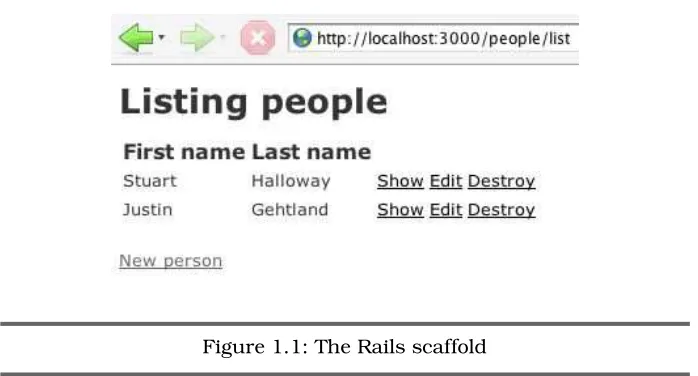
Now browse to http://localhost:3000/people. You should see a simple, form-based application for creating, reading, updating, and deleting people, as in Figure1.1, on the following page.
RAILSAPP IN FIFTEENMINUTES 24
Figure 1.1: The Rails scaffold
Now, let’s run the automated tests for your application: $ rake
(in /Users/stuart/temp/people)
/bin/ruby -Ilib:test [snip] "test/unit/person_test.rb" Loaded suite [snip]
Started .
Finished in 0.093734 seconds.
1 tests, 1 assertions, 0 failures, 0 errors
/bin/ruby -Ilib:test [snip] "test/functional/people_controller_test.rb" Loaded suite [snip]
Started ...
Finished in 0.337262 seconds.
8 tests, 28 assertions, 0 failures, 0 errors
That is interesting, since we didn’t write any tests yet. When you ran script/generate scaffold, Rails generated some tests for you. Earlier, when you first ranrails people, Rails created a build script (rakefile) that would automatically run the tests underrake. Rails helps you test your project by putting testing in place on day one.
Joe Asks. . .
Is Rails Yet Another Code Generator?
If you have seen any brief demonstrations of Rails, you have probably seen somebody generate the Rails scaffolding before. Because scaffolding makes good demoware, it would be easy to assume that Rails is primarily about generating code. Nothing could be further from the truth. Although scaf-folding can help you get the skeleton of your app up and run-ning quickly, it will most likely be gone by the time your appli-cation is complete. In fact, many experienced Rails developers do not use the scaffolding at all.
If any of the steps we just zipped through particularly intrigued you, here is a guide to where they are covered in more detail:
rails people
Section1.1,Setting Up Ruby and Rails, on page20
create database people_development
Section1.7,Rails Environments, on page32
script/generate model Person
Chapter4,Accessing Data with ActiveRecord, on page 96
editing db/migrate/001_create_people.rb
Section 4.2, Managing Schema Versions with Migrations on page100
rake db:migrate
Section 4.2, Managing Schema Versions with Migrations on page100
script/server
Section1.9,Rails Support Scripts, on page36
rake Chapter8,Automating the Development Process, on page233
1.3
The Rails Development Cycle
THERAILSDEVELOPMENTCYCLE 26
changes. That’s all. There is no compile, deploy, or server bounce nec-essary. This simple cycle has two huge impacts on productivity. First, work goes faster. Since you do not have to wait to see the results of a change, you do more changing and less waiting. Second, and more sub-tly,you learn more as you go. In Rails it is easy to just “try things” and do little experiments as you go. In environments with a more compli-cated development cycle, these little experiments simply do not happen. To see this in action, let’s make a few improvements to the People appli-cation. If you do not still have the application running, start it again withscript/server. We will leave the application running continuously as we make a series of changes.
Our People application does no data validation. If you create a per-son with an empty first name and last name, it will happily store a bogus record in the database. Validation is critical to web applications, and Rails makes validation simple. To add validation, open the file app/models/person.rb. Edit the file to look like this:
Downloadcode/people/app/models/person.rb
class Person < ActiveRecord::Base
validates_presence_of :first_name, :last_name end
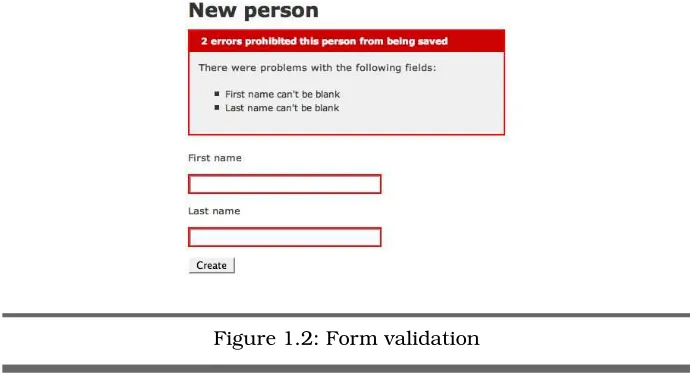
Thevalidates_presence_ofpart requires that both the first name and the last name be present; that is, they should not be nil. Now, take your browser tohttp://localhost:3000/people/new, and try to create a man with no name. When you click Create, you will see an error message like the one in Figure1.2, on the following page.
When you add validations to a model, their effects automatically prop-agate to the view, with no additional work necessary. Validations are covered in detail in Section4.5,Validating Data Values, on page113. Next, let us make a change to the people list view. If you browse to http://localhost:3000/people/list, you should see a list of people. We could make the list more useful by adding a search box. Open the file app/views/people/list.rhtml, and insert the following code right after <h1>Listing people</h1>:
Downloadcode/people/app/views/people/list.rhtml
<%= start_form_tag('', :method=>'get') %> People named:
<%= text_field_tag 'search', @search %> <%= submit_tag 'Find'%>
Figure 1.2: Form validation
The code inside the<%= %> is embedded Ruby, which we will cover in Chapter6,Rendering Output with ActionView, on page167. For now, if you refresh your browser to http://localhost:3000/people/list, you should see a search form like the one shown in Figure 1.3, on the next page. Of course, the search form doesn’t change the behavior of the appli-cation. No matter what you search for, the list will show all people (or the first ten, anyway). To change the behavior of the application, you will need to modify an action method in the controller. Open the file app/controllers/people_controller.rb, and find thelistmethod:
def list
@person_pages, @people = paginate :people, :per_page => 10 end
If the user specifies no search term, the method should continue to work as is. If there is a search term, we’ll be nice and compare against both first and last names. Replacelistwith this expanded version:
Downloadcode/people/app/controllers/people_controller.rb
def list
@search = params[:search] if @search.blank?
@person_pages, @people = paginate :people, :per_page => 10 else
query = ['first_name = :search or last_name = :search', {:search=>@search}]
@person_pages, @people = paginate :people,
:per_page => 10, :conditions=>query end
FINDINGINFORMATION INONLINEDOCUMENTATION 28
Figure 1.3: Search form
Now, refresh your view ofhttp://localhost:3000/people/list, and add a few people if you haven’t already. Then try some search terms. The list should automatically contract to show only the matching names. Con-trollers are covered in detail in Chapter 5,Coordinating Activities with ActionController, on page133.
As is so often the case with Rails, the important aspect is what isn’t
here. We didn’t have to do anything to test our changes, other than refresh the browser. Our changes themselves were minimal and to the point. We didn’t have to tell Rails how to convert URLs into controller methods, how to connect models to views, or how to find the right view for a controller action. Almost everything in Rails has a default, and you need configuration only when you want to override the defaults.
1.4
Finding Information in Online Documentation
All Rails developers should bookmark these documentation sites: http://api.rubyonrails.org
Up-to-date documentation for the entire Rails API.
http://www.ruby-doc.org/
Ruby documentation metasite. Pointers to library docs, books, training, and more.
http://www.ruby-doc.org/core
http://www.ruby-doc.org/stdlib/
Ruby Standard Library documentation. It is roughly analogous to everything in the JDK not in the packages listed previously.
Ruby API documentation is usually presented in RDoc format. RDoc is similar to Javadoc; both tools build documentation by reading the source code and embedded comments.
Rails includes Rake tasks to build documentation files on your local machine. From any Rails project, you can build the documentation by running rake doc:app. This will create a top-level documentation file at doc/app/index.html within your project. We cover Rake in detail in Chapter8,Automating the Development Process, on page233.
1.5
Editors and IDEs
GUI tools (such as IDEs) for Ruby and Rails are primitive compared to
their Java counterparts. But they are better than Notepad. Here are a In 1997, Java IDEs were primitive compared to their C++ counterparts. few pointers:
TextMate (Mac only)
If you are willing to spend money, get TextMate.6 It has most of the power and customizability of Emacs, plus the GUI savvy of a native Mac application.
Radrails (cross-platform, open source)
Radrails (http://www.radrails.org/) is built on top of Eclipse,7 so it runs almost everywhere. It is a perfect choice if Eclipse is already your IDE of choice for Java.
IntelliJ IDEA (cross-platform)
IntelliJ IDEA8 is expected to have Rails support via an IDEA 6.0 plugin. We haven’t used it yet, but we have high hopes. IDEA is our preferred IDE for Java development.
Old school...
There is a good Rails plugin for vim.9 There is also a Rails minor mode for Emacs.10
6. http://macromates.com/
7. http://www.eclipse.org
8. http://www.jetbrains.com/idea/
9. http://www.vim.org/scripts/script.php?script_id=1567
RUNNING THESAMPLES 30
1.6
Running the Samples
Instructions for downloading the sample code are on page16. The sam-ple code in this book appears in three forms:
• Very small examples that can be run directly inirb, the Ruby inter- irb active shell
• Stand-alone Ruby programs that can be run using therubycom- ruby mand
• Rails applications and support scripts that can be launched using the variousscript/* commands, which are automatically included script/* in every Rails project
Detailed instructions for running each type of sample appear in the following sections. We strongly encourage you read this book with a working environment close at hand. One of Ruby’s greatest strengths is the ease of trying it yourself.
Running irb Samples
irbis the interactive Ruby shell. Given a working Ruby installation (see Section1.1,Setting Up Ruby and Rails, on page20), you can start the interactive shell by typing irb. You will be greeted with a prompt where you can enter Ruby code. This prompt is configurable, but the default on your system will probably look like this:
$ irb
irb(main):001:0>
From theirbprompt, you can enter Ruby code, such asputs("hello"):
Downloadcode/rails_xt/sample_output/hello.irb
irb(main):001:0> puts("hello") hello
=> nil
The previous shell is displaying the following: • Ruby code as you type it (line 1)
• Console interaction (line 2)
• The return value from the last statement (line 3)
It is possible to type longer blocks, such as this three-lineif...endblock: irb(main):002:0> if true
irb(main):003:1> puts "tautology" irb(main):004:1> end
tautology => nil
If you make as many typing mistakes as we do, you can also paste multiple lines of code intoirb. When code starts to be long enough that it is unwieldy to enter into irb, you will want to switch to full Ruby programs.
Running Ruby Samples
All the Ruby samples for the book are from the rails_xt/samples direc-tory, unless otherwise noted in the text. So, if you see the following command:
$ ruby foo.rb
you can execute the same command within therails_xt/samplesdirectory after you unzip the sample code.
Running Rails Samples
The samples include a Rails application in therails_xtdirectory. All Rails commands should be run from this directory, unless otherwise noted. When you see a command that begins withscript, such asscript/console orscript/server, run that command from therails_xtdirectory.
The script/console command is particularly important. It gives you an interactive Ruby shell with Rails and your application’s environment already loaded. Try running script/console from the rails_xt directory in the sample code.
$ script/console
Loading development environment. >> puts "Hello"
Hello
This is just likeirb, except you can also now call Rails API methods. For example, you could ask what database Rails is using:
>> ActiveRecord::Base.connection.current_database => "rails4java_development"
RAILSENVIRONMENTS 32
Running the Unit Tests
We wrote much of the code in this book asexploration tests. Exploration exploration tests tests are unit tests written for the purpose of learning, teaching, and
exploring. Sample code should be tested for the same reason people unit test anything else: It is easy for us (and you!) to quickly verify that the code works correctly.
You don’t need to run the unit tests to follow along in the book (except in the testing chapter!), and we typically do not clutter the prose by including them. For example, here is the code from Section 4.8,
Pre-venting the N+1 Problem, on page130, demonstrating a solution to the
N+1 problem in Hibernate:
Downloadcode/hibernate_examples/src/TransactionTest.java
Criteria c = sess.createCriteria(Person.class)
.setFetchMode("quips", FetchMode.JOIN); Set people = new HashSet(c.list());
That’s the code you will see in the book, which demonstrates the point being made. Notice that the listing begins with the filename. If you go to that file in the sample code, you will find the code is followed imme-diately by assertions that prove the code works as intended:
assertEquals(2, people.size()); sess.close();
for (Iterator iterator = people.iterator(); iterator.hasNext();) { Person p = (Person) iterator.next();
assertEquals(25, p.getQuips().size()); }
For more about exploration testing, also known as learning tests, see learning tests “How I Learned Ruby”11 and “Test Driven Learning.”12
1.7
Rails Environments
Web applications run in three distinct environments:
• In a development environment, there is a developer present. Code and even data schemas tend to change rapidly and interactively. Data is often crufted up by the developer, such as John Smith at Foo Street.
11.http://www.clarkware.com/cgi/blosxom/2005/03/18#RLT1
• In a test environment, automated tests run against prepackaged sample data. A developer may or may not be present. Data sche-mas are regularly trashed and rebuilt to guarantee a consistent starting state for the tests.
• In a production environment, code and schemas change much more rarely. The database data is real and valuable, and develop-ers are rarely present.
In Java web frameworks, environments have historically been ad hoc: Each team evolves its own, using a collection of scripts and Ant tasks to manage environments and move code and data between them.
In Rails, environments are a first-class concept. Each application starts life with the three environments in place. Rails environments are used to select databases, log file destinations, policies for loading code, and more. Here are some of Rails’ environmental defaults:
Development:
• The log file islog/development.log. • The database is{appname}_development. • The breakpoint server is enabled.
• Web pages show error stack traces. • Classes reload for each page. Test:
• The log file islog/test.log. • The database is{appname}_test. • The breakpoint server is disabled. • Web pages show generic error messages. • Classes load once at start-up.
Production:
• The log file islog/production.log. • The database is{appname}_production. • The breakpoint server is disabled. • Web pages show generic error messages. • Classes load once at start-up.
RAILSENVIRONMENTS 34
files to the config/environments directory.) There is a top-level environ-ment file namedconfig/environment.rbthat contains settings common to all environments.
It is worth reading through the environment files to get a sense of the automation that Rails provides. Here is a snippet:
Downloadcode/people/config/environments/development.rb
# Log error messages when you accidentally call methods on nil.
config.whiny_nils = true
# Enable the breakpoint server that script/breakpointer connects to
config.breakpoint_server = true
# Show full error reports and disable caching
config.action_controller.consider_all_requests_local = true config.action_controller.perform_caching = false
The most noticeable aspect is that the configuration is just Ruby. In a Java web application, code is one language (Java), and configuration is in another (XML). In Rails applications, Ruby is often used for both code and configuration.13
Let’s try modifying the Rails environment. Although Rails’ knowledge of English grammar is pretty good, you might decide it is not good enough. To experiment with Rails, you can run script/console from any Rails project, such as the People application at code/people in the sample code.
$ script/console
Loading development environment. >> "emphasis".pluralize
=> "emphases" >> "focus".pluralize => "focus"
The Rails environment includes a pluralization rule smart enough for emphasis but not for focus. We can add our own pluralization rules to the environment. We’ll editconfig/environment.rb (that way our rule will be available in all environments):
Downloadcode/people/config/environment.rb
Inflector.inflections do |inflect| inflect.irregular 'focus', 'foci'
end
Now you should be able topluralize( ) your focus: $ script/console
Loading development environment. >> "focus".pluralize
=> "foci"
Rails support scripts and Rake tasks automatically select the envi-ronment most likely to be right. For example, script/console defaults to development, and rake test defaults to test. Many scripts report the environment they are working in so you don’t forget:
$ script/console
Loading development environment.
It is easy to override the environment for a command. Simply prepend RAILS_ENV=envname. For example, you might need to open a console against a production server to troubleshoot a problem there:
$ RAILS_ENV=production script/console Loading production environment.
1.8
How Rails Connects to Databases
Rails programs access relational data through the ActiveRecord library (see Chapter4,Accessing Data with ActiveRecord, on page96). Under-neath ActiveRecord, there is a driver layer. You will rarely call down into the driver layer yourself, but you may need to configure the driver for your application.
The database driver configuration is in the fileconfig/database.yml. This file is in YAML format.14 The top-level names indatabase.ymlare Rails environments—by default, they are the three environments discussed in Section 1.7, Rails Environments, on page 32. Each top-level name introduces a collection of indented, name/value pairs to configure the driver for a particular environment.
Rails chooses database names based on your application name plus the environment name. For an application named Whizbang, the initial config/database.ymlwould look like this:
development: adapter: mysql
database: whizbang_development
# ...more driver settings ...
RAILSSUPPOR TSCRIPTS 36
test:
adapter: mysql
database: whizbang_test
# ...more driver settings ...
production: adapter: mysql
database: whizbang_production
# ...more driver settings ... Don’t put anything too
important in the test database, since Rails blows this database away as part of running unit and functional tests. You can override the database names as you see fit by editing the
con-figuration file. One common override is to strip the_productionpart from the production database name.
In this book, we are connecting to MySQL as the root user with no password, because that is the exact setting that a new Rails application generates by default.
1.9
Rails Support Scripts
Every new Rails application includes a script directory, with a set of supporting Ruby scripts. script is similar to the bin directory in many Java projects. These scripts are run from the top directory of a Rails project, like this:
stuthulhu:~/myproj stuart$ script/server
Do not navigate into thescriptdirectory and run scripts from there. Rel-ative paths in Rails are always considered from the top project direc-tory, available within Rails asRAILS_ROOT.
You have already seen several scripts in this chapter: script/console, script/server, andscript/generate. All the scripts are summarized here: script/about
Describes the Rails environment: Rails library versions, RAILS_ROOT, andRAILS_ENV
script/breakpointer
Is an interactive Ruby shell that will take control of a Rails appli-cation when abreakpointstatement is encountered
script/console
Is an interactive Ruby shell with access to your Rails app
script/destroy
script/generate
Creates starter code from a template called agenerator generator
script/performance/benchmarker
Runs a line of Ruby code ntimes and reports execution time
script/performance/profiler
Runs a line of Ruby code n times and reports relative time spent in various methods
script/plugin
Installs and manages plugins (third-party extensions)
script/runner
Runs a line of code in your application’s environment
script/server
Launches the web server and Rails application
You now know the basic structure of a Rails application, plus some of the tools you can use to manage the development process. You will not use all this information at once, though. Instead, use this chapter as a road map as you move through the book.
Chapter 2
Programming Ruby
Ruby syntax looks pretty foreign to a Java programmer. The mission of this chapter is to explain Ruby syntax and the underlying concepts this syntax supports. You will be happy to find that many of the under-lying concepts are shared with Java: Ruby’s strings, objects, classes, identity, exceptions, and access specifiers are easily mapped to their corresponding numbers in the Java world.
2.1
Primitive Types
Java divides the world into primitive types and objects. The primitive types represent numeric values of various ranges and precision (some-times interpreted in non-numeric ways, for example as text characters or true/false). Objects represent anything they want to and are com-posed of behaviors (methods) and state (other objects and/or primi-tives). This section introduces the primitive types and their Ruby coun-terparts.
Consider the Java primitive typeint:
Downloadcode/java_xt/src/TestPrimitives.java
public void testIntOverflow() { int TWO_BILLION = 2000000000; assertEquals(2, 1+1);
//Zoinks -- Not four billion!
Three factors are immediately evident in this simple example:
• Java variables are statically typed. On line 2, the keywordint indi-cates that TWO_BILLION must be an int. The compiler will enforce this.
• Java takes advantage of a syntax we all know: infix math. To eval-uate one plus one, you can say the obvious 1+1 (line 3), rather than something annoying such as 1.plus(1).
• On line 5, two billion plus two billion does not equal four billion. This is because Java’s primitives are confined to a specific number of bits in memory, and four billion would need too many bits.
To represent arbitrarily large integers, Java uses theBigIntegerclass:
Downloadcode/java_xt/src/TestPrimitives.java
public void testBigInteger() {
BigInteger twobil = new BigInteger("2000000000");
BigInteger doubled = twobil.multiply(new BigInteger("2")); assertEquals(new BigInteger("4000000000"), doubled); }
In this example,BigIntegerdiffers fromintin three ways:
• You cannot create aBigIntegerinstance with literal syntax. Instead ofBigInteger b = 10;, you sayBigInteger b = new BigInteger("10")(line 2). • You cannot use infix mathematical notation. On line 3, you have
to saya.multiply(b)instead ofa*b.
• On line 4, two billionmultiplytwodoesequal four billion.
Ruby also knows how to manipulate integers. Like Java, Ruby needs to do the following:
• Enforce type safety
• Provide a convenient syntax
• Deal smoothly with the human notion of integers (which is infinite) inside a computer (which is finite)
Ruby takes a radically different approach to achieving these goals: irb(main):010:0> 1+1
=> 2
irb(main):001:0> TWO_BILLION = 2*10**9 => 2000000000
irb(main):002:0> TWO_BILLION + TWO_BILLION => 4000000000
PRIMITIVETYPES 40
TWO_BILLION=.... There is no compiler to make sureTWO_BILLION is really an integer.
• Ruby allows infix math syntax (2+2) for integers and any other types that want it.
• Two billion plus two billiondoesequal four billion, as expected.
Behind the scenes, Ruby deals with integers of unusual size by manag-ing two different types:Fixnumfor small integers that have a convenient representation andBignumfor larger numbers. It is possible to find out which type is actually being used:
irb(main):016:0> 1.class => Fixnum
irb(main):017:0> TWO_BILLION.class => Bignum
Most of the time you will not care, because Ruby transparently uses the appropriate type as needed:
irb(main):004:0> x = 10**9 => 1000000000
irb(main):005:0> x.class => Fixnum
irb(main):006:0> x *= 100 => 100000000000
irb(main):007:0> x.class => Bignum
Notice thatxsmoothly shifts fromFixnumtoBignumas necessary.
We could repeat the previous comparison for the other Java primitives, but this would be a waste of space, because the underlying story would be mostly the same as forint. Here are a few other factors to remember when dealing with numeric types in Ruby:
• Numeric types are always objects in Ruby, even when they have a literal representation. The equivalents for methods such as Java’s Float.isInfinite are instance methods on the numerics. For example: irb(main):018:0> 1.0.finite?
=> true
irb(main):019:0> (1.0/0.0).finite? => false
• Like Java, Ruby will coerce numeric types in various reasonable ways:
irb(main):024:0> (1 + 1).class => Fixnum
irb(main):025:0> (1 + 1.0).class => Float
If you try something unreasonable, you will know soon enough because Ruby will throw an exception:
irb(main):027:0> (1.0/0) => Infinity
irb(main):028:0> (1/0)
ZeroDivisionError: divided by 0
For information about character types, see Section2.2,Strings, below. For booleans, see Section2.5,Control Flow, on page 51.
2.2
Strings
In Java, strings are commonly represented as double-quoted literals. The implementation of JavaString is a class, with methods, fields, and constructors.
However, because string concatenation is so fundamental to many pro-gramming tasks,Stringalso has some special abilities. The most impor-tant of these is concatenation with the+sign:
Downloadcode/java_xt/src/DemoStrings.java
String name = "Reader"; print("Hello, " + name); The Ruby syntax is similar: irb(main):001:0> name = "Reader" => "Reader"
irb(main):002:0> "Hello, " + name => "Hello, Reader"
Java Strings also have a format method, which uses sprintf-like format specifiers:
print(String.format("Hello, %s", name.toUpperCase()));
Ruby offers a different approach for formatting, using a literal syntax
called string interpolation. Inside a double-quoted string, text between string interpolation
STRINGS 42
This is similar to${}property expansion in Java’s Ant. You could write the preceding example with string interpolation:
Downloadcode/rails_xt/sample_output/interpolation.irb
irb(main):005:0> "Hello, #{name.upcase}" => "Hello, READER"
In Java, you can use backslash escapes to represent characters: print(String.format("Hello, \"%s\"\nWelcome to Java", name)); Ruby also uses backslash escapes:
irb(main):008:0> puts "Hello, \"#{name}\"\nWelcome to Ruby" Hello, "Reader"
Welcome to Ruby
In both the previous Ruby and Java examples, we escaped the double-quote character inside the string (\") to avoid terminating the string. This kind of escaping can be confusing to read if you escape a lot of characters:
irb(main):009:0> puts "\"One\", \"two\", and \"three\" are all strings." "One", "two", and "three" are all strings.
In Ruby, you can get rid of all these backslash escapes. You simply pick an alternate string delimiter such as{}by prefixing a string with%Q:
Downloadcode/rails_xt/sample_output/quoting.irb
irb(main):011:0> puts %Q{"One", "Two", and "Three" are strings"} "One", "Two", and "Three" are strings"
In Java, individual characters are represented by single quotes. You can pull individual characters from a string via thecharAtmethod:
Downloadcode/java_xt/src/TestStrings.java
public void testCharAt() {
assertEquals('H', "Hello".charAt(0)); assertEquals('o', "Hello".charAt(4)); }
}
Ruby handles individual characters differently. Character literals are prefixed with a question mark:
irb(main):015:0> ?A => 65
Ruby also handles extraction differently. For example, you could call a method named slice, but Ruby programmers would typically prefer to use the[ ]syntax instead:
irb(main):019:0> ?H == "Hello".slice(0) => true
irb(main):020:0> ?H == "Hello"[0] => true
The really cool part of usingslice/[ ]is that it performs reasonable tasks with all kinds of arguments. You can count from the back of a string with negative offsets:
irb(main):022:0> ?o == "Hello"[-1] => true
You can take substrings by passing two arguments: irb(main):025:0> "Hello"[1,4]
=> "ello"
Asking for a character past the end of a string returnsnil: irb(main):026:0> "Hello"[1000]
=> nil
But, attempting to set a character past the end of a string throws an exception:
irb(main):009:0> "Hello"[1000] = ?Z IndexError: index 1000 out of string
Although interpolation is useful, you will not want it in all cases. To turn off string interpolation, use a single-quoted string instead of a double-quoted one:
irb(main):028:0> "Hello, #{name.upcase}" => "Hello, READER"
irb(main):029:0> 'Hello, #{name.upcase}' => "Hello, \#{name.upcase}"
In Java, you can create multiline strings by embedding\ncharacters: print("one\ntwo\nthree");
The embedded backslashes are legal Ruby too, but there is an easier way. Ruby provides an explicit syntax for multiline strings called a here
document, orheredoc. heredoc
OBJECTS ANDMETHODS 44
Downloadcode/rails_xt/sample_output/heredoc.irb
irb(main):035:0> puts <<MY_DELIMITER irb(main):036:0" one
irb(main):037:0" two irb(main):038:0" three
irb(main):039:0" MY_DELIMITER one
two three
Regular expressions provide a powerful syntax for finding and modi-fying ranges of characters within Strings. For example, here is a Java method that uses a regular expression to bleep out any four-letter words that appear in aString:
Downloadcode/java_xt/src/Bowdlerize.java
public static String bleep(String input) {
return input.replaceAll("\\b\\w{4}\\b", "(bleep)"); }
}
Ruby uses a literal syntax for regular expressions, delimiting them with //. As a result, a Ruby programmer might bleep like this:
Downloadcode/rails_xt/sample_output/regexp.irb
irb(main):041:0> 'Are four letter words mean?'.gsub(/\b\w{4}\b/, "(bleep)") => "Are (bleep) letter words (bleep)?"
The gsub method replaces all matches of its first argument with its second argument.
Notice that the regular expression itself looks slightly different in the Ruby and Java versions. Where you see a single backslash in the Ruby version, the Java version has a double backslash. The Java regular expression is built from a Java string, and the paired backslashes translate to single backslashes after the string is parsed. The Ruby regular expression does not pass through a temporary “string phase,” so the single backslashes are represented directly.
2.3
Objects and Methods
You have already seen some examples of objects and methods in Sec-tion 2.2,Strings, on page41.Strings are just a kind (class) of object: A method is code that is defined by an object to manipulate the object, return a result value, or both. To invoke a method on a string, or any other object, append a dot (.), the name of the method, and parenthe-ses, as in (). For example, to get the lowercased version of a string in Java, you use the following:
Downloadcode/java_xt/src/DemoMethods.java
print("HELLO".toLowerCase());
Ruby is similar, except the parentheses are optional: irb(main):047:0> "HELLO".downcase()
=> "hello"
irb(main):048:0> "HELLO".downcase => "hello"
Methods often have arguments: one or more pieces of additional infor-mation that the object uses. For example, Java has aMathobject, with acosmethod that takes a single argument, the angle in radians:
Downloadcode/java_xt/src/DemoMethods.java
print(Math.cos(0));
In this case, the Ruby version can matchexactly, since Ruby also pro-vides aMathobject.
irb(main):051:0> Math.cos(0) => 1.0
In Ruby, you can omit the parentheses around arguments, if the syntax is otherwise unambiguous:
irb(main):051:0> Math.cos 0 => 1.0
In Java, objects are type-safe. Objects know what they are capable of, type-safe and you cannot ask them to perform methods they do not have. The
following code will fail in Java, since strings do not have acosmethod:
Downloadcode/java_xt/src/DemoMethods.java
print("hello".cos(0));
Ruby objects are also type-safe: irb(main):057:0> "hello".cos 0
OBJECTS ANDMETHODS 46
Type Safety Does Not Ensure Correctness
Type safety is a very weak assurance that your program actually works as intended. Type safety says that your pieces fit together, not that you have chosen all the right pieces. Imagine your car’s lubrication system filled with orange juice. It is “type-safe” in that the lubrication system contains the right “type” (a liquid), but we wouldn’t recommend driving it.
Returning to our math example, what if you thought Math.cos
expected degrees instead of radians?
irb(main):067:0> Math.cos 180 => -0.598460069057858
There is nothing in the previous Ruby code, or its Java equiva-lent, to tell that your result is radically different from what you intended:
irb(main):069:0> Math.cos Math::PI => -1.0
In September 1999, a “little problem” similar to this one destroyed the Mars Climate Orbiter. A miscalculation based on English instead of metric units caused the orbiter to pass too close to Mars, where it was destroyed by the atmosphere.
One approach to these type-safety issues is to add even more type safety. Instead of using primitive types, you could create value types with embedded units in an enumeration. Without first-class language support, this makes code more cumber-some. A more likely approach in Ruby is to have good auto-mated tests.
Although both Ruby and Java are type-safe, they achieve type safety in different ways. Ruby uses dynamic typing. Objects carry type informa-tion with them, and that informainforma-tion is used at runtime to determine the set of legal methods for the object. Java also provides static typing: Variables have types that are enforcedat compile timeby the Java com-piler. Both approaches have their merits, and the difference will crop up several times throughout this book.
2.4
Collections and Iteration
Computer science is filled with all manner of esoteric collections (data structures). Being general-purpose languages, Java and Ruby can han-dle any of these, but daily use often boils down to three concerns:
• Ordered collections such as arrays accessed by numeric index • Fast mappings from keys to values, also known asdictionariesor
hashes
• Iteration, the generic traversal of any collection or stream of data The following sections cover these most common usages of collections and iteration.
Arrays
Java deals with collections in two ways: arrays and collection classes. Arrays are a language construct, and they hold a fixed-size collection of some primitive type or object.
The collection classes work with objects, and they implement a wide variety of different data structures. Here’s a simple example that loops over the array of program arguments, printing them to the console:
Downloadcode/java_xt/src/PrintArgs.java
public class PrintArgs {
public static void main(String[] args) { for (int n=0; n<args.length; n++) {
System.out.println(args[n]); }
} }
Here is the Ruby equivalent:
Downloadcode/rails_xt/samples/print_args.rb
ARGV.each {|x| puts x}
Running the program produces the following: $ ruby samples/print_args.rb one two three one
two three
Let’s start by talking about whatisn’t in the Ruby version:
COLLECTIONS ANDITERATION 48
• The Ruby version does not have a main method. Ruby executes any code it encounters, so simple programs do not need to define any methods either.
• Ruby’sputs is (roughly) equivalent to Java’s System.out.println. The call to puts does not need an explicit object; it is invoked on the implicit top-level object.
Now, back to the one line of code. Here is the Ruby equivalent: ARGV.each {|x| puts x}
Ruby populatesARGVas an array of command-line arguments. The rest of the line does the following: “Take each element from ARGV, one at a time. Assign it tox. Then perform the block of code between the curly block braces (and after the |x|).” If you want to spread a block over multi-ple lines, you can use do...end. Here’s the argument-printing program, usingdo...end:
Downloadcode/rails_xt/samples/print_args_long.rb
ARGV.each do |x| puts x
end
Ruby arrays have a literal syntax, so they can easily be created inline: irb(main):009:0> ['C', 'Java', 'Ruby'].each {|lang| puts "#{lang} is fun!"} C is fun!
Java is fun! Ruby is fun!
=> ["C", "Java", "Ruby"]
If each item in the array is a word, there is an even shorter syntax, the %wshortcut:
irb(main):002:0> ['C', 'Java', 'Ruby'] == %w{C Java Ruby} => true
Ruby arrays respond in a reasonable way to mathematical operators:
Downloadcode/rails_xt/sample_output/array_literals.irb
irb(main):002:0> [1,2] + [3] => [1, 2, 3]
irb(main):003:0> [1,2,3] * 2 => [1, 2, 3, 1, 2, 3]
irb(main):004:0> [1,2,1] - [2] => [1, 1]
irb(main):005:0> [1,2] / 2
Ruby arrays are resizable and can usepushandpopto act like stacks: irb(main):006:0> skills = ['C', 'Java']
=> ["C", "Java"]
irb(main):007:0> skills.push 'Ruby' => ["C", "Java", "Ruby"]
irb(main):008:0> skills.pop => "Ruby"
Java Map and Ruby Hash
Java has several implementations of Maps, which are collections that manage key/value pairs. One such collection is the environment vari-ables. Here, then, is a simple program that enumerates the environ-ment variables:
Downloadcode/java_xt/src/PrintEnv.java
import java.util.*;
public class PrintEnv {
public static void main(String[] args) { Map map = System.getenv();
for (Iterator it = map.entrySet().iterator(); it.hasNext();) { Map.Entry e = (Map.Entry) it.next();
System.out.println(String.format("%s: %s", e.getKey(), e.getValue())); }
} }
Here is the Ruby equivalent:
Downloadcode/rails_xt/sample_output/hashes.irb
irb(main):032:0> ENV.each {|k,v| puts "#{k}: #{v}"} TERM_PROGRAM: Apple_Terminal
TERM: xterm-color SHELL: /bin/bash
ANT_HOME: /users/stuart/java/apache-ant-1.6.2 ...lots more...
Ruby sets ENVto the environment variables. After that, iteration pro-ceeds witheach. This time, the block takes two parameters:k(key) and v(value). Blocks are a completely general mechanism and can take any number of arguments. Functions that use blocks for iteration tend pass one or two parameters to the block, as you have seen.
Most Ruby objects that manage key/value pairs are instances ofHash. Like arrays, hashes have a literal syntax:
COLLECTIONS ANDITERATION 50
Curly braces introduce a hash. Keys and values are separated by =>, and pairs are delimited by commas. You can get and set the values in a hash with the methods fetchandstore:
irb(main):013:0> dict.fetch(:do) => "a deer"
irb(main):014:0> dict.store(:so, "a needle pulling thread") => "a needle pulling thread"
But Ruby programmers prefer to use the operators[ ]and[ ]=: irb(main):015:0> dict[:so]
=> "a needle pulling thread"
irb(main):016:0> dict[:dos] = "a beer" => "a beer"
The [ ] and [ ]= operators are easy to remember, because they borrow from mathematical notation. They are also more compact than the named methodsfetchandstore.
Better Than For, and More Than Each
Java 5.0 introduced a more expressive syntax for iteration. The fol-lowing example uses Java 5.0’s For-Each loop to enumerate first the command