MoPMIT: A PROTOTYPE SYSTEM FOR
REACTIVE MAINTENANCE PROJECTS IN THE
UK
Kherun Nita Ali 1
, Ming Sun2
, Gary J. Petley3
, Peter S. Barrett4
, Mike Kagioglou5
1 Department of Quantity Surveying, Faculty of Built Environment, Universiti
Teknologi Malaysia, 81310 Skudai, Johor
2
University of West England, Bristol, England
3,4,5
University of Salford, Salford, England
ABSTRACT More Productive Minor Construction Project through Information
Technology (MoPMIT) is a research project that focuses the use of IT to improve the management of reactive maintenance (RM) works for large clients. The research participants include a group of building owners, facilities management team, contractors and suppliers. At the early stage of this research, several existing deficiencies with RM projects were identified, which require some measures of improvement. These problems include poor communication between different parties; lack of knowledge sharing; and poor quality of information, which often lead to longer time taken to fix a problem and incurs higher cost. The current development of knowledge management and Internet technology has offered a platform for developing an online knowledge management system to improve the operation of these RM projects. A prototype web-based system called “MoPMIT” has been developed to demonstrate the idea by having all parties in the process to share information and communicate on a common interface with pre-allocated password access as a control mechanism that will limit each user to its role in the RM process. Testing has been conducted and feedbacks from potential MoPMIT users show that there is a consensus that the system will lead to better management of knowledge, improve communication and better data sharing among all parties. This paper will illustrate how the system operates and the theoretical underpinning that has enabled the development of the tool.
Keywords: Reactive Maintenance Projects, Facilities Management, Web-based system, Knowledge Management
Introduction
More Productive minor construction projects through IT (MOPMIT) is a research that
focused on the application of IT on reactive maintenance work with the aim to explore
capacity to manage information and learn from past experience. The study involved
some building owners, facilities management team, contractors and suppliers in the
UK.
In the last few decades, the share of building maintenance projects in the UK
construction industry has been steadily increasing. For examples, in the late 60s,
such work represents 28% of the total construction output, which accounts for about
40% of the labour force of the construction industry (Seeley, 1976). Between the
year 1979 until 1989, this small work class of activity rose from 38% of the total
output in 1979 to 46.4% in 1985 and slightly decreased to 41% towards the end of
the decade (Griffith, 1992). Current statistics from DETR (2003) show that more than
50 percent of construction project undertaken in the UK are building maintenance
projects.
Early findings revealed that two-third of these building maintenance jobs are reactive
maintenance works where immediate action is needed to rectify failures resulting
from unforeseen damage due to external causes or failures of planned maintenance
(British Standard; CIOB (1990)). The sheer volume of works, and the unexpected
nature of reactive maintenance, often caused disruption to business activities (Ali et
al, 2002). In addition, this type of project is usually carried out by firms with less than
20 employees, which constitute 84 per cent of the industry (DTI, 2000).
This paper describes some background of the research, the prototype system itself
as part of the research outcome and the discussion on evaluation of the system.
Background of Research
An analysis of the maintenance process was performed, which included visits and
interviews to different types of industrial companies involved in the project with the
aim of discovering the problems that impede the cost, data sharing, speed and
maintenance project i.e. the clients (building owner of 1000-9000 properties all over
the UK); in-house or outsourced facilities management team; various scales of
contractors and suppliers. Besides interviews, observation technique was also made
on facilities management Call Centre to monitor how problem reported in the
premises are handled.
A detail process flowchart was drawn as a result of these interviews (Ali et al, 2002).
In brief, a reactive maintenance process starts when a unit manager at one of the
premises reports a fault to the facilities management helpdesk, normally by
telephone. The helpdesk will help to describe the problem into a computerised
facilities management system that will identify a contractor according to the repair
work required and the unit's location. The job description will then be sent to the
contractor by fax for their further action.
Every client limits each reactive maintenance work to a certain amount of cost.
Therefore, prior to the actual repair work, contractor's operative whom was sent to do
the work must come out with an estimation cost. Any works that is above the budget
limit would have to seek for facilities manager's authorisation that will make his
decision based on the essentiality of the work. Upon completion of the job, the unit
gives feedback on the operative quality of work. Contractor will prepare invoices for
claiming purposes and submits it to facilities management team. The facilities
manager certifies payment to the contractor upon approval of acceptable invoices.
The settlement of payment by the client indicates the completion of that particular
reactive maintenance job.
The analysis of the current business process has identified some problems
associated with reactive maintenance. Firstly, the knowledge management, storage
and use of data; secondly, the problems in the procedures used during the reactive
maintenance process; and lastly, the inadequacies of the current systems. The
problems have been grouped together under three categories to emphasise the
major issues. Among the major problems that have been revealed are:
1. Knowledge Management
3. Overall System
1) Knowledge Management
There are problems with the management of the information generated in
reactive maintenance projects, for example the storage and utilisation of data
has major inadequacies. Error prone in data acquisition when the helpdesk
operator has to define what type of problem is occurring at the unit. They are
given a list of possible problem types and then have to select one option.
However, the operator with little maintenance knowledge has to decide which
questions to ask the caller to determine the problem type, and with no
guidelines. Apart from that user has to manually enter some data, such as
address details, every time. This manual data entry also occurs when
information is passed between client and contractor. Double handling is
required to get the data from one system to the other, which is due to lack of
industry data protocol. If a standard data format for the data stored in the
reactive maintenance process was used, then the clients and contractors
systems would be more compatible.
In addition, the existing databases are not complete and are not updated with
new information and some useful information is not known or stored. Also
some information is recorded on paper and is not entered into the IT system.
Non-archiving of records that have been kept for years and the massive
databases of jobs that evolve slowed down the system.
2) Procedures
Some of the procedures in the reactive maintenance process are not well
defined or followed by the users. About 20% of incoming calls are calls
received by the client helpdesks from unit staffs that have phoned the wrong
help desk. Sometimes, helpdesks are missed out of the communication chain.
For example, calls go straight from the client helpdesk to the contractor area
Most of the time, information is sent via conventional communication methods
such as telephones, mobile telephones, facsimile machines, post and paper
forms (such as client specific worksheets and job reports). This requires the
operative to write down information that has already been entered into the
system, the helpdesks to manually enter the data recorded on paper into the
system, and the transfer of information between contractor and client involves
the re-entering of information - “a manual switch interface”. The use of paper
forms means that recent job details are not in the system and are not available
to be checked via the computer.
A long communication chain between operative, contractor and facilities
manager often resulted in a re-visit by an operative which will cause longer
time taken in job authorisation procedure. In addition to that, the contractor
does not always pass the job quote limit for a client on to the sub-contractor
when they are used for specialist jobs.
Completed Jobs often involves a lot of traveling, costs that takes up a lot of
time. Besides, payment procedure that involves too much paper, such as
posted certificates of payment, and too many communication steps has also
impede the inefficiency of the process.
3) Overall System
The current IT systems developed by clients years ago, run on early age
operating system which are not compatible with other parties modern systems
and machines, and lack modern features. They are also, very fixed in design
and cannot be reconfigured to handle new types of information that could be
used, such as email addresses. Besides, because they are stand-alone
systems, exporting of data for transfer of information to external systems, such
as contractor’s is difficult. Data analysis for reports are not fully available, and
the information that is stored is not easily manipulated. Further more, the
current interface is DOS based and therefore does not utilize the easier to use
Improving the Reactive Maintenance Process
Proposals were developed after considering the process analysis and the identified
problems. The goal is to reduce the problematic components, and therefore increase
the work efficiency in terms of time and cost during the reactive maintenance. Thus,
this study proposed the following measures for improvement to the reactive
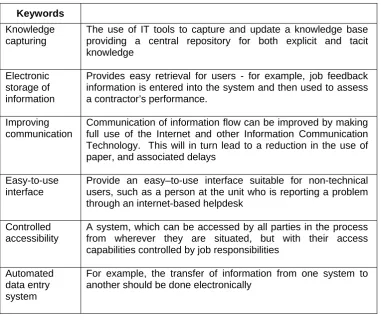
maintenance business process as shown in Table 1 below.
TABLE 1: Proposed Measure of Improvements for Reactive Maintenance Projects
Keywords
Knowledge capturing
The use of IT tools to capture and update a knowledge base providing a central repository for both explicit and tacit knowledge
Electronic storage of information
Provides easy retrieval for users - for example, job feedback information is entered into the system and then used to assess a contractor’s performance.
Improving communication
Communication of information flow can be improved by making full use of the Internet and other Information Communication Technology. This will in turn lead to a reduction in the use of paper, and associated delays
Easy-to-use interface
Provide an easy–to-use interface suitable for non-technical users, such as a person at the unit who is reporting a problem through an internet-based helpdesk
Controlled accessibility
A system, which can be accessed by all parties in the process from wherever they are situated, but with their access capabilities controlled by job responsibilities
Automated data entry system
MoPMIT – A prototype System
The aim of this research project was to improve the reactive maintenance business
process through information and communication technology. Having seen the
problems emerged from the existing business process, there was a clear need to
redesign the process. Client (building owner), Facilities Manager and Contractor are
expected to communicate with each other and share the necessary project
information via an online knowledge management system called MoPMIT. This
system acts as a client server where project related data is stored. It also provides a
common interface that allows these parties to update the project information and
exchange information. An online system was chosen because it could work as
web-based system on the Internet platform, which is often accessible nowadays.
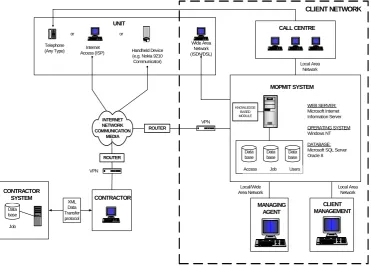
Figure 1 shows the configuration for the MoPMIT system. The main components of
the system are the knowledge based module and the web interface. The system links
CLIENT NETWORK Data base Data base Data base
Access Job Users
WEB SERVER: Microsoft Internet Information Server OPERATING SYSTEM: Windows NT DATABASE: Microsoft SQL Server Oracle 8 MOPMIT SYSTEM CALL CENTRE CLIENT MANAGEMENT MANAGING AGENT Data base XML Data Transfer protocol Job CONTRACTOR SYSTEM UNIT Wide Area Network (ISDN/DSL) Handheld Device
(e.g. Nokia 9210 Communicator) Internet Access (ISP) CONTRACTOR Telephone (Any Type) or or VPN VPN ROUTER ROUTER INTERNET NETWORK COMMUNICATION MEDIA Local Area Network Local/Wide Area Network KNOWLEDGE BASED MODULE Local Area Network
to an existing Facilities Management (FM) system with a generic design that ideally
allows it to port to other FM systems at a later stage. The system is web based and
so to access it the user has to have a device with a web browser and a connection to
the Internet. The diagram shows the methods available for a unit to enter a job,
either accessing the system themselves or phoning the call centre and they then
access the system. The call centre, managing agent and client management will
access the system from their PC, which will be within the clients network.
The contractor is an external user, as was the case for the unit, and will have to
access the system via some Internet network communication media. For security a
Virtual Private Network (VPN) is at each end of the connection. The VPN prevents
hackers getting into the system and makes the data transferred secure. The MoPMIT
system requires a machine to act as the server. This machine will run a web server
for hosting the web pages and a database for handling the information.
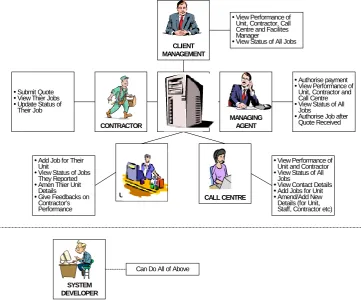
Figure 2 indicates a circle of process of how every party is interconnected by
MoPMIT system. The system allows them to share information and communicate on
a common interface with pre-allocated password access as a control mechanism that
will restrict each user to its role. Figure 3 explains in clear details the features that
Both figures show the flow of a reactive maintenance work, which starts when a
problem occurred at a unit premises. To report the problem online, the user has to
log in into the system. Once logged in, the system will show the Unit’s details such
as the address; contact number and person; available parking area, and status of
work progress. The user is allowed to change any details on the screen. The same
screen also provides a link where job will be reported. By clicking this link, the system
will first help the user to check if the problem could be solved on-site. For example,
Figure 2: Process Flow for Reactive Maintenance Project with MoPMIT System
UNIT CALL CENTRE OPERATIVE CONTRACTOR CLIENT FACILITIES MANAGER MoPMIT
Report via telephone (helpdesk operator)or having problem reporting online
Report problem for the Unit
yAuthorise job based on previous data yAnalyse Unit's and
Contractor's performances
Evaluate Contractor's invoice and authorise payment
Report a problem occurs in the Unit View status of jobs Gives feedback on Contractor's performance
View status of all jobs and view performance of Unit, Contractor, Call Centre and Facilities Mnagaer Submit invoice for payment claim Submit quoatation for authorisation Receive job description Submit estimation of above budget limit work for FM authorisation
Assign Operative to the Unit
Estimate repair work (complete the work if below budget limit or authorised by FM)
Issue payment
START
when an automatic door is not closing, the system will suggest the user to check if
anything blocked the door laser beam that could prevent the door from closing. The
user will check the situation and see if the self-check has actually solved the problem.
Job will not be created if the problem is solved on-site. Otherwise, the system will
proceed with questions and answers session in order to identify the exact problem.
This is important, as the system will rely on these answers to decide and select the
appropriate Contractor to do the job whom would consequently visit the Unit with the
right tools and equipment. The questions and answers session basically replicates
what a Helpdesk Operator would do in the current practice.
SYSTEM DEVELOPER
yView Performance of Unit, Contractor, Call Centre and Facilites Manager
yView Status of All Jobs
Can Do All of Above
CLIENT MANAGEMENT
SERVER
MANAGING AGENT CONTRACTOR
UNIT MANAGER CALL CENTRE
yAuthorise payment yView Performance of
Unit, Contractor and Call Centre yView Status of All
Jobs
yAuthorise Job after Quote Received
yView Performance of Unit and Contractor yView Status of All
Jobs
yView Contact Details yAdd Jobs for Unit yAmend/Add New Details (for Unit, Staff, Contractor etc) yAdd Job for Their
Unit
yView Status of Jobs They Reported yAmen Thier Unit
Details yGive Feedbacks on
Contractor's Performance ySubmit Quote yView Thier Jobs yUpdate Status of
Their Job
Apart from self-check, the user would also be asked if the problem covered by
insurance or warranty. For health and safety issue, the system will suggest what
actions should be taken before the Operative arrives on site to see if the problem
incurs any hazard. For instance, a warning sign should be put up to avoid people
from using the faulty elevator.
The user has to select the Response Time needed for the Contractor to come and
also identify the repair location. At this point, the system will assign a Contractor that
would send an Operative to do the work.
It is possible that at any time while reporting the problem via online, technical
problem might occur. The system should be able to escalate the report to a
Helpdesk Operator whom will help the user via telephone. Helpdesk Operator will be
seeing the same interface as the Unit Manager’s, i.e. self-check; insurance &
warranty check; and the questions and answers session. In a way, this system would
also offer an element for Helpdesk training purposes. The structure of question and
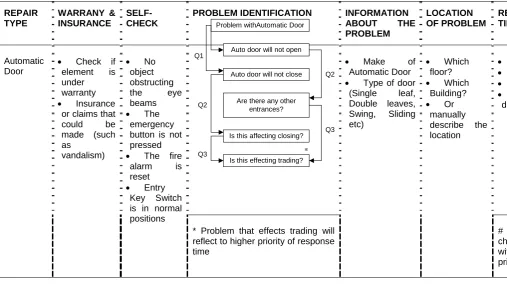
answer session between MoPMIT system and the user is as shown in Table 2. The
arrows at the bottom of the table indicate the flow of questions that a user will
encounter when adding a new job in the system.
Until this point, the problem description is successfully entered into the system.
MoPMIT will alert the Contractor about the new job when the Contractor logs in into
the system. An Operative will then visit the Unit and estimates the repair work. If
authorisation is needed from the Facilities Manager, Operative will supply the
Contractor with the quotation of the estimated work.
Instead of faxing the quotation to Facilities Manager, Contractor could upload their
quotation and measurement for the Facilities Manager to check. The system will
alert the Facilities Manager about the awaiting job authorisation. Decision on
whether the job should be authorised could be based on the information stored in
MoPMIT server e.g. history of repair work at the Unit; Contractor’s previous history
data or cost of material. As usual, discussion or negotiation with Contractor could
Facilities Manager will update the job status in the system once he has decided to
grant the authorisation. Operative will go back to the Unit with the necessary
equipment to complete the work.
When job is completed, Contractor will update the job status in MoPMIT. Unit
Manager could check the progress of work by logging in into the system and also
give feedback on Contractor’s quality of work. This information could be use by
Facilities Manager to assess the Contractor’s performance for future reference. To
claim payment of work done, Contractor may do so by uploading the invoice into
MoPMIT. Once received, Facilities Manager evaluates the invoice against work
done and certifies the payment for the Client to pay the Contractor.
System Evaluation
At the final stage of the development, MoPMIT prototype was implemented and
demonstrated at different occasions as a final evaluation. The main goal of MoPMIT
system is to explore the use of technology to improve the managing of reactive
maintenance projects. In other words, it aims at providing support during fault
reporting, contractor allocation, jobs authorisation and performance evaluation.
Hence, this evaluation is vital in order for these aims to be recognised by the
potential users.
The system was demonstrated to a group of people consisting of various expertise
related to the nature of the project such as IT expert, facilities managers, surveyors,
builders and project managers. MoPMIT prototype was also taken to Call Centre and
IT staff in FM, Clients and contractors’ firm. They were shown all the user interfaces
and their functionalities in the system i.e. Unit Manager, Contractor and Managing
Agent upon which they were asked if these three main users would be able to
understand, operate and view the system as beneficial.
At another occasion, a group of six individuals from facilities management division
have taken part in a one-day pilot at one of the industrial partners in this project
handling calls and two from the administration. In order to evaluate the usability of
the system interface, the people are selected from various ranges of computer skills,
as realistically, the targeted users for this system could be someone whom never has
experience with computer before. During this one-day pilot, participant were all given
the opportunity to actually test the prototype according to the cycle of reactive
maintenance process. Thorough discussion was held at the end of the pilot and
questionnaires administered to them to answer.
In general, the overall responses were very positive. Participants in the evaluation
positively agreed that web enablement reactive maintenance reporting could benefit
in better management of knowledge. A large majority thought the system was an
improved method of communication and data sharing between all the parties in the
reactive maintenance process being better with MoPMIT system. Although some of
the invoicing and payment part of the reactive maintenance process are missing from
the current MoPMIT system, they believe that the system would be able to expedite
the reactive maintenance process.
The participants think that Managing Agents would be able to understand and
operate the system. One of the features that enable Managing Agent, which is to
analyse the Units and Contractors performance, could be a very useful support data
for future action and decision-making practice such as review on budget allocation for
the Unit or decision on whether to engage the same Contractor for future
maintenance work.
Majority of them agree that Contractors would be able to understand and operate.
The system ability to provide the correct description of repair work plus warning on
possible health hazard would be greatly benefits the contractor as this will help them
to decide the correct tools and parts to bring to the site and get prepared to face the
REPAIR TYPE WARRANY & INSURANCE SELF-CHECK
PROBLEM IDENTIFICATION INFORMATION
ABOUT THE PROBLEM LOCATION OF PROBLEM RE TIM • • • • d Automatic Door
• Check if
element is under
warranty
• Insurance
or claims that could be made (such as
vandalism)
• No
object obstructing the eye beams
• The
emergency button is not pressed
• The fire
alarm is reset
• Entry
Key Switch is in normal positions
* Problem that effects trading will reflect to higher priority of response time
• Make of
Automatic Door
• Type of door
(Single leaf, Double leaves, Swing, Sliding etc)
• Which
floor?
• Which
Building?
• Or
manually describe the location # cha wit pri
TABLE 2: Structure of Questions
Auto door will not open Problem withAutomatic Door
Auto door will not close
Are there any other entrances?
Is this affecting closing?
Is this effecting trading? Q1
Q2
Q2
Q3
As for the Unit Manager, they are all agreed the system would be beneficial to the
unit manager especially on checking the status of work and giving online feedback on
completed work. However, majority of the participant from the call centre has concern
that the Unit Manger would be able to understand and operate the system. This is
due to lack of robustness in the questions and answers provided by the system. The
system may not cover most of the repair work but it is suffice to demonstrate the idea
of online self-reporting. For the benefits of all parties in the reactive maintenance
process, an appropriate incentive based on a share of the reduced transaction costs
would be necessary to motivate the Unit Manager to be involved in the reengineered
business model.
Conclusion and Recommendations
More Productive Minor Construction Projects through Information Technology
(MoPMIT) project seeks to explore the use of a web based technology to improve the
reporting and managing of reactive maintenance projects. It aims at providing support
during fault reporting, contractor allocation, job approval and performance evaluation.
The process of reactive maintenance project involves four main parties: the client, the
contractor, the facilities management agent and the suppliers. Analysis on business
process of reactive maintenance projects unearthed problems that impede the
process in term of time, cost, quality of work and the health and safety of the users.
These problems can be summarised as [1] poor communication among different
parties in the process; [2] lack of knowledge sharing; and [3] poor quality of
information. An online knowledge management system named MoPMIT has been
developed as a prototype with the aim to improve the operation of these reactive
maintenance projects, which the main idea is to bring all the different parties to share
information and communicate on a common interface. Internet technology brilliantly
offers a platform for such a system to be accessed by anyone, anywhere and at
anytime with a valid password.
A pilot exercise was performed to test and evaluate the system on some potential
users such as building owners, helpdesk staffs, facilities managers, contractors,
a consensus that the system will lead to better management of knowledge, improve
communication and result in better data sharing among all parties. Above all, the
respondents also agree that MoPMIT will be able to speed up the reactive
maintenance process and produce significant savings in transaction costs. Although
they recommended that training would be required for non-technical users, the
prototype has shown the potential benefits to minor construction and reactive
maintenance in particular.
Acknowledgement
The authors would like to thank EPSRC, UK for funding this research and Industrial
Partners WS Atkins Consultants, WS Atkins FM, Lloyds TSB Group PLC, Whitbread
PLC andWillmott Dixon
References
Ali, K.N., Sun, M., Petley, G.P., Barrett, P. (2002). Improving the Business Process of
Reactive Maintenance Projects. Facilities. Vol. 20. No. 7/8. pp 251-261
British Standard 3811
Department of the Environment, Transport, Region (DETR) (2003). Construction
Statistic Annual 2000 Edition
Department of Trade and Industry (DTI) (2000). Small and Medium Enterprise (SME)
Statistics for the UK, 1999
The Chartered Institute of Building (CIOB) (1982). Maintenance Management – A
Guide of Good Practice
Seeley I. H. (1976). Building Maintenance. London: The MacMillan Press