Gesture Recognition for Interactive Systems
Using Kinect v2
Adarsh M V1, Akarsh M S1, Chethan M R1, Karunesh Gurkar N M1, Prashanth Kumar K N2
Students, Dept. of Computer Science, Vidyavardhaka College of Engineering, Mysuru, Karnataka, India1
Assistant Professor, Dept. of Computer Science, Vidyavardhaka College of Engineering, Mysuru, Karnataka, India2
ABSTRACT: Body-movement based interfaces are one of the most discussed modes of interaction with a computer system in the recent past. Among these modes, touchless body movement interface has obviously caught more attentions since it can offer more user friendly experience. However, due to the limitation of its usage on applications, such technology did not own a large user set. In this paper, we focus on gesture recognition of such interactive systems. In this sense, by analysing and training the video data from Microsoft Kinect v2, we would design a machine learning method to classify the actual gestures captured from the kinect sensor with high accuracy. We then use this data to implement the body movement interface. Authenticity is one of the concerns in such an interface. In this paper we also provide a session based approach where a particular user is identified using face recognition and then the user is granted access to system’s functionalities.
KEYWORDS: Face Authentication; Optimized Hand Tracking; Building Gestures;Gesture Sensitivity;Eigen Face Model
I. INTRODUCTION
Kinect is a motion sensing input device by Microsoft for the Xbox 360 video game console and Windows PCs.Based around a webcam-style add-on peripheral for the Xbox 360 console, it enables users to control and interactwith the Xbox 360 without the need to touch a game controller, through a natural user interface using gestures and spoken commands. The paper is aimed at broadening the Xbox 360's audience beyond its typical gamer base.
In this paper we implement a session based approach to allow the user to access system’s functionalities. Here first we identify a particular user using an authentication technique. The authentication technique we prefer is face recognition. A user’s face is first captured, converted into a grey scale image and then saved in a database. A database lookup is performed to compare the user’s face against the faces present in the database. On a successful match the user is granted access to system’s functionalities.
Recognition of gestures is very important in many real world applications, such as automatic monitoring systems, athletic performance analysis, surveillance, human-computer interfaces, content-based image storage and retrieval, video conferencing, etc. In this paper we use Kinect Studio, a tool provided by Kinect SDK 2.0 to record the gestures. This recorded gesture is a raw .xrf file which then has to be converted into an executable .xef clip. The gesture is then trained for true and false values using Visual Gesture Builder. The trained gesture is then stored in a database which can be imported in a Visual Studio Project to bind actions to this gesture.
II. RELATED WORK
hand movements which makes it more efficient. Face recognition is one of the most commonly used authentication techniques today. There are various approaches to implement face recognition. In our paper Eigen Face Model and Principal Component Analysis(PCA) are used to implement face recognition. Paper [4] illustrates the basics of both these approaches. The basic idea of converting bitmap images to grey scale images can be drawn from the paper [4] which helps in understanding the authentication of users based on the comparison between the converted grey scale image of the user’s face and the images stored in the database. Reference [6] is a basic kinect sdk programming guide which illustrates the basics of programming Kinect v2 sensor. It also helps in understanding the basics of Kinect sensor architecture, hardware programming and various APIs provided by the Kinect SDK.
III.PROPOSED SYSTEM
A. Design Considerations:
Maximum number of skeletal joints detected using kinect sensor is 21.
Maximum number of persons detected at a time is 6.
Out of 6 persons only person is authenticated and authorized to use the system.
Total number of gestures built is 15.
The range of the gesture detection is 6 – 8 meters.
B. Description of the Proposed System:
The proposed system would achieve the following,
Uniquely identifying an authorized person and recognizing the gestures made byhim.
Using a full body skeleton to map a gesture and bind it to a single key press or single mousefunctionality.
Along with a key press it would also have a programmable gesture (toggle on/off) that would track a hand and thereby change the mouse co-ordinates on thescreen.
Develop the gestures to control the entire mouse i.e. all kinds of input signals/operations sent by the mouse like left/right click, drag and drop, scrolletc.
Record and Bind Gestures and use them as inputs to thesystem.
This would allow users to control their computer with their own set ofgestures.
Associate gestures with an application or trigger anevent.IV.PSEUDO CODE
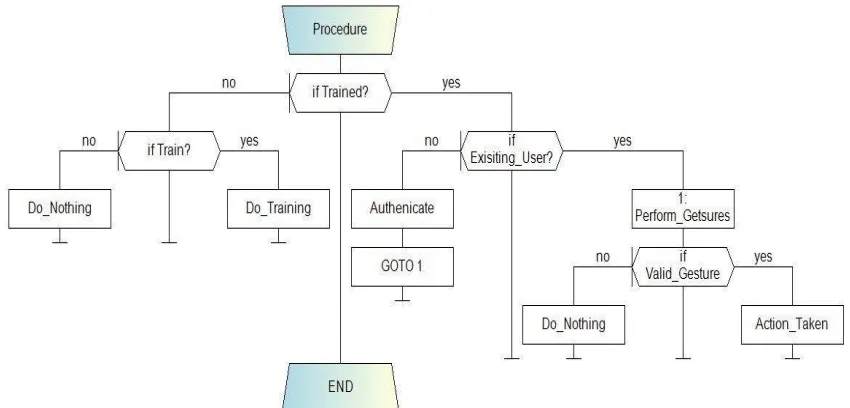
In this section we discuss the various steps in achieving the proposed system with the help of pseudo code. Figure 1 illustrates the control flow diagram of the proposed system. It involves the following steps,
Step 1: Check whether the user’s face is recognized. if(new_user)
train the user’s face and store it the database Step 2: if(existing_user)
Recognize the gestures performed by the user. else
goto Step4 Step 3: if(valid_gesture)
Perform the corresponding action. else
Ignore the gesture
Step 4: If the existing user is not authenticated, If(!authenticate)
Repeat the procedure and authenticate the user to grant access
Step 5: Repeat the above steps every time the user performs a gesture or until a new user is detected. Step 6: End.
V. RESULTS
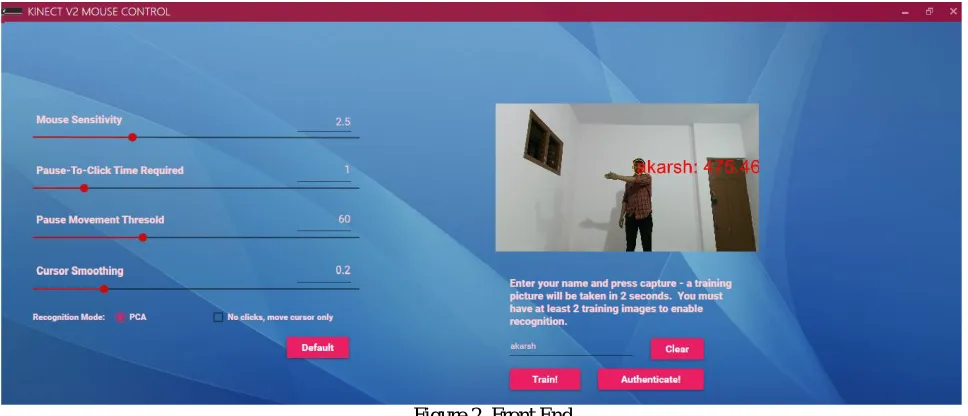
In this section we present the results of face recognition, performing gestures, usage of Front – End of the application and the results of gesture building process. Here we start with face recognition where a unique person is identified and authorized to perform gestures. We then move on to various gestures that can be performed and various action associated with these gestures. Front end offers certain options like changing gesture sensitivity, cursor smoothing and other settings. Finally we discuss the results of the gesture building process using Visual Gesture Builder.
Figure 2. Front End
values. It also allows the users to train new faces and authenticate them to use the system functionalities. It also streams the user’s actions at 30 fps. In the above figure you can also see the user’s name attached to the user’s face.
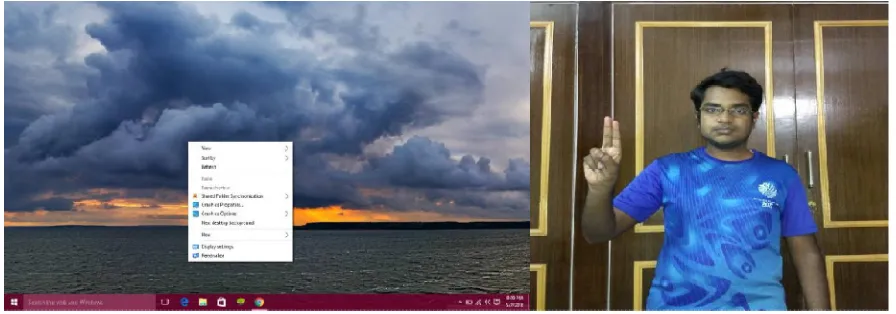
Figure 3. Authorized user performing the gesture(Right Click)
Figure 3. shows an authorized person performing a gesture(right) in front of the Kinect v2 sensor. The gesture performed here is mapped on to Right Click(left). When the user lifts his right hand up with the hand state Lasso and freezes his hand for 2 seconds, the gesture is successfully recognized and right click is performed. It is difficult to keep the hand steady for 2 seconds. This is where the Pause – to – click threshold comes into play. It ignores the minute displacements of the users hand and recognizes the gesture efficiently.
Table 1.Continuous Gestures and their corresponding actions
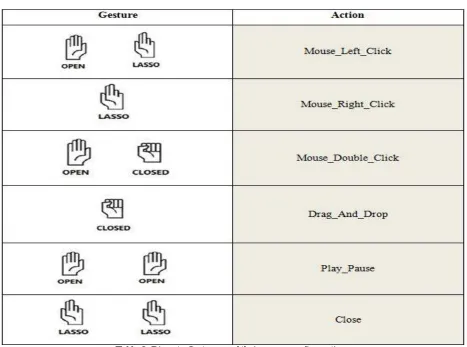
Table 2. Discrete Gestures and their corresponding actions
The above table illustrates various discrete gestures that can be performed. The first gesture is used to perform a left click. The second gesture is used to perform a right click. The third gesture is used to perform a double click. The fourth gesture is used to perform drag and drop of objects. The fourth gesture is used to play or pause the media. The last gesture is used to close a file, media or an application.
Figure 4. Gesture Building Process
VI.CONCLUSION AND FUTURE WORK
In this paper we focus on developing a WPF application that uses Microsoft Kinect v2 sensor to recognize the gestures made by the authorized users who are authenticated through Face Recognition technique. The application binds different actions to each gesture performed by the users and also allows them to dynamically set the gesture sensitivity accordingly. The key area of our interest is face recognition which makes our project reliable and secure.Therefore only authorized users can use the application to interact with the system. But new users can also be authorized to use the application by authorizing them dynamically. Making the most use of our resources and knowledge we have developed this application which takes the Present yet another step closer to the Future.
REFERENCES
1. Abhishek Singh,“Face Recognition Using PCA and Eigen Face Approach”, Journal of National Institute of Technology, Rourkela,
3rdSeptember 2012
2. D.M. Hobson, R.M. Carter, Y.Yan, “Interactive Gesture Recognition”, Information Technology Conference IMTC 2012
Warsaw, Poland, May 1-3, 2012
3. J.L. Raheja, A.Chaudhary, K.Singal, “Tracking of Fingertips and Centre of Palm using KINECT”, IEEE International Conference on Computational Intelligence, Modelling and Simulation, Malaysia, 20-22 Sep, 2011, pp. 248-252.
4. M. A. Turk and A. P. Pentland,“Eigenfaces for Recognition”, Journal of Cognitive Neuroscience, 3(1):7186, 1991.
5. Anil K. Jain, Robert P.W. Duin, and Jianchang Mao,“Statistical Pattern Recognition: A Review”, IEEE Transactions on Pattern Analysis and Machine Intelligence, 22(1):4, 37thJanuary 2000.
6. Abhijith Jana, Kinect for Windows SDK programming guide.
BIOGRAPHY