Masters Thesis
Dynamic Group Generation
based on Interests
Eduardo Jacobo Miranda Ackerman
Born: 15. 06. 1977, Tijuana Mexico
I would like to thank Karina my wife for supporting and helping me in this long process. The Mobilis group for their help and support Dr.-Ing. Thomas Springer, Dr.-Ing. Daniel Schuster and specially Dipl.-Medieninf. Maximilian Walther for the patience and guidance he showed during the development of this work. I would also like to thank Prof. Schill for strong direction and motivation to finish this work.
Contents
List of Figures vii
List of Tables ix Glossary ix 1 Introduction 1 1.1 Aim . . . 2 1.2 Scenario . . . 3 1.3 Further Chapters . . . 4 2 Foundations 7 2.1 Android . . . 7 2.1.1 Software Stack . . . 8 2.1.2 Android Applications . . . 10 2.2 XMPP . . . 12
2.2.1 Smack and Openfire . . . 13
2.3 Mobilis . . . 16
2.3.1 AndroidBuddy Composition . . . 17
2.3.2 AndroidBuddy Client . . . 20
2.3.3 Information Repositories and Additional Tools . . . 22
2.4 Conclusion . . . 22
3 Related Works 23 3.1 Contact List Enrichment . . . 23
3.1.1 Cluestr . . . 23
3.1.3 ContextContacts . . . 27
3.2 New Contact Recommendation . . . 27
3.2.1 Do you know . . . 28
3.2.2 Nokia Sensor . . . 29
3.2.3 Twitviz . . . 31
3.2.4 PeerHood . . . 33
3.3 Groups and Interests . . . 33
3.4 Conclusion . . . 34
4 Requirements 35 4.1 AndroidBuddy . . . 36
4.2 Dynamic Group Generation Based on Interests . . . 36
4.3 Good Users Experience . . . 38
4.4 Overall Requirements . . . 39 4.5 Conclusion . . . 40 5 Conceptual Design 41 5.1 General Architecture . . . 41 5.1.1 The Client . . . 43 5.1.2 The Server . . . 43 5.1.3 The Communications . . . 44
5.2 Communications Data Structures . . . 44
5.2.1 Interest Stanza . . . 44
5.2.2 Suggestions Stanza . . . 46
5.2.3 Additional Stanzas . . . 47
5.3 Underlying Mobilis Services . . . 48
5.4 Client Services . . . 48
5.4.1 Interest Service . . . 49
5.4.2 Suggestion Service . . . 50
5.4.3 Group Activity . . . 50
5.5 Server Services . . . 51
5.5.1 Interest Management Service . . . 51
5.5.2 Suggestion Service . . . 53
CONTENTS 5.5.4 Additional Services . . . 54 5.6 Conclusion . . . 55 6 Implementation 57 6.1 General Architecture . . . 57 6.2 XMPP communications . . . 60 6.3 The Client . . . 61 6.3.1 Interfaces . . . 61 6.3.2 Activities . . . 63 6.3.3 Services . . . 63 6.3.4 Database . . . 63 6.4 The Server . . . 64 6.5 Conclusion . . . 67 7 Evaluation 69 7.1 The Questionnaire . . . 69
7.2 The Test System . . . 69
7.3 Observations . . . 71
7.4 Summary of Results . . . 72
7.5 Summary of User Comments . . . 73
7.6 Conclusion . . . 73
8 Conclusion and Future Work 75
List of Figures
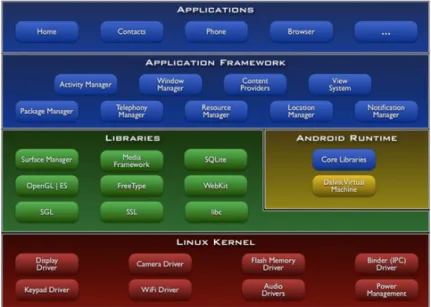
2.1 Android software stack . . . 9
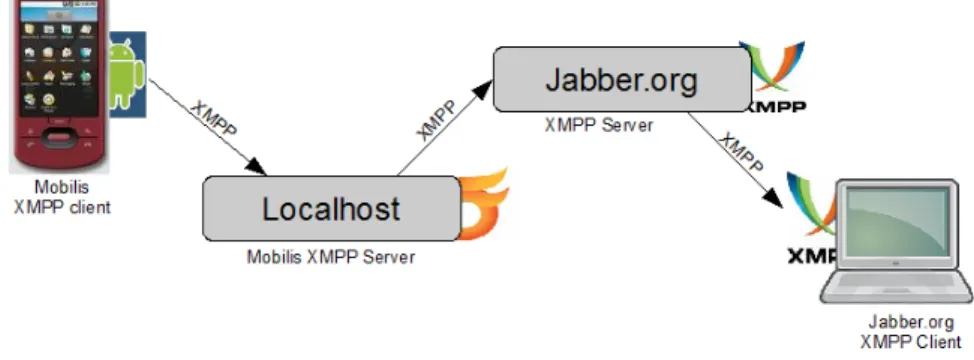
2.2 Server to server communication connecting clients . . . 13
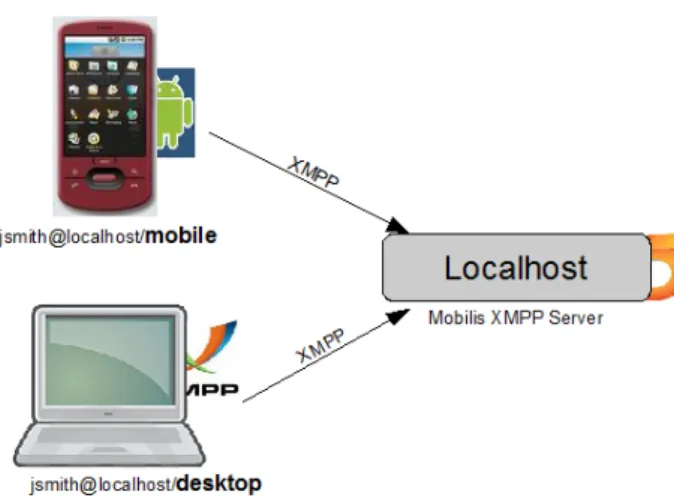
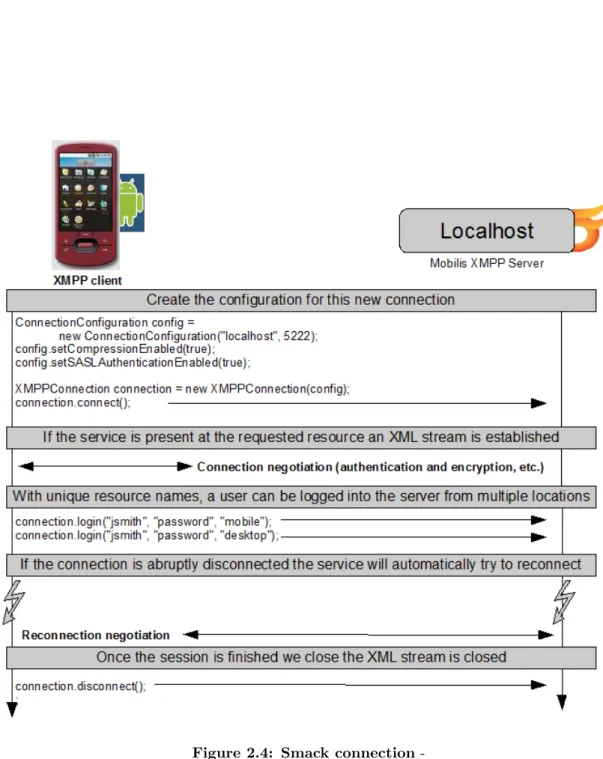
2.3 Client login in from phone and desktop, with configuration information 14 2.4 Smack connection . . . 15
2.5 Extensions Developeded for AndroidBuddy . . . 19
2.6 AndroidBuddy composition . . . 19
2.7 AndroidBuddy protype . . . 21
2.8 AndroidBuddy Services . . . 21
3.1 Visualization of sample ego-graph . . . 25
3.2 Visualization of sample ranking . . . 26
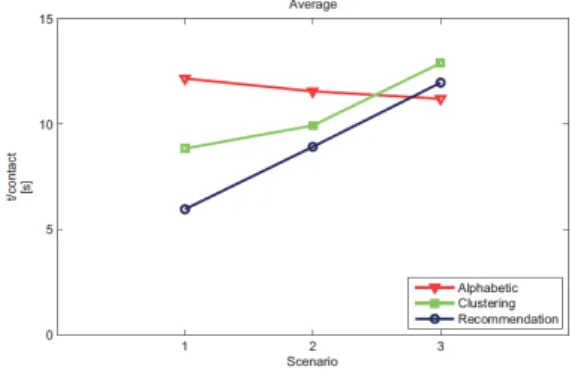
3.3 Average time required to initiate a group for in Cluestr . . . 26
3.4 Situation cues and relevance in making social judgments . . . 27
3.5 A)standard contact list, B)ContextContacts, C)ContextContacts, de-tailed information . . . 28
3.6 Do you know widgit screen . . . 29
3.7 Sensor augmented interaction . . . 29
3.8 Sensor screen map . . . 32
3.9 Twitviz network view . . . 32
5.1 General sequence diagram of the developed system . . . 42
5.2 General client structure . . . 43
5.3 General Server structure . . . 44
5.4 XMPP communications . . . 44
5.6 Main client components . . . 49
5.7 Server Composition for developed system . . . 51
6.1 Composition of a custom stanza from the Smack Library . . . 58
6.2 Left: UI with large list and collapsable menu; Right: Current list UI . . 61
6.3 Observer design pattern used for the interest service . . . 65
6.4 Facade design pattern used for the suggestion service . . . 67
7.1 The questions and summary results of the questionnaire . . . 70
List of Tables
2.1 Smack extensions . . . 16
4.1 Basic Requirements . . . 36
4.2 Group Creation Requirements . . . 38
4.3 Group Activity Requirements . . . 39
4.4 User Experience Requirements . . . 40
4.5 Overall Requirements . . . 40
Glossary
API Application programming interface; an interface that defines the ways to
request services
MSD Mobile smart devices; capable of communications and computer pro-cessing to run specialized applica-tions
PC Stationary desktop computer
Smartphones Mobile phone with PC like func-tionality
tweets to send a brief message to the twitter social network
Chapter 1
Introduction
The Internet, a system developed to interconnect computers, has become readily acces-sible to Smartphones. With the development of Web 2.0, more services and applications are able to move off the personal computer and into hosted services, but these services are not always accessible to smartphones. Many services have not been adapted to work within the constraints of mobile devices such as a limited interface and limited processing power. Although there have been many improvements in Web design and Web development that facilitate interactivity, there are still many services lacking this improved interactivity(1) for Smartphones.
One of the tools propose to facilitate interactivity on a Smartphone, for a group of participants, is dynamic group generation. Because there can be many factors that define which participants should conform a group, the particular attribute of a com-mon interest has been chosen to generate the groups. Dynamic group generation is not something new. Smartphone users are able to contact multiple parties via confer-ence calls or messages to multiple recipient, these mecahnisms may be elaborate and cumbersomb for the user . The innovation item presented here is the mechanism by which the participants in a groups are selected. Instead of selecting participants one by one(2), the groups participants are selected from a central server that allows users to come together who might not otherwise know each other thus facilitating group creation.
According to (3), there are already more mobile web users in the world than PC based Internet users, there are also predictions that by 2015 more than 50% of the world will have an Internet connection, much of this growth coming from mobile phones. This
may be due to a higher number of services being available to users at a lower cost. If trends continue, Smartphones will have a lower cost and will present more sophisticated technical capabilities. The technical developments pioneered in the PC market will aid in the development of the smartphone, making the developments process faster. An example of this is the Android 1 smartphone that is built upon an operating system originally designed for stationary PCs.
There are many aspects that make smartphones attractive to users, such as en-hanced reality, device mobility and location awareness(4), which are features that are not functional on PCs. There is also a current trend of interactive sites to turn mobile, this is to acces the services via a smartphone, allowing more features to be available to the smartphone’s user. Some of these sites, such as social networking sites, personal blogs and image repositories allow content to be posted from the smartphone. This allows individuals to communicate to many others but provides little or no feedback communication.
Some of the caveats to smartphone functionality are inherent to its features: the compact design limits screen size and interfacing controls and the portability limits the power available for processing. Although there are attempts to improve application navigation and performance with features such as touch screens and voice commands, there are still many shortcomings in the ease of use compared to a PC. This is one of the reasons there is a need to develop tools to facilitate interaction between the user and the the services available to the smartphone, either by providing what the users may expect of the system or by changing what the user can expect of the system eather way enhancing the user’s experience. This work proposes that dynamic group creation does just that, enhance the user experience by changing the way groups of participants establish communication.
1.1
Aim
The main goal of this thesis is to dynamically generate and manage groups of partic-ipants based on a common interest for the Mobilis(5) platform, extending a service similar to those provided by social networking services, where individuals with similar
1.2 Scenario
interests or commonalities converse and connect with each another. The functional-ity would extend the services provided by AndroidBuddy1, an application based on the Mobilis platform, by registering the users interests and creating a group when sufficient commonalities are found.
Although the main activity generated for the group is a multi user chat service, the system could present other group activities, such as coordinating tasks and environmen-tal awareness. The design of the system should be modular to facilitate functionality extension and portability even though the implementation in multiple platforms is not within the scope of this work.
By dynamically creating groups the the burden of creating a group, inviting par-ticipants and administrating the group is shifted from the user to the server. This is particularly useful when the participants do not know each other and it is also very useful if there is a predefined group of people with which communication is established, such as informing friends of current events or organizing a sporting event. Studies show it is very common for teens and young adults to update friends via text message(6). If the tasks of setting up the group and selecting the participants were automated, it could only improve the users experience.
1.2
Scenario
This thesis will employ a tourist scenario to provide particular uses cases and give an example of the requirements. The tourist scenario has already provided use cases for other Mobilis (5) applications and has proved to be very useful because it provides flexible and dynamic use cases(7). An example of the flexibility in the use case is one where a tourist agency schedules activities for the participant and participation is voluntary, so the tourist can decide to go or not. Use cases may present themselves dynamically such as when a group of participants is touring the city and they find street performers, it may be more interesting for the participants to watch the street performers than to continue with the scheduled activity. It is also important to note that some activities may provide a better user experience when completed in groups(8) even if the members of the group do not know each other.
Most use cases in the tourist scenario are of voluntary participation, it is not oblig-atory to complete all activities; this is notable because it provides a reason for why the final application to be very user friendly. The participation should be of a group of people with a shared goal. If more people participate it should be easier to reach the common goal. There could be many goals accomplished, be it sharing information about the tourist area or getting together to socialize or even to find some security by being with others. These common goals provide a motivation (9) to participate in the group.
To provide a context for the tourist scenario the following points should be consid-ered
• The participants are in a location where they have not been before or do not know very well.
• The usual home resources are not readily available, an example of this would be the lack of a PC.
• There is help and advice available but not always accessible, an example of this would be a tourist information kiosk where they do not speak a common language. To Summarize the tourist scenario we should consider the participants to be in a new location away from home resources where a mobile device would be very useful, there must be a motivation(10) to collaborate with others because participation is not obligatory and we should also consider that the participants may not known each other, therefore a dynamic way to create the group is advisable.
1.3
Further Chapters
The following chapters will present some works and tools that aid in the development of this thesis. There is a description of the tools that provide a base upon which the implementation is developed. During the study of the material required to develop the work similar or related works were encountered and a brief summary of these works is presented.
The next few chapters provide an outline of the system from various points of view. The requirements section presents the system from the point of view of the customers
1.3 Further Chapters
of the system by stating what is required or desired from the system at different levels. The design chapter exposes the point of view of the architecture of the system, how it is modularized and combined for best performance and extensibility. The implementation provides a some examples of the implementation from the developers stand point. Finally the conclusion and further works will complete the material provided for any further development.
Chapter 2
Foundations
This chapter presents some of the tools and technologies related to the development of the system. The tools and technologies that provide the application’s basis also provides a suggested implementation style or architecture. This is particularly important for mobile devices where the system development should be constrained to the limitation of the device.
The main components upon which this work was developed are Android1 for the client, XMPP2 as the communication platform and the Mobilis(5) middleware to access services that have previously been developed.
2.1
Android
Android is a platform comprised of many elements including mobile devices, an oper-ating system and the SDK . Initially, Android was a small start up that made mobile phone applications. In 2005 Google acquired the company and developed the oper-ating system for two years. In 2007 the Open Handset Alliance3 along with Google presented the free and open source platform for mobile phones, called Android. The Open Handset Alliance is a group of companies dedicated to developing open standards for mobile devices, building better phones for customers and providing joint direction for development. The members of the alliance span many fields, including mobile
op-1http://source.android.com 2
http://xmpp.org/
erators, software companies, commercialization companies, semiconductor companies and handset manufacturers.
Android offers middleware and key mobile applications that include many useful APIs to help develop applications. Because so much of Android is open it has been called ”the first free, open source, and fully customizable mobile platform” 1. Custom applications can run as well as preinstalled applications. Other advantages of being free and open is that it makes it well suited for academic development purposes and there are many sources for support, such as online documentation, sample open source code and theSDK System Development Kit. The kit contains tools for developing and debugging applications and designing user interfaces. There is also an emulator to test applications on a PC.
There are many devices that are able to run the Android operating system. By the end of 2009 there will be at least 18 phone models using Android2. Each mobile phone may present different feature configurations. There are hardware dependent features such as telecommunication support for EDGE, 3G or GSM, networking via Bluetooth or WiFi and location awareness based on GPS, accelerometers or compass. Features can also be implemented via software, such as memory management and process control that is optimized for mobile devices. There are several layers to the software stacksee figure 2.1 3 on an Android device. At the lowest layer is a Linux kernel with special patches for mobile devices. This layer is the buffer between the hardware and the rest of the software stack. Upon the kernel are the libraries, mostly written in C/C++ that provide support for the Android runtime environment and the application framework. Atop the stack are the applications that can use the resources provided by the application framework or other applications.
2.1.1 Software Stack
Android is based on a Linux 2.6 kernel as an abstraction layer between the hardware and the rest of the software stack. It provides system services such as security, memory management and process management. The services support multiple threading and low level memory management. This allows multiple applications to be run at the same
1http://source.android.com/ 2
http://en.wikipedia.org/wiki/Android (operating system)
2.1 Android
Figure 2.1: Android software stack
-time. The services also manage the network stack and device drivers that are tuned to the hardware configurations of each device. The libraries running on the kernel provide most of the functionality available in the core libraries of the Java programming language 1. They include the surface manager that handles the display subsystem and composes graphic layer from multiple applications, libraries that support multiple media playback and recording and SQLite, a powerful and lightweight database engine. On the same level as the libraries is the runtime environment. This environment is composed of libraries and multiple instances of the Dalvik virtual machine. There are multiple instances because each application runs in its own process with its own instance of a virtual machine. There are many advantages in keeping each application in its own process. It improves concurrency and security by making applications independent of each other, it also simplifies memory management and an application crash should not affect other applications running. Because there are limited resources on the phones, the Dalvik virtual machine has been designed so that a device can run multiple VMs efficiently2 by minimizing the memory footprint required to run the system.
Before the final application layer, the application framework layer is presented. This layer exposes the programs that manage the phone’s basic functions. They include an
1
http://developer.android.com/guide/basics/what-is-android.html 2http://developer.android.com/guide/basics/what-is-android.html
activity manager that handles the application’s life cycle and provides a common nav-igation backstack, content providers that allow access to data for multiple applications and tools to build the user interfaces. These programs were written in Java and de-signed to simplify component reuse. Therefore they are accessible to all applications and can also be replaced or enhanced.
The following describes the Android Application model. This model presents the components of an Android application and how these components access each other. The building blocks for an Android application are activities, services, content providers and broadcast receivers.
2.1.2 Android Applications
Android applications are composed of four basic building blocks: activities, services, content providers and intent broadcasters. These components are bundled together with the resource files the application requires to form the aplication. The final bundled file is compressed to an APK file. Each APK file is considered one application and is used to distribute and load the application onto the phone. Because each component can be called individually the application is started when any component of the aplication needs to be executed, and shuts downs when no longer needed or system resources are required by other applications.
Because each application runs within its own virtual machine, each application is assigned its own Linux user ID so applications are isolated. It is possible for two appli-cations to share the same ID to would allow separate appliappli-cations to see each other’s files and they could possibly run within the same VM to save resources. This is not the only way for applications to call each other. Permissions can be set to share data be-tween processes and applications can call one another using intents. The use of intents and broadcast receivers can provide extended functionality in response to an applica-tion call by adding funcapplica-tionality to the call or replacing the funcapplica-tionality altogether.
Activities present the graphical display of to the application. They provide a user interface and react to user inputs or events. Although activities are independent, they can work together and communicate to make one cohesive user interface. The activity windows display user interface controls such as buttons and lists, these components are
2.1 Android
known as views. There can be an overlay of views that provides a complete perspective of the user interface. There is typically one activity marked as the first one to display when an application is initiated and from there activities can call other activities. This provides the user a means to navigate through the application.
Services are components that do not have a user interface and are usually run for an extended amount of time. Examples of the services available in the Android framework are the network monitor or a media player. While activities are used to start services, it is also possible for activities to connect to running services through an interface the service exposes and services can also start activities in case a special event occurs. If activities and services are running concurrently, it is possible for the service to spawn a new thread in order to avoid blocking the activity, this is very useful in cases such as the media player where the user requires access to the controls such as play and pause while the music is heard in the background uninterrupted.
Intents and Broacast Receivers are messages for components of an aplication to
communicate between different virtual machines and within the same virtual machine. These are received by Broadcast receivers. An example of a broadcast may be low battery warning or an incoming message. Activities and services can be started us-ing intents and broadcast receivers. The intents describe the action that should be performed and can carry additional information, called extras, to provide required in-formation to start an action. Various components can react to a single broadcast, this allows the system to add functionality to the response or replace the activity that re-sponds to a broadcast. For example a broadcast can be received by the notification manager to notify the user of a new event by flashing the backlight and vibrating and also an application can start to respond to the same broadcast. Components can pub-lish intent filters to describe what type of intent each component is able to process to avoid redundant message passing.
Content Providers exists, to simulate a common storage area for all Android appli-cations, . They manage access to persistent data such as databases and images trough a content resolver. The content resolver serves as a broker between the component and the data available by the content provider. Examples of the content providers are the
contacts stored in the phone or the images stored in memory. These can be required by various applications for different purposes and require a standardized way to access them.
Another component that should be mentioned is the manifest file. This file is where the permissions and intent filters are registered and it is also used by the operating system to tell which components exist in the application and additional information of the application.
2.2
XMPP
The Extensible Message and Presence Protocol (XMPP) was developed initially by the Jabber open source community as an XML-based protocol for near real-time instant messaging and presence information. In 2002 it was formalized by the IETF1 resulting in the publication of the XMPP base protocols. These include the Jabber client and server protocols as well as the presence and IM session establishment and security protocols.
Currently, XMPP has implemented many extensions including multi-party chat, voice and video calls, collaboration tools, content syndication and remote systems monitoring. These extensions are developed through an open standards process by the XMPP community and commercial developers, which produce a wide variety of XMPP-based software. The open standards process is run by the XMPP Standards Foundation that is in charge of documenting and managing the XMPP protocols. There have also been developments by Google for XMPP. Initially the Android application framework presented an XMPP service but Google changed its name because as it developed it was no longer compatible to the XMPP standard.
The XMPP protocols are free, open, public, and clearly documented, multiple im-plementations of this standard exist in the form of clients, servers, server components, and code libraries. One implementation that runs on Android is called Smack. It is written in Java and implements the core XMPP protocol and also provides an archi-tecture to extend features by handling custom messages.
2.2 XMPP
2.2.1 Smack and Openfire
To better understand how XMPP works a small example is provided. For this example a running XMPP server, such as Openfire, is accessible via its URL. Because XMPP is open anyone can setup their own server and connect via Internet to other servers. In this case the server will be called localhost, and an external server will be called jabber.org, to show a connection established between the two servers, see figure 2.2.
Figure 2.2: Server to server communication connecting clients
-In this example the Client has already setup an account with the name JSmith, his account includes his password and a list of his contacts called a roster. When the connection is established to the server the client can specify his connection con-figuration. This may include message compression and authentication settings, the client can also specify a resource name to specify where the connection comes from, for example ”home” or ”mobile”, see figure 2.3. Each connection must have a spe-cific resource name to illustrate the user Jsmith@localhost would have the full address jsmith@localhost/mobile.
Once a connection to the XMPP server is established, the client can login and send descrete units of information called stanzas, like messages and configuration. Stanzas are XML based and used in XMPP for all communications.
To illustrate the concepts of the initiation protocol the figure see figure 2.4 is pro-vided based on the smack library, in Smack the stanzas are called IQs.
Below the code using the Smack library to send a message and the resulting stanza is presented:
1: Message message = new Message(); 2: message.setTo("[email protected]");
Figure 2.3: Client login in from phone and desktop, with configuration infor-mation
-3: message.setSubject("Server down");
4: message.setBody("Hello, Hal. Do you read me, Hal?"); 5: connection.sendPacket(message);
To produce the following stanza in XML:
1: <message from-’[email protected]/laptop’ to=’jsmith@localhost’ xml:lang-’en’> 2: <subject>Server down</subject>
3: <body>Hello, Hal. Do you read me, Hal?</body> 4: <message>
In Smack messages can also provide special properties additional to the standard content of a message that may be a very powerful tool to provide additional data in a simple format. Currently supported types of adittional data are: integer, long, float, double, boolean, string, and Java-objects.
1: Message message = chat.createMessage(); 2: // Add a Color object as a property.
3: message.setProperty("favoriteColor", new Color(0, 0, 255)); 4: // Add an int as a property.
5: message.setProperty("favoriteNumber", 4); 6: chat.sendMessage(message);
Having provided some information on how stanzas are sent, the processing of incom-ing messages will be presented. In Smack there are two classes that receive messages,
2.2 XMPP
-packet collector and -packet listener. The -packet listener reacts to all stanzas coming in so it is good for event style programming. The packet collector has a result queue of packets so it is useful for waiting for a specific packet to arrive.
These classes can then distribute the packet information to the classes able to process them. This mechanism of receiving packets of a certain type and passing them over to a class that can process them is similar to the mechanism used in Android with intents and broadcast receivers. By evaluating the namespace of the stanza the packet listener can forward the packet to an IQ provider, used to parse the message into Java objects that can then be processed.
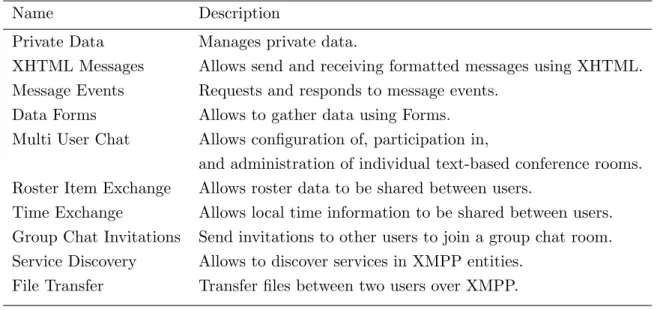
Some of the extensions that are already included in Smack are in table 2.1. Table 2.1: Smack extensions
Name Description
Private Data Manages private data.
XHTML Messages Allows send and receiving formatted messages using XHTML. Message Events Requests and responds to message events.
Data Forms Allows to gather data using Forms. Multi User Chat Allows configuration of, participation in,
and administration of individual text-based conference rooms. Roster Item Exchange Allows roster data to be shared between users.
Time Exchange Allows local time information to be shared between users. Group Chat Invitations Send invitations to other users to join a group chat room. Service Discovery Allows to discover services in XMPP entities.
File Transfer Transfer files between two users over XMPP.
Smack provides an architecture to develop extensions and process them in the same manner as base protocols by generating custom IQs, providers and packet listeners.
2.3
Mobilis
Mobilis (5) is a mobile collaboration middleware that provides various services, such as geo-location and context management services. Developed by the Computer Networks chair at the Informatics Faculty, TU Dresden, it has been used for various applications that include a car sharing application and a location aware trading application.
2.3 Mobilis
One application that uses the Mobilis middleware is AndroidBuddy. It brings social networks to an Android enabled device, not only for contact information but also location awareness.
AndroidBuddy follows the client server model, it uses XMPP communication to access the Mobilis server and the client is designed to run on Android smartphones.
The Mobilis server is accessed by all the users, it handles client registration, database storage, group chat administration and a publish subscribe mechanism used to update location information.
Mobilis is accesed through an XMPP communications server that provides basic messaging and presence features. It is also able to handle some extensions to the protocol or convey the extended protocol stanzas to be processed by Mobilis. For the AndroidBuddy system the XMPP server used is Openfire1.
The client runs on the Android smartphone and can deal with multiple accounts on Facebook2and on Mobilis. It has a context service that handles location updates and a social networking service that handles updates to Facebook accounts. The system also accesses information from the smartphone, specifically the contacts. These contacts are integrated with the contacts on the Facebook and Mobilis accounts to manage one global list of contacts. It also provides various other services such as a multi-user chat and notifications.
2.3.1 AndroidBuddy Composition
A review of each of the relevant components on the server, the client and the commu-nications protocol is presented.
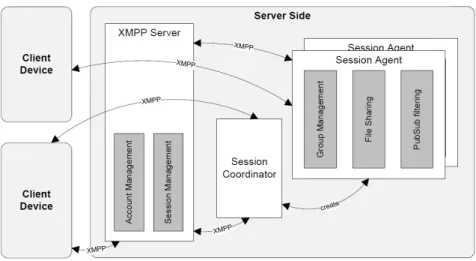
On the Mobilis server there are three main components: the XMPP communications server, the AndroidBuddy Agent and the Session coordinator. Both the AndroidBuddy Agent and the Session coordinator are configured and managed by the Mobilis Manager.
The XMPP communications server used for the AndroidBuddy system is
Open-fire. It was developed by Ignite Realtime3, the developers of Smack4. The server stores account information for each user and provides the standard features for the XMPP
1 http://www.igniterealtime.org/projects/openfire/ 2www.facebook.com 3 http://www.igniterealtime.org/ 4http://www.igniterealtime.org/projects/smack/index.jsp
protocol, such as presence information and IM. All communications between the client and server are done trough this communication server.
The AndroidBuddy Agent is responsible for processing the extended functionality
of the XMPP protocol, such as the following:
• The buddy finder service
• Social network integration service
• Context service
The buddy finder service uses the location information of each user to send proximity alerts if users are nearby one of another. It sends the location information using a stanza that was specially developed for the AndroidBuddy application.
The social network integration service provides a proxy for the user to update account information in a social networking site from the AndoridBuddy application. The system is enabled to process Facebook account information using a specialized stanza. This stanza contains the name of the network that is being updated, the name of the service and the updated value. It can also be used to update Mobilis acount information.
The context service manages user context information such as location updates and notifies other services of the updates.
There are four XMPP packet extensions developed for AndroidBuddy, see figure 2.5 (11). In order for Mobilis to process the specialized stanzas, the services that converted the stanzas to objects, called IQ providers, are a registered along with the packet listener to forward the messages to the according service.
The Session Coordinator see figure 2.6 (11). is responsible for initializing and managing session agents. Therefore it is not responsible for administrating groups directly. The session agents do however administrate the groups that are created. Some of the responsibilities of the session agents are to manage group membership and the affiliation rights of each participant in the group and handle the administration of the multi-user chat instance in the XMPP server.
2.3 Mobilis
Figure 2.5: Extensions Developeded for AndroidBuddy
-2.3.2 AndroidBuddy Client
Because the AndroidBuddy Client is an Android application, we can divide the system into four basic types of components: user interface activities, services running in the background, information repositories and additional tools.
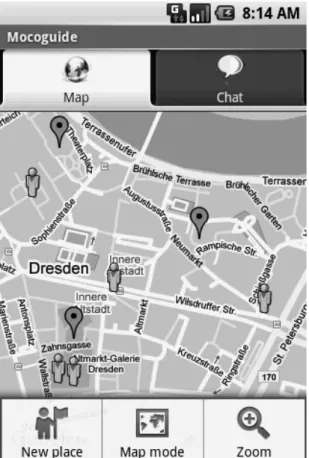
User Interfaces The map screen, see figure 2.7 (11) is the initial user interface, it shows the user’s current location and the location of nearby contacts. The map screen may also show activities that can be started with nearby contacts. The same contact information is available in list form on the Buddy list tab. This simplifies lookup for the user. Another user interface is the chat screen. This screen is automatically created also when the user receives an invitation to chat by the Mobilis server. There are several account and network connection configuration screens. Many of the screens are accessible trough the ”‘menu”’ button on the device. This is a context menu only available in the main map screen.
Services The client activities are supported by several services running on the client. The central service is called the session service. It initiates and coordinates all other ser-vices, including the Smack library that establishes the communication with the XMPP server. Although the Android architecture indicates the use of intents to call compo-nents, in order to minimize code complexity a direct referencing of Java objects was used for method calls.
The session service is where services capable of processing XMPP extension stanzas are registered. In the following sections we will examine some of these services. Most of these services have a counterpart in the Mobilis server, see figure 2.8 1.
The group management service holds the memberships to the groups the user is affiliated to, so it is the counter part to the Session agent on the server. It is also used to query available MUC groups and handle invitations to participate in a MUC group. The context management service handles presence and location notifications from other users and collects them in a list to trigger updates on the main map activity.
The places management services implements an internal database to store rich lo-cation based data that includes a proximity alert and a timestamp. Because the data
2.3 Mobilis
Figure 2.7: AndroidBuddy protype
-is not frequently updated, th-is service uses the publ-ish subscribe mechan-ism to acquire the information sporadically from the server.
The social networking management service is used for logging in and administrating connections and accounts to the various networks, namely Facebook and Mobilis.
The buddy list service integrates the smartphone’s contact list and the mobilis contact list and publishes the result to the Mobilis server. This allows an integrated management of the contacts with additional contacts from Facebook.
The map enrichment Service adds elements to the map screen, it employs a lightweight data structure to differentiate between people and places and also posts location coor-dinates on the main map activity.
2.3.3 Information Repositories and Additional Tools
The AndroidBuddy system utilizes a content provider from the Android operating sys-tem to access the contact information stored on the smartphone, and an object oriented database implementation stores account credentials and other information local to the application. The database is accessible to all components within the application to store and access pertinent information.
One additional tool provided by the AndroidBuddy project is the KLMSimulator. This is a small Java application that can communicate to the XMPP server as though it was a client. This allows easier testing of sample code evaluation and it is also useful for testing the interaction of multiple client instances.
2.4
Conclusion
The applications on which this work is built upon are well supported for development. The Android platform and the XMPP protocol both have good documentation and example code. The AndroidBuddy system does not have as much online support, but since it is built in house there are some developers with a good working knowledge of the system that are willing to provide clarification or commentary as to the function of the system.
Chapter 3
Related Works
The material studied to prepare this work spans many fields. This is partially due to the scarcity of materials dealing with dynamic group initiation(12) with the further refinements of a mobile environment and the use of interests.
The documentation read could be categorized into three major fields. The first field comprises systems that enhance the contact list information already available to the users by providing an analysis of how contacts are selected to form a group. The next field is of systems that provide suggestions to build a community additional to the user’s contacts. The final field is that of papers dealing with sharing interests in a group(13) or coordinating activities as a group.
3.1
Contact List Enrichment
This section presents works that intend to aid in the selection of contacts to participate in a group. Some of these systems enrich the information available for the user to select a contact, others provide a suggestion based on social network analysis.
3.1.1 Cluestr
Cluestr(12) presents a community-aware mechanism that allows the efficient selection of contacts to select them to form as a group. This is achieved by providing a recom-mendation from the contact list to add to the group communication. The mechanism by which the recommendations are selected is the following:
2. The category information is used to build a social network graph that includes contacts of all the participants in the system known as the community.
3. Clusters of participants are deduced from the social network, these clusters rep-resent groups such as colleagues or a group of friends.
4. Finally when the user initiates a group and selects a contact the application provides a recommendation based on the selected contacts, with each additional contacts the application refines the clustering and provides the refined recommen-dations of contacts to add to the group.
To illustrate a simple use case is provided where a user has a contact list of A, B, C, D and E. Each contact is a member of one or more clusters, represented here by a number 1,2,3,4 and 5. • A = 1,2,3 • B = 1,2 • C = 4 • D = 2,3 • E = 3
in this simple use case the initiator first selects A to participate, based on the con-tacts’ clusters the engine recommends B, D and E. The contact C is not recommended because it does not match any cluster of A. Then the initator invites E to participate, based on this additional information the engine refines the participants to one single cluster and recommends D. The contact B is no longer recommended because it is not part of the refined cluster (3).
This mechanism does not only help to reduce the time to setup a group. It also helps the user to remember what contact to invite to participate.
To avoid tasking the user with maintaining the category information for all con-tacts a social network analysis generates a relationship types between each one of the users contacts. The social network information is obtained from Facebook1, a social networking service where users can establish relationships with other users.
3.1 Contact List Enrichment
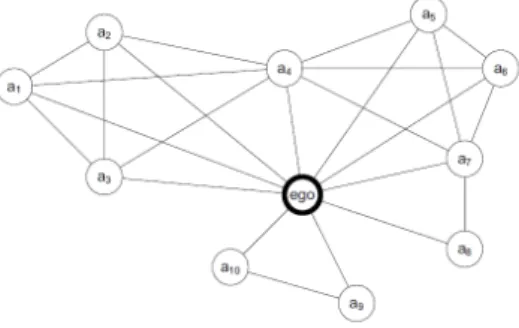
The figure 3.1 presents an ego-alter graph where the ego at the center represents the user and the alter nodes represent the contacts. The links represent the relationships that are established between the participants. A small cluster of two nodes(a9, a10) is evident in the lower part of this graph. Other overlapping clusters are also evident, these clusters represent relations such as family or sports team. The collection of all nodes and relations is called the community.
Figure 3.1: Visualization of sample ego-graph
-Mathematical analysis is used to derive the clusters of each contact this information is used by the engine to rank each contact for recommendation. The ranking is based on the clusters of the selected contacts, the more matching clusters a contact has the higher the ranking. In figure 3.2 the selected contacts are presented on the left and the recommendations on the right. In the selected contacts cluster C1 appears 3 times, cluster C2 appears 3 times and cluster C3 appears once. This information is used to score the rankings, for example the highest score is 6 because the contact is a member of cluster C1 that scores 3 and the cluster C2 that scores 3 in total the score is 6. The lowest ranking is 1 because the contact is a member of cluster C3, this contact is also a member of cluster C4 but that cluster is not in the selected contacts therefore it does not add points to the score.
The system was evaluated based on several criteria including how fast a group setup for three scenarios:
• Scenario 1: The group consists of all members of one community.
• Scenario 2: Only a part of a community’s members should be invited.
• Scenario 3: A random sample of contacts, regardless of their community affiliation should be selected.
Figure 3.2: Visualization of sample ranking
-To provide a frame of reference each scenario was tested using three methods of presenting the contacts, in the traditional alphabetic order, contacts in a cluster without ranking and the recommendations system top 5 ranked contacts.
The results, provided in the figure 3.3, show that the recommendation systems fairs better in both scenario 1 and 2 in the case of random selection recommendation performance decays. In all three scenarios if the user did not find the intended contact the selection method was reverted to alphabetic, in the third scenario. Overall the system performed well for what would be most real life scenarios where a user would select members of a particular group.
Figure 3.3: Average time required to initiate a group for in Cluestr
-3.1.2 Friendlee
Friendlee(14)provides contact recommendations based on context information. The system analyzes the user’s call and messaging activity to rank the contact list, provid-ing a higher rankprovid-ing for those that are contacted more often or for longer times. The
3.2 New Contact Recommendation
system presents context information including location, weather and phone status such as on hold or busy for each contact to providing an insight into the users environment or availability. One of the main concerns for the users of this system is lack of privacy in sharing context information with others. To address this issue the system proposes a category-based privacy model providing more and finer grained information for certain categories of contacts, such as family or collegues and more general or less information for others.
3.1.3 ContextContacts
ContextContacts (15)provides context information for the user’s contacts, this includes phone usage and time spent at a location. Each element of information that composes the contacts’ context is called a ”cue”. The system does not provide a recommendation. Instead the user is expected to use the ”cues” to deduce the contact’s situation or availability and thus select participants. A sample of the cues provided to the user and the relevance in making social judgments are presented in the figures 3.4 and how these cues are presented to the user can be see in figure 3.5 (15).
Figure 3.4: Situation cues and relevance in making social judgments
-These approaches have little or no support for extending the social network, but provide an insight(16) into how participants in a group are selected.
3.2
New Contact Recommendation
Systems that provide suggestions to add to the contact list are presented next. Many of these systems are centralized and have access to not only a global list of participants
Figure 3.5: A)standard contact list, B)ContextContacts, C)ContextContacts, detailed information
-but also related data that is used to propose the additional contacts. One in particular presents an Ad-hoc approach to present potential contacts.
3.2.1 Do you know
(17) Do you know is a desktop widget developed to recommend contacts within a company’s social network. The widget is based on SONAR(18) a system for collecting and aggregating social network information across an organization. The relationships are deduced from sources that include organizational chart, co-authorship of various documents like papers, patents or wiki pages and mutual contacts in various social networks. The system is mainly directed for large companies where employees may not have the opportunities to establish contact with coworkers of interest and access to reference information is available.
SONAR assigns a score to each relationship based on the activity within the different sources such as document co-authorship or contacts in common within a social network. The scores are aggregated and used to produce a weighted recommendation list. This list is then used to create the final ranked list of recommendations provided to the user. Figure 3.6 (17) presents the widget screen with recommendation criteria.
The resulting analysis of the performance of the system was very positive, in usage and value of the information provided. Although the system recommends the top 100 participants most users only reviewed the top ten recommendations and rarely reviewed more than twenty recommendation. Most users found the evidence for recommendation, such as co-authorship, very useful and invited other participants to join the system.
3.2 New Contact Recommendation
Figure 3.6: Do you know widgit screen
-3.2.2 Nokia Sensor
Nokia Sensor: From Research to Product (19) is envisioned to moves the personal web page to the smartphone. The application uses bluetooth communication to share personal digital identity with others including a personal Web page like presentation screen.
”The Nokia Sensor application allows users to express themselves and discover new things about others nearby in a novel and simple way. This means that the value of using mobile phones and devices is expanded to connecting with those who share the same space at the same time, acquainted or unacquainted,” says Hannu O. Nieminen, Vice President of User Experience Unit at Nokia.
This application seeks to enhance existing social behaviors, practices, and experi-ences between people by being able to identify a potentially interesting person, discover invisible connections, and find out more about a person’s interests, history and prefer-ences with the aid of data exchange between Smartphones see figure 3.7 (19).
Figure 3.7: Sensor augmented interaction
for the development of this system, these are the following:
• Supporting the acquainted as well as the unacquainted to establish a social con-nection.
• Identity expression and social curiosity; Expressing ones identity is done trough a variety of ways, ones clothing, gestures and personal homepages provide an insight into one’s self and the curiosity to have an insight into others are fundamental social acts. The application proposes augmenting the principle of ”see and be seen” by providing a similar mechanism in the digital realm.
• Focused vs. unfocused encounters; Focused encounters refer to those where the participants interact such as a face to face meeting, in contrast unfocused encoun-ters are where people do not interact but acknowledge each others presence. One of the targets of this application is to provide legitimate reasons for people to move from unfocused to focused interaction by revealing interesting and hidden connections.
• Social memorabilia; Is the trace left behind by an encounter, like exchanging business cards or scribbling down a phone number. These provide a way to re-encounter or a reminder of a social contact. The system should provide digital versions of this.
• Identification and traceability; These could be represented by a personal telephone number or personal image to identify users during repeat encounters.
• Optimal use of mobile data; Smartphones offer a wide array of mobile data from audio and image files to personal calendar and contact information. This data should be used to provide an identity expression and provide data to find corre-lations between users.
• Pervasiveness; In this system it means to rely on other users in order to provide the core experiences.
• General tool; The application should provide tools used for socializing in profes-sional and personal lives.
The results were two development systems that provided the core of the final Sensor application, DigiDress and Scent.
3.2 New Contact Recommendation
DigiDress a digital personal ’expression page’ including text and imagery, that could be scanned by other DigiDress users in the proximity. This asymmetrical ’peek view’ could also allow the ’onlooker’ to discover common interests with or connections to the page owner thus encouraging the unfocused encounter to a focused one. Users could save any found identity expressions on the phone for future reference.
Scent focused on providing various levels of social interaction possibilities by taking the users’ mobile data, such as contacts, and comparing it with others, the users are then presented the matching entries. The users could then keep a record of this encounter as social memorabilia. Both Scent and DigiDress also provided a guestbook. Contents of the guestbook were publicly available to any other (proximate) application user.
To find and browse proximate identity expressions a process referred to as scanning is used. Users were not allowed to scan for others’ identity expressions before they created at least a minimal version of their own although scanning for and finding others’ identity expression does not require a request/consent process. Other processes such as sharing mobile data do require consent.
Sensor combined the two approaches and provided additional features. The figure 3.8 (19) presents the major features of the Sensor application. There a presentation of the introductory page inspired by DigiDress, some of the additional feature were media sharing and a popularity feature.
The system was released as free software by Nokia with some features dropped due to privacy and technical issues such as personal data comparison and phone to phone ”viral” distribution. Overall the development system provided good experience as a learning tool for the developers.
3.2.3 Twitviz
(20) Twitviz is an interesting approach to exploring social networks based on interest, it is a desktop application. One of the problems the system addresses is the lack of support for initial group formation in social networking services, in this case Twitter. Twitviz helps the user on this initial group creation by allowing the user to explore new participants that may share the same interests.
Exploring new participants is done trough a graphical tree display where the user is the central node. From there a branch is established that represents an interest and
Figure 3.8: Sensor screen map
-the leafs that expand from -the branches provide contact information for participants using the term of interest in tweets . In this way the system provides a collection of users who may share the same interests. There is also an egocentric graphical display of participants reciprocating within the social network, see figure 3.9 these are the participants that follow the users tweets and vice versa. Contact information is also provided for the reciprocating participants. By combining these two graphs the user may visually discover new potential contacts by exploring a hierarchical structure of contacts. There are contacts of contacts, where the participants use the term of interest. This provides some level of security in selecting new contacts.
-3.3 Groups and Interests
One of the drawbacks of the system is that general terms would provide a subset of participants that do not share the same interest. Placing the term within a context was not possible in the application, so for example if the user could be interested in the fruit apple and get results for apple computers.
3.2.4 PeerHood
(21) PeerHood is an implementation of a Peer-to-Peer neighborhood and communica-tion middleware run on a Linux or Symbian OS, developed in the Communicacommunica-tions soft-ware laboratory of Lappeenranta University of Technology in cooperation with Nokia. The PeerHood middleware was extended by a social networking application(22), de-veloped by Bishal Raj Karki. The approach used to join groups is based on dynamic group discovery in accordance to common user interests. Because PeerHood is peer to peer, the devices must be within range to create a network with other users and the logic to create a group must be minimal in order to accommodate the smartphone’s capability. The implementation had no visual interface and the main focus of the work was being able to add the functionality to the middleware in contrast to how well the implementation worked. One of the interesting conclusions of this work is that it rec-ognized the need to find the semantic network of terms in order to register the same interest. For example the term ”football” and ”soccer” could be considered within the same semantic network and so as the same interest.
3.3
Groups and Interests
Some papers were reviewed to evaluate activities for a group such as a groundswell (23) that is defined as ”a spontaneous movement of people using online tools to connect, take charge of their own experience, and get what they need–information, support, ideas, products, and bargaining power–from each other.”. The term groundswell is a good representation of what a virtual group activity could be. Other group activities such as a Textmob (24) that presents the used or text messeges to form protest groups dynamically. Other papers were reviewed to explore how interests are used in a group, for example how interest are derived from visited web pages (25) or how they are used in tagging communities (26).
3.4
Conclusion
During the search for reference materials and similar works, there was no system found in direct competition for dynamic group creation. This is not to say this work is the first to develop dynamic group creation based on interests, but the variety of platforms and means by which a group is selected differs greatly between each implementation. There are some proprietary dynamic group creation systems implemented for social networking sites, but because of their closed nature an in depth analysis is not ac-cessible. One item that was consistent between many of the works is that within the development process the conceptual part had more of an impact than the technical part. This is to say there was more effort in how the system would perform than the actual performance. It is also very helpful to view similar problems from different points of view to have a better understanding and contrast as to what is being developed, for example systems that ranked the contacts to form groups or papers that describe the way a group functions.
Chapter 4
Requirements
This chapter will present the different requirements expected of each level in the de-veloped system. These requirements will include items that may not be necessary to complete the core functionality of the system but would enhance the user experience and could be beneficial for potential further development. The different levels of the system will be divided in the following sections.
• related to AndroidBuddy
• related to dynamic group generation based on interests
• related to a good user experience
• overall requirements
The requirements will be presented along with a specific use case, the tourist sce-nario, to provide a motivation or overview of why the requirement is present. At the end of each subsection a table containing the specific items and additional data will be pre-sented. The additional data will indicate the relevance as an indicator of how important it is to reach this requirement. Not all requirements present the same importance to be implemented. A high relevance indicates it is indispensable for that requirement to be met for the system to function properly, a medium relevance indicates the presence of the defined feature would improve the system and should be implemented, and a low relevance indicates the requirement can be present but is not required for the function of the system. Because the system being developed is based on an application that has various features, there is an implemented column that indicates if the requirement
has been meet by the previous developers or if it has been partially completed, having presented some work but not the complete feature required by the system.
4.1
AndroidBuddy
The requirements stated here are to reiterate and itemize those stated in the task description. The system is expected to expand the features available on the Android-Buddy system. This fits into the tourist scenario in the sense that there are various features available to the users by AndroidBuddy as mentioned beforehand.
Because the system has been built to handle protocol extensions it is expected to develop extensions to handle the interest information required to generate the groups, the continued use of XMPP as the communications protocol and the Mobilis services such as client accounts [AR-1.0], presence and messaging and multi-user chat. This also implies that the extension to the system should keep a familiar nomenclature [AR-1.1] and architecture of the system as related to AndroidBuddy, to facilitate further development.
Table 4.1: Basic Requirements
ID Description Relevance Implemented
AR-1.0 user account information High Partial
AR-1.1 follow similar nomenclature and architecture of system High
4.2
Dynamic Group Generation Based on Interests
This section will define the requirements of the user for the additional features to be presented in the system. Because the groups are to be formed dynamically based on interest [DGR-1.0]it is required that the user registers and unregisters interests[DGR-2.0] in the system. As with any manual data entry it is expected to have some issues such as bad spelling or the use of inflections in the interest term, this could be corrected by a spell checker[DGR-2.1] and system to find the root of the term being used, and because there is no standard vocabulary for interest a system to provide similar terms is suggested. The similar term [DGR-2.2]system should be able to find a relation between
4.2 Dynamic Group Generation Based on Interests
two terms that are not necessarily synonyms but are within the same grouping of words. An example could be the terms party and dance, as they are not synonyms but they are somehow related. The interests that are provided to the system may be accompanied by some additional data to further define the interest[DGR-3.0], such as private or only to be shared with known contacts[DGR-3.1]. This would provide an added level of security, especially when we are proposing to generate groups with participants unknow to the user.
To make the system more intuitive for the users, the user could request some recommendations(27) from the system[DGR-4.0]. The recommendations could fol-low several criteria based on the interests collected from all the users such interests that are most popular[DGR-4.1], the interest that are active(28) in the geographi-cal region[DGR-4.2], interest that the users’ contacts have and the users himself does not[DGR-4.3]. Other recommendation criteria could help in standardizing the interest vocabulary by proposing a term that is similar[DGR-4.4] to the interest provided and is also already found in the list of interests from all participants. This recommendation type should be extensible[DGR-5.0] to accommodate additional context information or different criteria(29), for example the criteria of some related works (12)where groups were generated based on relationship type[DGR-6.0]. This would require a relationship type tag be added to all contacts.
The activity that is started[DGR-7.0] as a group should be group chat[DGR-7.1] (30)but should not be limited to this, so extensions to the triggered activities should be possible so the user is invited[DGR-7.1.1] to participate in other types of activities. Some example of additional group activities could be participating in a poll[DGR-7.2] (31) or survey[DGR-7.3]. This would require a standardized query[DGR-7.2.1] and results[DGR-7.2.2] compilation so as not to confuse the participants in a tourist case this may be a poll to see if the large group transport is required or if there are enough participants to warrant a price reduction at a certain event. Another possible group activity could be a shared task (32) list[DGR-7.4] in a tourist case scenario. This could mean that a group has participants provide particular food items to have a communal meal. This would also require a near real-time update to the list.
Because the participants potentially have various activities [DGR-7.5]that can prompt for participation, settings to autorun [DGR-8.0] activities should be provided to
min-Table 4.2: Group Creation Requirements
ID Description Relevance Implemented
DGR-1.0 Generate groups dynamically based on interests High
DGR-2.0 Users register interests High
DGR-2.1 Term correction (spelling, synonyms) Medium DGR-2.2 Similar terms alredy registered Medium
DGR-3.0 Record interest metadata Low
DGR-3.1 Define sharing level (with buddies, with all) Low DGR-4.0 Request/display server suggestions High DGR-4.1 Server suggests popular interests Medium
DGR-4.2 Server suggests interests based on location Medium partial DGR-4.3 Server suggests Buddies’ interests Medium
DGR-4.4 Server suggests Similar interests Medium DGR-5.0 Server suggests are extensible Medium DGR-6.0 Server initiates a group based on relationships Low
imize the effort of the user to participate in a group. These settings could also be proposed by the Mobilis service simplifying selection for a standard configuration.
Other miscellaneous requirements would be to notify users when there are not enough participants to maintain a group and destroy that group[DGR-9.0]. It may also be suggested by the system the interests that are not in use for some time and if they should be eliminated from the interest list[DGR-9.1]. The user may also decide not to input the interest manually instead to select from a list of all interests[DGR-10.0] or only those with an open group[DGR-10.1].
4.3
Good Users Experience
To provide an overall pleasant user experience[UIR-1.0] it should be noted that a seem-ingly fast[UIR-1.1] and stable network connection is available, in case there is a weak connection caching and messages resend would mediate the problem. Simple and clear user interfaces [UIR-1.2] make the system more intuitive for the user, it should also be simple for the user to find the interfaces that are required. This could be archived by
4.4 Overall Requirements
Table 4.3: Group Activity Requirements
ID Description Relevance Implemented
DGR-7.0 Server provides a group activity High
DGR-7.1 Main group activity is multi user chat High partial DGR-7.1.1 Use invitations to request participation Medium partial
DGR-7.2 Group activity is polling Low
DGR-7.2.1 present the users a standard query format Low DGR-7.2.2 present the users query results update Low
DGR-7.3 Group activity is a survey Low
DGR-7.4 Group activity is a task list Low DGR-7.5 Group activity is extensible High DGR-8.0 Configure activities to start automatically Low
DGR-9.0 Destroy unused groups High
DGR-9.1 Detect unused interests Medium
DGR-9.2 Eliminate unused interest Medium DGR-10.0 User can select interest from list Medium DGR-10.1 Select interest from active groups Medium
auto starting or inviting to start an activity, having a central place to access related activities or a map of options would also assist the user.
The user should feel the application is friendly[UIR-1.3] and not invasive, even though it may prompt activities continually. Some kind of motivation [UIR-1.3.1] may be in order to promotes participation. The user may also find it helpful to access the system as an anonymous guest[UIR-1.4]. The system may also seem more accessible if the user can switch back and forth between different activities[UIR-1.3.2].
4.4
Overall Requirements
The users may not be aware of some overall requirements, although they may be de-manded at some time, for example communications security[OR-1.0] over the network and within the application(33) or service adaptation to resources available to the device, including the network strength. The service adaptation[OR-2.0] could mean disallowing
Table 4.4: User Experience Requirements
ID Description Relevance Implemented
UIR-1.0 good user Experience High
UIR-1.1 Fast, no lagging High
UIR-1.2 Intuitive navigation of user itnerface High UIR-1.3 Addresses the human factor High UIR-1.3.1 Participation motivation Low
UIR-1.3.2 Screen switching Low
UIR-1.4 Run as guest Low
or lowering the frequency with which some messages are sent. Table 4.5: Overall Requirements
ID Description Relevance Implemented
OR-1.0 Secure system communication Low partial OR-2.0 Service adaptation to device resources Low
4.5
Conclusion
The requirements presented here provide the basis for the design of the system, they provide what will be expected of the system not only by the user but by what a potential future users may require. And it also present what requirements have been partially or fully meet by previous developers.
Chapter 5
Conceptual Design
This chapter presents a detailed view of the components of the system and how they are put together. Many factors are taken into consideration to develop the general architecture from the specifications that are derived from the requirements. To develop the design the core requirements provided the general structure and the additional requirements are adapted to function within this general framework.
5.1
General Architecture
The overall architecture of the system is dictated by the Mobilis architecture, this is a client server model, where the additional features are added to the session service of the client and the server. Therefore all the extended features either add data structures to be communicated by the AndroidBuddy services or the services are registered in the session service to handle custom messages developed to accomplish the requirements.
The sequence diagram 5.1 is presented to provide an overall illustration of the ser-vices and datastructures of the system. It represents on the client side a user requesting a suggestion, then starting the interes service with the suggestion as the term of inter-est and participating in the group activity based on the interinter-est. On the server side it represents a request for a suggestion that is provided by the suggestion service, a request for an interest that triggers a group creation and the group activity that is initiated.
In the further sections of this chapter we will explore in more detail the services and messege types that support the functionality of the client and server for dinamic
-5.1 General Architecture
group generation, but first we will see how the additional feature are embedded into the AndroidBuddy system.
5.1.1 The Client
the client, see figure 5.2, makes use of the established communication from the ses-sion service running on AndroidBuddy, and uses the Android application framework to access the services already present in AndroidBuddy, namely intents and broadcast receivers. The client also requires persistent data storage. For this the database func-tionality from AndroidBuddy is extended and for less frequently accesses data storage such as settings, the editable preferences from the Android framework are used. The various components that provide the extended functionality include the interest service, the group activity and the suggestions service.
Figure 5.2: General client structure
-5.1.2 The Server
The server, see figure 5.3, makes use of the established communication from the An-droidBuddy agent and makes extensive use of the services provided such as location information available from the context service and the settings service that is extended with additional data structures that are required by the services presented here, namely the recommendation servic