CALIFORNIA DIGITAL LIBRARY
Mobile Strategy Report
Mobile Device User Research
Rachael Hu, User Experience Design Manager & Alison Meier, Mobile Strategy Intern 8/18/2010
2 | M o b i l e D e v i c e U s e r R e s e a r c h
CONTENTS
Executive Summary ... 3
Introduction ... 4
Literature Review ... 5
Overview of Mobile Devices ... 5
Internet on Mobile Devices ... 6
Text Messaging on Mobile Devices ... 9
Designing for Mobile Devices ... 10
Design ... 10
Designing Native Applications and Mobile Websites ... 10
Device Features ... 11
Mobile in Higher Education ... 12
Mobile Services in Libraries ... 13
Mobile Devices as Part of Academic Workflow ... 14
Research Methodology ... 15 Surveys ... 15 Librarian Survey ... 15 Academic Survey ... 16 Survey Analysis ... 17 Interviews ... 17 Participants ... 18 Findings ... 19 Technology ... 19 Device Ownership ... 19 Internet Access ... 21
3 | M o b i l e D e v i c e U s e r R e s e a r c h
Barriers to Use ... 22
Behaviors ... 23
Mobile Devices with Internet vs. Computers ... 23
General Activities on Mobile Devices with Internet ... 24
Academic Activities ... 25
Email and Text Messages ... 29
Notification ... 29
Organization ... 30
Reaching Your Mobile Audience ... 31
Recommendations ... 32
References ... 33
EXECUTIVE SUMMARY
This report encapsulates the findings and recommendations from a mobile device user research project conducted summer of 2010 by the California Digital Library.
Methodology
In order to capture UC academic behavior in regard to mobile devices, we gathered both quantitative and qualitative data. We conducted two surveys to collect quantitative data regarding mobile device ownership, preferences, and activities. Most of the respondents to the first survey were librarians, so only their responses were analyzed. The second survey was distributed to random undergraduate, graduate, and faculty at UC Berkeley. We also gathered qualitative data through interviews to better understand user motivations and workflow
processes. We conducted 14 interviews with CDL service users or potential users. Findings
The following is a snapshot of the key information discussed in more detail in the findings section of this report. • Slightly more academic survey respondents own mobile phones without internet (61%) than mobile
devices that with internet (53%). Faculty were the most likely respondents (63%) to own a mobile device with internet, followed by graduate students (53%) and then undergraduates (41%).
• Of academic survey respondents who own mobile devices with internet, the majority own iPhone (53%) or iPod Touch (20%) devices. The next highest device was Blackberry (10%), and then Droid (9%). • Of those who do subscribe to data plans, 78% of survey respondents reported using the cellular network
4 | M o b i l e D e v i c e U s e r R e s e a r c h
• Most interviewees told us that they prefer to use internet from their laptops rather than their mobile devices, yet many don’t carry laptops to campus or have internet access at home.
• Some of the most common uses of mobile devices with internet include finding information and accessing email. They are used less for academic purposes, such as accessing campus or library websites or
completing coursework.
• Most interviewees told us that they did not read academic content on mobile devices. Some noted that they prefer to read PDFs on their laptops, while others stated a preference for reading material on paper. • Out of survey respondents who use internet on their mobile devices, 26% said that they read “academic
content (e.g. books, articles)” on their devices at least daily.
• Few survey respondents are using eBook devices and tablets for academic reading.
• Most interviewees noted that they did not want to do actual academic research on mobile devices. Many see research as a difficult activity that would only be more difficult on a mobile device.
• Despite this disinclination to do heavy research on mobile devices, there does seem to be an interest in having the option to access library databases, catalogs, and resources from mobile devices. Instead of using these tools to perform actual research, it is more likely that users will use library databases to retrieve known materials or find quick information.
• Despite positive interest in notification by text message in the literature (including library notifications), most of our participants prefer notifications by email instead of text message.
• Sending oneself email is a way to transfer information and files between devices.
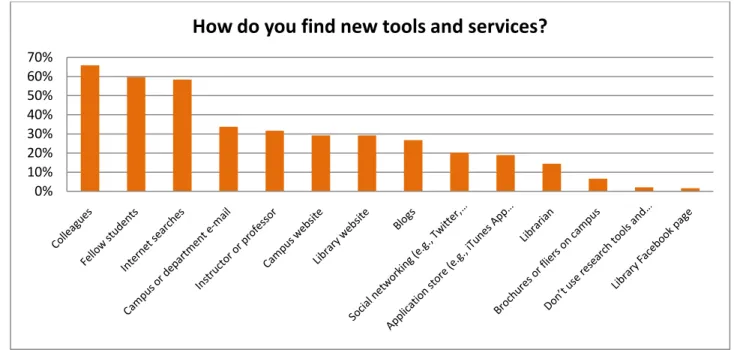
• Survey respondents ranked immediate community members—colleagues and fellow students—as the most likely sources for finding out about new tools and services (66% and 60%, respectively).
Recommendations
Based on our overall findings from this inquiry, we learned that the majority of academic ownership and use has not quite reached a tipping point of mass adoption. Thus, our general strategic recommendations are preparatory in nature. Recommendations include setting up testing environments, supporting mobile web access rather than standalone applications, assessing mobile experience for current web-based services, adopting analytics tools that track mobile devices, and continuing to survey users as devices and behavior change rapidly.
INTRODUCTION
This report is a collection of findings and recommendations from a mobile device user research project conducted in the summer of 2010. The California Digital Library undertook this project for three reasons:
1. CDL wanted to understand how the proliferation of mobile devices with internet access in the general public and the explosion of mobile tools and products in higher education and libraries affect CDL constituents and services.
2. UC campus libraries expressed a need for guidance regarding mobile access.
3. CDL programs were trying to understand if they needed to support users in a mobile capacity and if there were opportunities for new ways to meet user needs.
In order to answer these questions, we performed an extensive literature review and conducted user research. The literature review helped us to clarify what is happening in the mobile world in terms of technology changes, device ownership, internet access, and mobile projects, especially within the higher education and library spheres.
5 | M o b i l e D e v i c e U s e r R e s e a r c h
We wanted to learn additional details about the role mobile devices play in the lives of CDL constituents. Very little literature focuses on academic populations in regard to mobile devices, and even then it usually focuses on undergraduate students. We wanted to expand this study to faculty, graduate students, and academic librarians. We sought information about the kinds of devices users owned, how they used mobile devices with internet, and what kinds of preferences and frustrations they encounter while using mobile devices as part of their academic lives.
Based on these findings, we developed both specific and general strategic recommendations in order to guide CDL in supporting and developing mobile access to its services.
LITERATURE REVIEW
OVERVIEW OF MOBILE DEVICES
The New York Times recently announced: "Wall Street has called the end of an era and the beginning of the next one: The most important technology product no longer sits on your desk but rather fits in your hand" (Helft & Vance, 2010). In fact, mobile phones have become the most prevalent tool for media consumption and communication worldwide. 4.6 billion mobile phone subscriptions are now in use. Compared to the 1.2 billion personal computers in use (including laptops), that number is staggering (Hennig, 2010). Eighty-three percent of American adults own a mobile phone, and this number is even higher for American adults ages 18-29 (93%) (Lenhart, Purcell, A. Smith, & Zickuhr, 2010).
Mobile phones are often divided into two categories: feature phones and smartphones. Feature phones are basic mobile phones that can run simple applications but typically do not connect to the internet (“Feature phone,” Wikipedia.) Smartphones are mobile phones that have
advanced computing abilities such as complete operating systems and internet connectivity (“Smartphone,” Wikipedia). The Nielsen Company predicts that more Americans will have smartphones by the end of 2011 than feature phones: “We are just at the beginning of a new wireless era where smartphones will become the standard device consumers will use to connect to friends, the internet and the world at large” (Entner, 2010b). Currently 25% of American mobile consumers have
smartphones (Nielsen Wire, 2010b). Research in Motion (makers of BlackBerry) leads the market of current U.S. smartphone subscribers with 35%, followed by Apple at 28%. This is likely to change as over half of current BlackBerry subscribers claim that their next purchase is likely to be an iPhone or an Android device. Although currently at 13% market share, the Android OS market share is experiencing rapid growth. Twenty-seven percent of new smartphone subscribers chose the Android platform over the last six months, compared to 23% choosing the Apple iOS (Nielsen Wire, 2010b).
“We are just at the beginning of a new wireless era where smartphones will become the standard device consumers will use to connect to friends, the internet
and the world at large” --The Nielsen Wire
6 | M o b i l e D e v i c e U s e r R e s e a r c h Figure 1 Nielsen Wire, August 2, 2010
Beyond mobile phones, other mobile devices such as eReaders, mp3 players, tablets, gaming devices, and PDAs are also common mobile devices. Some of these devices are also able to access the internet. It is uncertain whether devices like smartphones that combine many of these functionalities will replace single-function tools in the future, though these multi-function devices have been highly successful so far. The iPhone and iPod Touch devices experienced the fastest user growth in consumer technology history (Morgan Stanley, 2009), which indicates consumer interest in multi-function devices.
INTERNET ON MOBILE DEVICES
Smartphones and other mobile devices with internet access allow people to access the web on the go. Some estimate that more users will access the internet from mobile devices than desktop computers within a few years (Morgan Stanley, 2009).
Pew Research Center’s Internet & American Life Project finds that almost a third of American adults have used mobile devices to access the internet, and 19% of survey respondents had used a smartphone or other cell phone to access the internet the day before the survey (Horrigan, 2009).
EDUCAUSE surveyed undergraduate students regarding their use of internet using mobile devices. They found that half of the student respondents own a mobile device that can access the internet, but only a third of the students actually access the internet from this device (S. Smith et al., 2009). The report cites easy access to internet through other means, the expense of data plans, and lack of desire to use the internet as the key reasons for the difference between ownership of capable devices and actual use. There is not much research that focuses on academic populations besides undergraduate students, such as graduate students and faculty.
Teenagers are slightly less likely to go online than using mobile devices than adults or undergraduate students, with only 27% reporting that they access the internet from their phones. Older teens, who have more disposable income to pay for mobile internet connectivity, are more likely to access the internet from mobile devices than younger teens (Lenhart, Ling, Campbell, & Purcell, Kristen, 2010).
7 | M o b i l e D e v i c e U s e r R e s e a r c h
WIFI VS. CELLULAR INTERNET
Most smartphones access the internet through a combination of wireless networks (WiFi) and cellular connections. WiFi networks typically require a username and password, and access is typically limited to places like coffee shops and academic campuses. Some devices, such as the iPod Touch, which does not have phone service, can only connect to the internet through WiFi.
Cellular connections use the user’s cellular network to access the internet. Cellular connections can be used wherever the user has a phone signal, though often at slower speeds than WiFi networks. Most cellular
connections currently use 3G technology, though carriers (and devices) are beginning to transition to 4G networks. Sprint’s HTC Evo released in March 2010 is the first 4G capable phone in the United States, though a good
percentage of the country does not have 4G network access yet (Barrett, 2010). 4G networks are expected to be twice as fast as 3G (German, 2010), which opens up possibilities for faster mobile internet use and more reliable video streaming without relying on WiFi connections.
APPS AND MOBILE WEBSITES
Apps: A key component of smartphone usage is use of third-party applications, called “apps.” Apps are native applications that are built specifically for individual smartphone platforms. App software is typically downloaded to the device, though most content is still accessed through an internet connection. Unlike mobile websites, apps can take advantage of the phone’s built-in features, like cameras, geolocation, microphones, speakers, and motion sensors.
Apple’s App Store (for iPhone, iPod Touch, and iPad) dominates the application market, with over 225,000 apps available (AppleInsider, 2010). The Android App market is gaining some traction with about 72,000 apps (Murphy, 2010).
As of June 2010, 14% of mobile subscribers had downloaded an app in the last 30 days. Most downloaded apps were games (65%). The most popular apps were Facebook, Google Maps, and Weather Channel (Nielsen Wire, 2010a).
Mobile websites: Despite the popularity of apps, some predict that mobile websites will have greater growth than apps. A company called Taptu describes what they call “mobile touch web sites” as sites “derived from the internet, but are sites created specifically for mobile touch screen devices, with finger-friendly layouts and lightweight pages that are fast to load over cellular networks” (Taptu, 2010). They estimate that over 400,000 sites like this currently exist and will reach one million by the end of next year.
8 | M o b i l e D e v i c e U s e r R e s e a r c h
Figure 2 Taptu predicts that mobile websites will have greater growth than apps. Source: Taptu, 2010
MOBILE INTERNET ACTIVITIES
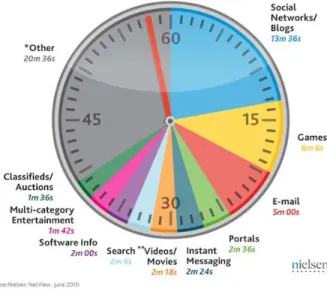
A recent Nielsen Group report compares PC internet activities to mobile internet activities: “Although we see similar characteristics amongst PC and mobile internet use, the way their activity is allocated is still pretty contrasting. While convergence will continue, the unique characteristics of computers and mobiles, both in their features and when and where they are used mean that mobile Internet behavior mirroring its PC counterpart is still some way off.”
The report shows that most mobile internet time is spent using email. After that, people spend time on the mobile internet accessing web portals and social networks or blogs. Using portals has decreased by double digits, but social networking has increased significantly (Nielsen Wire, 2010c).
Figure 3 Mobile internet time from the Nielsen Group, August 2, 2010. Source: Nielsen Wire, 2010c
Figure 4 All internet time from the Nielsen Group, August 2, 2010. Source: Nielsen Wire, 2010c
9 | M o b i l e D e v i c e U s e r R e s e a r c h
Web search ranks as the fourth most popular way to spend time on the mobile internet according to the Nielsen report. While search accounts for 4 minutes and 12 seconds of every hour of mobile internet use, it only makes up 2 minutes and 6 seconds of all internet time (Nielsen Wire, 2010c). This indicates that people spend a greater percentage of their mobile internet time using than search than their regular desktop internet time. This may be because search of mobile devices takes longer than on regular computers, or it may highlight that an import aspect of mobile internet use is seeking information.
Most use search the mobile internet quick pieces of information rather than extensive research or exploration. Pew Research found that for people ages 18-29, access to information on-the-go is a more important aspect of mobile technology (60%) than staying in touch with others (57%) (Horrigan, 2009).
One study completed in 2008 limited subjects’ internet use to mobile phones. Although mobile internet has improved since 2008, their findings are still relevant. The study authors report that their subjects often found using the internet from a mobile device frustrating because the experience is different than using the internet on a full computer. They likened desktop internet use to scuba diving, where search can be “immersive” and “invites exploration and discovery.” In contrast, mobile internet use is closer to snorkeling, where “shallow dipping in and dipping out of content for quick checking of key content is desired” (Hinman et al., 2008). They note, however, that “powerful experiences happened when participants were able to connect to Internet content to fulfill a pressing need in a mobile context.”
TEXT MESSAGING ON MOBILE DEVICES
Text messaging, also called SMS (short message service), is generally available on modern feature phones and smartphones. Text messaging is characterized by short messages shared back and forth, typically in real time. In addition to communication between individuals, text messaging can also be used for commercial applications. It is becoming increasingly common to receive automated text messages for things such as emergency alerts,
notification of flight changes, or confirmation of dental appointments.
Although some users pay .10 to .20 for each text sent and received, the majority of American texters subscribe to text messaging plans. The average cost per text in the United States is .01 per message (Entner, 2010a).
Texting is particularly popular among teenagers. One study found that 72% of American teenagers use text messaging; a third of American teenagers send a whopping 100 texts per day (Lenhart et al., 2010). While it is not clear if college-age students text quite as avidly as teens, EDUCAUSE did find that 90% of undergraduate students surveyed use text messaging (S. Smith et al., 2009).
Adults sending text messages is on the rise as well. Over 60% of adults over 45 report using text messaging as frequently as they make phone calls (Harnick, 2010).
Desktop internet is like scuba diving, where search can be “immersive” and
“invites exploration and discovery.” Mobile internet use is closer to snorkeling, where “shallow dipping in and dipping out
of content for quick checking of key content is desired”
10 | M o b i l e D e v i c e U s e r R e s e a r c h
DESIGNING FOR MOBILE DEVICES
DESIGN
Designing for mobile devices is not just redesigning regular websites so that they fit on a small screen. Mobile tools should be designed in ways that help alleviate some of the inherent challenges of using a mobile device. Many smartphone screens are touch screens, so buttons and links must be accessible by imprecise finger movements. Mobile keyboards (whether physical QWERTY keyboards or touch screen ones) are difficult to use, so text entry is generally avoided as much as possible.
Mobile internet is often slow, and devices do not have as much processing power as full computers. Jakob Neilsen writes, “download times dominate the user experience [on mobile internet]. Most pages take far too long to load, particularly on non-3G phones. But even the highest-end phones deliver much slower browsing than a desktop computer. As a result, users are reluctant to request additional pages and they easily give up” (Nielsen, 2009a) Thus interfaces must be simplified and prioritized so that users can access key information without needing to load multiple pages.
To help users accomplish their goals on mobile devices despite the small screen size, difficult text entry, and spotty internet connection, Crumlish and Malone suggests several mobile interface design guidelines, such as load only partial lists (rather infinite ones) in order to cut down on download time, make it easy to share items, and “take advantage of time and location” (Crumlish & Malone, 2009).
Mobile tools should take into account not just device limitations but also the mobile user’s context. Mobile devices are often used on the go, where users are likely to have frequent interruptions and distractions. Furthermore, mobile users often need information in the moment, such as directions or phone numbers.
DESIGNING NATIVE APPLICATIONS AND MOBILE WEBSITES
When creating mobile interfaces, designers must decide whether to create a native application or a mobile website. A native application is built specifically for a particular platform, whereas a mobile website is typically accessible by all devices with internet browsing capabilities. There are many tradeoffs in each option.
Native applications can take advantage of the particular device’s functionality and capability. In addition, some of the application software is stored on the user’s device hard drive, which can decrease load time. Typically native applications are built first for the iOS (for iPhone, iPod Touch, and iPad) and then sometimes expanded to other platforms. iOS applications (“apps”) are downloaded through iTunes and must undergo Apple’s review and approval process, which can take a long time. Another downside is that native applications only work on a limited number of devices. Users who do not have Apple mobile devices are not able to use these products. It is also difficult to update app content.
A mobile website, on the other hand is accessible to more mobile users. Mobile sites do not need approval from an app store like iTunes, and the user does not have to download anything before use. There is less control, however, of how the site will render on different devices. Each device has different capabilities and will display material differently, though these differences can be mitigated somewhat by configuring the site display based on browser detection. Furthermore, mobile websites are not able to take advantage of the many built-in features of particular devices.
11 | M o b i l e D e v i c e U s e r R e s e a r c h Usability expert Jakob Nielsen has found that apps are generally more usable than mobile websites: “My main conclusion from watching iPhone app users is that they suffered much less misery than users in our mobile website tests. In fact, testing people using iPhone apps produced happier outcomes than testing people attempting to use websites on the same phone” (Nielsen, 2010). Nonetheless mobile websites were still a significant improvement over full sites on mobile devices: “When our test participants used sites that were designed specifically for mobile devices, their success rate averaged 64%, which is substantially higher than the 53% recorded for using ‘full’ sites — that is, the same sites that desktop users see” (Nielsen, 2009b).
It is difficult to determine whether to create a native application or a mobile website. Fling writes in Mobile Device Design and Development that a native application is the best route in the following conditions:
• Charging for it • Creating a game
• Using specific locations (though some devices are able to detect location through browser applications) • Using cameras
• Using accelerometers (to detect motion or rotation) • Accessing file systems
• Offline users (Fling, 2009)
DEVICE FEATURES
When creating a native application, designers can take advantage of features that are often built into
smartphones. These capabilities go beyond what a user could do using a traditional computer and present new possibilities for tools and services.
Geolocation: Geolocation software allows programs to utilize the user’s physical location. This software uses embedded GPS chips or triangulates cell phone towers. Knowing a user’s exact location allows an application to provide filtered results. For example, the WorldCat library application will determines libraries with a particular item closest to the user. Although many devices require a native application to take advantage of geolocation information, newer browser standards are changing this, so some mobile websites can detect location as well (Fling, 2009).
Augmented Reality: Many smartphones have built-in cameras. In addition to taking pictures, the camera has many other uses. One use is augmented reality, where computerized data or images are superimposed top of the real world. The device’s camera operates as a lens to the real world, and the device screen depicts the additional information. Sophisticated uses of augmented reality include object recognition, where the view of the object triggers recall of data. For example, one technology called Layar for smartphones uses GPS information and the device’s camera to provide information. If one points the camera at a building, for example, an application using Layar could tell you if that company is hiring (Bonsor, n.d.).
“When our test participants used sites that were designed specifically for mobile devices, their success rate averaged 64%, which is substantially higher than the 53% recorded for using ‘full’ sites — that is, the
same sites that desktop users see.” —Jakob Nielsen
12 | M o b i l e D e v i c e U s e r R e s e a r c h
QR Codes: Another use of smartphone cameras is reading QR codes, also called 2D codes. QR codes are stamp-sized images that contain data that can be read by electronic devices. QR codes are quite popular in Japan but have yet to really take off in the United States. A smartphone camera (loaded with appropriate QR software) scans the QR code and typically directs users to a web address. “The codes are increasingly found in places such as product labels, billboards, and buildings, inviting passers-by to pull out their mobile phones and uncover the encoded information” (EDUCAUSE, 2009). The U.S. market currently has little experience or knowledge of QR codes, though some are using QR codes in unique ways. A copy of Jules Verne’s Around the World in 80 Days was recently published with QR codes in the print margins. When the reader uses a smartphone top scan the QR code, the reader is taken to a website with corresponding historical facts, forums, and related video (Miller, 2010)1
MOBILE IN HIGHER EDUCATION
.
Mobile devices are becoming part of many aspects of higher education. Mobile-friendly course materials complement mobile websites and mobile applications. Some courses are distributing podcast lectures and other course materials designed for mobile use (Johnson, Levine, R. Smith, & Stone, 2010). For example, one chemistry class at Abilene Christian University presented safety lectures via podcasts for iPhone and iPod Touch. Instructors found that students learned as much from the podcasts as previous classes had from in-class lectures (Johnson et al., 2010). Commercial course management systems like Blackboard offer mobile versions of their services and allow students to access (and educators to upload) resources, course information, and homework from mobile devices.2 Other universities have mobile applications that provide campus maps, directories, and dining hall menus.3
In addition to creating mobile content and applications, some institutions are taking advantage of text messaging services. One out of seven universities reports using text messaging to communicate with students, particularly for emergency notification (Sheehan & Pirani, 2009). Higher education survey respondents in the UK “were more positive about accessing information through text messages than through the mobile internet” (Mills, 2009). Latimer finds emergency text messaging services problematic, however, because text messaging “suffers from several disadvantages including inherent design problems, the opt-in process, character limits, and vulnerability to abuse" (Latimer, 2008). Latimer also notes that universities have difficulty maintaining up-to-date contact
information because cell phone numbers change frequently.
Despite these examples of mobile device use within higher education, Alan Livingston believes that educational institutions have “failed to notice the potential of mobile devices to provide students with educational experiences and services” (Livingston, 2009). Livingston envisions a campus that provides “multimobile”options —voice, text, instant message, and email—for every campus service. He has designed prototypes and tutorials for universities to implement these ideas4
There are security concerns, however, about transacting all campus services with a mobile device. EDUCAUSE notes that offering mobile services that require authentication “involves additional effort and introduces privacy and security concerns” (EDUCAUSE, 2010). Nonetheless, they predict that “students will soon be able to use mobile devices to do everything from registering for classes and paying tuition to meeting with advisors, reserving
.
1 To see a demonstration of QR codes in this book, see http://www.youtube.com/watch?v=OE5Ch4NnVu0 2 http://www.blackboard.com/Mobile/Overview.aspx
3 http://pyxismobile.com/Applications/Education.aspx
13 | M o b i l e D e v i c e U s e r R e s e a r c h
a tennis court at the rec center, requesting official transcripts, and getting personal assistance from campus police, health services, or the IT help desk” (EDUCAUSE, 2010).
MOBILE SERVICES IN LIBRARIES
A growing number of university and public libraries are offering mobile services.5
1) Participate in general shift: Many recognize that mobile devices are playing a large role in people’s lives,
particularly for information finding. Libraries want to remain a major source for information and resources and, thus, want to capture the mobile audience. “As smartphones become our users’ key information devices, libraries will want to have a significant presence in offering content and services suitable for those devices” (Lippincott, 2010).
Libraries are creating mobile versions of library websites, using text messaging to communicate with patrons, developing mobile catalog search, providing access to resources, and creating new tools and services particularly for mobile devices. Mike Teets, vice president of innovation at OCLC, believes “a strong mobile strategy is fundamental to librarians and librarianship” (OCLC, 2010). Libraries are pursuing mobile strategies in order to participate in general shift toward information access from mobile devices, to reach different demographics of users, and to prepare for a future in which mobile devices become even more central to daily life.
2) Reach different demographics: Teets believes that creating mobile services is essential for serving young generations of library patrons. Patrons 25-44 are highly unlikely to use traditional catalog-based services (in comparison to patrons ages 55 and older): “In our current services, we are not meeting that crowd.” This same user-group, however, includes high numbers of smartphone owners (OCLC, 2010).
Furthermore, mobile internet also reaches many populations that have less access to broadband internet from computers. African Americans are the highest percentage of mobile internet users (48%) (Horrigan, 2009). African Americans are less likely to have broadband internet access at home than white Americans, but when internet access via mobile devices is taken into account, the gap between white American and African American internet access is significantly reduced: “The high level of activity among African Americans on mobile devices helps offset lower levels of access tools that have been traditional onramps to the internet, namely desktop computers, laptops, and home broadband connections” (Horrigan, 2009). 3) Prepare for future: Although it is not evident that library patrons are currently accessing library mobile
services in large numbers, many find it important to create services now that will prepare for the growing numbers of smartphone owners. One librarian notes that just .3% of her library’s web traffic comes from mobile devices, but nonetheless feels a mobile site is essential for a library: “This traffic, though small right now, will continue to grow” (Trainor, 2010).
Some are less confident in the success of the wave of library mobile services. Bruce Washburn of the OCLC is pragmatic about the usefulness of mobile library applications:
5 More in-depth coverage of specific mobile services is located in the comparative analysis report located on the
wiki. See also the Library Success, M-Libraries wiki to see a list of libraries with mobile access to library resources:
“As smartphones become our users’ key information devices, libraries will want to
have a significant presence in offering content and services suitable for those
14 | M o b i l e D e v i c e U s e r R e s e a r c h
There is certainly much enthusiasm and interest in the library community about mobilizing library resources. It’s been there, frankly, for years. But, from what we can see so far, there isn’t corresponding evidence of widespread adoption and use of the results of those development efforts. At best, these applications may be partially displacing use that would have otherwise occurred in a desktop application. At worst, they may be either frustrating users by not delivering fully on the expected promised, or being otherwise missed or ignored. (Washburn, 2010)
Washburn believes that it is important to hold mobile library applications to usage metrics in order to judge success. Metrics should measure increased usage—either by the same people with more frequency or by more people overall (Washburn, 2010).
The key to creating worthwhile mobile library services is to truly meet patrons’ needs and deliver those services in usable, accessible formats. Lippincott sees mobile services as an opportunity for libraries: “The challenge for academic libraries is to create compelling information services and to make digital content available in a way that our user community will find not only acceptable, but tailored to their needs” (Lippincott, 2010).
MOBILE DEVICES AS PART OF ACADEMIC WORKFLOW
Undoubtedly academics have incorporated mobile devices into their academic workflow even though there are not tools or systems designed specifically for these needs. Some students look at lecture slides on their mobile devices or listed to recorded lectures. Others access course materials or readings from mobile devices. Of course, many communicate using mobile devices regarding their academic work. Yet there is little literature or research about how academics use mobile tools in these contexts. Most literature focuses on what campuses or libraries are building for academics rather than what they already do.
One area that has potential for academic use is reading on mobile devices. Although smartphones have become common devices for reading personal content (such as novels), there seems to be less buzz around reading academic content on mobile devices. Even eBook readers and tablets seem to have low academic usage. One reason for this difference is that reading for academic purposes is significantly different than reading for personal reasons. Reading is one component of an academic cycle of work that involves research, reading, analyzing, and creating.
Research
Read
Analyze
Create
15 | M o b i l e D e v i c e U s e r R e s e a r c h
Because reading is only one part of this cycle, tasks such as taking notes, comparing documents, and saving citations are particularly important.
A pilot program at Princeton University reported that students found “the classroom experience was somewhat worsened by using e-readers, as study and reference habits of a lifetime were challenged by device limitations” (Princeton University, 2010). One of the primary complaints that these students had was the inability to take notes. The Kindle does allow users to take notes and highlights that are then stored online, but students soon learned that they could only highlight up to 10% of the entire book, which was insufficient for their needs.
RESEARCH METHODOLOGY
In order to capture UC academic behavior in regard to mobile devices, we gathered both quantitative and qualitative data. We conducted two surveys to collect quantitative data regarding mobile device ownership, preferences, and activities. We also gathered qualitative data through interviews to better understand user motivations and workflow processes. Due to project logistics, timeline, and budget constraints, we were only able to collect data from a limited number of campuses. Future work would ideally capture data from all UC campuses and constituent groups.
SURVEYS
LIBRARIAN SURVEY
We conducted two surveys, both administered online. The first survey was distributed through Facebook and Twitter posts and ads. Most of the respondents were librarians, so only their responses were analyzed. The survey was administered from 4/29/10 to 5/4/10. Twenty-seven librarians responded to the survey. The librarian
respondents were from the following universities:
UC Irvine
12
OCLC
3
California Digital Library
2
UC Berkeley
1
UCLA
1
UCR
1
UCSD
1
Other university
5
Not answered
1
“The classroom experience was somewhat worsened by using e-readers, as study and
reference habits of a lifetime were challenged by device limitations.”
16 | M o b i l e D e v i c e U s e r R e s e a r c h
ACADEMIC SURVEY
The second survey was distributed to random undergraduate, graduate, and faculty at UC Berkeley. Due to survey distribution logistics and project timeline, we were not able to survey other campuses. Respondents had the option to enter a drawing for a $25 Amazon.com gift certificate. Questions in this survey branched based on responses.
The survey was administered from 6/18/10 to 7/31/10. 286 people responded to this survey. 99% of the respondents were from UC Berkeley. Survey respondents held the following occupations:
Faculty
92 34.33%
PhD
55 20.52%
Masters
8
2.99%
First-year undergraduate student
2
0.75%
Second-year undergraduate
student
32 11.94%
Third-year undergraduate
student
26
9.70%
Fourth-year undergraduate
student
34 12.69%
Fifth-year undergraduate student
7
2.61%
Recent graduate
64
1.49%
Alumni
1
0.37%
Part-time student
1
0.37%
Visiting scholar
1
0.37%
Researcher
1
0.37%
Staff
1
0.37%
Other
3
1.12%
Survey respondents were grouped into general academic areas based on their discipline selection. The respondents were from the following disciplines:
Formal
sciences
47 16.43%
Humanities
59 20.63%
Natural
sciences
74 25.87%
Professional
19
6.64%
Social
sciences
65 22.73%
Unknown
22
7.69%
6 Recent graduate, alumni, part-time student, visiting scholar, researcher, staff, and other were all combined into
17 | M o b i l e D e v i c e U s e r R e s e a r c h
Figure 5 Percentage of survey respondents from each discipline, organized by occupation. N= 268
SURVEY ANALYSIS
Most survey results in the report are based on the academic survey results. All percentages are calculated based on the number of respondents to that particular question. Presumably some respondents skipped questions that they would have otherwise answered in the negative, which inevitably skews some results. All of the questions were cross-tabulated based on occupation. A select number of questions were cross-tabulated based on discipline. Complete results can be found on the project wiki.
Although respondents were selected randomly to be contacted about the survey, individuals with a strong interest in mobile technology may have been more likely to respond to the survey, and thus may skew results to report a greater proliferation of devices and interest in mobile tools than the general population.
INTERVIEWS
We conducted 14 interviews with CDL service users or potential users. In general we sought participants who owned a mobile device with internet access. Two participants did not own a mobile device with internet access; one was a heavy user of the Online Archive of California, another was a faculty member who conducted field research. Participants were offered a $25 Amazon.com gift card in exchange for participation.
We conducted on-campus interviews at UC San Francisco (4 interviews), UC Berkeley (3 interviews), and UC Davis (3 interviews). On-campus interview participants were solicited in-person. Although we would have liked to interview subjects at all UC campuses, we were limited by logistics, schedule, and budget. We also conducted 4 phone interviews with two K-12 teachers, one special collections librarian, and one faculty member. The first 3 participants responded to a request for interviews emailed to a Calisphere mailing list or in conjunction with the first survey; the faculty member was contacted based on a personal connection.
All participants signed a consent form. Most participants agreed to be audio or video recorded. 0% 10% 20% 30% 40% 50% 60% 70% 80% 90% 100%
Faculty Graduate Undergrad Other
% of Discipline by Occupation
Unknown Social sciences Professional Natural sciences Humanities Formal sciences18 | M o b i l e D e v i c e U s e r R e s e a r c h
PARTICIPANTS
We wanted a variety of perspectives from users, so we sought participants from various occupations and disciplines that might use CDL services and tools.
Campus Occupation Academic Field Mobile
Device Ownership Mobile Internet Usage* Library Usage** Participant 1 UCSF Staff, Clinical
Fellow
Health/medicine Palm, iPad, iPod Touch
High High
Participant 2 UCSF Faculty Health/medicine iPhone Low Low
Participant 3 UCSF Student, 4th Health/medicine
year PhD
iPod Touch, feature phone
Medium Low
Participant 4 UCSF Archivist N/A BlackBerry Medium High
Participant 5 UC Berkeley Student, 2nd Psychology year undergraduate iPod Touch, LG Rumor (smartphone) Medium Medium Participant 6 UC Berkeley Student, First year PhD Biology Google Android HTC Medium High Participant 7 UC Berkeley Student, 4th Information Science year PhD Feature phone N/A High
Participant 8 UC Davis Student, 3rd year undergraduate Sociology and health/medicine LG eNV Touch without data plan, iPod Touch Medium Low
Participant 9 UC Davis Student, 4th year
undergraduate
Art and history iPhone High Low
Participant 10 UC Davis Student, 3rd year
undergraduate
Biology LG eNV Touch
with data plan
High Low Participant 11 Other university Teaching Librarian/Speci al Collections Librarian
N/A iPhone High High
Participant 12 K-12 School
8th-grade History & English
teacher iPhone, iPod Touch High High (Calisphere) Participant 13 High School District Technology specialist N/A iPhone (personal), iPad and iPod Touch (district) High High (Calisphere) Participant 14 Other university
Faculty Field ecology LG phone without a data plan
N/A Low
*Based on our assessment. High = glued to device; Medium = will use as needed; Low = rarely use.
**Based on our assessment. High = use lots of services, all the time; Medium = occasionally when needed for school/job; Low = rarely use.
19 | M o b i l e D e v i c e U s e r R e s e a r c h
FINDINGS
TECHNOLOGY
DEVICE OWNERSHIP
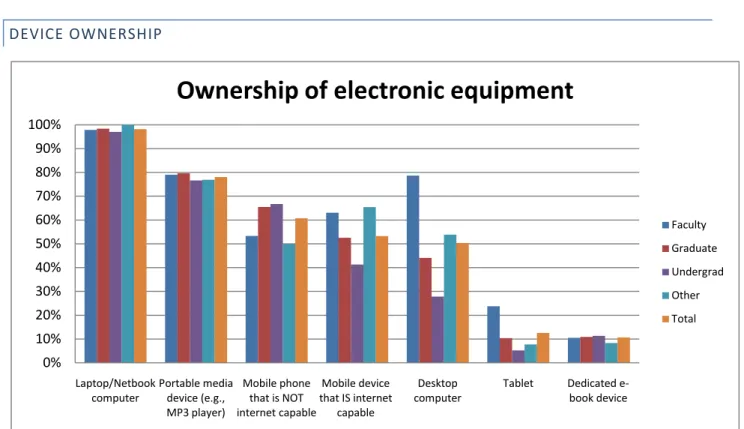
Figure 6 Please indicate the electronic equipment you currently own. (Select all that apply). N = 268, 260, 247, 261, 258, 247, 243. Laptops are clearly the most ubiquitous electronic device owned by academic survey respondents. Over 98% of survey respondents owned a laptop or netbook.7
Overall there was low ownership among survey respondents of either tablet computers (13%) or dedicated eBook readers (11%). Faculty members were the most likely to own tablet computers (24%). Respondents in social sciences fields were slightly more likely (15%) to own dedicated eBook devices than academics in other fields. Of survey respondents who own mobile devices with internet, 9% owned an iPad. This survey was conducted about three months after the iPad was released, so it remains to be seen whether tablet ownership increases as a result of iPad proliferation.
Fewer respondents owned desktop computers (50%), with faculty members being the most likely to own a desktop computer (79%). After laptops, portable media devices such as MP3 players were most likely to be owned (78% overall).
Slightly more academic respondents own mobile phones without internet (61%) than mobile devices that with internet (53%).89
7 Unless otherwise stated, “survey respondents” refers to respondents to survey B, made up primarily of faculty
and students from UC Berkeley.
Faculty were the most likely respondents (63%) to own a mobile device with internet, followed
8 Some respondents own both a mobile phone without internet and a mobile device with internet, hence why
these percentages add up to more than 100%. 0% 10% 20% 30% 40% 50% 60% 70% 80% 90% 100% Laptop/Netbook computer Portable media device (e.g., MP3 player) Mobile phone that is NOT internet capable Mobile device that IS internet capable Desktop computer Tablet Dedicated e-book device
Ownership of electronic equipment
Faculty Graduate Undergrad Other Total
20 | M o b i l e D e v i c e U s e r R e s e a r c h
by graduate students (53%) and then undergraduates (41%). The rate of undergraduate survey respondents who own mobile devices with internet is slightly lower than EDUCAUSE’s findings of 51% undergraduate ownership of an “internet-capable handheld device” (S. Smith et al., 2009). 59% of librarian survey respondents reported owning a mobile device with internet.
Survey respondents overall are already well ahead of the general American population in terms of mobile device with internet ownership (23% of American mobile consumers have smartphones) (Kellog, 2010), and it is likely that the percentage of academics who own mobile devices with internet will continue to grow. 24% of undergraduate respondents, for example, reported that they “plan to buy” a mobile device with internet in the near future.
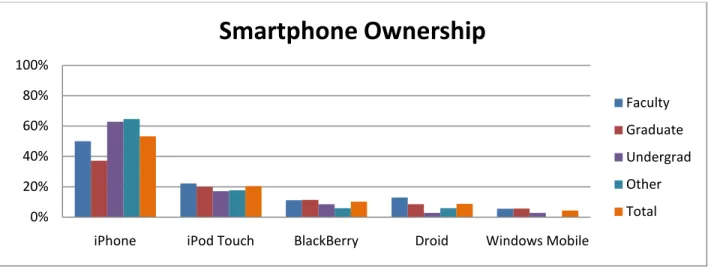
Figure 7 Which of the following mobile devices with internet do you currently own or use frequently? (Select all that apply). Out of survey respondents who own a mobile device with internet. N = 137.
Of academic survey respondents who own mobile devices with internet, the majority own iPhone (53%) or iPod Touch (20%) devices. The next highest device was Blackberry (10%), and then Droid (9%). Windows Mobile trails with (4%). Out of librarian mobile device owner survey respondents, 69% owned iPhones, 13% iPod Touches, 13% BlackBerry, and no Droid or Windows Mobile owners. In comparison to general U.S. smartphone ownership, iPhone has a greater percentage of market share among survey respondents than the general public (53% versus 28%). BlackBerry has a much lower percentage of market share (10% versus 35%) (Nielsen Wire, 2010b).
BlackBerry devices are often business devices, so it is not surprising that many academics do not have company-provided phones.
9 Mobile phones that are not capable of accessing the internet can also be described as feature phones, though
some respondents who own smartphones that do not subscribe to data plans may have selected this option as well. Because the definition of smartphone is so undefined, we used “mobile device that IS internet capable” as our category. We also wanted to include other mobile devices that can access WiFi internet (such as the iPod Touch) that are not actually phones, so we specifically referred to this category as a device rather than a phone. We provided the following examples of devices in the survey question: iPhone, Blackberry, Droid, iPod Touch, etc.
0% 20% 40% 60% 80% 100%
iPhone iPod Touch BlackBerry Droid Windows Mobile
Smartphone Ownership
Faculty Graduate Undergrad Other Total21 | M o b i l e D e v i c e U s e r R e s e a r c h Barriers:
• Although many own mobile devices that are capable of accessing the internet, a good portion of respondents do not.
• Although the iOS platform (including iPhone, iPod Touch, and iPad) has the highest user group by far, other smartphone platforms—BlackBerry and Droid in particular—are in use and should be considered when testing and supporting platforms.
Recommendations:
• Smartphone ownership will likely increase over the next couple of years, so resurvey user groups regularly to determine if ownership increases significantly.
• The iOS platform clearly dominates usage, so supporting this platform should be highest priority. Any applications that are developed should be developed based on this platform first.
INTERNET ACCESS
DATA PLANS
Some who own internet-capable devices do not actually subscribe to data plans that would allow them to access the internet. Some respondents, particularly undergraduate students, may share phone plans with family members and not have much flexibility in choosing their feature options. 23% of survey respondents who do own an internet-capable mobile device do not have data plans. Most cite cost as the primary deterrent to subscribing to a data plan. This finding is similar to EDUCAUSE’s report that a third of students with mobile devices that support internet do not actually use the internet from their devices (S. Smith et al., 2009). One librarian survey respondent stated: “I would use mobile devices for internet, but the prices they charge for data are way too high.”
CELLULAR VS. WIFI
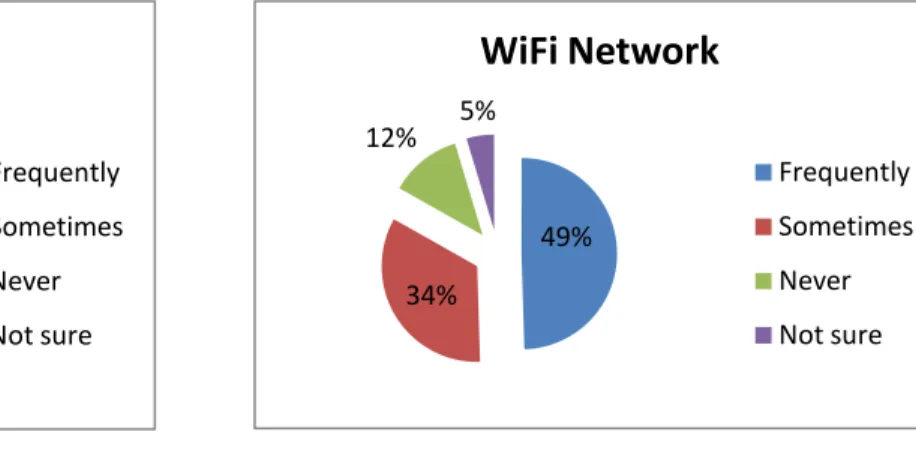
Of those who do subscribe to data plans, 78% of survey respondents reported using the cellular network
frequently to access the internet, whereas only 49% report using WiFi frequently. Accessing the internet by cellular connection is clearly the more popular option.
Figure 8 When you use the internet on your mobile device, which type of network do you use? *Out of survey respondents who have mobile devices with data plans. N= 107
Figure 9 When you use the internet on your mobile device, which type of network do you use? *Out of survey respondents who have mobile devices with data plans. N= 107
78% 10% 7% 5%
Cellular Network
Frequently Sometimes Never Not sure 49% 34% 12% 5%WiFi Network
Frequently Sometimes Never Not sure22 | M o b i l e D e v i c e U s e r R e s e a r c h
Even though WiFi is often faster than cellular connections, the difficulty of finding strong WiFi networks and logging in may deter potential WiFi users. One undergraduate student explained “I wouldn't go through all the hassle to use the internet at school. I just use the internet that AT&T provides.”
Academics using cellular connections instead of campus wireless networks may have significant implications for accessing licensed resources. If academics are attempting to use library resources through cellular connections, even when on campus, they will not have access to resources
that require authentication.
Some struggle with configuring access to library resources even when on the campus wireless network. A staff clinician at UCSF who is a heavy user of mobile devices told us “I do sometimes use the library for journals [on my mobile device], but I haven't gotten around the VPN issue to actually be able to pull up the articles.”
Barriers:
• Not everyone who owns internet-capable devices actually subscribes to data plans. Cost is a significant deterrent.
• Many use cellular networks to connect to the internet rather than WiFi, which complicates accessing authenticated library resources.
Recommendations:
• Services that do not require authentication may have more use than those that do.
• Establish ways to connect to authenticated resources via cellular connections. This would be a complicated task because of various third party and vendor requirements and campus library infrastructures.
BARRIERS TO USE
USABILITY ISSUES
Survey respondents felt that the highest barriers to using mobile devices with internet were small screen size (47%), slow load time (46%), difficulty reading content format (e.g. PDF not size correctly) (41%), and web page formatting (40%).
Small screen size is not likely to change significantly in mobile devices, though some mobile screens are increasing their resolution significantly, which makes it easier to fit more content on a page without straining the eye. Slow load time may improve as 4G cellular internet becomes more prevalent. In the meantime, mobile content should be developed in ways that speed up load time: simplifying content and minimizing file size.
Both difficulty reading content format and web page formatting are issues that can be addressed by creating mobile friendly content and websites.
“I do sometimes use the library for journals [on my mobile device], but I haven't gotten around the VPN issue to actually be able to
pull up the articles.” --Staff Clinician
23 | M o b i l e D e v i c e U s e r R e s e a r c h
USAGE LIMITATIONS
Some interviewees told us that they would like to use mobile devices in their professions but were prevented from doing so because of technological or device limitations.
For example, an archivist told us that he would use a mobile device at work when he is away from his desk, but he works in the stacks or basement area, so he doesn’t have any cellular signal.
A faculty member who does field research would like to record observations on a mobile device, but field work is too muddy to bring electronic devices: “The challenge for us is that our field work is super dirty and muddy, so bringing electronics to the field is a challenge.” Currently observations are recorded on paper and then transcribed back in the lab.
A PhD student who uses archival material frequently told us how she takes pictures of physical artifacts, but she is not able to use a camera on her phone because the images need to be incredibly high quality. She also didn’t think it would be helpful to have access to her digital images on a mobile device because she needs to be able to view details: “Using online archives, you need a really amazing monitor. The newspaper text...you have to zoom in and pan around. I dream of the day I have a nice big monitor. For maps, you really need a big monitor to decipher the text and the handwriting.”
Barriers:
• Using mobile devices presents many usability issues: small screens, slow load time, difficult to read content, poor web page formatting.
• Using electronic devices is not always feasible in various environments and situations. Recommendations:
• Create mobile-friendly files and web pages that considering small screen real estate, load time, and format for mobile devices.
• Be aware of device and environmental limitations users might face before building mobile tools.
BEHAVIORS
MOBILE DEVICES WITH INTERNET VS. COMPUTERS
Most interviewees told us that they prefer to use internet from their laptops rather than their mobile devices. One student told us that she uses her phone to “check something, look at picture on the internet. If I’m going to do any extensive browsing or academic work, I’ll use my laptop.”
Another student stated “I prefer to use my computer for big things that I have to do, like if I have to do a paper or research.”
Despite the preference for laptops, many don’t carry laptops to campus. One student told us why she doesn’t carry her laptop: “It’s just kind of a pain to carry around, especially because I live really far away and I walk to campus. I don’t want to carry it if I
“I prefer to use my computer for big things that I have to do, like if I have to do a paper
or research.” --Student
24 | M o b i l e D e v i c e U s e r R e s e a r c h
don’t have to.” Many students use library computer labs when laptops are not available, but it can be a hassle to go to the library and find an open computer, especially when it is only needed for short sessions.
Oftentimes a mobile device with internet serves as an internet access point when it isn’t convenient to bring a laptop or use a computer in the library. One student told us how she uses her phone during class: “My phone I usually only use in class, because I don’t bring my laptop to class. So [I use it] if I just want to check email or something real quickly. But it takes forever and is kind of annoying to use, so I wouldn’t do anything too extensive on it.”
Furthermore, some do not have internet access at home, so they rely on internet from their phone’s data plan: “The internet where I live has been down a lot, so I can use my cellular, so I’ve been using my phone internet a bit more.”
In addition to times when computers and internet are not available, some people will use a mobile device even when a computer is easily accessible. Sometimes people use mobile devices even when a computer is easily accessible. Out of survey respondents who own mobile devices with internet, 36% will use a mobile device when a computer is available occasionally; 16% said often, while 5% said very often.
Out of survey respondents who have mobile devices with internet, most spend either 15-60 minutes (32%) or 1-5 hours (37%) using the internet from their mobile devices each week.
GENERAL ACTIVITIES ON MOBILE DEVICES WITH INTERNET
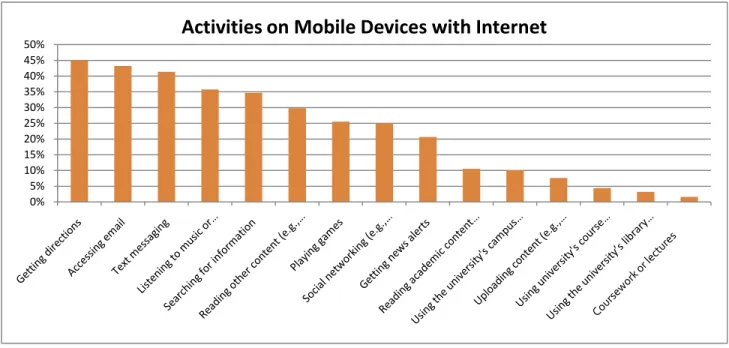
Mobile devices with internet access are used for a variety of purposes. Some of the most common uses include finding information and accessing email. They are also used for text messaging, watching videos and listening to music, reading, playing games, and social networking. They are used less for academic purposes, such as accessing campus or library websites or completing coursework. They are also not used frequently for uploading content.
Figure 10 Which devices do you use regularly to engage in the following online activities? (Select all that apply.) N = 251, 257, 244, 246, 251, 255, 235, 248, 237, 256, 248, 237, 249, 250, 246 0% 5% 10% 15% 20% 25% 30% 35% 40% 45%
25 | M o b i l e D e v i c e U s e r R e s e a r c h
1. Finding Information: Mobile users are likely to seek quick hits of information, especially when there is a pressing need in the moment. In the survey, faculty reported particularly high rates of searching for information on mobile devices (46% faculty, 35% overall). Furthermore, 35% of survey respondents reported searching for information several times a day.
Often mobile users seek information that is particularly relevant in a mobile context, such as directions or hours. Others seek information that is relevant in the moment. For example, one faculty interviewee told us how he will access a research database (that is not mobile friendly) when he needs to look something up right away. He also noted that he would use his mobile phone for short tasks: “I would use this for very quick things, like looking in the dictionary.” As noted earlier, finding information on mobile devices is like snorkeling, where “shallow ‘dipping in and dipping out of content’ for quick checking of key content is desired” (in contrast to desktop search, which is like scuba diving) (Hinman et al., 2008).
2. Email and Text Messaging: Email is a commonly used tool on mobile devices, with many survey
respondents who own mobile devices with internet reporting that they access email from a mobile device several times a day (56%). Text messaging is also popular from mobile devices with internet; 50% of mobile device with internet owners report using their device to send text message several times a day. This number is relatively consistent across occupations, with almost as many faculty (46%) as
undergraduates (49%) reporting several times a day usage. Ways that both email and texting are used are discussed in more detail later in the report.
3. Reading: About 30% of mobile internet using survey respondents report reading content on their mobile devices, such as news articles or blogs. Fewer report reading academic content, which will be discussed in more depth later.
4. Social Networking: Social networking in common on mobile devices, and most interviewees cited Facebook as their favorite application. One undergraduate student told us that she often uses her phone to check Facebook “especially in class if you’re just bored or something.” Yet undergraduate students are not the only ones who use their mobile devices for social networking. Faculty survey respondents reported using mobile devices with internet at twice the rate of undergraduates (faculty 32%, undergraduates 17%).
5. Video and Music: 59% of survey respondents report using mobile devices with internet to watch or listen to videos or music as least weekly, and this number may increase as cellular internet becomes faster.
ACADEMIC ACTIVITIES
READING: MOBILE DEVICES WITH INTERNET
Most told us that they did not read academic content on mobile devices. Some noted that they prefer to read PDFs on their laptops, while others stated a preference for reading material on paper. One graduate student told us: “I can’t imagine reading a whole science journal on my iPod Touch.” Another told us that she doesn’t like reading on her phone longer than 10 minutes. One student told us that he had tried to read on his phone, but he didn’t like reading from the small screen: “I tried, like when the professor sends PDFs, but I'm not great at reading it off of the screens.”
“I tried [to read academic content], like when the professor sends PDFs, but I'm not
great at reading it off of the screens.” --Student
26 | M o b i l e D e v i c e U s e r R e s e a r c h Another significant issue for interviewees was the ability to organize their readings and citations. Many had complex organization systems on their laptops, such as saving PDFs in folders, saving URLs as bookmarks, or saving citations in EndNote. A staff clinician noted: “I like to have my laptop with me because I have all of my stuff organized in a certain way there. And if there were a way that I could do it on my mobile device and then it would end up on my laptop eventually, I would do that. But that’s really my big issue…If it’s something that’s pertinent to my work, I’d want to be able to go and get it and then save it on my computer so that I can reference it later.” These tasks would be much more complicated from a mobile device because of the lack of citation tools and file organization available on mobile devices.
While interviewees were generally opposed to reading on their mobile devices, survey respondents reported more academic reading on their mobile devices. Out of survey respondents who use internet on their mobile devices, 26% said that they read “academic content (e.g. books, articles)” on their devices at least daily. Another 20% reported reading academic content on their mobile device weekly. In contrast, 43% said that they never read academic content on their devices. It is not clear if respondents are reading complete materials or just referencing them. This aspect should be explored in greater detail in future work.
Interviewees often expressed hesitation with reading on their mobile devices because of the difficulty of opening various file types. One PhD student noted that her phone’s memory is too small to hold large files and it doesn’t read PDFs well. One faculty member has a third-party application so that he can open Word and PowerPoint attachments on his phone. Another student wasn’t sure if her device could open PDFs: “When I’m using PubMed I'm looking for a PDF of the article, and I don't think...can you open PDFs on [iPod Touch]? I don’t know actually.” It is interesting that so many interviewees were opposed to or uncertain about using PDFs on their mobile devices because PDFs are clearly the medium of choice for reading academic content on a mobile device. Out of survey respondents who reported using a mobile device for academic reading, most reported reading from downloaded PDFs (74%). 47% read academic content from websites. Only 8% use a reading application such as the Kindle app.
READING: EBOOK READERS AND TABLETS
Only 5% of survey respondents reported reading academic content on eBook readers (4% reported reading non-academic content on eBook readers). A few more people (7%) report reading non-academic content on tablets (compared to 8% who read non-academic content on tablets). These low numbers are partially a reflection of the low ownership of eBook readers and tablets. When these percentages are calculated only based on the number of people who own each of these devices, about half use them to read academic content. Only one interviewee owned either an eBook reader or a tablet. This person owned an iPad but did not use it for reading.
Right now it appears that respondents are not using eBook devices and tablets often for academic reading. It would be worthwhile to keep an eye on this trend after the iPad has been on the market longer and electronic textbooks become more advanced. For example, the NOOK Study is new product that integrates eTextbooks and BlackBoard. This tool is not customized for tablets or eBook readers at this point (only desktops and laptops), but products like this will likely be available for mobile devices in the future.
“If there were a way that I could do it on my mobile device and then it would end up on my laptop eventually, I would do that. But that’s really my big issue…If it’s
something that’s pertinent to my work, I’d want to be able to go and get it and then save it on my computer so that I
can reference it later.” --Staff Clinician
27 | M o b i l e D e v i c e U s e r R e s e a r c h
LIBRARY RESOURCES FOR RESEARCH ON MOBILE DEVICES WITH INTERNET
Most interviewees noted that they did not want to do actual academic research on mobile devices. Many see research as a difficult activity that would only be more difficult on a mobile device. As one undergraduate student noted, “it’s a little complicated to [access library resources] on
the computer so I haven’t tried on the iPod Touch.” Despite this disinclination to do heavy research on mobile devices, there does seem to be an interest in having the option to access library databases, catalogs, and resources from mobile devices. About 53% of survey respondents said that they would like to search library databases from mobile devices either “frequently” or “occasionally.” (46% said they would never
search library databases on a mobile device.) About 55% wanted to search the library catalog from a mobile device either “frequently” or “occasionally.” (43% said they would never search the library catalog on a mobile device.) Instead of using these tools to perform actual research, it is more likely that users will use library databases to retrieve known materials or find quick information.
While most do not want to conduct in-depth research on a mobile device, some are willing to find material that they already know is available. For example an undergraduate student may access materials that have been assigned by instructors, or faculty may search for articles they have already read to recall specific facts. One undergraduate student told us that she would only use her mobile device to seek out a library material that she already knew was available rather than searching for something new: “I probably wouldn’t look for something new on [my mobile device] just because it’s kind of a pain. But if there was something that I knew was already there and was just looking for it, I might do that.” Another scenario for mobile research is finding quick pieces of information within resources. A staff clinician interviewee described how she needs to look up information in medical journals while working with patients at the county hospital. She hasn’t been able to get the campus VPN to work off site, so she does not have access to licensed resources and uses Google Scholar instead. She currently does this on her laptop, but it is easy to imagine a scenario where she would do this on her mobile device instead.
Another interviewee told us that she would like to be able to search the library catalog from her phone to determine if a book is available in the library. She thought she would use this when she is somewhere without her computer or WiFi access. This person was not really interested in actually accessing the resource from her phone; instead, she wanted to find out if the physical copy was available before she went to the library.
These findings are similar to data from Texas A&M University Library, who recently publicized access to EBSCO mobile databases on its campus. They found that while users did try out the mobile database, they did not actually click through to the full-text resources. Only 1% of mobile EBSCO users actually viewed the full text (as opposed to 77% who typically view full-text on a regular device).10
10 Bennet Ponsford, personal communication, 6/28/10
“It’s a little complicated to [access library resources] on the computer, so
I haven’t tried on the iPod Touch.” --Student
“I probably wouldn’t look for something new on [my mobile device]
just because it’s kind of a pain. But if there was something that I knew was already there and was just looking for
it, I might do that.” --Student
28 | M o b i l e D e v i c e U s e r R e s e a r c h
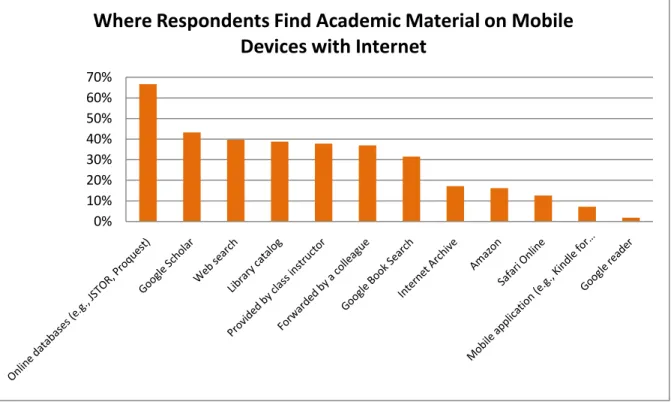
Some are already using library resources on mobile devices. Most of the survey respondents who read academic content on mobile devices reported getting the content they read on their mobile devices from online databases (e.g. JSTOR, Proquest) (67%). The next most popular places to get content were Google Scholar (43%), web searches (40%), and the library catalog (39%). Material provided by class instructor and forwarded by a colleague ranked at 38% and 37%, so it is also important to support access to static links as well as searches.
Figure 11 Where do you find academic content to read on your mobile device? (Select all that apply.) *Out of survey respondents who read academic material on mobile devices with internet. N=111
Barriers:
• Laptops are often the right tool for the job at hand, but mobile devices fill in when computers or internet are not available.
• Mobile devices are more likely to be used for personal uses than academic ones. • Mobile devices are not likely to be used for uploading content.
• Many do not want to read academic content on mobile devices because of note taking preferences, dislike of small screens, and difficulty with file formats.
• Citation tools and organization workflows are built around laptops, and it is difficult to integrate mobile devices into these systems.
• Few people are using eBook readers or tablets for academic reading.
• People do not want to do in-depth research from mobile devices, but they do want access to resources. Recommendations:
• Keep in mind that high ownership of mobile devices with internet and high usage of personal apps or mobile sites may not translate to high usage of academic mobile tools.
0% 10% 20% 30% 40% 50% 60% 70%
Where Respondents Find Academic Material on Mobile
Devices with Internet