Master’s Thesis
Collaboration Patterns
for Software Development
David Arve DT05
Department of Computer Science Faculty of Engineering LTH
Lund University, 2010
ISSN 1650-2884 LU-CS-EX: 2010-32
Collaboration
Patterns
for
Software
Development
Keywords: Collaboration, Parallel Development, Patterns, Distributed Version Control, Branching, Software Configuration Management.
Master’s thesis, Lunds University, Faculty of Engineering Department of Computer Science
Author: David Arve, [email protected] Supervisor: Christian Pendleton, Softhouse Examiner: Lars Bendix, Lund University
Abstract
Software development is a collaborative effort, as such effective communication and coordination is essential. All the time that is spent on unnecessary communication and coordination, leaves less time for the core activities of developing and testing software.
There are two important aspects of software development. Software development produces software products. Products that have versions, variants, milestones and release schedules etc. This is all part of the high level product tactics. Software development is also about collaborative problem solving. Developers and testers work together to solve problems, this is a creative, social and dynamic activity. These two aspects of software development needs to work efficiently on their own and together.
The technical solution for coordinating the collaborative software development effort is mainly branches in version control tools. The technical nature of branches includes more or less advanced concepts from Software Configuration Management. Neither developers or management can be expected to be SCM experts. Developers and management need to translate their desired tactics and collaboration into SCM concepts they are not familiar with.
This thesis presents Collaboration Patterns that can be used to efficiently streamline high level product tactics with low level collaborative development. Collaboration Patterns provides high level concepts that are familiar to both management and developers, providing conceptual tools that does not require SCM knowledge. This thesis also presents methods for implementing Collaboration Patterns with version control tools, both traditional branching and with distributed version control. The common mental model of Collaboration Patterns bridges the gap between management, developers and SCM experts.
______________________________________________ 1 Introduction! 1 ______________________________________________ 2 Background! 3 ... 2.1 Problem! 3 ...
2.2 Requirements for a solution! 4
...
2.3 Outline of possible solutions! 5
_____________________________________
3 Collaboration Patterns! 7
...
3.1 High Level Patterns! 8
...
3.2 Low Level Patterns! 13
____________________ 4 Example of Using Collaboration Patterns! 21
...
4.1 Project Scenario! 22
...
4.2 Discussion! 26
______ 5 Implementing Collaboration Patterns with Version Control! 28
...
5.1 Implementing Promotion-Gatekeeper Pattern! 28
...
5.2 Split and Regroup! 31
_ 6 Differences between centralized and distributed version control! 33
...
6.1 Difference in approach to high level patterns! 33
...
6.2 Difference in approach to low level patterns! 35
_____________________________________________ 7 Future Work! 37 ______________________________________________ 8 Conclusion! 39 ______________________________________________ 9 References! 40
1 Introduction
Software development is a collaborative effort. The more people that are involved in the process the more time is spent on communication and coordination. Instead of spending time coding and testing, adding real customer value to the products, time is spent in meetings and waiting for other team members to finish etc. Some of this communication and coordination is necessary and moves the project forward. Some of it is not necessary which slows down the project and adds to team frustration. It is not, however, easy to identify where the inefficiencies lay and even if this is known it is not easy to know how to solve it.
Collaborative software development means that we need parallel development. This is a well known fact. Appleton et al. writes that
”The question is not "should we conduct a parallel development
effort", but "
how
should a parallel development effort best be
conducted?"”
Appleton et. al.
Appleton’s question about how we should conduct a parallel effort leads him to branches. Branches is the technical solution most version controls use to support parallel development. Tools have more or less extensive support for advanced branching strategies. Appleton describes what advantages and disadvantages there are with different strategies in different situations.
Given that we need parallel development, this thesis does not ask how we should do parallel development. This thesis asks “What kind of parallel development should we do?”, or “How should we collaborate for effective software development?”. This thesis will argue that Collaboration Patterns is a way of structuring what kind of collaborative development we need to solve recurring problems given a specific context. This will give us high level concepts to create mental models of how the parallel development effort is being undertaken. This thesis argues that Collaboration Patterns presents concepts that are of a high enough level to span the entire software development organization. They are therefor applicable both for a tactical product strategy and for dynamic creative development.
This thesis presents Collaboration Patterns as a way to analyze and enhance the way in with team members collaborate when developing software. Collaboration Patterns gives a clear structure to communication and coordination within a team. We will describe both high level patterns and low level patterns. High level patterns involve control over product tactics and strategy while low level patterns involve the collaborative problem solving of day-to-day development.
strategy is a tactic much like war or sport tactics requiring planning and execution. Development on the other hand is a creative problem solving process. It combines experience with creativity. The developers are much more like soldiers than generals or soccer players than coaches adapting and collaborating around a changing environment.
With a product strategy a manager can give the project a direction. Developers on the other hand give the project speed. When these work together we have a project that is going fast in the right direction. If they are not, we can have the project go downhill – fast.
The two activities of product strategy and creative development are very different in nature. The manager needs to speculate, or plan, for what he or she thinks will happen to the project and other factors affecting it. Development needs to adapt to each new problem, tailoring a specific solution to fit. It is not only what developers do that is highly dynamic, but also how you work. Do you work alone? The whole team together? Pairs? It all depends on the problem at hand. Development is a highly dynamic activity.
The patterns and concepts of this thesis have been researched through interviews with developers, managers and SCM experts. The author has had some experience testing the patterns on other students during the courses “Software Development in Teams” and “Configuration Management”. It has not been possible for the author to test these patterns and concepts more extensively in this thesis.
In chapter two of this thesis the background to the problems outlined above will be described. The chapter will discuss possible requirements for solutions to this problem and relate Collaboration Patterns to other related solutions. In chapter three a set of high and low level patterns are presented and analyzed. In chapter four provides a contrived example of how one can apply these patterns to a project. In chapter five some of the patterns put forth are implemented with centralized and distributed version control. In chapter six we discuss the differences with centralized and distributed version control from a Collaboration Patterns point of view. Chapter seven presents possible related and future work and chapter eight presents the solutions that have been proposed by this thesis.
2 Background
This section will first dive a little bit deeper into the problem domain and more closely examine our problem. We will then specify requirements for any potential solution to this problem. In the third subsection we will look closer at different types of potential solutions motivating the choice of Collaborations Patterns. Finally we will give a overview of the driving forces of Collaboration and Parallel Development.
2.1 Problem
Software development is a group activity. All group activities needs communication and coordination to be successful. This is why the amount of work needed to complete a software project can’t be
measured in “man months”. There will be productivity fall-off because the team needs to communicate and coordinate their efforts. (Brooks, 1975) The larger a team is the more acute the coordination problem is. Communication channels grow faster then the team, three channels with three developers but six with four developers, see fig. 2.1. (Babich)
“We need to find ways to
decrease the amount of time spent
[coordinating] and increase the
time available for designing,
coding and testing.” – Babich
This is the main problem. Increase productivity, increase the amount of time that is spent on adding costumer value to the software and decrease the amount of time spent on coordination. The point here is not that we shouldn’t coordinate, this is an absolute must, but we need to do the right
coordination and the right communication. This is subject for this thesis.
In software development we produce changes to software. This can be changes to code, but also to documentation, tests and other documents. The changes are made independently by different individuals or groups of individuals. The activity of coordinating, controlling and enabling these changes to take place is Configuration
Figure 2.1. The possible connections between team members grow faster then the team.
Management (CM). CM can be divided into identifying, controlling, auditing and reporting. This is nothing more than to make controlled changes.
“Understand what you want changed and why; make a decision to
change or not; control the change; verify that the change was
made; and communicate the change.” – Moreira
One purpose of CM is to structure the collaboration between team members, including not only developers but testers, QA, management etc. There are two important factors in this coordination: speed and direction. Speed is about focusing on producing costumer value, direction is about having enough control to adapt to changes, keeping the project on track.
To be able to get the speed we are looking for we need effective parallel development. Parallel development is mainly about two things. It’s about having a parallel product strategy e.g. simultaneously developing version 1.1 and 1.2 as well as doing maintenance on version 1.0. It’s also about utilizing all team members as efficiently as possible, e.g. if feature A and B can implemented independently two groups of developers can work on them in parallel.
This thesis tries to answer the question what kind of organization, methodologies and technical support do we need to support a flexible and dynamic way of doing parallel development that satisfies both our need for speed and our need for control. What we try to do is to go past the technical problems and focus on the people problems behind.
2.2 Requirements for a solution
This section describes what kind of requirements that should be put on a solution for the above stated problem. There are a few key concepts that are important.
1. Team Collaboration 2. Speed and Control 3. Repeatable and Reusable 4. Teachable and Trainable 5. High level and Low level 6. Minimal coordination
7. Implementable (tool support)
These seven “requirements” should be met by a solution to the problem of organizing parallel development. Each requirement is motivated below.
1. The solution should be a solution to the problem of team collaboration. The solution should provide answers to what roles and responsibilities can be used and how information flows between these.
2. We’ve discussed why speed and control are important for parallel development in the section above, concluding that these are highly valuable requirements for a solution.
3. Repeatability is important for any solution to this problem. Repeatability means that we can reuse the same solution over and over. This will let us achieve experience through repetition.
4. A good solution is one where we can distribute the experience we have to others in the team. This means that we should have solutions that team members can teach each other and that can be trained and exercised.
5. We need a solution that will be high level enough for management etc. to make tactical decisions. This means that the solution should give management the possibility to structure features, deadlines, people and responsibilities. It should also be low level enough for developers to be able to have a self-organizing dynamic problem solving organization.
6. The problem description states that the more communication and coordination we do we get less time for adding customer value. Therefor we should have as simple coordination and communication as possible – but not simpler. We need structure, co-ordination and control but a good solution will keep the lines of communication and the flow of changes as straight as possible, avoiding bottlenecks but not responsibilities.
7. Any solution that we give to the high level problem of collaborative software development needs to be implementable, if not in practice at least in theory. The typical way would be to use some kind of version control software and/or other tools.
2.3 Outline of possible solutions
If we accept the problem and requirements outlined above, what would possible solutions to this be?
One very common way of coordinating a parallel development effort, especially from CM professionals, is branching strategies. A branching strategy will use branching patterns to describe how the parallel development effort can be solved using version control.
There is nothing wrong with branching patterns, but they do not solve the problem that we’re facing. Branching is a technical solution we can use once we’ve solved what kind of collaboration we are going to use. Branching patterns does not solve the collaboration problem, but the technical problem of implementing a specific way of collaborating and organizing the flow of changes in an development effort.
Another possible solution would be software methodologies like Agile or Waterfall supported by version control and
branching strategies. Agile and Waterfall can be described as development strategies, where Waterfall have big static phases of development, e.g. requirements phase, implementation phase, test phase Agile will have a small iterative workflow where where this is happening more or less at the same time. These development strategies does however not solve our problem, but give a framework for where they take place. They give a framework for where the collaboration will take place, but not how it’s done.
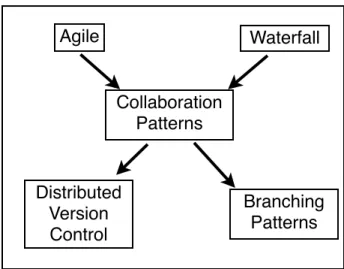
This thesis will present Collaboration Patterns as a way to solve our collaborative problem, satisfying our given requirements. Collaborations Patterns will be shown to be both fast and flexible without sacrificing structure and control. This solution fits in between high level development strategies such as Agile or Waterfall and low level technical solutions such as branching strategies. It will also be shown that Collaboration Patterns give us a new possibility to use distributed version control to implement Collaborations Patterns instead of traditional centralized version control with branching strategies.
Distributed Version Control Agile Waterfall Collaboration Patterns Branching Patterns
Figure 2.2 Collaboration Patterns fit in between methodologies and SCM implementations.
3 Collaboration Patterns
The problem, as defined above, is that the possible connections between team members grow faster then the team. Communication between team members takes more and more time away from core activities as designing, coding and testing. The other aspect is that the team members needs to coordinate their changes to the software. If this coordination is ineffective we can see problems like waiting for changes, independently solving the same problems, waiting for changes to be approved and other activities that waste time.
This chapter will show how Collaboration Patterns can solve different problems that arise in software development. Collaboration Patterns is way to look at software development from a high level. It’s about analyzing the core problems regarding how communication and changes flow through the organization.
Why patterns? A pattern is a well proven solution to a reoccurring problem in a context. Collaboration Patterns provide a common vocabulary and mental model that can be used through the entire organization. Collaboration Patterns give building blocks that can be used to tailor a specific solution to a specific team and a specific context. Patterns also makes it easier to improve. When a problem or inefficiency is noticed we can track it back to a pattern and if appropriate change the pattern.
The patterns will be analyzed in the following way. A context will be analyzed for communication and coordination problems. Problem contexts will be related to patterns and will be analyzed with respect to how communication and changes flow through the organization. They will also be analyzed with respect to how developers are coordinated and how changes are coordinated.
This thesis argues that Collaboration Patterns is an abstraction from branching patterns or distributed version control. The choice of implementation is discussed in later chapters.
Collaboration Patterns are implementation independent, but patterns can also be too complex to implement efficiently in a given tool. Therefor tool choice can affect the efficiency of the patterns, see chapter 5 and 6.
This chapter differs between high level patterns and low level patterns. The distinction is made as high level patterns map better to product strategy and larger coordination efforts. High level patterns can be seen as static. By static we mean that when described they are not changed over time. Even if a pattern doesn’t change over time this does not mean that the higher level organization does not change. Higher level organization can be extremely adaptive to change and that corresponds to the organization changing patterns, not that the patterns change.
On the other hand we have low level patterns. These are patterns that have a time component, the patterns them self include different phases that correspond to the dynamic nature of creative development.
3.1 High Level Patterns
The problem context of high level collaboration patterns is the problem of product strategy and tactics. An example of a product strategy could be an organization that have just released their version 1.0 of their product and are now in a maintenance phase of that project. They will soon start to ramp up feature work on the next 1.1 release in parallel to maintaining 1.0. When they have made some progress on 1.1 they will have some people start on a new exiting feature that won’t make it until the 1.2 release. When 1.1 is released is will move to a maintenance phase and after a while the maintenance of 1.0 will stop.
One way of describing this would be with a traditional GANTT diagram or some other event chain diagram. A simplified example can be seen in figure 3.1.
This is a very good way of describing a product strategy, but it lacks some crucial information for the purpose of this thesis. The diagram doesn’t show how changes flow inside the organization. Sure, we could add meta information such as change flow, e.g. from maintenance of 1.0 to feature development of 1.1, but this would always be a hypothetical illustration as we would not know when this flow will take place. Even more importantly it does not show how changes flow through the people in the organization. We can not, from this diagram, analyze if communication and changes propagate through the organization in a inefficient manner. The GANTT diagram, and others alike, depict the result – not how the team will get there and not what organization, roles and responsibilities should be used to get there.
The purpose of high level Collaboration Patterns is to present a method that we can use to plan our product strategy and depict this in a way that will clearly show the organization, the people, the roles and their responsibilities. High level Collaboration
Maintenance 1.0
Feature development 1.2
Maintenance 1.1
Figure 3.1. Simplified event chain diagram of product strategy.
Patterns shows the people problem – and the people solution – behind the product strategy.
3.1.2 Promotion Pattern
The Promotion Pattern is used to promote changes through an organization. The point is to elevate the status of changes. Each level holds a subset of the changes present in the lower level.
Problem
Product, and the features in them, goes through different phases; development, testing, beta testing, release, deployed. Every feature can be mapped to a given status at a specific level. If a feature is in a given level it must be present in every level below.
Related Patterns & Other solutions
Related patterns are the Gatekeeper and the Promotion Gatekeeper pattern. The Gatekeeper pattern is similar as it provides a coordination point similar to the different levels in the Promotion Pattern. Low level patterns that are related are the pull pattern and the push anti-pattern, as these can be used for the way changes flow
between the levels. Other solutions, or supporting solutions, could be to keep documents or databases that contain information about builds and their status, this is beyond the scope of this thesis.
Solution
In this pattern changes are received at the bottom level and gathered until the set of changes fulfill some requirement. This requirement can be a specific list of feature, a deadline or other types of requirements.
Figure 3.2. In the Promotion Pattern each level accept changes only from the level below.
Development Test Release A B C B C C
The different levels will have a specific meaning, such as the bottom level might hold untested development changes, the second level might hold changes that should be more extensively tested. The top level might hold changes that have been released or deployed. Other team members or customers can thereby “subscribe” to source code or binary builds that come from a specific level. These levels can be defined as baselines, but are not required to. This means that the information flows out from the different levels – if one is only interested in the released changes one can get only that information and filter out changes and communication that is going on on lower levels.
Each level can be associated with a individual, but this is not required.
Discussion
How many levels and their specific function is dependent on the specific project. One has to choose how many levels to have. If one chooses to decrease the number of levels, so that there are fewer levels natural for the organization this needs to be accepted across the organization. This will mean that we don’t make a difference of changes that are in testing and QA for example, even if the organization has both a testing and a QA group. If this level of detail is not necessary then it is good to remove the granularity, but then the organization should be made clear that there is no distinction, for example if there’s only one test team it might be superfluous to have more then one test level.
There are both advantages and disadvantages in having one individual responsible for each level. This can be hard to implement in smaller teams. In small teams one might have fewer levels or have one person playing several roles. Having one person playing several roles increases the risk that communication can be confusing – am I talking to the test level responsible or the release level responsible? The more one has to distinguish between the person and the role he or she is playing the greater risk there is for unclear communication and confusing coordination. The more an individual is connected to the role and responsibilities of that role the more transparent the organization is.
3.1.3 Gatekeeper Pattern
The gatekeeper pattern is used to filter changes, only letting changes that fulfill a specific requirement pass through.
Problem
To keep product deadlines or other milestones, features that have been developed needs to be held off until a later point for some reason. Features that have been developed may be deemed as security risks, or other reasons why accepting the change would have too big of an impact on the project. The person responsible for this deadline needs to be able to keep changes from coming in and control this.
Related Patterns and Other Solutions
Related high level patterns are the Promotion Pattern (see 3.1.2) and the Promotion Gatekeeper Pattern (see 3.1.4). These patterns are related because they describe central points of coordination. The Promotion Pattern could typically use a Gatekeeper Pattern for the lowest promotion level. The low level Helper Pattern is also related as the ‘gatekeeper’ can view all contributing developers as ‘helpers’ (see 3.2.4).
Solution
The ‘gatekeeper’ shelters others from changes that are not approved. Changes flow into the ‘gatekeeper’ which decides if the changes should be accepted or not. If one listens to the gatekeeper one will only get the information that is approved by the ‘gatekeeper’. The gatekeeper can serve as a coordination point, where the ‘gatekeeper’ decides what changes comes in and what information comes out.
One can choose to use the ‘gatekeeper’ in different ways with this pattern. The ‘gatekeeper’ might be a physical person that will decide what to accept or reject, this could be called an “active gatekeeper strategy”. It can also be used as an ‘advisory gatekeeper’ which one would ask if the changes can be accepted, but the ‘gatekeeper’ does not enforce it’s decision, this could be called a “passive gatekeeper strategy”. The ‘gatekeeper’ can also be a set of requirements that the developer’s changes needs to meet, a “definition of done”, this could be called an “empty gatekeeper strategy”.
Discussion
Having a single coordination point using a Gatekeeper Pattern makes the organization very simple. It is easy to know where the latest-and-greatest changes can be found – from the ‘gatekeeper’. All coordination goes through the ‘gatekeeper’. This makes this solution powerful for immature teams where there is a lot of confusion and a need for structure.
Take my changes!
No! Yes!
Take my changes!
Figure 3.3. The Gatekeeper Pattern acts as a coordinating point for a group of developers. The ‘gatekeeper’ either accepts or rejects changes.
On the other hand the single coordination point tends to give an authoritarian organization, where everything is decided by the ‘gatekeeper’. There is also a risk that the ‘gatekeeper’ can become a bottleneck and thus stalls development as the team has to wait for changes to propagate through the ‘gatekeeper’.
These shortcomings can be mended with the use of low level patterns where changes can flow more dynamically between developers. Combining the gatekeeper pattern with other patterns, such as the Promotion Gatekeeper Pattern (see 3.1.4) adds some value but also creates a more complex organization which looses some of the advantages with the Gatekeeper Pattern.
When choosing what type of ‘gatekeeper’ to use, the following should be considered. If the ‘gatekeeper’ always needs to accept or reject changes, simple changes can seem more cumbersome and bureaucratic. It might also lead to changes being accepted fast, without enough impact analysis or code review which can lead to a false sense of security. If we use a softer approach and only ask the ‘gatekeeper’ when there are significant changes, the changes might get more attention but we also risk that small changes have a big negative impact on the product and are caught later. A ‘empty gatekeeper’ can be used if there is no need for dynamic high level control. The product and the team should be mature enough for a system to be used that is based on trust.
3.1.4 Promotion Gatekeeper Pattern
This pattern is a combination of the Promotion Pattern and the Gatekeeper Pattern. This shows how to combine the two patterns and thereby also illustrates the difference between them.
Problem
For strategic control over the product we need a level organization that where changes can propagate up through the levels. Each level needs to be able to accept or reject proposed changes. Changes does not need to propagate from the lowest level but can be submitted to a higher level. A typical example would be where maintenance changes to a version 1.0 would be submitted at a lower level and feature changes to 1.1 would be submitted to a higher level.
Related Patterns and Other Solutions
Obviously the Gatekeeper Pattern (see 3.1.3) and the Promotion Pattern (see 3.1.2) are related to this pattern. The pull and push low level patterns (see 3.2.2 and 3.2.3) relates to what kind of pattern should be used to move changes through the organization.
Solution
This pattern builds a hierarchy from a Gatekeeper pattern using some concepts from the Promotion Pattern. Each ‘gatekeeper’ will have a set of individuals that submit changes. These individuals could either be developers and the like that submit
original changes, other gatekeepers that forward changes from other developers or promotion levels. This creates a pattern with several different coordination points.
From the point of view of a developer connected to a ‘gatekeeper’ there will be no difference if the other individuals connected to the same ‘gatekeeper’ are them selfs ‘gatekeeper’ or original submitters.
Discussion
With this pattern there is a risk that the created organization becomes very complicated and hard to have a good overview of. This can have the risk of adding extra information and communication to keep everyone up to date of what is happening. There is however a possibility to keep the actual organization quite complex without that complexity affecting each team member too much. From a high level management point of view the ‘gatekeepers’ are probably the main interest in this pattern. From a low level point of view, a single developer needs only to be concerned with its own ‘gatekeeper’ or promotion level and in some degree the other developers connected to the same ‘gatekeeper’ or promotion level.
3.2 Low Level Patterns
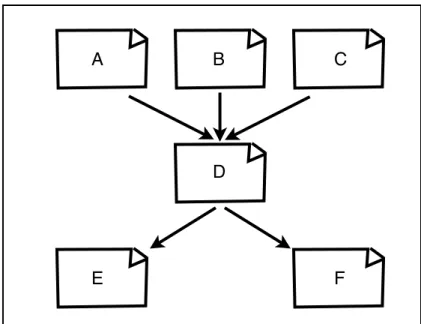
The problem context of low level collaboration patterns is the problem of having a dynamic and creative organization that can support developers and be flexible enough to fuel the development process. A typical example would be a group of developers presented with a set of features that should be implemented. The different features depend on each other as shown in the dependency graph in figure 3.5.
Dev Test
Dev
Figure 3.4. Using the Promotion-Gatekeeper Pattern for parallel development of version 1.0 and 1.1. The 1.0 release needs more testing than the 1.1 release hence the extra promotion
level. 1.1 1.0 Other contributor, e.g. technical writer or legal
Feature A seems quite difficult so two developers pair up to tackle this. Feature B and C seem easy so only one developer per feature on this. After a while the pair developing feature A realizes that this was not as hard as they though and one of the developers starts working on feature D. Feature D depends on the A, B and C feature, but some work can be done while waiting for the others. The developers on feature B and C realize that their changes aren’t really as independent as they thought and need to work together on some changes for a while. When the feature C is done that developer joins on developing feature D, and so on...
When developers work in a team like this, it will be a highly dynamic and flexible environment. Groups will change in a fluid manner, developers will hop from problem to problem, helping out where it’s needed. This environment is different from the much more static world of high level product strategy, and therefor it needs its own set of patterns and procedures.
3.2.1 Split and Regroup
The Split and Regroup Pattern is used for development teams to split into smaller groups where communication and coordination can be more effective. The small groups can then come together and integrate their different solutions.
Problem
When working in the whole team, there might be situations where the problem solving communication and coordination is slowing down the development. The given tasks that the team is solving might be naturally split into two groups. That is, the communication between team members and the coordination of their changes seem to be divided into two groups. The problem being that when the team is together everyone will be affected by all the communication and coordination.
A B C
D
E F
Figure 3.5. Example of a typical requirement dependency graph.
Related Patterns and Other Solutions
Within the new smaller groups all low level patterns can be used, including the Split and Regroup pattern itself.
Solution
Splitting the team into smaller groups. The flow of changes and communication will be limited to the smaller group. When the groups are ready they will regroup into bigger groups and finally into the entire team. The changes inside a small group will flow according to some pattern, e.g. the pull/push patterns (see 3.2.2 and 3.2.3), the helper pattern (see 3.2.4) or the pair collaboration pattern (see 3.2.5).
Discussion
By splitting the team into smaller groups the total number of communication paths will decrease. For example, in the example in figure 3.6 above, the total number of communication paths are decreased from six to two. It get’s even better if we look at each individual as it will go from a group with six potential communication paths to a group with only one.
All problems related to the fact that the code in the different groups diverge grow with the amount of time the groups stay separate. This is an inherent problem with minimizing the collaboration between the groups. Being independent of the changes that are done by the other groups also make you vulnerable to their changes. If the problems were not as independent as first thought there can be serious problems when the groups try to merge. There is also obvious risks of the different groups solving the same problems independently hence doing extra work.
The risk of these problems arising can be decreased by doing high level design
Figure 3.6. Showing a team splitting into smaller groups and then merging back together.
entire team knows where work will be done, if there are areas of the code that several groups need to touch, maybe they shouldn’t split into groups until that code has been finished. If a group needs to do changes in other parts of the system than they first thought, they can coordinate with the entire team to communicate the changes they need to do. This lets the different groups have a clear strategy for when they need to collaborate and when they don’t.
3.2.2 Pull Pattern
With this pattern the receiver of changes is the one that initiates the flow from the originator of the changes.
Problem
When changes are made they need to propagate to other team members. The problem is who should initiate the flow of changes and who should communicate what.
Related Patterns and Other Solutions
The Push anti-pattern is the counterpart of this pattern (see 3.2.3).
Solution
The pull pattern solves this by letting the originator of the changes communicate that the changes are done (according to some definition of done). This could be by formal or informal lines of communication. It can be direct communication or indirect “broadcasted” communication. The receivers of this information can then choose to accept these changes depending on their status and the status of the receivers current work. A developer might broadcast the some untested high risk changes are done. Some developers want these changes because they are in an early phase of their own development and want their changes to work with this. Other developers, that are just finishing their tasks might not want these changes as it would bring too much uncertainty into their code.
Discussion
This pattern let’s the individual that receives the changes make the decision if they should be accepted. The receiver is exposed for the risk of receiving the other
Done!
I want your changes!
pull!
developers changes. The receiver is the one that needs to do the work of merging the code is the one that will decide when, or if, that work should be done.
When there are conflicting interests, that is when the originator wants the changes to propagate to the receiver but the receiver is not happy with them, the solution is for the two parts to negotiate a solution that both can accept. An example could be that a developer has finished a feature and wants that to propagate to the individual responsible for the project. The project responsible however is not happy with the testing that the developer has done and asks if more tests can be run. The developer and the project responsible will have to negotiate which tests are necessary for the changes to be accepted.
3.2.3 Push Anti-Pattern
With this pattern the originator of the changes initiates the flow from the originator to the receiver. This is described as an anti-pattern even if it might be a appropriate in some situations.
Problem
When changes are made they need to propagate to other team members. The problem is who should initiate the flow of changes and who should communicate what.
Related Patterns and Other Solutions
This is the counter part to the Pull Pattern (see 3.2.2).
Solution
This push pattern solves the problem by letting the originator of the changes push the changes to the receiver, whether the receiver wants them or not.
Discussion
This is called an anti-pattern because it does not show respect for the other team members. It makes it very hard to take responsibility for the given code as it is not voluntarily accepted by the receiver. Even so, there are some advantages with this
Done! Everyone wants
my changes!
No, I didn’t!
Figure 3.8. Showing how changes can flow from originator to receiver in the push anti-pattern.
The originator of the changes has the most information about the changes and can therefor judge that these changes are very important and that the receiver needs these changes.
If the team is not able to resolve conflicting interests about what changes should propagate this pattern can solve the issues with force.
As the originator pushes the changes to whomever he or she likes, it is easy for the originator to know how far the changes, at least, have propagated.
This pattern can propagate changes through a team faster than the Pull Pattern (see 3.2.2) as only one action is needed to broadcast the changes.
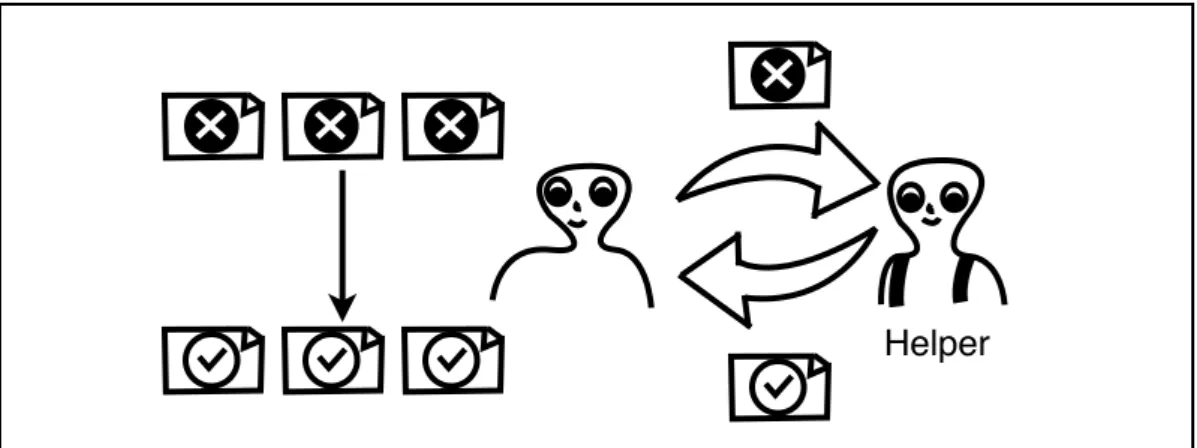
3.2.4 Helper Pattern
Pattern for asking for help, e.g. from an expert, and how this supports collaboration.
Problem
When working on a set of tasks a developer (or a group of developers) might need help with one or more of these. This could be because they do not have the special competence for some aspects of the task, it could be that they are not allowed to do some changes. The tasks could also be repetitive or simple enough for the developer to want to delegate these tasks to other staff.
Related Patterns and Solutions
The Pair Collaboration Pattern (see 3.2.5) is related as it also includes the collaboration between two developers. The Pull and Push Patterns are relates to how the changes and communication flows between the main developer and the helper.
Solution
The developer will delegate some tasks to a helper whom returns the finished task when done.
Helper
Discussion
This pattern enables experts to take care of difficult tasks. This might be advantageous if knowledge is unevenly distributed within the team and the tasks are two difficult for the expert to explain. There is an inherent problem that the different team members gets more and more specialized which can make the team less robust. There is also a problem with the delegating team member does not fully understand the code that he or she will deliver.
It can also be used to delegate tedious tasks to other team members, or even individuals outside of the team. This can speed up efficiency and keep tedious repetitive tasks from taking time from active development.
3.2.5 Pair Collaboration Pattern
Giving a more general account to pair programming and when to use pair collaboration.
Problem
When working on complex tasks a single developer can digress from the given task. When a single developer gets stuck on a problem frustration can build up and it is hard to find new initiative. A single developer is more likely to not follow team practices. (Beck)
Related Patterns and Solutions
This pattern is related to pair programming as it solves the same problem but in a more general way. It is also related to the Helper Pattern (see 3.2.4) as it handles collaboration between two individuals.
Solution
This pattern proposes that two developers sit side-by-side at the same screen. An alternative is that the developers each have their own computer and they sit in a way where both developers can see the other developers screen. If the later solution is
Figure 3.10. Pair Collaboration can be done either as pair programming or more flexible with individual computers.
used, the changes made needs to be coordinated between the developers. A pattern like pull or push should be used for this.
Discussion
This might at first be counter productive as we are actually increasing the number of communication paths from zero to one in this pattern. The point with this is that while too many communication paths can hinder development, too few can have the same affect.
Studies have shown that pair programmings can work almost as fast as individual developers but the quality of the code is a lot better. (Canfora et. al.) It has also been shown that novice-novice pairs gain a lot more than expert-expert pairs. (Lui)
One problem with expert pairs is that one of the developers gets bored as he or she does not have anything creative to do. In this case we have unnecessary communication between the developers that slows down development. This is why there are advantages in using two computers as the bored coworker can do other productive work, instead of being bored and looking at what the other developer is doing. When needed the extra computer is put away and both developers focus on a single screen.
When using one screen there is a risk that the incremental code review the co-developer is doing might miss bigger code mistakes and temporary solutions that are not removed. If the developers are allowed to work more independently when needed there is a chance that these mistakes will be noticed. On the other hand there is a risk that small mistakes give larger repercussions as they are not noticed as fast.
The dynamic flow between pair programming and pair collaboration and also using the Helper Pattern can be an effective way of keeping developers active and creative and minimizing unnecessary communication and coordination and focus on the core tasks of problem solving development.
4 Example of Using Collaboration Patterns
This chapter will describe how the patterns that were outlined in the previous chapter can be used in a real world situation.
The example project that will be used through out this chapter is a client-server project. The client application will be used by customers where as the backend server
will be hosted by the company. The example includes special considerations that needs to be addressed as the client and server are independent in certain respects, but dependent in others. The problem will be analyzed from a high level product strategy point of view and a low level development point of view.
The high level strategy will try to capture the static, forward planning, organization for the project. It will try to give a organizational structure so that questions about project status and project planning can be answered. It will try to give a structure so that management can control the release, is there need for tighter control near the release deadline?
The low level strategy will try to capture and enable the dynamic, creative development process. Letting developers and testers, both within the team and between the teams, communicate and collaborate in a efficient way.
1.0 Gatekeeper Test Development Test Development Server Team
Figure 4.1. Illustration of the patterns used while developing the first 1.0 version of a client-server application.
This is an example of how to use Collaboration Patterns, as such it will show one possible way of using the patterns but this is in no way the only way one could use Collaboration Patterns in the given context.
4.1 Project Scenario
This section will apply Collaboration Patterns to the situation where a project is working towards a 1.0 release. In this example we have two groups of developers with 5-10 developers in each. One group will work on the server application and one on the client application. In each group there will be 1-2 system test engineers.
The requirements for the organization and coordination is that every feature that’s developed needs to go through testing before it is integrated to the release candidate. The teams will test their part independently of each other, but will also test with different versions of the other teams application. A more detailed analysis of how testing works is beyond the scope of this thesis.
As the different teams will develop both independent features as well as dependent features it is required that the solution can coordinate changes in a way where dependent features are included in the release in a orderly fashion.
4.1.1 High level product strategy
When analyzing the given situation we see that we need to have coordinated control over what server and client features are accepted into the 1.0 release. We do not want to release a version with incompatible server and client applications. To get this level of control we will use the Gatekeeper Pattern (3.1.3). When choosing what kind of ‘gatekeeper’ we should use (active, passive or empty) we need to look at who will be responsible for rejecting or accepting changes. This is important as the ‘gatekeeper’ needs to have the authorization to do it’s job.
In this example we have a project manager that has the responsibility and the authorization to hold of on changes from either team so that the released versions have a compatible feature set. It is important to note here that the project manager does not have to have the responsibility of deciding which features should be implemented or anything like that, this can all be left to the customer or customer representative. It can be the customers role to decide which features are dependent on each other. It is the project manager’s role as ‘gatekeeper’ to make sure that all – or none – of the dependent features are included in the released versions. To be able to take full responsibility for this the ‘gatekeeper’ will use the Pull Pattern (see 3.2.2) to accept changes. This makes sure that the ‘gatekeeper’ is the only one that will add features to the release. This is to be considered as a “active” gatekeeper.
The ‘gatekeeper’, in this example, does not want to be responsible for the quality of each individual feature, this is the responsibility of the testers. The ‘gatekeeper’ only wants to choose from features that have been tested thoroughly and have a high
quality. Therefor a test level will be used for both teams such that the testers will test features and when they are happy with the quality they will tell the ‘gatekeeper’ that the given features are available.
The testers, however, are not responsible for coordinating which features are ready to test. For this we will use a development level where features that are ready to be tested can be coordinated. This level will be the responsibility of a team leader. This is used to create a single coordination point for changes within the development team. Every feature that is accepted into the development level has reached the teams “Definition of Done”.
The test and development levels follow the Promotion Pattern (see 3.1.2). The entire project organization is illustrated in figure 4.1. This outlines the high level strategy that will be used at this phase of the project. This will give management a high level overview of what features and bugs are located at what promotion level; development, test or release. It will also give management a optional level of control in how restrictive the Gatekeeper should be, high risk changes might be allowed in early development but not closer to the release deadline.
There are several ambiguities in the above example. There are of course details that are beyond the abstract patterns, like what should be done with a promotion level build and in what form we communicate the status of features. There are also details that are relevant to the implementation of the patterns. What requirements do we have for changes to be promoted through the different levels, i.e. what do we know of a feature if it is at the test promotion level? We need to decide if we should have formal requirements that every feature needs to pass before it can be promoted or if we should let it depend on the given feature. The first alternative may give greater certainty about the project status but might also increase overhead and bureaucracy. If we choose the latter, it might be more uncertain what it actually means for a feature to be at a given level but features might propagate more easily between the levels. We also need to decide if it should be the lower level that promotes the changes, or if it is the higher level, or if they need to agree. Is it the developer promotion level that decides to push changes to the test level, or is it the test level that pulls changes from the development level? These are all questions that needs answers, but they need to be tailored to the specific project, teams and contexts.
We shall see that although this gives a good high level structure for the project, it does not enable efficient problems solving for developers and testers. High level structure needs to be complemented with low level collaboration.
4.1.2 Low level development
The high level pattern described above gives a perfect structure and boundaries for the low level patterns that developers and testers can use in their day to day development.
In our example we will closer examine the development of a feature that lets the user enter some information into a User Interface (UI) in the client and then submit this information to the server. The server should process the information that the client application sends and return an appropriate response, which the client in turn should display. From a high level point of view this will be tracked as “Server feature A” and “Client feature A” and they will propagate through the high level pattern and only pass through the ‘gatekeeper’ when both are done.
From a low level point of view the different parts, or tasks, of this feature is outlined in figure 4.2. The relationships between the different tasks are what we will use to model our collaboration strategy.
In this example the developers will use a Pull Pattern (see 3.2.2) to exchange changes between one another. This is used during active development when there is no clear and static coordination point which lets the developers work across teams and tasks in a looser ad-hoc style. The Helper Pattern (see 3.2.4) as well as the Pair Collaboration Pattern (see 3.2.5) will be used between, and across, the teams. The Split and Regroup Pattern (see 3.2.1) will also be used. These patterns are chosen during development as a response to the given problems, see below.
The developers working on the four tasks related to sending and receiving information between the server and client (2, 3, 5 and 6) will sit down together. They realize that there is some common code that could be written that would be used by both the server and the client. In this group they decide on a common network protocol for sending and receiving the information. Then they split up, with one client developer and one server developer working on sending information (2, 5) and one client developer and one server developer working on receiving information (3, 6). When both groups are done they regroup and merge their code. How this code is then shared by the two groups, a code library or two different copies of the same code and
Server Receive Request Process Request Send Response Client Request UI Send Request Receive Response Response UI
Figure 4.2. Illustrating how the different tasks of a feature are related.
1 2 3 4 5 6 7
whether or not this is version controlled is beyond this example. The point is how they use the patterns to collaborate, not the architecture of the code produced.
This group has in affect used the Split and Regroup Pattern. They have also used the Pair Collaboration Pattern when working two and two on the specific tasks.
They use the Split and Regroup Pattern because they realize that they have a task that during one phase needs a lot of communication and coordination within the group. Then there is a phase where they do not need to communicate and coordinate within the entire group, but only in subgroups and then a last phase where they need to coordinate, communicate and maybe merge the changes they’ve done separately. They use the Pair Collaboration Pattern because they need communication and coordination between the server and client teams when developing the parts, making sure both the server and the clients needs are met.
The two UI tasks, (1, 7) in this example, are handled by one developer that is familiar with those APIs. The developers working on the tasks 2 and 6 will in affect use the UI developer as a expert helper, using the Helper Pattern. In this example they will use the helper in two phases, they will first ask for a rough UI that will let them easily test the functionality and will then receive a polished UI that has been approved by management, customer et. al.
On the server side two developers, using the Pair Collaboration Pattern, will be working on the task of processing the information that has been received from the client, task 4. The code here seems to be really difficult so they will use Pair Programming as a part of their Pair Collaboration. In addition to this the task includes some database changes, neither of the developers are very familiar with this so they will delegate this to a database expert using the Helper Pattern.
The two teams both choose a Helper Pattern because some part of their task, or a task connected to their task, is beyond their level of expertise. They could choose to use a Pair Collaboration Pattern if they felt the need to propagate this knowledge within the team. A disadvantage with the pairing could be that the expert might need to wait for a team member to be available. If however, other team members need to wait on experts one solution could be to pair more often with the expert to distribute that knowledge.
In each group there will be a developer that will pull code from the other developers to create an aggregated set of changes that will correspond to the entire feature. This developer will do this from time to time during the development creating incremental progress of the entire feature. This developer will act as the Development promotion level. This is done because of the need to have a starting point for the Promotion Pattern. The developers need a coordination point for changes where they agree on the functionality, we could call this a form of baseline. The development level also solves a communication and coordination problem. If this developer notices
inconsistencies or merge conflicts a coordination problem has been noticed and the affected developers can be made aware of this. The responsible coordinator for the development level can focus communication and coordination efforts on the affected developers alone, without the need to disturb other developers that will not help in solving the problem.
4.2 Discussion
When choosing Collaboration Patterns for a given project there are some interesting points of discussion. How do we analyze our project / company structure so that we get enough information to choose patterns, what information do we need? How dependent are the high and low level pattern?
In this thesis we have focused the problem of collaboration into communication and collaboration. The high level focus is to make this as efficient as possible to allow for more time to code, design and test – the core activities in Software Development. When choosing patterns we should analyze the given situation in respect to communication and collaboration. Communication can be seen as answering “what are we doing?” and coordination answers “what should we be doing?”. When analyzing a situation in respect to communication we should look at who produces the information and who consumes it, and then look for patterns that let these, and only these, communicate. When analyzing a situation in respect to coordination we should look at what decisions different individuals can make and what individuals that will affect, then look for patterns that will let these decision to only impact these people.
We also need to relate our abstract patterns to the practical situation at hand, do everyone work full time? Is the team distributed and work at different locations or time zones? Do we have other people problems in the organization that will interfere with our patterns? These are all important questions, but beyond the scope of this thesis.
It is obvious, from the somewhat contrived example in this chapter, that the high level patterns and the low level patterns need to work together. When we choose a high level pattern as the Gatekeeper Pattern, the Gatekeeper should be able to pick and choose changes that should be accepted or rejected. This means that the low level patterns need to accommodate for the level of granularity that the Gatekeeper requires to make these decisions. For example, a Helper Pattern might be a bad choice if the Gatekeeper wants to be able to accept or reject the different tasks individually. It therefor seems like the low level patterns are not completely independent of the high level patterns and it is therefor important that this information is available when low level patterns are chosen.
The low level patterns cut right across the high level patterns. In our example we see this when the two groups collaborate on the network protocol with the Split and Regroup Pattern even though no such connection is apparent in the high level pattern.
They do not circumvent the high level patterns but allows for a dynamic flow of changes and information within the high level patterns. They allow for changes and information to flow directly to the developers that can help solve the problems, and also keeps that information from distracting developers that can not. It keeps coordination to a minimum, and when coordination is needed it only brings developers together that need that coordination.
High level patterns give a structure that help not only management but also give developers a structure to which the low level patterns relate. While the low level patterns give solutions to problems, the high level pattern make solutions into features. In the low level pattern we see a problem of network communication while in the high level patterns we see the client feature A and client feature B propagate through the pattern. The high level coordination is kept to a minimum and does not interfere with how the problems are solved. Yet the high level patterns let management control the product, on a feature level, as much as needed.
5 Implementing Collaboration Patterns with
Version Control
We’ve been discussing Collaboration Patterns as a way to solve the coordination and information inefficiency problem. We have looked at different patterns and also how they can be applied in a real world situation. We shall now take a closer look at how these patterns can be implemented using standard version control tools and techniques. The main techniques that will be proposed are branching strategies for centralized version control and distributed version control. We will not discuss specific tools like CVS, Subversion, AccuRev, Git, Mercurial etc. but instead we will look at general features that are needed for efficient implementation of these patterns. We will first take a look at how to implement a high level pattern and a low level pattern. We will then look at how combination and changes ...
In 5.1 we will analyze how to implement the high level Promotion-Gatekeeper Pattern (see 3.1.4) and in 5.2 we will look at the low level Split and Regroup Pattern (see 3.2.1).
5.1 Implementing Promotion-Gatekeeper Pattern
The Promotion-Gatekeeper Pattern is one of the most useful high level patterns and it is therefor important that this scenario can be efficiently implemented with available version control tools.
5.1.1 Branching strategy
In central version control tools the main technique for coordinating parallel development is branching.1 Branching patterns are well known, mature solutions to common problems. There are several things that we need to take into account when we use this branching strategy to implement the Promotion-Gatekeeper Pattern. According to the Gatekeeper pattern one point is to have a decision maker that can accept or reject changes. This will be handled by a branch that will merge changes from other development branches.
There are two aspects that need to be addressed. We need a branching strategy for the development branches and we need a policy for how the developed changes are merged in to the Gatekeeper branch.
The development branching strategy is mainly an implementation of the low level patterns used, but there are requirements imposed by the high level pattern. The development branching strategy needs to accommodate the level of granularity that the Gatekeeper requires when accepting or rejecting changes. If the Gatekeeper needs
to be able to accept or reject each developed feature, a feature branch strategy could be necessary.
When implementing the Promotion-Gatekeeper Pattern with a branching strategy the way in which changes from development branches are merged into the Gatekeeper branch needs to be addressed. There are basically three alternatives; an empty, passive or active Gatekeeper strategy. With an empty Gatekeeper strategy the merge decision is made by a “Definition of Done” or some set of predefined requirements that needs to be fulfilled before the changes are merged by the developer. With a passive Gatekeeper the changes are verified by the Gatekeeper but merged by the developer. With a active Gatekeeper the changes are verified and merged by the Gatekeeper. A illustration of the implementation can be seen in figure 5.1.
5.1.2 Distributed Version Control
Branching plays an intrinsic part in distributed version control (DVC), just as in centralized version control, but it’s the distributed nature that makes it especially interesting as an alternative way of implementing Collaboration Patterns.
Figure 5.1. Illustration of branching strategy to implement the Promotion-Gatekeeper Pattern
Team A Development branches
Team B Development branches
Team A test branch
With typical DVC setup each individual in a team, wether a developer, tester or Gatekeeper, has a private and public repository. The private repository is where active development is being done, much like a private workspace in central version control. The public repository is where changes that developer wishes to share to others are
Public Private Public Private Public Private Public Private Public Private Public Private
Figure 5.2. An illustration of the Promotion-Gatekeeper Pattern implemented with Distributed Version Control.
put, often called publishing changes. Other team members will get the published changes from a developer to his or her private repository.
An illustration of an implementation of the Promotion-Gatekeeper Pattern can be seen in figure 5.2. This shows how the changes propagate according to the pattern. The illustration has left out the fact that changes will also propagate down from the Gatekeepers to the developers.
5.2 Split and Regroup
The split and regroup low level pattern is a basic Collaboration Pattern. When implementing this pattern there are many specific problems to take care of, as how long should the groups diverge?
5.2.1 Branching strategy
This Collaboration Pattern fits really well with the traditional branching techniques. The two groups will work on separate branches and will then regroup by merging the two branches, see figure 5.3.
When implementing this a decision needs to be taken when the branches should be created. There also needs to be a decision when and who will merge the two branches.
5.2.2 Distributed version control
With distributed version control the Split and Regroup Pattern tightly maps onto the pattern. The two groups will exchange changes using one of the other low level pattern. In figure 5.4 this is done using the Pair Collaboration Pattern together with the Pull Pattern.
When implementing this pattern with DVC there is nothing to create, no branches or other setup that needs to be done. The grouping is made by changes not being shared between the groups, but only within the group. See figure 5.4.
Private Public Private Public Private Public Private Public Private Public Private Public Private Public Private Public Private Public Private Public Private Public Private Public