Stock Trading System
Software Design
Document
Project Name: Stock Trading System
Prepared by: Jin Li
Student ID: 3062211079
Version: 1.2
CATALOG
1Introduction ...4
1.1 Purpose ... 4
1.2 Scope ... 4
1.3 Definitions, Acronyms and Abbreviates ... 4
1.4 References ... 5
2Design Overview ...5
2.1 Background Information ... 5
2.1.1 System Background ... 5
2.1.2 Assumption and Dependence ... 6
2.2 Alternatives ... 7
3User Characteristics...7
3.1Professional stockbrokers: ... 7
3.2Ordinary users ... 7
4Requirements and Constraints...8
4.1 Performance Requirements ... 8 4.2 Security Requirements ... 9 4.3 Design Constraints ... 9 5System Architecture... 10 6Detailed Design... 12 6.1 Module architecture ... 12 6.2 Class Definition ... 13 6.3 Users’ activities ... 20
6.3.1 Buy Stock Activity... 21
6.3.2 Sell Stock Activity ... 22
6.3.3 Change password Activity ... 24
6.3.4 Search owned stock Activity... 25
6.3.5 Capital Query Activity ... 26
6.3.6 Stock Query Activity ... 28
6.3.7 Cancel Activity... 29
7Data Architecture ... 31
7.1 Local Data... 31
7.2 Physical Data Structure ... 32
7.3 Database Design... 36
8Interface Requirements ... 42
3
8.2 External System Dependencies ... 43
9User Interface... 45
9.1Interface Design ... 45
9.2Functionality... 47
10 Error Handling Design ... 48
11 Appendix ... 49
11.1 Group List ... 49
1
Introduction
1.1 Purpose
This software design document for Client End of Trading aim at presenting a detailed view on the whole design about the subsystem of Stock Trading System. There are four intentions on the following.
1. All the software system requirements will be realized in the system design. 2. The development of the system architecture.
3. Let the system adapt the environment and improve its performance. 4. Divide the system structure to modules and functions.
1.2 Scope
This project is to develop a subsystem of Stock Trading System. As the subsystem is Client End of Trading. The following tips will show its scope.
1. It must give users convenient and effective ways to deal with stocks. 2. Friendly interfaces are also necessary in this project.
3. It can’t visit the database directly for it is only a Client End.
1.3 Definitions, Acronyms and Abbreviates
Client End ofTrading
All the client related operations will be done in this part. The client-end should offer a user interface for client and has the function to provide all the needed information for the trading system.
Central Trading System
It is the central module for whole system. All the orders will be decided by the central trading system. This module also is
responsible for maintaining the database. Central trading system will change the data and send a reply to other module.
Software Design Document
This document is used to present a detailed view on the whole design about the system.
ANSI/IEEE 9001 A generic standard that applies to any organization that
wants to improve the overall quality of the products, systems, or services that it provides.
ACD Short for Architecture Context Diagram
GUI Short for Graphical User Interface
ER Short for Entity Relation Diagram
CD Short for Class Diagram
5
1.4 References
《Stock Trading System》(given in the course)
《Software Engineering》
Author: Roger S.Pressman Press: McGraw Hill
Following standards are used as guides to develop this document: ANSI/IEEE 9001: Standard for Software design
ANSI/IEEE 9001: Standard for System software design ANSI/IEEE 9001: Standard for Software general design
2
Design Overview
2.1 Background Information
2.1.1 System BackgroundNowadays, stock market has been an important part for economy. Every day, millions of trades are completed in the stock market. It has been difficult to deal these trades by handwork. The software for stock market is necessary.
This is what developers plan to do: stock trading system. The project is a system used in many fields, including stock trade, trade control, and market management. A serious of interfaces will be developed to suit different requirements of different kinds of people. A database will be set up to save the information intensively. And all the operations are based on this database. Besides the database and interfaces, a central trading system will be developed to deal with the trading and the changes on the database.
The whole system is departed into five modules: Central Trading System, Account & Fund, Client End of Trading, Information Display and Trading Management. Then there are five develop groups to finish corresponding modules. Problems about communicating and testing are solved by the meeting which all the developers of this system attend.
However, this system is a basic system, which means that our main attention will be paid to implementing its functions. All the functions will be implemented and some extra functions may come true. Well, the requirements for the safety will be lower than some big stock trading system. The communicated information is not encrypted and there is no firewall for database.
2.1.2 Assumption and Dependence
There are many factors that have great influence on the project. The design must implement all of the explicit requirements contained in the analysis model, and it must accommodate all of the implicit requirements desired by the customer. So it is important to make sure the primary conditions of the customers and develop environments. That is, assumptions and dependences.
Assumption:
1. In the analysis model, basic information of the requirements is clear. No big mistakes exist. If a big mistake is ignored in the beginning of the project, it will lead to a disaster that the whole work has to be checked.
2. All the developers are trained and familiar with the project. And the number of people in the project team is adequate to do the job. When the situation of lacking developers occurs, the delivery time for the software may be delayed. 3. The developer team has a good estimation for the technical problems and
software size. When technology does not meet exception, there should be some alternative schemes.
4. The scope and requirements of the project is stable. Because the model is similar with FLOW model. The final work is accomplished in the last stage of the develop process. Any change after the requirements analysis stage will force the developers to modify the architecture of the system, which takes a lot of time and human resources.
Dependence:
1. Developers have had a clear view for the system and a detailed schedule has been made. Requirements analysis is treated carefully so that developers have the specification of software's operational characteristics.
2. The technology developers prefer has been used in some similar systems and it proves to work in gear. And a lot of jobs have been done. They can offer us great experience and ideas.
3. Well, this system is just a basic stock trading system. Developers can neglect the security. The number of the users is not very much, which reduce a lot of work on the communication.
7
2.2 Alternatives
All design alternatives considered, and the rationale for non-acceptance, should be briefly addressed in this section.
1. Developers prefer Socket as the communication method. Developers will use Java Socket API, to implement the communication between different modules. But one default of this method is that it can`t stand too many information. It may lead to the block of the communication. Developers plan to solve it by designing suitable algorithm to avoid the bad situation.
2. Multithread is used in our software. Another way that can take place of it is to check the server in fixed time. To make the UI more comfortable for users, the first one will be chosen by developers, which will make the structure of the software more complex.
3
User Characteristics
No matter how advanced a computer interface is. Users’ characteristics will always be the most important element rather than the designers.
Our potential customers are those who are professional stockbrokers or public users. They may be teenagers, middle-aged and old ones. They also have different education levels and professions. Our task is to design a general and easy-to-use system for the customer.
3.1
Professional stockbrokers:
Classification: computer knowledge – moderate/high
stock trading knowledge - high
frequency of use – high
Interaction with the system:
They do transactions either by clicking buttons and mouse or by pressing hot keys. The latter one is a better choice for them.
3.2
Ordinary users
Classification: computer knowledge - varies, low-high
stock trading knowledge - varies, low-high
Interaction with the system:
Most of them use mouse rather than the hot keys. Only a few of them who know more about computers use hot keys.
A suitable font size and color, large-enough buttons and helpful tool tips are required to meet the general requirements. Besides, error or warning messages must be clear and provide specific guidance.
4
Requirements and Constraints
4.1 Performance Requirements
The performance requirements of the Client end of trading will be divided into three parts:
1. The service life of the system. 2. The running rate of the system. 3. The stability of the system.
To meet all the performance requirements:
As the Client end of trading is one part of the Stocking trading system, the abilities of it depends on the center trading system. So to the Client end of trading, the data exchanging will be the most important. In the software design, orders which are accepted by both Client End of Trading and Central Trading System are used to meet the requirements.
Apart from the orders, functions that are used to send or receive orders are also very important. In the software design, Object-oriented programming is chosen. All the users’ interface will be objects to meet different functions. As the system is multithreading, data exchanges between different objects are under control strictly to ensure the stability of the system. Otherwise, functions of objects must work effectively and quickly to safeguard the run rate of the system.
9
4.2 Security Requirements
The Stock Trading System is a small system, so the Instruction encryption may be abandoned. Therefore, the security requirements will be divided into only two parts: 1. The security of system.
2. The security of data. To meet these requirements:
1. The security of system includes several aspects. For instance, one account can’t login the system twice at the same time. To meet this requirement, the verify code is selected in our design. Besides, if the power failed suddenly, the completed orders should not loss. So data is recording promptly in our design. 2. The security of data includes three parts: Accounts, capital accounts and data in
the database. To confirm the security of accounts and capital accounts, our design stipulates that users should input the account number and password again in every trade.
4.3 Design Constraints
There is a list of the general constraints imposed on the system that may limit designer’s choices:
1. Information should not be lost when the orders are exchanged between client end of trading and center trading system.
2. The number of client end can be hundreds.
3. Transaction results depend on the order come from center trading system, they must come out quickly in less than 1 second.
5
System Architecture
Architecture diagram of the whole system
In this diagram, Database contains all kinds of information: Accounts, capital accounts, information of stocks, relations between them and so on. Here, the Client End of Trading is used for users to carry on the transaction operations. Account Fund is used to manage each kind of account information. Manage Side is used to manage the stock information. Online is used to issue the stock information. The Central Trading System is used to handle all kinds of orders from other modules.
As this design document is for the Client End of Trading, relations between Client end of trading and other modules will be analysis here. The Client end of trading will mainly exchange orders with the Central Trading System and Account Fund to get information of stock, account and capital from them. However, those information is decided by the manage side. Besides, online service is the premise for users to buy or sell stocks because the detail information of all stocks will be shown there. In a word, all the other modules will influence our design.
Users Client End of Trading Central Trading System Manager s Manage Side Database Account Fund Online Staff Users
11
Architecture context diagram
In this diagram, the system on the server is the up component of Client End of Trading while other components are equal to Client End of Trading. Their relations have been signed in the diagram. The following paragraphs will show the relations between Client end of trading and other components.
The Client end of trading is the most important interface between users and the whole system, so the orders exchanging between Client end of trading and Central trading system occupies the majority. For instance, if users want to buy stocks, he or she will input the stock name and quantity. According to his or her account information, the Client end will form an order that can be accepted by the Central trading system. Then the Central trading system will handle the order and return the request information to the Client end of trading. After receiving the information, the Client end of trading will analysis it and show users the correct result. This is the whole process of one exchange.
Apart from the relation with Central trading system, there are also exchanges between Client end of trading and Account Fund. For instance, when users login the system, he or she should input their account number and password, then the Client end will form an order contains the necessary information to send to the Account Fund. The Account Fund will check the information and return the result. Finally, the Client end of trading show the result to users.
Customer
Use
Target system:
Client End of Trading
Central Trading System
Peer System System on the server
Use
Use
6
Detailed Design
In this section, the detail design of Client End of Trading will be described. As it is used for developers to realize the project, every detail should be considered comprehensively. Module architecture, class Definition and Users’ Activities will be analysis completely in this section.
6.1 Module architecture
Level relation Diagram
This diagram shows the level relations of Client End of Trading. Users are in the bottom level, functions are in the middle level and Central Trading System is in the top level. The middle level can be divided into three parts through different functions. Parser is used to parse messages from user’s input to a standard message form that the Central Trading System accepts. And it also parses the messages received from the Central Trading System to the form that the GUI Controller could recognize. The messages format is based on the protocol that achieved by our group and the group of the Central Trading System. Data communication is used to send messages to
GUI Users Parser Login System Buy or sell stocks Change password Stock search Capital query Show or cancel orders Data communication
13 Central Trading System and receive messages from it. Data Communication doesn’t care about what the messages are, its duty is to send and receive messages. Socket is used for communication between the client and the Central Trading System.
User’s inputs are from the functional GUI model, such as Stock Search GUI module. And then the Parser parses the inputs and asks the Data Communication to send the parsed messages to the Central Trading System. If a message is received from the Central Trading System, the Data Communication will inform the GUI Controller. Then the GUI Controller tells the user the results.
6.2 Class Definition
It’s a general class diagram, not all attributes and methods of each class are included in this diagram. In this Class Diagram, there are twelve classes. All functional modules illustrated in section 6.1 are implemented as classes.
Class Name Controller
Description
Its responsibility is to control all the GUI functional modules,
including Login, StockBuy, StockSell, StockSearch,
PasswordChange, CapitalQuery, Orders and MyStockQuery. The Controller gets fields information from the eight GUI functional modules. It also validates whether the contents of the fields are legal or not by calling static methods in class Parser. If responses are received from the server, the Parser will inform the Controller, and then the Controller will popup dialogs to the user.
Method
For example, if the user tries to login the system, then the method login() in class Parser will be called. And the method loginResult() in class Controller will be called after the login result has been received from the Central Trading
System. The methods sellSuccess(), buySuccess(),
sellOrderResult() and buyOrderResult() in this class each has two overloads.
Class Name VerifyImg
Description Its responsibility is to produce an image which contains four randomly generated characters.
Method
1. getVerifyImg(): generate a BufferedImage object
2. verify(): check whether the target string matches the current image or not.
15
Class Name Login
Description Its responsibility is to show a login window, in which user types the required account information.
Method
1. createContents():a private method in this class, which is used to create the contents of the login window.
2. verifyCodeCheck(): be used to check if the characters inputted by the user match the verify image.
3. addLoginAction(): be used to add an actionListener to the login button. The class Controller invokes this method. 4. Other methods used for getting or setting contents of
textfields are not listed in the class diagram.
Extend javax.swing.JFrame.
Class Name CapitalQuery
Description Its responsibility is to show the capital information of the user.
Method
1. createContents(): a private method in this class, which is used to create the contents of the panel.
2. responseReceived(): capital information has been received from the Central Trading System, this method gets capital information and then displays it on the screen.
3. Other methods used for getting or setting contents of textfields are not listed in the class diagram.
Class Name StockBuy
Description Its responsibility is to provide a place where user can input necessary information to buy stocks.
Method
1. createContents(): a private method in this class, which is used to create the contents of the panel.
2. setBuyButtonAction(): be used to add an action to the buying button. The class Controller invokes this method. 3. Other methods used for getting or setting contents of
textfields are not listed in the class diagram.
Extend javax.swing.JPanel
Class Name StockSell
Description Its responsibility is to provide a place where user can input necessary information to sell stocks.
Method 1. createContents(): a private method in this class, which is
used to create the contents of the panel.
2. setSellButtonAction(): be used to add an action to the selling button. The class Controller invokes this method. 3. Other methods used for getting or setting contents of
textfields are not listed in the class diagram.
17
Class Name PasswordChange
Description Its responsibility is to provide a place where user can input necessary information to change his account password.
Method
1. createContents(): a private method in this class, which is used to create the contents of the panel.
2. setChangeButtonAction(): be used to add an action to the change button. The class Controller invokes this method. 3. Other methods used for getting or setting contents of
textfields are not listed in the class diagram.
Extend javax.swing.JPanel
Class Name StockSearch
Description Its responsibility is to provide a place where user can search stocks through stock id or stock name, and view the detailed stock information.
Method
1. createContents(): a private method in this class, which is used to create the contents of the panel.
2. setSearchButtonAction(): be used to add an action to the search button. The class Controller invokes this method.
3. responseReceived(): information of stocks has been
received from the Central Trading System, this method gets this information and then displays the detailed stock information on the panel.
4. Other methods used for getting or setting contents of textfields are not listed in the class diagram.
Class Name MyStockQuery
Description Its responsibility is to provide a place where user can view his
or her holding stocks.
Method
1. createContents(): a private method in this class, which is used to create the contents of the panel.
2. setSellButtonAction(): be used to add an action to the buy button in this panel. It provides a shortcut way to sell the current holding stock. The class Controller invokes this method.
3. responseReceived(): information of holding stocks has been received from the Central Trading System, this method gets this information and then displays it on the panel.
4. Other methods used for getting or setting contents of textfields are not listed in the class diagram.
Extend javax.swing.JPanel
Class Name Orders
Description Its responsibility is to show the buying orders and selling orders of the user. Each order includes order id, stock id, order price, order amount, order state and order type.
Method
1. createContents(): a private method in this class, which is used to create the contents of the panel.
2. addItem(): add an order to the orders list.
3. updateOrder(): update one order in the orders list when the order state is changed.
19 today’s orders have been received from the Central Trading System.
5. getSelectedIndex (): get the index of the selected item in the orders list, ranges from 0 to the list size.
Extend javax.swing.JPanel
Class Name Parser
Description Its responsibility is to parse messages from user’s input to a standard message form that the Central Trading System accepts, and it also parses the messages received from the Central Trading System to the form that the GUI Controller could recognize.
Method The following methods: login(), changePwd(), buy(), sell(),
search(), queryOwned(), queryCapital(), getOrderState() and cancelOrder() are used to parse user’s input. While the method resolve() is used to parse the messages from the Central Trading System.
Class Name Data Communication
Description Its responsibility is to send messages to Central Trading
System and receive messages from it.
Method 1. close(): used to end the threading for receive messages.
2. send(): used to send parsed messages to Central Trading System. The messages are parsed by class Parser.
3. run(): used for multi-threading, because socket will block while waiting for a message. The main function of this method is waiting for messages, and then informs class Parser to parse the messages.
6.3 Users’ activities
Activity Overview Diagram
This is the Activity Overview diagram of Client End of Trading. According to this diagram, login system is the basic activity for users. Only if users login the system successfully, he or she can do the other things. There are seven major functions in this diagram. Every function has its own activity and will be described later.
21
6.3.1 Buy Stock Activity
Buy stock Activity Diagram
Activity: Enter stock id or stock name, quantity, price, capital account and password.
Related classes: StockBuy
Description: user enters in this panel
Activity: Validate the information
Related classes: Parser
Description: validate whether the inputs are legal or not using static methods in class Parser
Activity: Send information to central sever
Related classes: Parser, DataCommunication
Description: invoke method buy() in class Parser and then class Parser invokes method send() in class DataCommunication to send parsed messages.
Activity: Display the order in the window
Related classes: Orders, Controller, Parser, DataCommunication
Description: if the buy order generated successfully, then a confirm message will be received in class DataCommunication. And then DataCommunication invokes method resolve() in class Parser to parse the coming message. After parsing it, class Parser informs the class Controller by invoking method buyOrderResult(). Class Controller then invokes addItem() to add the order to the panel class Orders.
Activity: Prompt for failure/ reentry
Related classes: JOptionPane
Description: invoke the static method showMessageDialog() in class JOptionPane to display messages.
6.3.2 Sell Stock Activity
23
Activity: Enter stock id or stock name, quantity, price, capital account and password.
Related classes: StockSell
Description: user enters in this panel
Activity: Validate the information
Related classes: Parser
Description: validate whether the inputs are legal or not using static methods in class Parser
Activity: Send information to central sever
Related classes: Parser, DataCommunication
Description: invoke method sell() in class Parser and then class Parser invokes method send() in class DataCommunication to send parsed messages.
Activity: Display the order in the window
Related classes: Orders, Controller, Parser, DataCommunication
Description: if the sell order generated successfully, then a confirm message will be received in class DataCommunication. And then DataCommunication invokes method resolve() in class Parser to parse the coming message. After parsing it, class Parser informs the class Controller by invoking method sellOrderResult(). Class Controller then invokes addItem() to add the order to the panel class Orders.
Activity: Prompt for failure/ reentry
Related classes: JOptionPane
Description: invoke the static method showMessageDialog() in class JOptionPane to display messages.
6.3.3 Change password Activity
Change password Activity Diagram
Activity: Enter the old password and new password.
Related classes: PasswordChange
Description: user enters in this panel.
Activity: Validate the information
Related classes: Parser
Description: validate whether the passwords are legal or not using static method isValidPassword() in class Parser.
Activity: Send information to central sever
Related classes: Parser, DataCommunication
Description: invoke method changePwd() in class Parser and then class Parser invokes method send() in class DataCommunication to send parsed messages.
25
Activity: Succeed to change the password
Related classes: Orders, Controller, Parser, DataCommunication
Description: if the user changes password successfully, then a confirm message will be received in class DataCommunication. And then DataCommunication invokes method resolve() in class Parser to parse the coming message. After parsing it, class Parser informs the Controller to display the result.
Activity: Prompt for failure
Related classes: JOptionPane
Description: invoke the static method showMessageDialog() in class JOptionPane to display messages.
6.3.4 Search owned stock Activity
Activity: Click the Owned Stock Query button.
Related classes: MyStockQuery
Description: the detailed information of stocks is shown in this panel.
Activity: Send information to central sever
Related classes: Parser, DataCommunication
Description: invoke method queryOwned () in class Parser and then class Parser invokes method send() in class DataCommunication to send parsed messages.
Activity: Display the owned stocks
Related classes: MyStockQuery ,Controller, Parser, DataCommunication
Description: class DataCommunication receives stock information from the Central Trading System. And then DataCommunication invokes method resolve() in class Parser to parse the coming message. After parsing it, class Parser informs the Controller by invoking method queryOwnResult(). Class Controller then invokes method responseReceived() in MyStockQuery to display the result
Activity: Prompt for failure/ reentry
Related classes: JOptionPane
Description: invoke the static method showMessageDialog() in class JOptionPane to display messages.
6.3.5 Capital Query Activity
27
Activity: Click the update button in CapitalQuery
Related classes: CapitalQuery
Description: the detailed information of capitals is shown in this panel. User can click the update button to get the latest information from the Central Trading System. Actually, the request of querying capitals will be sent to the Central Trading System automatically after login.
Activity: Send information to central sever
Related classes: Parser, DataCommunication
Description: invoke method queryCapital () in class Parser and then class Parser invokes method send() in class DataCommunication to send parsed messages.
Activity: Display the information of capitals
Related classes: CapitalQuery, Controller, Parser, DataCommunication
Description: class DataCommunication receives information of capitals from the Central Trading System. And then DataCommunication invokes method resolve() in class Parser to parse the coming message. After parsing it, class Parser informs the Controller by invoking method capitalResult(). Class Controller then invokes method responseReceived() in CapitalQuery to display the result
Activity: Prompt for failure/ reentry
Related classes: JOptionPane
Description: invoke the static method showMessageDialog() in class JOptionPane to display messages.
6.3.6 Stock Query Activity
Stock Query Activity Diagram Activity: Input stock id or stock name.
Related classes: StockSearch
Description: user enters stock id or stock name in this panel
Activity: Send information to central sever
Related classes: Parser, DataCommunication
Description: invoke method search() in class Parser and then class Parser invokes method send() in class DataCommunication to send parsed messages.
Activity: Display the information of the stock
Related classes: StockSearch, Controller, Parser, DataCommunication
29
Central Trading System. And then DataCommunication invokes method resolve() in class Parser to parse the coming message. After parsing it, class Parser informs the Controller by invoking the method searchResult(). Class Controller then invokes responseReceived() in class StockSearch to display the result
Activity: Prompt for failure/ reentry
Related classes: JOptionPane
Description: invoke the static method showMessageDialog() in class JOptionPane to display messages.
6.3.7 Cancel Activity
Activity: Select an order to cancel
Related classes: Controller, Orders
Description: user selects one order in the orders list and clicks the cancel menu to cancel the selected order.
Activity: Send information to central sever
Related classes: Parser, DataCommunication
Description: invoke method cancel() in class Parser and then class Parser invokes method send() in class DataCommunication to send parsed messages.
Activity: Succeed to cancel the order
Related classes: Orders, Controller, Parser, DataCommunication
Description: if the order canceled successfully, then a confirm message will be received in class DataCommunication. And then DataCommunication invokes method resolve() in class Parser to parse the coming message. After parsing it, class Parser informs the Controller by invoking the method cancelResult() to display the result.
Activity: Prompt for failure/ reentry
Related classes: JOptionPane
Description: invoke the static method showMessageDialog() in class JOptionPane to display messages.
31
7
Data Architecture
7.1 Local Data
7.2 Physical Data Structure
Parser: a class to parse messages on the basis of custom-defined protocol
Data: dc type: DataCommunication
Meaning: the layer used for communication with the server controller type: Controller Meaning: the GUI controller of the entire system
DataCommunication: a class to transfer messages between Client End of Trading
and Central Trading System.
Data: Socket type: Socket
Meaning: Send and receive messages
Parser type: Parser
Meaning: Parse messages on the basis of custom-defined protocol
Out type: PrintWriter
Meaning: Output data flow
In type: BufferedReader
Meaning: Input data flow
PasswordChange: a class to implement the function that changes the password of
the account.
Data: AccountIDJTF type: JPasswordField
Meaning: Check the account ID
AccountOldPwdJTF type: JPasswordField Meaning: Get the old password
AccountNewPwdJTF type: JPasswordField Meaning: Get the new password
ChangeJB type: JButton
Meaning: trigger the method the execute the function NewPwdVerify type: JTextField Meaning: show the result of the action
StockSearch: a class to query the database to find stock information
Data: stockKeyJTF type: JTextField
Meaning: Show the stock ID
Stock type: JTextField
Meaning: Show the stock name
stockDayMaxJTF type: JTextField
Meaning: Show the highest price in this day
stockDayMinJTF type: JTextField
33
stockWeekMaxJTF type: JTextField
Meaning: Show the lowest price in this week
stockWeekMinJTF type: JTextField
Meaning: Show the lowest price in this week
stockMonthMaxJTF type: JTextField
Meaning: Show the lowest price in this month
stockMonthMinJTF type: JTextField
Meaning: Show the lowest price in this month
stockCurPriceJTF type: JTextField
Meaning: Show current price
stockNoticeJTF type: JTextField
Meaning: Show remind information
buyJB type: JButton
Meaning: Trigger the method the execute the function
Order: a class to show the state and result of the orders which has been handed up to the central trading system
Data: orderJT type: JTable
Meaning: The table to show the state of the orders, including the order information and the result
Login: a class to allow the user login the system and check the validity of the account ID and password
Data: accountIDJTF type: JTextField
Meaning: Get the account ID
accountJPF type: JPasswordField
Meaning: Get the account password
VerifyCodeJTF type: JTextField
Meaning: Get the verify code
VerifyImg type: VerifyImg
Meaning: Show the picture that contains the verify code VerifyImg: a class to create the verify image randomly
Data: verifyCode type: String
Meaning: Create a string randomly as the verify code
charMap type: char
Meaning: Get characters from the string
Controller: a class to control the switch of different classes
Data: stockBuy type: stockBuy
stockSell type: stockSell Meaning: Call the stockSell class
Login type: Login
Meaning: Call the Login class
CapitalQuery type: CapitalQuery
Meaning: Call the CapitalQuery class
myStockQuery type: MyStockQuery
Meaning: Call the MyStockQuery class
pwdChanges type: PwdChanges
Meaning: Call the PwdChanges class
orders type: Orders
Meaning: Call the Orders class
StockBuy: a class to accomplish the buy functions and related operations
Data: stockIDJTF type: JTextField
Meaning: Get the stock ID
stockNumJTF type: JTextField
Meaning: Get the quantity the user wants to buy
stockPriceJTF type: JTextField
Meaning: Get the limit price
capitalIDJPF type: JTextField
Meaning: Get the fund account ID
capitalPwdJPF type: JPasswordField
Meaning: Get the fund account password
buyJB type: JButton
Meaning: Trigger the method the execute the function
StockSell: a class to accomplish the sell functions and related operations
Data: stockIDJTF type: JTextField
Meaning: Get the stock ID
stockNumJTF type: JTextField
Meaning: Get the quantity the user wants to sell
stockPriceJTF type: JTextField
Meaning: Get the limit price
capitalIDJPF type: JTextField
Meaning: Get the fund account ID
capitalPwdJPF type: JPasswordField
Meaning: Get the fund account password
sellJB type: JButton
35 CapitalQuery: a class to query the fund account information
Data: capitalIDJTF type: JTextField
Meaning: Get the fund account ID
TotalAmountJTF type: JTextField
Meaning: Show the total number of the fund
usableJTF type: JTextField
Meaning: Show the usable capital in the fund
frozenJTF type: JTextField
Meaning: Show the frozen capital in the fund
nextCapitalJB type:JButton
Meaning: Operation that gets the next fund account
previousCapitalJB type:JButton
Meaning: Operation that gets the previous fund account
MyStockQuery: a class to query the stock that belongs to the user
Data: stockIDJTF type: JTextField
Meaning: Show the stock ID
stockNameJTF type: JTextField
Meaning: Show the stock name
stockNumJTF type: JTextField
Meaning: Show the stock quantity
stockPriceJTF type: JTextField
Meaning: Show the stock price when user buys it
holdingCostsJTF type: JTextField
Meaning: Show the total cost of the stock
profitsand lossesJTF type: JTextField
Meaning: Show the profit or the loss of trade
parser type: Parser
Meaning: Method to transfer the information
nextStockJB type:JButton
Meaning: Operation that gets the next stock information
previousStockJB type:JButton
Meaning: Operation that gets the previous stock information
sellStockJB type: JButton
7.3 Database Design
There is a database which stores all the information associated with this system. The information is formed as different tables. Among the tables, there are about six tables whose attributes will be used in the Client End.
Following is the E-R diagram for these tables:
37 Table descriptions
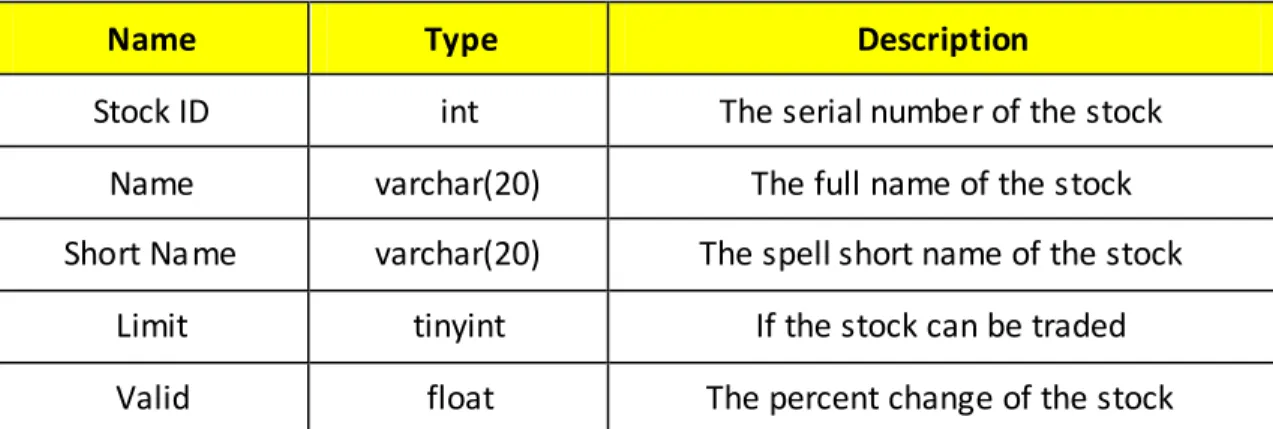
Stock Information: the table records the basic information of the stock
Name Type Description
Stock ID int The serial number of the stock
Name varchar(20) The full name of the stock
Short Name varchar(20) The spell short name of the stock
Limit tinyint If the stock can be traded
Valid float The percent change of the stock
Stock Event: the table records big events associated with the stock
Name Type Description
Stock ID int The serial number of the stock
Time timestamp The time when putting out the event
Event varchar(5000) The detailed description of the event
Trade: the table records the trade orders which have been executed successfully
Name Type Description
Stock ID int The serial number of the stock
Date timestamp The time when orders are executed
Price decimal(10, 2) concluded price
Trader char(15) The account ID of the trader
Type int 0 stands buying; 1 stands selling
Quantity int quantity transacted
Current Stock Information: the table records the newest information of the stock and some statistics about the stock
Name Type Description
Date datetime Current time
Open Price decimal(10, 2) The primary price today
Current Price decimal(10, 2) Current price
Highest decimal(10, 2) The highest price in this day
Lowest decimal(10, 2) The lowest price in this day
Last Exchange Quantity
int The trade quantity in last exchange
Total Exchange Quantity
int The total quantity of all the trade on the
stock
Account: the table records the name, quantity and the corresponding rights and interests and the change which the account investor holds
Name Type Description
Account ID int The serial number of the account
Name char(50) Holder name of the account
Password char(15) Password of the account
Fund char(15) Fund account ID related with the account
User Own Stock: the table records what stock, how much stock the user owns
Name Type Description
Stock ID int The serial number of the stock
User ID char(15) The serial number of the user`s account
Quantity int The total quantity of the stock user owns
Active Quantity int The quantity of the stock which user can
39 Data Dictionary
Data Name Account ID
Description necessary record for stock trader
Definition A unique series of numbers to confirm the account Where used input for client trading system
Data Type Char
Restriction 000000~999999
Data Name Fund (Fund ID)
Description necessary record for the fund capital
Definition A unique series of numbers to confirm the fund account Where used input for client trading system
Data Type Char
Restriction 000000~999999
Data Name Account ID
Description necessary record for stock trader
Definition A unique series of numbers to confirm the account Where used input for client trading system
Data Type Char
Restriction 000000~999999
Data Name Useable capital
Description useful part in the fund account
Definition the money user can invest in the stock market Where used input for client trading system
Data Type int
Data Name Frozen capital
Description frozen part in the fund account
Definition the money user has invested in the stock market Where used input for client trading system
Data Type int
Restriction 0~999999999
Data Name Stock ID
Description necessary record for stock information
Definition A unique series of numbers to distinguish the account Where used input for client trading system
Data Type Char
Restriction 000000~999999
Data Name Valid
Description The biggest percent stock can change in one day
Definition The limit margin for stock price which stock can rise or fall in one day
Where used output when querying the stock information Data Type float
Restriction >0
Data Name Event
Description Show the changes and latest information about the stock and the company
Definition The description of important news of the stock Where used output when querying the stock information Data Type Char
41 Data Name Open Price
Description The start price of the stock on this day
Definition The foremost price when no trade about the stock occurs Where used output when querying the stock information
Data Type decimal(10, 2) Restriction >0
Data Name Trade Orders
Description A form including the stock ID, quantity, type, price and account ID to implement the trade
Definition The order which users send to buy or sell stocks Where used input for client trading system
Data Type Stock ID (char) + Quantity (int) + Type (int) + Price (int) + Account ID (char)
Restriction Up to the request
Data Name Active Quantity
Description In all the stocks which belong to the user, some have been declared to be sold, then other stocks are the active ones Definition The quantity of the stock which belong the user that can be
sold
Where used output when querying the account information Data Type int
8
Interface Requirements
8.1
Required Interfaces
The Client end of trading mainly relates with the center trading system, so all the interfaces should support the correspondence between them. In our design, we use socket to realize orders exchanging between Client end of trading and center trading system. These orders are accepted by both groups. The following diagrams show the orders that will be sent to center trading system.
Function name Login the system
Order format Function code(login) Account
number
password
Function name Buy stocks
Order format Function
code(buy)
Stock number
price quantity Capital
account
password
Function name Sell stocks
Order format Function
code(sell)
Stock number
price quantity Capital
account
password
Function name Cancel orders
Order format Function code(recall) Stock number Order number 0(buy)
Order format Function code(recall) Stock number Order number 1(sell)
Function name Exit
Order format Function code(exit) None
Function name Search owned stocks
Order format Function code(QueryHoldStocks) None
Function name Change password
Order format Function
code(ChangePassword) Account number Old password New password
Function name Search trade orders in one day
Order format Function code(QueryTradeInstruction) None
Function name Search stock information
43
Function name Search capital information
Order format Function code(QueryMoney) None
Because the Client end will be several hundred at the same time, the order exchange will be very frequently. In this way, the system will be designed as multiprocessing system to meet the requirements.
8.2 External System Dependencies
The Client end of trading will mainly depend on the return orders from the Central trading system. So the following diagrams will show the return orders of each function from the Central Trading System.
Function name Login the system
Return Order LoginSuccess
Return Order LoginReject; 2(Wrong account number or password)
Return Order LoginReject; 3(duplicate login)
Function name Buy stocks
Return Order BuyInstructionSuccess, order number
Return Order BuyInstructionReject; -5(Have not login the system)
Return Order BuyInstructionReject; -1(The stock is not existed)
Return Order BuyInstructionReject; 0(The stock trading is stopped)
Return Order BuyInstructionReject; -2(The quantity is too small)
Return Order BuyInstructionReject; -3(Wrong capital account or password)
Return Order BuyInstructionReject; -4(Usable capital limited)
Function name Sell stocks
Return Order SellInstructionSuccess, order number
Return Order SellInstructionReject; -4(Have not login the system)
Return Order SellInstructionReject; -1(The stock is not existed)
Return Order SellInstructionReject; 0(The stock trading is stopped)
Return Order SellInstructionReject; -2(The quantity is too small)
Return Order SellInstructionReject; -3(Quantity is more than owned)
Function name Cancel orders
Return Order RecallInstructionSuccess
Return Order RecallInstructionReject; -2(Have not login the system)
Return Order RecallInstructionReject; 0(The stock is not existed)
Return Order RecallInstructionReject; 2(This buy order is not existed)
Function name Exit
Return Order ExitSuccess
Return Order ExitReject
Function name Search owned stocks
Return Order Stock number, stock name, quantity, current price, cost, profit and loss
Return Order QueryHoldStacksReject; -2(Have not login the system)
Function name Change password
Return Order ChangeSuccess
Return Order changeReject; -2(Wrong old password)
Function name Search trade orders in one day
Return Order QueryTradeInstruction;
Buy(sell), stock number, stock price, quantity, order number, condition
Return Order QueryTradeInstructionReject; -2(Have not login the system)
Function name Search stock information
Return Order QueryStock; stock number, stock name, current price, highest
price in buy orders, lowest price in sell orders, highest price in that day, lowest price in that day, highest price in that week, lowest price in that week, highest price in that month, lowest price in that
month, important notice of this stock.
Return Order QueryStockReject; -2(Have not login the system)
Return Order QueryStockReject; -1(This stock is not existed)
Function name Search capital information
Return Order Capital account, total capital, frozen capital, usable capital
Return Order QueryMoneyReject; -2(Have not login the system)
Function name After Central Trading System handle buy or sell orders
Return Order BuySuccess, stock number , original price, current price, original quantity, current quantity
Return Order SellSuccess, stock number , original price, current price, original quantity, current quantity
After the Client end of trading get these orders, system will check the information to confirm the accurate. Then the Client end of trading will show the results to users.
45
9
User Interface
The Client end of trading is the bridge between users and system, so the users’ interfaces are very important. To users, usable and comprehensive functions are the most important. Besides, a friendly and convenient Contact surface is the key element, too. As the user community is varied, all the possible situations should be considered carefully. The following diagram shows the user community.
Age From 20 to 60 years old
Education condition From primary school to university
Computer familiar degree Beginner in majority
9.1
Interface Design
A login interface is necessary in the design. In order to meet the users’ requirement, a friendly and clear interface is necessary. Therefore, only the account, password and verify code will be added to the login interface. The purpose of verify code is to confirm the security of users’ accounts. After users input all the informa tion, they can click the “login” button.
To users, convenience and efficiency are the most important elements for function interface. All the functions will be combined in only one interface. After login successfully, the function interface will be shown to users. On the function interface, we can see all the function buttons: search stocks, search owned stocks, buy stocks, sell stocks and change password. On the right side, we can get information of capital with the account and capital account. On the bottom is the information of all the orders in one day.
With the function interface, users can do their operations. For example, if users want to buy stocks, he or she can click the buy stock function button. Then the following diagram will been shown to users. After inputting the necessary information, click the “buy” button to finish the activity.
47
9.2
Functionality
The following diagrams will show the relation between users’ input and each function.
Function name Login the system
Users’ input Account number password Confirmation code
General output Success(Function
interface)
Failed(Error Dialog Box)
Function name Buy stocks
Users’ input Stock number
(stock name)
quantity Capital account Capital password
General output Success(owned stocks and capital
change)
Failed(Error Dialog Box)
Function name Sell stocks
Users’ input Stock number
(stock name)
quantity Capital
account
Capital password
General output Success(owned stocks and
capital change)
Failed(Error Dialog Box)
Function name Change password
Users’ input Old password New password(twice)
General output Success Failed (Error Dialog Box)
Function name Search owned stocks
Users’ input Click the search button
General output Information of owned stocks
Function name Search stock information
Users’ input Stock number (stock name)
General output The highest and lowest price of the stock so far, in one month, one week and one day. Important notes of the stock.
Function name Cancel orders
Users’ input Click the cancel button
General output Success(show the order number) Failed(Error Dialog Box)
Function name Exit system
Users’ input Click the exit button
Function name Search all the orders in one day
Users’ input None
General output Show information of all the orders in one day
Function name Search capital information
Users’ input None
General output Total capital, usable capital, frozen capital
10 Error Handling Design
Errors Cases Outputs Handling
Information input error
1. Users input wrong
account number or wrong password.
2. Users input wrong
stock name or wrong stock number.
A dialog box will remind users about
the error. By remind users the reasons Information flaw 1. Users forget to input the account number or
password. 2. Users click the
search button but haven’t input stock name or stock number.
A dialog box will remind users about
the error.
By remind users the reasons
The information does not tally with the reality
The price of predetermined stocks
is more than usable capital.
A dialog box will remind users about the error.
By remind users the reasons
Program error To deal with too much
information at the same time may cause
the system collapse
The data will be saved, then exit
the system Automatically.
By program design
Other error One account can’t
login the system twice at the same time.
A dialog box will remind users about
the error.
By remind users the reasons
49
11 Appendix
11.1 Group List
Name Student Number Telephone E-mail
高石 3062211074 13656648835 [email protected]
金立 3062211079 13656655870 [email protected]
甘锡云 3062211081 13857162301 [email protected]
徐德超 3062211071 15988487336 [email protected]
11.2
Version and Changes
Version Date Brief summary of changes
1.0 2008-10-12 This is the first version of Software Design
Document.
1.1 2008-10-26 Update the Architecture Context Diagram.
Update the Activity Diagrams. Update the interface requirements. Update the user interface
1.2 2008-10-31 Update the detail design
Update the class diagram Update the activity diagrams