Introduction
This document describes basic echo issues as they may appear in packet voice networks. Different types of ech-oes are explained, as well as where they occur and at which points in the network they can be filtered out. The objective of this document is to help identifying the cause of an echo and guide to its elimination.
Sources of Echo
Echo is commonly encountered on PSTN when analog lines are involved in the conversation path. There are two types of distinguishable echo– acoustic and hybrid.
Telephony terminals: Acoustic echo
Echo that results from acoustic coupling of sound from the telephone’s speaker to the telephone’s microphone. This echo is mainly a concern with hand-free speaker phone sets, because the sound is coupled over the air and includes the echo of the room the phone is placed in. Normal phones are usually not subject to this problem.
Figure 1. Acoustic Echo
Line type transitions: Hybrid echo
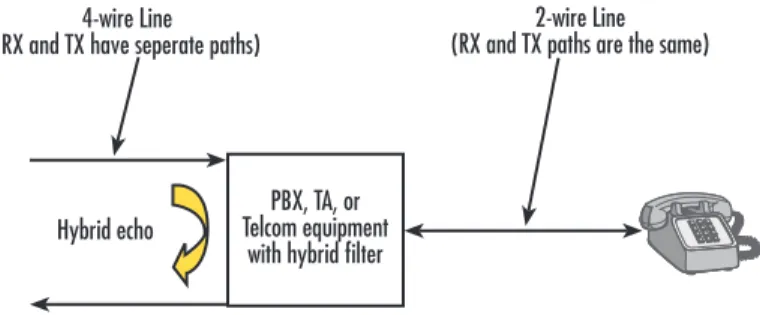
This type of echo is produced at a non-perfect transition from 4-wire lines to 2-wire lines. 4-wire lines are transmission lines with separated RX/TX path and without coupling between RX/TX (e.g: IP based telephony, ISDN, SS7/E1). 2-wire lines are transmission lines with common RX/TX path and a natural coupling between RX and TX (typically POTS). At each transition from 4-wire to 2-wire or vice-versa, there is a so-called hybrid filter, which introduces an echo.
Figure 2. Hybrid Echo
Tech Note
Understanding Echo ProblemsAcoustic echo
Microphone Earpiece / Speaker
PBX, TA, or Telcom equipment
with hybrid filter Hybrid echo
2-wire Line (RX and TX paths are the same) 4-wire Line
Echo in Voice Packet Networks
When is Echo Perceptible
Echo is not an issue in PSTN, although it is a common effect. This is because of the characteristics of the human ear: echoes that arrive in a very short time (less than 30ms) are imperceptible. Delays larger than that are heard as an echo.
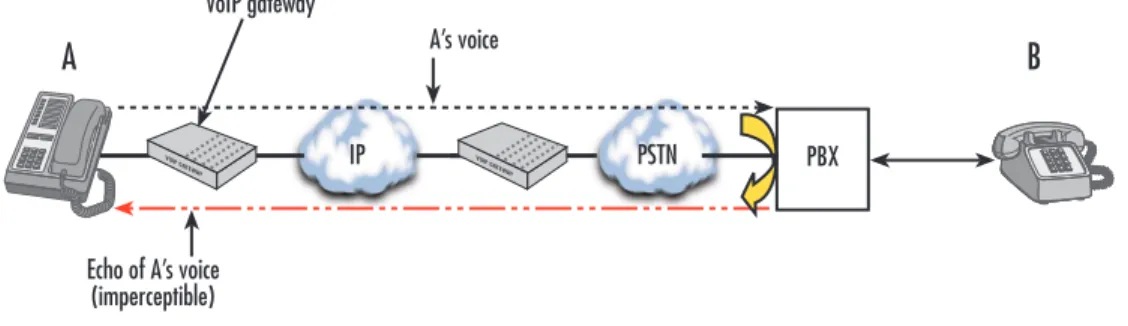
As PSTN is mostly line switched, no delays occur but the propagation delay of electrical/optical information and the transmitter/receiver’s own delay. Summed, these delays are generally < 30ms and thus imperceptible. If, in the figure below, B’s PBX generates a hybrid echo, A’s voice is returned but imperceptible for A:
Figure 3. Imperceptible Echo in PSTN
Delays larger than 30ms are perceptible and occur, for instance, in satellite transmissions or VoIP networks. In the case of VoIP networks, the delay is the sum of the packetization delay in the emitting voice gateway, half the IP roundtrip delay and the dejitter buffer delay in the receiving voice gateway.
In the example below, the situation in Figure 3 is extended with a VoIP link. A’s voice is returned by the hybrid filter at B’s PBX. Because of the larger delay introduced by the packet transmission of voice, the echo becomes perceptible for A:
Figure 4. Perceptible Echo with VoIP
Handling perceptible echo
As Figure 4 shows, echo is generated at the opposite end of where it is audible. It might as well be generated
anywhere in the PSTN network, but definitely not at A itself. The echo source is neither under control of A, nor of the VoIP provider.
Thus, the echo must be cancelled. This is best done at the VoIP gateway between the IP network and the PSTN.
PSTN
A
A’s voiceB
PBX
Echo of A’s voice (imperceptible)
IP PSTN
A
Echo of A’s voice (imperceptible) VOIP GA TEW AY
B
PBX VOIP GA TEW AY A’s voice VoIP gatewayFigure 5. Location of the Echo Canceller
Handling Perceptible Echo in SmartNode VoIP Gateways
Do SmartNodes Generate Echo?
Patton SmartNodes with ISDN ports (BRI/PRI) are pure “4-wire line” devices. RX and TX always have their own path, and therefore SmartNodes do not introduce any echo.
A SmartNode with FXS ports may introduce an echo at the hybrid filter that performs the conversion from a 4-wire line to an FXS 2-wire line.
Built-in Echo Canceller
To cancel this echo as well as echoes that may appear in PSTN network or ISDN terminals, SmartNodes have built-in echo cancellers in their voice processing DSPs. Each VoIP connection has its own configurable echo canceller.
Figure 6. Echo Canceller Structure
The voice signal from the IP network is potentially subject to being echoed back by the PSTN network., and it is analyzed and compared to the signal from PSTN. If an echo is detected, the voice signal from IP network is subtracted adaptively from the signal from PSTN after a certain delay (the estimated delay time of the echo). This attenuates the echo from PSTN.
The adaptive mechanism assures that the delay time and the volume of the echo are estimated correctly, such that, if no echo is present, no cancelling should occur.
IP PSTN
A
Echo of A’s voice is cancelled VOIP GA TEWAY
B
PBX VOIP GA TEWAY A’s voice VoIP gateway IP network NLP ISDN or FXS port, towards terminal or PSTN Adaptive FilterUncancellable Echo
Under some conditions, echo cannot be cancelled and remains perceptible: • The echo is too loud.
• The echo is delayed beyond the time window of the echo canceller (25ms in SmartNodes). PSTN lines that involve long distance transmission, multiple conversions from analog to digital, or satellite links may have a longer delay.
• The echo is distorted acoustically. A distorted signal can’t be recognized as an echo.
Configuring Echo Cancelling
The relevant parameters for configuring echo canceller are in the voip profile. There is always a profile called ‘default’ that is used when nothing else is specified. The setting from voip profile can be overridden with a command in the voice interface.
To modify the echo canceller relevant parameters:
NODE(cfg)#profile voip default
To enable/disable the echo canceller:
NODE(pf-voip)[default]#[no] echo canceller
We generally recommend leaving the echo canceller switched on, because the adaptive algorithm assures that no canceling is done when no echo is present.
The parameter ‘voice-volume’ can influence the echo perceptibility as well, although it does not affect the echo canceller’s performance or quality. It just changes the voice output level towards PSTN, which makes the level of echoed voice change as well. If the voice-volume is reduced, echo is also reduced (and the level of A’s voice will be reduced at B as well!).
To modify the voice output volume:
NODE(cfg)# profile voip default
NODE(pf-voip)[default]#voice-volume <-31..+3dB>
Summary
Echoes are generated in PSTN, not in packet networks. However, packet network transmission makes them audible. The normal characteristics of a VoIP network unmask pre-existing problems in TDM-based networks. The best place to cancel an echo is at the VoIP gateway between the IP network and the PSTN, or the PBX where it occurs.
Patton SmartNodes have an integrated echo canceller for that purpose. Because it works adaptively, only the echo that really exists is cancelled. Therefore, it is generally recommended to switch it on (which is the default setting).
There are some conditions remaining where the echo canceller can’t recognize an echo signal as such, and thus can’t cancel it. In these conditions, the echo must be troubleshooted in the PSTN or the PBX connected to the VoIP network.
Additional Information
Contacting Patton
If you have any additional questions please feel free to contact Patton’s Technical Support: • E-mail support—e-mail sent to [email protected] will be answered within 1 business day
• Telephone support—standard telephone support is available five days a week—from 8:00 am to 5:00 pm EST (1300 to 2200 UTC)—by calling +1 (301) 975-1007
Last Updated September 20, 2007
7622 Rickenbacker Drive Gaithersburg, MD 20879 Tel: +1 301.975.1000