Chapter
with Java
Topics in This Chapter
•
Representing an entire XML document using the
Document Object Model (DOM) Level 2
•
Using DOM to display the outline of an XML document in
a JTree
•
Responding to individual XML parsing events with the
Simple API for XML Parsing (SAX) 2.0
•
Printing the outline of an XML document using SAX
•
Counting book orders using SAX
•
Transforming XML using XSLT
•
Invoking XSLT through custom JSP tags
1133
Chapter
23
ML is a “meta” markup language used to describe the structure of data.
XML has taken the computer industry by storm since its inception and is
now the markup language of choice for configuration files, data interchange,
B2B transactions, and Java 2 Enterprise architectures. XML is even being used to
represent calls to distributed objects through the Simple Object Access Protocol
(SOAP), an XML application.
XML has numerous advantages including being easy to read, easy to parse,
exten-sible, and widely adopted. In addition, you can define a grammar through a
Document Type Definition (DTD) to enforce application-specific syntax. However,
the greatest single advantage of XML is that the data can be easily processed by other
applications; XML data is not in a proprietary format. In essence, XML has done for
data what the Java language has done for programs:
Java = Portable Programs
XML = Portable Data
This chapter doesn’t focus on how to
write
XML but rather how to
process
XML
documents with Java. We show you how to use Java to process XML documents by
using the Document Object Model (DOM), the Simple API for XML (SAX), and the
Extensible Style sheet Language for Transformations (XSLT). If you are new to
XML, here are some good starting points for additional information:
XML 1.0 Specification
http://www.w3.org/TR/REC-xml
Sun Page on XML and Java
http://java.sun.com/xml/
WWW Consortium’s Home Page on XML
http://www.w3.org/XML/
Apache XML Project
http://xml.apache.org/
XML Resource Collection
http://xml.coverpages.org/
O’Reilly XML Resource Center
http://www.xml.com/
23.1 Parsing XML Documents with
DOM Level 2
The Document Object Model (DOM) represents an entire XML document in a
tree-like data structure that can be easily manipulated by a Java program. The
advan-tages of DOM are that it is relatively simple to use and you can modify the data
struc-ture in addition to extracting data from it. However, the disadvantage is that DOM
parses and stores the entire document, even if you only care about part of it. Section
23.3 (Parsing XML Documents with SAX 2.0) discusses an alternative approach
appropriate for cases when you are dealing with very large XML documents but care
about only small sections of them.
Installation and Setup
DOM is not a standard part of either Java 2 Standard Edition or the servlet and JSP
APIs. So, your first step is to download the appropriate classes and configure them
for use in your programs. Here is a summary of what is required.
23.1 Parsing XML Documents with DOM Level 2
1135
We use the Apache Xerces-J parser in this book. See
http://xml.apache.org/xerces-j/
. This parser also
comes with the complete DOM API in Javadoc format.
2.
Download the Java API for XML Processing (JAXP).
This API
provides a small layer on top of DOM that lets you plug in different
vendor’s parsers without making any changes to your basic code. See
http://java.sun.com/xml/
.
3.
Set your
CLASSPATH
to include the DOM classes.
In the case of
Apache Xerces, you need to include
xerces_install_dir\
xerces.jar
. For example, for desktop applications on Windows you
would do
set CLASSPATH=xerces_install_dir\xerces.jar;%CLASSPATH%
If you wanted to use DOM from servlets and JSP, you would copy the
appropriate JAR file to the server’s
lib
directory (if supported),
unpack the JAR file (using
jar -xvf
) into the server’s
classes
directory, or explicitly change the server’s
CLASSPATH
, usually by
modifying the server start-up script.
4.
Set your
CLASSPATH
to include the JAXP classes.
These classes
are in
jaxp_install_dir
/jaxp.jar
. For example, on Unix/Linux and
the C shell, you would do
setenv CLASSPATH jaxp_install_dir/jaxp.jar:$CLASSPATH
For use from servlets and JSP, see the preceding step.
5.
Bookmark the DOM Level 2 and JAXP APIs.
The official
DOM specification can be found at
http://www.w3.org/TR/
DOM-Level-2-Core/
, but the API in Javadoc format that comes
with Apache Xerces is easier to read and also includes the JAXP and
SAX (see Section 23.3) APIs.
6.
Print the JAXP specification for your reference.
Download it
from
http://java.sun.com/xml/jaxp-1_1-spec.pdf
.
Parsing
With DOM processing, there are two high-level tasks: turning an XML document
into a DOM data structure and looking through that data structure for the data that
interests you. The following list summarizes the detailed steps needed to accomplish
these tasks.
1.
Tell the system which parser you want to use.
This can be done in
a number of ways: through the
javax.xml.parsers.Document-BuilderFactory
system property, through
jre_dir/lib/
META-INF/services/javax.xml.parsers.Document-BuilderFactory
, or with a system-dependent default parser. The
system property is the easiest method. For example, the following
code permits users to specify the parser on the command line with the
-D
option to
java
, and uses the Apache Xerces parser otherwise.
public static void main(String[] args) {String jaxpPropertyName =
"javax.xml.parsers.DocumentBuilderFactory"; if (System.getProperty(jaxpPropertyName) == null) {
String apacheXercesPropertyValue =
"org.apache.xerces.jaxp.DocumentBuilderFactoryImpl"; System.setProperty(jaxpPropertyName,
apacheXercesPropertyValue); }
... }
2.
Create a JAXP document builder.
This is basically a wrapper
around a specific XML parser.
DocumentBuilderFactory builderFactory = DocumentBuilderFactory.newInstance(); DocumentBuilder builder =
builderFactory.newDocumentBuilder();
Note that you can use the
setNamespaceAware
and
setValidating
methods on the
DocumentBuilderFactory
to
make the parser namespace aware and validating, respectively.
3.
Invoke the parser to create a Document representing an XML
document.
You invoke the parser by calling the
parse
method of the
document builder, supplying an input stream, URI (represented as a
string), or
org.xml.sax.InputSource
. The
Document
class
rep-resents the parsed result in a tree structure.
Document document = builder.parse(someInputStream);
4.
Normalize the tree.
This means to combine textual nodes that were
on multiple lines and to eliminate empty textual nodes.
document.getDocumentElement().normalize();
5.
Obtain the root node of the tree.
This returns an
Element
, which
is a subclass of the more general
Node
class that represents an XML
element.
Element rootElement = document.getDocumentElement();
23.2 DOM Example: Representing an XML Document as a JTree
1137
nodes (
getChildNodes
; i.e., the elements contained between the
current element’s start and end tags). You can recursively examine
each of the child nodes.
7.
Modify properties of the nodes.
Instead of just extracting data
from an XML document, you can modify the document by adding
child nodes (
appendChild
), removing child nodes (
removeChild
),
and changing the node’s value (
setNodeValue
). Unfortunately,
how-ever, DOM doesn’t provide a standard method of writing out a DOM
structure in textual format. So, you have to either do it yourself
(print-ing out a “<”, the node name, the attribute names and values with
equal signs between them and quotes around the values, a “>”, etc.) or
use one of the many existing packages that generate text from a DOM
element.
23.2 DOM Example: Representing
an XML Document as a JTree
Listing 23.1 shows a class that represents the basic structure of an XML document as
a
JTree
. Each element is represented as a node in the tree, with tree node being
either the element name or the element name followed by a list of the attributes in
parentheses. This class performs the following steps:
1. Parses and normalizes an XML document, then obtains the root
ele-ment. These steps are performed exactly as described in steps one
through five of the previous section.
2. Makes the root element into a
JTree
node. If the XML element has
attributes (as given by
node.getAttributes
), the tree node is
rep-resented by a string composed of the element name (
getNodeName
)
followed by the attributes and values in parentheses. If there are no
attributes (
getLength
applied to the result of
node.get-Attributes
returns 0), then just the element name is used for the
tree node label.
3. Looks up the child elements of the current element using
getChild-Nodes
, turns them into
JTree
nodes, and links those
JTree
nodes to
the parent tree node.
4. Recursively applies step 3 to each of the child elements.
Listing 23.2 shows a class that creates the
JTree
just described and places it into
a
JFrame
. Both the parser and the XML document can be specified by the user. The
parser is specified when the user invokes the program with
If no parser is specified, the Apache Xerces parser is used. The XML document
can be supplied on the command line, but if it is not given, a
JFileChooser
is used
to interactively select the file of interest. The file extensions shown by the
JFileChooser
are limited to
xml
and
tld
(JSP tag library descriptors) through use
of the
ExtensionFileFilter
class of Listing 23.3.
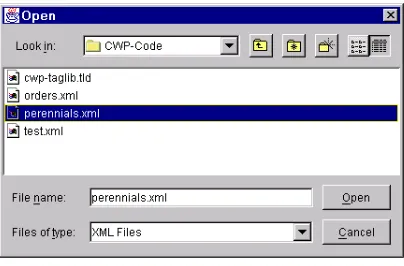
Figure 23–1 shows the initial file chooser used to select the
perennials.xml
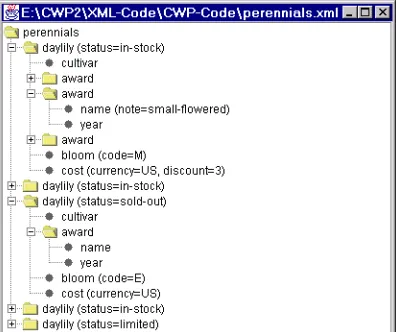
file (Listing 23.4; see Listing 23.5 for the DTD). Figures 23–2 and 23–3 show the
result in its unexpanded and partially expanded forms, respectively.
Note that because the XML file specifies a DTD, Xerces-J will attempt to parse
the DTD even though no validation of the document is performed. If
perennials.dtd
is not available on-line, then you can place the DTD in a
dtds
subdirectory (below the directory containing
XMLTree
) and change the
DOCTYPE
in
perennials.xml
to
<!DOCTYPE perennials SYSTEM "dtds/perennials.dtd">
[image:7.612.161.352.507.670.2]Figure 23–1
JFileChooser
that usesExtensionFileFilter
(Listing 23.3) to interactively select an XML file.23.2 DOM Example: Representing an XML Document as a JTree
1139
Figure 23–3
JTree
representation ofperennials.xml
with several nodes expanded.Listing 23.1
XMLTree.java
import java.awt.*; import javax.swing.*; import javax.swing.tree.*; import java.io.*;
import org.w3c.dom.*; import javax.xml.parsers.*;
/** Given a filename or a name and an input stream, * this class generates a JTree representing the * XML structure contained in the file or stream. * Parses with DOM then copies the tree structure * (minus text and comment nodes).
*/
public class XMLTree extends JTree {
public XMLTree(String filename) throws IOException { this(filename, new FileInputStream(new File(filename))); }
public XMLTree(String filename, InputStream in) { super(makeRootNode(in));
}
// This method needs to be static so that it can be called // from the call to the parent constructor (super), which // occurs before the object is really built.
private static DefaultMutableTreeNode
makeRootNode(InputStream in) { try {
// Use JAXP's DocumentBuilderFactory so that there // is no code here that is dependent on a particular // DOM parser. Use the system property
// javax.xml.parsers.DocumentBuilderFactory (set either // from Java code or by using the -D option to "java"). // or jre_dir/lib/jaxp.properties to specify this. DocumentBuilderFactory builderFactory =
DocumentBuilderFactory.newInstance(); DocumentBuilder builder =
builderFactory.newDocumentBuilder();
// Standard DOM code from hereon. The "parse"
// method invokes the parser and returns a fully parsed // Document object. We'll then recursively descend the // tree and copy non-text nodes into JTree nodes. Document document = builder.parse(in);
document.getDocumentElement().normalize();
Element rootElement = document.getDocumentElement(); DefaultMutableTreeNode rootTreeNode =
buildTree(rootElement); return(rootTreeNode); } catch(Exception e) { String errorMessage =
"Error making root node: " + e; System.err.println(errorMessage); e.printStackTrace();
return(new DefaultMutableTreeNode(errorMessage)); }
}
private static DefaultMutableTreeNode
buildTree(Element rootElement) { // Make a JTree node for the root, then make JTree
// nodes for each child and add them to the root node. // The addChildren method is recursive.
DefaultMutableTreeNode rootTreeNode =
new DefaultMutableTreeNode(treeNodeLabel(rootElement)); addChildren(rootTreeNode, rootElement);
return(rootTreeNode); }
23.2 DOM Example: Representing an XML Document as a JTree
1141
private static void addChildren
(DefaultMutableTreeNode parentTreeNode, Node parentXMLElement) {
// Recursive method that finds all the child elements // and adds them to the parent node. We have two types // of nodes here: the ones corresponding to the actual // XML structure and the entries of the graphical JTree. // The convention is that nodes corresponding to the // graphical JTree will have the word "tree" in the // variable name. Thus, "childElement" is the child XML // element whereas "childTreeNode" is the JTree element. // This method just copies the non-text and non-comment // nodes from the XML structure to the JTree structure.
NodeList childElements =
parentXMLElement.getChildNodes();
for(int i=0; i<childElements.getLength(); i++) { Node childElement = childElements.item(i); if (!(childElement instanceof Text || childElement instanceof Comment)) { DefaultMutableTreeNode childTreeNode = new DefaultMutableTreeNode
(treeNodeLabel(childElement)); parentTreeNode.add(childTreeNode);
addChildren(childTreeNode, childElement); }
} }
// If the XML element has no attributes, the JTree node // will just have the name of the XML element. If the // XML element has attributes, the names and values of the // attributes will be listed in parens after the XML // element name. For example:
// XML Element: <blah> // JTree Node: blah
// XML Element: <blah foo="bar" baz="quux"> // JTree Node: blah (foo=bar, baz=quux)
private static String treeNodeLabel(Node childElement) { NamedNodeMap elementAttributes =
childElement.getAttributes();
String treeNodeLabel = childElement.getNodeName();
if (elementAttributes != null &&
elementAttributes.getLength() > 0) { treeNodeLabel = treeNodeLabel + " (";
int numAttributes = elementAttributes.getLength(); for(int i=0; i<numAttributes; i++) {
Node attribute = elementAttributes.item(i); if (i > 0) {
treeNodeLabel = treeNodeLabel + ", "; }
treeNodeLabel =
treeNodeLabel + attribute.getNodeName() + "=" + attribute.getNodeValue();
}
treeNodeLabel = treeNodeLabel + ")"; }
return(treeNodeLabel); }
}
Listing 23.2
XMLFrame.java
import java.awt.*; import javax.swing.*; import java.io.*;
/** Invokes an XML parser on an XML document and displays * the document in a JTree. Both the parser and the * document can be specified by the user. The parser * is specified by invoking the program with
* java -Djavax.xml.parsers.DocumentBuilderFactory=xxx XMLFrame * If no parser is specified, the Apache Xerces parser is used. * The XML document can be supplied on the command
* line, but if it is not given, a JFileChooser is used * to interactively select the file of interest.
*/
public class XMLFrame extends JFrame { public static void main(String[] args) { String jaxpPropertyName =
"javax.xml.parsers.DocumentBuilderFactory";
23.2 DOM Example: Representing an XML Document as a JTree
1143
// Pass the parser factory in on the command line with // -D to override the use of the Apache parser.
if (System.getProperty(jaxpPropertyName) == null) { String apacheXercesPropertyValue =
"org.apache.xerces.jaxp.DocumentBuilderFactoryImpl"; System.setProperty(jaxpPropertyName,
apacheXercesPropertyValue); }
String filename; if (args.length > 0) { filename = args[0]; } else {
String[] extensions = { "xml", "tld" }; WindowUtilities.setNativeLookAndFeel();
filename = ExtensionFileFilter.getFileName(".",
"XML Files", extensions); if (filename == null) {
filename = "test.xml"; }
}
new XMLFrame(filename); }
public XMLFrame(String filename) { try {
WindowUtilities.setNativeLookAndFeel(); JTree tree = new XMLTree(filename); JFrame frame = new JFrame(filename);
frame.addWindowListener(new ExitListener()); Container content = frame.getContentPane(); content.add(new JScrollPane(tree));
frame.pack();
frame.setVisible(true); } catch(IOException ioe) {
System.out.println("Error creating tree: " + ioe); }
} }
Listing 23.3
ExtensionFileFilter.java
import java.io.File; import java.util.*; import javax.swing.*;
import javax.swing.filechooser.FileFilter;
/** A FileFilter that lets you specify which file extensions * will be displayed. Also includes a static getFileName * method that users can call to pop up a JFileChooser for * a set of file extensions.
* <P>
* Adapted from Sun SwingSet demo. */
public class ExtensionFileFilter extends FileFilter { public static final int LOAD = 0;
public static final int SAVE = 1; private String description; private boolean allowDirectories;
private Hashtable extensionsTable = new Hashtable(); private boolean allowAll = false;
public ExtensionFileFilter(boolean allowDirectories) { this.allowDirectories = allowDirectories;
}
public ExtensionFileFilter() { this(true);
}
public static String getFileName(String initialDirectory, String description, String extension) { String[] extensions = new String[]{ extension }; return(getFileName(initialDirectory, description, extensions, LOAD));
}
public static String getFileName(String initialDirectory, String description, String extension, int mode) { String[] extensions = new String[]{ extension }; return(getFileName(initialDirectory, description, extensions, mode));
}
23.2 DOM Example: Representing an XML Document as a JTree
1145
public static String getFileName(String initialDirectory, String description, String[] extensions) { return(getFileName(initialDirectory, description, extensions, LOAD));
}
/** Pops up a JFileChooser that lists files with the * specified extensions. If the mode is SAVE, then the * dialog will have a Save button; otherwise, the dialog * will have an Open button. Returns a String corresponding * to the file's pathname, or null if Cancel was selected. */
public static String getFileName(String initialDirectory, String description, String[] extensions, int mode) {
ExtensionFileFilter filter = new ExtensionFileFilter(); filter.setDescription(description);
for(int i=0; i<extensions.length; i++) { String extension = extensions[i]; filter.addExtension(extension, true); }
JFileChooser chooser =
new JFileChooser(initialDirectory); chooser.setFileFilter(filter);
int selectVal = (mode==SAVE) ? chooser.showSaveDialog(null) : chooser.showOpenDialog(null); if (selectVal == JFileChooser.APPROVE_OPTION) {
String path = chooser.getSelectedFile().getAbsolutePath(); return(path);
} else {
JOptionPane.showMessageDialog(null, "No file selected."); return(null);
} }
public void addExtension(String extension,
boolean caseInsensitive) { if (caseInsensitive) {
extension = extension.toLowerCase(); }
if (!extensionsTable.containsKey(extension)) { extensionsTable.put(extension,
new Boolean(caseInsensitive)); if (extension.equals("*") ||
extension.equals("*.*") || extension.equals(".*")) { allowAll = true;
} } }
public boolean accept(File file) { if (file.isDirectory()) {
return(allowDirectories); }
if (allowAll) { return(true); }
String name = file.getName();
int dotIndex = name.lastIndexOf('.');
if ((dotIndex == -1) || (dotIndex == name.length() - 1)) { return(false);
}
String extension = name.substring(dotIndex + 1); if (extensionsTable.containsKey(extension)) { return(true);
}
Enumeration keys = extensionsTable.keys(); while(keys.hasMoreElements()) {
String possibleExtension = (String)keys.nextElement(); Boolean caseFlag =
(Boolean)extensionsTable.get(possibleExtension); if ((caseFlag != null) &&
(caseFlag.equals(Boolean.FALSE)) &&
(possibleExtension.equalsIgnoreCase(extension))) { return(true);
} }
return(false); }
public void setDescription(String description) { this.description = description;
}
public String getDescription() { return(description);
} }
23.2 DOM Example: Representing an XML Document as a JTree
1147
Listing 23.4
perennials.xml
<?xml version="1.0" ?> <!DOCTYPE perennials SYSTEM
"http://archive.corewebprogramming.com/dtds/perennials.dtd"> <perennials>
<daylily status="in-stock">
<cultivar>Luxury Lace</cultivar> <award>
<name>Stout Medal</name> <year>1965</year>
</award> <award>
<name note="small-flowered">Annie T. Giles</name> <year>1965</year>
</award> <award>
<name>Lenington All-American</name> <year>1970</year>
</award>
<bloom code="M">Midseason</bloom>
<cost discount="3" currency="US">11.75</cost> </daylily>
<daylily status="in-stock">
<cultivar>Green Flutter</cultivar> <award>
<name>Stout Medal</name> <year>1976</year>
</award> <award>
<name note="small-flowered">Annie T. Giles</name> <year>1970</year>
</award>
<bloom code="M">Midseason</bloom>
<cost discount="3+" currency="US">7.50</cost> </daylily>
<daylily status="sold-out"> <cultivar>My Belle</cultivar> <award>
<name>Stout Medal</name> <year>1984</year>
</award>
<bloom code="E">Early</bloom> <cost currency="US">12.00</cost> </daylily>
<daylily status="in-stock">
<cultivar>Stella De Oro</cultivar> <award>
<name>Stout Medal</name> <year>1985</year>
</award> <award>
<name note="miniature">Donn Fishcer Memorial Cup</name> <year>1979</year>
</award>
<bloom code="E-L">Early to Late</bloom>
<cost discount="10+" currency="US">5.00</cost> </daylily>
<daylily status="limited">
<cultivar>Brocaded Gown</cultivar> <award>
<name>Stout Medal</name> <year>1989</year>
</award>
<bloom code="E">Early</bloom>
<cost currency="US" discount="3+">14.50</cost> </daylily>
</perennials>
Listing 23.5
perennials.dtd
<?xml version="1.0" encoding="ISO-8859-1" ?>
<!ELEMENT perennials (daylily)*>
<!ELEMENT daylily (cultivar, award*, bloom, cost)+> <!ATTLIST daylily
status (in-stock | limited | sold-out) #REQUIRED>
<!ELEMENT cultivar (#PCDATA)>
<!ELEMENT award (name, year)>
<!ELEMENT name (#PCDATA)> <!ATTLIST name
note CDATA #IMPLIED>
23.3 Parsing XML Documents with SAX 2.0
1149
23.3 Parsing XML Documents
with SAX 2.0
DOM processing is relatively straightforward since the DOM classes do all the “real”
parsing—you just have to look through the parsed result for the data you want.
How-ever, DOM can be quite wasteful if you only care about a small part of the document.
For example, suppose that you want to extract the first word from an XML document
representing an entire dictionary. DOM would require you to parse and store the
entire XML document (which could be huge in this case). With SAX, you need only
store the parts you care about and can stop parsing whenever you want. On the other
hand, SAX is a bit more work. The idea is that the system tells you when certain
pars-ing events such as findpars-ing a start tag (
<language rating="good">
), an end tag
(
</language>
), or a tag body (e.g.,
Java
between the aforementioned start and
end tags). You have to decide what to do when these events occur. Are you a JSP
pro-grammer? Does this process sound familiar? It should—SAX processing is very
simi-lar to the way you go about defining custom JSP tag libraries (Section 20.7).
Installation and Setup
SAX is not a standard part of either Java 2 Standard Edition or the servlet and JSP
APIs. So, your first step is to download the appropriate classes and configure them
for use in your programs. Here is a summary of what is required.
1.
Download a SAX-compliant parser.
The parser provides the Java
classes that follow the SAX 2 API as specified by the WWW Consortium.
You can obtain a list of XML parsers in Java at
http://www.xml.com/
pub/rg/Java_Parsers
. We use the Apache Xerces-J parser in this
book. See
http://xml.apache.org/xerces-j/
. This parser
comes with the complete SAX API in Javadoc format.
<!ELEMENT year (#PCDATA)>
<!ELEMENT bloom (#PCDATA)> <!ATTLIST bloom
code (E | EM | M | ML | L | E-L) #REQUIRED>
<!ELEMENT cost (#PCDATA)> <!ATTLIST cost
discount CDATA #IMPLIED> <!ATTLIST cost
currency (US | UK | CAN) "US">
2.
Download the Java API for XML Processing (JAXP).
This API
provides a small layer on top of SAX that lets you plug in different
ven-dor’s parsers without making any changes to your basic code. See
http://java.sun.com/xml/
.
3.
Set your
CLASSPATH
to include the SAX classes.
In the case of
Apache Xerces, you need to include
xerces_install_dir\
xerces.jar
. For example, on Windows you would do
set CLASSPATH=xerces_install_dir\xerces.jar;%CLASSPATH%
If you wanted to use DOM from servlets and JSP, you would copy the
appropriate JAR file to the server’s
lib
directory (if supported),
unpack the JAR file (using
jar -xvf
) into the server’s
classes
directory, or explicitly change the server’s
CLASSPATH
, usually by
modifying the server startup script.
4.
Set your
CLASSPATH
to include the JAXP classes.
These classes
are in
jaxp_install_dir/jaxp.jar
. For example, on Unix/Linux
and the C shell, you would do
setenv CLASSPATH jaxp_install_dir/jaxp.jar:$CLASSPATH
For use from servlets and JSP, see the preceding step.
5.
Bookmark the SAX 2 and JAXP APIs.
You can browse the
official API at
http://www.megginson.com/SAX/Java/
javadoc/
, but the API that comes with Apache Xerces is easier to
use because it is on your local system and is integrated with the
DOM and JAXP APIs. More information on SAX can be found
at
http://www.megginson.com/SAX/
.
Parsing
With SAX processing, there are two high-level tasks: creating a content handler and
invoking the parser with the designated content handler. The following list
summa-rizes the detailed steps needed to accomplish these tasks.
1.
Tell the system which parser you want to use.
This can be done in
a number of ways: through the
javax.xml.parsers.SAX-ParserFactory
system property, through
jre_dir/lib/
jaxp.properties
, through the J2EE Services API and the class
specified in
META-INF/services/javax.xml.parsers.SAX-ParserFactory
, or with a system-dependent default parser. The
system property is the easiest method. For example, the following
code permits users to specify the parser on the command line with the
-D
option to
java
, and uses the Apache Xerces parser otherwise.
public static void main(String[] args) {String jaxpPropertyName =
"javax.xml.parsers.SAXParserFactory";
23.3 Parsing XML Documents with SAX 2.0
1151
String apacheXercesPropertyValue =
"org.apache.xerces.jaxp.SAXParserFactoryImpl"; System.setProperty(jaxpPropertyName,
apacheXercesPropertyValue); }
... }
2.
Create a parser instance.
First make an instance of a parser factory,
then use that to create a parser object.
SAXParserFactory factory = SAXParserFactory.newInstance(); SAXParser parser = factory.newSAXParser();
Note that you can use the
setNamespaceAware
and
set-Validating
methods on the
SAXParserFactory
to make the
parser namespace aware and validating, respectively.
3.
Create a content handler to respond to parsing events.
This
handler is typically a subclass of
DefaultHandler
. You override any
or all of the following placeholders
•
startDocument, endDocument
Use these methods to respond to the start and end of the document;
they take no arguments.
•
startElement, endElement
Use these methods to respond to the start and end tags of an
ele-ment. The
startElement
method takes four arguments: the
namespace URI (a
String
; empty if no namespace), the
namespace or prefix (a
String
; empty if no namespace), the fully
qualified element name (a
String
; i.e.,
"prefix:mainName"
if
there is a namespace;
"mainName"
otherwise), and an
Attributes
object representing the attributes of the start tag. The
endElement
method takes the same arguments except for the
attributes (since end tags are not permitted attributes).
•
characters, ignoreableWhitespace
Use these methods to respond to the tag body. They take three
arguments: a
char
array, a start index, and an end index. A common
approach is to turn the relevant part of the character array into a
String
by passing all three arguments to the
String
constructor.
Non-whitespace data is always reported to the
characters
method. Whitespace is always reported to the
ignoreable-Whitespace
method a parser is run in validating mode, but can be
reported to either method otherwise.
4.
Invoke the parser with the designated content handler.
You
invoke the parser by calling the
parse
method, supplying an input
stream, URI (represented as a string), or
org.xml.sax.Input-Source
along with the content handler.
parser.parse(filename, handler);
23.4 SAX Example 1: Printing the
Outline of an XML Document
Listing 23.7 shows a content handler that responds to three parts of an XML
docu-ment: start tags, end tags, and tag bodies. It overrides the
startElement
,
end-Element
, and
characters
methods to accomplish this. The handler simply prints
out the start element, end element, and first word of tag body, with two spaces of
indentation for each nesting level. To accomplish this task, the content handler
over-rides the following three methods:
•
startElement
This method prints a message indicating that it found the start tag for
the element name. Any attributes associated with the element are
listed in parentheses. The method also puts spaces in front of the
printout, as specified by the
indentation
variable (initially 0).
Finally, it adds 2 to this variable.
•
endElement
This method subtracts 2 from the
indentation
variable and then
prints a message indicating that it found the end tag for the element.
•
characters
This method prints the first word of the tag body, leaving the
indentation level unchanged.
[image:21.612.160.364.546.672.2]Listing 23.8 shows a program that lets the user specify a SAX-compliant parser and
an XML file, then invokes the parser with the outline-printing content handler just
described (and shown in Listing 23.7). Figure 23–4 shows the initial result, and Listing
23.6 shows the top part of the output when
orders.xml
(Listing 23.9) is selected.
23.4 SAX Example 1: Printing the Outline of an XML Document
1153
Listing 23.6 Partial output of
SAXPrinter
applied to
orders.xml
Start tag: orders Start tag: order Start tag: count 37
End tag: count Start tag: price 49.99
End tag: price Start tag: book Start tag: isbn 0130897930 End tag: isbn Start tag: title Core...
End tag: title Start tag: authors Start tag: author Marty...
End tag: author Start tag: author Larry...
End tag: author End tag: authors End tag: book End tag: order Start tag: order Start tag: count 1
End tag: count Start tag: price 9.95
End tag: price Start tag: yacht
Start tag: manufacturer Luxury...
End tag: manufacturer Start tag: model M-1
End tag: model
Start tag: standardFeatures (oars=plastic, lifeVests=none) false
End tag: standardFeatures End tag: yacht
End tag: order
... (Rest of results omitted)
Listing 23.7
PrintHandler.java
import org.xml.sax.*;
import org.xml.sax.helpers.*; import java.util.StringTokenizer;
/** A SAX handler that prints out the start tags, end tags, * and first word of tag body. Indents two spaces
* for each nesting level. */
public class PrintHandler extends DefaultHandler { private int indentation = 0;
/** When you see a start tag, print it out and then * increase indentation by two spaces. If the * element has attributes, place them in parens * after the element name.
*/
public void startElement(String namespaceUri, String localName, String qualifiedName, Attributes attributes) throws SAXException {
indent(indentation);
System.out.print("Start tag: " + qualifiedName); int numAttributes = attributes.getLength();
// For <someTag> just print out "someTag". But for // <someTag att1="Val1" att2="Val2">, print out // "someTag (att1=Val1, att2=Val2).
if (numAttributes > 0) { System.out.print(" (");
for(int i=0; i<numAttributes; i++) { if (i>0) {
System.out.print(", "); }
System.out.print(attributes.getQName(i) + "=" + attributes.getValue(i)); }
System.out.print(")"); }
System.out.println();
indentation = indentation + 2; }
23.4 SAX Example 1: Printing the Outline of an XML Document
1155
/** When you see the end tag, print it out and decrease * indentation level by 2.
*/
public void endElement(String namespaceUri, String localName, String qualifiedName) throws SAXException {
indentation = indentation - 2; indent(indentation);
System.out.println("End tag: " + qualifiedName); }
/** Print out the first word of each tag body. */
public void characters(char[] chars, int startIndex, int endIndex) {
String data = new String(chars, startIndex, endIndex); // Whitespace makes up default StringTokenizer delimeters StringTokenizer tok = new StringTokenizer(data);
if (tok.hasMoreTokens()) { indent(indentation);
System.out.print(tok.nextToken()); if (tok.hasMoreTokens()) {
System.out.println("..."); } else {
System.out.println(); }
} }
private void indent(int indentation) { for(int i=0; i<indentation; i++) { System.out.print(" ");
} } }
Listing 23.8
SAXPrinter.java
import javax.xml.parsers.*; import org.xml.sax.*;
import org.xml.sax.helpers.*;
/** A program that uses SAX to print out the start tags, * end tags, and first word of tag body of an XML file. */
public class SAXPrinter {
public static void main(String[] args) { String jaxpPropertyName =
"javax.xml.parsers.SAXParserFactory";
// Pass the parser factory in on the command line with // -D to override the use of the Apache parser.
if (System.getProperty(jaxpPropertyName) == null) { String apacheXercesPropertyValue =
"org.apache.xerces.jaxp.SAXParserFactoryImpl"; System.setProperty(jaxpPropertyName,
apacheXercesPropertyValue); }
String filename; if (args.length > 0) { filename = args[0]; } else {
String[] extensions = { "xml", "tld" }; WindowUtilities.setNativeLookAndFeel();
filename = ExtensionFileFilter.getFileName(".",
"XML Files", extensions); if (filename == null) {
filename = "test.xml"; }
}
printOutline(filename); System.exit(0);
}
public static void printOutline(String filename) { DefaultHandler handler = new PrintHandler();
SAXParserFactory factory = SAXParserFactory.newInstance(); try {
SAXParser parser = factory.newSAXParser(); parser.parse(filename, handler);
} catch(Exception e) { String errorMessage =
"Error parsing " + filename + ": " + e; System.err.println(errorMessage);
e.printStackTrace(); }
23.4 SAX Example 1: Printing the Outline of an XML Document
1157
Listing 23.9
orders.xml
<?xml version="1.0" ?> <orders>
<order>
<count>37</count> <price>49.99</price> <book>
<isbn>0130897930</isbn>
<title>Core Web Programming Second Edition</title> <authors>
<author>Marty Hall</author> <author>Larry Brown</author> </authors>
</book> </order> <order>
<count>1</count> <price>9.95</price> <yacht>
<manufacturer>Luxury Yachts, Inc.</manufacturer> <model>M-1</model>
<standardFeatures oars="plastic" lifeVests="none"> false
</standardFeatures> </yacht>
</order> <order>
<count>3</count> <price>22.22</price> <book>
<isbn>B000059Z4H</isbn>
<title>Harry Potter and the Order of the Phoenix</title> <authors>
<author>J.K. Rowling</author> </authors>
</book> </order> <order>
<count>2</count>
<price>10452689.01</price> <yacht>
<manufacturer>We B Boats, Inc.</manufacturer> <model>236-A</model>
<standardFeatures bowlingAlley="double" tennisCourt="grass">
23.5 SAX Example 2: Counting
Book Orders
One of the advantages of SAX over DOM is that SAX does not require you to process
and store the entire document; you can quickly skip over the parts that do not
inter-est you. The following example looks for sections of an XML file that look like this:
<orders> ...
<count>23</count> <book>
<isbn>0130897930</isbn> ...
</book> ... </orders>
The idea is that the program will count up how many copies of
Core Web
Programming Second Edition
(you
did
recognize that ISBN number, right?) are
con-tained in a set of orders. Thus, it can skip over most elements. Since SAX, unlike
DOM, does not store anything automatically, we need to take care of storing the
pieces of data that are of interest. The one difficulty in that regard is that the
isbn
element comes after the
count
element. So, we need to record every count
tempo-rarily but only add the temporary value to the running total when the ISBN number
matches. To accomplish this task, the content handler (Listing 23.10) overrides the
following four methods:
true
</standardFeatures> </yacht>
</order> <order>
<count>13</count> <price>49.99</price> <book>
<isbn>0130897930</isbn>
<title>Core Web Programming Second Edition</title> <authors>
<author>Marty Hall</author> <author>Larry Brown</author> </authors>
</book> </order> </orders>
23.5 SAX Example 2: Counting Book Orders
1159
•
startElement
This method checks whether the name of the element is either
count
or
isbn
. If so, it sets a flag that tells the
characters
method to be
on the lookout.
•
endElement
This method checks whether the name of the element is either
count
or
isbn
. If so, it turns off the flag that the
characters
method
watches.
•
characters
If the
count
flag is set, this method parses the tag body as an
int
and
records the result in a temporary location. If the
isbn
flag is set, the
method reads the tag body and compares it to the ISBN number of
the second edition of
Core Web Programming
. If this comparison
results in a match, then the temporary count is added to the running
count.
•
endDocument
This method prints out the running count. If the number of copies is
less than 250 (a real slacker!), it urges the user to buy more copies in
the future.
[image:28.612.112.314.456.581.2]The
CountBooks
class (Listing 23.11) invokes a user-specifiable parser on an
XML file with
CountHandler
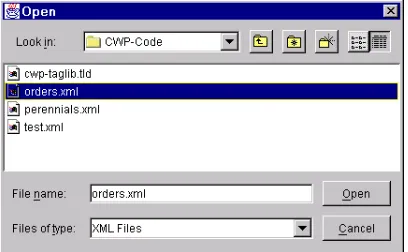
as the parser’s content handler. Figure 23–5 shows
the initial result and Figure 23–6 shows the final result, after
orders.xml
(Listing
23.9) is used as input.
Figure 23–5 Interactively selecting the
orders.xml
file.Listing 23.10
CountHandler.java
import org.xml.sax.*;
import org.xml.sax.helpers.*; import java.util.StringTokenizer; import javax.swing.*;
/** A SAX parser handler that keeps track of the number * of copies of Core Web Programming ordered. Entries * that look like this will be recorded:
* <XMP> * ...
* <count>23</count> * <book>
* <isbn>0130897930</isbn> * ...
* </book> * </XMP>
* All other entries will be ignored -- different books, * orders for yachts, things that are not even orders, etc. */
public class CountHandler extends DefaultHandler { private boolean collectCount = false;
private boolean collectISBN = false; private int currentCount = 0;
private int totalCount = 0;
/** If you start the "count" or "isbn" elements, * set a flag so that the characters method can check * the value of the tag body.
*/
public void startElement(String namespaceUri, String localName, String qualifiedName, Attributes attributes) throws SAXException {
if (qualifiedName.equals("count")) { collectCount = true;
currentCount = 0;
} else if (qualifiedName.equals("isbn")) { collectISBN = true;
} }
23.5 SAX Example 2: Counting Book Orders
1161
/** If you end the "count" or "isbn" elements, * set a flag so that the characters method will no * longer check the value of the tag body.
*/
public void endElement(String namespaceUri, String localName, String qualifiedName) throws SAXException {
if (qualifiedName.equals("count")) { collectCount = false;
} else if (qualifiedName.equals("isbn")) { collectISBN = false;
} }
/** Since the "count" entry comes before the "book" * entry (which contains "isbn"), we have to temporarily * record all counts we see. Later, if we find a
* matching "isbn" entry, we will record that temporary * count.
*/
public void characters(char[] chars, int startIndex, int endIndex) { if (collectCount || collectISBN) { String dataString =
new String(chars, startIndex, endIndex).trim(); if (collectCount) {
try {
currentCount = Integer.parseInt(dataString); } catch(NumberFormatException nfe) {
System.err.println("Ignoring malformed count: " + dataString);
}
} else if (collectISBN) {
if (dataString.equals("0130897930")) { totalCount = totalCount + currentCount; }
} } }
/** Report the total number of copies ordered. * Gently chide underachievers.
*/
public void endDocument() throws SAXException { String message =
"You ordered " + totalCount + " copies of \n" + "Core Web Programming Second Edition.\n"; if (totalCount < 250) {
message = message + "Please order more next time!"; } else {
message = message + "Thanks for your order."; }
JOptionPane.showMessageDialog(null, message); }
}
Listing 23.11
CountBooks.java
import javax.xml.parsers.*; import org.xml.sax.*;
import org.xml.sax.helpers.*;
/** A program using SAX to keep track of the number * of copies of Core Web Programming ordered. Entries * that look like this will be recorded:<XMP>
* ...
* <count>23</count> * <book>
* <isbn>0130897930</isbn> * ...
* </book> *
* </XMP>All other entries will be ignored -- different books, * orders for yachts, things that are not even orders, etc. */
public class CountBooks {
public static void main(String[] args) { String jaxpPropertyName =
"javax.xml.parsers.SAXParserFactory";
23.5 SAX Example 2: Counting Book Orders
1163
// Pass the parser factory in on the command line with // -D to override the use of the Apache parser.
if (System.getProperty(jaxpPropertyName) == null) { String apacheXercesPropertyValue =
"org.apache.xerces.jaxp.SAXParserFactoryImpl"; System.setProperty(jaxpPropertyName,
apacheXercesPropertyValue); }
String filename; if (args.length > 0) { filename = args[0]; } else {
String[] extensions = { "xml" };
WindowUtilities.setNativeLookAndFeel();
filename = ExtensionFileFilter.getFileName(".",
"XML Files", extensions); if (filename == null) {
filename = "orders.xml"; }
}
countBooks(filename); System.exit(0); }
private static void countBooks(String filename) { DefaultHandler handler = new CountHandler();
SAXParserFactory factory = SAXParserFactory.newInstance(); try {
SAXParser parser = factory.newSAXParser(); parser.parse(filename, handler);
} catch(Exception e) { String errorMessage =
"Error parsing " + filename + ": " + e; System.err.println(errorMessage);
e.printStackTrace(); }
} }
23.6 Transforming XML with XSLT
XSLT is a language for transforming XML documents into HTML, XML, or other
types of documents. When performing a transformation, an XSLT engine converts
the XML document according to formatting rules and XPath addresses specified in
an XML style sheet (XSL). The XPath information identifies the different parts of
the XML document for processing, and the style sheet information identifies the
lay-out of the lay-output.
The benefit of XSLT is that you can define multiple style sheets for transforming a
single XML document. For example, a database could return a query in an XML
for-mat, and depending on the client protocol, HTTP or WAP, a servlet could use
differ-ent style sheets to convert the data into HTML or WML, respectively. As another
example of an XSLT application, consider an e-commerce business order; the order
could be sent to the supplier in an XML format and then processed by the recipient
with XSLT, using different XSL documents to convert the original order into
sepa-rate billing and shipping documents.
Specifications for XSLT, XSL, and XPath technologies are maintained by the
WWW Consortium. These specifications are located at:
XSLT 1.0
http://www.w3.org/TR/xslt.html
XSL 1.0
http://www.w3.org/TR/xsl/
XPath 1.0
http://www.w3.org/TR/xpath.html
Upcoming specifications are summarized at
http://www.w3.org/Style/XSL/
.
In addition, an excellent XSLT resource site, sponsored by GoXML, is located at
http://www.xslt.com/
.
Installation and Setup
XSLT is not a standard part of either Java 2 Standard Edition or the servlet and JSP
APIs. So, your first step is to download the appropriate classes and configure them
for use in your programs. Here is a summary of what is required:
23.6 Transforming XML with XSLT
1165
http://www.xslt.com/xslt_tools_engines.htm
. We use
the Apache Xalan-J transformer in this book. See
http://xml.apache.org/xalan-j/
.
2.
Set your
CLASSPATH
to include the DOM and SAX classes.
XSLT
builds upon DOM and SAX for handling the document processing. In
the case of Apache Xalan-J, you need to include
xerces.jar
in the
CLASSPATH
. See Section 23.1 (Parsing XML Documents with DOM
Level 2) and Section 23.3 (Parsing XML Documents with SAX 2.0) for
configuration of Apache Xerces-J. Note that
xerces.jar
is included
in the Xalan-J installation directory.
3.
Set your
CLASSPATH
to include the XSLT classes.
With Xalan,
these classes are in
xalan_install_dir\xalan.jar
. For
exam-ple, for desktop application on Windows, you would do
set CLASSPATH=xalan_install_dir\xalan.jar; %CLASSPATH%
On Unix/Linux and the C shell, you would do
setenv CLASSPATH xalan_install_dir/xalan.jar: $CLASSPATH
If you wanted to use XSLT from servlets and JSP, you would copy the
appropriate DOM, SAX, and XSLT JAR files to the server’s
lib
direc-tory (if supported), unpack the JAR files (using
jar -xvf
) into the
server’s classes directory, or explicitly change the server’s
CLASSPATH
,
usually by modifying the server’s startup script.
4.
Bookmark the XSL 1.0 and XPath 1.0 specifications.
The official
documentation for these two specifications can be found at
http://www.w3.org/Style/XSL/
.
5.
Bookmark the XSLT specification.
The official XSLT specification
can be found at
http://www.w3.org/TR/xslt.html
. The XSLT
specification is implemented in Apache Xalan through the
Transfor-mation API for XML (TrAX). The complete TrAX API comes with
Xalan-J in Javadoc format and is also available on-line at
http://xml.apache.org/xalan-j/apidocs/
.
Translating
With XSLT processing, there are two high-level tasks, establishing an XSL template
from which to build a transformer and invoking the transformer on the XML
docu-ment. The following list summarizes the detailed steps needed to accomplish these
tasks.
1.
Tell the system which parser you want to use for
transforma-tions.
This can be done in a number of ways: through the
through the
jre_dir/lib/jaxp.properties
, through the J2EE
Services API and the class specified in the
META-INF/services/
javax.xml.transform.TransformFactory
, or with a
sys-tem-dependent default processor. As XSLT depends on DOM and
SAX, you can tell the system which DOM and SAX parser to use for
processing the document. See Section 23.1 and Section 23.3 for
infor-mation on configuring DOM and SAX parsers. By default, Apache
Xalan-J uses the Apache Xerces-J DOM and SAX parsers.
2.
Establish a factory in which to create transformers.
Before
processing an XML document, you first need to establish a
TransformerFactory
. The factory allows you to create different
transformers for different style sheet templates.
TransformerFactory factory = TransformerFactory.newInstance();
3.
Generate a transformer for a particular style sheet
template.
For each style sheet you can generate a separate transformer to apply
to multiple XML documents.
Source xsl = new StreamSource(xslStream);
Templates template = factory.newTemplates(xsl); Transformer transformer = template.newTransformer();
Typically, the XSL source is a
StreamSource
object. You can easily
convert an XSL document to a
StreamSource
through a
File
,
Reader
,
InputStream
, or URI (represented as a
string
) reference
to the document.
4.
Invoke the transformer to process the source document.
You
invoke the transformation by calling the
transform
method,
supply-ing the XML source and a
Result
object to receive the transformed
document.
Source xml = new StreamSource(xmlStream);
Result result = new StreamResult(outputStream); tranformer.transform(xml, result);
Similar to the XSL source, the XML source is typically a
Stream-Source
constructed from a
File
,
Reader
,
InputStream
, or URI.
The transformed
StreamResult
can be a
File
,
Writer
,
Output-Stream
or URI.
23.6 Transforming XML with XSLT
1167
character stream, process the input using XSLT, and deliver the result as an HTML
document to a browser client. At no time do the XML document and transformed
result need to reside on disk.
Listing 23.12
XslTransformer.java
package cwp;
import javax.xml.transform.*;
import javax.xml.transform.stream.*; import java.io.*;
import java.util.*;
/** Creates an XSLT transformer for processing an XML document. * A new transformer, along with a style template are created * for each document transformation. The XSLT, DOM, and * SAX processors are based on system default parameters. */
public class XslTransformer {
private TransformerFactory factory;
public XslTransformer() {
factory = TransformerFactory.newInstance(); }
/** Transform an XML and XSL document as <code>Reader</code>s, * placing the resulting transformed document in a
* <code>Writer</code>. Convenient for handling an XML * document as a String (<code>StringReader</code>) residing * in memory, not on disk. The output document could easily be * handled as a String (<code>StringWriter</code>) or as a * <code>JSPWriter</code> in a JavaServer page.
*/
public void process(Reader xmlFile, Reader xslFile, Writer output)
throws TransformerException { process(new StreamSource(xmlFile),
new StreamSource(xslFile), new StreamResult(output)); }
/** Transform an XML and XSL document as <code>File</code>s, * placing the resulting transformed document in a
* <code>Writer</code>. The output document could easily * be handled as a String (<code>StringWriter</code)> or as * a <code>JSPWriter</code> in a JavaServer page.
*/
public void process(File xmlFile, File xslFile, Writer output)
throws TransformerException { process(new StreamSource(xmlFile),
new StreamSource(xslFile), new StreamResult(output)); }
/** Transform an XML <code>File</code> based on an XSL * <code>File</code>, placing the resulting transformed * document in a <code>OutputStream</code>. Convenient for * handling the result as a <code>FileOutputStream</code> or * <code>ByteArrayOutputStream</code>.
*/
public void process(File xmlFile, File xslFile, OutputStream out)
throws TransformerException { process(new StreamSource(xmlFile),
new StreamSource(xslFile), new StreamResult(out)); }
/** Transform an XML source using XSLT based on a new template * for the source XSL document. The resulting transformed * document is placed in the passed in <code>Result</code> * object.
*/
public void process(Source xml, Source xsl, Result result) throws TransformerException {
try {
Templates template = factory.newTemplates(xsl); Transformer transformer = template.newTransformer(); transformer.transform(xml, result);
} catch(TransformerConfigurationException tce) { throw new TransformerException(
tce.getMessageAndLocation()); } catch (TransformerException te) {
throw new TransformerException(
te.getMessageAndLocation()); }
} }
23.7 XSLT Example 1: XSLT Document Editor
1169
23.7 XSLT Example 1: XSLT
Document Editor
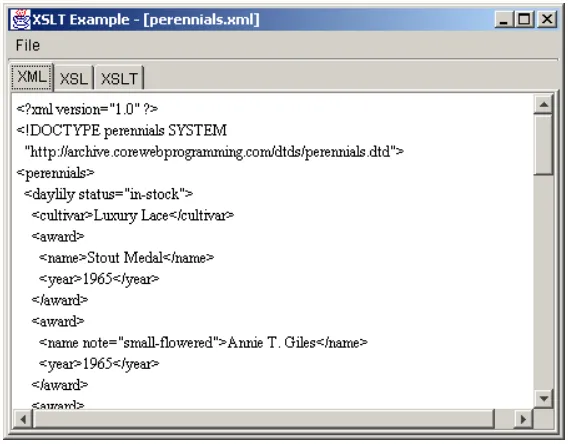
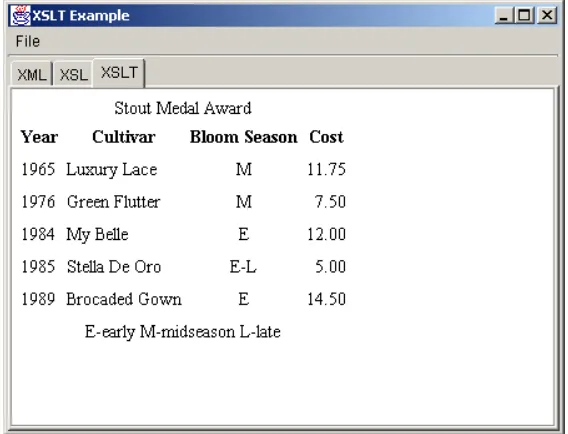
Listing 23.13 shows a simple Swing document editor that presents three tabbed
panes: one for an XML document, one for an XSL style sheet, and one for a resulting
XSLT-transformed document. Both the XML and XSL document panes are editable,
so after you load the XML and XSL files from disk you can edit the documents
directly. Each tabbed pane contains a scrollable
DocumentPane
that inherits from a
JEditorPane
(see Listing 23.14). The XML and XSL panes are treated as plain
text, and the XSLT pane is treated as HTML. If an XML file and XSL file are loaded,
selecting the XSLT tab will invoke an
XslTransformer
(Listing 23.12) to process
the XML file by using the style sheet, and present the results as HTML in the XSLT
document pane.
Listing 23.13
XsltExample.java
import javax.xml.transform.*; import java.awt.*;
import java.awt.event.*; import javax.swing.*; import javax.swing.event.*; import java.io.*;
import cwp.XslTransformer;
/** A document editor to process XML and XSL text using
* XSLT and presenting the results as HTML. Three tabbed panes * are presented: an editable text pane for the XML document, * an editable text pane for the XSL style sheet, and a * editable HTML pane for the HTML result. If an XML and XSL * file are loaded, then selecting the XSLT tab will perform * the transformation and present the results. If there is * a problem processing the XML or XSL document, then a * message box is popped up describing the problem. */
public class XsltExample extends JFrame
implements ChangeListener { private static final int XML = 0;
private static final int XSL = 1; private static final int XSLT = 2;
private static final String DEFAULT_TITLE = "XSLT Example";
private static final String[] tabTitles =
{ "XML", "XSL", "XSLT" }; private static final String[] extensions =
{ "xml", "xsl", "html" }; private Action openAction, saveAction, exitAction;
private JTabbedPane tabbedPane; private DocumentPane[] documents; private XslTransformer transformer;
public XsltExample() { super(DEFAULT_TITLE);
transformer = new XslTransformer(); WindowUtilities.setNativeLookAndFeel(); Container content = getContentPane(); content.setBackground(SystemColor.control);
// Set up menus
JMenuBar menubar = new JMenuBar(); openAction = new OpenAction(); saveAction = new SaveAction(); exitAction = new ExitAction(); JMenu fileMenu = new JMenu("File"); fileMenu.add(openAction);
fileMenu.add(saveAction); fileMenu.add(exitAction); menubar.add(fileMenu); setJMenuBar(menubar);
// Set up tabbed panes
tabbedPane = new JTabbedPane(); documents = new DocumentPane[3]; for(int i=0; i<3; i++) {
documents[i] = new DocumentPane(); JPanel panel = new JPanel();
JScrollPane scrollPane = new JScrollPane(documents[i]); panel.add(scrollPane);
tabbedPane.add(tabTitles[i], scrollPane); }
documents[XSLT].setContentType(DocumentPane.HTML);
// JEditorPane has a bug, whereas the setText method does // not properly recognize an HTML document that has a META // element containing a CONTENT-TYPE, unless the EditorKit // is first created through setPage. Xalan automatically // adds a META CONTENT-TYPE to the document.