Java with BlueJ
Ron McFadyen
c
2016 Ron McFadyen
Department of Applied Computer Science University of Winnipeg
515 Portage Avenue
Winnipeg, Manitoba, Canada R3B 2E9
[email protected] [email protected]
This work is licensed under Creative Commons Attribution NonCommercial ShareAlike 4.0 International Public License. To view a copy of this license visit
http://creativecommons.org/licenses/by-nc-sa/4.0/
This work can be distributed in unmodified form for non-commercial pur-poses. Modified versions can be made and distributed for non-commercial purposes provided they are distributed under the same license as the origi-nal. Other uses require permission of the author.
The website for this book is
To Callum
Contents
1 Introduction 9
1.1 Java, the beginning . . . 9
1.2 The Java Compiler and the Java Virtual Machine . . . 11
1.3 BlueJ . . . 12
1.4 A First Program . . . 13
1.5 Using BlueJ to RunHelloWorld . . . 14
2 Basics 19 2.1 Literals . . . 19
2.2 Variables . . . 19
2.3 Primitive Data Types . . . 23
2.3.1 Numeric Data Types: byte,short,int,long . . . . 23
2.3.2 Numeric Data Types: float,double. . . 26
2.3.3 Numeric Expressions . . . 29
2.3.4 booleanData Type . . . 36
2.3.5 char Data Type . . . 40
2.4 Operators . . . 43
2.5 TheStringClass . . . 46
2.6 Output . . . 54
2.6.1 System.out . . . 54
2.6.2 RedirectingSystem.out . . . 58
2.6.3 JOptionPane . . . 60
2.7 Input . . . 61
2.7.1 The ScannerClass . . . 61
2.7.2 The JOptionPaneClass . . . 65
3 Control Structures 67 3.1 Compound statements . . . 67
3.3 if . . . 78
3.4 for . . . 89
3.5 do. . .while . . . 104
3.6 switch. . . 109
4 Classes in the Java Class Libraries 115 4.1 Random . . . 115
4.2 Character . . . 120
4.3 Scanner . . . 127
4.4 Math . . . 134
4.5 Integer . . . 137
5 ArrayLists 141 6 One-Dimensional Arrays 149 6.1 Initializing arrays . . . 151
6.2 Storage of arrays and copying arrays . . . 152
6.3 The enhanced for . . . 154
6.4 Passing string values into main() . . . 156
6.5 Parallel arrays . . . 157
6.6 Partially filled arrays . . . 159
6.7 Array utilities in Java class libraries . . . 162
7 Designing Java Classes 167 7.1 Using Multiple Classes . . . 169
7.2 Fields . . . 170
7.3 Methods . . . 173
7.4 Constructors . . . 178
7.5 Visibility Specifications: Public, Private . . . 182
7.6 Overloading . . . 184
7.7 Associations . . . 185
7.8 Reusing code . . . 190
7.9 Parameter lists and arguments . . . 192
7.10 Varargs: a variable number of arguments . . . 195
7.11 Code listings: Student, Subject . . . 197
8 A Brief Introduction to Graphical User Interfaces 205 8.1 Brief Introduction to Simple GUI Builder . . . 207
Preface
This book is Part I of a two-part set that introduces the Java programming language. The text assumes the student will be using the BlueJ development environment and provides some introductory BlueJ material. Our experi-ence has been that BlueJ is easy to learn and provides a good programming environment for the beginner programmer.
The material in chapters 1 through 5, and 7 are required topics.
• Chapter 1: This is a high-level introduction to Java. The typical HelloWorld program is discussed along with how to run HelloWorld in BlueJ.
• Chapter 2: Basic concepts having to do with constants, variables, data types, expressions and input/output are covered.
• Chapter 3: This chapter covers the major control structures a pro-grammer uses.
• Chapter 4: Java provides a great deal of functionality in its class libraries. In this chapter we introduce several of these classes such as Random . . . Random gives the programmer the ability to simulate throwing dice or tossing coins. As well, useful functionality in utility classes such as Math, Integer, and Character are covered.
• Chapter 5: Many applications require a program to work with col-lections of data. For example, the set of courses at a university is a collection. Java programs must be able to manage such a set and the ArrayList data structure is well-suited to the task.
• Chapter 7: The program code in a Java system is managed in struc-tures where the basic component is the class. A Java class contains data and executable code. This chapter covers concepts that must be understood if one is to design and implement a Java-based system.
Chapter 1
Introduction
This book is about programming in Java. We begin with short descriptions of Java and BlueJ. We feel that BlueJ is one of the simplest development environments for the beginning programmer to use. All of the examples in this text have been tested using BlueJ. Sample solutions for most exercises are available on the website for this text.
1.1
Java, the beginning
James Gosling is referred to as the father of the Java programming lan-guage. He graduated with a BSc (1977) from the University of Calgary and a PhD (1983) from Carnegie Mellon University. Later, in 1994 at Sun Microsystems he created the Java language while leading a team that was purposed with developing a handheld home-entertainment controller tar-geted at the digital cable television industry. That project did not produce the expected outcome, but in 1995, the team announced that the Netscape Navigator Internet browser would incorporate Java technology, and from there its adoption for implementing systems began.
James Gosling has received several awards, including: • 2007 - appointed an Officer of the Order of Canada.[1]
• 2013 - named an Association of Computing Machinery Fellow for ”Java, NeWS, Emacs, NetBeans, and other contributions to program-ming languages, tools, and environments”.[2]
• 2015 - awarded the IEEE John von Neumann Medal for ”the Java programming language, Java Virtual Machine, and other contributions to programming languages and environments”.[3]
In 2010 Oracle acquired Sun Microsystems and took over the development of the language. The language has gone through a number of updates, and at the time of writing the current release is referred to as Java 8. All programs in this text have been tested on Java 8.
1.2. THE JAVA COMPILER AND THE JAVA VIRTUAL MACHINE 11
1.2
The Java Compiler and the Java Virtual
Ma-chine
1.3
BlueJ
BlueJ is an integrated development environment that provides a program-mer with a framework that includes an editor, a compiler, and a runtime environment. It is our experience that BlueJ is very suitable for the begin-ning Java programmer.
BlueJ is available as a free download from http:www.bluej.org.
We expect that if you are reading this text then BlueJ is already installed on available student workstations. If not please consult your technical ser-vices staff. If you need BlueJ on your own computer then please visit
http://www.bluej.organd follow their download and installation
instruc-tions.
1.4. A FIRST PROGRAM 13
1.4
A First Program
Shown in Listing 1.1 is the traditional first program, HelloWorld, that ap-pears in many Java texts. When executed, this program does one simple thing: it displays the message ”Hello World”.
Listing 1.1: HelloWorld.java 1 p u b l i c c l a s s H e l l o W o r l d
2 {
3 p u b l i c s t a t i c v o i d m a i n ( S t r i n g [] a r g s )
4 {
5 S t r i n g m e s s a g e = " H e l l o W o r l d "; 6 S y s t e m . out . p r i n t l n ( m e s s a g e ) ;
7 }
8 }
When you inspect this program one thing that is immediately obvious is that there is a lot of overhead to do just one thing. Each line of the program is explained below:
1. The first line gives a name to the program: HelloWorld.
2. The program is actually a Javaclass and the lines making up the class are delimited by the{in line 2 and the }in the very last line.
3. Line 3 begins the definition of a method named main. In general, a method can take arguments and the textString[] args()is the way those are indicated for a main method - much more on this in later chapters.
4. The lines that comprise the main method begin with the { in line 4 and end with the}in line 7.
5. Line 5 is an assignment statement that says the value to be assigned to the variablemessageis the textHello World. When this line executes the stringHello Worldis stored in memory locations reserved for the variable message.
1.5
Using BlueJ to Run
HelloWorld
Very little instruction is required to learn how to use BlueJ. This text as-sumes that BlueJ is demonstrated in lectures and/or a laboratory setting. More information is available at the BlueJ web site; for instance, there is a tutorial athttp://www.bluej.org/tutorial/tutorial-201.pdf.
In this section we discuss typical steps one can follow to runHelloWorldin the BlueJ environment.
1. Download the sample programs from the text’s web pages.
2. Unzip the sample programs storing them in a folder on your computer. Open the folder and locate the file HelloWorld.java.
3. Start BlueJ and then create a new project:
An empty project actually contains one item
. . . a file named ReadMe.txt that will be discussed later on in the text. 4. Now, to get a copy of HelloWorld . . . Click the HelloWorld.java file, hold the mouse button down, drag the file to your new BlueJ project window, and then release the mouse button:
1.5. USING BLUEJ TO RUN HELLOWORLD 15
5. Double-click the image in the project representing HelloWorld. . . the BlueJ editor opens showing you the contents. You should see the 8 lines shown in Listing 1.1. You should see the editor open as shown below:
6. The next step is to compile the program. There are two ways to do this . . . use the compile button on the editor window, or use the compile button on the project window with HelloWorldselected. If you click the compile button on the editor window the response will be that the code compiled with no errors:
7. Finally, to run the program you must close the editor by clicking the
8. As a result of the above, BlueJ is ready to run the main method and prompts you for any argument values for main. Since there are none (arguments are discussed much later in the text), click the OK button:
1.5. USING BLUEJ TO RUN HELLOWORLD 17
Exercises
1. Run the Hello World program.
Chapter 2
Basics
This chapter covers material that gives you the necessary information to run basic programs that use constants and variables, perform calculations, obtain input from a user, and generate output. The topics covered are literals, variables, primitive data types, theStringclass, input, and output. Java is an object-oriented language and with the last three topics you will begin to get an understanding of what object-oriented means. Literals, variables, and the primitive data types are concepts you will find in most (if not all) programming languages you encounter.
2.1
Literals
It is common for programs to include constants; in Java these are referred to as literals. Examples include: 123,123.45,’a’,"Gosling",true. Most of the time a programmer codes numeric literals and boolean literals in the same way we would normally write them down (e.g. 123, 123.45, true, false). With practice you will get used to using single quotes to specify a single character (e.g. ’a’), or double quotes to specify a text string (e.g.
"Gosling").
2.2
Variables
Thevariable is a fundamental concept in programming. In general terms we say a variable is a named location in a computer’s memory, and the value stored in that location is controlled during the execution of programs. A variable is a name associated with a piece of computer memory - a piece of
memory that holds a value that a program can use and change as it executes. The Java programming language requires us to declare the type of data to be associated with a variable. Java makes a distinction betweenprimitive data
primitive types
types and other data types defined via classes. In the Java class libraries
there are many pre-defined classes, for example: String and System. The Java language contains eight primitive data types: byte,short,int,long, float,double,char and boolean:
• byte,short,int, andlong are used for cases where the data is to be treated as whole numbers (numbers without a fractional component). For example, 33, 498, -100 are whole numbers. These data types differ with regards to the magnitude of number they can represent.
• float and doubleare used for cases where the data is numeric and where one expects values to have a fractional component such as: 101.5, 26.334, -55.5. When written we show them with a decimal point. Again, these two types differ with regards to size in terms of the number of significant digits and in the magnitude of the number they can represent.
• char is used when there are individual characters to be handled. Ex-amples of individual characters are ’a’, ’b’, ’q’, ’$’. Values are enclosed in single quotes.
• boolean is used when the situation requires one to work with logical values oftrue andfalse. In a Java program these values are written just as we do in English: true,false.
A Java programmer declares a variable in adeclaration statement, and then uses the variable name later in a program to assign a value, to alter the current value, and to reference the value currently stored. Two example programs follow; in Listing 2.1 the program defines and uses a variable, and in Listing 2.2 the program alters the value stored in a variable.
In Listing 2.1 note the following:
• In line 10 an int variable namediis declared,
• In line 11 the value 14 is assigned toi(that is, the value14is stored in the memory location reserved for i),
2.2. VARIABLES 21
Listing 2.1: Using a variable 1 /* *
2 * T h i s J a v a c l a s s d e c l a r e s
3 * an int v a r i a b l e n a m e d i ,
4 * a s s i g n s the v a l u e 14 to i ,
5 * and d i s p l a y s i .
6 */
7 p u b l i c c l a s s V a r i a b l e 8 {
9 p u b l i c s t a t i c v o i d m a i n ( S t r i n g [] a r g s ) {
10 int i ;
11 i = 14;
12 S y s t e m . out . p r i n t l n ( i ) ;
13 }
14 }
Listing 2.2 starts off like Listing 2.1 but modifies the value ofito30in line 13 just before it is displayed for the second time. This program changes the value associated with the variable.
Listing 2.2: Changing the value stored in a variable 1 /* *
2 * T h i s J a v a c l a s s d e c l a r e s
3 * an int v a r i a b l e n a m e d i ,
4 * a s s i g n s it a v a l u e and t h e n
5 * c h a n g e s its v a l u e .
6 */
7 p u b l i c c l a s s V a r i a b l e C h a n g e d 8 {
9 p u b l i c s t a t i c v o i d m a i n ( S t r i n g [] a r g s ) {
10 int i ;
11 i = 14;
12 S y s t e m . out . p r i n t l n ( i ) ;
13 i = 30;
14 S y s t e m . out . p r i n t l n ( i ) ;
15 }
Naming Variables
A convention used by many Java programmers is to choose names that are concise yet meaningful. A name you choose should indicate the intent of its use. In situations where the intent of use involves more than one word a Java programmer will often name the variable incamel case. For instance,
camel case
suppose you need a variable to keep track of net pay. In order to have a proper name a programmer could choose the name netPay for the variable. Two words are involved: net and pay. the first word is in lower case and other word is catenated to it, and only the first letter of the second word is capitalized. Camel case is a style where words are catenated together forming a variable name - the first word is all lower case, the second and subsequent words have only the first letter capitalized.
Some examples of variables named according to camel case:
netPay grossPay
dayOfWeek shippingAddress
monthOfYear billingAddress studentNumber lastName
Camel case is a good convention to follow when declaring variables. How-ever, Java will accept any variable name as long as the name starts with a letter and contains any mixture of letters, digits, and the underscore char-acter (’ ’). Some valid variable names include: a123, net pay, gross pay. Java variable names are case-sensitive. This means that variable names such as NetPay and netPay are different variables.
Java reserves the use of certain names . . . keywords. Keywords are reserved
keyword
2.3. PRIMITIVE DATA TYPES 23
Exercises
1. Java requires that all variables be declared. What type of message does the Java compiler report if a variable is not declared before it is used? Consider Listing 2.1. Change line 11 to read
abc = 14; instead of
i = 14;
Compile the program. What is the response you get from the compiler? 2. Java does not permit reserved words to be used as variable names. Consider Listing 2.1 again. Change all references to the variable ito public, as shown here:
int public; public = 14;
System.out.println(public);
Compile the program. What is the response you get from the compiler? 3. Java variable names are case sensitive so two variables namedMessage
and message do not refer to the same thing. Modify line 6 in the
HelloWorldso that the variablemessageis misnamed asMessagewith
a capital M. What is the response you get from the Java compiler?
2.3
Primitive Data Types
2.3.1 Numeric Data Types: byte, short, int, long
These data types are used for numeric values where there is no fractional component - all values are whole integers. These types differ with respect to the amount of memory used (and therefore minimum and maximum values):
data type memory minimum value maximum value
byte 1 byte -128 127
short 2 bytes -32768 32767
int 4 bytes -2147483648 2147483647
long 8 bytes -9223372036854775808 9223372036854775807
operator example of use example’s result
+ 7+11 18
- 12-5 7
* 3*4 12
/ 13/5 2
Integer Arithmetic
If the operands of an arithmetic operation are both integers, the result is an integer. Consider division - there is no remainder . . .13/5evaluates to2 and not2.6. Modulo gives the remainder when the first operand is divided by the second operand . . .13%5 evaluates to 3.
Example: Division and Modulo
The following example program uses division and modulo to obtain the last two digits of an integer. The output follows the listing.
Listing 2.3: Obtain the last two digits of an integer 1 p u b l i c c l a s s I n t e g e r A r i t h m e t i c
2 {
3 p u b l i c s t a t i c v o i d m a i n ( S t r i n g [] a r g s )
4 {
5 // Use i n t e g e r a r i t h m e t i c
6 // D i v i s i o n : no r e m a i n d e r
7 // M o d u l o : y i e l d s the r e m a i n d e r
8 int number , d i g i t ;
9 n u m b e r = 1 2 9 7 ;
10 // Get right - m o s t d i g i t
11 d i g i t = n u m b e r % 10;
12 S y s t e m . out . p r i n t l n ( d i g i t ) ;
13 // D e c r e a s e n u m b e r by a f a c t o r of 10
14 // and get n e x t d i g i t
15 n u m b e r = n u m b e r / 10;
16 d i g i t = n u m b e r % 10;
17 S y s t e m . out . p r i n t l n ( d i g i t ) ;
18 }
2.3. PRIMITIVE DATA TYPES 25
Figure 2.1: Last two digits
Default Integer Data Type
If a numeric literal has no decimal point (such as10025) then the data type used is int. If a programmer wanted to use the long data type the value would have a suffix of Lorl; for example, 10025L. Lis recommended since the lowercaselappears too much like digit1. We say thatintis thedefault
integer data type.
Exercises
4. We have seen some simple expressions in Java. Modify the program in Listing 2.2 to use a simple expression. Alter the statement
i = 30;
to the following (so the value in iis multiplied by3): i = i*3;
This statement causesito be multiplied by3and the result is stored back in i.
5. Modify the program in Listing 2.3 so that each of the four digits are displayed on separate lines.
6. Write a program to determine what happens when: (a) 1 is added to the largest intvalue,
(b) 1 is subtracted from the smallest intvalue, (c) an integer is divided by zero.
7. What values are produced by the following expressions: 99 / 10
99 / 10 * 10
99 % 10
99 - 99 % 10
99 - 99 / 10
2.3.2 Numeric Data Types: float, double
These data types are used to represent values that have decimal places. For example, the numbers 11.5, 12.25, -300.123, and 0.0 are written with decimal places. Even the value zero written as0.0is a double.
Thefloatanddoubletypes differ with respect to the number of significant digits they store (approximately 7 for float and 16 for double) and the overall magnitude of a value that can be represented. The table below shows the amount of memory used and the maximum value per type:
data type memory maximum
float 4 bytes 3.4028235×1038 double 8 bytes 1.7976931348623157×10308
Of course a programmer can perform calculations ondoubles and floats. The operators we will discuss at this time include +, -, *, and / as shown in the following table.
operator example of use example’s result
+ 7.1 + 1.1 8.2
- 12.1 - 5.0 7.1
* 2.2 * 2.2 4.84
/ 10/4 2.5
Listing 2.4 illustrates some simpledouble calculations in order to compute and display fuel consumption as litres per 100 kilometres travelled.
Listing 2.4: Perform simple double calculations 1 p u b l i c c l a s s F u e l C o n s u m p t i o n
2 {
3 p u b l i c s t a t i c v o i d m a i n ( S t r i n g [] a r g s )
4 {
5 // C a l c u l a t e f u e l c o n s u m p t i o n as
6 // l i t r e s per 100 k i l o m e t r e s t r a v e l l e d .
7 // All c a l c u l a t i o n s i n v o l v e d o u b l e s .
8 d o u b l e litres , km , k m 1 0 0 ;
9 l i t r e s = 6 0 . 6 ;
10 km = 5 0 0 . 2 5 ;
11 k m 1 0 0 = km / 1 0 0 . 0 ;
12 // c a l c u l a t e l i t r e s per 100 km
2.3. PRIMITIVE DATA TYPES 27
14 S y s t e m . out . p r i n t l n ( c o n s u m p t i o n ) ;
15 }
16 }
Doubles as approximations
Programmers must be aware that not every number can be represented ex-actly as adoubleorfloat. You know that some fractions cannot be written, using decimals, exactly or completely. Most people use the decimal number system where we can write out the fraction 1/4 exactly as 0.25. However, the fraction 1/3 is a repeating decimal. If we write it out as a decimal num-ber we either stop at some numnum-ber of digits, or, we write it as 0.33333. . . , to indicate the number has an infinite representation. A similar case arises with computers - there are fractions that cannot be represented exactly in a computer. With limited space we are often storing just an approximation. One must be aware that round-off can occur when calculations are done with float and double. Hence they are not appropriate for certain situations: for example if your program needs to represent monetary values. A highly rec-ommended book on Java is Effective Java[4]. This is a great reference for the experienced programmer . . . for monetary calculations the BigDecimal class is recommended. More about this much later on in the text.
The following program demonstrates a calculation: using the minus operator to have one value subtracted from another. If you performed the calculation yourself, you would say the answer is 0.05. However this program prints a different answer. We have included this example to illustrate how some values are just approximate values.
Listing 2.5: Approximations.java 1 p u b l i c c l a s s A p p r o x i m a t i o n s
2 {
3 p u b l i c s t a t i c v o i d m a i n ( S t r i n g [] a r g s )
4 {
5 // the f o l l o w i n g r e s u l t s h o u l d be
6 // 0 . 0 5 but the v a l u e p r i n t e d is
7 // 0 . 0 4 9 9 9 9 9 9 9 9 9 9 9 9 7 1 6
8 S y s t e m . out . p r i n t l n ( 1 0 0 . 2 5 - 1 0 0 . 2 0 ) ;
9 }
The output from the above is:
Default Decimal Data Type
When a numeric literal (such as 100.25) appears in a program and has a decimal point, the data type used isdouble; we say that doubleis the de-fault data type for values with a decimal point. If the programmer wanted to use afloat value then the suffixfwould be used, as in100.25f. To a non-programmer literals such as 100.0 and 100 may seem the same, but a Java programmer knows the first is represented internally as adouble and the second is represented as anint.
We say thatdoubleand intare the default numeric data types. We focus on these numeric data types for the rest of this text.
Exercises
8. Modify the program in Listing 2.4 to calculate and display fuel con-sumption as the number of kilometres travelled per litre of fuel. 9. Write a program that converts a value in centimetres to an equivalent
value in inches. Use the conversion: one inch equals 2.54 centimetres. Use variables of type double.
10. Write a program that converts a value in dollars to an equivalent value in euros. Use the conversion: one euro equals 1.5 dollars. Use variables of type double.
11. Modify Listing 2.5 to run some different calculations, such as: System.out.println(100.5-100.00);
2.3. PRIMITIVE DATA TYPES 29
2.3.3 Numeric Expressions
Calculations arise in almost every computerized application. For instance, • calculating gross pay
• calculating tax payable
• resizing of text on a computer monitor • direction of a ball when it strikes a border
Calculations are defined using Java expressions which comprise operators and operands. The operators we consider here are addition, subtraction, multiplication, division, and modulo. Operands are either literals, vari-ables, or sub-expressions. Subtraction, multiplication, division, and modulo are represented by +, -, *, /, and % respectively. All of these operators are binary operators, meaning that they have two operands. Expressions involving these are written in an infix manner where one operand is on the left of the operator and the other operand in on the right of the operator. Sub-expressions are expressions enclosed in parentheses, (and ).
Some examples of expressions, going from simple to more complex are: Some Java Expressions
1 32.0
2 9.0/5.0
3 105%10
4 9.0/5.0*c
5 9.0/5.0*c+32.0 6 5.0*(f-32.0)/9.0
Expressions 3 through 5 are complex and to fully understand how Java evaluates these requires knowledge of operator priorities and associativity.
Operator Priorities
Operator Priorities Highest to lowest
* / % +
-Multiplication is given the same priority as division and modulo, and ad-dition is given the same priority as subtraction. However, the priority of multiplication, division, and modulo is higher than that of addition and subtraction. The following table shows expressions, the order of evaluation shown with equivalent sub-expressions, and the final result.
Java expressions involving priorities
expression equivalent evaluation final result 9.0 / 5.0 + 32.0 (9.0 / 5.0) + 32.0 33.8 105 - 105 % 10 105 - (105 % 10) 100
1 + 3 * 2 1 + (3 * 2) 7
The next two examples show situations where operator priorities must be overridden in order to have correct calculations:
Example: Calculate Net Pay
Suppose we must calculate an employee’s net pay. Suppose for the employee we have their gross pay, deductions from gross, and their tax rate in variables namedgrossPay,deductions, andtaxRate respectively. Suppose net pay is calculated by subtracting deductions from gross pay and then multiplying by the tax rate. If we code this as
grossPay - deductions * taxRate
we will get the wrong result since*has higher priority than-. We can code this using a sub-expression as:
2.3. PRIMITIVE DATA TYPES 31
Example: Calculate Area of Trapezoid
Consider the formula for calculating the area of a trapezoid:
If we were to code the formula as a + b / 2 * h
the area would be calculated incorrectly due to division and multiplication having higher priority than addition. To force the correct evaluation we can use a sub-expression and override operator priorities: the formula can be written as:
(a + b) / 2.0 * h
Operator Associativity
When an expression involves more than one operator of the same priority it is necessary to understand the order in which they are evaluated. If more than one multiplication or division appears they are evaluated from left to right; similarly for addition and subtraction. In programming terms we say
left associative
these operators areleft associative.
Suppose if we want to convert a temperature in Celsius to an equivalent Fahrenheit temperature using the formula
f = 9 5 c+ 32
a programmer can code this as 9.0 / 5.0 * c + 32.0. This would be correct as the expression is evaluated by Java as required: the division, 9.0 / 5.0, is performed, then the multiplication, and then the addition.
If division and multiplication were right-to-left associative the result of the above would be incorrect.
Mixed Mode Expressions
Expressions could contain a mixture of types. Java permits conversions be-tween integer and floating-point types.
There are two types of conversions: widening and narrowing conversions. By
widening
widening we mean that the type being converted to contains all values of the other type. For example, any value of theshorttype (a 2-byte integer) can be represented as an inttype (a 4-byte integer). In the following program (see line 12) the value of s, a 2-byte integer, will be converted to an int value, a 4-byte integer.
Listing 2.6: Example of widening 1 /* *
2 * T h i s J a v a c l a s s d e c l a r e s a s h o r t v a r i a b l e ,
3 * a s s i g n s it a value , and t h e n a s s i g n s the
4 * v a l u e to a v a r i a b l e of t y p e int
5 */
6 p u b l i c c l a s s S h o r t T o I n t 7 {
2.3. PRIMITIVE DATA TYPES 33
10 int t ;
11 s = 1 0 0 ;
12 t = s ;
13 S y s t e m . out . p r i n t l n (" s is : "+ s ) ; 14 S y s t e m . out . p r i n t l n (" t is : "+ t ) ;
15 }
16 }
Java allows these widening conversions automatically: • from byte to short, int, or long, float, or double • from short to int, long, float, or double
• from int to long, float, or double • from long to float or double • from float to double
• from char to int, long, float, or double Example 1
Consider the expression
(100 - 10)* 0.10
The sub-expression involves integers and the result is an integer producing a value of 90. Next in the evaluation will be the multiplication involving 90 and 0.10; note these are different types: int and double. Java automati-cally converts the 90 to 90.0 before the multiply is performed.
Example 2
Consider the expression (9/5) * 1 + 32.0
The sub-expression, 9/5, involves integers and the result is an integer yield-ing a value of 1. Next in the evaluation will be the multiplication involving
1 and 1, which yields the int value of 1. Now we have 1 plus 32.0. For
this to be performed the 1 is converted to1.0 and the final result is33.0. Note that this would be considered inaccurate (wrong) for the conversion of 1 degree Celsius to Fahrenheit. To obtain a more accurate result 9.0/5.0 should be used instead of 9/5.
Narrowing conversions are cases where there could be a loss of precision narrowing
anintis not allowed unless the programmer directly indicates thatcasting is to be performed. We will leave casting until a later chapter.
Unary Minus
There are several unary operators where the operator takes one operand. The unary minus is one most people would be familiar with. A unary minus, -, can be placed immediately in front of an expression to negate the value of the expression. For instance the value of -(50-75) is 25. The unary minus precedes its operand as shown above. Its priority is higher than multiplication, division, and modulo.
Exercises
12. Write a program to calculate an employee’s gross pay where variables hoursWorked and rateOfPay hold the employees hours worked and rate of pay respectively. Gross pay is calculated as hours worked times rate of pay. Test your program with hoursWorked = 40 and rateOfPay = $7.50 per hour.
13. Write a program to calculate the provincial sales tax and the gen-eral sales tax payable for an item where the variables pstPayable, gst-Payable, price represent the provincial sales tax payable, the general sales tax payable, and an item’s price. Use the formulas:
pstP ayable=price∗0.05 gstP ayable=price∗0.08 Test your program with price = $50.00.
14. Suppose a customer is charged an amount and the customer gives the clerk an amount that is larger. An amount equal to the difference between the amount given and the amount charged must be returned to the customer. Write a program that calculates this amount to be returned to the customer. Use variables amountCharged, amount-Given, amountReturned to represent the different amounts. Test your program with amountCharged = $75.50 andamountGiven =$100.00. 15. Write a program that uses the formula
9
2.3. PRIMITIVE DATA TYPES 35
where c represents degrees Celsius to calculate the equivalent Fahren-heit value. Test your program using c = 22.0.
16. Write a program that uses the formula (f −32) 5
9
where f represents degrees Fahrenheit to calculate the equivalent Cel-sius value. Test your program using f = 22.0.
17. Write a program that uses the formula 1 2 h
2.3.4 boolean Data Type
The boolean type has two values: true and false. We will see that the boolean type can be useful when we discuss control structures in the next chapter. There are three operators defined for booleans: and, or and not
represented in Java as &&, ||, and ! respectively. && and || are binary operators where the operator appears between the two operands; ! is a unary operator that precedes its operand.
Boolean operators operator in Java meaning
AND && Evaluates to true if and only if both operands are true; evaluates to false otherwise.
OR || Evaluates to true if at least one operand is true; evaluates to false if both operands are false.
NOT ! NOT: negates the operand.
Threetruth tables below show the results for Boolean operators for all pos-sible values of their operands.
Boolean operation of AND
a b a |b
true true true
false true false true false false false false false
Boolean operation of OR
a b a ||b
true true true
false true true true false true false false false Boolean operation of NOT
a ! a
true false
false true
2.3. PRIMITIVE DATA TYPES 37
to know Java rules for evaluating these expressions (discussed in the notes below).
Examples boolean x, y, z; x=false; y=true; z=true;
example result
1 y true
2 y && z true
3 x||y true
4 !x true
5 x && y||! z false
6 ! x ||y true
7 ! (x||y) false
A Boolean expression may have multiple operators. Consider example 5 from above,
x && y || ! z
We need to be clear on how Java evaluates such an expression. Java assigns
priorities to these Boolean operators: !is highest, followed by&&, followed priorities
by ||. Higher priority operators are evaluated before lower priority
opera-tors. So, for the above expression !z is evaluated first yielding false. So now the expression effectively becomes:
x && y || false
As && has higher priority than || it is evaluated next yielding false. So now the expression effectively becomes:
false || false which evaluates to false.
sub-expressions
Java allows sub-expressions; these are expressions enclosed in parentheses. A sub-expression is evaluated before the expression of which it is a part, and that value is substituted in its place. Consider examples 6 and 7 from above. They are the same except for the use of parentheses. In example 6:
! x || y
the ! is evaluated first and the expression effectively becomes: true || y
which evaluates to true. In example 7: ! (x || y)
Some further points about the Boolean operators (not very important to us yet):
• When &&is being evaluated and if the first operand isfalse, then the result must be falseand so the second operand is not evaluated. • When || is being evaluated and if the first operand istrue, then the
result must be true and so the second operand is not evaluated. • There are other operators (&, |, and ^) that you may be interested
other operators
in learning about subsequent to this course. These, amongst other features, are discussed in Java in a Nutshell [5].
Relational Operators
There are a number of operators defined for comparing one value to another. These are summarized in the table below (assumexandyare of typeint). These operations evaluate to a boolean (trueorfalse):
Relational operators
operator meaning example
< less than x<y
> greater than x>5
<= less than or equal to 22 <= y >= greater than or equal to x>y
== equal to x == y
! = not equal to x ! = 0
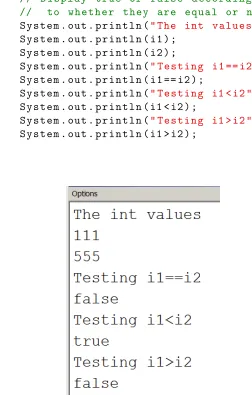
Note that==is the operator used to test for equality, and !=is used to test two operands to determine if they are not equal. Listing 2.7 illustrates the use of relational operators. Later in the chapter on control structures we will use relational operators in many examples.
Listing 2.7: Comparing char values 1 p u b l i c c l a s s C o m p a r e N u m b e r
2 {
3 p u b l i c s t a t i c v o i d m a i n ( S t r i n g [] a r g s )
4 {
5 // i1 and i2 are two c h a r v a r i a b l e s
6 int i1 = 1 1 1 ;
7 int i2 = 5 5 5 ;
2.3. PRIMITIVE DATA TYPES 39
9 // D i s p l a y t r u e or f a l s e a c c o r d i n g
10 // to w h e t h e r t h e y are e q u a l or not
11 S y s t e m . out . p r i n t l n (" The int v a l u e s ") ;
12 S y s t e m . out . p r i n t l n ( i1 ) ;
13 S y s t e m . out . p r i n t l n ( i2 ) ;
14 S y s t e m . out . p r i n t l n (" T e s t i n g i1 == i2 ") ;
15 S y s t e m . out . p r i n t l n ( i1 == i2 ) ;
16 S y s t e m . out . p r i n t l n (" T e s t i n g i1 < i2 ") ;
17 S y s t e m . out . p r i n t l n ( i1 < i2 ) ;
18 S y s t e m . out . p r i n t l n (" T e s t i n g i1 > i2 ") ;
19 S y s t e m . out . p r i n t l n ( i1 > i2 ) ;
20 }
[image:39.612.137.389.137.532.2]21 }
2.3.5 char Data Type
char is used when you need to handle characters individually. When you see a char value in a program you see it enclosed in single quotes, as in:
’a’,’A’,’q’,’%’.
Java organizes memory for char values so that each value is stored using two bytes of memory. One byte of memory is eight bits. We can consider a bit as being eitheron oroff, or, 0 or 1. A byte of memory can be considered to be a sequence of eight 0’s and 1’s. Just for interest, the bit sequences and corresponding integer value for a few characters is listed below:
character bit sequence corresponding integer value
’a’ 0000000001100001 97
’a’ 0000000001100010 98
’a’ 0000000001100011 99
’a’ 0000000001000001 65
’a’ 0000000001000010 66
’a’ 0000000001000011 67
’a’ 0000000000110000 48
’a’ 0000000000110001 49
’a’ 0000000000110010 50
’a’ 0000000000100100 36
’a’ 0000000000001001 9
’a’ 0000000000001010 10
Recall the relational operators defined for comparing one value to another; these operators produce abooleanvalue oftrueorfalse. These are shown again in the table below; assumexand yare of type char.
Relational operators
operator meaning example
¡ less than x<y
¿ greater than x ¿ ’a’
¡= less than or equal to ’a’ <= y ¿= greater than or equal to x>y
== equal to x == y
!= not equal to x != ’$’
2.3. PRIMITIVE DATA TYPES 41
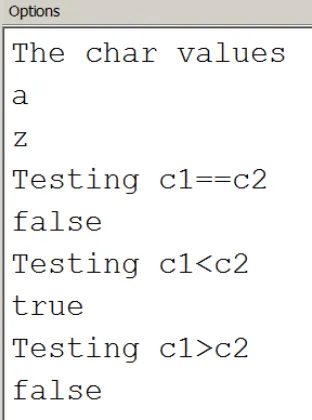
use in a program. Later on in the section on the Character class you will see useful techniques for analyzing individual characters in a string.
Listing 2.8: Comparing char values 1 p u b l i c c l a s s C o m p a r e C h a r
2 {
3 p u b l i c s t a t i c v o i d m a i n ( S t r i n g [] a r g s )
4 {
5 // c1 and c2 are two c h a r v a r i a b l e s
6 c h a r c1 = ’ a ’; 7 c h a r c2 = ’ z ’;
8 // D i s p l a y c1 and c2
9 // D i s p l a y t r u e or f a l s e a c c o r d i n g
10 // to w h e t h e r t h e y are e q u a l or not
11 S y s t e m . out . p r i n t l n (" The c h a r v a l u e s ") ;
12 S y s t e m . out . p r i n t l n ( c1 ) ;
13 S y s t e m . out . p r i n t l n ( c2 ) ;
14 S y s t e m . out . p r i n t l n (" T e s t i n g c1 == c2 ") ;
15 S y s t e m . out . p r i n t l n ( c1 == c2 ) ;
16 S y s t e m . out . p r i n t l n (" T e s t i n g c1 < c2 ") ;
17 S y s t e m . out . p r i n t l n ( c1 < c2 ) ;
18 S y s t e m . out . p r i n t l n (" T e s t i n g c1 > c2 ") ;
19 S y s t e m . out . p r i n t l n ( c1 > c2 ) ;
20 }
21 }
Exercises
18. Write a program that will print the integer values for the characters
’!’, ’@’, ’#’, ’$’, ’%’, ’^’, ’&’, ’*’, ’(’, ’)’. Note that Java allows a statement such as int value = ’a’;
2.4. OPERATORS 43
2.4
Operators
We have seen arithmetic, relational, and boolean operators so far. The table below shows these operators and several others: method invocation, post-increment, post-decrement, conditional operator, and assignment. We will soon encounter these in sections and chapters to follow.
Priorities of Operators priority Java operator meaning
16 name of method(. . . ) method invocation
++ post-increment
– post-decrement
15 - unary minus
! boolean not
14 new object creation
13 / division
* multiplication
% modulo
12 + addition
- minus
+ string catenation
10 < less than
<= less than or equal to
> greater than
>= greater than or equal to
9 == equals
!= not equals
5 && boolean and
4 || boolean or
3 ? : conditional operator
2 = assignment
+= assignment with operation -= assignment with operation *= assignment with operation /= assignment with operation %= assignment with operation
you see the actual operator priorities. For example, bothunary minus and
boolean not have the same priority (15) which is much higher than most others. Assignment has the lowest priority (2).
There are several operators we do not discuss in this text. There are opera-tors for every level from 1 to 16; we have not included any of the operaopera-tors at levels 1, 6, 7, or 8. You could consult a reference such asJava in a Nutshell
[5] at some future date.
Complex Expressions
Expressions can be very complex . . . each operand can itself be an expression that evaluates totrueorfalse. Consider the following complex expression where a, b, c, d, x, z are numeric types:
boolean answer = a+b > c+d && x<z The&& operator has two operands:
a+b > c+d and
x<z
and each will evaluate to eithertrue orfalse. If you look at the priorities of operators you will see the additions will be done first, followed by the re-lational operators, followed by&&, and finally the assignment to the variable answer.
Some programmers prefer to include extra spaces and parentheses in expres-sions like the above . . . in order to make the expression more readable, as in:
boolean answer = ((a+b)> (c+d)) && (x<z)
In this example the parentheses do not change the order of operations; rather, they may make it easier for someone toread.
The Assignment Operator
What is often referred to as theassignment statementis really a Java expres-sion followed by a semicolon. The assignment operator, having a priority of 2, is usually the last operator to be evaluated. The assignment operator is right associative. That is, when several assignment operators appear in an expression they are evaluated/performed from right to left. So, if you have the statement:
int q = (j=1)+1;
2.4. OPERATORS 45
odd statement to include; what is more likely is to have several variables all initialized to the same value, as in:
2.5
The
String
Class
It is very common for a program to work with text strings and the Java String class is provided to facilitate the many things that programmers need to do with text strings. String literals are written as a sequence of characters that are delimited by double quotes. For example:
"this is a line of text" "my first name is Joe"
"Joe was born on May 1, 1999"
The assignment statement:
String fullName = "Joe Smith";
declares fullName to be of type String. fullName is a variable and the Java compiler allocates memory for fullName. The memory location for
fullNamewill contain a reference (an address) to the storage location where
the text string ”Joe Smith” is actually stored. Memory for primitive types is handled differently. The memory location associated with a primitive type contains the value (not an address) of the variable. For example, an int variable will have a memory location reserved for it where the value of the variable is stored.
There is a subtle difference that may be hard to appreciate at this time: a variable (of type String) holds a reference to the value instead of holding the actual value. The diagram below attempts to show the difference.
2.5. THE STRINGCLASS 47
Since text strings are objects of typeStringanother way to declarefullName and assign it a value is to use the newoperator:
String fullName = new String("Joe Smith");
In general, the new operator is used to instantiate (to create) an object. new operator
Because text strings are so common Java provides the short cut for allocat-ing a strallocat-ing, such as:
String fullName = "Joe Smith";
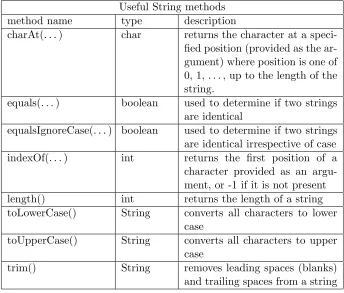
The only way to work with objects is through the methods that are defined in the class from which the object is instantiated. The String class provides many methods for working with text strings such as:
Useful String methods
method name type description
charAt(. . . ) char returns the character at a speci-fied position (provided as the ar-gument) where position is one of 0, 1, . . . , up to the length of the string.
equals(. . . ) boolean used to determine if two strings are identical
equalsIgnoreCase(. . . ) boolean used to determine if two strings are identical irrespective of case indexOf(. . . ) int returns the first position of a character provided as an argu-ment, or -1 if it is not present
length() int returns the length of a string
toLowerCase() String converts all characters to lower case
toUpperCase() String converts all characters to upper case
trim() String removes leading spaces (blanks)
[image:47.612.108.452.292.585.2]and trailing spaces from a string
Table 2.1: Some of the useful String methods
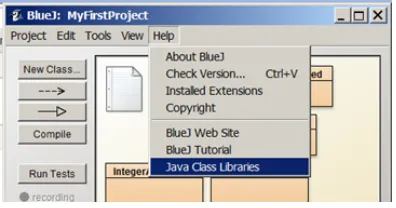
documentation for a class. As Figure 2.4 illustrates, you just need to click onHelp and then click onJava Class Libraries. Choosing this results in an internet browser opening to a page where, on the left pane, you can find and click on the entry for String (or some other class) to view documentation which includes information about methods.
Figure 2.4: Getting documentation on Java classes
Several example programs follow that demonstrate how to use the various methods of theString class. To use a Stringmethod it is necessary that you reference the object and the method. For example, to obtain the length ofs use the expressions.length(). Note the variable name is followed by a period which is followed by the method name and any arguments enclosed in parentheses. In object-oriented terminology we are asking the objectsto execute itslength()method.
Example, obtaining the length of a string
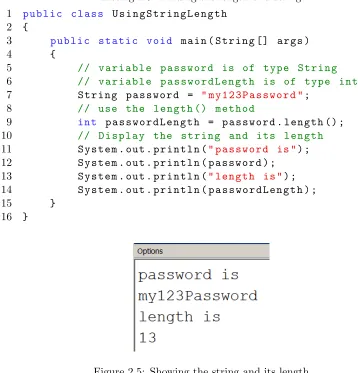
In many applications it is necessary to examine a text string, character-by-character, to ensure it conforms to certain rules. For instance, when a user resets a password there may be restrictions that at least one character is in uppercase, that at least one character is alphabetic, etc. To do this processing where we examine the string character-by-character we need to know how long the string is. The String class has a method namedlength which returns, to the point where it is called, an integer value that is the length of the string. The following program shows the method being used; see line 9 in particular:
int passwordLength = password.length();
2.5. THE STRINGCLASS 49
name of the method is followed by parentheses even though no argument is passed . . . this is necessary so the Java compiler knows that the code specifies a method name.
Listing 2.9: Finding the length of a string 1 p u b l i c c l a s s U s i n g S t r i n g L e n g t h
2 {
3 p u b l i c s t a t i c v o i d m a i n ( S t r i n g [] a r g s )
4 {
5 // v a r i a b l e p a s s w o r d is of t y p e S t r i n g
6 // v a r i a b l e p a s s w o r d L e n g t h is of t y p e int
7 S t r i n g p a s s w o r d = " m y 1 2 3 P a s s w o r d "; 8 // use the l e n g t h () m e t h o d
9 int p a s s w o r d L e n g t h = p a s s w o r d . l e n g t h () ;
10 // D i s p l a y the s t r i n g and its l e n g t h
11 S y s t e m . out . p r i n t l n (" p a s s w o r d is ") ;
12 S y s t e m . out . p r i n t l n ( p a s s w o r d ) ;
13 S y s t e m . out . p r i n t l n (" l e n g t h is ") ; 14 S y s t e m . out . p r i n t l n ( p a s s w o r d L e n g t h ) ;
15 }
[image:49.612.79.437.189.562.2]16 }
Figure 2.5: Showing the string and its length
Example, getting the character at a specific position
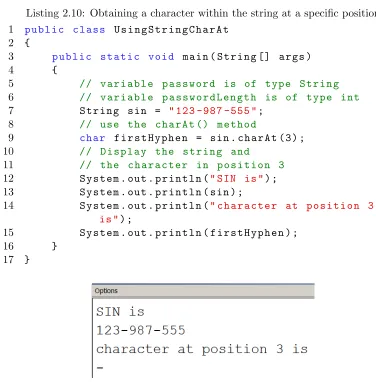
methodcharAt(. . .)returns the character at a specific position to the point where the method is invoked. The method charAt(. . .)must always have an argument value (the position) passed to it. For Java, positions within a string begin at 0 and so the first hyphen should be at position 3. Note in the program, at line 9, shown here:
char firstHyphen = sin.charAt(3);
how the method is invoked (a period separates the name of the string,sin, from the name of the method) and how the value 3 is passed to the method (in parentheses as an argument value).
Listing 2.10: Obtaining a character within the string at a specific position 1 p u b l i c c l a s s U s i n g S t r i n g C h a r A t
2 {
3 p u b l i c s t a t i c v o i d m a i n ( S t r i n g [] a r g s )
4 {
5 // v a r i a b l e p a s s w o r d is of t y p e S t r i n g
6 // v a r i a b l e p a s s w o r d L e n g t h is of t y p e int
7 S t r i n g sin = " 123 -987 -555 ";
8 // use the c h a r A t () m e t h o d
9 c h a r f i r s t H y p h e n = sin . c h a r A t (3) ; 10 // D i s p l a y the s t r i n g and
11 // the c h a r a c t e r in p o s i t i o n 3
12 S y s t e m . out . p r i n t l n (" SIN is ") ;
13 S y s t e m . out . p r i n t l n ( sin ) ;
14 S y s t e m . out . p r i n t l n (" c h a r a c t e r at p o s i t i o n 3 is ") ;
15 S y s t e m . out . p r i n t l n ( f i r s t H y p h e n ) ;
16 }
[image:50.612.128.504.252.634.2]17 }
2.5. THE STRINGCLASS 51
Example, determining if one string equals another string
To determine if one object is equal to another object you must use a method which, by convention, is named equals. The String class has a method
equals and another method named equalsIgnoreCase. Both of these
methods require an argument to be passed. If we want to compare two strings, say s1 and s2, to see if they are equal we can use either of these two expressions:
s1.equals(s2) s2.equals(s1)
Both must return the samebooleanvalue. The following program initializes two strings and then displays the value when they are compared for equality. Note line 15, repeated here:
boolean equalsResult = s1.equals(s2);
On the right hand side of the assignment operator is the expression: s1.equals(s2)
We say, in object-oriented terms, that we are asking the object s1 to exe-cute itsequals()method with the arguments2. When line 15 executes the method is invoked, a value is returned to this point in the statement, and that result is assigned to the booleanvariable equalsResult.
Listing 2.11: How to compare two strings 1 p u b l i c c l a s s U s i n g S t r i n g E q u a l s
2 {
3 p u b l i c s t a t i c v o i d m a i n ( S t r i n g [] a r g s )
4 {
5 // v a r i a b l e p a s s w o r d is of t y p e S t r i n g
6 // v a r i a b l e p a s s w o r d L e n g t h is of t y p e int
7 S t r i n g s1 = " J o h n A . S m i t h ";
8 S t r i n g s2 = " J o h n A S m i t h ";
9 // D i s p l a y s1 and s2
10 // D i s p l a y t r u e or f a l s e a c c o r d i n g
11 // to w h e t h e r t h e y are e q u a l or not
12 S y s t e m . out . p r i n t l n (" The s t r i n g s ") ;
13 S y s t e m . out . p r i n t l n ( s1 ) ;
14 S y s t e m . out . p r i n t l n ( s2 ) ;
15 b o o l e a n e q u a l s R e s u l t = s1 . e q u a l s ( s2 ) ;
16 S y s t e m . out . p r i n t l n ( e q u a l s R e s u l t ) ;
17 }
Figure 2.7: Showing the result of using equals()
Catenation operator +
We have seen the + operator before, but the operands were always numeric. The + operator can also be used to add (i.e. catenate) strings. It is used frequently in statements that generate output. If at least one operand is a string then a result is formed by joining two strings. Joining two strings is called catenation.
When one operand is not a string then the equivalent string representing that non-string’s value is generated, and then the catenation of two strings is carried out forming a new string as a result. For instance if you want to display a message ”The value of X is ” followed by the value of x you just code:
System.out.println("The value of x is "+x);
However, suppose you wanted to display a string and show the sum of two numbers. Consider:
int x = 10;
int y = 11;
System.out.println("the total is "+x+y);
Someone might expect the output from the above to be: The total is 21
but it is not, rather the output is: The total is 1011
The reason this happens is that the expression is evaluated from left to right. The first + is adding a string and a number producing the string
2.5. THE STRINGCLASS 53
Exercises
20. Evaluate the following Java expressions:
"x = "+100
"The remainder is "+ (21 % 10) (21 % 10)+ " is the remainder" "x = "+100+200
100 +" is the value of x"
100 + 200 +"is the value of x" "" + 100 + 5
21. Write a program with 3 String variables: firstName, middleInitials, lastName. Assign values to these variables to represent your name. Print a line that shows your name displayed with the last name first, followed by a comma, followed by your first name, and then your middle initials. For example:
2.6
Output
We discuss two different ways to generate output from a program: using
System.out and JOptionPane. We discuss the use of System.out in the
next two sections; in the second of these we discuss how you can redirect the output which normally appears in the Terminal Window to a file. In the third section we discuss theJOptionPaneclass and how that can be used to present information and data in the form of dialog boxes.
2.6.1 System.out
A simple way to generate output for the user is to use the println(. . .)
and print(. . .) methods that belong to the pre-defined Java class named
Systemand an object within Systemnamed out. The output generated is
said to go to the standard output device. When you use this type of output with BlueJ you will see a window pop up named ”Terminal Window” that contains the output produced by the program.
The following program listing illustrates ways of producing output. The
println(. . .) and print(. . .) methods take one argument which is a text
string. Often that text string is composed of multiple catenations. Notice the last println(. . .) introduces special characters for new line (\n) and
tab (\t). The special characters are not displayed, they are used to control the appearance of the output.
Listing 2.12: Using println() 1 p u b l i c c l a s s U s i n g P r i n t l n
2 {
3 p u b l i c s t a t i c v o i d m a i n ( S t r i n g [] a r g s )
4 {
5 d o u b l e g r o s s P a y , t a x e s P a i d , taxRate , netPay , d e d u c t i o n s ;
6 g r o s s P a y = 1 0 0 . 0 0 ;
7 d e d u c t i o n s = 1 0 . 0 0 ;
8 t a x R a t e = 0 . 1 0 ;
9 // C a l c u l a t e t a x e s and net pay
10 t a x e s P a i d = n e t P a y = ( g r o s s P a y
-d e -d u c t i o n s ) * t a x R a t e ;
2.6. OUTPUT 55
12 // E a c h t i m e p r i n t l n () e x e c u t e s the o u t p u t w i l l s t a r t on a new l i n e
13 // P r o d u c e one l i n e of o u t p u t w i t h one d o u b l e v a l u e
14 S y s t e m . out . p r i n t l n ( g r o s s P a y ) ;
15 // O f t e n a g o o d i d e a is to l a b e l the o u t p u t so it is self - d e s c r i b i n g
16 // P r o d u c e one l i n e of o u t p u t w i t h a l a b e l and a v a l u e
17 S y s t e m . out . p r i n t l n (" G r o s s Pay is
"+ g r o s s P a y ) ;
18 // S e v e r a l i t e m s can be c a t e n a t e d
19 // N o t e t h a t one t e x t s t r i n g m u s t a p p e a r on one l i n e
20 // but a l o n g one can be f o r m e d o v e r m u l t i p l e l i n e s
21 S y s t e m . out . p r i n t l n (" G r o s s Pay = "+ g r o s s P a y 22 +" D e d u c t i o n s = "+ g r o s s P a y ) ;
23 // You can f o r c e o u t p u t to go o n t o m o r e t h a n one l i n e
24 // by e m b e d d i n g c o n t r o l c h a r a c t e r s in a s t r i n g
25 // ’\ n ’ is the new l i n e c h a r a c t e r
26 // ’\ t ’ is the tab c h a r a c t e r
27 S y s t e m . out . p r i n t l n (" \ t G r o s s Pay = "+ g r o s s P a y 28 +" \ n \ t D e d u c t i o n s = "+ g r o s s P a y
29 +" \ n \ t N e t Pay = "+ n e t P a y ) ;
30 }
Theprintln(. . .)method causes the display to advance to a new line and then displays output. The print(. . .) method differs from println(. . .) in that it does not automatically advance to a new line when it displays output; instead, output begins at the point where the previous print(. . .) orprintln(. . .) left off. If we change all the println(. . .)to print(. . .) expressions for the previous example the output we get is:
Exercises
22. Write a program to calculate the total of the provincial sales tax, the general sales tax, and the price of an item. Use the variables
totalPayable,pstPayable,gstPayable, andprice to represent the
total payable, the provincial sales tax payable, the general sales tax payable, and the item’s price. Use the formulas:
pstP ayable=price∗0.05 gstP ayable=price∗0.08
2.6. OUTPUT 57
Test your program with price = $50.00. Your program must display
price,pstPayable,gstPayable, andtotalPayable. Similar to lines
2.6.2 Redirecting System.out
By default the println(. . .) and print(. . .) methods create output that is displayed on the standard output device (also called theConsole) - with BlueJ we know this as the window named Terminal Window. The output is handled this way because the default value ofSystem.outis aPrintStream object directed to standard output. If we redirect the output to a file we can reuse our knowledge of println(. . .) and print(. . .) to create files. The following program has a main() method that writes a line to a text file namedmyfile.txt. Note the 3 import statements in lines 1, 2, and 3. Further remarks follow the program listing.
Listing 2.13: Redirecting output to a file. 1 i m p o r t j a v a . io . F i l e ;
2 i m p o r t j a v a . io . P r i n t S t r e a m ;
3 i m p o r t j a v a . io . F i l e O u t p u t S t r e a m ; 4 /* *
5 * R e d i r e c t o u t p u t to a f i l e
6 */
7 p u b l i c c l a s s R e d i r e c t O u t p u t T o F i l e 8 {
9 p u b l i c s t a t i c v o i d m a i n ( S t r i n g [] a r g s ) 10 t h r o w s E x c e p t i o n {
11 S y s t e m . out . p r i n t l n (" 1. to s t a n d a r d o u t p u t ") ;
12 P r i n t S t r e a m s t a n d a r d = S y s t e m . out ;
13 F i l e f = new F i l e (" m y f i l e . txt ") ;
14 F i l e O u t p u t S t r e a m fs =new
F i l e O u t p u t S t r e a m ( f ) ;
15 P r i n t S t r e a m ps = new P r i n t S t r e a m ( fs ) ;
16 S y s t e m . s e t O u t ( ps ) ;
17 S y s t e m . out . p r i n t l n (" 2. to the o t h e r f i l e ") ;
18 ps . c l o s e () ;
19 S y s t e m . s e t O u t ( s t a n d a r d ) ;
20 S y s t e m . out . p r i n t l n (" 3. to s t a n d a r d o u t p u t ") ;
21 }
22 }
Some comments:
2.6. OUTPUT 59
• Lines 14 and 15 create a new PrintSteam that replaces the standard output in line 16.
• Line 17 results in a line of text being written to the file myfile.txt. • Its important that a program closes a file (line 18) in order to release
resources and to allow other programs or users to access the file. • In line 19 the value of System.outis reset to its initial value. • The output generated in line 20 goes to the Terminal Window. If you run the above program you will find that a new file is created in your BlueJ project folder. You will not see it when you have your project open in BlueJ, but if you navigate to the project folder in your file system you will see the file named myfile.txt. You can open the file with a text editor.
Exercises
2.6.3 JOptionPane
In some situations a programmer may prefer to useJOptionPane message dialogs in order to provide the user a more interactive experience. The following program shows how to display some information to the user and where the program waits for the user to respond with the click of a button. When the pop-up window appears, the program is suspended until the user clicks the OK button. Note that line 1 is animportstatement that directs the compiler to the location where it finds details regarding theJOptionPane class.
Listing 2.14: Using println() 1 i m p o r t j a v a x . s w i n g . J O p t i o n P a n e ;
2 p u b l i c c l a s s U s i n g D i a l o g B o x 3 {
4 p u b l i c s t a t i c v o i d m a i n ( S t r i n g [] a r g s )
5 {
6 d o u b l e netPay , g r o s s P a y , d e d u c t i o n s ;
7 g r o s s P a y = 1 0 0 . 0 0 ;
8 d e d u c t i o n s = 1 0 . 0 0 ;
9 // C a l c u l a t e net pay
10 n e t P a y = g r o s s P a y - d e d u c t i o n s ;
11 J O p t i o n P a n e . s h o w M e s s a g e D i a l o g (null, " net pay is "+ n e t P a y ) ;
12 }
13 }
When line 11 executes the pop-up window becomes visible and the program waits for the user to press the OK button:
Exercises
2.7. INPUT 61
2.7
Input
We examine two ways a programmer can arrange to get input from the user by using pre-defined Java classes: the Scanner class and the JOptionPane class.
2.7.1 The Scanner Class
A Scanner object can be used with the standard input stream which is
named System.in. The typical statement used is:
Scanner keyboard = new Scanner(System.in);
System is a pre-defined Java class that has an object named in. Once a
variable like keyboard is defined the programmer can use methods defined for a scanner object to get values (Java refers to these as tokens) the user has typed on the keyboard. Some of the most useful methods are listed below.
Useful Scanner methods
hasNext() returns true if the scanner has more tokens next() returns the next token
nextLine() returns the next line
nextInt() returns the next int in the input stream nextDouble() returns the next double in the input stream nextBoolean() returns the next boolean in the input stream The program below shows one how to use next(), nextDouble(), and
nextInt() to obtain a user’s name, hours worked and rate of pay. Note
that line 1 is an importstatement that directs the compiler to the location where it find details of the Scanner class. The program uses pairs of state-ments; for example consider lines 12 and 13 repeated here:
System.out.println("\n\nEnter your name and press enter");
name = keyboard.next();
Line 12 prompts the user, and then in line 13 the user’s input is obtained. The listing is followed with the contents of the Terminal Window for a sam-ple run. This shows the output (prompts) from the program and the input provided by the user via the keyboard.
Listing 2.15: Using JOptionPane for input 1 i m p o r t j a v a . u t i l . S c a n n e r ;
4 p u b l i c s t a t i c v o i d m a i n ( S t r i n g [] a r g s )
5 {
6 d o u b l e r a t e O f P a y ;
7 S t r i n g n a m e ;
8 int h o u r s W o r k e d ;
9 // D e c l a r e a s c a n n e r o b j e c t for the k e y b o a r d
10 S c a n n e r k e y b o a r d = new S c a n n e r ( S y s t e m . in ) ;
11 // P r o m p t the u s e r for a n a m e
12 S y s t e m . out . p r i n t l n (" \ n \ n E n t e r y o u r n a m e ( no s p a c e s ) and p r e s s e n t e r ") ;
13 n a m e = k e y b o a r d . n e x t () ;
14 // P r o m p t the u s e r for h o u r s w o r k e d
15 S y s t e m . out . p r i n t l n (" E n t e r the h o u r s w o r k e d ( no d e c i m a l p l a c e s ) and p r e s s e n t e r ") ;
16 h o u r s W o r k e d = k e y b o a r d . n e x t I n t () ;
17 // P r o m p t the u s e r for the r a t e of pay
18 S y s t e m . out . p r i n t l n (" E n t e r y o u r r a t e of pay
and p r e s s e n t e r ") ;
19 r a t e O f P a y = k e y b o a r d . n e x t D o u b l e () ;
20
21 // C a l c u l a t e g r o s s pay and d i s p l a y all the i n f o r m a t i o n
22 d o u b l e g r o s s P a y = h o u r s W o r k e d * r a t e O f P a y ; 23 S y s t e m . out . p r i n t l n (" \ n Y o u r n a m e : "+ n a m e 24 +" \ n h o u r s w o r k e d : "+ h o u r s W o r k e d 25 +" \ n r a t e of pay : "+ r a t e O f P a y 26 +" \ n g r o s s pay : "+ g r o s s P a y ) ;
27 }
2.7. INPUT 63
Exercises
25. Write a program that prompts the user for their birthday as the day (as an integer), followed by the month (as text), followed by the year (as an integer) with at least one space between the values. Use the Scanner methods next() and nextInt() to get these values. Then the program displays the birthday in the format month day, year. For example, if the user entered
1 January 1990
2.7. INPUT 65
2.7.2 The JOptionPane Class
To provide a user with a more interactive experience the programmer can use
JOptionPaneto prompt the user and to obtain text input from the user. One
of the methods defined in JOptionPane is showInputDialog(. . .). When this method executes the user is prompted to enter text. The text the user enters becomes the value of the method. Typically showInputDialog(. . .) is on the right-hand-side of an assignment statement; for example:
String name = JOptionPane.showInputDialog("Enter name");
When the above line executes the user sees the pop-up window:
The user then uses the keyboard to enter something in the white box in the pop-up, and then clicks the OK button. The text the user entered is the value returned by the method.
The following program uses two pop-ups to obtain values from the user; comments follow the listing.
Listing 2.16: Using JOptionPane for input 1 /* *
2 * T h i s J a v a c l a s s u s e s J O p t i o n P a n e to o b t a i n
3 * i n p u t f r o m the u s e r
4 */
5 i m p o r t j a v a x . s w i n g . J O p t i o n P a n e ; 6 p u b l i c c l a s s U s i n g J O p t i o n P a n e 7 {
8 p u b l i c s t a t i c v o i d m a i n ( S t r i n g [] a r g s ) {
9 S t r i n g f i r s t N a m e =
J O p t i o n P a n e . s h o w I n p u t D i a l o g (" E n t e r f i r s t n a m e ") ;
10 S t r i n g l a s t N a m e =
11 S y s t e m . out . p r i n t l n (" Y o u r n a m e is : "+ f i r s t N a m e +" "+ l a s t N a m e ) ;
12 }
13 }
• Line 5 is required since we need to tell the Java compiler where it can find the JOptionPaneclass.
• When line 9 executes it causes a dialog box to be displayed to the user:
The user enters a value in the box and presses OK. Then control returns to the program and the value entered is assigned to firstName. • A similar dialog box is displayed when line 10 executes.
• In line 11 the values obtained from the dialog boxes is displayed in BlueJ’s terminal window.
Exercises
26. Write a program that uses a dialogue box to prompt the user for a